Designed for Growth: Scale your recurring revenue with the new Teamgate SaaS CRM. Explore SaaS Features →

Book a demo today and save 50% off your first month, or 20% off your first year.

Get a free sales audit to uncover hidden revenue opportunities!

In today’s highly competitive business landscape, generating a consistent stream of leads is crucial for the growth and success of small businesses. However, many small businesses often struggle with lead generation due to limited resources and expertise. In this article, we will demystify lead generation for small businesses and provide you with practical strategies to attract the right leads, nurture them, and convert them into loyal customers. So, let’s dive in and explore the world of lead generation!

Key Takeaways:

  1. Content Marketing: A powerful tool for generating qualified leads.
  2. Social Media Utilization: Engage and attract potential leads where they spend their time.
  3. Email Marketing: Efficiently nurture leads and guide them down the conversion funnel.
  4. Website Optimization: Transform your site into a lead conversion machine.
  5. SEO Practices: Drive organic leads and boost online visibility.

Contents:

  1. Introduction: Lead Generation for Small Businesses
  2. Why Lead Generation is Crucial for Small Business Growth
  3. How to Identify Your Ideal Lead: Defining Your Target Audience
  4. 6 Lead Generation Strategies for Small Businesses
  5. Using CRM Tools for Effective Lead Management
  6. Measuring the Success of Your Lead Generation Efforts
  7. Overcoming Challenges in Lead Generation for Small Businesses
  8. Conclusion
  9. FAQs: Lead Generation Strategies for Small Businesses

Introduction: Lead Generation for Small Businesses

Lead generation, in essence, refers to the process of attracting and capturing potential customers’ interest in your products or services. It involves identifying and targeting individuals or organizations who have shown an interest in your industry or have the potential to become your customers. By generating leads, small businesses can fuel their sales pipeline, increase their customer base, and ultimately drive revenue growth.

The Role of Lead Generation in Today’s Competitive Market

Lead generation is not just a buzzword in the business world; it is a fundamental aspect of any successful marketing strategy. For small businesses, it plays a particularly vital role in their growth and survival. In today’s highly competitive market, where consumers have endless options at their fingertips, attracting and converting leads is essential to stand out from the crowd.

Targeting the Right Audience: Efficiency and Precision

One of the key reasons why lead generation is crucial for small businesses is that it allows them to reach their target audience effectively. By identifying individuals or organizations who have already shown an interest in their industry or products, small businesses can focus their marketing efforts on those who are more likely to convert into customers. This targeted approach not only saves time and resources but also increases the chances of generating high-quality leads.

Building Trust and Loyalty Through Lead Nurturing

Moreover, lead generation enables small businesses to build a strong and loyal customer base. By capturing the interest of potential customers and nurturing them through the sales funnel, businesses can establish meaningful relationships and gain their trust. This trust is invaluable as it leads to repeat business, positive word-of-mouth referrals, and long-term customer loyalty.

Gathering Insights: The Data-Driven Advantage

Another significant advantage of lead generation for small businesses is its ability to provide valuable insights and data. Through various lead generation techniques, such as online forms, surveys, and tracking tools, businesses can gather essential information about their leads. This data can include demographics, preferences, buying behavior, and more. To ensure uninterrupted access to this data, businesses can utilize a website unblocker, which helps bypass geographical restrictions and network limitations. By analyzing this data, small businesses can gain a deeper understanding of their target audience, allowing them to tailor their marketing strategies and offerings accordingly.

Staying Ahead of the Competition with Continuous Lead Flow

Furthermore, lead generation allows small businesses to stay ahead of their competitors. By consistently generating a steady stream of leads, businesses can ensure a continuous flow of potential customers into their sales pipeline. This not only gives them a competitive edge but also provides them with more opportunities to convert leads into customers before their competitors do.

Why Lead Generation is Crucial for Small Business Growth

For small businesses, lead generation holds immense significance as it enables them to:

  1. Expand their customer base: By consistently generating leads, small businesses can widen their pool of potential customers and increase their chances of securing new clients.
  2. Boost sales revenue: More leads mean more opportunities to convert prospects into paying customers, leading to increased sales revenue.
  3. Establish brand credibility: Effective lead generation helps small businesses build trust and credibility among their target audience, positioning them as industry experts.
  4. Enhance marketing ROI: By focusing on attracting qualified leads, small businesses can ensure that their marketing efforts are targeted and yield a higher return on investment.

How to Identify Your Ideal Lead: Defining Your Target Audience

Before diving headfirst into lead generation activities, it’s essential to have a clear understanding of your target audience and the specific characteristics that make them ideal leads for your business. By defining your target audience, you can tailor your lead generation strategies to attract individuals who are most likely to convert into valuable customers.

Start by conducting market research to identify the demographics, psychographics, and behaviors of your ideal customers. Who are they? What are their pain points? Where do they spend their time online? Understanding these key details will help you craft targeted messaging and reach your ideal leads more effectively.

6 Lead Generation Strategies for Small Businesses

Strategy #1: Using Content Marketing for Lead Generation

A well-executed content marketing strategy can be a powerful tool in generating leads for small businesses. By creating and distributing valuable, relevant, and informative content, you can attract individuals who are actively seeking solutions to their pain points.

Start by identifying the common challenges and questions your target audience faces. Then, create high-quality blog posts, articles, videos, or infographics that offer practical solutions and insights. Make sure to optimize your content for search engines to enhance its visibility and attract organic traffic.

Additionally, consider gating valuable content behind lead capture forms or offering lead magnets such as e-books, whitepapers, or exclusive guides. By exchanging valuable content for contact information, you can convert website visitors into leads and nurture them further along the sales journey.

Strategy #2: Leverage Social Media for Attracting Potential Leads

Social media platforms provide an excellent opportunity for small businesses to build brand awareness, engage with their target audience, and generate leads.

Start by identifying the social media channels where your target audience is most active. Then, create compelling and shareable content that resonates with your audience’s interests and pain points. Engage in conversations, respond to comments, and leverage social media advertising to amplify your reach and attract potential leads.

Consider running contests using an online giveaway tool to streamline data capture and lead collection. This strategy not only helps you generate leads but also creates a buzz around your brand.

Strategy #3: Implementing Email Marketing to Nurture Leads

Once you’ve captured leads, it’s time to nurture them and guide them through the sales funnel. Email marketing remains one of the most effective strategies for lead nurturing. Some small businesses also use a virtual assistant to manage campaigns, segment lists, and handle follow-ups more efficiently. You could also consider hiring a specialized service, like a lead generation virtual assistant, to help manage and optimize this crucial process.

Create personalized, relevant, and valuable email campaigns that provide ongoing value to your leads. Segment your email list based on demographics, behavior, or other relevant criteria to ensure that your messages resonate with each lead.

Use email automation tools to streamline your campaigns and deliver targeted content at the right time. Whether it’s sending a welcome email to new leads or nurturing them with a series of educational emails, email marketing can help you stay top of mind and guide leads towards making a purchasing decision.

Strategy #4: Optimizing Your Website for Lead Conversion

Your website plays a crucial role in lead generation and conversion. Optimizing your website to capture and convert leads should be a top priority for small businesses.

Ensure that your website has clear and compelling calls-to-action (CTAs) placed strategically throughout your site. Use enticing landing pages with lead capture forms to capture visitor information in exchange for valuable resources or offers.

Make sure your website is user-friendly, mobile-responsive, and loads quickly to provide a seamless user experience. Remember, a well-optimized website not only attracts leads but also encourages them to take action and convert into customers.

Strategy #5: Using SEO to Drive Organic Lead Generation

Search engine optimization (SEO) is vital for small businesses looking to generate organic leads. By optimizing your website and content for relevant keywords, you can increase your organic visibility and attract potential leads.

Conduct thorough keyword research to identify the terms and phrases your target audience is searching for. Then, optimize your website pages, blog posts, and other content by strategically incorporating these keywords.

Additionally, focus on building high-quality backlinks from reputable websites in your industry. This not only improves your search engine rankings but also increases your chances of attracting organic traffic and generating leads.

Strategy #6: Harnessing the Power of Networking Events

Networking events, both online and offline, present valuable opportunities for small businesses to connect with potential leads and industry professionals.

Participating in trade shows, conferences, webinars, or industry-specific events allows you to showcase your expertise, build relationships, and generate leads.

Organising your own event can also be a powerful move—and to ensure its success, it’s worth partnering with an experienced team that can manage the planning and execution end-to-end with professionalism and impact.

Make sure to have a well-designed booth or virtual presence that clearly communicates the value you offer. mobile business card can be a handy tool during these events, enabling you to share your contact details instantly and professionally with just a tap. 

Collect contact information from interested individuals and follow up with personalized messages to nurture these leads further.

Using CRM Tools for Effective Lead Management

As your small business generates leads, it’s crucial to manage and organize them effectively. Customer Relationship Management (CRM) tools can help you streamline your lead management processes and ensure that leads don’t fall through the cracks.

Consider investing in a CRM platform that suits your business needs and allows you to track leads, segment them based on different criteria, and automate lead nurturing tasks. By centralizing your lead management, you can stay organized, improve efficiency, and provide a personalized experience to your leads.

Measuring the Success of Your Lead Generation Efforts

To gauge the effectiveness of your lead generation efforts, it’s essential to measure and analyze key metrics and indicators.

Track metrics such as website traffic, conversion rates, email open and click-through rates, and social media engagement to assess the impact of your lead generation strategies. Identify which strategies are delivering the best results and optimize your efforts accordingly.

Experiment with different approaches, test new tactics, and monitor your analytics consistently to continuously improve your lead generation efforts.

Overcoming Challenges in Lead Generation for Small Businesses

Lead generation is not without its challenges, especially for small businesses with limited resources and budget constraints. However, by understanding these challenges and adopting a strategic approach, you can overcome them and achieve sustainable lead generation success.

Common lead generation challenges for small businesses include:

  • Lack of brand awareness and credibility
  • Tight marketing budgets
  • Difficulty in standing out in a crowded marketplace
  • Inadequate infrastructure for lead capture and management

By addressing these challenges head-on and leveraging the strategies discussed in this article, small businesses can overcome limitations and generate a consistent flow of high-quality leads.

Conclusion

Lead generation is pivotal for any small business aiming for growth. Grasping its significance, pinpointing your perfect leads, and deploying impactful strategies are essential for transforming leads into dedicated clients. However, the journey doesn’t stop here.

Consistency in lead generation, combined with the power of advanced tools, can truly make a difference. That’s where Teamgate CRM steps in. Streamline your lead management, benefit from intuitive analytics, and optimize every strategy you implement with Teamgate’s user-friendly interface. It’s designed to seamlessly fit the dynamic needs of small businesses like yours. Ready to witness the transformation firsthand?

Start Your Free 14-Day Teamgate CRM Trial Now!


FAQs: Lead Generation Strategies for Small Businesses

Q1: How can a small business effectively generate leads?

A1: Small businesses can effectively generate leads by employing various strategies such as content marketing, leveraging social media, implementing email marketing, optimizing their website for conversions, and utilizing SEO for organic lead generation. Additionally, networking events and CRM tools like Teamgate can further streamline the process.


Q2: What are the best lead generation techniques for startups?

A2: For startups, it’s essential to focus on cost-effective techniques. Content marketing, social media engagement, and email marketing campaigns are pivotal. A strong online presence through an optimized website and SEO can also drive significant leads without huge investments.


Q3: Why is lead generation essential for business growth?

A3: Lead generation is the backbone of sales and marketing. It brings potential customers into the sales funnel. Without a consistent influx of new leads, businesses can struggle to expand their customer base, achieve sales targets, or grow.


Q4: How do I optimize my website for better lead conversion?

A4: Optimize your website by ensuring it’s user-friendly, mobile-responsive, and has clear call-to-action (CTA) buttons. Include testimonials, case studies, and trust signals. Additionally, having a live chat or chatbot can engage visitors and capture leads in real-time.


Q5: Which digital platforms are most effective for attracting potential leads?

A5: The effectiveness of a platform often depends on your target audience. Typically, platforms like Facebook, LinkedIn, Instagram, and Google Ads are potent for various industries. Content platforms like blogs or YouTube can also be instrumental when coupled with SEO strategies.


Q6: How can content marketing aid in lead generation for my business?

A6: Content marketing positions your business as an authority in your field. By providing valuable, informative content, you attract potential leads looking for solutions or information. Once they’re engaged with your content, you can guide them down the conversion funnel using strategic CTAs.


Q7: Are there any tools to streamline lead management for small enterprises?

A7: Yes, Customer Relationship Management (CRM) tools like Teamgate offer a holistic approach to lead management, allowing businesses to track, nurture, and convert leads efficiently, all while providing insightful analytics.


Q8: How does social media play a role in generating leads for small businesses?

A8: Social media platforms allow businesses to engage with a vast audience, share their content, run targeted ad campaigns, and directly interact with potential leads. Platforms like LinkedIn are especially potent for B2B lead generation, while Facebook and Instagram can be effective for B2C.


Q9: What’s the importance of defining a target audience in lead generation?

A9: Defining a target audience ensures your lead generation efforts are focused. It means you’re reaching out to people who are genuinely interested in your products or services, leading to higher conversion rates and a more efficient use of resources.


Q10: How can I measure the success of my lead generation strategies?

A10: The success of lead generation strategies can be measured using key performance indicators (KPIs) like the number of new leads acquired, conversion rates, cost per lead, and the ROI of specific campaigns. Tools like Google Analytics and CRM platforms can provide comprehensive insights into these metrics.
In the vast sea of Customer Relationship Management (CRM) platforms, choosing the right one can be a challenge. Businesses need tools that not only enhance their sales processes but also offer ease of use, comprehensive support, and scalability. This comparison takes a closer look at two notable contenders in the CRM space: Teamgate CRM and Less Annoying CRM. We’ll explore their pricing, features, usability, and more to guide you through making an informed decision tailored to your business needs.

Contents:

Teamgate CRM Overview

Teamgate CRM is an intuitive cloud-based CRM designed to streamline sales processes and enhance customer relationship management for small to mid-sized businesses. It’s known for its user-friendly interface and comprehensive sales tools.

Teamgate CRM Pricing and Plans

Teamgate CRM offers several pricing tiers:

  • Starter Plan: A free plan for up to 2 users, suitable for small businesses or startups needing basic CRM functionalities.
  • Team Plan: Priced at $39.90 per user/month, this plan offers advanced features like sales dashboards, workflow automation, and 24/7 chat and email support.
  • Growth Plan: At $59.90 per user/month, this plan caters to larger businesses needing in-depth sales analysis and more extensive customization options.

Teamgate CRM Key Features

Teamgate CRM stands out in the CRM landscape with its rich array of features meticulously engineered to support and enhance every stage of the sales lifecycle. This platform is not just a tool; it’s a comprehensive ecosystem designed to streamline lead generation, nurture leads through the sales pipeline, close deals with greater efficiency, and cultivate enduring customer relationships. Here’s a deeper dive into the key features that set Teamgate apart:

Advanced Analytics Tools

Teamgate’s advanced analytics go beyond basic data presentation, offering deep insights into sales performance, customer behavior, and market trends. With customizable dashboards and real-time reporting, sales teams can track key performance indicators (KPIs), measure progress against sales goals, and identify areas for improvement. This data-driven approach enables strategic decision-making and helps in forecasting future sales with greater accuracy.

Customizable Sales Pipelines

Flexibility is at the core of Teamgate’s design, allowing for fully customizable sales pipelines that can be tailored to match the unique processes of any business. Users can create multiple pipelines with stages that reflect their sales cycle, set up specific activities for each stage, and monitor the progress of deals from initial contact to closure. This customization ensures that the CRM adapts to the business, not the other way around.

Seamless Integration with Leading Email Platforms

Understanding the pivotal role of email communication in sales, Teamgate offers seamless integration with leading email platforms such as Gmail and Outlook. This integration facilitates efficient email tracking, allows for the sending of personalized email campaigns directly from the CRM, and ensures that all communication is logged and accessible within the context of each customer or lead. The result is a unified communication hub that enhances engagement and keeps every team member informed.

Rich Suite of Communication Tools

Teamgate’s communication toolkit is comprehensive, encompassing more than just email integration. It includes telephony features allowing for click-to-call functionality, call logging, and call planning. The platform also supports SMS messaging, live chat, and social media interactions, ensuring that sales teams can communicate with customers and leads through their preferred channels. These tools are designed to foster more meaningful interactions, improve response times, and enhance overall customer satisfaction.

Sales Productivity Enhancement through Automation

At its core, Teamgate is designed to maximize sales productivity by automating routine tasks and workflows. This automation spans across email campaigns, lead assignment, follow-up reminders, and more. By reducing the time spent on administrative tasks, sales teams can focus more on engaging with leads and closing deals. The platform’s intelligent automation capabilities also ensure that no opportunity is missed due to oversight or manual process limitations.

Detailed Reporting and Insightful Data Analytics

Teamgate’s reporting capabilities are both comprehensive and intuitive, offering detailed insights into every aspect of the sales process. Custom reports can be generated to analyze sales activities, team performance, pipeline health, and customer engagement metrics. These dashboard-able reports provide actionable insights, helping teams to optimize their strategies, improve efficiency, and drive sales growth.

Together, these features represent a formidable array of tools that empower sales teams to perform at their best. Teamgate CRM is more than just a software solution; it’s a strategic partner in achieving sales excellence and driving business growth. By leveraging Teamgate’s extensive feature set, businesses can transform their sales processes, enhance customer relationships, and achieve unprecedented levels of productivity and success.

Teamgate Ease of Use

Teamgate shines in its user-friendly interface and intuitive design, making it accessible for users of all tech levels. The platform focuses on reducing the learning curve associated with CRM software through a clean, organized dashboard and straightforward navigation. This ease of use extends to its setup process, onboarding, and daily operations, allowing sales teams to quickly adapt and make the most of the platform’s extensive features without extensive training.

teamgate crm awards
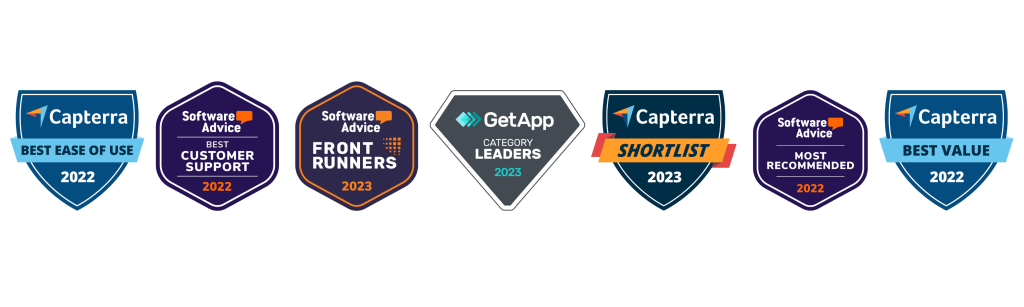
Teamgate CRM Awards

Less Annoying CRM Overview

Less Annoying CRM Pricing and Plans

Less Annoying CRM stands out for its straightforward, single-tier pricing model at $15/user/month (excluding tax), making it an attractive option for small businesses and startups. This model offers full access to all features, including unlimited contacts, calendars, task tracking, and customer support, without the complexity of multiple pricing tiers. This simplicity ensures that small teams can budget for their CRM needs without worrying about escalating costs or hidden fees as they expand.

Less Annoying CRM Key Features

Less Annoying CRM emerges as a beacon for small businesses navigating the vast world of customer relationship management. With a philosophy rooted in simplicity and immediate usability, this platform distills CRM to its most essential functionalities, ensuring that small enterprises can focus on what truly matters: building and maintaining strong customer relationships. Here’s an expanded look at the core features that make Less Annoying CRM a standout choice for small businesses:

Streamlined Contact Management

At the heart of Less Annoying CRM is its streamlined contact management system, designed for ease of use without sacrificing depth. Businesses can effortlessly organize contact information, track communication history, and categorize contacts into groups for targeted outreach. This system supports the import and export of contacts, ensuring seamless integration with existing workflows. The emphasis is on providing a centralized hub for all customer information, making it easily accessible for quick reference or in-depth analysis.

Integrated Calendar and Task Tracking

Less Annoying CRM integrates calendar and task tracking directly into the CRM environment, enabling businesses to manage their schedules and to-dos alongside customer relationships. This feature allows for the setting of reminders, scheduling of follow-ups, and tracking of deadlines, all within the context of customer interactions. It’s particularly beneficial for small teams, where multitasking is a necessity, offering a clear view of daily priorities and ensuring that no commitment or opportunity slips through the cracks.

Simple Yet Effective Pipeline View

Understanding the sales process’s complexity, Less Annoying CRM provides a simple yet effective pipeline view that demystifies sales management for small businesses. This view allows for the tracking of leads and deals through customizable stages, reflecting the unique sales cycle of each business. It’s designed to give a quick, at-a-glance understanding of sales status, enabling swift decision-making and focused action on moving deals forward.

Designed for Immediate Usability

With a focus on immediate usability, Less Annoying CRM eliminates the steep learning curve often associated with CRM software. The platform is designed for quick setup and easy adoption, requiring minimal training so businesses can get started right away. This approach ensures that teams can concentrate on leveraging the CRM for growth rather than getting bogged down by complex features or configurations.

No Unnecessary Features

In a landscape where CRM systems are often bloated with features that small businesses may never use, Less Annoying CRM takes a different path. It eschews unnecessary complexity in favor of a focused feature set that addresses the core needs of small businesses. This philosophy not only makes the platform more approachable but also ensures that users aren’t overwhelmed, allowing them to utilize the CRM to its fullest potential without distraction.

Ideal for Effective Customer Relationship Management

Less Annoying CRM is the ideal solution for small businesses seeking effective, straightforward customer relationship management. By concentrating on the essentials and stripping away the superfluous, it offers a clear path to nurturing customer relationships, managing sales processes, and organizing daily tasks and appointments. This simplicity, combined with the platform’s robust functionality, makes Less Annoying CRM a powerful tool for small businesses aiming to grow their customer base and enhance customer satisfaction without the complexity of more elaborate CRM systems.

In sum, Less Annoying CRM stands as a testament to the power of simplicity, providing small businesses with a user-friendly, efficient, and highly effective CRM solution that gets right to the heart of customer relationship management.

Less Annoying Ease of Use

True to its name, Less Annoying CRM offers an exceptionally user-friendly experience, prioritizing ease of use above all. The platform boasts a clutter-free interface, emphasizing straightforward functionality that allows users to get up and running quickly. Its focus on providing a hassle-free CRM experience makes it particularly appealing for small businesses or those without dedicated IT support.

Quick Comparison: Teamgate vs Less Annoying CRM

screenshot of Teamgate crm deals pipeline
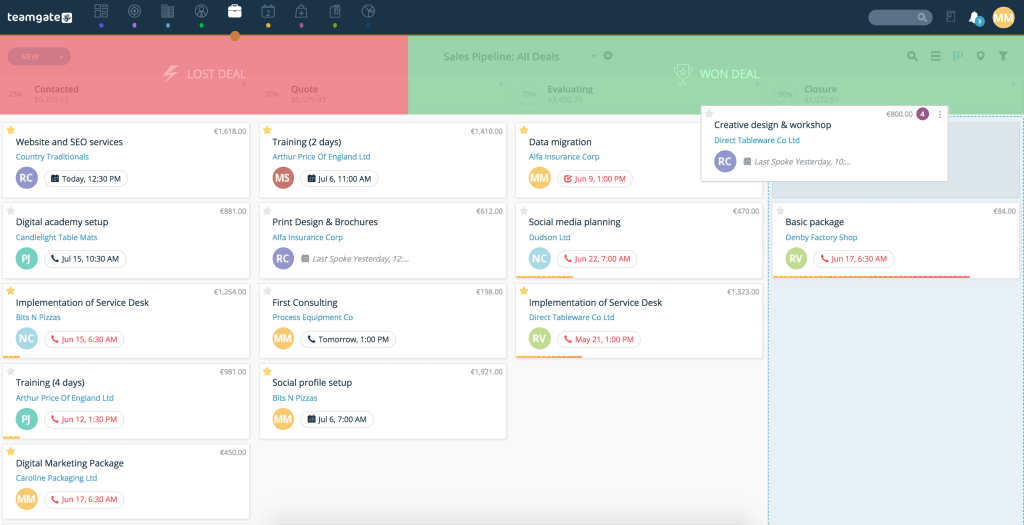
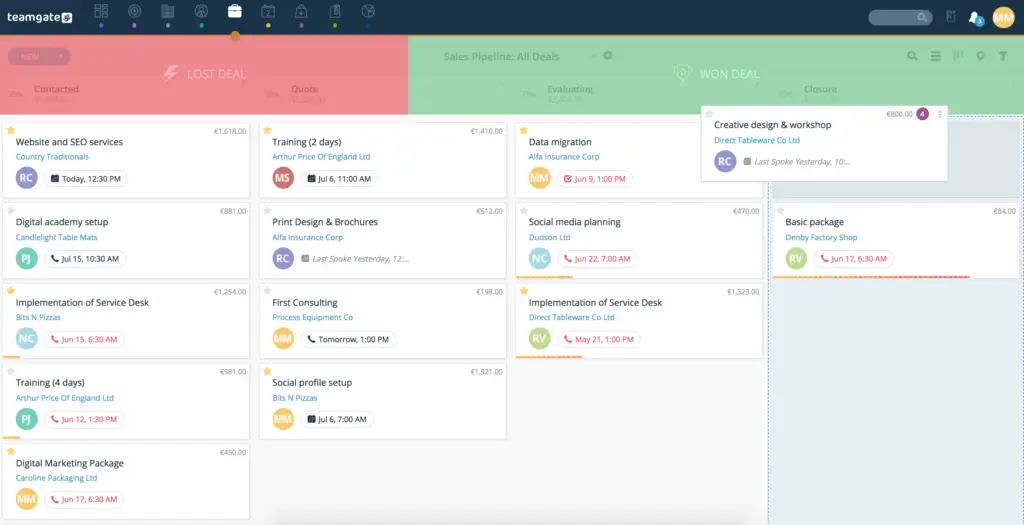
Teamgate’s Drag and Drop Deals Pipeline

Feature Set and Functionality Comparison

Teamgate CRM Highlighted Features:

  • Advanced Sales Insights and Analytics: Provides in-depth analysis tools that allow businesses to track performance, forecast sales, and gain actionable insights.
  • Lead Scoring: Offers a lead scoring system to prioritize leads based on their potential value and likelihood of conversion.
  • Pipeline Management: Features an intuitive pipeline management system, helping businesses track the progress of deals through various stages.
  • Task and Activity Management: Includes tools for scheduling, managing, and tracking tasks and activities associated with sales processes.
  • Email Integration and Tracking: Allows integration with email services for efficient communication tracking and management.
  • Customizable Sales Pipelines and Fields: Provides options for customizing sales pipelines and fields to fit specific business processes.
  • Third-party Integrations: Supports integration with a variety of tools like Slack, Mailchimp, Zapier, and more for enhanced functionality.

Teamgate CRM Suitability:

  • Teamgate CRM caters to a broad range of businesses, from startups to scaling enterprises, with its extensive features and flexible plans. It’s particularly suitable for organizations looking to optimize their sales processes with comprehensive analytics and lead management tools.

Less Annoying CRM Feature Set:

  • Simplified Contact Management: Centralizes customer information in an easy-to-use interface.
  • Intuitive Calendar and Task Tracking: Integrates a comprehensive calendar and task management system directly within the CRM.
  • User-friendly Pipeline View: Provides a clear and straightforward pipeline view that simplifies the tracking of leads and deals.
  • Seamless Email Synchronization: Enables direct synchronization with email platforms, allowing for the seamless management of customer communications within the CRM.
  • Custom Fields and Categories: Offers the ability to create custom fields and categories for contacts, tasks, and notes, allowing businesses to tailor the system to their specific needs and workflows.

Less Annoying CRM Suitability:

  • Ideal for small businesses and startups looking for an uncomplicated, effective CRM solution

CRM Integration Comparison

  • Teamgate CRM: Teamgate native intregrations include Twilio for dialling, Gmail and Outlook for email correspondence, Mailchimp for marketing campaigns, key accounting integrations with Xero and Quickbooks and much much more. Teamgate CRM also offers an Open API and Zapier for additional customization options.
  • Less Annoying CRM: while more limited in its integration offerings, focuses on providing seamless experiences with the essential tools its target users are most likely to use.

Customization and Flexibility Comparison

  • Teamgate CRM: stands out for its high level of customization and Open API functionality, allowing businesses to tailor the platform to their specific processes and needs.
  • Less Annoying CRM: offers less in terms of customization but maintains a high degree of flexibility by keeping its platform simple and adaptable.

CRM Pricing Comparison

  • Both options are well-priced for small businesses operating on a budget.
  • Teamgate’s tiered pricing model including a free entry-level plan provides options for businesses of different sizes. As businesses scale and add more features prices remain consistent, making it a cost-effective option for small businesses and startups through to enterprise.
  • Less Annoying CRM’s single, affordable pricing plan makes it an attractive option for small businesses looking for budget-friendly CRM solutions.

Customer Support Comparison

Both Teamgate and Less Annoying CRM offer robust customer support, but they approach it differently. Teamgate provides a more structured support system with resources for training and onboarding, while Less Annoying CRM focuses on personal, responsive support to quickly address user needs.

Final Thoughts

In summary, Teamgate CRM and Less Annoying CRM both offer unique advantages. Teamgate stands out for its straightforward, no-frills approach, making it a great option for small businesses needing an effective CRM without a steep learning curve. Less Annoying CRM, on the other hand, is ideal for small businesses looking for a cost-effective, entry-level CRM system.

The decision between Teamgate CRM and Less Annoying CRM should be based on specific business needs, existing software infrastructure, and budget considerations.

For the most up-to-date information and to explore these systems further, visiting the official websites of Teamgate CRM and Less Annoying CRM is recommended.


FAQs: Less Annoying CRM vs Teamgate

What does CRM mean, and why is it important?

CRM, or Customer Relationship Management, is essential software for businesses to manage and analyze customer interactions and data throughout the customer lifecycle. Its goal is to improve business relationships, assist in customer retention, and drive sales growth.

How do Less Annoying CRM and Teamgate CRM differ in CRM solutions?

Less Annoying CRM simplifies CRM to essential features for ease of use, targeting small businesses. Teamgate CRM offers a broad set of features supporting detailed sales processes and analytics, suitable for a wider range of business sizes, including medium to large enterprises.

Is it possible to tailor the sales process in Teamgate CRM and Less Annoying CRM?

Both CRMs allow sales process customization. Teamgate provides detailed options to align with intricate sales operations, whereas Less Annoying CRM focuses on straightforward customization to cater to the fundamental needs of smaller businesses.

What type of support services do Teamgate CRM and Less Annoying CRM offer?

Teamgate provides diverse support options including live chat, email, training, and a detailed knowledge base. Less Annoying CRM emphasizes direct and personal support with dedicated reps, ensuring quick and effective assistance.

Are Teamgate CRM and Less Annoying CRM suitable for any business size?

Teamgate CRM caters to a broader business spectrum, from medium to large, with scalable features. In contrast, Less Annoying CRM is specifically designed for small businesses, offering simplicity and affordability.

How does the pricing structure of Less Annoying CRM compare to Teamgate CRM?

While Teamgate CRM adopts a multi-tiered pricing strategy to suit various business needs and scales, Less Annoying CRM maintains a simple, single-price model, making it easier for small businesses to anticipate costs.

Can I integrate external applications with Teamgate CRM and Less Annoying CRM?

Yes, integration capabilities exist for both platforms. Teamgate offers a wide array of integrations for enhanced productivity, whereas Less Annoying CRM provides essential integrations, focusing on simplicity and core needs.

Do Teamgate CRM and Less Annoying CRM provide a free trial to test their platforms?

Both platforms offer trial periods, enabling companies to evaluate the systems’ fit for their specific business requirements before committing financially.

How user-friendly are Teamgate CRM and Less Annoying CRM for beginners?

Less Annoying CRM is renowned for its user-friendly design, making it ideal for CRM novices and small businesses, while Teamgate CRM, despite its advanced features, strives for intuitive design and navigability to accommodate users at all levels of tech savviness.

What are the main benefits of using Teamgate CRM or Less Annoying CRM for my business?

Teamgate CRM delivers comprehensive insights and tools for sales optimization and customer management for businesses looking to scale. Conversely, Less Annoying CRM offers straightforward, essential CRM tools focusing on ease of use and affordability, ideal for small businesses prioritizing simplicity.

In the world of Customer Relationship Management (CRM) systems, selecting the right platform is critical for business efficiency and growth, especially for small to mid-sized businesses. This comprehensive comparison between Teamgate CRM and Copper CRM will delve into their features, pricing, ease of use, customization options, customer support, and overall value, providing a detailed guide for businesses contemplating which CRM to choose. This analysis aims to cover aspects that are crucial for small to mid-sized businesses and first-time CRM users.

Contents:

Teamgate CRM Overview

Teamgate CRM is an intuitive cloud-based CRM designed to streamline sales processes and enhance customer relationship management for small to mid-sized businesses. It’s known for its user-friendly interface and comprehensive sales tools.

Teamgate CRM Pricing and Plans

Teamgate CRM offers several pricing tiers:

  • Starter Plan: A free plan for up to 2 users, suitable for small businesses or startups needing basic CRM functionalities.
  • Team Plan: Priced at $39.90 per user/month, this plan offers advanced features like sales dashboards, workflow automation, and 24/7 chat and email support.
  • Growth Plan: At $59.90 per user/month, this plan caters to larger businesses needing in-depth sales analysis and more extensive customization options.

Teamgate CRM Key Features

teamgate sales pipeline
Teamgate’s drag-and-drop deals pipeline

Teamgate CRM Ease of Use

Teamgate CRM is recognized for its straightforward and intuitive interface, making it accessible for first-time CRM users and small businesses. Winning several awards for ease of use, customer support and small business, Teamgate CRM is designed specifically to combine simplicity and efficiency.

teamgate crm awards
Teamgate CRM Awards

Copper CRM Overview

Copper CRM, formerly known as ProsperWorks, is a CRM system designed to integrate seamlessly with Google Workspace, offering an intuitive user experience with a focus on eliminating manual data entry and increasing productivity, particularly for businesses embedded in the Google ecosystem.

Copper CRM Pricing and Plans

Copper CRM also offers multiple pricing tiers:

  • Basic Plan: Priced at $23 per month/user, aimed at small teams requiring essential CRM tools.
  • Professional Plan: Priced at $59 per month/user, this plan provides more advanced CRM features suitable for growing businesses.
  • Business Plan: Priced at $99 per month/user, the highest tier, offering extensive CRM functionalities for larger organizations.

Copper CRM Key Features

copper crm UI
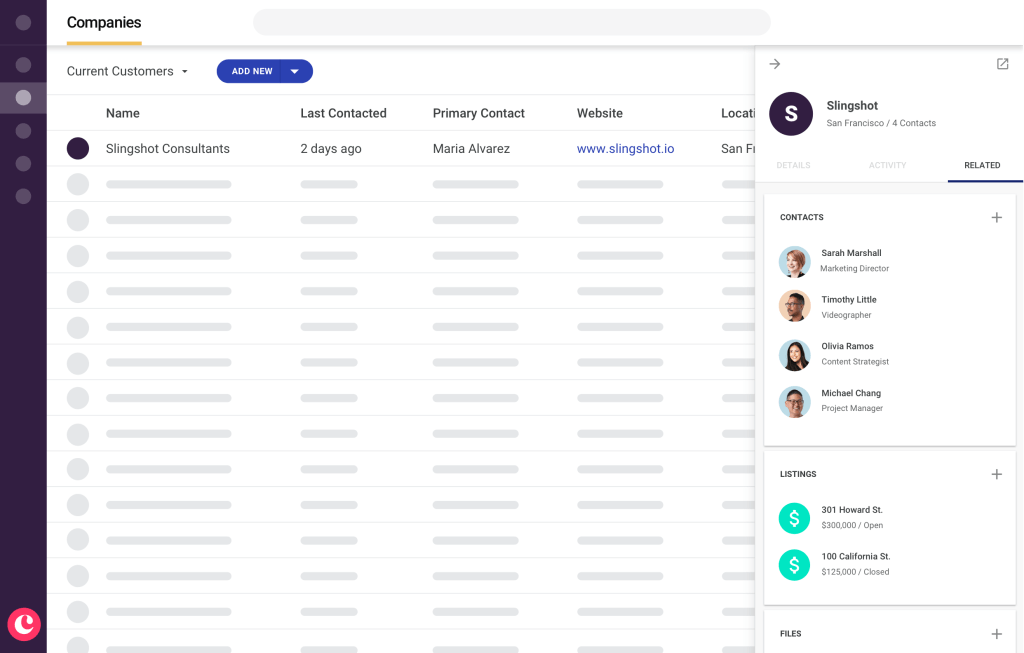
Copper CRM Companies Funnel

Copper CRM Ease of Use

Copper CRM is lauded for its seamless integration with Google Workspace, making it extremely user-friendly for businesses already using Google apps.

Quick Comparison: Teamgate CRM vs Copper CRM

Feature Set and Functionality Comparison

Teamgate CRM Feature Set:

  • Advanced Sales Insights and Analytics: Provides in-depth analysis tools that allow businesses to track performance, forecast sales, and gain actionable insights.
  • Lead Scoring: Offers a lead scoring system to prioritize leads based on their potential value and likelihood of conversion.
  • Pipeline Management: Features an intuitive pipeline management system, helping businesses track the progress of deals through various stages.
  • Task and Activity Management: Includes tools for scheduling, managing, and tracking tasks and activities associated with sales processes.
  • Email Integration and Tracking: Allows integration with email services for efficient communication tracking and management.
  • Customizable Sales Pipelines and Fields: Provides options for customizing sales pipelines and fields to fit specific business processes.
  • Third-party Integrations: Supports integration with a variety of tools like Slack, Mailchimp, Zapier, and more for enhanced functionality.

Teamgate CRM Suitability:

  • Teamgate CRM caters to a broad range of businesses, from startups to scaling enterprises, with its extensive features and flexible plans. It’s particularly suitable for organizations looking to optimize their sales processes with comprehensive analytics and lead management tools.

Copper CRM Feature Set:

  • Seamless Google Workspace Integration: Copper CRM is designed to integrate effortlessly with Google Workspace, providing a unified experience for users of Google tools.
  • Automated Data Entry: Reduces manual data entry by automatically capturing and organizing data from emails and other sources.
  • Project and Workflow Management: Includes tools for managing projects and automating workflows to streamline business processes.
  • Contact and Deal Management: Offers robust contact and deal management features to keep track of customer interactions and sales opportunities.
  • Customizable Reports and Dashboards: Provides customizable reporting tools and dashboards for real-time insights into business performance.
  • Task and Activity Tracking: Features comprehensive task and activity tracking capabilities to keep sales teams on track.

Copper CRM Suitability:

  • Copper CRM is ideal for businesses heavily reliant on Google Workspace. It’s an excellent choice for those who value a CRM that offers a high degree of automation and integration with Google tools. While it may not have as many advanced features as some larger CRMs, its focus on essential functionalities and ease of use makes it a strong contender for small to medium-sized businesses looking for efficiency and simplicity.

CRM Integration Comparison

  • Teamgate CRM: Teamgate native intregrations include Twilio for dialling, Gmail and Outlook for email correspondence, Mailchimp for marketing campaigns, key accounting integrations with Xero and Quickbooks and much much more. Teamgate CRM also offers an Open API and Zapier for additional customization options.
  • Copper CRM: Deeply integrated with Google Workspace, offering a more seamless experience for Google users.

illustration of popular software logos

Customization and Flexibility Comparison

  • Both CRMs offer good customization options and flexibility, including custom fields, tags, segmentation and more.

CRM Pricing Comparison

  • Both options are well-priced for small businesses operating on a budget.
  • Teamgate CRM: Offers a free entry-level plan, making it a cost-effective option for very small businesses or startups.
  • Copper CRM: While it doesn’t have a free plan, its pricing is justified by its advanced features and Google Workspace integration, offering value for money, especially for Google-centric businesses

Customer Support Comparison

Whilst both provide reliable customer support throughout all subscription offerings, Copper CRM restricts premium support and onboarding to a minimum spend. Comparatively, Teamgate CRM offers dedicated customer support to all plans, whilst onboarding and ongoing training is restricted to Team and Growth subscribers.

Final Thoughts

In summary, Teamgate CRM and Copper CRM both offer unique advantages. Teamgate stands out for its straightforward, no-frills approach, making it a great option for small businesses needing an effective CRM without a steep learning curve. Copper CRM, on the other hand, is ideal for businesses seeking deep integration with Google Workspace, offering advanced features and a seamless user experience within the Google ecosystem.

The decision between Teamgate CRM and Copper CRM should be based on specific business needs, existing software infrastructure, and budget considerations. For businesses using Google Workspace extensively, Copper CRM would be a natural fit, while Teamgate CRM could be more suitable for those looking for a simple yet effective CRM solution with dedicated customer support.

For the most up-to-date information and to explore these systems further, visiting the official websites of Teamgate CRM and Copper CRM is recommended.


FAQs: Teamgate vs Copper CRM

  1. Can you describe the analytical tools available in Teamgate CRM for sales insight?
    • Answer: Teamgate CRM offers a range of analytical tools for sales insight, including performance tracking, sales forecasting, and detailed analytics. These tools help businesses understand sales trends, evaluate team performance, and make data-driven decisions.
  2. Can you explain Copper CRM’s integration capabilities with Google applications?
    • Answer: Copper CRM is designed to integrate seamlessly with Google Workspace applications. This includes syncing with Gmail for email communications, Google Calendar for scheduling, Google Drive for document management, and other Google apps, providing a unified and efficient workflow.
  3. What features does Teamgate CRM have for assessing and ranking potential leads?
    • Answer: Teamgate CRM includes a lead scoring feature that allows users to assess and rank potential leads based on various criteria. This feature helps prioritize leads by their likelihood to convert, enabling sales teams to focus on the most promising opportunities.
  4. How does Copper CRM facilitate business process automation?
    • Answer: Copper CRM offers workflow automation features that allow businesses to automate repetitive tasks, such as follow-up emails, task assignments, and lead qualification processes, thereby increasing efficiency and reducing manual workload.
  5. Can sales pipelines in Teamgate CRM be tailored to specific business needs?
    • Answer: Yes, Teamgate CRM provides customizable sales pipelines, enabling businesses to tailor them according to their specific sales processes and stages. This customization allows for better alignment with business strategies and sales operations.
  6. How does Copper CRM handle task tracking and management?
    • Answer: Copper CRM features comprehensive task tracking and management capabilities. Users can create, assign, and track tasks, set deadlines, and get reminders, ensuring that all sales activities and customer interactions are managed efficiently.
  7. Is Teamgate CRM’s interface easy to navigate for beginners?
    • Answer: Teamgate CRM is known for its user-friendly interface, which is straightforward and intuitive, making it easy for beginners or those new to CRM systems to navigate and use effectively.
  8. How does Copper CRM streamline data input processes?
    • Answer: Copper CRM streamlines data input processes through its automated data entry feature. It captures and organizes data from emails and other interactions automatically, reducing manual data entry and ensuring data accuracy.
  9. What external applications can be connected to Teamgate CRM?
    • Answer: Teamgate CRM supports integration with a variety of external applications, including email marketing tools like Mailchimp, communication platforms like Slack, and productivity apps like Zapier, enhancing its functionality and adaptability.
  10. How effective is Copper CRM for companies that don’t rely on Google Workspace?
    • Answer: While Copper CRM is optimized for Google Workspace integration, it is still effective for companies that don’t use Google Workspace. It offers core CRM functionalities like contact management, deal tracking, and workflow automation, which are valuable for any business, regardless of their reliance on Google Workspace.

In the bustling world of small business, where every resource counts, Google Sheets emerges as a dynamic ally. This cloud-based spreadsheet tool, part of the Google Workspace, is more than just a place to store data. It’s a powerhouse for organization, analysis, and collaboration, offering flexibility and functionality without straining your budget.

For beginners, Google Sheets is akin to having a multifaceted assistant, adept at handling a variety of tasks from financial tracking to inventory management, all within a user-friendly interface. In this comprehensive guide, we delve into the nuances of Google Sheets, demonstrating how it can be a pivotal tool in the arsenal of any small business. Whether you’re charting out your financial forecasts, managing customer databases, or tracking project progress, Google Sheets offers an intuitive platform to manage your business data effectively.

Join us as we explore the intricacies of Google Sheets, tailored for beginners in the small business landscape. It’s time to turn your data into a strategic asset, driving efficiency and growth.

Key Takeaways:

  1. Getting Started: Master the basics of creating and navigating Google Sheets, an essential for effective data organization in small businesses.
  2. Essential Features: Utilize data entry, formatting, and fundamental functions for day-to-day business operations and analysis.
  3. Advanced Tools: Dive into advanced features like Pivot Tables, Data Validation, and complex formulas to elevate your data analysis capabilities.
  4. Collaboration and Sharing: Discover the power of real-time collaboration and data sharing, enhancing team productivity and decision-making.
  5. Productivity Tips: Implement practical tips and tricks, including keyboard shortcuts and integrations, to streamline your business processes with Google Sheets.

Contents

Getting Started with Google Sheets

Creating a New Google Sheet

Embarking on your Google Sheets journey begins with simplicity. Open Google Sheets in your browser, click on the multicolored ‘+’ sign, and behold – your new spreadsheet. Think of it as a blank canvas for your business data. Give it a meaningful name, like ‘2026 Financial Projections’ or ‘Customer Contact List,’ to maintain organization from the get-go.

Understanding the Google Sheets Interface

The Google Sheets interface is an exercise in intuitive design. At the top, the menu bar houses standard options like File, Edit, and View. Below this, the toolbar presents icons for common actions – formatting text, inserting charts, or adding formulas. The heart of Google Sheets is the grid itself, a vast expanse of rows and columns waiting to be filled with your business data. At the bottom, sheet tabs enable easy navigation between different sections of your data – an excellent way to compartmentalize various aspects of your business in one file.

Basic Operations

Entering data in Google Sheets is as straightforward as clicking a cell and typing. But the power lies in the subtleties. Learning keyboard shortcuts, like ‘Ctrl/Cmd + C’ for copy and ‘Ctrl/Cmd + V’ for paste, can significantly speed up data management. To replicate data across cells, simply click and drag from the cell’s corner – a handy trick for extending date ranges or duplicating product prices.

Navigating through your data efficiently is key in a small business context. Use ‘Ctrl/Cmd + PgUp/PgDn’ to flip through various sheets. Organize your data logically, with separate sheets for different needs – one for inventory, another for sales, and yet another for expenses, ensuring that your business runs like a well-oiled machine.

Essential Features of Google Sheets for Beginners

Data Entry and Formatting

In the realm of small business, the presentation of data can be as crucial as the data itself. Start by understanding the nature of your data – use plain text for general information, dates for scheduling, and numerical values for financials. Google Sheets instinctively aligns text to the left and numbers to the right, aiding in quick data differentiation.

Effective formatting is paramount. Utilize bold headers to demarcate different data sections. Embrace the freeze pane feature to keep headers visible as you scroll. Employ alternating row colors (through conditional formatting) to enhance readability. Imagine a product inventory sheet where each product category is color-coded, simplifying navigation and data retrieval.

Formulas and Functions

For a small business, Google Sheets is like having a math wizard at your fingertips. Basic functions like SUM, AVERAGE, and COUNT are invaluable for day-to-day operations. Calculate your monthly expenses, average sales, or the number of items sold using these simple yet powerful functions.

Leverage functions like FORECAST and TREND for future planning. Based on your past sales data, these functions can predict future trends, helping you make informed stocking or marketing decisions.

Working with Rows and Columns

The flexibility to modify rows and columns as per your business needs is a standout feature of Google Sheets. Add new rows to input additional data, like a new client in your CRM sheet. Delete rows that contain outdated information, or hide them for a less cluttered view. Adjust column widths to accommodate varying data types – wider columns for detailed descriptions and narrower ones for dates or prices.

In a small business setting, each row and column can represent a critical piece of your business puzzle. Whether it’s tracking customer interactions, managing project timelines, or recording financial transactions, how you organize these elements can significantly impact your operational efficiency and clarity.

Advanced Google Sheets Features for Beginners

Data Analysis Tools

In the fast-paced world of small business, being able to quickly analyze data is essential. Google Sheets comes equipped with powerful tools like Pivot Tables, Data Validation, and Filter Views, each serving a unique purpose in data analysis.

Pivot Tables: Pivot Tables are your best friend for summarizing large datasets without complex formulas. Imagine you have a year’s worth of sales data. With a few clicks, Pivot Tables can help you break down this data by month, product category, or sales region, providing clear insights into your sales trends.

Data Validation: Data Validation is crucial for maintaining data integrity. It restricts the type of data entered into a cell, ensuring consistency and accuracy. For instance, if you have a column for ‘Order Status,’ data validation can limit entries to ‘Pending,’ ‘Shipped,’ ‘Delivered,’ etc., preventing erroneous data entries.

Filter Views: Filter Views allow you to sift through data and focus on what’s important. You can create different views of your data, like viewing only high-value clients or products with low stock, without altering the main dataset. This feature is particularly useful when you need to make quick decisions based on specific data subsets.

Advanced Functions and Formulas

Beyond basic arithmetic, Google Sheets offers a suite of advanced functions and formulas tailored for complex calculations and data manipulation – a boon for small businesses needing deeper data analysis.

VLOOKUP and HLOOKUP: These functions are invaluable for cross-referencing data across different sheets. For instance, use VLOOKUP to find a client’s contact information from a client database sheet using their ID from a sales sheet.

Conditional Formatting: This feature automatically formats cells based on specific conditions. For a small business tracking financial performance, you can set up conditional formatting to highlight profits that are below a certain threshold, making it easier to identify areas needing attention.

Array Formulas: Array Formulas enable you to perform multiple calculations on one or more items in an array. They can be incredibly efficient for calculating totals or averages across a range of data, saving time and reducing the potential for errors in manual calculations.

Charts and Graphs

For a small business, visual representation of data can be a game-changer. Charts and Graphs in Google Sheets transform numbers into understandable and actionable visuals.

Creating Charts: Turn your sales formulas and data into a bar chart or line graph with just a few clicks. This visual representation makes it easier to spot trends and patterns, crucial for strategic planning.

Customizing Charts: Google Sheets offers extensive customization options for charts. Adjust colors, add labels, and modify axes to suit your specific needs. For example, a customized pie chart showing revenue distribution across different services can provide quick insights into your business’s income streams.

Collaboration and Sharing in Google Sheets for Small Business

Sharing and Collaborative Editing

One of the most significant advantages of Google Sheets for small businesses is its collaborative nature. The platform allows you to share spreadsheets with team members, stakeholders, or clients, providing control over who can view, comment on, or edit the document.

Sharing a Sheet: Easily share your Google Sheet by clicking on the ‘Share’ button and entering the email addresses of the collaborators. You can set permissions at different levels – viewers can only see the data, commenters can add insights, and editors can make changes. For instance, share your budget sheet with view-only access to employees while giving edit access to your finance manager.

Real-Time Collaboration: Multiple people can work on the same sheet simultaneously. This feature is invaluable for small businesses, where team members might be updating client information, sales data, or inventory status in real-time, ensuring everyone has the most current information at all times.

Comments and Chat

Communication is key in any small business, and Google Sheets supports this through its comments and chat features.

Adding Comments: If you want to provide feedback or ask a question about a specific part of the sheet, you can add a comment directly to a cell. This function is particularly useful for clarifying entries or suggesting edits without altering the actual data.

Chat Function: For real-time discussions, use the built-in chat feature when multiple collaborators are working on the sheet simultaneously. It’s an efficient way to discuss changes or decisions related to the data being worked on, without leaving the spreadsheet.

Version History

Maintaining the integrity of your data is crucial, and Google Sheets addresses this with its version history feature.

Viewing Version History: Access the version history to see past versions of the sheet. This feature is a lifesaver if you need to revert to a previous version after an unwanted change or error.

Restoring Previous Versions: If you find that a previous version of the sheet was more accurate or relevant, you can restore it with just a click. For small businesses, this means reduced risk of data loss and the ability to track changes over time.

Tips and Tricks for Google Sheets in Small Business

Google Sheets is packed with features and functionalities that can significantly boost productivity and efficiency in a small business setting. Here are some tips and tricks to help you make the most of this powerful tool.

Keyboard Shortcuts: Familiarize yourself with keyboard shortcuts for common tasks. Shortcuts like ‘Ctrl/Cmd + Z’ for undo, ‘Ctrl/Cmd + Shift + V’ for paste values only, and ‘Ctrl/Cmd + Arrow keys’ for quick navigation can save you a significant amount of time.

Custom Formulas: Beyond the standard functions, Google Sheets allows you to create custom formulas. These can be tailored to your specific business needs, like calculating complex commissions or custom performance metrics.

Data Validation for Consistency: Use data validation not just for restricting data entry but also for maintaining consistency. For instance, create drop-down lists for categories or statuses to ensure uniform data across the sheet.

Conditional Formatting for Alerts: Set up conditional formatting to highlight anomalies or important data points. For example, you could have the cells change color if inventory levels fall below a certain threshold or if a project deadline is approaching.

Integrate with Other Apps: Google Sheets can be integrated with various apps and tools. Use this feature to connect with your CRM system, accounting software, or other business tools, streamlining your workflow and reducing manual data entry.

Templates for Recurring Tasks: If you have recurring tasks or reports, create templates in Google Sheets. Templates for monthly financial reports, inventory tracking, or client databases can be reused, saving time and ensuring consistency.

Use Add-ons: Explore the Google Workspace Marketplace for add-ons that can extend the functionality of Google Sheets. Add-ons for mail merging, graph-making, or project management can provide tailored solutions for your specific business needs.

Conclusion

Google Sheets stands out as an indispensable tool for small business owners beginning their business journey. Its versatility, ease of use, and collaborative features make it an ideal solution for a wide range of business applications — from data analysis and financial management to customer relationship handling and inventory tracking. By mastering Google Sheets, you empower your business with the ability to harness data effectively, leading to smarter decisions and improved business outcomes. Remember, the key to getting the most out of Google Sheets lies in exploring its features, practicing the tips and tricks shared, and customizing it to fit your unique business needs. Embrace Google Sheets and watch it transform your small business’s data management into a streamlined, efficient process.

As small businesses evolve and expand, their data management and business needs often become more complex, potentially outgrowing the capabilities of Google Sheets. In such scenarios, transitioning to a more robust, specialized CRM system can be a strategic move. Teamgate CRM emerges as an excellent choice for businesses accustomed to Google Sheets. Its user-friendly interface mirrors the efficiency and simplicity that Google Sheets users are familiar with, making the switch smoother and more intuitive. What sets Teamgate CRM apart is its exceptional customer support, always ready to assist and guide businesses through their CRM journey, ensuring a seamless transition and continuous support for growing business needs.

Get started with Teamgate CRM for FREE today.


FAQs: Google Sheets

Q1: Can Google Sheets be accessed offline?
A1: Absolutely. Google Sheets has an offline mode, allowing you to view and edit your spreadsheets without an internet connection. To use this feature, you need to enable offline access in Google Drive settings. Once set up, any changes made offline will automatically sync when you reconnect to the internet, ensuring your work is always up-to-date.

Q2: How do I secure my Google Sheets data?
A2: Securing your Google Sheets data involves several steps. Firstly, use Google’s two-factor authentication for your account for added security. Within Sheets, you can set specific sharing permissions, limiting who can view, comment, or edit your spreadsheets. Additionally, consider using the ‘Protected Ranges’ feature to restrict editing in certain parts of your sheet, safeguarding sensitive data.

Q3: Is it possible to automate tasks in Google Sheets?
A3: Yes, Google Sheets offers various automation capabilities. One of the simplest ways is through the use of Google Sheets macros, which record and replay a series of steps within your spreadsheet. For more complex automation, you can use Google Apps Script, a JavaScript-based language that lets you create custom functions, automate repetitive tasks, and integrate with other Google services.

Q4: Tips for troubleshooting common issues in Google Sheets?
A4: Common issues in Google Sheets often relate to formulas, cell formatting, or loading errors. For formula-related problems, ensure your formulas are correctly typed and references are accurate. If you encounter formatting issues, double-check your conditional formatting rules and cell formats. For loading errors, try clearing your browser’s cache or ensuring that your browser is up-to-date. Google’s support forum and help center are also excellent resources for troubleshooting.

In today’s fiercely competitive market landscape, leveraging robust sales software can be a game-changer for businesses striving to streamline their sales processes and enhance customer relationships. Navigating through the myriad of free sales software options can often feel like a daunting quest. This comprehensive guide aims to light the way, shedding light on the critical role of sales software, essential features to seek, and some of the leading free platforms in the market.

Key Takeaways:

  1. Streamlining Sales Processes: Discover how sales software automates mundane tasks, freeing up time for building meaningful customer relationships.
  2. Critical Features: Uncover the essential features like user-friendly dashboards and lead management capabilities that optimize sales operations.
  3. Top Free Sales Software Platforms: Dive into an overview of leading platforms including HubSpot CRM, Zoho CRM, Teamgate and Freshsales, and how they cater to diverse business needs.
  4. Transitioning Seamlessly: Learn about the best practices for a smooth transition to a new sales software system, ensuring continuous sales efficiency.
  5. Maximizing Utilization: Explore the strategies for maximizing software utilization through thorough training, customizations, and leveraging advanced features.
Table of Contents:
  1. The Role of Sales Software in Today’s Competitive Landscape
  2. Key Features to Look for in Free Sales Software
  3. Exploring the Best Free Sales Software Options
  4. Transitioning to a New Sales Software System
  5. Elevate Your Sales Game with Teamgate

Navigating the World of Free Sales Software

In a digital world where cutting through the market clutter is akin to finding a needle in a haystack, leveraging the right tools is not just smart but essential. Welcome to the realm of free sales software, a domain that not only promises to streamline your sales process but propels you ahead in the customer-centric race. This compass aims to navigate you through the ocean of sales software, ensuring you sail smoothly towards your organizational goals. Within this guide, you’ll discover the pivotal role of sales software, the critical features to look for, and the leading players in the free sales software arena.

The Role of Sales Software in Today’s Competitive Landscape

Sales software has evolved from a luxury to a necessity in today’s fiercely competitive business ecosystem. Let’s delve into the core aspects that elevate sales software from being just a tool to a sales companion.

Streamlining the Sales Process for Efficiency

The modern sales landscape is littered with repetitive tasks that, while essential, consume a hefty chunk of your time. Enter sales software, your knight in shining armor, ready to automate these monotonous tasks. By doing so, it frees up your time, enabling you to focus on what truly matters – building relationships and closing deals. Moreover, the real-time tracking of sales metrics ensures you’re always a step ahead, while centralization of sales data acts as a goldmine of information, ready to be tapped whenever needed.

Enhancing Customer Relationships and Closing Deals

In an era where customer is king, personalizing your interactions is the crown jewel. Sales software acts as your royal adviser, managing contacts meticulously, thus paving the path for personalized interactions. Furthermore, the ability to visualize your sales progress through pipeline management is nothing short of having a crystal ball. It provides a clear picture of where you stand and the road ahead. Lastly, forecasting tools within sales software act like your business horoscope, predicting sales trends, helping you meet and exceed those all-important sales targets.

Data-Driven Insights for Strategic Decision Making

In the realm of sales, being data-driven is not a choice but a prerequisite for survival. Sales software serves as your in-house oracle, offering performance analytics that measure every aspect of your sales activities. The reporting tools are your lens to the future, providing actionable insights that drive strategic decisions. And when it comes to outsmarting your competitors, the competitive analysis feature is your secret weapon. It empowers you with market insights, helping you stay ahead in the game, and carving a niche in the saturated market.

Through these lenses, it’s evident that adopting a sales software is akin to hiring a multi-faceted sales maestro, ready to orchestrate your sales processes towards a symphony of success.

Key Features to Look for in Free Sales Software

As you venture into the realm of free sales software, being armed with the knowledge of essential features is like having a map in an uncharted territory. Here’s a breakdown of core features that are not just bells and whistles, but necessities for your sales odyssey.

User-Friendly Dashboards and Reporting Tools

In the saga of sales management, your dashboard is your command center. A user-friendly dashboard doesn’t just display data; it narrates the story of your sales journey. Its ease of navigation allows for a seamless transition between tasks, while customizable reports serve as your treasure trove of insights, ready to be delved into for making informed decisions.

Lead and Opportunity Management Capabilities

In the bustling marketplace, every lead is a potential goldmine and managing them effectively is your map to treasures unknown. A robust sales software facilitates lead scoring and prioritization, ensuring you’re investing your resources wisely. Moreover, opportunity tracking and management are your compass, guiding you through the sales cycle, ensuring no opportunity slips through the cracks.

Integration Options with Other Business Systems

A sales software that plays well with other business systems is like having a well-oiled machine where every cog works in harmony. CRM integration ensures a unified view of customer interactions, while the amalgamation with email marketing and communication tools amplifies your outreach, creating a symphony of synchronized efforts aimed at bolstering sales and fostering relationships.

Exploring the Best Free Sales Software Options

Embarking on a quest for the ideal free sales software is akin to setting sail in a sea of possibilities. This section aims to be your lighthouse, guiding you towards the shores of efficiency and success.

Overview of Leading Free Sales Software Platforms

In a market teeming with options, standing at the helm and deciding which way to steer can be daunting. Fear not, as we spotlight the giants like HubSpot CRM, Zoho CRM, Teamgate and Freshsales. Each has carved a niche in the free sales software sphere, promising a blend of functionality and ease of use. Every business is a unique vessel, requiring a tailored approach. A feature comparison is your compass in the stormy seas, helping you identify the tool that resonates with your business ethos. Delve into a comparative analysis, exploring customization and scalability, ensuring your chosen software is a snug fit for your business framework.

Hubspot CRM

HubSpot’s free CRM offering is a boon for businesses on a budget, yet aspiring for a streamlined sales process. It acts as a centralized hub for all customer interactions, providing a 360-degree view of your sales pipeline. With its user-friendly interface, it simplifies contact management, enabling personalized engagements. The free version offers core functionalities with usage limits such as lead tracking, email scheduling, and data analytics, providing actionable insights. Moreover, its seamless integration with other HubSpot tools and external applications enhances its utility, creating a cohesive ecosystem for managing marketing, sales, and customer service. This CRM is not just a tool, but a companion in nurturing customer relationships and driving sales efficiency.

Zoho CRM

Zoho’s free CRM offering is a powerful tool for small to medium-sized businesses aiming to organize their sales processes efficiently. It offers a suite of features including contact management, lead and deal progression, and workflow automation, all housed within an intuitive interface. The platform facilitates seamless communication with customers alongside tracking every interaction, providing a holistic view of the sales pipeline. Its integration capabilities are notable, allowing for a harmonized operation with other business systems. Furthermore, the robust analytics and reporting tools provide data-driven insights, aiding in informed decision-making. Zoho’s free CRM is a stepping stone towards a structured and insightful sales journey, fostering enhanced customer relationships and business growth.

Teamgate CRM

Teamgate’s free CRM offering is a robust solution for businesses aiming to elevate their sales processes and scale. It stands out with its intuitive interface and a plethora of features including contact management, lead scoring, and deal managenent. The platform is designed to nurture leads through the sales funnel efficiently, ensuring no opportunity slips through the cracks. Its comprehensive reporting tools provide in-depth insights, aiding in data-driven decision-making. The seamless integration capability with other business tools amplifies its functionality, creating a unified business ecosystem. Furthermore, Teamgate offers scalable solutions to grow with your business, making it a reliable partner for sales success as your business grows. Its focus on providing a seamless user experience coupled with powerful features makes Teamgate’s CRM a noteworthy investment for achieving sales excellence and enhanced customer relationships.

Freshsales

Freshsales’ free CRM offering is a dynamic platform designed to cater to modern sales teams seeking a blend of usability and feature richness. The platform encompasses essential CRM functionalities such as contact and deal management, thereby aiding in maintaining organized and fruitful customer interactions. Its visually intuitive sales pipeline provides a clear view of deal stages, enabling effortless progress tracking. The email tracking feature is a bonus, offering insights into email effectiveness. Freshsales also boasts a user-friendly interface, making navigation and data entry a breeze. Its robust integration with other business tools enhances its appeal, creating a unified ecosystem for various business operations. With its foundation of essential features, Freshsales’ free CRM is a solid contender for businesses aiming to refine their sales processes and customer engagement strategies.

Transitioning to a New Sales Software System

Transitioning can be a turbulent journey, but with the right preparation, it can be as smooth as a calm sea under a clear sky. Delve into the best practices ensuring a smooth sail, maximizing software utilization, and addressing potential challenges as you set sail towards a horizon of sales excellence.

Best Practices for Smooth Implementation

Planning and preparation are your first mates in the voyage towards implementing a new sales software system. Ensuring a structured data migration process is like having a reliable map, guiding you through the transition phase, ensuring no treasure (data) is lost in transit.

Training and Onboarding: Maximizing Software Utilization

An uncharted software is like a riddle waiting to be solved. Training and onboarding are your keys to deciphering this riddle, ensuring every member aboard is well-versed with the tools at disposal, thus maximizing software utilization and setting the stage for a successful journey ahead.

Addressing Potential Challenges and Solutions

Every voyage has its share of storms. Being prepared for potential challenges and having a treasure chest of solutions ready is your shield against the unforeseen. Delve into proactive problem-solving strategies ensuring a smooth sail, even when the waters get choppy.

Elevate Your Sales Game with Teamgate

In the bustling market of sales software, standing out is a feat akin to conquering kingdoms. Among the myriad options, Teamgate has emerged as a knight in shining armor, promising a realm of features that not only streamline your sales process but set the gold standard in the industry.

What Sets Teamgate Apart in the Sales Software Arena

In the grand tournament of sales software, Teamgate parades with a banner of advanced features combined with ease of use and a dedicated support team. It’s not merely a tool; it’s your trusted squire in the battlefield of market competition, ready to assist at every juncture, ensuring you’re always several strides ahead of your adversaries.

Seamless Experience Tailored for Sales Success

Teamgate is akin to a master tailor, meticulously crafting a seamless experience that fits the unique contours of your sales processes. Its integration capabilities ensure a harmonious chorus with other business tools, while customizable sales processes promise a bespoke suit of armor, empowering you with agility and insight in the face of market challenges.

Growing with Your Business: Scalability and Advanced Features

A companion in your quest for market dominance, Teamgate grows with you. Its scalable pricing plans ensure a snug fit, regardless of your business size, while advanced analytics and reporting are your crystal ball, providing foresight and strategic insights, ensuring you’re always galloping towards success, with every sales milestone a fortress conquered.

Ready to Supercharge Your Sales? Get started with Teamgate Today!

As you stand at the cusp of sales excellence, Teamgate extends its hand, offering a chalice of advanced features, seamless integration, and unparalleled support. It’s more than a sales software; it’s a pledge of superior sales operations. So, are you ready to supercharge your sales and ascend to the throne of market leadership? Discover Teamgate today and step into a realm of unlimited sales possibilities!

The journey through the world of free sales software is akin to a saga, filled with quests for efficiency, alliances with the right tools, and the ultimate conquest of sales milestones. As you explore the landscapes of Teamgate, a new chapter in your sales saga awaits, promising a narrative of success, growth, and unmatched sales excellence.

Get started with your account today by visiting Teamgate or speaking with their team.

FAQs: Free Sales Software

  1. What are the top free sales software platforms?
    • The leading free sales software platforms include HubSpot CRM, Zoho CRM, Teamgate and Freshsales. Each platform comes with a unique set of features catering to different business needs, with user-friendly interfaces and essential sales management tools.
  2. How can free sales software streamline my sales processes?
    • Free sales software automates repetitive tasks, centralizes sales data, and provides real-time tracking of sales metrics. Additionally, they offer contact and pipeline management tools to enhance customer relationships and streamline the sales process from lead capture to closing deals.
  3. What features should I look for in a free sales software?
    • Look for user-friendly dashboards, customizable reporting tools, lead and opportunity management capabilities, and integration options with other business systems. These features will help optimize your sales processes, manage leads effectively, and ensure seamless operation with other business tools.
  4. How does Teamgate compare to other free sales software options?
    • Teamgate stands out for its advanced features, user-friendly interface, and scalability. Unlike some free options, it provides a seamless experience tailored for sales success, with integration capabilities ensuring a harmonious operation with other business tools.
  5. What are the benefits of transitioning to a new sales software system?
    • Transitioning to a new sales software system can streamline operations, improve sales efficiency, and provide data-driven insights for better decision-making. It also can enhance customer relationships, improve lead and opportunity management, and integrate with other business systems for a holistic business operation.
  6. How can I maximize the utilization of my sales software?
    • Maximizing software utilization involves thorough training and onboarding, customizing the software to fit your business processes, and leveraging its advanced features and integration capabilities. Regular reviews and updates, along with leveraging support and training resources, will also help maximize utilization.
  7. What types of support and training resources are available for onboarding?
    • Support and training resources may include online tutorials, webinars, documentation, community forums, and customer support channels. These resources help in understanding the software functionality, troubleshooting issues, and ensuring smooth onboarding and ongoing utilization.

Introduction: In the competitive world of sales, the right CRM can be a game-changer. This article delves into the transformative power of Teamgate CRM, highlighting its unique offerings tailored for small businesses and their impact on sales strategies.

Key Takeaways:

  1. Teamgate CRM’s role in revolutionizing sales processes for SMBs.
  2. The unmatched benefits of integrating Teamgate into your business operations.
  3. Features that set Teamgate apart in the crowded CRM landscape.
  4. How Teamgate’s analytics drive informed, data-driven sales decisions.
  5. Best practices for leveraging Teamgate CRM to its fullest potential.

Table of Contents:

  1. Introduction: Empowering Small Businesses with Teamgate Sales Software
  2. Why Teamgate? Understanding the Benefits for Small Businesses
  3. Exploring Key Features of Teamgate Sales Software
  4. Enhancing Customer Relationship Management with Teamgate
  5. Streamlining Sales Processes: How Teamgate Can Help
  6. Making Data-Driven Decisions with Teamgate Analytics
  7. How Teamgate Facilitates Effective Team Collaboration
  8. Choosing Your Teamgate Plan: A Guide for Small Businesses
  9. Implementing Teamgate in Your Small Business: A Step-by-Step Guide
  10. Best Practices for Maximizing Your Use of Teamgate
  11. Conclusion: Harnessing the Power of Teamgate for Small Business Growth
  12. FAQs: Teamgate for Small Business

Introduction: Empowering Small Businesses with Teamgate Sales Software

In the competitive world of business, small enterprises are constantly seeking innovative tools to enhance their sales strategies. Teamgate emerges as a leading sales CRM, uniquely designed to empower these businesses. With a focus on simplicity and efficiency, Teamgate offers resources tailored for both CRM newcomers and seasoned professionals, ensuring a smooth transition and effective utilization.

The Rise of Digital Sales Tools for SMBs

The digital revolution has introduced a myriad of sales tools. For SMBs, these tools have become indispensable, offering solutions that drive growth and ensure competitiveness in the market.

Why Small Businesses Need Specialized Sales Software

Given their unique challenges and aspirations, SMBs require specialized sales software. Teamgate, with its tailored features, offers the perfect blend of functionality and ease-of-use for these businesses.

Why Teamgate? Understanding the Benefits for Small Businesses

Teamgate isn’t just another CRM; it’s a comprehensive sales solution designed with small businesses at its core. Its integrated sales inbox facilitates seamless communication, reducing the time spent switching between tools and minimizing errors. Moreover, Teamgate’s suite of features ensures transparency, efficiency, and effectiveness throughout the sales process.

Cost-Effective Solutions for Budget-Conscious Enterprises

Teamgate offers a rich array of features without imposing a hefty price tag. Its cost-effective solutions make it a prime choice for budget-conscious SMBs.

Tailored Features Meeting Specific SMB Needs

Recognizing the distinct needs of every SMB, Teamgate provides customizable features. This adaptability ensures that businesses can mold the CRM to perfectly fit their operational requirements. Add a layer of dedicated support personnel to guide you through every step of your sales journey and beyond; and you have a solution provider specific to small business, rather than just another  CRM.

Exploring Key Features of Teamgate Sales Software

Teamgate stands out with its plethora of features aimed at amplifying sales and nurturing customer relationships. The integrated sales inbox ensures efficient client communication, while its diverse integrations, ranging from SmartDialer to WordPress Forms, offer a holistic sales experience. With its user-centric design, Teamgate provides actionable insights, streamlining the sales process from lead acquisition to deal closure.

Intuitive User Interface and Experience

Teamgate’s design prioritizes user experience. Its intuitive interface ensures effortless navigation, enabling businesses to maximize its potential without hurdles.

Integration Capabilities with Other Tools

One of Teamgate’s strengths is its seamless integrations with popular tools. This interconnectedness ensures a unified and efficient sales experience, eliminating the need for multiple platforms.

Mobile Access for On-the-Go Sales Teams

In an era where mobility is paramount, Teamgate offers robust mobile capabilities. This ensures that sales teams remain connected, capitalizing on opportunities irrespective of their location.

Enhancing Customer Relationship Management with Teamgate

In the realm of sales, maintaining robust customer relationships is paramount. Teamgate, with its advanced CRM capabilities, ensures businesses can foster and nurture these relationships seamlessly. The platform offers smart customer management tools that enable businesses to stay a step ahead, ensuring they can cater to their clients’ needs efficiently and effectively.

Centralized Customer Data Management

Teamgate’s CRM centralizes customer data, ensuring all relevant information is easily accessible. This consolidation aids in understanding customer preferences, purchase history, and interactions, enabling businesses to tailor their approach and offer personalized solutions.

Automated Follow-ups and Reminders

With Teamgate, businesses can automate follow-ups, ensuring no lead or opportunity is missed. The platform’s reminder system ensures timely interactions, helping businesses stay on top of their customer relationship management efforts.

Streamlining Sales Processes: How Teamgate Can Help

Sales processes can be intricate, but with Teamgate, they’re simplified. From lead gathering to deal closure, Teamgate offers tools and features that streamline every stage, ensuring efficiency and effectiveness.

Lead Scoring and Prioritization

Teamgate’s lead scoring system allows businesses to prioritize leads based on their potential value. This ensures that efforts are directed towards the most promising opportunities, optimizing resource allocation and increasing conversion rates.

Seamless Workflow Automation

Teamgate’s workflow automation capabilities ensure that repetitive tasks are automated, freeing up time for more strategic activities. This automation ensures a smoother sales journey, reducing manual efforts and potential errors.

Making Data-Driven Decisions with Teamgate Analytics

In today’s data-centric world, making informed decisions is crucial. Teamgate’s analytics provide businesses with the insights they need to make data-driven choices, ensuring they’re always on the right path.

Real-time Sales Performance Dashboards

Teamgate offers real-time dashboards that provide an instant overview of sales performance. These dashboards present key metrics in an easily digestible format, enabling businesses to gauge their success and make necessary adjustments.

Forecasting and Revenue Prediction

With Teamgate’s forecasting tools, businesses can predict future sales trends. This foresight allows them to prepare and strategize, ensuring they’re well-equipped to meet future challenges and capitalize on upcoming opportunities.

How Teamgate Facilitates Effective Team Collaboration

Effective team collaboration is the backbone of any successful sales strategy. Teamgate, with its suite of features, ensures that teams can collaborate seamlessly, irrespective of their location. The platform offers integrated communication tools, shared calendars, and task management features, ensuring that every team member is aligned and informed.

Shared Calendars and Task Management

Teamgate’s shared calendars ensure that all team members are on the same page. Whether it’s scheduling meetings, setting reminders, or tracking tasks, the shared calendar feature ensures transparency and coordination. Additionally, the task management tool allows teams to assign, track, and manage tasks efficiently, ensuring timely completion and accountability.

Communication Tools Integration

Teamgate’s integration with popular communication tools ensures that teams can communicate in real-time. Whether it’s discussing leads, strategizing sales pitches, or sharing updates, integrated communication tools ensure that information flows seamlessly, fostering collaboration and efficiency.

Choosing Your Teamgate Plan: A Guide for Small Businesses

Teamgate offers a range of pricing plans tailored to meet the diverse needs of businesses. From startups to established enterprises, there’s a plan that fits every budget and requirement.

Comparing Different Teamgate Plans

Teamgate offers three primary plans:

  • Starter ($9/user/month): Ideal for businesses just starting out, this plan offers essential features like lead and sales management, reminders, notifications, and basic integrations.
  • Professional ($26/user/month): A comprehensive toolkit for businesses looking for more advanced features. It includes everything in the Starter plan, along with key sales and pipeline management tools.
  • Enterprise ($65/user/month): The all-in-one solution for businesses seeking extensive reports and native integrations. It offers advanced features like product price catalogues, wins and losses statistics, integrated dialling and in-depth sales analytics.

Understanding Pricing and Value Proposition

Choosing the right Teamgate plan depends on the specific needs and budget of a business. While the Starter plan offers basic CRM functionalities, the Enterprise plan provides a holistic CRM experience with advanced features. It’s essential to assess the business’s requirements and choose a plan that offers the best value for money.

Implementing Teamgate in Your Small Business: A Step-by-Step Guide

Implementing a new CRM can seem daunting, but with Teamgate, the process is streamlined and straightforward. From initial setup to training your team, Teamgate offers resources and support at every step.

Pre-Implementation Checklist

Before diving into Teamgate, it’s essential to:

  1. Assess Your Needs: Understand what you expect from the CRM and how it aligns with your business goals.
  2. Gather Data: Compile all customer data, ensuring it’s clean and organized.
  3. Allocate Resources: Designate a team or individual responsible for the implementation process.

Training and Onboarding Your Team

Once Teamgate is set up:

  1. Utilize Teamgate Resources: Teamgate offers a plethora of resources, from tutorials to webinars, ensuring your team gets up to speed quickly.
  2. Regular Check-ins: Schedule regular check-ins to address any challenges or questions.
  3. Feedback Loop: Encourage team members to provide feedback, ensuring continuous improvement and optimization of the CRM usage.

Best Practices for Maximizing Your Use of Teamgate

To harness the full potential of Teamgate, it’s essential to adopt best practices that ensure optimal utilization and results. Teamgate, with its myriad of features, offers numerous opportunities to enhance sales and customer relationships. However, the key lies in how effectively these features are used.

Regular Data Audits

Consistent data audits ensure that the information within Teamgate remains accurate and up-to-date. Regularly cleaning and updating the CRM data ensures that teams work with the most current information, leading to better decision-making and customer interactions.

Continuous Team Training

The digital landscape is ever-evolving, and so are CRM tools like Teamgate. Regular training sessions ensure that the team remains updated with the latest features and functionalities. This not only enhances efficiency but also ensures that the team can leverage the CRM to its fullest potential.

Conclusion: Harnessing the Power of Teamgate for Small Business Growth

In today’s fast-paced sales environment, small businesses need a reliable partner to navigate the complexities of customer relationship management. Teamgate, with its comprehensive suite of tools and features, emerges as that trusted ally. It’s not just a CRM; it’s a solution tailored to the unique challenges and aspirations of SMBs. Its intuitive interface, combined with actionable insights, ensures businesses can confidently tackle their sales goals and foster lasting customer relationships. As the digital landscape continues to evolve, having a robust tool like Teamgate becomes more than just an advantage—it’s a necessity. For those businesses ready to elevate their sales strategy and drive growth, Teamgate offers the perfect platform.

Don’t just take our word for it. Experience the transformative power of Teamgate for yourself. Whether you’re curious about its features or eager to see it in action, there’s no better time to dive in. Start your free 14-day trial today or book a system demo to discover how Teamgate can revolutionize your sales process.

FAQs: Teamgate for Small Business

  1. How does Teamgate differ from other sales software for SMBs?
    • Answer: Teamgate is specifically designed with SMBs in mind, offering a blend of simplicity and advanced features. Its user-friendly interface, coupled with a comprehensive suite of tools, makes it stand out from other sales software. Additionally, Teamgate’s seamless integrations and cost-effective plans cater to the unique needs of small businesses.
  2. What integrations are available with Teamgate?
    • Answer: Teamgate offers a wide range of integrations, including popular email service providers, SmartDialer for voice communications, WordPress Forms for landing pages, Slack for team communications, and many more. This ensures a holistic and unified sales experience.
  3. How does Teamgate’s analytics help in sales forecasting?
    • Answer: Teamgate’s analytics provide real-time dashboards and insights, allowing businesses to predict future sales trends. The forecasting tools offer a clear view of potential revenue streams, helping businesses strategize and prepare for future opportunities.
  4. Can Teamgate be accessed on mobile devices?
    • Answer: Yes, Teamgate offers robust mobile capabilities, ensuring sales teams can access the CRM on the go. This mobile-first approach ensures that opportunities can be captured anytime, anywhere.
  5. How does Teamgate ensure data security for its users?
    • Answer: Teamgate prioritizes data security, employing advanced encryption methods and stringent data protection protocols. Regular security audits and updates ensure that user data remains safe and protected at all times.
  6. What training resources are available for new Teamgate users?
    • Answer: Teamgate offers a plethora of resources for new users, including tutorials, webinars, and dedicated support teams. These resources ensure a smooth onboarding process and continuous learning.
  7. How does Teamgate support team collaboration in sales?
    • Answer: Teamgate offers integrated communication tools, shared calendars, and task management features, ensuring seamless team collaboration. Real-time updates and integrations with popular communication tools foster effective teamwork.
  8. Are there any hidden costs in Teamgate plans?
    • Answer: Teamgate believes in transparency. All costs are clearly outlined in their pricing plans, with no hidden fees. Businesses can choose a plan that best fits their budget and needs.
  9. How often does Teamgate release new features or updates?
    • Answer: Teamgate is committed to innovation and regularly releases new features and updates. This ensures that the CRM remains up-to-date with the latest industry trends and user requirements.
  10. How can I migrate my existing data to Teamgate?
  • Answer: Teamgate offers easy data migration tools, allowing businesses to seamlessly transfer their existing data to the platform. Additionally, Teamgate’s support team is always available to assist with the migration process, ensuring a smooth transition.