Get a free sales audit to uncover hidden revenue opportunities!

If you want faster follow-ups, cleaner call logging, and every SMS and call tied to a real deal, you need your CRM and Twilio working as one system, not as separate tools.

In 2026, the best CRM platforms with Twilio integration help you:

  • Automatically track calls and activities

  • Improve follow-up discipline and reduce missed opportunities

  • Use communication data to improve coaching and forecasting

Twilio provides the communication layer. The CRM determines whether those interactions actually move deals forward.

Teamgate is a sales operating system for teams who want disciplined selling, real insight, and a CRM their reps actually use. When Twilio is built directly into that operating rhythm, communication becomes structured, measurable, and revenue-focused, not just another channel to manage.

In this guide, we compare the 6 best CRM systems with Twilio integration in 2026, covering features, pricing, and what type of team each platform fits best.

Key Takeaways:

  1. Why Twilio Integration Matters: Unify SMS, voice, WhatsApp, and email inside your CRM.

  2. Benefits: Faster responses, higher engagement, and improved agent productivity.

  3. Top Picks for 2026: Teamgate, HubSpot, Salesforce, Zoho, Freshsales, Insightly, and Pipedrive.

  4. Cost & ROI: Twilio’s pay-as-you-go pricing model delivers enterprise-grade communication without overspending.

  5. Who It’s For: Businesses seeking smarter, real-time, AI-driven customer communication.

Contents:

Benefits of Twilio Integration in CRM Systems

Enhanced Communication Channels

Integrating Twilio with your CRM breaks down communication silos by enabling SMS, voice, WhatsApp, and email conversations directly within your dashboard. Customers can connect through their preferred channels while your team tracks every interaction in one unified timeline.

That means:

  • Every interaction is visible to reps and managers

  • No more scattered call notes or lost SMS threads

  • Follow-ups can be triggered automatically

For instance, a Twilio WhatsApp Business integration allows your CRM to send appointment reminders, marketing campaigns, or personalized support messages, all automated and fully compliant.

The real advantage isn’t just multi-channel messaging. It’s structured communication tied to a live pipeline, so conversations actually advance deals instead of happening in isolation.

When communication activity is automatically logged and attached to deals, managers gain visibility into deal health and next-step coverage, turning conversations into measurable progress.

Sales Training and Feedback

Twilio call recording within a CRM creates a searchable library of real sales conversations.

This supports:

  • Coaching based on real calls, not memory

  • Identifying patterns in objections and buying signals

  • Faster onboarding for new reps

  • Clearer feedback tied to actual deal outcomes

When recordings, notes, and follow-up tasks are connected directly to the deal stage, coaching becomes practical and evidence-based.

Managers can review call quality, see whether next steps were scheduled, and ensure that late-stage deals aren’t simply “hope-cast” without meaningful activity.

This is where communication discipline turns into predictable revenue.


AI-Driven Insights & Analytics

In 2026, Twilio integrations are no longer just about sending messages — they generate performance data.

Each call and message can contribute to:

  • Lead prioritization

  • Response time tracking

  • Sentiment analysis

  • Activity-to-close correlation

When communication metrics are combined with CRM pipeline data, teams gain a 360° view of customer engagement.

The key is not just collecting activity — but tying it to stage progression, deal aging, and forecast accuracy.

That’s what separates communication tools from a true sales operating system.


6 Best CRM with Twilio Integration

1. Teamgate CRM

Teamgate CRM Overview

Teamgate CRM stands out for teams that care about process clarity, next-step discipline, and pipeline truth — not just logging activity.

It combines structured pipeline management with built-in Twilio communication tools, making follow-up consistent and visible.

Rather than turning CRM into admin work, Teamgate is designed so reps update it because it helps them sell.

Teamgate CRM Twilio Integration Highlights

Teamgate’s SmartDialer (powered by Twilio) enables:

  • Inbound and outbound calls directly inside the CRM

  • Automatic call logging tied to deals and contacts

  • Call recordings for coaching and review

  • SMS communication within the deal context

  • Activity tracking without manual entry

Because communication lives inside the deal pipeline, every call or message can trigger the next step — preventing deals from going stale.

This reinforces disciplined selling: if there’s no next step, the deal isn’t truly active.

Teamgate CRM Twilio Integration Pros and Cons

Pros:

  • Native Twilio SmartDialer integration

  • Automatic activity tracking and call recordings

  • Sales dashboards for call performance and pipeline health

  • On-call note-taking and script support

  • Workflow automations that create follow-up tasks

Cons:

  • Twilio usage costs (calls/SMS) are billed separately

  • Not available on the FREE subscription plan

Why Choose Teamgate CRM?

Teamgate is built around three fundamentals:

  • Structured deal stages with required next steps

  • Clean, trustworthy pipeline data

  • High adoption by design

Instead of communication floating outside the sales process, Twilio activity becomes part of a daily operating rhythm.

Reps start in their task list, make calls directly from the CRM, log outcomes automatically, and create next steps immediately. Managers review activity, deal aging, and next-step coverage weekly — not just stage and revenue amount.

The result is not just more communication — it’s protected revenue.


2. HubSpot CRM

HubSpot CRM Overview

HubSpot CRM is known for its user-friendly interface and strong inbound marketing capabilities.

HubSpot CRM Twilio Integration Highlights

Through Twilio, HubSpot users can:

  • Send SMS messages

  • Make calls from within the CRM

  • Automate outreach using workflow tools

This is particularly useful for marketing-led teams that rely heavily on campaign automation.

HubSpot CRM Twilio Integration Pros and Cons

Pros:

  • Easy to use

  • Strong marketing automation ecosystem

Cons:

  • Advanced features require higher-tier plans

  • Customization may increase overall cost


3. Salesforce CRM

Salesforce CRM Overview

Salesforce offers an enterprise-grade CRM platform with deep customization capabilities.

In order to effectively manage this vast ecosystem and ensure its seamless operation, large corporations often require certified specialists, who are found by specialized Salesforce recruitment agencies.

Salesforce CRM Twilio Integration Highlights

Twilio integration enables:

  • Direct messaging and voice communication

  • Automated workflows tied to CRM data

  • Embedded communication inside sales and service clouds

Salesforce CRM Twilio Integration Pros and Cons

Pros:

  • Highly customizable

  • Extensive integration ecosystem

Cons:

  • Can be complex

  • Higher implementation and operational costs


4. Zoho CRM

Zoho CRM Overview

Zoho CRM targets small and medium-sized businesses with a broad feature set at competitive pricing.

Zoho CRM Twilio Integration Highlights

Twilio integration enables SMS and voice communication within the platform.

Zoho CRM Twilio Integration Pros and Cons

Pros:

  • Cost-effective

  • Broad automation capabilities

Cons:

  • May feel feature-heavy

  • Scalability limitations for complex sales teams


5. Freshsales

Freshsales Overview

Freshsales is part of the Freshworks ecosystem and emphasizes AI-powered sales insights.

Freshsales Twilio Integration Highlights

With Twilio, users can:

  • Automate SMS and call workflows

  • Analyze engagement effectiveness

  • Manage multi-channel communication

Freshsales Twilio Integration Pros and Cons

Pros:

  • AI lead scoring

  • Easy-to-use interface

Cons:

  • Twilio functionality depends on ecosystem configuration


6. Insightly CRM

Insightly CRM Overview

Insightly combines CRM functionality with project management capabilities.

Insightly CRM Twilio Integration Highlights

Twilio enables users to send personalized text messages and make calls from the CRM through third-party setup.

Insightly Twilio Integration Pros and Cons

Pros:

  • Strong project management features

  • Communication tools via Twilio

Cons:

  • Third-party configuration required

  • May not suit pure sales-led teams


Comparison Table of CRM Systems with Twilio Integration

Table 1: CRM Platform Comparison

CRM Platform Key Features Pricing (Approx.) Pros Cons
Teamgate Native Twilio SmartDialer, pipeline management, activity tracking From $39.90/user/month Strong pipeline structure, automatic logging Twilio usage billed separately
HubSpot SMS + workflow automation Free to start; paid tiers increase Easy to use Advanced tools cost more
Salesforce Enterprise customization + Twilio Flex Starts at $25/user/month Highly scalable Complex and expensive
Zoho CRM Automation + SMS integration Starts at $14/user/month Affordable Feature-heavy for some teams
Freshsales AI insights + SMS automation Starts at $15/user/month AI scoring Ecosystem dependent
Insightly Project + CRM + Twilio Starts at $29/user/month Strong project tools Third-party integration needed

This table provides a quick snapshot to help align platform strengths with your operational needs.


How to Choose the Best CRM with Twilio Integration

Selecting the right CRM depends on more than just communication features.

CRM Scalability

Choose a platform that supports:

  • More users as your team grows

  • Multiple pipelines if needed

  • Advanced reporting over time

Your CRM should scale with your sales process — not force you to rebuild it later.


Twilio Integration Ease

Look for:

  • Native or deeply embedded integrations

  • Automatic call/SMS logging

  • Clear documentation

The smoother the integration, the faster your team adopts it.


CRM Technical and Customer Support

Twilio integration introduces technical layers. Reliable support ensures:

  • Quick issue resolution

  • Faster implementation

  • Minimal disruption

Strong onboarding and responsive service reduce long-term friction.


Conclusion

Twilio-powered CRM systems in 2026 go beyond sending messages. The real value comes when communication is structured, logged automatically, and tied directly to deal progression.

When SMS, voice, and WhatsApp interactions connect to pipeline stages, next steps, and forecasting, teams stop guessing — and start operating on real signals.

Among the options discussed, Teamgate CRM stands out for combining Twilio’s communication power with disciplined pipeline management, automatic activity tracking, and clear next-step visibility.

If your follow-ups rely on memory and your pipeline feels messy, structured communication inside a clean sales operating system changes everything.


Streamline Your Sales with Teamgate CRM

Discover a sales operating system designed to keep your pipeline clean, your reps consistent, and your managers confident in the forecast—without enterprise CRM bloat or feature overload.

Start Your Free Trial

AI-Driven Insights & Analytics

In 2026, CRM-Twilio integrations aren’t just about communication — they’re about intelligence. Each call, message, and interaction is analyzed for sentiment, tone, and responsiveness using Twilio’s Voice Intelligence and native CRM analytics.

This data empowers teams to:

  • Identify high-value leads faster.

  • Measure campaign performance across channels.

  • Refine messaging for greater customer impact.

By combining CRM analytics with Twilio’s communication data, businesses gain a 360° view of customer behavior, enabling smarter decision-making and predictive engagement strategies.

6 Best CRM with Twilio Integration

1. Teamgate CRM
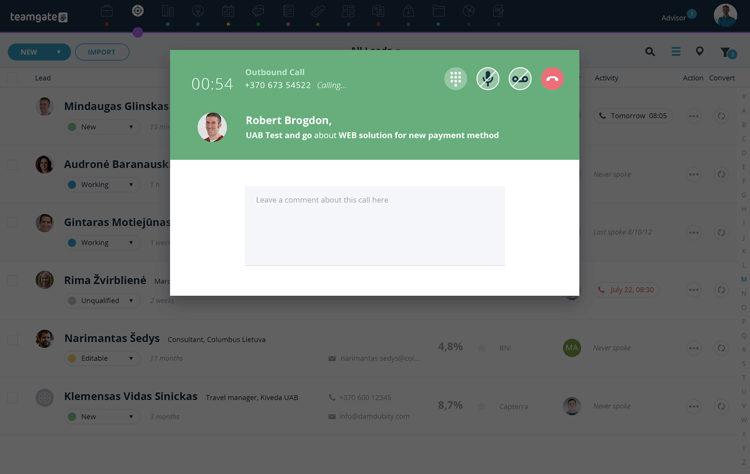
Teamgate crm UI displaying Twilio SmartDialer feature
Teamgate CRM’s Built-In Twilio SmartDialer

Teamgate CRM Overview

Teamgate CRM emerges as a frontrunner in the realm of CRM solutions with its sophisticated Twilio integration. Designed with a keen understanding of the needs of modern businesses, Teamgate offers a comprehensive suite of features that facilitate not just customer relationship management but a seamless, enriched customer communication experience. This platform distinguishes itself through its intuitive user interface, robust analytics capabilities, and flexible customization options, making it an ideal choice for businesses of all sizes seeking to optimize their customer engagement strategies.

Teamgate CRM Twilio Integration Highlights

A key aspect of Teamgate CRM’s offering is its deep integration with Twilio, also know as Teamgate’s SmartDialer. SmartDialer provides users with advanced communication tools directly within the CRM platform. This integration facilitates both inbound and outbound calls, SMS and text messages, as well as automated activity tracking and call recording within the CRM environment.
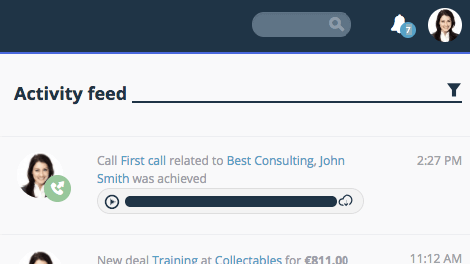
Teamgate UI displaying activity feed call completed and recording
Benefit from automatic activity tracking and call recordings

Teamgate CRM Twilio Integration Pros and Cons

Pros:

  • Deep, native integration with Twilio offers seamless communication capabilities.
  • Call recording for sales training, reviews and improvement.
  • Comprehensive analytics dashboard for tracking and optimizing completed calls.
  • Note-taking and script capabilities whilst on calls.
  • Highly customizable workflows to suit various business processes and needs.

Cons:

Why Choose Teamgate CRM?

Teamgate CRM is the preferred choice due to its effective blend of CRM functionality and communication integration. It provides a central platform for managing customer relationships and communication workflows, supported by the reliable and flexible capabilities of Twilio. This makes Teamgate CRM an invaluable tool for businesses looking to succeed in the digital marketplace.

By highlighting Teamgate CRM as a standard for excellence, we introduce the exploration of other CRM solutions that excel in integrating with Twilio, each offering unique benefits and features suited to various business needs and objectives.

teamgate crm awards
Teamgate CRM Awards

2. HubSpot CRM

hubspot twilio

Hubspot CRM Overview

HubSpot CRM is renowned for its user-friendly interface and comprehensive inbound marketing tools. Integrating Twilio, it offers streamlined communication solutions that enhance its CRM capabilities.

Hubspot CRM Twilio Integration Highlights

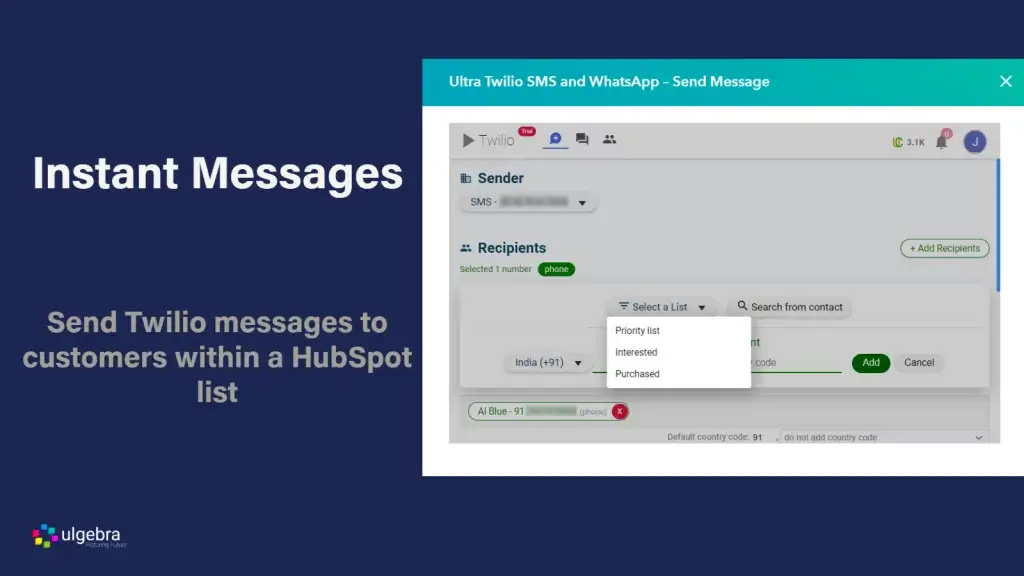
With Twilio, HubSpot users can send SMS messages and make calls directly from the CRM, automating these processes with HubSpot’s workflow tools for efficient, targeted customer outreach.

Hubspot CRM Twilio Integration Pros and Cons

HubSpot’s strength lies in its simplicity and integration with the broader HubSpot ecosystem. However, advanced features and customization may require higher-tier plans, making it less accessible for budget-conscious businesses.

3. Salesforce CRM
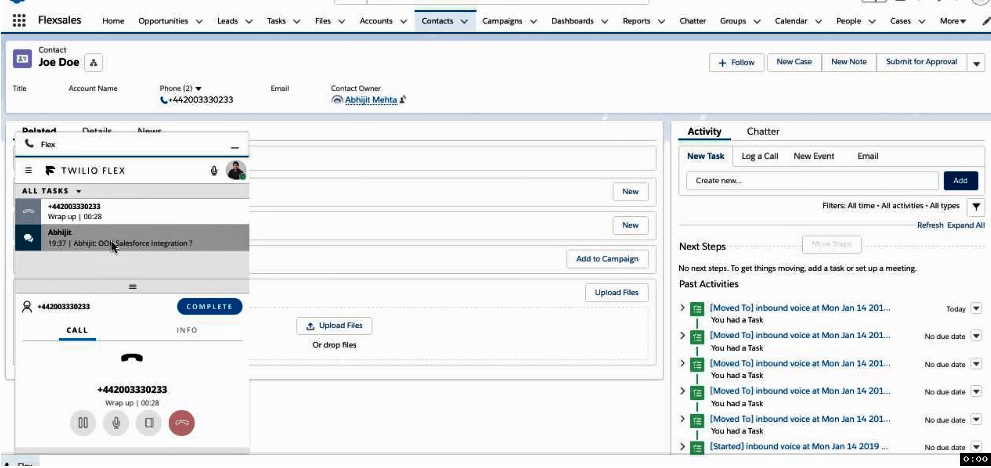
Integrate Salesforce with Twilio Flex

Salesforce CRM Overview

Salesforce, a titan in the CRM industry, offers a highly customizable platform that serves businesses of all sizes. Its integration with Twilio amplifies its already robust set of features, providing enhanced communication channels directly within its ecosystem.

In order to effectively manage this vast ecosystem and ensure its seamless operation, large corporations often require certified specialists, who are found by specialized Salesforce recruitment agencies.

Salesforce CRM Twilio Integration Highlights

Through Twilio, Salesforce CRM enables direct messaging, calls, and even video communications, embedding these functionalities within the sales and service clouds. This integration facilitates personalized customer interactions at scale, automated based on customer data and interaction history within the CRM.

Salesforce CRM Twilio Integration Pros and Cons

Pros include Salesforce’s extensive customization options and its vast ecosystem of integrations, with Twilio being a standout for communication. The main drawback is the complexity and cost, which can be prohibitive for smaller businesses or those with limited technical resources.

4. Zoho CRM

Zoho CRM Overview

Zoho CRM stands out for its affordability and versatility, catering to small and medium-sized enterprises with a comprehensive suite of CRM tools.

Zoho CRM Twilio Integration Highlights

The integration with Twilio enriches Zoho CRM with capabilities for sending SMS and making calls within the platform, enhancing the customer engagement experience.

Zoho CRM Twilio Integration Pros and Cons

Zoho CRM’s advantages include its cost-effectiveness and ease of use. However, businesses requiring more complex, scalable solutions may find its features somewhat limited.

zoho twilio
Zoho CRM’s outbound call interface

5. Freshsales

Freshsales Overview

Freshsales is part of the Freshworks ecosystem, offering a user-friendly CRM solution that focuses on bringing AI-driven insights to sales and marketing teams.

Freshsales Twilio Integration Highlights

Through its integration with Twilio, Freshsales enables businesses to automate their communication workflows, send bulk SMS messages, and make calls directly from the CRM, all while leveraging AI to analyze the effectiveness of these interactions.

Freshsales Twilio Integration Pros and Cons

Pros of Freshsales include its intuitive design, AI capabilities for lead scoring and insights, and effective Twilio integration for communication. The downside might be its reliance on the broader Freshworks ecosystem for full functionality, which could increase costs for some businesses.

6. Insightly CRM

Insightly CRM Overview

Insightly CRM stands out for its focus on project management alongside customer relationship management. It’s designed for businesses that look for an integrated approach to managing customer interactions, projects, and sales pipelines efficiently.

Insightly CRM Twilio Integration Highlights

With Twilio, Insightly users gain the ability to send personalized text messages and make calls directly from the CRM through a third party. This integration facilitates real-time communication with prospects and customers, ensuring that businesses can maintain a high level of engagement and responsiveness.

Insightly Twilio Integration Pros and Cons

Pros include its robust project management features, seamless integration with Twilio for enhanced communication, and a user-friendly interface. However, its focus on project management might not cater to all businesses, and additional third-party costs may be payable to set up the integration.

Comparison Table of CRM Systems with Twilio Integration

In the pursuit of selecting the ideal CRM platform that aligns with your business objectives and communication needs, a comparative glance at the key features, pricing, and pros and cons of each CRM with Twilio integration can offer invaluable insights. Below is a succinct comparison table that encapsulates the essence of our top picks for 2026, aiding in the decision-making process.

Table 1: CRM Platform Comparison

CRM Platform Key Features Pricing (Approx.) Pros Cons
Teamgate Seamless Twilio integration, user-friendly, sales pipeline management From $39.90/user/month Intuitive UI, robust integration Additional cost for dials and SMS
HubSpot Easy integration, inbound marketing tools Free to start; paid plans increase significantly with features and contacts User-friendly, great for inbound marketing Limited customization in lower-tier plans
Salesforce Comprehensive CRM capabilities, extensive ecosystem Starts at $25/user/month Highly customizable, vast app marketplace Can be complex and expensive for small business
Zoho CRM Extensive suite of applications, automation features Starts at $14/user/month Versatile, affordable Potentially overwhelming feature set
Freshsales AI-driven insights, communication automation Starts at $15/user/month AI capabilities, easy to use Twilio offering depends on Freshworks ecosystem selected
Insightly Project management, Twilio integration for communication Starts at $29/user/month Strong project management Third party required for integration.

Table 1 provides a snapshot of the dynamic capabilities and considerations associated with each CRM system. Whether your priority lies in affordability, ease of use, feature richness, or the depth of Twilio integration, this guide serves as a foundational step toward choosing a CRM platform that resonates with your business ethos and operational needs.
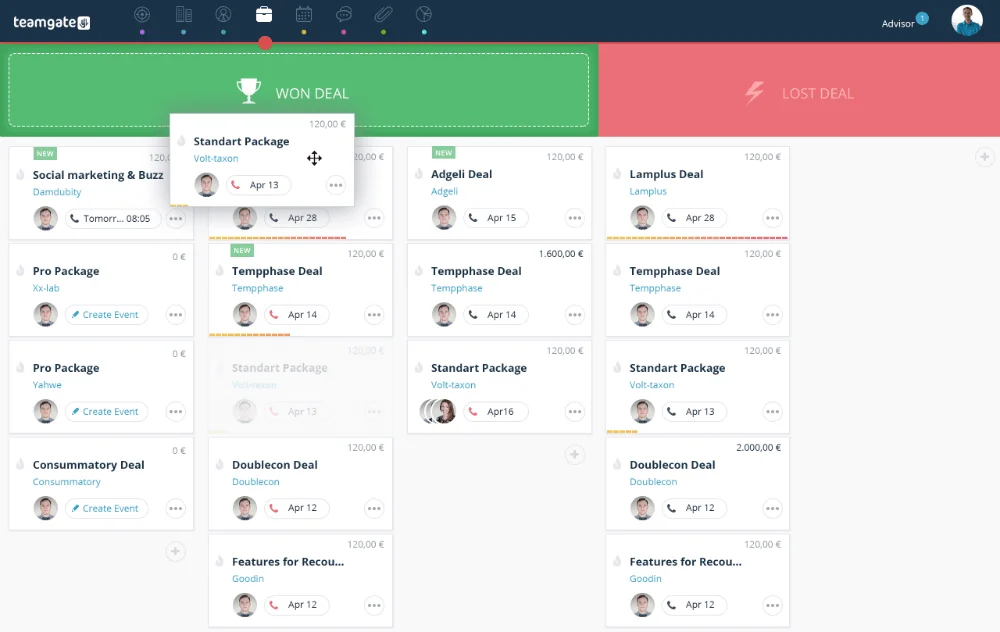
How to Choose the Best CRM with Twilio Integration

Selecting the best CRM with Twilio integration for your business in 2026 involves a careful evaluation of several key factors. Understanding the unique needs of your business, including size, industry, and specific customer engagement requirements, is crucial. A small startup might prioritize ease of use and cost-effectiveness, while a large enterprise may seek advanced customization and integration capabilities.

CRM Scalability

Scalability is another vital consideration. The chosen CRM should not only meet your current needs but also grow with your business. It should offer the flexibility to add more users, expand functionalities, and integrate with new tools as your business evolves.

Twilio Integration Ease

Integration ease plays a significant role in how smoothly you can implement and utilize Twilio within the CRM. Look for platforms that offer straightforward, well-documented integration processes, allowing you to leverage Twilio’s communication features without extensive technical support.

CRM Technical and Customer Support

Speaking of technical support, the availability of responsive, knowledgeable support teams cannot be overstated. Even with the most user-friendly systems, questions and issues will arise, particularly when integrating third-party services like Twilio. Excellent customer service ensures that these challenges are addressed swiftly, minimizing disruption to your business operations.

Choosing the best CRM with Twilio integration requires a balanced consideration of your business’s current and future needs, the system’s scalability and flexibility, ease of integration, and the quality of customer support. Making the right choice will empower your business to harness the full potential of CRM and Twilio integration, enhancing your customer engagement strategies and driving growth.

Conclusion

As we conclude our exploration of the 6 Best CRM with Twilio Integrations, it’s clear that the integration of sophisticated CRM systems with Twilio’s robust communication capabilities offers a powerful combination for businesses aiming to enhance their customer interaction strategies. These integrations pave the way for more personalized, efficient, and data-driven customer communications, ultimately contributing to improved customer satisfaction and loyalty.

In this digital era, where customer expectations are higher than ever, investing in the right CRM with Twilio integration can set your business apart. Among the options discussed, Teamgate CRM stands out as the preferred choice for its dedicated customer support, seamless integration, intuitive interface, and comprehensive features that cater to businesses seeking to maximize their customer engagement efforts.

We invite you to discover how Teamgate CRM can transform your business’s communication strategies and foster stronger, more meaningful customer relationships. Take the first step towards redefining your customer engagement by exploring Teamgate CRM for FREE today.

With the right tools in hand, the potential to elevate your customer interactions and drive your business forward is limitless.


FAQs: Twilio CRM Integration

What is Twilio, and why integrate it with CRM?

Twilio is a cloud communication platform that provides APIs for text messaging, voice calls, video calls, and email services. Integrating Twilio with a Customer Relationship Management (CRM) system enables businesses to streamline their communication processes, making it possible to engage with customers directly from the CRM interface. This integration enhances customer interaction through personalized and immediate communication, improving response times and customer satisfaction levels.

Can Twilio integration improve customer service?

Absolutely. Twilio integration can significantly enhance customer service by providing more immediate, personalized, and versatile communication options. For instance, service teams can use SMS or voice calls to quickly resolve issues, provide updates, or offer support, all documented within the CRM for continuity and analysis. This level of engagement ensures customers feel valued and supported, fostering loyalty and trust.

What to look for in a CRM with Twilio integration?

When evaluating a CRM for Twilio integration, consider the depth of integration, ease of use, and the features offered. The best integrations allow for automated workflows, personalized messaging based on customer data, and the ability to track and analyze communication effectiveness. Additionally, consider the CRM’s overall features, scalability, and how well it can adapt to your business’s growing and evolving needs.

How does Teamgate CRM stand out with its Twilio integration?

Teamgate CRM stands out due to its seamless integration with Twilio, which offers a wide range of communication tools directly within the CRM platform. This integration enables businesses to manage their sales pipeline, customer data, and communications efficiently in one place. Teamgate’s focus on ease of use, combined with the power of Twilio’s communication APIs, makes it an ideal choice for businesses looking to enhance their customer engagement strategies with advanced communication capabilities.

Is Twilio integration expensive?

The cost of Twilio integration can vary depending on the volume of communications and the specific services used. Twilio operates on a pay-as-you-go pricing model, which means businesses only pay for what they use without upfront costs. Integrating Twilio with a CRM system may require initial setup and customization efforts, but the return on investment, in terms of improved customer engagement and efficiency, can outweigh the costs for many businesses. It’s essential to evaluate the pricing in the context of the value it brings to your customer interaction strategies.

Your business either has customer relationship software (CRM) or could benefit from implementing a program. Consumers today expect a frictionless experience when they purchase products and services. CRM allows businesses of any size to improve their customer service and streamline their workflows. It is also invaluable if your company has remote workers who need access to a central data hub.

The CRM market is expanding rapidly and is expected to grow by 14.27% between 2020 and 2027, which demonstrates customer demand for an enhanced service experience. To meet this demand, the industry has produced a number of superior CRM software programs.

This article provides an in-depth look at how customer relationship management (CRM) software can significantly improve your business operations. You’ll discover the benefits of CRM, its key role in enhancing customer experience and streamlining workflow, and explore eight top CRM platforms that could be ideal for your needs.

Key Takeaways

  • CRM software centralizes customer information, offers advanced analytics, boosts customer retention, automates repetitive tasks, and enhances customer segmentation.
  • The CRM platforms discussed include Teamgate, Salesforce, Pipedrive, Nutshell, Hubspot, Monday Sales CRM, ClickUp, and Capsule CRM.
  • The choice of CRM should reflect your company’s unique needs and requirements. It’s crucial to understand why you need a CRM, conduct thorough research, test customer support, and choose a solution that solves your specific business challenges.
  • Teamgate is a versatile CRM solution that caters to businesses of all sizes. It is lauded for its advanced features, affordability, and a customer-centric approach.

Contents

The Benefits of Sales CRM Software

Implementing a Sales CRM system offers numerous advantages for your business. Here are the key benefits:

Centralized Customer Information

A CRM system centralizes all vital customer information into a single, accessible database. This ensures that every department and location can view the progress of a customer’s current transaction and their complete history, improving collaboration and customer service.

Advanced Sales Analytics

With advanced sales analytics capabilities, CRM software transforms vast amounts of client data into actionable insights and informative metrics. These include bounce rates, click-through rates, and demographic information, enabling data-driven decision-making.

Increased Customer Retention

Retaining existing customers is more cost-effective than acquiring new ones. CRMs facilitate seamless data sharing, allowing employees to address issues proactively and alerting staff when it’s time to engage clients for product updates or closing sales, thus enhancing customer retention.

Sales Automation

A robust CRM system automates repetitive and error-prone tasks such as sending sales emails or creating service tickets. This allows your staff to focus on higher-value activities, like providing excellent customer service, ultimately boosting productivity.

Improved Customer Segmentation

CRM software enables precise customer segmentation, allowing you to tailor communications based on demographic and interest groups. Personalized emails and calls are more effective than a generic approach, leading to better customer engagement and satisfaction.

A CRM system empowers your business to focus on sales and service, enhancing customer satisfaction, saving time, reducing labor costs, and increasing profits.

8 Top Sales CRM Choices

Teamgate CRM

software crm

Teamgate CRM is tailored for small-to-medium sized sales organizations, offering a comprehensive platform for sales and lead management. It excels in streamlining sales processes through its efficiency, ease of use, and robust analytical insights.

With Teamgate, you can conveniently and effectively manage your contacts. The platform centralizes email and live chat communication, and allows you to import your contact database from multiple sources. Additionally, Teamgate enables personalization of your CRM profile with custom fields and tags.

Teamgate CRM Pricing

Teamgate has three subscription offerings for your scaling business:

  • Starter: Free for up to 2 users.
  • Team Plan: $39.90 per user, per month
  • Growth Plan: $59.90 per user, per month

Onboarding and training is included in the monthly subscription fee.

Teamgate CRM Reviews

Critics praise Teamgate for it’s award-winning value-for-money, exceptional customer service, and ease of use, frequently highlighting its unrivaled out-of-the-box analytics and sales insights.

Salesforce CRM

Salesforce CRM dashboard

Salesforce is one of the best-known CRM programs. It offers various CRM products that focus on sales and marketing efforts. Depending on which package you choose, you’ll be able to manage your accounts, contacts, and leads, integrate your email, and automate various tasks.

Salesforce CRM Pricing

  • Essential: $25 per user per month
  • Professional: $80 per user per month
  • Enterprise: $165 per user per month
  • Unlimited: $330 per user per month.
  • Einstein 1 Sales: $500 per user per month.

Other add-ons and onboarding are also available for additional costs.

Salesforce CRM Reviews

Whilst many customers and prospects highlight concerns around Salesforce pricing and complexity, once up and running, customers are often relatively satisfied.

Pipedrive CRM

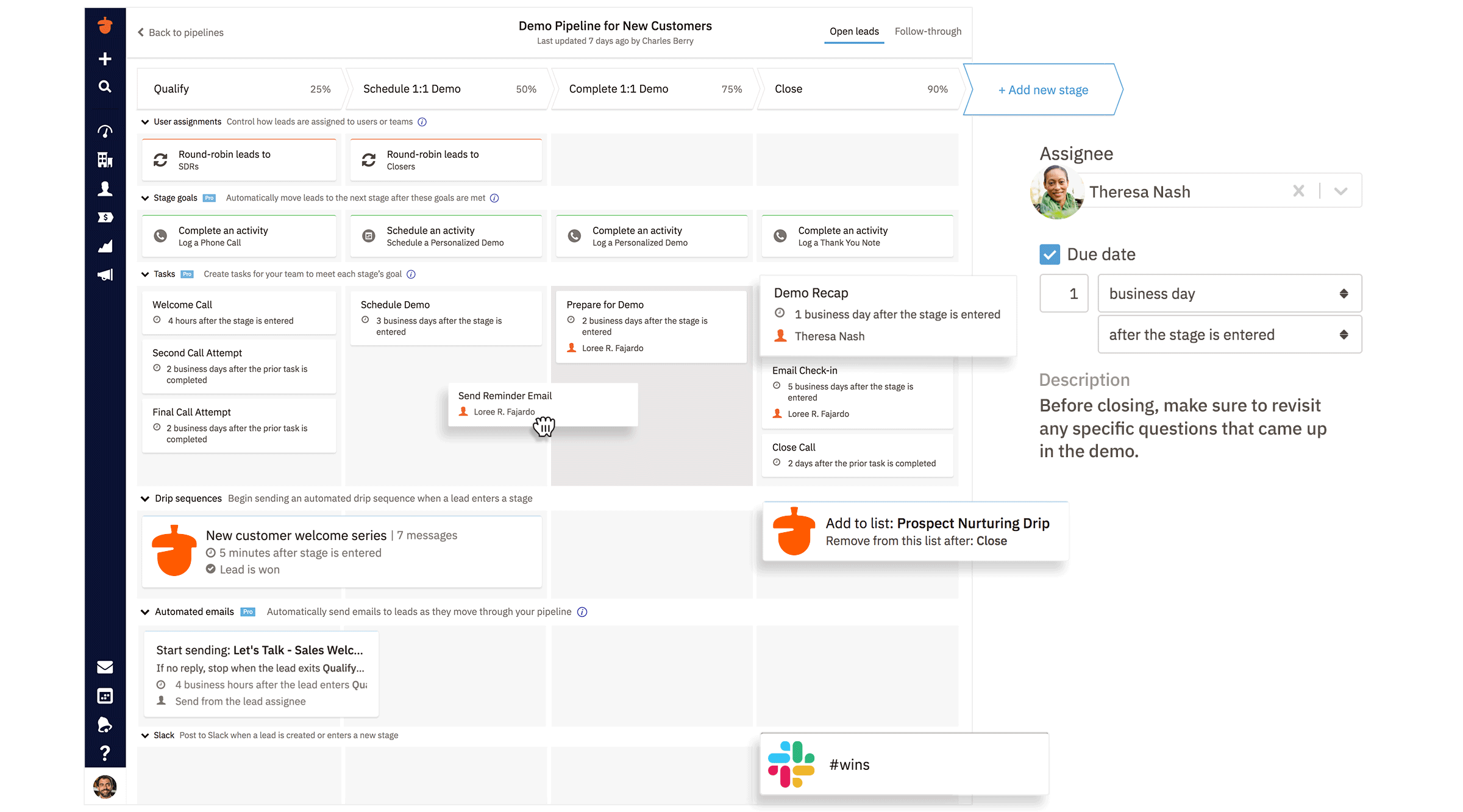
pipedrive interface

This popular CRM program allows you to visualize your sales process and close more deals. The software has limited customization options, which can result in a more effective workflow. Pipedrive lets you add deals, deal value, win probability, and the expected close date. You can organize and track this data through your pipeline states. Deals on the verge of going cold are color-cued to alert your staff to take action.

Pipedrive CRM Pricing

  • Essential: $24 per user per month
  • Advanced: $39 per user per month
  • Professional: $64 per user per month
  • Power: $79 per user per month
  • Enterprise: $129 per user per month.

Pipedrive CRM Reviews

Pipedrive is an affordable and popular option within the sales CRM realm. Many existing customers rave about it’s ease of use, and affordability, although experiencing frequent down-time and a lack of customer support.

Nutshell CRM CRM

nutshell interface

Nutshell CRM promises easy implementation with no IT department necessary. It offers powerful automation, unlimited data storage, no user caps, and no contract service. The company also emphasizes its customer service.

Nutshell CRM Pricing

  • Nutshell Foundation Plan: $19 per month per user
  • Nutshell Pro: $49 per user per month
  • Nutshell Power AI: $59 per user per month
  • Nutshell Enterprise: $79 per user per month.

Nutshell CRM Reviews

Nutshell strengths include its affordability and ability to pay month to month with no contract. This strength plays well to start-ups and SMBs, however questions remain about scalability of the platform long-term.

Hubspot CRM

hubspot interface

Hubspot is another popular entry in the CRM field, offering a number of important features, including data sync, programmable automation, data quality automation, SEO recommendations, and website themes.

Hubspot CRM Pricing

  • Sales Hub Starter: $20 per user per month
  • Sales Hub Professional: $100 per user per month
  • Sales Hub Enterprise: $150 per user per month

Hubspot CRM Critics

Hubspot is a sophisticated program that earns high marks from users needing a sales and marketing tool. Whilst offering a free CRM platform, buyers are to be aware that pricey add-ons are a necessity to gain true CRM functionality.

Monday Sales CRM

monday interface

Monday Sales CRM offers a centralized client data hub and is customizable to your sales cycles. It also offers automation and instant overviews of transactions and sales histories.

Monday CRM Pricing

Monday CRM pricing includes a minimum of three seats. Pricing below includes price per seat and minimum total spend per month:

  • Basic Plan: $10 per user per month, minimum spend $30 per month
  • Standard: $15 per user per month, minimum spend $45 per month
  • Pro: $25 per user per month, minimum spend $75 per month
  • Enterprise – negotiated with sales team

Monday CRM Critics

Monday Sales CRM shines for small businesses with a project management focus with a modest budget.

ClickUp

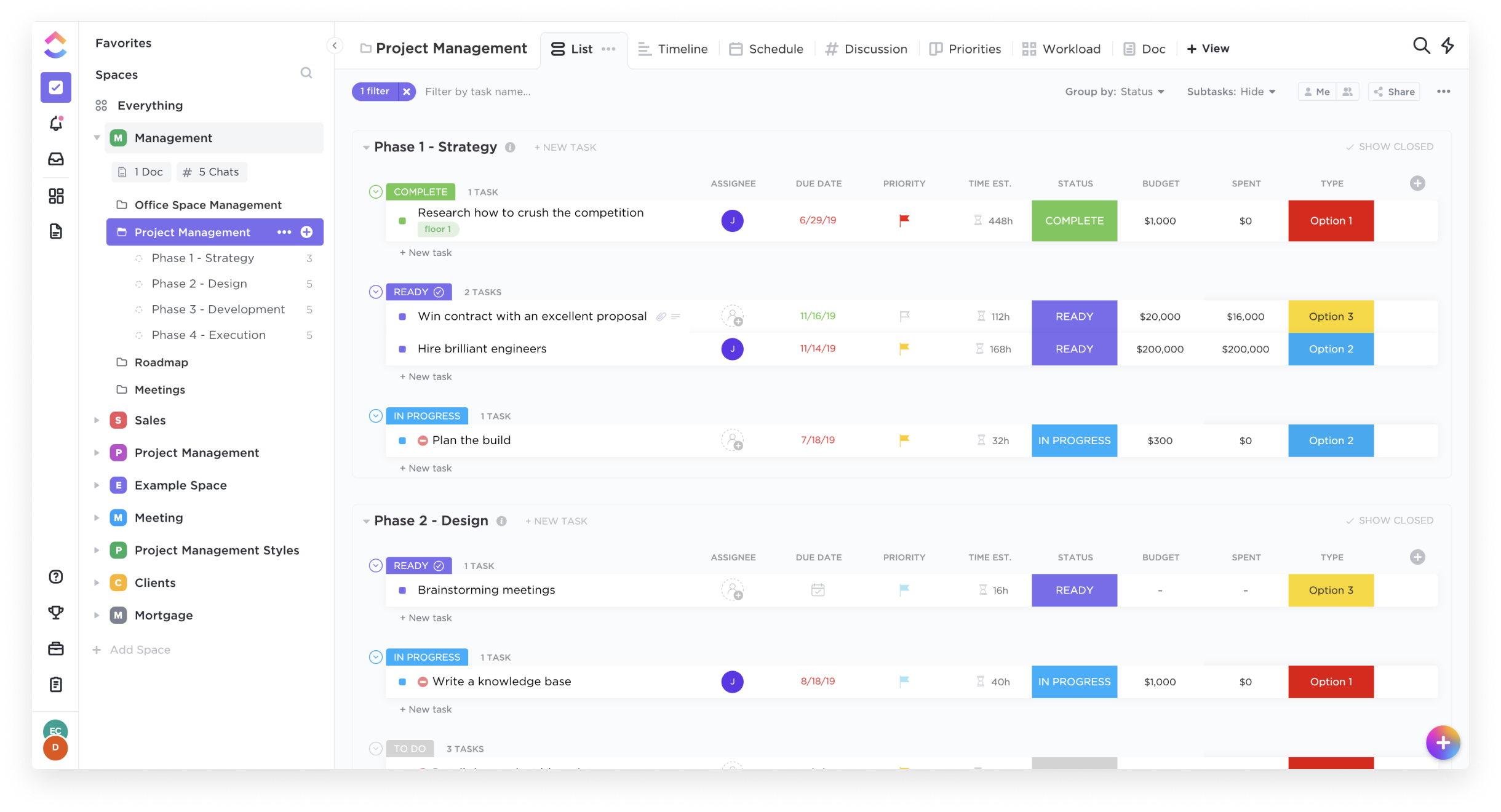
clickup interface

ClickUp is another well-reviewed option for your CRM needs at a very basic level. Clickups primary focus is on assisting teams to collaborate on projects and tasks, however these tools can be re-purposed to provide a basic CRM functionality. Thus, ClickUp is a universal platform. The one for project management and teamwork. It offers flexible pricing plans for different types of businesses. Each plan offers tools to improve collaboration and productivity. If you want to learn more about pricing options, check out ClickUp Pricing guide. You will find a detailed breakdown of all plans and their benefits.

Clickup Pricing

  • Pricing: Free Forever option capped at 100mb of storage
  • Unlimited: $10 per user per month,
  • Business: $19 per user per month
  • Enterprise: Negotiated by the sales team

Clickup Critics

ClickUp offers truly affordable options for small to mid-size businesses, but be weary of the high learning curve and limited CRM feature set.

If ClickUp feels overwhelming, especially for non-technical users, there are ClickUp alternatives that streamline the CRM experience without the complexity

Capsule CRM

Capsule is an online CRM that contains the most important CRM features but does away with those that are less essential. They provide a streamlined service that promises 24/7 access to the sales pipeline dashboard, as well as calendar and task management.

Capsule CRM Pricing

  • Starter: $21 per user per month
  • Growth: $38 per user per month
  • Advanced: $60 per user per month
  • Ultimate: $75 per user per month

Capsule CRM Critics

Capsule is an affordable CRM that allows you online access to many of the key features you want in a CRM with limitations on customization, automation and analytics.

How to Find the Right CRM

Your choice of CRM should reflect your company’s unique needs and requirements to operate efficienctly. Whilst many CRMs offer unique and sometimes over-the-top features, you should only pay for solutions relevant to your business problems. Whilst pricing is a key factor, of course, you still do not have to pay outrageous rates to get an effective CRM program. The following are some important and recommended stages in finding the right CRM for your business needs:

Understand Your ‘Why’

First understand your current sales process and why you need a CRM. Is there factors you need to improve? Is there processes that needs to change? Can you even answer those questions without an effective CRM?

Secondly, will the CRM you are considering assist with your why? If the solution does not fix the problem, continue to look elsewhere.

Do Your Research

Research the CRMs on the market. Whether its reading blog articles, customer reviews or testing the CRM with a free trial, ensure you have all of the information before making your decision.

Test the Customer Support

If you are able to start a free trial – reach out to customer support and ask for help. Do you get help straight away? Do you speak with a human? Are they responsive? How willing are they to help? These are all factors which should impact your decision-making criteria.

The Teamgate Advantage

The CRM field is crowded with good and sometimes great programs. But most of these programs work best for only certain segments of business.  Teamgate offers award-winning CRM solutions that are technologically advanced, affordable, and perfect for any size company. At Teamgate, we work with you to streamline your sales process and improve your data access and communications hub. We pride ourselves on putting the customer first, regardless of their business size because as you grow, we grow.
To get started for FREE today, visit Teamgate.com

FAQs: Best Sales CRM

  • Which CRM is best to use in analyzing sales?
    • Teamgate has won multiple awards in part for its intuitive tracking and analysis of your sales team’s productivity. Salesforce and Pipedrive are also given good marks in this category.
  • What is sales analysis software?
    • Sales analysis software determines sales patterns, individual performance, geographic and demographic influences, and other factors that impact your company’s success.
  • How are analytics used in sales?
    • Analytics should inform all of your sales decisions, including which products to produce, sell, discount, and retire. It also gives you clear insight into the productivity level of your sales team and individual members. Analytics takes the guesswork out of your sales program.
  • What is the best tool for data analytics?
    • A CRM with inlcuded analytics is definitely the best tool for businesses of all sizes to strengthen and streamline their sales process. Due to it being co-located with your sales information and data, users are able to access in analytics in real time.
  • What is the best sales CRM for small businesses?
    • Several CRM platforms cater to small businesses. Teamgate and Monday Sales CRM are known for their modest cost and effectiveness, while ClickUp offers basic CRM functionality at affordable pricing. However, the best choice depends on your specific needs and budget.
  • What should I look for in the best sales CRM?
    • The best sales CRM should offer centralized customer information, advanced analytics, customer retention strategies, automation, and effective customer segmentation. It should also have excellent customer service and be user-friendly.
  • Are there any free options for the best sales CRM?
    • Yes, some CRM platforms offer free versions with basic features, such as HubSpot and ClickUp. However, these may lack some functionalities compared to paid versions, and add-ons may be necessary for complete CRM capabilities.
  • What is the best sales CRM with advanced analytics?
    • Most CRM platforms come with advanced analytics. Teamgate is highly rated for its in-depth analytical insights, making it a strong contender for the best sales CRM in terms of data analysis.
  • How does automation factor into the best sales CRM?
    • Automation is a significant feature of the best sales CRM as it allows staff to avoid repetitive tasks, focus on customer service, and streamline workflows. Platforms like Nutshell and Teamgate excel in providing powerful automation features.
  • Which is the best sales CRM for ease of use and customer service?
    • Teamgate ranks high in terms of ease of use and customer service. It also provides out-of-the-box analytics and sales insights. However, the best CRM will depend on your specific needs and preferences.
  • How does the best sales CRM aid in customer retention?
    • The best sales CRM aids in customer retention by making data sharing easy, which enables your team to identify and rectify issues before they escalate. CRM platforms like Salesforce and Teamgate have features designed to enhance customer retention.