If you want faster follow-ups, cleaner call logging, and every SMS and call tied to a real deal, you need your CRM and Twilio working as one system, not as separate tools.
In 2026, the best CRM platforms with Twilio integration help you:
-
Automatically track calls and activities
-
Improve follow-up discipline and reduce missed opportunities
-
Use communication data to improve coaching and forecasting
Twilio provides the communication layer. The CRM determines whether those interactions actually move deals forward.
Teamgate is a sales operating system for teams who want disciplined selling, real insight, and a CRM their reps actually use. When Twilio is built directly into that operating rhythm, communication becomes structured, measurable, and revenue-focused, not just another channel to manage.
In this guide, we compare the 6 best CRM systems with Twilio integration in 2026, covering features, pricing, and what type of team each platform fits best.
Benefits of Twilio Integration in CRM Systems
Enhanced Communication Channels
Integrating Twilio with your CRM breaks down communication silos by enabling SMS, voice, WhatsApp, and email conversations directly within your dashboard. Customers can connect through their preferred channels while your team tracks every interaction in one unified timeline.
That means:
-
Every interaction is visible to reps and managers
-
No more scattered call notes or lost SMS threads
-
Follow-ups can be triggered automatically
For instance, a Twilio WhatsApp Business integration allows your CRM to send appointment reminders, marketing campaigns, or personalized support messages, all automated and fully compliant.
The real advantage isn’t just multi-channel messaging. It’s structured communication tied to a live pipeline, so conversations actually advance deals instead of happening in isolation.
When communication activity is automatically logged and attached to deals, managers gain visibility into deal health and next-step coverage, turning conversations into measurable progress.
Sales Training and Feedback
AI-Driven Insights & Analytics
In 2026, CRM-Twilio integrations aren’t just about communication — they’re about intelligence. Each call, message, and interaction is analyzed for sentiment, tone, and responsiveness using Twilio’s Voice Intelligence and native CRM analytics.
This data empowers teams to:
-
Identify high-value leads faster.
-
Measure campaign performance across channels.
-
Refine messaging for greater customer impact.
By combining CRM analytics with Twilio’s communication data, businesses gain a 360° view of customer behavior, enabling smarter decision-making and predictive engagement strategies.
6 Best CRM with Twilio Integration
1. Teamgate CRM
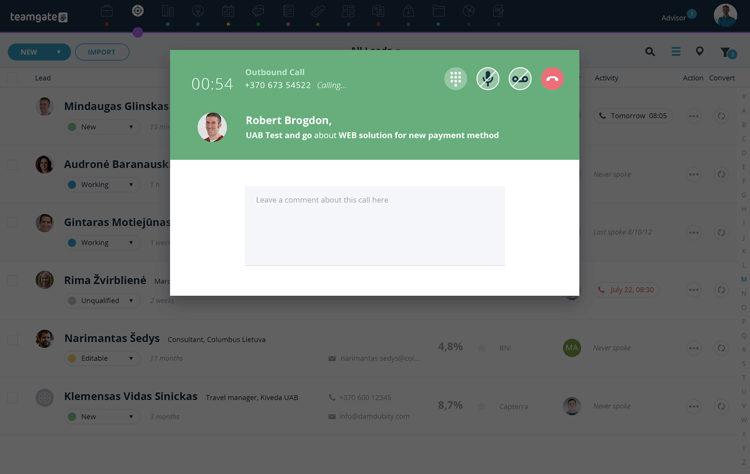
Teamgate CRM Overview
Teamgate CRM emerges as a frontrunner in the realm of CRM solutions with its sophisticated Twilio integration. Designed with a keen understanding of the needs of modern businesses, Teamgate offers a comprehensive suite of features that facilitate not just customer relationship management but a seamless, enriched customer communication experience. This platform distinguishes itself through its intuitive user interface, robust analytics capabilities, and flexible customization options, making it an ideal choice for businesses of all sizes seeking to optimize their customer engagement strategies.
Teamgate CRM Twilio Integration Highlights
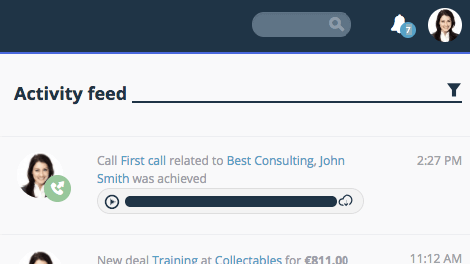
A key aspect of Teamgate CRM’s offering is its deep integration with Twilio, also know as Teamgate’s SmartDialer. SmartDialer provides users with advanced communication tools directly within the CRM platform. This integration facilitates both inbound and outbound calls, SMS and text messages, as well as automated activity tracking and call recording within the CRM environment.
Teamgate CRM Twilio Integration Pros and Cons
Pros:
- Deep, native integration with Twilio offers seamless communication capabilities.
- Call recording for sales training, reviews and improvement.
- Comprehensive analytics dashboard for tracking and optimizing completed calls.
- Note-taking and script capabilities whilst on calls.
- Highly customizable workflows to suit various business processes and needs.
Cons:
- Whilst low, additional costs for calls and SMS are issued through Twilio, in addition to your CRM costs.
- Not available on Teamgate’s FREE subscription plan.
Why Choose Teamgate CRM?
2. HubSpot CRM
Hubspot CRM Overview
HubSpot CRM is renowned for its user-friendly interface and comprehensive inbound marketing tools. Integrating Twilio, it offers streamlined communication solutions that enhance its CRM capabilities.
Hubspot CRM Twilio Integration Highlights
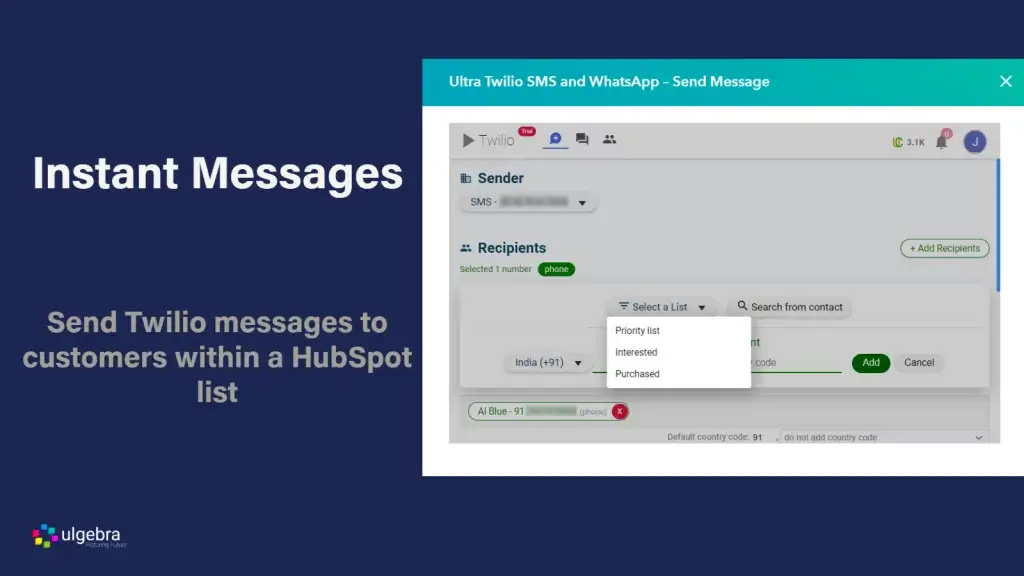
With Twilio, HubSpot users can send SMS messages and make calls directly from the CRM, automating these processes with HubSpot’s workflow tools for efficient, targeted customer outreach.
Hubspot CRM Twilio Integration Pros and Cons
HubSpot’s strength lies in its simplicity and integration with the broader HubSpot ecosystem. However, advanced features and customization may require higher-tier plans, making it less accessible for budget-conscious businesses.
3. Salesforce CRM
Salesforce CRM Overview
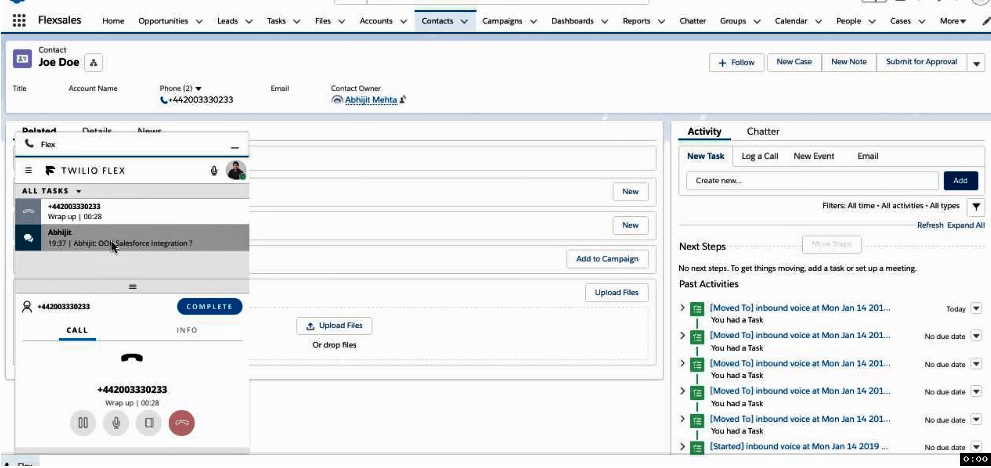
Salesforce, a titan in the CRM industry, offers a highly customizable platform that serves businesses of all sizes. Its integration with Twilio amplifies its already robust set of features, providing enhanced communication channels directly within its ecosystem.
Your business either has customer relationship software (CRM) or could benefit from implementing a program. Consumers today expect a frictionless experience when they purchase products and services. CRM allows businesses of any size to improve their customer service and streamline their workflows. It is also invaluable if your company has remote workers who need access to a central data hub.
The CRM market is expanding rapidly and is expected to grow by 14.27% between 2020 and 2027, which demonstrates customer demand for an enhanced service experience. To meet this demand, the industry has produced a number of superior CRM software programs.
This article provides an in-depth look at how customer relationship management (CRM) software can significantly improve your business operations. You’ll discover the benefits of CRM, its key role in enhancing customer experience and streamlining workflow, and explore eight top CRM platforms that could be ideal for your needs.
Key Takeaways
- CRM software centralizes customer information, offers advanced analytics, boosts customer retention, automates repetitive tasks, and enhances customer segmentation.
- The CRM platforms discussed include Teamgate, Salesforce, Pipedrive, Nutshell, Hubspot, Monday Sales CRM, ClickUp, and Capsule CRM.
- The choice of CRM should reflect your company’s unique needs and requirements. It’s crucial to understand why you need a CRM, conduct thorough research, test customer support, and choose a solution that solves your specific business challenges.
- Teamgate is a versatile CRM solution that caters to businesses of all sizes. It is lauded for its advanced features, affordability, and a customer-centric approach.
Contents
- The Benefits of Sales CRM Software
- 8 Top Sales CRM Choices
- How to Find the Right CRM
- The Teamgate Advantage
- FAQs: Best Sales CRM
The Benefits of Sales CRM Software
Implementing a Sales CRM system offers numerous advantages for your business. Here are the key benefits:
Centralized Customer Information
A CRM system centralizes all vital customer information into a single, accessible database. This ensures that every department and location can view the progress of a customer’s current transaction and their complete history, improving collaboration and customer service. For organizations managing data across multiple sources, DreamFactory provides a self-hosted platform that offers governed API access to any data source, enabling seamless integration of diverse customer data into your CRM ecosystem.
Advanced Sales Analytics
With advanced sales analytics capabilities, CRM software transforms vast amounts of client data into actionable insights and informative metrics. These include bounce rates, click-through rates, and demographic information, enabling data-driven decision-making.
Increased Customer Retention
Retaining existing customers is more cost-effective than acquiring new ones. CRMs facilitate seamless data sharing, allowing employees to address issues proactively and alerting staff when it’s time to engage clients for product updates or closing sales, thus enhancing customer retention.
Sales Automation
A robust CRM system automates repetitive and error-prone tasks such as sending sales emails or creating service tickets. This allows your staff to focus on higher-value activities, like providing excellent customer service, ultimately boosting productivity.
Improved Customer Segmentation
CRM software enables precise customer segmentation, allowing you to tailor communications based on demographic and interest groups. Personalized emails and calls are more effective than a generic approach, leading to better customer engagement and satisfaction. For sales teams looking to take personalization further, Sendspark is an AI-powered video personalization platform that lets you record a single video and automatically generate thousands of individually personalized videos—each addressed to a specific prospect by name and company—which can be distributed through your CRM and email platforms.
A CRM system empowers your business to focus on sales and service, enhancing customer satisfaction, saving time, reducing labor costs, and increasing profits.
8 Top Sales CRM Choices
Teamgate CRM
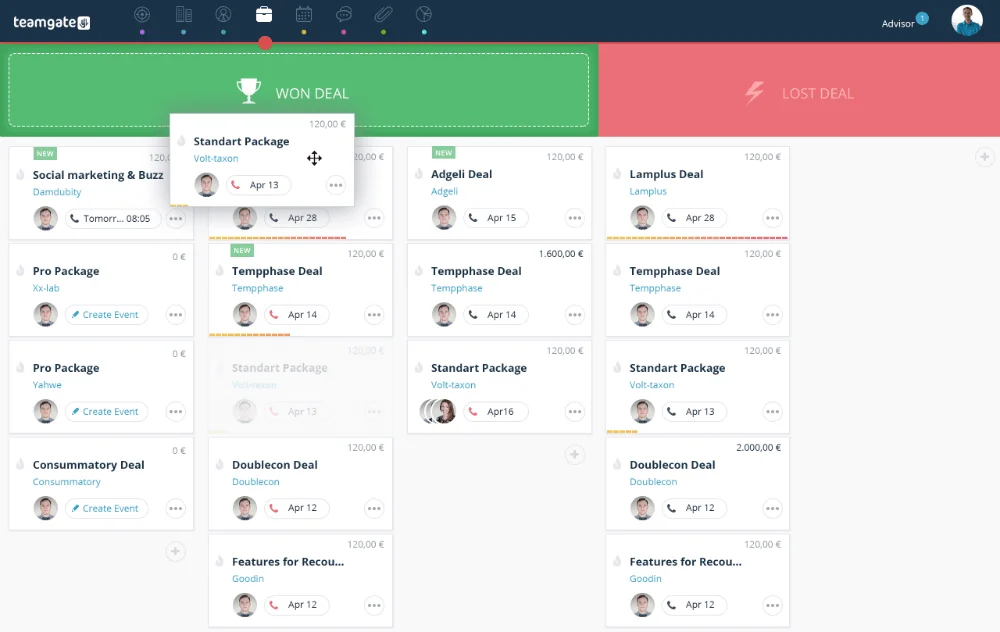
Teamgate CRM is tailored for small-to-medium sized sales organizations, offering a comprehensive platform for sales and lead management. It excels in streamlining sales processes through its efficiency, ease of use, and robust analytical insights.
With Teamgate, you can conveniently and effectively manage your contacts. The platform centralizes email and live chat communication, and allows you to import your contact database from multiple sources. Additionally, Teamgate enables personalization of your CRM profile with custom fields and tags.
Teamgate CRM Pricing
Teamgate has three subscription offerings for your scaling business:
- Starter: Free for up to 2 users.
- Team Plan: $39.90 per user, per month
- Growth Plan: $59.90 per user, per month
Onboarding and training is included in the monthly subscription fee.
Teamgate CRM Reviews
Critics praise Teamgate for it’s award-winning value-for-money, exceptional customer service, and ease of use, frequently highlighting its unrivaled out-of-the-box analytics and sales insights.
Salesforce CRM

Salesforce is one of the best-known CRM programs. It offers various CRM products that focus on sales and marketing efforts. Depending on which package you choose, you’ll be able to manage your accounts, contacts, and leads, integrate your email, and automate various tasks.
Salesforce CRM Pricing
- Essential: $25 per user per month
- Professional: $80 per user per month
- Enterprise: $165 per user per month
- Unlimited: $330 per user per month.
- Einstein 1 Sales: $500 per user per month.
Other add-ons and onboarding are also available for additional costs.
Salesforce CRM Reviews
Whilst many customers and prospects highlight concerns around Salesforce pricing and complexity, once up and running, customers are often relatively satisfied.
Pipedrive CRM

Pipedrive CRM Pricing
- Essential: $24 per user per month
- Advanced: $39 per user per month
- Professional: $64 per user per month
- Power: $79 per user per month
- Enterprise: $129 per user per month.
Pipedrive CRM Reviews
Pipedrive is an affordable and popular option within the sales CRM realm. Many existing customers rave about it’s ease of use, and affordability, although experiencing frequent down-time and a lack of customer support.
Nutshell CRM CRM
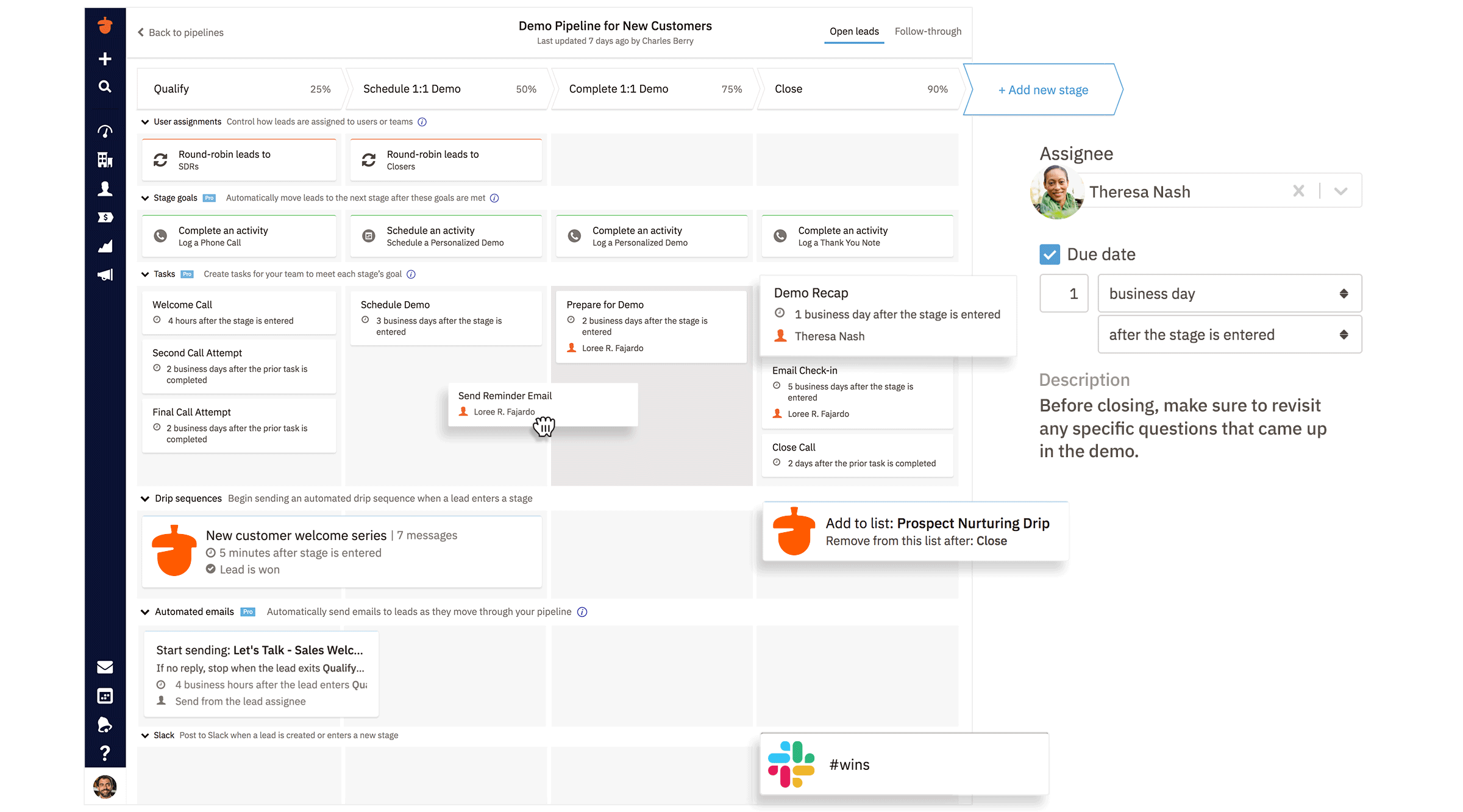
Nutshell CRM promises easy implementation with no IT department necessary. It offers powerful automation, unlimited data storage, no user caps, and no contract service. The company also emphasizes its customer service.
Nutshell CRM Pricing
- Nutshell Foundation Plan: $19 per month per user
- Nutshell Pro: $49 per user per month
- Nutshell Power AI: $59 per user per month
- Nutshell Enterprise: $79 per user per month.
Nutshell CRM Reviews
Nutshell strengths include its affordability and ability to pay month to month with no contract. This strength plays well to start-ups and SMBs, however questions remain about scalability of the platform long-term.
Hubspot CRM

Hubspot is another popular entry in the CRM field, offering a number of important features, including data sync, programmable automation, data quality automation, SEO recommendations, and website themes.
Hubspot CRM Pricing
- Sales Hub Starter: $20 per user per month
- Sales Hub Professional: $100 per user per month
- Sales Hub Enterprise: $150 per user per month
Hubspot CRM Critics
Hubspot is a sophisticated program that earns high marks from users needing a sales and marketing tool. Whilst offering a free CRM platform, buyers are to be aware that pricey add-ons are a necessity to gain true CRM functionality.
Monday Sales CRM

Monday Sales CRM offers a centralized client data hub and is customizable to your sales cycles. It also offers automation and instant overviews of transactions and sales histories.
Monday CRM Pricing
Monday CRM pricing includes a minimum of three seats. Pricing below includes price per seat and minimum total spend per month:
- Basic Plan: $10 per user per month, minimum spend $30 per month
- Standard: $15 per user per month, minimum spend $45 per month
- Pro: $25 per user per month, minimum spend $75 per month
- Enterprise – negotiated with sales team
Monday CRM Critics
Monday Sales CRM shines for small businesses with a project management focus with a modest budget.
ClickUp
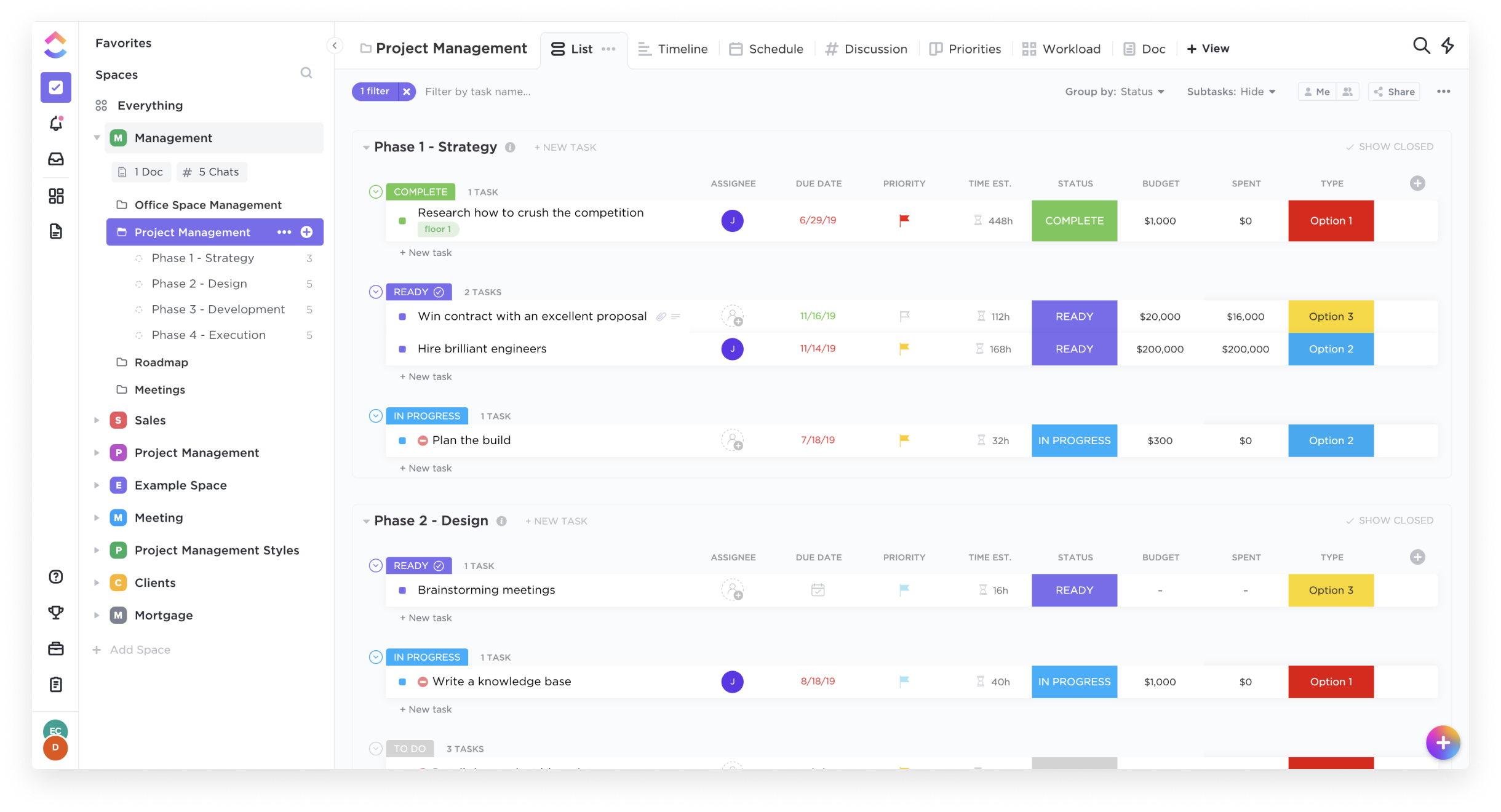
ClickUp is another well-reviewed option for your CRM needs at a very basic level. Clickups primary focus is on assisting teams to collaborate on projects and tasks, however these tools can be re-purposed to provide a basic CRM functionality. Thus, ClickUp is a universal platform. The one for project management and teamwork. It offers flexible pricing plans for different types of businesses. Each plan offers tools to improve collaboration and productivity. If you want to learn more about pricing options, check out ClickUp Pricing guide. You will find a detailed breakdown of all plans and their benefits.
Clickup Pricing
- Pricing: Free Forever option capped at 100mb of storage
- Unlimited: $10 per user per month,
- Business: $19 per user per month
- Enterprise: Negotiated by the sales team
Clickup Critics
ClickUp offers truly affordable options for small to mid-size businesses, but be weary of the high learning curve and limited CRM feature set.
If ClickUp feels overwhelming, especially for non-technical users, there are ClickUp alternatives that streamline the CRM experience without the complexity
Capsule CRM
Capsule is an online CRM that contains the most important CRM features but does away with those that are less essential. They provide a streamlined service that promises 24/7 access to the sales pipeline dashboard, as well as calendar and task management.
Capsule CRM Pricing
- Starter: $21 per user per month
- Growth: $38 per user per month
- Advanced: $60 per user per month
- Ultimate: $75 per user per month
Capsule CRM Critics
Capsule is an affordable CRM that allows you online access to many of the key features you want in a CRM with limitations on customization, automation and analytics.
How to Find the Right CRM
Your choice of CRM should reflect your company’s unique needs and requirements to operate efficienctly. Whilst many CRMs offer unique and sometimes over-the-top features, you should only pay for solutions relevant to your business problems. Whilst pricing is a key factor, of course, you still do not have to pay outrageous rates to get an effective CRM program. The following are some important and recommended stages in finding the right CRM for your business needs:
Understand Your ‘Why’
First understand your current sales process and why you need a CRM. Is there factors you need to improve? Is there processes that needs to change? Can you even answer those questions without an effective CRM?
Secondly, will the CRM you are considering assist with your why? If the solution does not fix the problem, continue to look elsewhere.
Do Your Research
Research the CRMs on the market. Whether its reading blog articles, customer reviews or testing the CRM with a free trial, ensure you have all of the information before making your decision.
Test the Customer Support
If you are able to start a free trial – reach out to customer support and ask for help. Do you get help straight away? Do you speak with a human? Are they responsive? How willing are they to help? These are all factors which should impact your decision-making criteria.
The Teamgate Advantage
FAQs: Best Sales CRM
- Which CRM is best to use in analyzing sales?
- Teamgate has won multiple awards in part for its intuitive tracking and analysis of your sales team’s productivity. Salesforce and Pipedrive are also given good marks in this category.
- What is sales analysis software?
- Sales analysis software determines sales patterns, individual performance, geographic and demographic influences, and other factors that impact your company’s success.
- How are analytics used in sales?
- Analytics should inform all of your sales decisions, including which products to produce, sell, discount, and retire. It also gives you clear insight into the productivity level of your sales team and individual members. Analytics takes the guesswork out of your sales program.
- What is the best tool for data analytics?
- A CRM with inlcuded analytics is definitely the best tool for businesses of all sizes to strengthen and streamline their sales process. Due to it being co-located with your sales information and data, users are able to access in analytics in real time.
- What is the best sales CRM for small businesses?
- Several CRM platforms cater to small businesses. Teamgate and Monday Sales CRM are known for their modest cost and effectiveness, while ClickUp offers basic CRM functionality at affordable pricing. However, the best choice depends on your specific needs and budget.
- What should I look for in the best sales CRM?
- The best sales CRM should offer centralized customer information, advanced analytics, customer retention strategies, automation, and effective customer segmentation. It should also have excellent customer service and be user-friendly.
- Are there any free options for the best sales CRM?
- Yes, some CRM platforms offer free versions with basic features, such as HubSpot and ClickUp. However, these may lack some functionalities compared to paid versions, and add-ons may be necessary for complete CRM capabilities.
- What is the best sales CRM with advanced analytics?
- Most CRM platforms come with advanced analytics. Teamgate is highly rated for its in-depth analytical insights, making it a strong contender for the best sales CRM in terms of data analysis.
- How does automation factor into the best sales CRM?
- Automation is a significant feature of the best sales CRM as it allows staff to avoid repetitive tasks, focus on customer service, and streamline workflows. Platforms like Nutshell and Teamgate excel in providing powerful automation features.
- Which is the best sales CRM for ease of use and customer service?
- Teamgate ranks high in terms of ease of use and customer service. It also provides out-of-the-box analytics and sales insights. However, the best CRM will depend on your specific needs and preferences.
- How does the best sales CRM aid in customer retention?
- The best sales CRM aids in customer retention by making data sharing easy, which enables your team to identify and rectify issues before they escalate. CRM platforms like Salesforce and Teamgate have features designed to enhance customer retention.