Get a free sales audit to uncover hidden revenue opportunities!

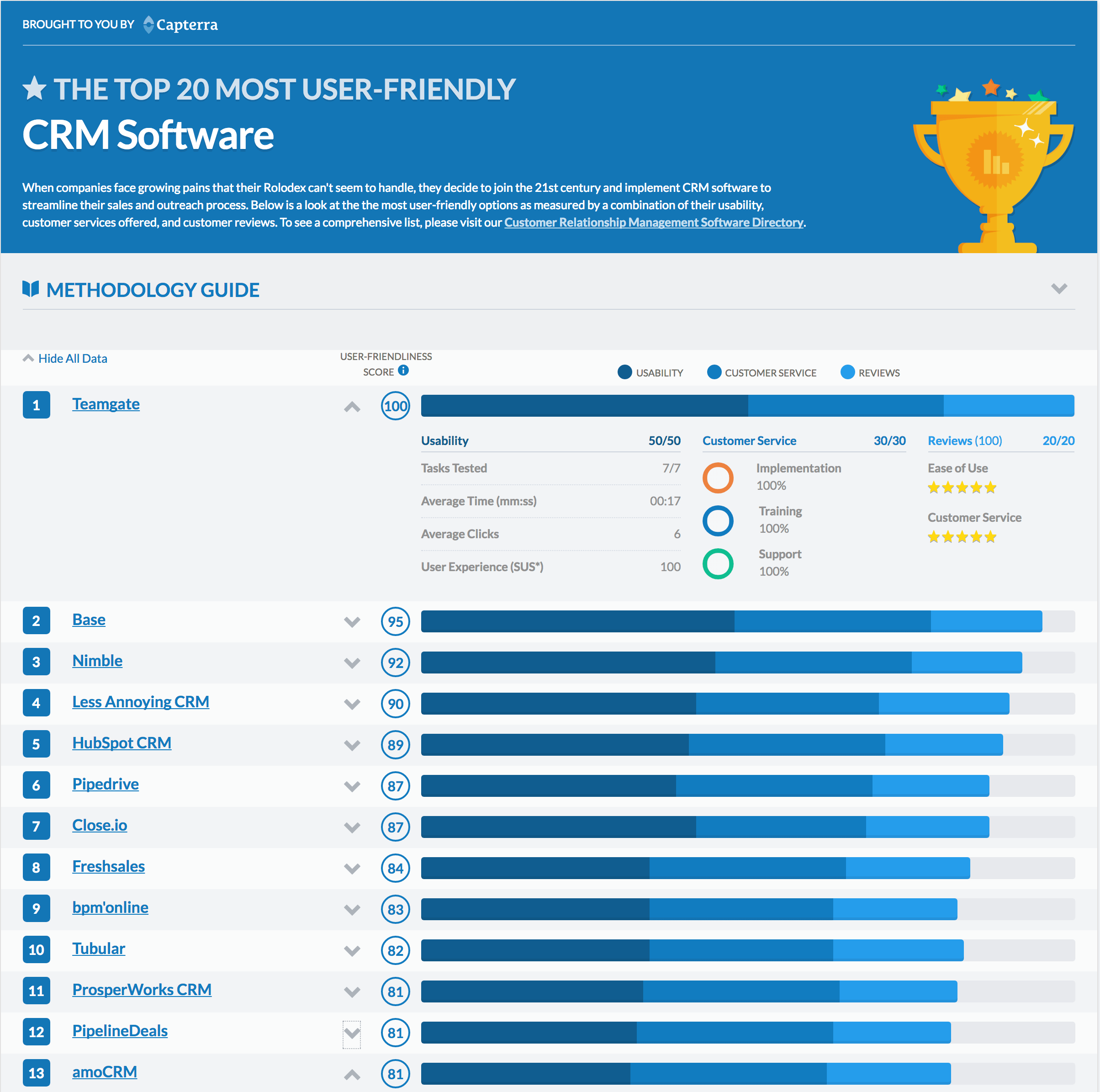
Good News! The well-known software marketplace, Capterra.com which helps businesses to find and connect with the best software worldwide has just announced that Teamgate (that’s us) has earned NUMBER 1 spot on the Top 20 Most User-Friendly CRM Software report.

And, it was no fluke.

All of the options are measured by a combination of their usability, customer services offered, and customer reviews.

Here are some of the reasons why Teamgate Sales CRM was voted most user-friendly, here’s just a small piece of our improvements:

  1. Data import. Having your contacts in Teamgate is vital and profitable, so an easy import function is essential. Once you import your initial contact list our system will match the fields in Teamgate automatically, remembering the selections you made in your previous import session.
  2. Custom fields and filters. In Teamgate, you can create your own fields; the ones that work best for you and you. Also, you can customize tags, and even create custom search filters. These features make it so easy to use and adapt Teamgate for your business.
  3. Quick and easy editing. We’ve also developed a new feature which gives you the ability to edit your contact cards more efficiently. Now, you can edit contact information such as phone, email, address, or website data with just a click, there’s no need to modify the entire contact card.
  4. Global search. You can search for Leads, Contacts, Deals, and Files from one search bar. It works even if all you have is an email address or telephone number and you’re not sure whether the person is a Lead or Contact. The choice is all yours.
  5. SmartDialer. What could be better than the ability to call straight from your Sales CRM? This powerful integration lets you call your prospects and clients with just one click. After you end the call you can leave a note and save it to the customer file. This feature is not only easy to use, but it also keeps you organized and saves you plenty of time.

Teamgate’s CEO, Marijus Andrijauskas, shares his views about the importance of usability:

“The terms user-friendly or UX refer to the complete user-experience of design and interaction with a product. It includes the overall experience with which a user is presented as they interact with that product. After Steve Jobs introduced his first-generation iPhone to the world, the manner in how we understand UX has changed completely. Today, after 10 years, users become not only more experienced but more spoiled, in a positive manner. We believe that you can have a really great product, but only great UX design can make your product amazing.”

Katie Connolly of Capterra explains:

Our product report team revisited and updated our Top 20 Most User-Friendly CRM report,” said Katie Connolly of Capterra,  a CRM software reviews company. “Our latest update looks at the same criteria as last year when determining the ease of use of each CRM product. Teamgate almost doubled their number of user reviews on Capterra and after testing the product again for the second time, it was clear that Teamgate should be listed as the most user-friendly CRM software for the second year in a row.

The Ranking

The top 20 most user-friendly CRM Software

The Ranking Methodology Guide

Capterra tested these tasks:

  1. Create a lead
  2. Add a task
  3. Add interaction/note
  4. Set reminder to follow up
  5. Change lead status to “qualified”
  6. Attach a document
  7. Generate a report

*These 7 common tasks were the criteria for usability testing.

Also,  usability, customer service, and reviews were measured.

Usability:

  • Task completion time
  • Clicks to complete task
  • System Usability Score (SUS)*

*SUS – a questionnaire that measures perceived ease of use.

Customer service:

  • Implementation (configuration options offered)
  • Training (resources offered)
  • Support (services offered)

Reviews:

  • Ease of Use
  • Customer Service

***

For a full report on Capterra, click here.

7 Steps to Creating an Exceptional Customer Support Strategy

Software as a Service (Saas), is super convenient, for many reasons. Because it’s cloud-based, there is no need for the purchase of extra hardware or costly setup fees. Customizable software features are accessible across multiple devices, and can be accessed from anywhere. All of this, however, means nothing without great customer service. Teamgate’s planning team knows this, and has built an award winning support system around you.

Business owners, entrepreneurs, and sales professionals are busy. You turn to SaaS options to heighten your ability to meet your goals more conveniently. When you seek out a platform to assist your business efforts, you want to know that you can depend on a support team to compliment a platform that is efficient and easy to use. Your customers have the same needs. Take a look at how we’ve designed our support experience, and put what you can to use in your own business.

Related: Customer Success Strategies for Non-SaaS Businesses

Quick Response Time & Detailed Answers to Customer Queries

Teamgate was recognized by and received the Exceptional Customer Support Award for 2015 from financesonline.com for trust earned answering user inquiries promptly and in detail. 100% customer satisfaction came from understanding that when you need help, you expect a thorough resolution right away. The simple software might not warrant an email to support, but if it does, you know that you can depend on a response that same day. This kind of reliability is what businesses look for in a trusted IT support service, ensuring users always have answers to any questions they might have.

What was found about customer relationships, during this review, went beyond responding to the typical user wanting to know how to use the sales pipeline properly. When customers asked for a way to find their contacts, within the platform, based on location, it was delivered. This transformed the interface into an essential tool for export businesses.

With your new plan, your goal should be to offer five star customer service, should your patrons need it. Those who interact with your support team should respond positively to friendly, reliable, and fast answers.

05_small

User Friendly Support Page

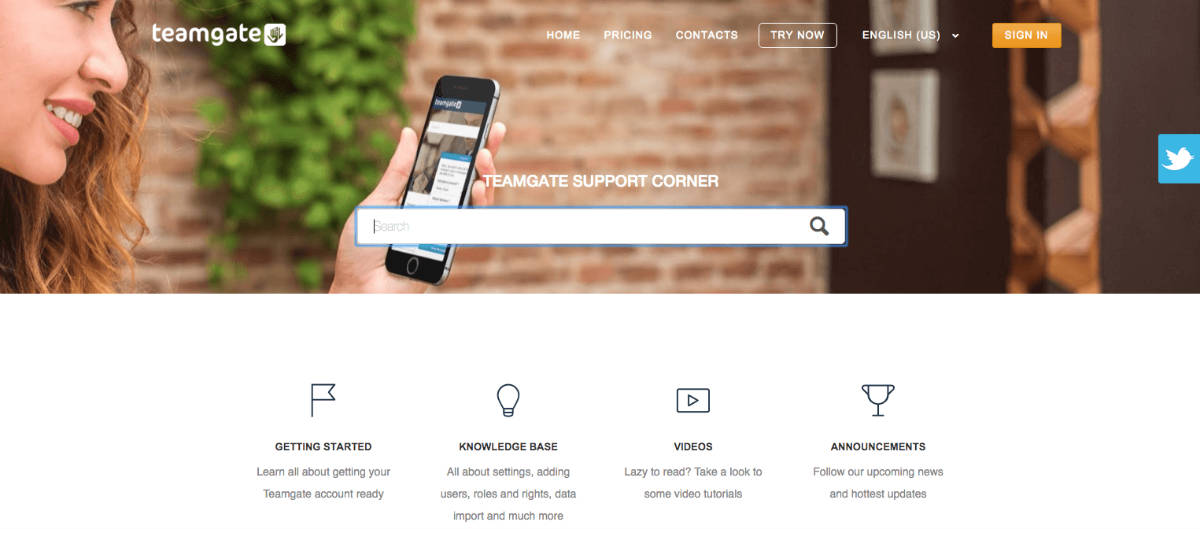
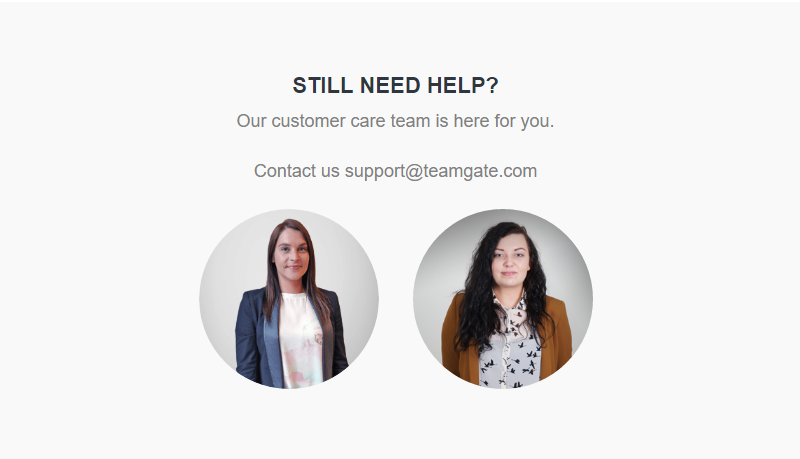
Make sure your customers can find all they need to know about getting your account ready, settings, adding users, roles, and rights, data import, and more. The Teamgate Support Corner is a good place to look for ideas. Video tutorials and announcements are also found here. If customers don’t find what they’re looking for after exploring a bit, answers to most topics can be easily found with a quick search. If all else fails, they can take advantage of the the chat box located conveniently at the bottom of the page. Our support staff is available online during business hours, and 24/7 via email.

When you come up with a strategy, include ways for customers to easily find all of the answers to frequently asked questions on your website as well as via means like chat, email, and phone support. Make the experience as simple and informative for users as possible.

support (1)


Steps for Practical Application

As a member of our platform, you can trust in your customer support experience. Give your customers the same courtesy by following these steps to create your customer support plan:

  1. Respond Swiftly – When a customer inquires about an issue, let him or her know how long the expected wait time is for an answer. It is best to respond to all matters within 24 hours. If there is going to be a delay, let your customer know right away, including when you expect to be able to provide an update. People like to know what to expect. By communicating about your process, you can keep someone in the loop and prevent disappointment.
  2. Provide Well Thought-Out Answers – If you don’t have an appropriate answer to a given query, find one before issuing a response. When the research needed for a thorough response requires a bit of time, let your customer know that you are looking, especially if it could take awhile. Once you have compiled enough information, think about how you can share your findings in a way that is easy to understand.
  3. Be Courteous and Upbeat – You and your customer service representatives have the power to set the tone of any conversation. When dealing with customers, it is important to stay thoughtful and cheery, even if the customer is heated. The purpose of customer support is to solve problems and keep customers happy to patronize your business. Neglecting this step can lead to disaster.
  4. Ensure Understanding of the Problem – Before you try to resolve anything, make sure that you understand the issue at hand. If anything seems unclear, be sure to ask for clarification. Only by knowing the details of the problem can you solve it.
  5. Follow Up to Make Sure the Issue Was Resolved – Before filing any conversations away as completed, follow up at the end of the conversation to make sure that the situation is cleared up in the customer’s eyes. If there is anything further that you can do to help, try your best to do it.
  6. Be Consistent – All aspects of business require planning and customer support is no different. You should have a customer support strategy in place. All members of your organization that will be involved in this department should be briefed on the strategy. Their input should be heard as well.
  7. Make Changes to Your Support Plan as Needed – Once your support strategy is in place, you should take the time to comprehensively analyze how well it is working. Are your customers satisfied? If you’re not sure, you can ask them. Include follow up surveys via email or phone, remembering to ask if there’s anything else they would like to see. If you notice that something is missing from your tactics, add it into the plan and inform the support team if applicable.

Teamgate Customer Support Corner

[email protected]