Designed for Growth: Scale your recurring revenue with the new Teamgate SaaS CRM. Explore SaaS Features →

Book a demo today and save 50% off your first month, or 20% off your first year.

Get a free sales audit to uncover hidden revenue opportunities!

Sales data is only useful if it drives action. Many teams collect endless metrics but struggle to turn them into clear next steps, leading to stalled deals, missed follow-ups, and unreliable forecasts. By focusing on actionable metrics, structured tracking, and targeted coaching, you can transform your sales process into a system that consistently delivers results.

Key Takeaways:

  • Track core metrics like pipeline velocity, win rates, and deal stage conversions to identify bottlenecks and opportunities.
  • Use CRM automation to reduce admin work and ensure accurate, real-time data.
  • Monitor pipeline health by spotting stalled deals, overdue tasks, and stage movement delays.
  • Forecast accurately by combining historical trends with real-time pipeline insights.
  • Tailor coaching to individual reps based on activity levels, conversion rates, and deal management.

Teamgate helps sales teams achieve clarity, structure, and reliable pipeline insights – without the complexity of bloated CRM systems. With tools to flag stalled deals, automate follow-ups, and track next steps, it ensures your sales process is disciplined and your data trustworthy.

Let’s dive into how to make sales data work for you.

6-Step Sales Performance Tracking Framework for Data-Driven Revenue Growth

6-Step Sales Performance Tracking Framework for Data-Driven Revenue Growth

Step 1: Choose the Right Sales Metrics to Track

Select Your Core Metrics

To measure sales performance effectively, focus on metrics that truly impact revenue rather than getting distracted by vanity data. Here are some key metrics to prioritize:

  • Pipeline velocity: This measures how quickly revenue is generated using the formula:
    (opportunity count × average deal size × win rate) ÷ sales cycle length.
    It provides a clear view of how efficiently your pipeline converts opportunities into revenue.
  • Win rate: This is the percentage of opportunities that close successfully. Tracking this metric both overall and by segment (such as by rep, industry, or lead source) can reveal patterns in performance.
  • Deal stage conversions: These help identify bottlenecks. For instance, if conversions drop significantly between two stages, it signals an area in your process that needs attention.
  • Average deal size: This indicates the typical revenue brought in per closed deal.
  • Activity volume: This includes metrics such as calls made, emails sent, and meetings booked, providing insight into the raw effort driving your pipeline.

Metrics can be divided into two categories:

  • Leading indicators: Predict future outcomes (e.g., activity volume, lead response time). For example, responding to a lead within five minutes can dramatically improve conversion chances.
  • Lagging indicators: Measure past performance (e.g., total revenue, quota attainment).

Once you’ve identified the metrics that matter most, set specific targets to drive meaningful action.

Set Clear Targets for Each Metric

Metrics without targets are just numbers. To make them actionable, define clear benchmarks that align with your goals. For instance, set precise objectives for win rates, sales cycle lengths, or the number of qualified meetings. This ensures your team is focused and accountable.

“Setting clearly defined, reasonable expectations and metrics for your team helps everyone start on the same page and lays a strong foundation you can build upon.” – Robert Morton, Team Lead, Sales, Pipedrive

Defined targets allow you to act quickly when needed. For example, if a team member’s activity levels fall below expectations early in the cycle, you can address the issue immediately rather than waiting until it’s too late. For subscription-based models, tracking metrics like a Magic Number of 0.75 or higher can help assess the efficiency of sales and marketing efforts. Similarly, maintaining a Customer Lifetime Value to Customer Acquisition Cost ratio of 3:1 or higher is crucial for long-term success, and tools like Baremetrics can help you monitor these subscription metrics and revenue recovery in real time.

Involve your team in setting these benchmarks. When sales reps help define their own goals, they’re more motivated to achieve them and can better anticipate potential challenges. Balance short-term targets (e.g., daily or weekly activities) with long-term objectives (e.g., quarterly quota attainment) to keep your team productive without overwhelming them. Tailor metrics to individual roles – for instance:

  • Measure SDRs based on outbound activity and lead conversion rates for the qualified meetings they generate.
  • Evaluate account executives on pipeline development and closed revenue.

Setting clear, role-specific goals ensures everyone knows what’s expected and how their performance contributes to the bigger picture.

I tracked these 7 sales metrics and 2xed our sales!

Step 2: Track Daily Sales Activities

Tracking daily sales activities is essential for turning your core metrics into actionable insights. Think of it as the heartbeat of your sales engine – it reveals whether your pipeline is flowing smoothly or stalling before deals even reach later stages. Without this daily visibility, coaching efforts might miss the mark, and potential bottlenecks in your pipeline could go unnoticed.

Track Calls, Emails, and Tasks

Pay close attention to the volume and quality of calls, emails, meetings, and completed tasks. These activities act as leading indicators of future pipeline health, signaling potential growth long before it shows up in closed deals.

  • Outreach volume and engagement depth: It’s not just about making calls or sending emails – it’s about the quality of those interactions. For example, a rep making 50 calls with minimal talk time may need help refining their messaging, while another making 30 calls with deeper conversations is likely progressing deals.
  • Follow-up persistence: Deals rarely close on the first attempt. Tracking how consistently reps follow up can highlight who’s keeping opportunities alive and who’s letting them cool off.
  • Responsiveness: Speed matters. Reps should respond to leads within five minutes; after that, conversion rates drop dramatically. Monitoring response times ensures your team acts quickly when new opportunities arise.

Use CRM Automation to Reduce Manual Work

Manual data entry can drain productivity and lead to incomplete or inaccurate data. Reps often spend more time updating fields than selling, which hurts adoption and makes reports unreliable. CRM automation eliminates this issue by capturing activity data – calls, emails, meetings – automatically. This ensures your tracking is both accurate and effortless. Clean, automated tracking provides the high-quality Data for AI needed to generate accurate lead scores and predictive insights that drive smarter sales decisions.

With Teamgate, reps can focus on selling while the system handles the admin work. Integration with Gmail and Outlook automatically logs email interactions, linking them to the right deals. Built-in calling through Twilio records call outcomes seamlessly. This automation reduces busywork, allowing reps to concentrate on what matters: moving deals forward.

Additionally, automated task reminders ensure follow-ups are timely and consistent. For example, when a deal advances to a new stage, Teamgate can create a follow-up task or send a reminder to ensure no opportunities slip through the cracks. Alerts for new leads also help reps respond within that critical five-minute window.

This automated approach not only saves time but also provides managers with real-time visibility into team activities. Reps won’t feel micromanaged because the system works in the background, supporting their efforts instead of adding extra work. When the CRM becomes a tool that helps reps sell rather than a chore, adoption happens naturally, and the data you rely on for coaching and forecasting becomes reliable. Teamgate ensures your sales process stays disciplined, insightful, and easy to use.

Step 3: Check Pipeline Health and Find Bottlenecks

Once you’ve got a handle on daily activities, it’s time to ensure your sales pipeline management is moving forward. Deals should progress steadily, tasks need to be completed on schedule, and opportunities shouldn’t sit idle. When these processes falter, revenue can slip away unnoticed. Here’s how to spot and address the warning signs of a struggling pipeline.

Find Stalled Deals and Overdue Tasks

Stalled deals can quietly drain your pipeline. They might look active, but if no action is being taken – no calls, emails, or meetings – they’re at risk of slipping through the cracks. One of the earliest red flags is overdue tasks. If a deal has gone days or even weeks without activity, it’s likely in trouble, even if it hasn’t been marked as lost yet.

Another key metric to watch is your deal slippage rate – the percentage of deals expected to close but get pushed into the next month. A high slippage rate points to unreliable forecasts and deeper pipeline issues. To tackle this, use your CRM’s automated triggers to flag deals that haven’t seen activity for a set number of days or have been stuck in a stage longer than usual. This helps you catch and address neglected opportunities before they deteriorate.

With Teamgate, every opportunity requires a clear next step. If a deal doesn’t have a scheduled task or follow-up, it’s flagged immediately. Managers can run regular reviews of stalled deals, assigning actions to reignite momentum and prevent deals from going cold due to inaction or miscommunication.

Monitor Deal Age and Stage Movement

The age of a deal can tell you a lot about its health. If deals are lingering in your pipeline far beyond your typical sales cycle, it’s a sign they might be decaying. Tracking how quickly deals move through each stage can also pinpoint where bottlenecks occur. For instance, if deals often stall at the proposal stage, it might be due to pricing concerns, changes in key decision-makers, or budget constraints.

To dig deeper, monitor how long deals spend in each stage compared to your historical averages. For example, if most deals move from demo to proposal in seven days but some have been stuck there for three weeks, those cases need immediate attention. Combine this data with feedback from your sales reps to uncover the root causes of delays and adjust your approach accordingly.

Teamgate makes it easy to track deal age and next-step coverage through real-time dashboards. Managers can use this data to coach their teams based on hard evidence rather than guesswork. By identifying deals that lack a next action or are lingering too long in a stage, you can step in before they go stale. This systematic approach helps keep your pipeline healthy and protects your revenue from the hidden costs of inaction.

Step 4: Use Data to Forecast More Accurately

Relying on intuition for sales forecasting often leads to inflated pipelines that fail to deliver. To create reliable forecasts, use a combination of historical data and real-time insights from your pipeline. This method shifts forecasting from guesswork to a structured process driven by actual sales performance. When you combine past trends with live data, your forecasts become more realistic and actionable.

Historical data provides a baseline for understanding your team’s typical performance. Metrics like average win rates, sales cycle lengths, and deal sizes help set realistic expectations for future outcomes. For instance, if your team closes deals at a 25% win rate with an average cycle of 45 days, you can calculate the pipeline coverage needed to meet your next-quarter goals. Research from McKinsey highlights that a pipeline coverage ratio of 3–4x your quota is common, though this can vary: enterprise sales might need 4–5x, while faster SaaS cycles may only require 2–3x.

Break down win rates by categories like industry, lead source, or deal size to refine your forecasts further. Pay attention to deal slippage – the percentage of deals pushed to the next period – as it often signals over-optimism. High slippage rates indicate that your forecasts may rely more on hope than reality. At the end of each sales cycle, compare predicted revenue with actual results to identify and fix any biases in your forecasting models.

“Tracking informs forecasting by providing accurate, up-to-date performance data.” – Arvinda Bharathi, Everstage

Ground Forecasts in Real Pipeline Data

While historical data sets the foundation, real-time pipeline metrics reveal what’s likely to happen. Monitor your pipeline coverage ratio weekly; if it drops below three times your quota, you might not have enough active deals to hit your targets. Measure funnel velocity by tracking how quickly deals move through each stage compared to historical norms. For example, if deals typically progress from demo to proposal within a set timeframe but some are stalling, you should adjust their weight in your forecast accordingly.

Use your CRM to assign win probabilities to deals based on their stage, activity levels, and next-step actions. Deals with clear follow-ups are more likely to close. Review deal health weekly to remove stalled opportunities that could skew your projections. Focus on leading indicators like scheduled demos and proposals sent, rather than relying solely on closed deals, to assess the health of your future pipeline.

Teamgate simplifies evidence-based forecasting by highlighting key metrics like deal age, next-step actions, and activity levels. By ensuring every opportunity includes a clear next step, managers can quickly identify which deals are real and which ones are padding the numbers. This approach minimizes revenue loss and ensures forecasts are rooted in actual pipeline performance.

Step 5: Find Coaching Opportunities in the Data

Once you’ve fine-tuned your tracking and forecasting, the next step is using that data to uncover coaching opportunities. Effective coaching isn’t about broad, one-size-fits-all training sessions – it’s about identifying where each sales rep needs targeted support. Your sales data can reveal performance gaps and patterns that might not be obvious, helping you provide coaching that addresses specific challenges.

Review Individual Rep Performance

Start by analyzing individual metrics to identify outliers. Look at activity levels, conversion rates at each stage of the funnel, and how reps manage deals in the pipeline. For example, a rep making plenty of calls but booking few meetings might need help refining their messaging. On the other hand, a rep conducting multiple demos but struggling to close deals likely needs coaching on handling objections or closing techniques.

Dive deeper into conversion rates by funnel stage to pinpoint where performance dips. For instance:

  • If a rep converts leads to opportunities at 15%, while the team average is 25%, they may need coaching on qualification skills.
  • If they move opportunities to proposals effectively but close deals at half the team average, focus on improving their closing strategies.

Also, monitor deal age and adherence to next steps. Deals that sit idle in one stage for weeks often signal a rep who either lacks the confidence to advance the conversation or doesn’t know how to move it forward. Use your CRM to identify these stalled deals and address them during one-on-one coaching sessions.

Coach Based on Activity and Next Steps

Once you’ve reviewed performance data, tailor your coaching based on both activity levels and the actions reps take afterward. Activity metrics tell you what happened, but understanding why requires context. For instance:

  • A rep making 50 calls but booking no appointments might need help with targeting or improving their pitch.
  • A rep making only 10 calls but securing eight appointments is likely effective and just needs to increase their call volume.

Look for discrepancies between effort and results to guide your coaching focus.

“If your data shows certain reps consistently struggling with conversion rates, it’s a signal for targeted coaching.” – Arvinda Bharathi, Everstage

Next-step coverage is another critical coaching indicator. Reps who fail to define clear next steps for their deals often let opportunities go cold. Use your CRM to track which reps consistently maintain next steps and which ones let deals drift. During weekly one-on-ones, review stalled deals and collaborate with reps to define actionable next steps that keep deals moving forward.

Teamgate makes this process easier by tracking deal age, activity levels, and next-step coverage in real time. Managers can quickly identify reps who need help maintaining pipeline discipline versus those who are consistently executing well. By focusing on real performance data, you can transform coaching into a precise and impactful process that directly addresses each rep’s challenges.

Step 6: Review Performance on a Regular Schedule

Taking a structured, consistent approach to performance reviews can make all the difference between staying ahead of challenges and constantly playing catch-up. Regularly scheduled reviews ensure your sales process remains on track and evolves effectively, building on earlier steps like tracking and forecasting.

Schedule Weekly and Monthly Reviews

Set your review schedule to match your sales rhythm. Weekly check-ins are ideal for monitoring immediate activities such as call volumes, response times, and stalled deals. These quick reviews help you make tactical adjustments on the fly. Monthly reviews, on the other hand, should focus on broader metrics like win rates, conversion ratios, and quota attainment. For longer-term insights, quarterly reviews can tackle strategic metrics like Customer Acquisition Cost (CAC) and Lifetime Value (LTV).

Balancing the numbers with context is crucial. Alongside CRM data, dive deeper by conducting deal post-mortems or listening to call recordings to understand what’s driving – or hindering – your progress. Tools like Teamgate’s dashboards offer real-time visibility into deal age, activity levels, and next-step coverage, giving you a clear starting point for these discussions. Use this information to pinpoint areas that require immediate attention and refine your sales approach accordingly.

Use Insights to Improve Your Process

Performance reviews aren’t just about tracking progress – they’re about driving meaningful improvements. Look for patterns in your data. For instance, if high call volumes aren’t translating into appointments, it might be time to rethink your targeting or messaging. If deals frequently stall at the proposal stage, it could signal issues with your late-stage content or pricing strategy.

“Tracking makes you proactive instead of reactive. It turns your sales process from a scramble into a system.” – Arvinda Bharathi, Everstage

Distinguish between strategic challenges and tactical gaps, then act on those insights. Update your playbooks, refine targeting criteria, or adjust your sales stages to better reflect reality. The ultimate goal is not just to measure performance but to learn and adapt. When your team sees that these reviews lead to real improvements, they’ll be more engaged and committed to maintaining a clean pipeline. Over time, this approach transforms tracking from a mundane task into a genuine competitive edge.

Conclusion: Turn Data Into Predictable Revenue

Turning your sales data into a reliable revenue engine starts with disciplined tracking and proactive coaching. Sales performance tracking isn’t about juggling endless spreadsheets – it’s about using actionable insights to drive consistent growth. By combining structured selling, clean pipeline data, and consistent follow-up, you shift from reacting to problems to actively generating revenue. Your data becomes a powerful tool, highlighting stalled deals, identifying reps who need support, and pinpointing effective strategies.

Businesses that rely on performance data for decision-making – backed by disciplined follow-up and a clear pipeline – achieve up to 5% higher productivity and 6% higher profits than their peers. Yet, despite the potential, 84% of sales leaders admit that analytics have fallen short of expectations, often due to unreliable data and unclear processes. The solution isn’t collecting more data – it’s putting dependable data into action.

“Tracking sales performance turns numbers into actions, helping you hit sales targets faster and grow more predictably.” – Arvinda Bharathi

Teamgate CRM is designed to stop revenue from slipping through the cracks. It eliminates the risk of “no next step”, ensures follow-ups are systematic rather than left to chance, and flags aging opportunities before they’re lost. Every deal is anchored in a real stage with a clear next action, creating a pipeline grounded in reality – not guesswork. Sales reps spend less time on admin tasks and more time closing deals, while managers gain actionable insights from real-time activity, deal health, and next-step coverage.

The outcome? A clean, reliable pipeline that makes growth predictable. By following the principles outlined here – accurate data, realistic forecasts, and clear next steps – you safeguard your revenue from the hidden costs of inaction and uncertainty.

FAQs

What sales metrics should I track first?

To keep your sales pipeline healthy and your team on track, start by measuring the metrics that matter most. Pay close attention to deal stages, next steps, activity levels, and deal age – these indicators help you spot potential bottlenecks and keep deals moving forward.

You should also track the number of active deals, scheduled follow-up tasks, and how deals are progressing. These metrics not only highlight overlooked opportunities but also provide valuable insights for coaching your team and ensuring consistent follow-up efforts. By staying on top of these numbers, you can maintain a clean, actionable pipeline and avoid letting deals slip through the cracks.

How do I keep CRM data accurate without extra admin work?

To keep your CRM data accurate without overwhelming your team with admin tasks, prioritize automation and set up clear workflows. Use automation to handle repetitive tasks like data entry, updating records, and syncing information across tools. Schedule regular data audits to identify and fix errors, remove duplicates, and update outdated entries. Train your team on consistent data entry practices and make sure the CRM is easy to use. These strategies help maintain reliable data while keeping administrative work manageable.

How can I spot deal risk early and coach the right reps?

To spot potential deal risks early and coach your team effectively, keep an eye on critical sales metrics such as deal age, activity levels, and next-step coverage. Aging deals, minimal follow-up activity, or deals lacking clear next steps often indicate trouble. By comparing these metrics across your team, you can identify reps who may be struggling. Regularly tracking these indicators helps maintain a healthier pipeline and allows you to focus your coaching efforts where they’ll have the most impact.

Related Blog Posts

Most CRM dashboards fail because they overwhelm users with irrelevant data instead of guiding decisions. The best dashboards focus on 5–8 key metrics that directly impact sales outcomes, like pipeline hygiene, deal progress, and team activity. By tailoring dashboards to specific roles – sales reps, managers, and executives – you can eliminate distractions, reduce missed opportunities, and improve team performance.

Key takeaways for designing effective dashboards:

  • Focus on actionable metrics: Track KPIs like deal age, win rate, and next-step coverage to identify risks and opportunities.
  • Role-specific views: Reps need pipeline clarity, managers need team insights, and executives need high-level trends.
  • Real-time updates: Accurate, up-to-date information ensures better decisions and faster action.
  • Simple design: Use clear layouts, color-coded indicators, and single-screen views to make data easy to interpret.

Teamgate gives growing sales teams clarity, structure, and trustworthy pipeline insight – without enterprise CRM bloat or feature overload.

A well-designed dashboard isn’t just a tool; it’s a way to protect revenue by making every sales decision smarter and faster.

Designing Intuitive Dashboards for CRM Software

Understand Your Sales Team’s Needs First

Role-Specific CRM Dashboard Metrics for Sales Teams

Role-Specific CRM Dashboard Metrics for Sales Teams

One of the biggest mistakes in dashboard design is focusing on the data you already have instead of the decisions your team needs to make. The key to creating effective dashboards is understanding the unique needs of your team members. Start by identifying the questions each role needs to answer regularly. For instance, a sales rep might wonder, "Which deals need my attention today?" A manager might ask, "Where is my team getting stuck?" Meanwhile, an executive is likely focused on, "Are we on track to hit our quarterly revenue target?"

Define Key User Roles

Each role within your team requires different metrics to perform effectively:

  • Sales reps need to see their pipeline status, daily activity counts, quota progress, and alerts for next steps.
  • Sales managers focus on team-wide productivity, identifying pipeline bottlenecks, understanding win/loss patterns by rep, and spotting coaching opportunities.
  • Executives require high-level insights, such as revenue trends across the company, market share analytics, and the status of strategic initiatives.

The numbers tell a clear story: while 93% of sales leaders have access to basic CRM metrics, only 21% focus on the activities that drive predictable revenue growth. This disconnect happens because dashboards often try to display everything, rather than highlighting what truly matters for each role. Tailoring metrics to specific responsibilities helps cut through the noise and reduces information overload.

Once you’ve identified role-specific needs, the next step is to align dashboard features with the goals of each user.

Match Dashboard Features to User Goals

Every dashboard element should directly support what the user needs to achieve. For example:

  • A sales rep aiming to hit their quota needs a dashboard that emphasizes personal pipeline stages, commission tracking, and overdue tasks – not broad company analytics they can’t act on.
  • A manager focused on coaching their team benefits from scorecards that highlight rep performance, conversion rates, and activity patterns.

This role-specific focus not only makes day-to-day tasks more efficient but also ensures that users can stay informed on the go. Mobile access plays a critical role here – teams using mobile CRM tools hit their sales targets 65% of the time, compared to just 22% for teams without mobile access.

To determine the most important metrics, ask, "Which metric, if it changed suddenly, would have the biggest impact?". The answers to this question help zero in on the data that drives decisions and ensures your dashboards are actionable, helping to minimize revenue loss through better focus and discipline.

Select the Right Metrics and KPIs

A good dashboard simplifies decision-making by focusing on actionable metrics. If a number doesn’t lead to a clear next step, it’s just clutter. Your dashboard should cut down analysis time and help you identify stalled deals, prioritize revenue-generating activities, and address urgent tasks quickly.

Core KPIs Every Sales Dashboard Needs

Start with metrics that directly affect revenue. Sales revenue measures the total value of closed deals within a specific timeframe, offering a snapshot of past performance. Sales forecast predicts future revenue by multiplying deal values by their likelihood of closing, based on pipeline stages. This keeps your team grounded in what’s probable, not just possible.

Another key metric is the total pipeline, which tracks all active deals with closing dates in your chosen period. To make pipeline data meaningful, pair it with conversion rates – such as the win rate (percentage of closed opportunities) and the lead conversion rate (how efficiently leads turn into opportunities).

Two often-overlooked metrics can provide essential insights: deal age and next-step coverage. Deal age shows how long opportunities stay in each stage, helping you identify deals that are stagnating. Next-step coverage ensures every deal has a clear follow-up plan – deals without next steps risk losing momentum. Use visual indicators like red flags for overdue deals to spot potential revenue risks instantly.

Finally, track activity metrics to gauge your team’s daily efforts. This includes cold calls, successful calls, meetings booked, and new customer acquisitions. These numbers reveal whether your team is putting in the work needed to meet their goals.

When building your dashboard, balance these core KPIs with activity-based metrics for a well-rounded view.

Combine Leading and Lagging Indicators

A strong dashboard blends leading indicators (predictive metrics) and lagging indicators (results-based metrics). Lagging indicators like total revenue, won deals, and quota attainment show what’s already happened. Leading indicators, such as call volume, email outreach, and new leads, highlight behaviors that drive future outcomes and help forecast trends.

The key is connecting these two types of metrics. For example, by identifying which activities consistently lead to closed deals, you can coach your team to focus on the behaviors that yield results. If leading indicators start to dip while lagging indicators remain strong, it may signal that current success won’t last – prompting you to adjust strategies proactively.

Maintaining balance is crucial. Use metrics like the relationship between new leads and total pipeline to decide whether your team should prioritize prospecting or closing existing deals. Monitor pipeline velocity to see how quickly deals progress through stages and identify bottlenecks in your sales process. This mix of past performance and forward-looking data ensures your team can address challenges early and stay on track to meet revenue goals.

Design for Clarity and Easy Navigation

Once you’ve identified the right metrics, the next step is designing a dashboard that transforms raw data into actionable insights. The design should prioritize simplicity and clarity. As Jonny Rowse from CRM Beat explains:

"A useful dashboard is the opposite. It shows a small number of metrics that drive decisions, refreshes automatically, and makes it obvious when something needs attention".

The aim is to create a dashboard that sales reps can quickly scan to identify what requires immediate action and track sales effectively. This involves using layout and visual design principles that align with how people naturally process information, ensuring that critical details stand out.

Layout and Navigation Principles

Start with the top-left corner. People tend to read from top left to bottom right. Place your most critical metric – be it monthly revenue, pipeline value, or new leads – in the top-left corner to grab attention immediately.

Group related metrics together. Organize metrics by category for better readability. For example, keep all lead-generation data in one section and revenue metrics in another. This makes it easier to notice patterns, such as a spike in leads paired with a drop in conversions.

Stick to the one-screen rule. A dashboard should fit on a single screen to avoid unnecessary scrolling. Limit it to five to eight key metrics per view. If there’s too much information, consider you’re tracking too many metrics. Use a top navigation bar for filtering by rep, team, or organization, and keep real-time activity feeds in a sidebar to avoid cluttering the main view.

Maintain consistent timeframes. Ensure all widgets align to the same timeframe, such as "this month" or "last 30 days." Inconsistent timeframes can confuse users and make comparisons difficult.

Visual Design That Improves Usability

Use white space effectively. White space improves readability and prevents the dashboard from becoming overwhelming or, as Rowse puts it, "digital wallpaper" that users ignore.

Match visuals to the data type. Different data types require different visualizations:

  • Use large numbers for single values like monthly revenue.
  • Use line charts to show trends over time, such as weekly pipeline growth.
  • Use bar charts for comparisons, like revenue by team member.
  • Avoid pie charts, especially with more than five slices, as they are harder to interpret accurately.

Color-code for quick insights. Colors can instantly convey the health of metrics:

  • Dark green for closed deals.
  • Light green for forecasts.
  • Yellow for stalled deals.
  • Red for overdue tasks or past-due opportunities.
    Stephanie Trovato from monday.com highlights the value of this approach:

"Color coding adds another layer of insight. Red might show stalled deals, while green indicates healthy progress".

Provide context for every number. Display metrics alongside targets, comparisons to previous periods, or trend arrows. Numbers without context require extra mental effort, slowing down decision-making.

Add Real-Time Data and Usability Features

Make your dashboard more practical by integrating real-time data and dynamic filters, ensuring your team has instant access to actionable insights. Real-time synchronization is a must – it allows everyone to see the latest pipeline status as deals progress, leads enter the system, or tasks fall overdue. This ensures that every metric reflects current sales activity. As Stephanie Trovato from monday.com explains:

"Effective sales teams run on accurate, real-time information. Yet, many organizations still rely on static spreadsheets and delayed reports, creating a gap between what their team is doing and what leadership can see".

With automatic data refreshes, managers can identify bottlenecks and provide timely coaching, addressing issues as they arise rather than waiting for daily or weekly summaries. Mobile-friendly dashboards are equally important, enabling reps to act on opportunities while on the go.

Enable Real-Time Updates and Alerts

Keep data fresh with automatic updates. Jonny Rowse from CRM Beat highlights the importance of this:

"If the dashboard shows yesterday’s numbers and your team knows it, they will stop trusting it. Make sure the data refreshes frequently enough to be useful".

Incorporate live activity feeds to provide instant visibility into new leads, deal progress, calls, and tasks. This reduces the risk of duplicate outreach and keeps everyone on the same page without the need for manual intervention. Adding clear visual indicators helps teams quickly identify priorities without having to sift through every metric.

Provide Filters and Custom Views

Offer multi-level filtering to allow users to switch between their individual pipeline, team performance, or company-wide metrics. Sales reps need a clear view of their quotas and next steps, managers require insights into team productivity, and executives focus on high-level revenue trends and strategy. Adding time-period dropdowns lets users quickly analyze monthly, quarterly, or annual progress.

Implement role-based access controls to customize the data each user sees. Steve Chipman from CRM Switch underscores this flexibility:

"Not every CRM dashboard component is needed by every employee, and most enterprise CRM solutions are flexible enough to let each user (with appropriate permissions) choose which components to view".

Filters for region, product line, or deal owner help users focus on the most relevant data, reducing distractions and improving productivity. When dashboards are tailored to individual roles and responsibilities, they become tools that genuinely support daily work instead of creating extra tasks. These personalized views ensure your team gets the most out of their dashboard, boosting both efficiency and engagement.

Build Better Dashboards with Teamgate CRM

Teamgate

Teamgate CRM focuses on disciplined selling, pipeline transparency, and ease of use. Its dashboard design ensures that every feature supports predictable revenue by addressing common sales challenges: undefined next steps, inconsistent follow-ups, and unreliable forecasts. This approach minimizes revenue leaks while helping teams stay on track.

Use Teamgate’s Visual Deal Pipeline

Teamgate’s visual pipeline is built around a drag-and-drop Kanban-style board, offering a clear overview of deals. Each deal card displays key details: the current stage, assigned rep, deal value in USD, next step due date (formatted as MM/DD/YYYY), and activity history. This layout ensures deals keep moving forward. Overdue next steps are flagged in red, and aging opportunities are automatically highlighted, helping managers act before deals go cold.

Here’s a real-world example: In Q1 2024, LeadGenius, a SaaS company based in the UK, adopted Teamgate’s visual pipeline. Within three months, their stale deals dropped by 35%, going from 22% to 14% of their total pipeline. By restructuring their sales stages with mandatory next steps and dashboard alerts, they achieved 92% pipeline accuracy and generated $450,000 in predictable revenue. Sales Director Mark Thompson credits these changes for the improvement.

Teamgate also supports accurate forecasting. By multiplying deal value by the win probability of each stage, it calculates forecasts while excluding overdue deals to maintain realistic projections. Andrew Martin from Teamgate CRM advises:

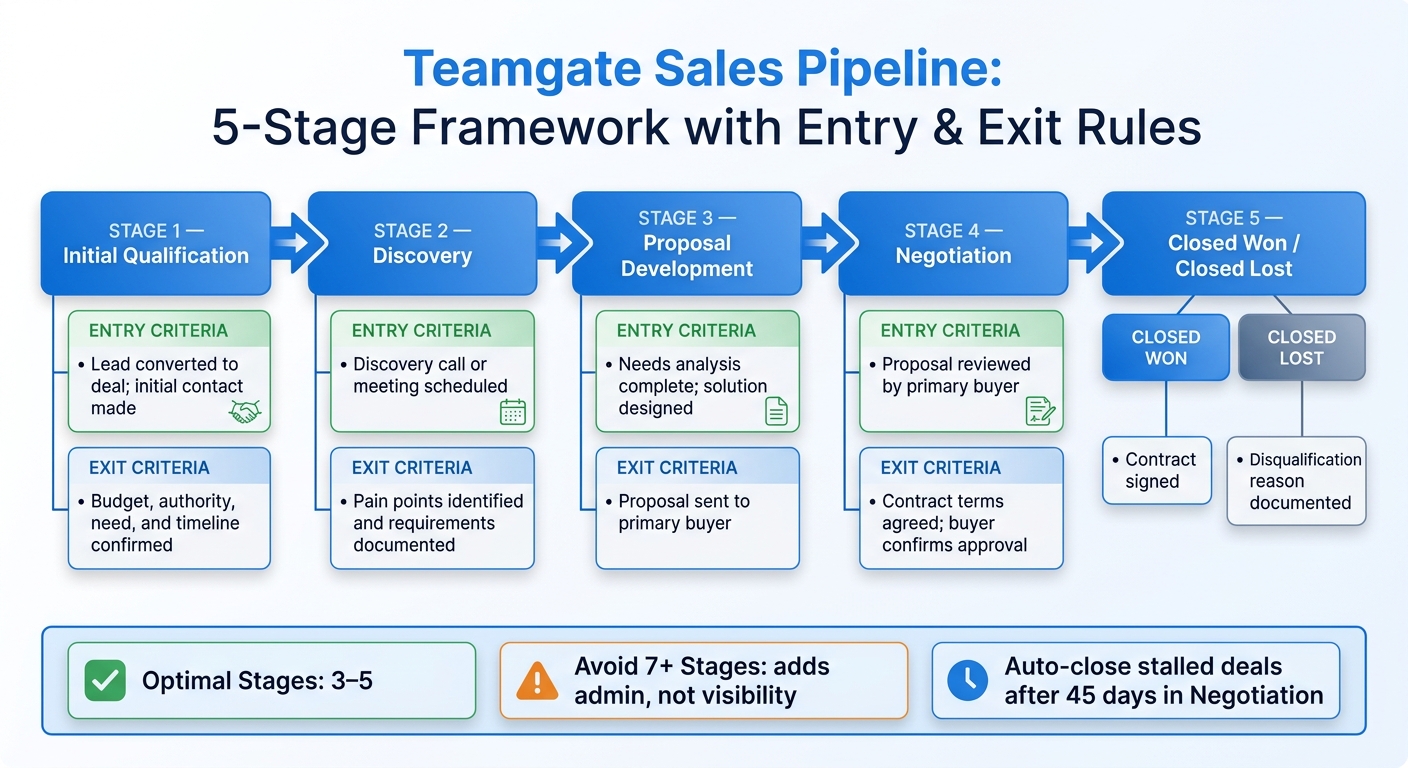
"Too many stages won’t help your sales reps to act quickly and properly. Therefore, it would be an excellent idea to have three to five stages".

These visual tools integrate seamlessly with automated workflows, simplifying follow-up tasks.

Automate Follow-Up with Built-in Workflows

Teamgate’s workflows take the guesswork out of follow-ups by automatically generating tasks and reminders when deals move through stages. For instance, when a deal shifts to "Proposal Sent", the system creates a 3-day follow-up email task and adds a calendar reminder adjusted for US time zones. If no activity occurs within seven days, dashboard alerts notify both reps and managers.

The platform centralizes all sales activities – emails, calls, meetings, and notes – within the deal view. This means reps only log their work once, and the CRM updates automatically. Admin time is significantly reduced, with features like one-click task completion and custom filters such as "My Overdues" or "Team at Risk" keeping reps focused on selling rather than data entry.

Drive Adoption Through Simple Design

Teamgate prioritizes simplicity with a rep-first dashboard design. The interface is clean and single-paged, requiring only essential fields like stage, next step, and deal value in USD. CRM implementation takes less than an hour, and the platform auto-populates activity from emails and calls without needing manual tagging. By avoiding mandatory custom fields, Teamgate ensures reps update the CRM because it delivers actionable insights – not because they’re forced to.

The dashboard highlights critical sales metrics, forecasts, and top opportunities, while allowing users to customize their activity feed. This keeps the interface uncluttered and focused. Andrew Martin from Teamgate CRM explains:

"The new dashboard has been created with a sales professionals advisers and clients demand in order to purify the key indicators in daily sales team life".

For managers, leader dashboards provide insights into leading indicators such as deal age distribution, activity velocity (e.g., calls and emails per deal), and next-step coverage percentages. Managers can drill down to individual rep performance, spotting neglected high-value deals – for example, opportunities worth $50,000+ that haven’t been updated in weeks. This evidence-based visibility enables managers to coach effectively, relying on clear data rather than assumptions.

Jack Hodges, Sales Manager at FiveCRM, shared his experience:

"With Teamgate’s intuitive interface, our user adoption was immediate. Even with a remote team… we were onboarded and up and running within hours".

Teamgate’s design and functionality have earned it recognition as Capterra’s #1 "Value-for-Money" CRM for 2024. It holds a 4.7/5 rating on G2 from over 250 reviews, with users frequently highlighting its intuitive pipelines and automation features that save time. The platform boasts a 95% user adoption rate, thanks to its low administrative burden and focus on helping sales teams close deals rather than manage data.

Conclusion

Creating a CRM dashboard that genuinely supports your sales team boils down to three essentials: aligning with user needs, focusing on actionable metrics, and ensuring accurate, real-time data. Dashboards shouldn’t just display numbers – they should guide decisions. A well-crafted dashboard helps reps identify their next steps and prioritize key deals, while giving managers a clear view of deal progress, activity levels, and pipeline health. As Jonny Rowse from CRM Beat aptly states:

"The best dashboards look almost too simple".

The focus should be on metrics that prompt action, such as identifying stalled deals, overdue tasks, or sudden drops in lead volume. Real-time updates and intuitive visual cues, like traffic-light signals, make it easy to spot and address issues immediately.

By incorporating these strategies, your dashboard becomes a tool for smarter decision-making. Teamgate CRM embodies these principles by promoting disciplined selling – ensuring no deal is left without a next step, flagging aging opportunities before they expire, and excluding overdue deals from forecasts to maintain accuracy. Its visual pipeline management, automated workflows, and user-focused design encourage adoption by enhancing the sales process instead of adding unnecessary tasks.

To maximize the impact of your dashboard, set it as the default home screen and incorporate it into weekly team reviews to establish consistent habits. Reevaluate your metrics regularly – perhaps quarterly – to remove widgets that no longer provide value. When your dashboard becomes the single source of truth, forecasting evolves from guesswork into data-driven planning, making revenue outcomes more predictable.

FAQs

How do I choose the right 5–8 dashboard metrics?

To choose 5–8 meaningful dashboard metrics, start by identifying the crucial decisions your sales team faces each week. Pick metrics that make those decisions easier, spotlight pressing concerns, and directly align with sales activities. Examples include tracking upcoming meetings, overdue tasks, deals nearing close, or aging deals. Keep the dashboard clear and focused – avoid overwhelming it with excessive data. The goal is to create a tool that’s practical and actionable for daily use.

What should a rep vs manager vs exec dashboard include?

A sales rep’s dashboard should focus on essentials like active deals, upcoming tasks, and clear next steps to keep deals moving forward. Sales managers, on the other hand, need a broader view that includes team metrics such as goals, forecasts, top-performing deals, and activity tracking to assess overall performance. For executives, the priority is high-level insights – pipeline health, forecast reliability, and deal aging – to inform strategic decisions. Custom dashboards help ensure that everyone gets the specific insights they need to excel in their role.

How do I keep CRM dashboard data accurate in real time?

To keep your CRM dashboard accurate and up-to-date, rely on tools that automatically refresh with the latest sales pipeline and team activity data. This removes the hassle of manual updates, ensuring tasks, deals, and team progress stay current. Real-time updates allow your sales team and managers to focus on disciplined selling while maintaining a clear and reliable pipeline.

Related Blog Posts

Most sales reps fail to meet their quotas because they’re tracking the wrong metrics or lack clear benchmarks. Without these, teams are left guessing about pipeline health, activity effectiveness, or forecast accuracy. Benchmarking your KPIs solves this by turning raw data into actionable insights – helping you identify bottlenecks, coach reps effectively, and align activities with revenue goals. Companies that do this well see up to a 25% boost in forecast accuracy and a 20% increase in win rates.

Here’s how to start:

  • Choose key KPIs: Focus on 5–7 metrics like quota attainment, win rate, and pipeline velocity.
  • Gather clean data: Use tools like Teamgate to pull 6–12 months of historical data and segment by role or deal size.
  • Set baselines: Calculate your current performance and compare it to industry standards.
  • Analyze performance gaps: Identify where you’re falling short and create clear, measurable targets.
  • Track and adjust: Use Sales KPI dashboards to monitor progress and refine strategies regularly.

Teamgate helps sales teams follow a clear process and provides managers with trustworthy pipeline insights – without turning CRM into a time-consuming task. By focusing on the right metrics and maintaining clean, structured data, you can build a predictable and reliable revenue engine.

5-Step Sales KPI Benchmarking Process with Key Metrics

5-Step Sales KPI Benchmarking Process with Key Metrics

Step 1: Choose Which Sales KPIs to Benchmark

Select Your Core Performance Metrics

To avoid overwhelming your analysis, focus on 5–7 key KPIs that directly influence revenue instead of trying to track too many metrics at once.

Start with the “Starter Five” KPIs: Quota Attainment, Pipeline Coverage Ratio, Win Rate, Pipeline Velocity, and Average Sales Cycle Length. Here’s what they reveal:

  • Quota Attainment: Tracks whether sales reps are hitting their targets. A healthy range is between 85–100%.
  • Pipeline Coverage Ratio: Shows if your funnel has enough opportunities. A good benchmark is 3–4× your sales quota.
  • Win Rate: Measures how effectively leads convert into closed deals. For B2B teams, this typically falls between 20–30%.

It’s also important to balance leading indicators (like meetings booked or pipeline created) with lagging indicators (such as closed revenue or win rate). Leading metrics provide immediate feedback, while lagging ones confirm long-term trends.

Tailor KPIs to your team’s roles. For example:

  • SDRs (Sales Development Representatives): Focus on early-stage metrics like meetings booked.
  • Account Executives: Prioritize closed revenue and deal size.
  • Account Managers: Emphasize retention and account growth.

Different industries and sales cycles also demand different benchmarks. For instance, a manufacturing rep closing $100K deals over 6–12 months will track different metrics than a SaaS rep managing $15K contracts over 1–3 months.

Connect KPIs to Revenue Goals

Every KPI should tie directly to a business goal. If your objective is market expansion, track metrics like new territory performance. If profitability is the focus, emphasize efficiency metrics and average deal size.

Work backward from your revenue target to set clear benchmarks. For example, if your goal is $5M in annual recurring revenue, and your historical win rate is 25% with an average deal size of $50K, you can calculate how many qualified opportunities your pipeline needs.

“KPIs bridge your business objectives with where you currently stand, relating sales performance to your core goals over set increments of time.” – Faiza Hughell, Senior Vice President, Small Business, RingCentral

Convert broad goals into measurable targets. For instance, instead of saying “Grow revenue”, define it as “Increase annual revenue by 15% for our top-performing product by December 31, 2026”. Standardize KPI definitions across departments to ensure consistency. For example, when marketing, sales, and finance agree on what constitutes a “qualified lead”, sales forecasting becomes more accurate and actionable.

Step 2: Collect Your Data

Pull Data from Teamgate CRM

Teamgate

To benchmark effectively, you need accurate and reliable data. Start by pulling historical performance metrics from Teamgate’s sales dashboards, which provide real-time insights into both team and individual performance metrics. Aim to gather 3–6 months of historical data for each key performance indicator (KPI) to identify meaningful trends.

Leverage Teamgate’s activity tracking to capture both leading indicators (like calls made, emails sent, and meetings scheduled) and lagging indicators (such as closed deals and win rates). Research shows that organizations using sales dashboards experience, on average, a 29% boost in sales. Make sure CRM records are up-to-date to ensure data accuracy.

Break down your data collection by role for better clarity:

  • Account Executives: Focus on quota attainment and closed revenue.
  • SDRs (Sales Development Representatives): Track meetings booked and pipeline created.
  • Account Managers: Monitor retention rates and account growth.

Teamgate’s pipeline insights can also help you refine your forecasts using weighted deal values (calculated as Deal Value × Probability %). Additionally, include activity data from all devices – teams using mobile CRM tools achieve targets at a 65% rate compared to just 22% for teams without mobile access.

Automating KPI tracking can save time and improve accuracy. Automated systems reduce reporting time by 40%, improve forecast accuracy by up to 25%, and boost quota attainment by as much as 35%. Use Teamgate’s built-in reporting tools or set up automated exports to minimize manual errors and streamline your workflow.

Organize Data for Analysis

Once your data is collected, organize it for easy analysis and comparison. Export reports as CSV files from Teamgate to work with external tools or spreadsheets. Group your metrics into the following categories:

  • Core Revenue: Metrics like win rate and average selling price.
  • Pipeline Health: Metrics such as coverage ratio and velocity.
  • Efficiency: Includes sales cycle length and lead response time.
  • Activity: Tracks calls, demos, and emails.

Segment your data by rep, team, product line, or lead source to uncover specific strengths and bottlenecks. For instance, if your team’s overall win rate is 22% but one rep consistently closes at 35%, segmentation can help pinpoint successful strategies. Tailor data views based on the audience: reps benefit from personal activity metrics, managers need team-level insights, and executives focus on high-level revenue and growth trends.

To ensure consistency and accuracy, standardize naming conventions and define metrics clearly across all systems. Document how each KPI is calculated and note the data sources to avoid confusion. As Improvado highlights:

“Sales metrics only drive performance when they are accurate, timely, and consistently defined across systems”.

Finally, implement automated data quality checks to identify anomalies before they distort your analysis. Teams that maintain well-structured data can spot at-risk deals 60% faster, allowing them to take action before opportunities slip away.

Step 3: Set Baselines and Compare to Industry Standards

Calculate Your Current Baselines

Start by analyzing 6–12 months of historical data to establish performance baselines. This involves using measurable data to quantify outcomes for the KPIs you identified in Step 1. For instance, if your team closed 45 deals out of 200 opportunities in the past six months, your baseline win rate is 22.5%.

Key baseline calculations include:

  • Average win rate = total deals won ÷ total opportunities
  • Sales cycle length = average days from first contact to close
  • Pipeline coverage ratio = total pipeline value ÷ sales quota
  • Quota attainment = actual revenue ÷ assigned quota

Segment your data by individual reps, teams, or deal sizes to uncover performance variations. For example, you might find that smaller deals (under $50,000) close in 45 days, while larger deals (over $100,000) take 180 days. This segmentation provides valuable insights for forecasting and allocating resources effectively. historical data not only highlights areas for improvement but also helps refine your sales management strategies over time.

With tools like Teamgate’s reporting dashboards, you can automate these calculations and ensure consistency by documenting your methodology and the date ranges used. These baselines are essential for comparing your performance to industry standards.

Find Industry Benchmark Data

Once you’ve calculated your internal metrics, compare them to industry benchmarks to understand your competitive position. Look for industry reports, whitepapers, or vendor research that provide KPI benchmarks specific to your industry (e.g., SaaS, manufacturing, or professional services) and deal size, as these factors significantly affect performance expectations.

For reference, industry benchmarks suggest:

  • Win rates: Typically range from 20–30%, with SaaS companies averaging 15–25% and top performers reaching 30% or more. Professional services firms often see win rates of 25–35%, with top performers achieving 40% or higher.
  • Sales cycle lengths: Commonly 3–6 months, though deals between $10,000 and $50,000 may close in 1–3 months, while deals over $500,000 can take 12–18 months.
  • Pipeline coverage ratios: A healthy range is 3–4 times the sales quota.

When comparing benchmarks, ensure you’re aligning similar deal sizes – don’t measure a $250,000 enterprise deal against a $25,000 mid-market transaction. Balance your analysis by including both leading indicators (like meetings booked) that predict future outcomes and lagging indicators (like win rate) that reflect past performance.

If your business lacks historical data, starting with these industry averages provides a practical foundation for setting realistic performance targets. Tools like Teamgate can simplify this process by offering clarity, structure, and reliable pipeline insights, helping you stay focused on disciplined selling and actionable data.

Step 4: Analyze Gaps and Set Targets

Identify Performance Gaps

Once you’ve established your baselines and reviewed industry data in Step 3, it’s time to pinpoint where your performance is falling short – or exceeding expectations. Compare your team’s metrics directly to industry benchmarks. For instance, if your win rate is 18% but the industry average for your sector is 25%, you’ve uncovered a 7-percentage-point gap that could be costing you significant revenue.

Dive deeper by segmenting your analysis based on factors like deal size, territory, or the experience level of your reps. This approach can uncover specific weaknesses. For example, you might find that your team converts 30% of deals under $50,000 but only 12% of deals over $100,000. This suggests a need to focus on enterprise selling skills rather than general sales ability. Watch for warning signs, such as pipeline coverage falling below 3x quota, which signals the need for immediate action to stay on track.

It’s also crucial to verify the accuracy of your data. Gaps should reflect true performance, not outdated or incomplete records. Teamgate helps ensure your data stays reliable by keeping deal stages updated and next steps clearly defined. With an accurate understanding of your performance gaps, you can confidently move on to setting precise improvement targets.

### Create SMART Goals

Transform each identified gap into a Specific, Measurable, Achievable, Relevant, and Time-bound goal. Avoid vague objectives like “improve pipeline coverage” and aim for something clear and actionable, such as: “Increase pipeline coverage from 2.5x to 3.5x quota by September 30, 2026, by adding 15 qualified opportunities per rep each month.” This kind of clarity makes it easier to track progress and stay focused.

For every gap, outline a SMART target that includes the metric, target value, data source, review frequency, and the person responsible for achieving it. Use the 70/20/10 framework to balance your goals: 70% should be challenging but achievable, 20% should stretch your team, and 10% should focus on maintaining strengths. This mix keeps your team motivated without overwhelming them.

For example, if your sales cycle for deals between $50,000–$100,000 is 5.5 months while the industry average is 4 months, set a goal to reduce it to 4.5 months within six months. You could achieve this by improving qualification criteria and automating follow-up reminders. Assign a sales manager to oversee this KPI, track weekly progress using Teamgate, and document the initiatives – like enhanced training on objection handling or a revamped discovery call framework – that will help achieve the goal. Be prepared to adjust targets as conditions evolve.

Step 5: Track Progress and Adjust

Monitor Performance in Teamgate Dashboards

After setting your SMART goals, it’s critical to keep an eye on your metrics and address any issues as they arise. Teamgate’s dashboards are designed to highlight key indicators that predict revenue, such as deal age, activity levels, and next-step coverage. This ensures you’re always informed between reviews, rather than operating in the dark.

Tailor the dashboard views based on roles to streamline focus:

  • Reps: Track daily activities like calls, emails, and meetings, along with real-time quota progress.
  • Managers: Monitor team performance, pipeline health, and risk alerts, such as deals stalling or opportunities without clear next steps.
  • Executives: Keep an eye on revenue growth, customer acquisition costs, and forecast accuracy.

Organizations that utilize effective sales dashboards report an average 29% increase in sales, thanks to delivering the right data to the right people at the right time.

Keep an eye on deal slippage – the percentage of deals missing their original close dates – using Teamgate. If more than 20% of forecasted deals are slipping, it could indicate problems with qualification or overly optimistic forecasting. Similarly, tracking how long deals spend in each stage can reveal bottlenecks. For example, if deals linger in one stage longer than expected, it pinpoints where coaching is needed most. Metrics like these, which you can actively manage, are known as leading indicators. Use them to guide your reviews and pivot strategies as necessary.

Review and Adjust Regularly

Benchmarking isn’t a one-and-done task – it’s a continuous process. Regular tracking should align with a structured review cadence. Consider a tiered approach:

  • Daily: Focus on activity metrics like calls, emails, and lead response times to maintain consistency.
  • Weekly: Assess pipeline health, forecast updates, and team performance to spot at-risk deals and short-term gaps.
  • Monthly: Dive into win rates, sales cycle length, and stage-by-stage conversion rates to refine processes and coaching.
  • Quarterly: Evaluate strategic KPIs like revenue growth, customer acquisition cost, customer lifetime value (CLV), and team turnover to make broader strategic adjustments.
Review Frequency Focus Metrics Primary Goal
Daily Calls, emails, lead response time Maintain activity consistency
Weekly Pipeline health, forecast updates, team performance Identify at-risk deals and short-term gaps
Monthly Win rates, cycle length, conversion by stage Optimize processes and coaching
Quarterly Revenue growth, customer acquisition cost, CLV, team turnover Adjust strategy and targets

During weekly pipeline reviews, dig deeper into the numbers to understand the context. For instance, if win rates are unusually high but overall pipeline coverage is low, it might signal the team is focusing only on easier deals. Similarly, if the sales cycle is shortening but average deal size is shrinking, it could mean faster closes are coming at the cost of larger opportunities. As Jerry Muller wisely notes, “Measurement should inform judgment, not replace it”. Use your data to ask smarter questions and adapt your strategy.

Sales KPIs The 12 Key Sales Metrics You Should Be Tracking

Conclusion

Benchmarking sales KPIs is the cornerstone of driving predictable revenue growth. By focusing on the right metrics, ensuring clean data, setting achievable baselines, identifying performance gaps, and consistently tracking progress, you can shift from reactive problem-solving to proactive sales management. Companies that embrace disciplined KPI tracking often experience a 15–25% boost in forecast accuracy and a 25–35% improvement in quota attainment. The key is maintaining discipline and focusing on metrics that truly matter.

The real challenge lies in maintaining sales pipeline hygiene and ensuring every metric reflects actionable insights. As Dmytro Chervonyi, CMO at Forecastio, explains:

“Effective B2B sales KPI tracking is not just about collecting data – it’s about creating a culture of accountability, continuous improvement, and data-driven decision making”.

To achieve this, you need tools that enforce disciplined selling practices. Teamgate CRM is designed to do just that. It ensures every deal is assigned a stage and a clear next step, so opportunities don’t linger unnoticed. Automation keeps follow-ups consistent, allowing reps to spend less time on admin tasks and more time advancing deals. Managers gain actionable insights – like deal age, activity levels, and next-step coverage – so they can coach effectively and rely on a pipeline built on real data.

The outcome? A reliable, evidence-based pipeline that drives steady growth. Teamgate doesn’t just track revenue – it protects it by addressing the hidden costs of inactivity. When your sales strategy is grounded in pipeline accuracy instead of guesswork, you can finally trust your data to guide your decisions.

FAQs

How do I pick the right 5–7 sales KPIs?

To select the best 5–7 sales KPIs, prioritize metrics that directly support your strategic objectives and offer clear insights into performance. Examples of such KPIs include revenue growth, conversion rate, average deal size, sales cycle length, and customer acquisition cost.

Keep your KPIs limited to maintain focus and avoid confusion. Build them on accurate historical data to ensure they reflect actionable areas that can drive revenue and support long-term success.

What if my CRM data is incomplete or messy?

Incomplete or disorganized CRM data can throw off your ability to track KPIs and analyze sales effectively. To address this, start by cleaning up your data: remove duplicate entries, update outdated records, and make sure every deal and activity includes clear next steps. Set up structured data entry practices, such as consistently using predefined fields and statuses, to keep your CRM data reliable over time. This approach leads to smarter decisions, better coaching opportunities, and a dependable sales pipeline.

How often should I update KPI benchmarks and targets?

Keeping your KPI benchmarks and targets up-to-date is essential to ensure they align with your business objectives. Many sales teams find it effective to review KPIs on a monthly basis, though some may track specific metrics weekly, depending on the speed of their operations and the nature of the KPIs. Regular updates help you stay responsive to shifts in the industry and changing customer expectations.

Related Blog Posts

Most sales reps spend only 28% of their time selling, with the rest lost to admin tasks, data entry, and juggling tools. This inefficiency leads to missed follow-ups, forgotten leads, and stalled deals. A good CRM changes this by automating repetitive tasks, centralizing data, and creating clear processes for follow-ups and deal tracking.

Key Takeaways:

  • Automation reduces manual work, allowing reps to focus on selling.
  • Centralized data eliminates wasted time switching tools.
  • Clear pipelines and reminders ensure no deal or lead is overlooked.
  • Integrated communication tools (email, calls, SMS) streamline follow-ups.
  • Real-time dashboards and clean data improve forecasting and coaching.

Teamgate CRM helps sales teams follow a structured process, keeps deals moving with clear next steps, and provides managers with reliable insights – without the complexity of bloated systems.

How CRMs Transform Sales Team Productivity: Key Statistics and Benefits

How CRMs Transform Sales Team Productivity: Key Statistics and Benefits

How to Use Your CRM to Boost Customer Relationships & Sales Productivity | Sales Team Starter Kit

How Automation Reduces Admin Work

Sales reps spend about 65% of their time on non-selling activities like manual data entry and scheduling tasks. Automation takes these repetitive chores off their plates, allowing them to focus on closing deals.

Automated Tasks and Reminders

Modern CRMs simplify follow-ups and task management by automating them. For example, when a lead fills out a form or a deal advances to a new stage, the system automatically generates the next steps – whether it’s scheduling a demo, sending a proposal, or making a follow-up call. Features like calendar syncing with Google or Outlook and automated email drip campaigns ensure that meetings and follow-ups happen seamlessly, without manual effort. Advanced AI tools even analyze call results, suggest next actions, and provide conversation transcriptions. For teams managing complex data workflows or integrating customer information across multiple systems, platforms like DreamFactory can provide the backend API infrastructure needed to connect your CRM with other enterprise applications and data sources.

"Every minute your team spends on mundane tasks, they’re missing out on an opportunity to retain and source new clients." – Pipeline CRM

Teamgate CRM transforms follow-ups from a manual effort into a streamlined system. By automating task creation and reminders based on deal activity, it ensures sales reps always know their next move.

Automation doesn’t just make follow-ups easier – it also reduces time spent on administrative tasks by centralizing all essential data.

Centralized Data in One System

Automation goes hand in hand with centralizing data, giving reps instant access to complete customer histories and making their work more efficient. Switching between multiple tools wastes time and fragments information. A centralized system eliminates this issue by housing all emails, calls, meeting notes, and activity histories in one place, providing a clear picture of every lead’s status.

Take ASUS as an example. After implementing a centralized data system, they eliminated days of manual work. Jeff Lee, Head of Community and Digital Strategy at ASUS, shared:

"Previously, disparate data delayed report standardization. Today, we can finally build any report we want in minutes".

Teamgate consolidates all the work sales reps already do – emails, calls, meetings, notes, and activity history – into one platform. This not only streamlines the sales process but also encourages reps to keep the CRM updated because it simplifies their workflow.

Better Communication and Team Collaboration

When sales teams operate in isolation, deals tend to stall. Miscommunication between departments can lead to situations where one rep is unaware of promises made by another, support teams miss crucial details from sales conversations, or marketing pursues leads without knowing which ones are already being worked on. Research indicates that embracing real-time collaboration can boost team productivity by nearly 33%.

CRMs play a key role in tackling these challenges by consolidating live customer data. With a unified system, sales, marketing, and support teams all have access to accurate, up-to-date customer information. This shared visibility eliminates conflicting data and enables seamless coordination across departments.

"A CRM system bridges these gaps by allowing multiple teams to access and update real-time customer data, ensuring seamless collaboration." – Kris Thomas, Arcs & Curves

Visual Pipelines for Deal Tracking

Visual pipelines are a game-changer for sales teams, offering a clear snapshot of where each deal stands. Instead of wasting time on status updates, reps can instantly see the stage of every deal and the next steps required to move it forward.

Teamgate CRM uses visual pipelines to ensure every deal has a defined next step, keeping opportunities from stalling. Managers can also quickly identify bottlenecks, such as deals stuck in the proposal stage, and offer targeted coaching during check-ins.

"An element that often impedes good collaboration is when all team members are not aware of the exact status of the project." – Patricia Jones, CRM Consultant, ConvergeHub

In addition to visual tracking, detailed activity logs provide a full record of interactions, ensuring continuous alignment among team members.

Shared Activity Logs and Notes

Activity logs are essential for capturing every interaction – whether it’s an email, call, meeting, or internal note – all in one centralized location. This allows team members to seamlessly pick up where others left off, eliminating the need for lengthy handoff meetings.

Teamgate simplifies this process by automatically logging emails, calendar events, and call outcomes, reducing the burden of manual data entry. Notes from discovery calls provide full context for future interactions, and support teams can review the entire sales journey to deliver tailored responses.

Comprehensive activity logs not only save time but also enhance operational clarity. For example, they can reduce the time spent investigating team issues by 90% while improving operational insights by 75%. Additionally, by tracking which team member performed each action, the system ensures accountability and transparency.

Consistent Follow-Up Through Built-in Discipline

Did you know that most sales reps give up on a lead after just one follow-up, even though 80% of sales require at least five follow-up attempts to close? That gap is where potential revenue quietly disappears as deals grow cold and opportunities slip away. CRMs step in to solve this problem by making consistent follow-up second nature. Automation acts as a safety net, using reminders and trigger-based workflows to ensure no lead is left unattended. For example, if a prospect misses an appointment or reaches a post-purchase milestone, the system automatically launches follow-up actions. Tools like Sendspark can further enhance follow-up effectiveness by enabling personalized video outreach at scale, turning standard email follow-ups into more engaging interactions that capture prospect attention.

The results are striking. Teams using automated follow-up reminders through email and SMS have reported close rates increasing by 40%, and automating lead follow-up processes can boost conversions by 28%. The secret is making follow-up effortless. When communication tools like email, SMS, and calling are built directly into the CRM, response times shrink from days to minutes, and every interaction is logged in one place. This ensures follow-ups are not only consistent but also informed by the prospect’s complete history and preferences. This built-in system naturally feeds into a structured sales pipeline that defines every stage and next step.

Structured Deal Stages and Next Steps

CRMs replace inconsistent sales processes with a clear, disciplined structure by mapping out stages like Prospecting, Qualification, Proposal, Negotiation, and Closing. This standardization ensures no deal lingers “open” without a defined next action, eliminating the risk of opportunities going stale.

Teamgate CRM enforces this structure by making it impossible to ignore the next step. Every deal must have a real stage and a real next action, helping managers quickly identify and address aging opportunities. Automated reminders keep reps on track, notifying them when a lead requires follow-up or reaches a specific stage. Features like lead scoring and qualification models, such as BANT, ensure prospects are ready to move forward. Meanwhile, centralized activity logging captures every call, email, and meeting, creating a complete record of interactions. A well-organized CRM pipeline can increase sales conversions by 30% in just one quarter. By defining stages and next steps, CRMs not only protect revenue but also help managers forecast accurately and pinpoint where deals tend to stall – like the proposal stage – so they can address bottlenecks effectively.

Integrated Email, SMS, and Calling

Juggling multiple communication tools often leads to inefficiency, with reps wasting time switching between apps and risking missed follow-ups. Integrated communication channels solve this by bringing email, SMS, and calling directly into the CRM. This seamless integration strengthens the follow-up process, ensuring every interaction is logged and actionable.

Teamgate centralizes communication, enabling reps to send emails, make calls through an in-app dialing feature, and send SMS messages – all within the CRM. Each interaction is automatically tied to the relevant deal or contact, providing a complete conversation history for informed follow-ups. Features like email templates and bulk email capabilities speed up outreach while maintaining consistency. Dynamic fields, such as the contact’s name or recently discussed product, keep automated messages personal and relevant.

This integration also improves response quality. Reps can access the full context of previous conversations, while CRM data highlights the best times to reach out – those “magic windows” when prospects are most likely to respond. As Flowlu Team explains:

"Processes… need to be not only clearly defined but also set out and followed consistently".

The result? A disciplined follow-up system that keeps deals moving forward and ensures no opportunity is lost to inaction.

Leadership Insights for Better Management

Relying on instinct alone can leave sales managers with unpredictable results. While 93% of sales leaders track basic metrics, only 21% focus on the activities that truly drive consistent growth. Without effectively using data, deals stall, coaching falls behind, and forecasting becomes guesswork. CRMs help bridge this gap by offering real-time visibility into the pipeline, empowering managers to lead with clarity.

Switching to data-driven management isn’t just about creating better reports – it’s about spotting problems before they impact revenue. With the ability to identify stagnant deals, support reps who are struggling, and uncover pipeline bottlenecks, managers can offer timely coaching instead of waiting until the end of the month. Companies that use core CRM tools report up to 30% higher customer retention and 25% faster sales cycles. The key lies in dashboards that highlight critical signals – like deal age, activity levels, and next steps – so managers can base their coaching on facts, not assumptions. This approach ensures disciplined follow-up and clean data, forming the foundation of any revenue-protecting strategy.

These principles naturally align with tools that deliver real-time dashboards and reliable forecasting.

Real-Time Dashboards and Reports

For many sales teams, the challenge isn’t a lack of data – it’s cutting through the noise to find the right insights. Teamgate CRM tackles this issue with real-time dashboards that emphasize leading indicators like deal health, activity volume, and next-step coverage, helping managers predict outcomes more effectively.

Dashboards aren’t just for tracking numbers – they’re designed to inspire action. With Teamgate, managers gain instant clarity through visual dashboards that show pipeline health at a glance. Color-coded deal stages make it easy to spot at-risk opportunities, and managers can dive deeper into specific deal notes and activity logs for more context during coaching sessions. Key metrics such as response times, task completion rates, and conversion rates are also tracked, helping managers distinguish between reps who need encouragement (low activity) and those who require additional training (low conversion).

To avoid overwhelming users, it’s best to limit dashboards to 5–8 core metrics that align with business goals. Teamgate’s role-based customization ensures that reps focus on personal performance while managers monitor team-wide trends and performance gaps. This streamlined approach prevents “data overload” and keeps everyone focused on actionable priorities. Plus, with mobile access, managers can retrieve insights and make decisions no matter where they are.

Building on these real-time insights, clean data is the key to accurate forecasting.

Accurate Forecasting with Clean Data

Forecasting based on unreliable data can be worse than having no forecast at all – it creates false confidence, leading to missed targets and wasted resources. Only 7% of sales organizations achieve forecast accuracy above 90%, largely due to pipelines filled with outdated deals and missing information. Teamgate CRM addresses this by ensuring pipeline hygiene through automated features.

Teamgate’s forecasting tools use clean, up-to-date pipeline data to help leaders set realistic goals and allocate resources wisely. By flagging aging deals and tracking essential metrics – such as historical win rates, average deal sizes, and conversion trends – the system makes it nearly impossible to overlook revenue risks.

The goal isn’t just to predict outcomes – it’s to build trust in the pipeline so leaders can make evidence-based decisions. When every deal has a defined stage, a clear next step, and a complete activity history, forecasts become dependable, coaching becomes precise, and revenue becomes consistent. Teamgate helps growing sales teams achieve this balance by combining disciplined processes with actionable insights, without the complexity of bloated enterprise CRMs.

Conclusion

A successful sales team cuts down on admin tasks and focuses on what matters most – selling. When sales reps spend only 23% of their time actually selling, with the rest lost to manual work, it’s a sign that outdated tools are slowing them down. A well-designed CRM changes the game by automating repetitive tasks, organizing communication in one place, ensuring consistent follow-ups, and enabling managers to coach based on real data instead of guesswork.

Teamgate CRM helps protect revenue by keeping the sales process disciplined. Every deal is tracked through clear stages with defined next steps, so no opportunity gets forgotten. Automated reminders and workflows handle follow-ups seamlessly, while centralized logs for emails, calls, meetings, and notes make updating the CRM a natural part of the sales process. For managers, real-time dashboards spotlight key metrics like deal age, activity levels, and next-step coverage, making forecasts more reliable and coaching more effective.

As Bill Gates famously said:

"The first rule of any technology used in a business is that automation applied to an efficient operation will magnify the efficiency. The second is that automation applied to an inefficient operation will magnify the inefficiency."

This wisdom highlights how the right automation can amplify the success of a well-structured sales team.

Teamgate delivers this streamlined efficiency without the complexity of bulky enterprise systems or the hassle of manual tools. It’s quick to set up, simple to use, and built with modern sales teams in mind.

FAQs

What should a sales CRM automate first?

Streamlining repetitive tasks is the top priority when it comes to sales CRM automation. These are the tasks that, while essential, don’t directly contribute to revenue but consume a lot of time. Automate processes like follow-up reminders, activity logging, and lead nurturing. By doing so, sales reps can focus on high-impact activities, like closing deals. Automation helps ensure consistent follow-ups, maintains accurate data, and keeps the pipeline organized – ultimately minimizing revenue loss and improving overall team efficiency.

How does a CRM stop deals from going stale?

A CRM helps keep deals moving by monitoring their age and alerting you when they’ve stalled for too long. The best CRMs ensure follow-up discipline by requiring a next step for every deal, making it easier to catch overlooked opportunities before they’re lost. With features like centralized reminders, automations, and activity tracking, tools like Teamgate enable sales teams to stay on top of their pipelines, maintain momentum, and prevent revenue from slipping through the cracks.

Which 5–8 CRM metrics matter most for managers?

The key CRM metrics that matter most for managers are quota attainment, win rate, sales velocity, average deal size, sales cycle length, activity levels, deal health, and next-step coverage. These metrics offer clear insights into how the team is performing, support accurate sales forecasting, and pinpoint areas where adjustments are needed.

Related Blog Posts

Data mapping ensures your CRM imports are accurate and efficient by aligning fields from your source file to your CRM system. Errors in mapping can cost companies up to $100 per inaccurate record and waste valuable time. Proper mapping prevents misplaced data, reduces manual updates, and safeguards your pipeline’s integrity. Tools like Teamgate CRM simplify this process with features like automatic field matching, drag-and-drop mapping, and a 48-hour rollback option for error correction.

Key Takeaways:

  • Accurate Mapping Saves Time and Money: Prevents errors, improves data quality, and saves 200+ hours annually.
  • Automated Tools: Teamgate supports CSV and XLSX imports, auto-creates missing fields, and offers rollback options.
  • Preparation is Critical: Clean your source data, standardize formats (e.g., dates, addresses), and create a detailed mapping document.
  • Test Before Full Import: Run small test imports to validate mappings and relationships between records.
  • Ongoing Automation: Use recurring imports with validation rules to maintain a clean CRM.

Teamgate gives growing sales teams clarity, structure, and trustworthy pipeline insight – without enterprise CRM bloat or feature overload.

Let’s dive deeper into how to prepare, map, and validate your CRM data for seamless imports.

CRM Data Mapping Process: 4-Step Workflow for Accurate Imports

CRM Data Mapping Process: 4-Step Workflow for Accurate Imports

Preparing Your Data for Mapping

Audit Your Source Data

Before diving into data migration, take a close look at your source data. As Chris Algiere from Accelant puts it, this process is like spring cleaning – keep only what’s essential. Start by cataloging your existing data: contacts, companies, deals, activities, and their specific properties. This inventory will help you decide what’s worth carrying over to the new system.

Pay special attention to data scrubbing. Remove duplicates, verify that email addresses are valid for contacts, and ensure companies have domain names. Standardize critical fields like dates (MM/DD/YYYY), phone numbers ((555) 123-4567), and currency (use $). For address data, break it into separate components – Address, City, ZIP, and Country – for easier filtering.

Make sure required fields are filled out. For Teamgate, every record must have at least a Company title or Contact name. If you notice redundant fields serving the same purpose, consolidate them now to simplify your database. And don’t forget to back up your data exports before making any changes.

Once your data is clean, document your approach to mapping it for the new system.

Create a Data Mapping Document

To keep your migration organized, create a detailed spreadsheet that outlines how each field in your current system will map to Teamgate. Include columns for Source Field, Source Type, Target Field, Target Type, and any Transformation Rules. This document acts as your blueprint for moving data. For complex integrations involving multiple data sources, you might also consider using a data integration platform like Integrate.io, which can handle ETL and ELT pipelines to transform and consolidate data from databases, APIs, and other systems before it reaches your CRM.

For instance, if your current system uses "Work Email" and Teamgate uses "Email", note this pairing and specify that both are text fields. If you need to combine "First Name" and "Last Name" into Teamgate’s single "Name" field, include a transformation rule like "Merge First Name + space + Last Name". Documenting these decisions ensures clarity during the migration and makes troubleshooting easier later. Include the reasoning behind each mapping – such as "required for monthly billing reports" – to streamline future updates.

Identify Data Transformation Needs

Some data will need adjustments before it can fit Teamgate’s requirements. Common transformations include splitting full names into first and last names, combining address fields, and converting free-text entries into dropdown options. For example, Teamgate requires names in a single "Full Name" column, so you’ll need to merge separate First Name and Last Name columns.

For addresses, the opposite is true: break full addresses into four columns – Address, City, ZIP, and Country – for better filtering after the import. If your data includes free-text fields like industry classifications, convert these into dropdown (picklist) options in Teamgate to maintain consistency. Set up Tags, Industries, or Sources in Teamgate’s settings ahead of time so they match your imported data. If a contact has multiple email addresses or phone numbers, list them in separate columns (e.g., Email 1, Email 2) instead of combining them into one cell.

Transformation Type Source Example Teamgate Requirement
Name Formatting First Name, Last Name (2 columns) Full Name (1 column)
Address Formatting Full Address (1 column) Address, City, ZIP, Country (4 columns)
Field Type Conversion Industry (Free Text) Industry (Dropdown/Picklist)
Multiple Values Email (multiple in 1 cell) Email 1, Email 2 (separate columns)

Field Mapping Process in Teamgate CRM

Teamgate CRM

Map Core Entities

Once your data is clean and your mapping document is ready, you can start the mapping process in Teamgate. Go to Settings > Data migration > Import or click the Import button in the Leads or People/Companies modules. Follow the instructions to upload your source file.

During the import preview, use the drop-down menus to align each column from your source file with the correct Teamgate field. If your column headers match Teamgate’s field names exactly, the system’s "assign automatically" feature will handle this for you. For unmatched fields, you can drag and drop them into the appropriate Teamgate fields.

Make sure all required fields are mapped correctly. For lead imports, you need to map either "Lead name" or "Company title." For people and company imports, ensure you provide either "Company" or "Contact name". If your source file does not include an "Owner" or "Responsible person" field, Teamgate will automatically assign you as the owner of all imported records. You can exclude any unnecessary columns by unchecking them during the preview.

Once you’ve mapped the core fields, you can move on to setting up custom fields and handling any missing data.

Handle Custom Fields and Missing Data

After core fields are mapped, focus on custom fields to capture unique data. Teamgate gives you two ways to handle custom fields: create them ahead of time via Settings > Customization > Custom fields, or add them directly during the import preview using the provided button. For lead imports, use the Custom fields mapping button to define how custom data will convert into fields for companies, contacts, and deals when a lead is qualified. This step is crucial – skipping it means your custom lead data won’t transfer during conversion. Be sure to map each source column to a corresponding field, or the data won’t be imported.

Once custom fields are addressed, you can define how records relate and set rules to avoid duplicates.

Define Relationships and Duplicate Rules

To link multiple contacts to a single company, repeat the company’s name in the appropriate cells for each related contact. For instance, if three contacts are associated with "Acme Corp", ensure "Acme Corp" is listed in the Company column for all three rows.

To prevent duplicates and track imported records, create a unique tag (like "Import_April_2026") in Settings before starting the import. Add a "Tags" column to your source file with this value to easily identify new records from a specific import batch.

Teamgate keeps a history of the last 30 imports, offering a clear audit trail for your data migration activities. It’s always a good idea to run a small test import first – upload 10–20 rows to confirm that relationships, like Contact-to-Company links, are set up correctly before proceeding with the full import.

Testing and Validating Data Mappings

Run Small Test Imports

Start with a small batch of 50–100 records to ensure the import process works smoothly and your data appears correctly in Teamgate. This step helps maintain data quality while letting you preview how everything will map out. Prepare a sample XLSX or CSV file that includes a variety of field types and relationships from your dataset.

When you preview the mapping, use the "assign automatically" feature for matching column names. For any fields that don’t automatically align, manually drag the source columns to the appropriate fields in Teamgate.

If any issues arise after the test import, you have a 48-hour window to cancel it. Go to Settings > Data migration > Import history > Cancel import to remove the test records and try again. Teamgate also keeps a record of your last 30 imports, giving you a clear audit trail for troubleshooting and validation.

Validate Data Accuracy and Relationships

After importing your test data, take time to verify that all records have been mapped correctly. For example, ensure contacts are properly linked to their respective companies – this means the company name should appear in every row for related contacts in your source file. Open a few sample records to confirm that custom fields have been populated as expected, especially for lead imports, where custom data needs to convert into fields for companies, contacts, or deals.

Watch for common errors, such as incorrect number formats, date fields that don’t parse properly, or ownership assignments defaulting incorrectly. Addressing these issues early ensures smoother full imports later.

Once you’ve validated individual records, use the checklist below to confirm the overall accuracy of your data mapping.

Use a Validation Checklist

After checking sample records, go through this checklist to ensure your data mapping is complete and accurate:

  • Field Mapping Accuracy: Confirm all required fields, like Company or Contact name, are correctly filled.
  • Data Integrity: Check for duplicates, broken dates, or formatting inconsistencies.
  • Relationship Preservation: Verify that contacts are linked to the correct companies and deals are assigned to the right owners.
Validation Category Checklist Item Action
Core Entities Required Fields Ensure Company/Contact name or Lead name is present.
Data Integrity Address Formatting Split address, city, ZIP, and country into separate columns.
Relationships Company Contacts Copy the company name into multiple rows for each related contact.
Customization Custom Fields Set up custom fields in Settings or during the import preview.
Categorization Tags/Sources Configure Tags, Sources, and Industries in Settings before importing.
Post-Import Rollback Window Double-check data within 48 hours to preserve the option to cancel.

Before moving ahead with a full import, test how the imported data interacts with search functions, reporting filters, and automation triggers. This step helps you catch any unexpected outcomes, such as imported values triggering existing workflows or producing incorrect results.

How to Plan a Successful CRM Data Migration

Automating Imports in Teamgate CRM

Automating data imports in Teamgate ensures your CRM stays accurate and reliable, saving time and reducing errors.

Set Up Recurring Imports

Teamgate supports recurring imports through integrations with tools like Google Contacts, Outlook, LinkedIn, and platforms such as Zapier and Make.com. To make the process seamless, ensure your source file headers match Teamgate’s field names precisely. For instance, when importing leads weekly, include a "Tags" column to easily differentiate new contacts from existing ones. Keep in mind, CSV imports can handle up to 50,000 rows, while XLSX files support up to 150,000 cells for People/Company imports and 5,000 cells for leads.

Set Validation Rules and Monitor Imports

Data validation is key to maintaining a clean CRM. Convert emails to lowercase, trim unnecessary spaces, and apply title case for names and company fields. Use "Email" as the unique identifier and enable upsert logic to prevent duplicate entries.

"Field mapping is the single highest-leverage duplicate prevention mechanism. One correct mapping configuration prevents thousands of duplicates." – The Sports Angel

In fact, nearly 89% of duplicate issues in CRM databases stem from field mapping errors rather than user mistakes. To further ensure data accuracy, validate email formats to achieve 0% missing values and keep invalid formats below 1%. Regularly review the Import History (found at Settings > Data migration > Import history), which logs the last 30 imports.

After setting up validation rules, secure the process with proper backup plans.

Plan Backup and Rollback Strategies

Before starting a new import, export your current data as a backup. Teamgate also offers a "Cancel import" feature, allowing you to undo an import within 48 hours. If issues arise after an automated import, go to Settings > Data migration > Import history and use the "Cancel import" option to restore your database to its earlier state. For larger imports, consider scheduling downtime to make it easier to pinpoint and address any discrepancies caused by the process.

Conclusion

Benefits of Data Mapping

Data mapping transforms CRM imports from a potential headache into a smooth, reliable process. By breaking down address components into separate columns, matching headers to trigger automatic field alignment, and testing with a small sample before a full upload, you can avoid errors that disrupt your pipeline. This minimizes duplicate records, mismatched fields, and ensures your team has a trustworthy database for accurate forecasting and follow-ups.

Teamgate adds an extra layer of confidence with features like a 48-hour rollback window and import history tracking, giving you the flexibility to act quickly without fear of permanent mistakes. The true payoff isn’t just cleaner data – it’s the consistent revenue growth that comes from a CRM designed to support selling, not bog you down with administrative tasks. With these tools and strategies, you can streamline your CRM data import process for better outcomes.

Next Steps for Teamgate Users

Start by auditing your source files to confirm that company names, contact details, and address fields are properly separated. Then, create a mapping document that aligns your source columns with Teamgate’s fields – this will serve as a reusable template, saving you time on future imports.

Run a test with 50–100 rows to check for data accuracy. Ensure relationships between companies and contacts are maintained, custom fields populate correctly, and tags are applied as intended. Once satisfied with the mapping, proceed with the full database import confidently. For ongoing imports, ensure your source file headers consistently match Teamgate’s fields.

To maintain data integrity over time, establish validation rules, such as standardizing email formats and trimming extra spaces. This disciplined approach will keep your pipeline clean, focused, and ready to drive predictable revenue. Teamgate helps you achieve this by providing clarity, structure, and a CRM your team will actually use.

FAQs

What’s the fastest way to clean my file before importing?

Before importing your file into a CRM like Teamgate, it’s essential to clean and organize your data for a smooth upload. Start by removing duplicate entries and ensuring consistent formatting across all fields. Verify that your file meets the required formats, such as CSV or XLSX, and that the column structure aligns with the CRM’s guidelines. Standardize elements like dates and phone numbers, merge duplicate contacts or companies, and use data validation tools to spot and fix errors. These steps will help ensure your import is accurate and hassle-free.

How do I map custom fields to ensure lead data transfers correctly?

To ensure a smooth CRM import process, it’s important to map custom fields accurately. Here’s how to do it:

  • Match each custom field in your source data to the appropriate CRM field.
  • Create or update CRM fields if they don’t already exist.
  • Set up validation rules to maintain data consistency.
  • Test the mapping with a small sample of data to check for errors and avoid mismatches.

Taking these steps will help you transfer data cleanly and reliably.

What should I check in a test import before importing everything?

Before moving all your data into Teamgate CRM, it’s a good idea to perform a test import first. This helps ensure everything runs smoothly. Here’s what to check during the process:

  • Field Matching: Make sure the fields in your file correctly correspond to the fields in Teamgate to prevent mismatches.
  • File Format and Size: Confirm your file is either in CSV or XLSX format and meets the size requirements.
  • Data Accuracy: Review the imported data to ensure it’s complete and accurate.
  • Filtering: Check that imported contacts are unique and that filtering options work as intended.

Related Blog Posts

Most CRMs fail not because they lack features but because teams don’t use them consistently. The key to success isn’t stricter rules – it’s designing a CRM that works for your team, shaped by their feedback. When sales reps feel heard and see their input driving improvements, adoption becomes natural.

Here’s how you can bridge the gap between CRM implementation and true adoption:

  1. Set Up Feedback Channels: Use surveys, team discussions, and CRM usage data to gather insights.
  2. Analyze and Prioritize Feedback: Group feedback into themes and focus on high-impact barriers like manual tasks or unclear workflows.
  3. Make Targeted Changes: Adjust pipelines, automate repetitive tasks, and deliver quick wins to reduce friction.
  4. Train and Refine Continuously: Provide hands-on training and regular updates to ensure changes stick.
  5. Celebrate Progress: Recognize contributions and share success stories to maintain momentum.

Teamgate helps sales teams follow a clear process and gives managers trustworthy pipeline insights – without turning CRM into a full-time admin job.

5-Step CRM Adoption Process Using Employee Feedback

5-Step CRM Adoption Process Using Employee Feedback

CRM Implementation: Change Management for Sales Teams

Step 1: Set Up Feedback Channels

Improving CRM adoption starts with creating straightforward ways for your team to provide feedback. Without clear channels, you might miss out on valuable insights into their daily struggles and successes. The goal is to make it easy for team members to share concerns, suggest changes, and highlight tools that genuinely help them close deals. This can be achieved using surveys, open discussions, and analyzing usage data.

Use Surveys and Polls

Short surveys with 10–15 questions are a great way to gather actionable feedback. Mixing scaled questions (e.g., rating scales) with open-ended ones ensures you capture both measurable data and detailed input. Focus on five main areas: ease of use, features, training, productivity impact, and general suggestions. For example, you might ask, “How much time do you spend on manual data entry compared to selling?” This is especially relevant given that 32% of sales reps spend over an hour daily on manual tasks.

Timing is key. Avoid sending surveys during high-pressure periods, like the end of a sales quarter, to ensure thoughtful responses. Offering anonymity can also encourage reps to share honest opinions about system challenges or workflows.

"The best insights don’t always come from analytics dashboards – they come from the people who use the system every single day".

Once you’ve gathered responses, close the loop by acting on the feedback. For instance, if reps suggest automating lead entry, inform them when this change is implemented. Sharing specific actions builds trust and motivates future participation.

Hold Team Meetings for Open Discussion

Regular team meetings are an opportunity for open and constructive conversations. Use these sessions to hear real-time feedback, pain points, and improvement ideas directly from your reps.

Make your team part of the process. Instead of unilaterally deciding changes, involve them in decision-making.

"Leading your sales team is making them a part of the process. It’s letting them get their hands dirty with you and making them feel like it’s their decision as well".

Ask open-ended questions like, “What’s working well?” or “How can we improve the user experience?” This approach encourages honest dialogue. Additionally, securing buy-in from top performers can help solidify management’s decisions and reduce skepticism among others.

Frame discussions around value for the reps. For example, explain how logging objections in the CRM helps marketing create better content, which in turn makes selling easier. Above all, take feedback seriously – ignoring suggestions can erode trust. Always follow up on changes made based on team input to foster ongoing collaboration.

Review CRM Activity Tracking Data

Feedback isn’t just about what your team says – it’s also about what they do. CRM activity tracking can uncover patterns, underused features, and areas where reps might be struggling or defaulting to old habits like spreadsheets.

Monitor key metrics such as record creation rates, task completion, and deals stuck in pipeline stages without next steps. If certain fields or features are consistently skipped, it could signal confusion, complexity, or misaligned workflows.

Teamgate CRM provides detailed activity tracking, offering insights into how your team interacts with the system daily. You can identify which features are being utilized, where deals are stalling, and whether follow-up tasks are completed on time. This data complements feedback from surveys and meetings, giving you a well-rounded view of adoption challenges.

Pay attention to common support requests or training issues. For instance, if multiple reps struggle with the same task, it’s a sign that either the feature needs simplification or training needs improvement. Aligning behavioral data with team feedback ensures your CRM evolves to meet their needs effectively.

Step 2: Analyze and Prioritize Feedback

Once you’ve set up your feedback channels, the next step is to organize that input into actionable insights. Raw feedback can feel overwhelming, but grouping it into themes helps you zero in on the changes that will have the biggest impact on daily CRM usage.

Group Feedback by Theme

Start by sorting feedback into clear categories. You can divide it into four main areas: People (training and motivation), Strategy (alignment with business goals), Process (workflows and methods), and Technology (features and tools). This structure makes it easier to identify patterns. For instance, if multiple reps mention confusion about pipeline stages, it likely points to a Process issue rather than a Technology one.

Another way to group feedback is by its effect on sales efficiency. Look for recurring themes like a complicated user interface, missing integrations, or excessive admin work.

It’s also helpful to consider feedback based on user adoption levels. Power users who have mastered the CRM will have different insights than those still struggling to get started. Using a tiered system – from "license activated" to "system ambassador" – can help you determine whether feedback reflects a training gap or a genuine system limitation. For example, a feature request from an occasional user carries less weight than one from a top performer who has fully explored the CRM’s potential.

"In order to successfully implement a CRM system, you need to first pick the features of the CRM system that you chose that support both your strategies and processes. You can simply ignore all the other features."
Flowlu Team

Once feedback is grouped, shift your focus to identifying the obstacles that most directly impact daily adoption.

Find High-Impact Barriers

After identifying themes, prioritize the issues that disrupt sales processes the most. Focus on barriers that directly hinder adoption, such as unclear workflows, excessive data entry, or missing features that force reps to rely on spreadsheets. Consider this: sales reps spend 20% to 30% of their time on manual data entry. If feedback highlights similar challenges, aim to cut that time to around 10%.

One practical approach is to shadow low-adoption users for a day to see where they struggle and resort to workarounds. François Fillette, CEO of Akimbo, sums it up well:

"Sales people don’t care about CRM itself. They are looking for simplicity and profitability".

Map the feedback to your sales journey – from lead to close – and note where deals stall. For example, proposals without clear next steps or missed follow-ups due to non-automated reminders are clear signals of trouble. Companies using CRM systems report a 26.4% boost in sales productivity compared to manual processes, but this only happens when the CRM aligns with real-world sales methods. To reduce manual data entry and connect your data seamlessly across systems, many teams also integrate Integrate.io to automate data flows from emails, forms, and other sources directly into the CRM.

Feedback Theme Focus Area Goal
Usability User Interface & Navigation Make the CRM faster and easier to use
Integration Connection with other tools Eliminate manual data transfers
Automation Reducing admin tasks Reduce manual data entry from 30% to 10%
Training Feature mastery Help users advance to expert levels
Process Workflow alignment Ensure the CRM mirrors actual sales steps

Use Teamgate Dashboards for Data Analysis

Teamgate

Teamgate’s dashboards can help you analyze feedback by highlighting low-usage areas and workflow bottlenecks. They track metrics like login frequency, data entry consistency, and feature usage. For example, if certain pipeline stages routinely have incomplete records or aging deals with no next steps, it’s a clear sign of confusion or misaligned workflows.

Dashboards also reveal critical gaps. If you notice a shortfall in scheduled follow-up tasks compared to expected benchmarks, it might mean reps either don’t know how to set reminders or find the process too complicated. This gives you a clear starting point for improvements.

Teamgate surfaces key metrics like deal age, activity, and next-step coverage, helping you distinguish between a healthy pipeline and one filled with stalled deals. If feedback points to lost opportunities, you can verify it by checking overdue tasks and stalled deals. Real-time dashboards reduce forecast errors by 31%, enabling you to base coaching and adjustments on hard data instead of guesswork.

Step 3: Make Targeted Changes

With feedback collected and prioritized, it’s time to focus on specific adjustments that improve daily CRM usage. Address the friction points your team has flagged to eliminate obstacles in their workflow and make the CRM a tool that genuinely supports their sales process.

Adjust Pipelines and Workflows

Begin by aligning your pipeline stages with how your team actually sells. If feedback reveals confusion about moving deals forward or identifies redundant stages, it’s a clear sign that your CRM structure needs a refresh. Sales strategy expert Sam Queen emphasizes:

"If your CRM isn’t structured the right way, and your team isn’t committed to following that structure, you won’t have the data you need."

Skipped steps or incomplete fields often highlight workflow issues, not laziness. For instance, if the "Proposal Sent" stage feels unclear, consider breaking it into "Proposal Sent" and "Negotiation", with clear next steps for each. Teamgate simplifies this process by allowing you to customize pipeline stages and set action requirements, ensuring nothing slips through the cracks.

Additionally, review objections logged in the CRM. If prospects consistently stall at a specific stage, it might indicate a need to refine your sales process. Involve a top-performing rep early on to help shape and promote these changes, building trust within the team.

Once workflows are optimized, the next step is to reduce repetitive tasks.

Reduce Admin Work with Automations

Admin tasks consume a staggering 70% of a sales rep’s time, leaving only 30% for actual selling. If your team’s feedback points to excessive data entry, manual follow-ups, or time spent building reports, automation can be a game-changer.

Focus on automations that integrate seamlessly into your team’s workflow. For example, automate lead routing, task creation, and deal updates. A simple automation, like creating a follow-up task when a proposal email is sent, can save significant time. Teamgate’s workflow automations handle these repetitive tasks, making consistent follow-up effortless.

Provide pre-built email and SMS templates for common scenarios – such as post-call follow-ups, re-engaging cold leads, or post-demo check-ins. Use clear naming conventions so reps can quickly find the right template. These small changes save hours each week and reduce the mental load of crafting messages from scratch.

Tim Cakir, Founder of AI Operator, sums it up perfectly:

"If your team isn’t updating the CRM, the problem isn’t your team. Legacy systems were never designed around how reps work."

For a 10-person sales team, effective automation can free up the equivalent of four to seven full-time reps’ worth of selling capacity.

Deliver Quick Wins

Quick, visible improvements can build trust and encourage ongoing engagement. When reps see that their feedback leads to real changes within days, they’re more likely to stay invested in the CRM and continue sharing insights.

Focus on fixes that provide immediate relief. For example:

  • If reps struggle to find resources, create a searchable template library with clear naming.
  • If manual data entry is a pain point, automate lead capture from web forms or emails.
  • If follow-ups are being missed, set up reminder automations.

These changes can have a daily impact. For instance, automating follow-up tasks might result in a 20% boost in productivity. Translate that into real outcomes, like more closed deals and higher commissions.

Quick wins also show that leadership is listening. When a rep’s suggestion goes live within a week, it reinforces that their input matters and builds momentum, turning skeptics into advocates for the CRM.

Change Type Example Impact
Pipeline Adjustment Split "Proposal Sent" into "Proposal Sent" and "Negotiation" Clearer next steps, fewer stalled deals
Automation Auto-create follow-up tasks when a proposal email is sent Saves 10–15 hours/week per rep
Template Library Pre-built emails for common scenarios with clear naming Faster outreach, consistent messaging
Data Capture Automatically log calls and emails to deal records Eliminates manual entry, improves accuracy

Step 4: Train and Refine Continuously

Making targeted changes is only half the battle – continuous training ensures those changes stick and lead to measurable results. Without ongoing education and feedback, even the most promising updates can fall flat. Your team needs to know not just how to use new features but also why they matter for closing deals. Sales strategy expert Sam Queen highlights the common pitfall of neglecting proper resources:

"People love to roll out new tech without creating supplemental resources, loom videos, walkthroughs, SOPs, etc."

Without robust training, your CRM risks becoming an underutilized tool instead of a system that drives revenue. Regular refinement ensures your CRM evolves alongside your sales strategies, reinforcing disciplined selling and accurate pipeline management – key principles of Teamgate CRM. Pairing training with consistent feedback keeps the system aligned with your team’s needs.

Train on Key Features

Focus your training efforts on essential features like email integration, task reminders, and reporting tools. Provide a clear system overview, short walkthrough videos, and a competency test to ensure readiness before reps dive into live sales. For example, in Teamgate, this could mean showing reps how to connect their email accounts for automatic conversation logging, set up task reminders to avoid missed follow-ups, and generate reports that highlight deal health and next steps.

A simple competency test – such as creating a deal, logging a call, and scheduling a follow-up task – can confirm that reps are prepared to use the CRM effectively. Proper training can lead to measurable results; teams that previously struggled with CRM adoption often see an average 20% boost in productivity after focused training.

Once the basics are mastered, ongoing feedback ensures the CRM continues to support daily sales activities effectively.

Build Continuous Feedback Loops

Create a four-step feedback cycle: gather input, act on it, monitor results, and repeat. Use anonymous surveys and team discussions to collect feedback, and appoint CRM champions to share insights from the ground level. These power users can help identify problems before they hinder adoption.

A great example comes from ARC Document Solutions, which achieved 100% user adoption in 2024 after migrating 200 sales reps to a new CRM. By prioritizing user experience and tailoring training based on rep feedback, they saw reps respond to leads 94% faster and experienced a 133% year-over-year increase in new business growth. Monthly meetings to review CRM performance and gather input played a key role in this success.

Feedback should always be specific, actionable, and timely. If a rep finds reporting confusing, dig deeper: Which report? What details are they looking for? Use these insights to create pre-built dashboards in Teamgate that highlight critical metrics like deal age, activity levels, and next-step coverage.

Track Adoption Progress

Continuous feedback and training should be paired with metrics to measure adoption progress. Track usage data – such as login rates, record creation, completed tasks, and emails sent – to identify where gaps in understanding or data quality may exist. These insights can guide targeted training efforts. Teamgate’s reporting tools make it simple to analyze patterns and spot areas for improvement.

For example, low email integration usage might signal the need for additional walkthroughs. Similarly, regular audits of data quality can reveal whether reps understand how to properly enter information. If deal stages are skipped or fields are left incomplete, address these issues with focused training and process updates.

Metric Category What to Measure Purpose
Usage Login rates Verifies basic access and initial adoption
Behavior Record creation, tasks completed, emails sent Checks if training leads to active feature use
Data Quality Accuracy and completeness of entries Shows whether reps understand data entry protocols

Organizations that actively seek and act on employee feedback see 14.9% lower turnover rates. When reps notice their input leading to tangible improvements, they stay engaged – not just with the CRM but with your company as a whole.

Step 5: Celebrate Progress and Maintain Momentum

The journey to CRM adoption doesn’t conclude when the system goes live – it thrives when your team integrates it into their daily workflow. To ensure this, it’s crucial to celebrate progress and keep the momentum alive. Acknowledging contributions and showcasing the system’s benefits can transform compliance into commitment. When reps see their feedback being implemented and understand the value of the CRM, they start viewing it as an essential tool rather than just another management requirement.

Recognize Employee Contributions

Acknowledging your team’s efforts can have a profound impact. Publicly recognizing reps who provide valuable feedback or consistently use the CRM effectively not only boosts morale but also encourages others to follow suit. Engaging top performers early in the process can amplify this effect, as their influence often shapes team behavior.

As Sales Strategy and CRM Expert Sam Queen notes, "Of course, business owners and sales managers have influence over a company. But when it comes down to it, usually your top performer has the most influence." Highlighting specific successes – like a rep’s suggestion to simplify pipeline stages leading to measurable improvements – through team meetings, newsletters, or Slack channels can inspire broader adoption.

Share Success Stories

Concrete examples resonate more than abstract promises. Share stories that highlight how CRM usage directly benefits the team. For instance, a rep’s habit of logging prospect objections in Teamgate could lead to marketing creating targeted content, which then helps the entire sales team address similar objections more effectively. This kind of "objection-to-content loop" demonstrates that CRM data isn’t just busywork – it’s actionable intelligence that makes everyone’s job easier.

Make it personal by showing how CRM discipline leads to tangible rewards. Teams that adhere to CRM processes and automation often see an average 20% increase in productivity. For sales reps, this translates into more closed deals, higher commissions, and less time wasted on unproductive tasks. Use Teamgate’s dashboards to visualize these wins, such as faster deal progression, fewer overdue tasks, and improved forecast accuracy.

Keep Long-Term Benefits Visible

Adoption can wane if the team loses sight of the CRM’s purpose. Keep its value top of mind by regularly sharing updates that connect directly to business outcomes. Leverage Teamgate’s role-based dashboards to give reps real-time insights into how their efforts are driving results. For example, when a rep sees that consistent follow-ups have moved deals from "consideration" to "decision" in just a week, the CRM becomes an indispensable tool.

Track key adoption metrics like closed deals and team morale. If these indicators aren’t improving, it might signal that the CRM isn’t fully embedded in daily routines. Schedule regular check-ins to assess CRM performance, gather feedback, and make incremental adjustments. Remember, 94% of customers say a positive service experience increases their likelihood of repeat business. This starts with your team’s ability to deliver timely, personalized follow-ups – a process made seamless with Teamgate. By emphasizing how the system prevents revenue loss and ensures no deal is left without a next step, you can keep the CRM central to daily operations and set the foundation for long-term success.

Conclusion

Getting your team to embrace and use a CRM effectively starts with making them feel like they own the system. The five steps in this guide – opening feedback channels, analyzing input, implementing changes, offering ongoing training, and celebrating progress – create a structure for Sales CRM implementation where your team’s input shapes the tool they rely on every day. As Sales Strategy and CRM Expert Sam Queen explains:

"Leading your sales team is making them a part of the process. It’s letting them get their hands dirty with you and making them feel like it’s their decision as well."

By focusing on feedback-driven strategies, you ensure clean data, quicker deal closures, and a CRM that doesn’t gather dust. You’re tackling issues before they grow into bigger problems, and you’re creating a system that evolves alongside your team’s needs. Teamgate, for example, helps reps follow a clear sales process while managers gain trust in the numbers – without turning CRM into a full-time admin job.

The importance of getting this right can’t be overstated. 82% of customers say they’d recommend a company based on excellent customer service. Delivering that kind of service requires timely, personalized follow-ups – something a CRM like Teamgate is built to support. But even the best technology won’t succeed if your team doesn’t buy in. Without their commitment, your CRM won’t deliver the return on investment you’re aiming for.

Making feedback a core part of your CRM strategy ensures it evolves with your business. It shifts adoption from a one-time event to an ongoing process of improvement. This isn’t just about using a CRM – it’s about plugging revenue leaks caused by stalled deals and missed follow-ups. When your team sees their feedback leading to real improvements – like automated lead routing or workflows that cut down on busywork – they’ll stop seeing the CRM as a chore and start seeing it as a tool that drives success.

FAQs

Which CRM adoption metrics matter most?

The most critical CRM adoption metrics focus on user engagement and the system’s effectiveness in supporting business processes. Key indicators include:

  • Usage rates: How many team members are actively using the CRM.
  • Data quality: The accuracy and completeness of information entered into the system.
  • Alignment with adoption goals: How well the CRM meets the intended objectives.

These metrics reveal areas that need improvement, help fine-tune strategies, and ensure the CRM enhances workflows, boosts productivity, and improves revenue forecasting.

How can I quickly prioritize employee CRM feedback?

To make employee feedback on your CRM truly count, start by actively collecting their input and organizing it systematically. Use digital tools to store and review feedback, making it easier to spot recurring issues or significant obstacles. Focus on addressing the most pressing concerns first by developing a clear action plan to implement quick fixes. Keep the momentum going by regularly revisiting feedback, making adjustments, and showing employees their input matters. This approach not only keeps the CRM aligned with their needs but also encourages quicker adoption and ongoing improvements.

What are the best quick wins to boost CRM adoption?

The quickest ways to improve CRM adoption are to involve your team from the start, offer the right tools and training, and tackle obstacles as they arise. Including employees in the CRM selection process helps create a sense of ownership and minimizes pushback. Equipping them with proper training and resources boosts both confidence and productivity. Addressing technical or other challenges early ensures the transition is smoother and encourages regular use as part of everyday tasks.

Related Blog Posts