Get a free sales audit to uncover hidden revenue opportunities!

Managing remote sales teams without the right metrics is like flying blind. You lose real-time visibility, and it’s easy for productivity, motivation, and deal progress to falter. Tracking key data points ensures you stay on top of performance and keep revenue predictable. Here are the 10 most important metrics you should focus on to manage remote sales effectively:

  • Activity Rate: Tracks how often reps engage with prospects through calls, emails, and meetings.
  • Call Volume: Measures the number of outbound calls made, helping assess effort and productivity.
  • Email Outreach Volume: Monitors the number of emails sent, ensuring consistent digital engagement.
  • Meeting Booking Rate: Calculates how many outreach efforts lead to scheduled meetings.
  • Deal Velocity: Measures how quickly deals move through the pipeline, reducing delays.
  • Pipeline Coverage: Compares pipeline value to revenue quotas, ensuring enough opportunities to meet goals.
  • Win Rate: Tracks the percentage of closed deals compared to total opportunities.
  • Average Deal Size: Evaluates the typical value of closed deals, helping plan revenue goals.
  • Quota Attainment: Measures how much of a rep’s target has been achieved.
  • Follow-up Consistency: Ensures reps are regularly re-engaging leads and completing tasks.
10 Essential Metrics for Remote Sales Team Performance

10 Essential Metrics for Remote Sales Team Performance

The Art of Managing Remote Sales Teams Effectively

1. Activity Rate

Activity rate tracks how often your sales reps connect with prospects through calls, emails, and meetings. For remote teams, where in-person oversight isn’t possible, digital tracking becomes the go-to method for monitoring daily productivity. This metric forms the backbone of understanding how engaged your team is in a distributed work environment.

Relevance to Remote Sales Workflows

For remote sales managers, activity metrics are indispensable. Without the ability to observe in person, these metrics provide a reliable way to assess performance. Traditional measures like in-person account visits lose their practicality when teams operate across time zones. Instead, digital activities – logged automatically through CRM tools integrated with telephony systems – offer a transparent look at how reps allocate their time. For instance, some teams aim for benchmarks like 50 calls per day or 300 calls per month per rep. Beyond sheer numbers, analyzing data such as answered calls, call durations, and follow-ups sheds light on the quality of engagement.

Impact on Revenue Predictability

A high activity rate often signals a healthy pipeline. Regular engagement, such as hitting the 300-calls-per-month target, aligns with better deal progression when paired with meaningful follow-ups. However, focusing solely on volume can be misleading. Calls must lead to conversations and actionable next steps to avoid hidden revenue losses. By comparing activity levels with revenue outcomes, managers can pinpoint which behaviors are driving results and refine their strategies.

Actionability for Coaching and Improvement

Real-time dashboards transform activity data into actionable coaching moments. For example, if a rep has a low percentage of answered calls or unusually short conversations, managers can step in with immediate, targeted feedback instead of waiting for formal reviews. Automating interaction logging via CRM and telephony integrations reduces manual tasks. Additionally, digital leaderboards showcasing real-time metrics encourage friendly competition, keeping remote teams motivated and turning activity tracking into a tool for ongoing improvement.

2. Call Volume

Call volume tracks the total number of outbound calls your sales reps complete within a set timeframe – whether daily, weekly, or monthly. In remote sales settings, where managers can’t directly observe their team’s activities, this metric becomes a key indicator of daily effort and overall productivity. It helps paint a clearer picture of your team’s performance trends over time.

Why It Matters in Remote Sales

When working remotely, the visibility of an in-person sales floor disappears. Call volume bridges this gap by providing tangible data on how reps are allocating their time. While the ideal number of calls depends on factors like market conditions and deal complexity, monitoring call volume – along with connections made and scheduled activities – can reveal weak points in your sales strategy.

Connecting Call Volume to Revenue

Call volume is a strong predictor of future sales results. By analyzing metrics like call-to-meeting and call-to-deal ratios, you can better forecast performance. For instance, understanding how call activity translates into closed deals enables you to set activity levels that align with hitting quarterly goals. Real-time dashboards can alert you when a rep or team is falling behind, giving you the opportunity to intervene before it impacts monthly outcomes. However, it’s important to focus on quality over quantity – high call numbers only matter if they drive meaningful progress in your sales pipeline.

Using Call Metrics for Coaching and Growth

Drilling down into call metrics – such as answer rates, call duration, and follow-up quality – can make coaching more effective by differentiating between productive efforts and wasted time. Dashboards allow you to compare performance across reps, making it easier to identify top performers and use them as examples for improvement. Setting SMART goals for call volume gives your team clear targets to aim for. Regular check-ins can help address challenges, refine strategies, and keep everyone aligned. Additionally, using AI-generated call summaries can speed up coaching by pinpointing customer sentiment and highlighting key moments, saving you from having to sift through long recordings.

3. Email Outreach Volume

Email outreach volume measures the number of emails sent within a specific timeframe. In remote sales, where digital communication takes the place of in-person interactions, tracking this metric becomes essential for understanding team activity. It works hand-in-hand with call volume to provide a fuller view of how engaged your team is in digital outreach.

Why Email Outreach Matters in Remote Sales

Without the natural visibility of an office environment, remote sales teams can be harder to monitor day-to-day. This is where email outreach volume becomes a valuable tool for gauging productivity. Interestingly, automation can handle more than 30% of sales activities, including email outreach. By integrating your email platform with a CRM like Teamgate, outgoing emails are automatically logged – eliminating manual data entry and ensuring accurate tracking. This integration not only saves time but also provides managers with real-time sales analytics to guide decision-making.

Connecting Email Outreach to Revenue Goals

Simply sending a large volume of emails doesn’t guarantee success. For email outreach to impact revenue predictability, it has to drive results. If high email activity doesn’t lead to conversions, it may point to issues with messaging or targeting. On the other hand, when email volume aligns with strong conversion rates, it shows that outreach strategies are working. Metrics like email-to-meeting and email-to-deal ratios help managers forecast performance more accurately and adjust activity levels to meet quarterly goals. This ensures email efforts are directly contributing to pipeline progress.

Using Email Metrics for Coaching and Growth

Dashboards that combine email volume with response rates and meeting bookings can uncover areas where reps need improvement, such as refining their messaging or follow-up techniques. Setting daily email targets (e.g., 50+ outbound emails) and monitoring reply rates can make coaching more focused and actionable. By analyzing response rates and meeting outcomes, managers can tailor their coaching to address specific gaps. When combined with call and activity metrics, email outreach offers a comprehensive view of team performance. Focusing on both the quantity and quality of emails ensures meaningful progress in your sales pipeline.

4. Meeting Booking Rate

The Meeting Booking Rate tracks how many of your outreach efforts lead to scheduled meetings. To calculate it, use the formula: (meetings booked ÷ total digital outreach) × 100. For example, if a sales rep makes 100 calls and books 20 meetings, the booking rate is 20%.

Why It Matters for Remote Sales

In remote sales, virtual meetings have completely taken over from face-to-face interactions. Without the option to visit a prospect’s office or connect at events, your booking rate becomes the clearest way to gauge how effective your digital outreach really is. A high booking rate shows that reps excel at virtual prospecting – they know how to connect with prospects over phone calls or emails, even without in-person engagement.

This metric provides a real-time snapshot of team performance, making it easy to see how outreach efforts translate into actual engagement.

Linking to Revenue Predictability

The Meeting Booking Rate bridges the gap between outreach activity and pipeline growth. While call and email volumes measure effort, this metric highlights effectiveness – it shows how well those efforts convert into qualified opportunities. A consistent booking rate of 15–25% gives you confidence in forecasting deal flow.

"By analyzing the charts and activity reports, you can see the links between sales activities and outcomes, as well as identifying your top performers and how they perform differently." – Teamgate

On the flip side, a low booking rate (under 10%) flags potential problems like poor targeting, weak messaging, or ineffective follow-up. Spotting these issues early helps you refine your strategy before they derail your quarterly goals.

Turning Insights into Action

This metric is invaluable for targeted coaching. For instance, if one rep’s booking rate is 8% while the team average is 20%, you have a clear starting point. Review their call recordings to identify weak spots in their pitch. Set actionable goals, such as improving to 15% by testing different email subject lines, and monitor their progress weekly.

When combined with other metrics, the booking rate helps pinpoint specific challenges. High outreach volume but low bookings? The issue might be the pitch quality. Strong bookings but inconsistent follow-ups? Meetings are being scheduled but not nurtured. Tools like Teamgate CRM ensure follow-up steps are logged after every booked meeting, maintaining momentum. This approach turns the booking rate from a simple number into a system that drives consistent revenue growth.

5. Deal Velocity

Deal velocity measures how quickly opportunities move from the first contact to a closed deal. It’s calculated by dividing the length of the sales cycle by the number of deals closed. While the average B2B sales cycle takes 84 days, high-performing remote teams often reduce this by 20-30% through consistent velocity tracking. This metric is a game-changer, allowing teams to identify and address delays in their workflows.

Relevance to Remote Sales Workflows

For remote teams, the lack of in-person oversight can lead to stalled deals. For example, a deal might sit in the "proposal sent" stage for weeks without a follow-up, and by the time the issue is noticed, it’s often too late. Deal velocity helps prevent this by highlighting bottlenecks in real-time. Tracking how long deals stay in each stage – like discovery, demo, proposal, or negotiation – makes it easier to spot where momentum is lost. Remote reps with deal velocity under 60 days are shown to achieve 25% higher quota attainment than those whose cycles exceed 90 days.

Impact on Revenue Predictability

Faster deal velocity doesn’t just speed things up – it makes revenue more predictable. Teams that track this metric experience 15% faster sales cycles, which translates into a 10-15% revenue increase per quarter. Here’s how it works: if your average deal closes in 45 days, you can forecast revenue with confidence. But when deals start dragging past 70 or 80 days, it signals a breakdown in the process. Tools like Teamgate CRM help by flagging aging deals and highlighting opportunities without a clear next step, enabling managers to step in before deals go cold.

"Any changes in sales performance can be gauged accurately when measured against the efficiency of a particular sales rep, or against the entire company." – Teamgate

Actionability for Coaching and Improvement

Deal velocity isn’t just a metric – it’s a tool for improvement. By analyzing velocity data, you can identify specific stages where deals slow down and take targeted action. For instance, if one rep’s deals consistently stall at the proposal stage, it might be time to review their pricing conversations or proposal quality. If another rep’s entire pipeline moves sluggishly, check their follow-up habits – are they scheduling next steps before ending calls? By focusing on stage-specific delays, remote teams can reduce cycle times by 10% each quarter.

Teams that prioritize deal velocity over sheer activity volume report 18% higher close rates, thanks to automation that keeps deals moving instead of stalling. Set benchmarks for your reps – like a 45-day cycle – and review progress weekly during virtual standups. Use these trends to deliver coaching that directly impacts performance and keeps deals on track.

6. Pipeline Coverage

Pipeline coverage is a straightforward metric: it compares the total value of your sales pipeline to your revenue quota, usually expressed as a multiple like 3x or 4x. For instance, if your team’s goal is to close $100,000 this quarter and your pipeline contains $300,000 in potential deals, you’ve got 3x coverage. This ratio acts as a safety net, accounting for deals that might stall or fall through. For remote sales teams, where managers can’t rely on in-person interactions to assess deal health, pipeline coverage becomes an essential gauge for tracking progress toward revenue targets.

Relevance to Remote Sales Workflows

In remote sales, the lack of casual, in-office visibility can make it harder to assess deal health. Without disciplined CRM practices, pipeline coverage numbers can paint a misleading picture. For example, a pipeline showing 4x coverage might actually be padded with outdated deals that have little chance of closing. These "ghost" opportunities can distort the numbers and give a false sense of security.

Impact on Revenue Predictability

Maintaining healthy pipeline coverage – typically between 3x and 5x, depending on factors like sales cycles and win rates – can significantly improve revenue forecasting. For example, with a 25% win rate, 4x coverage ensures teams can hit their quotas even if some deals fall through. A focus on pipeline health has led to measurable improvements, such as increasing average deal size from $32,000 to $36,000, reducing the sales cycle from 94 to 78 days, and boosting win rates from 4.6% to 6.2%. Conversely, teams with coverage below 2.5x often struggle to meet quotas, while those maintaining 3x or higher can forecast revenue with much greater confidence.

Actionability for Coaching and Improvement

Pipeline coverage isn’t just a number – it’s a tool for better coaching. Managers can use sales reports and dashboards to quickly identify reps with low coverage and address issues before they escalate. Platforms like Teamgate CRM make this process easier by flagging aging deals and highlighting opportunities that lack clear next steps. Automated alerts for stalled or inactive deals allow managers to step in and provide timely guidance, whether that means helping reps move deals forward or disqualifying leads that aren’t promising. When managed effectively, pipeline coverage becomes a powerful lever for driving consistent and predictable growth.

7. Win Rate

Win rate measures the percentage of deals closed compared to all opportunities, calculated using the formula: (Number of Deals Won / Total Number of Deals) × 100. It provides insight into how well digital outreach, virtual demos, and follow-up efforts convert prospects into customers.

Why Win Rate Matters in Remote Sales

For remote sales teams, success depends entirely on digital interactions – emails, calls, and video meetings. A drop in win rate often highlights weaknesses in these areas, such as ineffective objection handling during video calls, poorly aligned email messaging, or inconsistent follow-ups. For example, improving lead qualification processes has been shown to significantly boost win rates. Combining win rate with activity metrics like call volume or meeting bookings helps pinpoint whether reps are effectively advancing deals or just staying busy.

Connecting Win Rate to Revenue Forecasting

A consistent win rate makes your pipeline a dependable tool for forecasting revenue. For instance, if your team reliably closes 25% of qualified opportunities, you can calculate the pipeline coverage needed to meet quotas. Without monitoring win rate, forecasts may become overly optimistic, cluttered with deals that are unlikely to close. A clear win rate helps teams focus on realistic goals, enabling targeted coaching to improve conversion rates.

Using Win Rate to Coach and Improve

Win rate becomes a valuable coaching tool when analyzed by sales stage, individual reps, or deal sources. For example, if a rep is booking plenty of meetings but struggling to close deals, the issue might lie in late-stage activities like demo quality, objection handling, or pricing discussions. Teamgate CRM can track conversion rates at each stage and flag aging deals for timely follow-up. Additionally, recording reasons for lost deals – such as pricing objections, competitors, or lost contact – helps teams identify trends and adjust their strategies.

Teamgate emphasizes this point:

"By continuously entering loss reasons, as deals progress, your sales performance dashboard can outline the top loss reasons… [and] offer you intuitive reports suggesting improvements on your closing process with all future deals".

Real-time dashboards and digital leaderboards also keep remote reps motivated, turning win rate from a passive metric into a proactive performance driver. These insights pave the way for improvements across every stage of the sales process.

8. Average Deal Size

Average Deal Size, also referred to as Average Contract Value (ACV), represents the typical value of closed deals. It’s calculated by dividing the total sales value by the number of deals closed. For remote sales teams, this metric is particularly useful in understanding whether reps are prioritizing high-value opportunities or spending their efforts on lower-value prospects. It serves as a foundation for evaluating performance trends in virtual sales environments.

Why It Matters in Remote Sales

In a remote setup, the CRM essentially replaces the traditional sales floor. Here, deal size data becomes a critical tool for managers who no longer have the benefit of in-person oversight. Metrics like Average Deal Size allow managers to make data-driven decisions, offering insight into rep performance and sales strategies. This approach aligns with the structured practices essential for remote teams. Managers can identify top performers, analyze their strategies, and encourage the adoption of winning tactics across the team.

Role in Revenue Planning

Average Deal Size is a key element in forecasting revenue. For instance, if your team typically closes deals worth $15,000, you can estimate how many deals are needed to meet specific revenue goals. To achieve a quarterly target of $500,000, and with a 25% close rate, you’d need at least 134 qualified opportunities in your pipeline. As Larry Long, Jr., Founder and Chief Energy Officer at LLJR Enterprises, points out:

"Reps fall in love with deals, even if they’re stagnant. When I think about pipeline aging, if it’s stale – it’s trouble".

How to Use It for Coaching and Growth

Comparing individual reps’ deal sizes to the team average can highlight areas for improvement. For example, if a rep consistently closes smaller deals, they might benefit from coaching on upselling, cross-selling, or targeting higher-value prospects earlier in the sales cycle. Tracking the "Top Loss Reasons" for high-value opportunities can also reveal patterns – if pricing objections frequently derail deals, it might indicate the need for better value-proposition training or adjustments to pricing strategies.

Additionally, reviewing "Top Customer" reports can help pinpoint the traits of your most profitable clients, enabling your team to focus outreach on similar profiles. Analyzing conversion rates at each pipeline stage can further identify where coaching is needed, whether it’s improving meeting quality or better assessing customer potential. These insights help refine your team’s approach, ensuring they’re set up for success.

9. Quota Attainment

Quota attainment measures how much of a salesperson’s target has been achieved, offering a clear and results-driven way to assess performance – without the need for micromanaging.

Relevance to Remote Sales Workflows

The shift to hybrid and remote work has transformed how sales performance is evaluated. With 52% of U.S. jobs now hybrid and 27% fully remote, the old practice of monitoring physical presence is no longer relevant. However, this shift has created challenges, as 85% of leaders report difficulty in gauging productivity when employees aren’t in the office. Quota attainment stands out by focusing on results rather than activity. As ActivTrak explains:

"Monitoring outcomes… encourages employees to prioritize quality and impact over presenteeism or appearing active, leading to more meaningful contributions."

Displaying quota attainment on leaderboards promotes transparency and healthy competition. It also helps managers quickly spot gaps in performance, redirecting attention from mere activity tracking to actual results, which is essential for accurate forecasting.

Impact on Revenue Predictability

Quota attainment plays a key role in improving revenue forecasting. By comparing actual sales performance against projections, CRM dashboards provide leaders with the tools to predict revenue trends more confidently. As one expert notes, "Sales leaders define target KPIs to ensure teams are tracking to specific revenue goals". This level of insight allows leaders to act proactively, addressing any performance gaps before they impact overall revenue.

Actionability for Coaching and Improvement

Beyond its forecasting benefits, quota attainment also highlights where sales reps may need support. By analyzing how specific sales activities contribute to meeting quotas, managers can uncover successful B2B sales approach behaviors. During coaching sessions, combining quota attainment data with other metrics – like follow-up consistency or deal velocity – can help pinpoint areas for improvement. This approach ensures that challenges in lead qualification, closing, or follow-up are addressed effectively.

10. Follow-up Consistency

Follow-up consistency reflects how reliably sales reps complete scheduled tasks and re-engage leads. In remote sales settings, where managers can’t oversee daily activities in person, this metric becomes a vital indicator of whether deals are moving forward or stalling. It evaluates whether calls include documented next steps, how quickly reps respond to inbound leads, and whether overdue tasks are addressed before opportunities slip away. This consistency lays the groundwork for automated tracking and actionable coaching, as explained below.

Why It Matters for Remote Sales Teams

Remote sales teams face a specific challenge: without in-person oversight, deals can easily fall through the cracks. Poor follow-up – a leading reason deals fail – worsens when reps lack structured accountability.

Modern CRM tools tackle this by automating the logging of calls, emails, and meetings, as well as creating follow-up tasks. This automation ensures follow-up becomes a standard process rather than a reactive one. Real-time dashboards give managers instant insight into which reps are actively managing their pipelines and which deals are at risk of being neglected.

How It Impacts Revenue Predictability

Consistent follow-up directly influences revenue by preventing missed opportunities. When follow-up is inconsistent, revenue can take a hit – demand generation efforts go to waste, sales hours are spent on dormant deals, and the pipeline may appear full but lack meaningful progress. A systematic approach to follow-up ensures deals stay in defined stages with clear next steps, reducing the chance of stagnation. By tracking activity metrics and ensuring every deal has actionable next steps, managers can spot and address aging or overlooked opportunities before it’s too late.

Turning Data Into Coaching Opportunities

Follow-up consistency metrics give managers concrete data to improve rep performance. By analyzing activity and conversation data, managers can identify where reps may be falling short – whether it’s timing, frequency, or communication quality. Real-time feedback systems allow reps to make immediate adjustments, while performance leaderboards promote a culture of accountability and improvement. When coaching sessions incorporate follow-up data alongside pipeline conversion rates, managers can pinpoint the root causes of performance gaps and provide targeted advice.

Teamgate CRM simplifies follow-up with automated task creation, timely reminders, and real-time dashboards. This ensures every opportunity is followed up with a documented next step, reducing the risk of lost revenue and keeping deals on track.

Conclusion

Every metric – from activity levels to follow-up consistency – plays a key role in keeping your sales pipeline on track. For remote sales teams, having clear, measurable insights is essential to staying productive and hitting revenue goals. The ten metrics we’ve discussed – activity rate, call volume, email outreach, meeting booking rate, deal velocity, pipeline coverage, win rate, average deal size, quota attainment, and follow-up consistency – help reveal whether reps are putting in the effort, turning it into opportunities, and ultimately driving revenue.

Looking at these metrics together uncovers both strengths and areas for improvement. For instance, a rep might make 300 calls in a month but fail to close deals if their messaging isn’t resonating. On the other hand, a rep with a high win rate might only focus on smaller deals that don’t significantly impact the bottom line. By analyzing activity metrics alongside revenue outcomes, managers can pinpoint what’s working and where targeted coaching is needed.

Real-time visibility into these metrics can significantly boost productivity. Companies using real-time feedback systems see a 12% increase in productivity, while teams that gamify metric tracking report a 48% jump in engagement. When remote reps can instantly track their progress, they stay motivated and can adjust their approach immediately, rather than waiting for periodic reviews.

When metrics align, the result is a clean, reliable pipeline and predictable revenue. Teamgate CRM simplifies this process by automatically logging activities and flagging aging deals before they go stale. Its real-time dashboards highlight critical indicators – like deal age, activity coverage, and next-step status – making coaching more effective. With every deal in a defined stage and a clear next step, follow-ups become systematic, reducing the risk of revenue loss from overlooked opportunities.

For remote teams, these metrics are more than just numbers – they’re the rhythm that keeps deals progressing, ensures accountability, and maintains steady revenue growth. By tracking and acting on these insights, sales teams can stay focused, efficient, and successful.

FAQs

What’s the best way for remote sales teams to track activity levels effectively?

To keep track of activity levels effectively, remote sales teams should concentrate on measurable actions such as calls made, emails sent, meetings scheduled, and tasks completed. Begin by outlining the key activities that drive sales success and establish clear daily or weekly targets for each team member. This way, everyone knows exactly what’s expected and can stay aligned with overall team objectives.

Using a centralized dashboard to gather activity data simplifies real-time progress tracking. Managers can easily compare actual performance against set targets, spot any gaps, and offer tailored coaching. Regularly reviewing these metrics as a team not only promotes accountability but also reinforces consistent follow-up, ensuring deals continue to move forward.

Incorporating activity tracking into daily routines can enhance engagement. Automating reminders for next steps or introducing leaderboards for friendly competition can make the process more interactive. When sales reps see a direct link between their efforts and the health of the pipeline or sales results, they’re more likely to stay motivated and maintain productivity.

Why is pipeline coverage essential for accurate remote sales forecasting?

Pipeline coverage plays a key role in ensuring accurate and dependable sales forecasts, especially in remote sales environments. By monitoring factors such as deal age, activity levels, and next-step coverage, you can base your forecasts on solid, actionable data instead of relying on assumptions.

This method highlights stalled opportunities, promotes consistent follow-ups, and keeps your pipeline organized and reliable. For remote teams, it fosters transparency and structure, safeguarding revenue and making results more predictable.

Why is consistent follow-up crucial for remote sales success?

Consistency in follow-up is key to keeping deals alive and avoiding missed chances. When every deal has a clear next step, you keep the momentum going, minimize the risk of leads turning cold, and enhance your overall sales results.

For remote sales teams, staying consistent with follow-ups strengthens trust with prospects and ensures no opportunities are overlooked. This structured approach safeguards revenue while establishing a dependable and predictable pipeline for sustained growth.

Related Blog Posts

Missed follow-ups and outdated data are costing your sales team time and revenue. Poor pipeline hygiene leads to stalled deals, unreliable forecasts, and wasted resources. Task automation solves this by ensuring timely follow-ups, keeping data accurate, and maintaining a clean pipeline to embed discipline into your sales process.

Sales leaders spend 13% of their time fixing CRM data, while reps waste up to 20% of their day on admin tasks. Automating routine activities like reminders, overdue task alerts, and next-step prompts saves time and ensures no deal slips through the cracks. Teamgate helps sales teams maintain pipeline clarity, structure, and real-time insights – without turning CRM into a burden.

With automation, you can:

  • Prevent stalled deals by automating follow-ups.
  • Keep your pipeline accurate with real-time updates and alerts.
  • Enforce a consistent sales process that reps follow naturally.
  • Save time for both reps and managers, letting them focus on selling and coaching.

Teamgate transforms your CRM into a tool for disciplined selling, ensuring reliable data and actionable insights to protect your revenue.

Steal My Perfect Sales Opportunity Pipeline (Setup for Beginners)

The Cost of Poor Pipeline Hygiene

A cluttered sales pipeline can quietly drain revenue, even if it looks full on the surface. Effective sales pipeline management isn’t just about organization – it’s about protecting your bottom line. When deals stall without clear next steps, prospects are overlooked, and forecasts are based more on hope than reality, the financial toll quickly adds up. Missed opportunities, wasted sales hours, and ineffective use of demand spend all contribute to this hidden loss. Ultimately, these issues don’t just hurt individual deals – they can undermine your entire financial performance.

The numbers tell the story: when 20–30% of your pipeline leaks due to neglect, forecasting becomes unreliable. This makes it harder for leadership to distinguish real opportunities from "zombie deals" that linger without progress. The result? Misaligned hiring decisions, missed quotas, and a reactive approach to planning instead of a strategic one.

Warning Signs of Poor Pipeline Hygiene

Catching the problem early is crucial. Here are some red flags to watch for:

  • Overdue tasks: Ignored follow-up reminders allow deals to stagnate while still appearing active. For instance, if a rep misses a scheduled call and there’s no system to flag it, the deal can quietly lose momentum.
  • Deals without next steps: Opportunities stuck in early stages with no scheduled actions or blank activity fields inflate the pipeline without moving deals forward. Tools like color-coded alerts for overdue closing dates or deals that have aged beyond 90 days can help identify these bottlenecks before they spiral out of control.

Impact on Sales Teams and Leadership

These pipeline issues don’t just affect deals – they create ripple effects for both sales teams and leadership.

For sales reps, a messy pipeline means spending up to 20% of their day on administrative tasks like chasing stale leads or fixing outdated data. That’s time they could be using to sell. For leadership, the challenges are even bigger. Without accurate data, it’s hard to know which deals need attention, making coaching reactive instead of proactive. Forecasts based on unreliable data can lead to poor resource planning – overstaffing during slow periods or understaffing when real opportunities arise. This cycle of missed targets and eroded trust in the pipeline can cripple both morale and performance.

How Task Automation Improves Pipeline Hygiene

Task automation turns pipeline hygiene into a seamless, ongoing process rather than a repetitive, manual task. By following CRM best practices and embedding discipline directly into your daily workflow, automation ensures deals stay active, data remains up-to-date, and your pipeline reflects the actual state of your sales efforts – not just optimistic guesses. Here’s how automation tackles follow-ups, keeps data accurate, and enforces process discipline.

Automating Follow-Ups to Prevent Stalled Deals

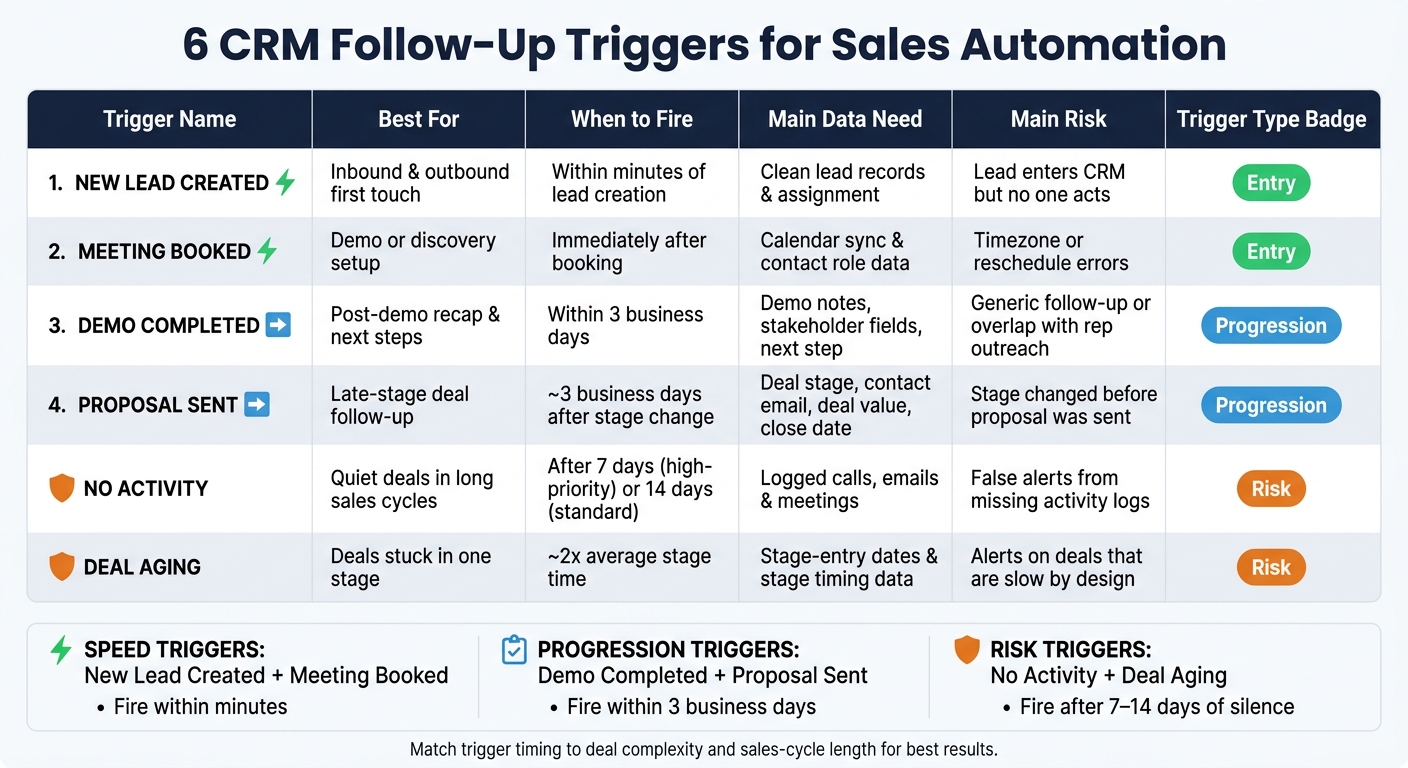
One of the most common reasons deals stall is missed follow-ups. With multiple opportunities to juggle, it’s easy for even a hot lead to slip under the radar. Automation solves this by creating follow-up tasks based on deal stages or periods of inactivity. For instance, if a deal sits idle for too long, the system automatically generates a task and notifies the rep, eliminating the need for manual reminders.

This approach ensures follow-ups remain consistent and timely, reducing the risk of stalled deals. Automated scheduling frees reps to concentrate on meaningful interactions with prospects instead of spending time managing their calendars. Tools like color-coded indicators and closing date alerts highlight overdue deals, ensuring no opportunity is left unattended.

Maintaining Real-Time Pipeline Accuracy

A clean pipeline depends on accurate, up-to-date data. When deal information becomes outdated, it skews forecasts and makes it harder for leadership to separate active opportunities from dead ends. Task automation addresses this by prompting reps to update data at key stages. Whether it’s logging a call, updating a status, or scheduling a meeting, the system ensures each stage includes a clear next step. It also flags inconsistencies like overdue tasks or missing actions, keeping your pipeline aligned with reality.

The benefits are tangible. Automating pipeline hygiene can cut the 13% of time sales leaders spend cleaning CRM data by up to 20%. This time savings allows leaders to focus on coaching and strategy while ensuring data quality through early validation. With accurate, real-time data, forecasting becomes a grounded, evidence-based process rather than a guessing game.

Enforcing Sales Process Discipline

A structured sales process only works if it’s followed consistently, starting with a successful CRM implementation. Task automation ensures this discipline without requiring constant oversight. By setting mandatory next steps at each stage and using conditional fields, notifications, and workflow rules, the system guides reps through the sales cycle. Deals can only move forward when required actions are completed, reinforcing a consistent and reliable process.

This built-in structure leads to better outcomes. Instead of relying on reps to remember to log updates or schedule follow-ups, automation makes these tasks a natural part of their workflow. Centralizing activities like emails, calls, and notes within the CRM also reduces administrative burdens, allowing reps to focus on selling. With clear next steps for every deal and well-defined stages, your pipeline transforms into a dependable system for driving revenue – not just a database you hope stays current.

Benefits of Task Automation in Teamgate CRM

Teamgate

Task automation in Teamgate transforms sales teams by replacing guesswork with consistency, grounding decisions in real data, and creating a CRM that reps actually want to use because it helps them close deals.

Predictable Revenue Through Consistent Follow-Up

In Teamgate, when a deal reaches a stage without a defined next step, the system steps in with an automatic task reminder. This ensures that no opportunity is left hanging, eliminating the risk of losing potential revenue because a hot lead was forgotten. Follow-up becomes a built-in process, not something reps have to remember or scramble to manage. This keeps deals moving forward smoothly and consistently.

By automating follow-up tasks, forecasts become more reliable. Deals progress based on actual actions rather than overly optimistic assumptions, leading to better pipeline visibility and allowing reps to focus on selling instead of juggling reminders.

Better Pipeline Visibility for Leadership

Teamgate provides leaders with real-time insights into critical metrics like deal age, activity levels, and next-step coverage. The Time Journey feature automatically tracks how deals move through stages, giving managers a clear timeline of progress without requiring manual updates.

This level of visibility changes how leaders coach and forecast. Instead of relying on spreadsheets or instinct, they can identify stalled deals and address bottlenecks before they become problems. Pipeline Movement reports highlight where deals tend to get stuck, enabling managers to take proactive steps based on real data. When every deal has an actionable next step, the pipeline becomes a reliable tool for driving the business forward. Clear insights also help reps prioritize their efforts more effectively.

Higher Rep Productivity and CRM Adoption

Teamgate integrates seamlessly into the daily activities of sales reps, centralizing tasks like emails, calls, meetings, and notes. This makes the CRM a natural part of their workflow, not an extra chore. By automating routine data entry, reps can save up to 20% of their time, allowing them to focus on building relationships and closing deals.

Features like the drag-and-drop interface for managing deals and automated activity tracking eliminate repetitive tasks that often discourage CRM use. Reps see immediate benefits as automated reports provide clear insights into their performance and pipeline progress. With routine tasks like logging interactions and scheduling follow-ups handled by the system, reps can dedicate their energy to actions that drive sales forward. This keeps the pipeline organized and ensures momentum is never lost.

Steps to Implement Task Automation in Teamgate CRM

Setting Up Workflow Automations

Start by defining triggers that automatically create follow-up tasks as deals move through critical stages. In Teamgate, you can set up workflows to ensure no opportunity slips through the cracks. For example, when a deal reaches a key stage, such as "Proposal Sent", the system can prompt the scheduling of a follow-up call or task. You can also configure conditional rules to notify reps when tasks are close to their due dates or escalate alerts to managers if deals remain inactive beyond a certain age.

To ensure consistency, require specific fields to be completed at each stage and apply conditional logic to guide the process. For instance, when a deal transitions to "Negotiation", the system can enforce a next step, like scheduling a meeting. Always test these workflows on sample deals to make sure they function as intended. Once workflows are live, use dashboards to keep an eye on deal health and ensure the process runs smoothly.

Using Dashboards to Monitor Deal Health

Dashboards work hand-in-hand with automated workflows by offering real-time insights into your pipeline. Customize these dashboards to track essential metrics like task completion rates, deal age, and next-step coverage. This helps managers quickly identify potential bottlenecks or areas where deals might be stalling. Set up alerts to flag deals that exceed age limits or when task completion rates dip below acceptable levels.

The Time Journey tool automatically records every status change and tracks how long deals stay in each stage, eliminating the need for manual reporting. Utilize the Sales Pipeline Movement report to review daily progress, identifying which stages are effectively qualifying leads and where opportunities are getting stuck. You can also filter dashboard views by users or teams to pinpoint high performers and use their workflows as a model for others.

Integrating Task Automation with Daily Sales Activities

Once workflows and dashboards are in place, integrate automation into your team’s daily routines. Automate tasks related to emails, calls, and meetings to save time and reduce manual effort. For instance, when a rep logs a call in Teamgate, the system can automatically create a follow-up task based on the outcome. The drag-and-drop interface makes it easy for reps to visually manage deals while the system handles reminders and tracking in the background.

To streamline communication, connect Teamgate with sales automation integrations like Gmail, Outlook, or Microsoft 365. This integration ensures email conversations are linked to deals, and follow-up tasks are created without requiring reps to leave their inbox. Use SmartDialer to log calls and automatically generate follow-up tasks. By centralizing emails, calls, meetings, and notes in one platform, Teamgate transforms the CRM into a tool that supports selling rather than adding administrative overhead.

Measuring the Impact of Automation on Pipeline Hygiene

Manual vs Automated Pipeline Management: Key Performance Metrics Comparison

Manual vs Automated Pipeline Management: Key Performance Metrics Comparison

Quantifying the results of automation is essential to demonstrate its value. By tracking key metrics, you can clearly show how automation safeguards revenue and transforms pipeline hygiene from a vague idea into a measurable system.

Key Metrics to Track

Deal age is a critical metric that highlights how long opportunities linger in each stage. Before automation, deals often spend an average of 45 days per stage. After implementing automation, this average drops to 20 days, significantly reducing silent revenue loss. With Teamgate’s real-time tracking, aging deals are flagged before they expire, enabling managers to coach reps on what’s truly stuck versus what’s moving forward.

Task completion rates shed light on how consistently follow-ups are being executed. Manual processes typically result in 60-70% task completion, as tasks can easily fall through the cracks. Automation boosts this rate to over 90% by issuing timely alerts and preventing stage progression until tasks are completed. Tracking on-time task completion above 85% is a strong indicator of predictable revenue, as consistent follow-ups keep opportunities warm and active.

Forecast accuracy is another area where automation delivers tangible results. By comparing projected pipeline values to actual closed-won revenue, you can identify gaps caused by poor pipeline hygiene. Manual processes often yield forecast accuracy rates around 65%, inflated by stale deals. Automation ensures deals are up-to-date and next steps are covered, raising accuracy to 85-90%. Teamgate provides data-driven signals like deal health and next-step tracking, grounding forecasts in reality rather than guesswork.

Lastly, sales cycle duration – the average time from opportunity creation to close – often shortens by 20-30% with automation. For instance, a sales cycle of 90 days may shrink to 65 days as automation prevents deals from stalling and prioritizes active opportunities.

These metrics offer a clear and measurable comparison of manual versus automated processes.

Comparing Manual vs. Automated Processes

The best way to showcase automation’s effectiveness is through a side-by-side comparison. Start by exporting 3-6 months of historical data to establish baselines for deal age, task completion, sales cycle length, and forecast variance. After running automation for three months, retrieve the same metrics from Teamgate’s dashboards and compare. The results will highlight where automation recovers lost revenue and improves efficiency.

Metric Manual Process Automated Process
Task Completion Rate 60-70% 90%+
Overdue Tasks 30-40% <10%
Average Deal Age 45 days per stage 20 days per stage
Sales Cycle Duration 90 days 65 days
Forecast Accuracy 60-70% 85-90%
Rep Time on Admin 13% Minimal

These measurable improvements validate how automation not only cleans up your pipeline but also speeds up deal progression. By automating manual tasks, sales teams reclaim time previously spent on administrative work. This means cleaner data, faster-moving deals, more accurate forecasts, and reps who can focus on selling instead of updating CRM fields. Ultimately, automation transforms pipeline clutter into actionable insights that drive revenue. Measuring these shifts proves that automation isn’t just effective – it protects your revenue from the hidden costs of inefficiency.

Conclusion

Automating task reminders can transform your sales pipeline into a reliable engine for consistent growth, preventing revenue from slipping through the cracks.

Pipeline hygiene goes beyond just keeping your data clean – it’s about preventing lost opportunities. Stalled deals, missed follow-ups, and unreliable forecasts can drain resources and waste time chasing leads that have gone cold. Task automation tackles these challenges by ensuring timely follow-ups, maintaining accurate data, and embedding disciplined selling practices into your team’s daily routine.

The benefits are clear: leaders can reclaim up to 13% of the time they once spent cleaning up CRM data, redirecting their focus to coaching and closing deals. Sales reps save as much as 20% of their time on admin tasks, freeing them to connect with customers and build relationships instead of managing data. These changes replace guesswork with an evidence-based approach to pipeline management.

Teamgate CRM addresses revenue leaks by highlighting deals without next steps, identifying aging opportunities, and providing actionable insights into deal health and activity. It simplifies the sales process by integrating seamlessly into the workflows reps already use – emails, calls, and meetings – while automating follow-ups and enforcing a clear sales process. This makes disciplined selling second nature and eliminates unnecessary busywork.

The decision is straightforward: stick with manual processes that let deals quietly fade away or embrace task automation to create a predictable, growth-focused pipeline. Teamgate offers a solution that combines structured processes, reliable data, and high user adoption – all without unnecessary complexity. It’s quick to set up, easy to use, and built for modern sales teams. Start automating your pipeline hygiene today to protect every dollar of your hard-earned revenue.

FAQs

How does automating tasks keep your sales pipeline moving?

Automation plays a crucial role in keeping your sales pipeline moving smoothly. By setting up reminders and prompting next-step actions, it prevents tasks from being overlooked and ensures that deals don’t lose momentum. Overdue tasks are flagged, helping you address potential bottlenecks before they become bigger issues.

By simplifying follow-ups and maintaining steady progress, automation transforms consistency into a reliable process rather than a manual effort. This approach keeps your pipeline organized and ensures every opportunity gets the focus it needs to close deals effectively.

What are the main advantages of keeping your sales pipeline accurate in real time?

Keeping your sales pipeline accurate in real-time is key to keeping deals moving and maintaining momentum. Timely reminders and updates ensure that no opportunity is forgotten or left to cool down, helping you avoid hidden revenue loss and keeping every deal active.

For leaders, an accurate pipeline offers clear, current visibility into the team’s progress. This clarity supports more reliable forecasting and enables quicker, data-informed decisions. By bringing attention to bottlenecks and overdue tasks, it creates a clean and dependable pipeline that drives steady growth and strong performance.

How does task automation improve sales forecasts and shorten the sales cycle?

Automation plays a key role in keeping deals on course by sending timely reminders and highlighting follow-ups that need attention. This approach helps avoid overdue tasks, ensures pipeline data stays accurate, and keeps deals from losing momentum.

With activities consistently updated, automation provides reliable, real-time data for forecasts, improving their accuracy. It also speeds up the sales process by maintaining steady progress, cutting down delays, and ensuring every opportunity moves forward smoothly.

Related Blog Posts

Sales teams often lose deals not because of effort, but due to unclear pipeline stages that lead to stalled opportunities. A well-structured sales pipeline aligns with buyer actions, tracks progress, and ensures consistent follow-up to prevent hot leads from going cold. Here’s how to design one that works:

  • Define clear stages based on buyer milestones (e.g., lead qualification, needs analysis, proposal, negotiation, closing).
  • Focus on buyer actions like reviewing proposals or confirming budgets, rather than internal tasks.
  • Use 5–7 stages to balance simplicity with visibility into bottlenecks.
  • Set entry and exit criteria for each stage, ensuring deals move forward only with real buyer commitment.
  • Track key metrics like conversion rates, deal velocity, and next-step coverage to refine your process.

Teamgate helps sales teams follow a clear process and gives managers reliable insights – without turning CRM into a full-time admin job. By aligning your pipeline with buyer behavior, you can create a predictable system that drives revenue and keeps deals moving forward.

5-Step Framework for Designing Effective Sales Pipeline Stages

5-Step Framework for Designing Effective Sales Pipeline Stages

How to design a sales process that works

Map Your Sales Process to the Buyer Journey

Your sales pipeline should reflect how buyers make decisions, not just your internal workflows. When pipeline stages align with actual buyer commitment milestones, it becomes easier to track progress and identify where deals stall.

Start by examining your current sales process to understand where buyer actions truly impact deal outcomes.

Review Your Current Sales Process

Use your CRM data to map out your sales cycle. Focus on deal progression, win/loss ratios, and cycle times. Look for trends – like a 40–50% drop-off between qualification and demo stages – that could signal issues like weak lead criteria or poor handoffs.

Talk to your sales reps about their experiences with wins, losses, and stalled deals. These conversations often reveal bottlenecks, such as jumping into proposals before fully understanding buyer needs. For example, many B2B teams find that deals stall between needs analysis and proposal stages for this very reason. Track key touchpoints like discovery calls, demos, and meetings with decision-makers to map the actual buyer journey, rather than an idealized version.

Gather specific metrics to pinpoint improvement areas. For instance:

  • Win/loss ratios by stage (aim for 20–30% progression at each stage)
  • Average deal velocity (30–45 days for SMB deals is typical)
  • Conversion rates from lead to close (often 1–5%)

If your data shows that 60% of deals stall in the needs analysis stage, you’ve found a clear area to address.

Identify Buyer Commitment Shifts

Once your process is mapped, focus on identifying where genuine buyer commitment occurs versus routine sales activity.

Align your pipeline stages with measurable buyer actions. For example, moving from "problem identification" to "solution evaluation" should happen when a prospect confirms their pain points during a discovery call – not just because you sent a follow-up email. Similarly, the "decision-making" stage should start when decision-makers actively review ROI data and budget approvals begin, not just when you submit a proposal.

The number of pipeline stages depends on your sales cycle. For SMB sales with shorter cycles (2–4 weeks), a 5-stage pipeline often works well. For enterprise deals lasting 90+ days, 6–7 stages are usually needed to account for multiple stakeholders and ROI validation. For instance, a SaaS company that defines "budget approval" as the exit criterion for the negotiation stage can improve forecast accuracy by 25%.

Each stage should focus on buyer actions, not internal tasks. For example, "proposal reviewed by decision-makers" is a clear, actionable milestone, while "proposal sent" doesn’t provide real insight into buyer engagement. Structuring your pipeline around buyer behavior can improve conversion rates by 15–25%, as it encourages your team to prioritize meaningful progress over simply completing internal steps.

Build Your Core Pipeline Stages

Once you’ve outlined the buyer’s journey, it’s time to create pipeline stages that align with each key commitment point. Aim for 5–7 stages. Having more can lead to unnecessary complexity, while fewer can obscure bottlenecks in your process. These stages should clearly reflect the critical decision points your buyers encounter.

Standard Stages to Include

Here are some essential stages to consider, based on common buyer commitment milestones:

  • Lead Generation/Prospecting: This is where you identify potential buyers through inbound marketing efforts or outbound outreach. The goal is to build awareness and spark initial interest.
  • Lead Qualification: At this stage, you evaluate whether a prospect meets essential criteria like budget, authority, need, and timeline (often referred to as BANT). This helps weed out opportunities that aren’t a good fit.
  • Initial Contact/Needs Analysis: These early conversations aim to gauge interest, uncover pain points, and understand what the prospect truly needs.
  • Proposal & Presentation: Here, you present a tailored solution, backed by data and case studies, as the prospect actively evaluates your offering.
  • Negotiation: This stage involves discussing terms, pricing, and addressing any objections. Decision-makers are typically engaged to finalize deal details.
  • Closing: The agreement is finalized, contracts are signed, and the deal transitions from opportunity to revenue.
  • Post-Sale Follow-Up: After the purchase, this step ensures customer satisfaction and opens the door for potential upselling opportunities.

Customize Stages for Your Sales Motion

Your pipeline should reflect the nuances of your sales process. For instance, if you handle complex enterprise deals involving multiple stakeholders and lengthy cycles, you might add stages like "Stakeholder Alignment" or "ROI Validation" to account for the extended evaluation process. On the other hand, if you’re working with fast-paced SMB sales, you could streamline by merging stages like Proposal and Negotiation to better match the shorter sales cycle.

The key is to keep stages focused on the buyer’s actions and easy for your team to apply consistently. Each stage should represent a clear shift in buyer commitment. For example, a stage labeled "proposal reviewed by decision-makers" is far more actionable and meaningful than simply calling it "proposal sent".

Teamgate CRM allows you to customize pipeline stages to fit your unique sales motion while maintaining the structure needed to keep deals moving forward. You can define the number of stages, name them to match your buyer’s journey, and set clear criteria for advancing deals – all without adding unnecessary fields or creating overly complicated workflows.

Set Entry and Exit Criteria for Each Stage

To keep your pipeline accurate and actionable, it’s not enough to have well-defined stages – you also need clear entry and exit criteria for each one. These criteria act as checkpoints, ensuring deals only move forward when there’s real buyer commitment. Without them, your pipeline risks becoming cluttered with stalled deals that never progress. Instead of relying on guesswork or optimism, base these criteria on verifiable buyer actions that signal an actual shift in intent.

For example, marking a deal as ready to progress simply because a proposal was sent is wishful thinking. However, requiring the buyer to review the proposal and provide feedback demonstrates genuine engagement. Companies that adopt 5–7 pipeline stages with objective criteria often see better conversion rates, as each stage reflects measurable buyer progression.

Use Buyer Actions as Criteria

The most reliable criteria are rooted in buyer actions, not tasks completed by your sales team. For instance:

  • Lead Qualification stage: Entry might require a prospect to respond positively to outreach and share basic company details. Exit could involve confirming BANT (Budget, Authority, Need, Timeline) through a discovery call.
  • Needs Analysis stage: Deals enter after a discovery call is completed and exit once the buyer’s pain points are clearly identified, and a solution has been mapped out together.
  • Proposal stage: Progress is only made when decision-makers have reviewed the proposal and provided structured feedback that signals their commitment.

This buyer-focused approach avoids vague labels like "interested" or arbitrary milestones like "three calls made." Instead, it relies on concrete actions that reflect real intent. When such criteria are consistently applied, deals can convert at rates 70–80% higher because they’re based on genuine buyer engagement.

Enforce Discipline with Structured Stages

Once you’ve set buyer-driven criteria, it’s crucial to apply them consistently. Tools like Teamgate CRM can help by automating this discipline. For example:

  • Automated reminders ensure deals don’t stall without follow-up.
  • Real-time data on deal age and activity highlights neglected opportunities.
  • Standardized processes make skipping steps or ignoring next actions nearly impossible.

This structure keeps your pipeline clean and trustworthy. Deals stay active, forecasts are grounded in real data, and managers can coach more effectively using metrics like activity levels, deal health, and next-step coverage. By tracking stage conversion rates (ideally 20–40% per stage) and time-in-stage metrics, you can refine your process over time. When your pipeline reflects actual buyer behavior, growth becomes not just possible – but predictable.

Assign Activities, Metrics, and Follow-Up Actions

Once you’ve established the criteria for entering each stage, the next step is assigning specific activities, metrics, and follow-ups to ensure deals keep moving forward. Without clear guidelines on what reps should do at each stage – or how success is measured – you risk turning your pipeline into a guessing game rather than a reliable revenue generator.

Focus activities on buyer commitments rather than internal tasks. For example, during the needs analysis stage, reps should ask open-ended questions to uncover pain points and align solutions to those needs. In the proposal stage, activities might include customizing content with relevant data, case studies, and visuals tailored to the buyer’s challenges. Each stage should have minimum buyer interaction requirements and clearly defined follow-ups to maintain momentum.

Define Stage-Specific Activities and Tasks

Clarify the actions required at every stage. In the lead qualification phase, this could mean conducting a discovery call to understand the prospect’s challenges and confirm key criteria, such as BANT (budget, authority, need, timeline), before moving forward. During product demos, reps should schedule demonstrations, address objections, and thoroughly document interactions. In the negotiation stage, tasks might include reviewing proposals, negotiating terms, and securing necessary approvals.

Teamgate CRM simplifies this process by tracking emails, calls, meetings, notes, and activity history. Its built-in tasks, reminders, and automations ensure follow-ups happen consistently. By enforcing structured stages with clear next steps, Teamgate prevents deals from stalling.

The next step is measuring these actions to pinpoint bottlenecks and improve your approach.

Track Key Metrics for Each Stage

With defined activities in place, tracking key metrics helps identify roadblocks and optimize performance. Aligning metrics with buyer commitments reinforces a disciplined approach. Key metrics to monitor include:

  • Conversion rates: The percentage of deals advancing to the next stage.
  • Deal velocity: The time deals spend in each stage.
  • Next-step coverage: The percentage of deals with clearly defined next actions.

For instance, if deals linger too long in the needs analysis stage, it may indicate gaps in qualification. Similarly, low conversion rates from proposal to negotiation could highlight weaknesses in presentations.

Teamgate CRM provides real-time dashboards that display deal age, activity levels, next-step coverage, and pipeline hygiene, including overdue tasks. Reviewing these metrics weekly helps refine your process, prioritize opportunities, and prevent revenue loss. When your pipeline reflects consistent rep activity and buyer behavior, you can expect more predictable and positive outcomes.

Implement and Optimize Your Pipeline

Once you’ve outlined your stages, criteria, and activities, the next step is to bring your pipeline to life and make it work effectively for your team. This process goes beyond just setting up software – it’s about building a system that sales reps will actually use while providing leadership with the insights needed to safeguard revenue.

Set Up Your Pipeline in Teamgate CRM

Teamgate CRM

Start by logging into Teamgate and navigating to the Pipelines section. Click "Create New Pipeline" to begin defining your stages. These stages should reflect key shifts in buyer intent, such as Lead Management, Needs Analysis, Proposal, Negotiation, and Closed-Won. Each stage should represent a distinct step in your buyer’s journey.

If your sales process involves different workflows, consider creating separate pipelines. For example, you might have a simplified pipeline for SMB deals and a more detailed one for enterprise deals, including stages like Internal Review and Executive Sign-Off. Teamgate allows for unlimited pipelines, so you can tailor each one to fit specific deal types, industries, or product lines.

When setting up your pipeline, focus on objective buyer actions to define each stage. Assign specific activities to each stage, such as required buyer interactions or follow-up deadlines. Take advantage of automation features to streamline tasks – Teamgate can, for instance, notify reps when a deal has been inactive for 14 days or automatically schedule follow-up emails after a meeting. These automations ensure that follow-ups happen consistently and that no deal is left without a clear next step. This setup process transforms your previously defined stages and criteria into a functional system.

Once your pipeline is in place, the next step is to monitor its performance and make ongoing improvements.

Monitor and Refine Pipeline Performance

With your pipeline up and running, use Teamgate’s dashboards to track critical metrics like deal age, activity coverage, conversion rates at each stage, and next-step completion. Visual tools like color-coded indicators help you spot overdue deals early, while the Sales Funnel view provides real-time insights into where leads are dropping off. Use weekly reports to identify bottlenecks – if deals are stalling in Needs Analysis, consider tightening qualification criteria; if conversion rates from Proposal to Negotiation are low, revisit your presentations.

Regular pipeline maintenance is essential. Remove outdated deals and ensure every opportunity has a clear next action. Teamgate’s pipeline hygiene reports highlight overdue tasks and aging deals, helping to prevent unnoticed revenue loss. Plan quarterly reviews to refine your pipeline – merge underused stages, adjust criteria based on buyer behavior, and test changes against historical data. This disciplined approach ensures that your pipeline stays accurate, efficient, and focused on driving revenue. Continuous feedback and adjustments keep your system aligned with your sales goals and evolving buyer needs.

Conclusion

A well-designed pipeline should reflect how buyers make decisions, not add unnecessary complexity. By aligning your 5–7 pipeline stages with actual shifts in buyer commitment – rather than internal sales tasks – you create a system that fosters predictable revenue. Each stage should include specific activities to ensure consistent follow-up and keep deals moving forward.

The key to a strong pipeline lies in structured stages and clear visibility. Structured stages prompt your team to ask critical questions: Has the buyer reviewed the proposal? Is there a clear next step? Defining entry and exit criteria based on buyer actions prevents deals from advancing on mere optimism. Stage-specific activities maintain momentum, ensuring opportunities don’t stall. Without this structure, deals can linger, hot leads may grow cold, and your demand generation efforts can go to waste. The real cost isn’t just lost revenue – it’s also the hours your team spends chasing deals that are no longer viable.

With Teamgate CRM, maintaining discipline becomes easier. Automated reminders and pipeline hygiene reports help reps focus on actions that drive deals forward, rather than getting bogged down in administrative tasks. The system is designed to support selling, not just tracking data.

Leadership benefits from actionable insights, grounded in metrics like deal age, activity levels, and next-step coverage. This makes sales forecasting more reliable and coaching more effective. When your pipeline reflects true buyer progress and every deal has a defined next step, it transforms from a static list into a dynamic system that drives growth.

To protect and predict revenue, align your stages with buyer behavior, monitor key metrics, and continuously refine your pipeline based on real-world data. Regular adjustments ensure your pipeline remains a powerful tool for growth.

FAQs

How can I decide the right number of stages for my sales pipeline?

The number of sales pipeline stages you need depends on how complex your sales process is. For most businesses, 3 to 6 stages strike the right balance, with 4 or 5 often being the most effective. Fewer than 3 stages might oversimplify things, while more than 6 can make the process feel overwhelming and harder to manage.

To get started, map out the key steps in your sales journey – from the first contact with a lead to closing the deal. Once you’ve outlined these steps, you can fine-tune them over time to better fit your team’s workflow. Tools like Teamgate CRM make it easier to test and adjust your pipeline structure, helping you maintain clarity and consistency in your sales process.

What factors should determine when to move a deal to the next stage in the sales pipeline?

To maintain a reliable and disciplined sales process, only advance a deal to the next stage when it meets specific, predefined criteria. This eliminates guesswork and ensures your pipeline stays accurate and actionable.

  • Completed or scheduled next steps: Each stage should end with a clear action, such as a discovery call, demo, or proposal. This action must either be completed or have a confirmed date on the calendar.
  • Qualified leads: Before moving past the qualification stage, confirm the prospect meets essential criteria like budget, authority, need, and timeline (often referred to as the BANT framework).
  • Buyer engagement: Look for tangible signs of progress, such as a positive response to a presentation, a signed proposal, or a commitment to a follow-up meeting.
  • Stage-specific requirements: Make sure all checklist items for the current stage (e.g., "lead qualified" or "proposal delivered") are fully completed before advancing the deal.

By sticking to these guidelines, you’ll keep your pipeline clean and trustworthy, with every deal’s movement reflecting real progress.

How do I align my sales pipeline stages with the buyer’s journey?

To make your sales pipeline align seamlessly with the buyer’s journey, design its stages to mirror how prospects transition from initial interest to making a decision. Break the buyer’s journey into four key phases – Awareness, Consideration, Evaluation, and Purchase – and match these to pipeline stages like Lead Generation, Lead Qualification, Proposal, and Closing. Each stage should include a clear, actionable next step, such as scheduling a demo or sending a proposal, to ensure deals keep moving forward without stalling.

Keep your pipeline organized by routinely reviewing overdue tasks, tracking how long deals remain in each stage, and ensuring every deal has a defined next step. Use your CRM to maintain consistency by setting criteria for advancing deals between stages, so only prospects who are genuinely progressing move forward. Additionally, tailor your content and messaging to fit each stage of the journey, helping prospects advance with confidence. Regularly refine your pipeline to eliminate bottlenecks and stay in sync with changing buyer behaviors.

Related Blog Posts

Responsibility plays a vital role in sales. However, not all teams know how to increase their accountability over time to meet the modern-day business requirements. While most businesspeople agree that responsible sales teams perform their tasks better, maintaining high standards can be tricky. Especially when supervisors do not possess the right tools and solutions to track everyday activities within a team.

What Is Responsibility in Sales Teams?

Fundamentally, sales teams’ responsibility is not just about pushing too hard or watching too closely. As a matter of fact, this approach requires making sure everything is clear. It starts by setting clear goals and understanding of the work needed, and continues by relying on clear ways to measure how well someone is performing

The best way to get this clarity is by introducing regular and organized ways to keep track of what team members are doing. When managers know exactly how employees allocate their time and energy each day, they are able to track how responsible sales teams actually are. This approach allows supervisors to get all the details necessary to control how deals are closed, leading them to better agent coaching, wiser resource use, and the creation of a culture of responsibility that can be scalable as the team grows.

Why Activity Tracking Is Key for Boosting Responsibility?

Sales create numbers. Numbers tell you the exact effects of your commerce activities. Even so, just looking at the final results of a sales team’s performance does not provide you with details on how these numbers were achieved. This is precisely why activity tracking matters most.

More and more businesses are relying on MightyCall Call Center software to keep an eye on how well agents are performing. Using an online call system designed for sales teams’ productivity enables managers to closely control each step of the funnel. Supervisors can easily gather call actions, automatically keep recordings of conversations, and provide a stable way to get detailed info without making the team do more work. Automation in data gathering boosts responsibility among team members, teaching agents that being accountable is a shared value, not just something managers talk about in meetings.

Activity tracking based on modern tech allows you to gather more knowledge. You will know not just how much you sold, whether you hit your goals, and what the possible value of future sales is. More importantly, you will discover the reasons these numbers happen in the first place. As a result, you will be able to predict potential problems, scale your teams up and down whenever needed, and understand the impact of each action agents take.

Activity Tracking and Performance: The Direct Link

Performing well should never be done by chance. It is recommended to carefully follow a strict path to achieve corporate goals. Doing what teams are supposed to do helps managers and bosses recognize patterns in how people talk, what they talk about, and how they react. Tracking these activities helps companies understand how these things are connected, leading supervisors to avoid mistakes in managing sales teams.

The link between activity tracking and performance allows you to get answers to the following questions:

  • Why is the pipeline failing—is it because of insufficient early activity, or because of poor conversion rates?
  • Are there any salespeople facing difficulties due to a lack of effort or ineffective communication strategies?
  • Are the sales teams not taking responsibility for their actions that lead them to unfortunate decisions and results?
  • What exact steps are taken by the sales representatives in order to close new and ongoing deals?

As soon as you know these things, you will be able to boost responsibility, leading to an increase in overall sales. Based on HubSpot’s The State of Marketing report, sales are the most important metric for measuring marketing effectiveness. Therefore, it should become your number one priority to track activity in such a way that will lead the team to push overall performance forward.

How to Track Activity Without Overstepping Boundaries?

Boosting sales teams’ responsibility is often possible only through well-planned activity tracking. The main goal should always be not overstep any boundaries, which could lead to leaving a potentially negative impact on your employees. Overwhelming teams with too much data, pushing for the wrong steps, and hurting mutual trust are some of the main issues. If you value responsibility in others, you should also track activity responsibly.

Follow these steps to ensure you succeed in fair activity tracking:

  1. Choose the right tools. Tracking is currently done mostly by machines, meaning that agents do not have to write reports themselves. The trick is to choose the perfect software that allows you to gather all the necessary knowledge and insights.
  2. Set tracking standards. Sales teams often use pretty similar steps in achieving their goals. Employees need to know what KPIs will be watched by managers, and why such tracking is important. As a result, there ought to be no confusion while people understand what activities they should focus on. 
  3. Take quality and quantity into account. Successful activity tracking needs to focus both on how much work is done and how well tasks are performed. Just counting numbers will not suffice. Vital factors—including call results, how long talks last, or if check-ups are done—add meaning to the simple indicators you get from supervising work.

If you are working with large teams across various departments, you might want to consider employing a thorough business activity monitoring (BAM) solution. This complex approach enables companies to precisely track each and every step employees are taking during their shifts. The goal is simple: to follow such metrics as return on investment (ROI), runtime errors, app usage, unintended interruptions, or total sales results.

Turning Data Into Eloquent Coaching: The Next Step

The lack of coaching in a company might lead the teams and employees to make irresponsible choices. If you want to boost your sales teams’ responsibility, you need to look beyond making people follow rules. You do not want to make them feel disconnected. That is why all the data you gather through activity tracking can (and should) be used to help you utilize information to help teams grow instead of just criticizing them.

Eloquent coaching is possible if managers use information about activities to:

  • Quickly spot areas where people need better skills and know-how.
  • Focus on specific actions that lead to the right outcomes,
  • Develop training plans specific to each person and based on real patterns.

Let us use an example to illustrate the meaning of good coaching. If you look at the results of calls over time, they can show you if someone has trouble starting conversations, answering questions, or explaining the next steps. Coaching agents to deal with specific call issues can help them develop the much-needed skills. 

Summing up, activity tracking balanced with powerful coaching can boost overall work quality, leading you to increase sales over time. Make these best practices your norm.

Why Consistent Authority Signals Shape Long-Term Rankings

Every business looking to improve search visibility eventually realizes that growth depends on steady, trustworthy authority signals rather than quick SEO tricks. This is why many brands explore structured link building packages as a way to build credibility through relevant placements. When executed consistently, links from established websites help search engines understand the value and reliability of your content, leading to stronger ranking stability over time.

Search engines reward websites that demonstrate topical expertise reinforced by external validation. A single link from a respected publication can influence how algorithms interpret your brand’s position within a niche. Over the long run, these editorial endorsements become foundational signals that strengthen trust, visibility, and audience perception.

Understanding How Editorial Links Influence Real Organic Growth

Search engines don’t limit themselves to counting the number of backlinks anymore. They evaluate the relationship between content, context, and user intent to determine how meaningful each reference actually is. When your website earns a backlink within content that aligns with your industry, it reinforces semantic relevance and strengthens your overall authority.

Editorially placed links work as reputation markers that signal your expertise to both search engines and users. These placements feel natural, add value to readers, and support long-term ranking potential. Over time, a growing network of contextual mentions helps algorithms classify your website as a credible source of information.

Why Relevance and Authenticity Matter More Than Raw Link Quantity

Google’s evolved guidelines make it clear that quality always outweighs volume. Meaningfully placed links outperform dozens of generic mentions because they reflect genuine endorsements from niche-relevant sources. When your brand appears in content that audiences already trust, the association naturally strengthens your credibility.

This is why many SEO teams prioritize contextual placements built around real expertise rather than forcing links into unrelated content. The closer the alignment between topic, audience, and value, the stronger the long-term impact on rankings and user trust.

The Advantage of Building Links Through Guest Publishing

Guest posting offers one of the most sustainable ways to build authority while also expanding your brand’s reach. When your insights appear on respected websites, you get exposure to audiences who are already engaged with topics related to your business. This not only improves SEO performance but also strengthens brand recognition across multiple digital touchpoints.

Guest contributions allow you to demonstrate expertise, share valuable lessons, and participate in industry conversations. Readers perceive your presence in these publications as a sign of authority, which can influence both conversions and trust-building efforts. With consistent placements, your brand becomes more visible in the spaces that matter most.

How Trustworthy Partners Elevate Link Acquisition Quality

Managing link acquisition internally can be time-consuming because it requires ongoing prospecting, content evaluation, and communication with publishers. Many teams choose to work with professionals who specialize in ethical link placement to save time and maintain quality. The right partner focuses on editorial integrity, website relevance, and long-term value instead of chasing quick wins.

Experienced teams also understand the importance of choosing sites with real engagement, authentic content, and strong topical alignment. Working with specialists protects your brand from low-quality networks and ensures your link profile stays aligned with search guidelines.

How Strategic Backlinks Influence User Behavior and Engagement

High-quality link placements do far more than influence rankings—they shape the way users perceive your brand. When readers encounter your name on credible websites, they automatically associate your business with reliability and expertise. This positive perception often leads to higher engagement rates, longer on-page time, and stronger conversion potential.

Referral visitors from niche-specific publications already possess an interest in your topic. Their behavior reinforces positive signals to search engines, creating a cycle where quality traffic helps improve your organic position.

Evaluating Whether a Link Opportunity Is Worth the Effort

Not every placement opportunity contributes to meaningful growth. Before pursuing a link, it’s essential to analyze whether the website is relevant to your niche, whether its content attracts real engagement, and whether it maintains editorial quality. Metrics like domain authority matter, but context and credibility matter more.

A thoughtful evaluation process helps brands avoid weak placements that offer little SEO value. When each acquired link contributes meaningfully to long-term growth, your digital footprint becomes stronger and more resilient.

Why Diversifying Link Types Strengthens SEO Stability

A natural backlink profile includes different types of placements—guest posts, editorial mentions, niche edits, and contextual citations. Search engines favor link profiles that grow gradually and reflect organic diversification. When your authority is distributed across multiple platforms, your website becomes less vulnerable to ranking fluctuations.

Strategic diversification also supports broader brand storytelling across various industry channels. Each placement reinforces your expertise while expanding your brand’s digital presence.

The Role of High-Value Mentions in Sustaining Long-Term Visibility

A strong presence on authoritative websites builds momentum that strengthens your reputation over time. Unlike paid campaigns that stop working when budgets pause, editorial links continue driving value for months or even years. This makes link acquisition one of the most sustainable long-term growth strategies available to digital marketers.

When these mentions are paired with credible outreach methods or professional backlinks services, the result is a scalable authority engine that compounds with every new placement. Over time, your content benefits from stronger relevance, better rankings, and more consistent visibility in competitive industries.

Final Thoughts: Authority Comes From Meaningful Digital Relationships

Search engines reward brands that contribute real value to their ecosystems. When your business consistently earns contextual, high-quality links, you build a level of credibility that competitors can’t quickly replicate. Authority isn’t created overnight—it comes from sustained efforts that align your content, expertise, and outreach with industry expectations.

With a thoughtful approach to link acquisition and ongoing visibility efforts, your brand can build a strong digital presence that grows each year, reinforcing your reputation across search results and industry conversations.


Running a sales meeting can be frustrating if you’re relying on outdated information or gut feelings. But with a well-organized CRM like Teamgate, you can streamline the process, focus on actionable insights, and make data-driven decisions. Here’s how to transform your weekly sales meetings into efficient, results-oriented sessions:

Key Takeaways:

  • Use Sales KPI Dashboards: Get real-time insights on deal progress, team activities, and performance metrics.
  • Prepare in Advance: Clean up CRM data, create custom dashboards, and generate key reports before the meeting.
  • Structured Agenda: Focus on last week’s results, upcoming goals, bottlenecks, and clear action items.
  • Track Key Metrics: Monitor pipeline movement, activity levels, and forecast accuracy to stay on top of performance.
  • Follow Up: Assign tasks, track progress in the CRM, and ensure accountability.

By focusing on CRM data, you can eliminate guesswork, improve accountability, and help your team close more deals.

5-Step Process for Running Data-Driven Weekly Sales Meetings Using CRM

5-Step Process for Running Data-Driven Weekly Sales Meetings Using CRM

How To Build Effective Sales Reports From CRM Data?

Step 1: Prepare Your CRM Data Before the Meeting

Poor sales pipeline hygiene can derail even the best-planned meetings. While Teamgate CRM makes preparation easier, taking the time to organize and verify your data is key to a productive discussion. Follow these steps to ensure your CRM data is ready to go.

Clean and Update Your CRM Data

Keeping your data accurate and up-to-date is non-negotiable. As Teamgate puts it:

Accurate CRM reports and analytics are essential for identifying strengths and weaknesses among a sales team, and the individuals involved, the complete sales process, and any shortcomings in sales cycles.

Start by converting qualified leads into People and Companies records to declutter your CRM workspace. Make sure loss reasons – like pricing issues, competitor preference, or lost contact – are properly recorded to maintain a clear picture of your pipeline’s health. During lead qualification, assign statuses and note rejection reasons to keep everything organized. Teamgate’s Workflow Automations can also help minimize manual data entry errors and ensure your records stay accurate.

With clean data in place, you’re ready to move on to the next step: visualizing your metrics.

Create Custom Dashboards

Dashboards are your go-to tool for real-time insights. Customize yours to highlight important metrics like pipeline stages, sales activities, and revenue trends from the past week. Use filters to narrow down specific timeframes and get a clear snapshot of your current performance. The Risk Management metric can flag high-risk opportunities that need immediate attention, while the Sales Funnel view helps you identify bottlenecks. For a broader perspective, the Insights section lets you compare performance across different periods.

Once your dashboards are set, pre-generated reports will further solidify your meeting prep.

Generate Reports in Advance

Preparing reports ahead of time ensures your meeting is focused and productive. Teamgate provides pre-built reports in categories like Sales Results, Sales Pipeline, Activity, and Marketing. Reports such as Won/Lost, Sales Cycle, Activity Ratios, and Top Loss Reasons should be ready for review before the meeting.

For deeper analysis, use the Export to Excel feature in the pipeline management or insights section. Tracking activity ratios can help you determine how many meetings it typically takes to close a deal. Additionally, reviewing the Sales Forecast report allows you to make informed decisions based on historical data. These steps ensure your meeting is built around actionable insights, keeping everyone aligned and focused on the strategy ahead.

Step 2: Build Your Meeting Agenda

Once you’ve organized your CRM data, the next step is creating a meeting agenda that promotes efficient decision-making. A clear and structured agenda helps you keep the meeting under 60 minutes, ensuring everyone stays focused and engaged. The following framework outlines how to cover the most important CRM data points without wasting time:

Meeting Segment Duration CRM Data/Report to Use
Last Week’s Results 20 mins Won/Lost Deals, Top Loss Reasons, Activity Ratios
Coming Week’s Goals 10 mins Sales Forecast (7-90 days), Pipeline Value, Lead Trajectory
Problem Solving 20 mins Sales Funnel (Bottlenecks), Risk Management, Sales Cycle Length Report
Action Items 10 mins Task Manager, Meeting Recap/Summary

Here’s a detailed guide on how to make the most of these agenda segments.

Review Last Week’s Results

Start by evaluating the previous week’s performance. Use the Won/Lost Deals report to see which deals closed successfully and which ones fell short. Compare these results to your team’s Activity Goals – such as calls and meetings – to assess key performance indicators (KPIs). Dive into the Top Loss Reasons report to uncover recurring obstacles. Additionally, review Lead Conversion metrics to track how many leads progressed into qualified opportunities. Recognize high-performing team members during this segment to keep morale high.

Set Goals for the Coming Week

Shift the focus to the week ahead by setting actionable and realistic goals. Use the Sales Forecast report (spanning 7 to 90 days) to establish revenue expectations. Check the Pipeline Value to confirm that there are enough opportunities to meet those goals. Evaluate Lead Management reports to decide whether the team should prioritize generating new leads or qualifying existing ones. Finally, define specific Activity Ratios – for instance, the number of calls or meetings needed to secure a deal – so everyone knows what actions are necessary to drive results.

Pinpoint Issues and Delegate Tasks

Identify bottlenecks and challenges using the Sales Funnel report to locate stalled deals or blocked leads. Review the Sales Cycle Length report to flag deals that are taking longer than usual to close. Use the Risk Management metric to highlight high-priority deals that need immediate attention. Check the Sales Leaderboard to spot team members who may require additional coaching or support. Turn these insights into Actionable Tasks using tools like Teamgate, assigning clear ownership and deadlines to ensure accountability. If you’re using the Slack integration, send instant notifications to team members about urgent deals or new opportunities.

Step 3: Focus on Key CRM Metrics

Now that your agenda is set, it’s time to hone in on the metrics that truly matter for sales performance. Instead of drowning in a sea of data, focus on three critical areas: pipeline movement, activity levels, and forecast accuracy. These metrics are directly tied to your team’s ability to close deals and meet revenue goals. By keeping the spotlight on these, you can uncover operational strengths and pinpoint weaknesses in your sales process.

Track Deal Movement Through Pipelines

Keep an eye on how deals are progressing through each stage of your pipeline using Teamgate CRM’s Sales Pipeline Movement report. This tool highlights which deals are moving forward smoothly and which are stuck in specific stages, making it easier to maintain a clean sales pipeline. You can also track how long opportunities linger in each stage with age tracking and visual alerts. This level of detail makes it easier to spot your quickest closers – those deals that move swiftly through the pipeline – and replicate their success across the team.

Measure Activity Levels and Team Output

Activity Reports are your go-to for understanding how much work your team is putting in. They show how many calls, meetings, and tasks each team member has completed during the week. If you’re using SmartDialer, call numbers are recorded automatically, so you can easily compare these figures to the activity goals you’ve set. This data helps you determine whether low conversion rates are due to insufficient effort or if there’s a problem with lead quality.

Beyond just tracking activity, it’s essential to align these efforts with your revenue trends to gain a clearer picture of your overall strategy.

Check Forecast Accuracy and Revenue Patterns

Your Sales Forecast report is key to understanding how well your projected revenue matches actual results. Use the sales trajectory metric to see if performance is steady or fluctuating. Teamgate’s multi-currency support makes it simple to monitor revenue trends across different markets. Additionally, review the profitability of closed deals to ensure you’re not just chasing volume but also closing the right opportunities. Dive into the Top Loss Reasons report to uncover recurring challenges – like price objections or competitor preferences – that might be blocking deals. With these insights, you can adjust your strategy and prevent similar issues from derailing future sales.

Step 4: Convert Insights into Action Items

Data alone doesn’t drive results – it’s what you do with it that matters. After reviewing your metrics, the next step is to turn those insights into actionable steps that push your team forward. This is often where sales meetings can stumble: discussions happen, but no one leaves with a clear plan or accountability. Teamgate CRM eliminates that risk with tools that let you assign tasks, set deadlines, and track progress effectively.

Record Action Items in Teamgate CRM

Teamgate

Use your meeting time to log tasks directly in Teamgate. For instance, if a sales rep’s pipeline value drops, assign them a specific task like re-engaging three at-risk deals by a set deadline, such as Friday. Avoid vague instructions like “follow up on stalled deals.” Instead, make it concrete: “John: Call three prospects in the proposal stage by 12/31/2025.” This level of detail ensures tasks don’t get overlooked.

The Activity Feed in Teamgate allows you to track task completion in real time. Plus, if you integrate Teamgate with Slack, updates on won deals and new opportunities are shared automatically, keeping everyone aligned between meetings. For added accountability, use the Sales Leaderboard to display individual performance against goals. This not only encourages follow-through but also inspires friendly competition.

Once tasks are assigned, monitor progress by comparing performance metrics from one week to the next.

Compare Metrics Week Over Week

Set up a simple dashboard that places last week’s results side by side with this week’s targets. This layout makes it easy to identify trends. For example, if you notice a drop in key activities, it’s a signal to address the issue immediately. Reviewing this table at the start of each meeting helps clarify who’s hitting their goals and who might need additional support.

Example Table: Weekly Metric Comparison

Metric Last Week Value This Week Target Owner
Calls Made 50 60 John Smith
Deals Closed 5 6 Jane Doe
Revenue ($) $10,000 $12,000 Team A
Pipeline Value ($) $150,000 $175,000 Mike Johnson
Meetings Booked 15 20 Sarah Lee

Teamgate’s Goal Management feature is ideal for setting weekly activity-based targets, such as the number of new leads generated or meetings scheduled. These goals go beyond revenue numbers, keeping your team focused on actions that maintain a healthy pipeline. For deeper analysis, you can export dashboard data to Excel for leadership review, but keep the meeting version simple and centered on the most critical metrics.

Step 5: Follow Up After the Meeting

The meeting may be over, but the real work starts now. Without proper follow-up, even the most productive discussions can lose their impact. Teamgate CRM equips you with the tools to keep the momentum going and make sure the commitments made during the meeting turn into action.

Update Pipelines and Records

Right after the meeting, update deal stages, activities, and notes in Teamgate. This ensures the CRM’s real-time tracking kicks in, giving you valuable insights. Teamgate tracks how long each opportunity stays in a particular stage, helping you identify deals that might be stalling.

Use the color indicators and age-tracking features to quickly flag deals that aren’t progressing as they should. For flagged deals, double-check that follow-up actions are in motion. If a deal falls through, make sure to log specific loss reasons, like "price too high" or "chose competitor." This data feeds into detailed reports that can help you fine-tune your sales approach.

Set Up Automated Reports

Teamgate turns your sales activity data into visual reports and actionable analytics automatically. These reports build on the insights you discussed in the meeting, giving you a clear picture of performance over time. With the Insights hub, you can easily track high-impact sales goals and compare results across different timeframes.

For teams using Slack, integrating it with Teamgate allows updates like won deals and new opportunities to be shared automatically. This keeps everyone motivated and accountable between meetings. Additionally, live dashboards let you monitor progress and adapt quickly when needed.

Track Progress with Live Dashboards

The Sales Dashboard provides a real-time view of pipeline bottlenecks and activity-related issues. Use the Sales Leaderboard to measure individual performance against the goals set during the meeting. According to Teamgate, this feature "makes sales team management easier and promotes accountability to both each other and the management among sales reps". For a deeper dive, check the Pipeline Movement report to identify which deals are advancing quickly and which ones are stuck.

The dashboard’s risk management feature highlights opportunities that need immediate attention, so you can act before they slip through the cracks. By tracking how long opportunities remain in each stage, you’ll get a clear sense of where momentum is lagging. And since Teamgate works on any device, you can stay on top of your team’s progress even while on the go.

Conclusion

By following these steps, your meetings can shift from scattered discussions to focused, actionable sessions. A structured, CRM-centered approach removes the guesswork from your sales process while enhancing accountability across the team.

With tools like Teamgate CRM, your team can make decisions based on real data. This turns your CRM into a reliable source of truth, offering a clear view of whether your sales strategies are working or need adjustments.

Consistency plays a crucial role here. Regular check-ins that emphasize clear KPIs and performance metrics keep everyone aligned and motivated. Start right away by setting specific activity goals, tracking performance, and utilizing dashboards to drive continuous improvement. Use the sales leaderboard to spark friendly competition, and link Teamgate with Slack to celebrate closed deals in real time – keeping the energy high between meetings.

The payoff? More productive meetings, better forecasting, and a sales team that knows exactly where they stand and what steps to take next. Put these practices into action and unlock the full power of your CRM data.

FAQs

How do I make sure my CRM data is accurate before a weekly sales meeting?

To make sure your CRM data is spot-on before heading into a sales meeting, start by setting up clear data-entry rules. For example, decide on consistent formats for fields like names (e.g., "First Name Last Name"), phone numbers (e.g., (555) 123-4567), and dates (e.g., MM/DD/YYYY). Incorporate these standards into your team’s training, and use Teamgate’s required fields feature to block incomplete entries from being saved.

Next, do a quick data check before the meeting. Teamgate offers tools like a data-quality dashboard to spot duplicates, missing information, or outdated records. Fix these issues using features like duplicate-merge tools or automated validation, which can flag errors as they happen. Keep an eye on metrics like completeness, accuracy, and duplication rates to ensure your data stays in great shape.

Lastly, make data maintenance a habit. Schedule regular audits, enable real-time syncing across devices, and track data-quality scores in Teamgate. Shoot for over 95% data completeness and less than 2% duplicates so you can walk into your sales meeting with confidence, knowing your insights are backed by reliable data.

What CRM metrics should you focus on in a weekly sales meeting?

To make your weekly sales meetings more productive, zero in on CRM metrics that deliver actionable insights. Start by assessing the pipeline health – look at the total value of deals and how they’re distributed across various stages. Next, review your win rate and lead-to-opportunity conversion rates to gauge how efficiently prospects are progressing through your sales funnel.

Keep an eye on your average deal size and progress toward sales targets to measure overall performance. Break down the data by region, product, or salesperson to pinpoint areas of strength and opportunities for growth. Focusing on these metrics ensures your meetings stay data-driven and aligned with your team’s objectives.

How can I turn CRM insights into actionable tasks for my sales team?

To turn CRM insights into practical actions, start by pinpointing critical data in Teamgate CRM that highlights problem areas – like deals stuck in the pipeline or a drop in win rates. Teamgate’s visual reports and dashboards make it easy to spot trends and identify bottlenecks. Once you have the insights, create tasks that directly address these issues.

For instance, if you notice multiple deals lingering in the proposal stage for over a week, you might assign a task such as: “Follow up with Client A to resolve pricing concerns.” Be sure to include a specific due date (e.g., December 31, 2025) and assign the task to the right team member. You can then tie these tasks to meeting agendas to monitor progress and discuss any roadblocks during your weekly sales meetings.

This method ensures insights are transformed into actionable steps, helping your team stay focused on activities that truly impact results.

Related Blog Posts