Get a free sales audit to uncover hidden revenue opportunities!

In this article, you’ll discover essential strategies to manage your work email effectively. Learn to streamline your communications, improve productivity, and maintain organization with expert tips for managing incoming messages, creating efficient email threads, and utilizing helpful tools like labels and canned responses.

Key Takeaways:

  1. Forwarding all your important emails to one inbox can improve focus and productivity.
  2. Cleaning up your inbox regularly helps maintain organization and saves time.
  3. Employing the ‘touch it once’ rule ensures emails do not clutter your inbox.
  4. Utilizing stars and labels can help you mark and organize important messages effectively.
  5. Implementing canned responses can save time when dealing with recurrent emails.

Email is an essential communication tool that every business and professional needs. Compared to other means of communication, sending an email is fast, convenient, and less intrusive. That way, it enables you to communicate with customers and clients and even set up meetings without having to spend much time making phone calls. 

As much as a work email can be excellent in helping you get things done, it can also hinder productivity if it’s mismanaged. Research shows that reading and answering emails can be time-consuming if you are not organized, which can leave you confused and even forgetting to perform other vital tasks. In this article, we look at some of the best tips that you can use to help manage your work email more professionally and effectively. That way, you can always stay organized and spend less time on your email, thus boosting your productivity significantly. Therefore, keep reading to find out.

1. Forward Your Messages To One Inbox

Most of the time, especially when dealing with both work and personal emails, you often receive messages that require immediate attention. During such times, you might find yourself checking different inboxes in a row, trying to monitor them for updates, which can negatively affect your productivity. The good news is that there is something you can do to help you avoid this situation.

Avoid checking other inboxes except for your work email when performing official tasks. That way, your sale promotions, updates, and social media notifications can’t disrupt your attention when working. However, if some clients message you through your personal email address, then do a setup that will be forwarding all those vital emails to your work email. That way, you get all important emails in one inbox, thus enabling you to maintain your productivity and focus at work.

To set up automatic email forwarding, go to the settings of the email account you’ll be forwarding messages from and open the Forwarding and POP/IMAP tab. Add the email address you want to be receiving those emails, and a confirmation email will be sent there. Additionally, you can instruct your source email account on what to do after forwarding those messages. You can choose to either keep or archive them.

2. Clean Up Your Inbox
tips to manage work inbox

You probably come across a lot of articles advising on how to manage new emails effectively when you are busy searching for some dissertation writing services. Most of these articles offer great advice, but what should you do with the emails already in your inbox? If you use your work email a lot and receive many emails, then you probably have messages that you’ve never deleted or even archived. This situation can force you to go through your emails one by one trying to find those to delete, which can consume a lot of time. 

You don’t have to do that. If you have many unread or unarchived messages, you have to sort them up first. Most of these emails are usually unimportant, especially if you haven’t even bothered to read them or review their details for a few months. Most email accounts, such as Gmail, allow you to find all emails that meet a certain criteria. So, you can search for emails that you received about one or two months ago. Enter “older_than:1m”, in the search bar. 1m means one month, but you can replace it with 2m if you want to find messages that are two months old. Doing this provides all those emails. At the top of the search result, you get the option of either archiving or deleting all these messages leaving your inbox clean and organized.

3. Touch It Only Once Email Management Rule

tips to manage work inbox

Mostly, you usually find yourself reading an email then doing nothing about it. Even if you’ll respond to that email, it still remains hanging in your inbox. There is a rule called touch it once, that you can use in such cases. This rule states that when you open an email, you MUST do something about it. So, after opening your work email and responding to new messages, you must either archive or delete them. That way, those emails do not clutter your inbox.

If the message is a task for you to work on, you should put it down somewhere else like into your to-do list, put a To-Do label on it, set up a follow-up then archive it. For cases when you have already replied to the email, you might need to go back to your inbox to archive the email. Sometimes, you might forget to do that if you had other pressing tasks to work on. To avoid that email from remaining in your inbox, use the Gmail archiving tool. This tool allows you to enable the send and archive feature in the General tab of your settings. That way, you always get the Send and Archive button at the bottom every time you are replying to an email.

4. Use Stars To Mark Important Messages

There are different ways that you can use to remind you to get back to a specific email. You can mark an email as unread, so it stays in your inbox, but you’d have to do that every time you open that email. The best trick to use is star that message. You can do so by clicking at the star symbol near the sender’s name if you are using Gmail. That way, you can always find that email faster in the starred messages. Normally, you are allowed to use one star. However, you can enable additional stars and other symbols to mark that email to help remember or identify it easily.

You can also use follow-ups in NetHunt CRM as they are more similar to the Gmail stars. These follow-ups are better in organizing emails and records compared to Gmail stars. NetHunt CRM follow-ups allow you to set a color-coded flag on your emails, then create a follow-up for them. Also, you can create specific dates for these follow-ups allowing you to manage your tasks better and respond to emails as planned.

5. Use Labels To Organize Messages

Labels are another vital tool that can help you organize your work email effectively. You can use labels to tag your important emails, organize, and even find them faster using those tags. One significant advantage that you enjoy when using labels is that you can tag an email in different labels. That way, labels provide you with a great trick to categorize messages that fall under different categories, unlike folders, since you can’t group the same email in separate folders.

Gmail has some preconfigured labels by default( inbox, drafts, archived, and several others on the left sidebar), but you can create your unique labels. Go to the Labels tab in settings where you can create a new label that will be appearing at the sidebar. That way, you can be finding messages from the picked sender in that label, thus making it easier to access specific information.

6. Use Canned Responses For Recurrent Emails

There are times when you want to send the same message to different writing firms when you are looking for some essay help online. You can either paste old messages from the sent label or have a document with drafts of the message you want to send. Doing these things can be time consuming and exhausting. You can simplify your work by using canned responses. This feature allows you to save a particular response, which you can easily access in the compose window when emailing a different person. Activate this feature by going to your Gmail settings and enabling Canned responses under the Labs tab.

When you activate canned responses, you can always save and name a specific message for later use. You can access canned responses by clicking on the arrow in the left corner of your compose windows. Clicking this button allows you to access different templates and select one with the message you want to reuse.

7. Create Searchable Email Subjects

Gmail search capabilities are great. However, you can have some difficulties searching for a certain email if you are not sure of the keyword to use as the search query. You can always try using a date, name, or even apply some search filters when looking for specific emails. However, that also will only be helpful if you remember some details of the message you sent.

The best way to get emails quickly is ensuring you always use detailed subject lines. Using casual subject lines might make it hard to remember the exact words you used. So, you should always state the exact contacting reason and make it clear. If your email was about meeting a particular manager, then state that briefly and the reason for your meeting on the subject part of your emails. That way, it is hard to forget what the email was about and, thus making it easy to search for it.

8. Unsubscribe From Unwanted Promotional Emails

Newsletters and advertisements can overwhelm your email inbox, making it hard even to find important messages. Therefore, go through your promotional messages and identify those you no longer need to be updated about. You can also unsubscribe from senders who you are interested in their products, but you don’t get time to go through their emails anymore as you can always subscribe back later when you need those updates.

To ease this process, search your inbox for the word “Unsubscribe.” Doing that provides you with a list of emails and senders. That way, you can quickly choose the sender whose promotional emails you no longer need in your inbox, hence leaving your work email looking more professional.

Above are the best tips that you can use to help you manage your work email professionally. Therefore, understand all the details, so you can apply them accurately, and ensure your work email is organized. Also, if you find yourself emailing writing firms asking something like, “Can you do my essay?’’ when looking for some resume help, then research first to help email only the best company that won’t spam your inbox, and not offer the support you need.

Integrating Teamgate CRM for Effective Email Management

Managing your work email professionally and effectively is not a daunting task when you employ the right strategies.

By incorporating these practical tips, such as forwarding all your important messages to one inbox, cleaning up your inbox, using stars and labels, and implementing canned responses, you can significantly boost your productivity.

With a tool like Teamgate, you can further streamline your email management process and focus more on what truly matters in your business. Take a step towards better email management by trying out Teamgate CRM today!

FAQs: Tips to manage email

Q: What are some tips to manage emails effectively?
A: Some effective tips to manage emails include forwarding all your important messages to one inbox, regularly cleaning up your inbox, employing the ‘touch it once’ rule to avoid clutter, using stars and labels to organize emails, and implementing canned responses for recurrent emails.

Q: How can I avoid distractions from multiple inboxes while managing my work email?
A: You can avoid distractions by forwarding all important emails to your work email. This helps you to focus on one inbox at a time, thereby improving your productivity.

Q: What should I do with old emails in my inbox?
A: One strategy for managing old emails is cleaning up your inbox regularly. Search for old messages that are not important and either archive or delete them. This helps to maintain organization in your inbox and saves time.

Q: How can I mark important emails in my inbox?
A: You can mark important emails using stars and labels. In Gmail, for example, you can click the star symbol near the sender’s name to mark an email as important. You can also create and assign labels to categorize your emails more effectively.

Q: What is the ‘touch it once’ rule in email management?
A: The ‘touch it once’ rule in email management states that when you open an email, you should do something with it, either responding, archiving, or deleting it. This rule helps to avoid clutter in your inbox.

Q: How can I manage recurrent emails more efficiently?
A: For recurrent emails, you can use canned responses. This feature allows you to save a specific response which you can access easily when needed, saving you the time of typing the same response over and over again.

Q: What is the best way to organize my emails using labels?
A: Labels can be used to tag your important emails, organize them, and find them faster. You can create unique labels in your email settings and tag an email with different labels if it falls under various categories. This way, you can access specific information faster.

In this comprehensive article, you’ll unlock the secrets to crafting effective sales emails that elicit responses from prospects. Learn how to write engaging subject lines, connect with your audience on a personal level, leverage social proof, and create compelling calls to action that move your audience toward the next steps in your sales process.

Key Takeaways:

  • The significance of research in crafting personalized, response-driven sales emails cannot be overstated.
  • The art of creating catchy subject lines can drastically affect the open rates of your cold emails.
  • Always keep your emails simple, concise, and focused more on the benefits than the features of your product or service.
  • Leverage social proof to enhance credibility and make a persuasive case for your product or service.
  • Never forget to include a clear and concise call to action to guide prospects on the next steps.

Confession time: I have recently signed up to Unroll.Me.

It was a decision driven by desperation mostly — I was getting buried under unsolicited emails and irrelevant pitches. There were moments when I was really aghast at the lack of imagination and flair of the people who kept barraging me with thoughtless, generic emails.

When it comes to interpreting cold email responses, silence usually means no. And that got me thinking — what makes a stellar cold email? Is there a secret hack to writing a sales email that gets a response?

It appears now that there is more than one hack to crafting an inbox-busting cold email campaign. 

#1 Do your homework

A mischievous cat from ‘Alice in Wonderland’ once said that “if you don’t know where you’re going, it doesn’t matter which road you take”. It’s okay if you don’t want to take advice from a fictional character, but talk to any self-respecting inbound sales rep and they’ll tell you that the single most important aspect of their job is research.

Effective marketing and sales campaigns are based on connecting with prospects on an emotional level. What seems like a pretty simple box to tick, invoking emotions can actually be excruciatingly difficult. Not only do you need to know your lead’s pain points to be able to push the right buttons, but you also need to choose the right method to approach them and the right vocabulary to make them take the desired action.

Most inbound marketers will agree that if you don’t know who you’re targeting, your emails will stink.

Whether you’re reaching out to just a handful of leads or a database of 1000+, crafting a highly personalized sales email is the only reliable way to generate decent response rates. If your mailing list exceeds a reasonable number of people, consider a few basic tips for improving your chances of hitting the bullseye:

  1. Create a meaningful buyer persona that captures and summarizes the most important information about your target market, including their pain points and motivations. When you get to crafting the actual sales email copy, write for that particular person as if you were talking to them face to face.
  2. Use LinkedIn to get a better understanding of your list. Select just a few names at random to research their profiles, and see what language they’re using to describe themselves, what skills they’re highlighting, their recommendations, and so on. This will give you direction as to what style, tone, and messaging they’re most likely to respond to.

Anyone who’s ever tried to write a killer sales email knows that defining the buyer persona early can significantly shorten the writing and redrafting process as well as help you choose the right keywords and tone. A CMO will not respond to the same messaging as a CTO, so blindly shooting emails left and right in the hopes of winning some of the leads will waste your list and earn you a spammer’s badge.

Do you have a CRM that keeps you organised?

The most user-friendly CRM on the market. 14-day free trial.

Start Free Trial

Painless setup, no credit card required

At this stage, having the right tools in place can help you cut the research time in half, so make sure your prospecting process is well thought through. You will most likely need a few different tools and extensions to create, track and optimize your email campaigns. Here are some of the most popular email prospecting tools that you should explore.

Tools and Resources

Teamgate – helps to connect, research, present, and close their inbound leads. It also allows sending emails directly to your leads and clients from your CRM account.

Crystalknows – helps you write better emails and connect with prospects based on their unique personality and communication style.

Clara – an auto-scheduling plugin with a human feel that handles all your meetings calendar.  

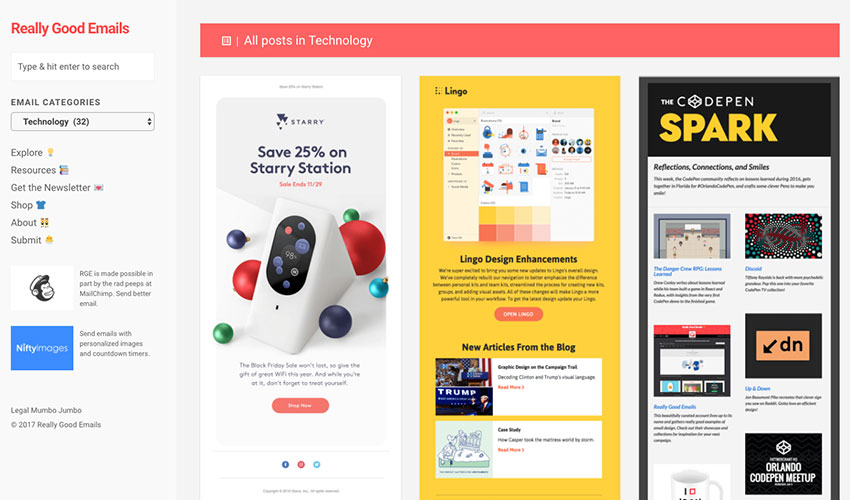
Really Good Emails – a database of the best email designs and copy. Find your inspiration!

Sales Email

Image source: Really Good Emails

Gmail extensions

Rapportive – pull up your prospect’s LinkedIn info right into your inbox.

Boomerang – a Gmail plugin that lets you schedule emails to be sent at any time.  

Clearbit – find any sales email right from your Gmail inbox.

WiseStamp – enables you to create a professional email signature for free. 

Grammarly – boost your credibility with this grammar and spelling checker.

#2 Craft and test various subject lines

When you’re sending cold emails, the subject line can virtually be a door opener. But make a mistake and you’ll land in the spam folder with no chance of making it out of there. And I have the statistics to back this up: 35% of email recipients decide whether to open an email based solely on the subject line, while 69% of people report email as “Spam” based entirely on the subject line. 

Subject lines matter.

Besides getting you through the door, a strong, compelling subject line will also earn you a few extra seconds after a prospect opens the email. But how can you pimp your subject lines to really grab their attention? Marketing pros recommend:

  • Keep it short. And it’s not even because people have the attention span of a goldfish. You have only about six to eight words to transfix your mind, as a typical inbox reveals about 60 characters of an email’s subject line. If your prospects are checking their email on a mobile screen, you’ve only got 25 to 30 characters to seal the deal.
  • Start with the most important information. 55% of all email opens occur on smartphones. A long subject line will get cut off, putting the success of your entire campaign at risk. If it’s not skimmable, it’s not good enough.
  • Personalize your subject lines. Who doesn’t love the sound of their own name? Using personalization tokens, like name or location will help you break through the initial barrier and build rapport. Showing your prospects that you know more about them than just their email address is an effective tactic to get that email opened.
  • Avoid clickbait. Look, you’re already a stranger in someone’s personal inbox — don’t push it. Making false promises or telling half-truths to get your emails opened won’t get you far. If you want to build a relationship based on trust and respect, keep your subject lines honest.

Sales Email

Once you nail a few teaser subject lines, don’t rely on your gut to figure out which one achieves better open rates. The best way to see how your audience responds to different styles and subject line formulas is by implementing a smart A/B testing strategy. Most of the email marketing tools like MailChimp, GetResponse or Yesware will run the tests for you, giving you a detailed report of opens and clicks at the end. The most important lesson here is to let the data guide you.

#3 Keep it short and to the point

Cut the fluff. Everyone is busy and living by the “time is money” rule. Getting into someone’s inbox is one thing, making a connection with a prospect and getting a response is quite another. It’s not particularly helpful when you hear the “keep it short and simple” mantra but it’s the best advice you can get.

One of the easiest ways how to keep things simple is to write as you talk. An email written in a straightforward, casual style sets the right tone for future communications — you come across as more relatable, personable, and approachable. When you finish drafting the email, read it out loud and see whether it rolls off your tongue nicely or sounds like an excerpt from an essay. Don’t make your cold email sound cold, write like a human.

#4 Make it about them and talk about benefits over features

Whatever you’re selling, don’t go for a hard sell in the first email.

If you’ve done your homework and carried out thorough research, you’re starting from the position of strength. Addressing your prospects by their name and talking about their most pressing problems makes your intrusion a little less annoying and shifts their attention from you to their pain points.

The only important truth in sales is that you don’t sell products or services, apps, or tools. You sell dreams and aspirations and offer people a better version of themselves. Benefits over features is a classic example of how much buying decisions are driven by psychological cues. You will have a better chance of converting your leads by vividly painting the picture of what they can achieve if they get on board with your offer, rather than blowing your own trumpet and talking about the amazing features.

[optin-monster-shortcode id=”cvfuxuhchvywm9wl2q6w”]

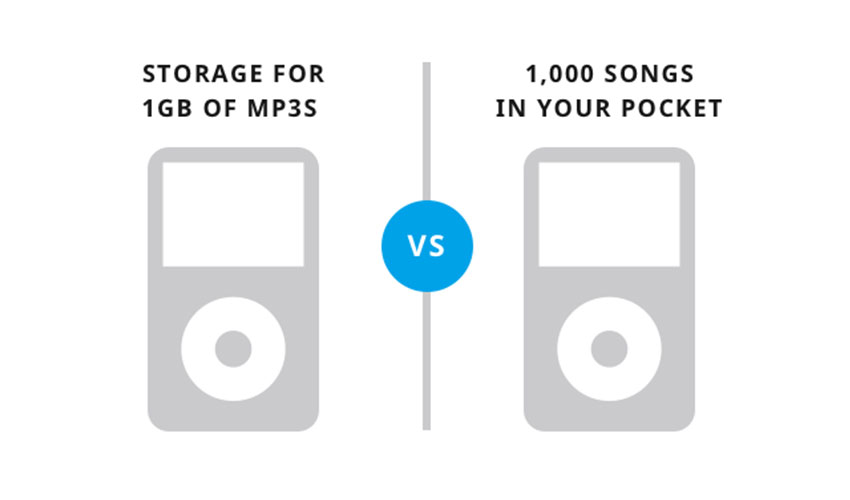
Apple nailed the feature-selling technique when they launched the iPod. When crafting your email copy, keep the Apple example in mind, avoid the awful “me me me” attitude, and focus on the prospect. If you keep on asking yourself “So what?” after every sentence you write, you’re bound to reach a version of your email that will get you a “yes”.

Sales Email

Image source: Help Scout

#5 Use social proof

7 out of 10 Americans seek out opinions before making a purchase, so adding a little social proof can go a long way. It’s one of the few big guns under an inbound sales rep’s belt that can make it easier for a prospect to say “yes” as well as foster trust. Name-dropping and using high-level stats to add a little oomph to your pitch can be an effective way to demonstrate the value that your product creates and increase the response rate.

Although it’s important to weave some case studies, numbers, or client testimonials into your cold email copy, it’s also worth remembering that it needs to stay sharp and concise. You need to find a way how to make the social proof a part of your story instead of throwing dry facts and numbers at your prospects and expecting them to be impressed. Yet, the allure of proven success is incredibly powerful:

Studies have shown that people tend to value the opinions of those that resemble them in some way. If you nail your buyer persona and pick the right case studies or testimonials for your emails, social proof can be your lucky ticket.

#6 Make sure to include a clear CTA

It goes without saying that a strong CTA is the linchpin of any promotional campaign. Chances are, your prospects will skim through your email and jump straight to the bottom of it to quickly figure out what you want. If your closing line is too long, your CTA will lose its punch and might even get lost.

A good rule of thumb is to limit your CTA to one or two sentences, ensuring it directs the prospects to the next step. When they open your email, the first question they’ll have will be “What do you want from me?”. Ensure that your CTA or your closing text clearly states the desired action and next steps.

#7 Include an email signature

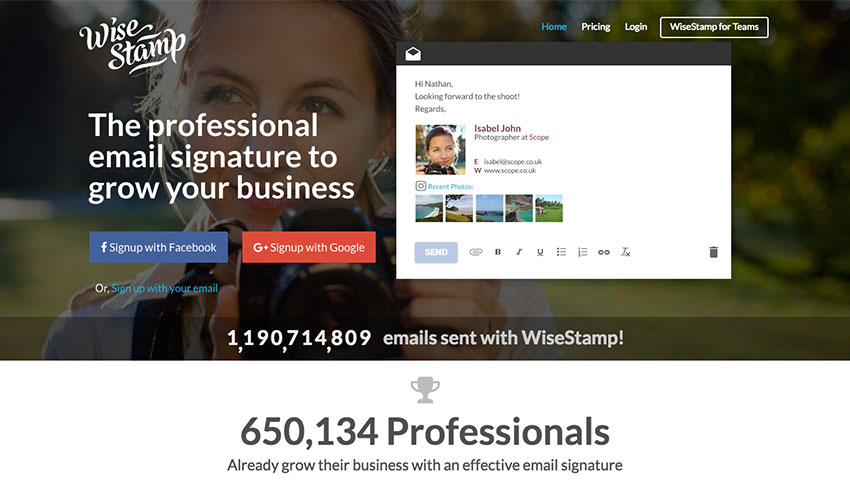
It’s okay to end your email with “Best wishes” and “Kind regards” if you want to, but make sure your email signature is a little more creative. WiseStamp will prove to be a particularly handy tool if you decide to give it a shot. A great-looking signature will send the right message to your prospects, help you improve email engagement, and garner trust. Besides that, using an email signature generator to create a professional email signature is a powerful tactic to establish credibility and put a face on a cold email. By adding relevant content, connecting your social media profiles, and keeping your email signature up-to-date you will easily differentiate your emails and engage with your prospects in a unique way.

sales email

Image source: WiseStamp

#8 Writing techniques for inspiration  

You have probably deleted quite a few cold emails yourself, without ever giving them a chance to charm you into some sort of action. Most people open cold emails already irritated, so failing to find the right copy formula to really seize your prospect’s attention can have disastrous effects on the entire campaign. There are many different schools of thought and a myriad of clever writing techniques that can come to your rescue if you feel particularly drained and uninspired. The following three are particularly liked among professional copywriters:

  • Military precision. Let’s just say that military professionals take their email communications as seriously as their job. Efficiency and speed are at the core of everything they do. A US Navy veteran has recently shared a few unique tips on how to format emails with military precision.
    Optimize the subject line: military personnel uses email subject to state the purpose of the email and to indicate the action that needs to be taken. They place special keywords, such as ACTION or REQUEST, at the beginning of the subject to get their emails noticed quickly.
    The five W’s: Another rule they have is to lead their emails with very brief statements, otherwise known as BLUF (Bottom Line Up Front). The ultimate goal of this procedure is to help the reader quickly digest the announcement or decision, without diving deeper into the background information. The statements are based on the five W’s technique and need to answer who, what, where, when, and why.
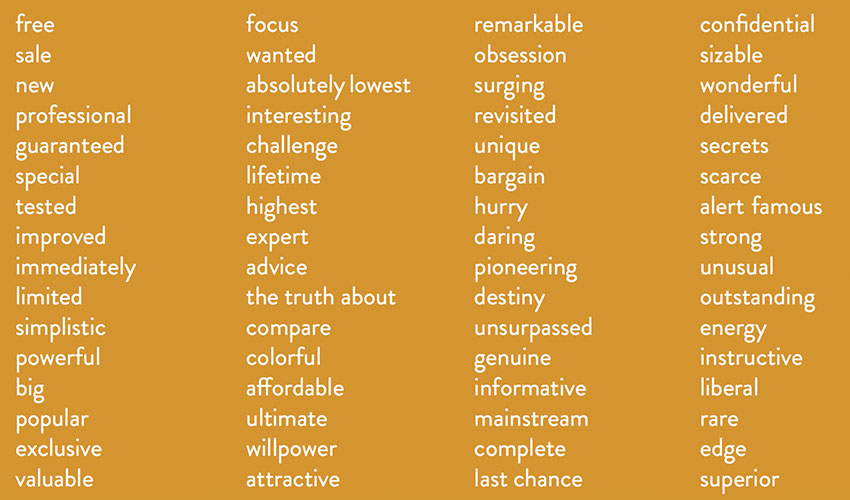
  • Use power words. There’s a lot to gain from combining active voice with power words. Putting nouns ahead of verbs and charging your writing with action-oriented, powerful words will help you sound more persuasive. Unsure about what power words are? Here’s a list of 317 of them.

sales email

Image source: dlvr.it

  • The essentials of business writing. Business writing is all about clarity and persuasion. It teaches us to cut out unnecessary words and inject a little bit of humor. One of the main takeaways from the business writing technique is to write short sentences and to avoid mixing multiple thoughts in one sentence.

#9 Follow up and follow up your follow-ups

Have you ever wondered how many follow-up emails you should send and how often? (See, I’m not even asking whether you think follow-up emails are important — they are key to any cold email campaign.) The number of follow-up messages will largely depend on the kind of relationship you have with the prospect. Yet, for a cold email outreach campaign, it’s not advisable to go beyond 2 follow-ups. Bombarding your prospects with unsolicited emails at this stage will only cause anger and tarnish your brand.

Keeping tabs on all the emails you send and remembering when the follow-ups should go out would be a nightmare without email automation and scheduling tools. The market is awash with smart email automation platforms, so choosing the right software might take as long as crafting the copy. Start with the best-known brands like Marketo, Pardot, or Yesware and work your way backward to find the most cost-effective solution for your needs.

If your initial campaign flopped or generated weaker results than you hoped for, here’s an interesting thought for you:

  • 44% of salespeople stop trying after one follow-up;
  • 80% of sales require five follow-ups.

If these few numbers shock you, take a look at the latest statistics on Email Marketing, the team of Sleek Note has gathered.

Quick takeaways

Crafting a winning cold email campaign takes practice and patience. Even with all these hacks and techniques at your fingertips, the most important factor determining your work’s success will be research. 

  • Research is the stepping stone to the success of cold email campaigns. Before you sit down to write anything, develop a buyer persona and gather as much information about your target segment as possible. Then turn that information into a story.
  • Spend time perfecting your subject lines because they can make or break your entire campaign.
  • The KISS (keep it simple, stupid) principle is one of the best rules you can follow to keep your prospects engaged.
  • Focus on the idea that you’re selling emotions, not products or services. Stressing benefits over features will help you capture the interest of a much wider base of people.
  • Use social proof to quickly build trust and credibility.  
  • Supercharge your emails with clear and simple CTAs that are a maximum of two sentences long.
  • Add a professional email signature with your contact and social media details to encourage your prospects to look you up and connect on other channels.
  • Take advantage of proven writing techniques to sharpen your copy and conquer your prospect’s inbox.
  • Follow up the first cold email at least twice.

Write to win prospects over, not to spam your way into their inbox.

FAQs: How to write a sales email

Q: How do I start writing a sales email?

A: The first step is to do your homework. Research your prospect thoroughly and create a meaningful buyer persona. This will help you understand their needs, pain points, and motivations, thereby allowing you to craft a highly personalized sales email that speaks directly to them.

Q: What is the importance of a subject line in a sales email?

A: Subject lines are crucial as they can greatly influence whether your email gets opened or not. Statistics show that 35% of recipients open an email based solely on the subject line. It should be short, start with the most important information, be personalized, and avoid clickbait.

Q: How should the body of a sales email be written?

A: The body of your sales email should be concise and to the point. Keep it short, use a straightforward, casual style, and make it about the recipient. Talk about their problems and how your product or service can offer a solution. Emphasize benefits over features to create a more compelling argument.

Q: How do I conclude a sales email?

A: Conclude your sales email with a strong and clear call to action (CTA). This tells the recipient exactly what you want them to do next. The CTA should be limited to one or two sentences. Also, include a professional email signature with your contact and social media details.

Q: How important are follow-ups in sales email strategy?

A: Follow-ups are crucial in a sales email strategy. Often, sales require multiple follow-ups. The right email automation and scheduling tools can help you manage your follow-ups effectively. Remember not to bombard your prospects with too many follow-ups, as it may tarnish your brand’s image.