Get a free sales audit to uncover hidden revenue opportunities!

Other than ensuring that your SaaS product is running like a well-oiled machine, do you know the other thing that keeps developers up at night?

They would ask themselves how to increase their sales.

Mind you, acquiring new customers is one of the most challenging things that you should do when you are in SaaS. No wonder some companies would tap the help of a SaaS marketing agency to take the load off of their shoulders.

Nonetheless, acquiring sales is one of the most rewarding things about SaaS. That’s why we have listed down five tactics that can help you boost your SaaS sales.

Generate Leads Using PPC

Pay-per-click may seem a boring lead generation technique, but it can be the most efficient. After all, you just simply need to write the ad copies, create a landing page, run the campaign, and start seeing results.

Nonetheless, you can use this tactic to target your preferred users. A good example is a business manager who is looking for an alternative to the software that they are already using.

If you are able to attract his attention using your PPC ads, the next thing you should expect to happen is that he will click it, and he will be redirected to your landing page.

However, instead of directing a site visitor to a landing page that explains what makes your SaaS product awesome, we suggest that you use a comparison landing page. It is the kind of landing page wherein you compare your product versus leading brands.

A great example of this is MailerLite’s pricing and feature comparison page.

What makes a comparison landing page work?

For one, it gives your target users the information they need. It shows how affordable your SaaS product is compared to others, as well as the better features that you can offer. It simply answers the question, “What makes you the right choice?”

Stay Connected Using Social Media

Regardless of whether you are targeting individual users or business owners, there is a big chance that the majority of them haven’t made up their minds about your SaaS product yet.

The rest are divided between those who love you and those who hate you.

Luckily, you can connect to these three kinds of target users through social media. Here’s how:

Use Client Testimonials as Social Proof

User testimonials are the best kind of social proof that you can get, and you should leverage it whenever you have the chance.

You can turn it into a case study, for example, and share it on social media. Or you can feature one of your clients in a Facebook video to showcase how your SaaS product was able to achieve their goal.

A great example would be Shopify’s feature on Kurasu as part of their #Shopify1Million campaign.

Properly Address Negative Issues

Using social media to address negative feedback from haters has two benefits:

  1. It sets the record straight before it gets out of hand.
  2. It lets you demonstrate your superb customer service.

Doing so allows you to quell rumors and inaccurate complaints, as well as earn the respect of your audience.

Educate Your Undecided Prospects

As mentioned earlier, the majority of your target users are undecided about your SaaS product. Fortunately, you can use social media to educate them on what makes you a better choice.

Did they send an inquiry via Facebook? Make sure to reply promptly. You can also direct them to the right resources, be it to your website’s knowledge base section or to a particular post on your page.

The key here is to directly answer their queries so that you can educate them on the value of what you offer.

Get Featured on Review Sites

Here’s the thing, your clients definitely do their homework before making a purchase. In fact, 66% of software buyers said that reading product reviews could have an impact on their buying decision.

As such, it would be a good idea to get featured on third-party review sites such as PCMag. First, review sites make it easy for your target users to compare products. Second, they are deemed more trustworthy than vendor sites (a.k.a. your website).

There are various ways to get featured on review sites.

One, you can partner with tech blogs, give them free access to your SaaS product for a limited time in exchange for a detailed review. There are also paid options wherein you pay a review site to review your product and share it with their network or place it on a “Featured Review” section.

Getting featured on review websites does not only validate your product, but it also helps your own website to earn backlinks from credible sources.

Use Strong Trust Signals

In SaaS marketing, credibility is gold.

There is a big chance that your target user already knows what your SaaS product is, as well as the solution it provides. But can you deliver your promise?

This is where strong trust signals come in. It allows you to project that your product is credible and reliable.

Here are some quick tips on how you can display your credibility:

  1. Use well-known trust seals. Trust seals from the likes of Norton, BBB, and Visa or Mastercard helps allay your prospects’ fears and concern about data privacy and security.
  2. Feature client testimonial. As mentioned earlier, it is the best kind of social proof that you could get. That’s because it demonstrates that your products can deliver results.
  3. Provide case studies. Case studies illustrate what your SaaS product can do, just like a client testimonial. But in addition, it gives your prospects a walkthrough on a particular use case that may be similar to theirs.
  4. Put customer service contact details front-and-center. Doing so simply shows that you are accessible should a prospect need your help or has an inquiry.

Offer a Free Trial

It is a no-brainer that offering free trial has become the standard in the SaaS industry. Otherwise, it could hinder your conversion rate.

Sure, your trust signals can put your prospects’ minds at ease, but a free trial gives them comfort to give your product a try. Plus, being able to tinker your software allows them to evaluate whether your product suits their needs.

On your end, this is a great opportunity to generate and capture leads that you can nurture later on and turn into paying clients.

Nonetheless, it is a rule of thumb that your trial period should not be longer than 14 days. After all, most prospects jump ship after three days.

SaaS is like the F1 race of the IT industry. It is fast-paced and highly competitive. Thus, the best way to get ahead of the competition is not just to work hard, but also to implement effective tactics that can help increase your SaaS sales.

Don’t underestimate the power of social media. The right choice of a social media strategy can help you increase sales. Substantially. 

The influence of social media marketing continues to spread. You can see, how much the landscape of social media marketing has changed over the past decade:

How to Use Social Data to Increase Sales

Image credit: Statista

Social media platforms have tremendous outreach and are very user-friendly for businesses who want to grow their audience and increase their online presence. And, with the help of selling tools, you can actually have your customers shop without leaving a social media platform. 

However, the part of social media that brings the most value is social data. Mined with the help of the built-in Analytics tools, which every social media platform provides, businesses can get up-to-date information on their social media performance. 

More on Social Data

So what is social data?

This data includes public information that users share on social media, including shares, likes, as well as demographical and biographical data, etc. 

Social data is generated through social networks in real-time and is used to determine:

  • reach
  • influence
  • relevance
  • brand exposure, etc. 

Social data not only helps brands measure their online presence but also helps customer acquisition and retention, which is crucial for sales. 

Is Social Data a Cure for All Issues?

It may seem that social data can provide answers to all the questions. 

In reality, however, social data has limitations:

  • Users don’t always share all the information. So, you should be prepared that social data that you mine from social media will not be 100% accurate. 
  • It is hard to confirm the identity of many users on social media. Some of them can have fake accounts, and other accounts are used by bots and robots. This may undermine the credibility of social data. 
  • Because many comments, received from the users, are neutral, it’s quite hard to do sentiment analysis and estimate the real influence of the brand. 

Despite all the limitations, however, social data still provides information necessary to identify and implement the strategies that will help your brand increase sales. It helps brands answer the most important questions regarding the effective use of social media to increase sales. 

What are these questions?

Let’s take a look. 

  1. Who Are You Selling To?

Just as with a marketing campaign, knowing your audience will help you develop a more elaborate strategy to increase sales. Social data provides brands with extensive information on their audience, which they can use to develop a further sales strategy. 

In particular, social data can help you determine, which social channel is the best one to use in order to increase sales. For this, you need to compare your target buyer persona with your general audience on a certain social media platform. 

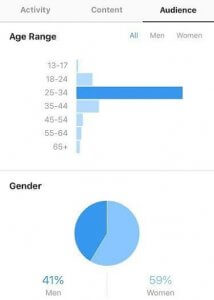
Let’s say, your target buyer persona is an English-speaking male aged 25-34, working in manufacturing and located somewhere in Europe. 

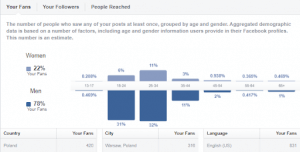
Once you determine your target buyer persona, check your Analytics tabs on social media platforms that you’re interested in using to increase sales. For instance, on Facebook your target audience may look like this:

How to Use Social Data to Increase Sales

And let’s take Instagram for comparison:

How to Use Social Data to Increase Sales

While both social platforms work in terms of age, they are drastically different in terms of gender. Thus, between these two platforms, the best choice would be Facebook. 

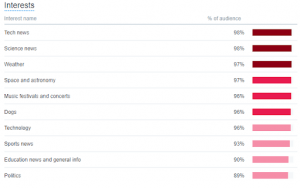
You can also check the interests of your audience to match more points that you’re looking for in a target buyer persona. For instance, on Twitter, social data provides you with extensive information on what your followers are interested in:

How can it help increase sales?

Choosing the right platform to target a buyer persona will increase your outreach and the chances that your brand will stand out more. Audiences on social media platforms are different, so social channels are not universal in terms of outreach. Tools like SocialBoosting can help brands tailor their strategy to match the engagement patterns of their target audience, ensuring more effective reach.

Social data, however, can help you find the right social platform to reach the audience you’re looking for. 

  1. What Content Are You Selling With?

Many brands post regularly on social media and expect their sales to go up, but it doesn’t happen that way. 

Indeed, content can help bridge the gap between marketing and sales. However, the success of your sales through social media depends on content rather than on regular updates. 

Social platforms provide up-to-date social data on the content preferences of your audience, helping you choose the best content type in terms of sales. On Facebook, for instance, you can see the statistics on the best-performing post types as well the how each post performed individually in terms of reach and engagement:

How to Use Social Data to Increase Sales

This social data can help find the answer to the question, which content to use to boost engagement and drive sales. Content is one of the main driving forces for customer acquisition and retention through social media, thus, the choice of the right content type has a significant impact on sales. 

  1. How Can You Increase Your Outreach?

Outreach and sales go hand-in-hand. The higher is the outreach, the better are the sales. The outreach depends on how well your brand is in-line with the current social media trends and tools, and how well you can use them. 

One of the tools that have a substantial effect on outreach is hashtag. The right choice of a hashtag determines the visibility of your brand, consequently influencing the outreach. 

Companies employ hashtags to create hashtag campaigns that go viral. For instance, Flatfy, an international real estate company, did a hashtag campaign with #bootstrap when they were a startup. After several months, they were able to extend to the international market, spreading across Europe, Asia, and Latin America. 

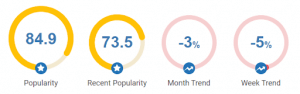
Of course, the choice of a hashtag depends on its performance. The performance of a hashtag is measured with social data that’s updated in real-time. For instance, if you take #tbt, you can see its performance and popularity growth within the period of one week and one month:

How to Use Social Data to Increase Sales

Image credit: Hashtagify.me

You can also get on board with current hashtag trends by adding some of the most popular hashtags to your hashtag campaign. Of course, the choice of the hashtags will also depend on how relevant they are to your brand and your product.

Ultimately, hashtags will help make your brand more traceable, visible, and more relevant, helping more people find you and learn about your product. 

Wrapping Up

Social data doesn’t have a direct impact on sales, but it can help you determine targeting strategies that will help you reach out to the right audience through the right platform with the right content. 

Hopefully, our tips will help you better understand the role of social data in increasing sales and to use it to grow your brand. 

Thinking about redesigning a website or migrating to new CMS??

Do you know that redesigning can be critical?

Yes, only when done, wrongly!! 

It can affect your website’s organic traffic.  

Obtaining organic traffic is a tough job, though. From link building, link generation, to on-page optimization, it takes a lot of hard work. If you tend to lose your vision on those efforts, then it could be disastrous for your business. 

When you lose your website traffic and ranking, then you will notice fewer sales and leads. 

But, on the contrary, it is also essential to redesign a website. There are many reasons, some of the leading ones are defined below:

  • The requirement of changing the website theme (appearance). 
  • Rebranding is demanded.
  • Platform migration is required, like, from HTML to WordPress.
  • A mobile-friendly theme is required. 

A redesign of the web site does not certainly imply modifying the domain name. Therefore, in the cases, as mentioned above, it is believed that you retain the same domain name but improve the appearance of the web site, basically the design.

Updating your website and changing the features, design, and user experience are recommended.  But, Google does not accept it.  

Resigning a website undoubtedly gives you the chance to improve conversion rate, SEO, and digital marketing on an all.  Remember that it could be disastrous if appropriate steps are not taken to ensure the stable migration from the existing website to the new one.  It surely will destroy SEO equity.

To assure the redesigning has a definite influence on search engine rankings after the new launch, you should keep some considerations intact. Redesigning tends to engage with marketers, designers, and other stakeholders to keep not only current ranks but also to generate new ones for more organic growth. Check out the key considerations below:

  • User interactions
  • On-page SEO
  • Website content
  • Technical health

We are here to give you the steps that you should follow while redesigning your website.  Let’s get started!!

Step  1: Setup the New Website on a Temporary URL

It is recommended to copy the existing website to the temporary URL, and adopt the new design. When the process is ready, change the domain.

Some technical details are there, but the hosting provider will supervise you to set up everything. 

Operating directly is not advised because it might invite some inevitable problems. As per the SEO perspective, assure that the testing website is in the list of Google indexing (for avoiding duplicate content). Two methods are there to execute it:

Method 1

While working in WordPress, go to Settings/ Discussion. Review the Search engine visibility option.

Method 2

Update your robots.txt file and integrate the below lines of code:

User-agent: *

Disallow: /

The aim of the code mentioned above is to block the search engines for accessing the website.

Step 2: Test the New Website

As of now, the existing website is copied in the new one comprehensively. Though, before redesigning the website, it is better to check the website thoroughly. 

While examining, other significant aspects such as; CSS, features, and broken links should be checked. XENU, a free tool to check whether the links are valid.

Step 3: Build a list of All Pages from your Existing Website

Changing the URL structure is not a big thing, but what is important is to let Google and other search engines know what you have changed. 

And, if you are not doing so, then you are hurting your website ranking and declining the trust rate. Accordingly, you are losing the organic traffic. 

The best thing is to make a list of URLs your current website has. And, the way you can adopt is to get your sitemap and save it to the text file later.

Step 4: Do proper 301 redirects

The next thing to do is to make 301 redirects among existing and new URLs. For instance, for the “Services” page on the existing website, the URL would be” “www.yourwebsite.com/aboutus.html.” While redesigning, the designer will change the URL to “www.yourwebsite.com/about-us.html”. 

Apply the 301 redirects to ensure that the mentioned URLs are working properly. And it does not result in losing the SEO benefits that you had obtained from the existing URL.

And, if it is not done accurately, then 404 errors will be displayed. In this process, the existing URL will be redirected to the new URL. 

This way (technically), you are conveying the search engines that you have changed your URL.  Accordingly, your efforts that you have put into gaining SEO previously will not get affected. 

“.htaccess” file could be used to integrate the redirects. Check out the below code to know how it will look like:

Redirect 301 /oldwebsite http://yoursite.com/new-url

If you do not have any idea to execute it manually on the WordPress CMS, then you can give a try to the redirect plugins. All you need is to fill out the form.

Step 5. Switch to The New Website

After carrying out the designing, developing, and testing, your new website is all set to go live. It is just one step away.

Whatever you will do at this stage will assure you that you are switching to the new website quickly and effortlessly — Google advice to perform this step at once. 

Step 6: Verification of New Website with Google Search Console

When your website is live, the main thing is to check if everything is working well.  It is suggested to run the broken links to assure that you have not missed anything. The subsequent thing is to log in to the webmaster tool (Bing and Google) and secure you about the verification of the website.

And, if in any case, it is not, then verification should be done to monitor how Bing and Google are indexing the new websites.

Step 7: Use the URL Inspection Tool to Check that Google is indexing the New Website Properly

In the Google Search Console, use the URL INSPECTION option (from the top bar) to assure that Google can index and read the newly migrate website accurately.

And, if there are no issues, then click on the “Request Indexing” button. It is used to boost the indexing process.

Step 8: Review robots.txt

In the process of redesigning, there is a probability that the robot.txt can get corrupted. And, if in any case, it is, then click on the “robot.txt” option below the crawl.   Robots is the file which is used by the experts to deny or allow access to the search engines for the website (as a whole or on specific pages). 

Any incorrect configuration in robots.txt can refuse access to the search engine crawlers, and it should be fixed promptly.

Step 9: Optimize and resubmit XML sitemap to Google and Bing

The next step is resubmitting the XML sitemap to the search engines (Google and Bing). When the URLs are changed, then consequently, the new XML sitemap will also get a new structure. It helps the search engines to index the redesigned website quickly. 

Step 10: Observe the Changes

Last but not least. It is vital to check the changes and the appearance for the notable growth.  Check the rankings on the top keywords. Many SEO tools (SeMrush) are there that lets you keep an eye on the keywords. If you notice any substantial change in SEO, then find out the reasons for this.  Discover the solution to avoid the slow loading of your website. It is also important to examine your website every two or three months. 

Wrapping Up

Redesigning is a daunting task.  But, it is the best way to boost the conversion rate and SEO.  Websites with substantial organic traffic must handle everything adequately.  

We have mentioned ways to redesign the website without affecting SEO.  These steps assure you of the definite improvement. If you are following a definite process with the imperative choices, monitoring the results, performing the regular changes, then you should not worry. 

Consider redesigning not only as an opportunity to improve the design but to capture more audiences. 

We hope you liked this article.  Related queries and suggestions are welcome. 

Thanks for reading!

If you are selling a product or service online, a sales funnel has become quite necessary in formulating an online sales strategy. Also known as a conversion path, a sales funnel guides the customer to a point of simply being curious about buying your product or service. 

Once you establish your website or eCommerce platform, you want to strategically take a prospective client through the stages that encourage them to buy your product or service. This process entails preempting the customer journey because sales funnels are largely determined by consumer behavior. 

While some prefer to build their own sales funnels, there are automated tools available to ease the process and save time. Some of the resources are free, while others are paid for. 

  1. ThriveCart

ThriveCart allows you to promote products, services, digital products, and services and subscriptions to your website visitors. It has a wide range of tools that go beyond a simple sales funnel but allows you to integrate digital marketing tools like MailChimp and HubSpot. 

ThriveCart features a built-in sales tax calculation, and offers special features like bump offers, and allows you to set up a sales funnel within minutes. The platform boasts a high conversion rate and offers a money-back guarantee if you are not happy with the service. 

A platform of this nature can be ideal for the online service industry, such as an essay reviewer; the tool is highly intuitive and does not disrupt the design of your website. 

  1. Builderall

Builderall is so aptly named because you can almost build an online service for your business and online marketing platform. The tool boasts a range of tools and features beyond a simple sales funnel. 

You can use the tool to create a sales funnel for your existing site. You can build your website, membership site, or blog and run social media campaigns. If you have not started building your site, this might be the best tool for you because it allows you to work with pre-built templates. 

If you are interested in building designing and selling courses, then this platform is perfect and it also you to create videos, ebooks, and webinars. As if all these features are not enough, you can also use the platform to coordinate email market campaigns. 

  1. Convertri

Convertri is another dynamic tool that allows you to diversify your site and create a responsive sales funnel. The tool allows for simplified audience targeting and it can be set up within minutes. 

With a simplified design, you can easily create accelerated pages, sales funnels, and websites. With its simple drag and drop features, it allows for simple integration and pages are responsive to mobile devices and there is a wide range of templates to choose from. 

Convertri is always improving and has recently allowed an easy and light way to embed videos into your pages and other features. The tool also allows you to create sub-users to allow for collaboration and it also features a WordPress plugin so you can integrate the tool into your site.

  1. Wishpond

Wishpond is an amazing tool for lead management, and it is quite diverse in its offerings and allows you to easily create landing pages, social promotions, online forms, and lead tracking tools. 

Wishpond accommodates your online marketing needs by helping you attract visitors and to publish eye-catching content for landing pages and converting clicks into sales. The tool allows you to integrate a range of software, including Salesforce, Insightly, MailChimp, and GetResponse. 

This tool is ideal for any type of business, including the kind of business that offers assignment help because it easily integrates the sales funnel with user needs. Wishpond is quite popular among online businesses because it allows to fully integrate online sales into their website. 

  1. Kajabi

Kajabi is a dynamic tool for business and eCommerce websites that allows its users to create a wide range of sales funnels. The all-in-one platform not only allows you to create interactive marketing campaigns but to also design online courses, websites and cool landing pages. 

Kajabi is quite affordable and its premium packages are perfect for smaller businesses. It offers coding-free landing pages that ensure that it is easy for anyone to use and build a functional sales funnel. 

It also features the ability to create conversational emails and it has a built-in shopping cart. Kajabi simplifies boosting revenue and it offers easy to customize checkout tools. For those who are novices, there is 24/7 support via email and live chat. 

  1. Cartflows

Cartflows is specifically designed for WordPress and gives its users the power to create a series of steps that ease the customer journey. Featuring a wide range of templates, the tool allows its users to create highly optimized checkouts and it also gives users one-click user bumps. 

Cartflows is an easy to use tool that can ease the process of creating a sales funnel to ease the process and ensure that you can offer diverse services. If you are a student looking to ease designing your eCommerce site, you can get to ensure that you are able to stay up to date with your studies. 

It is also quite simple to get help with building sites and managing your sales funnel. Companies that offer services for specific markets like UkWritings and you can also find essay services by reading up on Edubirdie review.

  1. HubSpot

Hubspot is one of the most popular dynamic tools out there to create a sales funnel and create other services for marketing. HubSpot is ideal for creating an entires sales hub that allows you to manage leads, increase your traffic and monitor your sales funnel. 

HubSpot is easy to use and has a simple drag and drop design featuring beautiful templates for web pages, landing pages, emails, and blog posts. Furthermore, you can also gain insights for when people open your emails, download an attachment or click on links. HubSpot also supports Google calendar, HubSpot CRM, and Office 365. 

Conclusion

The simplification of sales funnels has allowed businesses to operate optimally and focus on their growth. Eliminating the process of creating one manually creates the potential for a business to grow beyond its imagined capacity. The growing need for businesses to meaningfully connect with their customer base lies in the simplified design and an online presence. Sales funnels are also a way to stay in the loop with customer behavior and gain accurate insights on how to improve on the digital sales campaigns. 

Talking about the B2B email marketing, one medium that has proved constantly to be of greatest use is Email marketing. More and more businesses are turning towards enhancing their budget of Email marketing because the research has shown it to super effective.

The research revolves heavily around how this type of marketing brings in ROI. But how does one write b2b emails?  The best use of this marketing is put to is for generating leads. The leads then transpire into clientele in the coming times. While it has been established that email marketing is the answer to your B2B issues, even bigger question is what makes up for an ideal copy that is the most effective.  

The wide arena of Email marketing involves an entire array of communication strategies. These range from newsletters and autoresponders to follow-ups and surveys. Despite all the options available, the most common and effectively used approach is newsletters in the email to target the potential audience.

The important thing to consider is that there is a very fine line between the email newsletter being effective or ineffective. It is useless to bombard the consumer who is not interested and force him to unsubscribe you ultimately. This happens when the users receive emails not related to you.

Know the Target Audience

If you are looking to target the right audience, it is important to segment the audience aligned with their unique personas. Know the needs, problems, and solutions to those problems. Using a free email finder can help identify the right contacts. So instead of getting hyped up about email marketing and sending out generic newsletters, targeting the right spot is important.

Segmentation involves collecting user data at any possible opportunity. Social media interactions, landing page visits, subscription forms, and download provide valuable user data. This user data can do wonders for you and your business by letting you include what interests the audience the most.

If managing this segmentation process seems daunting, partnering with a specialized B2B email marketing agency can streamline the effort, ensuring your campaigns are both targeted and effective.

B2B marketing does not always have to be impersonal and dull, as opposed to popular belief. With an influx of information, it is best to design the newsletter in a way that is user-specific and more personal.  

Tell before you sell!

Newsletters are not meant to sell the product directly. These work to educate the consumer. You cannot expect the consumers to make a buying decision over an email or even a series of emails. The newsletter should be designed in a way that leaves an impact on the mind of the consumer. Even if they are not potential customers at that time, the newsletter must be compelling enough that whenever a related need arrives, the first brand or product to pop up in mind be yours.

Therefore newsletters also have that cushion to put in extra information as well that supplements the product information.

The research in the area also shows that addressing the need when the consumer desire like “Read more” works better than tabs like “Buy now”. So, set the ground for the consumer and educate him rather than forcing him to make an immediate buy. This strategy works best.

Design is the Key!

The design is the first thing that the consumer will come across. Before he reads the content, he develops an impression of your brand in mind by seeing the design. The design must have a few basic attributes to it.

  • It should be clean and easy to digest.
  • It should complement the email content and the buyer persona.
  • The graphics must be catchy.
  • The Call to Action must be visible and active.
  • Font should be good and generated from a font styler

All these attributes are guided by the knowledge of consumer attitudes, needs, and preferences. The color scheme plays an essential role as well.

Font can be generated from Fontalic. The newsletter must be responsive as well as most users open their emails on their cell phones. It must render smoothly on all devices for it to create leads. To test the newsletter with various browsers is also important.

One of the anchors to good and creative newsletters is that it should be easy to scan. The recipient should be able to get the main idea in the first few seconds of opening the email. A vertical format, white space to separate different items, short paragraphs, more graphic, less written content, self-explanatory images-all these factors add up to a readily imparted message.

Make use of user analytics

Analyzing email analytics is very important. The user data is magic in your hand. It gives you an insight into what the users are thinking, what they like and dislike, how much time they spend on your newsletter, what attracts them and makes them click.

After having a good knowledge of what the users are into, it helps to streamline your testing and orient accordingly. For instance, the content may be alright, but your newsletter fails to grab attention because of a flimsy subject line or the time at which you are sending out emails!

By testing the various variables, you can make an informed decision in the right direction. Analyzing the data helps you provide the customer what they want to see and allows you to avoid what repels them!

Reflect your Marketing Strategy

The newsletter must be a part of the greater whole of the marketing strategy. If it is not a continuation of the entire campaign, it fails to connect the consumer with the strategy as well as the product. If the consumer must go back to the website for each little thing, you simply lose leads.

Even though it’s a small section of your email, it is arguably the most crucial part. Yes, I’m talking about the subject of an email. It’s the first thing a reader sees, and they judge the email by it. It is a vital element of email marketing and has a lot of useful aspects to it.

Whether you are selling a service or trying to persuade someone to read an article on your website, you need eye-catching subject lines that force the reader to focus on your email. Many businesses use variation in their subject lines so that they have a good response from email marketing.

You always need a unique subject line or else it’ll be boring and won’t attract many readers. As a result, you need to learn the craft of making an eye-catching subject line that sells your product. There can be many email marketing strategies for this, but most businesses use some standard techniques.

7 tips proven to provide positive results:

1. Keep it short

Nobody wants to read a long subject line. Just like marketing strategies to come up with a clever line for advertisement, you can use smart ideas for email marketing. Keep it under 50 characters so that a reader can quickly finish reading it. But be sure that it includes simple words that are easy to understand. Your readers are not ready with a dictionary to find out the meanings of your emails.

2. Keep it simple

Don’t use such email lines that can confuse the users. Readers are not dumb to click on an email that tries to lure users. State the main subject of your email in a simple line so that anyone who isn’t familiar with the products of your company can easily understand the topic at one glance. The easier it is, the more clicks it gets.

3. Shock the readers

Ever got an email that had a crazy and shocking subject line that forced you to click on it? Most of us have fallen under this persuasion as our mind forces us to know more about it. But be careful so that the subject line matches with the body of your email or readers’ dissatisfaction will be seen. Some examples can be:

  • Here’s why your marketing strategy sucks.
  • Why are you still not aware of this?

Be careful about these as they will surely persuade people to click, but if the body of your email isn’t good enough, they’ll lose interest.

4. Scarcity

Scarcity is a well-known marketing strategy that has been proven to work well. World-famous marketing teachers have always stated the effectiveness of scarcity in a marketing strategy. When someone has thought of missing out on something good, they always tend to focus on it. This strategy increase sells at a great level. Some examples are:

  • Pay $20 for [product] – Available for 48 hours.
  • ONLY TODAY! Buy now to get a 20% discount.
  • ONLY FOR 5 HOURS! Enjoy our services with a 50% discount.

Don’t spam readers with these types of emails as they’ll find out your strategy. Only send these types of emails once and post another one after a certain period of time.

5.Personalization

Everyone likes it when you call them by their name. It has a psychological effect on their brain and makes them feel better. By calling them by their name, you can be seen as a familiar figure, and it increases the possibility of being viewed or clicked. Use “you” to make the email friendlier. You can also use the location of a user to provide a more personalized email, but be sure that it isn’t creepy.

6. Avoid using false promises

Do not use false promises for your email subject lines. It brings a bad reputation to your company, and readers lose their trust. If you have written about an offer in the subject line, but it is not present in the body of the email, it will irritate the reader as he will think he has wasted his time. Furthermore, such a bad experience will take a long time for recovery, and your business will undoubtedly face a terrible time.

7. Use compelling questions

You can ask a compelling question that relates to your business so that interested people can click on it. It is useful because only interested people will click on it and the sells will be higher. You do not only want people to read your email but also buy your product or service. A lot of businesses use the compelling question, so be sure that your subject stands out. Some examples can be:

  • Have you tried these SEO techniques?
  • Are you familiar with the most effective marketing techniques?

Again, be sure that the question relates to your email’s body, and people can have sn idea about your email.

These seven tactics are beneficial for email marketing. With variations in your emails, you can attract more ‘interested’ people who will be willing to buy your products or read your articles. Big corporations are now using email marketing; so it can be slightly hard to stand out. But with the right strategies, you can have success.