Get a free sales audit to uncover hidden revenue opportunities!

As companies move away from the traditional landlines, integrating your CRM with a VOIP app becomes paramount.
As we’ve discussed in a previous article, Integrated Telephony in the workplace has tremendous advantages. Notably:

  • Making our CRM a platform for unified communication
  • Cheaper costs and easier scalability
  • Access to analytics by measuring and monitoring call-specific data.

Which is why we are excited to unveil our next feature: Teamgate SmartDialer. 

Related: Introducing an easiest Mailchimp and Teamgate Integration and Integrate Teamgate CRM with Google Contacts

What is Teamgate SmartDialer?

SmartDialer allows calling directly from Teamgate with a native dialer, no manual entry required so you can make smarter calls faster with Teamgate’s built-in automatic dialer.

Our SmartDialer ensures that you have a great phone selling experience and never waste time dialling phone numbers & names again.

Teamgate SmartDialer is a cloud-hosted Twilio-Based phone integration. Twilio is a messaging, voice and video API that allows apps (like Teamgate CRM) to easily integrate telephony services. Check out some of Twilio’s best features below:
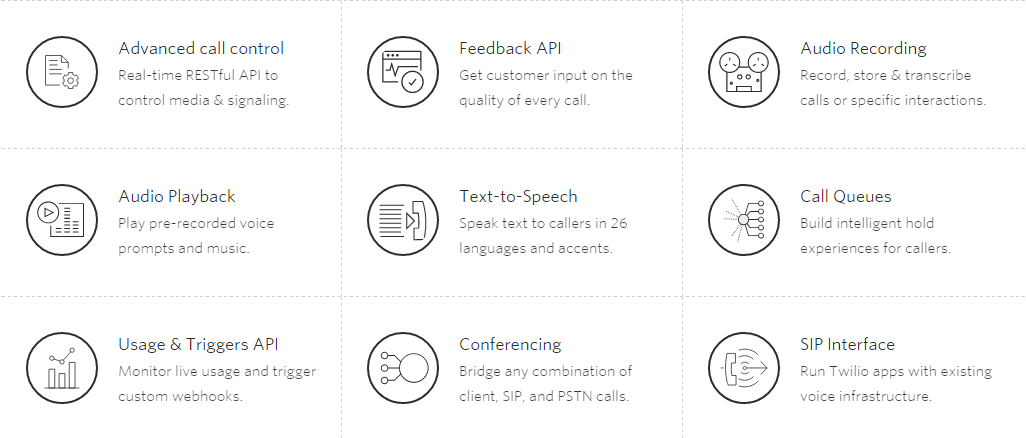
twiliofeats

How will it help?

Teamgate’s exclusive built-in automatic SmartDialer is a fast and easy system that integrates perfectly with our CRM and lets you make and receive calls directly from your Teamgate account.
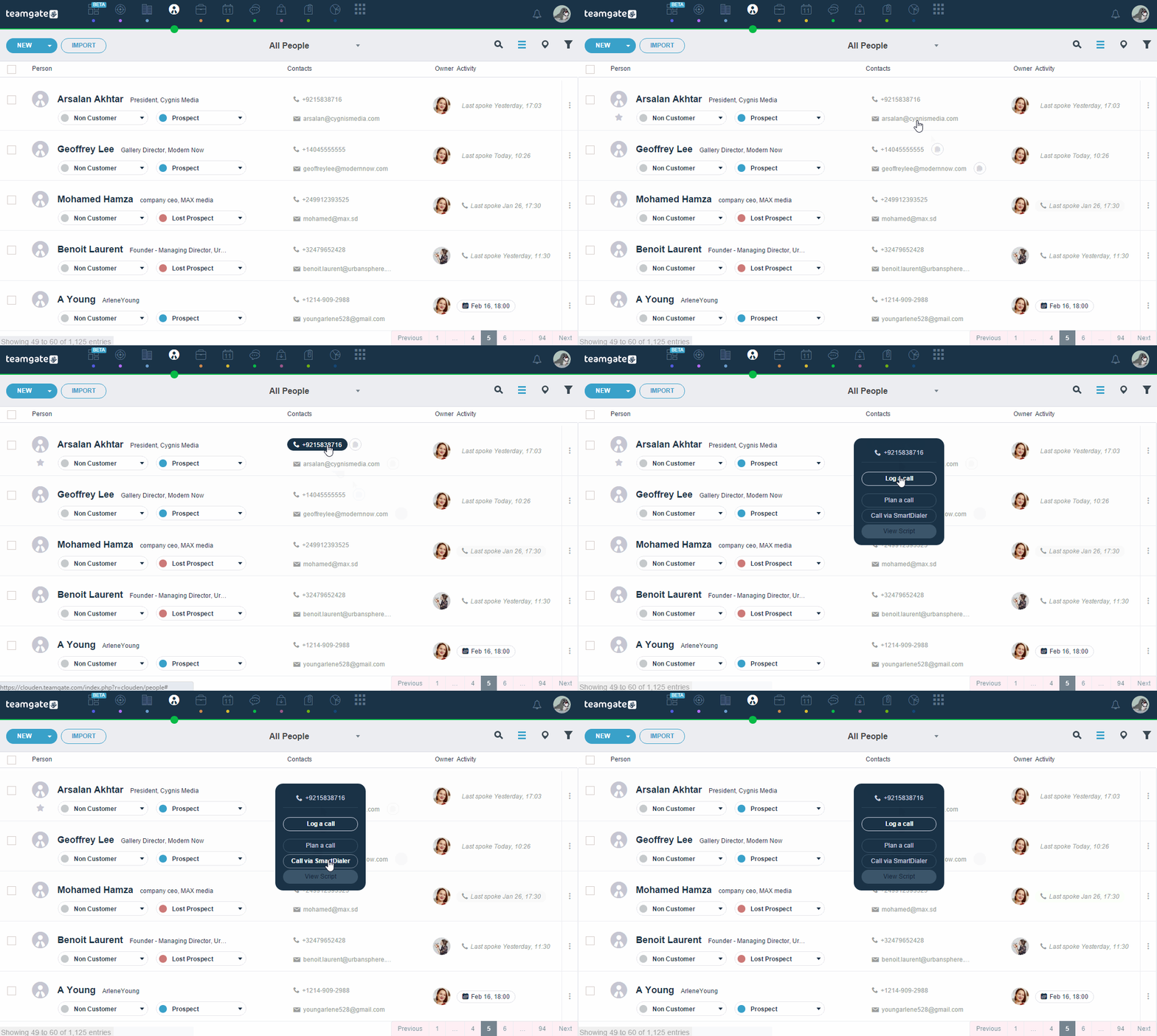
call_GIF

Teamgate SmartDial will allow you to do the following:

  • Make and receive Calls directly through Teamgate’s CRM.
  • Missed calls will be listed and recorded on each customer’s profile.
  • Unlimited storage for call records and history.
  • Record call-specific notes on the customer’s profile.
  • Share call notes with teammates.
  • Track the number and effectiveness of calls made.

How to set your SmartDialer up?

  1. Activate your SmartDialer, by clicking on the “Activate” button.
  2. Add your personal or work phone number and hit “Save”. After, you’ll receive an SMS with a registration code. Enter the code as received into Teamgate.
  3. Choose the number you like from the list which is offered to you by Teamgate. This number will be used when you call your leads or contacts. Please remember that You won’t be able to change the number you chose.
  4. Enter your country code.
  5. Choose if you want SmartDialer to record all your made or accepted calls. Make sure not to forget selecting the duration for which you’d like Teamgate to save and store your records.

Find more detailed information at Teamgate Support page.

In the meantime, why not take Teamgate for a test drive? Try Teamgate SmartDialer for free!
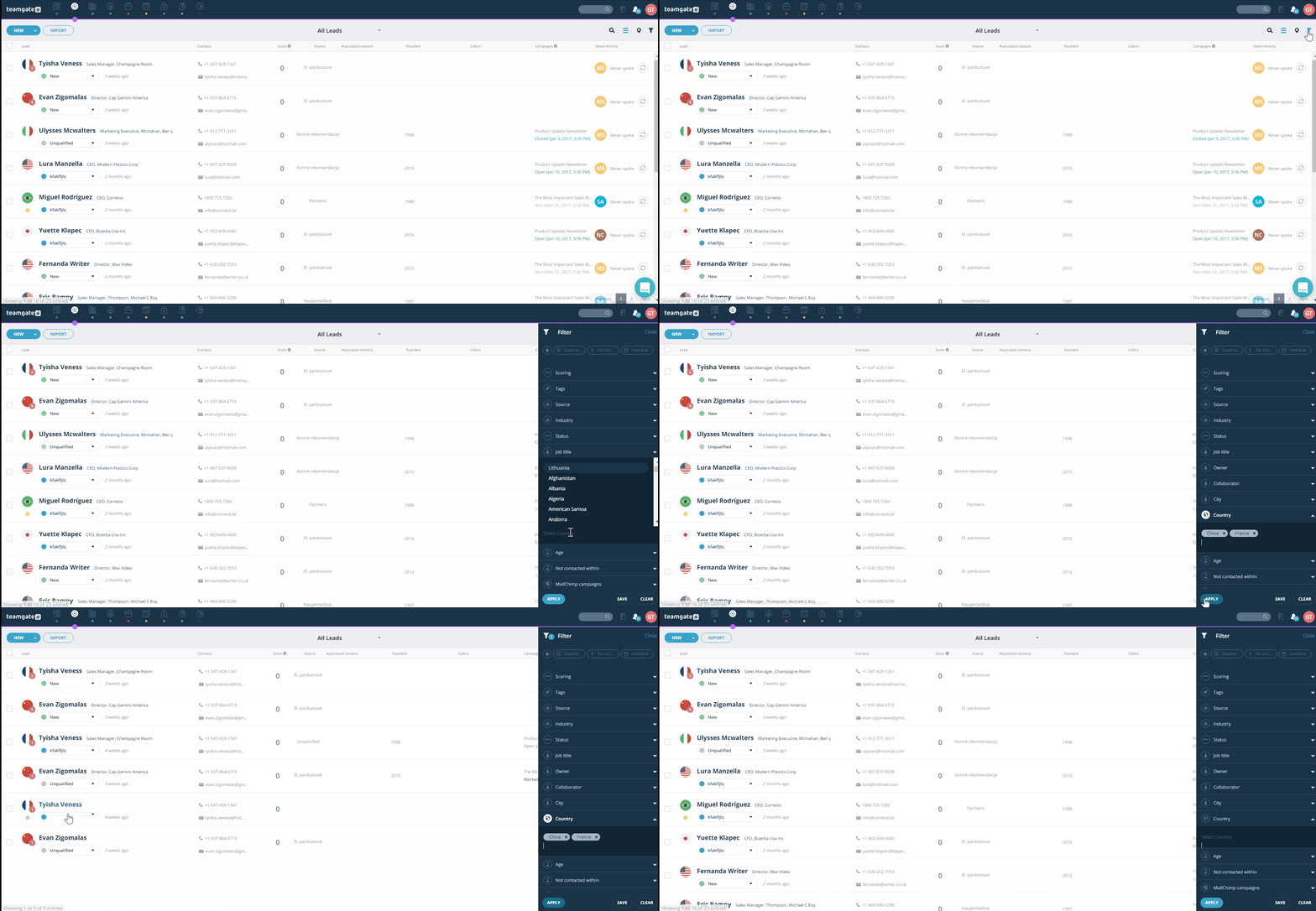
If you are working with large amounts of data, every time you need to find some specific information may become a nightmare, right? Even if you have automated sales processes with the help of a CRM, sometimes you may feel overwhelmed by the amount of information. Luckily, Teamgate CRM has powerful filtering and sorting features, which help to keep everything well-organized and improve your productivity. 

Complete Filtering

Basically, you can quickly filter every available list, including leads, contacts, companies, deals, and files. Items in each of the lists can be filtered by predefined and custom fields. Let’s say you need to see a list of every single lead from a specific country; you can do it in just a few clicks by either selecting the country or typing it in. Likewise, you can easily get a list of all won or lost deals, new leads, and much more.

Leads Filtering By Country Teamgate

For your convenience, you can choose which of the custom fields should be added to the list of filters. It is easy to adjust filters considering your business needs. Moreover, not only ‘Standard text’ but also ‘Multi-select’ custom fields can be filtered. 

Clean Filtering

Teamgate filtering solution is user-friendly and neat. Even if you use a lot of information fields, you won’t find filters too overwhelming – they can be expanded or collapsed so you can customize viewing options. To improve your experience, we made it possible both select and enter options manually. The latter helps when there are hundreds of options, e.g. zip codes, and it’s simply too time-consuming to scroll down the drop-down list.

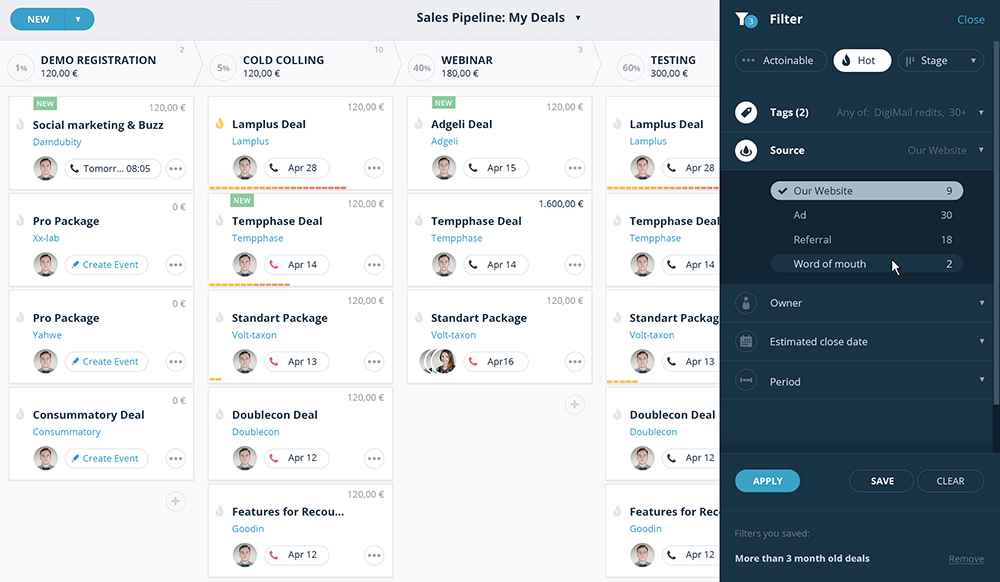
Deals Filter On Teamgate

Besides, Teamgate supports sorting. This feature may help to see a better overview of your lists. For example, you can sort leads by the lead score, and instantly see the hot leads at the top of your list; or sort your deals by value to see the most valuable ones. It may seem like a very simple feature, but it can help to grow your business. 

Add Some Extra Value!

If you want to get the most out of Teamgate filtering solution, it’s entirely up to you, because we also support tagging. You can use the keywords of your choice and re-use this data to make filtering more relevant. Teamgate adds some default tags, but you’re free to create as much custom tags as you need. Maybe you want to remember that a lead is a #CEO or #purchased your product, or maybe some contact is #important? You can easily do this! And remember that tagging is also helpful when you use Teamgate Insights.

So, wait no more and try Teamgate CRM yourself!

It’s always good to know that we are consistent in being a great CRM tool quarter by quarter!

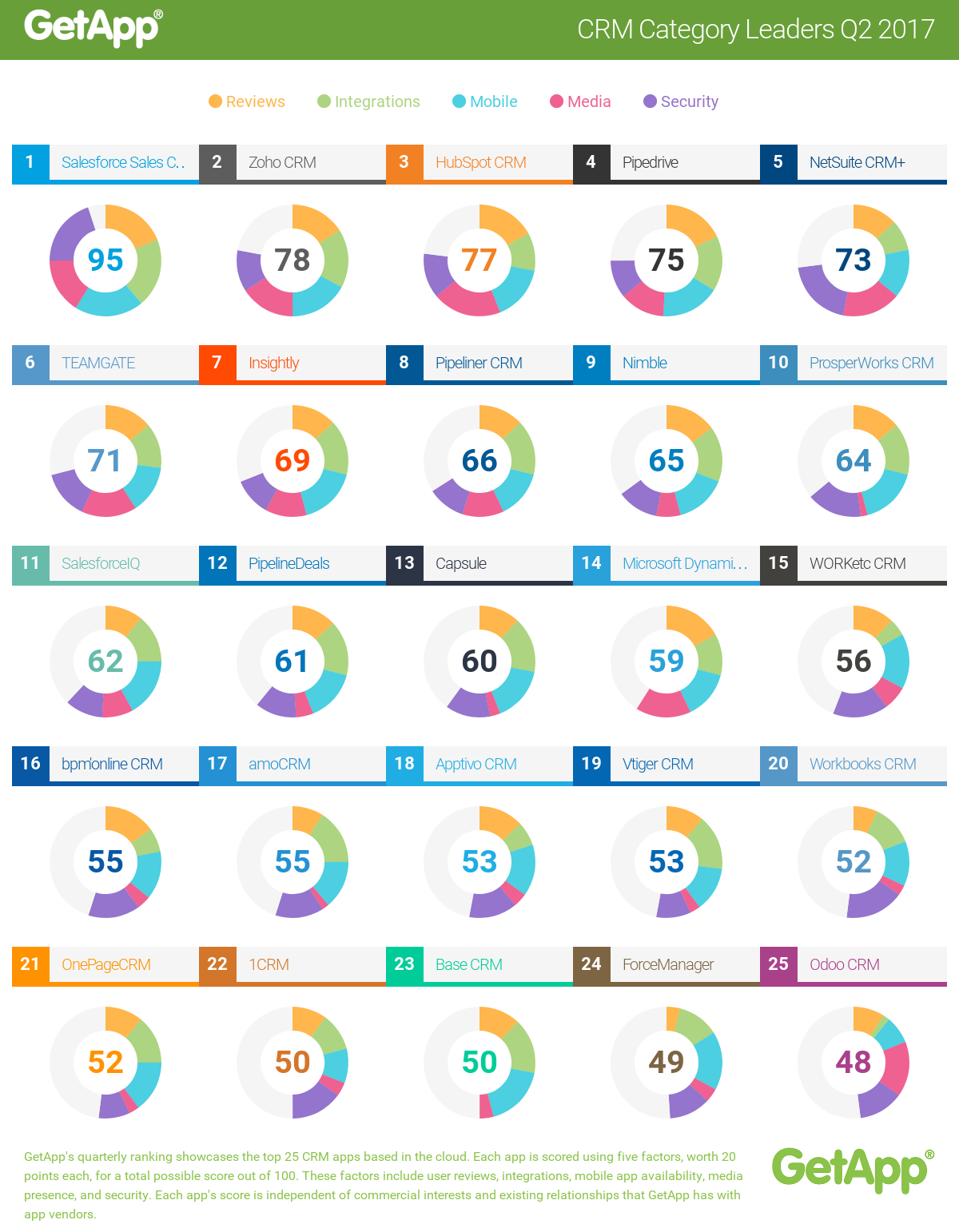
The leading Premium business app discovery platform GetApp.com announced Teamgate as #6 in Q2 2017 rankings of the best CRM applications on the market!

GetApp’s researcher Rhiân Davies says:

“Teamgate has been a fixture in GetApp’s top 10 Category Leader ranking for CRM since Q3 2015. Coming in at #6 this quarter with a total score of 71, Teamgate displays its strength with scores of 16 points for media presence and 14 points for its security features and its mobile apps. An additional 14 points for user reviews, with an average rating of 4.81/5 stars, secures Teamgate’s strong position in GetApp’s ranking.”

GetRank is GetApp’s quarterly ranking of the top 25 CRM apps based in the cloud. Each app is scored using five criteria, each worth 20 points, for a total possible score out of 100: User Reviews, Integrations, Mobile Apps availability,  Media Presence and Security.

On July 1 of 2015 GetApp was acquired by Gartner Inc.  (NYSE: IT)

[optin-monster-shortcode id=”rs4shvbsq8bjva7m”]

Top CRM Software 2016 | GetApp

Related: Teamgate Is Among the Most User-Friendly and Affordable CRMs According to Capterra

* * *

The Ranking

GetApp’s Category Leader rankings highlight the top 25 cloud-based business applications for every essential business operation, from CRM to HR and marketing. The ranking uses five unique data points to assess apps, giving software buyers a shortlist of some of the top cloud-based solutions for their growing business.

The five data points used to rank each app are:

User reviews– The score for user reviews is calculated using a Bayesian estimate, which is a weighted average that includes the number of reviews and the rating of an app, benchmarked against other apps in the category.

Integrations– based on the number of integrations with other apps listed on GetApp.

Mobile Platforms– based on the availability of an Android and iOS app and its rating in Google Play and the App Store, respectively.

Do you have a CRM that keeps you organised?

The most user-friendly CRM on the market. 14-day free trial.

Start Free Trial

Painless setup, no credit card required

Media Presence– based on the number of followers and fans on Twitter and Facebook, respectively.

Security– based on a security survey developed by GetApp in collaboration with Microsoft, modeled on the Cloud Security Alliance self-assessment form.

With a maximum high score of 100 up for grabs, each data point is scored out of 20 and weighted equally. If two or more apps have the same score, higher security scores take precedence, followed by reviews, integrations, mobile, and media scores.

This scoring system ensures that the ranking is completely independent of any commercial relationship that GetApp has with software vendors. High user opinion, the ability to function well with other software solutions, availability on mobile, a strong online presence, and a high level of security reflect applications that are reliable and well-respected in the market.

Using this list as a point of reference, software buyers and small business owners can get a good sense of the market landscape for whichever software they are looking for.

Click here for a full report on GetRank.

Every achievement is great. But today we are especially delighted about this one!

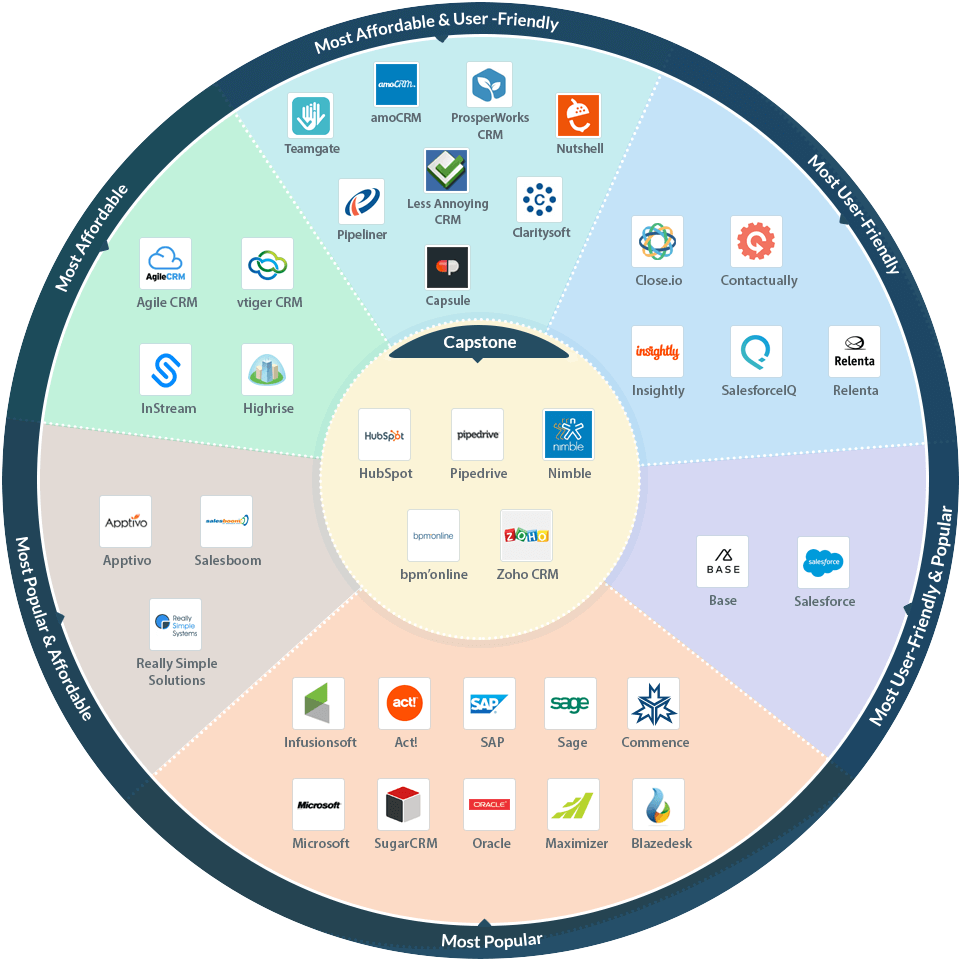
A well-known software marketplace Capterra.com which helps businesses to find the right software, placed Teamgate on Top CRM Software Roundup report as one of the Most Affordable & User-Friendly CRM Software!

This report focuses on combination of three categories: affordability, user-friendliness, and popularity.

On September 25 of 2015 Capterra was acquired by Gartner Inc.  (NYSE: IT)

* * *

Teamgate Capterra Top CRM Software Roundup Report

Related: Teamgate has Earned #1 Spot on Capterra new Top 20 Most User Friendly CRM Software list

The Report

Capterra has Top 20 reports on different topics – such as affordability, user-friendliness, and popularity. But the fact is, when most people buy software, they’re usually looking for a combination of all three of those qualities in one solution.

Right above you can find an infographic where all of these reports intersect and also see which CRMs have made one or more of Capterra’s Top 20 reports. The middle of the infographic indicated Capstone solutions – CRMs which made it to all three reports.

You can check out all these solutions and more in Capterra’s Customer Relationship Management Software directory.

* * *

For an original report on Capterra, click here.

We are excited to share some more fantastic news with you!

2017 started great for Teamgate as we were recognized as a FrontRunner for Customer Relationship Management on Software Advice, powered by Gartner Methodology.

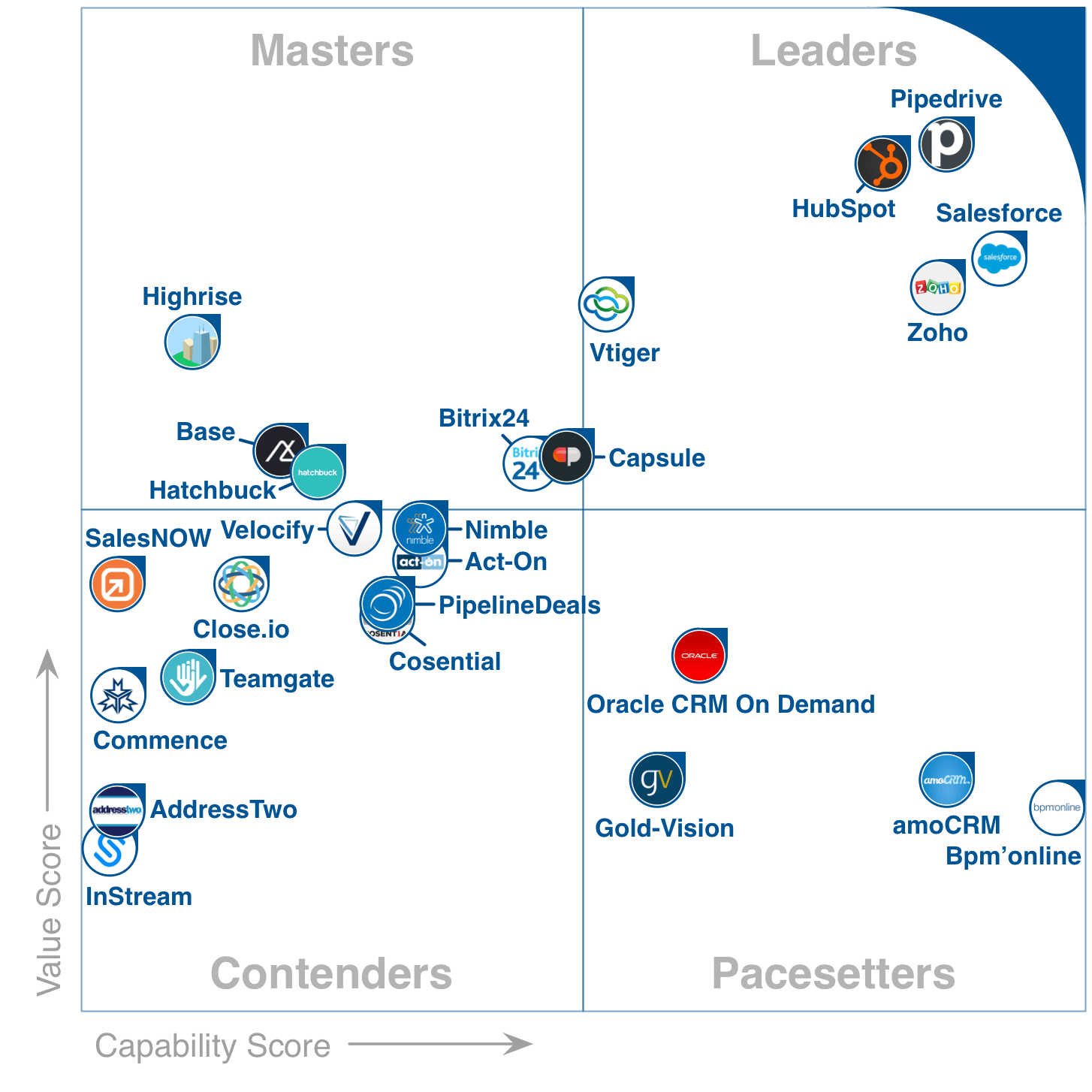
With a Capability score of 3.69 out of 5 and a Value score of 4.11 out of 5, Teamgate landed as a Contender in the FrontRunners quadrant.

FrontRunners Quadrant January 2017 CRM

Related: GetApp announced Teamgate as #2 of the top 25 CRM apps and Teamgate Receives A Very Positive Review From CompareCamp

Gartner’s quadrant FrontRunners for CRMs

The FrontRunners quadrant, powered by Gartner Methodology, provides a data-driven assessment of products in a particular software category to determine which ones offer the best capability and value for businesses. It helps business leaders to make the right decision when choosing which software to buy.

On 2016 September, Gartner launched a new type of quadrant called FrontRunners. It is released for four software markets, which are (1) CRM software, (2) Project Management software, (3) Help Desk software and (4) Applicant Tracking software.

[optin-monster-shortcode id=”kandoug21absj0ox”]

All products that qualify as FrontRunners are top performing products in their market. They have been evaluated and given score for Capability and Value. Capability (x-axis) starts at 3.60 and ends at 4.60, while Value (y-axis) starts at 3.60 and ends at 4.70. FrontRunners evaluate the top 20-30 products in a quadrant format and it is completely data-driven with no analyst interpretation, also, it is heavily influenced by user reviews.

During the first half of 2017, Gartner is planning to launch FrontRunners quadrants for 24 software markets.

FrontRunners Badge Gartner 2017 Software Advice

The content for the FrontRunners quadrant is derived from actual end-user reviews and ratings as well as vendor-supplied and publicly available product and company information that gets applied against a documented methodology. The results neither represent the views of, nor constitute an endorsement by, Gartner or any of its affiliates.

Quadrant Methodology

As it was mentioned above, the FrontRunners methodology assesses and calculates a score for products on two primary dimensions: Capability and Value. Here’s how they both are calculated.

The Capability score is an overall weighted average of scores including:

  1. End-user ratings of 1 to 5 stars on the product’s functionality.
  2. End-user ratings of 1 to 5 stars ratings on the product’s ease of use.
  3. End-user ratings of 1 to 5 stars on the product’s customer support.
  4. A score, relative to other products in the market, for the product’s inclusion of key functionality for the software category.
  5. A score, relative to other products in the market, representing the number of other products that integrate with it.

Do you have a CRM that keeps you organised?

The most user-friendly CRM on the market. 14-day free trial.

Start Free Trial

Painless setup, no credit card required

The Value score is an overall weighted average of scores including:

  1. End-user ratings of 1 to 5 stars on overall satisfaction with the product.
  2. End-user ratings of 1 to 5 stars on how valuable users consider the product to be relative to its price.
  3. End-user ratings of 1 to 5 stars on how likely they are to recommend the product to others.
  4. A score, relative to other products in the market, for the size of the product’s customer base.
  5. A score, relative to other products in the market, for the number of professionals in the market who have experience with the product (e.g., users, developers, administrators).
  6. A score, relative to other products in the market, representing the total number of user reviews across the three Gartner web properties.
  7. A score, relative to other products in the market, representing the average number of times per month internet users search for the product on Google.

For a full report and methodology on Gartner’s FrontRunners quadrant, check out the information on Software Advice.

If Mark Twain was a salesman, he would definitely advocate the new Teamgate & Slack integration. He once said that “to get the full value of joy you must have someone to divide it with” and we couldn’t agree more. In the fast-paced society, one often doesn’t have time to stop, appreciate winnings, and share the good news while they’re still relevant. Luckily, we live in the 21st century and technology is at our fingertips – let’s use it to spread the good news!

By now, you most probably know that with Teamgate you can improve communication with customers, boost your sales and implement set goals. But how about letting people know about the success? Traditionally, you could organize a status meeting and gather a group of people in a room. But we all know how busy work schedules can be. You’re lucky if everyone’s at your meeting few weeks after a deal was closed successfully. However, the good news is the most exciting while still fresh.

Fortunately, we know a way to keep your managers and teams up-to-date with your Teamgate activity, even if they don’t have an account! All you need is to use Slack, a multi-device team collaboration platform. Connect an integrated CRM solution to share instant, automatic notifications when deals are won. A few simple steps and your communication is improved significantly!

Related: 5 Most Important Sales Metrics You Need To Focus On Today

How does it work?

To be able to set up this integration, you will need the most powerful, yet free, app integration platform – Zapier. With this platform, you can connect various products into one solution to use them on a daily basis. So, you need to connect Teamgate with Slack over Zapier using easy selection steps inside the platform.

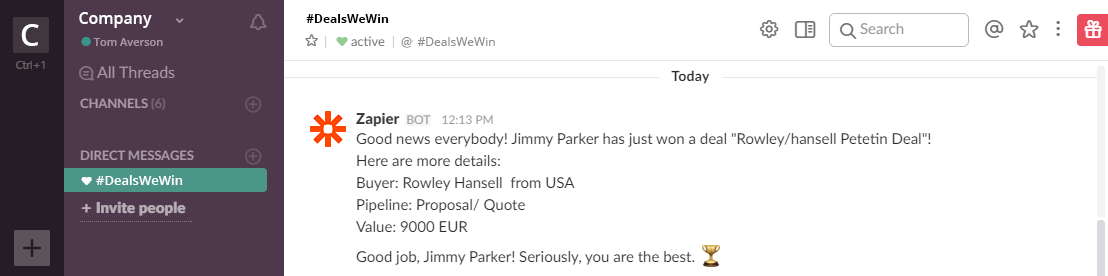
Create a new channel on Slack, e.g. #DealsWeWin, and make sure to invite the entire sales team, as well as other interested parties, to join the channel. Now, when everybody, including the Teamgate Winbot, is there, real-time notifications about winning deals will be pushed and the good news shared on the channel. You can setup the notification message yourself – include details about a customer, deal size and value, sales reps, etc. It is even possible to add more sophisticated messages and use them to congratulate your sales team member for doing a great job. Because they deserve this, right?

DealsWeWin Channel on Slack

Added value hides in simple things

For those wondering why this integration is better than tracking winning deals inside Teamgate, for example, using pipelines, insights, dashboard, here’s our argument: with this small feature you can be informed of the same minute wherever you are, with no extra action required. As Slack is a multi-device platform, one can be notified instantly, even on the go, because we cannot live without our smartphones and smartwatches!

Do you have a CRM that keeps you organised?

The most user-friendly CRM on the market. 14-day free trial.

Start Free Trial

Painless setup, no credit card required

Use Zapier wisely to build different information structures and you will improve your team communication by spreading the good news and appreciating great work. You’ll not only be the first one to do that, you’ll also save precious time spent in status update meetings where, most of the time, information shared is often outdated.

In a nutshell, if you decide to use the Slack integration, you will be able to:

  • Instantly share information about winning deals with a group of people.
  • Build the structure of information the way you want.
  • Improve team communication and reach those on the go.
  • Appreciate the excellent work.