

If you found yourself in the situation of losing important customer relationship management (CRM) data – or you just want to know if it’s even possible to recover deleted CRM data in theory – this short guide will give you the answers.
We’ll look at how CRMs handle deleted records, what built-in recovery options exist, when data recovery software might help, and what lessons you can borrow from companies that already lived through it.
How CRM Systems Store and Delete Data
At the core, every CRM is powered by a database. Records you see on the screen are stored as rows in tables, and attachments might live as binary files or links in a separate storage system. When you delete something, the CRM doesn’t always treat it the same way.
- Some platforms use a “soft delete.” The record isn’t wiped right away – it gets flagged as deleted and moved into a recycle bin.
- Others still rely on “hard deletes.” Microsoft Dynamics was notorious for this for years: the moment you hit delete, that record was gone unless you had a backup or auditing turned on.
- Audit logs play a big role too. Even if the record is gone, an enabled audit trail can capture the field values at deletion, giving you at least a blueprint to rebuild the lost data.
Also its not always about a single user action but a system-level failure. We all remember the Salesforce NA14 outage in 2016: a database failure left customers without access for more than 20 hours. When the service came back, Salesforce had to roll back to the last good backup. That meant customers on NA14 lost nearly four hours of CRM data added between the backup and the crash.
It’s a reminder that even the biggest vendors can stumble, and why backups matter as much as recycle bins.
Native Recovery Options in Popular CRMs
Now let’s talk in more detail about what options you actually have to recover deleted CRM data, depending on which system you use. Each platform treats deletions a little differently, and the tools they give you can save you a lot of stress if you know how to use them.
Salesforce
Salesforce is one of the better-known examples. It has a built-in recycle bin, which holds deleted records for about 15 days (sometimes extended to 30). If you notice the
mistake in time, you can restore records with a couple of clicks. After that window closes, though, you’re out of luck unless you have an export or backup.
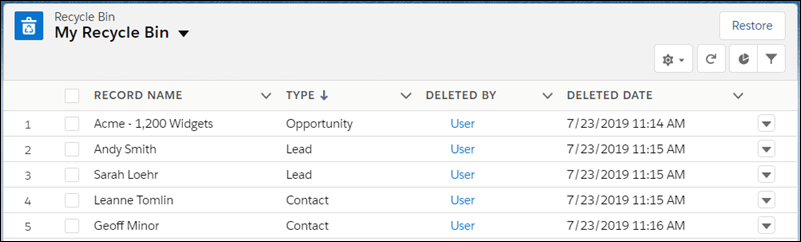
Salesforce used to offer a paid “Data Recovery” service, but it was slow, expensive, and eventually retired. These days, they encourage admins to schedule weekly exports or use third-party backup apps.
Microsoft Dynamics 365
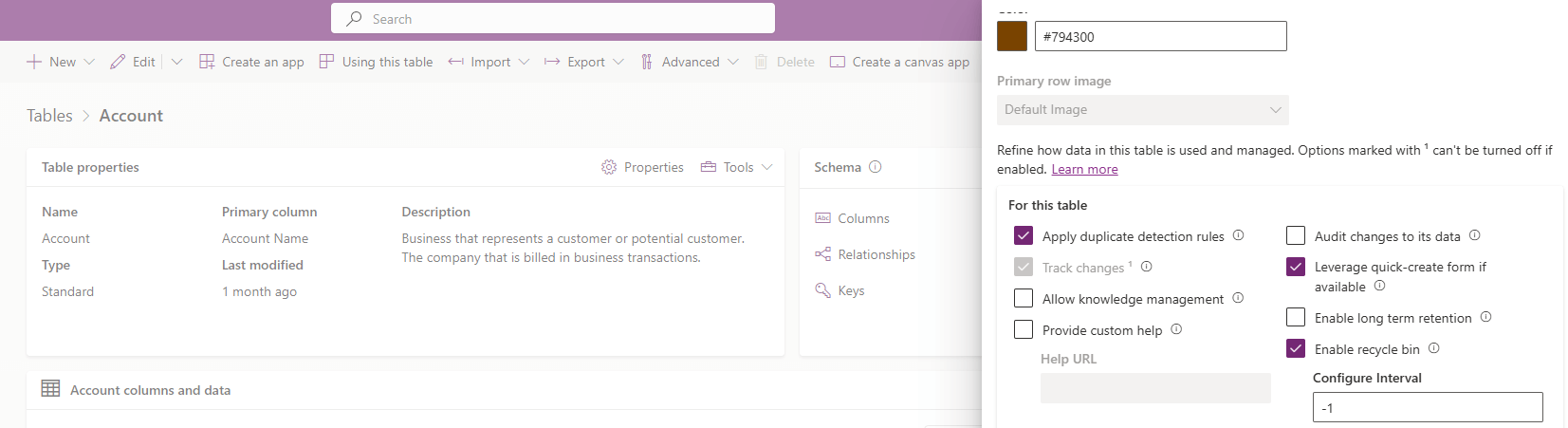
Microsoft Dynamics 365 (Dataverse) was tougher historically because it didn’t have a recycle bin at all. Once a record was deleted, it was gone, unless you could restore the entire database. That’s changed Microsoft introduced a recycle bin preview feature that works more like Salesforce’s. Until that’s fully rolled out, though, most admins rely on SQL backups or third-party tools.
HubSpot
HubSpot takes a slightly different approach. It lets admins generate full backups of CRM data, and in higher-tier plans, schedule them automatically. You can restore property values from those backups within 14 days. It’s not as straightforward as a recycle bin, but it does give you a way to roll back to a recent state.

Zoho CRM
Zoho CRM has caught up too. For years, users complained that recovery was almost impossible without support tickets. Now, Zoho includes a recycle bin that keeps deleted records for 60 days, which makes recovery a lot simpler.
Other platforms like NetSuite, SugarCRM, or custom CRMs usually rely heavily on database-level backups. In many cases, the only way to get back deleted records is to restore from a snapshot or use an export file.
The bottom line: if you’re lucky, your CRM has a recycle bin and you catch the mistake quickly. If not, you’ll need backups, exports, or third-party tools to recover deleted CRM files and records.
How to Recover Deleted CRM Files Without Backups
Now, these are all obvious default features that might help you, so the answer to the question in the title of this article can be answered with a yes – it is possible to retrieve deleted records in CRM. But what if the situation is a bit more complicated? What options are there when you don’t have a recycle bin entry or a recent backup to fall back on?
- This is where audit logs can help. Many CRMs can be configured to track changes, including deletions, at the field level. Even if the record itself is gone, the audit trail may hold all of the values it contained. With Salesforce, Zoho, or Dynamics 365, that means you can open the audit report, see exactly what was deleted, and rebuild the record manually. It’s slower than clicking “restore,” but it keeps you from losing everything.
- Another trick is to pull from older data exports or linked systems. If your CRM was syncing data with a BI warehouse, email marketing tool, or even an Excel export someone saved last month, that copy might still contain the missing records. Admins sometimes even spin up a sandbox environment from an older snapshot to extract lost records, then re-import them into production. Tools like Integrate.io can help streamline these data integration and recovery workflows, making it easier to reconnect data across your CRM, databases, and other systems.
- Also, if you’re a fan of self-hosted or on-premises CRM systems – like many people who prefer not to rely on big-name cloud vendors – you actually have another option. In those setups, your CRM data lives on a server you control (most likely in a database file such as a SQL .mdf file or an Oracle data file). If that file itself was deleted, corrupted, or made inaccessible, general-purpose data recovery software can be very useful. Tools like Disk Drill, R-Studio, and many more software options can help extract entire database files from a damaged or failing disk.
This type of recovery won’t undelete a single record inside a working database, but if the entire file is missing, these tools could save you. - As a last resort, you can reach out to vendor support. Some providers can perform limited point-in-time restores if you act fast, though they rarely guarantee full recovery. It’s not the smoothest process, but it can work if the deleted data is too critical to lose.
So while recovering deleted CRM files without default backups isn’t effortless, it is possible in some scenarios.
Final Words and Tips
CRM data recovery isn’t always straightforward, but you usually have more than one way out of a bad situation. Recycle bins, audit logs, and vendor backups can handle most cases of accidental deletions. And if you’re running an on-premises setup, file recovery tools give you a fighting chance when a database file is deleted or damaged.
One thing that’s worth stressing is corruption. Even if you never delete anything and follow every best practice, nobody is completely safe from database corruption. Hardware can fail, disks can develop bad sectors, and integrations sometimes write broken data that damages entire tables.
That’s why you need to prepare. To recover CRM after data corruption, keep regular backups tested, and maintain redundant exports in more than one location. If you skip this step, you’ll end up scrambling with partial exports or audit logs, hoping they cover enough to rebuild what you lost.
A few practical tips to close this out:
- Enable recycle bins if your CRM supports them.
- Make backups a scheduled habit.
- Double-check that auditing is enabled for your most important objects.
- Limit delete permissions to trusted users.
- Train staff to avoid accidental bulk deletes.
- Test your recovery process at least once so you know it works before you need it.
FAQs
Can I recover deleted CRM records without a backup?
If your CRM has a recycle bin or audit logs enabled, you may be able to restore or manually rebuild records. Without those, your options are limited unless you have exports.
How long do deleted CRM files stay in the recycle bin?
The retention period depends on the CRM platform.
- In Salesforce, deleted records remain in the recycle bin for about 15 days (sometimes extended to 30 for certain editions).
- HubSpot doesn’t use a traditional recycle bin, but instead relies on backup snapshots that you can restore from within 14 days.
- Zoho CRM keeps them for up to 60 days.
- For other CRMs like Microsoft Dynamics, deleted records may bypass a recycle bin entirely unless you’re using the new recycle bin preview feature.
Can I restore attachments when I recover deleted CRM records?
In many cases, yes. If your CRM uses a recycle bin, attachments linked to a deleted record often move there as well. For example, in Salesforce, when you restore a record from the recycle bin, its associated notes and attachments come back too.
However, not all CRMs handle files the same way. Some systems treat attachments as separate objects or store them outside the main database. In those cases, deleting a record may wipe the attachment immediately, and restoring the record won’t bring it back.
Does enabling auditing slow down my CRM?
In most modern CRMs, enabling auditing has little impact on performance. Systems like Salesforce and Dynamics 365 are designed to handle changes in the background without noticeably slowing down everyday tasks like adding leads or updating opportunities. The only time you might notice a difference is if you enable auditing for every field across every object, which can increase database size and slightly affect reporting speed.






