Designed for Growth: Scale your recurring revenue with the new Teamgate SaaS CRM. Explore SaaS Features →

Book a demo today and save 50% off your first month, or 20% off your first year.

Get a free sales audit to uncover hidden revenue opportunities!

Before every rally competition drivers have a possibility to prepare for it – to write a route book. 

Magical rally process highly depends on how professional are driver’s actions and how well co-driver interprets a road book. In short – driver operates vehicle using co-driver‘s instructions from a road book to reach the goal – team knows, what to expect around the corner. 

Can you win your Dakar on sales? With sales forecast – for sure. 

Forecast? Is it about the weather?

Yes, sometimes it even can be about the weather impact on your business. We are sure, you would like to know what happens to your sales results during a sunny holiday period or a snowy Christmas rush, right? 

Will you be ready for ups and downs? 

“Advanced maths” – you think. 

No, just scientifically tested probabilities and processes. 

Sales Forecasting In Your Sales Race

Sales forecast is more about business planning, definitely not about accounting. Information which you get from sales reports and forecast has to be reasonable, but it doesn’t need to be too much detailed. Forecasting is much easier than you think and much more useful than you imagine. 

Sales forecast will empower you: 

  • To plan your future growths and declines; 
  • To use sale insights for company‘s process management: cash flow, resources/workforce allocation; 
  • To predict revenue; 
  • To prepare for raising capital.

Forecasting of sales is the process of estimating future sales. Precise sales forecasts enable you to make wise business decisions and allow to improve short-term and long-term performance. 

[optin-monster-shortcode id=”kandoug21absj0ox”]

You can base your forecast on historical sales data, market research information, regional trends, additional personal estimates and even weather forecast! This report allows you to see what your prospective sales are and how they look in comparison to actual sales. 

It still sounds like advanced maths, right? Trying to run a business without a forecast is the same as trying to finish your Dakar without a road book. 

No doubt, that would be much harder. 

Related: How to Stop Being the Second Best in Sales?

Do you have a CRM that keeps you organised?

The most user-friendly CRM on the market. 14-day free trial.

Start Free Trial

Painless setup, no credit card required

Best practice tools to create right rally road book for your sales – insightful results with right forecast

If you’re still hesitant about forecasting your sales and think that it is not worth investing time to gather information from different reports, we have an excellent solution for you – Teamgate sales forecasting tool. It will empower you to take right insights and actions to reach the goal- finish your sales period successfully.

Teamgate sales forecast reports are based on two types of information: historical sales data and potential planned transactions – sales goals.  It makes sales process simple and understandable. Using sales forecast report in Teamgate CRM you’ll be able to access sales future prospective in a very user-friendly way. 

If you systematically bring together all the sales plans and results using CRM, you will need just a few mouse clicks to prepare your sales forecast for required period, person or product. 

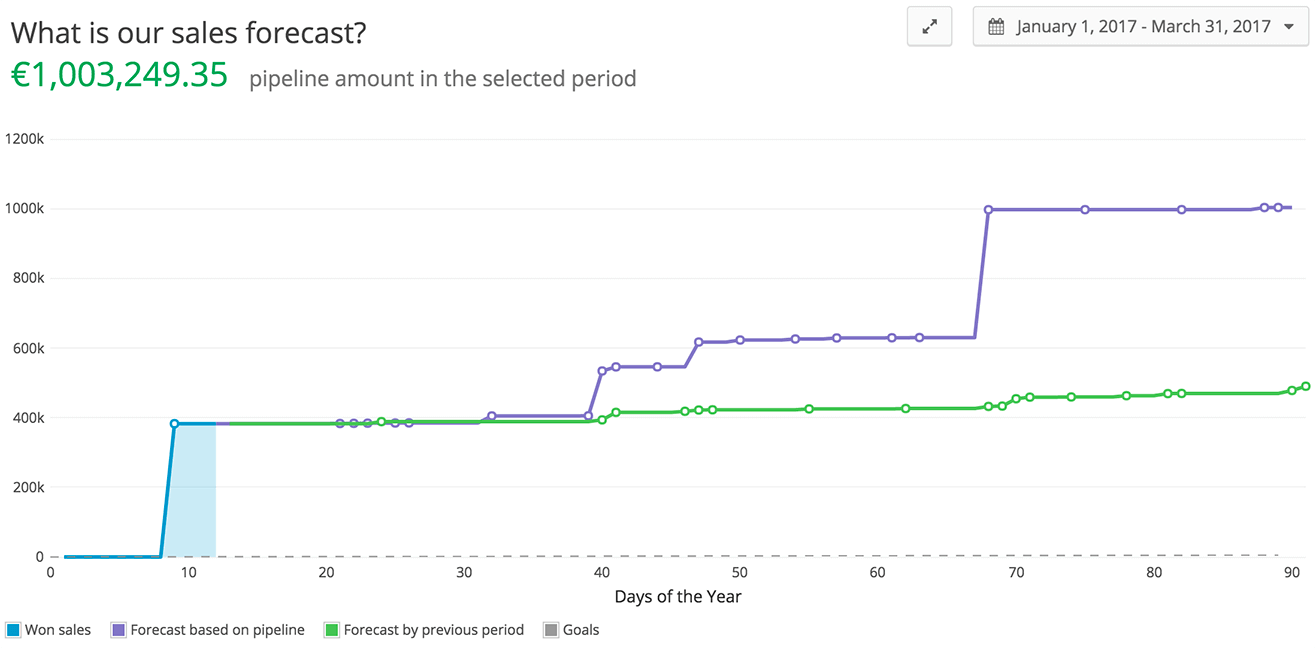
With Teamgate sales forecast you will have visualized „all in one“ diagram: 

  • previous period historical sales results; 
  • planned sales from your pipeline – opportunities; 
  • sales results for current moment; 
  • goal of sales.

Teamgate Sales Pipeline Forecast

Based on historical sales information forecasts show where you will be in end of period, what is very important for sales market insights to ensure your thoughtful actions in critical situations during the period. 

Related: 7 CRM Best Practices for 2017 and 5 Most Important Sales Metrics You Need To Focus On Today

For more information about Sales Forecast solution by Teamgate CRM please check our YouTube channel

Don’t be afraid of sharp turn in your sales rally, be prepared for it. 

You can be like professional rally driver with a perfect route book for navigation, because Teamgate Sales forecast report will empower you to be ready to face up the next month or year decade without big surprises. 

We’re ready to tell you more about Teamgate CRM. If you would like to hear more how this solution can empower you to get a 360 degree view of the whole sales process, please contact us or join  our Facebook page

Customer Relationship Management software, in theory, is a godsend for companies everywhere. It offers many different capabilities in all areas of operation. It offers the capability to handle automated phone calls for customer service, generate marketing campaigns based on the stored information of customers, and streamline data entry processes so employees can spend less time inputting information into spreadsheets. Companies should be leaping at the opportunity to use this technology and cut back on other operating expenses, then, right?

CRM Software – Pitfalls and Confusion

As it stands, CRM software is subject to the same pitfalls and confusions that any disorganized department within the company would be, and these pitfalls cost money. Data gets inputted incorrectly or not at all, leading to inaccurate information; records of phone calls aren’t recorded properly, so customers may receive duplicate calls regarding a product or issue; inaccurate data on a person’s whereabouts leads to completely irrelevant marketing campaigns being generated for them. The issues are numerous. So why invest a bunch of money in this new software and then have to double back and input the data that CRM software misses? It’s understandable that many companies out there don’t want to use it just yet.

While there is hope on the horizon, it’s difficult to say how close or far away we are from a point where the software can be effectively utilized across the board from a technological standpoint. There are issues that need ironed out, for sure. But companies have a lot to figure out in the interim, as well – there are some key issues that they face to implementing said software.

First, using CRM company-wide can prevent a lot of issues where the topic of keeping complete records is concerned. If every department utilizes the same technology, it greatly reduces the number of gaps in the records that are likely to be left. Many companies already utilize a common operating system that is slightly specialized for each department, for example; those companies that purchase the license for the software would be able to utilize CRM in the same way, specializing the platform slightly for each department so that the tools better suit their needs.

Related: How CRM Helps Companies in Logistics Industry to Improve

Is CRM Software A Substitute For Good Communication?

Communication is also key. CRM software at its peak is definitely capable, but it’s not a substitute for good communication within a company by any means. If departments just rely on CRM doing what it does and don’t bother to communicate otherwise, it will just lead to more confusion and inefficiency, which hurts the bottom line. Especially where sales and marketing departments are concerned, good communication is absolutely crucial, and the best way this can take place with CRM in use is to allow employees the ability to update information as necessary. With customer service complaints, for example, this function could be extremely important – for an issue that requires follow-up, the original person who spoke with the customer may not be available. And how frustrating would it be if the next person to help the customer had no prior knowledge of the situation, and CRM hadn’t effectively recorded the information? The customer and the customer service rep are both unhappy and more time has to be spent gathering information again. Giving employees the ability to update the information lessens the chance of this happening greatly. Again, CRM can be a very efficient tool, but employees need to be able to act as a safeguard against inefficiency when necessary.

photo-1431605695381-f4a9c3cdd150

Related: How to Win Friends and Influence People? Vs. What is CRM?

Data Flow in CRM

Data flow is also extremely vital – systems used by a company have to be able to communicate. Without the ability to translate the information received across different programs the company uses, CRM is significantly less useful. The technology has to be able to suit everyone in the company, from a sales representative to a top executive. After all, what good is it if the data a customer service rep needs is in the CRM database, but is unavailable to the program used to handle customer service issues? We end up with a situation like the one previously mentioned: frustrated customer, frustrated employee. Data flow and the ability to cross-communicate will make all the difference in the world for companies looking to use CRM to streamline their operations processes.

Do you have a CRM that keeps you organised?

The most user-friendly CRM on the market. 14-day free trial.

Start Free Trial

Painless setup, no credit card required

CRM software is a big investment for a company to make, especially in terms of time and budget. To make it work effectively requires a top-down overhaul: programs already in use need to be made compatible with CRM. Employees may need training to properly use the software. Policies regarding operations may need to change to reflect the way the new software is being used. Despite all of this, it can be worthwhile and can eventually save companies money in the long run by allowing them to cut down on expenses like payroll and preventing the need to outsource to more call centers. But these companies will have a lot to figure out about how the new software will require them to adapt. Without proper communication between employees and programs alike, and without making sure the system is used company-wide, CRM implementation can easily fail. That’s why you must take a closer look at charts of top CRM tools and make sure that CRM you plan to implement is capable to overcome all these pitfalls and confusions mentioned.

We come across articles discussing the SaaS sales leaders ranging from Jim Herbold to Sam Blond, about how they have driven a stellar revenue growth for their companies. It can easily be concluded that behind every successful and ravaging SaaS is an amazing VP of sales. However, before you can leap up to the SaaS unicorn, you first have to move forward from where you are to the SaaS VP of sales, and to tell you the truth, it is going to be more of a jump than just a step forward.

So, the question you would be asking yourself is how one can become the SaaS VP of sales. There are two crucial components that can get you there, and these components are no piece of cake.

  1. Make sure you have the ability to identify a great opportunity before anyone else can
  2. Understand the SaaS metrics

Identify a Great Opportunity before Anyone Else

Getting to know how to accomplish this can be difficult, but it isn’t that difficult if you know what you are looking for. To know whether a SaaS company can rocket under your leadership or not, is by having some strong answers for the following questions.

  1. Does the company have an ARR between $1 million and $5 million?
  2. Is the average ACV greater than $3,000 and less than $10,000?
  3. Is the Churn less than 30%?
  4. Product Market Fit: The Product Market Fit should be kept 100% contingent to the answers of the above three questions.
  5. Are there any profits pouring in?
  6. Do they have a strong product team?

When evaluating a SaaS opportunity based on the question mentioned above, then there are just two distractions that can lead you astray:

  1. No leads
  2. Bad Website

Related: 6 Entrepreneurial Lessons You Can Learn From an Olympian and Ways a New Sales Leader Can Rapidly Add Value

Understand the SaaS Metrics

Once the criterion has been determined based on the questioned mentioned above, and then your next goal is to aim for the position of the VP of Sales.

Therefore, there are only two goals left for you:

  1. Master the SaaS Metric
  2. Determine how you can show it

To be able to master the SaaS metric, all that you have to do is to go through all the blog post, twice, that have ever been written about the SaaS. Becoming the SaaS VP of Sales means that you will be the highest paid employee in the company, then you should have a plan, and to become one, you need your playbook. All you have to do is master that playbook.

Do you have a CRM that keeps you organised?

The most user-friendly CRM on the market. 14-day free trial.

Start Free Trial

Painless setup, no credit card required

There are a few key metrics that you should stick to for the purpose of getting a better chance to be a VP of sales.

  1. Monthly Recurring Revenue

For any SaaS business, all the payments made are upfront. Here before getting the customers you have to build the product by spending on it earlier, and the downside of it is that customers do no pay upfront. However, to build a sustainable business, you will have to survive this far. To do so, you will have to track the monthly recurring revenue. This is the amount of revenue that you are adding or losing of what you expect to receive every month. To achieve this, you will have to dive deep into the financials to get that number. Monthly Recurring Revenue is one the most important metrics that a SaaS business should track.

  1. Churn

Churn is a metric that measures the percentage of the people who leave your product every month. Retaining the customers is what determines whether your business can survive or not. For SaaS, churns are easy as the customer purchase every month; therefore, you will have to build the churn around that.

  1. Cost Per Acquisition

Marketing is an expensive feat, and utilizing wrong channels for the marketing can leave a huge hole in the profit margins. To avoid this, the VP of Sales can go for the tracking of the cost per acquisition of the campaign. If you are spending more money for the acquisition of the customers than what you are receiving, then there is a problem. As a VP of Sales, you will have to find the best solution for it.

  1. Average Revenue per Customer

This metric is straightforward. This is the average revenue that you are already receiving from your customers. Once the churn rate is brought under control, you get a sure way to acquire the customers. The basic keys for increasing the revenue are the up-sells and cross-sells. Up-sells are when you compel the customer to move to the expensive version of the product. Cross-sells are the extra features that you sell along with your product. Here the goal of the VP of Sales is to build the system that increases the revenue steadily, that you receive from the customers.

Understanding these metrics and the way to move around them along with your team members, you get the sure shot of being the VP of Sales. Since none of these metrics can be accomplished with only a single person, it becomes your duty to take the team with you and climb the ladder as you go.

Summary

Your sales pitch matters in order to implement the metrics; hence, it has to be compelling enough to show your scholarly understandings of the problems at some million dollars in ARR and a vision of how the revenue can be grown 2x, 3x, or 4x. Using the defined metrics in the SaaS business, you can determine how the metrics will give you the desired result.

Back in the 90s, Enterprise-to-Enterprise business solutions were pretty much the only way for large businesses to get things done. It was a zero-sum game whose players were known to a T-Sun Microsystems, Oracle, SAP and the likes. These corporate juggernauts had an oligarchy, and they knew it. Costs of “custom” solutions were regularly upwards of millions of dollars. We use quotes because countless SaaS companies at the time were infamous for recycling vast chunks of code between solutions and billing clients for thousands of hours of development time that simply never happened.

The recent VW software scandal involving thousands of lines of illicitly-used Bosch software code to “fix” the emission levels of their diesel vehicles, shows us that old habits really do die hard. It appears that Enterprise level SaaS is going the way of the dinosaurs – flamboyantly large and majestic in their time, but quickly going extinct. It’s anything but a graceful death though, as more enterprises find themselves out of their depth both in giving and receiving solutions to rapidly emerging problems in resource management and big data analysis.

Upper Echelon Inertia

Most Sales Stacks and CRM systems on the market today are far past their prime-clunky unintuitive interfaces that have made little if any progress with regards to usability and interface design since their inception. The culprit? Upper echelon enterprise management who learned one solution way back when in, say, ’95, who are either unaware or indifferent to other solutions that make have come out since then.  The central premise of upper echelons theory is that top executives view their situations – opportunities, threats, alternatives and likelihoods of various outcomes – through their own highly personalized lenses. These individualized construals of strategic situations arise because of executives’ experiences, values, personalities and other human factors. Thus, according to the theory, organizations become reflections of their top executives.

In many corporations, this culture of “if it’s not broke, don’t fix it” is so rampant that employees are left having to work with DOS command line to carry out the simplest of functions even in this day and age.

No Backwards Compatibility

Many enterprise solutions for Sales Stacks and CRM were invented in a day and age where software wasn’t designed to age gracefully or hand off to other solutions. These archaic throwbacks to earlier times are often riddled with huge chunks of code without a single line of commentary. The only person who knew what all of this does is probably long gone and likely even dead. The high-stakes of enterprise level business further reinforce the notion of needing to keep this information safe, leading to stagnancy. Nowadays, software is designed to be as dynamic as its users, with incremental updates being formulated and deployed within hours, something that enterprise solutions sorely lack.

Corporate Favoritism

Most enterprise partnerships are grandfathered from decades back. The top-level management in the respective organizations oftentimes have vested personal interests in continuing their current business arrangements. The end result is a culture of favoritism where solutions are chosen not based on their merits, but based on who’s offering them, further contributing to their stagnancy and lack of innovation.

corporate-business (1)

Over-Generalization

Enterprise-to-Enterprise business models hail back from a simpler time where problems were simple and solutions were straightforward. The modern Sales Stacks or CRM could afford to be slow and clunky because they were literally the only contenders around- it was that or physical filing. Solutions were afforded the minimum level of functionality needed to get the job done, so enterprises could move on to offering other solutions to other clients. It was a quantity over quality approach, a buyer’s market. These days, targeted, custom-tailored, and in-house solutions are all available to get the job done cheaper and more efficiently, but many enterprises are reluctant to take this inevitable next step forward.

Do you have a CRM that keeps you organised?

The most user-friendly CRM on the market. 14-day free trial.

Start Free Trial

Painless setup, no credit card required

In Summary

The sad truth of this all is that Enterprise level CRM and Sales Stacks are stuck in a rut. Things have gotten dark and musty being shut in this long. Peering into a corporate terminal at a large enterprise-level businesses is oftentimes like peering into the past.

There’s a false dichotomy at play between narrow-scoped custom applications that perform a few functions exceptionally, and the enterprise model where CRM and Sales Stacks are expected digitize as many of an organization’s functions as possible.

The Way Out?

Disentangling “complex” from “complicated,” with innovative, visual-based CRMs and Sales Stacks. Just because a CRM’s functions need must cover a host of complex scenarios in an Enterprise setting doesn’t necessitate that they themselves be complex. Much as with end-user applications that put user experience as the foremost design concern, so too, should enterprise solutions focus on providing maximal functionality at minimal complexity.

Movers and shakers have already begun to appear, from Zendesk, to Box, to our very own Teamgate, these solutions all aim to provide a simple but not simplistic means of carrying out their intended functions, combining all of the robustness of an enterprise level solution with the usability of an end-user application.

As we all know SaaS is application software that has been deployed as a hosted service and is accessible over the internet through standard browsers. Sales companies use several SaaS to make sales, generate more income or make the job easier for themselves.

One such service used by sales teams is CRM or in other words – Sales Stack. Software that helps in bringing all the contacts, deals & even customers segments that you might have in one place. Nowadays sales platforms sync with social networks and also provide the features that keep track of your tasks and the conversations with the contacts, and this is very useful software for the sales team to keep track of the sales being made or the leads that go cold.

Related: Stuck in a Rut: Why Enterprise-to-Enterprise Business isn’t what it used to be

Factors you should be considering when you look at a sales stack

Choosing a CRM software for your business, that would help in connecting your teams, keep track of your sales, help you in managing your customer relationships, and also provide you with clear and meaningful insights; can be a complicated task when there are too many options available. However, there are many factors you should be considering when you look at a sales stack.

Before diving into getting a CRM, you need to understand why you require a CRM for your business in the first place. It is important that you understand that a CRM is both related to the approaches and the relationship you should be keeping with your customer, as well as the software that you should employ to keep track of those customers. Having a CRM strategy that is used to the right kind of technology can be the most powerful tool in your hand. Before that, you need to determine why you would like to use a CRM.

  • Is it to make your business and yourself more organized?
  • Is it for the purpose of gaining powerful business insights?
  • Is it for the purpose of achieving a history of contacts, leads, and conversations?
  • Is it to make yourself more productive by scaling up your operations?

Being able to manage your customer relationships in an efficient way can be a challenging task. Since there are many more avenues for connecting with the current as well potential customers, many companies have become unsure about how to leverage these avenues for building up a long-term customer relationship. When CRM software is used in a proper way, it helps the business in leveraging these avenues effectively for building up a substantial relationship with the customers. There was a time when CRM was seen as a nonessential solution; however, nowadays CRMs are on a rise.

The need for insights

Since CRM software is expanding exponentially, companies will need to know how to make use of the software to their benefit and how to achieve the ROI much more quickly. Many of companies repeat the same mistakes when implementing a CRM solution. This leads towards the need for insights for the businesses for mastering the Sales Stack in an efficient manner. Certain pitfalls should be kept in mind when you are choosing a CRM solution and the ways to avoid such issues.

The type of insights that you can get from your CRM software is just as good as the data that you put in it. To make sure that the friction of the people, process, and the system is minimized, a CRM that helps in promoting user adoption should be acquired.

  • The bottom-up approach, providing the team with only the things they need
  • Unnatural processes should be avoided
  • CRM with a great UX and easy to use

Do you have a CRM that keeps you organised?

The most user-friendly CRM on the market. 14-day free trial.

Start Free Trial

Painless setup, no credit card required

As a salesperson or a manager, you should think about the metrics that you wish to see, and you should also make sure that your Sales platform provides you with such insights:

  • Incoming Deals Volume Report
    This report is a breakdown of numbers that shows the deals registered over a period and the percentage of the total deals you secured
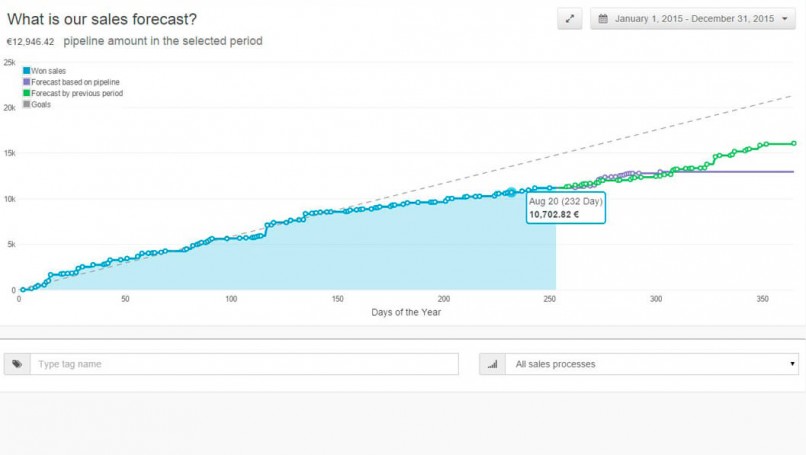
  • Sales Forecasting
    This report mentions the total value of the deals available in the pipeline and the amount that your business can bring in.

forecast small (1)

  • Sales Revenue Goals
    This helps in the setting and monitoring of individual and team revenue goals that are set with each passing
  • Won Leads/Deals
    The number of Leads/Deals won mentioned that are won by a team or member over any period with conversions.

funnel small (1)

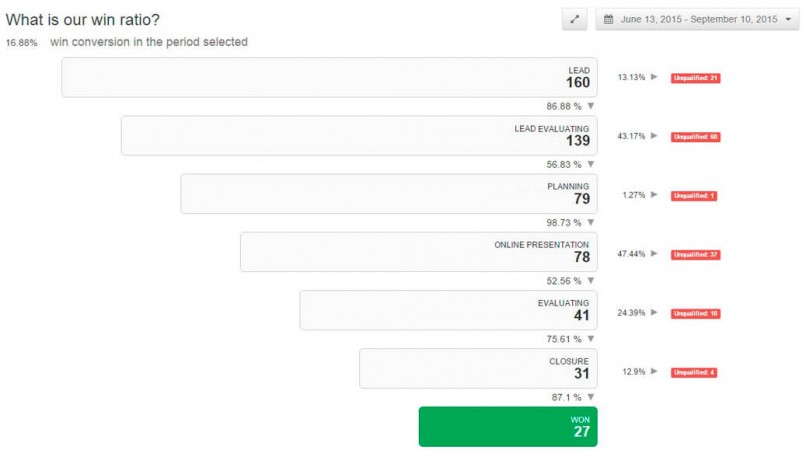
  • Sales Funnel Analysis
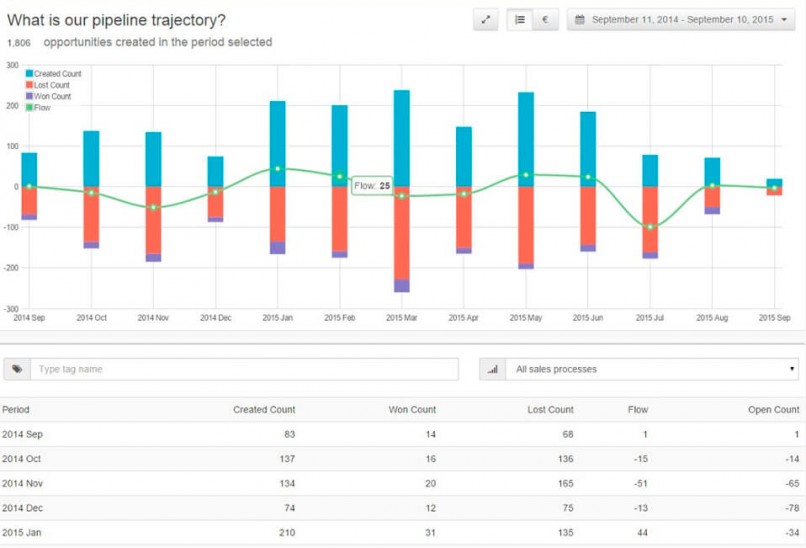
    This report tells the standpoint of the team at all the points in the pipeline and what your business can gain or lose.

trajectory small (1)

However, even if you can make your business grow well with the insights you get from the CRM you have employed, you need to ensure that you grow your CRM as your business grows. Just because it is working for you now, doesn’t mean it will work for in the next five years. Look for a Sales Stack that will be a long-term partner for you and your business. Try Teamgate.

Everybody talks about the opportunities brought about by cloud computing in the technological landscape. The integration of cloud computing is being adopted by almost every business out there. This transition to cloud computing can be attributed to the fact that it has the potency to help organizations in improving their data management systems in an efficient way – by cutting costs, bringing flexibility and effective customer relationships.

Although cloud computing is gaining momentum with every new upgrade, and by this, it also means that certain challenges also stand in the way of its implementation and adoption.

Devising a good computing strategy can be very crucial to foresee such challenges. While you plan and implement cloud computing, you also need to ensure that it complements your resources and capabilities, and coordinates with your on-premise infrastructure.

These challenges are not always understandable at the first stage, which may be the reason your cloud computing messes up every now and then. With knowledge about such challenges, businesses can weigh the pros and cons they are going to face with cloud computing.

Some of the most common challenges are:

Security challenges

  •  The concerns regarding privacy have become rampant with the way the digital arena is progressing. And also, the number of cybercrimes, mainly hacking, is on the toll. To fortify the security pillars of your cloud infrastructure, it’s essential to implement robust strategies. This means securing data in the cloud by safeguarding it from potential breaches and unauthorized access, ensuring compliance with industry standards, and maintaining visibility and control over your data assets. The data which needs to be kept within the firewalls of the organization can be accessed by any intruder any time they wish to.  Although the stakes are higher for businesses in this regard, however, some protective measures can be integrated to keep the data secure on cloud computing.  To mitigate these concerns, companies can use several security software and applications across their servers. Moreover, the security encryption on cloud data files can also ensure that data stays within the shared area of cloud computing. Also, every organization should have a proper backup storage system channelized through data loss software.

Monitoring of Cloud Computing

  • It’s hard to monitor the activity of the users across different cloud computing software. While using SaaS (software as a service), less visibility becomes a challenge for the users.  Moreover, during the integration of SaaS, this issue must be kept into consideration. So along with SaaS, integration solutions should be included, that can help make the information flow as transparent as possible. These integration solutions must be compatible as well as rich in monitoring competence so that all the in-house activities are under control.

Do you have a CRM that keeps you organised?

The most user-friendly CRM on the market. 14-day free trial.

Start Free Trial

Painless setup, no credit card required

Reliability Concerns

  • There is no guarantee that your cloud computing is going to work the same way as you want. The frequent server issues and internet outages can slow down the whole work process. Also, the more you depend on cloud computing for all your data storage functions, the more loaded it becomes, leading to technical glitches. So, to tackle this, you can take precautionary measures such as supervising the agility, robustness, and storing capabilities of the system.

Limitations regarding Costs

  • Sometimes the costs of cloud computing are difficult to access as the nature and requirements of such services can fluctuate due to the demand. The service providers may guarantee the service quality; however the scalability of such plans can vary, so target benchmarks regarding costs must be agreed upon within the service level agreements (SLAs).

Related: The KPIs that indicate SaaS is in Demand

Summary

These challenges can be overcome by using the solutions discussed above. Although cloud computing can increase business concerns regarding privacy and reliability, it can be an excellent way to overcome overheads that may otherwise be incurred due to the on-premise use of resources and infrastructure. To be on the safe side, businesses must be prepared to take advantage of every up-gradation of the technology in cloud computing and build infrastructure with the customer experience in mind.

Interested in giving Data Management a test drive? Try Teamgate CRM for free Today

This is How CRM Helps Effectively Build and Maintain Rapport With Real People

Imagine what would have happened if Apple products never found a solid fan base, or if Mark Zuckerberg had never asked his fellow students to join Facebook? Do you hear the crickets? That’s probably all we would have heard if these two companies had never put any emphasis on building customer relationships. Instead, hundreds of news articles are published concerning Apple products each day, while Facebook is brought up daily in household conversations. Companies rely on relationships with customers to grow and thrive.

Customer loyalty is the foundation on which every successful business is built. In some cases, this entails going out to lunch with a prospect or sending ball game tickets to a past client. But, today, much of a company’s rapport-building relies on technology to stay strong. Here are three major ways how technology can save and help maintain your customer relationships.

#1: With the Right Tools, Customers Won’t Get Lost in the Mix

Sometime after the Industrial Revolution, sellers lost their personal relationships with buyers. With modern shopping habits, mass production, and the self-serving convenience of the internet, the intimacy required in maintaining a connection can easily slip through your hands. Customer Relationship Management (CRM) software does provide a viable solution for this problem. You may not be able to shake the hand of everyone who purchases a product, contributing to your well-being, but you will be able to maximize the relationship potential of all e-customers.  

teamgate-call (1)

Here are some promises that customer relationship and sales management  platform offers you, the seller:

  • A chance to understand your customer through data mining and storage.
  • The opportunity for personalized buyer recommendations.
  • Integration of supplier and buyer transactions.
  • Optimized communication.
  • Adapting technology for an unpredictable, ever-changing market.  

Companies need to focus on delivering services that keep retail relationships strong. With CRM technology, this task becomes easier, and customers appreciate the feeling that an organization has gone the extra mile.

Related: Deference to Expertise – Respect Insights about the Business from “Experts”

 #2: Did You Know That Consistency is the Root of Satisfaction?

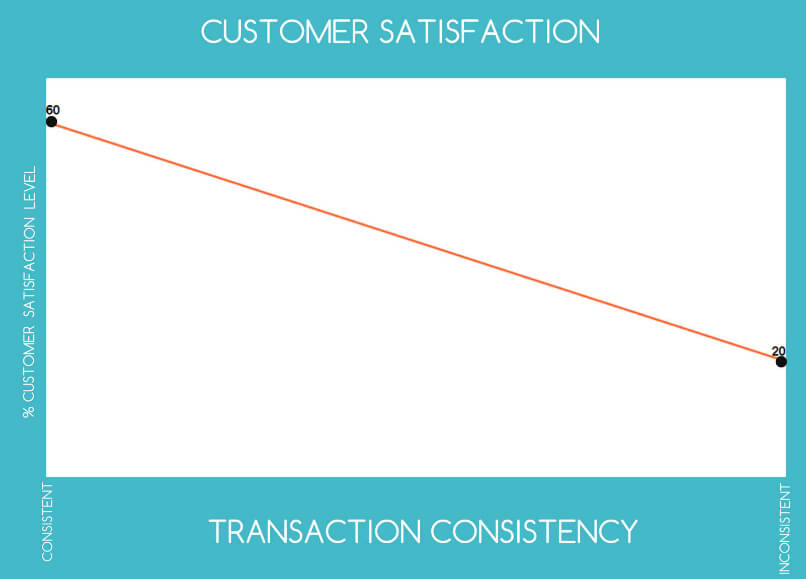
As you can see in this graph, based on information from Distinguishing Service Quality and Customer Satisfaction out of the Journal of Consumer Psychology, the level of customer satisfaction has a direct correlation with transaction consistency.

teamgate-customer-success-806 (1)

All secure relationships require consistency. Those between a buyer and seller are no different. Without secure, authentic commitments on your behalf, business associations will dwindle. With CRM, you are given a single view of your customer, insight into the value of each prospect, and a chance to prioritize resources into the most profitable areas.

When you have a unified view of your customer, you are able to better deliver what is expected. You will have a better understanding how to satisfy particular segments. Consistency in your communication amongst patrons becomes easier to deliver when you utilize new technology.

#3 Technology Helps You Deliver Customized Value to Consumers

You and your business are only one part of the value equation. Customers rely on more than just what you think and what you want. They actually come to expect certain experiences from you, sometimes based on factors entirely separate from what you claim to deliver or have proven in the past.

With customer relationship and sales management platform technology and data storage, you have the information handy to target research on specific demographics of your very own customers. Try to see if you can get into the minds of your customers, and replicate their thinking.

Your customer relationship and sales management platform provides you with the perfect opportunity to gather valuable information about people who have already purchased your products, those who are interested, and even the ones who are not. With careful analysis, you can create accurate, detailed customer profiles.

Do you have a CRM that keeps you organised?

The most user-friendly CRM on the market. 14-day free trial.

Start Free Trial

Painless setup, no credit card required

Many times, you can take this a step further than just input of what your customers have told you about themselves by researching public information online. You have John Smith’s email address, so can you find out what public accounts he has linked to this same email address? From there, can you find out what he is interested in aside from your products or services? Do you see any links between his interests and the interests of others? By asking questions like these and strategizing with the answers in mind,  you can often come up with valuable information to target your marketing campaigns.

Not only do inform strategies create enhanced relationships with current customers, but they provide the opportunity to attract new, like-minded leads at the same time. The internet provides an amazing tool for creating highly personalized advertising. Use the language and thoughts of your target market to appeal to them and provide more value. This is what consumers really respond to.

Summary

You may not be running a fortune 500 company, but you can certainly learn to think like one. Make sure your customer data is stored securely so that they don’t become just more numbers, provide consistency in your communications, and deliver value through personalized interactions and advertising. With the help of modern tools, you can save your customer relationships even when you can’t take everyone on your email list out to lunch. Most of those people wouldn’t have time for that anyway.

Related: Interactive Graphic Shows the Best Days of the Week for International Customer Sign-ups and 6 Sure and Simple Ways to Internationalize Your Business

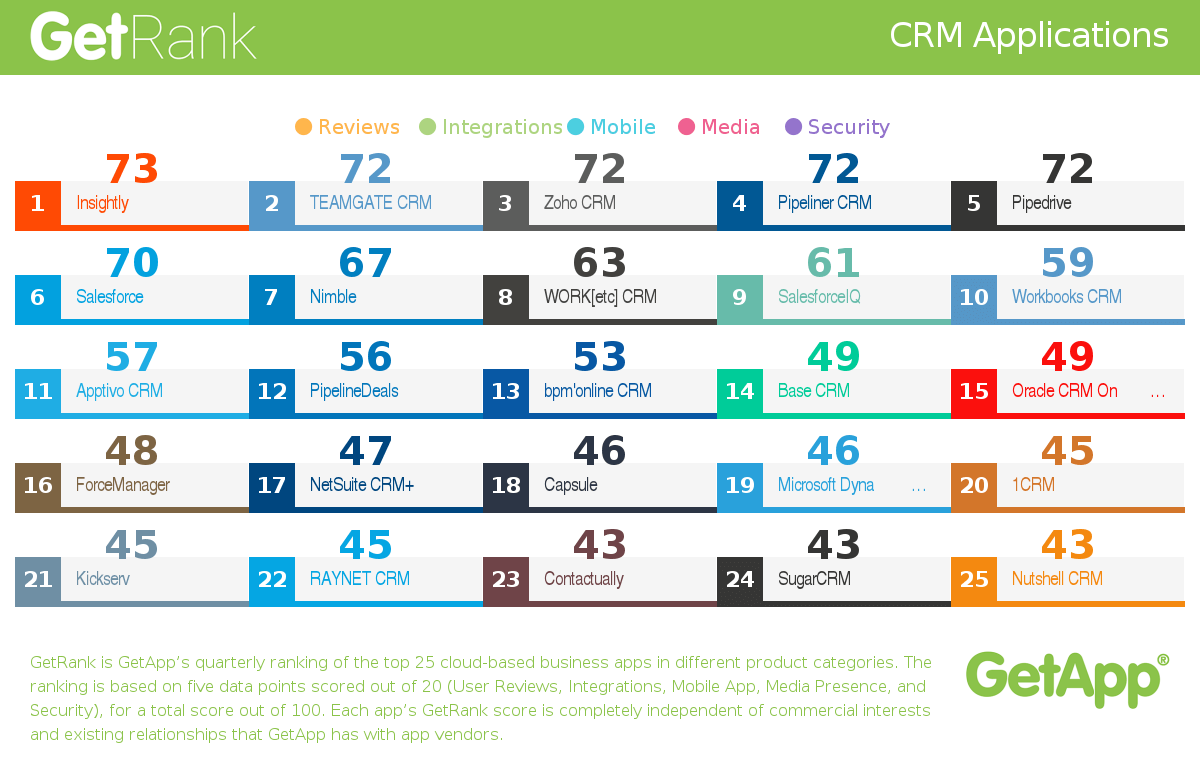
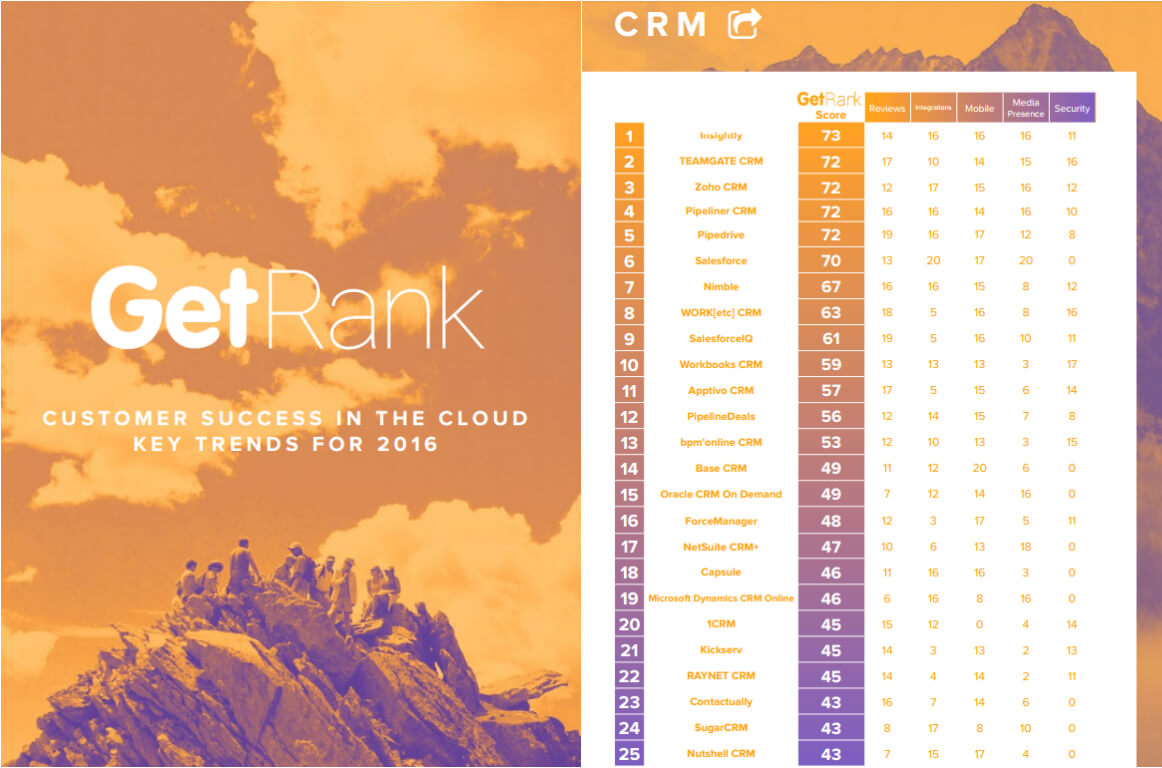
GetApp has published quarterly CRM industry trends report for Q1 2016. The Report is part of GetApp’s quarterly product ranking, GetRank, where Teamgate was announced as CRM #2 of the top 25 CRM apps based in the cloud.


crm (1)

The report, “Customer Success in the Cloud: Key Trends for 2016” highlights the most important trends in the customer management space to help you choose the right cloud-based CRM, Customer Service, or Call Center application for your business.

In GetApp report, you’ll find:

  • Expert analysis and industry commentary with insight into some of the most notable developments in customer management software in Q1 of 2016.
  • Unique insights from data collected through GetApp’s research program, GetData, as it relates to user perception of cloud-based business software.
  • The Q1 2016 ranking for CRM, Customer Service & Support, and Call Center software.
  • A detailed explanation of GetRank and the five unique data points used to calculate an app’s GetRank score.

Do you have a CRM that keeps you organised?

The most user-friendly CRM on the market. 14-day free trial.

Start Free Trial

Painless setup, no credit card required

KEY TRENDS FOR CLOUD BASED CRM 2016 :

  • With CRM emracing the cloud, having a native mobile app is integral for a CRM solution.
  • Analytics can provide useful data about the entire customer journey for marketing and sales departments.
  • Security concerns include data storage and protection.
  • Social listening has become a great way for companies to get users’ perceptions about their products.

For a full report on GetRank and quarterly industry trends, check out the full research or simply press the picture above:

teamgate getapp CRM (1)

Related: 4 Crucial Sales Trends You Cannot Afford to Ignore in 2016 and Teamgate becomes CRM & Sales Management Category Leader!

GIFT (1)

Being the customer of a business using CRM is a rewarding experience. Leads are well nurtured, the business knows its customers well, targeted marketing campaigns are customer-centric and each deal is closely followed to fruition through each step of the sales pipeline.

But CRM can also make an excellent gift for a business as well. If you’re in the market for a special gift, a CRM app might be the perfect choice.

Related: Black Friday: Choose Value Over Discounts

It Shows That You Care Deeply

EMPHASIZE (1)

CRM emphasizes knowing customers well. Likewise, a great gift is about truly knowing your friends.

Running a business is an exciting but also exhausting endeavor. We all have a business-owning friend or relative who’s constantly buried in repetitive paperwork and boxes of old receipts. Gifting someone a CRM shows that you are keenly aware of the challenges that business-owners undertake.

By giving someone the ability to automate sales and marketing, you are effectively freeing up some of the time they usually spend on repetitive tasks to now spend with the people they care about.

It Reflects Entrepreneurship

KUKU (1)

What makes personal gift personal is having a bit of both the giver and the gifted. Many friendships and relationships are based on shared interests—business and entrepreneurship in this case. If you gift a CRM, you are very likely to be the first contact they add which will cement your place as the first lead/customer/deal. Heartwarming isn’t it?

Surprise! (But professional)

pro teamgate (1)

The professional gift is a tricky business—no puns intended. Fountain pens, paperweights and stationery are old and very underwhelming ideas. On the other hand, A CRM gift is a very fresh and original take on the modern dilemma of the professional gift that marries utility, professionalism and care.

It’s Good PR

top gier teamgate (1)

When Top Gear presenter Jeremy Clarkson was suspended after a “food catering” disagreement, Snickers sent him a box of free chocolate bars. The move garnered Snickers significant media attention and was widely praised by marketers and customers alike.

A similar move by your business will prove your commitment to true customer support: Your customers and those of your customers.

Become A Team Happiness Champion

reasons teamgate (1)

You can always gift a CRM to your own team and they will appreciate you for it, for all the previous reasons.

It shows that you have the initiative and innovation required to see a challenge and prescribe the right solution. Repetitive tasks can take a toll on coworkers, and a CRM is the right gift to dissipate the stress of repetition.

Do you have a CRM that keeps you organised?

The most user-friendly CRM on the market. 14-day free trial.

Start Free Trial

Painless setup, no credit card required

Also, a CRM can be just the perfect gift to reflect your appreciation for your team’s professional ethics. What can be a better gift for a professional than an app that makes efficient workflows smoother and available for the rest of the office to appreciate?

At Teamgate, we care deeply about customers, relationships and productivity. Teamgate is intuitive and efficient enough to be the perfect CRM gift either for your team or your business-owning friends.

Don’t take our word for it! Try Teamgate for free before you buy the giftwrap.

If you are not a salesperson, it can be easy to look at Customer Relationship Management (CRM) software and shrug it off as something exclusive to salespeople. Granted, CRM find its popularity in sales since it mimics business workflows and sales pipelines. More importantly, the current “Age of The Customer” requires any business and product to be customer-centric. In the salesperson’s world of leads and clients, CRM usage allows businesses to keep customers at the core of their processes.

But can non-salespeople use CRM as well?
In this article we will talk about:

  • Why CRM Works For Other Professionals
  • Who Else Should Use CRM
  • How to Customize Your CRM

Why CRM Works For Other Professionals

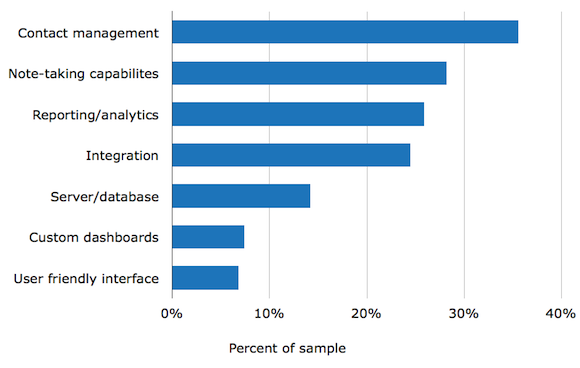
Truth is, almost every professional working in a field requiring frequent contact with customers can benefit from CRM. Take a look at the following graph of the most requested CRM features:

crm-buyerview-report-2013-5

(Graph and study by Softwareadvice)

Access to a centralized platform for contacts (emails, phone calls, meetings etc.), metrics and task management are features that make CRM a powerful toolkit for salespeople and other professionals alike.
Without a CRM, professionals have to resort to building their own ecosystem of apps. Although the choice of great app substitutes is limitless, having a dedicated platform where all the features are easily accessible can be a great boost to productivity –and revenue.

Who Else Should Use CRM

To misquote the bard:

All the world’s a market, and all the men and women merely salespeople”.

Professionals have services to offer –or sell, they have contacts that require various degrees of engagement and they need data to make informed decisions. If we follow this reasoning, every professional is a salesperson as well.
Let’s explore how other professionals can use CRM:

Online Freelancers:

freelance

Freelancers have to manage their clients, do customer support, manage projects, and prevent old leads from turning cold while doing their own marketing. Without planning and organization, these tasks can be very challenging to manage even for the more seasoned freelancers.

A CRM is the ideal toolkit to manage the complex web that is the freelancer’s contacts. On one platform, you can schedule follow-up emails, visualize your pipeline and receive smart insights on the likelihood that a lead will convert based on previously gathered data.
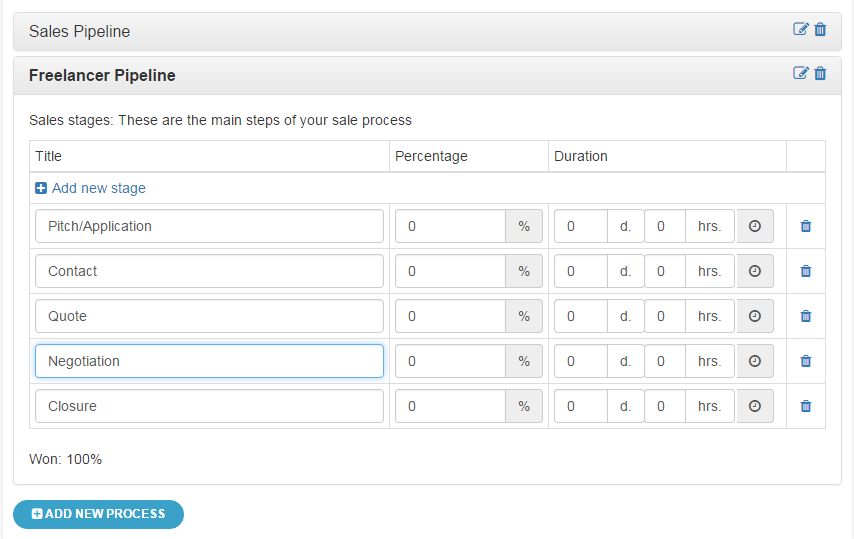
A pipeline can help you see the steps through which your deals progress. For freelance writers for example, a deal will start with a pitch, then an initial contact, a quote, a negotiation then closure.
The more you populate your CRM with data, the more information you can gather about:

  • Which deals are easier to close?
  • Which clients are more profitable?
  • The pipeline step where deals are most likely to fall through.

Besides freelance writers, any independent contractor who regularly deals with a variety of customers can use a CRM. This includes:

Non-Profits & Fundraising

giving (1)

For a non-profit to stay afloat financially, it has to manage a delicate network of established donors while trying to acquire new ones. Even with the advent of online crowdfunding efforts, fundraising is a field where high-touch engagement with donors is conventional if not required.
With contact management and segmentation strategies, non-profits can afford to easily give their owners the attention they deserve. In addition, the data gathered thanks to frequent CRM use can highlight the particular donor/prospect personas most likely to be generous.
Lastly, task and relationship management through scheduled and well-recorded contacts allow for better-targeted marketing campaigns and as a result, happy email-reading customers.

Related: Customer Success Strategies for Non-SaaS Businesses

Musicians and Promoters

musician (1)

For musicians who do not feature on the Billboard Top40, a great deal of management is needed to land a show. Musicians and promoters have to constantly look for venues (leads), manage their relationships with old customers (agents, music venues, labels, etc.), and send Demos.
Although creatives are typically portrayed as scattered individuals with a distaste for organization, their success will still depend on meticulous planning.

A CRM can help:

  • Manage client contacts for venues, promoters, agents, labels, etc.
  • Track previous and ongoing Deals (a deal can be a show, a gig, or a record contract)
  • Compare Deals based on profitability, geographic location, and other customized variables.

How to customize your CRM

The most important trick to making CRM a versatile tool for any profession is customization. Although the sales jargon can be applicable to many other professions, it’s best to replace it with something you’re more familiar with. Let’s find out how!

Pipeline

freelancepipeline
The sales pipeline consists of all the steps each deal goes through prior to closure. The default Sales Pipeline provided by Teamgate has the following stages:

  • Incoming
  • Contacted
  • Quote
  • Evaluating
  • Closure

You aren’t bound to keep the pipeline as it is. This is my attempt at creating a Freelance Writer Pipeline:

  • You can create your own pipeline by navigating through:
  • Click on your Profile then Settings
  • Pick Deals and Deals settings on the left tab.
  • Then Add New Process
  • Add a new stage for every stage of your ideal pipeline.

If you can’t think of a clearly defined and recognizable stage, it is perfectly fine to keep the original Sales Pipeline and keep tweaking it as you go.

Tags

tags

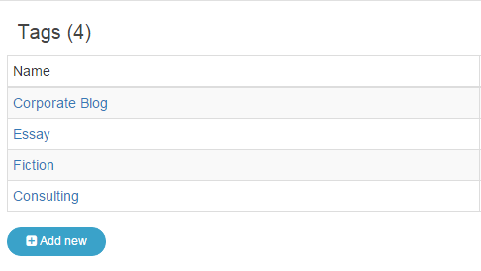
Our segmentation article talks extensively about how clear and purposeful tagging enriches Customer Relationship Management systems. Make sure to check it out for more information about good segmentation habits.
The above example is my attempt at segmentation as a Freelance writer.

Integration

Allowing your CRM to communicate with your apps of the trade is one of the best ways to customize it to your own liking. Although this can often require some API knowledge or CRM support, we thankfully now have options like Zapier which makes integration a breeze for non-developers.

Do you have a CRM that keeps you organised?

The most user-friendly CRM on the market. 14-day free trial.

Start Free Trial

Painless setup, no credit card required

Experimenting

To have a CRM tailored for you and your profession, there’s no substitute for practice. Tweaking around your pipeline and implementing different tag subgroups will allow you to learn more about the CRM and your own business practices.

Take Teamgate for a Free Trial today to see if it’s the best fit for your job.
Back to you! Do you use CRM for non-sales-related tasks? How do you use it? We’d love to hear your thoughts!

Related: Black Friday: Choose Value Over Discounts

You’ve probably heard the statistic: “1 million US B2B salespeople will lose their jobs to self-service E-Commerce by the year 2020” according to a 2015 Forrester forecast. Yet, few people can claim they haven’t seen it coming.

In the 1993 classic Groundhog Day, Bill Murray is stuck living the same day over and over and over again. It’s no coincidence that the film’s screenwriter chose to include an encounter with Ned Ryerson, an annoying insurance agent, to make the repetitive day even more nightmarish.

Ned Ryerson is everything customers hate about salespeople: Irritating, too pushy, untrustworthy, and incapable of tailoring his pitch and product to each customer.

With E-commerce and the rise of the SaaS sales model, salespeople like Ned Ryerson are in an endangered spot. But before we discuss how to avoid becoming Ned (or how to stop being one), let’s talk about some of the reasons why every traditional salesperson should be worried.

Why Salespeople are on their way out

The same Forrester study found:

  • 75% of B2B buyers now say that buying from a website is more convenient than buying from a sales representative.
  • 93% say that they prefer buying online rather than from a salesperson when they’ve decided what to buy.

The modern customer is one search and a few clicks away from knowing everything they want to know about the product they need.

Traditionally, the salesperson took care of educating the customer. Ned Ryerson approaches you (a dormant lead) and pitches an insurance plan, explains why you need it, and badgers you until you buy it or give him your phone number.

The internet not only has made product information immediate and accessible but has also made buying the product online easier and cheaper while completely bypassing the salesperson.

It also doesn’t help that decades of overly repetitive cold calls and scripted sales interactions have damaged customers’ trust in salespeople beyond repair. In contrast, E-commerce presents a much more pleasant experience and a customer-centric platform.

SaaS Stress SOS: The SaaS Sales Model

saas (1)

Your traditional B2B salesperson would probably find “Groundhog Day” the ideal scenario to land a deal. They get to pitch the same expensive deal (1 yearly software license for thousands of dollars for example) every day using the same sales script until the customer gives up. Then they make a big commission and move on to the next customer using the same strategy.

GET READY TO OWN YOUR WORKDAY

with the most user-friendly CRM on the market.

Start Free 14-Day Trial

Painless setup, no credit card required

SaaS has changed the delivery model of software to a Pay-As-You-Go or subscription-based service. Instead of focusing on securing long-term deals, the pressure for salespeople is now on meeting short-term quotas that are incredibly challenging to maintain. This is mostly because controlling SaaS Sales churn – the rate at which customers cease to use the service they subscribed to—is beyond the salesperson’s scope.

Unfortunately, many salespeople still can’t adjust to this new shift. Even more worrying are the companies that haven’t yet adjusted their overall sales strategy accordingly.

Besides product delivery and sales, SaaS has changed sales-quotas, pricing strategies, and salespeople’s responsibilities. Between finding leads, meeting quotas, lowering churn, and managing accounts, sales are starting to sound like the most stressful career – and justifiably so.

Aaron Ross author of the award-winning, bestselling SaaS bible “Predictable Revenue” calls overtasking sales teams one of the biggest productivity killers facing SaaS companies. When too many responsibilities are included in one sales role, he adds, salespeople suffer from a lack of focus, motivation, and appropriate training.

Furthermore, keeping track of relevant metrics is even harder when the salesperson covers so many roles.  More importantly, “lumped responsibilities obscure what’s happening and make it more difficult to isolate and fix issues with accountable follow through” continues Ross.

Companies that fail to implement sales specialization should look inwards when unable to make the revenue they aim for.

Old Sales Habits Die Hard (And Annoy Your Customers)

old habits (1) (1)

Whether the Cold Call is dead or not merits a separate article, but what everyone can agree on is that repetitive cold calling is annoying for customers.

Ineffective cold calls, however, are symptoms of bigger issues. Notably, a disconnection with how customers view salespeople and an inability to replace ineffective strategies with better ones.

“74% of consumers prefer to receive commercial communications via Email” according to a Merkle study. In addition, The Direct Marketing Association reports that “Email marketing has an ROI of 4,300%”. What do the numbers mean?

Dressing up old sales habits as outbound prospecting when other strategies deliver a much higher ROI should be inexcusable for any salesperson.

Ned-Free Sales: How To Reinvent The Sales Role (When it Doubt, Divide Labor)

CORE SALES ROLES

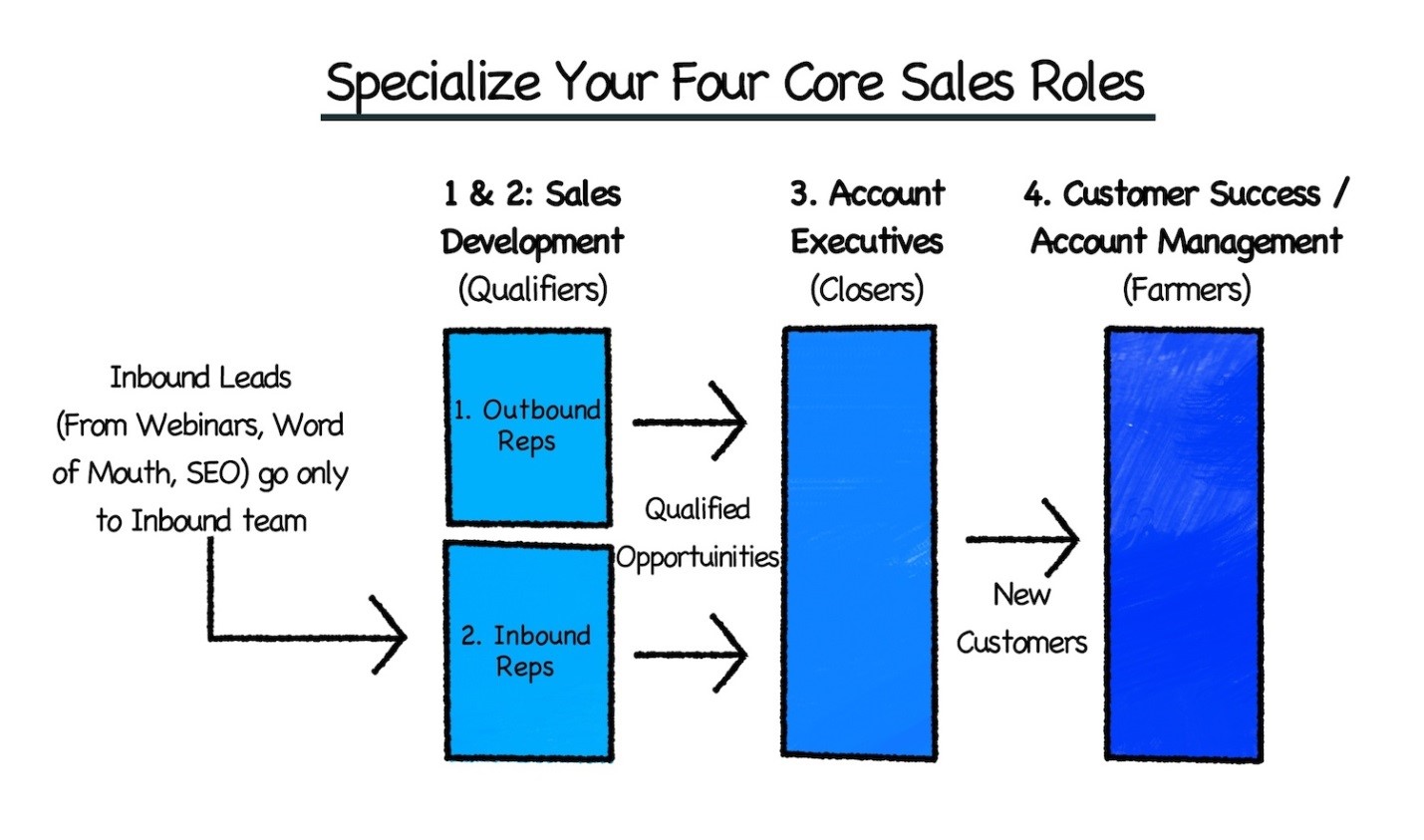
Aaron Ross, of Predictable Revenue, suggests starting Sale Specialization with the second salesperson hire. Ideally, a core sales team should have the following 4 roles:

  • “Inbound Lead Qualification: Commonly called Market Response Reps, they qualify marketing leads coming inbound through the website or 800 numbers. The sources of these leads are marketing programs, search engine marketing, or organic word-of-mouth.
  • Outbound” Prospecting/Cold Calling 2.0: Commonly called Sales Development Reps or New Business Development Reps, this function prospects into lists of target accounts to develop new sales opportunities from cold or inactive accounts. This is a team dedicated to proactive business development. Highly efficient outbound reps and teams do NOT close deals, but create & qualify new sales opportunities and then pass them to Account Executives to close.
  • Account Executives: They are the quota-carrying reps who close deals. They can be either inside or out in the field. As a best practice, even when a company has an Account Management/Customer Success function, Account Executives should stay in touch with new customers they close past the close until the new customer is deployed and launched.
  • Account Management/Customer Success: Client deployment and success, ongoing client management, and renewals. Someone needs to be dedicated to making customers successful–and that is NOT the salesperson! “

You can read more on “Predictable Revenue” on Aaron Ross’s website.

Sales Automation is the Answer

Does your sales team still not use a CRM? Well, it’s never too late.

A CRM can help you implement more effective cold calling strategies that do not alienate customers. By tracking the history of your sales contacts and response rates, you can tweak outbound prospecting strategies (like messaging schedule) without contacting the same customer multiple times in a short –albeit irritating– window.

Being a customer-centric app, CRMs also help to establish better customer relationships (more profitable even) which leads to more effective targeted prospecting and more data for your sales forecasts and analytics.

Do you have a CRM that keeps you organised?

The most user-friendly CRM on the market. 14-day free trial.

Start Free Trial

Painless setup, no credit card required

How Teamgate Can Help

Teamgate can help you become a more likable salesperson than Ned Ryerson. How?

By offering an intuitive CRM fully dedicated to customer relationships and the sales pipeline, we make sure that any workflow implementing Teamgate will keep customers at its core.

Likewise, Teamgate’s Segmentation features (we will discuss Segmentation on our next blog ) help salespeople avoid the problem of Information Overload by categorizing customers into appropriate sub-groups. We realize that not all your leads and customers are the same.

Furthermore, Teamgate’s contacts management helps you centralize all your sales contacts in one platform. You can organize, review and schedule contacts with your leads and customers. You can integrate it with third-party applications like Google, LinkedIn, Mac Contacts, and Outlook or craft your own Zapier+Teamgate integration recipes.

Assigning separate teams and salespeople to deals is yet another intuitive task in Teamgate. Additionally, you get to measure the performance of each sales role and identify which areas in particular need improvement.

Check out more of the analytical and forecasting tools available via Teamgate.

Are you tired of being a B2B Ned Ryerson? Start your Free Teamgate Trial Today!

Business is usually associated with risks but is there a way to minimize risk-taking while maintaining prosperity? The answer is trust.

But trust goes both ways: Customers have to trust the business and the business needs to learn to trust its clients. Where does CRM stand in this equation?

Trusting Customers

• Quantifying Trust

You have attended a very high profile networking conference where you met clients of all sorts. You updated your contact book and gave yourself a mental high five for all the prospect leads you have gathered. Is it enough?

Not all leads are the same. Old clients with whom you have successfully completed deals before feel more trust-worthy –and they should.  Also, new leads with quick response rates take priority over the cold ones.  Maybe you want to prioritize leads that can potentially yield the highest profit. This is where a CRM can quantify trust and reputation.

“Quantifying trust” might seem like a dubious expression at first, but if the key to trust is indeed consistency, CRMs are the best tools to track, visualize and quantify trust.

Monitoring deals through all phases of the sales pipeline allows you, and the CRM, to gather key information about your leads. Factors like purchase history, lead’s source, contact history and others give the CRM ample information to forecast the likelihood of a lead to convert into a deal.

quantifying1

If you find yourself unable to close certain deals, the visualization of the Sales Pipeline will help you identify precisely where they fell through. In future opportunities, you will be reminded to proceed with extra caution or even drop the deals if they have the reputation of falling through.

• Customized Leads = Personal Leads

customized

A sign that your business has seamlessly implemented the CRM into its workflows is when leads’ profiles reflect all of the information you have gathered about them. In fact, smart systems like CRMs provide more utility the more information you give them.  For example, once your leads are well customized, a quick look at them should help you sort clients according to conversion rates, deal-based reputation, association with other deals and contacts or even overall profitability.

Email and other integrations  are another source of information to customize your leads. Keeping track of emails, social media mentions, LinkedIn connections will alert you when a lead is inching in closer to conversion. It is also an excellent way to keep track of leads’ response rates and online interactivity with the business.

As we discussed in a previous article, having one platform solely dedicated to managing customer relationships will help your staff, and business in general, get accustomed to virtualizing customers’ details.  As a result, consistency of use and integration of CRM into business workflows will make discerning trust and reputation an intuitive procedure.

Do you have a CRM that keeps you organised?

The most user-friendly CRM on the market. 14-day free trial.

Start Free Trial

Painless setup, no credit card required

Related: 4 Traits of a Trustworthy Customer Relationship Management Platform

Earning Customers’ Trust

• Knowing Your Customers

A CRM helps foster clients’ trust in your business. As a customer-centric app, CRMs allow businesses to approach each client separately based on their needs, their purchase history and the nature of previously closed deals.  Likewise, knowing what each customer wants effectively eliminates the need for generic marketing campaigns that have the tendency to alienate clients.

• Closely Monitoring Deals.

owner1

Miscommunications over who’s responsible of certain aspects of the deal are unfortunately very common. Small lapses of attention like that are how deals are sometimes left unattended, until they fall through.

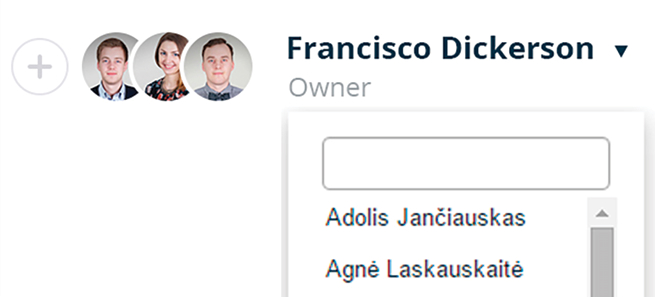
Team Collaboration tools, like the one Teamgate offers, allow you to assign deals to individual staff or entire teams. The deal’s primary owner can assign and monitor each aspect of deal to make sure no glare mistakes could affect the customer’s trust in the business.

• Setting Goals and Meeting them


goals (1)

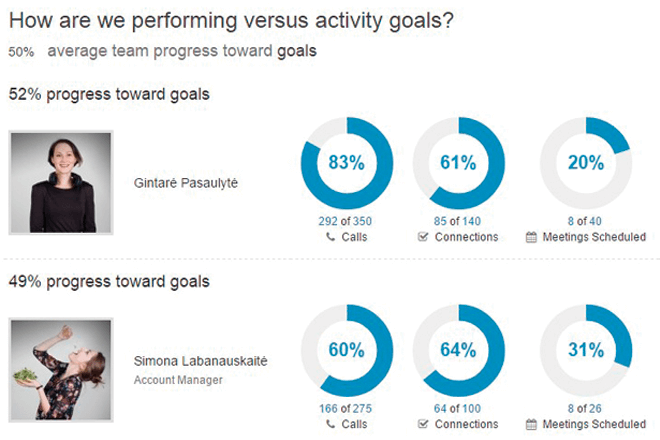
Customer-centric goal setting can help you sustain excellent performance when it comes to meeting deadlines, following up on deals, customer support and overall organization. You can also discern your best performing employees and assign them to your top clients. Alternately, choose staff with a good record of customer-support and assign to them tasks appropriate to their performance.

Clients can tell how organized and dedicated your business is based on the service they receive. With consistent CRM use, you should see a noticeable increase in customer satisfaction and client-retention thanks the trust you have earned.

Most of the images used in our blogs are from Teamgate. As an application dedicated to customer relationship, we understand the importance trust holds in business and we made sure our app embodies this commitment.

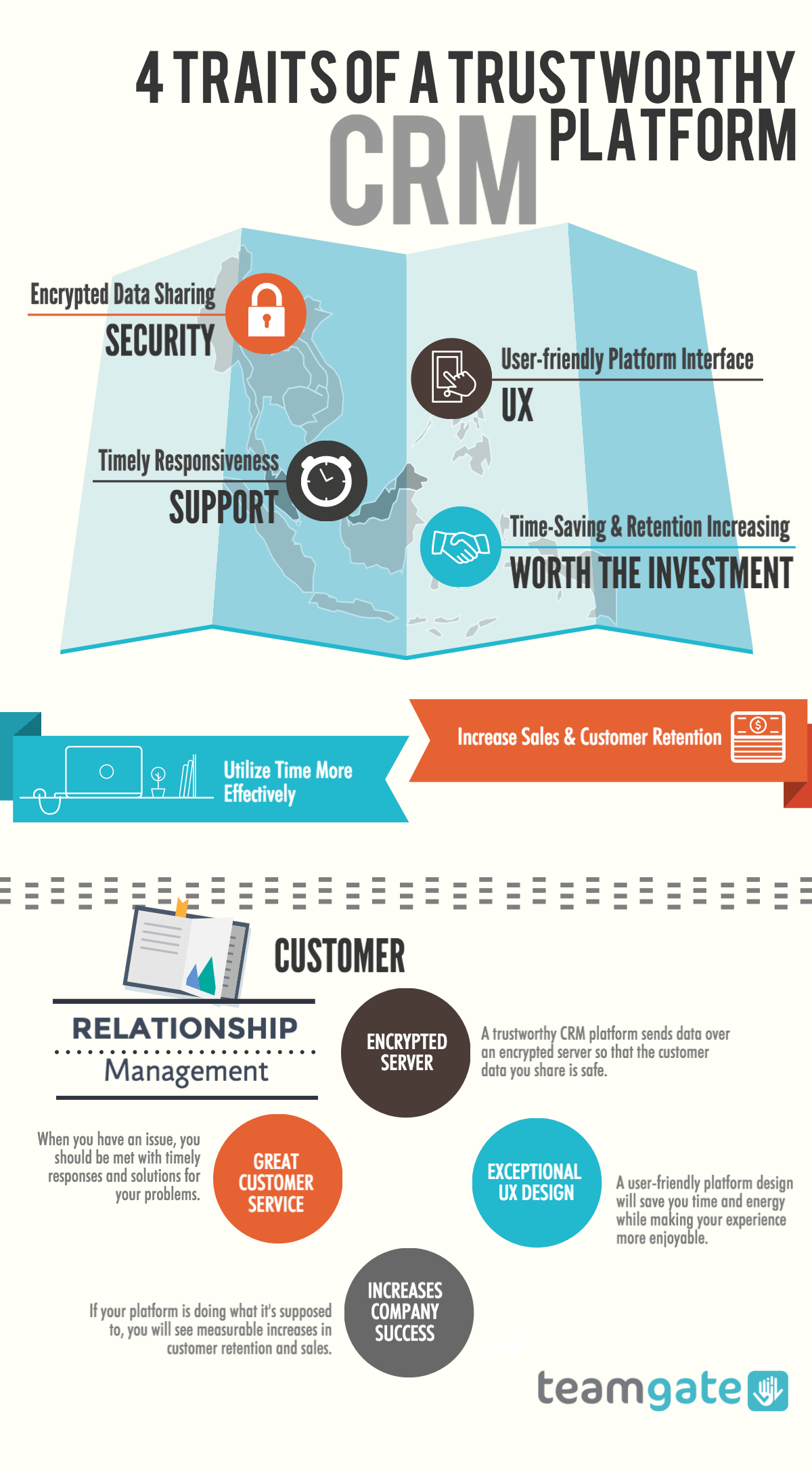
4 Traits of a Trustworthy Customer Relationship Management Platform. Why Should you trust your CRM?

Most business plans involve a Customer Relationship Management (CRM) section, devoted to organizing customer data in a way that maximizes profits and helps maintain satisfactory relationships between your company and your prospects and customers. Implementation of the plan often requires utilizing technology to help you meet your goals. In most industries, it is necessary to keep your information in a platform designed specifically for CRM. The data you share here is sensitive, and you need to be very cautious with it. Here are some ways to know whether or not your CRM is trustworthy.

Sharing Your Customer Data Over a Secure System

A trustworthy CRM app is secure. You should be 100% certain that your customers’ information is safe. Always go with a platform that is well-known. If you’re unsure, read online reviews about the platform you’re prospecting. If you still feel uneasy about the privacy of your data, do not proceed.

One trick is that, depending which browser you are using, you can determine the security of the site by looking at the address bar at the top of the page. If you see a green lock at the left of the screen, that is an indicator that the site is encrypted. Before you share any sensitive information online, you can easily make sure that you are sending via an encrypted site.

If you’re on a browser that doesn’t show whether or not the site is encrypted, you won’t see the green lock. You will have to find out, using other means, whether or not your information is safe. This is very important, as you don’t want your customer data shared with the wrong people. That could be a disaster for you and them.

security (1)

User-Friendly Platform for Information Management

The purpose of CRM platforms is to ensure that your customer relationships are managed with ease. They are here to help you, not make your job harder. Ask for a demo or take advantage of any free trials offered before you buy in. If you’re already working inside an app, but it seems difficult to navigate, try out some others to find one that’s right for you. Your CRM should be a step up from writing notes on a whiteboard, not a step-down.

Professional Customer Support

When you have issues with your CRM, their support team should be ready to help you in a timely manner. Whether your problem pertains to the usability of the platform or mistakes on either end, you should be provided with solutions. Your CRM provider should have a solid understanding of customer relationships themselves. This will be reflected in the way they treat you. If your problems aren’t getting solved, or it’s taking weeks for the service team to respond to you, it may be time to consider switching to a new platform.

When working with a CRM provider, you should not only find satisfaction in the relationships you have with their team but should also be able to learn from them. Who better to study business relationships strategies from than the pros. The major developers behind leading customer relationship management software are experts in the field. Use your satisfactory dealings with them as inspiration for tactics you can add to your plan and become or maintain your stature as an authority in your own field.

Do you have a CRM that keeps you organised?

The most user-friendly CRM on the market. 14-day free trial.

Start Free Trial

Painless setup, no credit card required

Actually Nurture Customer Relationships

Your CRM platform should be like the assistant that keeps you on track with your customers. Think of it as a real person that you work with all day. Is the platform actually helping you nurture relationships with your customers? You can measure this with retention and sales. If your relationships are being nurtured, helping you reach your goals, you can rest assured that you are getting exactly what you pay for.

Successful customer relationship nurturing comes from platforms that provide detailed data storage in a way that adds value (conversions) to your sales funnel. You should be able to take a look at the information stored in your CRM and analyze what’s going on a way that provides insight. What’s working in your sales funnel? What’s not working? You should be able to answer those two questions with confidence when the day is over. If you’re working with a trustworthy CRM, you will be able to.

The results of working with a reliable team of customer relationship specialists will be seen in your sales. Consider safety, user experience, customer support, and whether or not you are able to track relationships effectively when choosing your platform. If you are not already completely satisfied with the software you’re using, now might be the perfect time to try your options.

Trust your CRM (1)

The CRM market is saturated with a variety of apps and suits promising to satisfy every business’s needs. However, the ensuing fierce competition between apps to offer more expansive solutions has obscured the line between CRMs and ERPS.

Although All-In-One solutions might, at first, seem like they would be the ideal choice, specialized CRMs or custom-built CRM ecosystems can provide an incredible competitive advantage for small and big businesses alike.

Focus on Relationships

It makes sense for a company to inquire on whether a particular CRM also automates processes like accounting, billing and inventory management.  It is important however to remember the feature key to any CRM’s success: the R.

Core to any CRM is the ability to manage relationships with leads of all kind. Consequently, a CRM app dedicated to the sales pipeline is bound to be better at valuing good customer relationships.

This also means that the dedicated CRM is more likely than All-in-One suits to research and develop features unique to the customer relationship aspect. A classic development mistake for apps is spreading out resources across multiple features incompatible with CRM’s principal purpose: Leads conversion and customer relationships.

Flexibility

A good CRM should seamlessly slot in with already existing workflows.  This is why All-in-One CRMs target the same standardized workflows that big enterprises adopt. Small and medium sized businesses, on the other hand, rely on flexible workflows which makes the rigidity of All-In-One CRM solutions an obstacle.

Moreover, the wide variety of apps available for businesses allows you to build your own ecosystem centered on the dedicated CRM app of your choice. You can tailor this ecosystem to mimic your current business workflows and keep adjusting it according to future needs.

Instead of the ready-made features that All-in-One suits offer like billing, accounting and project management, you get to decide which particular app solution matches your resources and fits best with your workflow.

[optin-monster-shortcode id=”kandoug21absj0ox”]

Apps like Zapier allow a number of CRMs to easily integrate with other apps and services without any technical knowledge of their APIs. Flexibility in terms of integration can be an incredibly cost-effective and efficient feature due to the fact that it creates a CRM ecosystems consisting of apps your employees are already familiar with.

Related: Did Santa Leave a CRM app?

Scalability

When keeping the scalability of your business in mind, it’s important to make sure that business processes will stay centered around the customer.  Since growth is driven by increasing customers and customer demand, it makes perfect sense to have a platform dedicated to ensuring smooth scalability.

With increasing customers comes the need for better leads management, sales forecasting tools and other analytics native to your CRM platform of choice. Although most all-in-one solutions also offer such tools, it can hard to dedicate sufficient attention to them when they’re also cluttered with non-CRM related features.

Do you have a CRM that keeps you organised?

The most user-friendly CRM on the market. 14-day free trial.

Start Free Trial

Painless setup, no credit card required

Price

The “all” in All-in-One CRM solutions comes with a hefty price. For CRM suits, subscription fees take into account all the features and services made available at the business’s disposal regardless of whether they are needed or not. If you are only in the market for a CRM solution only, investing on features you do not required yet is a waste of resources. As previously mentioned, dedicated CRMs are flexible enough to accommodate more functionalities when the need for them arises.

Focus

Low adoption rates are a constant concern for any business seeking to make a CRM app part of its workflows. In simpler terms, businesses need to make sure that whatever CRM app they choose will become an elemental part of their sales team routines. Often, purchased CRMs app go either under-used or have some of their features ignored.

Low adoption is a much bigger risk with All-in-One solutions when their features fall outside sale’s scope. In addition, these solutions also require more extensive and frequent training for the staff members using them, otherwise, unfamiliarity with the features often results in under-use.

On the other hand, dedicated CRMs make low adoption less of a concern thanks to the ease with which they fit in most businesses workflows intuitively. Moreover, training your staff to use them is easier and cheaper.

The ease of integration, previously discussed, of dedicated CRMs with other solutions that staff members are familiar with guarantees no interruptions in your business workflows to deal with the logistics of adopting a CRM app.

At Teamgate, we remain committed to offering a CRM app dedicated to the sales pipeline and to customer relationships. Features such as Sales Funnel and Sales Forecasting reflect our commitment to our app’s purpose: Customer relationship.

focus

Related: Old vs. New CRM

You may be launching a new business soon. Perhaps you already have a thriving or struggling company. Either way, you’re curious about starting to look at tools that will help you manage customer relationships. When, in the lifespan of your business, is it best to try out CRM planning and implementation?

First, let’s take a look at what CRM entails. At some point, all businesses should have a strategy in place to guide how they will connect with customers, both existing and those that will surface in the future. This is their CRM plan. During the planning phase, a company looks at who their target market is, what the typical behaviors are, and what tools they should be using to best appeal to their market. As with all business-related strategies, these need to stay open for scheduled evaluations and be altered as needed. A great piece of advice is to make sure that the entire organization is briefed when a new or modified plan is executed.

So, when is the right time to start planning your Customer Relationship Management? No matter what point you are at in your business, the answer to the posed question is, “now.” Even if you haven’t launched your products or services to the public, having a great CRM plan involving the five key cross-functional processes is vital. If you’re already in business, CRM is only going to benefit your sales. Here’s what you need to consider today.

Strategy Development Techniques

What means are you going to use to create your strategy? This is just as important, in CRM, as the plan itself. You should have an idea what kind of information you will need. What target demographics are important to your strategy? Where are you going to compile your information from? How are you going to organize this information? Who is delegated to which tasks? When is the deadline for completion? Ask yourself these questions, and make the appropriate connections before you dive into the planning. A department meeting is a good way to brainstorm and make sure you are going to have all bases covered.

Once you have a good outline of the strategy, you and your team can start researching. You will want to compile as much information as you can about your prospective or current clients/ customers, depending on the maturity of your business. The goal is to see their spending habits and any needs or problems they have that you might solve.

When considering CRM implementation, it’s important to tailor your customer service tools to your industry’s specific needs. For example, businesses in the home services sector, such as plumbing companies, can greatly benefit from a dedicated plumbing answering service. This specialized service ensures that all customer calls are handled efficiently, boosting customer satisfaction and allowing plumbers to focus on the job at hand without disruptions.

Related: All-in-One CRM v.s. Dedicated CRMs

Value Creation Methods

Now that you have all of the important details in front of you, it’s time to take a look at providing value to your consumers. First of all, you must stand out from the crowd. You must also solve the problems and fill the needs of your target market. What are their issues and how can your customer service efficiently help them?

[optin-monster-shortcode id=”kandoug21absj0ox”]

For example, out of a sample of 100 people, 60 of them said that not being able to call a company after 5:00 pm, EST was hindering their likelihood of ordering products like yours. Currently, you have no after-hours call center. You can provide value by opening the telephone lines for extended hours and/ or directing after-hours calls to an answering service asking callers to visit a website where they can potentially see a list of frequently asked questions or start a live chat with an agent. By coming up with a viable solution to a real problem, you create value. Your CRM strategy is going to basically be a series of value creation tactics with your clients and customers in mind.

The Importance of Multichannel Integration

Integrating multiple channels of customer relationship tools, such as Crisp or Helpscout, into your plan is key. Email marketing, customer service, lead funneling, and all other CRM functions are each a working part of a larger whole. If your strategy involves simply having a shoddy contact form on your website to which you respond to inquiries within a couple of days, chances are you plan needs more work. Decide which tools you will be using and how you can digitally integrate these tools with one another  for the best user experience. Automate what you can, and let your tools work for you and your customers.

Do you have a CRM that keeps you organised?

The most user-friendly CRM on the market. 14-day free trial.

Start Free Trial

Painless setup, no credit card required

Information Management Considerations

This is where you will want to start tracking the effectiveness of your CRM plan. There should be a section in the strategy itself outlining a timeline and what you will be tracking. Do you need to know who is opening your emails, how much revenue you’re bringing in, the performance of your salespeople? These are some of the things you will need to consider in the information management portion of your strategy.

Performance Assessment

If you look at Amazon.com, you will see that the website is booming as one of the largest online retailers on the planet. They got this way by maintaining the highest standards for customers. They continuously recycle energy into CRM planning and implementation with the customer in mind. The final portion of your planning will go into assessing the performance of your current plan, and making changes. Again, you will want to brief your entire organization when changes are made to any of your company’s strategies. This is no exception.

It is essential to always leave room for improvement in your relationships with customers. When you make mistakes, quickly find a solution and move forward. The important part is that you start nurturing the relationships you have with your customers, starting today. As you experience growth within your organization, you can be grateful for giving appropriate attention to the CRM portion of your company structure.

Related: Old vs. New CRM