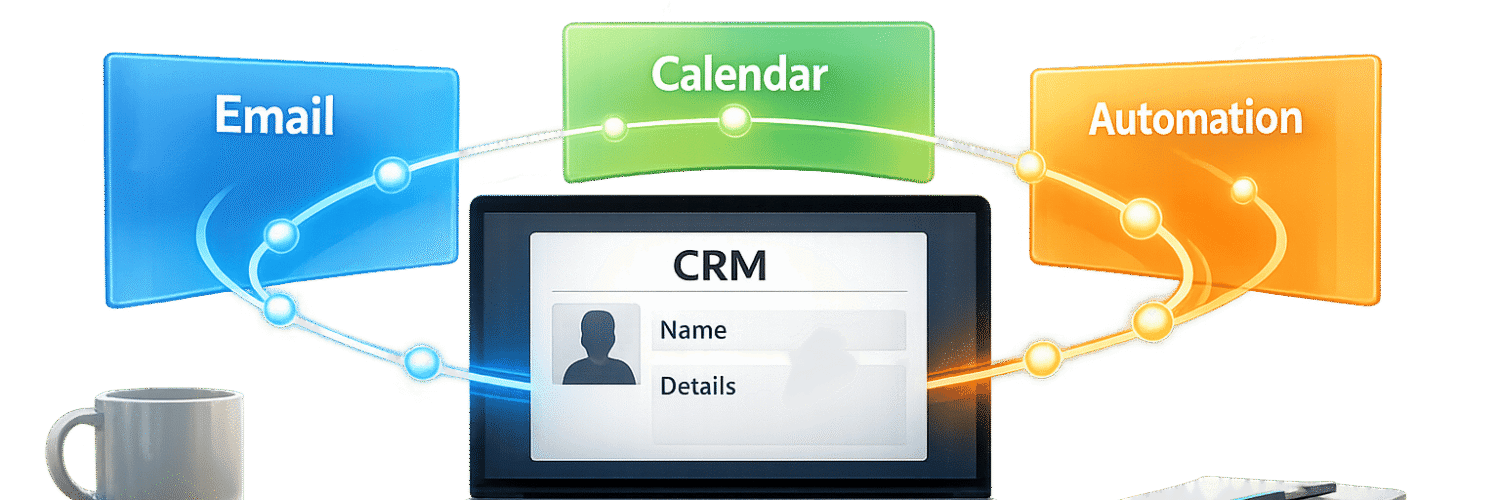

Most CRMs fail not because they lack features, but because they don’t align with how teams work. Without integrations, they become static databases, wasting time and losing valuable opportunities. By connecting your CRM to key CRM integrations like email, calendars, and automation platforms, you can simplify workflows, reduce manual tasks, and focus on meaningful customer interactions.
Key takeaways:
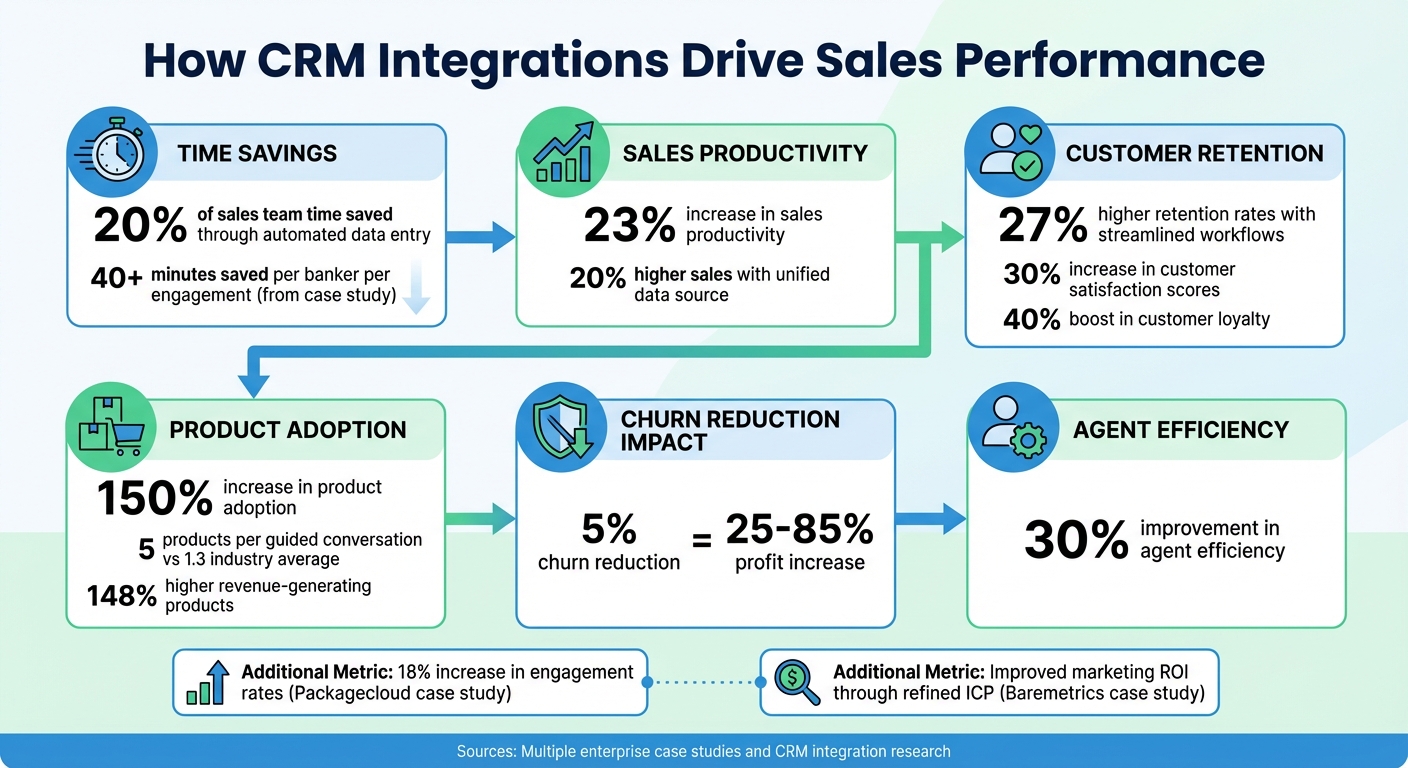
- Integrated CRMs save sales teams up to 20% of their time by automating data entry.
- Businesses report a 23% increase in sales productivity and 27% higher retention rates with streamlined workflows.
- Centralizing tools like email, support platforms, and calendars ensures no missed follow-ups or stalled deals.
Teamgate helps sales teams follow a clear process and provides managers with reliable insights – without turning CRM into a full-time admin job. Let’s explore how integrating your CRM creates a unified system to improve engagement and drive results.
CRM Integration Benefits: Key Statistics on Sales Productivity and Revenue Growth
Building a Single Source of Truth with CRM Integrations
When your CRM integrates with the tools your team uses daily, it becomes more than just a database – it turns into a central hub for all customer interactions. This setup eliminates the hassle of switching between platforms, allowing your team to access everything – emails, support tickets, meeting notes, and purchase history – in one place. This complete view equips your team with the context needed to engage customers effectively. The first step is identifying the tools that will feed your CRM with the data it needs.
Identifying Which Tools to Connect
Start by mapping out all the tools that house customer data. Here are some key systems to prioritize:
- Email clients (e.g., Gmail, Outlook): These capture the bulk of customer communication and should sync automatically with your CRM to keep contact records up to date.
- Customer support platforms (e.g., Zendesk, Intercom): Integrating these tools ensures sales teams can view ticket histories, avoiding repetitive conversations with customers.
- Accounting software (e.g., QuickBooks, Xero): Syncing invoices and payment statuses helps reps focus on accounts that need attention.
- Email marketing tools (e.g., Mailchimp): These reveal how leads interact with campaigns, providing insights for follow-ups.
- Calendar tools (e.g., Google Calendar, Calendly): Automatically logging meetings into customer records saves time and ensures nothing is missed.
Central Bank of the Ozarks in Missouri integrated their CRM with customer engagement tools, leading to customers adopting an average of five products per guided conversation – far surpassing the industry average of 1.3. This integration drove 148% higher revenue-generating products, according to President and COO Roselyn Baldner.
When the right tools feed into your CRM, your team gains the data needed for meaningful, informed conversations. Once these tools are mapped, the next step is centralizing everything to enhance customer engagement.
Why Centralized Data Improves Engagement
When all customer data is centralized in your CRM, every interaction becomes more personalized and relevant. Sales reps can rely on accurate history rather than guesswork – knowing what customers purchased, their support history, and how they’ve responded to previous outreach. This level of detail leads to better conversations, and the results speak for themselves.
A global bank pilot program used CRM-integrated guided conversations to update customer needs and preferences with one click. This saved over 40 minutes per banker per engagement, increased customer satisfaction scores by 30%, and boosted loyalty by 40% when bankers demonstrated a clear understanding of customer needs.
Centralizing data also eliminates the frustration of customers repeating themselves. Reps can instantly reference prior notes, recommend relevant products, and time follow-ups based on engagement trends. This personalization at scale delivers measurable results – companies report 20% higher sales and a 150% increase in product adoption when teams operate from a unified data source.
Ensuring Real-Time Data Updates
Real-time synchronization is essential to keep your CRM accurate and actionable. For example:
- When a prospect fills out a form on your website, their details should automatically create a new contact record.
- Emails sent by reps should log instantly.
- Support tickets should update sales teams the moment they’re resolved.
This two-way sync prevents outdated information from creeping into your system, ensuring your team always works with the latest data.
Teamgate CRM simplifies this process by centralizing emails, calls, meetings, notes, and activities with built-in automations. It ensures no overdue tasks or stagnant deals linger without action. Real-time insights highlight deal age and activity coverage, guiding your team on what steps to take next – without the burden of manual updates. This approach safeguards revenue by preventing opportunities from slipping through the cracks due to missed follow-ups or incomplete data.
For tools without native integrations, platforms like Zapier or Make.com can bridge the gap. These solutions allow you to connect niche tools – like project management software, webinar platforms, or custom applications – directly into your CRM. Every customer touchpoint should automatically update your central system, empowering your team to act on fresh, accurate information and deliver the personalized interactions that drive results.
sbb-itb-5772723
Using Automation to Maintain Consistent Follow-Up
Following up promptly can often mean the difference between closing a deal and losing one. When a prospect opens an email, schedules a meeting, or fills out a form, your response needs to be both quick and consistent. Relying on manual follow-ups introduces too much uncertainty. Automated workflows solve this by turning customer actions into immediate, dependable responses.
Creating Automated Workflows Based on Customer Actions
Start by identifying key triggers in your sales process. These could include actions like form submissions, email opens, meeting bookings, or even periods of inactivity. Once you’ve pinpointed these triggers, define the corresponding follow-up actions. These might involve sending a follow-up email, assigning a task to a sales rep, or kicking off a re-engagement campaign.
For instance:
- If a lead downloads a guide but doesn’t respond within three days, you could send a reminder email and assign a follow-up task to a rep.
- If a customer has been inactive for 30 days, you might launch a win-back campaign with personalized messaging.
CRM systems integrated with email tools like Mailchimp allow these workflows to operate seamlessly across platforms, ensuring no customer interaction is overlooked.
Testing is crucial here. Begin with a small segment of your audience, track metrics like response rates and task completion, and refine your workflows based on the results. The aim is to create a system where follow-ups happen automatically, freeing your team to focus on selling. Additionally, integrating your email and calendar systems with your CRM can amplify the efficiency of these workflows.
Connecting Email and Calendar to Your CRM
Linking your Gmail or Outlook account to your CRM ensures that all emails, replies, and attachments are automatically logged into the customer record. This creates a comprehensive communication history that’s easy to access.
Calendar integrations take this a step further. Tools like Calendly or Cal.com can sync appointments directly into your CRM, updating deal stages and creating records as soon as a prospect books a meeting. Automated reminders and follow-up tasks ensure no action is missed.
For example, a global bank piloted a program where guided conversations were integrated with their CRM. This automation updated customer fields during interactions, removed the need for manual data entry, saved over 40 minutes per banker per engagement, and increased customer satisfaction scores by 30%.
This kind of automation doesn’t just save time – it protects revenue. With emails and meetings logged automatically, leadership gains real-time visibility into active deals, follow-ups, and potential bottlenecks. Teamgate CRM, for instance, centralizes emails, calls, meetings, and notes while automating follow-ups. This reduces manual errors and provides managers with actionable insights to coach their teams effectively. By automating routine tasks, your CRM becomes a tool for driving momentum in every deal.
Keeping Automation Personal
While automation is excellent for streamlining follow-ups, maintaining a personal touch is vital for building trust. Customers can easily spot generic, robotic messages, which can hurt relationships. The solution is to automate the logistics – such as timing and task creation – while ensuring the messaging feels personal.
Leverage personalization tokens and segmented email templates to make automated messages relevant to each customer’s situation. For example, whether a prospect has just signed up for a trial or a long-time customer is nearing renewal, your messaging should reflect their specific context.
Create a library of effective message templates for scenarios like initial outreach, follow-ups, and re-engagement campaigns. Customize these templates as needed before sending. With tools like Teamgate CRM, you can even add personal signatures to keep communications conversational and authentic. Striking this balance between automation and personalization ensures that no opportunity is missed while maintaining meaningful customer relationships.
Delivering Personalized Experiences at Scale
Automation saves time, but it’s personalization that drives results. The challenge? Reaching hundreds or thousands of customers with messages that feel tailored to their needs. By building on a centralized data foundation, businesses can now deliver personalized interactions that engage customers at scale. With CRM integrations, it’s possible to segment intelligently, communicate in real time, and maintain consistent messaging across every channel.
Segmenting Customers for Targeted Outreach
Effective segmentation starts with unified customer data. When your CRM connects with tools like website analytics, support platforms, and email systems, you can track engagement across channels seamlessly. This integration provides a single source of truth, helping to uncover patterns that might otherwise go unnoticed.
For B2B teams, account-level identification is a game changer. Platforms using IP resolution can identify anonymous website visitors at the account level. This allows you to segment and score accounts based on factors like industry, tech stack, and engagement levels – even before a lead form is filled. Accounts can be tagged as "highly engaged" or "at-risk" by analyzing website visits, support ticket activity, and email interactions.
Lifecycle segmentation aligns outreach with where customers are in their journey. Grouping contacts by stages like welcome, trial, active, or at-risk ensures that messages are timely and relevant. Behavioral triggers add depth by segmenting based on actions such as feature adoption, time spent on key pages, or interactions with support.
Importantly, don’t rely on averages. Breaking down data by device, traffic source, or region can highlight friction points that averages might hide. For instance, segmenting B2B audiences by account role can double click-through rates because the messaging speaks directly to each buyer’s specific needs.
Personalizing Communication in Real Time
Real-time personalization hinges on up-to-date customer data. When your CRM integrates with communication tools – email, chat, SMS, and phone – your team can access interaction history, preferences, and account status without switching systems. This 360-degree customer view reduces response times and ensures that every interaction reflects the customer’s history.
Automated routing enhances personalization further. By using integrated data, customers can be directed to the right agent or department based on criteria like account value or past interactions. Companies that integrate their CRM with contact centers report a 20% boost in customer satisfaction and a 30% improvement in agent efficiency by cutting down on manual tasks.
Real-time triggers allow for tailored messages based on customer actions. For example, if a prospect visits your pricing page, your CRM can trigger an email offering a demo. Similarly, if a customer adopts a new feature, you can follow up with advanced tips. Integrating accounting tools like QuickBooks or Xero with your CRM also enables sales teams to tailor communication based on billing or payment behavior.
"Utilizing sales insights we have been able to conduct targeted experiments, enabling Packagecloud to increase engagement rates by 18% through the refinement of scripts and lead targeting", said Krish Sivanathan, Director of Operations at Packagecloud.
This level of personalization naturally supports multi-channel campaign orchestration.
Managing Campaigns Across Multiple Channels
Running campaigns across email, phone, SMS, and social media can get complicated. CRM integrations simplify this by feeding all channel data into a unified customer record.
By mapping the customer journey across touchpoints, businesses can align actions with specific stages – awareness, purchase, onboarding – to ensure messaging stays relevant. For example, a trial-stage customer might receive educational content via email, while an active customer nearing renewal could get a call from their account manager.
To maintain data accuracy, automate validation and clean up duplicates regularly. When your CRM logs emails, calls, meetings, and notes automatically, leadership gains real-time insights into deals, follow-ups, and bottlenecks.
Teamgate CRM streamlines this process by integrating with tools like Mailchimp, Intercom, Zendesk, and Twilio. Sales teams can manage outreach across email, SMS, and phone from one platform, while managers gain visibility into key metrics like deal age, activity, and next steps. This ensures consistent messaging without requiring manual updates.
"With Teamgate we’ve been able to refine our true ICP through sales insights. This has enabled targeted marketing campaigns resulting in more conversions and an increase in our overall marketing ROI", said Allison Barkley, Director of Operations at Baremetrics.
When campaigns span multiple channels, the CRM acts as the operating system that keeps everything aligned. Reps spend less time on admin tasks and more time focusing on actions that drive momentum.
Tracking and Improving Engagement Results
Personalization and automation are only as effective as the results they produce. Without real-time visibility from CRM integrations, teams risk wasting time on strategies that don’t deliver. CRM dashboards bring scattered data together, helping teams identify which actions drive success, where customers disengage, and how to close those gaps.
Monitoring Engagement Metrics Through Integrated Dashboards
When your CRM syncs with tools like email platforms, support systems, and communication APIs, all customer interactions are centralized. This eliminates the need to jump between systems to evaluate campaign performance. Sales teams can quickly identify which outreach efforts spark responses, how leads progress through the pipeline, and where deals tend to stall.
Integrating support tools like Zendesk or Freshdesk provides added context that sales data alone might overlook. For instance, multiple unresolved support tickets might signal the need for proactive attention before discussing renewals. Similarly, linking accounting software like QuickBooks or Xero enables teams to prioritize follow-ups based on payment trends.
In 2025, Krish Sivanathan, Director of Operations at Packagecloud, used Teamgate CRM’s integrated dashboards to run targeted experiments. By refining communication strategies and focusing on specific leads based on dashboard insights, the company boosted engagement rates by 18%.
These dashboards don’t just display performance – they enable immediate action.
Adjusting Strategies Based on Data
Tracking metrics is only valuable if you act on them. Integrated CRM data uncovers patterns that can refine your approach, whether it’s tweaking email subject lines, adjusting call schedules, or reallocating resources to more effective channels.
Start by comparing performance across different customer segments. For example, if one group responds better to SMS than email, shift efforts accordingly. If deals in a certain stage of the pipeline consistently stall, it might indicate a need for better messaging, pricing adjustments, or additional training. Integrated dashboards make these insights easy to spot without requiring manual data analysis.
CRMs that log every interaction also make A/B testing more effective. Experiment with email templates, call scripts, or follow-up schedules to see what drives better responses or faster deal closures. In 2025, Baremetrics used Teamgate CRM’s insights to fine-tune their Ideal Customer Profile (ICP). This led to more targeted marketing campaigns, higher conversion rates, and an improved marketing ROI.
The ability to adjust quickly is key. If a tactic isn’t working, dashboards help you pivot resources to avoid prolonged inefficiencies.
Finding and Fixing Engagement Gaps
After refining your strategies, the next step is identifying and resolving engagement gaps that could hurt revenue. These gaps – such as stalled deals, cold leads, or unresponsive customers – can lead to significant revenue losses if not addressed. Integrated CRM data helps pinpoint these issues early.
Monitor deal age and ensure every opportunity has a clear next step. If deals repeatedly stall at a specific stage, it’s a sign that your messaging, pricing, or processes need attention. Teamgate CRM highlights aging deals and flags those without next steps, prompting timely follow-ups.
Pay close attention to first-week engagement during onboarding. Low activity in the initial days often predicts future churn. If new customers aren’t using key features or responding to outreach, automated workflows can send personalized check-ins or educational materials.
Customer Engagement Scores (CES) combine metrics like usage, interaction frequency, and specific actions into a single figure. Segmenting customers by their CES allows teams to automate nurturing for low scores while focusing proactive outreach on mid-range accounts three months before renewal. This approach minimizes disengagement and reduces churn risks.
Finally, maintaining clean and accurate data is essential. Duplicate records or outdated information can distort your insights. Automated validation tools and regular data cleaning ensure dashboards remain reliable.
Reducing churn by just 5% can lead to profit increases ranging from 25% to 85%. With integrated CRM dashboards, you can detect and address engagement gaps early, keeping your revenue pipeline strong.
Conclusion
Centralized data and automation are the cornerstones of CRM integrations, offering predictable revenue growth and improved customer engagement.
What CRM Integrations Deliver
CRM integrations close revenue gaps by linking tools like email, calendars, support platforms, and automation systems into a unified database. This ensures every interaction – emails, meetings, and support tickets – syncs automatically.
This integration provides a complete view of each customer by merging contact data, purchase history, communication logs, and support records into one location. The result? Faster responses, fewer missed opportunities, and scalable engagement without increasing team size.
Automation plays a key role in delivering consistent and personalized follow-ups. Trigger-based workflows send timely messages based on customer actions, such as welcome emails for new users, re-engagement campaigns for inactive customers, or proactive outreach when support tickets pile up. Segmentation tools further refine this approach by targeting specific groups with tailored content based on behavior, demographics, or purchase trends.
Integrated dashboards provide real-time insights into metrics like open rates, deal progression, and customer value, allowing teams to adjust strategies quickly when something isn’t working. This visibility helps identify bottlenecks, reduce churn risks, and focus resources on high-performing channels.
With these tools in place, let’s look at how you can start integrating them into your workflow.
Getting Started with CRM Integrations
Start by connecting the essential tools your team relies on daily. Teamgate’s Professional Plan offers API access, Zapier compatibility, and integrations with Google Apps, WordPress, and LinkedIn. The Enterprise Plan expands these options with connections to Intercom, Zendesk, Mailchimp, and Xero.
Most integrations are straightforward, often requiring no coding thanks to platforms like Zapier. The setup process is quick:
"Teamgate’s intuitive interface enabled immediate adoption – our users were up and running within hours." – Jack Hodges, Sales Manager at FiveCRM
New users can explore Teamgate with a 14-day free trial (no credit card needed) or take advantage of discounts – 50% off the first month or 20% off the first year – by booking a demo.
Once your tools are connected, create workflows for common scenarios. For example, automate follow-ups for stalled deals, set reminders for overdue tasks, or trigger alerts when high-value customers need support. Use your dashboards to identify trends – adjust strategies if certain email templates perform better or if specific pipeline stages cause delays. The goal is to make consistent engagement a standard, not an exception.
FAQs
Which CRM integrations should I set up first?
Integrations that simplify daily tasks and boost data accuracy are a smart starting point. Focus on connecting tools like email platforms (such as Gmail or Outlook) to automatically track communications, calendar apps to streamline scheduling and follow-ups, and automation systems to sync lead data and engagement metrics. These connections not only save time but also ensure consistent follow-ups and maintain accurate, up-to-date data – key ingredients for scaling customer engagement efficiently.
How do I keep CRM data syncing in real time?
To keep your CRM data current and accurate, leverage integrations that link your CRM with essential tools such as email, calendar, and automation platforms. These connections automatically sync details like contacts, emails, meetings, and lead information, cutting down on manual updates and minimizing mistakes. Additionally, built-in automations within the CRM can take care of repetitive tasks, such as creating leads or scheduling follow-ups, ensuring your team has the latest information for seamless sales and marketing efforts.
How can I automate follow-ups without sounding robotic?
To make follow-ups feel natural, let your CRM handle repetitive tasks like sending personalized messages at the right time. Use templates that include details such as the recipient’s name, recent interactions, or specific needs to maintain a personal touch. Schedule follow-ups based on buyer actions or where they are in the pipeline to keep your outreach relevant. By integrating email and calendar tools, you can automate scheduling, ensuring your follow-ups are timely and thoughtful without adding extra work.






