The automotive CRM landscape is shifting fast in 2026. With the rise of AI-driven lead management, omnichannel communication, and tighter integrations across marketing and DMS tools, dealerships are demanding more flexible and cost-efficient solutions.
While eLeads CRM has long served as a trusted option in the automotive sector, many businesses are now exploring alternatives that offer deeper customization, better automation, and improved ROI.
In this updated guide, we review five leading eLeads CRM alternatives for 2026—comparing their standout features, integrations, pricing, and ideal use cases to help you choose the right CRM for your dealership or sales organization.
Key Takeaways:
- Comprehensive CRM Options: Explore versatile alternatives to eLeads CRM.
- Integration Capabilities: Importance of seamless integration with other tools.
- Customization & Flexibility: Key factors in aligning a CRM with business needs.
- Scalability: Ensure your CRM can grow with your business.
- Cost-Effectiveness: Evaluate pricing to get the best value for your investment.
Contents:
- What is eLeads CRM?
- Criteria for Choosing an eLeads CRM Alternative
- Top 5 Alternatives to eLeads CRM
- Conclusion: Choosing the Right CRM for Your Needs
- FAQs: eLeads CRM Alternatives
What is eLeads CRM?
Overview of eLeads CRM
eLeads CRM is a specialized customer relationship management system tailored for the automotive industry. It offers tools designed to manage customer interactions, streamline sales processes, and enhance marketing efforts. Key features include lead management, multi-channel communication, and integration with dealership management systems (DMS).
However, as businesses evolve, there is often a need to explore alternatives that can provide more tailored software features, better integration capabilities, or more cost-effective solutions.
Key Features of eLeads CRM
eLeads CRM is known for its robust lead management system, which allows businesses to capture and nurture leads effectively. The platform supports multi-channel communication, enabling dealerships to engage with customers via email, phone, and text messages. Additionally, eLeads CRM offers tools for campaign management, customer follow-ups, and performance tracking, which are essential for driving sales and improving customer satisfaction.
Limitations of eLeads CRM
Despite its strengths, eLeads CRM has certain limitations. Its focus on the automotive industry may make it less suitable for businesses in other sectors. Additionally, while eLeads CRM provides a comprehensive set of features, it may lack the flexibility and customization options that some businesses require. For companies looking for more tailored solutions, better integration capabilities, or a platform that can scale with their growth, exploring alternatives to eLeads CRM might be necessary.
Criteria for Choosing an eLeads CRM Alternative
Criteria for Choosing an eLeads CRM Alternative
When evaluating eLeads CRM alternatives in 2026, dealerships and sales-led teams need to look beyond feature checklists and focus on sales discipline, adoption, and pipeline truth. The right CRM should actively prevent revenue leakage—not just record activity after the fact.
AI & Automation That Enforce Follow-Up
Modern CRMs should automate the fundamentals: next-step reminders, task creation after calls, and alerts when deals stall. Predictive lead scoring and AI-driven prioritization only matter if they push reps toward timely, consistent action.
Integration Ecosystem (No Data Silos)
Your CRM must connect natively to email, calendars, calling/SMS, marketing tools, and your DMS or accounting stack. The goal is simple: reps shouldn’t update the same information twice—or worse, keep critical context in their inbox.
Customization Without Complexity
Flexible pipelines, stage definitions, and workflows are essential—but avoid platforms that require heavy admin work to maintain. The best CRMs let managers define clear process rules while keeping rep workflows fast and intuitive.
Scalability & Cloud Reliability
A cloud-native CRM should scale users, pipelines, and data volume without performance issues. Look for platforms that deliver strong uptime, fast load times, and secure access across desktop and mobile.
Pricing Transparency & ROI
Avoid CRMs that nickel-and-dime for essentials like reporting or integrations. Clear pricing, minimal add-ons, and fast time-to-value matter more than headline feature counts.
Adoption & User Experience
If reps don’t use the CRM daily, nothing else matters. Mobile-first design, low admin overhead, and workflows that reflect how reps actually sell are critical to long-term success.
Top 5 Alternatives to eLeads CRM

1. Teamgate CRM: The Best All-Rounder
Overview of Teamgate CRM
Overview of Teamgate CRM
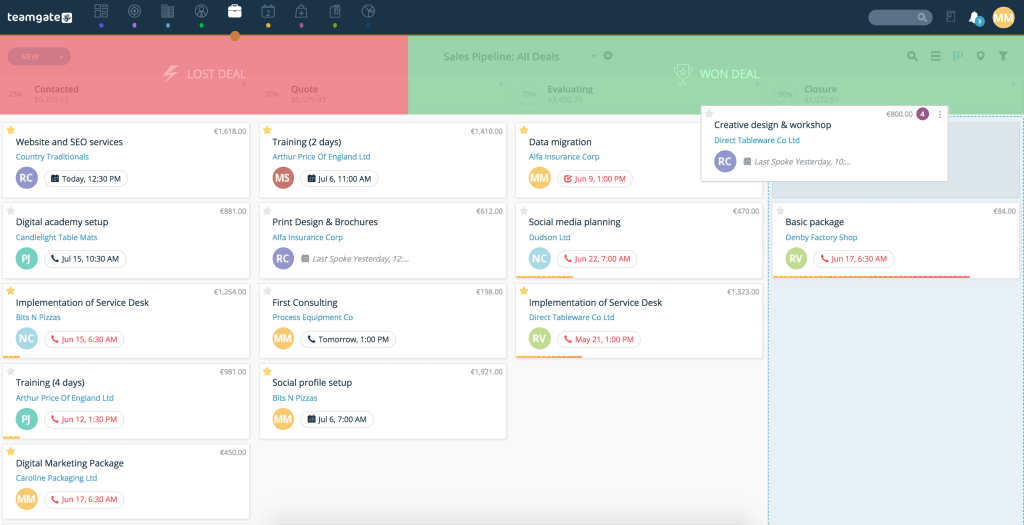
Teamgate CRM is built as a sales operating system, not a passive database. While eLeads CRM focuses heavily on automotive-specific workflows, Teamgate is designed to protect revenue across sales-led teams by enforcing disciplined selling, clean pipelines, and consistent follow-up—without bloated complexity.
At its core, Teamgate ensures every deal lives in a real stage with a real next step. This eliminates the silent revenue leak most teams experience when opportunities sit “open” but inactive.
Key Features of Teamgate CRM (and Why They Matter)
Teamgate’s features are intentionally tied to sales behavior—not vanity functionality:
-
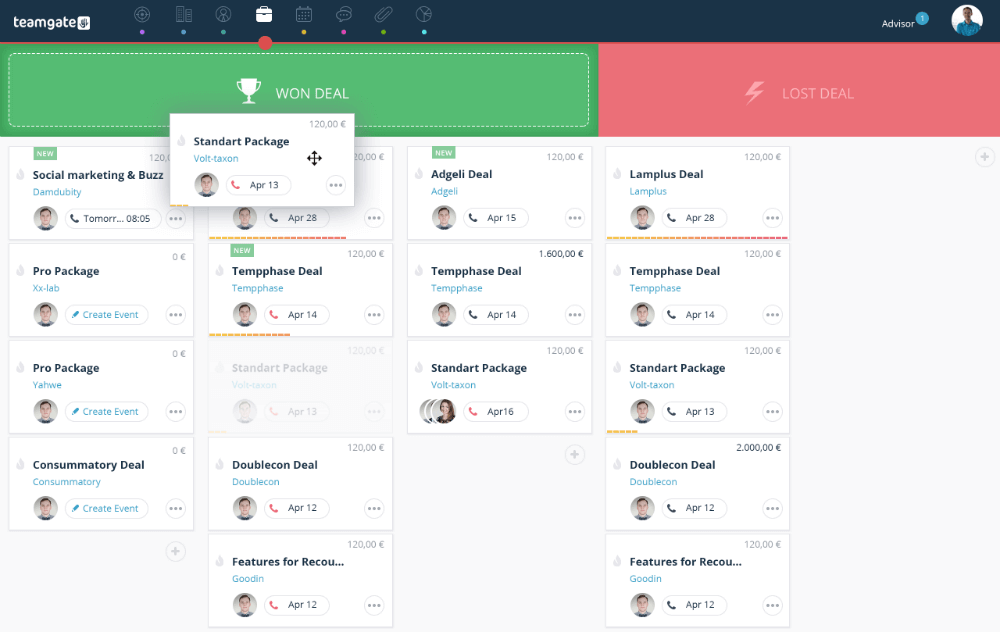
Visual Deal Pipelines with Defined Stages
Keeps deals grounded in reality, improves forecast accuracy, and prevents late-stage “hope-casting.” -
Tasks, Activities, and Reminders
Turns the CRM into a daily operating plan so follow-up discipline doesn’t rely on memory. -
Email & Calendar Sync (Gmail/Outlook)
Centralizes conversations and meetings, reducing context loss and manual logging. -
SmartDialer & SMS Integrations (Twilio/Nexmo)
Enables fast outreach with automatic activity capture—less admin, more selling. -
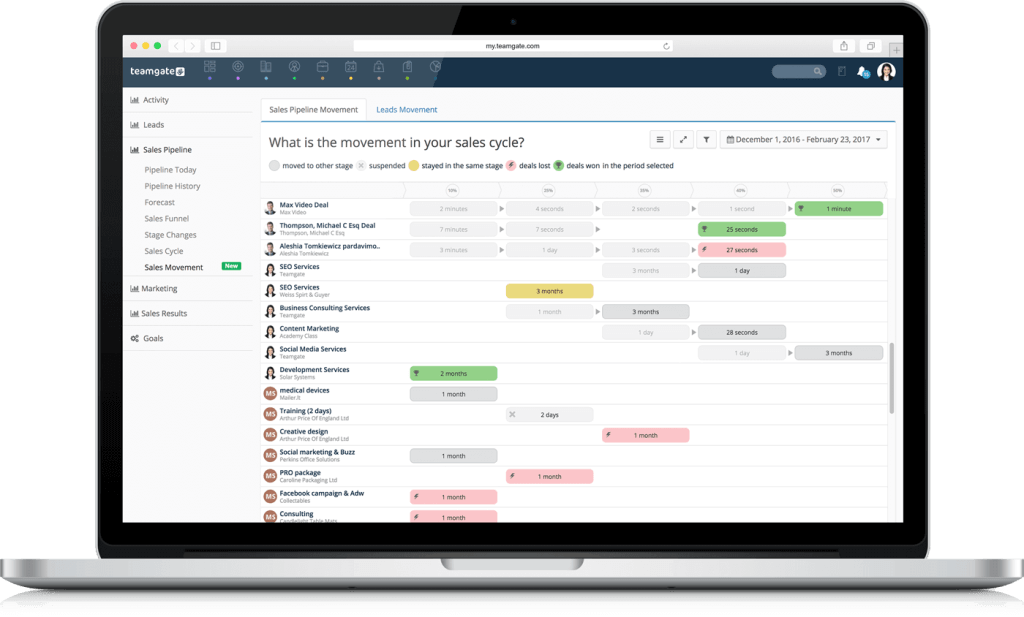
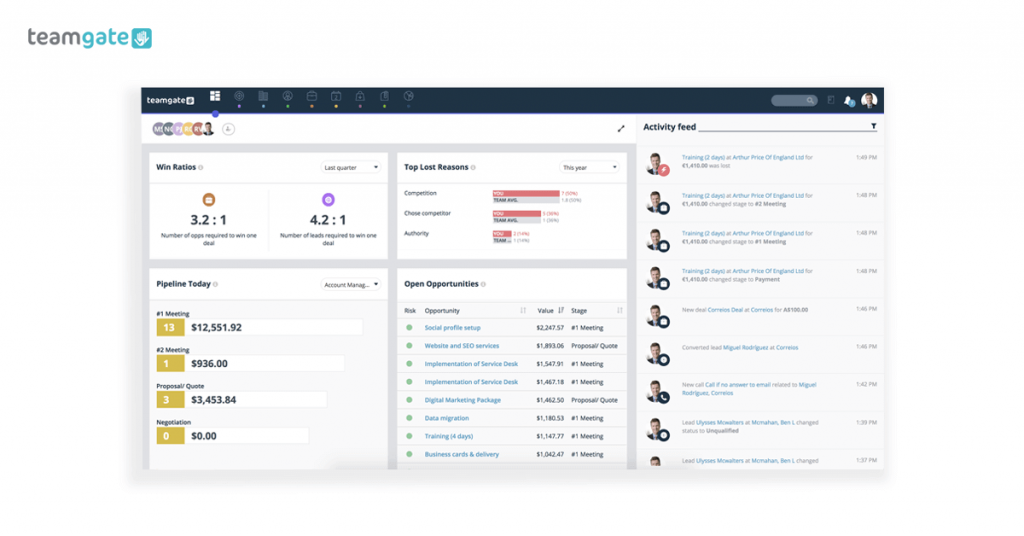
Sales Dashboards & Deal Aging Insights
Gives managers leading indicators (activity, deal age, next-step coverage) for evidence-based coaching. -
Workflow Automations
Auto-create tasks, reminders, and notifications so consistent behavior becomes the default.
Ideal For
Small to mid-market sales teams (2–50 users) that want predictable revenue, high CRM adoption, and visibility—without running a bloated enterprise system.
Scalability & Pricing
Teamgate scales cleanly from founder-led teams to structured sales orgs, supporting unlimited pipelines, advanced analytics, and API access as complexity grows. Pricing is transparent and designed around value, not feature gating—making it a strong ROI-driven alternative to eLeads CRM.

2. Salesforce CRM: The Enterprise Powerhouse
Overview of Salesforce CRM
Salesforce CRM is one of the most recognized names in the CRM industry, known for its comprehensive and customizable solutions that cater to large enterprises. Unlike eLeads CRM, which is more focused on the automotive sector, Salesforce CRM offers a wide range of tools and functionalities that can be adapted to various industries and business needs.
Key Features of Salesforce CRM
-
Highly customizable dashboards and workflows
-
Advanced analytics and AI-driven insights
-
Extensive third-party integration capabilities
-
Scalable architecture to support business growth
Ideal For: Large enterprises and businesses with complex CRM needs requiring extensive customization and integration options.
To address the elephant in the room, this level of customization and scalability comes at a cost. Salesforce CRM is generally more expensive than other CRM solutions, and its pricing structure can be complex, with additional costs for certain features and modules. For businesses with the budget and need for a highly customizable and scalable CRM, Salesforce is an excellent choice, but smaller companies or those with simpler needs might find it more than they require.
3. HubSpot CRM: The Inbound Marketing Leader
Overview of HubSpot CRM
HubSpot CRM is a well-regarded platform, particularly known for its strengths in inbound marketing and lead nurturing. Unlike eLeads CRM, which is tailored to the automotive industry, HubSpot CRM is designed to support businesses of all sizes across various sectors, with a strong focus on integrating marketing, sales, and customer service functions.
Key Features of HubSpot CRM
HubSpot CRM also excels in its ease of use. The platform is known for its intuitive interface, which makes it easy for users to navigate and utilize its features effectively. This ease of use is particularly beneficial for small to medium-sized businesses that may not have dedicated IT teams to manage their CRM.
-
Integrated marketing automation tools
-
Email tracking and lead nurturing capabilities
-
Customizable dashboards and reportingselecthub.com
-
Free tier with scalable upgrade options
Ideal For: Businesses focusing on inbound marketing strategies and seeking an all-in-one CRM solution, assuming you are willing to scale your budget accordingly.
While HubSpot CRM’s free version is one of its major selling points, businesses with more complex needs may find the cost of the paid plans comparable to other CRMs. However, the integration of HubSpot CRM with the company’s broader marketing and sales tools makes it a powerful option for businesses focused on inbound marketing, and its scalability ensures that it can grow alongside your business.
4. Zoho CRM: The Budget-Friendly Option
Overview of Zoho CRM
Zoho CRM is a popular choice for small to medium-sized businesses looking for a cost-effective customer relationship management solution. Unlike eLeads CRM, which is highly specialized for the automotive industry, Zoho CRM offers a more generalist approach, providing a wide range of features at a very competitive price point. This makes it an attractive alternative for businesses that need a robust CRM without breaking the bank.
Key Features of Zoho CRM
Zoho CRM is packed with features that cater to various aspects of customer relationship management. It offers tools for lead management, sales pipeline tracking, marketing automation, and customer support, among others. One of the platform’s strengths is its extensive customization capabilities, allowing businesses to tailor their CRM environment to fit their specific needs.
Top Features:
-
Custom modules and process automation
-
AI assistant (“Zia”) for sales predictions
-
Territory and workflow management
-
Integrations with over 500+ third-party apps
Why Choose It?
If you want strong customization capabilities like Salesforce—but without the enterprise pricing—Zoho CRM is a smart, scalable option.
Scalability and Pricing of Zoho CRM
One of the standout features of Zoho CRM is its affordability. The platform offers several pricing tiers, starting with a free version that supports up to three users, making it an ideal choice for startups and small businesses. As your business grows, you can upgrade to one of Zoho CRM’s paid plans, which offer additional features and greater customization options. Despite its low cost, Zoho CRM doesn’t skimp on functionality, making it one of the best value-for-money CRM solutions on the market.
In terms of scalability, Zoho CRM can grow with your business, accommodating more users, data, and features as needed. This scalability, combined with its competitive pricing, makes Zoho CRM an excellent choice for businesses looking to get the most out of their CRM investment without overspending.
5. Pipedrive CRM: The Sales-Focused Solution
Overview of Pipedrive CRM
Pipedrive CRM is a sales-focused customer relationship management system designed to help businesses manage their sales pipelines more effectively. Unlike eLeads CRM, which serves the broader needs of the automotive industry, Pipedrive is laser-focused on sales management, making it an ideal choice for businesses that prioritize sales processes and pipeline visibility above all else.
Key Features of Pipedrive CRM
Pipedrive CRM is known for its intuitive, visual approach to sales pipeline management. The platform allows sales teams to easily track the progress of deals, manage contacts, and forecast revenue, all from a simple drag-and-drop interface. This visual pipeline feature is Pipedrive’s hallmark, enabling sales teams to see the status of every deal at a glance and take action to move deals forward.
-
Highly visual drag-and-drop pipelines
-
Deal rotting and activity reminders
-
Revenue forecasting and goal tracking
-
Mobile app and Chrome extension for lead capture
Why Choose It?
For sales reps who spend most of their time prospecting, following up, and closing deals, Pipedrive keeps CRM management lean and productive.
Pipedrive CRM integrates well with other tools, particularly those related to sales and marketing. It supports integration with popular email providers, marketing automation platforms, and other sales tools, ensuring that all aspects of the sales process are connected and streamlined.
Scalability and Pricing of Pipedrive CRM
Pipedrive CRM offers a straightforward pricing model, with several tiers based on the features you need. The platform is competitively priced, making it accessible to businesses of all sizes, from startups to large sales teams. Pipedrive’s pricing structure is transparent, with no hidden fees, which is a significant advantage for businesses working within a budget.
In terms of scalability, Pipedrive CRM is designed to grow with your business. As your sales team expands, you can easily add more users and access additional features as needed. Pipedrive’s focus on sales processes makes it particularly well-suited for businesses that are looking to scale their sales operations efficiently.
Conclusion: Choosing the Right CRM for Your Needs
In 2026, choosing a CRM isn’t about storing contacts—it’s about running your sales operation with discipline and clarity. CRMs that merely record activity allow revenue to leak quietly through missed follow-ups, stale deals, and unreliable forecasts.
While eLeads CRM remains viable for traditional automotive workflows, modern sales teams are demanding systems that enforce next steps, surface deal health early, and integrate seamlessly with their existing stack.
Alternatives like Teamgate, Salesforce, HubSpot, Zoho, and Pipedrive each serve different needs—but the best choice is the one your reps will actually use every day and your managers can trust when forecasting.
Pro Tip: Use free trials to test one critical question: Does this CRM tell my team exactly what to do next—and show leadership what’s real?
To get started with Teamgate CRM for FREE today, claim your 14 day trial or book a system demo.
FAQs: eLeads CRM Alternatives
What are the main differences between eLeads CRM and Teamgate CRM?
The primary difference between eLeads CRM and Teamgate CRM is their target industries. eLeads CRM is specifically designed for the automotive industry, offering specialized tools for dealerships, while Teamgate CRM is a versatile, industry-agnostic platform suitable for a wide range of businesses. Teamgate CRM also offers more customization options and better integration capabilities compared to eLeads CRM.
Why should I consider switching from eLeads CRM to an alternative?
You might consider switching from eLeads CRM if your business requires more flexibility, better integration with other tools, or if you are looking for a CRM that can scale with your growing needs. Additionally, if your business operates outside the automotive industry, you might benefit from a CRM that is not as niche-specific as eLeads.
How does Teamgate CRM compare to Salesforce CRM?
Teamgate CRM is generally more user-friendly and cost-effective compared to Salesforce CRM. While Salesforce offers extensive customization and scalability, it is more suited to large enterprises with complex needs and higher budgets. Teamgate CRM, on the other hand, provides a more straightforward solution that is ideal for small to medium-sized businesses looking for an intuitive and affordable CRM.
Is Zoho CRM a good alternative for small businesses?
Yes, Zoho CRM is an excellent alternative for small businesses due to its affordability and extensive feature set. It offers a free version for up to three users, making it an accessible option for startups. Zoho CRM also provides good customization and integration options, making it a versatile tool for small businesses with limited budgets.
Can HubSpot CRM replace eLeads CRM for automotive businesses?
While HubSpot CRM can be used by automotive businesses, it is not specifically designed for this industry like eLeads CRM. However, HubSpot excels in inbound marketing and lead nurturing, making it a strong choice for businesses that prioritize these areas. If your automotive business places a high value on marketing automation and lead management, HubSpot could be a viable alternative.
What makes Pipedrive CRM a strong choice for sales teams?
Pipedrive CRM is designed with a strong focus on sales pipeline management, making it ideal for sales teams that need a visual and intuitive way to track deals and manage sales activities. Its simple drag-and-drop interface allows teams to see the status of each deal at a glance, and its sales-focused features help streamline the sales process, making it a strong choice for teams looking to enhance their sales performance.
How do the pricing models of these CRM alternatives compare?
The pricing models of these CRM alternatives vary significantly. Teamgate CRM offers competitive pricing with a focus on value for money, while Salesforce CRM tends to be more expensive due to its extensive features and scalability. HubSpot CRM offers a free version with paid tiers for advanced features, making it scalable according to your needs. Zoho CRM is known for its affordability, especially for small businesses, and Pipedrive CRM provides a transparent, straightforward pricing structure that scales with your team’s needs.
Which CRM is best for a growing business?
For a growing business, scalability is key. Teamgate CRM is an excellent choice due to its scalability and ability to adapt to different business sizes and industries. Salesforce CRM is also a strong option for larger businesses that require extensive customization and advanced features. Zoho CRM is ideal for small businesses planning to grow, thanks to its affordable pricing and flexible features.
What integration capabilities should I look for when choosing a CRM?
When choosing a CRM, it’s important to look for integration capabilities with tools you already use, such as email marketing platforms, accounting automation software, and customer support systems. CRMs like Teamgate and Salesforce offer extensive integration options with third-party applications, which helps in creating a seamless workflow and ensuring all your business tools work together efficiently.
How does ease of use vary between these CRM options?
Ease of use varies significantly between these CRM options. Teamgate CRM and Pipedrive CRM are known for their intuitive interfaces and user-friendly designs, making them easy to adopt with minimal training. Salesforce CRM, while powerful, has a steeper learning curve due to its complexity and extensive features. HubSpot CRM also offers an easy-to-use interface, especially for businesses focusing on marketing and sales alignment. Zoho CRM strikes a balance between ease of use and customization, making it accessible yet flexible.