Get a free sales audit to uncover hidden revenue opportunities!

In the vast sea of Customer Relationship Management (CRM) platforms, choosing the right one can be a challenge. Businesses need tools that not only enhance their sales processes but also offer ease of use, comprehensive support, and scalability. This comparison takes a closer look at two notable contenders in the CRM space: Teamgate CRM and Less Annoying CRM. We’ll explore their pricing, features, usability, and more to guide you through making an informed decision tailored to your business needs.

Contents:

Teamgate CRM Overview

Teamgate CRM is an intuitive cloud-based CRM designed to streamline sales processes and enhance customer relationship management for small to mid-sized businesses. It’s known for its user-friendly interface and comprehensive sales tools.

Teamgate CRM Pricing and Plans

Teamgate CRM offers several pricing tiers:

  • Starter Plan: A free plan for up to 2 users, suitable for small businesses or startups needing basic CRM functionalities.
  • Team Plan: Priced at $39.90 per user/month, this plan offers advanced features like sales dashboards, workflow automation, and 24/7 chat and email support.
  • Growth Plan: At $59.90 per user/month, this plan caters to larger businesses needing in-depth sales analysis and more extensive customization options.

Teamgate CRM Key Features

Teamgate CRM stands out in the CRM landscape with its rich array of features meticulously engineered to support and enhance every stage of the sales lifecycle. This platform is not just a tool; it’s a comprehensive ecosystem designed to streamline lead generation, nurture leads through the sales pipeline, close deals with greater efficiency, and cultivate enduring customer relationships. Here’s a deeper dive into the key features that set Teamgate apart:

Advanced Analytics Tools

Teamgate’s advanced analytics go beyond basic data presentation, offering deep insights into sales performance, customer behavior, and market trends. With customizable dashboards and real-time reporting, sales teams can track key performance indicators (KPIs), measure progress against sales goals, and identify areas for improvement. This data-driven approach enables strategic decision-making and helps in forecasting future sales with greater accuracy.

Customizable Sales Pipelines

Flexibility is at the core of Teamgate’s design, allowing for fully customizable sales pipelines that can be tailored to match the unique processes of any business. Users can create multiple pipelines with stages that reflect their sales cycle, set up specific activities for each stage, and monitor the progress of deals from initial contact to closure. This customization ensures that the CRM adapts to the business, not the other way around.

Seamless Integration with Leading Email Platforms

Understanding the pivotal role of email communication in sales, Teamgate offers seamless integration with leading email platforms such as Gmail and Outlook. This integration facilitates efficient email tracking, allows for the sending of personalized email campaigns directly from the CRM, and ensures that all communication is logged and accessible within the context of each customer or lead. The result is a unified communication hub that enhances engagement and keeps every team member informed.

Rich Suite of Communication Tools

Teamgate’s communication toolkit is comprehensive, encompassing more than just email integration. It includes telephony features allowing for click-to-call functionality, call logging, and call planning. The platform also supports SMS messaging, live chat, and social media interactions, ensuring that sales teams can communicate with customers and leads through their preferred channels. These tools are designed to foster more meaningful interactions, improve response times, and enhance overall customer satisfaction.

Sales Productivity Enhancement through Automation

At its core, Teamgate is designed to maximize sales productivity by automating routine tasks and workflows. This automation spans across email campaigns, lead assignment, follow-up reminders, and more. By reducing the time spent on administrative tasks, sales teams can focus more on engaging with leads and closing deals. The platform’s intelligent automation capabilities also ensure that no opportunity is missed due to oversight or manual process limitations.

Detailed Reporting and Insightful Data Analytics

Teamgate’s reporting capabilities are both comprehensive and intuitive, offering detailed insights into every aspect of the sales process. Custom reports can be generated to analyze sales activities, team performance, pipeline health, and customer engagement metrics. These dashboard-able reports provide actionable insights, helping teams to optimize their strategies, improve efficiency, and drive sales growth.

Together, these features represent a formidable array of tools that empower sales teams to perform at their best. Teamgate CRM is more than just a software solution; it’s a strategic partner in achieving sales excellence and driving business growth. By leveraging Teamgate’s extensive feature set, businesses can transform their sales processes, enhance customer relationships, and achieve unprecedented levels of productivity and success.

Teamgate Ease of Use

Teamgate shines in its user-friendly interface and intuitive design, making it accessible for users of all tech levels. The platform focuses on reducing the learning curve associated with CRM software through a clean, organized dashboard and straightforward navigation. This ease of use extends to its setup process, onboarding, and daily operations, allowing sales teams to quickly adapt and make the most of the platform’s extensive features without extensive training.

teamgate crm awards
Teamgate CRM Awards

Less Annoying CRM Overview

Less Annoying CRM Pricing and Plans

Less Annoying CRM stands out for its straightforward, single-tier pricing model at $15/user/month (excluding tax), making it an attractive option for small businesses and startups. This model offers full access to all features, including unlimited contacts, calendars, task tracking, and customer support, without the complexity of multiple pricing tiers. This simplicity ensures that small teams can budget for their CRM needs without worrying about escalating costs or hidden fees as they expand.

Less Annoying CRM Key Features

Less Annoying CRM emerges as a beacon for small businesses navigating the vast world of customer relationship management. With a philosophy rooted in simplicity and immediate usability, this platform distills CRM to its most essential functionalities, ensuring that small enterprises can focus on what truly matters: building and maintaining strong customer relationships. Here’s an expanded look at the core features that make Less Annoying CRM a standout choice for small businesses:

Streamlined Contact Management

At the heart of Less Annoying CRM is its streamlined contact management system, designed for ease of use without sacrificing depth. Businesses can effortlessly organize contact information, track communication history, and categorize contacts into groups for targeted outreach. This system supports the import and export of contacts, ensuring seamless integration with existing workflows. The emphasis is on providing a centralized hub for all customer information, making it easily accessible for quick reference or in-depth analysis.

Integrated Calendar and Task Tracking

Less Annoying CRM integrates calendar and task tracking directly into the CRM environment, enabling businesses to manage their schedules and to-dos alongside customer relationships. This feature allows for the setting of reminders, scheduling of follow-ups, and tracking of deadlines, all within the context of customer interactions. It’s particularly beneficial for small teams, where multitasking is a necessity, offering a clear view of daily priorities and ensuring that no commitment or opportunity slips through the cracks.

Simple Yet Effective Pipeline View

Understanding the sales process’s complexity, Less Annoying CRM provides a simple yet effective pipeline view that demystifies sales management for small businesses. This view allows for the tracking of leads and deals through customizable stages, reflecting the unique sales cycle of each business. It’s designed to give a quick, at-a-glance understanding of sales status, enabling swift decision-making and focused action on moving deals forward.

Designed for Immediate Usability

With a focus on immediate usability, Less Annoying CRM eliminates the steep learning curve often associated with CRM software. The platform is designed for quick setup and easy adoption, requiring minimal training so businesses can get started right away. This approach ensures that teams can concentrate on leveraging the CRM for growth rather than getting bogged down by complex features or configurations.

No Unnecessary Features

In a landscape where CRM systems are often bloated with features that small businesses may never use, Less Annoying CRM takes a different path. It eschews unnecessary complexity in favor of a focused feature set that addresses the core needs of small businesses. This philosophy not only makes the platform more approachable but also ensures that users aren’t overwhelmed, allowing them to utilize the CRM to its fullest potential without distraction.

Ideal for Effective Customer Relationship Management

Less Annoying CRM is the ideal solution for small businesses seeking effective, straightforward customer relationship management. By concentrating on the essentials and stripping away the superfluous, it offers a clear path to nurturing customer relationships, managing sales processes, and organizing daily tasks and appointments. This simplicity, combined with the platform’s robust functionality, makes Less Annoying CRM a powerful tool for small businesses aiming to grow their customer base and enhance customer satisfaction without the complexity of more elaborate CRM systems.

In sum, Less Annoying CRM stands as a testament to the power of simplicity, providing small businesses with a user-friendly, efficient, and highly effective CRM solution that gets right to the heart of customer relationship management.

Less Annoying Ease of Use

True to its name, Less Annoying CRM offers an exceptionally user-friendly experience, prioritizing ease of use above all. The platform boasts a clutter-free interface, emphasizing straightforward functionality that allows users to get up and running quickly. Its focus on providing a hassle-free CRM experience makes it particularly appealing for small businesses or those without dedicated IT support.

Quick Comparison: Teamgate vs Less Annoying CRM

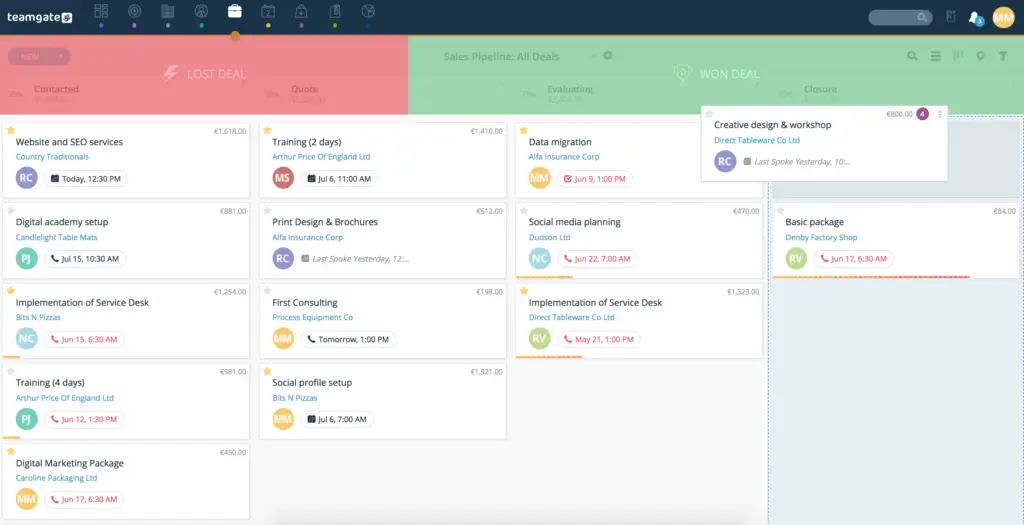
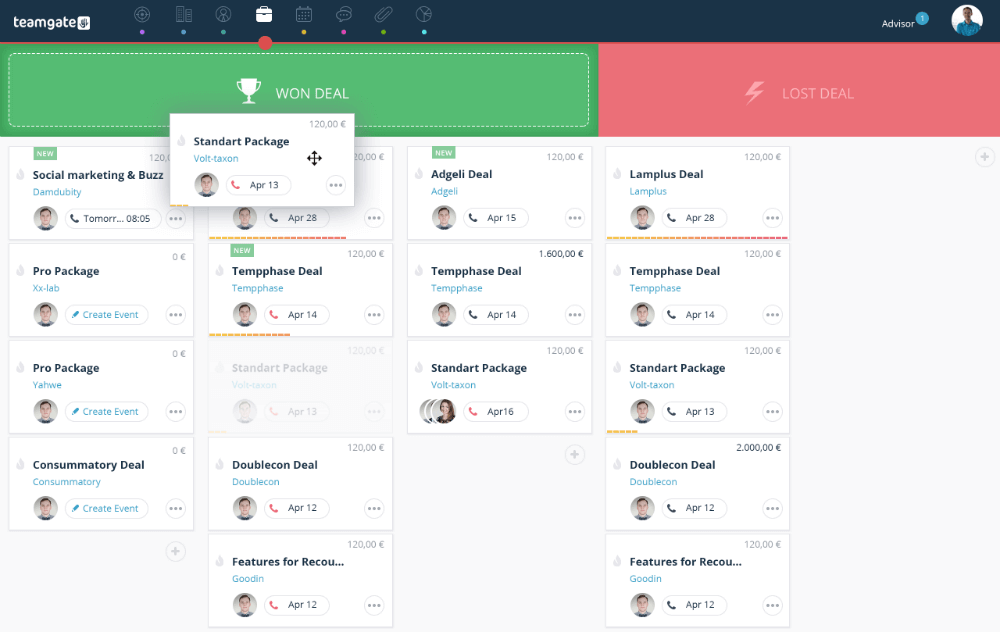
screenshot of Teamgate crm deals pipeline
Teamgate’s Drag and Drop Deals Pipeline

Feature Set and Functionality Comparison

Teamgate CRM Highlighted Features:

  • Advanced Sales Insights and Analytics: Provides in-depth analysis tools that allow businesses to track performance, forecast sales, and gain actionable insights.
  • Lead Scoring: Offers a lead scoring system to prioritize leads based on their potential value and likelihood of conversion.
  • Pipeline Management: Features an intuitive pipeline management system, helping businesses track the progress of deals through various stages.
  • Task and Activity Management: Includes tools for scheduling, managing, and tracking tasks and activities associated with sales processes.
  • Email Integration and Tracking: Allows integration with email services for efficient communication tracking and management.
  • Customizable Sales Pipelines and Fields: Provides options for customizing sales pipelines and fields to fit specific business processes.
  • Third-party Integrations: Supports integration with a variety of tools like Slack, Mailchimp, Zapier, and more for enhanced functionality.

Teamgate CRM Suitability:

  • Teamgate CRM caters to a broad range of businesses, from startups to scaling enterprises, with its extensive features and flexible plans. It’s particularly suitable for organizations looking to optimize their sales processes with comprehensive analytics and lead management tools.

Less Annoying CRM Feature Set:

  • Simplified Contact Management: Centralizes customer information in an easy-to-use interface.
  • Intuitive Calendar and Task Tracking: Integrates a comprehensive calendar and task management system directly within the CRM.
  • User-friendly Pipeline View: Provides a clear and straightforward pipeline view that simplifies the tracking of leads and deals.
  • Seamless Email Synchronization: Enables direct synchronization with email platforms, allowing for the seamless management of customer communications within the CRM.
  • Custom Fields and Categories: Offers the ability to create custom fields and categories for contacts, tasks, and notes, allowing businesses to tailor the system to their specific needs and workflows.

Less Annoying CRM Suitability:

  • Ideal for small businesses and startups looking for an uncomplicated, effective CRM solution

CRM Integration Comparison

  • Teamgate CRM: Teamgate native intregrations include Twilio for dialling, Gmail and Outlook for email correspondence, Mailchimp for marketing campaigns, key accounting integrations with Xero and Quickbooks and much much more. Teamgate CRM also offers an Open API and Zapier for additional customization options.
  • Less Annoying CRM: while more limited in its integration offerings, focuses on providing seamless experiences with the essential tools its target users are most likely to use.

Customization and Flexibility Comparison

  • Teamgate CRM: stands out for its high level of customization and Open API functionality, allowing businesses to tailor the platform to their specific processes and needs.
  • Less Annoying CRM: offers less in terms of customization but maintains a high degree of flexibility by keeping its platform simple and adaptable.

CRM Pricing Comparison

  • Both options are well-priced for small businesses operating on a budget.
  • Teamgate’s tiered pricing model including a free entry-level plan provides options for businesses of different sizes. As businesses scale and add more features prices remain consistent, making it a cost-effective option for small businesses and startups through to enterprise.
  • Less Annoying CRM’s single, affordable pricing plan makes it an attractive option for small businesses looking for budget-friendly CRM solutions.

Customer Support Comparison

Both Teamgate and Less Annoying CRM offer robust customer support, but they approach it differently. Teamgate provides a more structured support system with resources for training and onboarding, while Less Annoying CRM focuses on personal, responsive support to quickly address user needs.

Final Thoughts

In summary, Teamgate CRM and Less Annoying CRM both offer unique advantages. Teamgate stands out for its straightforward, no-frills approach, making it a great option for small businesses needing an effective CRM without a steep learning curve. Less Annoying CRM, on the other hand, is ideal for small businesses looking for a cost-effective, entry-level CRM system.

The decision between Teamgate CRM and Less Annoying CRM should be based on specific business needs, existing software infrastructure, and budget considerations.

For the most up-to-date information and to explore these systems further, visiting the official websites of Teamgate CRM and Less Annoying CRM is recommended.


FAQs: Less Annoying CRM vs Teamgate

What does CRM mean, and why is it important?

CRM, or Customer Relationship Management, is essential software for businesses to manage and analyze customer interactions and data throughout the customer lifecycle. Its goal is to improve business relationships, assist in customer retention, and drive sales growth.

How do Less Annoying CRM and Teamgate CRM differ in CRM solutions?

Less Annoying CRM simplifies CRM to essential features for ease of use, targeting small businesses. Teamgate CRM offers a broad set of features supporting detailed sales processes and analytics, suitable for a wider range of business sizes, including medium to large enterprises.

Is it possible to tailor the sales process in Teamgate CRM and Less Annoying CRM?

Both CRMs allow sales process customization. Teamgate provides detailed options to align with intricate sales operations, whereas Less Annoying CRM focuses on straightforward customization to cater to the fundamental needs of smaller businesses.

What type of support services do Teamgate CRM and Less Annoying CRM offer?

Teamgate provides diverse support options including live chat, email, training, and a detailed knowledge base. Less Annoying CRM emphasizes direct and personal support with dedicated reps, ensuring quick and effective assistance.

Are Teamgate CRM and Less Annoying CRM suitable for any business size?

Teamgate CRM caters to a broader business spectrum, from medium to large, with scalable features. In contrast, Less Annoying CRM is specifically designed for small businesses, offering simplicity and affordability.

How does the pricing structure of Less Annoying CRM compare to Teamgate CRM?

While Teamgate CRM adopts a multi-tiered pricing strategy to suit various business needs and scales, Less Annoying CRM maintains a simple, single-price model, making it easier for small businesses to anticipate costs.

Can I integrate external applications with Teamgate CRM and Less Annoying CRM?

Yes, integration capabilities exist for both platforms. Teamgate offers a wide array of integrations for enhanced productivity, whereas Less Annoying CRM provides essential integrations, focusing on simplicity and core needs.

Do Teamgate CRM and Less Annoying CRM provide a free trial to test their platforms?

Both platforms offer trial periods, enabling companies to evaluate the systems’ fit for their specific business requirements before committing financially.

How user-friendly are Teamgate CRM and Less Annoying CRM for beginners?

Less Annoying CRM is renowned for its user-friendly design, making it ideal for CRM novices and small businesses, while Teamgate CRM, despite its advanced features, strives for intuitive design and navigability to accommodate users at all levels of tech savviness.

What are the main benefits of using Teamgate CRM or Less Annoying CRM for my business?

Teamgate CRM delivers comprehensive insights and tools for sales optimization and customer management for businesses looking to scale. Conversely, Less Annoying CRM offers straightforward, essential CRM tools focusing on ease of use and affordability, ideal for small businesses prioritizing simplicity.

In the world of Customer Relationship Management (CRM) systems, selecting the right platform is critical for business efficiency and growth, especially for small to mid-sized businesses. This comprehensive comparison between Teamgate CRM and Copper CRM will delve into their features, pricing, ease of use, customization options, customer support, and overall value, providing a detailed guide for businesses contemplating which CRM to choose. This analysis aims to cover aspects that are crucial for small to mid-sized businesses and first-time CRM users.

Contents:

Teamgate CRM Overview

Teamgate CRM is an intuitive cloud-based CRM designed to streamline sales processes and enhance customer relationship management for small to mid-sized businesses. It’s known for its user-friendly interface and comprehensive sales tools.

Teamgate CRM Pricing and Plans

Teamgate CRM offers several pricing tiers:

  • Starter Plan: A free plan for up to 2 users, suitable for small businesses or startups needing basic CRM functionalities.
  • Team Plan: Priced at $39.90 per user/month, this plan offers advanced features like sales dashboards, workflow automation, and 24/7 chat and email support.
  • Growth Plan: At $59.90 per user/month, this plan caters to larger businesses needing in-depth sales analysis and more extensive customization options.

Teamgate CRM Key Features

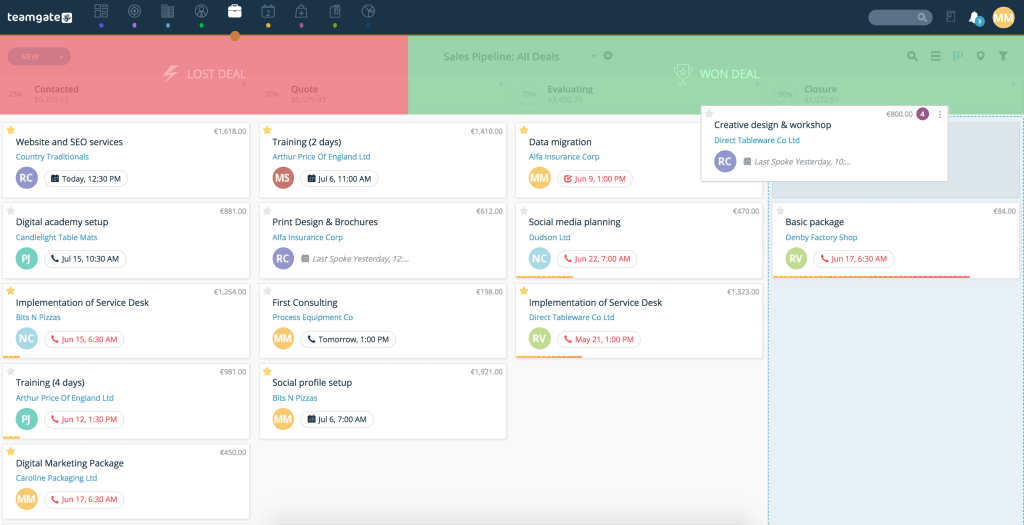
teamgate sales pipeline
Teamgate’s drag-and-drop deals pipeline

Teamgate CRM Ease of Use

Teamgate CRM is recognized for its straightforward and intuitive interface, making it accessible for first-time CRM users and small businesses. Winning several awards for ease of use, customer support and small business, Teamgate CRM is designed specifically to combine simplicity and efficiency.

teamgate crm awards
Teamgate CRM Awards

Copper CRM Overview

Copper CRM, formerly known as ProsperWorks, is a CRM system designed to integrate seamlessly with Google Workspace, offering an intuitive user experience with a focus on eliminating manual data entry and increasing productivity, particularly for businesses embedded in the Google ecosystem.

Copper CRM Pricing and Plans

Copper CRM also offers multiple pricing tiers:

  • Basic Plan: Priced at $23 per month/user, aimed at small teams requiring essential CRM tools.
  • Professional Plan: Priced at $59 per month/user, this plan provides more advanced CRM features suitable for growing businesses.
  • Business Plan: Priced at $99 per month/user, the highest tier, offering extensive CRM functionalities for larger organizations.

Copper CRM Key Features

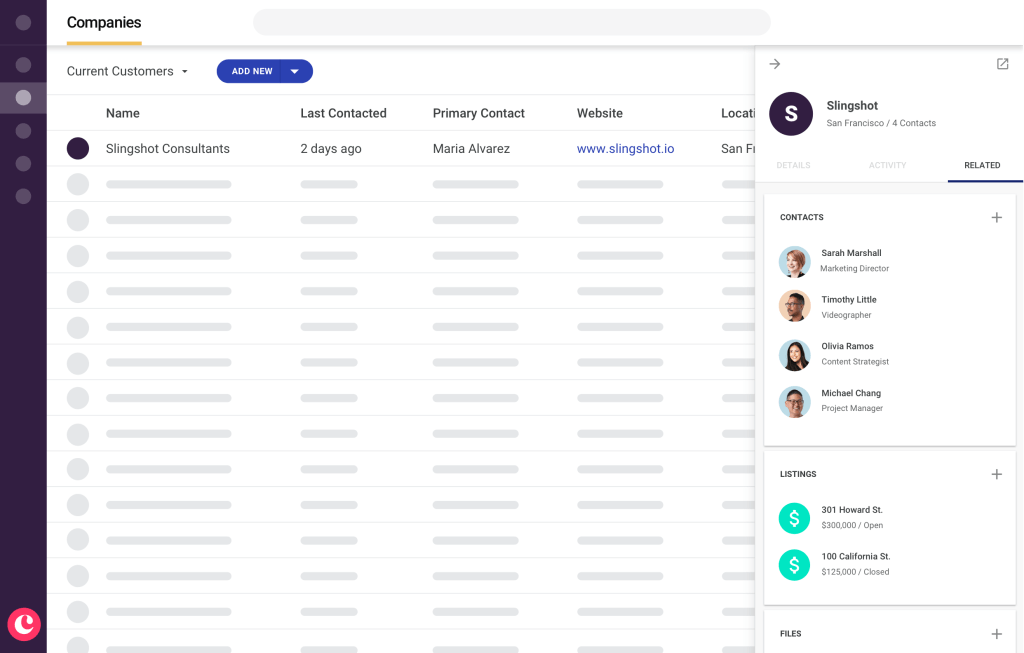
copper crm UI
Copper CRM Companies Funnel

Copper CRM Ease of Use

Copper CRM is lauded for its seamless integration with Google Workspace, making it extremely user-friendly for businesses already using Google apps.

Quick Comparison: Teamgate CRM vs Copper CRM

Feature Set and Functionality Comparison

Teamgate CRM Feature Set:

  • Advanced Sales Insights and Analytics: Provides in-depth analysis tools that allow businesses to track performance, forecast sales, and gain actionable insights.
  • Lead Scoring: Offers a lead scoring system to prioritize leads based on their potential value and likelihood of conversion.
  • Pipeline Management: Features an intuitive pipeline management system, helping businesses track the progress of deals through various stages.
  • Task and Activity Management: Includes tools for scheduling, managing, and tracking tasks and activities associated with sales processes.
  • Email Integration and Tracking: Allows integration with email services for efficient communication tracking and management.
  • Customizable Sales Pipelines and Fields: Provides options for customizing sales pipelines and fields to fit specific business processes.
  • Third-party Integrations: Supports integration with a variety of tools like Slack, Mailchimp, Zapier, and more for enhanced functionality.

Teamgate CRM Suitability:

  • Teamgate CRM caters to a broad range of businesses, from startups to scaling enterprises, with its extensive features and flexible plans. It’s particularly suitable for organizations looking to optimize their sales processes with comprehensive analytics and lead management tools.

Copper CRM Feature Set:

  • Seamless Google Workspace Integration: Copper CRM is designed to integrate effortlessly with Google Workspace, providing a unified experience for users of Google tools.
  • Automated Data Entry: Reduces manual data entry by automatically capturing and organizing data from emails and other sources.
  • Project and Workflow Management: Includes tools for managing projects and automating workflows to streamline business processes.
  • Contact and Deal Management: Offers robust contact and deal management features to keep track of customer interactions and sales opportunities.
  • Customizable Reports and Dashboards: Provides customizable reporting tools and dashboards for real-time insights into business performance.
  • Task and Activity Tracking: Features comprehensive task and activity tracking capabilities to keep sales teams on track.

Copper CRM Suitability:

  • Copper CRM is ideal for businesses heavily reliant on Google Workspace. It’s an excellent choice for those who value a CRM that offers a high degree of automation and integration with Google tools. While it may not have as many advanced features as some larger CRMs, its focus on essential functionalities and ease of use makes it a strong contender for small to medium-sized businesses looking for efficiency and simplicity.

CRM Integration Comparison

  • Teamgate CRM: Teamgate native intregrations include Twilio for dialling, Gmail and Outlook for email correspondence, Mailchimp for marketing campaigns, key accounting integrations with Xero and Quickbooks and much much more. Teamgate CRM also offers an Open API and Zapier for additional customization options.
  • Copper CRM: Deeply integrated with Google Workspace, offering a more seamless experience for Google users.

illustration of popular software logos

Customization and Flexibility Comparison

  • Both CRMs offer good customization options and flexibility, including custom fields, tags, segmentation and more.

CRM Pricing Comparison

  • Both options are well-priced for small businesses operating on a budget.
  • Teamgate CRM: Offers a free entry-level plan, making it a cost-effective option for very small businesses or startups.
  • Copper CRM: While it doesn’t have a free plan, its pricing is justified by its advanced features and Google Workspace integration, offering value for money, especially for Google-centric businesses

Customer Support Comparison

Whilst both provide reliable customer support throughout all subscription offerings, Copper CRM restricts premium support and onboarding to a minimum spend. Comparatively, Teamgate CRM offers dedicated customer support to all plans, whilst onboarding and ongoing training is restricted to Team and Growth subscribers.

Final Thoughts

In summary, Teamgate CRM and Copper CRM both offer unique advantages. Teamgate stands out for its straightforward, no-frills approach, making it a great option for small businesses needing an effective CRM without a steep learning curve. Copper CRM, on the other hand, is ideal for businesses seeking deep integration with Google Workspace, offering advanced features and a seamless user experience within the Google ecosystem.

The decision between Teamgate CRM and Copper CRM should be based on specific business needs, existing software infrastructure, and budget considerations. For businesses using Google Workspace extensively, Copper CRM would be a natural fit, while Teamgate CRM could be more suitable for those looking for a simple yet effective CRM solution with dedicated customer support.

For the most up-to-date information and to explore these systems further, visiting the official websites of Teamgate CRM and Copper CRM is recommended.


FAQs: Teamgate vs Copper CRM

  1. Can you describe the analytical tools available in Teamgate CRM for sales insight?
    • Answer: Teamgate CRM offers a range of analytical tools for sales insight, including performance tracking, sales forecasting, and detailed analytics. These tools help businesses understand sales trends, evaluate team performance, and make data-driven decisions.
  2. Can you explain Copper CRM’s integration capabilities with Google applications?
    • Answer: Copper CRM is designed to integrate seamlessly with Google Workspace applications. This includes syncing with Gmail for email communications, Google Calendar for scheduling, Google Drive for document management, and other Google apps, providing a unified and efficient workflow.
  3. What features does Teamgate CRM have for assessing and ranking potential leads?
    • Answer: Teamgate CRM includes a lead scoring feature that allows users to assess and rank potential leads based on various criteria. This feature helps prioritize leads by their likelihood to convert, enabling sales teams to focus on the most promising opportunities.
  4. How does Copper CRM facilitate business process automation?
    • Answer: Copper CRM offers workflow automation features that allow businesses to automate repetitive tasks, such as follow-up emails, task assignments, and lead qualification processes, thereby increasing efficiency and reducing manual workload.
  5. Can sales pipelines in Teamgate CRM be tailored to specific business needs?
    • Answer: Yes, Teamgate CRM provides customizable sales pipelines, enabling businesses to tailor them according to their specific sales processes and stages. This customization allows for better alignment with business strategies and sales operations.
  6. How does Copper CRM handle task tracking and management?
    • Answer: Copper CRM features comprehensive task tracking and management capabilities. Users can create, assign, and track tasks, set deadlines, and get reminders, ensuring that all sales activities and customer interactions are managed efficiently.
  7. Is Teamgate CRM’s interface easy to navigate for beginners?
    • Answer: Teamgate CRM is known for its user-friendly interface, which is straightforward and intuitive, making it easy for beginners or those new to CRM systems to navigate and use effectively.
  8. How does Copper CRM streamline data input processes?
    • Answer: Copper CRM streamlines data input processes through its automated data entry feature. It captures and organizes data from emails and other interactions automatically, reducing manual data entry and ensuring data accuracy.
  9. What external applications can be connected to Teamgate CRM?
    • Answer: Teamgate CRM supports integration with a variety of external applications, including email marketing tools like Mailchimp, communication platforms like Slack, and productivity apps like Zapier, enhancing its functionality and adaptability.
  10. How effective is Copper CRM for companies that don’t rely on Google Workspace?
    • Answer: While Copper CRM is optimized for Google Workspace integration, it is still effective for companies that don’t use Google Workspace. It offers core CRM functionalities like contact management, deal tracking, and workflow automation, which are valuable for any business, regardless of their reliance on Google Workspace.

In the rapidly evolving digital age, Customer Relationship Management (CRM) systems have become indispensable tools for businesses of all sizes. Among the plethora of options available, Teamgate CRM and Bigin by Zoho CRM stand out, especially for small and medium-sized businesses. This comprehensive comparison delves into their features, pricing, ease of use, customization options, and customer support, aiming to offer a detailed overview for businesses considering these platforms.

Contents

  1. Teamgate CRM Overview
  2. Bigin by Zoho CRM Overview
  3. Quick Comparison: Teamgate vs Bigin by Zoho
  4. Final Thoughts
  5. FAQs: Teamgate vs Bigin

Teamgate CRM Overview

Drag and drop interface
Teamgate’s Drag and Drop Pipeline Interface

Teamgate CRM is designed to cater to the dynamic needs of sales teams, offering a suite of tools that streamline customer management, sales processes, and reporting. It’s a solution aimed at businesses looking for a balance between functionality and user-friendliness.

Teamgate CRM Pricing and Plans

Teamgate has three subscription offerings and price points.

  • Starter Plan: Free for up to 2 users, Teamgate’s Starter Plan is ideal for small teams or startups. It includes basic functionalities like contact management and pipeline management.
  • Team Plan: At $39.90/user/month, this plan is suited for businesses needing advanced features like sales dashboards and workflow automation.
  • Growth Plan: Priced at $59.90/user/month, it’s tailored for larger organizations, offering extensive features such as advanced sales insights and analytics.

Teamgate CRM Key Features

Teamgate CRM Ease of Use

Teamgate CRM is recognized for its straightforward and intuitive interface, making it accessible for first-time CRM users and small businesses. Winning several awards for ease of use, customer support and small business, Teamgate is designed specifically to combine simplicity and efficiency.

teamgate crm awards
Teamgate CRM Awards

Bigin by Zoho CRM Overview

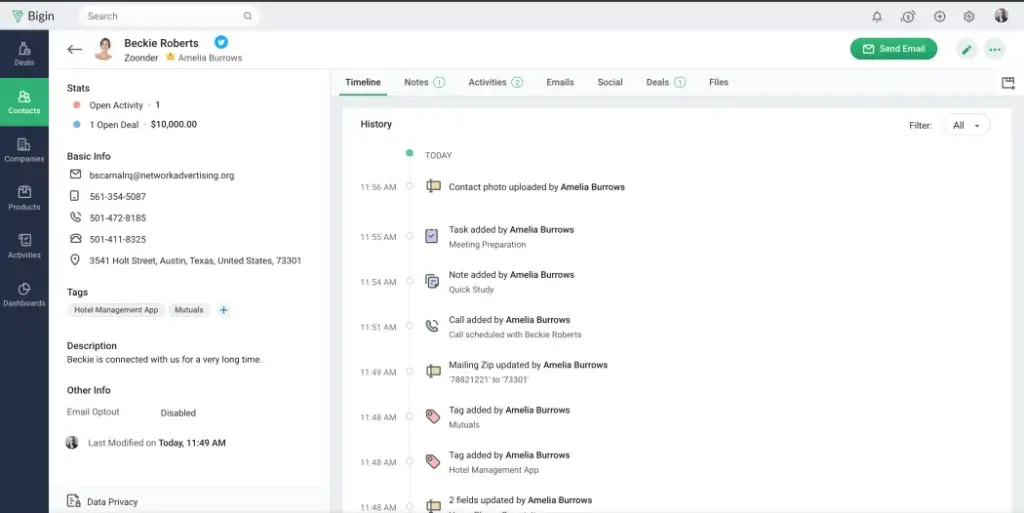
Bigin By Zoho Interface

Bigin by Zoho CRM is a pipeline-centric CRM solution built specifically for small businesses. It focuses on simplicity and ease of use, offering essential CRM functionalities without the complexity of larger systems.

Bigin by Zoho Pricing and Plans

Bigin by Zoho also offers three subscription levels and price points.

  • Free Version: Offers basic CRM features and is suitable for individual users or very small teams.
  • Express Plan: Priced at $7/user/month (billed annually), this plan includes additional features like automation workflows and email integration.
  • Premier Plan: At $12/user/month (billed annually), the Premier Plan caters to fast-growing businesses with features like advanced workflows and increased records and field limits.

Bigin by Zoho Key Features

Bigin by Zoho Ease of Use

Bigin by Zoho CRM is designed for greater ease-of-use, bringing a spreadsheets-like simplicity to CRM. It allows quick setup and operation without requiring extensive training, making it a favorable option for small businesses or startups.

Quick Comparison: Teamgate vs Bigin by Zoho

Feature Set and Functionality Comparison

  • Teamgate CRM: Offers a comprehensive set of features including advanced sales insights, analytics, lead scoring, and pipeline management. It’s range of plans and features make it suitable for businesses from startup through to scaling enterprise.
  • Bigin by Zoho CRM: Focuses on essential CRM features, making it ideal for businesses that need a straightforward and efficient system. It lacks the advanced functionalities of larger CRMs but offers simplicity and ease of use.

Customization and Integration Comparison

  • Teamgate CRM: Provides extensive customization options, allowing businesses to tailor the CRM to their specific processes and workflows. It supports integration with various external tools natively, as well as offering an Open API – enhancing its adaptability.
  • Bigin by Zoho CRM: Offers a degree of customization in its dashboards and workflows. It integrates well with other Zoho products and popular third-party tools, providing a cohesive ecosystem for business operations.

illustration of popular software logos

User Interface and Accessibility Comparison

  • Both Teamgate CRM and Bigin by Zoho CRM are known for their user-friendly interfaces. Teamgate offers a more traditional CRM experience with a range of easy to use functionalities, while Bigin by Zoho CRM stands out for its minimalistic and straightforward approach, making both tools particularly suitable for small businesses and startups.

Customer Support and Training Comparison

  • Teamgate CRM provides extensive levels of customer support throughout all of their plans. This includes a comprehensive support hub, 24/7 chat and email support, video support as well as training and included onboarding.
  • Bigin by Zoho CRM emphasizes customer support across all its plans, offering assistance through phone, email, and live chat. Additionally, the platform offers a a support hub and access to webinars and basic product training.

Sales Forecasting and Analytics Comparison

  • Teamgate CRM includes sales forecasting, sales analytics and dashboards with zero setup required, providing businesses with insights into sales trends and data-driven decision-making tools from day one.
  • Bigin by Zoho CRM, while focusing on simplicity, offers standard dashboards and KPIs for monitoring business performance. However, it may not provide as extensive sales forecasting tools as some more advanced CRM systems.
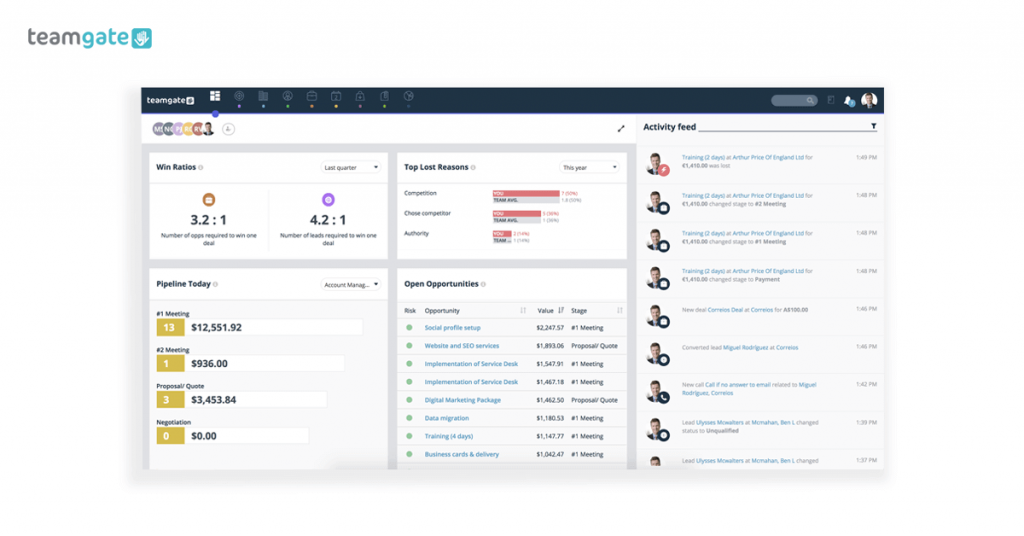
screenshot of Teamgate sales dashboard
Teamgate Dashboards are Completely Customizable

Final Thoughts

In choosing between Teamgate CRM and Bigin by Zoho CRM, businesses must consider their specific needs, budget constraints, and the scale at which they operate. Teamgate CRM offers a more feature-rich and customizable experience, suitable for businesses looking for a comprehensive CRM solution that can scale with their growth. On the other hand, Bigin by Zoho CRM is an excellent choice for small businesses and startups seeking an easy-to-use, efficient, and budget-friendly CRM solution.

Both platforms have their unique strengths and can significantly contribute to streamlining customer relationship management processes and enhancing business efficiency. For a more

detailed exploration of these systems, visiting the official websites of Teamgate CRM and Bigin by Zoho CRM is recommended. These websites will provide the latest information, feature updates, and support options to help you make the best decision for your business needs.


FAQs: Teamgate vs Bigin by Zoho

  1. Can you detail the cost structure for Teamgate CRM’s starter package?
    • Answer: Teamgate CRM offers a free Starter Plan for up to 2 users. It includes essential features such as contact management, pipeline management, and email customer support, making it suitable for small teams or individuals.
  2. Is it possible to connect Bigin by Zoho CRM with external software tools?
    • Answer: Yes, Bigin by Zoho CRM allows integration with various third-party applications, including popular tools like G Suite, Microsoft 365, and Zapier, enhancing its versatility and ability to fit into diverse business ecosystems.
  3. What support services are included in the mid-tier plan of Teamgate CRM?
    • Answer: In Teamgate CRM’s mid-tier plan, known as the Team Plan, users receive 24/7 chat and email support. This ensures timely assistance for any queries or issues that may arise during the use of the CRM.
  4. Is it feasible to tailor the sales pipeline in Bigin by Zoho CRM for specific business requirements?
    • Answer: Absolutely, Bigin by Zoho CRM offers customizable sales pipelines. Users can create distinct pipelines for each team, allowing them to streamline their customer-centric operations and manage day-to-day activities more effectively.
  5. Can I test Bigin by Zoho CRM for free prior to purchasing a plan?
    • Answer: Yes, Bigin by Zoho CRM offers a 15-day free trial, enabling users to explore its features and usability before committing to a paid subscription.
  6. Is there a no-cost version of Teamgate CRM suitable for startups or small companies?
    • Answer: Yes, Teamgate CRM provides a free Starter Plan specifically designed for small teams or startups. It includes basic CRM functionalities suitable for businesses taking their first steps in customer relationship management.
  7. Can you enumerate the key functionalities included in the Express edition of Bigin by Zoho CRM?
    • Answer: The Express plan of Bigin by Zoho CRM, priced at $7/user/month when billed annually, includes features like team pipelines, automation with instant workflows, email & WhatsApp Business integration, mass emails, no-code forms, customizable dashboards, and integration with various Zoho and third-party apps.
  8. Is Teamgate CRM easy to navigate for individuals with no prior CRM experience?
    • Answer: Yes, Teamgate CRM is recognized for its user-friendly interface, which is easy to navigate, making it an ideal choice for individuals or businesses new to CRM software.
  9. Can I tailor Teamgate CRM to fit my specific business processes?
    • Answer: Teamgate CRM offers a range of customization options, allowing businesses to tailor the CRM to their specific processes and workflows, including customizable sales pipelines and contact management features.
  10. Is there phone and email assistance available with Bigin by Zoho CRM?
    • Answer: Bigin by Zoho CRM offers comprehensive customer support, including assistance through phone, email, and live chat. This level of support ensures that users can receive help promptly whenever they encounter any issues or have questions about the CRM.


In the dynamic realm of Customer Relationship Management (CRM), choosing the right platform is crucial for business success, especially for small businesses and first-time CRM users. Two notable contenders in this space are Teamgate CRM and Monday.com CRM. This quick comparison will delve into various aspects including pricing, ease of use, customization options, customer support, and sales forecasting, providing a detailed guide to assist businesses in making an informed decision.

Contents

  1. Pricing
  2. Ease of Use
  3. Customization
  4. Customer Support
  5. Sales Forecasting and Reports
  6. Additional Considerations
  7. Conclusion
  8. FAQs

Pricing

Whether you’re a boot-strapped startup or an Enterprise company on the up, paying more doesn’t always equal higher value. When researching software and CRM pricing, it is crucial to also consider or ask about any non-advertised inclusions such as customer support, onboarding and training. Below, we break down the subscription offerings of Teamgate CRM and Monday.com CRM.

Teamgate CRM Pricing:

  • Starter Plan: A free plan designed for up to 2 users, offering basic contact and task management features.
  • Team Plan: Priced at $39.90 per user/month for unlimited users, providing advanced features like sales dashboards, workflow automation, and 24/7 chat and email support.
  • Growth Plan: At $59.90 per user/month, it caters to growing teams looking to scale. Including advanced sales insights, analytics, lead scoring, and 24/7 phone, video and face to face support.
  • Read more about Teamgate’s Pricing.

Monday.com CRM Pricing:

  • Basic CRM Plan: $10 per user/month (minimum 3 users), offering contact and CRM management basics.
  • Standard CRM Plan: $14 per user/month (minimum 3 users) offering email integration and capped sales process automations.
  • Pro CRM Plan: Costs $28 per user/month (minimum 3 users), focusing on the entire sales cycle and forecasting with features like sales forecasting, email tracking, and mass emails.
  • Enterprise CRM Plan: Offers enterprise-level features with pricing available upon request. It includes lead scoring, advanced analytics, and enterprise-grade security.
  • Read more about Monday.com CRM’s Pricing.

Ease of Use

Ease of use could mean the difference between your team adopting CRM software or it becoming another under-utilized tool in your tech-stack.

Teamgate CRM:

  • Built specifically with first-time CRM users in mind, Teamgate’s user-friendly interface and on-hand customer support make it suitable for small businesses.
  • Features a web-based platform that is easily accessible and simple to navigate.
  • Offers in-depth support articles, how-to videos and more.

Monday.com CRM:

  • Highly regarded for its intuitive design and user-friendly experience.
  • Offers customizable dashboards and visual project tracking, enhancing ease of use.

Customization Options

Customization gives the flexibility to adapt a CRM to your business processes, rather than the alternative.

Teamgate CRM:

  • Provides customizable sales pipelines and contact management in all plans.
  • Allows for various native integrations, as well as an Open API – offering flexibility to adapt to different business needs.

illustration of popular software logos

Monday.com CRM:

  • Stands out for its high level of customization, allowing users to tailor the tool for various business operations.

Customer Support

Customer support is crucial for early adoption and ongoing CRM benefits. Be sure to ask what customer support is included in your subscription plan, and if it comes with an additional cost.

Teamgate CRM:

  • Offers customer support in all subscription options.
  • Email support in available in the free Starter plan and 24/7 chat and email support in the Team plan.
  • The Growth plan includes comprehensive support with 24/7 phone and video assistance, as well as scheduled sales strategy meetings.

Monday.com CRM:

  • Known for providing quality support options, including 24/7 support for Enterprise users.
  • Offers a range of resources including FAQs and tutorials for users to troubleshoot common issues.

Sales Forecasting and Reports

Sales forecasting, reports, dashboards and analytics are the life blood of all high-performing sales teams. Using these feature sets will ensure your team is data-driven, removing the guess work from your sales strategy.

Teamgate CRM:

  • Sales forecasting and in-depth sales insights, reports and dashboards are included in the Team and Growth plans, and better yet – there is zero setup required.
Teamgate Sales Forecast Report

Monday.com CRM:

  • Features sales forecasting in the Pro CRM plan, offering real-time, fully-customizable dashboards for sales analytics.
Monday.com Sales Dashboard

Additional Considerations

  • Integration Capabilities: Both CRM systems offer integration options with other tools and services, enhancing their overall functionality and adaptability.
  • Market Position: Understanding each platform’s position in the market, including their strengths and weaknesses, can provide deeper insights into their suitability for different business types.
  • User Feedback: Exploring user reviews and feedback can offer valuable perspectives on the real-world application and performance of both CRM systems.

Conclusion

Teamgate CRM and Monday.com CRM each present unique strengths for small businesses or first-time CRM users. Teamgate CRM is an excellent choice for small teams or businesses beginning to explore CRM functionalities, especially with its free Starter plan. Monday.com CRM, while not offering a free option, provides a more comprehensive feature set for those with a more project management focus.

Ultimately, the choice between Teamgate CRM and Monday.com CRM will depend on specific business needs, including the scale of operations, budget constraints, and desired features. Both platforms offer valuable tools for enhancing customer relationship management and streamlining business processes.

For the most current information and a deeper exploration of these systems, visiting Teamgate CRM’s website and Monday.com CRM’s website is recommended.


FAQs:

  1. What is the pricing for Teamgate CRM’s basic plan?
    • Answer: Teamgate CRM’s Starter Plan is free for up to 2 users. It includes basic features like contact management, pipeline management, and email customer support.
  2. Can I access sales analytics in the Pro version of Monday.com CRM?
    • Answer: Yes, the Pro plan of Monday.com CRM includes sales forecasting and analytics features, providing insights into your sales pipeline and forecasting.
  3. What kind of support can I expect with Teamgate CRM’s mid-tier plan?
    • Answer: In Teamgate CRM’s Team Plan, users receive 24/7 chat and email support, providing assistance for any queries or issues they might encounter.
  4. Does Monday.com CRM allow tailoring the sales pipeline to my business needs?
    • Answer: Yes, Monday.com CRM offers a high level of customization, including the ability to tailor sales pipelines to fit specific business requirements.
  5. Can I connect Teamgate CRM with external applications or services?
    • Answer: Teamgate CRM allows integration with various external tools and services, enhancing its functionality and adaptability to different business workflows.
  6. Can I try Monday.com CRM for free before committing to a subscription?
    • Answer: Monday.com CRM offers a 14-day free trial, allowing users to test its features before deciding on a subscription.

In the dynamic world of sales, the tools you employ can make or break your success trajectory. Pipedrive, a renowned player in the CRM (Customer Relationship Management) arena, has been the go-to for many businesses. But as the business ecosystem evolves, so do the needs of sales teams.

The digital age has added a plethora of both challenges and opportunities for sales teams. With the surge in remote work, the increasing demand for data-driven strategies, and the need for seamless integrations, businesses are on the prowl for CRM solutions that can keep up, and are flexible enough to adapt to their business processes.

Pipedrive, with its intuitive interface and robust features, has been a favorite for a long time. But one size rarely fits all. Enter the realm of Pipedrive alternatives, each promising a unique blend of features to supercharge your sales strategy. And we’ve compiled a list of the top 10 Pipedrive alternatives to help you find the perfect solution for streamlining your sales operations.

Contents:

  1. Pipedrive Alternatives: Unearthing the Best CRM Solutions for Modern Sales Teams
  2. The 10 Best Pipedrive Alternatives To Use in 2023
  3. Teamgate CRM
  4. Hubspot
  5. Salesforce Sales Cloud
  6. Monday.com
  7. Insightly
  8. Copper
  9. Bitrix24
  10. Freshsales
  11. Zoho CRM
  12. Agile crm

Pipedrive Alternatives: Unearthing the Best CRM Solutions for Modern Sales Teams

While exploring the myriad of CRM alternatives, it’s essential to understand the benchmark that they are being compared against. Pipedrive, with its global recognition and widespread adoption, offers a suite of features that have made it a favorite among sales professionals.

  1. Visual Sales Pipelines: One of Pipedrive’s fan-favourite features is its visual sales pipeline. This intuitive and drag-and-drop interface allows sales teams to get a clear overview of their deals, stages, and progress, ensuring that no opportunity slips through the cracks.
  2. Activity-based Selling: Pipedrive emphasizes the importance of activities in the sales process. By focusing on actionable tasks, it ensures that sales reps always know their next move, driving efficiency and increasing the likelihood of closing deals.
  3. Customizable Fields and Modules: Recognizing that every business is unique, Pipedrive offers customization options. Sales teams can tailor the CRM to their specific needs, from custom fields to modules, ensuring that the platform aligns perfectly with their sales strategy.
  4. Communication History: Pipedrive’s email integration ensures that all communication is centralized. Whether it’s tracking open rates, scheduling follow-ups, or automating responses, the CRM offers tools to supercharge email communication.
  5. Performance Analytics: Pipedrive offers sales and performance analytics throughout some of their subscription offerings. Sales teams can delve deep into metrics, from conversion rates to revenue forecasts, ensuring that strategies are always informed and optimized.
  6. Marketplace Integrations: Pipedrive’s marketplace is a hub of integrations and plugins. Whether it’s connecting to marketing automation tools, finance software, or project management platforms, the CRM ensures that businesses have a cohesive and interconnected ecosystem.

Top 10 Pipedrive Alternatives for 2023

Pipedrive initially gained popularity due to its ease of use and suitability for small sales teams. This popularity has recently resulted in its own set of trade-offs. If your team needs hand-held customer support and flexibility, Pipedrive’s recent outsourcing and automated support might not cut it.

Additionally, if you’re looking for actionable reporting capabilities and flexible dashboards, you might be more likely to find disappointment. However, don’t loose faith – if Pipedrive simply isn’t meeting your business needs we have you sorted.

We will delve into, and review 10 of the best Pipedrive competitors for your business to consider.

1. Teamgate CRM

Screenshot of teamgate crm sales pipeline.
Easily drag and drop deals across your customized sales pipeline.

When it comes to CRM solutions that seamlessly blend functionality with user-friendliness, Teamgate CRM emerges as a formidable contender. But what sets it apart in the crowded CRM marketplace?

Scalability: One of Teamgate’s standout features is its adaptability. Whether you’re a budding startup or an established enterprise, Teamgate scales as you grow, with a dedicated support team at your side at no extra cost.

Feature-rich: Teamgate CRM isn’t just another Pipedrive alternative; it’s a powerhouse. With advanced analytics at its core, it offers insights that can transform your sales strategy. Whether it’s lead scoring, sales forecasting, workflow automations or performance metrics, Teamgate has got you covered.

Integration Ecosystem: In today’s interconnected digital landscape, integrations are the name of the game. Teamgate shines with its vast array of integrations, from native integrations ranging from email marketing tools to finance software, as well as an Open API for the more complex integration requirements. 

In the competitive world of CRM platforms, both Teamgate and Pipedrive have carved out significant niches for themselves. However, when diving deeper into the value drivers that businesses prioritize, Teamgate emerges as an excellent alternative to Pipedrive, and offers a no-obligation 14-day free trial for your to test it out yourself. 

Teamgate Top Features

  • Sales Analytics and Reports: One of Teamgate’s standout features is its in-depth sales analytics. The ease of use, combined with its flexibility, ensures that businesses can derive insights without any setup requirements. Whether it’s lead scoring, sales forecasting, or performance metrics, Teamgate provides actionable insights at your fingertips which resulted in a shortlist for Capterra’s 2023 best Sales Forecasting software.

  • High Adoption and Ease of Use: Teamgate’s intuitive interface ensures a swift time to value. Businesses can quickly onboard their teams, leading to higher user adoption rates. The platform is designed with the user in mind, simplifying the sales process and ensuring that sales teams can focus on what they do best: selling.

  • Human touch and Customer Support: Recognizing the importance of human touch, Teamgate ensures human interaction at every level of the sales cycle and beyond. This approach fosters trust and ensures that customers feel valued and understood regardless of the customer’s size, ensuring that every query or challenge is addressed promptly and efficiently at no extra cost.

  • Access to Leadership: Teamgate stands out by offering customers direct access to leadership. This open-door policy ensures that feedback reaches the top tiers, leading to continuous improvement and innovation. 

Teamgate Limitations

Teamgate Pricing

  • Free: for startups first 2 users.
  • Teams: $39.90/month per user
  • Growth: $59.90/month per user

*All listed pricing is in accordance with the annual billing cycle. Inclusions vary per subscription level. 

Teamgate Rating and Reviews

2. Hubspot

a screenshot from Hubspot software
via Hubspot

Another titan in the CRM domain is HubSpot. Known for its comprehensive suite of tools catering to marketing, sales, and service, HubSpot is more than just a Pipedrive alternative; it’s a holistic business solution.

Hubspot Top Features

  • 360-degree Customer View: HubSpot’s CRM provides a panoramic view of your customers. From the first touchpoint to the final sale, every interaction is meticulously tracked, offering invaluable insights into the customer journey.
  • Automation Galore: Time is of the essence in sales. HubSpot understands this, offering a plethora of automation tools. Whether it’s email sequences, lead nurturing, or task automation, HubSpot ensures that your sales team can focus on what they do best: selling.
  • Educational Resources: Beyond its software prowess, HubSpot stands out with its commitment to education. With a vast library of webinars, articles, and courses, it ensures that your team is always at the forefront of sales and marketing knowledge.

Hubspot Limitations

Hubspot Pricing

  • Free Tools: for five users
  • Starter: $30/month for unlimited free users and two paid users
  • Professional: $1,600/month for unlimited free users and five paid users
  • Enterprise: $5,000/month for unlimited free users and ten paid users

*All listed pricing is in accordance with the annual billing cycle. Inclusions vary per subscription level. 

Hubspot Rating and Reviews

3. Salesforce Sales Cloud

screenshot of salesforce sales cloud
via Salesforce

Salesforce, often dubbed the ‘granddaddy’ of CRM software, has been a dominant force in the industry for years. Its reputation is not just built on its longevity but its ability to continually innovate and adapt.

Salesforce Sales Cloud Top Features

  • Customization King: Salesforce’s primary strength lies in its unparalleled customization options. Businesses can tailor the platform to their exact needs, ensuring that the CRM aligns perfectly with their sales processes and strategies.
  • AI-Powered Insights: With Einstein AI, Salesforce offers predictive analytics, allowing sales teams to forecast with greater accuracy and harness the power of machine learning to drive sales strategies.
  • Expansive App Ecosystem: The Salesforce AppExchange is a treasure trove of integrations and plugins. Whether you need advanced reporting tools, marketing automation, or anything in between, there’s likely an app for that.

Salesforce Sales Cloud Limitations

Salesforce Sales Cloud Pricing

  • Starter: $25/month per user
  • Professional: $75/month per user
  • Enterprise: $150/month per user
  • Unlimited: $300/month per user

*All listed pricing is in accordance with the annual billing cycle. Inclusions vary per subscription level. 

Salesforce Sales Cloud Rating and Reviews

4. Monday.com

screenshot of monday crm software
via Monday.com

Monday.com, initially a project management tool, has expanded its horizons to offer a CRM solution that’s as vibrant as its colorful interface.

Monday.com Top Features

  • Visual Sales Pipelines: Monday.com stands out with its board-based approach, allowing sales teams to visualize their pipelines in a dynamic and engaging manner.
  • Automation Workflows: With a simple ‘if this, then that’ approach, Monday.com lets you automate mundane tasks, ensuring that your sales team spends less time on admin and more time closing deals.
  • Collaboration-Centric: Given its roots in project management, Monday.com excels in team collaboration. Sales teams can communicate, share files, and update lead statuses in real-time, fostering a cohesive sales environment.

Monday.com Limitations

Monday.com Pricing

  • Basic: $10/month per user
  • Standard: $14/month per user
  • Professional: $30/month per user
  • Enterprise: contact sales.

*All listed pricing is in accordance with the annual billing cycle. Inclusions vary per subscription level. 
** All listed prices for monday.com are based on a minimum 3 user contract ie minimum spend for basic is $30/month.

Monday.com Rating and Reviews

5. Insightly

screenshot of insightly software
via Insightly

While not as universally recognized as some of its competitors, Insightly has steadily climbed the ranks to become a favorite among SMEs (Small and Medium-sized Enterprises).

Insightly Top Features

  • User-Friendly Interface: Insightly’s clean and intuitive design ensures that even those new to CRM can navigate the platform with ease, reducing the learning curve.
  • Project Management Integration: Unlike many CRMs, Insightly seamlessly blends sales and project management. This dual functionality ensures that once a lead becomes a customer, the transition to project management is smooth and integrated.
  • Value for Money: For businesses on a budget, Insightly offers a robust suite of features at a competitive price point, making it an attractive option for those looking for a cost-effective CRM solution.

Insightly Limitations

Insightly Pricing

  • Plus: $29/month per user
  • Professional: $49/month per user
  • Enterprise: $99/month per user

*All listed pricing is in accordance with the annual billing cycle. Inclusions vary per subscription level. 

Insightly Rating and Reviews

6. Copper

screenshot of Copper CRM software
via Copper

In the vast ocean of CRM platforms, Copper stands out with its unique approach, focusing on nurturing relationships rather than just managing them.

Copper Top Features

  • G Suite Integration: Born with the idea of working seamlessly with Google Workspace (formerly G Suite), Copper offers an unparalleled integration with Google tools. From Gmail to Sheets, the CRM feels like a natural extension of the tools many businesses already use daily.
  • Minimal Data Entry: Copper prides itself on reducing manual data entry. By automatically capturing data from emails and other touchpoints, it ensures that sales teams can focus on building relationships rather than inputting data.
  • Visual Pipeline Management: With a drag-and-drop interface, Copper makes it easy for sales teams to move leads through the pipeline, ensuring clarity and efficiency in the sales process.

Copper Limitations

Copper Pricing

  • Basic: $23/month per user
  • Professional: $59/month per user
  • Business: $99/month per user

*All listed pricing is in accordance with the annual billing cycle. Inclusions vary per subscription level. 

Copper Rating and Reviews

7. Bitrix24

screenshot of Bitrix24 crm software
via Bitrix24

Bitrix24 is a holistic business management platform that caters to various facets of an organization, from sales to internal communication.

Bitrix24 Top Features

  • Unified Communications: Bitrix24 shines in its ability to bring teams together. With features like video conferencing, instant messaging, and social intranet, it fosters a collaborative environment.
  • Kanban Boards: Borrowing from the world of agile methodologies, Bitrix24’s Kanban boards offer a visual representation of the sales process, making it easy to track and manage leads.
  • Robust Reporting: With a suite of analytical tools, Bitrix24 provides in-depth insights into sales performance, helping businesses make informed decisions and refine their strategies.

Bitrix24 Limitations

Bitrix24 Pricing

  • Basic: $49/month for up to 5 users
  • Standard: $99/month for up to 50 users
  • Professional: $199/month for up to 100 users
  • Enterprise: from $399/month for up to 250 users

*All listed pricing is in accordance with the annual billing cycle. Inclusions vary per subscription level. 

Bitrix24 Rating and Reviews

8. Freshsales

screenshot of freshsales crm software
via Freshsales

Emerging from the Freshworks ecosystem, Freshsales offers a modern take on CRM, blending traditional features with innovative solutions.

Freshsales Top Features

  • AI-driven Insights: Freddy AI, Freshsales’ artificial intelligence component, offers predictive scoring, advanced analytics, and even suggests the next best action, guiding sales teams towards success.
  • Multi-channel Communication: Freshsales ensures that businesses can reach out to leads and customers via their preferred channels, be it email, phone, or chat, all from within the platform.
  • High volume Integrations: With a marketplace full of apps and integrations, Freshsales ensures that businesses can extend the CRM’s capabilities, connecting with tools ranging from marketing automation to finance software.

Freshsales Limitations

  • Bugs can be frequent and lengthy to resolve
  • Customer service can be slow to respond
  • Whilst volume of integrations is high, functionality can be limited 

Freshsales Pricing

  • Growth: first 3 users free, $15/month per user thereafter 
  • Professional: $39/month per user
  • Enterprise: from $69/month per user

*All listed pricing is in accordance with the annual billing cycle. Inclusions vary per subscription level. 

Freshsales Rating and Reviews

9. Zoho CRM

screenshot of Zoho CRM software
via Zoho

Zoho CRM, part of the extensive Zoho suite, has carved a niche for itself by offering a blend of simplicity and power, catering to businesses of all sizes.

Zoho CRM Top Features

  • Multichannel Support: Zoho CRM stands out with its ability to engage customers across various platforms, from email and phone to social media, ensuring that businesses can connect wherever their customers are.
  • Sales Automation: With a focus on driving efficiency, Zoho CRM offers a range of automation tools. From lead scoring to workflow automation, it ensures that sales teams can streamline their processes and reduce manual tasks.
  • Performance Analytics: Zoho CRM’s advanced analytics tools provide a deep dive into sales metrics, offering insights that can shape strategies and drive performance.

Zoho CRM Limitations

Zoho CRM Pricing

  • Standard: $14/month per user
  • Professional: $23/month per user
  • Enterprise: $40/month per user
  • Ultimate: $52/month per user

*All listed pricing is in accordance with the annual billing cycle. Inclusions vary per subscription level. 

Zoho CRM Rating and Reviews

10. Agile CRM

screenshot of Agile CRM software
via Agile CRM

Agile CRM stands out as a holistic solution that seamlessly integrates sales, marketing, and service functionalities into a unified platform.

Agile CRM Top Features

  • 360-Degree Contact View: Agile CRM offers a comprehensive view of each contact, capturing every interaction, be it emails, calls, or web activity. This consolidated view ensures that sales and marketing teams have all the information they need to tailor their approach effectively.
  • Marketing Automation: Beyond its CRM capabilities, Agile CRM shines in its marketing automation features. From email campaigns to web pop-ups and even multi-step workflows, the platform allows businesses to nurture leads and engage customers with precision.
  • Drag-and-Drop Builder: Whether it’s designing email campaigns or creating landing pages, Agile CRM’s intuitive drag-and-drop builder ensures that even those without technical expertise can craft compelling content
 

Agile CRM Limitations

Agile CRM Pricing

  • Free: up to 10 users
  • Starter: $9.99/month per user
  • Regular: $39.99/month per user
  • Enterprise: $64.99/month per user

*All listed pricing is in accordance with the annual billing cycle. Inclusions vary per subscription level. 

Agile CRM Rating and Reviews

Pipedrive Alternatives: The Journey to Finding the Right CRM Solution

In the vast and ever-evolving landscape of CRM platforms, businesses are presented with a plethora of options, each boasting its unique features and benefits. From industry giants like Pipedrive and Salesforce to emerging contenders like Teamgate and Agile CRM, the choices are both diverse and abundant.

The key to navigating this myriad of options lies in thorough research and introspection. Businesses should start by identifying their specific requirements, be it advanced analytics, seamless integrations, or robust customer support. Once these needs are outlined, it becomes easier to evaluate and compare different CRM platforms.

Furthermore, it’s beneficial to leverage free trials and demos, allowing businesses to get a hands-on feel of the platform’s interface, features, and overall user experience. Engaging with current users, reading reviews, and seeking recommendations can also provide invaluable insights.

Enjoy the hunt!

As a popular all-in-one marketing platform, HubSpot has been a leading choice for many businesses over the years. However, as the digital marketing landscape shifts and evolves, not every company may find HubSpot to be the right fit for their needs.

Whether it’s because of its pricing model, features, or user interface, businesses need to explore the market and consider other options that may better suit their requirements.

In this article, we’ll take a closer look at 10 HubSpot alternatives that can provide powerful and effective solutions for your business.

Key Takeaways

Here are some factors to consider when searching for a HubSpot alternative.

  • While HubSpot provides a complete suite of products and intuitive tools, it may only be suited for some industries and can get expensive for organizations that require advanced features and add-ons.
  • Hubspot is used by businesses to can manage their entire customer journey, from lead acquisition to nurturing and conversion.
  • When looking for a HubSpot alternative, pay attention to its pricing, ease of use, and range of features offered.
  • HubSpot covers a wide range of automation needs, from email marketing to sales workflow automation.

Table of Contents:

  • What Is HubSpot?
  • 10 Top HubSpot Alternatives
  • FAQs: HubSpot Alternatives

What Is HubSpot?

Rating: 4.4/5 (G2)

HubSpot is a cloud-based marketing, sales, and customer service platform that provides various tools to help businesses grow by optimizing customer acquisition, engagement, and retention.

HubSpot is used by over 100,000 companies worldwide, ranging from small businesses to large enterprises, enabling them to create interactive and engaging experiences that drive growth and revenue.

Key Features of HubSpot

HubSpot offers various essential characteristics, such as:

  • Company insights: Have access to a database of company details for your prospects to make more accurate outreach decisions.
  • Deal tracking: Constantly keep track of the deals you are working on.
  • Reporting dashboard: View the metrics you care about in one place.
  • Pipeline management: Let your deal pipeline flow by managing and assigning leads to your team members.

Pros & Cons of Using HubSpot

Before integrating HubSpot, it’s essential to balance its potential benefits against its drawbacks. Here are some pros and cons of using HubSpot.

Pros:

  • Complete suite of products: HubSpot provides all the features organizations need to manage their customer relationships effectively.
  • Intuitive tools: HubSpot requires little training, making it easy for users to quickly adopt and master the system.
  • Free to use: Organizations can start using HubSpot for free, eliminating concerns about the initial cost of implementing a new CRM system.

Cons:

  • Not suited for all industries: HubSpot has limited customization options for specific industries, making it less suitable for businesses with unique needs.
  • Can get overwhelming: The wide range of options available can be overwhelming for some users, and it may take time to find the most suitable features for specific needs.
  • Can get very expensive: HubSpot can become very expensive for organizations that require advanced features and add-ons.

10 Top HubSpot Alternatives

Here are some of the best HubSpot alternatives to check out.

Teamgate

Teamgate Software - 2023 Reviews, Pricing & Demo

Rating: 4.4/5 (G2)

Key Features:

  • Email marketing integration: Seamlessly connect your email marketing campaigns and track their performance within Teamgate.
  • SmartDialer: Place calls directly from Teamgate and reach your leads faster.
  • Leads management: Plan, track, and manage your leads with precision, segmenting them appropriately and interacting with them at the right time to increase conversions.
  • HubSpot integration: Sync with your HubSpot account and avoid time-consuming tasks.

Teamgate offers a great alternative to HubSpot thanks to its user-friendly interface and powerful features. With Teamgate, businesses can easily manage their sales pipeline, track leads, and automate workflows.

The platform offers great insights and reports, allowing businesses to make data-driven decisions and monitor their sales performance quickly. What’s more, Teamgate offers excellent customer support, ensuring that companies receive timely assistance whenever needed.

Zoho CRM

Zoho CRM Plus | Boosted CRM

RatingRating: 4/5 (G2)

Key Features:

  • Omnichannel: Engage with customers across multiple communication channels.
  • Sales enablement: Empower sales teams with tools and resources to increase productivity and success.
  • Predictive sales: Use data and machine learning to forecast sales and identify high-potential opportunities.
  • Marketing automation: Automate and optimize marketing tasks for increased efficiency and effectiveness.

Zoho CRM is a powerful customer relationship management tool that offers a wide range of features to businesses of all sizes. It includes lead and contact management, sales pipeline tracking, team collaboration, and analytics functionalities that help businesses to streamline their sales processes and make data-driven decisions.

Zoho is significantly cheaper than HubSpot and offers a similar range of features. Moreover, it integrates with over 50 third-party platforms, making it highly customizable.

Freshsales

Rating: 4.6/5 (G2)

Key Features:

  • Event tracking: Monitor and analyze visitor behavior on your website.
  • Conversion rate optimization: Use tools to improve the percentage of website visitors who take action.
  • Customer segmentation: Divide customers into groups based on shared characteristics to personalize marketing efforts.
  • Deal management: Track and manage sales opportunities from initial contact to close.

Freshsales is a cloud-based customer relationship management software that helps businesses manage their sales processes and improve their overall customer experience.

Compared to HubSpot, Freshsales has unique features, including better lead response times, advanced AI capabilities, and a 360° customer view. Businesses can auto-assign leads, make data-driven decisions, and personalize customer experiences using the tool’s AI capabilities. Freshsales’ cost-effectiveness makes it a practical option for businesses, as users often get faster ROI when compared with HubSpot.

EngageBay

Free Sales CRM Automation with 50+ Features | EngageBay

Rating: 4.6/5 (G2)

Key Features:

  • Live chat software: Enables businesses to communicate with website visitors and provide instant support, with customization options for chat forms.
  • Helpdesk software: Provides ticket management and automation, allowing businesses to handle customer inquiries and issues efficiently.
  • Appointment scheduling: Streamlines the scheduling process by allowing customers to book appointments online and businesses to manage their calendars more effectively.

EngageBay is an all-in-one marketing software with a heavy emphasis on marketing automation. The software offers a range of valuable features, such as lead generation capabilities and contact management software, making it a great alternative to HubSpot for businesses looking for an all-in-one solution.

One unique advantage of EngageBay is that even on the free plan, users can access valuable marketing automation features unavailable in HubSpot’s free plan. While you can’t use sales automation as part of EngageBay’s basic plan, several free features, such as SSL landing pages, email sequences, and technical support, are available.

Pipedrive

Sales CRM & Pipeline Management Software | Pipedrive

Rating: 4.5/5 (G2)

Key Features:

  • Customization: Tailor Pipedrive’s modules, pipelines, fields, and settings to best suit your business needs.
  • Insights and reports: Get a clear overview of your sales data, pipeline performance, and team progress through extensive reporting and analytics.
  • Integrations: Connect all your essential apps and tools to Pipedrive, including marketing automation, telephony, accounting, and more.

Pipedrive is a sales-focused CRM solution ideal for teams of all sizes. It boasts a simple and powerful design, making it easy to use while delivering robust reporting and analytics features.

In terms of distinguishing itself from HubSpot, Pipedrive is the more cost-effective option, with a seamless user interface requiring minimal training and support. On the other hand, while HubSpot is undeniably more customizable, it is also significantly more expensive, making it less suited for small businesses looking to automate their sales and marketing processes.

Sendinblue (now Brevo)

Rating: 4.5/5 (G2)

Key Features:

  • Templates: use pre-built email templates and simplify GDPR compliance.
  • Personalization: increase open rates through email personalization and create more relevant experiences.
  • Sign-up forms: collect information easily and use GDPR-compliant opt-ins for different email types.
  • Retargeting capabilities: create specific audiences based on page visits or actions.

Sendinblue is a CRM focused on email marketing and automation, allowing teams of all sizes to run multi-channel marketing campaigns. With Sendinblue, users can easily create newsletters, promotional emails, and transactional messages from scratch or using pre-existing templates.

What sets Sendinblue apart from HubSpot is its pricing, which is more affordable and scalable, making it a great option for growing teams. However, it’s worth noting that Sendinblue’s third-party integrations are limited, and reporting features are less robust than HubSpot’s.

Zendesk

Zendesk Suite 2023 Pricing, Features, Reviews & Alternatives | GetApp

Rating: 4.3/5 (G2)

Key Features:

  • Unified platform: All-in-one solution for prospecting, engagement, and lead generation.
  • Easy set-up: An intuitive,easy-to-use interface.
  • API-friendly: Zendesk offers open APIs that seamlessly integrate with current solutions and provide customization through the Zendesk apps framework.

Zendesk is a service-first CRM that focuses on building better customer relationships. With features such as a knowledge base, self-service portal, and community forums, Zendesk is designed to help customer support teams provide excellent customer service.

Compared to HubSpot, which is mainly focused on sales and marketing, Zendesk is easier to use with a simple and user-friendly interface. Bear in mind that Zendesk primarily focuses on support, making it a more suitable solution for businesses that require a CRM to handle customer support.

Insightly

Insightly Software Reviews, Demo & Pricing - 2023

Rating: 4.2/5 (G2)

Key Features:

  • Customer support: Insights and analytics to support customer service operations and a knowledge base to help customers find answers to common questions.
  • Sales force automation: Provides tools to manage contacts, sales pipelines, and tasks.
  • Marketing automation: Automates email marketing campaigns and streamlines the lead management process.

Insightly is a cost-effective CRM that provides businesses with a flexible and scalable approach to managing customer relationships. It is designed to help teams build and manage their sales pipelines and offers a range of features, including contact management, project management, and task tracking.

Compared to HubSpot, Insightly stands out as a better choice for users who need a CRM with additional project management features, particularly those with longer sales or support cycles. While HubSpot is an excellent option for users who require free or low-cost CRM software with essential lead generation and marketing tools, Insightly’s comprehensive suite of tools makes it ideal for businesses looking to streamline their sales and marketing processes while staying within budget.

Marketo

Marketo: Reviews, Prices & Features | Appvizer

Rating: 4.1/5 (G2)

Key Features:

  • Customization: Personalized and customizable solutions for your marketing campaign.
  • Landing page builder: Drag-and-drop interface and pre-designed templates make it easy to create landing pages with data capture forms and active lead profiling.
  • Lead management: Efficient and effective management of leads through the platform’s lead nurturing and scoring capabilities.

Marketo is a powerful marketing automation platform that enables companies to create personalized customer experiences throughout their journey. It offers many features to help marketing teams streamline their processes, such as lead management, email automation, and social media marketing.

Compared to HubSpot, Marketo offers a more sophisticated marketing automation solution best suited for mid-to-large-sized organizations with complex marketing needs. Marketo syncs with top CRMs such as Salesforce, allowing seamless integration and improved efficiency.

Marketing Cloud Account Engagement (Pardot)

Salesforce Marketing Cloud Account Engagement Reviews, Prices & Ratings | GetApp UK 2023

Rating: 4/5 (G2)

Key Features:

  • Real-time alerts: Notify sales reps and give them complete visibility into prospect engagement.
  • ABM: Get started with account-based marketing and align sales and marketing goals.
  • Robust analytics: Use predictive analytics as part of the premium plan.

Pardot is a marketing automation platform with a strong focus on sales-marketing alignment. As a powerful B2B marketing automation tool, Pardot facilitates lead management and customer journey workflows to engage prospects and customers better.

While HubSpot is known for being user-friendly and affordable for organizations of all sizes, Pardot is a higher-priced but more sophisticated tool with advanced B2B marketing and account-based engagement capabilities.

Get Started with Teamgate Today!

In conclusion, while HubSpot is a popular CRM, it may not be the best fit for every business. As discussed, many HubSpot alternatives are available, each with unique features and benefits.

Teamgate is an excellent option for businesses seeking powerful customer relationship management software that is user-friendly and affordable. With Teamgate, companies can automate their sales and marketing processes while enjoying excellent customer support.

Request a demo today and see how to take your business to the next level with Teamgate.

FAQs

Q: What is HubSpot?

A: HubSpot is a cloud-based marketing, sales, and customer service platform that provides tools to help businesses optimize customer acquisition, engagement, and retention. It offers features for lead tracking, reporting, pipeline management, and company insights.

Q: What are the pros of using HubSpot?

A: The pros of using HubSpot include its complete suite of products, intuitive tools, and the option to start using it for free. HubSpot is widely used by businesses of all sizes to manage their customer relationships effectively.

Q: What are the cons of using HubSpot?

A: The cons of using HubSpot include limited customization options for specific industries, the potential for overwhelming users with its wide range of options, and the potential for high costs, especially for organizations that require advanced features and add-ons.

Q: What are the key features of Teamgate?

A: Teamgate offers features such as email marketing integration, smart dialer for faster lead outreach, leads management with precise segmentation, and integration with HubSpot to streamline tasks.

Q: What sets Teamgate apart from other HubSpot alternatives?

A: Teamgate stands out for its user-friendly interface, powerful features, affordability, and excellent customer support. It offers automation for sales and marketing processes and provides insights and reports to make data-driven decisions.