Designed for Growth: Scale your recurring revenue with the new Teamgate SaaS CRM. Explore SaaS Features →

Book a demo today and save 50% off your first month, or 20% off your first year.

Get a free sales audit to uncover hidden revenue opportunities!

Most sales teams struggle with outdated pipelines, missed follow-ups, and inaccurate forecasts. Interactive KPI dashboards solve these problems by turning raw data into real-time, actionable insights. They connect directly to your CRM, highlight overdue tasks, and provide visual tools to track deals, saving time and improving productivity. For SMBs, this means fewer missed opportunities and more reliable forecasts.

Key Takeaways:

  • Real-time updates keep your pipeline accurate and actionable.
  • Dashboards reduce admin tasks, giving reps more time to sell.
  • Managers gain clear insights for coaching and forecasting.

Top Tools for SMBs:

  1. Teamgate CRM: Simple setup, clear pipelines, and actionable insights. Ideal for teams who want structure without complexity.
  2. Klipfolio: Customizable dashboards for multi-source data tracking.
  3. Geckoboard: Easy-to-read visuals for daily performance tracking.
  4. Power BI: Advanced analytics for teams in the Microsoft ecosystem.
  5. SimpleKPI: Straightforward tracking with budget-friendly pricing.

Quick Comparison:

Tool Best For Ease of Use Core Integrations Pricing (USD/month) Setup Time
Teamgate CRM Pipeline management, fast setup High MailChimp, QuickBooks, Zapier $0–$59.90/user Hours
Klipfolio Multi-source data tracking Moderate Salesforce, HubSpot, Pipedrive $99–$799 Moderate
Geckoboard Visual performance tracking High Salesforce, Google Analytics $49–$699 Under 1 hour
Power BI Advanced analytics, Microsoft users Moderate Excel, Office 365, Teams Free–Varies Less than 1 day
SimpleKPI Budget-conscious metric tracking Very High Zapier, Excel, Google Sheets $14–$129 Within 1 hour

Conclusion:
If your team struggles with pipeline clarity or wasted time on admin tasks, dashboards like Teamgate can help. Teamgate gives growing sales teams clarity, structure, and trustworthy pipeline insight – without enterprise CRM bloat or feature overload. Start with a pilot to see which tool fits your workflow best.

Make a Sales KPIs Dashboard in 15 minutes (+ Free Template)

Why SMB Sales Teams Need Interactive KPI Dashboards

For many SMB sales teams, revenue loss doesn’t happen in dramatic, obvious ways – it happens quietly, through missed follow-ups and overlooked opportunities. Without real-time insights, leads grow cold, deals stall, and forecasts lose accuracy. The result? Wasted effort on demand generation, inefficient use of sales hours, and pipelines that fail to deliver results.

Interactive dashboards tackle these challenges by turning scattered data into actionable insights.

Fixing Pipeline Management Problems

A clean and well-managed pipeline is the backbone of predictable revenue. Without visual tools and real-time alerts, deals can languish unnoticed. Interactive dashboards solve this by using features like color-coded closing dates to highlight overdue opportunities and metrics such as deal age, activity coverage, and stage velocity. These tools give managers the clarity they need to step in early – before small issues grow into major bottlenecks. This ensures that deals without clear next steps don’t fall through the cracks, reducing the quiet revenue drain caused by neglect.

Instead of relying on guesswork to assess the health of opportunities, teams can make decisions based on clear, data-driven signals about deal progress and viability.

Boosting Sales Team Productivity

Sales productivity often takes a hit when reps are bogged down with administrative tasks. Many CRMs unintentionally make this worse by turning selling into a data-entry marathon. Interactive dashboards simplify workflows by centralizing key activities – emails, calls, meetings, and notes – and automating routine tasks like follow-ups through reminders and workflow triggers. This means reps spend less time on updates and more time on actions that move deals forward.

Dashboards designed with "at-a-glance" visuals allow SMB sales teams to quickly assess performance without sifting through complex reports. By clearly showing which deals need attention and outlining next steps, dashboards naturally integrate into daily workflows, making adoption easier and more intuitive. These streamlined processes not only improve pipeline clarity but also empower teams to act on insights faster.

Supporting Data-Driven Decisions

When better follow-ups and clear metrics prevent silent revenue losses, sales leaders can make decisions that strengthen the pipeline. Real-time, evidence-based insights become the foundation for accurate forecasts. Interactive dashboards provide actionable metrics like deal age, activity levels, next-step coverage, and stage conversion rates. These indicators help leaders differentiate between realistic forecasts and optimistic guesses.

With visibility into which reps are hitting activity goals and which deals are stalling, coaching becomes more focused and impactful. Dashboards turn routine pipeline reviews into strategic discussions, helping teams identify trends, spot risks, and adjust tactics based on up-to-date data. This ensures that decisions are grounded in reality, keeping the pipeline healthy and reliable.

Best Interactive KPI Dashboard Tools for SMB Sales Teams

Choosing the right dashboard tool can be the key to transforming your sales pipeline into a well-oiled, deal-closing machine. For SMB sales teams, the priority lies in tools that are easy to set up, integrate seamlessly with existing workflows, and deliver rapid, actionable insights. Below are five standout options, each offering a unique combination of usability, integration, and insights tailored to SMB sales.

Teamgate CRM: Built for Predictable Revenue
Teamgate CRM

Teamgate CRM focuses on keeping a clean sales pipeline and minimizing revenue leaks. Its visual deal pipeline uses structured stages, color-coded indicators for overdue tasks, and aging deal alerts to ensure nothing slips through the cracks. Real-time activity tracking reduces the need for manual updates by automatically logging sales interactions.

Designed with sales reps in mind, Teamgate integrates effortlessly into daily workflows. It centralizes tasks like follow-ups, meeting notes, and conversations, so updates happen naturally instead of being forced by management. Automated reminders make follow-ups second nature, while managers gain insights into deal age, activity levels, and next-step coverage to coach and forecast effectively. Best of all, setup is quick – taking just hours, not weeks – so teams can start benefiting immediately. Teamgate is ideal for teams seeking clarity, discipline, and a CRM that’s easy to adopt.

Klipfolio: Real-Time KPI Visualization
Klipfolio

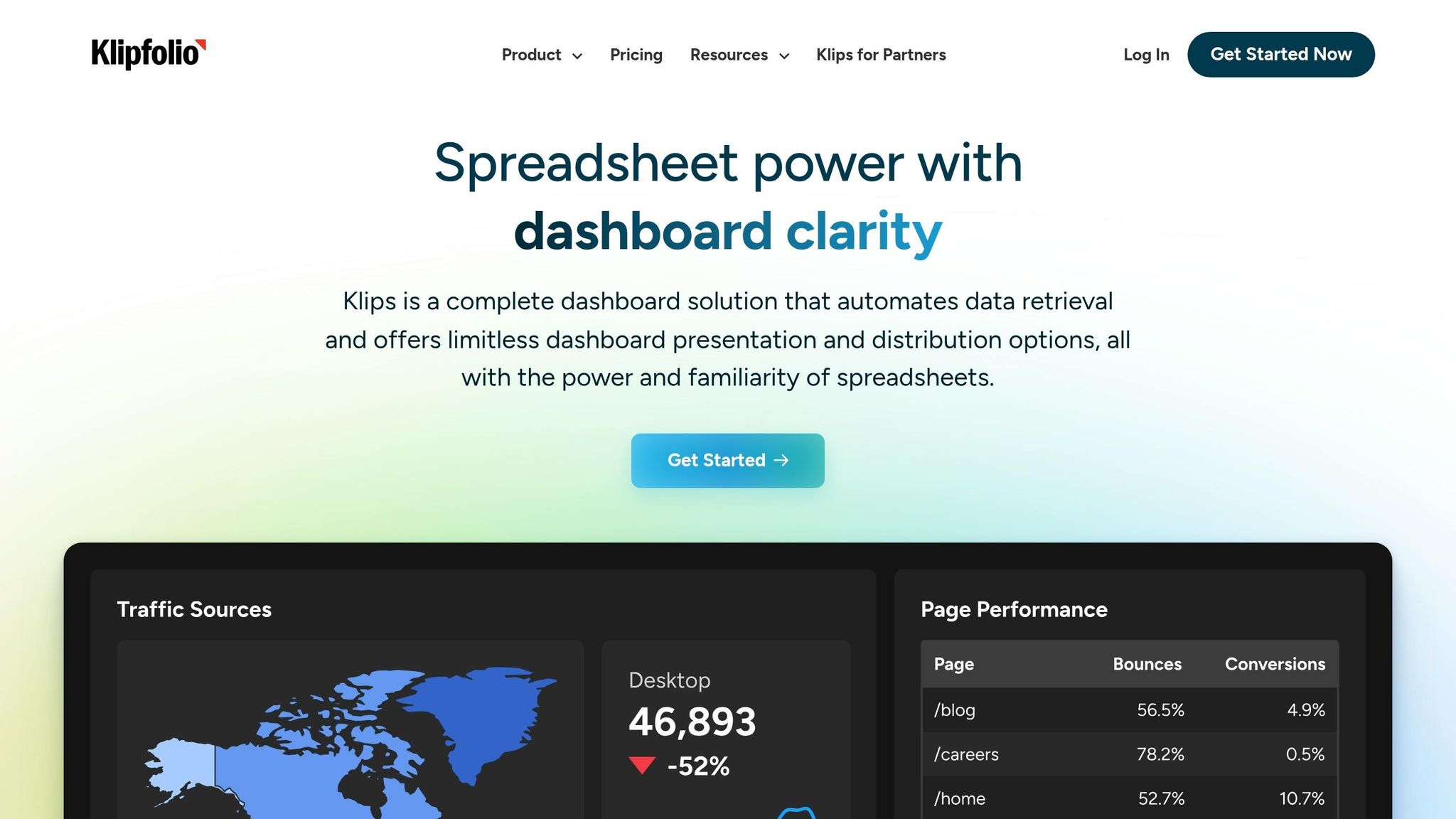
Klipfolio offers customizable dashboards with a simple drag-and-drop interface, perfect for tracking metrics like pipeline progress, conversion rates, and team performance in real time. It connects to over 130 CRMs and platforms, including Salesforce, HubSpot, and Pipedrive, through pre-built connectors and APIs for instant data syncing.

Its PowerMetrics feature ensures consistent KPI tracking across teams, eliminating discrepancies between sales and finance metrics like revenue attribution. For SMBs needing consolidated data from multiple sources, Klipfolio’s data blending capabilities create unified, actionable dashboards. Pricing starts at around $149 per month for small business plans.

Geckoboard: Simplified Sales Performance Tracking
Geckoboard

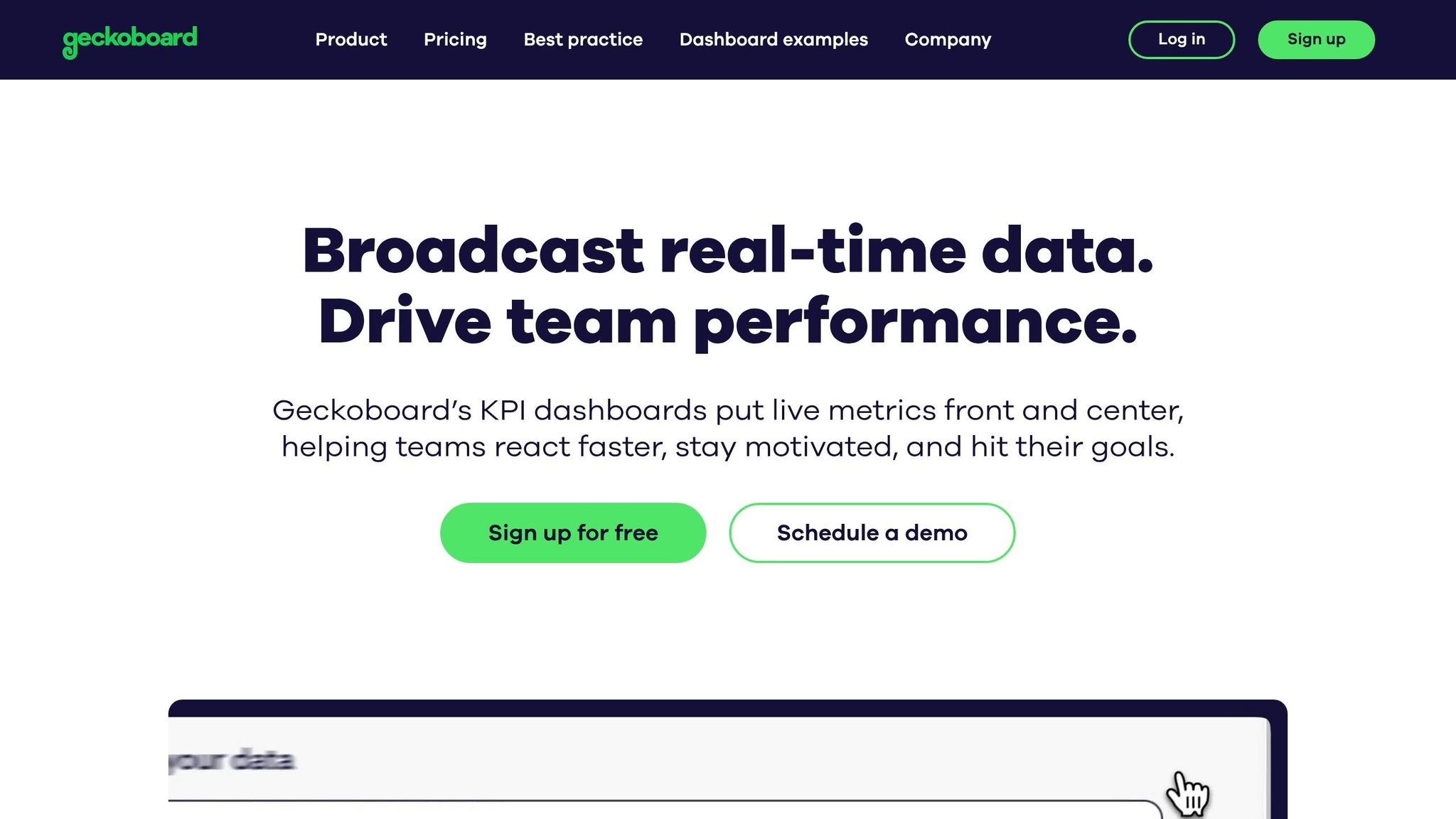
Geckoboard specializes in clean, TV-friendly dashboards that make daily sales performance easy to monitor. With pre-built templates, multiple chart types, and visual elements like target meters and traffic light indicators, teams can quickly assess their progress at a glance.

The platform integrates with over 90 tools, including Salesforce and Google Analytics, and allows dashboards to go live in under an hour using its drag-and-drop builder. Automated email reports and Slack notifications keep teams aligned on key metrics without the need for manual reporting.

Power BI: Advanced Analytics for Sales Metrics
Power BI

For SMBs already using Microsoft tools, Power BI offers seamless integration with Excel, Office 365, Teams, and SharePoint. It provides advanced visualizations, DAX formulas for complex sales calculations, and AI-powered anomaly detection to highlight trends in your pipeline data.

Power BI is cost-effective for Microsoft users and embeds directly into Teams or SharePoint workflows. With row-level security, sales reps only see data relevant to them. Setting up basic dashboards can often be done in less than a day, making it a practical choice for businesses already in the Microsoft ecosystem.

SimpleKPI: Easy Sales KPI Tracking
SimpleKPI

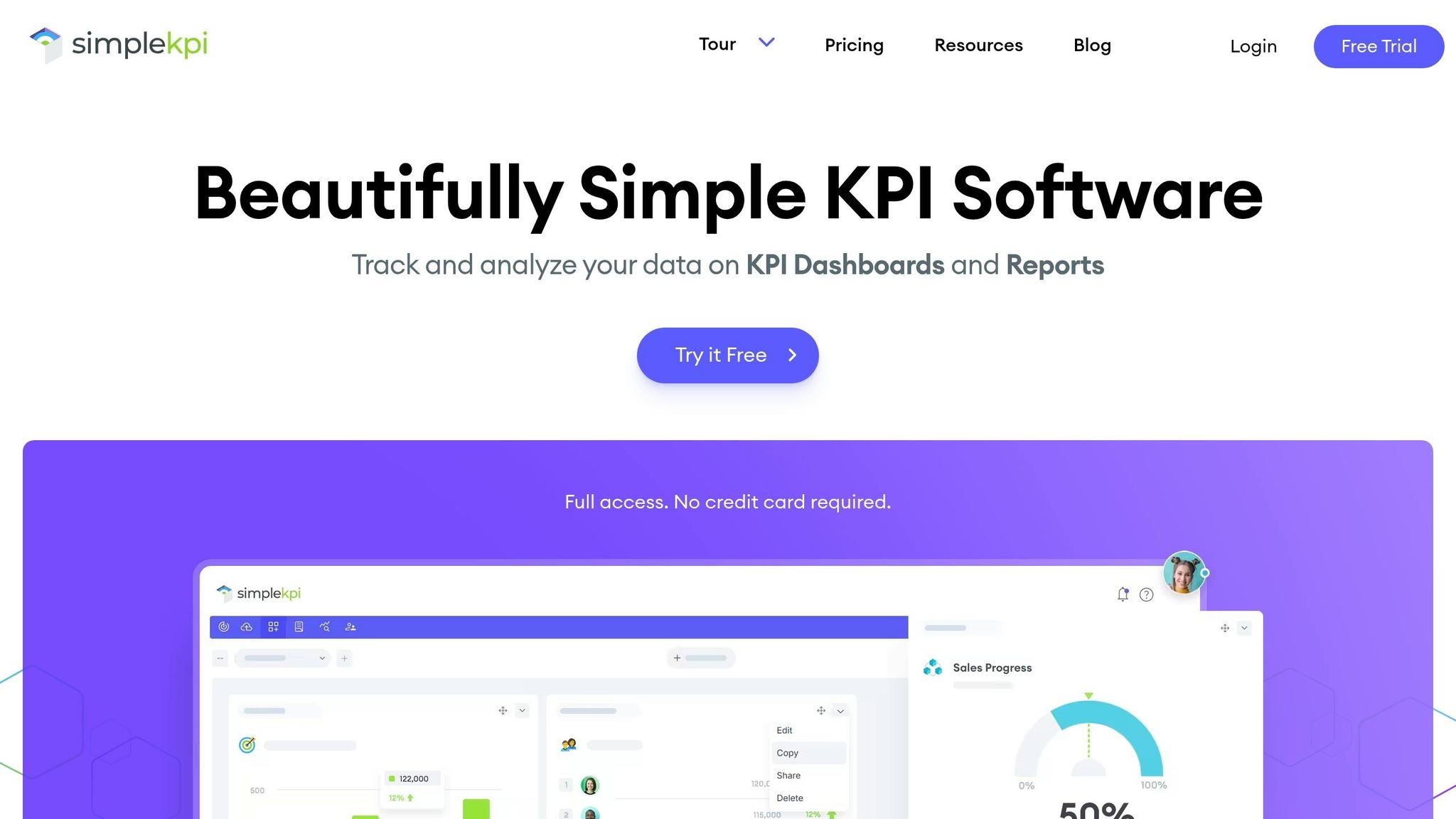
SimpleKPI is designed for SMBs that want straightforward sales metric tracking without the complexity of a full business intelligence platform. It features pre-built KPI templates, interactive charts, and goal tracking for metrics like revenue, deals closed, and pipeline health.

The tool integrates with Zapier, Excel, and Google Sheets for basic CRM connectivity. Its pricing is transparent, starting at $14 per user per month, with options for small teams ($49 per month) and unlimited users ($129 per user per month). A 14-day free trial is available, and most teams can start seeing results within an hour of setup.

These tools show how interactive dashboards can turn raw sales data into actionable insights, helping SMBs make smarter, faster decisions.

Comparing Interactive KPI Dashboard Tools
Interactive KPI Dashboard Tools Comparison for SMB Sales Teams

Interactive KPI Dashboard Tools Comparison for SMB Sales Teams

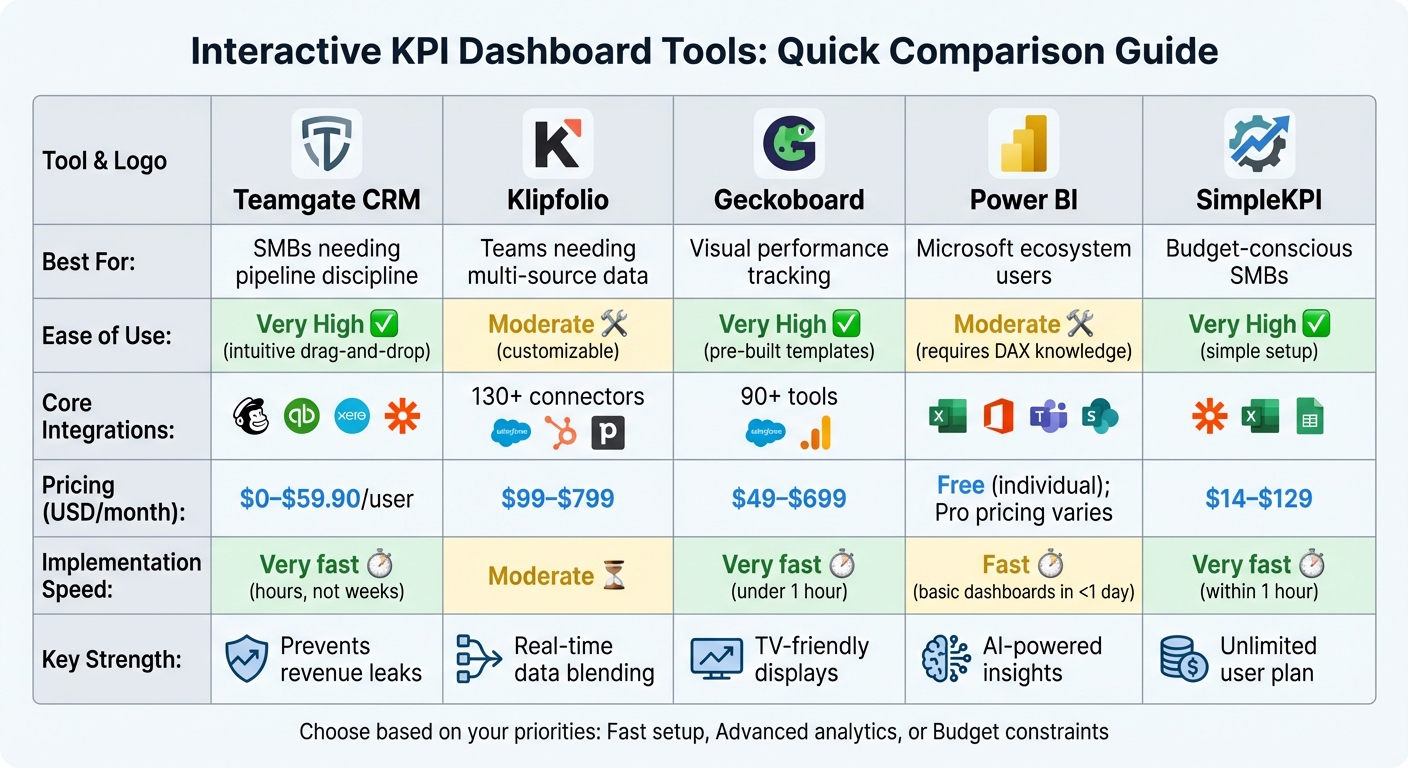
Choosing the right interactive KPI dashboard tool is crucial for SMB sales teams aiming to improve pipeline management through effective CRM implementation, track performance, and gain actionable insights from your sales data. This comparison highlights the key features, pricing, and implementation speeds of five popular tools, helping you decide which one aligns best with your team’s needs.

Feature and Pricing Comparison Table

The table below outlines how these tools perform across critical factors like ease of use, integration options, pricing, and setup time.

Tool Best For Ease of Use Core Sales Integrations Pricing (USD/month) Implementation Speed
Teamgate CRM SMBs needing pipeline discipline High – intuitive drag-and-drop MailChimp, QuickBooks, Xero, Zapier $0–$59.90/user Very fast (hours, not weeks)
Klipfolio Teams needing multi-source data Moderate (customizable) 130+ connectors (Salesforce, HubSpot, Pipedrive) $99–$799 Moderate
Geckoboard Visual performance tracking High – pre-built templates 90+ tools (Salesforce, Google Analytics) $49–$699 Very fast (under 1 hour)
Power BI Microsoft ecosystem users Moderate (requires DAX knowledge) Excel, Office 365, Teams, SharePoint Free (individual); Pro pricing varies Fast (basic dashboards in <1 day)
SimpleKPI Budget-conscious SMBs Very high – simple setup Zapier, Excel, Google Sheets $14–$129 Very fast (within 1 hour)

Key Insights on Features and Use Cases

The differences between these tools become more apparent when considering how they impact daily sales operations. For example, Teamgate CRM stands out for its simplicity and quick adoption. Jack Hodges, Sales Manager at FiveCRM, shared:

"With Teamgate’s intuitive interface, our user adoption was immediate. Even with a remote team… we were onboarded and up and running within hours".

When it comes to pricing, scalability is a major factor. SimpleKPI offers an unlimited user plan for $129/month, making it a cost-effective option for growing teams. Meanwhile, Teamgate provides a free tier for up to two users, scaling to $59.90/user/month for advanced features. Krish Sivanathan, Director of Operations at Packagecloud, highlighted how actionable insights can drive results:

"Utilizing sales insights we have been able to conduct targeted experiments, enabling Packagecloud to increase engagement rates by 18% through the refinement of scripts and lead targeting".

Real-Time Capabilities and Advanced Analytics

For real-time data visualization, Klipfolio and Geckoboard are excellent choices, offering seamless integration with multiple data sources. Power BI, on the other hand, leverages AI to detect anomalies and surface trends automatically. In contrast, SimpleKPI focuses on straightforward metric tracking, ideal for teams without the need for complex analytics.

Choosing the Right Tool for Your Needs

Your choice depends on your team’s priorities:

  • Fast implementation: Teamgate, Geckoboard, and SimpleKPI let you build dashboards quickly, often within an hour.
  • Advanced analytics: Power BI and Klipfolio provide deeper insights for data-driven strategies.
  • Budget-friendly options: SimpleKPI’s unlimited user plan and Teamgate’s free tier cater to cost-conscious teams.

For SMBs without dedicated data teams, tools that enable non-technical users to create dashboards quickly can be game-changers. These comparisons offer a strong foundation for identifying the right tool to enhance your sales operations, setting the stage for the next discussion on optimizing your processes.

Choosing the Right Interactive KPI Dashboard for Your SMB Sales Team

What to Look For

The difference between a dashboard that becomes a daily tool and one that gets ignored boils down to three key factors: adoption and implementation, quick setup, and seamless integration. These aren’t just extras – they’re the foundation of whether your team will rely on the dashboard or leave it unused.

  • Adoption rates: A dashboard packed with features won’t matter if it’s too complicated to use. An intuitive design ensures your team can track pipelines easily without feeling overwhelmed, which leads to consistent usage.
  • Setup speed: Time is critical for SMBs. Look for dashboards with pre-built templates and drag-and-drop interfaces that allow you to create live dashboards in hours instead of days.
  • Integration capabilities: A dashboard should fit into your existing workflow, not disrupt it. Check for compatibility with your CRM, email tools, and accounting software. For instance, Power BI connects to multiple data sources for real-time updates, while Geckoboard pulls in data from various applications, reducing manual input and saving time.

By focusing on these factors, you can match the tool’s features to your sales team’s specific needs.

Matching Tools to Your Sales Process

The features you prioritize should align with how your sales team operates. For example:

  • Pipeline management: If your team focuses on moving deals through the pipeline, choose dashboards with visual tools like Kanban boards and enforced next steps. Teamgate CRM, for instance, ensures every deal requires a defined action, keeping opportunities from stalling.
  • Forecasting accuracy: Teams prioritizing accurate forecasts should consider dashboards with AI-driven analytics. Power BI’s anomaly detection highlights trends that manual tracking might miss, while other tools offer custom metrics tailored to your sales goals.
  • Budget considerations: Pricing matters, especially for SMBs. SimpleKPI offers an unlimited user plan for $129/month, suitable for growing teams. Teamgate provides a free tier for up to two users, allowing smaller teams to try its disciplined pipeline management features without upfront costs.

Before committing, run a pilot test. Monitor rep login rates (aim for 80% or higher), track how quickly the dashboard is set up, and gather feedback from your team after one or two weeks. The goal is to ensure the tool supports daily selling activities rather than adding unnecessary tasks. Dashboards that centralize emails, calls, and activity histories tend to see higher adoption rates because they enhance productivity instead of creating extra work.

Conclusion

Interactive KPI dashboards help small and medium-sized businesses (SMBs) protect their revenue by turning raw data into actionable insights. They tackle common sales challenges like stalled deals, inconsistent follow-ups, and unreliable forecasts by highlighting key metrics – such as deal age, activity levels, and next-step coverage – in real time. This shift from guesswork to data-driven decision-making allows managers to coach effectively and ensures follow-up processes are consistent and reliable.

The right dashboard enhances three key areas that directly affect revenue: pipeline discipline, sales rep productivity, and forecast accuracy. As Teamgate states, "Accurate CRM reports and analytics are essential for identifying strengths and weaknesses among a sales team… and any shortcomings in sales cycles".

When choosing a tool, SMBs should prioritize fast setup, CRM integrations, and ease of use. Teamgate CRM is specifically designed to prevent revenue loss by eliminating "no next step" scenarios and flagging aging opportunities before they expire. Its pricing supports quick adoption without unnecessary complexity, including a free tier for up to two users.

To get started, consider running a short two-week pilot with your team and collecting their feedback. The goal isn’t to find the tool with the most features – it’s to find one your team will actually use because it makes their jobs easier. When dashboards centralize emails, calls, and activity histories in one place, adoption becomes effortless, and your pipeline becomes more predictable.

FAQs

Which KPIs should an SMB sales dashboard track?

An SMB sales dashboard should focus on tracking key metrics that provide a clear picture of sales performance, pipeline health, and team productivity. Important indicators include:

  • Sales trajectory: Monitors progress toward revenue goals.
  • Win/loss rates: Highlights how often deals are closed successfully.
  • Sales cycle length: Measures the average time it takes to close a deal.
  • Pipeline coverage: Ensures there are enough opportunities to meet targets.
  • Lead conversion rates: Tracks how effectively leads turn into customers.
  • Activity metrics: Includes data on calls, emails, and meetings to assess team effort.

Additional data points, such as top reasons for lost deals, forecasted revenue, and sales velocity, can reveal problem areas, improve forecasting accuracy, and ensure the pipeline remains clean and actionable for steady revenue growth.

How do I get reps to actually use the dashboard?

To get your sales reps to actively use the dashboard, make sure it aligns with their daily workflow. Keep it simple to update and packed with insights they can act on. Tailor the metrics to their roles – like tracking daily productivity for reps or monitoring team trends for managers. Add visual tools, such as pipeline aging indicators and clear next steps, to make the process intuitive. When reps see how it streamlines their tasks and speeds up closing deals, they’ll be much more likely to use it regularly.

What should a 2-week dashboard pilot include?

A 2-week dashboard pilot should center on key milestones: setup, testing, and training. The process involves configuring critical KPIs such as sales activity, deal progression, pipeline health, and forecasts. Once set up, testing ensures the data is accurate and the dashboard is easy to use. Product demonstrations play a crucial role, helping users understand how to interpret the data effectively and turn insights into actionable steps.
Related Blog Posts

Master Client Conversations with a Sales Objection Handling Tool

Navigating client hesitations during a sales pitch can be tricky, but having the right words at the right time makes all the difference. A well-crafted response can turn a ‘no’ into a ‘maybe’ or even a ‘yes.’ That’s where a tool designed to tackle sales objections comes in handy. It equips you with thoughtful, structured replies that address concerns without sounding pushy or scripted.

Why Handling Objections Matters

Every salesperson faces pushback—whether it’s about cost, timing, or trust. The key isn’t avoiding these moments but embracing them as chances to build rapport. With a resource that helps generate tailored rebuttals, you can focus on understanding the client’s perspective while confidently presenting your value. Imagine having a library of strategies at your fingertips, ready to adapt to specific scenarios like a high price concern or a delayed decision.

Boost Your Confidence in Sales

Using smart tools to refine your approach means less stress and more wins. You’ll walk into every call or meeting prepared to pivot, persuade, and close. For anyone looking to elevate their game, leveraging a system for crafting responses to client hesitations is a step toward consistent success.

FAQs

How does the Sales Objection Handling Generator create personalized responses?

Our tool uses a robust library of proven objection-handling templates crafted by sales experts. When you input the objection type—like price or trust—and a short description of the client’s concern, it matches your input to the most relevant strategy. Then, it weaves in your specific details to make the response feel tailored. It’s not random; it’s built on context and keywords from your input, ensuring the script fits the situation while keeping things natural and persuasive.

Can I edit the generated response to match my tone?

Absolutely! The generated script is a starting point, designed to save you time and give you a solid structure. You’re welcome to tweak the wording to match your personal style or the client’s vibe. Maybe you want to add a touch of humor or make it more formal—go for it. The tool provides the framework with empathy, reasoning, and a call-to-action, but the final polish is all yours.

Is this tool suitable for beginners in sales?

Yes, it’s perfect for anyone, whether you’re just starting out or you’ve been in sales for years. For beginners, it’s like having a seasoned mentor guide you through tough conversations, offering scripts that sound professional and confident. You’ll learn how to structure responses while addressing client hesitations effectively. Even experienced reps find it handy for quick ideas or to refine their approach on tricky objections. It’s a practical resource no matter your skill level.

Email still matters in sales, but it’s not the same tool it used to be. In 2026, buyers are overwhelmed with 117 emails daily, and AI filters now judge your email’s quality before it even reaches an inbox. Despite these challenges, 73% of B2B buyers still prefer email for communication, and it delivers a strong ROI – $36 to $40 for every $1 spent. However, success depends on personalization, timing, and combining email with other channels like LinkedIn or SMS.

Key insights:

  • Engagement: Cold emails average a 9% open rate and a 2.09% reply rate, but follow-ups can triple responses.
  • Conversions: Email converts at 4.24%, far outperforming social media (0.59%).
  • Scalability: Automated email sequences drive 41% of revenue while making up just 2% of email volume.

To cut through the noise, sales teams are combining email with AI-driven personalization and multi-channel outreach. AI tools can boost reply rates to 25–40% by tailoring messages to real-time triggers like funding announcements. Messaging platforms like SMS and LinkedIn also outperform email in engagement, with SMS response rates hitting 45%.

The best approach? Use email as the backbone of a multi-channel strategy. Tools like Teamgate help reps follow a clear sales process while ensuring managers trust the numbers – without turning CRM into an admin burden.

1. Email as a Sales Tool

Engagement Metrics

In 2026, email engagement is all about quality over quantity. The average open rate for emails sits at 23.44%, with cold sales emails achieving a modest 9% open rate. However, what happens after the email is opened – clicks, replies, and reading time – matters far more. Click-through rates average 3.5%, though AI-optimized campaigns can push this figure to an impressive 13.44%. Notably, 86% of business professionals still consider email their go-to communication channel.

With tools like Apple’s Mail Privacy Protection affecting open rate accuracy, sales teams are prioritizing deeper intent-based metrics such as clicks and replies. The average reply rate for cold emails is 2.09%, but sequences with 4 to 7 follow-ups can triple that response rate. These figures highlight the potential for meaningful engagement when emails are thoughtfully structured and strategically timed.

Conversion Effectiveness

When it comes to conversions, email outshines other channels. It delivers a conversion rate of 4.24%, which is nearly seven times higher than the 0.59% rate seen on social media. Automated email flows, such as abandoned cart reminders or lead nurturing sequences, can achieve conversion rates as high as 12%, compared to just 1.5% for manual bulk sends. Timing also plays a critical role – responding to leads within five minutes boosts qualification odds by tenfold compared to waiting 30 minutes.

Scalability and ROI

Email remains a standout tool for scalability and return on investment (ROI). For every $1 spent, email generates between $36 and $40 in revenue, with top-performing campaigns reaching ROI levels of $70 or more. It’s 40 times more effective than Facebook and Twitter for acquiring new customers and delivers twice the ROI of cold calling. Remarkably, just 2% of email volume – primarily automated sequences – accounts for 41% of revenue, emphasizing the importance of smart automation.

To maintain this scalability without sacrificing deliverability, sales teams rely on robust technical setups. This includes using SPF, DKIM, and DMARC authentication, warming up inboxes, and limiting cold email sends to 35–50 per account daily. For example, fashion brand NA-KD streamlined customer interactions across email, SMS, and web channels using a customer data platform, boosting customer lifetime value by 25% within a year. These strategies demonstrate how email can scale efficiently while driving consistent and predictable revenue growth.

2. Messaging Platforms for Sales

Moving beyond traditional email, messaging platforms offer faster, more engaging ways to connect with prospects and customers.

Engagement Metrics

Messaging platforms consistently outperform email when it comes to engagement. SMS open rates range from an impressive 90% to 98%, compared to email open rates, which average between 20% and 45%. Additionally, 90% of text messages are read within three minutes of being sent, whereas emails typically take about 90 minutes to get opened.

The difference is just as striking in response rates. SMS messages see an average response rate of 45%, significantly higher than email’s 6%. Similarly, SMS click-through rates fall between 18% and 36%, while email click-through rates remain at a modest 1.5% to 5%. For B2B professionals, LinkedIn messaging achieves response rates of 10–30%, making it a strong contender for outreach. By sidestepping inbox clutter and spam filters, messaging platforms act as a direct “notification layer”, encouraging quick action. These high engagement levels naturally translate into better conversion outcomes.

Conversion Effectiveness

When it comes to driving conversions, SMS campaigns shine. They typically achieve conversion rates between 21% and 40%, far surpassing email’s range of 1–15%. Using SMS alongside email can amplify results, with combined campaigns delivering a 429% improvement in conversion rates over email-only strategies. The concise 160-character limit of SMS also works to its advantage, ensuring messages are clear and actionable.

Timing is another crucial factor. Responding to leads within 60 minutes can increase conversion rates by up to seven times, and 71% of customers expect businesses to reply to texts within 15 minutes. For instance, in January 2026, LivePerson‘s AI-driven prospecting agents reduced research time from 20 minutes to just two, boosting engagement rates by 35%.

Scalability and ROI

Messaging platforms provide excellent returns while remaining scalable. SMS campaigns generate anywhere from $21 to $71 for every dollar spent. While SMS costs between $0.01 and $0.05 per message, compared to email’s $0.0001 per message, the higher engagement and conversion rates make the investment worthwhile.

Recent examples highlight the scalability and ROI potential. In February 2026, TestGorilla‘s messaging framework achieved an 80-day payback period on acquisition costs. Pushpay saw a 62% improvement in win rates and hit 179% of their sales quota by integrating AI-powered coaching tools into their messaging efforts. Automation is also playing a key role, with AI agents now managing lead qualification and meeting scheduling around the clock, all while maintaining a personalized touch.

3. AI-Driven Outreach in Sales

AI-driven outreach is transforming how sales teams engage with prospects, going beyond basic automation to advanced systems capable of managing entire workflows – from research to follow-ups. This evolution brings a new level of personalization and efficiency to sales strategies.

Engagement Metrics

When it comes to engaging prospects, AI-driven outreach consistently outshines traditional cold email methods. Standard cold emails typically see open rates ranging from 15–28%, but AI-personalized messages can achieve open rates of around 40%. Similarly, generic cold emails average reply rates of 3–5%, while AI-triggered outreach – activated by events like funding announcements or new hires – can achieve reply rates of 15–25%, marking a nearly fivefold improvement.

AI excels in delivering deep personalization. While adding a prospect’s name or company might yield reply rates of 5–9%, AI-powered methods that incorporate real-time signals – such as job changes or recent company news – can push reply rates to 25–40%. A standout example is HubSpot, where an AI agent using GPT-4 booked 11,000 meetings in Q3 2025, achieving 82% higher conversion rates through one-to-one personalization at scale. Additionally, AI can slash prospect research time by up to 90%, reducing what once took 20 minutes to just two minutes per lead.

“The teams that failed… were the ones who used it to do more of what wasn’t working. The teams that succeeded used it to do the same amount of outreach, but better targeted and better timed.”

  • Nadeem Azam, Founder, Rep

These improved engagement rates naturally lead to stronger conversion outcomes, as discussed in the next section.

Conversion Effectiveness

AI-enabled sales teams are significantly more likely to achieve revenue growth. Approximately 83% of teams using AI report growth, compared to 66% of those who don’t. Sales professionals who integrate AI into their daily routines are twice as likely to exceed their targets, and teams effectively using AI tools are 3.7 times more likely to meet their quotas.

Real-world examples highlight these advantages. In 2026, LivePerson adopted AI prospecting agents, seeing a 35% increase in engagement rates. Similarly, Pushpay reported a 62% improvement in win rates and a 179% increase in quota attainment after leveraging AI-driven coaching and conversation intelligence. In another case, cold email campaigns powered by AI delivered an 82× return on investment (ROI), compared to 11× for paid advertising.

The shift in focus from sheer volume to relevance is clear. Traditional “spray-and-pray” cold email strategies have seen reply rates drop by 50% over the past two years. Modern AI tools prioritize signal-based selling, using real-time triggers – like leadership changes or earnings calls – to ensure messages are timely and relevant.

Beyond improving conversions, AI-driven outreach enhances scalability and ROI.

Scalability and ROI

AI technology enables personalization at a scale that was previously unattainable. For instance, AI-powered sales development representatives (SDRs) can qualify leads at a cost of $15 each, compared to $50 for manual efforts. The cost per AI-personalized email is as low as $0.03 to $0.15, far less than the $5–$15 required for manual research. AI SDR solutions, typically costing $1,000 to $5,000 per month, are 75–95% more economical than hiring a human SDR, which can cost around $60,000 annually.

The evolution of AI from “copilots” that assist humans to fully autonomous “agents” capable of executing entire workflows is well underway. An impressive 86% of teams report positive ROI within the first year of adopting AI. By 2028, AI agents are forecasted to outnumber human sellers by a ratio of 10 to 1. However, the most effective strategy combines AI’s efficiency with human expertise: AI handles tasks like research and drafting, while human sales professionals focus on building relationships and navigating complex negotiations.

“AI is becoming a force multiplier that makes human sellers more effective, not obsolete.”

  • Maria Akhter, Editor, Outreach

The benefits of AI are evident in examples like Barti Software, which, in just three months of using an AI SDR, influenced 19% of its pipeline and achieved a lead capture rate of 9.82% – far exceeding the industry average of 2–3%. However, to maximize ROI, it’s essential to protect sender reputation by using automated “warm-up” tools and dedicated sending domains, as increased AI-driven email volumes can trigger spam filters if not managed properly.

Pros and Cons

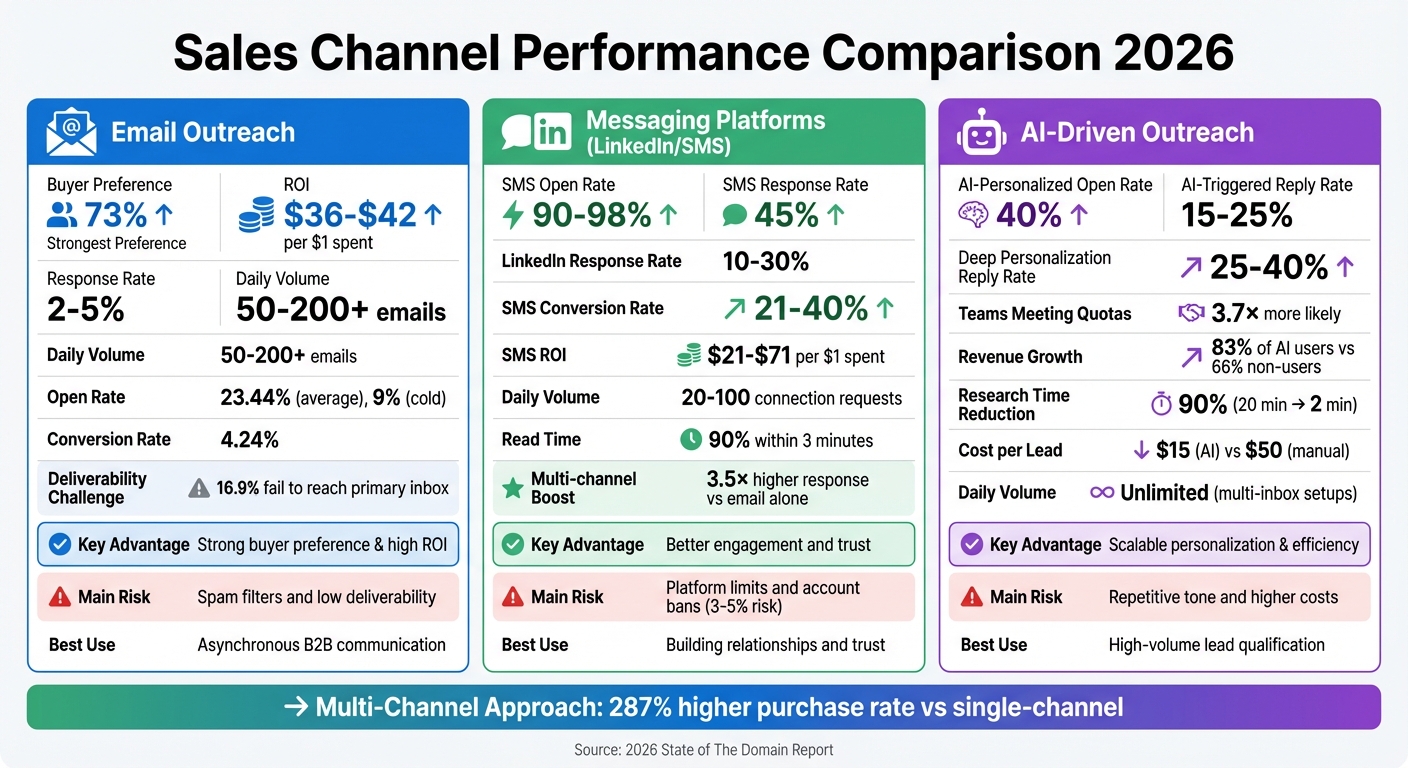
Email vs Messaging vs AI-Driven Outreach: Sales Channel Performance Comparison 2026

Email vs Messaging vs AI-Driven Outreach: Sales Channel Performance Comparison 2026

Every sales channel has its strengths and challenges. Email remains the go-to option for B2B outreach, with 73% of buyers favoring it. It delivers an impressive ROI of $36–$42 for every $1 spent and can scale to 50–200+ messages per mailbox daily. However, deliverability is a growing obstacle – 16.9% of cold emails fail to reach primary inboxes, and reply rates hover around 2.05%–2.09% as of 2026. Of those replies, only about 14.1% are positive. Compounding this issue is the overwhelming inbox traffic, with the average knowledge worker receiving 117 emails daily.

Messaging platforms like LinkedIn offer a different approach with higher engagement. When combined with email in a multi-channel strategy, response rates can be up to 3.5× higher. LinkedIn InMail alone sees response rates between 10% and 30%, thanks to its professional context and built-in social proof. However, scalability is limited – users can only send 20–100 daily connection requests – and using third-party automation tools carries a 3%–5% risk of account bans. Poorly targeted or irrelevant messages can also feel intrusive, reducing their effectiveness.

AI-driven outreach brings another dimension by enabling large-scale personalization. Sales teams using AI are 3.7× more likely to meet their quotas, as AI tools can research prospects, craft tailored messages, and even schedule meetings – all while cutting research time by up to 90%. But this approach has its downsides. Over-reliance on AI-generated templates can lead to repetitive, impersonal messaging that prospects quickly dismiss. Additionally, advanced AI tools require technical precision and come with higher costs, making them less accessible for smaller teams. As Nadeem Azam, Founder of Rep, aptly puts it:

“The tool doesn’t fix bad targeting. They won’t fix a weak offer. And they definitely can’t overcome the fundamental math problem: 95.9% of cold emails go unanswered.”

The most effective strategies often combine all three methods. Companies using three or more channels in their outreach see a 287% higher purchase rate compared to single-channel approaches. Here’s a breakdown of the pros and risks associated with each method:

Feature Email Outreach Messaging (LinkedIn/SMS) AI-Driven Outreach
Advantage Strong buyer preference & high ROI Better engagement and trust Scalable personalization & efficiency
Risk Spam filters and low deliverability Platform limits and account bans Repetitive tone and higher costs
Response Rate Around 2–5% Up to 3.5× higher than email High (with advanced AI)
Best Use Case Asynchronous B2B communication Building relationships and trust High-volume sales qualification
Daily Volume 50–200+ emails per mailbox 20–100 connection requests Unlimited (via multi-inbox setups)

A balanced, multi-channel approach that leverages email’s scale, messaging platforms’ trust-building potential, and AI’s efficiency is key to thriving in today’s competitive sales environment. By combining these methods, teams can sidestep the limitations of each individual channel and create a well-rounded strategy.

Conclusion

Email continues to be a cornerstone of B2B sales, with 73% of buyers favoring it over phone calls or social channels, and delivering an impressive ROI of $36–$42 for every dollar spent. The challenge isn’t about proving email’s effectiveness but ensuring your team uses it with the precision today’s buyers demand. This distinction highlights how a disciplined email strategy can far exceed the results of generic outreach.

A multi-channel approach enhances results dramatically, with a 287% higher purchase rate compared to single-channel efforts. Email offers the scalability and flexibility buyers appreciate, while messaging platforms add a personal touch, and AI takes care of repetitive tasks like research. As discussed earlier, email serves as the backbone of coordinated, multi-channel outreach, laying the groundwork for success when combined with other tactics.

To make email work in 2026, focus on relevance rather than surface-level personalization. Use buying signals like funding announcements, keep messages concise (50–125 words), and implement 4–7 touch sequences to significantly boost reply rates. Safeguard your deliverability by authenticating SPF, DKIM, and DMARC settings, and always use a dedicated domain for outreach. Speed also matters – responding to new leads within 5 minutes makes you 21× more likely to qualify the opportunity.

Teamgate CRM helps translate these strategies into actionable results. With built-in Gmail and Outlook integration, email templates, and workflow automations, every email connects to a deal stage and outlines the next step. Reps can send, track, and follow up directly within the CRM, while managers gain insights into activity patterns and deal progress – ensuring timely follow-ups and preserving context.

As SalesHive aptly states: “The inbox is still where work happens. If your buyers live there, your outbound motion has to be able to compete there”. With the right tools and a clear strategy, email can drive consistent, predictable revenue for your team.

FAQs

How do I keep cold emails out of spam in 2026?

To keep your emails out of spam folders, focus on two key areas: technical setup and sending practices. Start by ensuring your SPF, DKIM, and DMARC records are correctly configured and aligned. Additionally, warm up your domains gradually to establish a positive reputation with email providers.

On the content side, send personalized and targeted emails that resonate with your audience. Avoid spammy behaviors such as sending emails in bulk without segmentation or using trigger words that might flag your messages as spam. By maintaining strong email infrastructure and practicing good sending habits, you can improve your deliverability and increase the chances of landing in your recipient’s inbox.

When should I use email vs LinkedIn or SMS?

In 2026, the best communication method depends on who you’re reaching, the complexity of your message, and the situation. Email is perfect for detailed messages and large-scale campaigns, offering both personalization and reach. LinkedIn excels at building relationships with high-value prospects, thanks to its professional network and credibility. SMS shines when delivering urgent or time-sensitive updates. Combining these channels often works best, tailoring each to your audience’s preferences and the purpose of your message.

How can I use AI without sounding generic?

To make your email outreach stand out and avoid sounding generic, use AI to craft personalized, context-driven messages rather than relying on standard templates. Pay attention to real-time buyer signals, such as recent activity or specific interests, to guide your messaging. This approach can lead to higher response rates. Additionally, AI can help automate follow-ups by referencing details from actual conversations, making your emails feel more relevant and human. The goal is to use AI as a tool to amplify authentic personalization, not to churn out robotic or impersonal messages.

Related Blog Posts

If you’re picking an influencer marketing management platform in 2026, strong discovery capabilities won’t be enough – you need a proper operating system that does it all, from creator CRM to outreach, workflows, approvals, contracts, payments, measurement, and brand-safety controls, all while keeping your team out of the spreadsheet trenches. That’s the difference between an influencer platform you use every day and one you just employ from time to time.

Below are 10 picks that offer a good mix of enterprise-ready and eCommerce-friendly options; each one a solid influencer marketing management platform choice depending on your team size, channels, and the kind of reporting you need.

Influencer Marketing Management Platforms for 2026

In 2026, if you’re not getting end-to-end execution with your influencer marketing management platform — from finding creators to running campaigns and tracking performance — then you’re not really doing it right. And on top of that, most teams expect to be able to manage multi-channel creator programs, like paid, gifting, affiliate, whitelisting/boosting, all in one place. And they want the reporting to be solid enough for finance and leadership to trust, going beyond simple vanity metrics.

Some vendors want you to think that AI is the key component of an influencer marketing management platform, that it’s all about discovering and automating workflows. But speed is only part of the challenge. You still need full influencer marketing management platform functionality after you find the creators.

How We Picked the 10 Platforms

For us to consider an influencer marketing management platform as 2026-ready, it needed to cover execution from start to finish; not just the bits about finding creators. So our selection criteria were:

  • Workflow coverage: getting from campaign planning to outreach, collaboration, approvals, and reporting. That’s the core of any influencer marketing management platform.
  • Measurement that makes sense: dashboards, exportable reporting, attribution options, or at least some structured performance tracking.
  • Operational features: a creator CRM, contact history, list management, templates, and repeatable processes. These are all the things that make an influencer marketing management platform usable on a daily basis.
  • Payments and compliance support: not essential for every team, but a big differentiator for a proper influencer marketing management platform.
  • Integrations: ecommerce, email, analytics, and ad channels. Because if an influencer platform can’t hook up with the rest of your workflow, it’s back to manual work.

Where possible, the info below is straight from vendor pages, support docs, press releases, and structured feature listings.

What Management Platform Means

A discovery tool just helps you find creators, while a real influencer marketing management platform helps you run the program from start to finish.

Think of the difference like this:

  • Discovery tool: filters, search, influencer lists, and maybe some audience and fraud checks. Useful, but pretty limited.
  • Management platform: discovery plus all the pipeline stages, CRM, communication tracking, content approvals, contracts, payment workflows, and ongoing measurement.

For example, CreatorIQ positions itself as an all-in-one solution that ties everything together, from creator marketing workflows to multiple program types. And Modash talks about an end-to-end flow that includes finding creators, managing relationships, tracking performance, and paying them all in one place. That ‘after discovery’ layer is what makes an influencer marketing management platform worth paying for.

Quick Pick Guide (eCommerce, Enterprise, Self-Serve, Analytics-First)

Use this as a quick overview before you go deeper into each influencer marketing management platform’s features:

  • Ecommerce-first operations: GRIN, Aspire, Upfluence, Modash (they all have strong ecommerce positioning and practical program workflows).
  • Enterprise scale + governance: CreatorIQ, Captiv8, Traackr (these guys all have enterprise positioning, global program focus, and structured intelligence/reporting).
  • Social suite adjacency (if you already live there): Sprout Social’s Influencer Marketing product — is worth a look if the rest of your social workflow is already in Sprout.
  • Analytics / quality / fraud emphasis: HypeAuditor (they’re super focused on analytics and fraud detection in their materials).
  • Referral / advocacy-adjacent creator programs: Mention Me’s approach is worth a look if you want micro-influencers and advocacy-style programs all in one place.

No single influencer marketing management platform is best for everyone. The optimal one is the option that fits your workflow and reporting reality.

1) Mention Me (Referral/Advocacy-Adjacent)

Mention Me is probably best known for advocacy/referral, but its offering is pitched as a full-on influencer marketing management platform. An AI-first system, Mention Me is designed to scale micro-influencer programs.

Why it is a top influencer marketing management platform in 2026:

  • It’s useful if you’re into creator programs that are close to advocacy/referral. If your main goal is to find and manage a bunch of micro-influencers in a consistent way, then you’re in the right place.

If you’re looking to compare influencer platform options, think about whether you need strict control over all the creators in your network or the ability to easily work with lots of smaller creators. Mention Me leans more towards the latter.

2) Sprout Social Influencer Marketing

Sprout Social has an influencer marketing product that comes with a bunch of AI and automation features. It covers finding and qualifying, groupings and content approvals, paying out influencers and looking at results — all the things that teams typically want from an influencer marketing management platform.

Where this influencer platform really shines:

  • If your team is already using Sprout for publishing, engagement and analytics, and you just want to add influencer workflows into the same system.
  • If you need a pretty no-nonsense influencer marketing management platform that does exactly what you need it to do and shows you the results in a clear way.

3) CreatorIQ

CreatorIQ positions itself as an all-in-one creator marketing system that ties together paid, owned, earned, commerce, community and content. It also highlights how it makes it easy to see what you’ve paid out and what you’re getting back in terms of ROI, and it integrates with things like PayPal for payments in its product pages.

Choose this influencer platform if:

  • You’ve got a big influencer program to run, you need to be able to control who does what, and keep an eye on everything going on in the background.
  • You want measurement and payment systems that are properly set up and built-in, not just slapped together.

4) GRIN

GRIN is positioning itself as influencer marketing software that efficiently runs eCommerce campaigns, with built-in tools for payments and reporting. If you’re mainly looking to run campaigns like a team of pros, then this influencer platform is a great place to start.

Why it works as an influencer marketing management platform:

  • Payments and tracking of how much you’re spending are right up front where you can see them.
  • It’s got reporting and analytics built in properly, not just as an afterthought.

5) Traackr

Traackr sells itself as an AI-powered influencer marketing solution that covers discovery, campaign management and measurement. It also publishes its own guides on how to evaluate an influencer platform, and takes benchmarking and reporting seriously.

Choose this influencer platform when:

  • You want to be able to show your execs that you’re really measuring and tracking the success of your influencer marketing campaigns in a structured way.
  • You want an influencer marketing management platform that properly treats creator intelligence as a core part of its strategy, not just something you can see in a list of profiles.

6) Aspire

Aspire is a leading influencer marketing solution for ecommerce brands, with a focus on discovery (both bringing in new creators and finding the ones you need), and ROI measurement. Aspire also has a help centre that talks about how to customize your workflow stages. This is great if you want a bit more control over how things work.

Why this influencer marketing management platform is popular with smaller teams:

  • Being able to customize the workflow stages helps you standardize how your campaigns go (apply → approve → publish → pay).
  • Having all your communication with influencers in one place is a pretty big plus.

7) Upfluence

Upfluence is an influencer marketing solution for eCommerce brands, with a focus on integrations and automation to make it easy to work with store-led influencer programs. Its Integrations page shows how it connects with all sorts of other marketing tools that your team probably already uses. That’s a big plus if your influencer marketing management platform needs to fit in with the rest of your stack.

Choose this influencer platform if:

  • You’re running affiliate/promo-code campaigns and you need the influencer marketing management platform to play nice with your ecommerce system.

8) Captiv8

Captiv8 positions itself as an end-to-end influencer marketing solution, with a focus on scale (being able to cover a lot of different creators) and enterprise adoption (getting big clients on board). In a nutshell, it’s an advanced influencer marketing platform with AI and a social commerce suite.

Why this influencer platform might be a good choice for you in 2026:

  • It’s positioning itself as a complete influencer marketing solution, with a focus on social commerce.
  • If you care about getting support from the bigger ecosystem and aligning with big marketing agencies, then the acquisition context might be important (but you should check the roadmap and make sure it fits your needs).

9) Modash

Modash explicitly says that it’s an end-to-end influencer marketing solution for brands, which covers finding creators, managing relationships, tracking performance and paying out influencers all in one workflow. It also has robust discovery tools and filters.

Choose this influencer marketing management platform if:

  • You just want a self-serve influencer platform that feels like a proper CRM, especially for ecommerce and performance-based campaigns.
  • You need workflow cohesion (reach out → track → pay) without all the hassle of having to negotiate with an enterprise sales team.

10) HypeAuditor

HypeAuditor describes itself as an AI-powered influencer marketing solution that leans heavily on analytics and fair play detection. Its materials describe how its machine learning based fraud detection system uses lots of different patterns, and they sell this as a critical safety feature for figuring out if a particular creator is any good.

Why this influencer platform keeps getting shortlisted:

  • HypeAuditor’s focus on detection and quality analysis is basically what you need from an influencer marketing management platform
  • It comes in handy for teams who want to have confidence in whether or not their audience is real and whether their campaigns are actually working inside the influencer platform workflow.

Comparison checklist (Workflows, Payments, Measurement, Brand Safety)

Use this checklist to compare any influencer marketing management platform in a way that procurement and leadership will accept:

  • Workflows
    • Custom stages (first you get a brief, then it’s approved, live, and finally you get to do some reporting)
    • Communication history (you can log emails and DM’s or at the very least keep some notes)
    • Asset/UGC usage rights tracking
  • Payments
    • Doing your payouts in batches
    • Tracking
    • Compliance support (getting tax forms sorted, invoicing right, permissions in place)
  • Measurement
    • Campaign dashboards plus the ability to export to something useful (CSV or PPT)
    • Attribution options (links, promo codes, pixel/UTM or affiliate reporting)
    • Benchmarks (campaign comparison)
  • Brand safety
    • Checking on audience authenticity / fraud
    • Figuring out if/how a brand is affiliated with anything
    • Whitelisting/boosting controls

If an influencer platform doesn’t cover these basic requirements, then it’s probably not a full influencer marketing management platform — even if it has some cool discovery features.

Common Mistakes When Picking a Platform (and How to Avoid Making Them)

  1. Buying discovery when what you really need is operations
    If you’re already getting a bunch of creators coming to you, then discovery isn’t the problem. You need a workflow-centric influencer marketing management platform, not some big database platform.
  2. Putting off considering measurement requirements until leadership asks you
    Decide up front what success actually means to you (is it revenue, cost per customer, retention, brand lift, or content efficiency?) Then pick the influencer platform that actually gives you the tools to report on that
  3. Underestimating how complex your payments are going to be
    You might think “we only pay 20 creators” so payments seem easy. But when you scale up to 200 creators in different markets, you’ll see just how tricky it can get. If you’re planning on scaling up, then payments are a non-negotiable core feature of any influencer marketing management platform
  4. Not testing integrations early on
    If an influencer platform doesn’t connect with ecommerce/email/analytics, then you’re just going to end up with some manual reconciliation project.

FAQ

Do I need an influencer marketing management platform if I only run gifting?
If you’re doing some gifting on a tiny scale then maybe not; but the moment you start to need consistent tracking, content usage rights or reporting then a lightweight influencer platform with CRM + workflow stages starts to pay for itself.

What’s the biggest difference between an enterprise influencer platform and a self-serve one?
Enterprise tools typically emphasise governance (roles, permissions, auditability), global program support and executive reporting. Self-serve options tend to win on speed, simplicity and lower operational overhead, which is great for a practical influencer marketing management platform setup.

Can I avoid platform payments altogether and still hit 2026 measurement expectations?
Sometimes. If your finance ops are super simple and you’re really on top of things. But a lot of teams end up wanting payments inside the influencer marketing management platform to avoid mismatched spend.

In 2026, scheduling inefficiencies are still costing sales teams time and deals. Missed meetings, manual CRM updates, and disorganized workflows lead to lost revenue and wasted effort, often requiring better sales management tools to stay on track. Tools like Cal.com and its integration with Teamgate CRM solve these problems by automating scheduling, syncing data directly into your pipeline, and eliminating repetitive tasks.

  • Cal.com offers flexible scheduling with features like round-robin assignments, reminders, and custom branding.
  • Teamgate/Cal.com integration streamlines the sales process by syncing meeting details, automating follow-ups, and improving team alignment.

If your team struggles with CRM updates or scheduling delays, Teamgate gives you structure, clarity, and actionable insights – without overcomplicating your workflow.

Best Scheduling Software 2026? Calendly vs Cal.com vs TidyCal vs SavvyCal vs Chili Piper

Calendly

1. Cal.com

Cal.com is more than just a booking tool – it’s a scheduling infrastructure solution designed to offer flexibility and customization. Built on an open-source foundation, it allows sales teams to tailor their scheduling sales process to meet specific needs. Supporting over 40 languages and adhering to HIPAA and SOC 2 Type II standards, it’s especially well-suited for industries like healthcare and finance that require strict compliance.

Customizability

Cal.com’s modular design allows for highly personalized scheduling. Teams can create custom routing forms to gather key information – such as company size or product interest – and automatically assign leads to the appropriate sales representative based on their responses. For businesses requiring full control, a self-hosted option with complete code access is available.

The platform also supports white-labeling, removing Cal.com branding from booking pages to maintain a consistent brand experience. Additionally, it can be embedded directly into CRM records via iframes, enabling reps to schedule meetings without leaving their workflow. Booking forms prefill automatically with CRM data like names, email addresses, and company details, streamlining the process for prospects.

Sales Workflow Automation

Automation is a key feature of Cal.com. With round-robin scheduling, leads are distributed fairly across the sales team, based on factors like priority or availability. For team-based meetings, collective events allow prospects to book with multiple members simultaneously.

Meeting reminders and follow-ups are handled automatically, reducing no-shows without requiring manual effort. For high-value demos, the opt-in feature lets teams manually approve bookings to avoid unnecessary clutter on the calendar. Webhooks and API integrations ensure that lead statuses are updated in your CRM instantly when a booking is confirmed.

Pipeline Integration

Cal.com seamlessly integrates with your sales pipeline through CRM apps, Zapier, and webhooks. This creates a "zero-friction pipeline", embedding scheduling directly into the lead’s journey rather than treating it as a separate task. Booking data, contact details, and meeting notes sync automatically with your CRM, eliminating the need for manual updates and ensuring no details are overlooked.

Scalability

Cal.com is built to grow alongside your business. Features like managed event types allow administrators to centrally control booking settings for the entire team. Even the free plan includes unlimited event types and workflows. Paid team plans start at $15 per user per month, unlocking advanced options like round-robin scheduling and routing forms. Enterprise plans offer custom pricing, 24/7 support, and enhanced security features.

"Cal.com isn’t just a booking solution; it’s an entire calendar scheduling infrastructure product." – Assantewa Heubi, Cal.com

With its robust set of features and seamless CRM integration, Cal.com simplifies scheduling and enhances the sales process, making it a powerful tool for growing teams.

2. Teamgate/Cal.com Integration

This integration brings Cal.com’s scheduling power directly into Teamgate CRM, making scheduling an integral part of your sales process. By connecting the two platforms, booking meetings and managing relationships become a seamless experience, reducing the usual friction between these tasks.

Pipeline Integration

Teamgate’s integration with Cal.com introduces a "zero-data-entry workflow." When a prospect schedules a meeting through Cal.com, their contact details, deal information, and meeting notes are automatically synced into Teamgate’s pipeline. This eliminates the need for manual input, giving sales reps a complete timeline of interactions for better context before every call.

Smart team routing further enhances this process by automatically assigning bookings to the most suitable team member based on predefined rules. This ensures leads are directed to the right rep without requiring manual intervention, streamlining the path to conversion.

Sales Workflow Automation

The integration also automates key parts of the sales workflow. For example, when a call is booked, the system can immediately create a deal, add the contact, and schedule follow-ups. After the meeting, workflows can trigger automated post-call emails with resources or next steps, keeping the momentum alive while interest is still fresh.

To reduce no-shows, multi-channel reminders – sent via email, SMS, or WhatsApp – are deployed 24 hours before scheduled events. This approach has reportedly improved attendance rates, with 93% of users seeing better results. Companies like Packagecloud have leveraged Teamgate’s sales insights to refine lead qualification, achieving an 18% increase in engagement rates.

"Integrated CRM solutions make the working life of sales managers and sales team more streamlined, and more productive." – Teamgate

Scalability

This integration grows alongside your team. Teamgate’s Professional Plan provides core API access and supports integrations through platforms like Zapier and Make.com, while the Enterprise Plan unlocks full access to all native integrations. On the other side, Cal.com’s developer-friendly API allows larger organizations to configure workflows and routing rules programmatically, accommodating both individual and group events with ease.

Advantages and Disadvantages

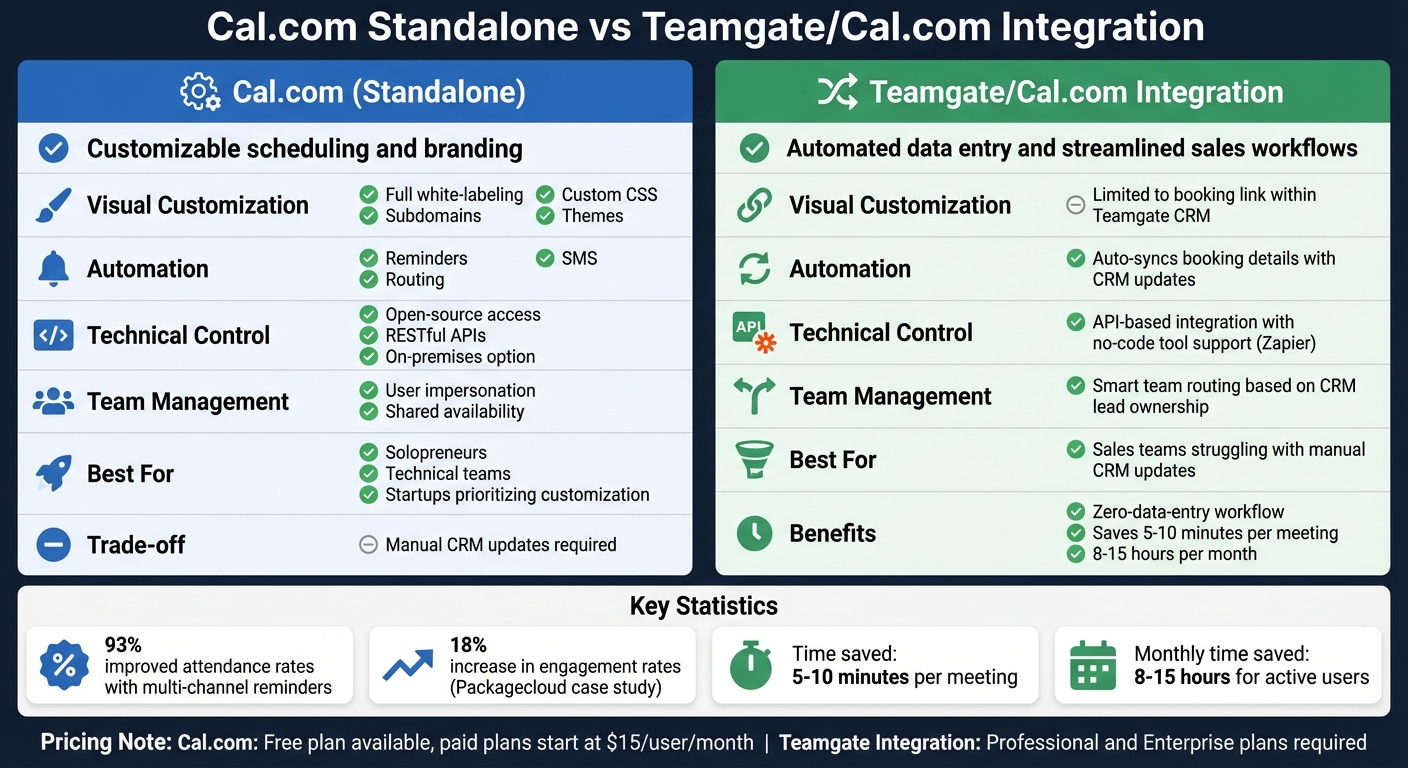
Cal.com Standalone vs Teamgate Integration Comparison

Cal.com Standalone vs Teamgate Integration Comparison

Cal.com and the Teamgate/Cal.com integration both tackle scheduling issues but cater to different needs. Picking the right option depends on how your sales team operates and where you face the most friction. Here’s a closer look at how they compare.

Cal.com is ideal if you prioritize branding and technical customization. It offers robust white-labeling options, allowing you to tailor the platform to match your brand identity, and even provides access to its source code. For businesses with strict data security policies, an on-premises deployment option is available. However, using Cal.com independently means your team will need to manually update the CRM, which can add to their administrative workload.

On the other hand, the Teamgate/Cal.com integration simplifies workflows by automating CRM updates. Once a meeting is scheduled, contacts, deals, and notes are synced directly into Teamgate, creating a seamless "zero-data-entry" system. Features like intelligent lead routing and follow-up automation save time and improve efficiency. However, this integration offers less flexibility in customizing the booking link’s appearance compared to Cal.com’s standalone platform.

Here’s a side-by-side comparison to clarify these differences:

Feature Cal.com (Standalone) Teamgate/Cal.com Integration
Primary Focus Customizable scheduling and branding Automated data entry and streamlined sales workflows
Visual Customization Full white-labeling, custom CSS, subdomains, and themes Limited to the booking link within Teamgate CRM
Automation Includes reminders, SMS, and routing Automatically syncs booking details with CRM updates
Technical Control Open-source access, RESTful APIs, on-premises option API-based integration with no-code tool support (e.g., Zapier)
Team Management User impersonation and shared availability Smart team routing based on CRM lead ownership

The decision boils down to your team’s biggest challenges. If you’re dealing with inefficiencies from manual CRM updates or disorganized data, the integration can deliver quick, impactful results. On the other hand, if a polished, highly customizable scheduling experience aligns more with your goals – and you’re ready to handle CRM updates separately – Cal.com’s standalone version offers unmatched flexibility. Choose the option that best aligns with your workflow and sales priorities.

Conclusion

The best choice ultimately hinges on your team’s specific needs. For solopreneurs, technical teams requiring self-hosting, or startups prioritizing customization over a full-scale CRM, Cal.com’s standalone solution fits the bill. Its free plan includes unlimited event types, full branding control, API access, and the option for self-hosting to maintain data sovereignty.

On the other hand, if your sales team struggles with time-consuming CRM updates, the Teamgate/Cal.com integration is a game-changer. As Teamgate explains: "Connect Teamgate with Cal.com to automate scheduling and CRM updates… all from one streamlined, zero-data-entry workflow". This integration syncs contacts, deals, and meeting details automatically, saving users 5–10 minutes per meeting and up to 8–15 hours per month for active users.

While individuals and small teams benefit from Cal.com’s free tier, larger teams managing centralized lead activity gain the most from the integration’s time-saving automation.

FAQs

How hard is it to set up Cal.com with Teamgate?

Setting up Cal.com with Teamgate is simple and efficient, designed to streamline your workflow. Start by installing the Cal.com app within Teamgate, then configure it to automatically sync your contacts, deals, and meetings. With user-friendly, low-code options and clear documentation, the process is accessible even if you’re not a tech expert.

What info gets synced into Teamgate after a booking?

After a booking is made, Teamgate automatically updates the CRM with crucial details like contact information, meeting or appointment specifics, and any associated deal or lead updates. This keeps your scheduling activities aligned with the CRM, making follow-ups smoother and tracking more efficient.

Can we control lead routing and round-robin rules?

Yes, with Cal.com’s tools, you can handle lead routing and round-robin assignments seamlessly. You can create custom rules, define specific attributes, and set up workflows to automatically direct leads to the appropriate team members or sales reps instantly. This helps streamline lead distribution and aligns perfectly with your sales process for better efficiency and accuracy.

Related Blog Posts

When your CRM and marketing automation tools aren’t connected, leads slip through cracks, sales teams lack context, and marketing wastes resources on closed deals. Syncing key data between these systems creates a single source of truth, helping sales respond faster and marketing focus on what works. Studies show businesses that automate lead management see a 10% revenue boost within 6–9 months, while responding to leads within 5 minutes makes teams 100x more likely to convert.

Here’s what to sync for better alignment and results:

  • Contact Details: Ensure names, emails, phone numbers, and job titles match across systems to avoid duplicates and missed opportunities.
  • Lead Status & Scores: Sync lifecycle stages (e.g., MQL, SQL) and scores to prioritize high-value leads and trigger follow-ups.
  • Engagement Data: Share email opens, clicks, and form submissions so sales has context for personalized outreach.
  • Deal Information: Keep deal stages, values, and close dates updated for accurate sales forecasting and campaign ROI tracking.
  • Campaign Metrics: Sync UTM parameters and lead sources to track marketing’s impact on revenue.

Teamgate helps growing sales teams achieve clarity and structure without overwhelming them with unnecessary features. By syncing the right data, you’ll avoid outdated records, duplicate entries, and slow follow-ups that cost revenue. Clean data and a well-planned sync strategy ensure your pipeline reflects reality, so every team can rely on it.

SuiteCRM & Mautic Integration Tutorial | How to Sync Your CRM & Marketing Automation

Key Data Points to Sync Between CRM and Marketing Automation

Not every piece of data needs to sync between your CRM and marketing automation tools. The key is to focus on syncing the information that keeps your pipeline accurate, equips your sales reps with the right insights, and ensures consistent follow-ups. Here’s what matters most:

Contact and Lead Information

Syncing essential details like names, email addresses, phone numbers, job titles, and company names ensures your team can identify leads accurately and avoid duplicate records. Including firmographic data – such as industry, company size, and headquarters location – helps prioritize accounts that align with your ideal customer profile (ICP). Without this synchronization, incomplete records can lead to missed opportunities and wasted time.

Once the basics are in place, syncing lead statuses further sharpens the sales process.

Lead Status and Scoring

Syncing lead scores, qualification statuses, and lifecycle stages (e.g., MQL, SQL, or "Nurture") ensures no lead falls through the cracks. For instance, when a lead hits a scoring threshold or is tagged as an MQL in your marketing platform, that update should automatically reflect in your CRM. This update can assign the lead to a rep and even create a follow-up task. By connecting lead scoring and lifecycle stages between systems, you can improve SQL generation and reduce costs.

Activities and Engagement History

Your sales team needs visibility into how prospects are engaging. Syncing data like email opens, clicks, form submissions, webinar attendance, and page views (especially on high-interest pages like pricing or product details) gives reps the context they need for personalized outreach. When this engagement data is integrated into your CRM, it can trigger real-time alerts for key actions, turning cold calls into informed, relevant conversations.

Deal and Opportunity Data

Keeping deal data updated is just as important as syncing leads. Syncing deal stages, values, and close dates ensures your pipeline reflects reality. For marketing teams, knowing when deals close helps shift their focus from nurturing leads to measuring ROI. For sales teams, accurate stage data supports better forecasting. For example, moving a deal to "Proposal Sent" could trigger the delivery of tailored content like case studies or ROI calculators to help close the deal. Companies with integrated CRM and marketing systems report 42% shorter sales cycles and 28% higher close rates.

Campaign and Marketing Metrics

To round out the picture, syncing campaign-related details like UTM parameters, lead source, and campaign IDs is essential. This data reveals where leads are coming from and which messaging resonates most. By creating custom fields in your CRM (e.g., UTM_Source__c or Campaign_ID__c) to capture information from marketing forms, sales reps can tailor their approach based on the prospect’s interests. This targeted strategy can shorten sales cycles and increase conversions.

Integrating these metrics into Teamgate CRM gives your team immediate access to actionable insights, helping you refine your processes and improve outcomes.

Sync Directions and Methods: Choosing the Right Approach

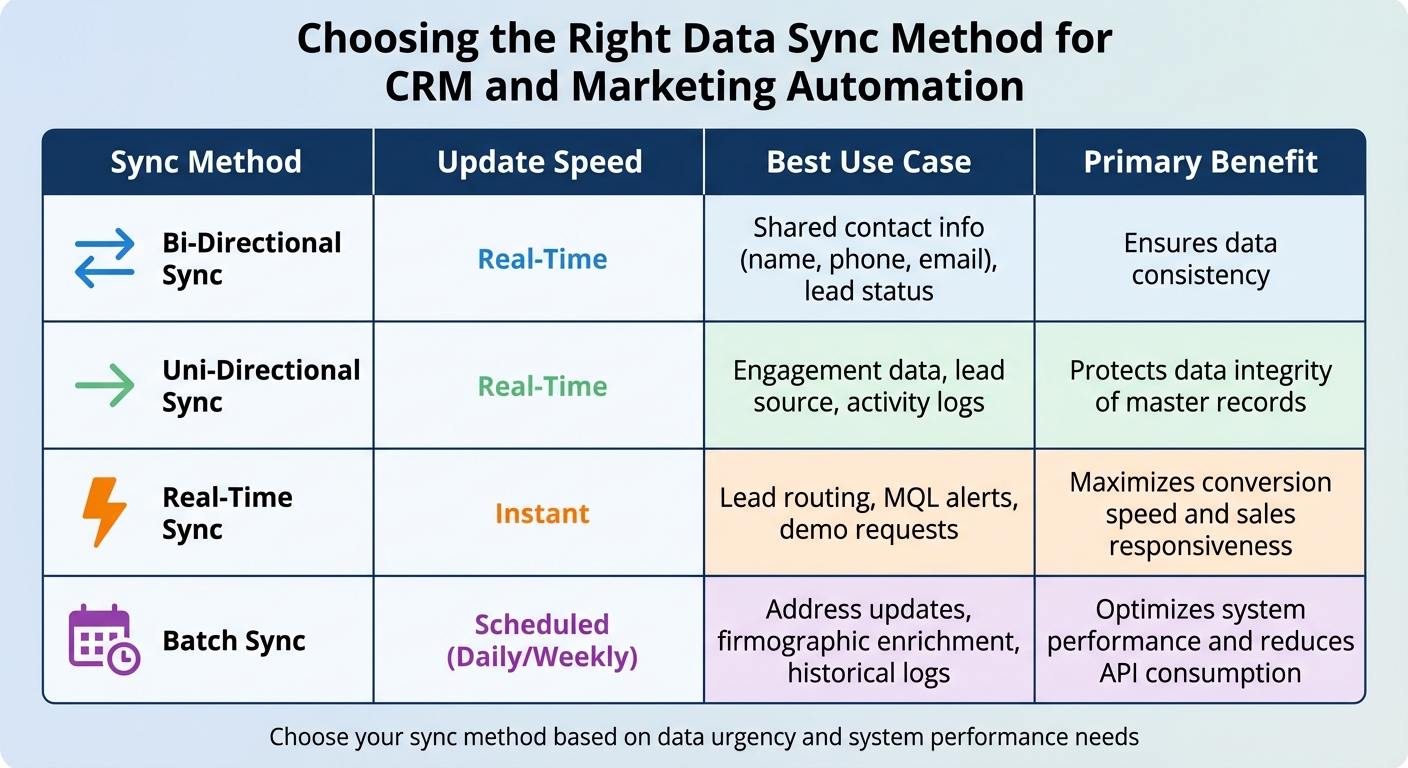
CRM and Marketing Automation Data Sync Methods Comparison

CRM and Marketing Automation Data Sync Methods Comparison

Keeping your pipeline accurate and up to date requires selecting the right sync direction and timing. These choices directly affect how well your sales and marketing teams stay aligned and how much time you spend fixing sync issues.

Bi-Directional vs. Uni-Directional Sync

Bi-directional sync allows data to flow both ways. For instance, when you update a contact’s phone number in your CRM, it automatically reflects in your marketing automation platform, and vice versa. This setup is ideal for shared fields like contact information and lead statuses. For example, if marketing updates a lead’s lifecycle stage to "MQL", that status should immediately sync to the CRM, prompting sales to take action. This seamless flow ensures your pipeline remains accurate and actionable.

Uni-directional sync, on the other hand, moves data in one direction only. This setup is best when you want to protect certain data or provide "read-only" access. For example, syncing engagement data – like email opens or webinar attendance – to your CRM gives sales valuable insights without risking accidental edits that could overwrite marketing data.

"A successful CRM and marketing automation integration is 90% strategy and only 10% technology." – MarTech Do

The cornerstone of an effective sync strategy is defining a source of truth for each field. Typically, your CRM should manage sales-related data, like account details and opportunity stages, while your marketing platform handles behavioral data, such as email clicks or website visits. Without clear ownership, you risk endless data overwrites, API overuse, and corrupted records.

Batch vs. Real-Time Updates

Real-time sync processes updates instantly, making it essential for time-sensitive actions like lead routing, demo requests, or MQL alerts. For example, when a prospect visits your pricing page or downloads a key resource, your sales team needs to act immediately to capitalize on the opportunity.

Batch sync, however, updates data at scheduled intervals – whether daily, weekly, or hourly. This method is ideal for non-urgent data, such as address updates, firmographic enrichment, or historical engagement logs. It reduces system strain and is perfect for handling large volumes of data. For instance, updating a contact’s industry classification doesn’t need to happen in real time but should be accurate when reviewed during a sales call.

In 2024, Instructure successfully integrated Marketo, Salesforce, Cvent, and ON24 using an iPaaS platform. By syncing webinar engagement data with Salesforce and triggering real-time sales alerts, they achieved 50% faster lead follow-up and enriched lead profiles with over 100 data points.

Comparison Table of Sync Types

Sync Method Update Speed Best Use Case Primary Benefit
Bi-Directional Real-Time Shared contact info (name, phone, email), lead status Ensures data consistency
Uni-Directional Real-Time Engagement data, lead source, activity logs Protects data integrity of master records
Real-Time Instant Lead routing, MQL alerts, demo requests Maximizes conversion speed and sales responsiveness
Batch Scheduled (Daily/Weekly) Address updates, firmographic enrichment, historical logs Optimizes system performance and reduces API consumption

Tips for Effective Sync Configuration

When setting up your sync in Teamgate CRM, consider using inclusion lists to filter which records sync. For instance, you might configure your system to sync only leads with a score of 100 or higher, ensuring your pipeline remains focused on qualified prospects. This approach prevents unnecessary clutter and keeps your team zeroed in on sales-ready opportunities. Proper configuration, such as inclusion lists, lays the groundwork for tackling common sync challenges later on.

Best Practices for Accurate Data Syncing

Setting up data sync correctly is not just about convenience – it’s essential for avoiding costly errors. Studies show that between 10% and 25% of B2B marketing database contacts have critical inaccuracies, and poor-quality data costs businesses an average of $12.9 million annually. A well-executed sync strategy ensures your systems work together seamlessly and keeps your data reliable.

Data Mapping and Field Alignment

Start by bringing together a team from Marketing, Sales, and IT to decide on a single source of truth for every data field. Clearly document which system is the master for each type of data. For instance, your CRM typically manages firmographic and sales information – like account details, contact data, and opportunity stages – while your marketing automation platform handles engagement metrics, such as email clicks and website visits.

Consistency is key. Standardize field values across systems. For example, if one platform uses "USA" and another uses "United States", you’ll risk creating duplicates and skewed reporting. To track marketing performance effectively, map custom fields like UTM parameters (Source, Medium, Campaign) from your marketing platform to your CRM. This allows you to link marketing spend directly to revenue.

A great example of this is Glassdoor’s 2024 integration of Marketo, Salesforce, and Bizible. By aligning their data and improving lead scoring techniques through precise field mapping, they boosted SQLs by 50% and cut their cost-per-MQL by 30%.

Deduplication and Data Cleanup

Before enabling sync, clean up your data. Deduplication is crucial and should be done within each platform using either built-in tools or third-party solutions. Use unique identifiers, such as email addresses or CRM IDs, to match records across systems. For accounts, employ advanced matching logic that combines domain and company names to catch duplicates that simpler checks might miss.

Define clear rules for merging duplicates. For instance, you might merge into the oldest record to preserve historical context or prioritize the record with the most recent activity. Add notes to surviving records to maintain a full history of interactions, such as multiple outreach attempts. Schedule weekly manual reviews to catch duplicates that automated processes might overlook.

"Duplicates are the silent killers of an integration. They compromise data integrity and erode your team’s trust in the systems." – MarTech Do

Once your data is clean and duplicates are removed, you can confidently validate your sync setup.

Real-Time Sync Setup and Validation

After ensuring data integrity, focus on setting up and validating real-time sync. Before enabling it, audit user permissions and establish field-level authority to avoid conflicts. This helps prevent scenarios where, for example, a marketing list import overwrites a sales rep’s recent notes.

Test real-world scenarios with user acceptance testing (UAT). Have team members simulate updates like changing a phone number, triggering an MQL handoff, or confirming that an "Unsubscribe" action in the marketing platform is reflected in the CRM. Regularly review sync logs and error reports – monthly reviews can help you catch and resolve mismatches or permission changes before they become bigger problems.

In 2024, Instructure successfully integrated Marketo, Salesforce, Cvent, and ON24 using an iPaaS. By validating their sync setup and capturing webinar engagement data directly in Salesforce, they reduced lead follow-up time by 50% and enriched lead profiles with over 100 data points. Achieving this level of accuracy starts with thorough validation from the beginning.

Common Data Syncing Problems and How to Fix Them

When it comes to integrating data, even the best systems can run into issues. The difference between a minor inconvenience and a major disruption often depends on how quickly you can identify and address these challenges. Below are some of the most common data syncing problems teams encounter, along with practical steps to resolve them.

Handling Duplicate Records

Duplicate records often occur when data from multiple channels isn’t properly matched. For example, a lead might download an eBook (tracked by your marketing platform) and later call a sales rep (manually entered into the CRM), creating two separate records. Manual data entry and inconsistent formatting, such as "USA" versus "U.S.A.", further complicate matching.

To tackle duplicates:

  • Audit your systems: Before syncing, identify and merge duplicates using a unique identifier like an email address.
  • Standardize fields: Use picklists instead of free-text fields for critical data points like Country, State, and Industry to ensure consistency.
  • Sync rules: Configure your integration to check for existing records before creating new ones.
  • Automated maintenance: Schedule regular tasks to catch duplicates that slip through. For example, review and merge duplicates weekly, keeping the oldest record to retain historical data. Add notes to merged records to provide context, such as noting multiple touchpoints.

Once duplicates are under control, maintaining up-to-date and consistent data becomes the next priority.

Outdated or Inconsistent Data

Stale or inconsistent data can lead to confusion and poor decisions. For example, if your CRM uses "United States" while your marketing platform lists "USA", reporting may break down, leaving teams with incomplete information.

To avoid this:

  • Define a system of record: Assign one platform as the source of truth for specific data types. For example:
    • CRM: Firmographic and sales data (e.g., account details, contact info, opportunity stages)
    • Marketing automation: Behavioral data (e.g., email clicks, website visits)
  • Document processes: Clearly outline and share these guidelines across teams to ensure everyone is aligned.
  • Enrich and validate data: Use data enrichment tools to fill in missing information and enforce validation rules at data entry to avoid errors.
  • Monitor sync logs: Regularly review logs to identify and fix issues before they escalate.

Field-Level Conflicts and Authority Rules

Conflicts can arise when two systems try to update the same field simultaneously, creating a "tug-of-war." For instance, a marketing list import might overwrite recent notes added by a sales rep.

"Duplicates are the silent killers of an integration. They compromise data integrity and erode your team’s trust in the systems." – MarTech Do

To prevent these conflicts:

  • Set field-level directionality: Decide which fields should sync in one direction (e.g., phone numbers from CRM to marketing platform) and which require bidirectional syncing (e.g., lead status).
  • Prioritize manual updates: Always give precedence to manual edits by sales reps over automated updates from campaigns.
  • Use inclusion lists: Limit syncs to qualified, sales-ready records to keep the CRM pipeline clean and focused on actionable opportunities.

Here’s a quick guide to managing data authority:

Data Category Recommended Master Reason
Firmographic Data CRM Sales reps maintain the most accurate details
Engagement Data Marketing Automation Originates from marketing activities
Opportunity Data CRM Critical for tracking pipeline and revenue
Lead Scoring and Prioritization Marketing Automation

Conclusion

Synchronizing key data between your CRM and marketing automation tools is essential for protecting and growing revenue. By connecting contact details, lead scoring, engagement history, deal information, and campaign metrics, you close the gaps that can cause opportunities to stall. This integration equips sales, marketing, and leadership teams with actionable insights that drive better decisions.

Once you’ve identified the important data points, it’s just as crucial to align your syncing strategy. The how is just as important as the what. Use bidirectional syncing and inclusion lists to maintain data accuracy and relevance. Real-time updates allow sales teams to respond within the critical five-minute window – companies that do this are 100 times more likely to connect with and convert leads. However, speed alone isn’t enough. Standardized fields, routine deduplication, and clear authority rules ensure your data remains clean and trustworthy.

"Integration is not a ‘nice-to-have.’ It is essential for any B2B company aiming to transition from reactive tactics to a proactive, predictable growth model." – MarTech Do

The results speak for themselves. Businesses that automate lead nurturing experience a revenue boost of 10% or more within six to nine months, with an average return of $5.44 for every dollar spent. Beyond the numbers, syncing data effectively prevents opportunities from going cold, enables timely follow-ups, and optimizes marketing efforts.

To get started, conduct a pre-sync audit to clean up your existing data, map out your customer journey to determine where data should flow, and regularly monitor sync logs to identify and address any issues early. With a comprehensive solution like Teamgate CRM, your systems can integrate seamlessly. Teamgate helps sales teams follow a clear and disciplined process while providing managers with reliable insights – turning your pipeline into a powerful revenue engine.

FAQs

Which fields should be the source of truth in each system?

For a reliable source of truth, focus on key fields such as contacts, leads, activities, and campaign metrics. Your CRM should serve as the central hub for customer and deal information, while marketing automation tools handle engagement data, behavioral patterns, and campaign responses. This division of responsibilities ensures accurate data and keeps both systems aligned effectively.

What data should NOT be synced between CRM and marketing automation?

Make sure to avoid syncing duplicate records, outdated or incomplete information, or system-specific elements like custom objects or system-generated fields. These issues can lead to sync errors or inconsistencies in your data. By keeping your records accurate and relevant, you’ll achieve smoother integrations and more dependable outcomes.

How often should data sync run (real-time vs batch)?

The frequency of syncing data between your CRM and marketing automation tools hinges on your organization’s priorities and how the systems are configured.

  • Real-time sync keeps data updated continuously, which is great for timely follow-ups and maintaining accurate insights. However, it often demands more system resources.
  • Batch sync (e.g., daily or weekly) is less resource-intensive and lowers system strain, making it a better fit for tasks that aren’t as time-sensitive.

The right choice depends on how quickly you need updates and what your systems can handle efficiently.

Related Blog Posts