Get a free sales audit to uncover hidden revenue opportunities!

Small businesses can’t survive if they don’t nurture their customer relationships. But as your small business continues to grow, it may become difficult to maintain high standards while managing contacts and providing a tailored experience to each customer.

If this is a struggle you’re currently going through, it may be time to invest in customer relationship management (CRM) software. Whilst certain industries have specialized CRM solutions tailored to their unique needs such as Real Estate CRM, Finance CRM, Loan Management CRM, and more. In this guide, we dive into our best rated CRM software picks for small businesses, including their key features, so you can make the best choice.

Key Takeaways:

  • CRM tools are an important part of maintaining consistent and tailored communication with both prospective and current customers, regardless of your business size.
  • Small businesses may not need all of the bells and whistles that come with enterprise CRMs, but they should never sacrifice quality in these key areas: general ease of use, availability of customer support, contact and data management, and basic reporting.
  • If your business has a key focus area, there’s a good chance a CRM solution has built-in templates or features to meet your requirements. For example, if your organization is most focused on sales and building out sales pipelines, Teamgate, Pipedrive, and Freshsales are some of the best sales CRM solutions on the market.
  • CRM solutions can get expensive, but many vendors offer affordable versions of their enterprise software or sell purpose-built customer relationship management tools for small businesses.
  • Don’t shy away from the big CRM names for fear of the price tag. Some of the biggest CRMs, including HubSpot, offer free and limited versions of their software for small business use.


Why have a CRM for a Small Businesses?

Customer relationship management (CRM) systems help small businesses streamline how they manage customer data, sales pipelines, team collaboration, and customer communication—whether through email, phone, or chat. Think of it as the digital command center for your relationships.

But great CRMs don’t stop at contact management. The best options provide built-in analytics, reporting, and automation tools—empowering your team to work smarter, not harder.

How to Evaluate CRM for Small Businesses

When selecting the right CRM solution for your small business, here are a few key factors to consider in your evaluation.

Affordability

Most Small businesses can’t afford enterprise-tier software (ie Salesforce). Look for vendors offering affordable entry plans (under $15/user/month) or free versions with upgrade options.

Consider your budget before you start your search. Be sure to also consider which features you need and what you can do without. Streamlining features may lower the cost of your CRM.

Ease of Use

A steep learning curve kills adoption. Prioritize intuitive user interfaces, helpful documentation, and live onboarding support to maximize ROI.

Scalability

Don’t box yourself in. Choose CRMs with tiered pricing, custom fields, and third-party integrations that can grow with your business.


🏆 Top 10 Small Business CRMs (2025 Edition)

Teamgate CRM – Best for Small/Full-Cycle Sales Teams
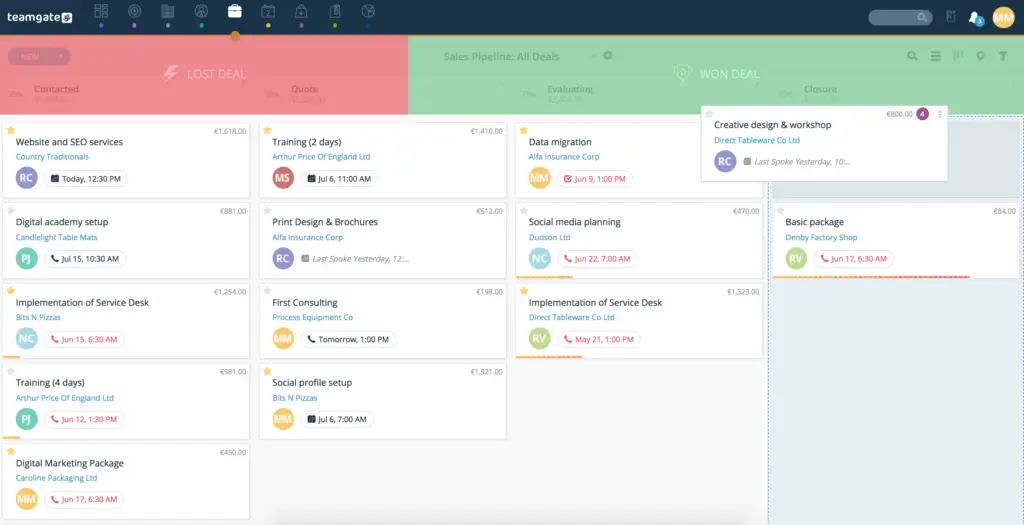
screenshot of Teamgate crm deals pipeline
via Teamgate

Teamgate CRM Rating

4.6/5 (G2)

4.8/5 (Capterra)

In addition to the above reviews, Teamgate CRM was the recent recipient of Capterra’s best value-for-money CRM of 2024!

Teamgate CRM Key Features

Teamgate CRM is one of the best small business CRMs, offering extensive sales features without compromising on ease of use or reasonable pricing. The platform differentiates itself with a user-friendly interface, intelligent lead scoring, advanced filters, relevant third-party integrations, and award-winning customer support.

Another standout feature is Teamgate’s configurability. Small businesses can configure workflows to fit their needs without the need for costly and cumbersome customization. Whether you’re an expert in using CRM software or a beginner, Teamgate was built for you.

Freshsales – Best for AI powered Workflows
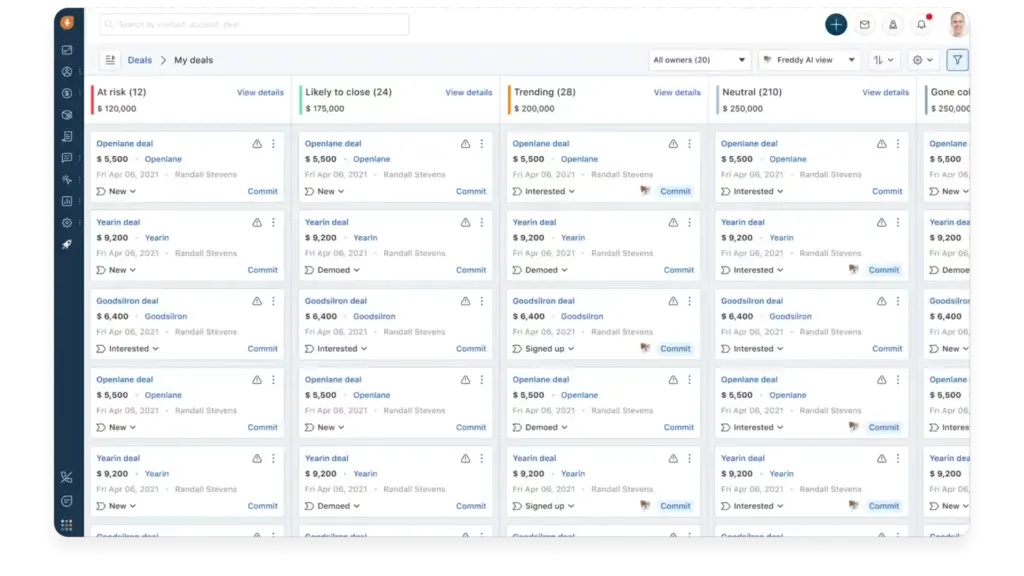
screenshot of freshsales crm software
via Freshsales

Freshsales Rating

4.5/5 (G2)

Freshsales Key Features

  • Table, Kanban, and Activity view options
  • Email, chat, messenger, Zoom, SMS integration, and phone communication options
  • Automated workflows and sales sequences
  • Deal management with customizable pipelines
  • AI-driven sales intelligence
  • Layout, lifecycle, and sales activity customization
  • Role-based access
  • API and marketplace integrations
  • Auto-profile enrichment
  • Pre-built and custom reports and dashboards

Freshsales is a great small business CRM solution from Freshworks. The product includes several sales-specific CRM features, but it stands out most in the areas of sales intelligence, administrative governance capabilities, and multiple communication channels.

Freshsales offers intelligent workflow capabilities that enable you to assign leads, update fields, create reminders, and other tasks automatically. This means you can spend less time doing manual tasks and more time growing your business.

Pipedrive – Best Visual Pipeline CRM
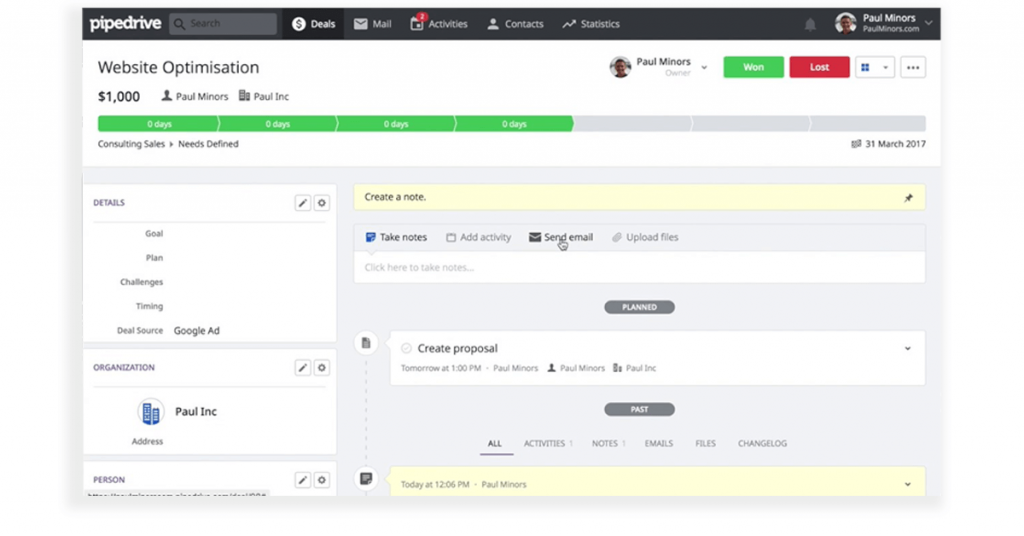
pipedrive UI
via Pipedrive

Pipedrive Rating

4.2/5 (G2)

Pipedrive Key Features

  • Customizable sales pipelines and pipeline stages
  • 24/7 lead generation chatbot
  • Automated call scheduling and email marketing
  • Visual reporting, pipeline metrics, and custom dashboards
  • Lead qualification
  • Task management
  • Internal chat integration
  • Integrated invoicing and billing
  • Products catalog
  • Deal rotting

Pipedrive is often considered one of the best sales pipeline software solutions, offering transparent pipeline activity views and filters, customizable pipeline stages, and an easy-to-use drag-and-drop interface.

It’s important to note that while many Pipedrive plans will be too expensive for small business budgets, the Essential plan is only $14.90 per user/month. Plus, it offers several key lead, deal, and pipeline management features.

Bigin by Zoho CRM – Best Free CRM Option
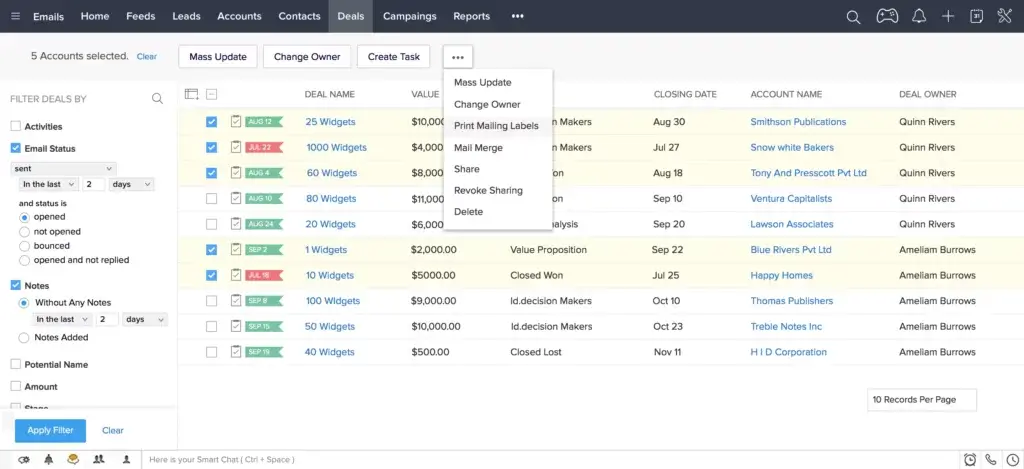
screenshot of Zoho CRM software
via Zoho

Bigin Rating

4.5/5 (G2)

Bigin Key Features

  • Team and connected pipelines
  • Gmail lead capturing
  • Email, Twitter, telephony, and video meeting communication capabilities
  • A variety of third-party and Zoho integrations
  • Workflow automation
  • Custom fields, modules, and “Toppings” (add-ons)
  • Native dashboards and integration with Zoho Analytics
  • GDPR, HIPAA, ISO/IEC, and SOC 2 compliance features
  • Developer API

Bigin by Zoho CRM is Zoho’s SMB-specific CRM solution that prioritizes affordability and easy setup. All Bigin plans are relatively affordable compared to the rest of the CRM market, but Bigin sets itself apart by offering a Free plan.

Bigin isn’t short on features. For example, the Free plan includes a single pipeline, up to 500 records, up to three instant workflows, several Zoho integrations, telephony, standard dashboard access, and developer APIs for additional customization opportunities.

HubSpot CRM – Best All-Inclusive CRM
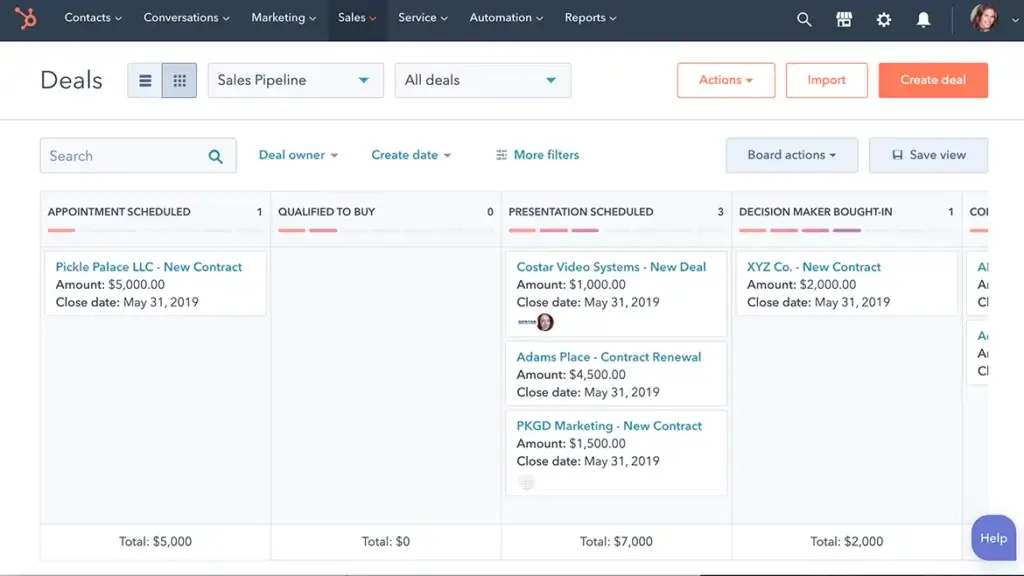
a screenshot from Hubspot software
via Hubspot

Hubspot CRM Rating

4.4/5 (G2)

Hubspot CRM Key Features

  • Lead generation
  • Contact management
  • Meeting scheduler
  • AI-driven email writing
  • Live chat capabilities
  • Email templates and template builder
  • Dashboards and reporting
  • Deal pipelines and pipeline management
  • Landing page, chatbot, and form builders
  • Ad management

HubSpot CRM is a modular CRM solution that can easily be right-sized to fit the needs of your small business. You can choose between various hubs, depending on your requirements, from Sales to Marketing.

One standpoint feature offered by HubSpot is the free CRM option. The free option includes a wide range of features, including simple sales dashboards, deal pipelines, pipeline management tools, and more. This option is most likely to fit the budgets of SMBs, while enterprise options are available as they scale.

Salesmate.io – Best for Low Volume/High Price Sales Teams
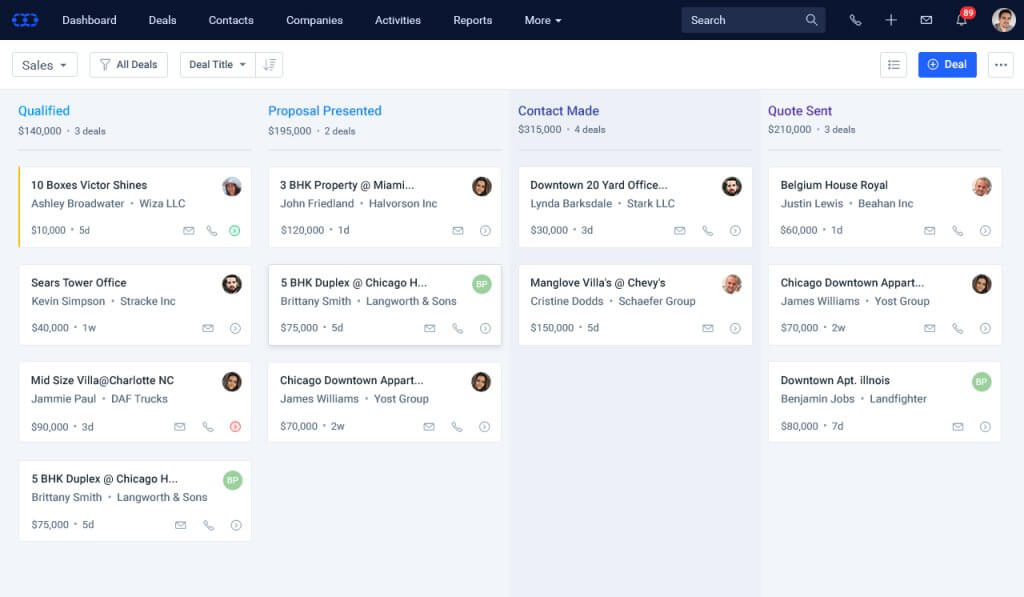
salesmate crm
via Salesmate

Salesmate Rating

4.6/5 (G2)

Salesmate Key Features

  • Email sync, tracking, and templates
  • Pipeline management
  • Web forms and lists
  • Dashboards and reports
  • Workflow management
  • Calling and texting capabilities
  • Automation and messenger add-ons
  • Contact management
  • Product management
  • Sales goals and forecasting

Salesmate.io is a CRM and automation software solution with a handful of affordable and helpful features in its Starter pack. Relevant features for small business users include access to multiple sales pipelines, email marketing and management tools, and basic automation workflows.

A key feature offered by Salesmate.io is its personalized outreach options. You can easily develop personalized and automated bulk emails and texts, email campaigns, and voicemail drops. This enables you to stay in touch with your customers without lifting a finger.

Less Annoying CRM – Best Simplicity & Pricing
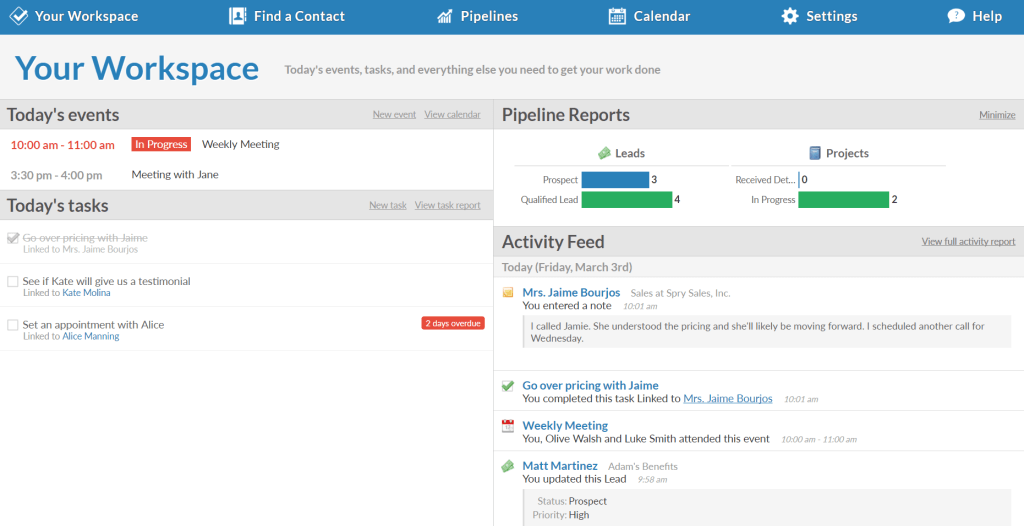
Less annoying CRM screenshot
via Less Annoying CRM

Less Annoying CRM Rating

4.9/5 (G2)

Less Annoying CRM Key Features

  • Simple search feature for the contact database
  • Calendar and task views
  • Lead reports with status, priority, and contact information
  • Unlimited user access
  • Unlimited contacts, companies, and custom fields
  • Unlimited pipelines
  • Task management
  • User-level permissions
  • Email logging
  • Daily agenda emails

Less Annoying CRM has won over a dedicated customer base with its simple approach to CRM software. Its solution is available in only one package option, extending all of its features and capabilities to unlimited users for a fee of $15 per user/month.

Unlimited user access—alongside unlimited pipelines and significant file storage space—makes this a particularly robust option for SMBs.

Keap CRM – Best for Sales + Marketing Automation
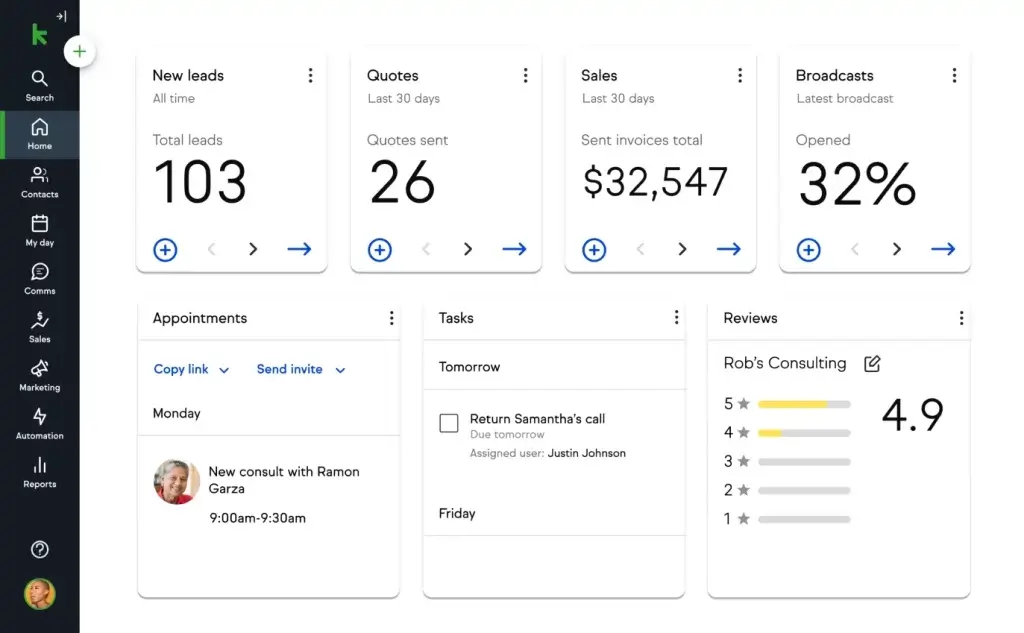
keap crm screenshot
via Keap CRM

Keap CRM Rating

4.2/5 (G2)

Keap CRM Key Features

  • Email and text marketing
  • Sales and marketing automation
  • Sales pipeline with built-in analytics
  • Quotes, payments, and invoicing
  • Automated lead capture and follow-up communication.
  • Landing pages
  • Lead scoring and source attribution
  • Appointment scheduling
  • Contact segmentation and tagging
  • Automated appointment reminders

Keap CRM is a solid CRM option for businesses that want small-business-friendly automation, communication, and contact management features all in one place.

It’s known for having a user-friendly interface as well as advanced marketing capabilities and tools. However, despite Keap being advertised as an SMB CRM solution, it’s important to note that it’s one of the most expensive options for this market. The most basic package starts at $159 per month and goes up in price if you need more than two users or 1,500 contacts.

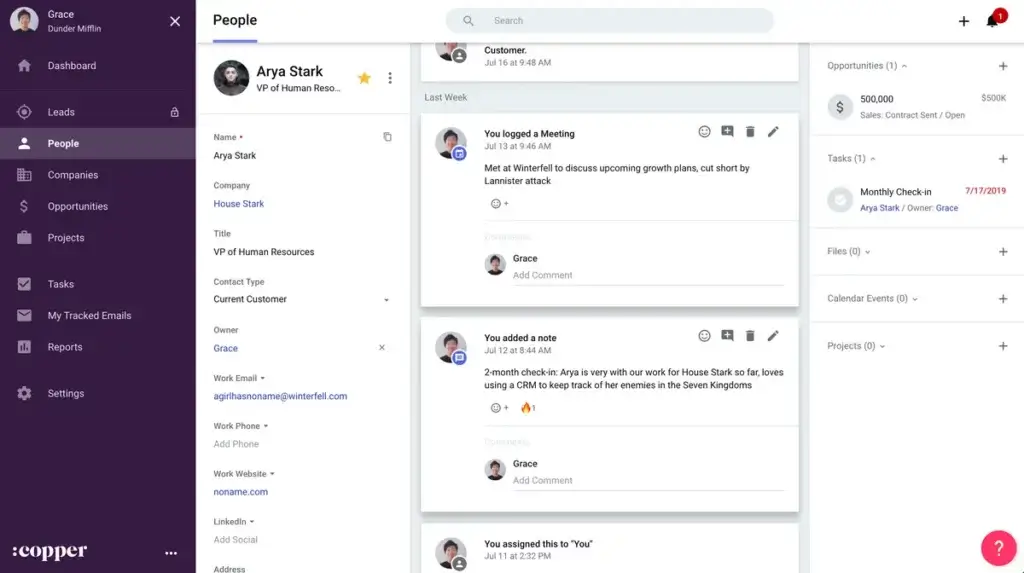
Copper CRM – Best for Google Workspace Integration
screenshot of Copper CRM software
via Copper

Copper CRM Rating

4.5/5 (G2)

Copper CRM Key Features

  • Recurring task and notification automation
  • Customizable pipelines for deal tracking
  • Customizable reports
  • Google Workspace CRM capabilities through integration
  • Contact enrichment
  • Task management
  • Deal management and opportunity slippage
  • Reminders, mentions, and comments
  • Note-taking and activity logging
  • Web, Chrome, and mobile apps

Copper CRM is a unique CRM solution that’s specifically designed to integrate with Google Workspace tools and applications, including Google Calendar, Gmail, Google Drive, Google Sheets, and Data Studio.

Its Basic plan is the best fit for small business users and includes features for pipeline and contact management, team collaboration, and Google integrations. Keep in mind that many of Copper’s more advanced features—like lead scoring, reporting, and workflow automation—are only available in more expensive plans.

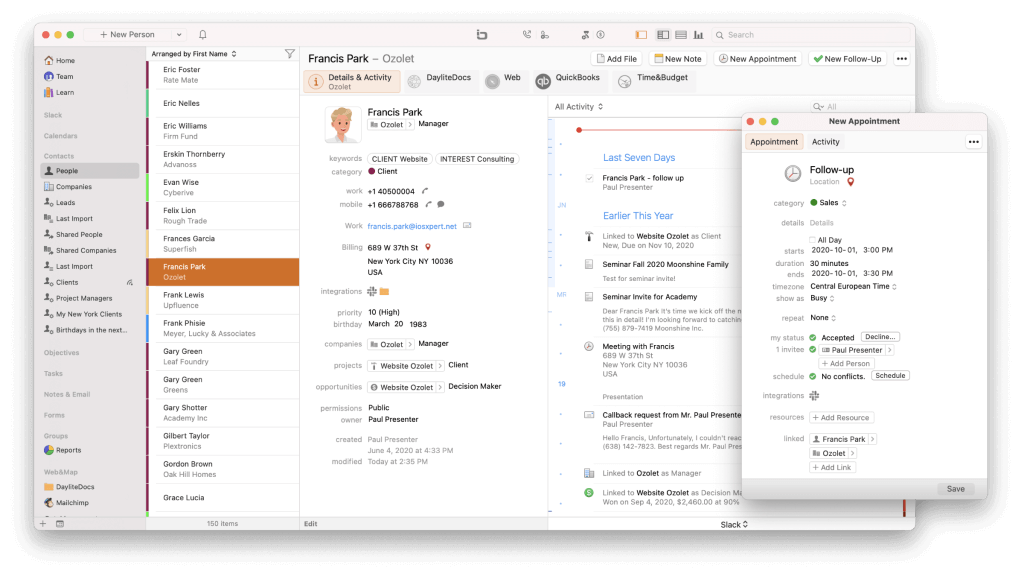
Daylite – Best CRM for Apple Users
daylite crm screenshot
via Daylite CRM

Daylite Rating

4.5/5 (G2)

Daylite Key Features

  • Contact management
  • Task management
  • Mail assistant
  • List segmentation
  • Two-way syncing between Apple Contacts and Apple Calendar
  • Calendar view
  • Email marketing
  • Opportunities board for deal tracking
  • Multitasking, notification center, caller ID, and Siri capabilities on iPhones and iPads
  • Reporting

Daylite is a small business CRM solution that specifically caters to Apple product users. Its built-in collaboration and notification capabilities connect directly to your iPhone, iPad, and Apple apps. This allows you to manage marketing and sales where you already manage your calendars, contacts, and inboxes.

For simple CRM access, pricing starts at $25 per month, though many users opt for the Sales, Projects, or Business plans that include more capabilities at an additional cost.

🎯 Choosing the Right CRM for Your Business

Your CRM should be a reflection of how your business operates—and how you want it to grow. Start with these questions:

  • What’s our sales cycle like?

  • Which communication channels do we rely on?

  • Do we need integrations with existing tools (e.g., Gmail, accounting software)?

  • What are our future hiring or scaling plans?

Don’t chase features you won’t use. Instead, seek out tools that solve your core pain points and offer flexibility to evolve.

Want to see Teamgate in action within your small business? Get started by scheduling a system demo today or get started yourself with a Free Trial.


FAQs: CRM for Small Businesses

Q: What is a CRM for small businesses?

A: A Customer Relationship Management (CRM) for small businesses is a software solution designed to manage customer relationships, nurturing leads, handle sales pipelines, and facilitate communication with customers and prospects across various channels. It also includes built-in reporting and analytics to measure marketing and sales performance against customer acquisition and retention goals.

Q: Why should a small business consider investing in a CRM?

A: As small businesses grow, managing contacts and providing a personalized experience to each customer becomes challenging. A CRM helps to maintain consistent and tailored communication with both prospective and current customers. It also assists in contact and data management, general ease of use, and basic reporting, which are vital for maintaining high standards in customer relationships.

Q: What factors should small businesses consider when evaluating CRM options?

A: Small businesses should consider affordability, ease of use, and scalability when evaluating CRM options. They need effective tools that don’t break the bank, are easy to learn and use, and can grow with the business. Paying attention to CRM solutions with tiered packages of features and valuable third-party integrations and add-ons is also important.

Q: What are some best-rated CRM systems for small businesses in 2025?

A: The best-rated CRM systems for small businesses in 2025 include Teamgate, Freshsales, Pipedrive, Bigin by Zoho CRM, HubSpot CRM, Salesmate.io, Less Annoying CRM, Keap, Copper, and Daylite. These CRM systems offer a wide range of features to suit the needs of small businesses.

Q: Can I get a CRM for my small business for free?

A: Yes, many CRMs offer free versions or tiers that are ideal for small businesses with limited budgets. Free CRMs typically include basic features like contact management, task automation, and simple reporting. However, premium features, such as advanced reporting or integrations, often require a paid plan. Systems like Teamgate CRM and Hubspot offer a free version limited to 2 users to get you started.

Q: What are users saying about CRMs for small businesses on Reddit?

A: Reddit users often discuss various CRM options for small businesses, weighing factors like ease of use, cost, and customer support. Some of the most recommended CRMs on Reddit include Teamgate, Zoho, and HubSpot, each offering different features depending on the business size and needs. Teamgate is frequently praised for its simplicity and affordability.

Q: What is the best cheap CRM for small businesses?

The best affordable CRM for your business depends on your specific needs. Some popular budget-friendly CRMs include Teamgate CRM, which offers robust features at competitive pricing. Look for CRMs that provide essential features to your needs such as sales automation, contact management, and reporting while fitting within your budget.

Q: How does Teamgate benefit small businesses?

A: Teamgate is a CRM designed specifically for ssmall business in mind, offering extensive smart features without compromising ease of use or reasonable pricing. Its user-friendly interface, intelligent lead scoring, advanced filters, and relevant third-party integrations differentiate it from other CRMs. Plus, it allows small businesses to configure workflows to fit their needs without costly and cumbersome customization.

In the competitive world of CRM platforms, Teamgate CRM and EngageBay present themselves as capable tools designed to streamline sales processes, enhance customer relationships, and drive business growth. This blog aims to dissect and compare CRM platforms to help businesses choose the CRM that best aligns with their needs.

Key Takeaways:

  • Affordable entry-level plans are available across various CRM platforms, offering businesses of all sizes a gateway to essential CRM functionalities without significant investment.
  • Sales funnel customization is a common feature, allowing for alignment with specific business models and sales processes.
  • Email campaign tools and integrations vary widely, with some CRMs offering extensive built-in marketing capabilities to enhance direct engagement strategies.
  • Ease of use and intuitive interfaces are prioritized by several CRM providers, ensuring that users with limited technical backgrounds can effectively utilize the platforms.
  • Flexible and scalable subscription options are offered by many CRMs, enabling businesses to adjust their CRM solutions as they grow and as their needs evolve, ensuring a balance between functionality and cost.

Contents:

  1. Teamgate CRM Overview
  2. EngageBay Overview
  3. Quick Comparison: Teamgate vs EngageBay
  4. Final Thoughts
  5. FAQs: Teamgate vs EngageBay

Teamgate CRM Overview

Teamgate CRM is designed to enhance sales efficiency and process management for SMBs. It offers a scalable toolkit that includes sales automation, advanced analytics, and seamless integrations, catering to businesses seeking to optimize their sales pipeline and customer engagement strategies.

Teamgate CRM Pricing and Plans

Teamgate CRM proposes a tiered pricing model to accommodate diverse business requirements:

  • Starter Plan: FREE for small teams, focusing on basic CRM functionalities.
  • Team Plan: Priced at $39.90/user/month, offering full email synchronization, workflow automation, and dedicated account management for unlimited users​​.
  • Growth Plan: At $59.90/user/month, it adds advanced sales insights, lead scoring, and enhanced support options for businesses looking to scale​​.

Teamgate CRM Key Features

Teamgate shines with its comprehensive feature set designed to streamline sales activities and customer management:

  • Sales Automation: Streamlines the sales process with smart automation.
  • Lead Scoring and Prioritization: Helps in identifying the most promising leads.
  • Advanced Sales Insights and Analytics: Offers deep insights into sales performance.
  • Multi-currency and Product Catalog: Supports businesses operating in multiple countries.
  • Custom Activity Types and Email Marketing: Enhances personalized customer engagement​​.

Teamgate Ease of Use

The CRM boasts a user-friendly interface accessible across macOS and Windows, providing extensive support options including email, phone, live support, and training to facilitate a seamless user experience​​.

teamgate crm awards
Teamgate CRM Awards

EngageBay Overview

EngageBay positions itself as an all-in-one marketing, sales, and service CRM solution, focusing on small to medium-sized businesses. It integrates a wide array of features designed to attract, engage, and convert website visitors into customers.

EngageBay Pricing and Plans

EngageBay offers a flexible pricing scheme to cater to different business needs:

  • Free Plan: Supports up to 250 contacts with basic CRM functionalities.
  • Basic Plan: Starting at $12.74/user/month, expanding on the Free plan with additional contacts and marketing tools​​.
  • Growth Plan: Priced at $55.24/user/month, it introduces marketing automation, A/B testing, and more advanced features​​.
  • Pro Plan: At $101.99/user/month, it provides unlimited contacts, comprehensive analytics, and dedicated account management​​.

EngageBay Key Features

EngageBay is celebrated for its comprehensive feature set, including email marketing, lead scoring, SMS marketing, and third-party integrations. It emphasizes ease of use and affordability, offering a robust solution for businesses aiming to streamline their marketing and sales processes without overspending​​.

EngageBay Ease of Use

EngageBay is noted for its intuitive design and user-friendly interface, facilitating quick adaptation for new users. It offers extensive customer support and training resources, ensuring businesses can leverage the platform’s full potential effectively​​.

Quick Comparison: Teamgate vs EngageBay

screenshot of Teamgate crm deals pipeline
Teamgate’s Drag and Drop Deals Pipeline

Feature Set and Functionality Comparison

Teamgate CRM Feature Set:

  • Sales Automation: Streamlines sales processes with automated workflows.
  • Advanced Analytics: Provides deep insights into sales performance and forecasting.
  • Multi-Platform Support: Accessible on macOS and Windows, catering to a diverse user base​​.

Teamgate CRM Suitability:

  • Best suited for SMBs looking for a comprehensive CRM with advanced sales automation and analytics capabilities.

EngageBay Feature Set:

  • All-in-One Marketing Suite: Integrates email marketing, lead scoring, and SMS marketing within a single platform.
  • Affordability: Offers a robust feature set at a competitive price point, making it accessible for small to mid-sized businesses​​.

EngageBay CRM Suitability:

  • Ideal for businesses seeking an affordable, all-in-one marketing, sales, and service CRM solution with a strong emphasis on ease of use and customer support​​.

CRM Integration Comparison

  • Teamgate CRM offers seamless integrations with email platforms, productivity tools, and custom API access for tailored integrations, enhancing its adaptability to different business ecosystems​​.
  • EngageBay emphasizes its all-in-one approach by providing extensive native integrations with social media, marketing tools, and service platforms, aiming to minimize the need for external integrations​​.

Customization and Flexibility Comparison

  • Teamgate CRM allows for significant customization, including custom sales pipelines and activity types, catering to the unique processes of SMBs​​.
  • EngageBay offers customization in marketing campaigns, CRM processes, and service automation, ensuring businesses can tailor the platform to their specific needs​​.

CRM Pricing Comparison

  • Teamgate CRM’s pricing is structured to scale with businesses, offering plans that cater to various stages of growth, from startups to established enterprises​​.
  • EngageBay provides a highly competitive pricing model, including a free tier for small businesses and startups, with advanced features available at lower price points than many competitors​​.

Customer Support Comparison

  • Teamgate CRM provides comprehensive support through email, phone, and live video support, ensuring users have access to assistance when needed​​.
  • EngageBay is noted for its exceptional customer support, offering immediate assistance through live chat, email, and phone, alongside an extensive knowledge base for self-service​​.

Final Thoughts

Choosing between Teamgate CRM and EngageBay hinges on a business’s specific needs, budget constraints, and desired feature set. Teamgate CRM shines for businesses in search of a sales-focused CRM with deep analytics and customization options. In contrast, EngageBay stands out as an affordable all-in-one solution for marketing, sales, and service automation, particularly appealing to small and mid-sized businesses prioritizing cost-effectiveness and ease of use.

Ultimately, both platforms offer compelling features, but the choice should be guided by which CRM aligns best with your business goals, operational needs, and growth aspirations. Whether you prioritize advanced sales automation and analytics or seek a cost-effective, all-encompassing marketing and CRM solution, carefully consider your business’s unique requirements to make an informed decision.

For businesses embarking on their CRM journey or looking to switch platforms, both Teamgate CRM and EngageBay offer robust capabilities to streamline operations, enhance customer engagement, and drive sales. The decision between the two should weigh their comprehensive features, ease of use, scalability, and support systems to find the best fit for your business’s future growth and success.

To get started with Teamgate CRM today, start a 14-day free trial. 


FAQs: Teamgate vs EngageBay

  1. For a newly established business, which CRM system provides a more economical entry point?
    • Teamgate CRM is potentially more beneficial for new businesses due to its no-cost plan and scalable pricing options, encompassing a wide array of functionalities for marketing, sales, and customer service.
  2. Is it possible to tailor the sales funnel stages within each CRM to fit unique business models?
    • Both Teamgate CRM and EngageBay support sales funnel customization, allowing businesses to align the CRM stages with their specific sales procedures.
  3. Are there options for email campaign integration within both CRM platforms?
    • Both Teamgate CRM and EngageBay facilitate integration with email campaign tools. EngageBay, in particular, offers a more comprehensive set of in-built tools for email marketing.
  4. Which CRM platform is more user-friendly for individuals without a technical background?
    • Teamgate is frequently commended for its straightforward and intuitive user interface, making it an ideal option for users with limited technical or CRM expertise.
  5. How flexible are both platforms in terms of plan adjustments according to evolving business needs?
    • Both Teamgate CRM and EngageBay offer adaptable subscription plans, enabling businesses to scale up or down effortlessly in response to their requirements.

In the vast sea of Customer Relationship Management (CRM) platforms, choosing the right one can be a challenge. Businesses need tools that not only enhance their sales processes but also offer ease of use, comprehensive support, and scalability. This comparison takes a closer look at two notable contenders in the CRM space: Teamgate CRM and Less Annoying CRM. We’ll explore their pricing, features, usability, and more to guide you through making an informed decision tailored to your business needs.

Contents:

Teamgate CRM Overview

Teamgate CRM is an intuitive cloud-based CRM designed to streamline sales processes and enhance customer relationship management for small to mid-sized businesses. It’s known for its user-friendly interface and comprehensive sales tools.

Teamgate CRM Pricing and Plans

Teamgate CRM offers several pricing tiers:

  • Starter Plan: A free plan for up to 2 users, suitable for small businesses or startups needing basic CRM functionalities.
  • Team Plan: Priced at $39.90 per user/month, this plan offers advanced features like sales dashboards, workflow automation, and 24/7 chat and email support.
  • Growth Plan: At $59.90 per user/month, this plan caters to larger businesses needing in-depth sales analysis and more extensive customization options.

Teamgate CRM Key Features

Teamgate CRM stands out in the CRM landscape with its rich array of features meticulously engineered to support and enhance every stage of the sales lifecycle. This platform is not just a tool; it’s a comprehensive ecosystem designed to streamline lead generation, nurture leads through the sales pipeline, close deals with greater efficiency, and cultivate enduring customer relationships. Here’s a deeper dive into the key features that set Teamgate apart:

Advanced Analytics Tools

Teamgate’s advanced analytics go beyond basic data presentation, offering deep insights into sales performance, customer behavior, and market trends. With customizable dashboards and real-time reporting, sales teams can track key performance indicators (KPIs), measure progress against sales goals, and identify areas for improvement. This data-driven approach enables strategic decision-making and helps in forecasting future sales with greater accuracy.

Customizable Sales Pipelines

Flexibility is at the core of Teamgate’s design, allowing for fully customizable sales pipelines that can be tailored to match the unique processes of any business. Users can create multiple pipelines with stages that reflect their sales cycle, set up specific activities for each stage, and monitor the progress of deals from initial contact to closure. This customization ensures that the CRM adapts to the business, not the other way around.

Seamless Integration with Leading Email Platforms

Understanding the pivotal role of email communication in sales, Teamgate offers seamless integration with leading email platforms such as Gmail and Outlook. This integration facilitates efficient email tracking, allows for the sending of personalized email campaigns directly from the CRM, and ensures that all communication is logged and accessible within the context of each customer or lead. The result is a unified communication hub that enhances engagement and keeps every team member informed.

Rich Suite of Communication Tools

Teamgate’s communication toolkit is comprehensive, encompassing more than just email integration. It includes telephony features allowing for click-to-call functionality, call logging, and call planning. The platform also supports SMS messaging, live chat, and social media interactions, ensuring that sales teams can communicate with customers and leads through their preferred channels. These tools are designed to foster more meaningful interactions, improve response times, and enhance overall customer satisfaction.

Sales Productivity Enhancement through Automation

At its core, Teamgate is designed to maximize sales productivity by automating routine tasks and workflows. This automation spans across email campaigns, lead assignment, follow-up reminders, and more. By reducing the time spent on administrative tasks, sales teams can focus more on engaging with leads and closing deals. The platform’s intelligent automation capabilities also ensure that no opportunity is missed due to oversight or manual process limitations.

Detailed Reporting and Insightful Data Analytics

Teamgate’s reporting capabilities are both comprehensive and intuitive, offering detailed insights into every aspect of the sales process. Custom reports can be generated to analyze sales activities, team performance, pipeline health, and customer engagement metrics. These dashboard-able reports provide actionable insights, helping teams to optimize their strategies, improve efficiency, and drive sales growth.

Together, these features represent a formidable array of tools that empower sales teams to perform at their best. Teamgate CRM is more than just a software solution; it’s a strategic partner in achieving sales excellence and driving business growth. By leveraging Teamgate’s extensive feature set, businesses can transform their sales processes, enhance customer relationships, and achieve unprecedented levels of productivity and success.

Teamgate Ease of Use

Teamgate shines in its user-friendly interface and intuitive design, making it accessible for users of all tech levels. The platform focuses on reducing the learning curve associated with CRM software through a clean, organized dashboard and straightforward navigation. This ease of use extends to its setup process, onboarding, and daily operations, allowing sales teams to quickly adapt and make the most of the platform’s extensive features without extensive training.

teamgate crm awards
Teamgate CRM Awards

Less Annoying CRM Overview

Less Annoying CRM Pricing and Plans

Less Annoying CRM stands out for its straightforward, single-tier pricing model at $15/user/month (excluding tax), making it an attractive option for small businesses and startups. This model offers full access to all features, including unlimited contacts, calendars, task tracking, and customer support, without the complexity of multiple pricing tiers. This simplicity ensures that small teams can budget for their CRM needs without worrying about escalating costs or hidden fees as they expand.

Less Annoying CRM Key Features

Less Annoying CRM emerges as a beacon for small businesses navigating the vast world of customer relationship management. With a philosophy rooted in simplicity and immediate usability, this platform distills CRM to its most essential functionalities, ensuring that small enterprises can focus on what truly matters: building and maintaining strong customer relationships. Here’s an expanded look at the core features that make Less Annoying CRM a standout choice for small businesses:

Streamlined Contact Management

At the heart of Less Annoying CRM is its streamlined contact management system, designed for ease of use without sacrificing depth. Businesses can effortlessly organize contact information, track communication history, and categorize contacts into groups for targeted outreach. This system supports the import and export of contacts, ensuring seamless integration with existing workflows. The emphasis is on providing a centralized hub for all customer information, making it easily accessible for quick reference or in-depth analysis.

Integrated Calendar and Task Tracking

Less Annoying CRM integrates calendar and task tracking directly into the CRM environment, enabling businesses to manage their schedules and to-dos alongside customer relationships. This feature allows for the setting of reminders, scheduling of follow-ups, and tracking of deadlines, all within the context of customer interactions. It’s particularly beneficial for small teams, where multitasking is a necessity, offering a clear view of daily priorities and ensuring that no commitment or opportunity slips through the cracks.

Simple Yet Effective Pipeline View

Understanding the sales process’s complexity, Less Annoying CRM provides a simple yet effective pipeline view that demystifies sales management for small businesses. This view allows for the tracking of leads and deals through customizable stages, reflecting the unique sales cycle of each business. It’s designed to give a quick, at-a-glance understanding of sales status, enabling swift decision-making and focused action on moving deals forward.

Designed for Immediate Usability

With a focus on immediate usability, Less Annoying CRM eliminates the steep learning curve often associated with CRM software. The platform is designed for quick setup and easy adoption, requiring minimal training so businesses can get started right away. This approach ensures that teams can concentrate on leveraging the CRM for growth rather than getting bogged down by complex features or configurations.

No Unnecessary Features

In a landscape where CRM systems are often bloated with features that small businesses may never use, Less Annoying CRM takes a different path. It eschews unnecessary complexity in favor of a focused feature set that addresses the core needs of small businesses. This philosophy not only makes the platform more approachable but also ensures that users aren’t overwhelmed, allowing them to utilize the CRM to its fullest potential without distraction.

Ideal for Effective Customer Relationship Management

Less Annoying CRM is the ideal solution for small businesses seeking effective, straightforward customer relationship management. By concentrating on the essentials and stripping away the superfluous, it offers a clear path to nurturing customer relationships, managing sales processes, and organizing daily tasks and appointments. This simplicity, combined with the platform’s robust functionality, makes Less Annoying CRM a powerful tool for small businesses aiming to grow their customer base and enhance customer satisfaction without the complexity of more elaborate CRM systems.

In sum, Less Annoying CRM stands as a testament to the power of simplicity, providing small businesses with a user-friendly, efficient, and highly effective CRM solution that gets right to the heart of customer relationship management.

Less Annoying Ease of Use

True to its name, Less Annoying CRM offers an exceptionally user-friendly experience, prioritizing ease of use above all. The platform boasts a clutter-free interface, emphasizing straightforward functionality that allows users to get up and running quickly. Its focus on providing a hassle-free CRM experience makes it particularly appealing for small businesses or those without dedicated IT support.

Quick Comparison: Teamgate vs Less Annoying CRM

screenshot of Teamgate crm deals pipeline
Teamgate’s Drag and Drop Deals Pipeline

Feature Set and Functionality Comparison

Teamgate CRM Highlighted Features:

  • Advanced Sales Insights and Analytics: Provides in-depth analysis tools that allow businesses to track performance, forecast sales, and gain actionable insights.
  • Lead Scoring: Offers a lead scoring system to prioritize leads based on their potential value and likelihood of conversion.
  • Pipeline Management: Features an intuitive pipeline management system, helping businesses track the progress of deals through various stages.
  • Task and Activity Management: Includes tools for scheduling, managing, and tracking tasks and activities associated with sales processes.
  • Email Integration and Tracking: Allows integration with email services for efficient communication tracking and management.
  • Customizable Sales Pipelines and Fields: Provides options for customizing sales pipelines and fields to fit specific business processes.
  • Third-party Integrations: Supports integration with a variety of tools like Slack, Mailchimp, Zapier, and more for enhanced functionality.

Teamgate CRM Suitability:

  • Teamgate CRM caters to a broad range of businesses, from startups to scaling enterprises, with its extensive features and flexible plans. It’s particularly suitable for organizations looking to optimize their sales processes with comprehensive analytics and lead management tools.

Less Annoying CRM Feature Set:

  • Simplified Contact Management: Centralizes customer information in an easy-to-use interface.
  • Intuitive Calendar and Task Tracking: Integrates a comprehensive calendar and task management system directly within the CRM.
  • User-friendly Pipeline View: Provides a clear and straightforward pipeline view that simplifies the tracking of leads and deals.
  • Seamless Email Synchronization: Enables direct synchronization with email platforms, allowing for the seamless management of customer communications within the CRM.
  • Custom Fields and Categories: Offers the ability to create custom fields and categories for contacts, tasks, and notes, allowing businesses to tailor the system to their specific needs and workflows.

Less Annoying CRM Suitability:

  • Ideal for small businesses and startups looking for an uncomplicated, effective CRM solution

CRM Integration Comparison

  • Teamgate CRM: Teamgate native intregrations include Twilio for dialling, Gmail and Outlook for email correspondence, Mailchimp for marketing campaigns, key accounting integrations with Xero and Quickbooks and much much more. Teamgate CRM also offers an Open API and Zapier for additional customization options.
  • Less Annoying CRM: while more limited in its integration offerings, focuses on providing seamless experiences with the essential tools its target users are most likely to use.

Customization and Flexibility Comparison

  • Teamgate CRM: stands out for its high level of customization and Open API functionality, allowing businesses to tailor the platform to their specific processes and needs.
  • Less Annoying CRM: offers less in terms of customization but maintains a high degree of flexibility by keeping its platform simple and adaptable.

CRM Pricing Comparison

  • Both options are well-priced for small businesses operating on a budget.
  • Teamgate’s tiered pricing model including a free entry-level plan provides options for businesses of different sizes. As businesses scale and add more features prices remain consistent, making it a cost-effective option for small businesses and startups through to enterprise.
  • Less Annoying CRM’s single, affordable pricing plan makes it an attractive option for small businesses looking for budget-friendly CRM solutions.

Customer Support Comparison

Both Teamgate and Less Annoying CRM offer robust customer support, but they approach it differently. Teamgate provides a more structured support system with resources for training and onboarding, while Less Annoying CRM focuses on personal, responsive support to quickly address user needs.

Final Thoughts

In summary, Teamgate CRM and Less Annoying CRM both offer unique advantages. Teamgate stands out for its straightforward, no-frills approach, making it a great option for small businesses needing an effective CRM without a steep learning curve. Less Annoying CRM, on the other hand, is ideal for small businesses looking for a cost-effective, entry-level CRM system.

The decision between Teamgate CRM and Less Annoying CRM should be based on specific business needs, existing software infrastructure, and budget considerations.

For the most up-to-date information and to explore these systems further, visiting the official websites of Teamgate CRM and Less Annoying CRM is recommended.


FAQs: Less Annoying CRM vs Teamgate

What does CRM mean, and why is it important?

CRM, or Customer Relationship Management, is essential software for businesses to manage and analyze customer interactions and data throughout the customer lifecycle. Its goal is to improve business relationships, assist in customer retention, and drive sales growth.

How do Less Annoying CRM and Teamgate CRM differ in CRM solutions?

Less Annoying CRM simplifies CRM to essential features for ease of use, targeting small businesses. Teamgate CRM offers a broad set of features supporting detailed sales processes and analytics, suitable for a wider range of business sizes, including medium to large enterprises.

Is it possible to tailor the sales process in Teamgate CRM and Less Annoying CRM?

Both CRMs allow sales process customization. Teamgate provides detailed options to align with intricate sales operations, whereas Less Annoying CRM focuses on straightforward customization to cater to the fundamental needs of smaller businesses.

What type of support services do Teamgate CRM and Less Annoying CRM offer?

Teamgate provides diverse support options including live chat, email, training, and a detailed knowledge base. Less Annoying CRM emphasizes direct and personal support with dedicated reps, ensuring quick and effective assistance.

Are Teamgate CRM and Less Annoying CRM suitable for any business size?

Teamgate CRM caters to a broader business spectrum, from medium to large, with scalable features. In contrast, Less Annoying CRM is specifically designed for small businesses, offering simplicity and affordability.

How does the pricing structure of Less Annoying CRM compare to Teamgate CRM?

While Teamgate CRM adopts a multi-tiered pricing strategy to suit various business needs and scales, Less Annoying CRM maintains a simple, single-price model, making it easier for small businesses to anticipate costs.

Can I integrate external applications with Teamgate CRM and Less Annoying CRM?

Yes, integration capabilities exist for both platforms. Teamgate offers a wide array of integrations for enhanced productivity, whereas Less Annoying CRM provides essential integrations, focusing on simplicity and core needs.

Do Teamgate CRM and Less Annoying CRM provide a free trial to test their platforms?

Both platforms offer trial periods, enabling companies to evaluate the systems’ fit for their specific business requirements before committing financially.

How user-friendly are Teamgate CRM and Less Annoying CRM for beginners?

Less Annoying CRM is renowned for its user-friendly design, making it ideal for CRM novices and small businesses, while Teamgate CRM, despite its advanced features, strives for intuitive design and navigability to accommodate users at all levels of tech savviness.

What are the main benefits of using Teamgate CRM or Less Annoying CRM for my business?

Teamgate CRM delivers comprehensive insights and tools for sales optimization and customer management for businesses looking to scale. Conversely, Less Annoying CRM offers straightforward, essential CRM tools focusing on ease of use and affordability, ideal for small businesses prioritizing simplicity.

In today’s competitive market, small businesses need every advantage they can get to succeed. One powerful tool that has revolutionized the way businesses interact with customers is Customer Relationship Management (CRM) software. CRM software allows businesses to efficiently manage their customer interactions, streamline business processes, and ultimately improve overall business performance. In this article, we will provide a comprehensive overview of CRM for small businesses and explore its importance and benefits. We will also discuss the key features to look for in a CRM system and provide tips for choosing the right one for your small business. Additionally, we will guide you through the step-by-step process of implementing a CRM system, discuss common implementation challenges, and explore the future trends and opportunities in CRM for small businesses.

Key Takeaways:

  1. The necessity of CRM for enhancing small business functions and customer relationships.
  2. Decoding essential features to consider when selecting a CRM for your small business.
  3. Insight into the considerable influence of CRM on sales, marketing, and business operations.
  4. The significant impact of CRM on customer retention and loyalty in a small business setting.
  5. Navigating the implementation process and overcoming common challenges while adapting to CRM systems.

Contents:

  • A Comprehensive Overview of CRM for Small Businesses
  • The Importance of CRM for Small Businesses
  • Features to Look for in a CRM for Small Business
  • How CRM Benefits Customer Relationship Management in Small Businesses
  • Enhancing Sales and Marketing Efforts with CRM
  • Streamlining Business Operations with CRM Tools
  • Impact of CRM on Customer Retention and Loyalty in Small Businesses
  • Tips to Choose the Right CRM for Your Small Business
  • Conclusion: Boost Your Small Business Success with CRM
  • Frequently Asked Questions: CRM for Small Business

A Comprehensive Overview of CRM for Small Businesses

CRM, at its core, is a technology-driven strategy that enables businesses to manage and analyze customer interactions throughout the customer lifecycle. It involves the use of software tools to gather and store customer data, improve customer communications, and streamline business processes related to sales, marketing, and customer service. By centralizing customer data in a single, easily accessible platform, businesses can gain valuable insights into customer behavior, preferences, and needs.

CRM software typically includes modules for lead management, contact management, sales automation, customer support, marketing automation, and analytics. These modules work together to provide a 360-degree view of each customer, enabling businesses to deliver personalized experiences, resolve issues efficiently, and nurture customer relationships effectively.

The Importance of CRM for Small Businesses

While CRM was initially associated with large corporations, it has become increasingly crucial for small businesses as well. Small businesses often have limited resources and need to maximize their efficiency at every step. CRM software allows small businesses to compete with larger corporations by providing the tools they need to effectively manage customer relationships.

CRM helps small businesses improve their customer satisfaction rates, retain customers, and drive repeat business. By understanding customer preferences and behavior, small businesses can tailor their offerings to meet customer needs better. This personalized approach strengthens customer relationships and fosters loyalty, resulting in increased customer retention and higher customer lifetime value.

Furthermore, CRM software enables small businesses to streamline their operations, automate repetitive tasks, and enhance collaboration among team members. By automating sales and marketing processes, businesses can reduce manual effort, eliminate errors, and optimize their overall efficiency.

Features to Look for in a CRM for Small Business

Whether you’re looking for your first CRM, or switching CRMs; it is important to note that not all CRM systems are created equal, and selecting the right one for your small business is crucial. Here are some essential features to consider when choosing a CRM system:

  1. Intuitive User Interface: Look for a CRM system with a user-friendly interface that your team can quickly learn and navigate.
  2. Customizability: Opt for a CRM system that allows customization to meet your unique business needs and workflows.
  3. Lead Management: Ensure the CRM system offers robust lead management capabilities, allowing you to track and nurture leads effectively.
  4. Contact Management: Look for a CRM system that enables you to organize and manage customer contact information efficiently.
  5. Integration Capabilities: Consider a CRM system that integrates seamlessly with your existing tools and software, such as email marketing and customer support platforms.
  6. Mobile Accessibility: Choose a CRM system with mobile apps or responsive design, allowing your team to access customer information on the go.
  7. Analytics and Reporting: Look for a CRM system that provides comprehensive analytics and reporting capabilities to help you gain insights and track key performance metrics.

How CRM Benefits Customer Relationship Management in Small Businesses

CRM software offers numerous benefits to small businesses when it comes to managing customer relationships. Let’s explore some of these benefits:

  • Improved Customer Service: CRM enables businesses to provide faster response times, personalized service, and accurate resolution of customer issues, leading to improved customer satisfaction.
  • Efficient Sales Process: CRM systems automate various aspects of the sales process, such as lead assignment and pipeline management, freeing up sales teams’ time to focus on building relationships and closing deals.
  • Targeted Marketing Campaigns: With CRM, businesses can segment their customer base and run targeted marketing campaigns based on customer demographics, preferences, and purchase history.
  • Enhanced Collaboration: CRM software allows teams to work together seamlessly, share information, and collaborate on customer-related activities, improving overall efficiency.
  • Improved Decision Making: By analyzing customer data and generating meaningful insights, CRM systems help businesses make informed decisions and develop effective strategies to drive growth.

Enhancing Sales and Marketing Efforts with CRM

CRM software plays a vital role in boosting sales and marketing efforts for small businesses. Here are a few ways CRM can enhance your sales and marketing strategies:

Firstly, CRM enables better lead management. With CRM, businesses can capture, track, and nurture leads efficiently. The CRM system helps prioritize leads based on their behavior, interests, and engagement, allowing sales teams to focus on high-potential leads and close deals effectively.

Secondly, CRM enables businesses to run targeted marketing campaigns. By analyzing customer data, businesses can understand their customers’ preferences and behavior, segment their customer base, and deliver personalized messages and offers to drive engagement and conversions.

Moreover, CRM software provides real-time insights into sales and marketing performance. By tracking key metrics such as conversion rates, revenue, and campaign effectiveness, businesses can optimize their strategies and make data-driven decisions to improve their overall performance.

Streamlining Business Operations with CRM Tools

CRM tools go beyond customer relationship management to streamline various business operations. Let’s explore how CRM can enhance different aspects of your business:

Sales Process: CRM tools automate sales processes, such as lead assignment, opportunity tracking, and deal closure. This automation eliminates manual tasks, reduces errors, and ensures a streamlined sales workflow.

Customer Support: CRM systems provide a centralized platform for managing customer support interactions, including issue tracking, ticket management, and knowledge base integration. This streamlined approach allows businesses to resolve customer issues promptly and deliver outstanding support.

Marketing Campaigns: CRM tools enable businesses to plan, execute, and track marketing campaigns seamlessly. From email marketing to social media campaigns, businesses can manage their marketing efforts from a single platform, ensuring consistent and effective messaging.

Team Collaboration: CRM tools facilitate collaboration among team members, allowing them to share customer information, communicate effectively, and work together towards common goals. This collaboration leads to improved productivity and better customer service.

Impact of CRM on Customer Retention and Loyalty in Small Businesses

Customer retention and loyalty are essential for the long-term success of any small business. CRM software plays a significant role in enhancing customer retention and fostering loyalty. Here’s how:

By providing businesses with a comprehensive view of each customer’s history, preferences, and interactions, CRM enables personalized customer experiences. Businesses can proactively anticipate customer needs, respond to inquiries quickly, and offer tailored solutions, ultimately building a stronger bond with customers.

CRM systems also help businesses identify and address customer issues promptly. By tracking customer interactions, businesses can identify patterns, common complaints, and areas for improvement. This proactive approach ensures customer satisfaction and reduces churn.

Furthermore, CRM software enables businesses to stay engaged with their customers through targeted marketing campaigns, personalized messages, and loyalty programs. By nurturing customer relationships and providing exclusive offers, businesses can create a sense of loyalty and encourage repeat business.

Tips to Choose the Right CRM for Your Small Business

Choosing the right CRM for your small business is a crucial decision that can impact your business’s success. Here are some tips to help you make an informed choice:

  1. Identify Your Business Needs: Evaluate your business processes and identify the specific challenges you want the CRM to address. This will help you prioritize features and functionalities when comparing different CRM systems.
  2. Consider Scalability: Choose a CRM system that can grow with your business. Ensure the system can handle increasing data volumes, accommodate additional users, and support future integrations.
  3. Get User Feedback: Involve your team members, especially those who will be using the CRM daily, in the selection process. Get their input, consider their pain points, and ensure the CRM system aligns with their needs and preferences.
  4. Opt for Cloud-based Solutions: Cloud-based CRM systems offer numerous benefits, including easy access, scalability, automatic updates, and lower upfront costs. Consider cloud-based solutions for flexibility and convenience.
  5. Integration Capabilities: Choose a CRM system that integrates well with other tools your business is currently using or planning to adopt. Seamless integration eliminates duplication of efforts and ensures data consistency.

Conclusion: Boost Your Small Business Success with Teamgate CRM

CRM is a powerful tool that small businesses can harness to improve customer relationship management, streamline business operations, and enhance sales and marketing efforts. By choosing the right CRM system and implementing it effectively, small businesses can elevate their customer service, drive growth, and foster long-term customer loyalty. With emerging trends such as AI, mobile CRM, and social CRM, the future of CRM holds significant opportunities for small businesses. Consider Teamgate CRM, a comprehensive, yet easy to use CRM solution with all the essential features and hand-held customer support you need to optimize your small business success.

To learn more speak with the Teamgate today, or get started yourself with a 14 day free trial.

Frequently Asked Questions: CRM for Small Business

  • What is the significance of CRM for small businesses?
    • CRM systems are invaluable for small businesses. They help to manage and analyze customer interactions and data, fostering improved business relationships, customer retention, and driving sales growth.
  • What are the essential features of an effective CRM for a small business?
    • A good CRM for a small business should have features such as contact and lead management, sales forecasting, email integration, interaction tracking, and customizable reports. Scalability and ease of use are also essential considerations.
  • How does a CRM aid in improving customer relationships in small businesses?
    • CRM systems offer a centralized platform where all customer interactions are recorded and easily accessible. This allows businesses to provide personalized experiences, promptly respond to customer needs, and develop strategies for improved customer engagement and satisfaction.
  • In what ways can CRM enhance sales and marketing efforts in small enterprises?
    • CRM systems provide valuable insights into customer preferences and behavior. These insights can be leveraged to create targeted marketing campaigns, follow up on leads efficiently, and close sales more effectively.
  • How can CRM tools streamline business operations?
    • CRM tools help streamline business operations by automating tasks like contact management, lead tracking, and customer service. They also provide valuable analytics that aid in strategic decision-making.
  • How does CRM affect customer loyalty and retention in small businesses?
    • CRM helps to improve customer loyalty and retention by providing personalized customer experiences, resolving issues promptly, and continuously engaging customers with relevant content. These efforts lead to improved customer satisfaction, fostering loyalty and encouraging repeat business.
  • What should I consider when choosing a CRM for my small business?
    • When choosing a CRM, consider its features, cost, scalability, ease of use, and integration with other systems. It’s also crucial to consider your specific business needs and the CRM’s capacity to meet those needs.
  • Can you provide a guide for implementing a CRM system in a small business?
    • Implementing a CRM involves several steps such as defining your objectives, choosing a suitable CRM, training your staff, migrating your data, and continuously evaluating the system’s effectiveness. It’s recommended to involve all stakeholders in the process for smooth implementation.
  • How can one overcome challenges while implementing CRM?
    • Overcoming CRM implementation challenges requires careful planning, sufficient training, and continuous system evaluation. It’s also important to manage expectations, engage users throughout the process, and ensure there’s a reliable support system for the CRM.
  • What are the emerging trends and opportunities in CRM for small businesses?
    • Emerging trends in CRM include increased use of AI and machine learning for personalized experiences, cloud-based CRM solutions, mobile CRM, predictive analytics, and integration of CRM with social media and other platforms. These trends present opportunities for improved efficiency, cost-saving, and customer engagement for small businesses.
