
Losing customers often starts with ignored feedback. Missed complaints, unresolved concerns, and forgotten follow-ups can silently drain revenue. Research shows that a 5% boost in retention can increase profits by 25% to 95%, yet 96% of unhappy customers leave without voicing complaints.
To prevent stalled deals, customer churn, and wasted opportunities, you need a system to track, prioritize, and act on feedback. Teamgate helps growing sales teams maintain clarity and structure by centralizing customer interactions and automating follow-ups – without overwhelming your team with admin tasks.
Here’s how feedback impacts revenue, the warning signs to watch for, and the steps to build a system that protects your bottom line.
Customer Retention: What Causes an 85% Loss In Revenue For Businesses
Spotting Revenue Loss from Poor Feedback Tracking
Revenue leakage often creeps in unnoticed when customer feedback goes untracked. The signs are subtle, hidden in your customer data and sales pipeline, and can easily be overlooked if you’re not actively paying attention.
Warning Signs of Neglected Feedback
One of the clearest indicators of ignored feedback is a decline in customer sentiment metrics. Falling Net Promoter Scores (NPS) and Customer Satisfaction (CSAT) scores are early warning signs that something is amiss. Alarmingly, 96% of dissatisfied customers never voice their complaints directly to the company. Instead, they quietly leave, giving you no opportunity to address their issues. By the time these scores drop, it’s often too late – those customers are already gone.
The statistics paint a stark picture. 86% of customers will leave a brand they once trusted after just two bad experiences, and nearly half of U.S. consumers (49%) reported abandoning a company in the past year due to poor customer experiences. Even more concerning, unhappy customers who don’t complain are 20-30% less loyal. These numbers not only highlight dissatisfaction but also point directly to revenue slipping through the cracks.
Your support tickets can also reveal problems. A surge in ticket volume, repeated complaints, and reopened "resolved" tickets are red flags that feedback isn’t being tracked or acted on. A low First Contact Resolution (FCR) rate suggests your support team may lack the necessary tools or insights to resolve issues effectively. Analyzing customer cohorts can help uncover patterns – specific groups of customers leaving due to recurring, unresolved feedback.
These issues in customer sentiment often have a ripple effect, creating bottlenecks in your sales pipeline.
How Feedback Problems Show Up in Your Pipeline
Neglected feedback doesn’t just affect customer satisfaction – it also disrupts your sales pipeline. Stalled deals, especially those lingering in stages like "proposal" or "negotiation", often point to unresolved customer concerns. As Andrew Martin, CEO of Teamgate, puts it:
"The real bottleneck is hidden behind your classic Sales Pipeline view… Examining pipeline movement can reveal which stages are qualifying most and which opportunities are loitering in stages".
To pinpoint these issues, track stage age and overall sales cycle length. When customer concerns are left unaddressed, deals tend to stall, dragging down your sales velocity. Tools like color-coded alerts for overdue follow-ups or missed closing dates can serve as early warnings that feedback is being overlooked. Regularly reviewing "Customer Loss Reasons" and "Unqualified Reasons" reports can also uncover patterns. Often, these reports reveal mismatches between your sales process and what customers actually need – a direct consequence of ignoring feedback.
Here’s a quick breakdown of key warning signs, their revenue impact, and how to diagnose them:
| Warning Sign | Revenue Impact | Diagnostic Metric |
|---|---|---|
| High Churn Rate | Loss of recurring revenue | Customer Attrition Rate |
| Stalled Deals | Missed forecasts and targets | Deal Velocity / Pipeline Coverage |
| Repeat Complaints | Rising support costs | First Contact Resolution (FCR) |
| Reopened Tickets | Lower productivity and agent burnout | Ticket Reopen Rate |
Setting Up Feedback Tracking with Teamgate CRM
Neglected feedback can lead to lost revenue. To prevent this, you need a system that ensures every customer interaction is captured and acted upon. Teamgate CRM centralizes all customer feedback, turning scattered comments into actionable insights that help protect your bottom line.
Organizing Feedback with Contact and Activity Management
Teamgate brings together all emails, calls, notes, and customer comments in one place. Its Activity Management system ensures that every interaction with a prospect is recorded, preventing duplicated efforts and unnecessary follow-ups. You can easily access a complete history of interactions through detailed contact cards.
Custom fields allow you to categorize feedback by type, urgency, or product focus. For example, you can attach documents like feature requests, complaint summaries, or support transcripts directly to deal cards. These custom fields also feed into real-time analytics, helping you spot trends in lost deals and uncover patterns in revenue loss. This structured approach lays the groundwork for sales pipeline hygiene and automated follow-ups.
Automating Alerts for Feedback and Follow-Ups
Once feedback is organized, automation ensures that no concern gets overlooked. Relying on memory for follow-ups can lead to missed opportunities, but Teamgate’s automated alerts make follow-ups a seamless part of your process. Visual alerts help your team stay on top of deadlines, ensuring every concern is addressed promptly.
For example, you can set an estimated closing date for each deal, and Teamgate’s color-coded warning system will flag overdue follow-ups before they risk slipping through the cracks. The SmartDialer captures missed calls as new leads, prompting your team to act immediately. Similarly, email requests are automatically added to the CRM, so they can be assessed and followed up on without delay. Task automation also helps keep deals moving by creating reminders and next steps – no extra data entry required.
Connecting Feedback to Deals and Pipelines
Feedback becomes powerful when it directly influences sales decisions. Teamgate links every piece of customer input to specific deals and pipeline stages, making it easy to see how feedback impacts revenue. The Sales Pipeline Movement report identifies deals that are stuck in particular stages – often an indicator of unresolved customer concerns.
Age tracking highlights deals that have been stagnant for too long, signaling your team to address lingering issues before they affect revenue. Reports like "Customer Loss Reasons" and "Unqualified Reasons" provide clarity on which feedback is tied to lost revenue, helping you prioritize the most pressing concerns. By connecting feedback to pipeline movement, Teamgate turns scattered comments into actionable insights that drive smarter, revenue-focused decisions.
sbb-itb-5772723
Building a Feedback System That Protects Revenue
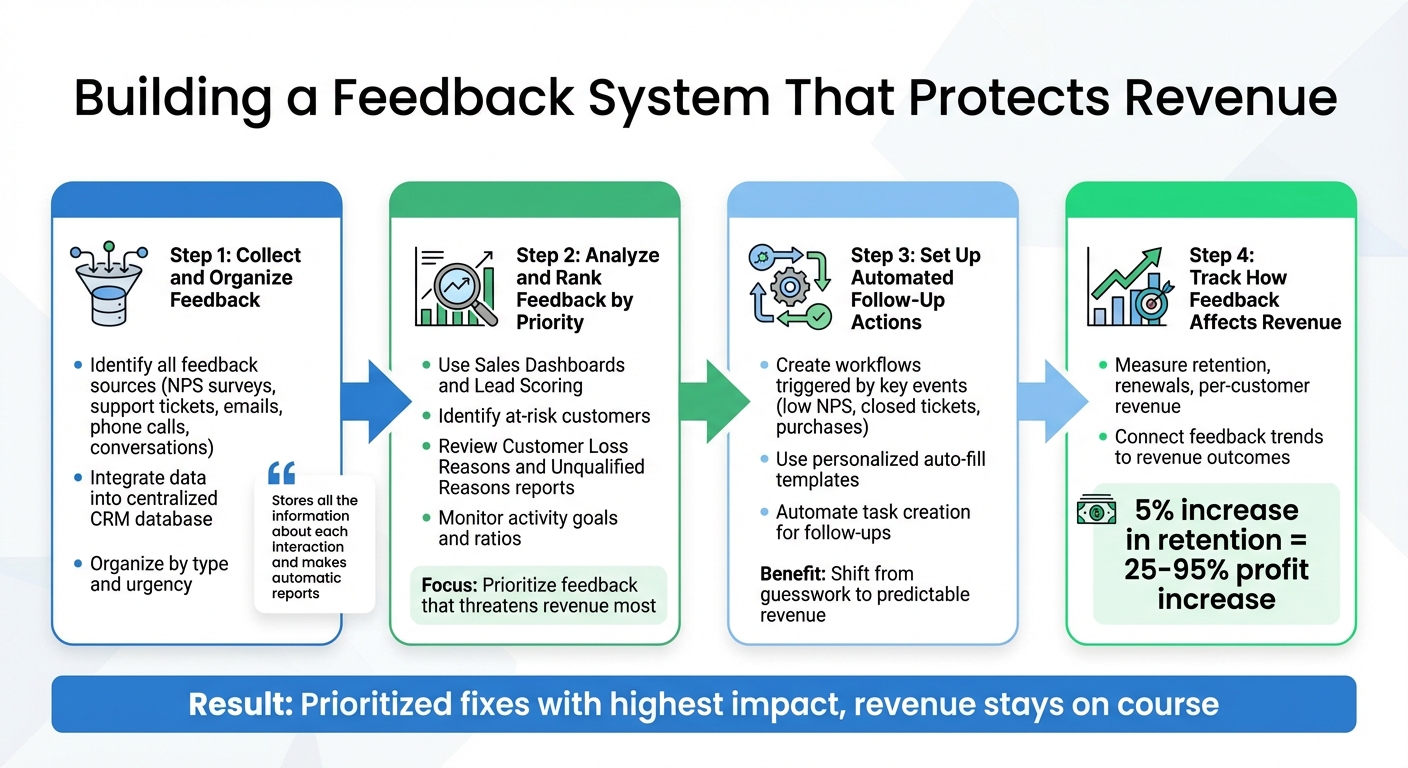
4-Step Feedback Tracking System to Protect Revenue
Gathering feedback is just the start. To truly safeguard revenue, you need a structured system that transforms raw input into actionable steps. This approach ensures no concern goes unnoticed and every piece of feedback contributes to improving sales and retention. Here’s how to make feedback work for your bottom line.
Step 1: Collect and Organize Feedback
Start by identifying all the ways customers share feedback – whether through NPS surveys, support tickets, emails, phone calls, or direct conversations. Use CRM tools to automatically integrate this data into a single, centralized database. Organize the feedback by type and urgency to keep your analysis focused and actionable. As Teamgate explains, their CRM "stores all the information about each interaction and makes automatic reports".
Step 2: Analyze and Rank Feedback by Priority
Once your feedback is centralized, the next step is to analyze it and prioritize the issues that have the most impact on revenue. Not all feedback is equally important. Tools like Teamgate’s Sales Dashboards and Lead Scoring can help identify at-risk customers and highlight the most urgent problems. Reports such as Customer Loss Reasons and Unqualified Reasons allow you to categorize feedback linked to churn. By monitoring activity goals and ratios, your team can maintain consistent follow-ups. For SaaS companies specifically, tracking subscription analytics and churn metrics can reveal how feedback connects to recurring revenue loss. This data-driven method ensures you focus on the feedback that most threatens revenue.
Step 3: Set Up Automated Follow-Up Actions
Relying on manual follow-ups often leads to missed opportunities. Instead, automate follow-up actions to ensure every feedback point triggers a response. For example, set up CRM workflows that activate after key events like a low NPS score, a closed support ticket, or a completed purchase. Use personalized templates that auto-fill customer details to make automated responses feel genuine. Automating task creation for follow-ups also prevents deals from stalling and keeps your CRM data accurate. This approach shifts your process from guesswork to predictable revenue.
Step 4: Track How Feedback Affects Revenue
Finally, measure the impact of feedback on key metrics like retention, renewals, and per-customer revenue. Teamgate’s reporting tools can help connect feedback trends to revenue outcomes. Research shows that boosting customer retention rates by just 5% can increase profits by 25% to 95%. Tracking these metrics ensures that your feedback system drives long-term growth and stability.
Conclusion
Customer feedback is more than just insights – it’s a window into what’s driving success and where revenue is slipping through the cracks. Ignoring or mishandling feedback can lead to stalled deals, disengaged customers, and missed opportunities. The result? Wasted marketing budgets and countless hours spent chasing deals that won’t close.
To avoid this, follow a simple four-step process: collect, analyze, automate, and track. This creates a feedback loop that prioritizes fixes with the highest impact, ensuring your revenue stays on course.
With Teamgate CRM, staying disciplined in feedback tracking becomes second nature. By centralizing customer interactions and automating alerts for at-risk deals, Teamgate keeps a clean sales pipeline, follow-ups consistent, and leadership informed – all without drowning your team in admin work. As Chase Horn explains:
"Task automation prevents stalled deals, keeps CRM data accurate, and turns pipeline hygiene into predictable revenue rather than guesswork".
Start protecting your revenue today by capturing customer feedback, setting up automated alerts for warning signs, and reviewing monthly reports. These small steps can lead to steady and sustainable revenue growth.
FAQs
How can failing to track customer feedback result in lost revenue?
When businesses fail to track customer feedback, they risk letting key issues fall through the cracks. Problems like missed follow-ups, deals stalling without progress, and overlooked opportunities can quickly pile up. This often leaves deals lingering in the pipeline without clear next steps, causes promising leads to lose interest, and makes pipeline forecasts unreliable.
The fallout? Missed revenue opportunities and wasted resources. Time gets spent chasing deals that are no longer viable, and marketing efforts fail to deliver results. By actively monitoring and responding to feedback, businesses can keep deals on track and safeguard their revenue from avoidable losses.
What are the main signs that customer feedback is being overlooked?
Ignoring customer feedback comes with consequences that businesses can’t afford to overlook. One of the first signs is growing customer dissatisfaction – when concerns go unaddressed or suggestions are dismissed, customers often feel unappreciated. This can lead to higher churn rates, as even the most loyal customers may decide to take their business elsewhere.
Another red flag is the appearance of negative reviews online. These can damage your brand’s reputation and discourage potential customers from engaging with your business. Over time, the combined impact of unhappy customers and public criticism can lead to revenue loss, as trust diminishes and opportunities slip away. Taking feedback seriously and acting on it is crucial to keeping customers happy and safeguarding your business’s success.
How does Teamgate CRM help automate tracking customer feedback and follow-ups?
Teamgate CRM makes managing feedback and follow-ups easier by bringing all customer interactions – emails, calls, meetings, and support tickets – into one place. This unified system provides a clear timeline of engagement, helping you stay on top of every opportunity without missing a beat.
The platform offers real-time insights into your pipeline, highlighting deal aging, neglected opportunities, and overall pipeline health. Automated alerts notify you about overdue tasks or stalled deals, while built-in reminders and simple automations ensure follow-ups happen on time with less manual effort.
By simplifying feedback tracking and automating responses, Teamgate CRM helps you stay organized and responsive, ensuring every lead and customer interaction is handled efficiently to support your revenue goals.






