

Most sales teams resist using CRMs because they see them as extra work with little payoff. The result? Missed follow-ups, stalled deals, and unreliable forecasts. The problem isn’t laziness – it’s that CRMs often feel like tools for managers, not tools that help reps close deals. To change this, you need to make CRM usage simple, useful, and directly tied to success.
Here’s how you can fix it:
- Automate Repetitive Tasks: Sync emails, calendars, and calls to reduce manual data entry.
- Align CRM with Sales Processes: Map pipeline stages to buyer actions, not internal steps.
- Enforce Discipline: Require next steps for every deal and use tasks to maintain accountability.
- Motivate with Sales KPI Dashboards: Show reps their progress and highlight wins to keep them engaged.
When the CRM becomes a tool that saves time and helps reps close deals, adoption happens naturally. Teamgate helps sales teams follow clear processes and trust their data – without turning CRM into a full-time admin job.
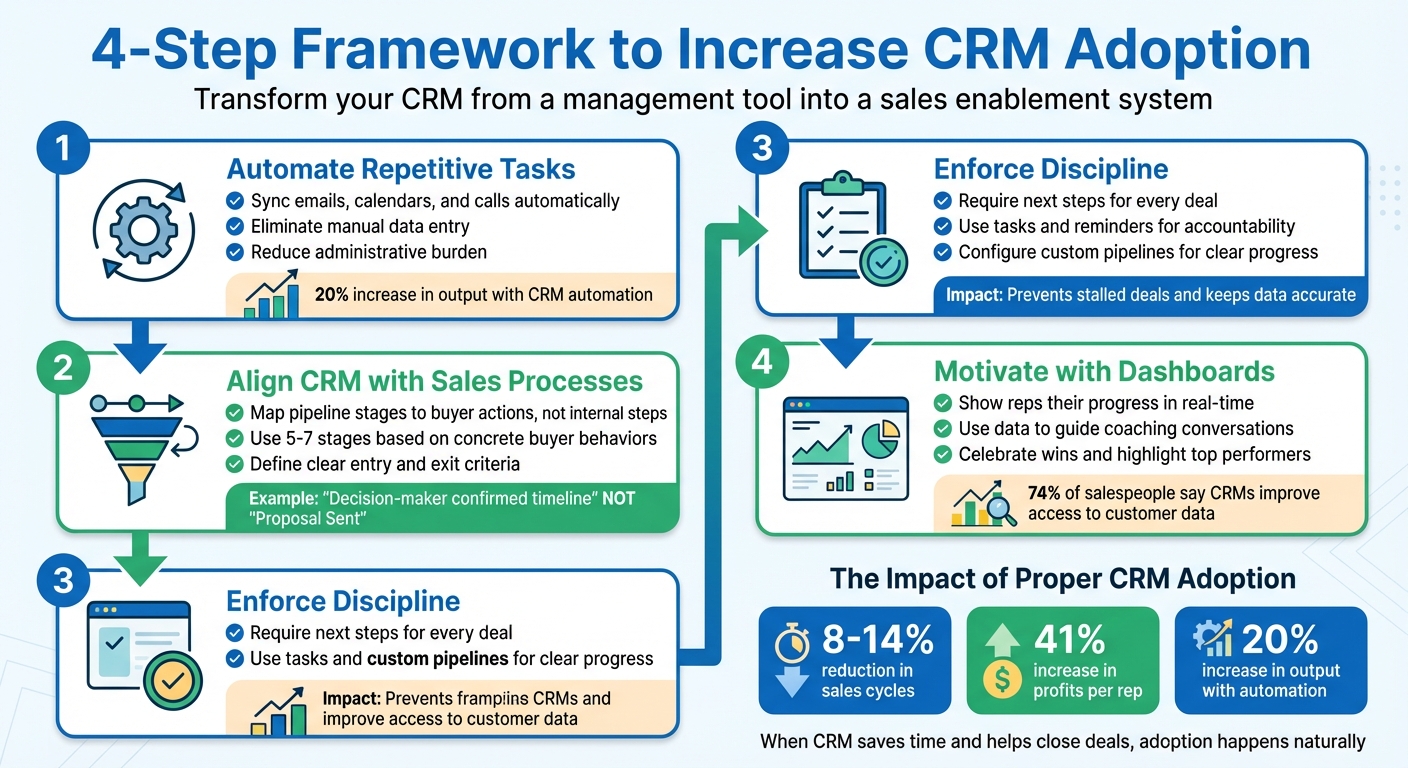
4-Step Framework to Increase CRM Adoption in Sales Teams
CRM Expert advice on how to increase CRM Adoption
sbb-itb-5772723
Common Barriers to CRM Adoption
Sales reps often push back against CRMs that feel more like a hindrance than a help. When a CRM disrupts their established processes, piles on manual tasks, and fails to directly support closing deals, adoption rates plummet. This creates a cycle of poor usage leading to bad data, which then makes the CRM less effective – further discouraging its use. These challenges typically fall into three key areas:
Manual Data Entry and Administrative Burden
One of the top frustrations for sales reps is the extra busywork that CRMs can create. Switching between tabs, manually entering contact information, and updating fields that don’t directly contribute to closing deals makes the system feel like a chore. For field reps, who spend much of their time meeting prospects, the challenge is even greater. If keeping the CRM updated requires additional devices or extra steps, many revert to using sticky notes or spreadsheets. Yet, when used effectively, CRMs can reduce sales cycles by 8% to 14% and increase profits per rep by 41%.
"If you give your reps an easy-to-use tool that automates parts of their day-to-day workflows, freeing them up to complete higher-priority tasks, their CRM use rate will naturally go up." – Sam Queen, Sales Strategy and CRM Expert
Disconnected Systems and Missing Integrations
CRMs that don’t integrate with essential tools like email, calendars, or calling systems create fragmented workflows. Reps are forced to duplicate their efforts – manually logging emails, scheduling meetings, and recording calls separately. This extra work often leads time-strapped reps to skip CRM updates altogether, leaving managers without a clear picture of the pipeline or deal progress. When your CRM is properly connected to your entire tech stack through robust integrations, it becomes the central hub for all customer interactions and business data.
Reps See CRM as a Management Tool, Not a Sales Tool
Perception plays a huge role in CRM adoption. Many salespeople view the CRM as a "watchtower" – a tool for managers to monitor their activity rather than something that helps them close deals. When CRM interactions are limited to performance reviews or pipeline audits, reps start seeing it as a tool for oversight rather than support. While 74% of salespeople acknowledge that CRMs improve access to customer data, if the system feels like it’s imposed solely for tracking purposes, they’re less likely to engage with it.
"If your reps aren’t using the CRM, it’s not because they’re lazy. It’s because it feels like a burden. A time sink. A watchtower." – IMPACT Team
Set Clear Expectations and Provide Effective Training
From day one, CRM usage should be a core part of your team’s workflow. The most successful sales teams approach CRM adoption as a leadership initiative, not just a compliance task. This means involving your team in the decision-making process, earning buy-in from top performers, and clearly demonstrating how clean, accurate data can directly boost their earnings. As Sam Queen, a Sales Strategy and CRM Expert, explains: "Leading your sales team is making them a part of the process. It’s letting them get your hands dirty with you and making them feel like it’s their decision as well."
Make CRM Part of Onboarding from Day 1
Introduce new hires to the CRM on their very first day, presenting it as an essential sales tool – not an optional add-on. Provide a clear systems overview document that covers key integrations and core features, ensuring they understand its role in their success. To solidify this foundation, require new team members to pass a short test on CRM tools and processes before they begin using it. This ensures they’re ready to hit the ground running and see the CRM as integral to their work.
Tailor Training to Specific Roles
One-size-fits-all training doesn’t cut it. Different roles within your team rely on the CRM in different ways, so training should reflect those needs. For example:
- Reps benefit from tools like deal management and pipeline visualization.
- SDRs need features such as lead conversion analysis and integrated dialing tools for high-volume outreach.
- Managers should focus on dashboards for coaching and decision-making rather than just reporting.
By showing each team member how the CRM simplifies their specific tasks – like using SmartDialers for outreach or pre-built email templates to save time – you make the system indispensable. Managers, in particular, should lead by example, using the CRM to drive team performance and align with the sales process.
Align CRM Usage with the Sales Process
To make the CRM a natural part of daily workflows, integrate it into all key activities. For instance:
- Use CRM dashboards during weekly sales meetings, one-on-ones, and pipeline reviews. Avoid relying on slides or spreadsheets, as this can signal to reps that the CRM isn’t central to your process.
- Map pipeline stages to buyer actions, such as “Decision-maker confirmed timeline,” rather than internal steps like “Proposal Sent.” This ensures data reflects real progress.
- Sync external tools like Google Calendar so that all appointments and activities are visible in the CRM, reducing the need to switch between apps.
These steps help reinforce earlier training by showing reps the CRM’s practical benefits every day. When the CRM becomes the team’s single source of truth, it stops feeling like extra work and starts becoming a tool they rely on. With its rep-friendly design and built-in automations, Teamgate CRM simplifies daily tasks and ensures these best practices are easy to follow.
Integrate CRM into Workflows with Automations
Once you’ve set clear expectations for using your CRM, the next step is weaving it into your team’s daily workflow through automations.
Extra steps and manual work often discourage CRM adoption. If reps have to jump between apps, manually copy data, or remember to update fields after every call, chances are they’ll avoid it. As the IMPACT Team aptly says: "Until the CRM helps them win, they won’t use it. Period." Automation eliminates these hurdles by connecting your CRM to the tools your team already uses and taking care of repetitive tasks. For organizations managing complex data ecosystems, DreamFactory can provide a governed API layer that securely connects your CRM to enterprise databases and data sources, ensuring seamless data access and integration across systems.
Sync Email, Calendar, and Calls
Integrating your CRM with tools like Gmail, Outlook, and Google Calendar can make life easier for your reps. Automatic logging ensures emails, meetings, and calls are recorded without manual input. Calendar sync through CalDav or direct integration ensures scheduled activities appear in both the CRM and the rep’s primary calendar, helping avoid double bookings. For calls, in-browser dialers like SmartDialer allow reps to make, record, and route calls directly within the CRM, capturing outcomes automatically and centralizing communication.
Automate Follow-Ups and Reminders
Deals often stall when follow-ups are missed or next steps are unclear. Automation can step in to keep deals moving. Configure your CRM to categorize tasks by urgency, set recurring check-ins, and define actions based on each deal stage using sales pipeline management tools. This ensures no opportunity gets overlooked. As Chase Horn, Sales Management at Teamgate, notes: "Task automation prevents stalled deals, keeps CRM data accurate, and turns pipeline hygiene into predictable revenue rather than guesswork."
Simplify Data Capture with Automations
Manual data entry is one of the biggest deterrents to CRM usage. Automations can reduce this burden by creating tasks, sending reminders, and triggering notifications based on deal progress or activity milestones. Features like pre-built email templates and one-click access to follow-up materials allow reps to stay productive without leaving the CRM. For more complex workflows, tools like Zapier can connect your CRM to third-party apps, automating specialized tasks. The goal is to make the CRM a tool that speeds up work – if it slows reps down, they’ll revert to spreadsheets and sticky notes.
Enforce Discipline Through Pipelines and Next Steps
Automation can get your team to start using a CRM, but discipline ensures they stick with it. Without a structured approach, even the most advanced system can lead to overlooked opportunities and forgotten follow-ups. By creating clear pipelines, requiring next steps, and leveraging activity tracking, you build a framework that makes daily CRM usage second nature – not through micromanagement, but by providing clarity and focus. Let’s break down how to set this up effectively.
Configure Custom Pipelines for Clear Progress
Your pipeline stages should reflect real, verifiable buyer actions – not just internal sales activities. As the IMPACT Team aptly says: "If your pipeline has stages like ‘Proposal Sent,’ but the buyer hasn’t even responded, you’re not tracking progress; you’re tracking hope." To avoid this, design 5–7 stages based on concrete buyer behaviors, such as "Decision-maker confirmed timeline" or "Budget approved." Define specific entry and exit criteria for each stage so reps know exactly what needs to happen before moving a deal forward.
Visual tools like color-coded deal boards and deadline tags make it easy to spot stagnant opportunities. This transforms pipeline management into a system for tracking real progress, rather than just another administrative task. A well-structured pipeline not only simplifies processes but also encourages consistent CRM use as part of daily routines.
Require Next Steps to Keep Deals Moving
Deals lose momentum when there’s no clear next step. To avoid this, make documenting next steps mandatory for every opportunity. Configure your CRM to prompt reps to log a next step immediately after calls or meetings. This ensures follow-ups aren’t left to chance but become part of a repeatable process.
Automating tasks tied to next steps keeps deals moving forward and helps maintain accurate data. Regularly review next-step coverage across your pipeline to spot deals at risk of stalling. Use this information in coaching sessions to emphasize the importance of maintaining momentum through documented actions.
Use Tasks and Reminders to Reinforce Accountability
Once your pipeline is structured and next steps are in place, accountability comes through effective task management and reminders. A centralized to-do list within your CRM helps reps stay on top of their responsibilities. Syncing CRM tasks with tools like Google Calendar or Outlook ensures reminders are visible wherever reps work – not just when they’re logged into the CRM.
During one-on-one meetings, ask pointed questions like: "What’s the next step, and is it documented?" This reinforces the CRM as the single source of truth for your team. It also promotes visibility across the team, reducing overlaps and ensuring everyone is aligned. By tying reminders and tasks to clear pipeline stages and next steps, you create a system that holds everyone accountable without adding unnecessary complexity.
Motivate Reps with Dashboards and Insights
Discipline keeps deals moving forward, but visibility is what keeps sales reps truly engaged. When reps can see their progress in real time, the CRM transforms from just another reporting tool into a resource that supports their success. This kind of visibility is essential for boosting daily engagement. The secret lies in creating dashboards that not only show reps their current status but also equip managers with actionable insights for effective coaching.
Here’s how dashboards can provide this much-needed clarity and motivation.
Give Reps a Clear View of Their Activity
Reps perform better when they can quickly gauge their progress. A well-designed dashboard includes an activity feed that tracks calls, emails, and meetings, along with a to-do list sorted by "due today", "overdue", and "due this week." By adding a performance tracker that updates targets and achievements in real time, reps can adjust their efforts as needed. Color-coded boards make it easy to spot deals that require immediate attention, ensuring nothing slips through the cracks.
Use Data to Guide Coaching Conversations
Dashboards aren’t just for reps – they’re a powerful tool for managers too. By using dashboard data during forecasts, one-on-one meetings, and pipeline reviews, managers can emphasize that the CRM is the single source of truth for decision-making. Instead of asking broad questions like, "How’s the quarter shaping up?", managers can dig into specifics with questions like, "What signals are we getting from the buyer?" or "What’s the next documented step for this deal?" Concrete data points – such as call recordings, next-step coverage, and deal velocity – enable managers to give precise, actionable feedback. Tracking key performance indicators (KPIs) like activity levels, outreach, booking rates, deal velocity, pipeline coverage, win rate, deal size, quota attainment, and follow-up consistency offers a clear picture of performance trends and areas for improvement.
Celebrate Wins to Reinforce Good Habits
Recognition is a powerful motivator. Highlighting reps who maintain clean pipelines and consistently cover next steps – whether during team meetings or through internal communication channels – sends a strong message about the importance of disciplined CRM use. Leaderboards showcasing top performers based on metrics like booking rates and follow-up consistency can further inspire the team to keep their data up to date. When managers themselves actively use dashboards, they set a strong example, reinforcing the value of CRM engagement. By tying disciplined pipeline management to visible, measurable successes, dashboards make the wins tangible and rewarding.
"Show reps that your CRM isn’t a reporting tool, it’s your decision-making tool. If you treat it like your compass, your team will too." – IMPACT Team
Conclusion
Transforming CRM use from a tedious task into a genuine advantage starts with removing obstacles, setting clear expectations, and automating repetitive work. When the CRM integrates seamlessly into daily workflows, supports selling rather than hindering it, and eliminates unnecessary admin work, adoption becomes natural. Reps are motivated to engage with the tool when it aids in closing deals rather than adding to their workload.
To make this shift, align pipeline stages with buyer actions, require clear next steps, and automate routine tasks. As Sam Queen notes, lacking proper pipeline structure means losing critical data. With these foundational changes, the CRM evolves into a powerful decision-making tool.
Consider this: CRM automation can increase output by 20% and boost individual sales rep profits by up to 41% when the system is intuitive, quick to update, and centered around actionable insights. These tangible results are at the heart of how Teamgate CRM empowers sales teams to succeed.
Teamgate is built with these principles in mind. Features like the SmartDialer for in-browser calling, Morning Muffin daily summaries, and automated task reminders ensure reps spend more time selling and less time on admin. Calendar sync keeps schedules organized automatically, while pipeline hygiene automation prevents deals from going stale without requiring constant manual intervention. The result? A streamlined, reliable pipeline that makes revenue predictable – not because managers are micromanaging data entry, but because the system encourages disciplined selling by design.
When a CRM protects and drives revenue rather than just tracking it, its use becomes second nature. Reps update it because it helps them succeed, managers coach with confidence using real insights, and leadership gains a dependable, trustworthy pipeline.
FAQs
How does automation help sales teams use CRM daily?
Automation streamlines CRM adoption for sales teams by handling repetitive tasks and cutting down on manual work. This makes the CRM more practical for everyday use. Features such as auto-generating quotes, creating "if-then" rules to manage deal stages, and automating follow-up reminders help keep deals progressing with minimal effort.
By taking care of routine tasks, automation frees up sales reps to concentrate on selling instead of administrative duties. It also delivers timely alerts and notifications about pipeline updates or aging opportunities, keeping reps informed and proactive. This combination of efficiency and usefulness fosters consistent CRM usage, embedding it naturally into the sales process.
How do dashboards encourage sales teams to use a CRM daily?
Dashboards play a key role in encouraging sales teams to actively use a CRM by transforming raw data into clear, actionable insights. They offer real-time updates on pipeline health, performance metrics, and deal progress, removing the need for tedious manual reporting. This allows sales reps to easily monitor their progress and concentrate on the tasks that truly matter.
By automating alerts and spotlighting critical activities – such as overdue tasks or aging deals – dashboards help keep sales reps accountable and engaged. When team members can clearly see how their efforts directly influence results, they’re more likely to stay consistent in updating the CRM. In essence, dashboards turn the CRM into an indispensable daily tool, promoting data-driven decisions and ensuring regular follow-ups, while fostering a proactive sales approach.
Why should CRM pipeline stages match the buyer’s journey?
Aligning your CRM pipeline stages with the buyer’s journey ensures your sales process reflects how customers actually make decisions. This approach simplifies tracking progress, highlights gaps, and makes it easier for sales teams to identify bottlenecks, focus on the right opportunities, and act quickly to keep deals advancing.
When pipeline stages are tied to buyer actions, forecasting becomes more precise, and follow-ups feel more relevant. This alignment not only strengthens pipeline accuracy but also promotes a structured and consistent strategy for driving revenue growth.






