

Most CRMs fail not because they lack features but because they aren’t used effectively. Integrating your CRM with third-party tools like email, calendars, and accounting systems centralizes data, reduces manual tasks, and improves pipeline accuracy. Businesses that integrate their CRMs see a 30% boost in productivity and spend less time on admin work. Teamgate simplifies this process with native integrations, no-code connectors, and API access, making it easy for sales teams to focus on closing deals, not updating fields.
Key Takeaways:
- Save Time: Automate data entry, follow-ups, and task reminders.
- Centralize Data: Connect tools like Gmail, Slack, and QuickBooks to create a single source of truth.
- Improve Efficiency: Eliminate data silos and ensure every interaction is logged.
- Scalability: Start with simple setups and expand integrations as your team grows.
Teamgate gives growing sales teams clarity, structure, and trustworthy pipeline insight – without enterprise CRM bloat or feature overload.
How Do I Integrate My CRM With Other Business Tools? – BusinessGuide360.com
Why Connect Third-Party Tools to Teamgate CRM
Sales deals often falter when critical data is scattered across different platforms. If your contact details are stuck in Gmail, meeting notes are buried in Slack, and deal updates never make it to your CRM, your sales pipeline becomes unreliable. By implementing key CRM integrations with Teamgate CRM, you create a single source of truth where every customer interaction is logged, tracked, and actionable.
Eliminating Data Silos and Centralizing Work
When sales activities are spread across numerous apps, reps waste precious time toggling between tools. By integrating Gmail, Outlook, and Google Calendar with Teamgate CRM, emails, calls, and meetings are automatically logged into a single timeline. This eliminates the need to search for scattered information or retrace prior outreach.
Tools like Zapier and Make.com expand integration possibilities further, ensuring that lead data, tasks, and updates flow seamlessly between systems in real time.
In 2022, Packagecloud’s Director of Operations, Krish Sivanathan, leveraged Teamgate’s centralized data and sales insights to drive targeted experiments. By refining scripts and lead targeting, the company boosted engagement rates by 18%.
"Utilizing sales insights we have been able to conduct targeted experiments, enabling Packagecloud to increase engagement rates by 18% through the refinement of scripts and lead targeting."
- Krish Sivanathan, Director of Operations, Packagecloud
Centralizing data doesn’t just streamline workflows – it also enforces disciplined sales actions that drive results.
Improving Team Efficiency and Sales Discipline
Integrations do more than save time – they help enforce the kind of sales discipline that leads to predictable revenue. For instance, syncing tools like Cal.com or Calendly with Teamgate ensures that meetings automatically generate CRM records, complete with next steps and follow-up tasks. These zero-data-entry workflows allow reps to focus on selling instead of admin tasks, keeping the pipeline clean and actionable.
Automated lead capture from platforms like WordPress and LinkedIn ensures prospects are contacted while interest is high, reducing the risk of missed opportunities. Similarly, syncing with QuickBooks or Xero eliminates manual billing errors and gives sales teams real-time insights into payment behavior, helping prioritize accounts that require immediate attention. Communication tools like Slack provide instant updates on deal progress, enabling faster decision-making across the team.
Baremetrics’ Director of Operations, Allison Barkley, used Teamgate’s sales insights to refine their Ideal Customer Profile (ICP). This led to more targeted marketing campaigns, higher conversion rates, and improved marketing ROI.
"With Teamgate we’ve been able to refine our true ICP through sales insights. This has enabled targeted marketing campaigns resulting in more conversions and an increase in our overall marketing ROI."
- Allison Barkley, Director of Operations, Baremetrics
By automating repetitive tasks and centralizing information, your team gains the efficiency and precision needed for growth.
Preparing Your Sales Stack for Growth
Efficient workflows and centralized data make scaling with Teamgate CRM straightforward. As teams grow, manual processes that work for a few reps often break down. By integrating third-party tools, Teamgate evolves from a simple CRM into a scalable central hub that adapts to your growing needs. API-based integrations ensure that data syncs accurately across platforms in real time, maintaining consistency as your business expands.
Teamgate’s Professional Plan includes API access, Zapier connectivity, and integrations with Google Apps, WordPress, and LinkedIn. For larger teams, the Enterprise Plan offers advanced connections with tools like Intercom, Zendesk, Mailchimp, and Xero. This flexibility allows you to start with a simple setup and add complexity only when your team needs it – avoiding the hassle of overhauling your entire system.
What Sales Teams Gain from CRM Integrations
When third-party tools integrate with Teamgate CRM, sales teams see immediate benefits in their workflow. These integrations do more than just simplify tasks – they directly influence revenue by cutting down on wasted time, improving pipeline accuracy, and making the CRM an indispensable tool for reps.
Less Admin Work and Faster Outreach
Integrations reduce the repetitive, time-consuming tasks that often bog down sales teams. For instance, syncing Gmail or Outlook with Teamgate ensures every email is automatically logged to the correct contact and deal. Tools like Cal.com and Calendly seamlessly add meeting details to the CRM, including contact information and follow-up steps. Similarly, email templates and integrated dialing through Twilio log calls, record outcomes, and schedule follow-ups – all without extra effort. These automations can save sales teams up to 20% of their time, giving them an extra day each week to focus on outreach, follow-ups, and closing deals.
Financial tools like QuickBooks or Xero integrate to provide real-time insights into payment behaviors, helping reps prioritize accounts based on billing status. Customer support histories from platforms like Zendesk or Freshdesk are displayed directly in the CRM, giving reps the context they need before engaging with customers. Workflow automation through Zapier or Make.com further streamlines processes by updating the CRM based on actions across thousands of apps. This approach not only speeds up outreach but also ensures the pipeline remains accurate and dependable.
Cleaner Pipelines and Better Forecasts
By centralizing data from third-party tools, Teamgate captures every customer interaction in one place. Emails, calls, meetings, and support tickets are all synchronized, allowing managers to assess deal health and maintain sales pipeline hygiene based on actual activity rather than assumptions. Real-time data updates eliminate discrepancies, ensuring the pipeline reflects the true status of every opportunity.
This level of visibility enhances forecasting. Instead of relying on overly optimistic projections, leaders can coach their teams using concrete evidence – such as deal age, activity frequency, and next-step coverage. Marketing integrations that provide lead scoring and campaign attribution data also help identify high-value opportunities, making revenue predictions more reliable. Additionally, the system flags aging deals without next steps, preventing opportunities from slipping through the cracks. These insights foster trust among reps, encouraging them to rely on and update the CRM consistently.
Higher CRM Usage Among Reps
Integrations make Teamgate easier for sales reps to embrace by allowing them to stick with familiar tools. For example, when Outlook or Gmail is connected, data is logged automatically while reps work within their preferred email platforms. Slack integrations deliver real-time updates on lead activity and deal progress, improving cross-team communication and enabling quicker decisions.
When the CRM aligns with daily workflows, reps are more likely to keep it updated – not because they’re required to, but because it genuinely helps them sell. The result is a cleaner, more reliable pipeline that supports predictable growth. Teamgate ensures that sales reps can focus on what they do best: building relationships and closing deals, without the burden of unnecessary admin work.
Teamgate CRM Native and Pre-Built Integrations
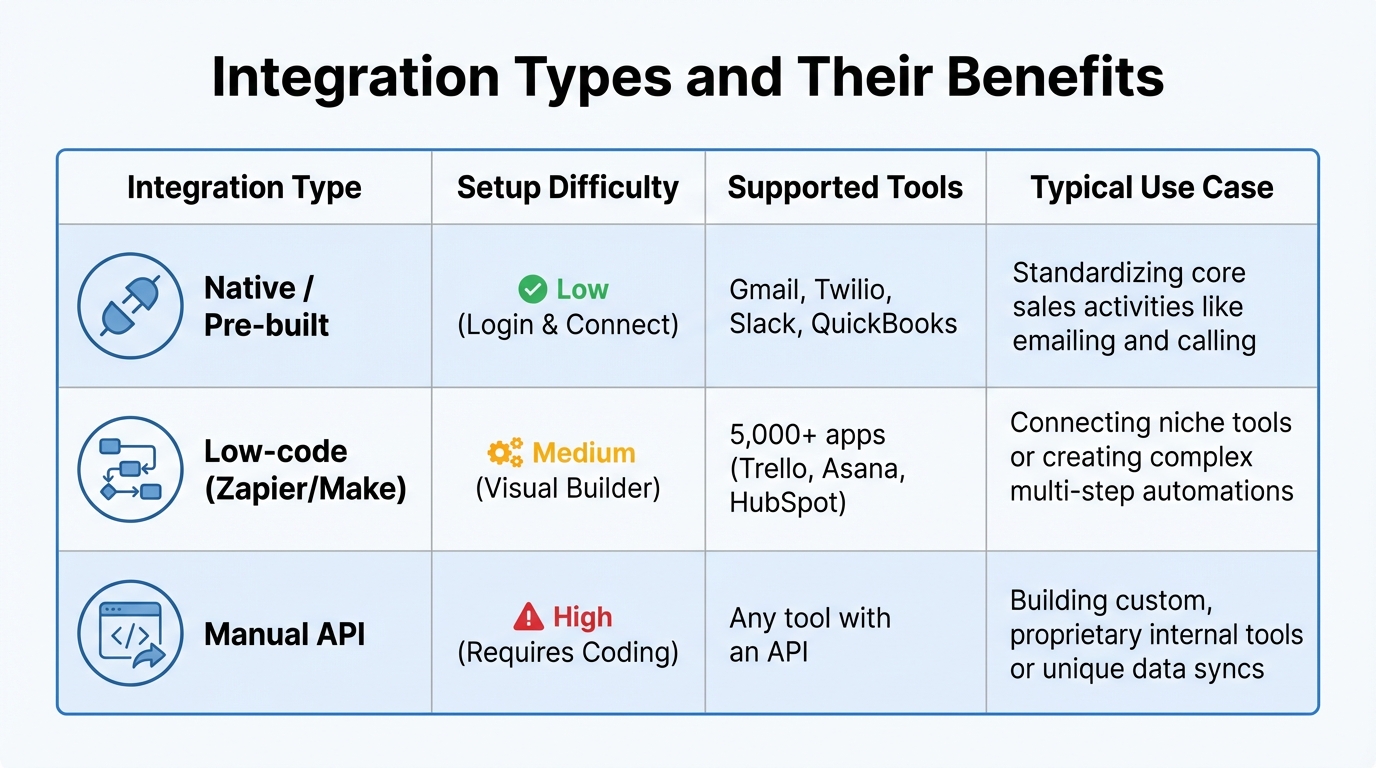
CRM Integration Types Comparison: Native vs Low-Code vs API
Teamgate CRM simplifies sales operations with 22 pre-built integrations, making it easy to connect your sales tools seamlessly. Whether you’re on the Professional or Enterprise plan, you’ll find integrations tailored to your needs. Professional plans include access to Gmail, Google Calendar, WordPress, LinkedIn, and Zapier, while Enterprise plans expand to include tools like Intercom, Zendesk, Mailchimp, and Xero.
Pre-Built Integrations Available Out of the Box
Teamgate’s native integrations cover essential tools for sales automation that teams rely on every day. For example:
- Email platforms: Gmail and Outlook sync automatically, logging emails to the correct contact and deal without any manual effort.
- Calendar tools: Google Calendar, Office 365 Calendar, Calendly, and Cal.com ensure meeting details are added to the CRM when prospects schedule appointments.
- Communication apps: Slack provides real-time deal updates, and Twilio enables in-app calling with automatic call logging and follow-up scheduling.
- Workflow automation: Zapier, Make.com, and n8n connect Teamgate to over 5,000 apps without needing any coding.
- Finance and support tools: QuickBooks and Xero offer financial insights, while Zendesk and Freshdesk bring customer support details into the CRM.
These integrations require only login credentials and quick authorization, making setup straightforward and hassle-free.
How Teams Use Common Integrations
Sales teams use these integrations to centralize data, automate tasks, and improve efficiency. Here are a few examples:
- Zapier: Automates repetitive tasks like creating leads or sending notifications across tools like Trello, Slack, and HubSpot – all without coding.
- Gmail/Outlook: Automatically syncs emails, ensuring every interaction is logged in the CRM.
- Twilio: Enables calls directly from the CRM, automatically capturing call outcomes and scheduling follow-ups.
These examples highlight how Teamgate integrations streamline workflows, giving teams more time to focus on selling.
Integration Types and Their Benefits
Teamgate offers three integration options to suit different needs:
| Integration Type | Setup Difficulty | Supported Tools | Typical Use Case |
|---|---|---|---|
| Native / Pre-built | Low (Login & Connect) | Gmail, Twilio, Slack, QuickBooks | Standardizing core sales activities like emailing and calling. |
| Low-code (Zapier/Make) | Medium (Visual Builder) | 5,000+ apps (Trello, Asana, HubSpot) | Connecting niche tools or creating complex multi-step automations. |
| Manual API | High (Requires Coding) | Any tool with an API | Building custom, proprietary internal tools or unique data syncs. |
For added security, Teamgate requires users to perform integrations themselves using provided documentation, ensuring control over the process. Verified integration partners maintain their own security policies, and for users who prefer not to use direct sync, Teamgate offers a Bcc email attachment feature to link Outlook emails to contact timelines.
sbb-itb-5772723
How to Set Up CRM Integrations Step by Step
Identifying Which Tools to Connect
Start by reviewing your current tech stack to pinpoint data silos and identify the integrations that will save the most time. For example, connecting Gmail can reduce the need for manual email logging. Instead of trying to integrate every tool, focus on solving specific challenges. For instance, if your sales forecasts are unreliable due to inconsistent deal stage updates, prioritize tools that automate status changes based on activity.
It’s important to define data fields consistently across systems to avoid sync errors. Fields like "Lead Source" or "Email" must match exactly between platforms, as mismatches can lead to errors or duplicate entries.
Choose an integration method that aligns with your Teamgate plan. Options include native one-click connections for popular tools, middleware like Zapier for access to over 5,000 apps, or custom API builds for unique workflows.
"A clear strategy ensures you’re integrating with intention, not impulse".
- tjeyakumar.itl
Once you’ve prioritized tools and aligned data fields, you’re ready to connect and test your integrations.
Connecting and Testing Your Integrations
Preparation is key before diving into technical connections. For native integrations like Gmail or Twilio, the process is as simple as logging in and authorizing access – Teamgate takes care of the heavy lifting. For non-native tools, platforms like Zapier or Make.com allow you to create workflows visually, even without coding skills.
Before going live, test your integrations in a sandbox environment. This step ensures that your production data remains unaffected while you verify that data syncs correctly and workflows trigger as intended. Use a multi-step testing approach:
- Unit testing: Confirm that the CRM can retrieve a contact.
- Integration testing: Check that a website form submission creates a lead in Teamgate.
- User acceptance testing: Have sales reps test real-world scenarios to validate functionality.
For secure connections, use OAuth 2.0 or token-based authentication instead of hardcoding credentials. Teamgate requires users to handle integrations directly using the provided documentation, ensuring you retain control over data privacy and security.
Once live, monitor the health of your syncs immediately. Set up automated alerts for failures and review API logs regularly to catch issues like rate limits or "sync loops", where systems continuously update each other.
Tracking and Improving Integration Performance
To maintain smooth operations, perform regular audits to ensure data flows correctly and APIs remain up-to-date. A quarterly review schedule works as a good starting point, but audits should also be conducted after updates to Teamgate or third-party tools.
Set up automated notifications to track technical health metrics, such as sync failure alerts and API uptime. This allows you to address issues before they escalate into problems like lost deals or duplicate records. Periodically check data quality by reviewing field accuracy and duplicate rates through manual audits.
Use Teamgate’s reporting tools to measure the impact of your integrations on sales. For instance, Krish Sivanathan, Director of Operations at Packagecloud, used sales insights to run experiments that boosted engagement rates by 18%. Similarly, Allison Barkley, Director of Operations at Baremetrics, refined their Ideal Customer Profile using CRM insights, leading to higher conversion rates and better marketing ROI.
Regular feedback from your sales reps is also essential. If they’re resorting to manual workarounds or avoiding certain features, it might indicate that an integration isn’t meeting their needs.
"Regularly audit your connections. Monitor performance and get alerts for sync failures. Third-party tools update their APIs – your system needs to keep up".
- tjeyakumar.itl, Techmated
Best Practices for Secure and Scalable Integrations
Protecting Data Quality and Security
When syncing customer data across platforms, security must be a top priority. Always use OAuth 2.0 or secure API tokens for connections, and avoid embedding credentials directly into scripts. Role-Based Access Control (RBAC) is another critical measure – it restricts data access based on user roles, minimizing the risk of unauthorized access.
Before integrating any third-party tools, confirm they comply with GDPR, CCPA, and SOC2 standards. If you’re in a regulated industry, ensure that data storage aligns with local regulations. Teamgate prioritizes platform security by partnering only with verified, trusted integration providers.
Regular maintenance is equally important. Conduct quarterly audits to spot sync failures, outdated APIs, or performance issues. Set up automated alerts for sync problems so you can address discrepancies immediately, rather than discovering them too late when they’ve already impacted deals.
"Integration isn’t a one-and-done task. Regularly audit your connections. Monitor performance and get alerts for sync failures."
- tjeyakumar.itl, Techmated
The next step is creating an integration framework that evolves alongside your sales process.
Balancing Structure with Flexibility
Start by implementing simple, unidirectional data flows for critical connections. Once your sales operations become more complex, you can expand to bidirectional syncing. This staged approach avoids sync loops – those frustrating cycles where systems endlessly update each other – and makes troubleshooting easier.
Develop a data map that outlines each integration’s source, destination, and transformation rules. Standardizing field mapping is essential to prevent errors like duplicate entries or mismatched data. Thoughtful planning upfront leads to smoother operations later.
Using middleware platforms like Zapier, n8n, or Make.com can help adapt your integrations as your tech stack grows. Remember, successful CRM integration projects are about 70% planning and 30% technical execution. Invest time in designing workflows before diving into technical implementation.
Getting Reps to Actually Use Integrations
Even the most secure and flexible integrations won’t deliver value if your team doesn’t use them. Focus on tools that address specific pain points rather than trying to integrate every app available. Overloading your CRM with unnecessary tools can clutter the interface, slow it down, and frustrate users – something Teamgate is designed to avoid.
Prioritize integrations that reduce manual tasks, like automating data entry, lead capture, and contact syncing. When reps see how an integration directly helps them close deals faster, they’re more likely to embrace it.
Provide clear documentation, step-by-step tutorials, and accessible support channels. Designate integration champions – team members who are enthusiastic about the tools and can help others adopt them. Native integrations, such as Gmail or Twilio, are often easier for users to adopt since they typically require just a simple login to set up.
"Even the best integrations fail if your team doesn’t know how to use them. Provide documentation, create internal tutorials, and offer support channels. Empower your users – don’t confuse them."
- tjeyakumar.itl, Techmated
Common Problems and How to Fix Them
Fixing Data Sync Problems
Sync issues like duplicate records, missing customer data, or incorrect field details – such as email open rates – are common headaches for CRM users. These glitches often occur when third-party tools update their APIs without notice, leaving your CRM integrations outdated and disrupting data flow.
To avoid such problems, always test integrations in a sandbox environment. This allows you to check for proper data syncing and workflow triggers without affecting live data. Once verified, activate the integration. Teamgate HQ continuously monitors performance to help maintain smooth operations.
Sync delays, often linked to outdated APIs, can be mitigated by setting up automated alerts and scheduling quarterly audits. These audits help identify vendor updates or performance issues before they impact your workflows.
While fixing technical issues is essential, getting your team to embrace these integrations is equally important for success.
Increasing Low Adoption Rates
Even the most advanced features are wasted if your team doesn’t use them. The key to improving adoption lies in demonstrating how the CRM simplifies daily tasks, rather than enforcing usage through strict policies. For instance, Packagecloud improved engagement rates by 18% by using sales insights from integrated data to refine their scripts and lead targeting.
Minimize administrative burdens by automating tasks like email logging via Bcc or syncing directly with Gmail or Outlook. Additionally, use tools like Won/Lost reports to track KPIs and sales goals, which can help boost win rates. When the CRM becomes a tool that actively supports selling rather than adding busywork, adoption tends to follow naturally.
"With Teamgate’s intuitive interface, our user adoption was immediate. Even with a remote team consisting of sales, customer success, and marketing – we were onboarded and up and running within hours". – Jack Hodges, Sales Manager at FiveCRM
Once adoption is high, addressing integration failures becomes a priority to maintain workflow efficiency.
Spotting and Resolving Integration Failures
When an integration fails, the first step is to re-authenticate automatic integrations like Gmail or Twilio. If the issue persists, use visual workflow tools on middleware platforms to identify the problem.
Check your CRM subscription plan, as certain features – like core API access or advanced integrations with tools like Zendesk or Intercom – are only available on Professional and Enterprise tiers. For non-native integrations handled through platforms like Zapier or Make.com, consult their specific guidelines and logs for troubleshooting. If you’re working with manual integrations, the Teamgate API Library and developer documentation are invaluable resources for resolving technical issues.
Although Teamgate provides detailed instructional materials for setting up third-party solutions, customers handle the setup themselves to ensure data privacy and security.
Conclusion
Integrating third-party tools with Teamgate CRM turns scattered data into a unified, reliable source of truth. When email history, support tickets, billing records, and lead activities all converge in one place, sales reps can stop wasting time searching for information and focus on actions that drive deals forward. This leads to a more organized pipeline, quicker outreach, and forecasts based on real data instead of assumptions.
The results are clear. In 2022, Packagecloud saw an 18% boost in engagement rates by leveraging insights from integrated data to fine-tune their scripts and lead targeting. Gains like these don’t come from adding more fields to update – they come from reducing unnecessary tasks and equipping reps with sales management tools that genuinely help them sell.
To achieve these outcomes, focus on integrating tools that enhance response times, automate lead capture, or sync financial data for better prioritization. Test integrations in a sandbox environment, conduct quarterly performance reviews, and ensure your team understands how to use the connected tools. Even the best integrations will fall flat if your team doesn’t adopt them. A thoughtful integration strategy creates a CRM ecosystem designed for actionable results.
Teamgate simplifies this process. With native integrations for Gmail, Outlook, Slack, QuickBooks, Xero, and access to over 5,000 apps via Zapier, you can build a sales stack that streamlines follow-ups, flags aging deals before they go cold, and provides leaders with real-time insights for better coaching. When your CRM becomes the backbone of your sales process, growth becomes a predictable outcome – not a gamble.
Start by connecting the tools your team already relies on, such as email and calendar apps. As your process evolves, add automation and support integrations to enhance efficiency. The ultimate goal is to create clarity, maintain discipline, and ensure adoption, transforming your pipeline into a system that drives consistent growth. With Teamgate, your CRM becomes a powerful platform that supports growth through real-time insights and a disciplined approach to sales.
FAQs
How does integrating a CRM with third-party tools enhance sales team productivity?
Integrating a CRM with third-party tools can significantly improve your sales team’s efficiency by automating time-consuming tasks like data entry and follow-up reminders. This frees up your team to concentrate on selling rather than getting bogged down with administrative work. Plus, it centralizes customer information, ensuring it’s always accurate and up-to-date, which helps reps make quicker, well-informed decisions.
These integrations also simplify workflows by linking essential tools – like email, calendars, and communication platforms – directly to your CRM. This creates a unified system where tasks, updates, and customer interactions are easily accessible. The result? A smoother process that keeps everything on track and ensures no opportunities are missed.
What are the main advantages of using Teamgate’s pre-built integrations?
Using Teamgate’s pre-built integrations can make your sales process smoother and more efficient. These integrations handle repetitive tasks like capturing leads, updating contacts, and scheduling follow-ups automatically. This reduces the need for manual input, freeing up your team to concentrate on closing deals. Plus, automation helps maintain accurate and consistent data across your systems, cutting down on errors.
Teamgate also syncs effortlessly with tools like email marketing platforms, customer support systems, and calendar apps. This connectivity provides a complete view of customer interactions, improves team collaboration, and keeps your pipeline current for better forecasting. With these integrations, your workflows become simpler, your team stays aligned, and your sales efforts are more focused on results.
How does Teamgate CRM keep your data secure during integrations?
Teamgate CRM places a strong emphasis on keeping your data secure during integrations. It implements stringent organizational and technical measures to block unauthorized access, changes, or sharing of your information throughout the integration process.
The platform incorporates secure authentication methods and adheres to data privacy laws like GDPR. These strict security practices ensure a dependable and protected environment for linking third-party tools, safeguarding your sensitive data at every step.






