Get a free sales audit to uncover hidden revenue opportunities!

This article offers practical strategies for tracking your offline marketing efforts using a customer relationship management (CRM) program. You’ll learn five key methods to monitor offline campaigns such as custom landing pages, unique discount codes, event tracking, direct mail engagement, and cold call monitoring.

Key Takeaways:

  • Creating custom landing pages for offline campaigns and implementing QR codes can help monitor the number of visits and conversions.
  • Unique discount codes used in print ads or direct mailers can be tracked through CRM to measure customer response.
  • CRM software can assist with event tracking, enabling businesses to create campaigns, track URLs, and subsequently retarget customers.
  • Direct mail marketing can be automated and tracked through CRM tools, allowing businesses to monitor response rates and craft targeted campaigns.
  • Integration of unique phone numbers into CRM can facilitate the tracking of cold calls, aiding in the determination of conversion-driving sources.

A survey found that 40% of online shoppers are influenced by offline marketing campaigns when making a purchase. In a saturated online marketplace, businesses should not forget that offline campaigns are still a viable option. 

Many marketers use offline channels like billboards, newspapers, magazines, and direct mailers as part of their marketing strategy.

Tracking and collecting data from these campaigns is crucial for attaining success. 

Using a comprehensive customer relationship management (CRM) program allows businesses to track lead management, sales journey, customer success management, and more. Businesses can easily integrate their offline marketing channels into a CRM software to track their performance.

We will discuss five ways to track offline marketing efforts using CRM solutions. 

5 ways to track offline marketing campaigns using CRM 

Creating customized landing pages 
Source

Sending offline traffic to a custom landing page is a popular way to track offline campaigns.

A custom landing page set up for your campaign allows you to focus on your advertisement’s main goal and target it towards a specific audience. In addition, businesses can also monitor the number of page visits.

The promotional URLs of the custom landing pages usually go on offline materials like billboards, flyers, and brochures. 

Design and launch professi-looking landing pages customized to your business needs using templates from the built-in library that are proven to convert and easy to build ground up. 

Display personalized CTAs, content, and forms for every visitor to improve the performance of your landing pages and provide customers with the best experience possible. 

As an alternative to the URL or a unique domain printed on offline materials, businesses can create QR Codes with logos. QR Codes will relieve customers of the errors while typing the URL and redirect customers to landing pages smoothly.

Adding unique discount codes 

Including discount codes on print ads and direct mails are a great way to incentivize customers to purchase your products. But, how to measure the number of people that actually used the discount code?

CRM software can help track discount codes by using analytics to segment customer profilings, measuring and tracking escalation, and predictive modeling. Some platforms can also generate discount codes and help them to integrate directly into the software. 

Businesses can even create specific discount codes and measure each customer’s response to the outreach. 

CRMs for event tracking 
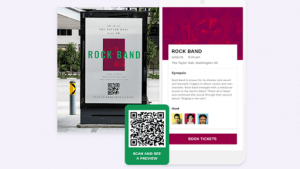
Source

Offline businesses can drive offline audiences online by tracking and retargeting them using CRM software.

At various events, businesses have constant interactions with the customer base. 

  1. By using CRM software, businesses can create a campaign for an event
  2. Then create a tracking URL that links to the QR Code
  3. Create a QR Code for a landing page, or a website you want customers to visit
  4. Then link the landing page to the QR Code. Integrate the landing page into the CRM. 

Businesses can place print materials near exit and entrance or near product displays at stores.

Using the data acquired from the CRM, businesses can retarget niche customers to digital campaigns. 

Track customer engagement from direct mails

Sending a direct mail for a free item or as a discount to give special benefits is a fantastic way to track customer engagement.

Businesses can pair their digital marketing strategies with direct mails by offering discount codes, special offers, and even freebies. Automate direct mail marketing using CRM tools to allow sending direct mail seamlessly. 

Through a CRM software, you can track direct mails by adding a digital tie-in to every piece to gather data. 

With advancements in customization, there are  a number of ways to tie digital tools in your direct mails – from QR Codes to landing pages to coupon codes. 

A Canada Post study found that direct mail + digital increases brand recall by 10% and emotional response by 5%. 

When customers visit the landing page after seeing the direct mails, they are included as leads. This will help collect the response-rate the direct mail campaign is garnering. 

Integrating Event Forms with QR Code into direct mail campaigns further enhances tracking and engagement. By directing recipients to dynamic event pages, businesses can collect real-time insights, measure attendance intent, and personalize follow-ups

You can create targeted campaigns that result in better conversion rates and ROI. 

Tracking cold calls 
Source

Phone calls have been a consistent blind spot when assessing marketing performance. Collecting information manually prolongs call time and might turn off prospects.

As a result, businesses aren’t always able to collect enough information through calls on a hotline. 

Businesses can integrate unique phone numbers on their CRM and track their performance. Unique phone numbers can also be placed on various ads to determine which sources drive conversions and prioritize. 

The integration synchronizes your calls with CRM so that you can instantly know who you are talking to and can quickly update new data. 

A unique feature on Teamgate Sales CRM will help businesses import data from a host of external file types. 

The Teamgate data import feature allows you to easily import a client/cold-call database from sources such as XLSX, CSV, vCARD files, or other third-party applications such as Linkedin, Outlook, Mac Address Book, and Google Contacts.  

Other Considerations: Data

When working on your call data, there is bound to be a lot of raw files on the system. These files combined with tools need an optimized system. This is why updating macOS is important. You should upgrade it to the latest version and if after an update, you find it slowing down, don’t worry. If your Mac is slow after the update, this guide has the information you need. Whether you want to roll back to the older version or fix the current one to make it faster, expert guidance will see you through the entire process in simple steps.

Final thoughts 

Measuring offline marketing can be crucial to your brand and overall marketing goals. 

Active customer engagement on both offline and online channels is necessary. Research shows that a 10% increase in word-of-mouth (off and online) lifts sales between 0.2 and 1.5%.

Offline interactions with your businesses allow you to establish a relationship and build consumer loyalty. 

Additionally, these physical interactions allow you to receive instantaneous feedback and reach an audience that doesn’t spend all their time online.

A proficient CRM program will help businesses tailor conversations and enhance each interaction. There are higher chances of leads becoming more comfortable and satisfied, and that increases conversions and retention rates.

A recent study mentioned that businesses that leverage CRM software improved sales productivity by 30%.

Businesses can correlate online and offline marketing efforts, like new landing pages and other print and digital advertisements, and use them to retarget customers. 


FAQs: Tracking offline marketing campaigns

Q: How can I start tracking offline marketing campaigns?
A: You can start tracking offline marketing campaigns by integrating them into your customer relationship management (CRM) software. This allows for monitoring lead management, the sales journey, customer success management, and more.

Q: What are some effective methods for tracking offline marketing campaigns?
A: Effective methods for tracking offline marketing campaigns include creating customized landing pages, utilizing unique discount codes in print ads, tracking customer engagement from direct mail, using CRM for event tracking, and monitoring cold calls.

Q: Can CRM be used for tracking offline marketing campaigns?
A: Yes, a comprehensive CRM solution can be an excellent tool for tracking offline marketing campaigns. It allows businesses to monitor campaign performance, measure customer engagement, track event success, and even record outcomes from cold calls.

Q: How can I track customer engagement from direct mails?
A: You can track customer engagement from direct mails by adding a digital component to each piece. This could be a QR code that directs to a landing page or a unique coupon code. This data can be collected and monitored through your CRM software.

Q: How does tracking offline marketing campaigns improve my business?
A: Tracking offline marketing campaigns can help you understand which strategies are most effective, giving you insights on how to optimize future campaigns. It also helps to build a holistic picture of your marketing efforts, enhancing customer interaction, increasing conversions, and improving overall business performance.

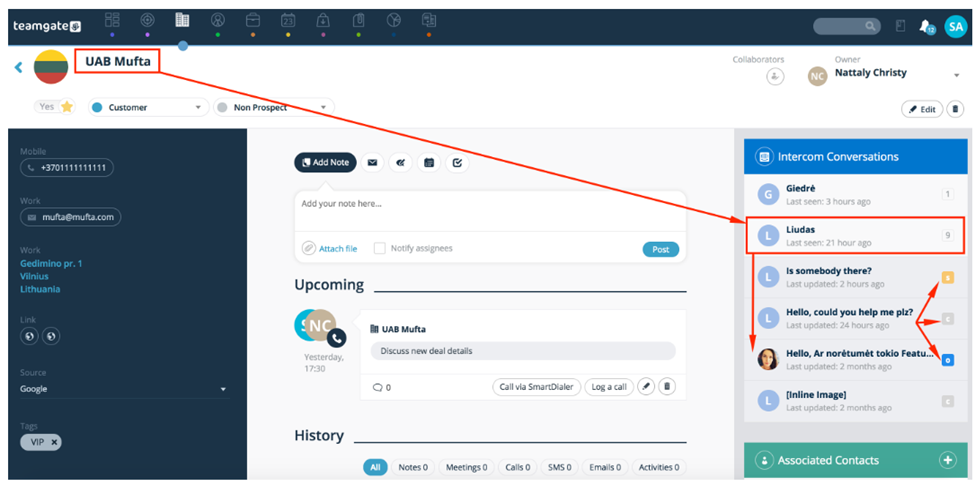
In this article, we’ll shed light on the advantages of integrating the Intercom communication system with a Customer Relationship Management (CRM) platform. We’ll explore how this integration can enhance customer communication, streamline sales processes, and improve overall business efficiency. Additionally, I’ll introduce you to the top five CRM platforms that offer seamless integration with Intercom.

Key Takeaways:

  • Integrating Intercom with a CRM can lead to better-targeted messages, increased conversions, and efficient real-time communication with customers.
  • Teamgate, NutShell, HubSpot, Pipedrive, and Pipeliner are among the top CRMs that offer robust Intercom integration.
  • Benefits of this integration include centralized communication, data-driven engagement, automation of conversations, and the ability to leverage multiple apps for enhanced customer service.
  • Teamgate stands out with features like one-click lead generation, convenient collaboration, and SmartDialer™ for diverse communication options.
  • Integrating a CRM with Intercom can significantly improve customer communication, leading to better customer relationships and increased sales opportunities.

5 Best CRMs with Intercom Integration

Intercom is a leading customer communication system that sales, marketing, and support teams rely on for communicating with prospects and existing customers. You can use the tool to communicate with customers via your website, mobile or web app, and email.

While Intercom works well on its own, you can get even better results by integrating the platform with a Customer Relationship Management (CRM) platform. Which CRMs offer the best Intercom integration? Before answering this question, let’s quickly look at the benefits of having Intercom integrated with a CRM.

Benefits of Integrating Intercom with Your CRM

Integrating Intercom with a CRM can benefit your company in several ways. For instance, the integration will help your sales team send better-targeted messages to the right prospects at the right time, increasing your chances of converting prospects. Other valuable benefits of having a CRM integration with Intercom are:

Live Communication

A CRM best practice that increases customer communication efficiency is offering real-time communication to customers. Integrating Intercom, or any customer messaging system similar to Intercom, with a CRM will equip you to run targeted live communication, such as live chat with customers via your app or website and other communication channels. Providing quick answers to customers via live chat can reduce customer churn and boost engagement and conversions.

All-In-One Communication Platform

Instead of switching between multiple communication channels, Intercom integration with a CRM lets your team communicate with all customers from a single location. It’s far more efficient and convenient for your team, allowing them to respond to customer inquiries faster.

Data-Driven Communication

With CRM and Intercom integrations, your team can engage with customers and prospects via their preferred communication channels. Even better, the CRM integration offers a variety of features that help your team access the insights they need to provide the best answers to customer queries and successfully follow up with leads.

Leverage Multiple Apps

Alongside Intercom, you can integrate other apps with your CRM to offer the best possible customer service. For instance, you can integrate QuickBooks to generate invoices and use Zendesk to manage tickets and requests. You can then use Intercom’s live chat to follow up on sent invoices or received tickets.

Automate Conversations

With a CRM like Teamgate, you can automate live chats on Intercom to create new leads, deals, or contacts. Automating conversations, such as customer inquiries, will free your team to handle more pressing duties.

Best CRMs with Intercom Integration

Every CRM is different, and some offer a better Intercom integration than others. For instance, some CRM systems can’t even integrate with Intercom. If you want a CRM with Intercom integration that offers maximum benefits, here are your best options:

1. Teamgate

null

Teamgate is an award-winning CRM platform with Intercom integration that outshines many other CRMs in terms of performance and functionality. Integrating the two platforms allows Teamgate to use data from Intercom and vice versa. For instance, when a customer reaches out to your company via Intercom live chat, Teamgate can generate a lead card based on the customer’s information from Intercom.

Also, integrating Intercom with Teamgate simplifies customer relations by centralizing communications. The centralized communication allows your team to handle all client communications from within the CRM, eliminating the need to switch between communication apps.

Integrating Intercom with Teamgate is quick and easy, requiring only a few clicks. Lastly, since Teamgate is user-friendly, your team won’t have trouble adopting and making the most of it after integrating Intercom.

Below are more features that set Teamgate apart from other CRMs you can integrate with Intercom:

null
  • Contact Management: Teamgate simplifies managing contacts, including contact information and histories gathered from Intercom. Easy access to a client’s communication history ensures that any team member can answer or follow up with a customer.
  • One-Click Lead and Contact Generation: Your team can access Intercom’s Inbox and create new leads, deals, or contacts with one click. The newly created leads will appear in the Teamgate CRM, allowing other team members to view and use the information.
  • Convenient Collaboration: Since Teamgate puts all your customer information in one place, your team can easily collaborate on projects to take care of customer requests. Team members can also view the progress of communications and assist if a conversation seems ineffective.
  • Customization: Teamgate is suitable for businesses of various sizes in different niches. You can customize the platform to fit the unique needs of your team.
  • SmartDialer™: You don’t have to limit yourself to the communication options provided by Intercom. When you have Intercom integrated with a CRM like Teamgate, you get access to SmartDialer for contacting clients via calls and other communication options.
  • File Synchronization: Intercom integration with Teamgate eliminates the need for double data entry. Any changes to the information stored in Teamgate will automatically reflect in Intercom and vice versa.
  • Mobile Apps: Teamgate offers mobile apps for Android and iOS, allowing your team to access the CRM and Intercom remotely and from their preferred device.
  • Sales Pipeline Management: With Teamgate, you can monitor the customer journey of each prospect your team is pursuing via Intercom.
  • Intelligent Reports and Analytics: The CRM provides real-time customer data analysis and reports that your team can leverage to take better-informed actions. For instance, the reports can help your team identify leads to pursue and prospects to let go.

Teamgate offers a 14-day free trial, after which you can opt for its $9 per month Starter plan or $26 per month Professional plan. However, if you want access to every Teamgate feature, such as SmartDialer, the $65-a-month Enterprise plan is the way to go.

2. NutShell

null

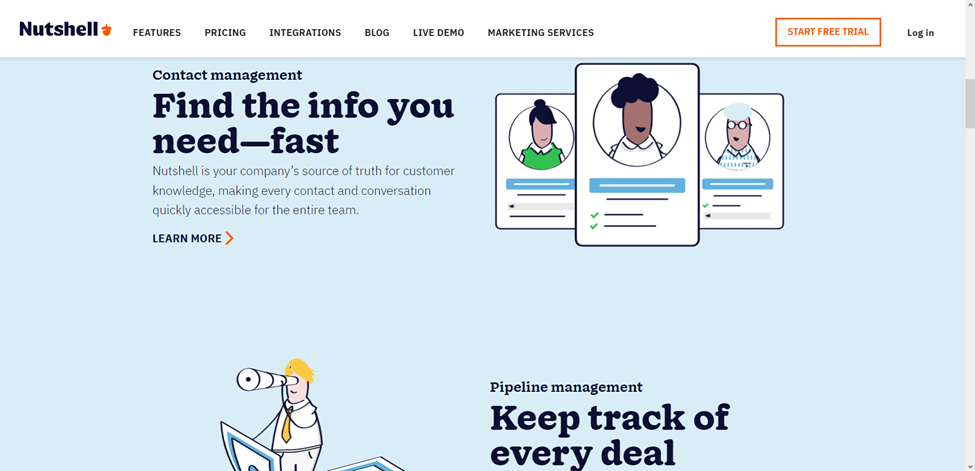
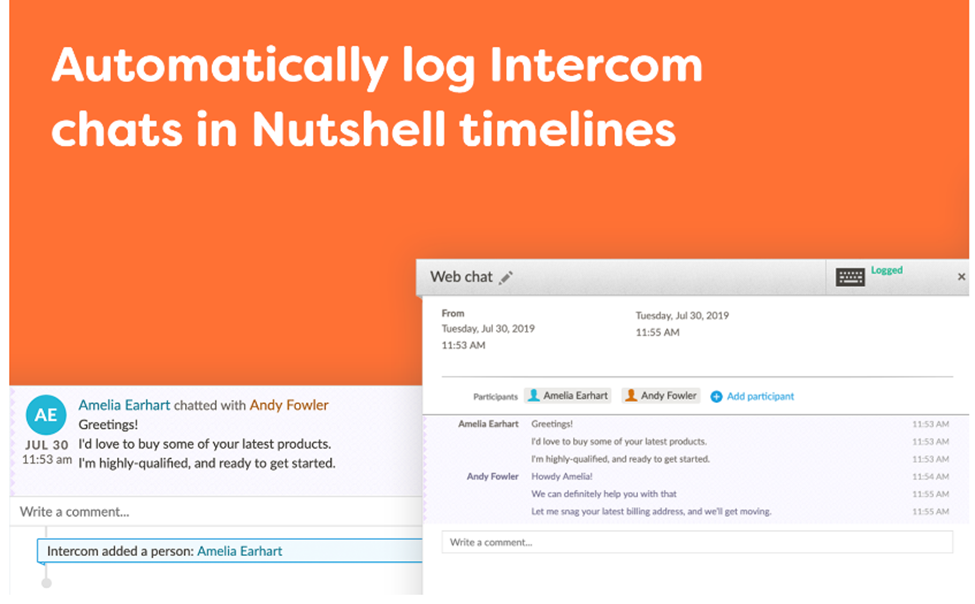
Nutshell offers native integration with Intercom, allowing your company to pair the CRM with the customer communication system with just a few clicks. Once integrated, Nutshell can automatically start syncing with Intercom conversations and creating customer records from website chats. Also, Nutshell can turn Intercom web chats into reportable activities that your team can monitor.

Another feature that sets the Nutshell CRM apart from competitors is you can use data from the platform to provide personalized customer support via Intercom. On the downside, since NutShell charges per user, companies with large teams may consider the CRM expensive.

Other features that make NutShell a suitable CRM for Intercom integration are:

null
  • Impressive Customer Support: NutShell’s live customer support team consists of real people. You can access the live support regardless of the NutShell plan you choose.
  • Automatic Contact Creation: After having Intercom integrated with the CRM, NutShell will automatically create new contacts from chat interactions. The platform can also provide chat transcripts for monitoring communication performance.
  • Save time: Two-way synchronization eliminates the need to enter new contact details manually. Changes to customer information in Intercom will automatically reflect in NutShell and vice versa.
  • Centralized Information: Your team can view all web chat conversations in the CRM, eliminating the need to switch between platforms.
  • Teamwide Customer Insights: Team members can check the performance of Intercom customer conversations to identify areas for improvement.

If you opt for the annual plan and have only one user, NutShell can cost as little as $16 per month. You also have the option to build a custom plan.

3. HubSpot

null

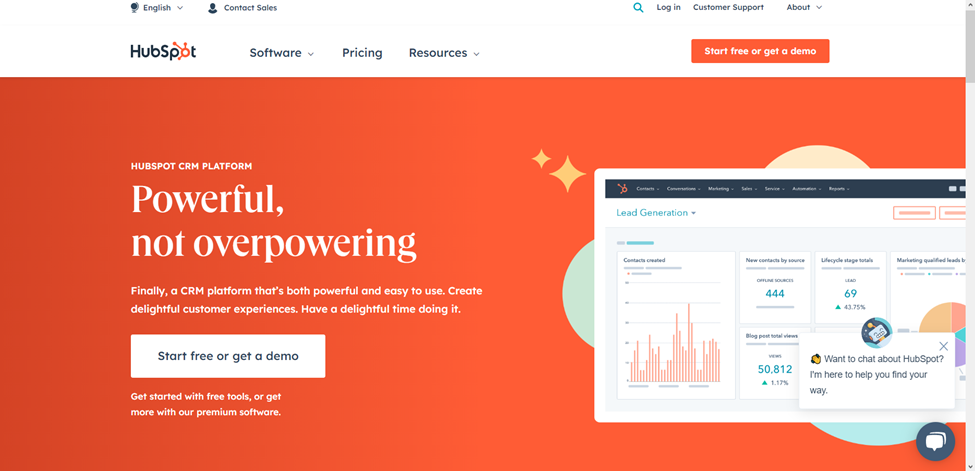
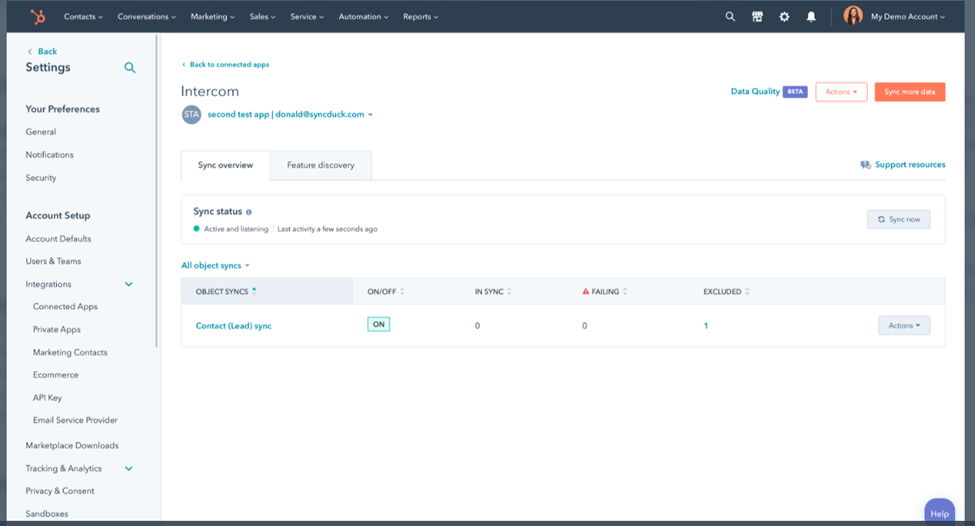
HubSpot is a popular CRM with several robust features. You can integrate Intercom with the platform to monitor contact activities and deals or manage contacts and email scheduling.

Also, integrating Intercom with the CRM will allow your team to seamlessly connect with clients via live chat, one-to-one customer communications, and conversational bots. The integration can simplify managing client queries to improve customer engagement and satisfaction.

Other reasons why you should consider the HubSpot CRM for Intercom integration are:

null
  • Capture More Leads: The integration allows your company to automate lead capturing from your website. The captured leads will come from live chats on your website, and HubSpot will sync new leads and conversations with old ones to keep your database updated.
  • Identify Leads: HubSpot will assess leads captured with Intercom and keep your team updated about the identity and quality of each lead. Your team can also see where each lead has reached in the customer journey.
  • Chatbots: Your team will have access to bots that can handle customer conversations on their behalf. These bots can also help your team by capturing leads and moving them along the buyer’s journey. The system will direct the most qualified leads to HubSpot for nurturing.
  • Trigger Workflows: You can program the system to trigger a workflow in HubSpot when users mention specific terms in Intercom conversations. For instance, if a lead mentions pricing, the system will send them to HubSpot for nurturing.
  • Templates: HubSpot provides templates your team can modify to respond quickly to customer queries. Using templates will eliminate the hassle of crafting responses from scratch.

HubSpot has a free plan, which is suitable for most small businesses. However, if you want access to the platform’s advanced features, you can pay as little as $45 a month or up to $1,200 monthly.

4. Pipedrive

null

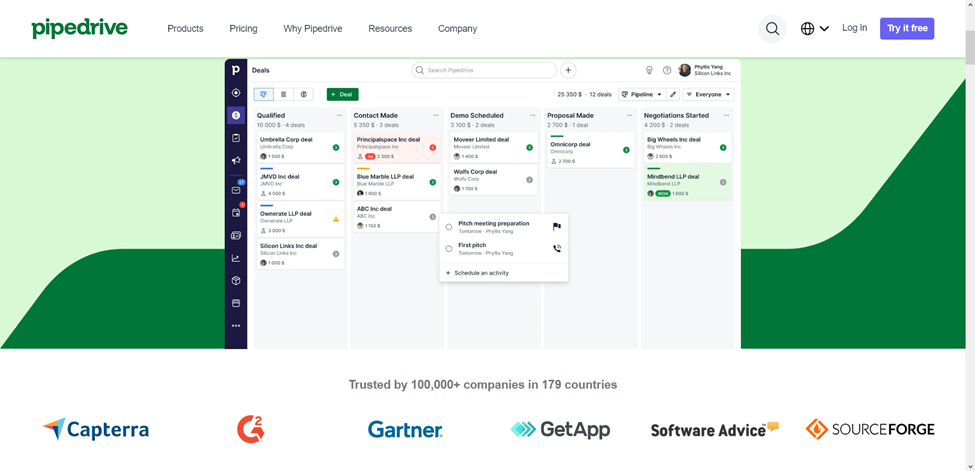
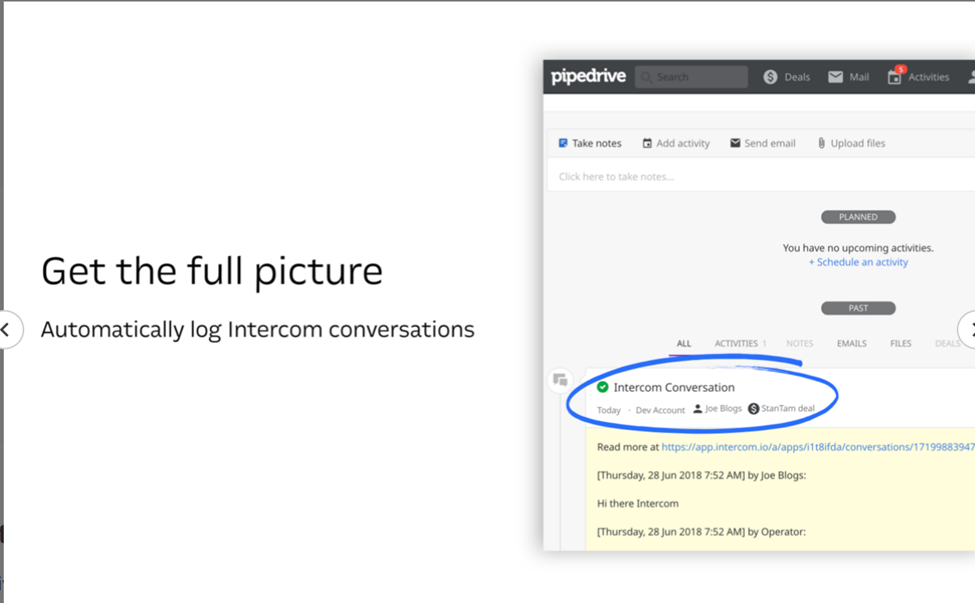
Pipedrive is a CRM created by salespeople to help companies capture and convert more leads. You can enhance the functionality of the platform with an Intercom integration. The integration will facilitate the seamless creation of deals and transfer of customer conversations to Pipedrive for lead monitoring and nurturing.

Setting up Pipedrive and Intercom integration is straightforward if you already have an Intercom account. You only need to click Install and enter your Intercom details to give Pipedrive access to your Intercom account. If you don’t already have an Intercom account, you can install Intercom from the Pipedrive Marketplace and create an account.

After integrating Intercom with Pipedrive, you can start creating deals in Pipedrive and capturing and qualifying leads in Intercom. Other benefits of integrating Intercom with Pipedrive are:

null
  • 300+ Apps and Integrations: Besides Intercom, you can integrate other tools with Pipedrive to improve your team’s efficiency and customer experience.
  • 24/7 Support: If you run into trouble while using Pipedrive, you can get help quickly by contacting the company’s round-the-clock email and chat support team.
  • Help Center: Pipedrive has a huge library of resources that users can access to learn new ways to use Pipedrive and Intercom to their advantage.
  • Fast Setup: Completing Intercom integration with Pipedrive requires only a few clicks and no special skills.
  • View Communication History: You can view Pipedrive deals in your Intercom Inbox and see conversations of your leads. Easy access to the communication history of leads will help your team communicate with leads more efficiently and increase the chances of converting them.

Pipedrive’s cheapest plan is $9.90 a month, while its most popular plan costs $39.90 per month.

5. Pipeliner

null

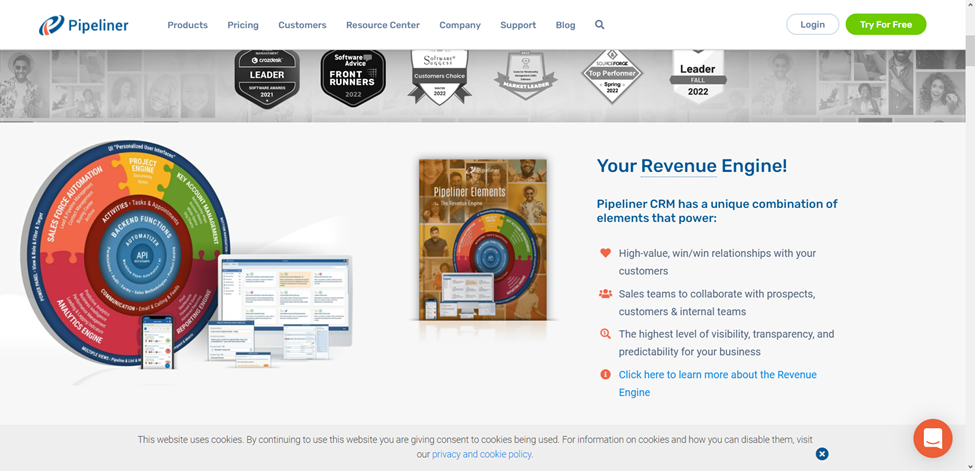
The Pipeliner CRM is excellent for monitoring prospects as they move along your buyer’s journey. Intercom integration takes lead management to another level by automating contact saving whenever a prospective customer interacts with your team via Intercom. The integration will also automatically save all Intercom conversations in Pipeliner so your team can easily collaborate and make data-driven decisions.

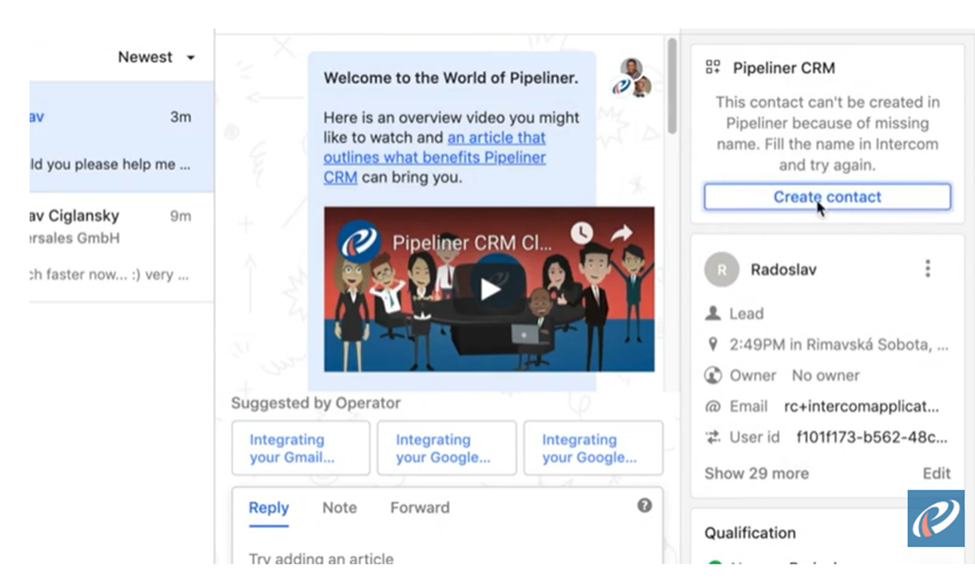
Another benefit of the integration is your team can view and manage your Pipeliner CRM contacts from the Intercom Inbox. If a lead that isn’t already on your contact list reaches out, you can easily add them to Pipeliner with a single click. You can also add custom data from the Intercom inbox to distinguish leads.

Other benefits to expect from integrating Pipeliner with Intercom are:

null
  • Automatizer: Pipeliner has an in-built automation engine for automating multiple workflows and eliminating the inconvenience of repetitive tasks.
  • Point-and-Click Interface: Thanks to its user-friendly point-and-click interface, you don’t need coding skills to use Pipeliner.
  • Personalized User Interface: You can customize the CRM platform to limit what specific team members can see. You can also modify how the platform displays information.
  • Communication Management: Intercom integrated with Pipeliner simplifies tracking and managing appointments with prospects and customers. You can also track and view past communications with clients, prospects, and team members.
  • Synchronization: The system automatically adds a new Pipeliner contact when there’s a new Intercom user. It also stores completed conversations from Intercom in Pipeliner.

Depending on your budget and company needs, you can choose Pipeliner’s $65 Starter plan, $85 Business plan, or $115 Enterprise plan. However, the $150 Unlimited plan is the way to go if you want unlimited access to the platform.

Improve Communications with Your Customers by Integrating Intercom with Your CRM

Communicate with prospects and customers more effectively by having a CRM integrated with Intercom. All the platforms that made our list of top five CRMs with Intercom integration are reliable. However, if you want a CRM that is versatile, affordable, user-friendly, and easy to adopt, you cannot go wrong with Teamgate.

Don’t believe us? Try any Teamgate plan for free by taking advantage of its 14-day free trial.

In this article, we delve into the vital role of Customer Relationship Management (CRM) software in the construction industry. We’ll look at how an efficient CRM can revolutionize operations, improve efficiency, and reduce costs for construction companies. From exploring the benefits and key features to consider when selecting a CRM, we further provide an overview of the top CRM platforms that are especially beneficial for businesses in the construction industry.

Key Takeaways:

  • CRM in construction offers numerous benefits, including improved project management, enhanced communication, increased efficiency, better data analysis, and enhanced customer relations.
  • Crucial features to look for in a construction CRM include user-friendliness, robust project management capabilities, collaboration and communication tools, customization options, powerful reporting and analytics, and integration with other tools.
  • Five of the most popular CRM platforms for construction companies include Teamgate, MarketSharp, Insightly, Hubspot, and Agile CRM. Each has unique capabilities, features, and pricing to suit different business needs.
  • The integration of CRM with other construction software can streamline workflows and enhance project management, ultimately leading to increased productivity and profitability.
  • CRM technology can enhance accountability within construction firms, aiding in compliance with industry regulations and standards. It also can improve job site safety by identifying potential issues in advance.

A CRM is a software system that helps businesses manage and track customer interactions and provide insights into customer behavior.

In the construction industry, a CRM can track sales opportunities, foster better communication between staff, manage customer invoices, and generate detailed reports.  An effective CRM can help construction companies streamline operations, increase efficiency, and reduce costs.

In this article, we’ll provide an overview of the most popular CRMs for construction companies, outlining their capabilities, features, and pricing. Let’s get started!

Benefits of using CRM in construction

By leveraging powerful CRM tools, construction companies can gain a competitive edge and improve their customer service. This section will explore the benefits of using CRM in construction, including improved customer relations, increased efficiency, and cost savings.

Improved project management

Improved project management is a crucial benefit of using CRM in the construction industry. By using CRM, construction companies can have real-time visibility into the project timeline, allowing them to plan and optimize resources more efficiently.

Critical tasks can be tracked and monitored to ensure deadlines are met, and project managers can quickly identify which tasks need to be completed and when. With this data, teams can better plan ahead, reducing the risk of costly delays or mistakes.

Enhanced communication

Communication is paramount among all stakeholders within a construction company. A CRM enables real-time communication, streamlining processes and minimizing delays. Additionally, CRM provides a centralized online platform where everyone can access project documents and data, ensuring everyone is working from the same up-to-date information.

As a result, businesses can reduce the risk of miscommunication and ensure that all stakeholders are informed and updated with all changes.

Increased efficiency

A CRM system facilitates a collaborative environment amongst all stakeholders involved in a project. From architects and engineers to subcontractors and vendors, everyone can easily access current data related to their respective projects, allowing them to make well-informed decisions quickly and efficiently. This, in turn, enables the project to move forward faster.

Better data analysis

CRM systems provide companies with the critical data they need to understand their customers and projects better. This data can be used to help companies gain a better understanding of their customer base, identify customer needs, and develop effective marketing strategies.

Besides, this data can be used to analyze customer behavior, identify trends, and develop more efficient processes. Better data analysis can help construction companies make better decisions, increase profitability, and improve customer satisfaction.

Enhanced customer relations

CRM technology enables construction companies to track, manage, prioritize, and analyze customer interactions, allowing them to maximize customer satisfaction and loyalty. By providing a 360-degree view of customer interactions, construction companies can gain insight into customer preferences and needs.

This information can be used to tailor services and products to meet customer needs better and provide timely, personalized customer service.

Better risk management

CRMs can provide better risk management by allowing construction companies to keep track of their projects and customers in one place. Companies can use the data in their CRM to analyze patterns, trends, and forecasts to better anticipate and manage risks, such as estimating project delays or the likelihood of customers churning.

CRM systems can also provide construction companies with automated processes and tools to better monitor and track risks, allowing them to respond quickly to and mitigate any issues that may arise.

Improved job site safety

A CRM gives construction companies access to real-time data and analytics that can be used to identify potential safety issues before they become serious problems. This can help prevent accidents and injuries on the job site.

Companies can quickly create and distribute work instructions, which can help ensure that employees are aware of the safety protocols and procedures that must be followed at all times.

Since most CRM systems are cloud-based, data can be accessed from anywhere, allowing managers to monitor job safety from a remote location easily.

Greater accountability

CRMs are centralized platforms where all documents, communications, and customer information are stored. This allows construction companies to track customer interactions and ensure that customer expectations are met. It also enables managers to monitor employee performance and identify any areas of improvement.

Construction companies can store customer feedback and analyze trends over time, leading to a better customer experience and higher customer satisfaction.

With greater accountability, construction companies can ensure that their processes comply with industry regulations and standards.

Key features to look for in a CRM for construction

In this section, we will discuss the key features to look for in a CRM for construction that increase productivity and efficiency and reduce costs.

User-friendliness

Regardless of their level of technical expertise, all team members in a construction company should access and use a CRM effortlessly. A user-friendly CRM makes it easier for employees to update information promptly and search for important data when needed.

This can help streamline operations and maximize team productivity. In addition, a user-friendly CRM can reduce the time and resources needed to train new employees on how to use the software.

Project management

Project management is a key feature to look for in a CRM for construction companies because it helps you manage your resources more efficiently. It allows you to track the progress of projects, assign tasks, monitor budgets, and ensure deadlines are met. It also provides insights into the team’s performance, helping to identify areas of improvement and ensure that projects are completed on time and on budget.

Collaboration and communication

Communication and collaboration tools help to improve customer service, as they allow for a quick exchange of information between all stakeholders. A CRM system can streamline communication between all parties involved in a project by providing the ability to track conversations, tasks, and projects.

This makes it easier to keep everyone informed of their roles and responsibilities and quickly resolve any problems that may arise.

Customization options

Customization is essential in the construction industry, where the complexities of projects, customer requirements, and regulations vary greatly. Customization options allow construction companies to create a CRM system that fits their specific needs and allows them to keep track of customer information and manage projects.

Reporting and analytics

A good construction CRM should provide reports on key metrics such as sales pipeline, pipeline velocity, and more so you can easily measure performance against goals set by management or other stakeholders.

This feature can help construction companies gain insight into the current status of their projects and make data-driven decisions that can maximize productivity and profitability.

Integration with other tools

Integrations enable construction companies to access data from other systems, such as accounting, scheduling, and project management, in one central location. This allows construction companies to access the data they need to make informed decisions and ensure their projects run smoothly. It also ensures that all relevant data is up-to-date and accurate, eliminating manual data entry and thus saving time and effort.

Top 5 CRM for Construction

To help you find the right CRM for your construction business, we have compiled a list of the top 5 CRM for construction. This list has something for every business, from comprehensive project management software to cloud-based solutions. Read on to find out which CRM is the best fit for you.

Teamgate

Teamgate is a customer relationship management (CRM) software designed to help businesses streamline their sales and marketing processes. It is a highly customizable and user-friendly platform that can be tailored to meet the specific needs of each company. It also provides an array of features to help businesses better manage their customer relationships, including but not limited to lead management, analytics, and automated marketing campaigns.

Here is what sets Teamgate apart from other CRMs for construction companies:

  • Automation – Teamgate offers construction companies automated workflows that help streamline and simplify the entire sales process, from lead generation to customer onboarding;
  • Customizable CRM – Teamgate features a customizable CRM that allows construction companies to tailor the platform to their specific needs;
  • Automated reports – The automated reports provide valuable insights into sales performance, customer behavior, and more;
  • Available on mobile – Teamgate’s mobile app allows construction companies to manage their sales process on the go;
  • Integrations: Teamgate integrates with popular construction apps and software, making it easier to manage sales and customer data in one platform.

Teamgate pricing is tailored to each customer’s needs and can range from €9 to €65 per user per month, billed annually.

MarketSharp

MarketSharp is a cloud-based customer relationship management software designed specifically for contractors.

It helps construction companies manage customer relationships, track sales and projects, and generate leads. It also provides features such as:

  • Contact management;
  • Project management;
  • Scheduling;
  • Invoicing;
  • Reporting.

These help companies keep track of their activities, ensure the accuracy of their data, and provide better customer service. MarketSharp also allows construction companies to improve their marketing efforts by segmenting customers according to their preferences, interests, and location.

The cost of MarketSharp depends on the size of your business and the features you need. The basic package price starts at $199 per month and can go up to $399 per month for the full suite of services.

Insightly

Insightly is a CRM platform that helps businesses of all sizes manage their customer relationships.

For construction companies, Insightly can help manage customer relationships and sales processes, track customer activity, and create reports and dashboards to monitor progress. It can also help with project management, tracking tasks, and team collaboration.

Additionally, Insightly integrates with over 2000 software platforms, such as G Suite, Calendly, Slack, and DocuSign, which can help streamline workflow and increase efficiency.

Insighly’s pricing starts at $29 per month and goes up to $99 for more advanced features.

HubSpot

HubSpot offers a variety of tools to help construction companies manage their sales pipeline, organize their team’s projects, and track customer activity in one place.

It provides a platform to organize customer data, create personalized customer experiences, and optimize customer engagement.

The free version is perfect for small teams and businesses just starting out. For more advanced features, the Premium plan starts at €1,474.31 per month, billed yearly.

Zoho CRM

Zoho CRM provides a centralized, cloud-based customer data and communications platform, allowing companies to capture customer information and track customer interactions.

One of the key features of Zoho CRM is its customizable user interface, which allows construction companies to tailor the CRM to best meet their needs and preferences. Zoho CRM also offers a suite of customer engagement tools to help construction companies build better customer relationships. The platform has features that allow users to send automated emails and SMS messages, track customer interactions, and integrate with other popular customer engagement platforms.

Their pricing starts at €14 and can go up to €52 per month.

Ready To Choose A CRM for your Construction Business?

When looking for a CRM solution for construction companies, businesses should prioritize features such as automation, time management, analytics, customization options, and sales forecasting. These features are essential for construction companies to help them reach their sales goals, streamline their sales process, and increase customer satisfaction.

Teamgate is an intuitive and powerful platform that helps companies manage customer relationships more effectively. Teamgate helps construction companies organize their customer data, track customer interactions, and access important insights about customer behavior. Additionally, Teamgate integrates with other popular construction software to streamline its operations and boost efficiency.

Take advantage of Teamgate’s 14-day free trial today to experience its full potential for your construction company.

FAQs: CRM for Construction Companies

Q: How does CRM aid the construction industry?
A: CRM in construction helps manage customer interactions, track sales, improve communication, manage invoices, and generate detailed reports. It enhances operations, efficiency, and reduces costs.

Q: What advantages does a CRM offer in construction?
A: A CRM improves project management, enhances communication, increases efficiency, enables better data analysis, enriches customer relations, aids risk management, boosts job site safety, and promotes greater accountability.

Q: What should I look for in a construction CRM?
A: Key CRM features for construction should include user-friendliness, project management, communication tools, customization, reporting and analytics, and integration capabilities.

Q: Can you suggest some CRMs for construction companies?
A: Recommended CRMs for construction companies include Teamgate, MarketSharp, Insightly, HubSpot, and Zoho CRM. Each offers unique features and pricing options.

Q: How does CRM enhance job site safety?
A: CRM provides real-time data to identify potential safety issues, allows for the distribution of safety instructions, and enables remote monitoring of job safety.

In this comprehensive article, you’ll discover how integrating Mailchimp, a widely-used email marketing platform, with various CRM (Customer Relationship Management) systems can streamline your marketing efforts and enhance your decision-making process. You will learn how this integration can help with segmenting potential customers, personalizing email messages, analyzing marketing data, managing subscribers, and generating custom reports, all to increase your marketing success.

Key Takeaways:

  • CRM integration with Mailchimp enables targeted email marketing strategies by segmenting potential and existing customers in your CRM.
  • CRM data can be used to personalize email messages, enhancing the overall customer experience.
  • Analytical tools provided by CRM integrations offer valuable insights into patterns and trends in email data, aiding in more informed marketing decisions.
  • Integrating CRMs with Mailchimp makes managing subscribers and unsubscribers more manageable and efficient.
  • CRM systems like Teamgate, Pipedrive, and SugarCRM offer different levels of integration with Mailchimp, with each offering unique features and pricing options.

Read more: 8 of the Best Sales CRM Software Programs

The Benefits of CRM Integrations for Mailchimp

Mailchimp is a service that specializes in marketing automation and email marketing. This comprehensive platform lets you communicate with prospects, leads, and existing customers to promote products and services via email. 

Mailchimp says on its website:

“Our approach to marketing focuses on healthy contact management practices, beautifully designed campaigns, and powerful data analysis. We’re here to help you become an expert marketer. Ready to get started?”

Many marketers think Mailchimp is merely a web-based application that works in internet browsers. However, you can now integrate this platform with various CRMs, including Teamgate. That lets you centralize your customer relationship management and email marketing practices. 

There are various things you can do when using Mailchimp CRM integrations:

  • Segment potential and existing customers in your CRM and send them targeted email marketing messages. 
  • Use the information in your CRM to personalize email messages to customers. 
  • Design, send, and save email templates based on CRM information.
  • Use analytical tools in your CRM to identify patterns and trends in email data and use these insights for better marketing decision-making. 
  • Use Mailchimp’s analytical tools to view open, click-through, conversations, and success rates for email campaigns.
  • CRM integration with Mailchimp also lets you manage subscribers and unsubscribers.
  • Generate custom reports based on CRM and Mailchimp information and become more successful at email marketing.

Integrating your CRM with Mailchimp Integrations can be a long, laborious process that involves complex code and data engineering—skills your business might lack. The best CRM for Mailchimp will have out-of-the-box no-code/low-code connectors and a simple drag-and-drop, point-and-click interface that makes integration easy. You won’t need to build data pipelines or enlist the services of a data engineer, saving you time and money. 

Note: To confuse things, Mailchimp now contains some CRM functionality of its own. (It has evolved from a simple email marketing tool to all-encompassing marketing automation and email marketing service platform.) However, in Teamgate’s opinion, no successful business in the SaaS industry should rely on Mailchimp for customer relationship management as there are far better tools that achieve this goal. At the most, Mailchimp aggregates and organizes customer information like phone numbers, physical addresses, and email addresses. A growing enterprise couldn’t count on Mailchimp for identifying and nurturing leads from customer account information in a busy call center, for example. You could use Mailchimp as a CRM if you have a very, very small business with a couple of hundred customers, but that’s about it. CRM integration with Mailchimp is better suited to an actual CRM system!

Learn more about the best CRM for Mailchimp below:

1. Best CRM for Mailchimp: Teamgate

Teamgate is, hands down, the best CRM for Mailchimp overall. It lets you send personalized, targeted email marketing messages to prospective and existing customers in the Teamgate CRM system with a few clicks of a mouse. That streamlines workflows and boosts productivity. For Teamgate-Mailchimp integration to happen:

  1. Export contact information from Teamgate lists.
  2. Define your segmentation criteria.
  3. Click on the Mailchimp icon at the top of lists.
  4. Export the contacts into Mailchimp.

This simple four-step process lets you use customer contact information for more effective email marketing outcomes. 

Another use case for Teamgate-Mailchimp integration is the ability to merge custom fields in Teamgate with fields in Mailchimp. You can do this by clicking “Create a new field” under “Mailchimp” fields on the Mailchimp integration page on Teamgate. This process lets you quickly merge Teamgate and Mailchimp custom fields for current and future email marketing campaigns. 

Sometimes a CRM makes it difficult to transfer records between that CRM and Mailchimp. Pipedrive, for example—the next entry on this Best CRM for Mailchimp list—requires a lengthy sync process that many small businesses in the SaaS sector might not understand. Teamgate is different. It simplifies record transfers and even sends you an email confirmation every time you move records between its CRM and Mailchimp. There’s no guesswork.

Also, Teamgate assigns all exported contacts a tag, allowing you to filter those contacts when required. If there’s a problem with transferring records, any error information will show up on the Export History page in Teamgate (in the Data Migration sections in Settings). Teamgate will also assign a tag to these failed-to-transfer contacts, making it easier to find this information. Merging a CRM with Mailchimp has never been this easy! 

Learn more information about Teamgate and Mailchimp CRM integrations here.

Teamgate CRM Integration With Mailchimp Key Features

  • Segment and filter customers by Mailchimp campaign.
  • View the read, clicked, and unsubscribed status of each lead/customer from within the Teamgate lead/customer contact page.
  • See which Mailchimp campaigns have been sent to which leads and customers within Teamgate through automatically applied, custom tags – removing workflow complexities.
  • Automatically dial potential and existing customers.
  • It’s not just Mailchimp. Teamgate integrates with numerous digital tools for better marketing results in your enterprise. You can select which integrations display in your Teamgate workspace and access information from multiple platforms on one monitor.
  • Support email marketing with in-depth lead conversion insights about prospects with Teamgate’s suite of sales intelligence tools. These tools personalize your marketing objectives and help you qualify leads against your ideal customer profile (ICP). 
  • Manage leads for Mailchimp campaigns with specialized sales and performance tools that monitor organizational performance. You can quickly discover which email marketing methods work (and which don’t) via a simple drag-and-drop, point-and-click user interface. That empowers sales teams to prioritize marketing efforts. 
  • Teamgate’s in-depth insights, sales dashboards, and analytical tools supplement Mailchimp marketing campaigns. Track and obtain real-time data about departmental performance. Also, use key metrics to increase sales pipelines and growth, streamline lead management, and improve overall account management in your growing organization.
  • You don’t need to integrate Teamgate with Mailchimp for improved email marketing. This CRM has its own in-built email marketing features that work with various email service providers, helping you connect with potential and existing customers. 

Teamgate Pricing for Mailchimp CRM Integrations

Teamgate pricing plans start from just $9 per month per user (billed annually), making this platform an affordable choice for your organization. The Professional plan, which costs $26 per user per month, includes one integration (in this case, presumably Mailchimp.) You can also use the Mailchimp CRM integration (and other unlimited integrations) in Teamgate’s Enterprise plan, which only costs $65 per user per month.

All these reasons and more make Teamgate the best CRM for Mailchimp! 

Learn More About Teamgate

2. Pipedrive

Pipedrive is arguably more well-known than Teamgate as a CRM. However, that doesn’t mean it’s a better fit for companies wanting to combine customer relationship management with email marketing. That’s because CRM integration with Mailchimp isn’t as extensive as on Teamgate. You won’t receive emails after encountering Mailchimp transfer errors, for example. Plus, setting up the transfer process is far more complicated than on Teamgate, making the latter a better fit for smaller SaaS businesses with limited resources. 

That’s not to say Pipedrive is useless for CRM integration with Mailchimp. Far from it. This CRM has an easy-to-use interface that almost anyone can understand quickly, and the integration process is pretty simple. 

Pipeline says on its website about its Mailchimp CRM integrations:

“Nearly half of our customers liked our simple yet powerful approach so much, they switched from an existing CRM tool. The other half? Well, they didn’t even know they needed Pipedrive until they tried it.”

Pipedrive CRM Integration With Mailchimp Key Features

  • Handle basic customer relationship management and Mailchimp email marketing tasks from a single platform. 
  • Like Teamgate, Pipedrive lets you filter and segment Mailchimp campaigns based on customer data. That helps you create more segmented campaigns that target specific customers based on location, shared characteristics, purchasing habits, and other factors. While Teamgate remains the best CRM for Mailchimp, Pipedrive can still achieve some successful marketing outcomes in your organization. 
  • Send personalized emails to customers based on information in Pipedrive. Deliver emails with customers’ names and locations, for example. 
  • As previously mentioned, Pipedrive-Mailchimp integration is pretty easy. Just click on the Mailchimp button within Pipedrive to export contacts. Pipedrive has a video on its website that explains the integration process really well, making this task simple for SaaS businesses of all sizes. 

Pipedrive Pricing for Mailchimp CRM Integrations

Pipedrive’s cheapest plan costs $14.90 per user per month (billed annually), making it more expensive than Teamgate. However, it’s unclear whether this tier allows for CRM integration with Mailchimp or whether users will need to upgrade to one of the more expensive pricing models, ranging from $24.90-$99 per user per month (billed annually).

Read more: The 6 Biggest Benefits of CRMs

3. SugarCRM

SugarCRM is a beast of a CRM system, boasting features that benefit SaaS businesses of all sizes. It actually has its own marketing automation tool, which might make integrating the product with Mailchimp an unnecessary task. However, if you are already familiar with Mailchimp’s features and interface, you might want to give integration a shot. 

It’s important to note that SugarCRM itself doesn’t offer any Mailchimp CRM integrations, unlike Teamgate and Pipeline. However, many users achieve successful integration with Mailchimp’s connector or a third-party product. 

Mailchimp says about this integration:

“With powerhouse platforms like SugarCRM and MailChimp, businesses can produce timely, hyper-relevant campaigns to grow sales and drive more revenue.”

Note: Using a third-party tool for SugarCRM-MailChimp integration can open up a can of worms, especially if that tool is open source. That’s because developers might not update or secure their connectors, increasing the chances of a data breach. You might also fail to adhere to data governance frameworks such as GDPR when transferring data from Sugar to Mailchimp. Non-compliance with these frameworks might result in expensive government penalties your business can’t afford. 

SugarCRM: CRM Integration With Mailchimp Key Features

  • Remove data silos by integrating SugarCRM with Mailchimp. Connect customer relationship management and email marketing automation workflows and use customer information to drive email marketing results. 
  • Updating customer information in SugarCRM automatically updates that same information in Mailchimp. Updating campaign management information in Mailchimp automatically updates that same information in SugarCRM.
  • No need to manually export data from Sugar to Mailchimp. The latter’s connector (or a third-party tool) will do all the hard work for you.

SugarCRM: Pricing for Mailchimp CRM Integrations

To benefit from all of SugarCRM’s features, you’ll need to opt for the platform’s Marketing Mavericks tier, which costs $1,000 per month for 10,000 contracts. Whether this works out cheaper or more expensive than Teamgate or Pipeline depends on the scope of your business. SugarCRM doesn’t have a “per-user per-month” pricing model, making it difficult to compare to the other two products on this best CRM for Mailchimp list. 

Read more: The Ultimate Guide to Inbound vs Outbound Marketing

4. SuiteCRM

If you’re looking for an open-source (free!) CRM with Mailchimp CRM integrations, look no further than SuiteCRM. This popular system integrates with Mailchimp, allowing you to optimize email campaigns while aggregating data for customer relationship management. Like SugarCRM, there are no in-built CRM integrations for Mailchimp. Again, you’ll need to combine the two platforms through Mailchimp or via a third-party connector. The latter, of course, increases the risk of data breaches and data governance non-compliance. 

Mailchimp says about its SuiteCRM connector:

“See up-to-date campaign and subscriber information within CRM and segment in MC based on CRM data using the SuiteCRM and Mailchimp Integration.”

SuiteCRM: CRM Integration With Mailchimp Key Features

  • View email campaign activity such as open, click, and bounce rates directly in SuiteCRM. Now team members don’t need to waste time switching between a CRM and Mailchimp!
  • Schedule customer record transfers from SuiteCRM to Mailchimp at a frequency that suits your SaaS business needs and data infrastructure capabilities (or limitations!).
  • CRM integration with Mailchimp lets you add and remove Mailchimp lists and campaigns from SuiteCRM with a few clicks of a mouse. 

SuiteCRM: Pricing for Mailchimp CRM Integrations

You won’t need to review different pricing tiers and weigh up the costs of each on SuiteCRM, which remains 100 percent open source and completely free to use. Of course, you’ll still need a subscription to Mailchimp to combine the two platforms. Because it’s open source, don’t expect advanced CRM functionality on SuiteCRM like you would find on Teamgate, SugarCRM, or HubSpot—the next entry on this best CRM for Mailchimp list. In Teamgate’s opinion, an open-source CRM can never replace a paid-for one, especially for user support, documentation, customization, data privacy, data security, data governance, and service level agreements (SLAs).

5. HubSpot CRM

Still looking for the best CRM for Mailchimp? HubSpot is one of the most popular CRM systems in the world, used by many Fortune 500 companies. It offers an incredible range of features for customer relationship management, enabling its users to aggregate, organize, share, process, and analyze customer information for sales, marketing, customer service, and business growth. But how do HubSpot’s Mailchimp CRM integrations compare with those of other systems on this list? How does HubSpot CRM integration with Mailchimp benefit your business?

HubSpot CRM probably sits somewhere between Pipedrive—which offers the most basic capabilities for CRM integration with Mailchimp—and Teamgate, which offers the most extensive Mailchimp features. HubSpot also has a free pricing tier—something that Teamgate and Pipedrive lack. (However, you’ll need to upgrade to a paid plan to integrate HubSpot CRM with Mailchimp.)

Note: HubSpot has two Mailchimp CRM integrations, which can confuse its users. The first, Mailchimp HubSpot integration, syncs CRM contacts with Mailchimp and logs email campaign activity, such as open, send, click, and bounce rates. The second, Data Sync, doesn’t specifically cater to Mailchimp but enables users to sync customer lists on HubSpot CRM with the email marketing application. However, it doesn’t log email campaign activity.

HubSpot CRM Integration With Mailchimp Key Features

  • As previously mentioned, HubSpot Mailchimp integration (the first HubSpot CRM integration for Mailchimp) tracks email campaign activity, making it a worthwhile tool if your business wants to improve the effectiveness of its marketing messages. You can view this activity—clicks, for example—directly in HubSpot, which reduces screen-switching for team members. As a result, HubSpot CRM integration with Mailchimp lets teams focus on sales instead of navigating CRM and email marketing tools.
  • HubSpot CRM integration also monitors any sync errors when transferring data from HubSpot to Mailchimp. (Pipedrive doesn’t do this at all.) If customer records fail to transfer over to Mailchimp, you can take quick action and not jeopardize imminent email marketing campaigns. 
  • Both HubSpot CRM integration and Data Sync effortlessly sync CRM data with Mailchimp through pop-up forms. You can sync all kinds of data, including contacts and timelines (HubSpot) and list members, email sent dates, email opened dates, email clicked dates, and email bounce dates (Mailchimp). 

HubSpot CRM Pricing for Mailchimp CRM Integrations

There’s the aforementioned free tier on HubSpot, but that pricing model won’t let you integrate this CRM with Mailchimp. For that objective, talk to HubSpot to get a personalized quote about your CRM integration needs. (HubSpot has a complicated pricing system with several tiers/features.) It’s also important to note that HubSpot has a usage pricing model, meaning it works out more expensive for lots of contacts. Depending on your requirements, HubSpot could be one of the most expensive platforms on this best CRM for Mailchimp list. 

Read more: Sales Process: How to Build an Effective Sales Machine

Why Teamgate Is the Best CRM for Mailchimp!

While the other CRMs listed above integrate with Mailchimp, only Teamgate helps you fully realize your email marketing goals. Successfully combine your customer relationship management and email marketing goals in one system and make communicating with and sending highly-targeted email marketing messages to prospective and existing customers easier. With segmentation through custom tags and fields, you can easily export your CRM contacts. Automatically allocated tags for each Mailchimp export and campaign makes performance tracking and filtering a breeze. Additionally, filter down on the status of each campaign for specific individuals by viewing open rates, click rates, and unsubscribe statuses from within your Teamgate CRM contact area.

Other reasons why Teamgate is the best CRM for Mailchimp include its simple drag-and-drop, point-and-click interface, out-of-the-box no-code Mailchimp connector, and affordable per-user per-month pricing. You can benefit from Teamgate’s Mailchimp CRM integrations by signing up for a Professional or Enterprise plan. 

If you still want more information, why not contact Teamgate for a product demo

Teamgate currently offers a 14-day free trial, which includes full functionality and integrations. Claim your trial and learn why this platform is, hands down, the best CRM for Mailchimp! 


FAQs: CRMs that integrate with Mailchimp

Q: Which CRMs integrate with Mailchimp?

A: There are several CRMs that integrate with Mailchimp to enhance email marketing and customer relationship management. Some popular options include:

  • Teamgate
  • Pipedrive
  • SugarCRM
  • SuiteCRM
  • HubSpot CRM
  • And others

Q: How do CRMs integrate with Mailchimp?

A: CRMs integrate with Mailchimp through connectors, APIs, or built-in integration features. The integration allows for seamless data transfer, segmentation of customer lists, personalized email campaigns, and synchronization of campaign performance metrics. Each CRM may have its own integration process, but generally, you’ll need to authorize the connection between your CRM and Mailchimp, configure settings for data transfer, and map relevant fields between the two platforms.

Q: What are the benefits of integrating a CRM with Mailchimp?

A: Integrating a CRM with Mailchimp offers several benefits, including:

  • Streamlined workflows
  • Personalized marketing
  • Enhanced analytics
  • Efficient data management
  • Improved customer engagement

Q: Can I use Mailchimp as a standalone CRM?

A: While Mailchimp has expanded its services beyond email marketing, it is primarily designed as a marketing automation platform rather than a comprehensive CRM. While you can store customer information in Mailchimp, it may not provide the robust features and functionalities of dedicated CRMs. For more advanced customer relationship management capabilities, integrating Mailchimp with a CRM like Teamgate, Pipedrive, SugarCRM, SuiteCRM, or HubSpot CRM is recommended.

Q: How do I choose the best CRM for Mailchimp integration?

A: When selecting a CRM for Mailchimp integration, consider factors such as:

  • Integration capabilities
  • Features and functionalities
  • Ease of use
  • Pricing and scalability
  • Customer reviews and support


In this comprehensive guide, we delve into the world of Sales CRM and its pivotal role in small and medium-sized businesses. We’ll explore CRM types, why SMBs need them, key features, top tools, and measuring their success.

Key Takeaways:

  1. CRM systems, divided into operational, analytical, and collaborative types, are essential for streamlining sales processes.
  2. SMBs, due to their unique challenges, can significantly benefit from implementing a sales CRM.
  3. Essential features of a good sales CRM include contact management, interaction tracking, and sales forecasting.
  4. Top-rated CRM tools for SMBs include Salesforce, HubSpot, Zoho, Pipedrive, and Freshsales.
  5. Measuring the success of a sales CRM involves evaluating key performance indicators like conversion rates, customer retention rates, and customer satisfaction scores.

Table of Contents

  1. Introduction
  2. Understanding CRM
  3. Why SMBs Need Sales CRM
  4. Features to Look For in a Sales CRM
  5. Top 5 Sales CRM Tools for SMBs
  6. Implementing Sales CRM in SMBs
  7. Measuring the Success of Sales CRM
  8. Conclusion
  9. FAQs

Introduction

Every SMB (small and medium business) craves growth. The key to unlocking this growth often lies in managing customer relationships effectively. Enter CRM, or Customer Relationship Management, a strategic tool that can transform the way businesses interact with their customers. For SMBs, the sales CRM becomes a crucial cog in the machinery that drives sales, fosters relationships, and ultimately accelerates growth.

Understanding CRM

At its core, CRM is a system that manages a company’s interactions with current and potential customers. It leverages data analysis about customers’ history to improve relationships, focusing on customer retention and driving sales growth.

CRM systems are usually classified into operational, analytical, and collaborative. Operational CRM streamlines the business processes, including sales automation, marketing automation, and service automation. Analytical CRM supports management, strategic level decisions, utilizing a customer data platform for insights. Collaborative CRM, on the other hand, deals with all the necessary communication, coordination, and collaboration between customers and stakeholders.

CRM software specifically targets improving sales processes. It accomplishes this by organizing and automating tasks like contact management, lead tracking, sales forecasting, and performance analysis. With these tools at their disposal, sales teams can focus more on selling and less on administrative tasks.

Why SMBs Need Sales CRM

SMBs face unique challenges in their sales process. Limited resources, high competition, and the need for rapid growth make managing customer relationships even more crucial. Herein lies the value of sales CRM.

Sales CRM can streamline sales processes, improve data organization, and provide a clear view of the sales pipeline. This leads to better customer interaction, improved cross-selling and upselling opportunities, and ultimately, increased sales.

For instance, an SMB in the retail industry implemented a sales CRM and observed a 20% increase in their sales within six months. This was primarily due to better lead tracking and improved customer engagement facilitated by the CRM.

Features to Look For in a Sales CRM

When selecting a sales CRM, SMBs should consider key features that align with their sales goals. Contact management is crucial, providing a central place for tracking customer information. Interaction tracking enables sales reps to document conversations and interactions, ensuring no detail falls through the cracks.

These features streamline the sales process, freeing up time for teams to focus on closing deals. Moreover, tools like email marketing, social media management, and reporting help in customer retention and acquisition by providing insights into customer behavior and engagement.

Top 5 Sales CRM Tools for SMBs

While numerous sales CRM tools are available, five stand out as particularly beneficial for SMBs:

  1. Teamgate – Known for its extensive onboarding and hand-held approach,  Teamgate offers an easy to use and cost-effective solution for SMBs.
  2. HubSpot – Offers a free CRM with a focus on simplicity and user experience. Paid plans provide more advanced features.
  3. Zoho – A cost-effective solution with a broad feature set, suitable for SMBs looking for affordability and functionality.
  4. Pipedrive – Designed with sales teams in mind, it excels at managing and visualizing the sales pipeline.
  5. Freshsales – Offers a comprehensive suite of features with a focus on AI and automation, at competitive pricing.

Implementing Sales CRM in SMBs

Implementing a sales CRM in an SMB involves a series of steps, starting with identifying needs, selecting the right tool, migrating data, configuring the system, and finally, training the staff. Challenges may arise, such as resistance to change or data migration issues, but these can be mitigated with proper planning and communication.

Training is crucial in the implementation process. It ensures that all staff can effectively use the CRM tool, maximizing its benefits. Vendors often provide training resources, but internal workshops and hands-on practice sessions can also be useful.

Measuring the Success of Sales CRM

To gauge the success of a sales CRM, SMBs should look at key performance indicators (KPIs) like conversion rates, customer retention rates, and customer satisfaction scores. The CRM tool itself can often track these metrics.

It’s also essential to regularly evaluate these KPIs. By monitoring trends over time, businesses can identify areas of success and potential improvement. This continual assessment enables them to fine-tune their sales process, ensuring that their sales CRM is a tool for growth, not just management.

Conclusion

Sales CRM isn’t just a tool; it’s a strategic asset for SMBs. It streamlines the sales process, provides valuable insights, fosters customer relationships, and drives growth. By choosing the right CRM, implementing it effectively, and measuring its success, SMBs can unlock their potential and set themselves on a path to success.

At Teamgate CRM we not only value our customers, but also their growth. That’s why for all new customers we offer a free, white-gloved onboarding which includes a full review of our customer’s sales processes and practices. Speak to one of our team member’s today about what we can offer for SMBs.

FAQs

What is a sales CRM?

  • A sales CRM is a system that helps businesses manage their interactions with current and potential customers, streamline sales processes, and drive sales growth.

Why does my SMB need a sales CRM?

  • Sales CRM can help SMBs overcome unique challenges like limited resources and high competition. It can streamline sales processes, improve customer interaction, and increase sales.

What features should I look for in a sales CRM?

  • Key features to look for include contact management, interaction tracking, sales forecasting, email marketing, social media management, and reporting.

What are some top-rated sales CRM tools for SMBs?

  • Top-rated sales CRM tools for SMBs include Salesforce, HubSpot, Zoho, Pipedrive, and Freshsales.

How can I implement a sales CRM in my business?

  • Implementing a sales CRM involves identifying needs, selecting the right tool, migrating data, configuring the system, and training staff.

How do I measure the success of my sales CRM?

  • You can measure the success of your sales CRM by looking at key performance indicators (KPIs) like conversion rates, customer retention rates, and customer satisfaction scores. Regular evaluation of these KPIs is essential for ongoing improvement.

Discover the power of sales metrics in driving business growth with our comprehensive guide. Explore key metrics, setting targets, monitoring progress, and optimizing sales performance to achieve success.

Key Takeaways:

  1. Track essential sales metrics such as revenue, activity, efficiency, and customer relationship metrics.
  2. Set realistic targets for your sales metrics by considering historical performance, industry benchmarks, and market conditions.
  3. Monitor progress with sales dashboards and tools like CRM systems for data-driven decision-making.
  4. Improve sales performance through training, sales process optimization, and leveraging technology.
  5. Sales metrics play a crucial role in driving business growth and enhancing sales team performance.

Contents:

  1. Introduction to Sales Metrics
  2. Key Sales Metrics to Track
  3. Setting and Monitoring Sales Metrics Targets
  4. Tips for Improving Sales Metrics
  5. Conclusion


1. Introduction to Sales Metrics

In the fast-paced world of sales, measuring performance is crucial for success. Sales metrics provide invaluable insights into your team’s effectiveness, highlighting areas of strength and uncovering opportunities for growth. By understanding and analyzing these metrics, you can drive improvement, foster a culture of accountability, and ultimately accelerate business growth.


2. Key Sales Metrics to Track

To harness the full potential of sales metrics, it is essential to track the right ones. In this section, we’ll explore four categories of sales metrics that cover the breadth of the sales process.

2.1 Revenue Metrics

Total revenue

Total revenue is the lifeblood of your business, representing the total amount of money generated from sales activities. Monitoring total revenue helps you gauge the overall success of your sales team and identify trends in performance.

Revenue growth

Revenue growth measures the increase in revenue over a specific period. By analyzing revenue growth, you can assess the effectiveness of your sales strategies and the overall health of your business.

Revenue per sales rep

Revenue per sales rep is the average amount of revenue generated by each team member. This metric enables you to identify top performers, understand individual contributions to the team, and allocate resources more effectively.

2.2 Sales Activity Metrics

Number of calls, emails, and meetings

Sales activities are the building blocks of the sales process. Tracking the number of calls, emails, and meetings helps you understand the effort put in by your sales team and identify opportunities to optimize their workflow.

Conversion rate

Conversion rate refers to the percentage of leads that convert into paying customers. A higher conversion rate indicates that your sales team is effectively engaging and persuading prospects, while a lower rate suggests room for improvement.

Sales cycle length

The sales cycle length is the time it takes for a lead to progress through the sales funnel, from initial contact to closing the deal. Analyzing sales cycle length can help you pinpoint inefficiencies in your sales process and strategize ways to shorten the cycle and close deals faster.

2.3 Sales Efficiency Metrics

Average deal size

Average deal size is the average revenue generated from each closed deal. Monitoring this metric can help you understand the types of deals your team is closing and identify opportunities to upsell or target larger accounts.

Sales quota attainment

Sales quota attainment measures the percentage of sales reps who achieve or exceed their sales targets. This metric highlights the overall performance of your sales team and helps you determine if your targets are realistic.

Win rate

Win rate is the percentage of closed deals out of the total opportunities pursued. A higher win rate signifies a more efficient sales process, while a lower rate indicates areas for improvement.

2.4 Customer Relationship Metrics

Customer acquisition cost

Customer acquisition cost (CAC) is the total cost of acquiring a new customer, including marketing, sales, and other related expenses. By monitoring CAC, you can ensure that you’re investing wisely in customer acquisition and maintaining profitability.

Customer lifetime value

Customer lifetime value (CLV) represents the total revenue a customer generates throughout their relationship with your business. Tracking CLV helps you identify high-value customers, prioritize resources, and optimize your sales and marketing strategies.

Churn rate

Churn rate is the percentage of customers who discontinue their relationship with your business over a given period. A high churn rate can signal dissatisfaction with your product or service and warrants immediate attention to improve customer retention.


3. Setting and Monitoring Sales Metrics Targets

Establishing realistic targets

Setting targets for your sales metrics is an essential step in driving improvement. Ensure that your targets are realistic, achievable, and aligned with your business objectives. Consider historical performance, industry benchmarks, and market conditions when setting targets.

Regularly reviewing and adjusting targets

Regularly review and adjust your sales metrics targets to account for changes in your business environment and sales team performance. This dynamic approach ensures that your targets remain relevant and challenging, motivating your sales team to continuously improve and strive towards goals and sales forecasts.

Sales dashboard and tools for tracking progress

Implement a sales dashboard and use tools like CRM systems to monitor your sales metrics. Visualizing your data in an easy-to-understand format enables you and your team to track progress, identify trends, and make data-driven decisions.


4. Tips for Improving Sales Metrics

Training and coaching

Invest in training and coaching to develop your sales team’s skills and knowledge. Regularly assess their performance and provide constructive feedback, ensuring they have the necessary tools and resources to succeed.

Sales process optimization

Continuously evaluate and refine your sales process to increase efficiency and effectiveness. Identify bottlenecks, eliminate redundancies, and implement best practices to streamline your sales operations.

Leveraging technology and automation

Embrace technology and automation to boost your sales team’s productivity. Utilize CRM systems, sales engagement platform tools, and analytics tools to automate repetitive tasks, enhance communication, and gain deeper insights into your sales metrics.


5. Conclusion

In conclusion, understanding and improving sales metrics is crucial for driving sales performance and achieving business growth. By tracking key sales metrics, setting realistic targets, and implementing strategies to optimize your sales process, you can empower your team to reach new heights of success. By harnessing the sales analytics and insights functionality of Teamgate CRM, your business is taking the first steps towards driving real business growth and performance. Ready to master the metrics? Explore Teamgate CRM’s powerful features today with a 14 day free trial.


Frequently Asked Questions

What are the most important sales metrics to track?

The most important sales metrics to track vary depending on your business objectives and industry. However, some key metrics include total revenue, revenue growth, conversion rate, sales cycle length, average deal size, sales quota attainment, win rate, customer acquisition cost, customer lifetime value, and churn rate. By monitoring these metrics, you can gain insights into your sales team’s performance and identify opportunities for improvement.

How do I set targets for my sales metrics?

Setting targets for your sales metrics involves considering historical performance, industry benchmarks, and market conditions. Ensure your targets are realistic, achievable, and aligned with your business objectives. Regularly review and adjust your targets to account for changes in your business environment and sales team performance, maintaining their relevance and challenge.

What tools can I use to monitor my sales metrics?

To monitor your sales metrics, you can use sales dashboards, CRM systems, and analytics tools. Sales dashboards provide an easy-to-understand visual representation of your metrics, while CRM systems allow for the efficient tracking and management of customer data. Analytics tools can help you dive deeper into your metrics, uncovering trends and patterns that inform data-driven decision-making.

How can I improve my sales team’s performance using sales metrics?

To improve your sales team’s performance using sales metrics, first, identify areas of strength and weakness by analyzing your metrics. Then, implement strategies such as training and coaching, sales process optimization, and leveraging technology and automation to address these areas. Continuously monitor your sales metrics and adjust your strategies as needed to ensure ongoing improvement.

What is the role of sales metrics in driving business growth?

Sales metrics play a critical role in driving business growth by providing insights into your sales team’s performance and the effectiveness of your sales strategies. By tracking and analyzing these metrics, you can identify areas for improvement, set realistic targets, and implement strategies to optimize your sales process. This, in turn, leads to increased sales, customer satisfaction, and ultimately, business growth.