Hello? Teamgate’s SmartDialer calling

In case you didn’t know it, there is one simple solution to the burdensome tasks of cold calling and Telemarketing. That’s the much underutilised Teamgate-SmartDialer CRM integration

Let’s be blunt.

Cold calling and telemarketing are difficult enough tasks without making them any more difficult. When reaching out to your prospective customers, land-lines are no longer the preferred, or sensible solution.

What sales and marketing people really need is one, simple, go-to solution to manage all of their calling requirements. The Teamgate-SmartDialer CRM integration is that solution.

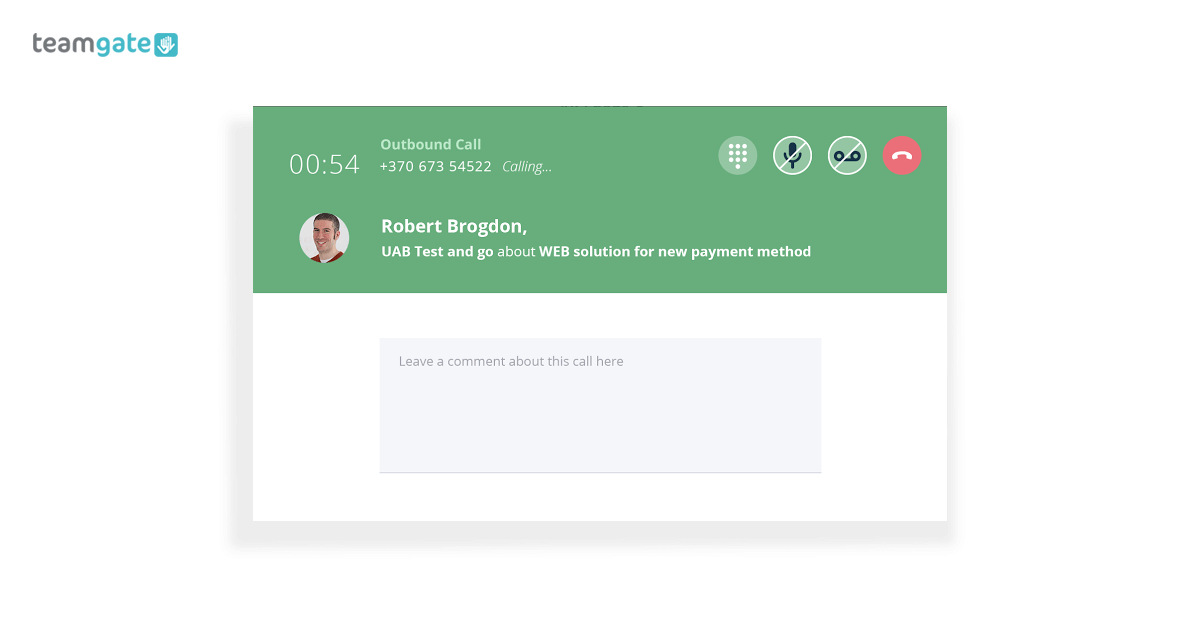
SmartDialer lets you call directly from Teamgate – no manual entry, no chasing phone numbers – plus, you have access to all of the other relevant information to hand as you make your calls (location, age, company, position, etc.).
Internet calling

In addition to other lead sourcing and marketing practices, Teamgate’s SmartDialer integration adds an extra and hugely valuable dimension to cold calling and telemarketing. But not just that, Teamgate’s SmartDialer can be used for every stage of your sales pipeline, from lead sourcing right through to customer service.

What’s not to love? 

Why cold calling shouldn’t be the poor relation

Telemarketing and cold calling are often considered the poor relations in the sales family. They are usually viewed in one of two ways; a complete waste of time and money; or the rock on which a company’s sales are built.

Whatever your views are, it’s a fact; people have developed a thick skin (and a sharp tongue) towards cold callers and telemarketers, and are less inclined to engage in random sales banter – with random strangers.

Plus, cold calling can be an expensive means of lead capture.

But remember, it still has a vital place and needs to be taken very seriously. A cold calling or telemarketing campaign can return better value for spending due to the personal nature, and the one-to-one customer nurturing element of the medium.

However cold calling still faces some problems which need to be tackled:

  • Time wasted accessing the right phone numbers to call.
  • Missed calls can cost you valuable sales.
  • No access to conversation records unless the notes from the call are comprehensive.
  • Your sales team have no access to call discussions.
  • Because of the increasing challenges of personal and privacy regulations, cold-calling has become far more selective in the sourcing of the prospective customers.
  • With cold calling comes a lot of manual note taking; comments on the call; follow up calls planned; additional information sourced, and all the other information required to take the sale to the next stage.
  • Time wasting – if you’re not talking to the right person, you’re wasting time. If you talking to the right person but using the wrong sales script, you’re wasting time.
  • It is often difficult to ascertain the success rates, clear results, or statistics – calls made, and outcomes reached.

But that’s where SmartDialer and Teamgate can help you to overcome these concerns.

Solution

It stands to reason that if you have to engage in the practice of cold calling and telemarketing, isn’t it better to come armed with the best tools available?

Tools like SmartDialer are even more effective when combined with AI cold calling softwaref, which helps identify the right leads and improve call timing. Learn how AI cold calling is changing the sales landscape.

Teamgate’s SmartDialer integration is ideal for cold calling and telemarketing. It’s the single, unified communication solution providing you with all the very best tools and features needed to reach beyond the old practices of cold calling.

At Teamgate we spend a lot (a LOT) of time engaged in calling and telemarketing, so we know, first-hand, the problems and just how to solve them. Over the years we’ve seen how sales techniques and sales methods have developed from outbound to inbound.

We have always tried to adapt the Teamgate CRM to these constant changes, and the evolving needs of sales and marketing teams. We have seen the problems, and we have designed the tools and features to remedy them, smarter, and faster.

How Teamgate’s SmartDialer can solve those problems:

  1. Your lead sourcing has already identified potential customers who have been entered into your Teamgate account. You can now simply make – and receive – calls directly through Teamgate sales CRM.
  2. Missed calls are listed and recorded along with the customer’s profile. This can save you valuable time and money, it can help you reschedule missed calls, and, it can also help nurture your leads by displaying your willingness to interact in a timely manner.
  3. You can record and playback all of your online phone calls. This can help you clarify any situation, it can help you learn where you may have made a mistake, and it can help improve your calling technique. Plus,  Teamgate’s SmartDialer integration let you store unlimited call records and history.
  4. Make and record call-specific notes directly within the customer’s Teamgate profile card. Notes can then be shared with sales colleagues allowing them to keep up to speed on individual communications.
  5. Sales managers – and sales individuals – can track the number of calls made, and evaluate the effectiveness of those calls.
  6. Recorded sales calls can be used for training purposes, allowing salespeople to hone and improve their sales pitch, and learn from their errors.
  7. The integration’s call logger lets you see all call history; incoming and outgoing calls, call owners, plus recordings and playback.

All of the above features are invaluable for sales managers who need to access a fuller, more complete picture of the whole sales process; call effectiveness; calls made and received; call techniques; assessing the value of cold calling in comparison to other methods; and, help when planning future sales strategy.

What to do next

Even if cold calling or telemarketing is only a fractional part of your sales strategy, we’re pretty sure that you still need a really smart calling solution.

Teamgate’s SmartDialer – the ultimate sales dialer – is easy to set up and can have you calling more successfully in no time. With four or five easy steps you’re ready to start calling smarter, and more productively.

If you think this is the solution for you why not sign up for a FREE Teamgate trial today. You have nothing to lose, and perhaps a lot to gain.

Do you have a CRM that keeps you organised?

The most user-friendly CRM on the market. 14-day free trial.

Start Free Trial

Painless setup, no credit card required

Setting up a “call center”, even if it’s just a small in-office operation, is a pain in the you know what. Even the best traditional phone systems are  clunky and hard to use. Tangled cords, managing multiple busy lines, dropped calls, a traditional dialing system produces more headaches than results. We don’t roll that way, sorry. That’s too 1990’s for us.

For inbound marketing and support teams, which often have a lot on their plate already, making and receiving phone calls can be a real drag. Calls -lots and lots of calls- are a must for these teams, but each team member is going to have a lot of other things that need to get done. Fortunately, the right dialing system can cut down on time wasted, as well as hassle, by making it easy to make and manage phone calls.

With the right automatic dialer, you get to enjoy the convenience of calling right from your web browser. With an auto dialer, there’s no need for an outside service provider, you can make your calls right through the web. And let’s not kid ourselves, most people these days are more familiar with web and smartphone apps  than old school push button phones and all their blinky little lights.

Do you have a CRM that keeps you organised?

The most user-friendly CRM on the market. 14-day free trial.

Start Free Trial

Painless setup, no credit card required

As a result, with a smart automatic dialer system you’ll spend more time being productive, and less time pulling your hair out, cursing at your clunky traditional phone system, smashing push buttons.

Of course, making a simple phone call through the web isn’t so difficult these days. What’s more of a challenge is finding a great platform that offers the value added services needed to really increase your company’s inbound and outbound performance.

Finding the right autodialer isn’t quite as hard as finding a needle in a haystack, but it’s close.  An automatic dialer itself isn’t enough, but when combined with a smart CRM system, you’ll be able to easily manage relationships.

With SmartDialer, you can use a smart management system that enables not only phone calls, but also makes it easy to record, manage, and track your efforts. With our automatic dialer, managing your calls isn’t “rocket science” precisely because we focused on making it easy. You don’t have to waste precious seconds hunting down names and numbers, and then dialing them. Everything can be managed with a few simple clicks.

In fact, SmartDialer is integrated directly into TeamGate’s customer relationship management (CRM) platform. This means you can plug your phone efforts directly into your overall relationship management efforts. This creates a more holistic and complete relationship management process. We hate using buzz words, but in this case it’s warranted: our autodialer will create synergy within your customer relationship management process.

Yup. We said it. Synergy. And our automatic dialer system will actually deliver it unlike all those PowerPoints cranked out by consulting firms. This results in increased productivity. Both sales and support teams are short on time. There are always more clients to call, or more issues to resolve. By increasing productivity, and cutting down on wasted time, your employees will be able to focus on more important tasks.

Using Recordings to Improve Team Performance

Recording phone calls is especially important for sales teams, as well as support and other business teams. Luckily, the SmartDialer autodialer makes that easy. You can record phone calls quickly, securely and with minimal effort. This creates a permanent record of your calls.

Worried about big brother? You’ll be in charge of your recordings. Hypothetically, you could set up some type of Orwellian state in the office, but we recommend using our autodialer for staff training and producing results.

You can use these recorded conversations to improve team performance. Did a sales team land a big sale with some clever tactics? Hand out some high-fives, review those tactics, digest them, and then share with the team. Is a particular issue with your software or product popping up frequently? Lots of hair getting pulled out on the support team? When a support team member finds that great solution for their customer, again you can use the recording to digest. Analyze and share.

When it comes to sales and support, knowledge is power. Simply put, not everyone on your team will know how to handle every single conversation or issue.  Of course, some team members are going to excel. Learn from them.

Besides recording conversations, you can also record scripts. Are you a sales closing Casanova that can sweep customers right off their feet? Rock it lover boy (girl?)! And with our automatic dialer,  you can record a script to execute those savvy lines automatically. This will save time, and ensure consistency.

Conclusion: In Browser Dialing Produces Efficiency

Seemingly “simple” features like SmartDialer autodialer can provide a huge number of benefits. Efficiency and productivity often isn’t achieved through sweeping changes, but instead smart innovations that save seconds here, and provide opportunities there.  That’s the SmartDialer auto dialing system.

No, an automatic dialer won’t provide you with any epiphany on its own. But SmartDialer will free up time and produce better results. What are you going to do with that extra time and profits? That’s up to you. Call more clients, meditate in a Zen garden, solve more support tickets, take a trip to Monte Carlo, whatever.

Calls are important both for sales and support teams, as well as others. Yet phones themselves are growing obsolete. By using an integrated, browser based automatic dialer that’s connected to your CRM, you can cut down on time spent making calls, and thus can gather more data and focus on what really counts: your customers.

The approach to selling is based on the principles of the sales process known as the sales pipeline. A sales pipeline involves various steps that an individual salesperson should take to convert the potential customers to qualifying prospects, then to lead, and further take the lead into a sales opportunity. The process is then taken through different stages to be considered closed.

Below is the typical sales funnel:

  • Cold Suspect
  • Warm Lead
  • Hot Deal
  • Qualified Buyer
  • Customer

Sales are a continuous process that requires you to bring in the needed prospects and close customers again and again. It is a process that never ends, and keeping this process under control requires a proper sales pipeline which was defined a while ago. The most fundamental thing about a sales pipeline is that you need to prioritize the prospects.

In many cases, the companies that do not use a sales pipeline management end up failing in the recognition of the benefits that it provides or they are unaware of the ways in which they can shape their sales.

A sales pipeline distinguishes between a good sales team from a great one. It is quite painful to have the goals you set out for your sales team to be missed out.

Five problems prevent the development of a robust sales pipeline:

  1. Unrealistic Timelines
  2. Research that takes too much time
  3. Wastage of time in communicating with unqualified companies
  4. Email response rates being poor
  5. Follow ups with the prospects are inefficient

Related: 4 Ways CRM Makes Small Business Employees More Productive

Unrealistic Timelines

One of the major causes of the forecasting frustration in business is the overly aggressive close dates (unrealistic timelines) and the stalling of opportunities. If the sales management is entirely focused on the acquisition of accurate numbers, then it is not helping the sales reps in choosing the opportunities that might assist in uncovering the unpredicted customer problems. This impacts the accuracy of forecasts and the velocity of the pipeline. This can be due to the causes:

The solution for such timelines is quite a straightforward one. The sales management should be more focused at the front end of the sales pipeline, which is wide and the opportunities are numerous. Also, the leading indicators are the basis for a good pipeline management. These can be found in the early stages of the sales cycle with the help of good buyer analysis and questioning.

unrealistic-deadlines (1)

Researching Prospects

Almost 20% of the time is spent by the sales reps researching the prospects. To overcome such problem, the sales reps should be presented with a list of prospective customers that are beyond the basic demographics. This way the reps will lead towards revenue generation.

Unqualified Companies

Your sales representatives most probably spend too much of their time on the businesses that are not even qualified. Nothing can be more wasteful for business than the sales reps spending time on the prospects that they will not be able to close. To overcome this, you should target the companies that are growing, as they have the budget. By providing your reps with the list of growing companies, you improve the closing rates and reduce the time wasted on the businesses that will never agree to the prices.

Cold Emails

Sales reps are only able to get a 5% response rate on the email blasts. Cold emails, if utilized well, are a guaranteed way of opening up new opportunities. However, the response rate of these cold emails is very degrading. To make most of it, you should make batches and email the companies that have commonalities that would improve the response rate. You should send out the emails that resonate with the receiver. To do this, the companies should be segmented, and the commonalities should be determined. 

Do you have a CRM that keeps you organised?

The most user-friendly CRM on the market. 14-day free trial.

Start Free Trial

Painless setup, no credit card required
Cold Calls

In the least, only 2% of the cold calls are ever received, it is a losing battle for the sales. To avoid such a problem, the sales reps should make the cold calls with a profound knowledge about the company they contract with. This can be done easily in a few minutes by visiting the websites and by pulling out information about them.

cold-calls-teamgate (1)

Follow Up with Prospects

Most of the reps do not follow up with the prospective customers; almost 80% of the sales require that 5 or more follow-up interactions should be made. This is because the reps do not always have anything relevant to reach out to. To overcome this problem, you should provide the sales rep with information promptly so that they can do the follow ups more diligently.

In hope that this gives the clear overview of the most common sales pipeline problems and the fixes, if you recognize any of these problems, you now have the knowledge as to how you can optimize and predict your sales and revenues.

Related: How To Analyze Your Sales Pipeline and Track Sales Effectively and Key Aspects of Building True Customer Demand

In an interview with the NY Times, Evernote’s CEO Phil Libin was asked the following question: What is unusual about your workplace?
His answer was very interesting:

We got rid of phones in the office. Just on a whim, I thought that at every company we start, and this is the third one, we’re going to eliminate one piece of unnecessary technology. So this time it was phoned. We thought, why do you really need a phone? If you have a phone at your desk, it’s just sitting there and you’re kind of encouraging people to talk on it. Everyone’s got a cellphone”

Are traditional landline phones “unnecessary technology” as Phil Libin puts it? Possibly, and Phone Integration is the likely contender to replace them.

Let’s find out how it can trump office phone landlines:

Unified Communication

Untitled design

Consider the following exchange:

Q: Did you call Customer Smith to follow-up on them?

A: I don’t think so; I thought you were supposed to call them?

Q: It’s ok; I’ll give them another call.


It is a time-consuming situation that is equally frustrating for customers as it is for co-workers. To avoid this scenario, we resort to manual data entry which can be even more time-consuming.

More hindering is the fact that traditional office phone conversations are impossible to integrate with any of the modern solutions businesses use. Ideally, you want to build a customized ecosystem of apps that communicate with each other. But what you end up with, using office phones, is an important component (communication) that is completely disconnected from your app ecosystem.

Cloud Hosted Phone Integration is the solution to this problem. Unified communication refers to centralizing and integrating features like Emails, calls, CRMs, and other business tools.

For example:

  • Set a Teamgate CRM reminder to call a customer.
  • Receive the reminder by SMS or Email.
  • Make the call through Teamgate.
  • Logit and archive it.
  • Notify teammates of the call.
  • Access your history to track the number of calls.
  • Monitor their success.
  • Why not forward your voicemail recordings to your email?

These tasks – all of which rely on cloud-hosted apps—are not restricted by the presence of a physical office phone and a nearby notepad. This perk is especially attractive to field workers like traveling salespeople looking for ways to avoid workflow disruptions. Moreover, the availability of call data can foster transparency and open communication within any team.

Related: 4 Crucial Sales Trends You Cannot Afford to Ignore in 2016

Cost and Scalability

The costs of maintaining multiple landlines, in addition to the initial installation fees, can add up quickly. This is why small businesses that switch to cloud-hosted Phone integrations “reduce the cost of their local costs by up to 40%, and save up to 90% on international call”, according to tech.co.
Seamless scalability also favors Telephony Integration apps since many cloud-hosted plans offer per-minute pricing. This guarantees that resources will be allocated according to your everyday business needs. Under-used landlines and phone plans are a significant resource sink. With Telephony Integration, the bearer setup requires nothing more than a headset.

Analytics

calls (1)

The popular quote “What can be measured can be improved” holds especially true for phone integration.
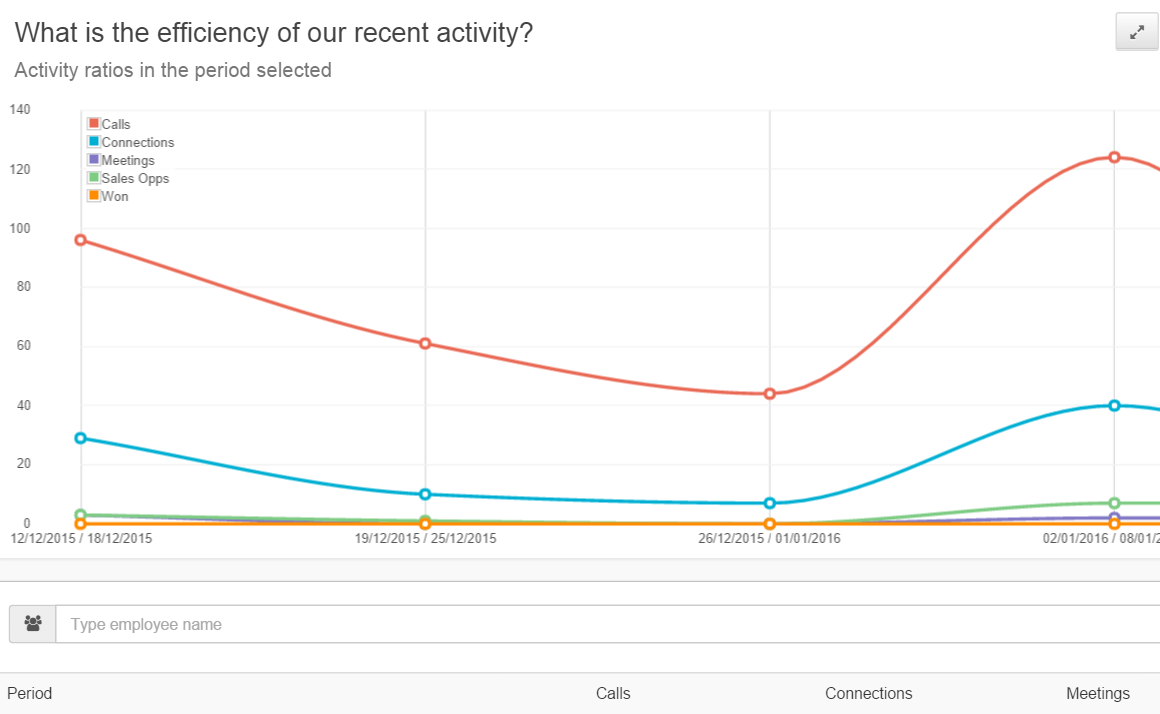
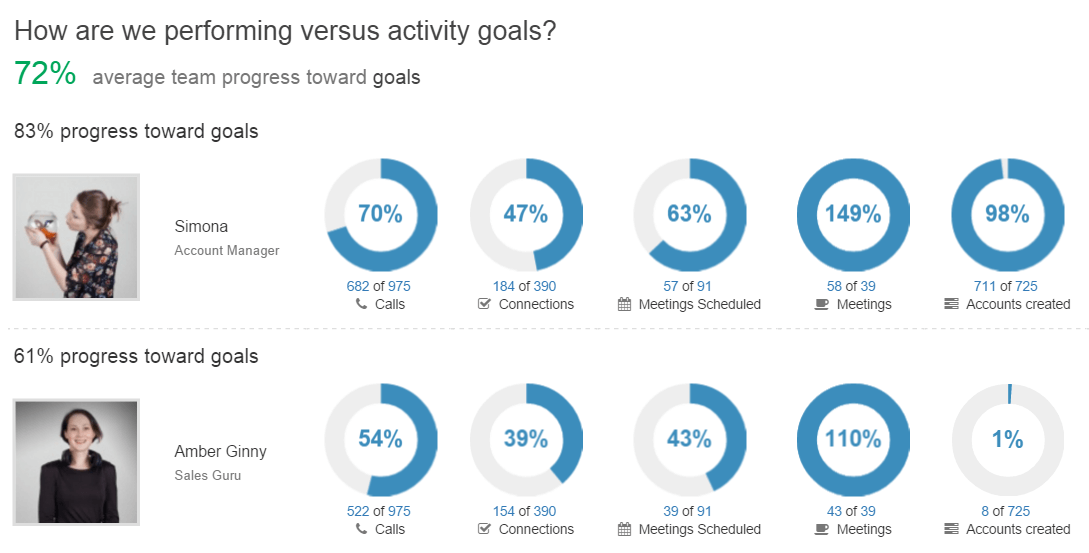
When combined with CRM, phone data is an invaluable tool for data lovers. Not only can you extract key information like duration of calls, a number of calls-per-customer, response rates, and conversion rates but you can also monitor how your sales team or customer service department, for example, is progressing towards meeting their pre-set goals.

goals (1)


Not to forget that this acquired data provides a rich stream of inputs that can make your CRM forecasts and visualizations more accurate, thus making future decisions more informed.

Teamgate and Phone Integration

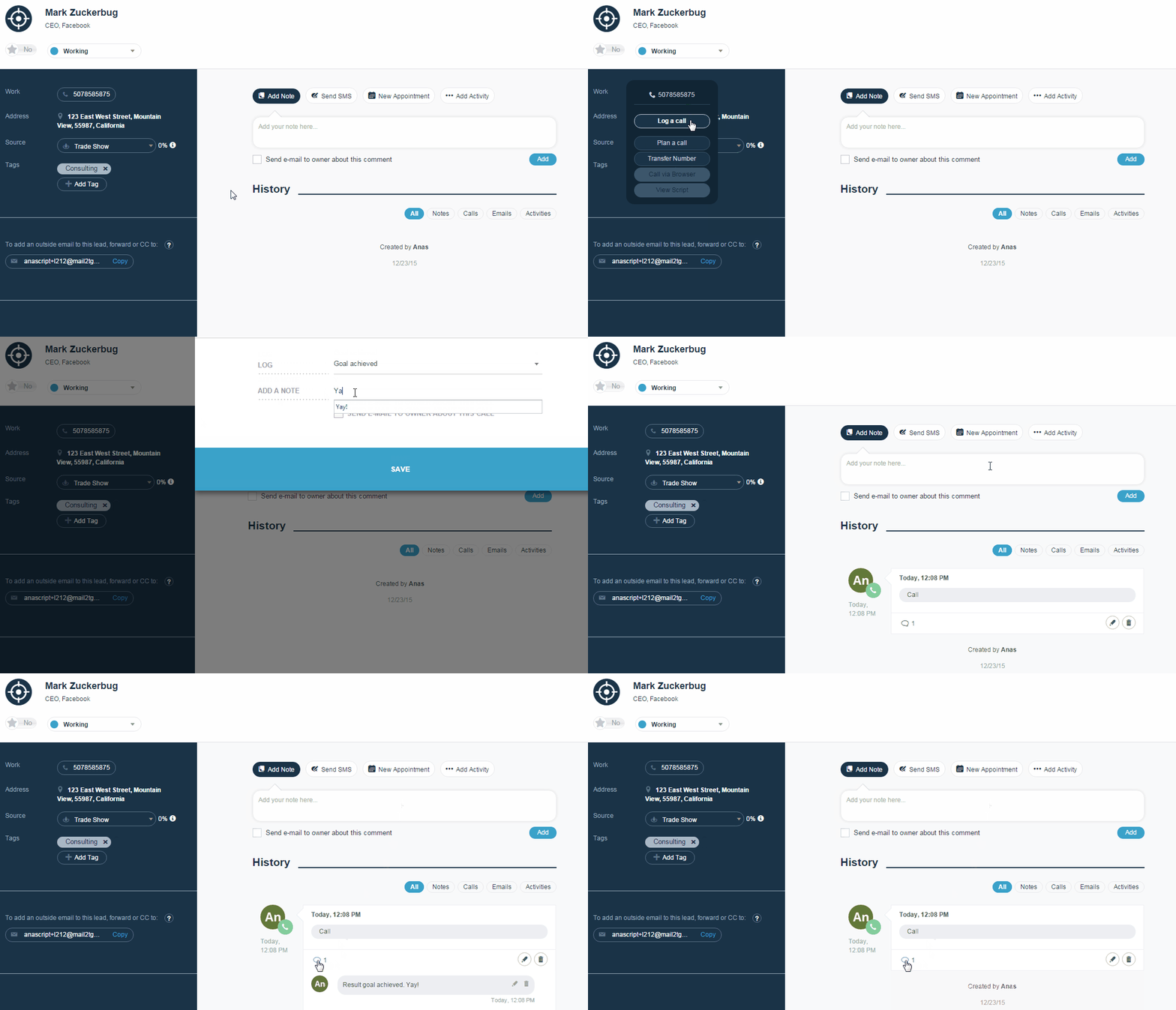
True Story
Yes, I just logged a call with Mark Zuckerburg.


Teamgate CRM supports integration with Nexmo, an API for phone services. We are also launching soon our very own Teamgate SmartDial, relying on the Twilio API.

Besides offering the features you can currently use with Nexmo integration like Browser Calls and SMS notifications, Teamgate SmartDial will include the following additions:

– Calls directly through Teamgate’s CRM.
– Missed calls will be listed and recorded on each customer’s profile.
– Unlimited storage for call records and history.
– Record call-specific notes on the customer’s profile.
– Share call notes with teammates.
– Track the number and effectiveness of calls made.

Stay tuned for Teamgate SmartDial Launch. In the meantime, why not take Teamgate for a test drive?

Try Teamgate today for free!