

Missed follow-ups and outdated data are costing your sales team time and revenue. Poor pipeline hygiene leads to stalled deals, unreliable forecasts, and wasted resources. Task automation solves this by ensuring timely follow-ups, keeping data accurate, and maintaining a clean pipeline to embed discipline into your sales process.
Sales leaders spend 13% of their time fixing CRM data, while reps waste up to 20% of their day on admin tasks. Automating routine activities like reminders, overdue task alerts, and next-step prompts saves time and ensures no deal slips through the cracks. Teamgate helps sales teams maintain pipeline clarity, structure, and real-time insights – without turning CRM into a burden.
With automation, you can:
- Prevent stalled deals by automating follow-ups.
- Keep your pipeline accurate with real-time updates and alerts.
- Enforce a consistent sales process that reps follow naturally.
- Save time for both reps and managers, letting them focus on selling and coaching.
Teamgate transforms your CRM into a tool for disciplined selling, ensuring reliable data and actionable insights to protect your revenue.
Steal My Perfect Sales Opportunity Pipeline (Setup for Beginners)
The Cost of Poor Pipeline Hygiene
A cluttered sales pipeline can quietly drain revenue, even if it looks full on the surface. Effective sales pipeline management isn’t just about organization – it’s about protecting your bottom line. When deals stall without clear next steps, prospects are overlooked, and forecasts are based more on hope than reality, the financial toll quickly adds up. Missed opportunities, wasted sales hours, and ineffective use of demand spend all contribute to this hidden loss. Ultimately, these issues don’t just hurt individual deals – they can undermine your entire financial performance.
The numbers tell the story: when 20–30% of your pipeline leaks due to neglect, forecasting becomes unreliable. This makes it harder for leadership to distinguish real opportunities from "zombie deals" that linger without progress. The result? Misaligned hiring decisions, missed quotas, and a reactive approach to planning instead of a strategic one.
Warning Signs of Poor Pipeline Hygiene
Catching the problem early is crucial. Here are some red flags to watch for:
- Overdue tasks: Ignored follow-up reminders allow deals to stagnate while still appearing active. For instance, if a rep misses a scheduled call and there’s no system to flag it, the deal can quietly lose momentum.
- Deals without next steps: Opportunities stuck in early stages with no scheduled actions or blank activity fields inflate the pipeline without moving deals forward. Tools like color-coded alerts for overdue closing dates or deals that have aged beyond 90 days can help identify these bottlenecks before they spiral out of control.
Impact on Sales Teams and Leadership
These pipeline issues don’t just affect deals – they create ripple effects for both sales teams and leadership.
For sales reps, a messy pipeline means spending up to 20% of their day on administrative tasks like chasing stale leads or fixing outdated data. That’s time they could be using to sell. For leadership, the challenges are even bigger. Without accurate data, it’s hard to know which deals need attention, making coaching reactive instead of proactive. Forecasts based on unreliable data can lead to poor resource planning – overstaffing during slow periods or understaffing when real opportunities arise. This cycle of missed targets and eroded trust in the pipeline can cripple both morale and performance.
How Task Automation Improves Pipeline Hygiene
Task automation turns pipeline hygiene into a seamless, ongoing process rather than a repetitive, manual task. By following CRM best practices and embedding discipline directly into your daily workflow, automation ensures deals stay active, data remains up-to-date, and your pipeline reflects the actual state of your sales efforts – not just optimistic guesses. Here’s how automation tackles follow-ups, keeps data accurate, and enforces process discipline.
Automating Follow-Ups to Prevent Stalled Deals
One of the most common reasons deals stall is missed follow-ups. With multiple opportunities to juggle, it’s easy for even a hot lead to slip under the radar. Automation solves this by creating follow-up tasks based on deal stages or periods of inactivity. For instance, if a deal sits idle for too long, the system automatically generates a task and notifies the rep, eliminating the need for manual reminders.
This approach ensures follow-ups remain consistent and timely, reducing the risk of stalled deals. Automated scheduling frees reps to concentrate on meaningful interactions with prospects instead of spending time managing their calendars. Tools like color-coded indicators and closing date alerts highlight overdue deals, ensuring no opportunity is left unattended. When follow-ups are consistent, you also gain the data needed to forecast revenue more reliably – something that Baremetrics helps SaaS teams measure through its subscription analytics and revenue recovery platform.
Maintaining Real-Time Pipeline Accuracy
A clean pipeline depends on accurate, up-to-date data. When deal information becomes outdated, it skews forecasts and makes it harder for leadership to separate active opportunities from dead ends. Task automation addresses this by prompting reps to update data at key stages. Whether it’s logging a call, updating a status, or scheduling a meeting, the system ensures each stage includes a clear next step. It also flags inconsistencies like overdue tasks or missing actions, keeping your pipeline aligned with reality.
The benefits are tangible. Automating pipeline hygiene can cut the 13% of time sales leaders spend cleaning CRM data by up to 20%. This time savings allows leaders to focus on coaching and strategy while ensuring data quality through early validation. With accurate, real-time data, forecasting becomes a grounded, evidence-based process rather than a guessing game.
Enforcing Sales Process Discipline
A structured sales process only works if it’s followed consistently, starting with a successful CRM implementation. Task automation ensures this discipline without requiring constant oversight. By setting mandatory next steps at each stage and using conditional fields, notifications, and workflow rules, the system guides reps through the sales cycle. Deals can only move forward when required actions are completed, reinforcing a consistent and reliable process.
This built-in structure leads to better outcomes. Instead of relying on reps to remember to log updates or schedule follow-ups, automation makes these tasks a natural part of their workflow. Centralizing activities like emails, calls, and notes within the CRM also reduces administrative burdens, allowing reps to focus on selling. With clear next steps for every deal and well-defined stages, your pipeline transforms into a dependable system for driving revenue – not just a database you hope stays current.
Benefits of Task Automation in Teamgate CRM
Task automation in Teamgate transforms sales teams by replacing guesswork with consistency, grounding decisions in real data, and creating a CRM that reps actually want to use because it helps them close deals.
Predictable Revenue Through Consistent Follow-Up
In Teamgate, when a deal reaches a stage without a defined next step, the system steps in with an automatic task reminder. This ensures that no opportunity is left hanging, eliminating the risk of losing potential revenue because a hot lead was forgotten. Follow-up becomes a built-in process, not something reps have to remember or scramble to manage. This keeps deals moving forward smoothly and consistently.
By automating follow-up tasks, forecasts become more reliable. Deals progress based on actual actions rather than overly optimistic assumptions, leading to better pipeline visibility and allowing reps to focus on selling instead of juggling reminders.
Better Pipeline Visibility for Leadership
Teamgate provides leaders with real-time insights into critical metrics like deal age, activity levels, and next-step coverage. The Time Journey feature automatically tracks how deals move through stages, giving managers a clear timeline of progress without requiring manual updates.
This level of visibility changes how leaders coach and forecast. Instead of relying on spreadsheets or instinct, they can identify stalled deals and address bottlenecks before they become problems. Pipeline Movement reports highlight where deals tend to get stuck, enabling managers to take proactive steps based on real data. When every deal has an actionable next step, the pipeline becomes a reliable tool for driving the business forward. Clear insights also help reps prioritize their efforts more effectively.
Higher Rep Productivity and CRM Adoption
Teamgate integrates seamlessly into the daily activities of sales reps, centralizing tasks like emails, calls, meetings, and notes. This makes the CRM a natural part of their workflow, not an extra chore. By automating routine data entry, reps can save up to 20% of their time, allowing them to focus on building relationships and closing deals.
Features like the drag-and-drop interface for managing deals and automated activity tracking eliminate repetitive tasks that often discourage CRM use. Reps see immediate benefits as automated reports provide clear insights into their performance and pipeline progress. With routine tasks like logging interactions and scheduling follow-ups handled by the system, reps can dedicate their energy to actions that drive sales forward. This keeps the pipeline organized and ensures momentum is never lost.
sbb-itb-5772723
Steps to Implement Task Automation in Teamgate CRM
Setting Up Workflow Automations
Start by defining triggers that automatically create follow-up tasks as deals move through critical stages. In Teamgate, you can set up workflows to ensure no opportunity slips through the cracks. For example, when a deal reaches a key stage, such as "Proposal Sent", the system can prompt the scheduling of a follow-up call or task. You can also configure conditional rules to notify reps when tasks are close to their due dates or escalate alerts to managers if deals remain inactive beyond a certain age.
To ensure consistency, require specific fields to be completed at each stage and apply conditional logic to guide the process. For instance, when a deal transitions to "Negotiation", the system can enforce a next step, like scheduling a meeting. Always test these workflows on sample deals to make sure they function as intended. Once workflows are live, use dashboards to keep an eye on deal health and ensure the process runs smoothly.
Using Dashboards to Monitor Deal Health
Dashboards work hand-in-hand with automated workflows by offering real-time insights into your pipeline. Customize these dashboards to track essential metrics like task completion rates, deal age, and next-step coverage. This helps managers quickly identify potential bottlenecks or areas where deals might be stalling. Set up alerts to flag deals that exceed age limits or when task completion rates dip below acceptable levels.
The Time Journey tool automatically records every status change and tracks how long deals stay in each stage, eliminating the need for manual reporting. Utilize the Sales Pipeline Movement report to review daily progress, identifying which stages are effectively qualifying leads and where opportunities are getting stuck. You can also filter dashboard views by users or teams to pinpoint high performers and use their workflows as a model for others.
Integrating Task Automation with Daily Sales Activities
Once workflows and dashboards are in place, integrate automation into your team’s daily routines. Automate tasks related to emails, calls, and meetings to save time and reduce manual effort. For instance, when a rep logs a call in Teamgate, the system can automatically create a follow-up task based on the outcome. The drag-and-drop interface makes it easy for reps to visually manage deals while the system handles reminders and tracking in the background.
To streamline communication, connect Teamgate with sales automation integrations like Gmail, Outlook, or Microsoft 365. This integration ensures email conversations are linked to deals, and follow-up tasks are created without requiring reps to leave their inbox. Use SmartDialer to log calls and automatically generate follow-up tasks. By centralizing emails, calls, meetings, and notes in one platform, Teamgate transforms the CRM into a tool that supports selling rather than adding administrative overhead.
Measuring the Impact of Automation on Pipeline Hygiene
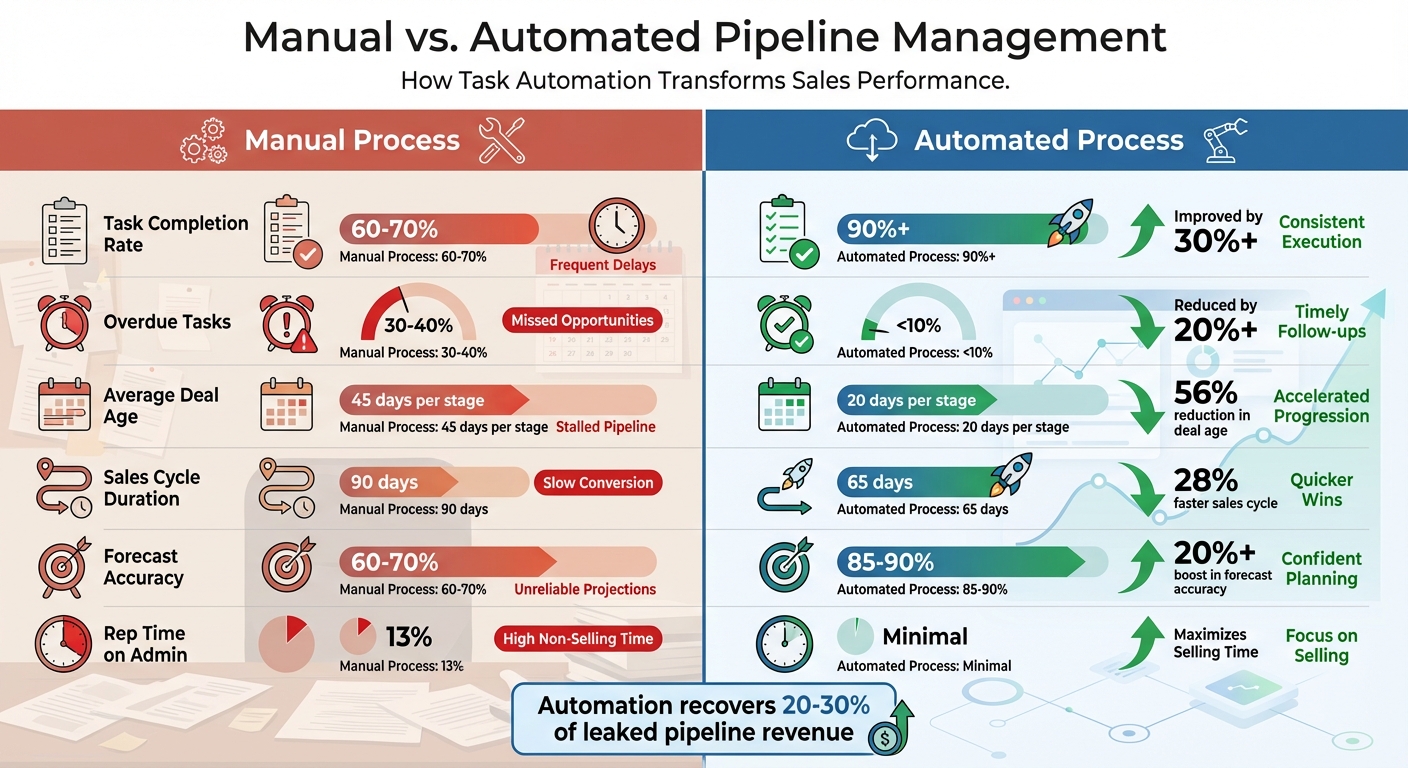
Manual vs Automated Pipeline Management: Key Performance Metrics Comparison
Quantifying the results of automation is essential to demonstrate its value. By tracking key metrics, you can clearly show how automation safeguards revenue and transforms pipeline hygiene from a vague idea into a measurable system.
Key Metrics to Track
Deal age is a critical metric that highlights how long opportunities linger in each stage. Before automation, deals often spend an average of 45 days per stage. After implementing automation, this average drops to 20 days, significantly reducing silent revenue loss. With Teamgate’s real-time tracking, aging deals are flagged before they expire, enabling managers to coach reps on what’s truly stuck versus what’s moving forward.
Task completion rates shed light on how consistently follow-ups are being executed. Manual processes typically result in 60-70% task completion, as tasks can easily fall through the cracks. Automation boosts this rate to over 90% by issuing timely alerts and preventing stage progression until tasks are completed. Tracking on-time task completion above 85% is a strong indicator of predictable revenue, as consistent follow-ups keep opportunities warm and active.
Forecast accuracy is another area where automation delivers tangible results. By comparing projected pipeline values to actual closed-won revenue, you can identify gaps caused by poor pipeline hygiene. Manual processes often yield forecast accuracy rates around 65%, inflated by stale deals. Automation ensures deals are up-to-date and next steps are covered, raising accuracy to 85-90%. Teamgate provides data-driven signals like deal health and next-step tracking, grounding forecasts in reality rather than guesswork.
Lastly, sales cycle duration – the average time from opportunity creation to close – often shortens by 20-30% with automation. For instance, a sales cycle of 90 days may shrink to 65 days as automation prevents deals from stalling and prioritizes active opportunities.
These metrics offer a clear and measurable comparison of manual versus automated processes.
Comparing Manual vs. Automated Processes
The best way to showcase automation’s effectiveness is through a side-by-side comparison. Start by exporting 3-6 months of historical data to establish baselines for deal age, task completion, sales cycle length, and forecast variance. After running automation for three months, retrieve the same metrics from Teamgate’s dashboards and compare. The results will highlight where automation recovers lost revenue and improves efficiency.
| Metric | Manual Process | Automated Process |
|---|---|---|
| Task Completion Rate | 60-70% | 90%+ |
| Overdue Tasks | 30-40% | <10% |
| Average Deal Age | 45 days per stage | 20 days per stage |
| Sales Cycle Duration | 90 days | 65 days |
| Forecast Accuracy | 60-70% | 85-90% |
| Rep Time on Admin | 13% | Minimal |
These measurable improvements validate how automation not only cleans up your pipeline but also speeds up deal progression. By automating manual tasks, sales teams reclaim time previously spent on administrative work. This means cleaner data, faster-moving deals, more accurate forecasts, and reps who can focus on selling instead of updating CRM fields. Ultimately, automation transforms pipeline clutter into actionable insights that drive revenue. Measuring these shifts proves that automation isn’t just effective – it protects your revenue from the hidden costs of inefficiency.
Conclusion
Automating task reminders can transform your sales pipeline into a reliable engine for consistent growth, preventing revenue from slipping through the cracks.
Pipeline hygiene goes beyond just keeping your data clean – it’s about preventing lost opportunities. Stalled deals, missed follow-ups, and unreliable forecasts can drain resources and waste time chasing leads that have gone cold. Task automation tackles these challenges by ensuring timely follow-ups, maintaining accurate data, and embedding disciplined selling practices into your team’s daily routine.
The benefits are clear: leaders can reclaim up to 13% of the time they once spent cleaning up CRM data, redirecting their focus to coaching and closing deals. Sales reps save as much as 20% of their time on admin tasks, freeing them to connect with customers and build relationships instead of managing data. These changes replace guesswork with an evidence-based approach to pipeline management.
Teamgate CRM addresses revenue leaks by highlighting deals without next steps, identifying aging opportunities, and providing actionable insights into deal health and activity. It simplifies the sales process by integrating seamlessly into the workflows reps already use – emails, calls, and meetings – while automating follow-ups and enforcing a clear sales process. This makes disciplined selling second nature and eliminates unnecessary busywork.
The decision is straightforward: stick with manual processes that let deals quietly fade away or embrace task automation to create a predictable, growth-focused pipeline. Teamgate offers a solution that combines structured processes, reliable data, and high user adoption – all without unnecessary complexity. It’s quick to set up, easy to use, and built for modern sales teams. Start automating your pipeline hygiene today to protect every dollar of your hard-earned revenue.
FAQs
How does automating tasks keep your sales pipeline moving?
Automation plays a crucial role in keeping your sales pipeline moving smoothly. By setting up reminders and prompting next-step actions, it prevents tasks from being overlooked and ensures that deals don’t lose momentum. Overdue tasks are flagged, helping you address potential bottlenecks before they become bigger issues.
By simplifying follow-ups and maintaining steady progress, automation transforms consistency into a reliable process rather than a manual effort. This approach keeps your pipeline organized and ensures every opportunity gets the focus it needs to close deals effectively.
What are the main advantages of keeping your sales pipeline accurate in real time?
Keeping your sales pipeline accurate in real-time is key to keeping deals moving and maintaining momentum. Timely reminders and updates ensure that no opportunity is forgotten or left to cool down, helping you avoid hidden revenue loss and keeping every deal active.
For leaders, an accurate pipeline offers clear, current visibility into the team’s progress. This clarity supports more reliable forecasting and enables quicker, data-informed decisions. By bringing attention to bottlenecks and overdue tasks, it creates a clean and dependable pipeline that drives steady growth and strong performance.
How does task automation improve sales forecasts and shorten the sales cycle?
Automation plays a key role in keeping deals on course by sending timely reminders and highlighting follow-ups that need attention. This approach helps avoid overdue tasks, ensures pipeline data stays accurate, and keeps deals from losing momentum.
With activities consistently updated, automation provides reliable, real-time data for forecasts, improving their accuracy. It also speeds up the sales process by maintaining steady progress, cutting down delays, and ensuring every opportunity moves forward smoothly.






