

Most teams don’t need another CRM. They need one that gets used during the work. If your reps forget follow-ups, deals sit with no next step, and forecast calls turn into data checks, the issue is not more fields or more reports. It is workflow.
I’d sum it up like this: Teamgate helps reps follow a clear sales process and helps managers trust the numbers – without turning CRM into a full-time admin job. The article’s main point is simple: Teamgate fits the workflow-first CRM shift because it helps reps act inside the CRM, keeps deal activity current, and gives managers a cleaner view of pipeline health.
Here’s the short version:
- 91% of companies with 10+ employees use a CRM, but only 37% of reps say it is fully used.
- Only 19% of sales leaders say their CRM data is extremely helpful for pipeline visibility.
- The gap is not software access. It is day-to-day use.
- A workflow-first CRM focuses on:
- clear deal stages
- one dated next step on each open deal
- auto-logged email, meetings, and calls
- lead routing
- alerts for stale deals
- Teamgate’s role is to make those steps part of selling, not cleanup work before a forecast meeting.
If you want a simple takeaway, it’s this: a CRM should help you move deals now, not just record what happened last week. This section frames Teamgate as a fit for SMB and mid-market sales teams that want less admin, cleaner pipelines, and better forecast visibility.
CRM Workflow Automations | Introduction and How to Guide
sbb-itb-5772723
What a Workflow-First CRM Actually Does
A workflow-first CRM should help your team sell, not just store records. In day-to-day work, that means a well-defined sales process, one next step on every open deal, automatic activity logging, smart lead routing, and forecast signals you can trust. Teamgate gives growing sales teams clarity, structure, and trustworthy pipeline insight – without enterprise CRM bloat or feature overload.
At a glance, a workflow-first CRM should do a few basic things well:
- Keep deal stages tied to clear sales milestones
- Make reps set a dated next step for every open deal
- Log email, meetings, and follow-up activity with little manual work
- Route inbound leads fast and assign the right owner
- Show managers whether deals are moving or just sitting still
Stage Discipline, Next Steps, and Follow-Up Consistency
The core idea is simple: your stages need to mean the same thing to every rep. Using 5–7 stages tied to observable milestones – like Discovery Completed or Proposal Sent – keeps pipeline data clean and usable.
That matters more than it may seem. If one rep moves a deal to proposal after a short intro call while another waits until pricing is sent, the pipeline stops being a shared system. It turns into guesswork.
A workflow-first CRM also requires one dated next step on every open deal and shows overdue deals on its own. When the system enforces that rule, deals are less likely to drift into a dead zone where nobody is actively moving them forward. Old deals get flagged before they turn into forecast trouble, which keeps pipeline reviews centered on sales movement instead of cleanup work.
Email, Calendar, Lead Routing, and Automation as Daily Basics
Some features should just work. Email and calendar sync fall into that bucket. If a rep sends a pricing email from Gmail, it should log to the right deal on its own. If a demo gets booked, it should appear on the deal timeline without anyone stopping to type it in.
That same logic applies to inbound leads. When someone fills out a "Request a Demo" form, the CRM should take that lead, assign it to the right rep based on territory or round-robin rules, and create a first-contact task within minutes.
Speed matters here. A slow handoff can cost you the deal before the first reply is sent. Manual triage drags things down. Automation does not replace judgment; it removes the lag between buyer interest and rep action.
Forecasting Signals and Integrations That Keep Work Connected
A workflow-first CRM also gives managers better forecast signals because it shows what is already happening in the sales flow. That includes days since the last meaningful touch, total deal age, time spent in the current stage, and the share of open deals with a future-dated next step.
Those signals lead to better coaching questions. Has anyone spoken with this prospect lately? Is there a clear next move? Is the deal advancing, or is it parked?
Integrations through Zapier or direct API connections help carry that same logic into the rest of your stack. If a customer moves from trial to paid in your billing system, the CRM can move the deal to Closed Won on its own. If someone books time through Calendly, the meeting can show up in both the rep’s calendar and the linked CRM opportunity, along with a pre-meeting checklist.
The point is not to add more systems. It is to keep each deal current without piling more admin work onto the rep.
Those workflow basics set the bar. Next is how Teamgate puts them to work in daily selling.
Where Teamgate Fits in the Workflow-First CRM Era
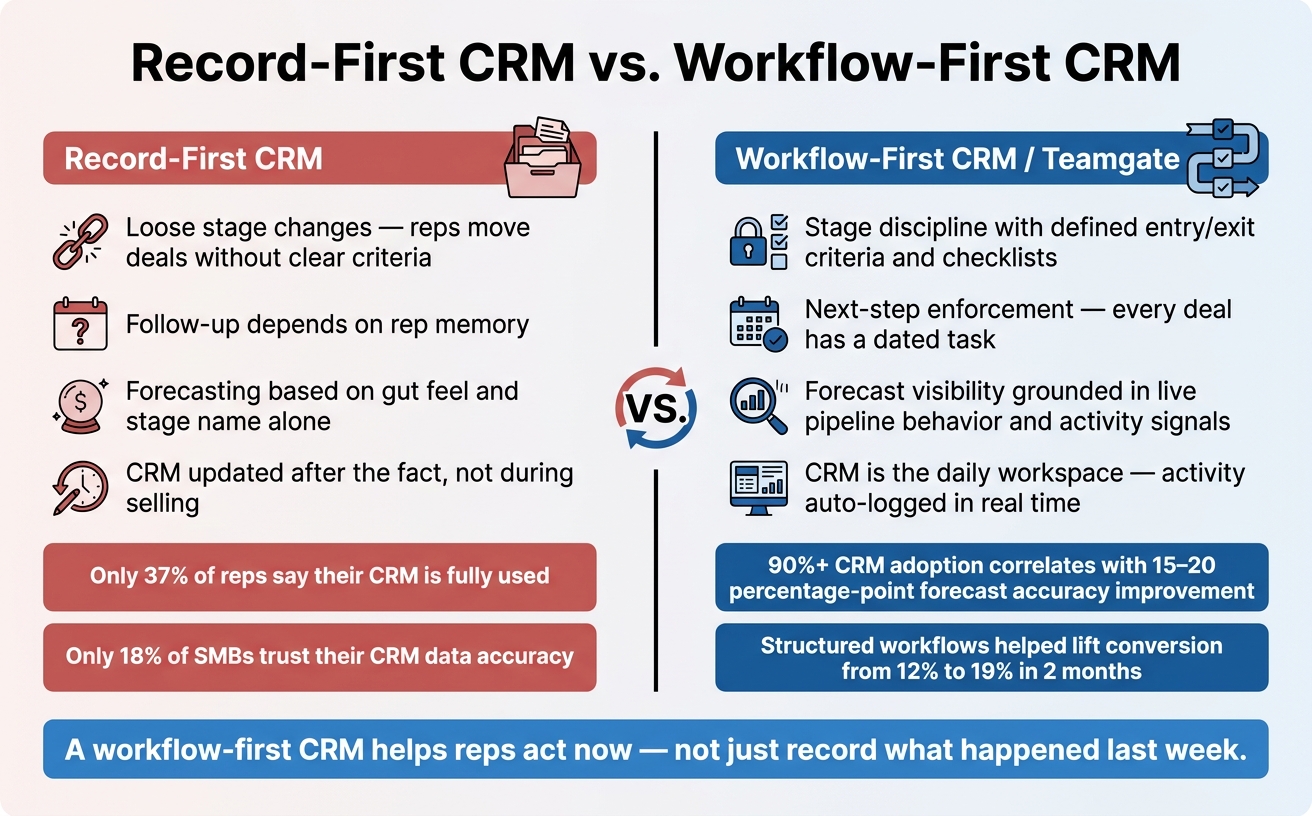
Record-First CRM vs. Workflow-First CRM: Key Differences
A workflow-first CRM only works if reps use it while they sell, not after the fact. That’s where Teamgate fits. It turns pipeline rules, follow-up steps, and deal movement into part of the work itself, so the CRM stays current because reps are working inside it all day. Teamgate helps reps follow a clear sales process and helps managers trust the numbers – without turning CRM into a full-time admin job.
Teamgate gives reps a daily workspace for moving deals forward, not a record they update later. Reps start the day in a visual pipeline that shows where each deal stands, what needs to happen next, and which opportunities have gone still.
How Teamgate Helps Reps Move Deals Forward with Less Admin
The visual pipeline is the main starting point each day. Every deal card shows its stage, next step, and how long it has been sitting there. From that same view, a rep can send an email through the integrated Gmail or Outlook connection, open a synced meeting from the calendar, or start a call through SmartDialer. The CRM logs that work as it happens, so there’s no separate data-entry step afterward.
Task templates and reminders tie follow-up to the deal stage, so reps know the next move without stopping to think, What am I supposed to do here? On mobile, reps can update stages, add notes, and send recaps right after a sales meeting. That helps keep momentum between the field and the office.
Teamgate becomes the system reps use every day.
How Teamgate Gives Managers Pipeline Clarity and Forecast Visibility
For managers, that same workflow data turns into pipeline visibility. Manager dashboards in Teamgate show pipeline value, stage distribution, win rates, and activity levels by rep. So before a weekly pipeline review even starts, a manager can already see which deals have had no logged activity in 30+ days, which opportunities are missing a next step, and which reps may need coaching.
That changes the tone of coaching. Managers get coaching conversations grounded in live deal behavior, not rep memory.
One of the most useful signals Teamgate surfaces is next-step coverage, which is the share of open deals with a future-dated task or meeting. Research shows that strong CRM adoption, with more than 90% of reps actively using the system, correlates with 15–20 percentage-point improvements in forecast accuracy. Teamgate uses activity signals and weighted pipeline views to support forecasting based on live pipeline behavior.
Record-First Patterns vs. Teamgate’s Workflow-First Approach
Here is how Teamgate turns workflow rules into daily CRM behavior.
| Record-first pattern | Workflow-first requirement | How Teamgate supports it |
|---|---|---|
| Loose stage changes | Stage discipline with clear entry/exit criteria | Custom stages with defined conditions, checklists, and time-in-stage visibility guide reps to advance deals only when required actions are complete. |
| Follow-up depends on rep memory | Next-step enforcement embedded in the CRM | Tasks and reminders tied to stages and triggers ensure every deal has a next step and reps are prompted when activity goes quiet. Aging deals surface automatically. |
| Forecasting based on stage and activity | Forecast visibility grounded in pipeline structure and behavior | Stage-based probabilities, weighted pipeline views, and activity metrics combine to produce forecasts tied to actual deal health. |
Only 18% of SMBs report confidence that their CRM data is accurate and up to date. That gap points to a workflow problem. Data stays current only when the CRM is part of daily selling.
Business Value for SMB and Mid-Market Sales Teams
A workflow-first CRM pays off when it helps your team sell more cleanly and predict revenue with less guesswork. For SMB and mid-market teams, that matters fast. When adoption is weak or pipeline data gets messy, there usually isn’t a big ops team around to fix it. Teamgate gives growing sales teams clarity, structure, and trustworthy pipeline insight – without enterprise CRM bloat or feature overload.
Here’s the plain version of the value:
- Reps are more likely to use the CRM when it cuts admin work
- Cleaner activity data leads to better pipeline visibility
- Managers can spot stalled deals earlier and coach with more confidence
- Smaller teams can get live in days, not quarters
Better Adoption, Cleaner Data, and Stronger Daily Execution
Reps use a CRM on a steady basis when it makes the job easier, not heavier. If email sync, calendar connections, and auto-logged calls cut down manual entry, CRM updates become part of the sales day instead of a separate chore. That changes behavior in a big way. You get cleaner activity histories, fewer missing notes, and steadier stage usage across the team.
The day-to-day impact is simple: managers spend less time guessing what’s real in the pipeline. Every deal has a logged next step. Every stage reflects actual progress. In one services-company implementation, enforcing structured logging and follow-ups through CRM workflows helped lift conversion from inquiry to deal from 12% to 19% in just two months.
That same consistency helps forecasting, too.
More Reliable Forecasting and Less Revenue Leakage
Revenue leakage is often quiet. It’s the lead that cooled off because no one booked a follow-up. It’s the deal stuck in proposal sent for six weeks with no logged activity. Small misses pile up.
When stale-deal alerts, next-step enforcement, and activity-based deal health signals are built into the daily workflow, managers can tell which deals are moving and which ones are just taking up space in the pipeline. That makes coaching more direct and more useful. The result is fewer stale opportunities and a clearer forecast at quarter end.
Fast Time-to-Value for Teams of 2 to 50 Users
For smaller teams, rollout speed is part of the payoff. They don’t have months to burn on CRM setup. They need something working in days, not quarters. Teamgate’s native integrations – Gmail, Outlook, Google Calendar, Zapier, and Slack – let reps connect the tools they already use without custom development. Workflow automations, task templates, and visual pipelines are ready to use out of the box.
Teams have reported that data migration can be completed in just a few days, which helps smaller teams get productive fast. That speed matters when a team of five or ten reps needs to start selling right away, not wait through a long onboarding cycle. The result is faster operational value: cleaner pipeline, steadier follow-up, and better visibility.
Conclusion: What Teamgate’s Place in This Era Really Means
Teamgate fits this moment by helping sales teams run the work, not just log it. In a workflow-first CRM, the point isn’t storing deal data for later. The point is making sure reps know what to do next, managers can spot risk early, and the pipeline reflects what’s actually happening. Teamgate gives growing sales teams clarity, structure, and trustworthy pipeline insight – without enterprise CRM bloat or feature overload.
That’s what these workflow basics add up to. A workflow-first CRM changes day-to-day selling, not just recordkeeping.
With Teamgate, that shift becomes practical. Every deal has a next step. Follow-up is driven by the system. Stale opportunities show up early. Managers can see pipeline health as it changes.
For SMB and mid-market teams, that structure changes the rhythm of work. There’s less time spent on admin. Coaching gets easier because managers can see what needs attention. And the pipeline starts to reflect real activity instead of best guesses.
That daily use is the whole point. Teamgate supports the habits that keep revenue work moving.
In plain terms, that’s Teamgate’s role in the workflow-first CRM era: helping teams run revenue work, not just record it.
FAQs
How is a workflow-first CRM different from a traditional CRM?
Most CRM problems start here: reps are asked to feed the system instead of use it to sell. A standard CRM often turns into a place for updates, notes, and manager checks. Teamgate helps reps follow a clear sales process and helps managers trust the numbers – without turning CRM into a full-time admin job.
A traditional CRM is mostly a system of record. Reps log calls, emails, meetings, and deal updates by hand so management can review what happened. That adds admin work, and it can eat into selling time.
A workflow-first CRM works more like a system of action. It helps with day-to-day sales work by pulling in data through email and calendar sync, then pointing reps to the next step. The result is simple: deals keep moving instead of sitting still.
What signals show whether a deal is actually moving?
Pipeline movement is easiest to spot in buyer milestones, not just rep activity. Emails and calls can fill up a timeline, but they don’t always mean a deal is moving. What matters is buyer progress: a finished discovery call, a confirmed need, a delivered proposal, legal review, or a signed contract.
Teamgate helps reps follow a clear sales process and helps managers trust the numbers – without turning CRM into a full-time admin job. That matters here, because a healthy deal should move through a defined process with clear exit criteria at each stage.
If there’s no scheduled next step, that’s a warning sign. If tasks are overdue, that’s another one. In most cases, the deal isn’t moving forward – it’s stalled.
How quickly can a small sales team get started with Teamgate?
Small sales teams can get started with Teamgate fast. Some users say they were up and running in just a few days. That matters when you need a CRM that works now, not months from now. Teamgate gives growing sales teams clarity, structure, and trustworthy pipeline insight – without enterprise CRM bloat or feature overload.
Getting started is simple:
- map your core deal stages
- sync email and calendar
- import your contacts
Once that’s done, your team can start managing the pipeline, tracking activity, and automating routine tasks without a long onboarding stretch.