

If you run a small sales team, the better CRM is usually the one your reps will use every day. From what I see here, Teamgate fits most SMB teams better when you want a clear pipeline, follow-up reminders, simple setup, and lower admin work. Salesforce fits better when you need more layers, more setup, and more system depth.
The short version:
- Teamgate is a better fit for many teams with 2 to 50 users
- Salesforce Starter Suite starts at $25/user/month, but cost can climb fast by tier
- Teamgate Team starts at $39.90/user/month
- Teamgate rollout is about 1 to 2 weeks
- Salesforce setup is often 2 to 4 weeks for basic use and 6 to 12 weeks for larger rollouts
- Some SMBs switch CRMs within 24 months because cost and user adoption fall short
My take: if you want sales discipline without extra system weight, Teamgate gives growing sales teams clarity, structure, and pipeline insight without enterprise CRM bloat or feature overload.
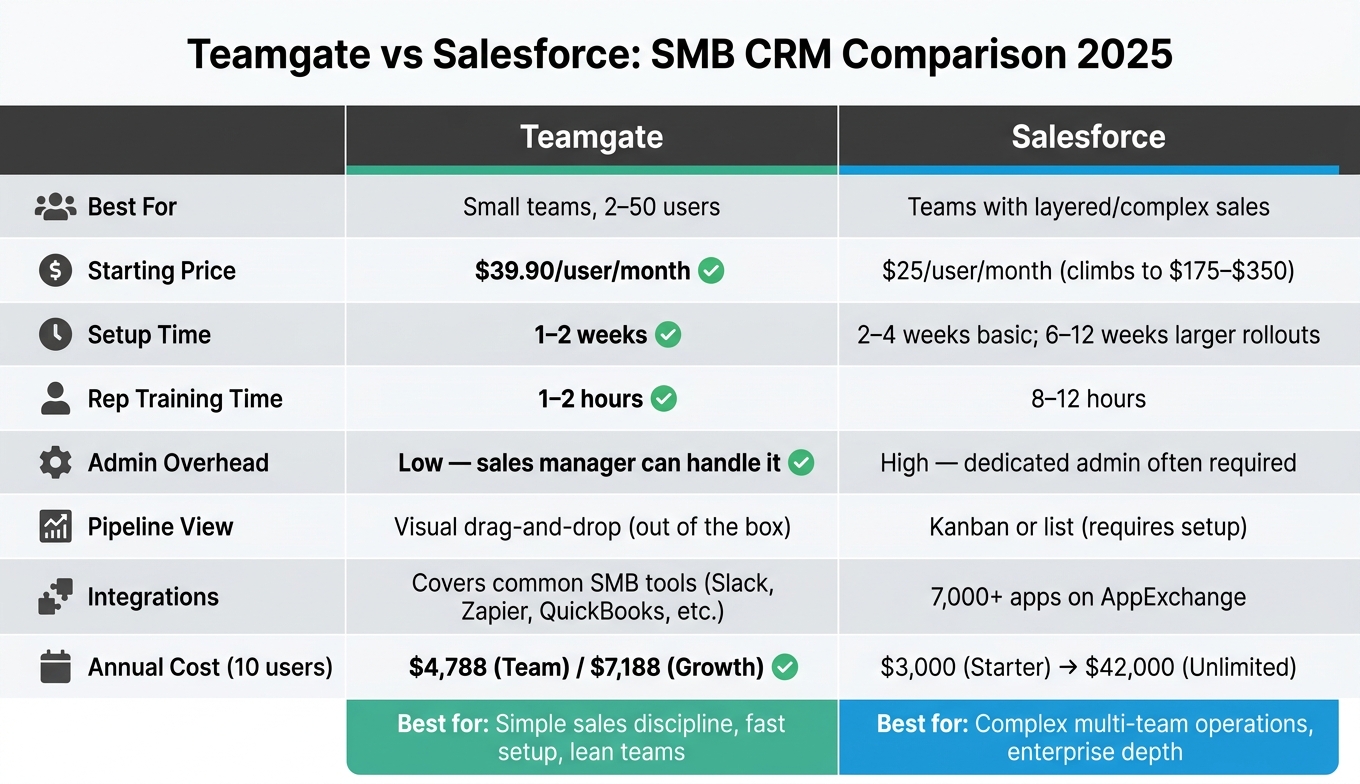
Teamgate vs Salesforce: SMB CRM Comparison 2025
Teamgate CRM Tutorial for Beginners | Simplify Your Sales Process 2026
sbb-itb-5772723
Quick Comparison
| Criteria | Teamgate | Salesforce |
|---|---|---|
| Best for | Small teams that want simple daily use | Teams with more layered sales work |
| Pipeline | Visual drag-and-drop | Kanban or list views |
| Follow-up | Tasks, reminders, SMS, call logging | Can do this, but setup takes more work |
| Email sync | Gmail and Outlook sync | Often through Einstein Activity Capture |
| Setup time | 1 to 2 weeks | 2 to 4 weeks basic; 6 to 12 weeks for larger rollouts |
| Admin work | Low | Higher; admin help is often needed |
| Rep training time | 1 to 2 hours | 8 to 12 hours |
| Integrations | Covers common SMB tools | 7,000+ apps on AppExchange |
| Starting price | $39.90/user/month | $25/user/month |
| Cost at higher tiers | More predictable | Can climb to $175 or $350/user/month |
If you are choosing between these two, I would focus on five things first: pipeline flow, follow-up, setup time, integrations, and total cost. That gives you a clear way to judge which CRM will help your team move deals instead of just adding more fields to fill out.
Core sales features: pipeline, follow-up, and daily rep workflow
For most SMB sales teams, the main issue is simple: can reps move deals, log activity, and keep follow-up on track without getting buried in admin? That’s where the day-to-day gap shows up. Teamgate helps reps follow a clear sales process and helps managers trust the numbers – without turning CRM into a full-time admin job.
How Teamgate CRM keeps deals moving
For SMBs, the key question is whether reps can move deals and log activity without extra work.
Teamgate uses a visual drag-and-drop pipeline, so every deal has a clear stage and next step. Reps can see what needs attention right away, and managers can spot stalled deals fast.
It also connects with Gmail and Outlook, logs emails and calendar events to the right deal, supports built-in calling, logs call outcomes automatically, and sends SMS follow-ups. When a deal changes stage, CRM workflows can create tasks and send follow-up reminders. In plain terms, reps spend less time updating records and more time moving the sale forward.
Salesforce can handle the same jobs, but the path is more layered.
How Salesforce handles leads, opportunities, and activity tracking
Salesforce uses a more layered setup, which works well for complex sales processes but adds steps smaller teams often do not need.
Email and calendar syncing often runs through Einstein Activity Capture, while guided stage prompts and Kanban views help reps work through each stage. Salesforce Flow can manage advanced automation, but it often takes more setup and more day-to-day admin work. For smaller teams without a dedicated admin, that extra load can become a drain.
Here’s the difference in daily use:
| Feature | Teamgate CRM | Salesforce Sales Cloud |
|---|---|---|
| Pipeline view | Visual drag-and-drop; out of the box | Kanban or list; requires setup |
| Email sync | Native Gmail/Outlook two-way sync | Einstein Activity Capture |
| Workflow automation | Rule-based triggers; no coding needed | Salesforce Flow; enterprise-grade complexity |
Ease of use and setup for small teams
For small teams, the CRM that gets used is usually the one that gets set up fast and doesn’t turn into an admin project. In this comparison, Teamgate is the lighter option for rollout, upkeep, and rep training, while Salesforce asks for more time, more setup work, and often outside help. Teamgate helps reps follow a clear sales process and helps managers trust the numbers – without turning CRM into a full-time admin job.
For a lean SMB team, the main differences are simple:
- Setup time: Teamgate is about 1–2 weeks, while Salesforce usually takes 2–4 weeks for a basic setup and 6–12 weeks for larger rollouts
- Admin work: Teamgate is light enough that a sales manager can often run it alone; Salesforce often needs a dedicated or part-time admin
- Rep ramp-up: Teamgate usually takes 1–2 hours to learn, while Salesforce training often takes 8–12 hours
Teamgate CRM: fast rollout and day-to-day adoption
Teamgate is built on a simple idea: reps are more likely to use a CRM when it helps them sell. Setup is fast, and upkeep stays light, so a sales manager can often handle both without bringing in a full-time admin.
Day to day, reps can keep emails, calls, notes, meetings, and next steps in one place. That cuts down on extra busywork. It also makes it easier for reps to stay up to date and gives managers cleaner pipeline data to work from.
Salesforce: setup effort, configuration, and ongoing admin work
Salesforce takes more effort to get live. For small businesses, a basic setup can take 2–4 weeks, while more involved deployments can stretch to 6–12 weeks. For SMBs, that setup can also come with added consultant costs. One 2025 example came to $18,000.
The admin load stays higher after launch. Salesforce often needs a dedicated or fractional administrator spending 10–20 hours per month on workflows, permissions, and data quality. Rep training can also take 8–12 hours. By comparison, simpler sales-focused CRMs often need just 1–2 hours of training.
| Factor | Teamgate CRM | Salesforce Sales Cloud |
|---|---|---|
| Implementation time | About 1–2 weeks | 2–4 weeks for a basic setup; 6–12 weeks for larger implementations |
| Admin overhead | Low; sales manager can usually handle it, no outside help needed | High; dedicated admin often required, consultants are common |
| Rep learning curve | 1–2 hours | 8–12 hours |
For lean teams, those gaps affect more than convenience. They shape adoption, data quality, and total cost. The next gap shows up in integrations, reporting, and pricing.
Integrations, reporting, and pricing compared
For a small team, the CRM has to stay simple to run and worth the monthly cost. At this stage, integrations, reporting, and price shape day-to-day use more than feature volume. Teamgate helps reps follow a clear sales process and helps managers trust the numbers – without turning CRM into a full-time admin job.
Here, the split is pretty clear:
- Teamgate keeps the stack lean, covers common small-team tools, and makes pipeline review easier.
- Salesforce offers a much larger app ecosystem and deeper reporting, but pricing climbs fast as you move up tiers.
Teamgate CRM integrations and pipeline visibility for managers
Teamgate connects with Slack, Twilio, Zendesk, Freshdesk, QuickBooks, Xero, Calendly, Zapier, and Make. Those connections cover team communication, calling, support, accounting, and automation. The result is simple: cleaner deal records and faster follow-up, without extra tools or manual data entry.
For managers, the bigger win is pipeline visibility. Teamgate shows deal age, activity history, and whether each open deal has a next step. When a deal stalls, it shows up fast. That makes pipeline reviews sharper and coaching more specific.
Teamgate keeps the toolset tight, while Salesforce pushes much farther on ecosystem size and reporting depth.
Salesforce ecosystem, reporting, and pricing for SMBs
Salesforce has a large app marketplace, with 7,000+ apps on AppExchange. On the reporting side, Salesforce goes deeper with collaborative forecasting, historical trending, and Einstein AI. That extra range can matter for teams with more complex needs, but it also changes the cost picture.
Per-user pricing runs from $25/month for Starter Suite to $350/month for Unlimited, with Enterprise at $175/month:
| Plan | Per User/Month | Annual cost for 3 users | Annual cost for 10 users | Annual cost for 25 users |
|---|---|---|---|---|
| Teamgate Team | $39.90 | $1,436 | $4,788 | $11,970 |
| Teamgate Growth | $59.90 | $2,156 | $7,188 | $17,970 |
| Salesforce Starter Suite | $25 | $900 | $3,000 | $7,500 |
| Salesforce Pro Suite | $100 | $3,600 | $12,000 | $30,000 |
| Salesforce Enterprise | $175 | $6,300 | $21,000 | $52,500 |
| Salesforce Unlimited | $350 | $12,600 | $42,000 | $105,000 |
All prices are in USD. Annual totals are calculated from monthly per-user pricing. Salesforce Enterprise is the minimum tier required for full API access and advanced territory management.
Conclusion: Choosing the right CRM for your SMB sales team
The right CRM for an SMB sales team usually comes down to one simple trade-off: ease of use vs. platform depth. If your team needs a system they can set up fast, use every day, and trust without extra admin work, Teamgate is often the better fit. Teamgate helps reps follow a clear sales process and helps managers trust the numbers – without turning CRM into a full-time admin job.
Cost is only part of the decision. Salesforce makes sense only when its added depth is worth the higher setup and admin costs.
For smaller teams, daily usability matters more than feature volume. If you’re running a lean team without a dedicated CRM admin, Teamgate is the more practical pick. Setup is fast, reps tend to use it sooner, and follow-up stays easy to track.
If you’re still deciding, a short pilot cuts through a lot of the uncertainty. It’s the lowest-risk way to check fit before a full rollout.
Best fit for lean teams that want process without added complexity
Teamgate fits best when your main goal is simple sales discipline without extra layers of work.
Best fit for teams that need broader platform depth
Salesforce starts to make more sense when your workflow is genuinely more complex. It fits teams that need territory routing, approval workflows, or cross-department workflows. For most SMBs, though, that level of complexity is still more than they need.
That’s where admin burden becomes part of the call. For smaller teams trying to build steady sales habits, that overhead is often hard to justify.
In short: Teamgate fits simple sales discipline; Salesforce fits complex, multi-team operations.
FAQs
How do I know which CRM tier I need?
Pick your CRM based on how your team sells today and how much process you can handle, not on who has the biggest feature list. In most cases, the right choice falls into one of three buckets: a simple pipeline tool, a combined marketing-and-sales suite, or a more configurable platform for complex sales work. Teamgate helps reps follow a clear sales process and helps managers trust the numbers – without turning CRM into a full-time admin job.
Before you decide, check three things:
- Your admin capacity
- Your total cost of ownership over 12 to 24 months
- Your data model
After that, test your top picks using real deals, not fake demos, so you can see whether the system fits day-to-day sales work without extra complexity.
What should I expect during CRM rollout?
You can usually get up and running in one to two weeks. For most small business teams, that covers mapping your current sales stages, setting up fields, and moving your data so the system is fully in use.
Before you touch the technical setup, map out your main sales workflow. That one step keeps admin work down and helps you avoid piling on extra fields, stages, or rules that your team won’t use. Teamgate helps reps follow a clear sales process and helps managers trust the numbers – without turning CRM into a full-time admin job.
There will be some learning as your team gets used to the new setup. Still, with an intuitive sales tool, most teams can start logging activity and moving deals forward without a long delay.
How can I test CRM fit before switching?
Before you switch CRM, write out your real sales process first. That simple step saves a lot of pain later. Teams that skip it often build too many workflows, and then no one follows them.
Next, test the CRM in a free trial or low-cost starter plan. Don’t just click around. Use it the way your team would use it in day-to-day sales work. Teamgate helps reps follow a clear sales process and helps managers trust the numbers – without turning CRM into a full-time admin job.
Focus on a few basics:
- How easy it is to learn
- Whether reps will keep using it
- How fast the team can start working in it
- Whether automations and reports match actual sales tasks
If you want to test automations or reporting, use templates or trial setups that look like your real pipeline. That gives you a much better read than a generic demo.