Get a free sales audit to uncover hidden revenue opportunities!

In this comprehensive guide, we delve into CRM analytics, its evolution, components, benefits, functioning, and implementation strategies. We also explore the top CRM analytics tools, best practices, success stories, and glimpse into its AI-infused future.

Key Takeaways:

  1. CRM analytics is a powerful tool that transforms raw customer data into actionable insights, driving informed business decisions.
  2. Contact analytics, customer analytics, sales analytics, marketing analytics, and service analytics form the core components of CRM analytics.
  3. Implementing CRM analytics enhances customer service, streamlines marketing efforts, and boosts sales performance.
  4. Effective implementation of CRM analytics involves preparing your team, choosing the right tool, setting up the system, training the team, and continuous monitoring for improvements.
  5. The future of CRM analytics is bright with the integration of AI and machine learning, promising more accurate predictive insights.

Table of Contents

  1. Introduction to CRM Analytics
  2. Evolution of CRM Analytics
  3. Key Components of CRM Analytics
  4. Benefits of CRM Analytics
  5. How CRM Analytics Work
  6. Implementing CRM Analytics: A Step-by-step Guide
  7. Best Practices for CRM Analytics
  8. Case Studies: Success Stories of CRM Analytics
  9. The Future of CRM Analytics
  10. Conclusion
  11. FAQs

Introduction to CRM Analytics

In the ever-evolving landscape of business, CRM analytics emerges as the lynchpin that binds customer relationships and data-driven decision-making. At its core, CRM analytics is the detailed examination of customer relationship management (CRM) data. It transforms raw data into actionable insights, helping businesses predict customer behavior, understand market trends, and improve overall customer service.

The importance of CRM analytics in business cannot be overstated. It offers a deep dive into customer data, revealing patterns and trends that pave the way for personalized customer interaction, informed decision-making, and strategic business moves. Simply put, CRM analytics is the compass that navigates the vast ocean of customer data.

Evolution of CRM Analytics

The roots of CRM analytics trace back to the 1980s, with the advent of database marketing. Early CRM systems were simple, focusing primarily on collecting customer information. As technology advanced, these systems evolved into comprehensive tools that not only stored data but also provided valuable insights into customer behavior.

Modern CRM analytics, powered by technologies like big data, AI, and machine learning, offer real-time insights and predictive analytics. They have transformed into intelligent systems capable of forecasting customer behavior, optimizing marketing campaigns, and enhancing customer service.

Key Components of CRM Analytics

CRM analytics encompasses various components, each contributing to a holistic view of customer behavior.

  1. Contact Analytics: This component dives into contact data, revealing insights about customer touchpoints and interactions.
  2. Customer Analytics: It analyzes individual customer behavior and preferences, helping businesses customize their offerings.
  3. Sales Analytics: This focuses on sales data, providing insights into sales trends, pipeline performance, and sales forecasting.
  4. Marketing Analytics: It optimizes marketing efforts by analyzing the success of marketing campaigns and customer response.
  5. Service Analytics: This component analyzes customer service data to identify service gaps and improve customer satisfaction.

Benefits of CRM Analytics

The strategic implementation of CRM analytics reaps numerous benefits. It enhances customer service by providing personalized customer experiences. By streamlining marketing efforts, it ensures the right message reaches the right customer at the right time. It boosts sales performance by helping businesses understand and predict sales trends. Moreover, CRM analytics improves overall business strategies by providing a data-backed foundation for decision-making.

How CRM Analytics Work

CRM analytics involves a systematic process:

  1. Data Collection: It begins with gathering customer data from various sources, including sales, marketing, and customer service.
  2. Data Integration: The collected data is then integrated into a single platform, ensuring a comprehensive view of customer behavior.
  3. Data Analysis: Using advanced analytical tools, the integrated data is analyzed to identify patterns and trends.
  4. Data Interpretation: The analyzed data is interpreted to derive meaningful insights about customer behavior, sales trends, and marketing effectiveness.
  5. Actionable Insights: Finally, these insights are converted into actionable strategies to improve customer relationships and business performance.

Implementing CRM Analytics: A Step-by-step Guide

Successfully implementing CRM analytics requires a systematic approach:

  1. Preparing Your Team: Begin by creating awareness about the benefits of CRM analytics and how it can transform business operations.
  2. Choosing the Right Tool: Evaluate different CRM analytics tools and choose one that aligns with your business needs.
  3. Setting up the System: Configure the selected tool, ensuring it aligns with your business processes and captures necessary data.
  4. Training Your Team: Provide comprehensive training to your team, ensuring they can effectively use the CRM analytics tool.
  5. Continual Monitoring and Improvement: Regularly review the system’s effectiveness and make necessary improvements to ensure it continues to meet business needs.

Best Practices for CRM Analytics

To maximize the benefits of CRM analytics, follow these best practices:

  1. Ensure Data Quality: The insights derived from CRM analytics are only as good as the data fed into it. Regularly clean and update your data to maintain its quality.
  2. Integrate Data Sources: To get a holistic view of customer behavior, integrate data from all customer touchpoints.
  3. Leverage Real-time Analytics: Real-time insights can help you respond promptly to customer needs and market trends.
  4. Prioritize Security: With the increasing threat of data breaches, ensuring data security should be a top priority.

Case Studies: Success Stories of CRM Analytics

Several businesses have reaped the benefits of CRM analytics:

  1. Amazon: Amazon’s recommendation engine, driven by CRM analytics, has significantly increased their cross-selling success.
  2. Starbucks: Starbucks uses CRM analytics to understand customer preferences and personalize their offerings, enhancing customer satisfaction.
  3. American Express: American Express uses predictive analytics to anticipate customer behavior and tailor their services.

The Future of CRM Analytics

The future of CRM analytics is ripe with potential. With the integration of AI and machine learning, CRM systems will become even more intelligent, capable of predicting customer behavior with unprecedented accuracy. It’s a future that every business should aspire to be a part of and adopt.

Conclusion

In the era of data-driven decision making, the importance of CRM analytics cannot be overstated. It serves as a powerful tool that transforms a multitude of customer data into actionable insights, enabling businesses to enhance their customer relationships while making strategic decisions backed by solid data.

In the modern world, the use of CRM analytics is not merely a nice-to-have tool but rather a business imperative. It offers a strategic advantage by providing deep customer insights, improving customer service, optimizing marketing efforts, and enabling informed business decisions. Investing in CRM analytics today will undoubtedly yield significant dividends for businesses in the future.

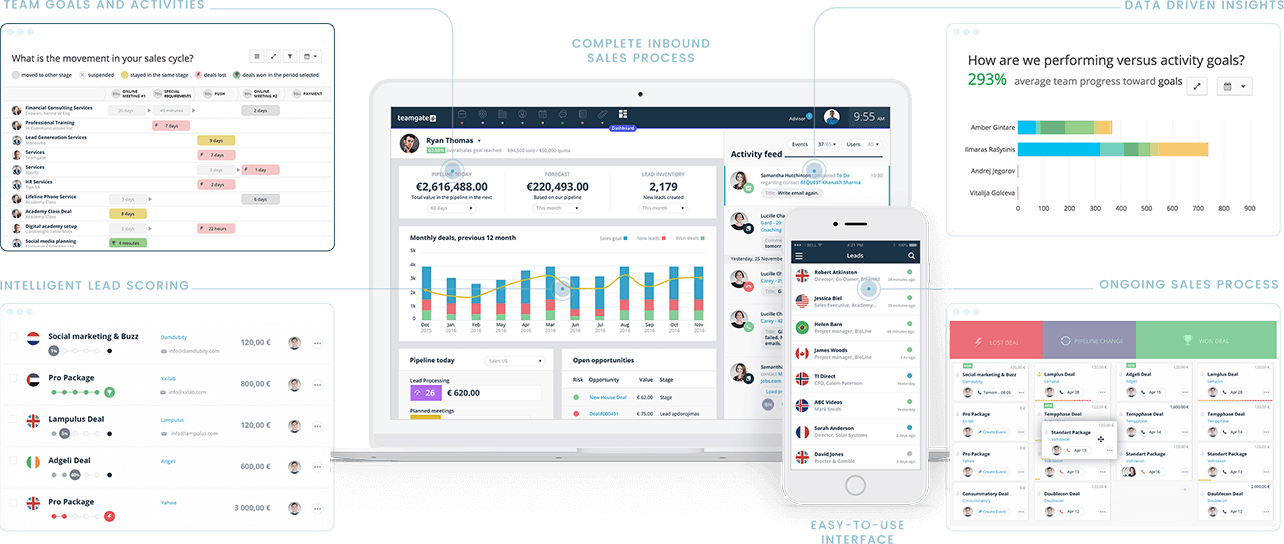
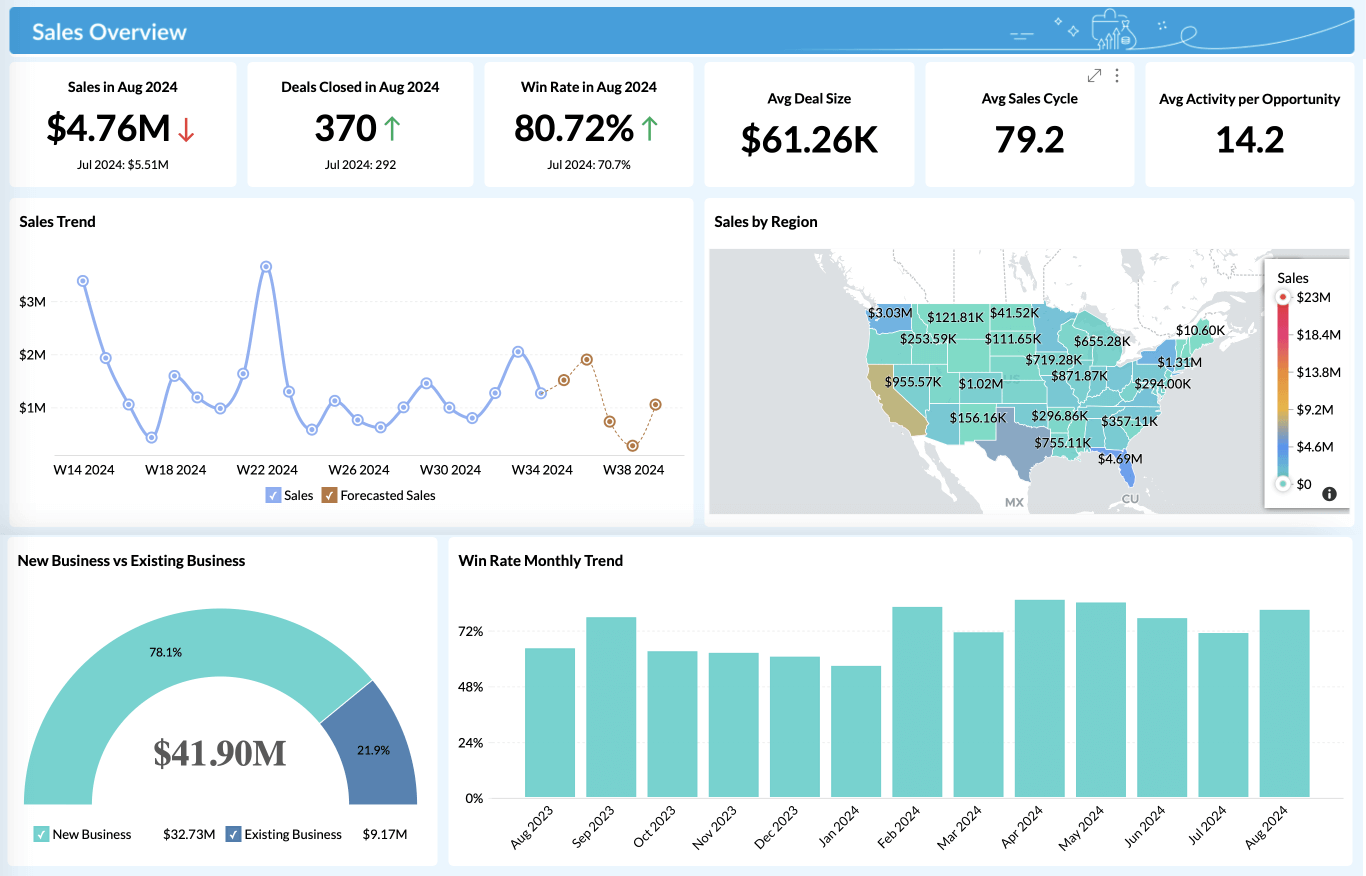
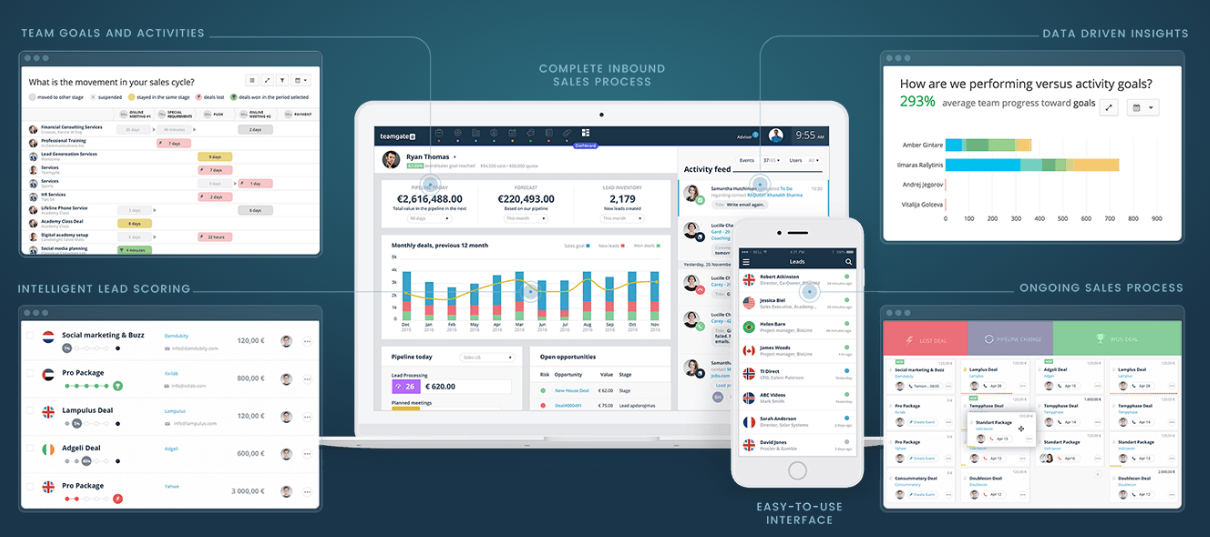
At Teamgate CRM, analytics is second nature. For this reason we offer the most powerful, out-of-the-box sales analytics and insights on the market. With zero setup required, your business could be well on the way to becoming data-drvien. Reach out to our team today for your free trial.

FAQs

  1. What is CRM analytics and why is it important?
    CRM analytics is the analysis of customer data to improve customer relationships and business decision-making.
  2. What are the key components of CRM analytics?
    The key components are contact analytics, customer analytics, sales analytics, marketing analytics, and service analytics.
  3. What are the benefits of CRM analytics?
    CRM analytics enhances customer service, streamlines marketing efforts, boosts sales performance, and improves business strategies.
  4. How does CRM analytics work?
    It involves data collection, data integration, data analysis, data interpretation, and deriving actionable insights.
  5. How can I implement CRM analytics in my business?
    Implement CRM analytics by preparing your team, choosing the right tool, setting up the system, training your team, and continually monitoring and improving.
  6. What are some best practices for CRM analytics?
    Best practices include ensuring data quality, integrating data sources, leveraging real-time analytics, and prioritizing security.
  7. Are there any success stories of businesses using CRM analytics?
    Companies like Amazon, Starbucks, and American Express have successfully used CRM analytics.
  8. What is the future of CRM analytics?
    The future lies in the integration of AI and machine learning for more accurate predictive analytics.
  9. How does AI and Machine Learning impact CRM analytics?
    AI and Machine Learning enhance CRM analytics by enabling predictive analytics and providing more accurate insights.

In this article, we delve into the vital role of Customer Relationship Management (CRM) software in the construction industry. We’ll look at how an efficient CRM can revolutionize operations, improve efficiency, and reduce costs for construction companies. From exploring the benefits and key features to consider when selecting a CRM, we further provide an overview of the top CRM platforms that are especially beneficial for businesses in the construction industry.

Key Takeaways:

  • CRM in construction offers numerous benefits, including improved project management, enhanced communication, increased efficiency, better data analysis, and enhanced customer relations.
  • Crucial features to look for in a construction CRM include user-friendliness, robust project management capabilities, collaboration and communication tools, customization options, powerful reporting and analytics, and integration with other tools.
  • Five of the most popular CRM platforms for construction companies include Teamgate, MarketSharp, Insightly, Hubspot, and Agile CRM. Each has unique capabilities, features, and pricing to suit different business needs.
  • The integration of CRM with other construction software can streamline workflows and enhance project management, ultimately leading to increased productivity and profitability.
  • CRM technology can enhance accountability within construction firms, aiding in compliance with industry regulations and standards. It also can improve job site safety by identifying potential issues in advance.

A CRM is a software system that helps businesses manage and track customer interactions and provide insights into customer behavior.

In the construction industry, a CRM can track sales opportunities, foster better communication between staff, manage customer invoices, and generate detailed reports.  An effective CRM can help construction companies streamline operations, increase efficiency, and reduce costs.

In this article, we’ll provide an overview of the most popular CRMs for construction companies, outlining their capabilities, features, and pricing. Let’s get started!

Benefits of using CRM in construction

By leveraging powerful CRM tools, construction companies can gain a competitive edge and improve their customer service. This section will explore the benefits of using CRM in construction, including improved customer relations, increased efficiency, and cost savings.

Improved project management

Improved project management is a crucial benefit of using CRM in the construction industry. By using CRM, construction companies can have real-time visibility into the project timeline, allowing them to plan and optimize resources more efficiently.

Critical tasks can be tracked and monitored to ensure deadlines are met, and project managers can quickly identify which tasks need to be completed and when. With this data, teams can better plan ahead, reducing the risk of costly delays or mistakes.

Enhanced communication

Communication is paramount among all stakeholders within a construction company. A CRM enables real-time communication, streamlining processes and minimizing delays. Additionally, CRM provides a centralized online platform where everyone can access project documents and data, ensuring everyone is working from the same up-to-date information.

As a result, businesses can reduce the risk of miscommunication and ensure that all stakeholders are informed and updated with all changes.

Increased efficiency

A CRM system facilitates a collaborative environment amongst all stakeholders involved in a project. From architects and engineers to subcontractors and vendors, everyone can easily access current data related to their respective projects, allowing them to make well-informed decisions quickly and efficiently. This, in turn, enables the project to move forward faster.

Better data analysis

CRM systems provide companies with the critical data they need to understand their customers and projects better. This data can be used to help companies gain a better understanding of their customer base, identify customer needs, and develop effective marketing strategies.

Besides, this data can be used to analyze customer behavior, identify trends, and develop more efficient processes. Better data analysis can help construction companies make better decisions, increase profitability, and improve customer satisfaction.

Enhanced customer relations

CRM technology enables construction companies to track, manage, prioritize, and analyze customer interactions, allowing them to maximize customer satisfaction and loyalty. By providing a 360-degree view of customer interactions, construction companies can gain insight into customer preferences and needs.

This information can be used to tailor services and products to meet customer needs better and provide timely, personalized customer service.

Better risk management

CRMs can provide better risk management by allowing construction companies to keep track of their projects and customers in one place. Companies can use the data in their CRM to analyze patterns, trends, and forecasts to better anticipate and manage risks, such as estimating project delays or the likelihood of customers churning.

CRM systems can also provide construction companies with automated processes and tools to better monitor and track risks, allowing them to respond quickly to and mitigate any issues that may arise.

Improved job site safety

A CRM gives construction companies access to real-time data and analytics that can be used to identify potential safety issues before they become serious problems. This can help prevent accidents and injuries on the job site.

Companies can quickly create and distribute work instructions, which can help ensure that employees are aware of the safety protocols and procedures that must be followed at all times.

Since most CRM systems are cloud-based, data can be accessed from anywhere, allowing managers to monitor job safety from a remote location easily.

Greater accountability

CRMs are centralized platforms where all documents, communications, and customer information are stored. This allows construction companies to track customer interactions and ensure that customer expectations are met. It also enables managers to monitor employee performance and identify any areas of improvement.

Construction companies can store customer feedback and analyze trends over time, leading to a better customer experience and higher customer satisfaction.

With greater accountability, construction companies can ensure that their processes comply with industry regulations and standards.

Key features to look for in a CRM for construction

In this section, we will discuss the key features to look for in a CRM for construction that increase productivity and efficiency and reduce costs.

User-friendliness

Regardless of their level of technical expertise, all team members in a construction company should access and use a CRM effortlessly. A user-friendly CRM makes it easier for employees to update information promptly and search for important data when needed.

This can help streamline operations and maximize team productivity. In addition, a user-friendly CRM can reduce the time and resources needed to train new employees on how to use the software.

Project management

Project management is a key feature to look for in a CRM for construction companies because it helps you manage your resources more efficiently. It allows you to track the progress of projects, assign tasks, monitor budgets, and ensure deadlines are met. It also provides insights into the team’s performance, helping to identify areas of improvement and ensure that projects are completed on time and on budget.

Collaboration and communication

Communication and collaboration tools help to improve customer service, as they allow for a quick exchange of information between all stakeholders. A CRM system can streamline communication between all parties involved in a project by providing the ability to track conversations, tasks, and projects.

This makes it easier to keep everyone informed of their roles and responsibilities and quickly resolve any problems that may arise.

Customization options

Customization is essential in the construction industry, where the complexities of projects, customer requirements, and regulations vary greatly. Customization options allow construction companies to create a CRM system that fits their specific needs and allows them to keep track of customer information and manage projects.

Reporting and analytics

A good construction CRM should provide reports on key metrics such as sales pipeline, pipeline velocity, and more so you can easily measure performance against goals set by management or other stakeholders.

This feature can help construction companies gain insight into the current status of their projects and make data-driven decisions that can maximize productivity and profitability.

Integration with other tools

Integrations enable construction companies to access data from other systems, such as accounting, scheduling, and project management, in one central location. This allows construction companies to access the data they need to make informed decisions and ensure their projects run smoothly. It also ensures that all relevant data is up-to-date and accurate, eliminating manual data entry and thus saving time and effort.

Top 5 CRM for Construction

To help you find the right CRM for your construction business, we have compiled a list of the top 5 CRM for construction. This list has something for every business, from comprehensive project management software to cloud-based solutions. Read on to find out which CRM is the best fit for you.

Teamgate

Teamgate is a customer relationship management (CRM) software designed to help businesses streamline their sales and marketing processes. It is a highly customizable and user-friendly platform that can be tailored to meet the specific needs of each company. It also provides an array of features to help businesses better manage their customer relationships, including but not limited to lead management, analytics, and automated marketing campaigns.

Here is what sets Teamgate apart from other CRMs for construction companies:

  • Automation – Teamgate offers construction companies automated workflows that help streamline and simplify the entire sales process, from lead generation to customer onboarding;
  • Customizable CRM – Teamgate features a customizable CRM that allows construction companies to tailor the platform to their specific needs;
  • Automated reports – The automated reports provide valuable insights into sales performance, customer behavior, and more;
  • Available on mobile – Teamgate’s mobile app allows construction companies to manage their sales process on the go;
  • Integrations: Teamgate integrates with popular construction apps and software, making it easier to manage sales and customer data in one platform.

Teamgate pricing is tailored to each customer’s needs and can range from €9 to €65 per user per month, billed annually.

MarketSharp

MarketSharp is a cloud-based customer relationship management software designed specifically for contractors.

It helps construction companies manage customer relationships, track sales and projects, and generate leads. It also provides features such as:

  • Contact management;
  • Project management;
  • Scheduling;
  • Invoicing;
  • Reporting.

These help companies keep track of their activities, ensure the accuracy of their data, and provide better customer service. MarketSharp also allows construction companies to improve their marketing efforts by segmenting customers according to their preferences, interests, and location.

The cost of MarketSharp depends on the size of your business and the features you need. The basic package price starts at $199 per month and can go up to $399 per month for the full suite of services.

Insightly

Insightly is a CRM platform that helps businesses of all sizes manage their customer relationships.

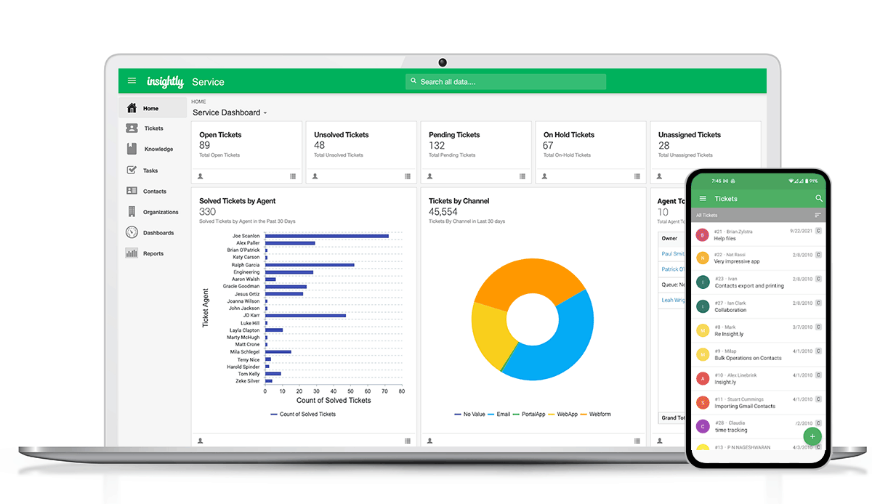
For construction companies, Insightly can help manage customer relationships and sales processes, track customer activity, and create reports and dashboards to monitor progress. It can also help with project management, tracking tasks, and team collaboration.

Additionally, Insightly integrates with over 2000 software platforms, such as G Suite, Calendly, Slack, and DocuSign, which can help streamline workflow and increase efficiency.

Insighly’s pricing starts at $29 per month and goes up to $99 for more advanced features.

HubSpot

HubSpot offers a variety of tools to help construction companies manage their sales pipeline, organize their team’s projects, and track customer activity in one place.

It provides a platform to organize customer data, create personalized customer experiences, and optimize customer engagement.

The free version is perfect for small teams and businesses just starting out. For more advanced features, the Premium plan starts at €1,474.31 per month, billed yearly.

Zoho CRM

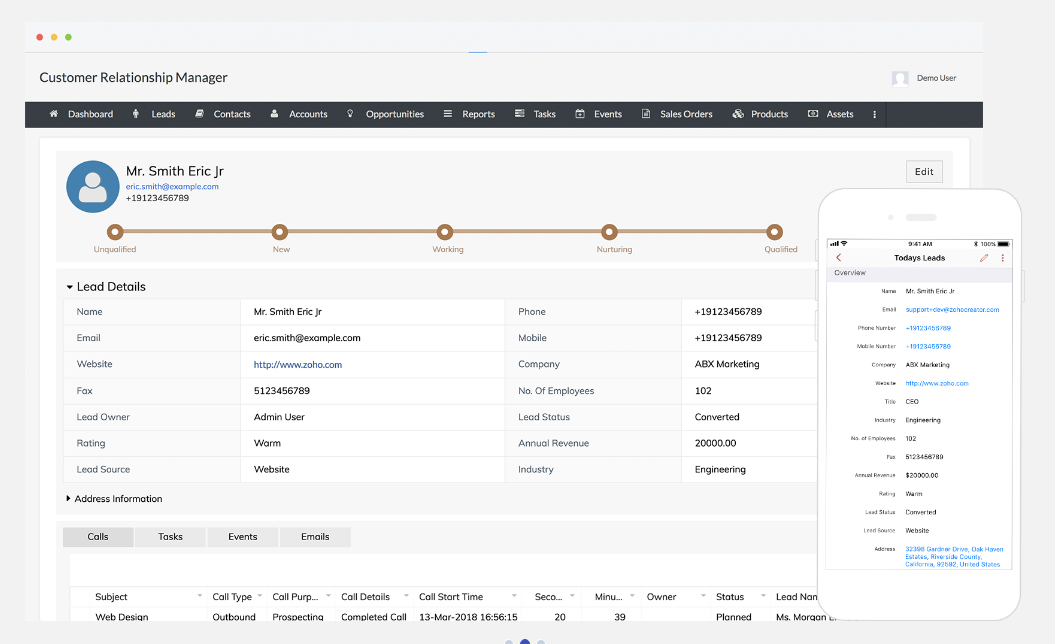
Zoho CRM provides a centralized, cloud-based customer data and communications platform, allowing companies to capture customer information and track customer interactions.

One of the key features of Zoho CRM is its customizable user interface, which allows construction companies to tailor the CRM to best meet their needs and preferences. Zoho CRM also offers a suite of customer engagement tools to help construction companies build better customer relationships. The platform has features that allow users to send automated emails and SMS messages, track customer interactions, and integrate with other popular customer engagement platforms.

Their pricing starts at €14 and can go up to €52 per month.

Ready To Choose A CRM for your Construction Business?

When looking for a CRM solution for construction companies, businesses should prioritize features such as automation, time management, analytics, customization options, and sales forecasting. These features are essential for construction companies to help them reach their sales goals, streamline their sales process, and increase customer satisfaction.

Teamgate is an intuitive and powerful platform that helps companies manage customer relationships more effectively. Teamgate helps construction companies organize their customer data, track customer interactions, and access important insights about customer behavior. Additionally, Teamgate integrates with other popular construction software to streamline its operations and boost efficiency.

Take advantage of Teamgate’s 14-day free trial today to experience its full potential for your construction company.

FAQs: CRM for Construction Companies

Q: How does CRM aid the construction industry?
A: CRM in construction helps manage customer interactions, track sales, improve communication, manage invoices, and generate detailed reports. It enhances operations, efficiency, and reduces costs.

Q: What advantages does a CRM offer in construction?
A: A CRM improves project management, enhances communication, increases efficiency, enables better data analysis, enriches customer relations, aids risk management, boosts job site safety, and promotes greater accountability.

Q: What should I look for in a construction CRM?
A: Key CRM features for construction should include user-friendliness, project management, communication tools, customization, reporting and analytics, and integration capabilities.

Q: Can you suggest some CRMs for construction companies?
A: Recommended CRMs for construction companies include Teamgate, MarketSharp, Insightly, HubSpot, and Zoho CRM. Each offers unique features and pricing options.

Q: How does CRM enhance job site safety?
A: CRM provides real-time data to identify potential safety issues, allows for the distribution of safety instructions, and enables remote monitoring of job safety.

In this comprehensive article, you’ll discover how integrating Mailchimp, a widely-used email marketing platform, with various CRM (Customer Relationship Management) systems can streamline your marketing efforts and enhance your decision-making process. You will learn how this integration can help with segmenting potential customers, personalizing email messages, analyzing marketing data, managing subscribers, and generating custom reports, all to increase your marketing success.

Key Takeaways:

  • CRM integration with Mailchimp enables targeted email marketing strategies by segmenting potential and existing customers in your CRM.
  • CRM data can be used to personalize email messages, enhancing the overall customer experience.
  • Analytical tools provided by CRM integrations offer valuable insights into patterns and trends in email data, aiding in more informed marketing decisions.
  • Integrating CRMs with Mailchimp makes managing subscribers and unsubscribers more manageable and efficient.
  • CRM systems like Teamgate, Pipedrive, and SugarCRM offer different levels of integration with Mailchimp, with each offering unique features and pricing options.

Read more: 8 of the Best Sales CRM Software Programs

The Benefits of CRM Integrations for Mailchimp

Mailchimp is a service that specializes in marketing automation and email marketing. This comprehensive platform lets you communicate with prospects, leads, and existing customers to promote products and services via email. 

Mailchimp says on its website:

“Our approach to marketing focuses on healthy contact management practices, beautifully designed campaigns, and powerful data analysis. We’re here to help you become an expert marketer. Ready to get started?”

Many marketers think Mailchimp is merely a web-based application that works in internet browsers. However, you can now integrate this platform with various CRMs, including Teamgate. That lets you centralize your customer relationship management and email marketing practices. 

There are various things you can do when using Mailchimp CRM integrations:

  • Segment potential and existing customers in your CRM and send them targeted email marketing messages. 
  • Use the information in your CRM to personalize email messages to customers. 
  • Design, send, and save email templates based on CRM information.
  • Use analytical tools in your CRM to identify patterns and trends in email data and use these insights for better marketing decision-making. 
  • Use Mailchimp’s analytical tools to view open, click-through, conversations, and success rates for email campaigns.
  • CRM integration with Mailchimp also lets you manage subscribers and unsubscribers.
  • Generate custom reports based on CRM and Mailchimp information and become more successful at email marketing.

Integrating your CRM with Mailchimp Integrations can be a long, laborious process that involves complex code and data engineering—skills your business might lack. The best CRM for Mailchimp will have out-of-the-box no-code/low-code connectors and a simple drag-and-drop, point-and-click interface that makes integration easy. You won’t need to build data pipelines or enlist the services of a data engineer, saving you time and money. 

Note: To confuse things, Mailchimp now contains some CRM functionality of its own. (It has evolved from a simple email marketing tool to all-encompassing marketing automation and email marketing service platform.) However, in Teamgate’s opinion, no successful business in the SaaS industry should rely on Mailchimp for customer relationship management as there are far better tools that achieve this goal. At the most, Mailchimp aggregates and organizes customer information like phone numbers, physical addresses, and email addresses. A growing enterprise couldn’t count on Mailchimp for identifying and nurturing leads from customer account information in a busy call center, for example. You could use Mailchimp as a CRM if you have a very, very small business with a couple of hundred customers, but that’s about it. CRM integration with Mailchimp is better suited to an actual CRM system!

Learn more about the best CRM for Mailchimp below:

1. Best CRM for Mailchimp: Teamgate

Teamgate is, hands down, the best CRM for Mailchimp overall. It lets you send personalized, targeted email marketing messages to prospective and existing customers in the Teamgate CRM system with a few clicks of a mouse. That streamlines workflows and boosts productivity. For Teamgate-Mailchimp integration to happen:

  1. Export contact information from Teamgate lists.
  2. Define your segmentation criteria.
  3. Click on the Mailchimp icon at the top of lists.
  4. Export the contacts into Mailchimp.

This simple four-step process lets you use customer contact information for more effective email marketing outcomes. 

Another use case for Teamgate-Mailchimp integration is the ability to merge custom fields in Teamgate with fields in Mailchimp. You can do this by clicking “Create a new field” under “Mailchimp” fields on the Mailchimp integration page on Teamgate. This process lets you quickly merge Teamgate and Mailchimp custom fields for current and future email marketing campaigns. 

Sometimes a CRM makes it difficult to transfer records between that CRM and Mailchimp. Pipedrive, for example—the next entry on this Best CRM for Mailchimp list—requires a lengthy sync process that many small businesses in the SaaS sector might not understand. Teamgate is different. It simplifies record transfers and even sends you an email confirmation every time you move records between its CRM and Mailchimp. There’s no guesswork.

Also, Teamgate assigns all exported contacts a tag, allowing you to filter those contacts when required. If there’s a problem with transferring records, any error information will show up on the Export History page in Teamgate (in the Data Migration sections in Settings). Teamgate will also assign a tag to these failed-to-transfer contacts, making it easier to find this information. Merging a CRM with Mailchimp has never been this easy! 

Learn more information about Teamgate and Mailchimp CRM integrations here.

Teamgate CRM Integration With Mailchimp Key Features

  • Segment and filter customers by Mailchimp campaign.
  • View the read, clicked, and unsubscribed status of each lead/customer from within the Teamgate lead/customer contact page.
  • See which Mailchimp campaigns have been sent to which leads and customers within Teamgate through automatically applied, custom tags – removing workflow complexities.
  • Automatically dial potential and existing customers.
  • It’s not just Mailchimp. Teamgate integrates with numerous digital tools for better marketing results in your enterprise. You can select which integrations display in your Teamgate workspace and access information from multiple platforms on one monitor.
  • Support email marketing with in-depth lead conversion insights about prospects with Teamgate’s suite of sales intelligence tools. These tools personalize your marketing objectives and help you qualify leads against your ideal customer profile (ICP). 
  • Manage leads for Mailchimp campaigns with specialized sales and performance tools that monitor organizational performance. You can quickly discover which email marketing methods work (and which don’t) via a simple drag-and-drop, point-and-click user interface. That empowers sales teams to prioritize marketing efforts. 
  • Teamgate’s in-depth insights, sales dashboards, and analytical tools supplement Mailchimp marketing campaigns. Track and obtain real-time data about departmental performance. Also, use key metrics to increase sales pipelines and growth, streamline lead management, and improve overall account management in your growing organization.
  • You don’t need to integrate Teamgate with Mailchimp for improved email marketing. This CRM has its own in-built email marketing features that work with various email service providers, helping you connect with potential and existing customers. 

Teamgate Pricing for Mailchimp CRM Integrations

Teamgate pricing plans start from just $9 per month per user (billed annually), making this platform an affordable choice for your organization. The Professional plan, which costs $26 per user per month, includes one integration (in this case, presumably Mailchimp.) You can also use the Mailchimp CRM integration (and other unlimited integrations) in Teamgate’s Enterprise plan, which only costs $65 per user per month.

All these reasons and more make Teamgate the best CRM for Mailchimp! 

Learn More About Teamgate

2. Pipedrive

Pipedrive is arguably more well-known than Teamgate as a CRM. However, that doesn’t mean it’s a better fit for companies wanting to combine customer relationship management with email marketing. That’s because CRM integration with Mailchimp isn’t as extensive as on Teamgate. You won’t receive emails after encountering Mailchimp transfer errors, for example. Plus, setting up the transfer process is far more complicated than on Teamgate, making the latter a better fit for smaller SaaS businesses with limited resources. 

That’s not to say Pipedrive is useless for CRM integration with Mailchimp. Far from it. This CRM has an easy-to-use interface that almost anyone can understand quickly, and the integration process is pretty simple. 

Pipeline says on its website about its Mailchimp CRM integrations:

“Nearly half of our customers liked our simple yet powerful approach so much, they switched from an existing CRM tool. The other half? Well, they didn’t even know they needed Pipedrive until they tried it.”

Pipedrive CRM Integration With Mailchimp Key Features

  • Handle basic customer relationship management and Mailchimp email marketing tasks from a single platform. 
  • Like Teamgate, Pipedrive lets you filter and segment Mailchimp campaigns based on customer data. That helps you create more segmented campaigns that target specific customers based on location, shared characteristics, purchasing habits, and other factors. While Teamgate remains the best CRM for Mailchimp, Pipedrive can still achieve some successful marketing outcomes in your organization. 
  • Send personalized emails to customers based on information in Pipedrive. Deliver emails with customers’ names and locations, for example. 
  • As previously mentioned, Pipedrive-Mailchimp integration is pretty easy. Just click on the Mailchimp button within Pipedrive to export contacts. Pipedrive has a video on its website that explains the integration process really well, making this task simple for SaaS businesses of all sizes. 

Pipedrive Pricing for Mailchimp CRM Integrations

Pipedrive’s cheapest plan costs $14.90 per user per month (billed annually), making it more expensive than Teamgate. However, it’s unclear whether this tier allows for CRM integration with Mailchimp or whether users will need to upgrade to one of the more expensive pricing models, ranging from $24.90-$99 per user per month (billed annually).

Read more: The 6 Biggest Benefits of CRMs

3. SugarCRM

SugarCRM is a beast of a CRM system, boasting features that benefit SaaS businesses of all sizes. It actually has its own marketing automation tool, which might make integrating the product with Mailchimp an unnecessary task. However, if you are already familiar with Mailchimp’s features and interface, you might want to give integration a shot. 

It’s important to note that SugarCRM itself doesn’t offer any Mailchimp CRM integrations, unlike Teamgate and Pipeline. However, many users achieve successful integration with Mailchimp’s connector or a third-party product. 

Mailchimp says about this integration:

“With powerhouse platforms like SugarCRM and MailChimp, businesses can produce timely, hyper-relevant campaigns to grow sales and drive more revenue.”

Note: Using a third-party tool for SugarCRM-MailChimp integration can open up a can of worms, especially if that tool is open source. That’s because developers might not update or secure their connectors, increasing the chances of a data breach. You might also fail to adhere to data governance frameworks such as GDPR when transferring data from Sugar to Mailchimp. Non-compliance with these frameworks might result in expensive government penalties your business can’t afford. 

SugarCRM: CRM Integration With Mailchimp Key Features

  • Remove data silos by integrating SugarCRM with Mailchimp. Connect customer relationship management and email marketing automation workflows and use customer information to drive email marketing results. 
  • Updating customer information in SugarCRM automatically updates that same information in Mailchimp. Updating campaign management information in Mailchimp automatically updates that same information in SugarCRM.
  • No need to manually export data from Sugar to Mailchimp. The latter’s connector (or a third-party tool) will do all the hard work for you.

SugarCRM: Pricing for Mailchimp CRM Integrations

To benefit from all of SugarCRM’s features, you’ll need to opt for the platform’s Marketing Mavericks tier, which costs $1,000 per month for 10,000 contracts. Whether this works out cheaper or more expensive than Teamgate or Pipeline depends on the scope of your business. SugarCRM doesn’t have a “per-user per-month” pricing model, making it difficult to compare to the other two products on this best CRM for Mailchimp list. 

Read more: The Ultimate Guide to Inbound vs Outbound Marketing

4. SuiteCRM

If you’re looking for an open-source (free!) CRM with Mailchimp CRM integrations, look no further than SuiteCRM. This popular system integrates with Mailchimp, allowing you to optimize email campaigns while aggregating data for customer relationship management. Like SugarCRM, there are no in-built CRM integrations for Mailchimp. Again, you’ll need to combine the two platforms through Mailchimp or via a third-party connector. The latter, of course, increases the risk of data breaches and data governance non-compliance. 

Mailchimp says about its SuiteCRM connector:

“See up-to-date campaign and subscriber information within CRM and segment in MC based on CRM data using the SuiteCRM and Mailchimp Integration.”

SuiteCRM: CRM Integration With Mailchimp Key Features

  • View email campaign activity such as open, click, and bounce rates directly in SuiteCRM. Now team members don’t need to waste time switching between a CRM and Mailchimp!
  • Schedule customer record transfers from SuiteCRM to Mailchimp at a frequency that suits your SaaS business needs and data infrastructure capabilities (or limitations!).
  • CRM integration with Mailchimp lets you add and remove Mailchimp lists and campaigns from SuiteCRM with a few clicks of a mouse. 

SuiteCRM: Pricing for Mailchimp CRM Integrations

You won’t need to review different pricing tiers and weigh up the costs of each on SuiteCRM, which remains 100 percent open source and completely free to use. Of course, you’ll still need a subscription to Mailchimp to combine the two platforms. Because it’s open source, don’t expect advanced CRM functionality on SuiteCRM like you would find on Teamgate, SugarCRM, or HubSpot—the next entry on this best CRM for Mailchimp list. In Teamgate’s opinion, an open-source CRM can never replace a paid-for one, especially for user support, documentation, customization, data privacy, data security, data governance, and service level agreements (SLAs).

5. HubSpot CRM

Still looking for the best CRM for Mailchimp? HubSpot is one of the most popular CRM systems in the world, used by many Fortune 500 companies. It offers an incredible range of features for customer relationship management, enabling its users to aggregate, organize, share, process, and analyze customer information for sales, marketing, customer service, and business growth. But how do HubSpot’s Mailchimp CRM integrations compare with those of other systems on this list? How does HubSpot CRM integration with Mailchimp benefit your business?

HubSpot CRM probably sits somewhere between Pipedrive—which offers the most basic capabilities for CRM integration with Mailchimp—and Teamgate, which offers the most extensive Mailchimp features. HubSpot also has a free pricing tier—something that Teamgate and Pipedrive lack. (However, you’ll need to upgrade to a paid plan to integrate HubSpot CRM with Mailchimp.)

Note: HubSpot has two Mailchimp CRM integrations, which can confuse its users. The first, Mailchimp HubSpot integration, syncs CRM contacts with Mailchimp and logs email campaign activity, such as open, send, click, and bounce rates. The second, Data Sync, doesn’t specifically cater to Mailchimp but enables users to sync customer lists on HubSpot CRM with the email marketing application. However, it doesn’t log email campaign activity.

HubSpot CRM Integration With Mailchimp Key Features

  • As previously mentioned, HubSpot Mailchimp integration (the first HubSpot CRM integration for Mailchimp) tracks email campaign activity, making it a worthwhile tool if your business wants to improve the effectiveness of its marketing messages. You can view this activity—clicks, for example—directly in HubSpot, which reduces screen-switching for team members. As a result, HubSpot CRM integration with Mailchimp lets teams focus on sales instead of navigating CRM and email marketing tools.
  • HubSpot CRM integration also monitors any sync errors when transferring data from HubSpot to Mailchimp. (Pipedrive doesn’t do this at all.) If customer records fail to transfer over to Mailchimp, you can take quick action and not jeopardize imminent email marketing campaigns. 
  • Both HubSpot CRM integration and Data Sync effortlessly sync CRM data with Mailchimp through pop-up forms. You can sync all kinds of data, including contacts and timelines (HubSpot) and list members, email sent dates, email opened dates, email clicked dates, and email bounce dates (Mailchimp). 

HubSpot CRM Pricing for Mailchimp CRM Integrations

There’s the aforementioned free tier on HubSpot, but that pricing model won’t let you integrate this CRM with Mailchimp. For that objective, talk to HubSpot to get a personalized quote about your CRM integration needs. (HubSpot has a complicated pricing system with several tiers/features.) It’s also important to note that HubSpot has a usage pricing model, meaning it works out more expensive for lots of contacts. Depending on your requirements, HubSpot could be one of the most expensive platforms on this best CRM for Mailchimp list. 

Read more: Sales Process: How to Build an Effective Sales Machine

Why Teamgate Is the Best CRM for Mailchimp!

While the other CRMs listed above integrate with Mailchimp, only Teamgate helps you fully realize your email marketing goals. Successfully combine your customer relationship management and email marketing goals in one system and make communicating with and sending highly-targeted email marketing messages to prospective and existing customers easier. With segmentation through custom tags and fields, you can easily export your CRM contacts. Automatically allocated tags for each Mailchimp export and campaign makes performance tracking and filtering a breeze. Additionally, filter down on the status of each campaign for specific individuals by viewing open rates, click rates, and unsubscribe statuses from within your Teamgate CRM contact area.

Other reasons why Teamgate is the best CRM for Mailchimp include its simple drag-and-drop, point-and-click interface, out-of-the-box no-code Mailchimp connector, and affordable per-user per-month pricing. You can benefit from Teamgate’s Mailchimp CRM integrations by signing up for a Professional or Enterprise plan. 

If you still want more information, why not contact Teamgate for a product demo

Teamgate currently offers a 14-day free trial, which includes full functionality and integrations. Claim your trial and learn why this platform is, hands down, the best CRM for Mailchimp! 


FAQs: CRMs that integrate with Mailchimp

Q: Which CRMs integrate with Mailchimp?

A: There are several CRMs that integrate with Mailchimp to enhance email marketing and customer relationship management. Some popular options include:

  • Teamgate
  • Pipedrive
  • SugarCRM
  • SuiteCRM
  • HubSpot CRM
  • And others

Q: How do CRMs integrate with Mailchimp?

A: CRMs integrate with Mailchimp through connectors, APIs, or built-in integration features. The integration allows for seamless data transfer, segmentation of customer lists, personalized email campaigns, and synchronization of campaign performance metrics. Each CRM may have its own integration process, but generally, you’ll need to authorize the connection between your CRM and Mailchimp, configure settings for data transfer, and map relevant fields between the two platforms.

Q: What are the benefits of integrating a CRM with Mailchimp?

A: Integrating a CRM with Mailchimp offers several benefits, including:

  • Streamlined workflows
  • Personalized marketing
  • Enhanced analytics
  • Efficient data management
  • Improved customer engagement

Q: Can I use Mailchimp as a standalone CRM?

A: While Mailchimp has expanded its services beyond email marketing, it is primarily designed as a marketing automation platform rather than a comprehensive CRM. While you can store customer information in Mailchimp, it may not provide the robust features and functionalities of dedicated CRMs. For more advanced customer relationship management capabilities, integrating Mailchimp with a CRM like Teamgate, Pipedrive, SugarCRM, SuiteCRM, or HubSpot CRM is recommended.

Q: How do I choose the best CRM for Mailchimp integration?

A: When selecting a CRM for Mailchimp integration, consider factors such as:

  • Integration capabilities
  • Features and functionalities
  • Ease of use
  • Pricing and scalability
  • Customer reviews and support


In the competitive business world, sales growth is an essential factor for any company’s success. However, achieving explosive sales growth requires a sound strategy and implementation plan. In this article, we will explore proven strategies for unlocking explosive sales growth and achieving success in the marketplace.

Key Takeaways:

  1. Understanding your customer and target market is essential for targeted marketing.
  2. A clear sales strategy can underpin your sales growth.
  3. Goal alignment and commonality is key to developing a high performing sales team.
  4. Measuring performance and metrics is crucial to identify areas for improvement.
  5. CRM technology can be leverage to supercharge your sales growth.

Contents:

  1. Introduction: Understanding the Importance of Sales Growth
  2. Identifying Your Target Market and Ideal Customer
  3. Developing a Sales Strategy that Works
  4. Building a High-Performing Sales Team
  5. Measuring and Analyzing Sales Performance
  6. Leveraging the power of CRM to boost your Sales Growth
  7. Conclusion: Taking Action to Unlock Explosive Sales Growth

Introduction: Understanding the Importance of Sales Growth

Sales growth is one of the most important metrics for any business. It not only indicates the health of the company but also plays a vital role in its long-term success. A company that experiences consistent sales growth is more likely to increase its revenue, expand its customer base, and improve its profitability.

However, achieving explosive sales growth is not an easy feat. It requires a significant amount of effort, planning, and innovation. Companies need to be adaptable to changing market conditions and always be on the lookout for new opportunities to grow their sales.

One of the key factors that contribute to explosive sales growth is having a deep understanding of the target market. Companies need to know their customers’ needs, preferences, and pain points to develop products and services that address those issues. By doing so, they can create a loyal customer base that will not only continue to purchase from them but also recommend their products to others.

Another important factor that contributes to explosive sales growth is having a strong sales team. A sales team that is well-trained, motivated, and equipped with the right tools can significantly increase a company’s revenue. They can identify new sales opportunities, build relationships with customers, and close deals more effectively.

Lastly, companies that want to achieve explosive sales growth need to be willing to take risks and invest in new ideas. This means being open to new technologies, marketing strategies, and business models. By doing so, they can stay ahead of the competition and continue to grow their sales.

Identifying Your Target Market and Ideal Customer

The first step towards unlocking explosive sales growth is to identify your target market and ideal customer. This involves researching and understanding your customers’ needs, preferences, and behavior patterns.

One effective way to identify your target market is to conduct market research. This can involve surveys, focus groups, or analyzing customer data. By gathering information about your customers, you can better understand their needs and preferences, and tailor your products and services to meet those needs. Take the cheese market, for example. Detailed research may uncover an untapped demand for vegan or lactose-free cheese varieties. By addressing this niche, a business can carve out a unique space for itself, attracting a specific segment of customers looking for these options, thereby increasing its market share and sales

Another important factor to consider when identifying your target market is their buying behavior. Are they price-sensitive? Do they prefer certain brands or types of products? Understanding your customers’ buying behavior can help you create marketing messages that resonate with them and encourage them to make a purchase.

Once you have identified your target market, you can create customer profiles that include demographic and psychographic information. Demographic information includes factors such as age, gender, income, and education level, while psychographic information includes interests, values, and personality traits. By creating detailed customer profiles, you can better understand your customers and create products and services that meet their specific needs.

It’s also important to keep in mind that your target market may change over time. As your business grows and evolves, you may need to adjust your target market to better align with your products and services.

By focusing on your ideal customer and addressing their specific needs, you can unlock explosive sales growth by creating products and services that resonate with your target market. Remember to regularly review and update your customer profiles to ensure that you are meeting the needs of your target market.

Developing a Sales Strategy that Works

A successful sales strategy requires a deep understanding of your target market, your competition, and your unique value proposition. Without a well-crafted sales strategy, your business may struggle to reach its full potential and may even fail to attract new customers.

One of the most important components of a successful sales strategy is a clear sales objective. This objective should be specific, measurable, and achievable. It should also be aligned with your overall business goals and should be regularly reviewed and updated as needed.

In addition to a clear sales objective, a comprehensive sales strategy should also include a well-defined target market. This means understanding who your ideal customer is, what their needs and pain points are, and how you can best serve them. By taking the time to truly understand your target market, you can tailor your sales approach to meet their unique needs and preferences.

Another key component of a successful sales strategy is a detailed sales process. This includes everything from lead generation and qualification to closing the sale and following up with customers after the sale. By having a clear and well-defined sales process in place, you can ensure that your sales team is working efficiently and effectively to drive revenue growth.

Of course, pricing strategy is also an important consideration when developing a sales strategy. This includes determining the right price point for your products or services, as well as any discounts or promotions you may offer. By carefully considering your pricing strategy, you can ensure that you are maximizing revenue while still providing value to your customers.

Finally, a successful sales strategy should also include a marketing plan. This plan should outline how you will promote your products or services to your target market, including which channels you will use and what messaging will resonate best with your audience. By developing a comprehensive marketing plan, you can ensure that your sales efforts are supported by effective and targeted marketing campaigns.

Building a High-Performing Sales Team

A high-performing sales team is not just a group of people who sell your products or services. It is a team of individuals who are dedicated to achieving common goals and objectives. A successful sales team is made up of individuals who are not only skilled at selling but are also motivated to succeed and are aligned with your business goals and sales strategies.

Building a high-performing sales team requires a structured recruiting process. You need to identify the key qualities and skills that you are looking for in a salesperson. This includes the ability to communicate effectively, a strong work ethic, and the ability to work well in a team. You should also look for individuals who are passionate about your industry and are excited about the products or services that you offer.

Once you have identified the right candidates, you need to provide them with robust training programs. This includes both initial training as well as ongoing training and development. Your sales team needs to be equipped with the latest sales techniques, product knowledge, and industry trends to be effective in their roles.

However, training alone is not enough to build a high-performing sales team. You also need to foster a supportive sales culture that encourages collaboration, innovation, and continuous improvement. This means creating an environment where your sales team feels comfortable sharing ideas and feedback, and where they are encouraged to take risks and try new approaches.

Investing in your sales team can unlock their full potential and drive explosive growth in your business. By providing them with the right training, support, and culture, you can create a team of salespeople who are not only effective at selling but are also passionate about your business and are committed to its success.

Measuring and Analyzing Sales Performance

Measuring and analyzing sales performance is a crucial aspect of any business. It helps businesses identify areas where they can improve, optimize their sales processes, and adapt to changing market conditions.

One of the key performance indicators (KPI) that businesses should track is sales revenue. Sales revenue is the total amount of money generated from sales during a specific period. It helps businesses understand how much they are selling and how much revenue they are generating from those sales.

Another important KPI is the sales conversion rate. This metric measures the percentage of leads that convert into paying customers. By tracking this metric, businesses can identify areas where they need to improve their sales processes and increase their conversion rates.

Customer lifetime value is another crucial metric that businesses should track. It measures the total amount of money a customer is expected to spend with a business over their lifetime. By understanding this metric, businesses can identify their most valuable customers and focus on retaining them.

Customer acquisition cost is also an important metric to track. It measures the cost of acquiring a new customer, including marketing and sales expenses. By understanding this metric, businesses can identify ways to reduce their customer acquisition costs and improve their overall profitability.

By analyzing these metrics and identifying trends, businesses can make data-driven decisions that drive explosive sales growth and lead to increased revenue and profitability. It’s important for businesses to regularly review their sales performance metrics and make adjustments as necessary to stay competitive in their market.

Leveraging the power of CRM to boost your Sales Growth

Harnessing the inherent power of a CRM system can revolutionize your sales trajectory. Delving into the intricacies of customer behavior becomes effortless, translating into an informed, targeted approach that catalyzes conversions.

Imagine having a conduit to your client’s preferences, their patterns of purchase, their likes and dislikes – a CRM system functions as just that. It systematically organizes customer data into a meaningful mosaic, painting a vivid portrait of your market. You’re not just shooting arrows in the dark; you’re strategically striking the bull’s eye of customer need and preference.

A CRM not only enhances customer engagement but also fortifies your sales team’s performance. With instantaneous access to customer data, your sales representatives can formulate tailored pitches, transforming cold leads into loyal clients. It’s a dynamic blend of efficiency and personalization.

Furthermore, an exceptional CRM system is the cornerstone of strategic forecasting. By analyzing historical data, you can identify trends and anticipate future sales patterns. It’s like having a crystal ball at your disposal.

Ultimately, leveraging the power of CRM systems is akin to unlocking a treasure trove of insights that can turbocharge your sales growth, morphing potential into palpable profit. It’s the indispensable tool in your arsenal, waiting to be unleashed.

Conclusion: Taking Action to Unlock Explosive Sales Growth

Unlocking explosive sales growth requires a strategic approach that aligns with your business goals, customer needs, and current market conditions. By implementing proven strategies such as identifying your target market, leveraging technology, building a high-performing sales team, and measuring and analyzing sales performance, you can unlock your business’s full potential and achieve success in the marketplace.

Teamgate CRM offers a comprehensive suite of sales tools, analytics and reporting features, mobile access, and seamless integration with other business tools. With its user-friendly interface and powerful capabilities, Teamgate CRM is an excellent choice for businesses looking to optimize their sales processes and drive growth. To leverage the power of Teamgate CRM to boost your sales growth, book a free system demo or get started with a 14 day free trial today!


Frequently Asked Questions

Q: Who can benefit from understanding how to unlock sales growth?

A: Business owners, sales managers, marketers, and anyone involved in business development or strategic planning can greatly benefit from understanding how to unlock sales growth.

Q: Are there specific industries where unlocking sales growth is more applicable?

A: The principles of unlocking sales growth are universal and can be applied across all industries. However, specific strategies might vary depending on the nature and dynamics of a particular industry.

Q: Can small businesses also unlock significant sales growth?

A: Absolutely. Small businesses often have significant potential for sales growth. Strategies might include targeting new markets, launching new products, or improving sales processes.

Q: Does unlocking sales growth only involve sales strategies?

A: No, unlocking sales growth is a comprehensive process involving multiple aspects of a business, such as marketing, product development, customer service, and operational efficiency.

Q: How can I measure sales growth?

A: Sales growth can be measured in a variety of ways, such as year-over-year sales increase, sales per representative, or growth in market share. The appropriate measure will depend on your specific business objectives.

Q: Is there a one-size-fits-all strategy for sales growth?

A: While there are common principles, the most effective sales growth strategies are often tailored to a company’s specific needs, goals, and market environment. It’s crucial to consider these unique factors when formulating a growth strategy.

In today’s competitive business world, having the right tools at your disposal can make all the difference. When managing customer relationships, sales pipelines, and team workflows, three of the most popular solutions are Teamgate, HubSpot, and Salesforce.

This article will dive deep into the differences between these three CRMs. We’ll look at their pros and cons, benefits, and pricing. As a business owner, this analysis will help you make an informed decision that caters to your unique requirements.

Key Takeaways

  1. Having the right CRM software can make a big difference in managing customer relationships, sales pipelines, and team workflows.
  2. Teamgate, HubSpot, and Salesforce are popular CRM solutions with different strengths and features catering to various business needs.
  3. Teamgate offers an easy-to-use interface, affordable pricing, and powerful sales pipeline management, making it a great option for small and medium-sized businesses.
  4. HubSpot offers a free plan, advanced reporting and analytics, and a vast ecosystem of integrations, which can enhance collaboration and streamline workflows.
  5. Salesforce is a robust CRM software that provides essential sales, marketing, and customer service tools, making it ideal for large businesses with many sales reps and complex sales processes.

Teamgate CRM

null

Are you tired of struggling through complex sales processes and failing to meet your targets? Look no further than Teamgate – the cloud-based, all-in-one sales CRM solution that’ll revolutionize how you interact with customers and streamline your sales processes.

With Teamgate, you’ll have access to a suite of advanced tools that’ll transform how you do business. From lead management to pipeline management and beyond, you’ll be able to optimize every aspect of your sales pipeline.

Additionally, you’ll effortlessly capture and manage leads with advanced marketing automation tools like email integration. With a user-friendly interface and real-time communication tools, you can collaborate more efficiently and make informed decisions based on comprehensive sales analytics.

HubSpot

null

HubSpot is a user-friendly software with a centralized hub to manage all your contacts, leads, deals, and tasks. With HubSpot, you can create personalized interactions, delegate tasks, and fine-tune your sales operations.

Thanks to its sales pipeline dashboard, you’ll never have to manually update reports or wonder how your team tracks toward quotas. Gain complete visibility into sales activities, track and analyze sales activity in real-time, and access detailed reports.

And for sales reps, HubSpot offers time-saving tools to take your selling game to the next level. Close more deals with less work by leveraging tools that notify you when a prospect opens an email or visits your website. Use that information to follow up at the right time via live chat, email, or call.

Salesforce

Salesforce Essentials 2020 Dashboard


The world we live in demands more from businesses than ever before. Customers expect a personalized and seamless experience with every touchpoint. Salesforce can help you address these challenges head-on. With Salesforce Customer 360, you can access your customer data anywhere, anytime, and through any device.

The is built for today’s world, and Salesforce ensures that your teams are united around your customers, get actionable insights from data, attract prospects, and retain loyal customers. The platform is powered by an ecosystem of over 8,700+ partner apps and services, making it easier for you to tackle the needs of your business.

Salesforce’s AI-powered automation engine, Einstein, helps automate most repeatable business tasks. Teams have easy access to complete customer data, driving productivity, adoption, and value across your organization.

Furthermore, the Salesforce-certified experts provide on-demand training and expert services to help customers achieve and exceed their goals.

Benefits & Features – Teamgate vs HubSpot vs Salesforce

If you’re having a tough time choosing between Teamgate, HubSpot, and Salesforce for your CRM software, continue reading to learn about the advantages of each platform and make a smart decision for your company.

Best For Free Plan / Trial Open Source Devices Deployment Customization
Teamgate SaaS and sales teams of all sizes 14 days No Desktop and mobile Cloud-based Yes
HubSpot Marketing, sales, and customer service teams 14 days No Desktop and mobile Cloud-based Yes
Salesforce Large-scale companies 30 days No Desktop and mobile Cloud-based Yes

Teamgate Benefits

Teamgate is an innovative CRM software that brings a new level of productivity to small and medium-sized businesses.

  • Track your sales team’s progress in real-time: This feature provides valuable insights into your sales campaigns’ effectiveness, enhancing your ability to make informed decisions.
  • Excellent customer service: This is particularly important for small businesses as they often don’t have the resources to hire dedicated tech support staff. Using Teamgate, you will enjoy frequent software updates, which keep the software secure and continually evolving to better suit your growing business needs.
  • Easy to use:  the software only takes around a week, saving you time and resources. This means you can start using the CRM and reap its benefits quickly.
  • Affordable pricing plans: These cater to different customer needs, ensuring you get the best value for your money.

HubSpot Benefits

HubSpot provides various benefits that can help enhance your business operations and drive growth.

  • Vast ecosystem of integrations: Users can easily connect with their favorite tools and apps. This means they can keep all their data in one place, improve collaboration, and streamline workflows.
  • Advanced reporting and analytics: HubSpot provides insights to help you make better decisions, identify areas for improvement, and measure your success in real time.
  • Automate manual tasks: With workflows, users can create custom processes that trigger actions based on specific criteria. For instance, businesses can automate lead scoring, nurture leads with triggered emails, create custom reminders, and more.

Salesforce Benefits

Salesforce can be a game-changer for small and medium-sized businesses.

  • Robust: The software is robust and can be built out to match most business use-cases, for a price.
  • All-in-one tool: Use it for everything from sales and marketing to customer service and analytics.
  • Highly customizable: Tailor it to your specific needs rather than trying to fit your business into a predetermined system. Customization also means that Salesforce can grow and adapt with your business as your needs change.

Support & Training – Teamgate vs HubSpot vs Salesforce

Support and training are essential elements that businesses need to consider while picking a CRM platform. Let’s see a comparison of each of the three platforms.

Teamgate HubSpot Salesforce
Support channels Phone, email, live chat Phone, form, chat bot Phone, call request, live chat
Live chat Yes No Yes
Training materials Help center, documentation, developer API examples HubSpot Academy, courses, certifications, help center Access to community and resources

Teamgate Support & Training

Teamgate offers comprehensive support and training options to its users, including phone, email, and live chat assistance. In addition, the platform provides access to a help center, documentation, and a range of developer API examples and resources for users to easily navigate and optimize their use of the software.

HubSpot Support & Training

HubSpot provides support and training through multiple channels such as phone, email, and chatbot. Additionally, HubSpot Academy offers a wide range of online courses, certifications, and a help center to ensure continuous learning for its users. With these resources, HubSpot users can become experts in inbound marketing, sales, and customer service.

Salesforce Support & Training

The platform provides users with phone support, the ability to request a call, and live chat assistance for any issues or queries they may face. Furthermore, users also get access to a thriving community of fellow Salesforce users and a plethora of resources such as technical documentation, webinars, and help articles.

Pricing – Teamgate vs HubSpot vs Salesforce

Teamgate HubSpot Salesforce
Free Trial Yes 14 days 30 days
Free / Freemium No Freemium No
Premium Solution From $9/month/seat Starting at $30/mo for individuals.

Starting at $1,600/mo for enterprise.

Starting at $25/user/month

Teamgate Pricing

Teamgate offers three plans with varying features ranging from $9 to $65 per user per month. The pricing depends on your chosen plan and the CRM features you need. Users can either pay monthly or yearly, depending on their preference.

HubSpot Pricing

HubSpot offers pricing plans for both small teams and enterprise-level businesses. In addition to their free tools, their individual and small team plans start at $20 per month, making it an affordable option for businesses of any size.

For enterprise-level companies, HubSpot’s plans begin at $1200 per month, providing advanced features and customizations to meet the needs of larger organizations.

Salesforce Pricing

Salesforce offers four different pricing plans to cater to businesses of all sizes: Starter, Professional, Enterprise, and Unlimited. The Starter plan is the most basic, starting at $25 per user per month, billed annually. This plan includes basic CRM features and is ideal for small businesses.

The Professional plan starts at $75 and includes enhanced features such as marketing automation and custom dashboards. The Enterprise plan starts at $150, while the Unlimited plan is the most comprehensive, starting at $300, and includes unlimited access to all features.

Teamgate vs HubSpot vs Salesforce: Comparison

Teamgate, HubSpot, and Salesforce are popular CRM software with various features suited to different business needs. The lowest pricing plans for each software are as follows:

  • Teamgate – $9 per user per month;
  • HubSpot – free, with paid plans starting from $20 per month for individuals and small teams;
  • Salesforce – $25 per user per month.

Teamgate is an all-in-one CRM software with everything you need to manage customer relationships. With pipeline stages, lead tracking, reporting tools, contact management, email integration, and more, you can easily handle all your sales tasks in one convenient place. Teamgate’s sales automation tool also helps streamline your sales funnel and automate repetitive tasks, making your life much easier.

On the other hand, HubSpot is an inbound marketing platform with many CRM tools that help you manage your leads and customers. Its features include marketing automation, email marketing, and even social media management. HubSpot is perfect if you’re looking for a one-stop shop for your marketing and sales needs.

Last but not least, Salesforce is a primary CRM software that provides businesses with essential sales, marketing, and customer service tools. With contact and opportunity management, sales automation, advanced analytics, and integrations with various software platforms, Salesforce is the ideal option for large businesses with many sales reps and complex sales processes.

Which software is the best fit for small and medium-sized businesses?

Teamgate is a perfect choice for small and medium-sized businesses. Its customizable interface and affordable pricing make it an excellent option for companies looking for easy-to-use CRM software tailored to their needs. Besides, Teamgate’s pipeline stages, lead tracking, reporting, and sales automation tools ensure businesses can quickly grow their sales and customer base.

HubSpot is also an ideal choice for small businesses as it has a free plan that caters to specific business needs at no cost. The free plan includes various features to manage leads, contacts, and company insights at limited functionality. The paid plans offer more robust features such as marketing automation, social media management, and landing pages. However, HubSpot’s cost may be prohibitive for some small businesses.

Which software is the best fit for enterprise-level businesses?

Salesforce is the most suitable choice for enterprise-level businesses. It’s a robust CRM software that caters to the needs of companies with many sales reps and sophisticated sales processes. It is scalable and fully customizable, and its advanced analytics and integrations with a range of software platforms make it a reliable platform for large businesses.

Which software offers the best value for money?

When it comes to value for money, Teamgate is the clear winner. It provides affordable and scalable CRM software, accounting for its cost-effectiveness. The customizable interface, in-depth customer support, and reporting features make it a powerful platform for small and medium-sized businesses, and prices start at just $9 per user per month.

Conclusion

In conclusion, when it comes to CRM software, Teamgate, HubSpot, and Salesforce are all great options with unique features and benefits. Each has strengths and weaknesses, and the right choice depends on your needs.

Teamgate stands out from the crowd with its user-friendly interface, powerful sales pipeline management, and affordable pricing. Don’t miss out, and give Teamgate a try by signing up for a free trial today.

In this comprehensive guide, we delve into the heart of sales performance metrics, exploring the immense value and functionality of Sales KPI Dashboards. We examine their role, essential elements, creation process, and the best practices for maximum impact.

Key Takeaways:

  1. Sales KPI Dashboards are indispensable tools for tracking and analyzing sales performance, fostering informed decision-making and strategic alignment.
  2. Crucial elements of an effective dashboard include appropriate KPI selection, user-friendly data visualization, data accuracy, and ease of accessibility.
  3. Creating a useful dashboard involves defining sales objectives, identifying relevant KPIs, selecting the right visualization, proper implementation, and regular updates.
  4. To optimize dashboard effectiveness, keep it simple, actionable, up-to-date, and aligned with your sales strategy.
  5. The Sales KPI Dashboard is a dynamic instrument, capable of supercharging your sales performance and steering your business towards growth and success.

Table of Contents

  1. Introduction
  2. Understanding Sales KPIs
  3. Why You Need a Sales KPI Dashboard
  4. Essential Elements of a Sales KPI Dashboard
  5. Steps to Create an Effective Sales KPI Dashboard
  6. Best Practices for a High-Performance Sales KPI Dashboard
  7. Conclusion

Introduction

In the dynamic world of sales, tracking your performance metrics is not just necessary; it is the cornerstone of success. A critical tool in this endeavour is a Sales Key Performance Indicator (KPI) Dashboard. This data visualization tool can be the difference between watching your business flounder and steering it to new heights.

Sales KPIs are tangible metrics that act as checkpoints, guiding your sales strategies and efforts. Without them, you’re navigating the vast sales terrain blindfolded. Enter the Sales KPI Dashboard. This critical instrument transforms raw data into visual, digestible insights, equipping your team to reach targets, achieve goals, and excel. Let’s delve into the world of Sales KPIs and their indispensable companion, the KPI Dashboard.

Understanding Sales KPIs

KPIs are quantifiable measurements and metrics used to evaluate the effectiveness of an organization in achieving key business objectives. In the sales world, KPIs are your GPS, providing real-time data on your performance and helping to forecast future trends. They highlight areas that require attention, enabling proactive measures to optimize success.

Sales KPIs are pivotal for numerous reasons. They provide a numerical backbone to your sales strategy, track progress, measure success, and act as early warning systems for potential issues. Examples of crucial Sales KPIs include Sales Growth, Sales Target, Conversion Rate, Customer Acquisition Cost, and Customer Lifetime Value.

Why You Need a Sales KPI Dashboard

The complexity and volatility of sales necessitate a tool that can streamline data interpretation and decision-making. A Sales KPI Dashboard is this tool. It acts as a control panel, providing a unified view of your KPIs, making monitoring and analyzing your sales performance simpler and more efficient.

The benefits of a Sales KPI Dashboard are manifold. It ensures data consistency, enhances strategic alignment, and supports informed decision-making. It also improves transparency and accountability, facilitates real-time performance tracking, and promotes proactive issue resolution.

Essential Elements of a Sales KPI Dashboard

Constructing an effective Sales KPI Dashboard entails careful consideration of various elements. First, KPI selection is critical; the right KPIs will accurately reflect your sales objectives. Next, data visualization methods must be chosen wisely to ensure information is easily interpreted. Bar graphs, pie charts, and line graphs each have their strengths. Selecting the right one depends on the nature of the data you’re visualizing.

Ensuring data accuracy and reliability is another cornerstone. Incorrect or outdated data can lead to misguided decisions, detrimental to sales. Lastly, an effective dashboard must be accessible and easy to use. User-friendly design and ubiquitous accessibility can dramatically enhance the usability and impact of your dashboard.

Steps to Create an Effective Sales KPI Dashboard

Crafting an effective Sales KPI Dashboard involves a strategic process. Initially, define your sales objectives clearly. These form the foundation upon which your KPIs and dashboard will be built. Next, identify the relevant KPIs that align with your objectives.

Choosing the right visualization is the next step. This decision should be based on the data you’re portraying and the message you want to convey. Following this, implement the dashboard with the necessary software and tools, ensuring that data sources are connected correctly.

The last, and often overlooked, step is the regular review and updating of the dashboard. As your objectives evolve, so should your dashboard, maintaining its relevance and effectiveness.

Best Practices for a High-Performance Sales KPI Dashboard

To maximize your dashboard’s potential, adhere to these best practices:
Keep it simple. Overcomplication can lead to confusion and misinterpretation.
Make it actionable; each KPI should spur a specific action that aligns with your sales objectives.
Ensure it’s up-to-date; real-time data is the lifeblood of your dashboard.
– Finally, align it with your sales strategy; it should reflect and support your overarching plan.

Conclusion

The sales terrain is ever-evolving, characterized by fierce competition and demanding customers. Navigating this landscape requires a compass – your Sales KPI Dashboard. This powerful tool is essential for tracking your performance, making informed decisions, and ultimately driving sales growth.

By understanding your Sales KPIs, recognizing the value of a dashboard, and knowing how to construct and maintain it effectively, you can supercharge your sales performance. Whether you’re implementing a dashboard for the first time or seeking to improve an existing one, the time to act is now. With a well-crafted Sales KPI Dashboard, your sales team can become a force to be reckoned with, powering your business to new heights of success.

Speak to our team at Teamgate CRM to learn just how easy it can be to have your own sales dashboard up and running in minutes, ensuring your business is benefiting from KPI dashboards and real-time performance insights.

Frequently Asked Questions

1. What is the role of a Sales KPI Dashboard in sales monitoring?

A Sales KPI Dashboard plays a pivotal role in sales monitoring by offering a unified view of all relevant sales KPIs. This visualization tool transforms raw data into digestible insights, helping sales teams monitor their performance in real-time, identify trends, spot potential issues early, and make informed decisions. By streamlining data interpretation, a Sales KPI Dashboard enhances strategic alignment and accountability, promoting efficiency and success.

2. What KPIs should be on a Sales KPI Dashboard?

The specific KPIs on a Sales KPI Dashboard may vary depending on your business objectives and sales strategy. However, some crucial KPIs typically featured include Sales Growth, Sales Target, Conversion Rate, Customer Acquisition Cost, Average Purchase Value, and Customer Lifetime Value. These KPIs collectively offer insight into sales performance, customer behavior, and profitability.

3. What types of data visualization are best for a Sales KPI Dashboard?

The ideal data visualization types for a Sales KPI Dashboard depend on the nature of the data being portrayed. However, some commonly used methods include:

  • Bar charts for comparing data across different categories.
  • Line graphs for demonstrating trends and progress over time.
  • Pie charts for showing proportional or percentage data.
  • Heat maps for highlighting areas of high and low intensity within datasets.
  • Gauge charts for illustrating the progress towards a specific goal.

4. How do you ensure data accuracy on a Sales KPI Dashboard?

Ensuring data accuracy on a Sales KPI Dashboard involves various strategies:

  • Regular data auditing: Regularly review and verify your data sources for inconsistencies or discrepancies.
  • Automating data collection: Automated systems can reduce manual errors, enhancing data reliability.
  • Integrating systems: Ensure that your dashboard is integrated with your data sources for real-time updates.
  • Training staff: Provide adequate training to those handling data to minimize human error and misinterpretation.

5. What are some examples of successful Sales KPI Dashboards?

Some examples of successful Sales KPI Dashboards are those employed by top-performing sales organizations like Salesforce and HubSpot. They typically feature real-time, interactive, and easily customizable dashboards that highlight a range of KPIs such as lead conversion rates, customer acquisition costs, sales growth rates, and customer lifetime value. These dashboards also boast user-friendly interfaces and integration capabilities with various data sources.

6. How can a Sales KPI Dashboard be made more user-friendly?

Making a Sales KPI Dashboard more user-friendly involves the following strategies:

  • Keep it simple: Avoid overcomplication. Use clear and concise visualization methods.
  • Make it customizable: Allow users to customize views and reports based on their needs.
  • Use clear labeling: All data, charts, and KPIs should be clearly labeled for easy understanding.
  • Use color effectively: Use color to differentiate data sets, highlight key information, and guide the viewer’s eye.
  • Mobile accessibility: In today’s on-the-go world, ensuring your dashboard is accessible on mobile devices can greatly enhance user-friendliness.
  • Provide user training: Adequate training can help users fully utilize the dashboard and understand the data better.