

Most CRM dashboards fail not because they lack data but because they overwhelm teams with irrelevant metrics. In 2026, the focus has shifted to tracking only the numbers that drive revenue decisions. Metrics like win rate, sales cycle length, pipeline velocity, and quota attainment help sales teams act decisively, spot bottlenecks, and improve forecasting accuracy. The key is role-specific dashboards: reps get actionable tasks, managers gain coaching insights, and executives see reliable forecasts.
Teamgate gives growing sales teams clarity, structure, and trustworthy pipeline insight – without enterprise CRM bloat or feature overload.
Here’s what to track to ensure your CRM delivers results:
- Win and Close Rates: Measure conversion efficiency and identify qualification issues.
- Sales Cycle Length & Pipeline Velocity: Spot bottlenecks and improve deal momentum.
- Pipeline Coverage & Deal Age: Ensure enough qualified opportunities to meet quotas.
- Activity Metrics: Track rep productivity with calls, emails, and task completion.
- Forecast Accuracy & Quota Attainment: Use AI-driven forecasting for realistic revenue projections.
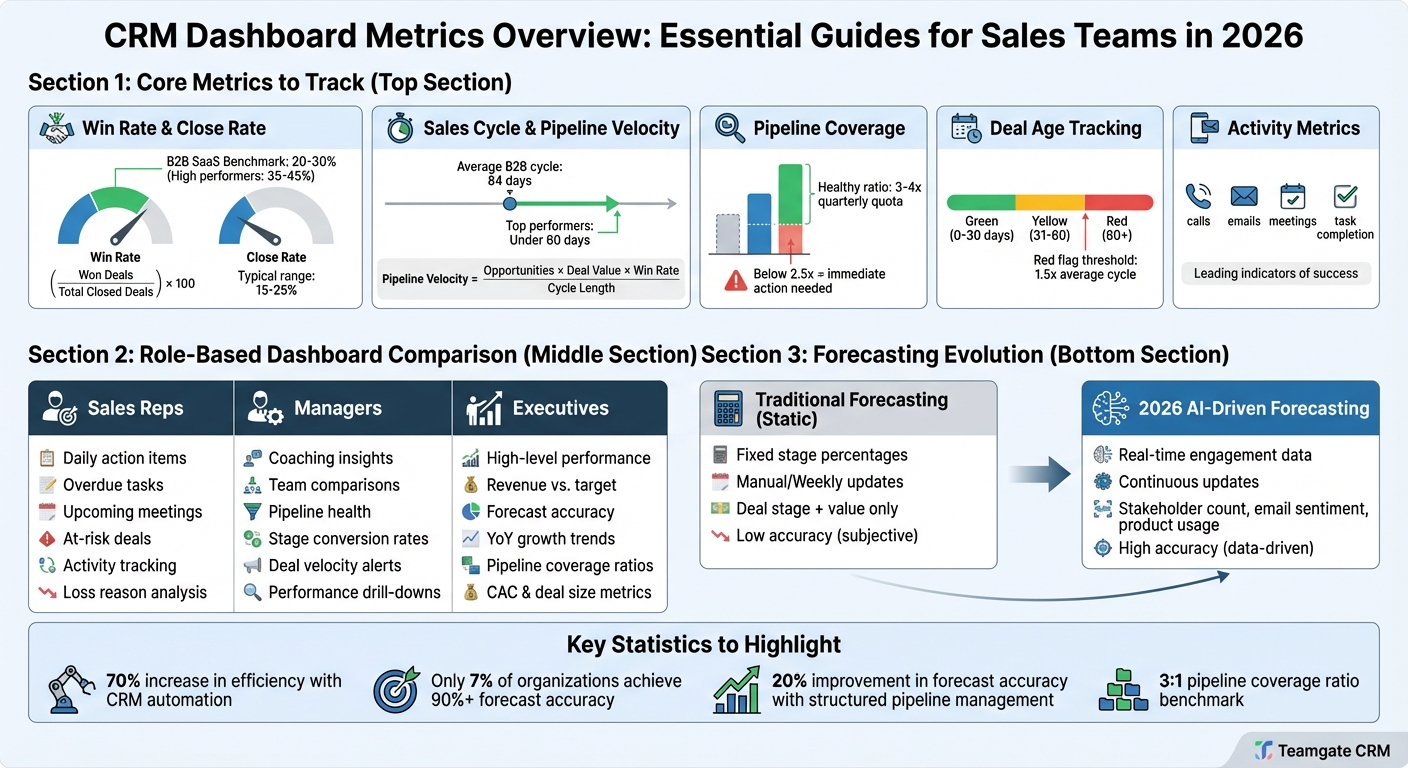
CRM Dashboard Metrics Guide: Key Performance Indicators by Sales Role
Mastering CRM dashboards: transforming data into business insights
sbb-itb-5772723
Core Metrics Every Sales Team Should Track
Success in sales often comes down to monitoring the right metrics. By focusing on key indicators, you can uncover insights about your pipeline’s health, the effectiveness of your reps, and the reliability of your forecasts. Below, we break down the core metrics every sales team should keep an eye on.
Win Rate and Close Rate
Win rate measures how well your team converts deals at the decision stage. To calculate it, use this formula:
(Number of Won Deals / Total Deals Closed (Won + Lost)) × 100.
For example, if you close 25 deals out of 50, your win rate is 50%. This metric highlights whether your reps are effectively closing qualified opportunities or losing out due to issues like competition, pricing, or timing.
Close rate, on the other hand, tracks the percentage of leads that turn into paying customers. The formula is:
(Number of Deals Closed (Won) / Total Leads or Opportunities Created) × 100.
For instance, converting 30 customers from 200 leads results in a 15% close rate. This metric reflects your funnel’s efficiency and whether your leads are properly qualified or if unfit prospects are clogging the pipeline.
For B2B SaaS teams, win rates typically range between 20-30%, with high performers reaching 35-45%. Close rates generally fall between 15-25% from lead to customer. Tracking these metrics by rep and by stage can reveal important trends. For example, if a rep’s win rate drops at the proposal stage, they might need help with objection handling. If close rates are low despite strong activity, it could point to a weak pre-sales qualification process.
Next, let’s dive into how time-based metrics can help you evaluate deal progress.
Sales Cycle Length and Pipeline Velocity
Sales cycle length measures how long it takes to close a deal, from the moment an opportunity is created until it’s either won or lost. To calculate it, divide the total number of days for all closed deals by the number of deals closed. For example, if deals average 45 days but spend 20 days stuck in the proposal stage, you’ve identified a bottleneck. While the average B2B sales cycle is around 84 days, top-performing teams often keep it under 60 days.
Pipeline velocity combines the speed of deals, their size, and win probability into a single metric. The formula is:
(Number of Opportunities × Average Deal Value × Win Rate) / Sales Cycle Length (in days).
For a mid-market SaaS team, a target might be $500,000 in pipeline velocity per month. If velocity slows, you’ll know whether it’s due to stalled deals, declining win rates, or shrinking deal sizes. Improving velocity directly boosts revenue efficiency.
Monitor pipeline velocity weekly. If it drops, examine its components to pinpoint the issue. For example, shortening your sales cycle by 20% can significantly increase velocity without needing more leads. Tracking cycle length by stage can also help identify where deals are stalling, allowing managers to coach reps on speeding up those stages.
Now, let’s look at how to ensure your pipeline stays full and focused.
Pipeline Coverage and Deal Age
Pipeline coverage measures whether your pipeline is sufficient to meet your quota. The formula is:
(Total Pipeline Value / Quota) × Coverage Multiple.
A healthy pipeline coverage ratio is typically 3-4x your quarterly quota. For instance, if your quarterly goal is $300,000, your pipeline should hold $900,000 to $1,200,000. Anything below 2.5x signals the need for immediate prospecting.
Deal age tracks how long opportunities have been in your pipeline, compared to your average sales cycle. Deals exceeding 1.5x your average cycle should raise red flags. For example, if your typical deal closes in 80 days, any deal lingering beyond 120 days needs attention. Stalled deals can inflate forecasts and distract your team from real opportunities.
To manage deal age effectively, categorize opportunities into buckets: 0-30 days, 31-60 days, and 60+ days. Deals inactive for over 30 days should either be re-engaged or closed. Use visual indicators like green for fresh deals, yellow for aging ones, and red for stalled opportunities. This helps reps prioritize their efforts and keeps your pipeline focused on deals with real potential for closing.
Activity Metrics: Measuring Rep Productivity
Outcome metrics like win rate and pipeline velocity explain what happened, but activity metrics dig into why. Tracking actions like calls made, emails sent, meetings booked, and tasks completed provides a clearer picture of whether your reps are putting in the effort needed to hit their targets. These metrics act as early indicators of sales success, giving you a chance to course-correct before it’s too late.
The trick is gathering this data without drowning your reps in data entry. CRMs with automated tracking features help reduce manual input while ensuring accurate records.
Call and Email Tracking
Keeping tabs on calls and emails offers insights into outreach effectiveness and follow-up consistency. Logging every interaction manually isn’t just time-consuming – it’s prone to errors and omissions. CRMs equipped with tools like SmartDialer and email sync can automatically record these interactions, saving time and improving data reliability.
With automatic logging, managers get real-time visibility into rep activity, making it easier to spot who might need extra coaching. Plus, analyzing response rates and engagement trends can reveal the most effective communication methods. For instance, if a rep makes 50 calls but only books two meetings, it might signal the need for a different approach.
"By analyzing the charts and activity reports, you can see the links between sales activities and outcomes, as well as identifying your top performers and how they perform differently." – Teamgate
To connect activity to outcomes, measure conversion rates – like how often calls lead to meetings and meetings lead to opportunities. This helps determine whether high activity levels are translating into actual pipeline growth.
Task Completion Rates
Task completion rates are another key metric for keeping deals on track. When reps consistently complete tasks – whether it’s sending proposals, scheduling follow-ups, or updating customer details – deals move through the pipeline more smoothly. Reps with higher task completion rates are typically more successful at closing deals.
Automated CRM tools can assist here as well. For example, when a deal enters the proposal stage, the system can automatically generate a follow-up task, ensuring no critical steps are missed. This automation keeps things moving and reduces the risk of deals stalling.
Tracking task completion rates on your dashboard can also highlight potential issues. If a rep frequently leaves tasks unfinished, it might indicate they’re overwhelmed, struggling with time management, or focusing on too many low-priority deals. Identifying these patterns allows managers to step in with targeted support, preventing opportunities from slipping away due to inaction.
Up next, we’ll dive into forecasting methods and quota tracking to round out the performance analysis.
Forecast Accuracy and Quota Attainment
Accurate forecasting and quota tracking are crucial for aligning daily sales efforts with long-term revenue goals. Reliable forecasts allow leadership to plan resources, manage capacity, and make informed decisions with confidence. When forecasts are dependable, teams can focus on execution instead of scrambling to meet targets at the last minute.
Structured pipeline management can boost forecast accuracy by up to 20%. This improvement can mean the difference between a chaotic rush to hit numbers and a smooth, predictable sales process. Yet, only 7% of sales organizations achieve forecast accuracy of 90% or more. Many teams still rely on outdated methods or overly optimistic assumptions instead of leveraging real-time data. Let’s dive into how modern tools, like AI-driven forecasting, are changing the game.
Weighted Pipeline Forecasting
Weighted pipeline forecasting offers a practical way to estimate revenue by multiplying a deal’s value by its probability of closing. For instance, a $50,000 deal in the proposal stage with a 40% close probability would contribute $20,000 in weighted value. This method provides leadership with a more realistic sense of what’s likely to close.
In 2026, forecasting has evolved beyond static percentages assigned to deal stages. Modern dashboards now use AI-driven signals – such as buyer engagement, stakeholder activity, and product usage – to dynamically adjust probabilities. For example, if a new decision-maker joins a call or a deal goes silent, the system recalculates the close probability in real time. This is a major improvement over traditional methods that treat all deals in a stage the same way.
| Feature | Traditional Forecasting (Static) | 2026 Forecasting (AI-Driven) |
|---|---|---|
| Probability Basis | Fixed stage percentages (e.g., 25% for Discovery) | Real-time engagement and historical trends |
| Update Frequency | Manual/Weekly | Continuous/Real-time |
| Data Inputs | Deal stage and value | Stakeholder count, email sentiment, product usage |
| Accuracy | Low (subjective) | High (data-driven) |
AI-driven deal health scoring adds another layer of precision by combining stage probabilities with real-time engagement data. This approach helps validate whether a deal is genuinely progressing or stuck. Dashboards that highlight bottlenecks make it easier to identify unqualified leads or stalled deals, giving teams the chance to clean up forecasts before it’s too late.
"Weighted pipeline… highlights pipeline quality, not just quantity." – Ohad Zafrir, Content Strategist, Lusha
While forecasting sharpens revenue predictions, tracking quota attainment ensures accountability for closing deals.
Quota Attainment Tracking
Quota attainment measures how much revenue a rep has closed compared to their assigned target. For example, if a rep closes $70,000 against a $100,000 quota, they’ve achieved 70% attainment. This metric promotes accountability and transparency, helping teams see exactly how much more pipeline they need to close to meet their goals.
Real-time visibility into quota attainment motivates reps to take action daily. Managers can quickly identify who’s on track and who needs support, allowing for timely coaching before the quarter ends.
A common benchmark for pipeline coverage is a 3:1 ratio, meaning $300,000 in pipeline is typically needed to close $100,000 in revenue. If your weighted pipeline shows you’re falling short, it’s a signal to either generate more opportunities or improve conversion rates. Dashboards that combine quota attainment and pipeline coverage provide both leading and lagging indicators, offering a clearer picture of performance and future outcomes.
"A great sales dashboard is like a GPS for your sales team, it shows you where you are, highlights the best route forward, and warns you when you’re going off track." – Adithya Krishnaswamy, Everstage
Tracking forecast accuracy – comparing predicted revenue to actual results – helps validate the reliability of your forecasting process. If the variance between forecasts and outcomes regularly exceeds 30%, it’s a red flag for issues like poor deal qualification or inconsistent pipeline reviews. Weekly forecast reviews can help catch these problems early by running "what-if" analyses, ensuring there are no surprises when deals slip or stall later in the quarter.
How to Customize Dashboards by Role
Each role in a sales team has unique needs when it comes to data. Reps need actionable tasks, managers need insights to coach effectively, and executives need a clear picture of overall performance. Role-specific dashboards help streamline workflows by showing only the most relevant information for each role. When dashboards align with daily responsibilities, CRM adoption becomes natural – because the tool actively supports the sales process.
The key is understanding what each role needs to achieve. Reps focus on immediate actions, managers look for areas to coach and improve, and executives rely on accurate forecasts and strategic insights. Customizing dashboards around these needs transforms the CRM into a daily operating system rather than an occasional tool. Let’s break it down, starting with what reps need to succeed.
Rep Dashboards: Daily Action Items
For sales reps, simplicity and clarity are essential. A well-designed rep dashboard works as a daily checklist, highlighting overdue tasks, upcoming meetings, deals needing follow-up, and opportunities at risk of stagnation. This setup keeps reps focused on taking action rather than searching for information.
Additionally, tracking daily activities – like calls made, meetings scheduled, and tasks completed – helps reps see the direct connection between their efforts and results. Visual comparisons of current progress against goals can help maintain motivation. For instance, tracking loss reasons, such as price objections or competitor preferences, allows reps to adjust their approach in real time.
Automation is another game-changer. Features like reminders for stale deals, auto-generated tasks after logging a demo, and preloaded email templates minimize busywork. By reducing administrative tasks, the dashboard becomes an active selling tool, and reps are more likely to keep the CRM updated.
While reps focus on daily execution, managers require a broader perspective to guide their teams.
Manager Dashboards: Coaching Insights
Managers need dashboards that answer two key questions: "Who needs help?" and "What’s really happening in the pipeline?" Real-time data helps managers spot bottlenecks and intervene promptly. Comparing team performance allows for targeted, data-driven coaching, while metrics like calls per closed deal or meetings per win help distinguish between effort and skill gaps.
Pipeline health metrics – such as deal velocity, stage conversion rates, and pipeline coverage – give managers the ability to predict revenue and identify stagnant deals before it’s too late. Conditional alerts, like color-coded flags for deals stuck in a stage for over 14 days, help managers focus their attention where it’s needed most. Drill-down features also let managers move seamlessly from team-level metrics to individual performance details.
"There’s probably about a 70% increase in efficiency in regards to the admin tasks that were removed and automated, which is a huge win for us." – Kyle Dorman, Department Manager – Operations, Ray White
Effective dashboards balance past performance metrics, like revenue closed and win rates, with forward-looking indicators, such as activity volume and pipeline growth. By focusing on five to eight core metrics, managers can avoid information overload and provide better coaching.
While managers focus on team performance, executives need a high-level overview to guide strategy.
Executive Dashboards: High-Level Performance
Executives rely on dashboards to monitor progress and spot early warning signs. These dashboards should address critical questions like: Are we meeting revenue targets? Is the pipeline strong enough to sustain growth? Where are we gaining or losing ground?
Key metrics include revenue versus target, year-over-year growth trends, and forecast accuracy. Comparing committed versus best-case scenarios helps executives project results with confidence, while pipeline coverage ratios reveal whether there are enough opportunities to meet future goals.
| Executive Metric | Strategic Purpose | Key Components |
|---|---|---|
| Revenue Forecast | Strategic Planning | Committed vs. best-case scenarios; target variance |
| Pipeline Health | Risk Management | Coverage ratios; total value by stage; aging deals |
| Business Efficiency | Profitability | Customer Acquisition Cost (CAC); average deal size |
| Market Position | Competitive Strategy | Year-over-year growth; market share indicators |
Automated updates every 15–30 minutes ensure decisions are based on the latest data. Visual hierarchy also plays a role – placing critical metrics like revenue versus target in prominent positions ensures they grab attention. Drill-down capabilities let executives move from summaries to detailed views when needed, and comparing metrics against benchmarks or historical data provides essential context. These dashboards enable executives to plan resources, manage capacity, and make informed decisions.
Conclusion
The right metrics transform your CRM into a powerful revenue engine. By focusing on key indicators like win rates, pipeline velocity, activity volume, and forecast accuracy, sales teams can eliminate guesswork and gain clear insights into their pipeline. Real-time data on deal aging, conversion rates, and rep productivity allows managers to identify bottlenecks quickly and provide data-driven coaching.
Success hinges on maintaining strict data discipline. Companies leveraging modern CRM automation report up to a 70% boost in efficiency for administrative tasks. However, only 7% of sales organizations achieve forecast accuracy of 90% or higher. Role-specific, customizable dashboards bridge the gap between raw data and actionable insights.
These dashboards are critical to a focused CRM strategy. Customizing dashboards for each role ensures that every user sees the information they need. Sales reps get actionable next steps to seize opportunities, managers gain coaching insights to support their teams, and executives access high-level performance data for strategic decision-making. This role-based approach not only prevents missed follow-ups but also equips leaders with the tools to make timely interventions, driving daily sales activity and long-term growth.
Teamgate CRM builds on these principles by offering real-time, customizable dashboards designed for modern sales teams. With features like weighted forecasts, pipeline coverage ratios, and activity-to-outcome tracking, teams can move from outdated spreadsheets to proactive decision-making. This creates a clean, reliable pipeline that makes growth predictable and ensures reps maintain proper pipeline hygiene.
To maximize impact, focus on 5 to 8 key metrics per dashboard view. Automate updates for critical metrics every 15–30 minutes, and include benchmarks to make it easy for your team to interpret performance. Clear and timely dashboards improve productivity and make revenue growth a consistent, predictable outcome.
FAQs
Which 5–8 CRM metrics should we track first?
In 2026, focus on CRM metrics that matter most: pipeline health, forecast accuracy, and sales rep productivity. Keep an eye on key indicators such as the number of qualified leads, win rate, average deal size, sales cycle length, and churn rate. These metrics give you a clear picture of how well your pipeline is performing, how reliable your forecasts are, and how effectively you’re retaining customers. By tracking these, sales teams can pinpoint bottlenecks, refine strategies, and stay aligned with changing sales dynamics.
How do we set a good pipeline coverage target?
To establish a solid pipeline coverage target, start by calculating your pipeline coverage ratio – this is the comparison between your total pipeline value and your sales target. Aiming for a ratio of at least 3:1 is a good rule of thumb, as it helps offset deal slippage and variability. Fine-tune your target by factoring in historical win rates, deal velocity, and the average size of your deals. Regularly track your pipeline health using CRM dashboards to ensure everything stays aligned with your revenue goals and adjustments can be made as needed.
How can we improve forecast accuracy in 2026?
To improve forecast accuracy in 2026, focus on AI-powered deal scoring to eliminate biases and concentrate on deal progress rather than just tracking activity metrics. Incorporate real-time forecasting tools to enable quicker, data-driven decisions while reducing errors. Keep your pipeline data accurate by clearly defining deal stages, regularly updating CRM records, and practicing disciplined pipeline management. By applying these strategies, your forecasts will better represent the actual state of your sales pipeline.






