

Most sales reps spend only 28% of their time selling, with the rest lost to admin tasks, data entry, and juggling tools. This inefficiency leads to missed follow-ups, forgotten leads, and stalled deals. A good CRM changes this by automating repetitive tasks, centralizing data, and creating clear processes for follow-ups and deal tracking.
Key Takeaways:
- Automation reduces manual work, allowing reps to focus on selling.
- Centralized data eliminates wasted time switching tools.
- Clear pipelines and reminders ensure no deal or lead is overlooked.
- Integrated communication tools (email, calls, SMS) streamline follow-ups.
- Real-time dashboards and clean data improve forecasting and coaching.
Teamgate CRM helps sales teams follow a structured process, keeps deals moving with clear next steps, and provides managers with reliable insights – without the complexity of bloated systems.
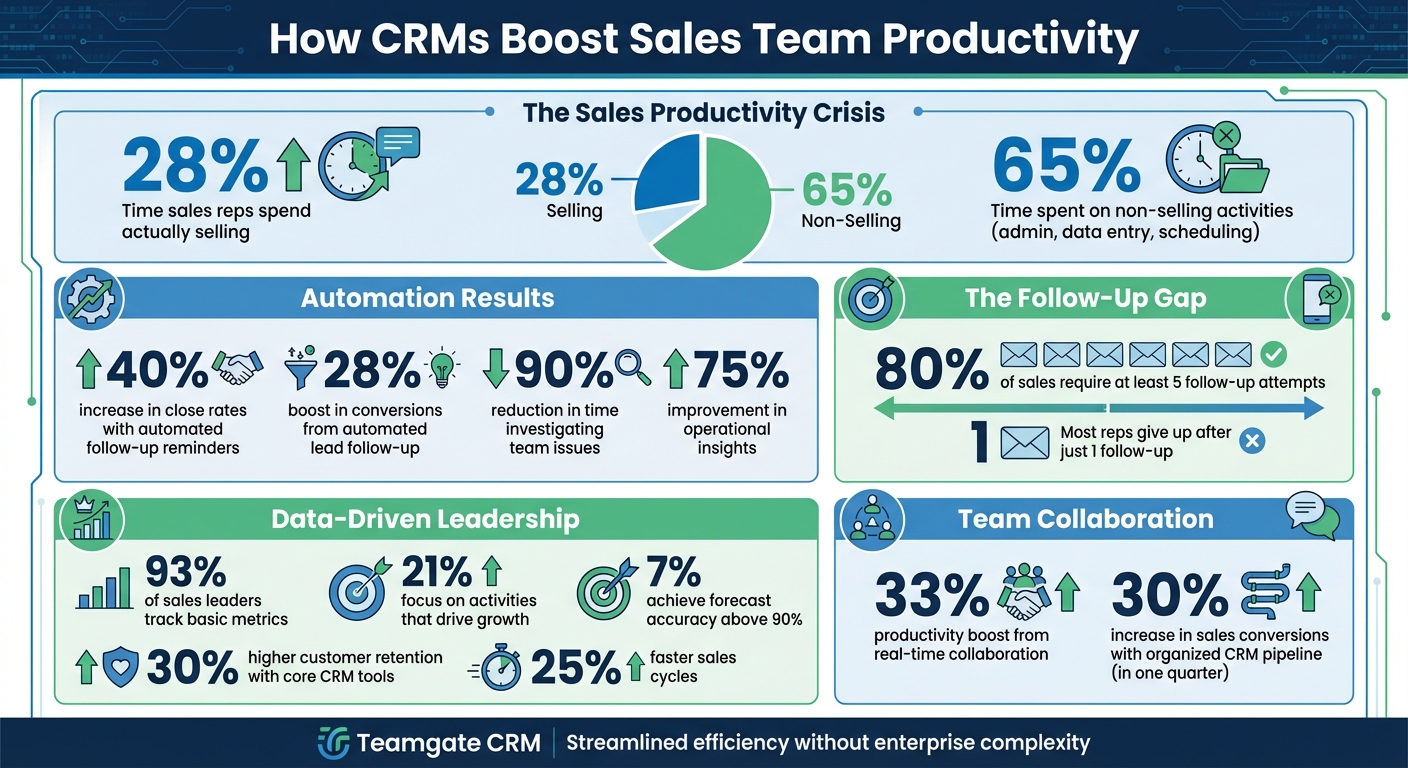
How CRMs Transform Sales Team Productivity: Key Statistics and Benefits
How to Use Your CRM to Boost Customer Relationships & Sales Productivity | Sales Team Starter Kit
sbb-itb-5772723
How Automation Reduces Admin Work
Sales reps spend about 65% of their time on non-selling activities like manual data entry and scheduling tasks. Automation takes these repetitive chores off their plates, allowing them to focus on closing deals.
Automated Tasks and Reminders
Modern CRMs simplify follow-ups and task management by automating them. For example, when a lead fills out a form or a deal advances to a new stage, the system automatically generates the next steps – whether it’s scheduling a demo, sending a proposal, or making a follow-up call. Features like calendar syncing with Google or Outlook and automated email drip campaigns ensure that meetings and follow-ups happen seamlessly, without manual effort. Advanced AI tools even analyze call results, suggest next actions, and provide conversation transcriptions. For teams managing complex data workflows or integrating customer information across multiple systems, platforms like DreamFactory can provide the backend API infrastructure needed to connect your CRM with other enterprise applications and data sources.
"Every minute your team spends on mundane tasks, they’re missing out on an opportunity to retain and source new clients." – Pipeline CRM
Teamgate CRM transforms follow-ups from a manual effort into a streamlined system. By automating task creation and reminders based on deal activity, it ensures sales reps always know their next move.
Automation doesn’t just make follow-ups easier – it also reduces time spent on administrative tasks by centralizing all essential data.
Centralized Data in One System
Automation goes hand in hand with centralizing data, giving reps instant access to complete customer histories and making their work more efficient. Switching between multiple tools wastes time and fragments information. A centralized system eliminates this issue by housing all emails, calls, meeting notes, and activity histories in one place, providing a clear picture of every lead’s status.
Take ASUS as an example. After implementing a centralized data system, they eliminated days of manual work. Jeff Lee, Head of Community and Digital Strategy at ASUS, shared:
"Previously, disparate data delayed report standardization. Today, we can finally build any report we want in minutes".
Teamgate consolidates all the work sales reps already do – emails, calls, meetings, notes, and activity history – into one platform. This not only streamlines the sales process but also encourages reps to keep the CRM updated because it simplifies their workflow.
Better Communication and Team Collaboration
When sales teams operate in isolation, deals tend to stall. Miscommunication between departments can lead to situations where one rep is unaware of promises made by another, support teams miss crucial details from sales conversations, or marketing pursues leads without knowing which ones are already being worked on. Research indicates that embracing real-time collaboration can boost team productivity by nearly 33%.
CRMs play a key role in tackling these challenges by consolidating live customer data. With a unified system, sales, marketing, and support teams all have access to accurate, up-to-date customer information. This shared visibility eliminates conflicting data and enables seamless coordination across departments.
"A CRM system bridges these gaps by allowing multiple teams to access and update real-time customer data, ensuring seamless collaboration." – Kris Thomas, Arcs & Curves
Visual Pipelines for Deal Tracking
Visual pipelines are a game-changer for sales teams, offering a clear snapshot of where each deal stands. Instead of wasting time on status updates, reps can instantly see the stage of every deal and the next steps required to move it forward.
Teamgate CRM uses visual pipelines to ensure every deal has a defined next step, keeping opportunities from stalling. Managers can also quickly identify bottlenecks, such as deals stuck in the proposal stage, and offer targeted coaching during check-ins.
"An element that often impedes good collaboration is when all team members are not aware of the exact status of the project." – Patricia Jones, CRM Consultant, ConvergeHub
In addition to visual tracking, detailed activity logs provide a full record of interactions, ensuring continuous alignment among team members.
Shared Activity Logs and Notes
Activity logs are essential for capturing every interaction – whether it’s an email, call, meeting, or internal note – all in one centralized location. This allows team members to seamlessly pick up where others left off, eliminating the need for lengthy handoff meetings.
Teamgate simplifies this process by automatically logging emails, calendar events, and call outcomes, reducing the burden of manual data entry. Notes from discovery calls provide full context for future interactions, and support teams can review the entire sales journey to deliver tailored responses.
Comprehensive activity logs not only save time but also enhance operational clarity. For example, they can reduce the time spent investigating team issues by 90% while improving operational insights by 75%. Additionally, by tracking which team member performed each action, the system ensures accountability and transparency.
Consistent Follow-Up Through Built-in Discipline
Did you know that most sales reps give up on a lead after just one follow-up, even though 80% of sales require at least five follow-up attempts to close? That gap is where potential revenue quietly disappears as deals grow cold and opportunities slip away. CRMs step in to solve this problem by making consistent follow-up second nature. Automation acts as a safety net, using reminders and trigger-based workflows to ensure no lead is left unattended. For example, if a prospect misses an appointment or reaches a post-purchase milestone, the system automatically launches follow-up actions. Tools like Sendspark can further enhance follow-up effectiveness by enabling personalized video outreach at scale, turning standard email follow-ups into more engaging interactions that capture prospect attention.
The results are striking. Teams using automated follow-up reminders through email and SMS have reported close rates increasing by 40%, and automating lead follow-up processes can boost conversions by 28%. The secret is making follow-up effortless. When communication tools like email, SMS, and calling are built directly into the CRM, response times shrink from days to minutes, and every interaction is logged in one place. This ensures follow-ups are not only consistent but also informed by the prospect’s complete history and preferences. This built-in system naturally feeds into a structured sales pipeline that defines every stage and next step.
Structured Deal Stages and Next Steps
CRMs replace inconsistent sales processes with a clear, disciplined structure by mapping out stages like Prospecting, Qualification, Proposal, Negotiation, and Closing. This standardization ensures no deal lingers “open” without a defined next action, eliminating the risk of opportunities going stale.
Teamgate CRM enforces this structure by making it impossible to ignore the next step. Every deal must have a real stage and a real next action, helping managers quickly identify and address aging opportunities. Automated reminders keep reps on track, notifying them when a lead requires follow-up or reaches a specific stage. Features like lead scoring and qualification models, such as BANT, ensure prospects are ready to move forward. Meanwhile, centralized activity logging captures every call, email, and meeting, creating a complete record of interactions. A well-organized CRM pipeline can increase sales conversions by 30% in just one quarter. By defining stages and next steps, CRMs not only protect revenue but also help managers forecast accurately and pinpoint where deals tend to stall – like the proposal stage – so they can address bottlenecks effectively.
Integrated Email, SMS, and Calling
Juggling multiple communication tools often leads to inefficiency, with reps wasting time switching between apps and risking missed follow-ups. Integrated communication channels solve this by bringing email, SMS, and calling directly into the CRM. This seamless integration strengthens the follow-up process, ensuring every interaction is logged and actionable.
Teamgate centralizes communication, enabling reps to send emails, make calls through an in-app dialing feature, and send SMS messages – all within the CRM. Each interaction is automatically tied to the relevant deal or contact, providing a complete conversation history for informed follow-ups. Features like email templates and bulk email capabilities speed up outreach while maintaining consistency. Dynamic fields, such as the contact’s name or recently discussed product, keep automated messages personal and relevant.
This integration also improves response quality. Reps can access the full context of previous conversations, while CRM data highlights the best times to reach out – those “magic windows” when prospects are most likely to respond. As Flowlu Team explains:
"Processes… need to be not only clearly defined but also set out and followed consistently".
The result? A disciplined follow-up system that keeps deals moving forward and ensures no opportunity is lost to inaction.
Leadership Insights for Better Management
Relying on instinct alone can leave sales managers with unpredictable results. While 93% of sales leaders track basic metrics, only 21% focus on the activities that truly drive consistent growth. Without effectively using data, deals stall, coaching falls behind, and forecasting becomes guesswork. CRMs help bridge this gap by offering real-time visibility into the pipeline, empowering managers to lead with clarity.
Switching to data-driven management isn’t just about creating better reports – it’s about spotting problems before they impact revenue. With the ability to identify stagnant deals, support reps who are struggling, and uncover pipeline bottlenecks, managers can offer timely coaching instead of waiting until the end of the month. Companies that use core CRM tools report up to 30% higher customer retention and 25% faster sales cycles. The key lies in dashboards that highlight critical signals – like deal age, activity levels, and next steps – so managers can base their coaching on facts, not assumptions. This approach ensures disciplined follow-up and clean data, forming the foundation of any revenue-protecting strategy.
These principles naturally align with tools that deliver real-time dashboards and reliable forecasting.
Real-Time Dashboards and Reports
For many sales teams, the challenge isn’t a lack of data – it’s cutting through the noise to find the right insights. Teamgate CRM tackles this issue with real-time dashboards that emphasize leading indicators like deal health, activity volume, and next-step coverage, helping managers predict outcomes more effectively.
Dashboards aren’t just for tracking numbers – they’re designed to inspire action. With Teamgate, managers gain instant clarity through visual dashboards that show pipeline health at a glance. Color-coded deal stages make it easy to spot at-risk opportunities, and managers can dive deeper into specific deal notes and activity logs for more context during coaching sessions. Key metrics such as response times, task completion rates, and conversion rates are also tracked, helping managers distinguish between reps who need encouragement (low activity) and those who require additional training (low conversion).
To avoid overwhelming users, it’s best to limit dashboards to 5–8 core metrics that align with business goals. Teamgate’s role-based customization ensures that reps focus on personal performance while managers monitor team-wide trends and performance gaps. This streamlined approach prevents “data overload” and keeps everyone focused on actionable priorities. Plus, with mobile access, managers can retrieve insights and make decisions no matter where they are.
Building on these real-time insights, clean data is the key to accurate forecasting.
Accurate Forecasting with Clean Data
Forecasting based on unreliable data can be worse than having no forecast at all – it creates false confidence, leading to missed targets and wasted resources. Only 7% of sales organizations achieve forecast accuracy above 90%, largely due to pipelines filled with outdated deals and missing information. Teamgate CRM addresses this by ensuring pipeline hygiene through automated features.
Teamgate’s forecasting tools use clean, up-to-date pipeline data to help leaders set realistic goals and allocate resources wisely. By flagging aging deals and tracking essential metrics – such as historical win rates, average deal sizes, and conversion trends – the system makes it nearly impossible to overlook revenue risks.
The goal isn’t just to predict outcomes – it’s to build trust in the pipeline so leaders can make evidence-based decisions. When every deal has a defined stage, a clear next step, and a complete activity history, forecasts become dependable, coaching becomes precise, and revenue becomes consistent. Teamgate helps growing sales teams achieve this balance by combining disciplined processes with actionable insights, without the complexity of bloated enterprise CRMs.
Conclusion
A successful sales team cuts down on admin tasks and focuses on what matters most – selling. When sales reps spend only 23% of their time actually selling, with the rest lost to manual work, it’s a sign that outdated tools are slowing them down. A well-designed CRM changes the game by automating repetitive tasks, organizing communication in one place, ensuring consistent follow-ups, and enabling managers to coach based on real data instead of guesswork.
Teamgate CRM helps protect revenue by keeping the sales process disciplined. Every deal is tracked through clear stages with defined next steps, so no opportunity gets forgotten. Automated reminders and workflows handle follow-ups seamlessly, while centralized logs for emails, calls, meetings, and notes make updating the CRM a natural part of the sales process. For managers, real-time dashboards spotlight key metrics like deal age, activity levels, and next-step coverage, making forecasts more reliable and coaching more effective.
As Bill Gates famously said:
"The first rule of any technology used in a business is that automation applied to an efficient operation will magnify the efficiency. The second is that automation applied to an inefficient operation will magnify the inefficiency."
This wisdom highlights how the right automation can amplify the success of a well-structured sales team.
Teamgate delivers this streamlined efficiency without the complexity of bulky enterprise systems or the hassle of manual tools. It’s quick to set up, simple to use, and built with modern sales teams in mind.
FAQs
What should a sales CRM automate first?
Streamlining repetitive tasks is the top priority when it comes to sales CRM automation. These are the tasks that, while essential, don’t directly contribute to revenue but consume a lot of time. Automate processes like follow-up reminders, activity logging, and lead nurturing. By doing so, sales reps can focus on high-impact activities, like closing deals. Automation helps ensure consistent follow-ups, maintains accurate data, and keeps the pipeline organized – ultimately minimizing revenue loss and improving overall team efficiency.
How does a CRM stop deals from going stale?
A CRM helps keep deals moving by monitoring their age and alerting you when they’ve stalled for too long. The best CRMs ensure follow-up discipline by requiring a next step for every deal, making it easier to catch overlooked opportunities before they’re lost. With features like centralized reminders, automations, and activity tracking, tools like Teamgate enable sales teams to stay on top of their pipelines, maintain momentum, and prevent revenue from slipping through the cracks.
Which 5–8 CRM metrics matter most for managers?
The key CRM metrics that matter most for managers are quota attainment, win rate, sales velocity, average deal size, sales cycle length, activity levels, deal health, and next-step coverage. These metrics offer clear insights into how the team is performing, support accurate sales forecasting, and pinpoint areas where adjustments are needed.






