

In 2026, scheduling inefficiencies are still costing sales teams time and deals. Missed meetings, manual CRM updates, and disorganized workflows lead to lost revenue and wasted effort, often requiring better sales management tools to stay on track. Tools like Cal.com and its integration with Teamgate CRM solve these problems by automating scheduling, syncing data directly into your pipeline, and eliminating repetitive tasks.
- Cal.com offers flexible scheduling with features like round-robin assignments, reminders, and custom branding.
- Teamgate/Cal.com integration streamlines the sales process by syncing meeting details, automating follow-ups, and improving team alignment.
If your team struggles with CRM updates or scheduling delays, Teamgate gives you structure, clarity, and actionable insights – without overcomplicating your workflow.
Best Scheduling Software 2026? Calendly vs Cal.com vs TidyCal vs SavvyCal vs Chili Piper
sbb-itb-5772723
1. Cal.com
Cal.com is more than just a booking tool – it’s a scheduling infrastructure solution designed to offer flexibility and customization. Built on an open-source foundation, it allows sales teams to tailor their scheduling sales process to meet specific needs. Supporting over 40 languages and adhering to HIPAA and SOC 2 Type II standards, it’s especially well-suited for industries like healthcare and finance that require strict compliance.
Customizability
Cal.com’s modular design allows for highly personalized scheduling. Teams can create custom routing forms to gather key information – such as company size or product interest – and automatically assign leads to the appropriate sales representative based on their responses. For businesses requiring full control, a self-hosted option with complete code access is available.
The platform also supports white-labeling, removing Cal.com branding from booking pages to maintain a consistent brand experience. Additionally, it can be embedded directly into CRM records via iframes, enabling reps to schedule meetings without leaving their workflow. Booking forms prefill automatically with CRM data like names, email addresses, and company details, streamlining the process for prospects.
Sales Workflow Automation
Automation is a key feature of Cal.com. With round-robin scheduling, leads are distributed fairly across the sales team, based on factors like priority or availability. For team-based meetings, collective events allow prospects to book with multiple members simultaneously.
Meeting reminders and follow-ups are handled automatically, reducing no-shows without requiring manual effort. For high-value demos, the opt-in feature lets teams manually approve bookings to avoid unnecessary clutter on the calendar. Webhooks and API integrations ensure that lead statuses are updated in your CRM instantly when a booking is confirmed.
Pipeline Integration
Cal.com seamlessly integrates with your sales pipeline through CRM apps, Zapier, and webhooks. This creates a “zero-friction pipeline”, embedding scheduling directly into the lead’s journey rather than treating it as a separate task. Booking data, contact details, and meeting notes sync automatically with your CRM, eliminating the need for manual updates and ensuring no details are overlooked. For teams managing complex data flows across multiple systems, Integrate.io provides additional low-code data integration and transformation capabilities that complement scheduling automation with ETL, ELT, and reverse ETL pipelines.
Scalability
Cal.com is built to grow alongside your business. Features like managed event types allow administrators to centrally control booking settings for the entire team. Even the free plan includes unlimited event types and workflows. Paid team plans start at $15 per user per month, unlocking advanced options like round-robin scheduling and routing forms. Enterprise plans offer custom pricing, 24/7 support, and enhanced security features.
"Cal.com isn’t just a booking solution; it’s an entire calendar scheduling infrastructure product." – Assantewa Heubi, Cal.com
With its robust set of features and seamless CRM integration, Cal.com simplifies scheduling and enhances the sales process, making it a powerful tool for growing teams.
2. Teamgate/Cal.com Integration
This integration brings Cal.com’s scheduling power directly into Teamgate CRM, making scheduling an integral part of your sales process. By connecting the two platforms, booking meetings and managing relationships become a seamless experience, reducing the usual friction between these tasks.
Pipeline Integration
Teamgate’s integration with Cal.com introduces a "zero-data-entry workflow." When a prospect schedules a meeting through Cal.com, their contact details, deal information, and meeting notes are automatically synced into Teamgate’s pipeline. This eliminates the need for manual input, giving sales reps a complete timeline of interactions for better context before every call.
Smart team routing further enhances this process by automatically assigning bookings to the most suitable team member based on predefined rules. This ensures leads are directed to the right rep without requiring manual intervention, streamlining the path to conversion.
Sales Workflow Automation
The integration also automates key parts of the sales workflow. For example, when a call is booked, the system can immediately create a deal, add the contact, and schedule follow-ups. After the meeting, workflows can trigger automated post-call emails with resources or next steps, keeping the momentum alive while interest is still fresh.
To reduce no-shows, multi-channel reminders – sent via email, SMS, or WhatsApp – are deployed 24 hours before scheduled events. This approach has reportedly improved attendance rates, with 93% of users seeing better results. Companies like Packagecloud have leveraged Teamgate’s sales insights to refine lead qualification, achieving an 18% increase in engagement rates.
"Integrated CRM solutions make the working life of sales managers and sales team more streamlined, and more productive." – Teamgate
Scalability
This integration grows alongside your team. Teamgate’s Professional Plan provides core API access and supports integrations through platforms like Zapier and Make.com, while the Enterprise Plan unlocks full access to all native integrations. On the other side, Cal.com’s developer-friendly API allows larger organizations to configure workflows and routing rules programmatically, accommodating both individual and group events with ease.
Advantages and Disadvantages
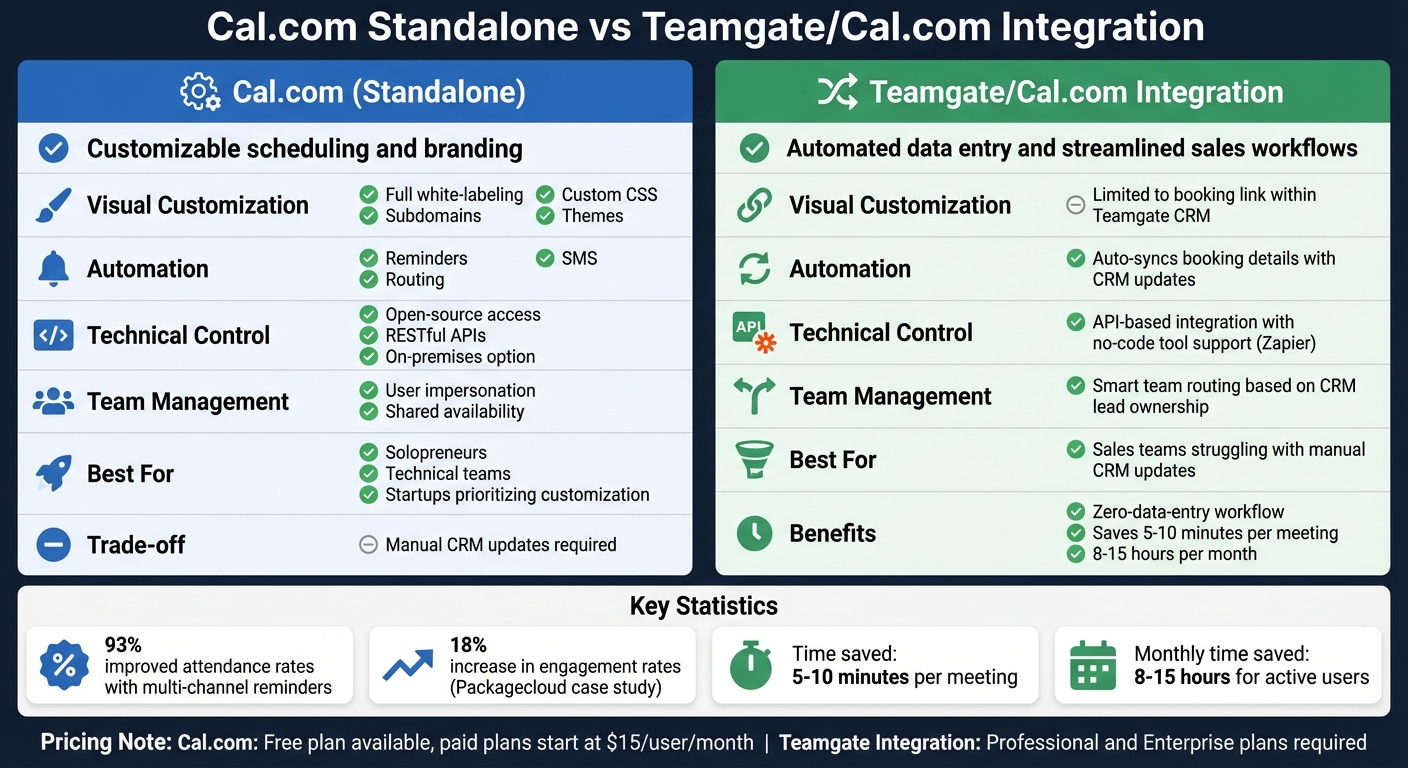
Cal.com Standalone vs Teamgate Integration Comparison
Cal.com and the Teamgate/Cal.com integration both tackle scheduling issues but cater to different needs. Picking the right option depends on how your sales team operates and where you face the most friction. Here’s a closer look at how they compare.
Cal.com is ideal if you prioritize branding and technical customization. It offers robust white-labeling options, allowing you to tailor the platform to match your brand identity, and even provides access to its source code. For businesses with strict data security policies, an on-premises deployment option is available. However, using Cal.com independently means your team will need to manually update the CRM, which can add to their administrative workload.
On the other hand, the Teamgate/Cal.com integration simplifies workflows by automating CRM updates. Once a meeting is scheduled, contacts, deals, and notes are synced directly into Teamgate, creating a seamless "zero-data-entry" system. Features like intelligent lead routing and follow-up automation save time and improve efficiency. However, this integration offers less flexibility in customizing the booking link’s appearance compared to Cal.com’s standalone platform.
Here’s a side-by-side comparison to clarify these differences:
| Feature | Cal.com (Standalone) | Teamgate/Cal.com Integration |
|---|---|---|
| Primary Focus | Customizable scheduling and branding | Automated data entry and streamlined sales workflows |
| Visual Customization | Full white-labeling, custom CSS, subdomains, and themes | Limited to the booking link within Teamgate CRM |
| Automation | Includes reminders, SMS, and routing | Automatically syncs booking details with CRM updates |
| Technical Control | Open-source access, RESTful APIs, on-premises option | API-based integration with no-code tool support (e.g., Zapier) |
| Team Management | User impersonation and shared availability | Smart team routing based on CRM lead ownership |
The decision boils down to your team’s biggest challenges. If you’re dealing with inefficiencies from manual CRM updates or disorganized data, the integration can deliver quick, impactful results. On the other hand, if a polished, highly customizable scheduling experience aligns more with your goals – and you’re ready to handle CRM updates separately – Cal.com’s standalone version offers unmatched flexibility. Choose the option that best aligns with your workflow and sales priorities.
Conclusion
The best choice ultimately hinges on your team’s specific needs. For solopreneurs, technical teams requiring self-hosting, or startups prioritizing customization over a full-scale CRM, Cal.com’s standalone solution fits the bill. Its free plan includes unlimited event types, full branding control, API access, and the option for self-hosting to maintain data sovereignty.
On the other hand, if your sales team struggles with time-consuming CRM updates, the Teamgate/Cal.com integration is a game-changer. As Teamgate explains: “Connect Teamgate with Cal.com to automate scheduling and CRM updates… all from one streamlined, zero-data-entry workflow”. This integration syncs contacts, deals, and meeting details automatically, saving users 5–10 minutes per meeting and up to 8–15 hours per month for active users. For sales teams looking to supercharge their outreach alongside scheduling automation, Sendspark enables personalized video engagement that complements automated scheduling with AI-powered video personalization for B2B prospecting.
While individuals and small teams benefit from Cal.com’s free tier, larger teams managing centralized lead activity gain the most from the integration’s time-saving automation.
FAQs
How hard is it to set up Cal.com with Teamgate?
Setting up Cal.com with Teamgate is simple and efficient, designed to streamline your workflow. Start by installing the Cal.com app within Teamgate, then configure it to automatically sync your contacts, deals, and meetings. With user-friendly, low-code options and clear documentation, the process is accessible even if you’re not a tech expert.
What info gets synced into Teamgate after a booking?
After a booking is made, Teamgate automatically updates the CRM with crucial details like contact information, meeting or appointment specifics, and any associated deal or lead updates. This keeps your scheduling activities aligned with the CRM, making follow-ups smoother and tracking more efficient.
Can we control lead routing and round-robin rules?
Yes, with Cal.com’s tools, you can handle lead routing and round-robin assignments seamlessly. You can create custom rules, define specific attributes, and set up workflows to automatically direct leads to the appropriate team members or sales reps instantly. This helps streamline lead distribution and aligns perfectly with your sales process for better efficiency and accuracy.






