
---
title: "How to set up your sales pipeline in Teamgate for better tracking and insights."
meta:
  description: "Set up a 3–5 stage Teamgate pipeline with clear stage rules, one owner per deal, required fields, and automated follow-ups for reliable forecasts."
  "og:description": "Set up a 3–5 stage Teamgate pipeline with clear stage rules, one owner per deal, required fields, and automated follow-ups for reliable forecasts."
  "og:title": "How to set up your sales pipeline in Teamgate for better tracking and insights."
  "twitter:description": "Set up a 3–5 stage Teamgate pipeline with clear stage rules, one owner per deal, required fields, and automated follow-ups for reliable forecasts."
  "twitter:title": "How to set up your sales pipeline in Teamgate for better tracking and insights."
---

#

- **Features**
  - [Overview](https://www.teamgate.com/tour/)
  - [Tour](https://www.teamgate.com/tour/)
  - [CRM](https://www.teamgate.com/tour/crm-software/)
  - [Sales Velocity](https://www.teamgate.com/tour/sales-velocity/)
  - [Mobile Apps](https://www.teamgate.com/tour/mobile-apps/)
  - [Industries](https://www.teamgate.com/tour/industries/)
  - [Collect](https://www.teamgate.com/blog/smarter-leadcapture-with-your-sales-crm/)
  - [Lead Capturing](https://www.teamgate.com/lead-capturing/)
  - [SmartDialer](https://www.teamgate.com/smart-dialer/)
  - [Email Integration](https://www.teamgate.com/integrations/mail-clients-integration/)
  - [Convert](https://www.teamgate.com/lead-qualification/)
  - [Lead Management](https://www.teamgate.com/lead-management/)
  - [Lead Qualification](https://www.teamgate.com/lead-qualification/)
  - [Lead Prioritization](https://www.teamgate.com/solutions/lead-prioritization/)
  - [Time Management](https://www.teamgate.com/time-management/)
  - [Sales Pipeline Management](https://www.teamgate.com/solutions/sales-pipeline-management/)
  - [Sales Acceleration](https://www.teamgate.com/solutions/sales-acceleration/)
  - [Contact Management](https://www.teamgate.com/contact-management/)
  - [Product Catalogue](https://www.teamgate.com/solutions/product-catalog/)
  - [Insights](https://www.teamgate.com/solutions/analytics-and-reports/)
  - [Analytics & Reports](https://www.teamgate.com/solutions/analytics-and-reports/)
  - [Sales Dashboard](https://www.teamgate.com/solutions/dashboard/)
  - [Sales Activity](https://www.teamgate.com/solutions/sales-activity/)
  - [Pipeline Management](https://www.teamgate.com/solutions/insights-pipeline-management/)
  - [Sales Leaderboard](https://www.teamgate.com/solutions/sales-leaderboard/)
  - [KPIs & Sales Goals](https://www.teamgate.com/solutions/kpi-and-sales-goals/)
- [**Blog**](https://www.teamgate.com/blog/)
- **Resources**
  - [Help CenterEverything about to get you started and improve knowledge.](https://www.teamgate.com/support/)
  - [Case StudiesLearn best practices from our customers.](https://www.teamgate.com/case-studies/)
  - [Developer APIDocumentation, API, Examples, FAQ and more.](https://developers.teamgate.com/)
  - [Affiliate ProgramEarn cash commission on every referral!](https://teamgate.getrewardful.com/signup)
- [**Pricing**](https://www.teamgate.com/pricing/)
- [**Integrations**](https://www.teamgate.com/integrations/)
- [**+1 725-254-2694**](tel:+17252542694)
- [**Start Free Trial**](https://www.teamgate.com/trial/)
- [**Login**](https://my.teamgate.com/index.php?r=my/guest/)

- [Log in](https://my.teamgate.com/index.php?r=my/guest/)
- [Sign up](https://www.teamgate.com/trial/)
- [REQUEST A DEMO](https://www.teamgate.com/request-form/%20%222024-nav-demo%22)

Designed for Growth: Scale your recurring revenue with the new Teamgate SaaS CRM. [Explore SaaS Features →](https://www.teamgate.com/saas)

[Book a demo](https://www.teamgate.com/request-form/) today and save 50% off your first month, or 20% off your first year.

Get a [free sales audit](https://calendly.com/tg-chase-horn/2025-sales-audit?month=2025-12) to uncover hidden revenue opportunities!

- **Features**
  - [Overview](https://www.teamgate.com/tour/)
  - [Tour](https://www.teamgate.com/tour/)
  - [CRM](https://www.teamgate.com/tour/crm-software/)
  - [Sales Velocity](https://www.teamgate.com/tour/sales-velocity/)
  - [Mobile Apps](https://www.teamgate.com/tour/mobile-apps/)
  - [Industries](https://www.teamgate.com/tour/industries/)
  - [Collect](https://www.teamgate.com/blog/smarter-leadcapture-with-your-sales-crm/)
  - [Lead Capturing](https://www.teamgate.com/lead-capturing/)
  - [SmartDialer](https://www.teamgate.com/smart-dialer/)
  - [Email Integration](https://www.teamgate.com/integrations/mail-clients-integration/)
  - [Convert](https://www.teamgate.com/lead-qualification/)
  - [Lead Management](https://www.teamgate.com/lead-management/)
  - [Lead Qualification](https://www.teamgate.com/lead-qualification/)
  - [Lead Prioritization](https://www.teamgate.com/solutions/lead-prioritization/)
  - [Time Management](https://www.teamgate.com/time-management/)
  - [Sales Pipeline Management](https://www.teamgate.com/solutions/sales-pipeline-management/)
  - [Sales Acceleration](https://www.teamgate.com/solutions/sales-acceleration/)
  - [Contact Management](https://www.teamgate.com/contact-management/)
  - [Product Catalogue](https://www.teamgate.com/solutions/product-catalog/)
  - [Insights](https://www.teamgate.com/solutions/analytics-and-reports/)
  - [Analytics & Reports](https://www.teamgate.com/solutions/analytics-and-reports/)
  - [Sales Dashboard](https://www.teamgate.com/solutions/dashboard/)
  - [Sales Activity](https://www.teamgate.com/solutions/sales-activity/)
  - [Pipeline Management](https://www.teamgate.com/solutions/insights-pipeline-management/)
  - [Sales Leaderboard](https://www.teamgate.com/solutions/sales-leaderboard/)
  - [KPIs & Sales Goals](https://www.teamgate.com/solutions/kpi-and-sales-goals/)
- [**Blog**](https://www.teamgate.com/blog/)
- **Resources**
  - [Help CenterEverything about to get you started and improve knowledge.](https://www.teamgate.com/support/)
  - [Case StudiesLearn best practices from our customers.](https://www.teamgate.com/case-studies/)
  - [Developer APIDocumentation, API, Examples, FAQ and more.](https://developers.teamgate.com/)
  - [Affiliate ProgramEarn cash commission on every referral!](https://teamgate.getrewardful.com/signup)
- [**Pricing**](https://www.teamgate.com/pricing/)
- [**Integrations**](https://www.teamgate.com/integrations/)
- [**+1 725-254-2694**](tel:+17252542694)
- [**Start Free Trial**](https://www.teamgate.com/trial/)
- [**Login**](https://my.teamgate.com/index.php?r=my/guest/)

- [Log in](https://my.teamgate.com/index.php?r=my/guest/)
- [Sign up](https://www.teamgate.com/trial/)
- [REQUEST A DEMO](https://www.teamgate.com/request-form/%20%222024-nav-demo%22)

Designed for Growth: Scale your recurring revenue with the new Teamgate SaaS CRM. [Explore SaaS Features →](https://www.teamgate.com/saas)

[Book a demo](https://www.teamgate.com/request-form/) today and save 50% off your first month, or 20% off your first year.

Get a [free sales audit](https://calendly.com/tg-chase-horn/2025-sales-audit?month=2025-12) to uncover hidden revenue opportunities!

#

-

![How to set up your sales pipeline in Teamgate for better tracking and insights.](https://www.teamgate.com/wp-content/uploads/2026/07/image_8f67a41a75f9828d1ef690a3648ccdc6-1500x500.jpeg)

[Sales Management](https://www.teamgate.com/blog/category/sales-management/)

# How to set up your sales pipeline in Teamgate for better tracking and insights.

![mm](https://www.teamgate.com/wp-content/uploads/2025/02/Profile-pic-e1738707394753-150x150.jpeg) [Chase Horn](https://www.teamgate.com/blog/author/chase-horn/)

July 8, 2026

Set up a 3–5 stage Teamgate pipeline with clear stage rules, one owner per deal, required fields, and automated follow-ups for reliable forecasts.

**If your reps move deals by feel instead of rules, your forecast will drift.** I’d set up a [Teamgate](https://www.teamgate.com/) pipeline with **3–5 clear stages**, one owner per deal, a dated next step on every open opportunity, and only the fields needed to track deal health and forecast revenue.

Teamgate **helps reps follow a [clear sales process](https://www.teamgate.com/blog/creating-sales-process/) and helps managers trust the numbers – without turning CRM into a full-time admin job.** That works best when you keep the setup simple and tie each stage to a buyer milestone, not a rep opinion.

Here’s the short version:

- **Use one pipeline first** if most deals follow the same path
- **Split pipelines only when the sales process is different**
- **Set stage entry and exit rules** before reps start moving deals
- **Require a small set of fields** like deal value, close date, buyer, budget, and loss reason
- **Give each deal one owner** and one next step with a date
- **Watch for stalled deals** with overdue stages, old close dates, and missing activities
- **Use reports** to check [stage aging, deal movement](https://www.teamgate.com/tour/features/sales-pipeline-movement/), activity levels, and weighted forecast risk

A few numbers matter here: the article points to **3–5 stages** as the best range, warns that going past **7 stages** adds more admin work, and suggests a follow-up task after **3 business days** in one case and a cleanup rule after **45 days** of no activity in late negotiation.

If you want cleaner pipeline data and a forecast you can use, I’d keep the process tight, visible, and easy for reps to update every day.
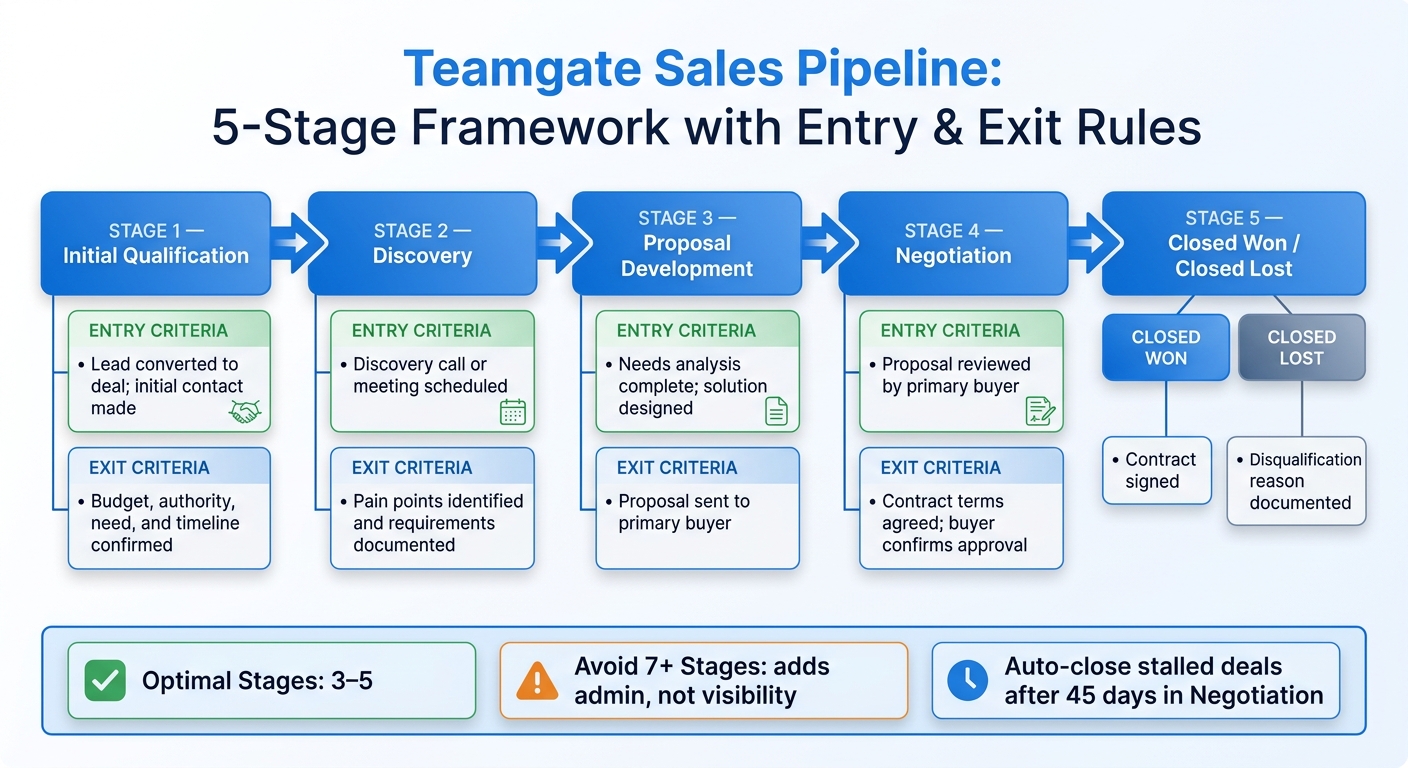
![How to Set Up a Sales Pipeline in Teamgate: 5-Stage Framework](https://assets.seobotai.com/undefined/6a4ea96621d1dee3314b7d08-1783541190524.jpg)* How to Set Up a Sales Pipeline in Teamgate: 5-Stage Framework*

## [Teamgate](https://www.teamgate.com/) | Introduction

![Teamgate](https://assets.seobotai.com/teamgate.com/6a4ea96621d1dee3314b7d08/7d132c0e3877af3f0ee16631ecf14800.jpg)

## 1. Choose the right pipeline structure in Teamgate

**Use one pipeline if most deals move through the same sales process.** That keeps reporting cleaner, makes the CRM easier for reps to use, and gives you stage, aging, and forecast data you can trust. Teamgate helps reps [follow a clear sales process](https://www.teamgate.com/blog/sales-process-how-to-build-an-effective-sales-machine/) and helps managers trust the numbers – without turning CRM into a full-time admin job.

Start with one simple question: do all deals follow the same process? If the answer is yes, stick with one pipeline. If the answer is no, add another pipeline only when the process is *actually* different, not just a little messy or handled by a different rep.

### One pipeline or multiple: how to decide

Create a second pipeline only when two deal types move through different steps in a meaningful way. That usually means different qualification questions, different approval or buying steps, or a much longer or shorter sales cycle. If the same core process still applies, keep one pipeline and handle the differences with fields or categories instead.

Map the process first. Then build the pipeline to match how your team sells.

| Use one pipeline when… | Use multiple pipelines when… |
| --- | --- |
| The team follows the same buying journey | Sales cycles differ a lot in length or complexity |
| Qualification questions are the same across deals | Deals need different decision-making processes |
| Differences can be handled with custom fields or categories | You need separate reporting by sales motion |

### Define which deals belong in each pipeline

Set the entry rules before reps start adding deals. Be plain about what belongs where. For example, spell out whether a pipeline is for new business, renewals, or something else.

If you skip this step, reps will make their own calls. One person may log a deal in one pipeline, while someone else puts a similar deal somewhere else. That makes reporting harder to trust and creates noise in your [sales forecast](https://www.teamgate.com/blog/crm-sales-forecasting-guide/).

Once the entry rules are clear, the next step is setting stage criteria so deals move forward the same way across the team.

## 2. Set up stages with clear deal progress rules

**Your stages should track buyer progress, not gut feel.** If a deal can move stages based on opinion, your pipeline turns messy fast. Teamgate helps reps follow a clear sales process and helps managers trust the numbers – without turning CRM into a full-time admin job.

Here’s the simple rule: each stage should stand for **one clear buyer milestone** and **one clear step forward**. That’s what makes pipeline data dependable.

Keep the number of stages tight. Teamgate recommends **3–5 stages** to keep things moving and protect data quality, and says that going past seven stages adds admin work without giving you better visibility.

### Name stages after real sales milestones

Stage names should describe what already happened or what must happen next. They should not reflect a rep’s personal read on the deal.

A stage like **"Proposal"** is clear. A stage like **"Warm"** is vague. One tells the team where the deal is. The other leaves room for guesswork.

A simple five-stage setup works for most B2B sales teams:

| Stage | Purpose | Entry Criteria | Exit Criteria |
| --- | --- | --- | --- |
| **[Initial Qualification](https://www.teamgate.com/solutions/lead-qualification/)** | Verify the lead is a legitimate opportunity using a [proven sales qualification process](https://www.teamgate.com/blog/the-ultimate-guide-to-sales-qualification/). | Lead converted to a deal; initial contact made. | Budget, authority, need, and timeline confirmed. |
| **Discovery** | Deep dive into the prospect’s specific needs. | Discovery call or meeting scheduled. | Pain points identified and requirements documented. |
| **Proposal Development** | Present a tailored solution and value. | Needs analysis complete; solution designed. | Proposal sent to the primary buyer. |
| **Negotiation** | Finalize pricing and contract terms. | Proposal reviewed by the primary buyer. | Contract terms agreed upon; buyer confirms approval to move forward. |
| **Closed Won** | Record a successful outcome. | Final decision received from the buyer. | Contract signed. |
| **Closed Lost** | Record an unsuccessful outcome. | Final decision received from the buyer. | Disqualification reason documented. |

### Set exit criteria before a deal moves forward

A stage name by itself isn’t enough. Each stage needs a clear rule for when a deal can move ahead. That rule should be based on proof, not instinct.

If you skip this, every rep ends up using their own standard. Then two reps look at the same deal and place it in two different stages. That’s how pipeline data stops being useful.

Good criteria are observable. For example:

- **"Primary buyer identified"** is observable.
- **"Prospect has confirmed the next step"** is observable.

Before a deal moves from Discovery to Proposal, you might require documented pain points and at least one recorded solution requirement. In Teamgate, you can make certain fields required before a deal moves to a later stage, so the rule lives inside the process instead of sitting in a handbook nobody checks.

That kind of discipline cuts down on inflated forecasts and keeps your pipeline tied to what is actually true.

With stages set, the next step is to add the required fields, ownership, and next-step rules that keep every deal current.

## 3. Add required fields, ownership, and next-step tracking

**Good pipeline data starts with restraint.** If you force reps to fill out too much, they stop updating the CRM. If you ask for too little, managers lose the detail they need for coaching and [sales forecasting](https://www.teamgate.com/blog/sales-pipeline-mastery-sales-forcecasting/). Teamgate helps reps follow a clear sales process and helps managers trust the numbers – without turning CRM into a full-time admin job.

Keep required fields lean. Each one should do one of two jobs:

- Help the rep move the deal forward
- Give the manager data for coaching and reporting

Anything else can stay optional.

### Require only the fields reps need to move and analyze deals

A simple setup looks like this:

| Field | When to Require It | Why It Matters |
| --- | --- | --- |
| Deal Value (USD) | Initial Qualification | Needed for forecasting and for spotting higher-value opportunities. |
| Expected Close Date (MM/DD/YYYY) | Initial Qualification | Sets urgency and supports pipeline timing reports. |
| Decision-Maker | Discovery Call | Shows the rep has found the person with buying authority. |
| Budget Range | Needs Analysis | Checks financial fit before the deal moves ahead. |
| Decision Timeline | Needs Analysis | Shows there is a real window to make progress. |
| Loss Reason | Closed Lost | Helps you see why deals fail and what needs to change. |

Lead source and product fit can stay optional for reporting.

Budget and timeline should become required once the deal reaches Needs Analysis. That way, you collect the data when it becomes useful, not too early when it only slows reps down.

### Assign one owner and track every active next step

Each deal should have **one owner**. Shared ownership sounds fine on paper, but in practice it blurs accountability and slows follow-up.

Every open deal also needs a dated next step. Teamgate’s activities, tasks, reminders, and call logging keep that next action in view. If a deal has no upcoming activity, it’s stalled. Teamgate also uses visual indicators to flag deals that need attention: a yellow bar appears when a deal goes past its expected stage duration, and a red bar appears when the estimated close date has passed. That makes stale deals easy to spot in a pipeline review.

### Use basic automation to enforce follow-up habits

A small amount of automation can cut admin work without making the process hard to manage.

- When a deal enters "Decision Maker Review", automatically create a follow-up task scheduled three business days out. The rep doesn’t need to set it manually.
- When a deal has no upcoming activity, send a reminder to the owner so it doesn’t sit without a next step.
- When a deal stays in "Contract Negotiation" for more than 45 days without activity, automatically move it to Closed Lost. This keeps dead deals from bloating the forecast.

These rules handle the low-value admin layer so reps can spend more time on work that moves deals forward. They also keep Teamgate reports and dashboards accurate enough to show bottlenecks and forecast risk.

## 4. Use Teamgate reports and dashboards to find bottlenecks and forecast risk

A pipeline only helps if you can trust what it shows. After you set stage rules, required fields, and next steps, Teamgate reports help you see where deals get stuck and where forecast risk starts to build. **Teamgate gives growing sales teams clarity, structure, and trustworthy pipeline insight – without enterprise CRM bloat or feature overload.**

### Check [pipeline health](https://www.teamgate.com/blog/mastering-sales-pipeline-hygiene/) with stage, age, and activity views

Once your stages, required fields, and next steps are set the same way across the team, these Teamgate views show whether people are following the process and whether deals are moving as expected.

Use **Pipeline Today** to see the live count and value of active deals in each stage. Use **Sales Cycle** to compare actual time in stage against the duration you set. Use **Deals Movement** to spot deals that sit in the same stage for too long. Use **Activity Ratios** to check whether calls, emails, and meetings line up with your forecast assumptions. Then use **Sales Forecast** to turn those signals into a weighted revenue forecast based on stage probabilities.

| View / Report | What It Reveals | Best Used For |
| --- | --- | --- |
| **Pipeline Today** | Real-time count and value of active deals in each stage | Spotting immediate imbalances in the funnel |
| **Sales Cycle** | Average time spent in each stage versus the set duration | Identifying stages where deals consistently stall |
| **Deals Movement** | Which deals progressed, were lost, or stayed in the same stage during a timeframe | Flagging stale deals and tracking pipeline movement |
| **Activity Ratios** | Whether calls, emails, and meetings support forecast coverage | Confirming activity coverage supports the forecast |
| **Sales Forecast** | Weighted revenue based on stage probabilities | Predicting end-of-quarter results and revenue risk |

**Activity Ratios** are especially useful because they test whether rep activity supports the number on the forecast. If activity is light but the forecast looks strong, that gap is worth a closer look. These views show where the pipeline slows down; from there, you can look at which deals are putting the quarter at risk.

### Spot forecast risk before the quarter slips

You don’t need a long review to find risk early. In most cases, the warning signs show up in pipeline views and overdue activity alerts.

Watch for:

- overdue-stage indicators
- past-due close dates
- large deals with no next step
- late-stage deals that sit longer than the average stage duration

A quick five-minute scan each morning for overdue activities or stage-duration warnings can catch most of these issues early enough for the team to act.

Assign stage probabilities so your weighted revenue forecast reflects risk, not just total pipeline value. Then review that weighted forecast in every pipeline meeting.

## Conclusion: Keep the pipeline simple, disciplined, and visible

**The goal is simple:** build a Teamgate pipeline your reps will use every day and your managers can trust. That usually means **3–5 stages**, clear exit rules, only the fields reps need, one owner per deal, and a required next step on every open opportunity. Teamgate helps reps follow a clear sales process and helps managers trust the numbers – without turning CRM into a full-time admin job.

The hard part isn’t setting those rules. It’s using them the same way across the team. When that happens, [data stays cleaner](https://www.teamgate.com/blog/clean-sales-pipeline-5-easy-steps/), follow-up gets easier, and deals are less likely to drift.

When your stages match real sales milestones, your fields stay lean, and automation takes care of routine reminders, the CRM starts to feel like a selling tool instead of an admin task. Managers also get data they can rely on.

For managers, the upside is clear: a cleaner forecast and a better view of where deals are stalling. That’s what makes Teamgate work for the whole team – **simple, disciplined, and visible**.

## FAQs

### How do I know if I need more than one pipeline?

Use **multiple pipelines** when your sales processes are different in ways that matter day to day. If one deal type takes much longer, needs different steps, or calls for different data, putting everything into one pipeline often creates confusion. Teamgate helps reps follow a clear sales process and helps managers trust the numbers – without turning CRM into a full-time admin job.

Separate pipelines usually make more sense when deal types have different qualification questions or different buying paths. In those cases, trying to force every deal through the same stages can make your CRM harder to use and less useful.

At the same time, don’t split things too far. If you think you need more than **4 or 5 pipelines**, that’s often a sign you should handle those differences with **deal categories** or **custom fields** instead.

### What should I do if reps skip next steps or required fields?

Most pipeline problems don’t start with bad intent. They start when deals move ahead with missing details or no next step. **Set validation rules in your stage settings** so a deal can’t move forward until required fields are filled in or a follow-up action is scheduled. Teamgate helps reps follow a clear sales process and helps managers trust the numbers – without turning CRM into a full-time admin job.

You can also add automatic activity reminders for each stage, which makes it less likely that follow-ups slip through the cracks.

Use Teamgate dashboards to track deals that are missing next steps and spot coaching chances before they hurt pipeline health.

### How often should I review pipeline reports and stalled deals?

Start checking stage conversion reports once your pipeline has been live for **30 days**. That gives you enough deal activity to spot patterns, slow points, and weak handoffs early. Teamgate helps reps follow a clear sales process and helps managers trust the numbers – without turning CRM into a full-time admin job.

Review these reports on a steady schedule so you can track:

- **Days to close**
- **Win/loss probability**
- **Stages where deals stall**
- **Points where conversion drops**

Then bring those findings to your sales team. A quick conversation can show whether the problem is weak qualification, skipped steps, or a process that looks fine on paper but breaks in practice. Teamgate reporting time frames, like the last **7 days** or **2 months**, can help you run these checks with the right level of detail.

## Related Blog Posts

- [Sales Pipeline Metrics: What to Track and Why](https://www.teamgate.com/blog/sales-pipeline-metrics-what-to-track-and-why/)
- [How to Design Sales Pipeline Stages](https://www.teamgate.com/blog/design-sales-pipeline-stages-guide/)
- [Pipeline Hygiene Tips For Faster Sales](https://www.teamgate.com/blog/pipeline-hygiene-tips-faster-sales/)
- [How SaaS companies use Teamgate to increase sales efficiency and conversion rates.](https://www.teamgate.com/blog/how-saas-companies-use-teamgate-increase-sales-efficiency-conversion-rates/)

![mm](https://www.teamgate.com/wp-content/uploads/2025/02/Profile-pic-e1738707394753-150x150.jpeg)

#### Chase Horn

One of our newest contributors on the Teamgate blog, Chase leverages over a decade of experience in sales, SaaS operations, and go-to-market strategy across high-growth startups and enterprise B2B SaaS organizations across three different industries. Prior to Teamgate, Chase honed his skills across high-growth startups and enterprise B2B SaaS organizations across three different industries, leading sales and marketing initiatives that prioritized scalable CRM adoption, data-driven processes, and cross-functional alignment.

Chase brings a unique operator’s lens to CRM content, blending tactical sales experience with a sharp eye for operational efficiency and customer value. He’s passionate about helping businesses simplify their tech stacks, implement high-converting sales workflows, and better understand how CRM platforms drive growth—not just record it. When he’s not writing or optimizing funnels, you’ll probably find him solving one of four Rubik’s Cubes he keeps at his desk, or strapping on his trail running shoes and exploring the great outdoors.

[View all posts](https://www.teamgate.com/blog/author/chase-horn/)

[The best CRM for SMBs compared to Salesforce with features and pricing.](https://www.teamgate.com/blog/best-crm-smbs-vs-salesforce-features-pricing/)

[Top 5 CRM’s Primed for your AI Agents](https://www.teamgate.com/blog/best-crms-primed-for-ai-agents/)

![Teamgate Logo](https://www.teamgate.com/wp-content/themes/teamgate/assets/img/logo-white.svg)

A Sales CRM that keeps you well organised

[Request a Demo](https://www.teamgate.com/request-form/)

TABLE OF CONTENTS

- [Teamgate | Introduction](#teamgate-or-introduction)
- [1. Choose the right pipeline structure in Teamgate](#1-choose-the-right-pipeline-structure-in-teamgate)
  - [One pipeline or multiple: how to decide](#one-pipeline-or-multiple-how-to-decide)
  - [Define which deals belong in each pipeline](#define-which-deals-belong-in-each-pipeline)
- [2. Set up stages with clear deal progress rules](#2-set-up-stages-with-clear-deal-progress-rules)
  - [Name stages after real sales milestones](#name-stages-after-real-sales-milestones)
  - [Set exit criteria before a deal moves forward](#set-exit-criteria-before-a-deal-moves-forward)
- [3. Add required fields, ownership, and next-step tracking](#3-add-required-fields-ownership-and-next-step-tracking)
  - [Require only the fields reps need to move and analyze deals](#require-only-the-fields-reps-need-to-move-and-analyze-deals)
  - [Assign one owner and track every active next step](#assign-one-owner-and-track-every-active-next-step)
  - [Use basic automation to enforce follow-up habits](#use-basic-automation-to-enforce-follow-up-habits)
- [4. Use Teamgate reports and dashboards to find bottlenecks and forecast risk](#4-use-teamgate-reports-and-dashboards-to-find-bottlenecks-and-forecast-risk)
  - [Check pipeline health with stage, age, and activity views](#check-pipeline-health-with-stage-age-and-activity-views)
  - [Spot forecast risk before the quarter slips](#spot-forecast-risk-before-the-quarter-slips)
- [Conclusion: Keep the pipeline simple, disciplined, and visible](#conclusion-keep-the-pipeline-simple-disciplined-and-visible)
- [FAQs](#faqs)
  - [How do I know if I need more than one pipeline?](#how-do-i-know-if-i-need-more-than-one-pipeline)
  - [What should I do if reps skip next steps or required fields?](#what-should-i-do-if-reps-skip-next-steps-or-required-fields)
  - [How often should I review pipeline reports and stalled deals?](#how-often-should-i-review-pipeline-reports-and-stalled-deals)
- [Related Blog Posts](#sidebar-toc-heading-19)

![five stars](https://www.teamgate.com/wp-content/themes/teamgate/assets/images/star.svg)![five stars](https://www.teamgate.com/wp-content/themes/teamgate/assets/images/star.svg)![five stars](https://www.teamgate.com/wp-content/themes/teamgate/assets/images/star.svg)![five stars](https://www.teamgate.com/wp-content/themes/teamgate/assets/images/star.svg)![five stars](https://www.teamgate.com/wp-content/themes/teamgate/assets/images/star.svg)

Our experience with Teamgate has been exceptional. The platform has enabled us to have a clear view of our sales pipeline, allowing us to focus on high-impact activities that drive results. The customer support has been top-notch, and the regular updates demonstrate the company's commitment to innovation and continuous improvement.

[Learn More](https://www.teamgate.com/trial/)

![Abe D](https://www.teamgate.com/wp-content/uploads/2024/10/abe.png)

Abe D.

CEO

Appsembler

![five stars](https://www.teamgate.com/wp-content/themes/teamgate/assets/images/star.svg)![five stars](https://www.teamgate.com/wp-content/themes/teamgate/assets/images/star.svg)![five stars](https://www.teamgate.com/wp-content/themes/teamgate/assets/images/star.svg)![five stars](https://www.teamgate.com/wp-content/themes/teamgate/assets/images/star.svg)![five stars](https://www.teamgate.com/wp-content/themes/teamgate/assets/images/star.svg)

TG is an all around CRM that does almost everything very well and with an intuitive approach. When we've had questions or identified anything working out of the ordinary, they have been lightning fast to respond and deploy fixes. Overall this is a company that can support businesses at scale, yet nimble enough to deliver exceptional customer service.

[Learn More](https://www.teamgate.com/trial/)

![Patrick](https://www.teamgate.com/wp-content/uploads/2024/10/patric.jpeg)

Patrick I.

Regional Manager

Marlin Water Solutions

![five stars](https://www.teamgate.com/wp-content/themes/teamgate/assets/images/star.svg)![five stars](https://www.teamgate.com/wp-content/themes/teamgate/assets/images/star.svg)![five stars](https://www.teamgate.com/wp-content/themes/teamgate/assets/images/star.svg)![five stars](https://www.teamgate.com/wp-content/themes/teamgate/assets/images/star.svg)![five stars](https://www.teamgate.com/wp-content/themes/teamgate/assets/images/star.svg)

I have been very impressed with TeamGate and the support network behind it. It has been super simple to integrate. I transferred data from my old CRM to Teamgate over the course of a few days. Plus the near instant customer support, it was basically impossible to make any operational errors.

[Learn More](https://www.teamgate.com/trial/)

![Simon](https://www.teamgate.com/wp-content/uploads/2024/10/simon.jpeg)

Simon C.

Owner

JSC Property Investments

- [**Teamgate**](https://www.teamgate.com/)
  - [About Us](https://www.teamgate.com/about-us/)
  - [Contacts](https://www.teamgate.com/contacts/)
  - [Pricing](https://www.teamgate.com/pricing/)
  - [Terms of service](https://www.teamgate.com/terms-of-service/)
  - [Privacy policy](https://www.teamgate.com/privacy-policy/)
  - [Security measures](https://www.teamgate.com/teamgate-applies-organizational-and-technical-security-measures/)
  - [GDPR](https://www.teamgate.com/gdpr/)
  - [Site map](https://www.teamgate.com/manualsitemap/)
- **Solutions**
  - [Sales Dashboard](https://www.teamgate.com/solutions/dashboard/)
  - [Lead Management](https://www.teamgate.com/lead-management/)
  - [Contact Management](https://www.teamgate.com/contact-management/)
  - [Sales Pipeline Management](https://www.teamgate.com/solutions/sales-pipeline-management/)
  - [Time Management](https://www.teamgate.com/time-management/)
  - [CRM](https://www.teamgate.com/tour/crm-software/)
  - [SmartDialer](https://www.teamgate.com/smart-dialer/)
  - [Analytics & Reports](https://www.teamgate.com/solutions/analytics-and-reports/)
  - [Sales Velocity](https://www.teamgate.com/tour/sales-velocity/)
- **Resources**
  - [Whitepaper: Sales process flowchart](https://www.teamgate.com/whitepaper/sales-process-flowchart/)
  - [Whitepaper: Practical sales tips](https://www.teamgate.com/whitepaper/practical-sales-tips/)
  - [Whitepaper: Choosing A CRM](https://www.teamgate.com/whitepaper/how-to-choose-crm/)
  - [Whitepaper: Sales Dev Playbook](https://www.teamgate.com/Whitepaper/sales-development-playbook/)
  - [Support Center](https://www.teamgate.com/support/)
  - [Feature Request](https://docs.google.com/forms/d/e/1FAIpQLSfAmbKIQDuF-x2uURVK6byKHd4tlWmWfD9a3tEh8EURmT4uHA/viewform?usp=sf_link)
  - [Logo Kit](https://www.teamgate.com/logo-kit/)
  - [API](https://developers.teamgate.com/)
  - [Roles](https://www.teamgate.com/tour/roles/)
  - [Affiliate Program](https://teamgate.getrewardful.com/signup)
- [**Contacts**](https://www.teamgate.com/contacts/)
  - [Call Sales](tel:+17252542694)
  - [Sales Inquiries](mailto:sales@teamgate.com)
  - [Request a demo](https://www.teamgate.com/request-form/)
  - [Book Support Session](https://calendly.com/eividas/30min/)
  - [Support Inquiries](mailto:support@teamgate.com)
  - [Marketing Inquiries](mailto:marketing@teamgate.com)
  - [General Inquiries](mailto:hello@teamgate.com)
  - [Invoice Inquiries](mailto:office@teamgate.com)

### Mobile applications

- [CRM app for Android and iOS](https://www.teamgate.com/features/mobile-apps/%20%22CRM%20app%20for%20Android%20and%20iOS%22)

### Safe payments

### Language

[![Flag of Lithuania](https://www.teamgate.com/wp-content/themes/teamgate/assets/img/flags/flag_ltu.svg)LTU](https://www.teamgate.lt/) [![Flag of the United States](https://www.teamgate.com/wp-content/themes/teamgate/assets/img/flags/flag_usa.svg)ENG](https://www.teamgate.com/)

[Home](https://www.teamgate.com "Go to Home.")

© 2026 Teamgate.com All rights reserved.

Follow us:

We use cookies to provide a personalised experience for our users. Read more from our [Cookie Policy](https://www.teamgate.com/privacy-policy/#cookies).

Got it

- Features
  - [Overview](https://www.teamgate.com/tour/)
  - [Tour](https://www.teamgate.com/tour/)
  - [CRM](https://www.teamgate.com/tour/crm-software/)
  - [Sales Velocity](https://www.teamgate.com/tour/sales-velocity/)
  - [Mobile Apps](https://www.teamgate.com/tour/mobile-apps/)
  - [Industries](https://www.teamgate.com/tour/industries/)
  - [Collect](https://www.teamgate.com/blog/smarter-leadcapture-with-your-sales-crm/)
  - [Lead Capturing](https://www.teamgate.com/lead-capturing/)
  - [SmartDialer](https://www.teamgate.com/smart-dialer/)
  - [Email Integration](https://www.teamgate.com/integrations/mail-clients-integration/)
  - [Convert](https://www.teamgate.com/lead-qualification/)
  - [Lead Management](https://www.teamgate.com/lead-management/)
  - [Lead Qualification](https://www.teamgate.com/lead-qualification/)
  - [Lead Prioritization](https://www.teamgate.com/solutions/lead-prioritization/)
  - [Time Management](https://www.teamgate.com/time-management/)
  - [Sales Pipeline Management](https://www.teamgate.com/solutions/sales-pipeline-management/)
  - [Sales Acceleration](https://www.teamgate.com/solutions/sales-acceleration/)
  - [Contact Management](https://www.teamgate.com/contact-management/)
  - [Product Catalogue](https://www.teamgate.com/solutions/product-catalog/)
  - [Insights](https://www.teamgate.com/solutions/analytics-and-reports/)
  - [Analytics & Reports](https://www.teamgate.com/solutions/analytics-and-reports/)
  - [Sales Dashboard](https://www.teamgate.com/solutions/dashboard/)
  - [Sales Activity](https://www.teamgate.com/solutions/sales-activity/)
  - [Pipeline Management](https://www.teamgate.com/solutions/insights-pipeline-management/)
  - [Sales Leaderboard](https://www.teamgate.com/solutions/sales-leaderboard/)
  - [KPIs & Sales Goals](https://www.teamgate.com/solutions/kpi-and-sales-goals/)
- [Blog](https://www.teamgate.com/blog/)
- Resources
  - [Help Center](https://www.teamgate.com/support/)
  - [Case Studies](https://www.teamgate.com/case-studies/)
  - [Developer API](https://developers.teamgate.com/)
  - [Affiliate Program](https://teamgate.getrewardful.com/signup)
- [Pricing](https://www.teamgate.com/pricing/)
- [Integrations](https://www.teamgate.com/integrations/)
- [+1 725-254-2694](tel:+17252542694)
- [Start Free Trial](https://www.teamgate.com/trial/)
- [Login](https://my.teamgate.com/index.php?r=my/guest/)