

Sales reps avoid CRMs because they feel like extra work, not because they’re unwilling to use them. When CRMs are disconnected from daily workflows, reps end up juggling tools, losing time to admin tasks, and skipping updates. The result? Inaccurate pipeline data, missed follow-ups, and stalled deals. Research shows sales reps spend 60–65% of their time on non-selling tasks, and only 47% of companies achieve high CRM adoption rates.
The solution is to integrate CRM into the daily sales process – making it part of how reps manage follow-ups, log activities, and advance deals in real-time. Tools like Teamgate CRM simplify this by syncing emails, calendars, and tasks directly into the CRM, turning it into a sales operating system rather than an admin burden. Teamgate helps reps follow a clear sales process and helps managers trust the numbers – without turning CRM into a full-time admin job.
Key takeaways:
- Sales reps lose productivity switching between disconnected tools, spending only 28–39% of their time selling.
- CRMs work best when they’re integrated into daily workflows, with real-time updates and automated logging.
- Features like task reminders, email/calendar sync, and visual pipelines keep reps focused and pipelines accurate.
Embedding CRM into daily routines ensures timely follow-ups, accurate sales forecasts, and better sales discipline. This guide explains how to achieve that using Teamgate CRM.
Why CRM Must Be Part of a Rep’s Daily Routine
The Problem: Too Much Admin, Too Many Disconnected Tools
Sales reps often juggle multiple tools – email, calendars, spreadsheets, notes apps, and dialers – that don’t work together. This lack of integration creates constant interruptions, pulling their focus away from selling. It’s not just an annoyance; it’s a drain on productivity.
Research from McKinsey reveals that reps spend just 28–39% of their time selling, with the rest lost to internal tasks, manual data entry, and admin work. Meanwhile, RingCentral reports that employees switch between apps up to 10 times per hour, with 69% losing an hour daily just navigating between tools. For a rep managing 40+ opportunities, this inefficiency quickly adds up.
HubSpot found that 40% of salespeople still rely on spreadsheets or email instead of CRM, leading to lower performance and reduced pipeline visibility compared to their peers.
The Fix: CRM as a Real-Time Sales Operating System
A CRM isn’t just a tool for reporting – it should be the central hub for all selling activities. By integrating CRM into daily workflows, reps can reduce admin burdens and stay focused on selling. Here’s how it works:
- Send follow-up emails directly from the CRM.
- Log call notes and update deal stages immediately after meetings.
- Use email and calendar integrations to automatically sync appointments, like a 2:00 PM ET discovery call or a 10:00 AM PT demo, with the opportunity timeline.
This approach transforms CRM from a static system of record into a dynamic system of action – a tool that helps reps decide their next steps in real time.
The Payoff: Better Forecasts, Follow-Ups, and Sales Discipline
When CRM becomes part of a rep’s daily routine, the benefits are undeniable:
- Improved forecast accuracy: Real-time updates ensure deal stages, close dates, and values are always current. Salesforce data shows that effective CRM use can lead to a 42% improvement in forecast accuracy, giving managers better visibility for planning headcount, budgets, and pipeline coverage.
- Stronger follow-up execution: A CRM task list ensures every deal has a defined next step with a clear due date. InsideSales research highlights that 50% of sales go to the vendor that responds first. By working from CRM reminders, reps avoid letting hot leads go cold.
- Consistent sales discipline: A shared pipeline with standardized stages and activity expectations keeps the team aligned. Reps can’t cherry-pick only the easiest deals, ensuring every opportunity gets attention. CSO Insights reports that organizations with high CRM adoption see win rates 10–15 percentage points higher than those with low adoption – proof that structured habits drive results.
sbb-itb-5772723
How to Build a Rep-Friendly Daily Workflow in Teamgate CRM
Streamlining your daily routine starts with integrating your CRM into every step of your workday. The goal isn’t about working harder – it’s about creating a structure that works for you. Begin each morning in Teamgate’s CRM dashboard, shifting your focus from email distractions to actionable priorities.
Start Each Day in the Visual Deal Pipeline
Kick off your day by opening Teamgate’s pipeline board view. This view provides an instant overview of all active deals, neatly organized by stages like New, Qualified, Proposal, and Negotiation. It’s a quick way to see where each deal stands without digging through spreadsheets or scattered notes.
Look for deals that are missing scheduled tasks or follow-ups to maintain sales pipeline hygiene. For example, a deal stuck in the "Proposal" stage without a planned next step is likely stalling. Use the pipeline board to filter deals by their last activity date. Focus on those untouched for five or more business days and schedule an immediate follow-up, whether it’s a call, email, or demo.
Here’s a practical approach for US-based SMB reps: prioritize deals set to close within the next seven days with values over $10,000. Also, flag any late-stage deals that haven’t had recent activity. This creates a focused, CRM-driven call list, helping you avoid a reactive day dictated by incoming emails.
Once your pipeline is updated, move on to your task list to organize your follow-ups.
Use Tasks, Activities, and Reminders as Your Daily Agenda
Let Teamgate’s Today and Overdue task views guide your daily workflow. These views act as your to-do list, showing every task tied to a deal or contact. Each task should have a clear action verb in its title (e.g., "Call Sarah about revised pricing") and include a due date and time in your local time zone.
To avoid losing momentum, adopt this habit: never close a deal record without setting up the next task. For instance, after completing a discovery call, immediately create a task like "Send recap email + schedule demo." This approach keeps deals moving forward and helps you spot pipeline gaps before they turn into missed opportunities. It also gives managers a clear view of your daily activities.
Connect Email and Calendar to Keep Everything in One Place
Syncing Gmail or Outlook with Teamgate ensures that all emails sent or received with contacts are automatically logged under the correct deal record. This makes it easy to access the full conversation history directly within the CRM, so you’re always prepared before every call.
When it comes to meetings, syncing your Google Calendar or Outlook Calendar ensures all scheduled events – whether discovery calls, demos, or renewal reviews – are visible in both systems. Schedule meetings directly from a contact or deal record in Teamgate to automatically link the event to the right opportunity. After each meeting, update the record and create the next task (e.g., "Send proposal by Friday, 10:00 a.m. EST").
This integrated setup – combining your pipeline board, task queue, email, and calendar – allows you to manage your entire day without jumping between apps. Instead of being a tool you update after the fact, Teamgate becomes the space where selling happens in real time.
How to Make Follow-Ups, Deal Updates, and Activity Logging a Daily Habit
Building consistent CRM habits is key to aligning your sales efforts with real-time pipeline insights. For Teamgate CRM users, this means feeding the system with accurate, timely information every day. By making these habits part of your routine, you’ll find managing deals becomes more structured and effective.
Assign a Next Step to Every Deal Before Moving On
Never leave a deal without scheduling its next step. After every interaction, update the deal with a specific action plan. Instead of vague notes, use clear, actionable tasks like: "Call Marcus to confirm budget approval – Thursday, 06/18/2026, 10:30 AM" or "Send revised proposal to IT team – tomorrow, 3:00 PM."
Why does this matter? Vague next steps don’t show up in task views, can’t be prioritized, and don’t help you track deal momentum. Teams that enforce a "no open deal without a future activity" rule often see forecast accuracy improve by 20–30 percentage points. In Teamgate CRM, tasks can be created directly from the deal record, automatically linking them to the right opportunity.
Keeping these next steps specific also ensures that deal stages stay relevant as circumstances change.
Keep Deal Stages Updated as Deals Progress
Your deal stages should reflect the current reality – not yesterday’s or last week’s. For instance, if you send a proposal, move the deal to the "Proposal" stage immediately. Delaying updates until the end of the day (or worse, during a cleanup session) can distort your pipeline, making it harder to maintain a clean sales pipeline. A deal sitting in "Negotiation" without activity for three weeks might look promising in the forecast but is likely stalled.
To avoid confusion, tie every stage to a clear trigger. For example:
- Discovery confirmed → Move to "Qualified"
- Proposal sent → Move to "Proposal"
- Verbal agreement received → Move to "Negotiation"
This approach ensures updates happen the moment there’s a change in the buyer’s status, keeping your pipeline accurate and actionable.
“According to a study from Aberdeen Group, companies with best-in-class CRM usage achieve 91% overall quota attainment versus 78% for all others.”
Use Teamgate’s Automation to Log Activities Automatically
Manual data entry is one of the biggest challenges for sales reps, with 35% citing it as their top CRM frustration, according to HubSpot research. This friction often leads to incomplete records and lost opportunities.
Teamgate CRM reduces this burden with automation. Here’s how:
- Email Sync: Connect Gmail or Outlook, and every email sent or received is automatically logged to the relevant contact and deal.
- Calendar Sync: Scheduled meetings are recorded as activities on the deal timeline.
- SmartDialer: Automatically logs call duration and outcomes.
- Workflow Automations: Triggers follow-up tasks when a deal stage changes or a new lead enters the pipeline.
By letting automation handle routine activity logging, you can focus on adding meaningful context – like objections raised, decision-maker dynamics, or commitments made. A deal record with an auto-logged call, a brief note, and a scheduled next step provides a solid foundation for future conversations and better forecasting.
Teamgate helps reps follow a clear sales process and helps managers trust the numbers – without turning CRM into a full-time admin job.
How Teamgate Automation Supports Sales Discipline and Pipeline Health
Teamgate’s automation tools help sales teams maintain discipline and keep their pipelines healthy by reducing manual tasks and ensuring follow-ups are handled consistently. With automated reminders, task creation, and lead prioritization, Teamgate turns routine processes into seamless habits.
Auto-Create Tasks and Reminders So Follow-Ups Don’t Fall Through
Missed follow-ups are often the reason deals stall – not a lack of effort or a poor pitch. Teamgate addresses this by automating task creation whenever critical events occur.
For instance:
- When a new lead enters the pipeline, Teamgate automatically assigns a "Call new lead" task to the lead owner, with a due date of one business day.
- If a deal moves to the "Proposal Sent" stage, a follow-up task – "Check in on proposal" – is created for three days later at 9:00 AM, complete with an in-app reminder.
- If a prospect’s email goes unanswered for 48 hours, a reminder is generated to ensure timely action.
This automation means sales reps start their day with a clear agenda in the Tasks/Activities section, rather than relying on memory or manual tracking. Managers and admins can configure these rules just once – such as triggering tasks based on deal stage changes – ensuring consistent follow-up across the team. According to research from InsideSales, leads contacted within five minutes are nine times more likely to qualify, making these automated processes a critical tool for proactive pipeline management.
Flag Stale and Neglected Deals Before They Go Cold
Beyond task automation, Teamgate’s filters and saved views help prevent deals from being forgotten. You can define "stale" deals based on inactivity – such as no logged activity for 14 days in mid-funnel stages or 30+ days in late-stage deals – and use saved filters to flag them.
For example:
- A "Stale deals this week" view highlights deals with overdue next steps or no recent activity.
- Reps can review these flagged deals weekly to either schedule a new follow-up, update the deal stage if offline progress has been made, or close the deal as lost if no further action is possible.
Managers can enhance their oversight by adding columns like "Days in stage" and "Last contact date" to their pipeline views. This helps them identify patterns or systemic issues early, allowing for timely coaching and adjustments.
Use Lead Scoring to Focus Rep Time on the Right Prospects
Not all leads are created equal, and lead scoring ensures reps focus on the most promising opportunities. With Teamgate, admins can set up scoring rules based on engagement and fit. For example:
- +10 points for opening an email three times
- +15 points for clicking a pricing link
- +20 points for having a key decision-making title
- +25 points for matching a target company profile
Leads are then categorized as Hot (80–100 points), Warm (50–79 points), or Cold (below 50 points). Reps can prioritize their day by filtering for Hot and Warm leads with recent activity, ensuring their time is spent on the most likely conversions.
For example, a small US services firm tailored its scoring system around website engagement and job titles. This shift resulted in 30% more rep time spent on Hot leads and a 25% reduction in time spent on low-fit prospects, leading to a higher close rate for qualified opportunities. In high-volume sales environments, this kind of focus can be the difference between hitting quotas consistently and staying busy without meaningful results.
How Managers Can Drive Consistent CRM Use Without Micromanaging
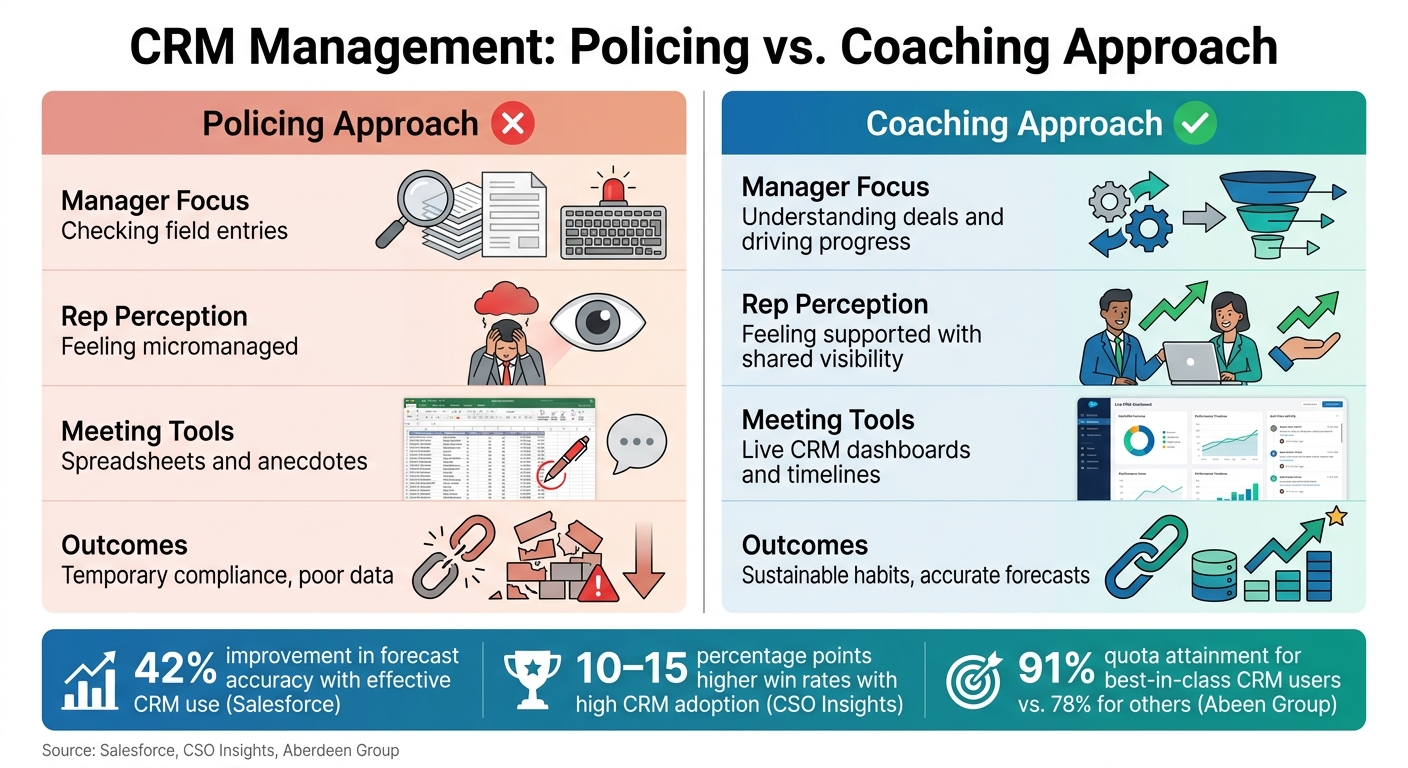
CRM Policing vs. Coaching: Management Styles That Impact Sales Results
To ensure the success of automation tools like stale deal flags and lead scoring, managers must create an environment where using Teamgate consistently becomes second nature for the team. Instead of chasing reps for updates, focus on building habits and systems that naturally integrate CRM use into daily workflows. These practices align with the automation strategies discussed earlier and help managers avoid micromanagement.
Set Clear Standards for What Reps Must Log and Update
Unclear expectations lead to uneven data. A straightforward solution? Define a concise list of non-negotiable tasks for your team. Here’s a practical example:
- Log every call, meeting, and significant email on the same day.
- Ensure all open deals include the current stage, USD value, expected close date (MM/DD/YYYY), and a next step with a deadline.
- Prevent deals from staying in the same stage for more than 14 days without action.
- Reach out to new leads within 24 hours of their addition to the pipeline.
Keep the list short – around 5 to 7 key points – to encourage adherence. Create a one-page "CRM Operating Rules" document and review it during onboarding and team meetings. Reinforce these rules within Teamgate by setting up required fields and standardized activity types (e.g., Cold Call, Discovery Call, Demo, Proposal Sent). This ensures that maintaining clean data becomes the easiest path forward, requiring minimal effort from your team.
Run Pipeline Reviews Directly Inside Teamgate
Once daily CRM habits are in place, managers can further encourage usage by relying on live data during pipeline reviews. Instead of working from outdated spreadsheets, conduct meetings directly within Teamgate. This practice shows reps that clean, up-to-date data simplifies discussions and keeps meetings efficient.
For example, a weekly pipeline review might involve filtering the sales pipeline board by deals closing this month and sorting them by value. For each deal, review its current stage, time spent in that stage, last activity, and the next planned step. Ask pointed questions like, "What changed since last week? What’s the next action, and when will it happen?" Update the deal’s information live during the discussion, ensuring the CRM stays current without additional follow-up work.
Helpful views to prepare include:
- A "Closing This Month" filter sorted by deal value.
- A "Stuck Deals" view showing deals with no activity for 14+ days.
- An activity summary by rep for the past 7 to 30 days.
By the end of the meeting, Teamgate will already reflect the latest updates, reinforcing its role as the team’s source of truth.
Use Reports to Spot Where Reps Need Support
Consistent logging and live reviews sustain productivity, but real-time reporting allows managers to identify specific areas where reps need help. Teamgate’s activity and pipeline reports don’t just track what’s happening – they highlight where challenges arise.
For instance:
- A rep with low call volume may need guidance on prospecting or time management.
- A rep losing deals between Discovery and Proposal stages might benefit from training on qualification or presenting value.
- If a rep’s average time-to-close is significantly longer than their peers, their deal history might reveal where momentum is stalling.
Pipeline coverage reports – comparing total pipeline value to quota (typically 3–4x in USD) – can also flag reps who need more top-of-funnel activity. This approach shifts the focus from generic oversight to actionable coaching.
Here’s a comparison of two management styles:
| Aspect | Policing Approach | Coaching Approach |
|---|---|---|
| Manager focus | Checking field entries | Understanding deals and driving progress |
| Rep perception | Feeling micromanaged | Feeling supported with shared visibility |
| Meeting tools | Spreadsheets and anecdotes | Live CRM dashboards and timelines |
| Outcomes | Temporary compliance, poor data | Sustainable habits, accurate forecasts |
Walking into a 1:1 armed with data – _“Your activity volume is solid, but conversions drop after demos; let’s review a few deals together” – _is far more effective than vague reminders to log more calls. This targeted coaching is only possible when your pipeline data is reliable, which is why setting clear standards upfront is so crucial.
Conclusion: Make CRM the Center of How Your Team Sells Every Day
Integrating CRM into your team’s daily sales habits can lead to noticeable improvements in pipeline accuracy and overall sales efficiency. A CRM works best when it’s a natural part of the selling process – not an afterthought. Starting each day by reviewing the pipeline, updating deal stages in real time, and syncing emails and calendars automatically creates a smoother workflow. This ensures pipelines reflect reality, forecasts remain reliable for executive discussions, and follow-ups happen on time, not by chance.
CRM struggles often stem from poor habits, not the tool itself. Reps tend to skip updates when the CRM feels like extra work rather than a helpful resource. Teamgate changes this dynamic by making CRM an effortless part of the sales routine. Features like auto-created tasks, built-in reminders, email and calendar syncing, and a visual pipeline tailored to daily priorities help reps focus on selling instead of administrative tasks.
For sales reps, the key is to start each day by opening the pipeline, updating deals, and scheduling next steps as a standard practice. For managers, conducting live pipeline reviews in Teamgate and relying on automation for reminders allows more time for coaching instead of chasing updates. These habits, as discussed throughout this guide, build the foundation for accurate forecasts and reports, timely follow-ups, and a disciplined approach to sales.
Clean data, timely follow-ups, and reliable revenue don’t require working harder. They come from embedding CRM into the daily rhythm of every rep’s workflow, creating a streamlined, effective process that drives consistent results. Teamgate helps make this possible by offering clarity, structure, and tools that reps will actually use.
FAQs
What’s the fastest way to make CRM part of my daily routine?
The fastest way to make Teamgate CRM a part of your daily workflow is to use it as the core of your sales operations. Start by syncing tools like your email and Google Calendar to ensure appointments are logged automatically. Leverage the CRM’s task list to stay on top of priorities, and set up automation for repetitive tasks such as follow-ups. This approach minimizes manual effort, keeps you organized, and allows you to focus more on closing deals.
Which sales activities should be logged automatically vs. manually?
To maintain productivity and ensure accurate pipeline data, it’s essential to strike the right balance between automation and manual input.
- Automation: Let Teamgate handle repetitive tasks like logging emails, meetings, and calls by syncing it with your email, calendar, and calling tools. Automation can also take care of creating leads and triggering follow-up tasks, saving you time and effort.
- Manual Input: Reserve manual updates for tasks that require human judgment, such as recording discovery notes, qualifying leads, or adding thoughtful insights that can guide future interactions.
This balance helps you stay efficient while keeping your CRM data meaningful.
How can managers boost CRM usage without micromanaging reps?
Managers can boost CRM adoption by framing it as a tool for driving sales success, not just a box to check. Show reps how keeping accurate data can directly improve their performance and results. Incorporate CRM dashboards into team meetings to make it a regular part of their workflow. In Teamgate, automate repetitive tasks and outline clear next steps to streamline daily routines, cut down on admin work, and seamlessly integrate the CRM into their process.






