Designed for Growth: Scale your recurring revenue with the new Teamgate SaaS CRM. Explore SaaS Features →

Book a demo today and save 50% off your first month, or 20% off your first year.

Get a free sales audit to uncover hidden revenue opportunities!

In this article, we’ll debunk some of the most common myths surrounding Customer Relationship Management (CRM) systems and their use in the sales process. We’ll address misconceptions about CRMs being too complicated, expensive, or only suitable for large corporations, and shed light on the true benefits and capabilities of modern CRM software.

Key Takeaways:

  • CRMs are diverse and tailored to fit different business needs; no two CRMs are exactly the same.
  • CRMs are not just for giant corporations; they are scalable and can benefit businesses of all sizes.
  • CRM systems are not just software; they represent a core philosophy behind a holistic sales strategy.
  • Implementing and learning a CRM doesn’t necessarily take a long time, especially with user-friendly options available.
  • Data security is a top priority for reputable CRM providers, ensuring the safety and integrity of your business data.

The mythology concerning sales

At Teamgate we’ve heard a lot of myths regarding CRMs and the art of selling. The longer we’re in this business the more we notice how these myths seem to grow and proliferate. And when it comes to selling, we’ve learned that myths can damage your business, very seriously.

Here’s the background we’ve discovered. Myths – just like diseases – can be contagious. And dangerous, especially to your intelligence.

For example: Bats can see. Angry bulls don’t particularly care whether the shirt you’re wearing is green, or red. A vomitorium was not a place where Romans went to be sick. And yes, lighting does strike the same place twice – New York’s Empire State building gets hit over 100 times every year. See what I mean?

It’s the same in the world of sales, myths are everywhere.

For some reason sales CRM software has spawned a hell of a lot more myths than any other area of the selling process. Is that just because people are afraid of change, and making excuses to avoid that change causes myths to be born?

At Teamgate we’re always curious, so let’s take a closer look.

Mythbusting attitudes

Myths surrounding sales CRMs are keeping a lot of smart salespeople rooted in the dark ages, and robbing them of the chance to sell smarter.

Some sales professionals have the notion that CRMs are all the same, that they are expensive, that will make life more difficult, that they impinge on personal lives by monitoring employees, and, some doggedly believe that the old ways are still the best ways.

If the dark ages are where you want your sales team to be – trapped in mounds of paperwork; keeping track of contacts and meetings in your head; managing endless incomprehensible spreadsheets; and missing vital calls and meetings – by all means listen to those myths.

But, if you want to stay at the top of the selling game we’ve compiled a list of some of the myths you should avoid like the plague.

1. One CRM is like another

No, they are not! CRMs are different – and diverse – for one simple reason; no two companies are the same.

With that in mind, there is no one CRM which can fit the needs of every single company. There are as many influencing variables as there are CRMs on the vendor’s shelves; price, features, mobility, in-house, cloud-based, etc.

That’s why when setting out on the path to choose a CRM for your business, you really need to understand the problems which you want to resolve. Only then can you choose the right CRM, suited for your exact needs, and capable of resolving your problems.

2. CRMs are only for giant corporations

Yeah, sure! And Einstein flunked math…

A really top-end CRM like Teamgate – along with many others, are designed with user scalability in mind. Businesses tend to start small, successful ones grow, and really successful ones can even turn into giant corporations, but the CRM employed from day one should be able to handle that growth seamlessly.

The idea of choosing a CRM, “because everyone else is using it”, or “because it’s cheap” is a certain path to disaster. To put it simply, choose the CRM solution that’s right for your business, answering all your questions, and able to scale along with your business.

3. Only sales people use CRMs

OK, so let’s go back to the previous topic for a moment. If your sales process is a holistic one – involving all departments of your business in the sales process – then your CRM is part of that journey for everyone involved in that process.

Not just sales, but marketing and customer excellence teams can reap the rewards of really smartly designed CRM software.

Every department involved in the sales process need to be closely aligned, with your CRM as the backbone of that alignment.

4. CRM is nothing more than software

Wash your mouth out with soap! CRM (Customer Relationship Management) is not just software, CRM is the core philosophy behind your whole sales strategy – or at least it should be.

The idea behind CRM is the notion that selling alone is no longer good enough, the process should be a journey entered into by the buyer and the seller, and one which offers positive returns and benefits to both parties.

The CRM business strategy endeavours to increase sales, at the same time as optimising customer value and satisfaction. The customer has needs and concerns, and the job of your sales team is to listen, identify, and resolve those needs. CRM software, like Teamgate, is an integral part of that CRM philosophy.

5. A CRM is going to take forever to implement and learn – and it’s going to be expensive

No new process is ever so easy that it doesn’t take a little getting used to. And that stands for CRMs too. However, if you’ve done your homework astutely, then all of your questions concerning implementation should have already been answered.

For example, Teamgate provide a dedicated customer experience to make your initial choice, and your transition as smooth as possible. They even offer advice on the problems you may face when onboarding a CRM for the first time; staff reaction and acceptance, training courses, one-to-one Q&A sessions, and any other queries which may arise.

And as to the question of expense, with three different levels of functionality to choose from, prices are suited to match your individual needs, and the size of your company.

(And by the way, the Great Wall of China is not visible with the naked eye from the surface of the moon)

6. A CRM takes too much time to input all that sales data

The myths don’t come much bigger than this one (except maybe the one which says that George Washington had wooden teeth).

Time-saving is the one main feature of a great CRM. With just such a CRM system in place, you can capture already optimised leads, reach your sales targets, monitor employee productivity, analyse sales patterns and produce detailed reports, far easier, and faster than ever before.

Using nothing more than your website, and your CRM, you can automatically source and gather only those valuable leads which are important to you. Once you’ve found those leads they can be collected, stored, and organised just how you want them, within your CRM.

Plus, every stage of the sales pipeline is far easier managed from within your CRM; creating events, scheduling meetings, generating and analysing email campaigns, global searching, scoring leads, setting sales goals, and so much more.

(Oh, by the way – George Washington’s teeth were made from gold, hippopotamus ivory, lead and animal teeth)

7. I’ll never learn that – CRMs are too complicated

Think about the process behind riding a bicycle. Complicated right? But somehow, you learned how to do it.

Once again, if you’ve chosen the wrong CRM for your business, this myth might, in fact, be true. A badly designed CRM can have you feeling right out of your league, an in the water way over your head.

But if you’ve chosen a CRM like Teamgate let me congratulate you now. Teamgate sales CRM has been awarded – get this – the Number 1 spot on the Capterra Top 20 Most User-Friendly CRM Software Report, two years in a row. Enough said.

8. Look out! CRMs have a lot of hidden costs once you’re hooked

Let’s make this one short. If you’ve chosen badly – whether it’s a CRM, a hot-dog, or a new car – there may always be hidden costs. So, just make sure you’ve asked all the right questions, from all the right people, and are satisfied with the answers.

9. CRM is like a spy watching over the company employees

Yes, a CRM does track sales people’s activities. It can even monitor if sales reps are making or flunking their sales targets. They can also analyse exactly where mistakes are being made and sales are being lost.

But, here’s the good news, they can also detail how the mistakes might be resolved, and help reduce the number of lost sales. Does that mean more money for you?

An intelligent CRM – like Teamgate – provides sales managers, and sales teams, quality sales insights with accurate, up-to-the-minute sales forecasting abilities. This remarkable power, built up from past sales experiences, helps you to shorten sales cycles, increase revenue, and remove all those time-consuming tasks from your sales process, giving you more time to do what you do best – sell

10. Everyone will steal your data from a CRM

If you’ve bought your CRM for $5 from a guy in a dark alleyway, there’s a very good chance that your data will be stolen.

Good CRM suppliers realise the importance and integrity of your business data and are constantly engaged in maintaining and evolving security features.

Teamgate is one such company, with a dedicated team in place ensuring the integrity and security of the lifeblood of your business; your data.

With data being stored in multiple highly secure environments, with a consistent uptime of over 99.5%, in the highly unlikely event of a major security incident, your data will be still available from another secure server location.

Data backups are performed daily – one or two times – depending on your chosen CRM plan, and all data is backed up for a minimum of one week, meaning total restoration is almost always possible.

Teamgate also provides and maintain highly stable and secure connections; firewalls and intruder detection systems; system integrity protection; and performs ever-evolving updates to the operating system.
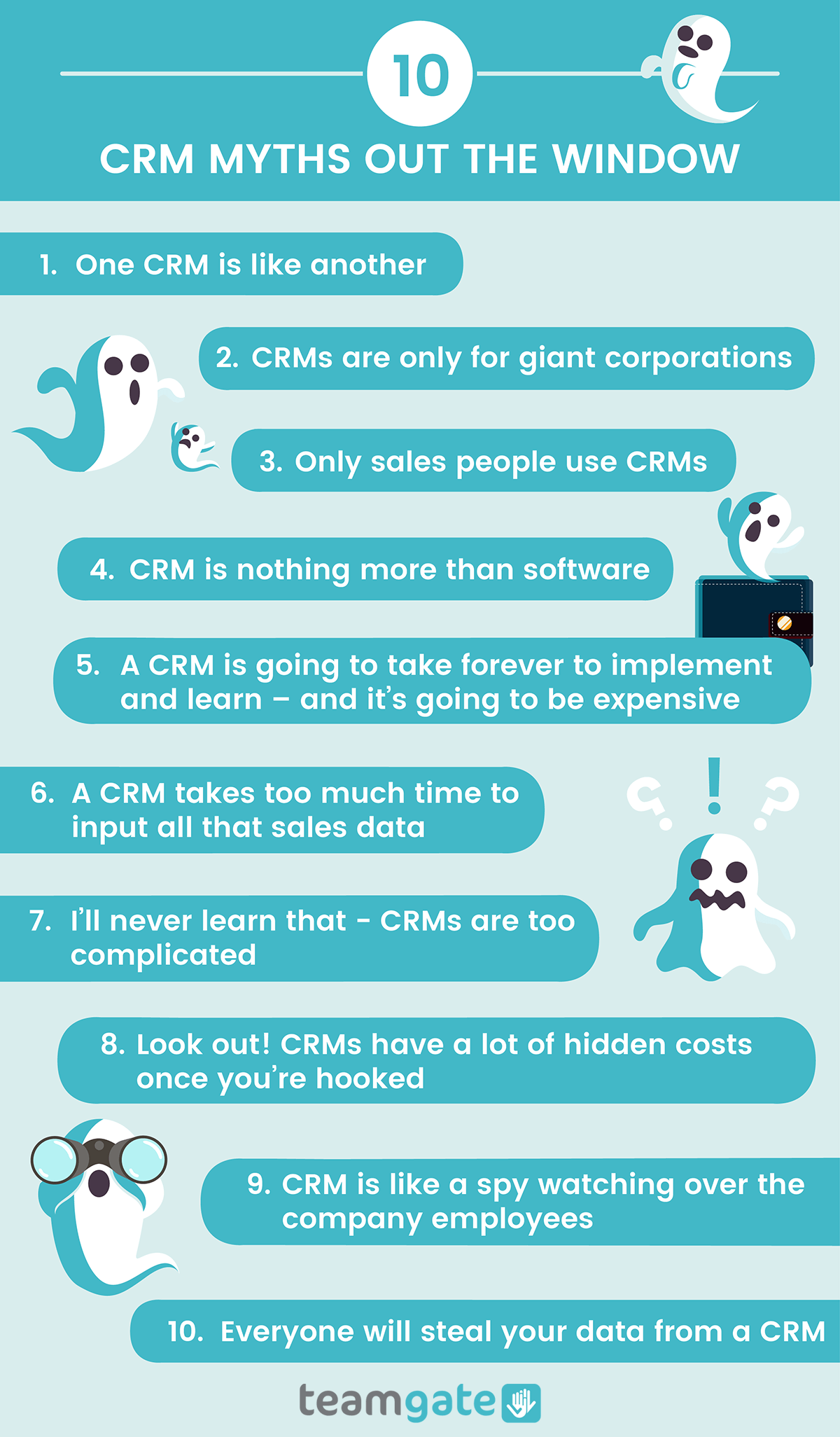
CRM Myths Debunked Infographic by Teamgate

So, myth busted. Your data is safe with Teamgate.

The myths are dead, long live the truth

Now that we’ve put paid to many common CRM myths, here’s a couple of truths to keep you on your toes:

  • No, your new CRM won’t turn your startup business into a global phenomenon overnight – but it will set you on the right path.
  • Make sure you really question why your business needs a CRM, and investigate the problems which you need to resolve. If you know the questions, you’ll find it a lot easier to discover the CRM that’s just right for you.
  • Your CRM software is just a part of an overall business strategy. Make sure that your CRM is fully aligned with that strategy.
  • The most expensive CRM isn’t necessarily the best CRM.
  • And finally, don’t believe everything you hear. If you need advice, ask the experts like Teamgate, a free trial, or online tutorial will help answer all your questions. 

GET READY TO OWN YOUR WORKDAY

with the most user-friendly CRM on the market.

Start Free 14-Day Trial

Painless setup, no credit card required

In this article, we’ll emphasize the importance of email subject lines and preheader text in determining the success of your email marketing campaigns. We’ll dive into the research findings on how these elements influence email open rates and explore practical tips and examples to craft compelling subject lines and preheaders that resonate with your audience.

Key Takeaways:

  • A staggering 33% of email recipients decide to open an email based solely on its subject line.
  • Preheader text, often overlooked, plays a crucial role in supporting the subject line and giving a glimpse of the email’s content.
  • It’s essential to view the subject line and preheader text as a cohesive unit, working together to engage the recipient.
  • The length and clarity of both elements are vital, with their visibility varying based on the device and email client.
  • Avoiding common mistakes, such as leaving the preheader text empty or using backend coding text, can significantly improve the effectiveness of your emails.

Are you overlooking your subject lines and preheader text?

Research from Convince & Convert revealed that “33% of email recipients decide whether or not to open an email based on the subject line alone.” Yes, that’s the impact a mere subject line can have on your email open rates. I cannot stress enough how crucial it is to create tempting subject lines to get those emails opened.

How do you create one, and what are the basics of writing that oh-so-triggering subject lines? According to Mailchimp, “the most effective email subject lines are brief, descriptive, and include a compelling reason for the user to click ‘open”.  That being said, subject lines are just not the sole warriors who would get your message delivered and registered in the subscribers’ minds. There’s more to it.

For a long time, email marketers have been yelling their lungs out in favor of good subject lines, but the preheader text is equally important. It’s been overshadowed for a long time but now times are about to change. In case you are not aware, a preheader is a text that follows the subject line when you view an email in your inbox. Its primary purpose is to support the subject line’s content and give you an idea of what your email body contains. 

This is how the preheader text appears when you view your emails on a laptop. Notice it’s kind of an explanation of the subject line to strengthen its messaging further.

And this is how the same preheader text looks while seeing an unopened email in your smartphone.

Having cleared the air around preheader text and subject line, we’ll now see why you should use preheader text, how to impact preheader text and subject line, and how to use both these crucial elements in sync to boost the CTRs and success of your email marketing campaigns.

See the big (or whole) picture

The most common mistakes email marketers make is considering preheader text and subject lines as different entities. Don’t do that. You should always think and create your email’s preheader in perfect harmony with its subject line, and vice versa. These two texts are closely placed, and they together make more impact than just fighting the battle alone. A well-paired team of preheader text and the subject line would definitely pique the subscriber’s curiosity and get your mails actioned upon.  

For instance, here is an excellent example of how you can team up both these elements and use them to complete and complement each other. Subscribers are bound to start a conversation on seeing such texts. So why not leverage them to the most?

Subject Line: Do you like it shirty?

Preheader: We bet you do! Here’re 6 summer shirt icons you need to know about

If you are still not clear on maximizing the impact through preheader text and subject line, then seeking professional services like Salesforce Marketing Cloud email specialists or Mailchimp email experts would save the day for you. Not just preheaders or subject lines, they can even transform the content of your entire email marketing strategy.

Keep it short 

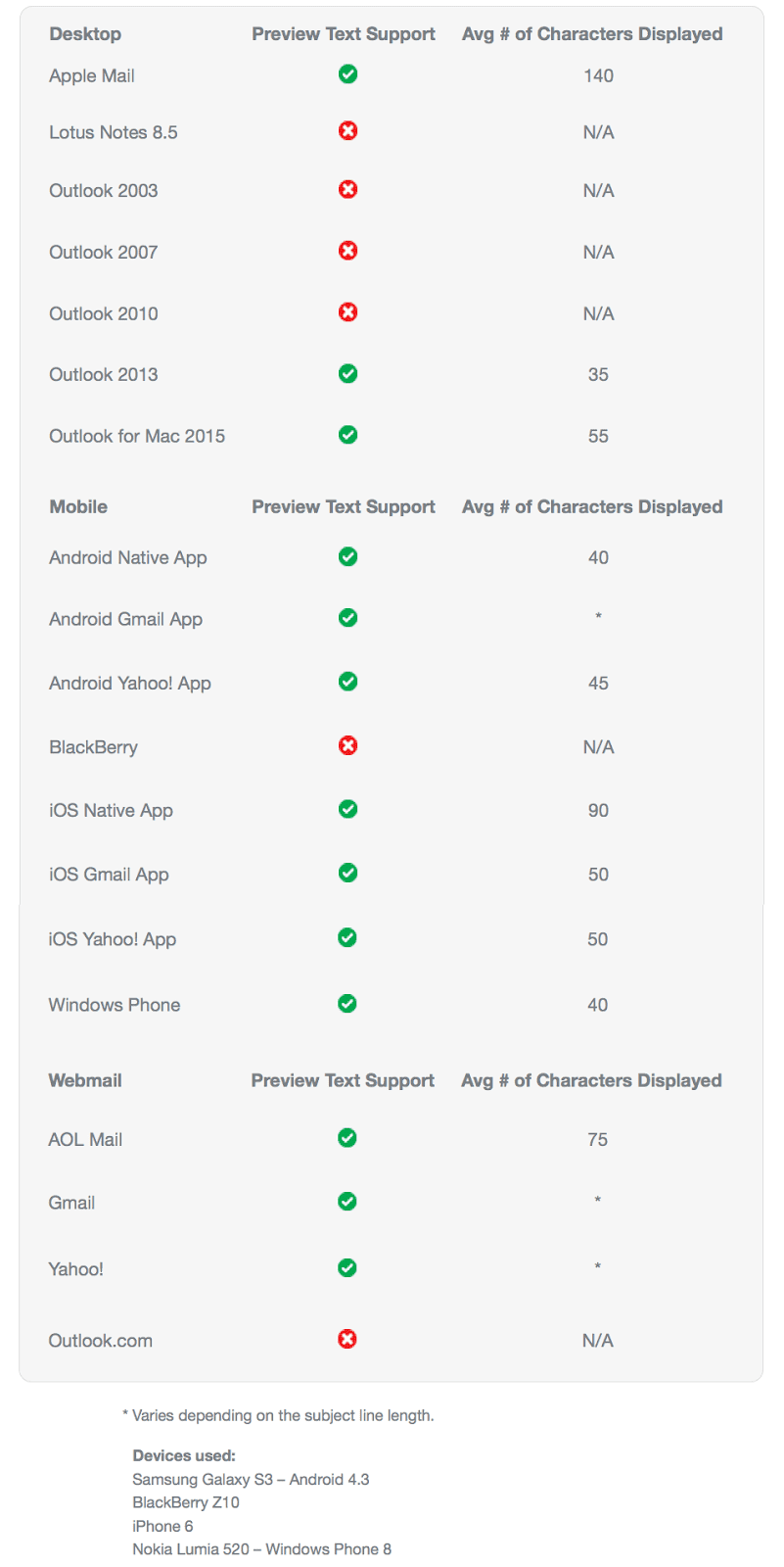
How much length of your preheader or your subject line is visible to a subscriber depends mostly on which device and email client they are using. For a desktop, the length of the preheader text visible depends on how wide a subscriber has set up their browser window and their email inbox customizations.

How long should it be?

Here is a compilation created by Litmus depicting the character limits for preheader text by some of those most popular email clients.


Here is a perfect example of a short yet contextual subject line and preheader text that doesn’t reveal the message’s content right away. Please observe how the brand has leveraged the text’s length by making it distinguished in the inbox.

Subject line: Beach, please.

Preheader text: Meet the JT Beach Jogger. Crisp, lightweight, and built for lazy days and epic adventures.

Can’t wrap your head around these preheader texts and subject lines? Using tried and tested email templates like Marketo email templates or Salesforce email templates is the best bet for you. You can leverage their expertise for your entire email marketing campaign.

You need to keep your preheader text concise and crisp but make sure it doesn’t appear vague or empty. Here is a classic example from Adidas that I handpicked from my inbox to show how an attempt to save some content can ruin your brand’s messaging and leave the subscribers wondering.

Cross-check

Another major mistake that email marketers make is to insert no preheader text at all. Sometimes, rather than a lucrative text, all your emails have is some coding text from the backend, which kind of dulls the impression of your brand. Not only does it exhibit the ‘carelessness’ towards your subscribers, but it would also make them lose interest in your future email. Here’s an example of what I am talking about. So, make sure you cross-check everything before jumping on that send button.

Wrapping Up

Subject lines and mostly preheader text might look a small part of the email marketing landscape, but it’s the small things that matter, as they say. So, follow these tips to keep your subscribers engaged.    

In this article, you’ll discover essential strategies to manage your work email effectively. Learn to streamline your communications, improve productivity, and maintain organization with expert tips for managing incoming messages, creating efficient email threads, and utilizing helpful tools like labels and canned responses.

Key Takeaways:

  1. Forwarding all your important emails to one inbox can improve focus and productivity.
  2. Cleaning up your inbox regularly helps maintain organization and saves time.
  3. Employing the ‘touch it once’ rule ensures emails do not clutter your inbox.
  4. Utilizing stars and labels can help you mark and organize important messages effectively.
  5. Implementing canned responses can save time when dealing with recurrent emails.

Email is an essential communication tool that every business and professional needs. Compared to other means of communication, sending an email is fast, convenient, and less intrusive. That way, it enables you to communicate with customers and clients and even set up meetings without having to spend much time making phone calls. 

As much as a work email can be excellent in helping you get things done, it can also hinder productivity if it’s mismanaged. Research shows that reading and answering emails can be time-consuming if you are not organized, which can leave you confused and even forgetting to perform other vital tasks. In this article, we look at some of the best tips that you can use to help manage your work email more professionally and effectively. That way, you can always stay organized and spend less time on your email, thus boosting your productivity significantly. Therefore, keep reading to find out.

1. Forward Your Messages To One Inbox

Most of the time, especially when dealing with both work and personal emails, you often receive messages that require immediate attention. During such times, you might find yourself checking different inboxes in a row, trying to monitor them for updates, which can negatively affect your productivity. The good news is that there is something you can do to help you avoid this situation.

Avoid checking other inboxes except for your work email when performing official tasks. That way, your sale promotions, updates, and social media notifications can’t disrupt your attention when working. However, if some clients message you through your personal email address, then do a setup that will be forwarding all those vital emails to your work email. That way, you get all important emails in one inbox, thus enabling you to maintain your productivity and focus at work.

To set up automatic email forwarding, go to the settings of the email account you’ll be forwarding messages from and open the Forwarding and POP/IMAP tab. Add the email address you want to be receiving those emails, and a confirmation email will be sent there. Additionally, you can instruct your source email account on what to do after forwarding those messages. You can choose to either keep or archive them.

2. Clean Up Your Inbox

tips to manage work inbox

You probably come across a lot of articles advising on how to manage new emails effectively when you are busy searching for some dissertation writing services. Most of these articles offer great advice, but what should you do with the emails already in your inbox? If you use your work email a lot and receive many emails, then you probably have messages that you’ve never deleted or even archived. This situation can force you to go through your emails one by one trying to find those to delete, which can consume a lot of time. 

You don’t have to do that. If you have many unread or unarchived messages, you have to sort them up first. Most of these emails are usually unimportant, especially if you haven’t even bothered to read them or review their details for a few months. Most email accounts, such as Gmail, allow you to find all emails that meet a certain criteria. So, you can search for emails that you received about one or two months ago. Enter “older_than:1m”, in the search bar. 1m means one month, but you can replace it with 2m if you want to find messages that are two months old. Doing this provides all those emails. At the top of the search result, you get the option of either archiving or deleting all these messages leaving your inbox clean and organized.

3. Touch It Only Once Email Management Rule

tips to manage work inbox

Mostly, you usually find yourself reading an email then doing nothing about it. Even if you’ll respond to that email, it still remains hanging in your inbox. There is a rule called touch it once, that you can use in such cases. This rule states that when you open an email, you MUST do something about it. So, after opening your work email and responding to new messages, you must either archive or delete them. That way, those emails do not clutter your inbox.

If the message is a task for you to work on, you should put it down somewhere else like into your to-do list, put a To-Do label on it, set up a follow-up then archive it. For cases when you have already replied to the email, you might need to go back to your inbox to archive the email. Sometimes, you might forget to do that if you had other pressing tasks to work on. To avoid that email from remaining in your inbox, use the Gmail archiving tool. This tool allows you to enable the send and archive feature in the General tab of your settings. That way, you always get the Send and Archive button at the bottom every time you are replying to an email.

4. Use Stars To Mark Important Messages

There are different ways that you can use to remind you to get back to a specific email. You can mark an email as unread, so it stays in your inbox, but you’d have to do that every time you open that email. The best trick to use is star that message. You can do so by clicking at the star symbol near the sender’s name if you are using Gmail. That way, you can always find that email faster in the starred messages. Normally, you are allowed to use one star. However, you can enable additional stars and other symbols to mark that email to help remember or identify it easily.

You can also use follow-ups in NetHunt CRM as they are more similar to the Gmail stars. These follow-ups are better in organizing emails and records compared to Gmail stars. NetHunt CRM follow-ups allow you to set a color-coded flag on your emails, then create a follow-up for them. Also, you can create specific dates for these follow-ups allowing you to manage your tasks better and respond to emails as planned.

5. Use Labels To Organize Messages

Labels are another vital tool that can help you organize your work email effectively. You can use labels to tag your important emails, organize, and even find them faster using those tags. One significant advantage that you enjoy when using labels is that you can tag an email in different labels. That way, labels provide you with a great trick to categorize messages that fall under different categories, unlike folders, since you can’t group the same email in separate folders.

Gmail has some preconfigured labels by default( inbox, drafts, archived, and several others on the left sidebar), but you can create your unique labels. Go to the Labels tab in settings where you can create a new label that will be appearing at the sidebar. That way, you can be finding messages from the picked sender in that label, thus making it easier to access specific information.

6. Use Canned Responses For Recurrent Emails

There are times when you want to send the same message to different writing firms when you are looking for some essay help online. You can either paste old messages from the sent label or have a document with drafts of the message you want to send. Doing these things can be time consuming and exhausting. You can simplify your work by using canned responses. This feature allows you to save a particular response, which you can easily access in the compose window when emailing a different person. Activate this feature by going to your Gmail settings and enabling Canned responses under the Labs tab.

When you activate canned responses, you can always save and name a specific message for later use. You can access canned responses by clicking on the arrow in the left corner of your compose windows. Clicking this button allows you to access different templates and select one with the message you want to reuse.

7. Create Searchable Email Subjects

Gmail search capabilities are great. However, you can have some difficulties searching for a certain email if you are not sure of the keyword to use as the search query. You can always try using a date, name, or even apply some search filters when looking for specific emails. However, that also will only be helpful if you remember some details of the message you sent.

The best way to get emails quickly is ensuring you always use detailed subject lines. Using casual subject lines might make it hard to remember the exact words you used. So, you should always state the exact contacting reason and make it clear. If your email was about meeting a particular manager, then state that briefly and the reason for your meeting on the subject part of your emails. That way, it is hard to forget what the email was about and, thus making it easy to search for it.

8. Unsubscribe From Unwanted Promotional Emails

Newsletters and advertisements can overwhelm your email inbox, making it hard even to find important messages. Therefore, go through your promotional messages and identify those you no longer need to be updated about. You can also unsubscribe from senders who you are interested in their products, but you don’t get time to go through their emails anymore as you can always subscribe back later when you need those updates.

To ease this process, search your inbox for the word “Unsubscribe.” Doing that provides you with a list of emails and senders. That way, you can quickly choose the sender whose promotional emails you no longer need in your inbox, hence leaving your work email looking more professional.

Above are the best tips that you can use to help you manage your work email professionally. Therefore, understand all the details, so you can apply them accurately, and ensure your work email is organized. Also, if you find yourself emailing writing firms asking something like, “Can you do my essay?’’ when looking for some resume help, then research first to help email only the best company that won’t spam your inbox, and not offer the support you need.

Integrating Teamgate CRM for Effective Email Management

Managing your work email professionally and effectively is not a daunting task when you employ the right strategies.

By incorporating these practical tips, such as forwarding all your important messages to one inbox, cleaning up your inbox, using stars and labels, and implementing canned responses, you can significantly boost your productivity.

With a tool like Teamgate, you can further streamline your email management process and focus more on what truly matters in your business. Take a step towards better email management by trying out Teamgate CRM today!

FAQs: Tips to manage email

Q: What are some tips to manage emails effectively?
A: Some effective tips to manage emails include forwarding all your important messages to one inbox, regularly cleaning up your inbox, employing the ‘touch it once’ rule to avoid clutter, using stars and labels to organize emails, and implementing canned responses for recurrent emails.

Q: How can I avoid distractions from multiple inboxes while managing my work email?
A: You can avoid distractions by forwarding all important emails to your work email. This helps you to focus on one inbox at a time, thereby improving your productivity.

Q: What should I do with old emails in my inbox?
A: One strategy for managing old emails is cleaning up your inbox regularly. Search for old messages that are not important and either archive or delete them. This helps to maintain organization in your inbox and saves time.

Q: How can I mark important emails in my inbox?
A: You can mark important emails using stars and labels. In Gmail, for example, you can click the star symbol near the sender’s name to mark an email as important. You can also create and assign labels to categorize your emails more effectively.

Q: What is the ‘touch it once’ rule in email management?
A: The ‘touch it once’ rule in email management states that when you open an email, you should do something with it, either responding, archiving, or deleting it. This rule helps to avoid clutter in your inbox.

Q: How can I manage recurrent emails more efficiently?
A: For recurrent emails, you can use canned responses. This feature allows you to save a specific response which you can access easily when needed, saving you the time of typing the same response over and over again.

Q: What is the best way to organize my emails using labels?
A: Labels can be used to tag your important emails, organize them, and find them faster. You can create unique labels in your email settings and tag an email with different labels if it falls under various categories. This way, you can access specific information faster.

After reading this article, you will learn why it is crucial for sales and customer support teams to work together in order to maintain customer happiness and improve the overall customer experience. The article emphasizes the importance of aligning these two teams, the challenges that arise when they are not coordinated and provides insights into how collaboration can be achieved effectively.

Key Takeaways:

  • Sales and customer support teams should collaborate closely to ensure a seamless customer experience.
  • Salespeople should focus on qualifying and closing deals, while customer support agents handle post-sales support and troubleshooting.
  • Customer success teams play a crucial role in ensuring customer satisfaction and are well-suited for upselling based on their deep understanding of customer goals and needs.
  • Effective communication and collaboration between sales and customer support are essential for building strong customer relationships and reducing churn.
  • Implementing the right tools, systems, and processes, such as a CRM, can facilitate collaboration and enable teams to access relevant customer information.
  • A successful integration between sales and customer support platforms can provide a comprehensive view of customer accounts and improve the overall customer experience.
  • Prioritizing customer happiness throughout the customer journey leads to a customer-focused business and long-term success.

Here’s a simple question for you. Who suffers most when Sales and Customer Success teams are at odds with each other? That’s correct, it’s your business.

The ability to maintain your customers’ happiness throughout their journey and ensuring that they have a positive experience from day one is a surefire way to grow a loyal customer base and reduce churn. Every successful business will testify that actively measuring customer satisfaction, in an attempt to keep existing customers from churning, is much cheaper and easier than acquiring new ones. And, here’s the beautiful thing; all this can be achieved by aligning your Sales and Customer Success teams.

Fostering a culture of open communication and collaboration between the two teams is critical if you want to avoid the ‘cliff-edge’ experience after the sale. As you know very well, the sale doesn’t stop after the money exchanges hands. In fact, the hard work only begins. Here is why, and how, your sales and customer support teams should work closely together to create a superior customer experience and generate more income.

Salespeople sell

The plain and simple truth is that there’s only one way for any company to grow – that is to acquire new customers. And although the cut-throat sales environment is somewhat a thing of the past now, ambitious targets and growth plans often mean that salespeople need to adopt a more aggressive mindset hitting their goals. They pay a great deal of attention to qualifying and closing deals but have little or no patience for hand-holding and troubleshooting. The moment a lead converts, that conversion becomes the responsibility of the support team.

The pressure to streamline the sales process and close as many deals as possible, in as short a period of time as possible can often result in acquiring customers that are not necessarily the best fit. When these customers realize that the product they have just invested in doesn’t meet their needs entirely, or they come to think that they’ve been misled, customer support agents are the ones faced with handling the complaints and grappling with unpleasant situations. This sort of divide which may arise between the two key teams breeds resentment and resistance; and needless to say, a divided company is a bleeding company. 

Sales Support Onboarding

Customer Success Upsell

Wait, what? Let’s go back to customer success for a moment.

There will be no record-breaking upsells or renewals if your customers aren’t satisfied with the main product. The first and most important mission of the customer success team is to ensure that the customers are achieving success. And then, only when they can effectively accomplish their desired goals, your success team can confidently introduce upsell offers. But even if that seems like a logical sequence of steps, a common issue that SaaS businesses must settle on first is who owns upsells.

Ultimately, the only metric that Customer Success teams care about is churn. If customers are churning faster than a company is acquiring new clients, the business will go under, sooner or later. Replacing churned customers by upselling is not an effective tactic. And although this bleak scenario is not a common one, the big question remains the same: who should handle upsells, customer success or sales?

The main reason why many businesses choose to entrust their Customer Success agents with the responsibility of upselling is that they are close to the customer throughout their entire journey and understand their goals and desires much better than anyone else. The true beauty of upselling is that it feels like a natural progression, an easy and logical conclusion. To make offers that make complete sense to existing customers, and to elevate their experience of your product, you must have a good understanding of their pain points and struggles. And no one knows your customers better than your Customer Success team.

The tight connection between Sales and Customer Success functions

In the ideal world, Sales and Customer Success teams should work hand in hand. Although salespeople get most of the credit for closing a deal, customer success agents play a vital role in onboarding and educating new customers, getting them acquainted with all the features and making the best use of the product. Without that crucial element of the sales process, businesses would sink faster than they could say “ROI”.

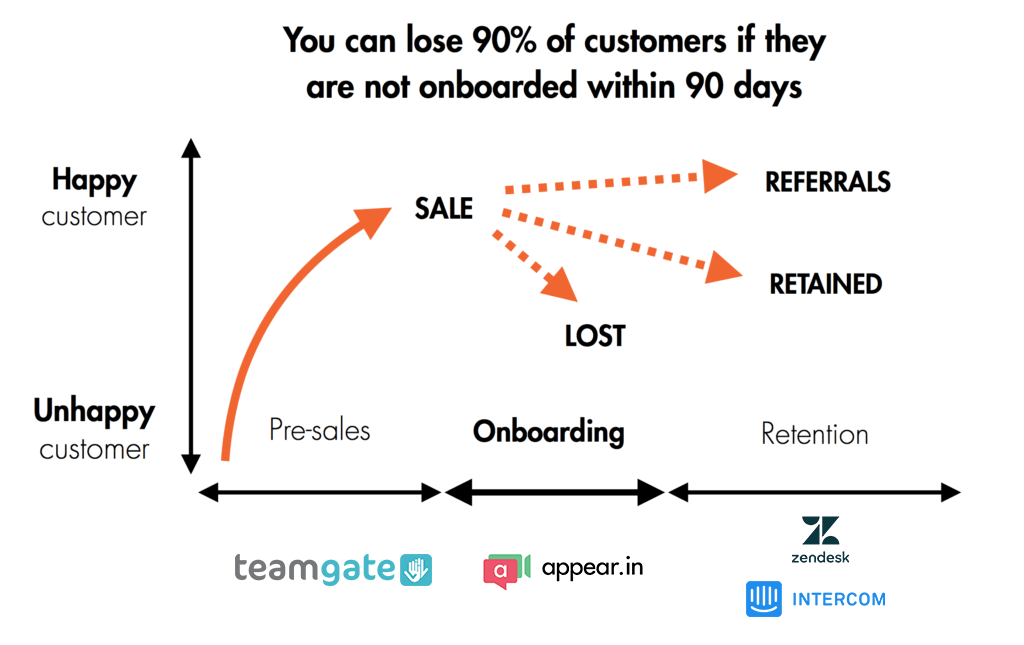
Ensuring the customer stays on an upward satisfaction trajectory from the very beginning of their experience is crucial. This begins with the sales team’s thorough and diligent lead qualification and ends with the “I’m just checking in” emails from the customer success agents. A smooth and seamless transition from one team to another is a key requirement for any business that hopes to build a loyal customer base and increase their life-long value to the business. The modern customer is often way more demanding than they are forgiving. Once the deal is done and dusted, the customer should know what follows next and why – even a few days of broken communication can lead to churn.

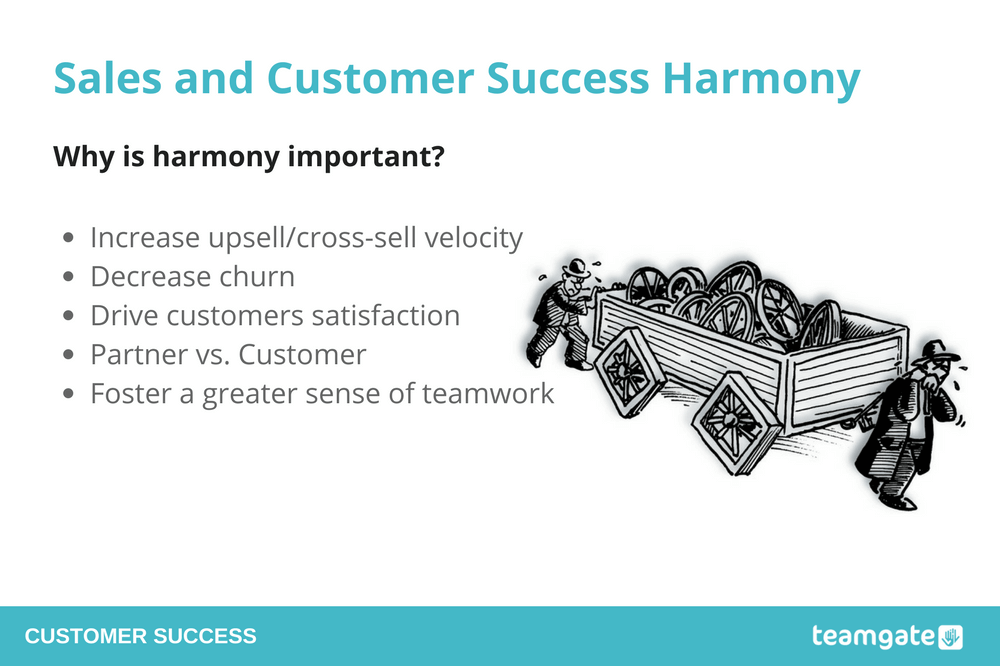
Sales Support Harmony Importance

No clue how to make these two teams collaborate and coordinate more effectively? Here’s how we handle it at Teamgate.

Helping Sales and Customer Success teams to work together

As soon as a company has more than one person actively approaching a single account, it becomes critical to have the right systems and processes in place to keep track of all that communication and critically to ensure that it doesn’t overlap. There’s nothing worse for customer experience than to contact an account with a new offer when they’re in the process of trying to troubleshoot an existing issue which they may have. It makes the customer feel like you don’t care about their goals or product experience – you’re just gunning for their money.

So before you set out to bring your Sales and Customer Success functions closer to each other, ask yourself whether you’re armed with the right tools, systems, and processes to make it a success.

Naturally, at Teamgate, we use our smart CRM system to keep up to speed with every team’s actions, collect accurate information and collaborate on various projects. Each time a customer is contacted, the details and outcome of the interaction must be recorded on the system, so whichever member of the team speaks to the customer next, they will already be aware of exactly what has happened in the past, and why.

The Teamgate collaboration between Sales and Customer Success teams was elevated to a complete new level when we completed a Zendesk CRM integration and Freshdesk CRM integration. These are without doubt the two biggest customer support platforms on the market. This integration offers sales teams a complete 360-degree view of all accounts by enriching customer data within Teamgate CRM by means of relevant customer account information from Zendesk and Freshdesk. This means that sales teams no longer need to juggle different tools and platforms to stay up-to-date with customer requests, issues, and relevant activity. Instead, they can tune in to all that information in one place within our CRM.

All the valuable customer information, including support tickets, areas of interest, support issues, deal status, and general communication can be easily accessed within the CRM, using leads, deals, or people cards, and is designed specifically to help sales teams avoid customer experience disasters. Imagine reaching out to a key customer at a dangerously sensitive moment; for example, when they might be experiencing support issues. This type of damage could be irreversible.

Besides helping you to improve the customer experience, giving your teams access to the right tools will also reduce the tension and blame games. Using a CRM to bring the two key functions closer to each other also allows you to look objectively at their performance, identify the weak links, and work single-mindedly towards better solutions. Instead of blaming each other for poorly done work they can now focus on pursuing and achieving their clearly defined targets in tandem. Everybody wins.

Where will you start?

Ideally, your entire business should be geared towards satisfying your customers’ requirements. But, putting the customer first does not just mean optimising your product to perfection. Customer happiness at any given step in their journey, whether they’ve just come onboard or they’re downgrading to a lower plan, is the ultimate indicator of how customer-focused your operations are being managed.

No matter who interacts with the customer, be it a new salesperson or an experienced support agent, the customer should not experience any difference. Working in harmony means that sales and support always stay in the loop, understand the history and context, and share information to deliver an overall gratifying customer experience. And remember, a prosperous business starts with happy customers.

Streamlining communication and collaboration with Teamgate CRM

The collaboration between customer success and sales teams is vital for ensuring a seamless customer experience and driving business growth. By aligning these teams and leveraging the right tools, such as Teamgate CRM, you can streamline communication, access comprehensive customer data, and enhance collaboration to deliver exceptional customer satisfaction.

Take action today and empower your teams with Teamgate CRM to foster effective collaboration, strengthen customer relationships, and achieve long-term success.


FAQs: Customer success and sales collaboration

Q: Why is collaboration between customer success and sales important?

A: Collaboration between customer success and sales is important because it ensures a seamless customer experience from initial sale to ongoing support. By working together, these teams can provide consistent communication, address customer needs effectively, and maximize customer satisfaction, ultimately leading to increased customer retention and business growth.


Q: How can customer success and sales teams collaborate effectively?

A: Effective collaboration between customer success and sales teams can be achieved through open communication, shared goals, and the use of collaborative tools. Regular meetings, joint planning sessions, and knowledge sharing help align efforts and ensure a smooth handover from sales to customer success. Utilizing a CRM system that integrates both teams’ data and interactions can also facilitate collaboration and provide a holistic view of customer accounts.


Q: What are the benefits of customer success and sales collaboration?

A: The benefits of customer success and sales collaboration are numerous. It leads to improved customer satisfaction as both teams work together to meet customer needs and expectations. Collaboration also enhances customer retention rates, as a seamless transition from sales to customer success ensures ongoing support and value for customers. Additionally, collaboration enables upselling and cross-selling opportunities, as customer success teams have a deep understanding of customer goals and can identify suitable expansion opportunities.


Q: How can customer success teams support sales efforts?

A: Customer success teams can support sales efforts by providing insights into customer needs, preferences, and pain points. They can share customer success stories and testimonials that sales teams can leverage during the sales process. Additionally, customer success teams can offer input on product enhancements based on customer feedback and collaborate with sales teams to identify upselling opportunities with existing customers.


Q: How can sales teams contribute to customer success?

A: Sales teams can contribute to customer success by setting realistic expectations during the sales process and ensuring a smooth transition to the customer success team. They can provide comprehensive information about the customer’s goals, requirements, and preferences, enabling customer success teams to deliver tailored solutions and support. Sales teams can also share customer feedback and challenges with the customer success team to drive continuous improvement and enhance the overall customer experience.


Q: What role does effective collaboration between customer success and sales play in reducing customer churn?

A: Effective collaboration between customer success and sales plays a significant role in reducing customer churn. When these teams work together seamlessly, they can identify and address customer issues promptly, provide ongoing support, and proactively meet customer needs. By maintaining a strong relationship throughout the customer journey, collaboration helps increase customer satisfaction, loyalty, and ultimately reduces churn rates.

Unravel the concept of Value Chain Analysis, a strategic tool for business optimization and success. This guide illuminates its benefits, provides a step-by-step guide on its implementation, and showcases real-life examples.

Article Summary:

  1. Value Chain Analysis is a strategic business tool for understanding operations, optimizing processes, and creating competitive advantage.
  2. It consists of two main types of activities: Primary and Support activities.
  3. Through Value Chain Analysis, businesses can identify cost reduction opportunities and differentiation points.
  4. The step-by-step guide and advanced tips provided can aid businesses in conducting their own Value Chain Analysis.
  5. Several real-world case studies highlight the effective application of Value Chain Analysis.

Table of Contents

  1. Introduction
  2. Understanding the Concept of Value Chain Analysis
  3. The Benefits of Applying Value Chain Analysis
  4. How to Conduct a Value Chain Analysis: Step-by-step Guide
  5. Real-life Case Studies of Value Chain Analysis
  6. Advanced Tips for Enhancing Your Value Chain Analysis
  7. Conclusion
  8. FAQs

Introduction

In the hyper-competitive global marketplace, businesses strive to stay ahead of the curve, focusing on strategies that optimize their operations while delivering maximum value to their customers. One such crucial strategy is Value Chain Analysis. Conceived by Michael Porter in his revolutionary 1985 book “Competitive Advantage”, Value Chain Analysis is a tool that allows businesses to visualize their activities and identify opportunities for efficiency and improvement.

Value Chain Analysis provides a panoramic view of the business landscape, illuminating both micro and macro factors that contribute to the company’s competitive position. It paves the way for robust strategic planning, delivering tangible benefits in productivity, cost savings, differentiation, and customer satisfaction.

Understanding the Concept of Value Chain Analysis

Value Chain Analysis is the process of dissecting a business’s operations to understand how each activity contributes to the creation and enhancement of its products or services. It’s about comprehending the entire lifecycle of your product—from raw materials to the end consumer—and identifying opportunities to add value at each stage.

Born in the fertile mind of Harvard Business School professor Michael E. Porter, Value Chain Analysis transformed the way businesses strategized their operations. Porter identified two main types of activities within any business’s value chain: Primary and Support activities.

Primary activities are those directly involved in the creation and delivery of a product or service, encompassing five key stages: inbound logistics, operations, outbound logistics, marketing & sales, and service.  Inbound logistics, in particular, focuses on how raw materials and components reach your production facilities efficiently. For example, specialized suppliers such as tractor wiring harness manufacturers play a critical role in the agricultural equipment supply chain, ensuring that essential components arrive on time and meet quality standards. Support activities, on the other hand, underpin these primary activities, providing the necessary foundation for them to occur. These include procurement, technology development, human resource management, and infrastructure.

The Benefits of Applying Value Chain Analysis

Applying Value Chain Analysis to your business operations offers an array of advantages, equipping you to fortify your competitive position and enhance profitability.

A trusted analytics tool provides a reliable way for enterprises to measure and communicate the results of their supplier diversity programs, helping organizations translate analytical insights into measurable business impact.

One primary benefit is the revelation of cost advantages. By breaking down each activity, you identify where you’re spending more and where you’re spending less. For instance, if your business spends a significant portion on inbound logistics, you might find opportunities to streamline these costs without sacrificing quality.

Not only does Value Chain Analysis identify cost reduction opportunities, but it also helps you uncover differentiation points. By pinpointing the stages where you can add unique value, you can distinguish your offerings from those of your competitors.

Many businesses have realized the transformative potential of Value Chain Analysis. IKEA, for instance, uses Value Chain Analysis to maintain its cost leadership in the furniture market. Through optimizing their production process, implementing supply chain efficiency techniques, and crafting a unique in-store experience, IKEA has managed to stay ahead in a fiercely competitive market.

How to Conduct a Value Chain Analysis: Step-by-step Guide

The process of conducting a Value Chain Analysis is systematic and thorough. The first step is to identify and categorize your primary and support activities. Next, assess the value that each activity delivers and how it contributes to your end product or service.

Determine the costs associated with each activity. This will highlight any inefficiencies and opportunities for cost reduction. Then, analyze your differentiation potential—identify opportunities to enhance value at each stage of your value chain.

However, this process is not without challenges. One common issue is obtaining accurate and comprehensive data, particularly in large organizations with complex operations. Overcoming this involves establishing robust data collection and management systems.

Real-life Case Studies of Value Chain Analysis

Value Chain Analysis has been instrumental in the success of many businesses. Starbucks, the global coffee giant, is one sterling example. Through its detailed Value Chain Analysis, Starbucks has been able to source high-quality coffee beans, maintain efficient store operations, and deliver a unique customer experience.

Another success story is Zara, the Spanish fast-fashion retailer. Zara’s implementation of Value Chain Analysis has revolutionized its supply chain management, enabling it to churn out new designs in a fraction of the time taken by its competitors. This swift response to changing fashion trends has been a significant factor in Zara’s international success.

Advanced Tips for Enhancing Your Value Chain Analysis

While understanding and implementing Value Chain Analysis can lead to substantial benefits, there are ways to further optimize this process.

One critical suggestion is to conduct a Value Chain Analysis not only for your business but also for your competitors. This will provide insights into their strategies and highlight potential opportunities for differentiation.

Moreover, as the digital revolution reshapes the business landscape, technology has become a significant part of Value Chain Analysis. Technologies like blockchain, AI, and IoT are transforming traditional value chains, creating new avenues for adding value and reducing costs.

Conclusion

Value Chain Analysis, if harnessed correctly, is a potent tool for improving business performance. By offering a clear understanding of your operations, identifying cost-saving opportunities, and spotlighting areas for value addition, Value Chain Analysis helps you carve out a sustainable competitive advantage.

Now that you’re equipped with the knowledge and understanding of this powerful tool, it’s your turn to implement Value Chain Analysis in your business and experience its transformative potential first-hand.

To learn how Teamgate CRM can assist with helping you implement business and sales best practices, contact our team today. 

FAQs

  1. What is the main purpose of Value Chain Analysis?
    • The main purpose of Value Chain Analysis is to identify the activities that create the most value for customers and to find areas where one can reduce costs without affecting value delivery.
  2. How does Value Chain Analysis improve business performance?
    • Value Chain Analysis enhances business performance by improving operational efficiency, reducing costs, identifying differentiation opportunities, and improving customer satisfaction.
  3. Can Value Chain Analysis be used for small businesses?
    • Yes, small businesses can also benefit from Value Chain Analysis. It helps them identify their strengths, improve efficiency, and find ways to differentiate themselves from competitors.
  4. What are the challenges in conducting a Value Chain Analysis?
    • One of the major challenges in conducting a Value Chain Analysis is the availability and accuracy of data. It’s essential to have reliable data for each activity in the value chain.
  5. What are the primary activities in Value Chain Analysis?
    • The primary activities in Value Chain Analysis are inbound logistics, operations, outbound logistics, marketing & sales, and service.
  6. How do support activities contribute in Value Chain Analysis?
    • Support activities, like procurement, technology development, human resource management, and infrastructure, provide the foundation for primary activities. They help enhance the efficiency and effectiveness of primary activities.
  7. What tools can assist in performing a Value Chain Analysis?
    • Various software tools can aid in Value Chain Analysis, including business process mapping tools, data analysis tools, and project management software.
  8. How does Value Chain Analysis aid in strategic planning?
    • Value Chain Analysis helps businesses identify their strengths and weaknesses, providing a clear picture of where they can create more value and gain competitive advantage. This aids in strategic planning.
  9. Can Value Chain Analysis help in identifying cost reduction opportunities?
    • Yes, Value Chain Analysis helps businesses identify areas where they can reduce costs without affecting value delivery to customers.
  10. How does Value Chain Analysis impact customer satisfaction?
  • By ensuring that each activity in the value chain is geared towards creating maximum value for customers, Value Chain Analysis improves product quality and service delivery, thereby enhancing customer satisfaction.

This article is a complete guide to SPIN Selling, which is a sales methodology developed in the late 1980s by Neil Rackham. SPIN Selling involves asking the right questions to identify customer needs and provide tailored solutions. The article covers the fundamental principles and techniques of SPIN Selling, as well as its benefits, and the four elements that comprise the methodology.

Five key takeaways from the article:

  1. SPIN Selling is a customer-centric approach that prioritizes understanding customer needs and pain points.
  2. SPIN Selling provides a framework for sales conversations that can enhance the effectiveness of the conversation.
  3. By using SPIN Selling, salespeople can differentiate themselves from competitors by better understanding customer needs and providing better solutions that address their pain points.
  4. The four elements of SPIN Selling are Situation, Problem, Implication, and Need Payoff.
  5. Effective questioning is essential to the success of SPIN Selling, and salespeople must ask open-ended questions to encourage customers to speak freely about their challenges.

Table of Contents:

  • What is SPIN Selling?
  • Understanding the SPIN Selling Methodology
  • Benefits of SPIN Selling
  • The Four Elements of SPIN Selling
    • Situation
    • Problem
    • Implication
    • Need Payoff
  • Applying SPIN Selling in Real Life
  • Teamgate Can Help With Your SPIN Selling Workflow

As a salesperson, you want to close deals and increase revenue. But how do you achieve that? SPIN Selling is a sales methodology that has proven effective for many businesses. It focuses on asking the right questions to identify customer needs and provide tailored solutions.

This article is a complete guide to SPIN Selling, covering its fundamental principles and techniques. Whether new to sales or looking to sharpen your negotiation skills, this guide will help you master SPIN Selling and excel in your role.

What is SPIN Selling?

SPIN Selling is a methodology developed by Neil Rackham in the late 1980s. This approach is used in sales and marketing to help identify customers’ needs and provide solutions.

“SPIN” stands for Situation, Problem, Implication, and Need Payoff. These four elements guide the sales conversation to uncover the customer’s needs and provide relevant solutions.

Understanding the SPIN Selling Methodology

Traditional selling methods usually involve a salesperson giving a presentation or pitch that highlights the features and benefits of a product or service. The assumption is that customers will see the value and make a purchase. However, this approach doesn’t always work since customers may have different needs or priorities.

On the other hand, the SPIN Selling methodology starts with the salesperson asking questions to customers to understand their current situation and identify the challenges they face and the potential consequences of those challenges. From there, salespeople can suggest solutions that meet customers’ unique needs and pain points.

SPIN Selling provides a more personalized approach focusing on the customer, while traditional sales methods can be more one-size-fits-all.

Benefits of SPIN Selling

There are several benefits of using SPIN Selling in sales and marketing:

1. Improved understanding of customer needs – by asking the right questions in the proper order, SPIN Selling helps the salesperson better understand the customer’s situation, problems, and pain points. This makes it easier to provide tailored solutions that meet their needs and increase the chances of a sale.

2. Increased customer trust – SPIN Selling is a customer-centric approach that prioritizes the customer’s needs and goals, which helps build trust between the customer and the salesperson, leading to higher customer satisfaction and loyalty.

3. More effective sales conversations: SPIN Selling methodology provides a framework for sales conversations that can enhance the effectiveness of the conversation. The salesperson can guide the conversation to uncover the customer’s needs and provide relevant solutions, leading to more positive outcomes.

4. A competitive edge – salespeople can differentiate themselves from competitors by better understanding customer needs and providing better solutions that address their pain points.

5. Higher sales conversion rates – because SPIN Selling focuses on the customer’s unique needs, goals, and pain points, salespeople can provide solutions that are more likely to result in a sale. SPIN Selling increases the chances of closing a sale by providing a more personalized and effective sales approach.

The Four Elements of SPIN Selling

Let’s explore the key elements that help sales professionals effectively engage with prospects and close more deals.

Situation

The “Situation” element is the first step in the SPIN Selling process. This step involves gathering information about the customer’s current situation and identifying relevant details that may impact the sale. This step aims to establish a foundation for the conversation and learn more about the customer’s background.

Salespeople can use various techniques to gather information during the Situation element. They might ask open-ended questions about the customer’s business or industry or collect basic information such as job title or company size. This information helps establish context for the conversation, but it also helps the salesperson better understand the customer’s needs.

To identify the prospect’s current situation, you should ask some of the following questions:

  1. Can you tell me a little about your company and what you do?
  2. How long have you been in your current role?
  3. What is your experience with our product/service?
  4. What challenges are you currently facing in your business?
  5. Can you describe your team’s workflow and processes?
  6. How does your organization currently approach [insert topic related to your product/service]?
  7. How many employees do you have in your organization?
  8. Can you tell me more about how [specific aspect of their business] works?
  9. Have you used any similar products or services in the past?

Problem

In the “Problem” step, salespeople identify specific challenges or issues the customer faces. Their goal is to uncover areas where the customer is struggling or experiencing pain points so the salesperson can provide relevant solutions.

To effectively identify problems, salespeople should ask questions encouraging customers to speak freely about their challenges. For example, they may ask open-ended questions such as:

  1. What obstacles are you facing keeping you from achieving your goals?
  2. What problems are you trying to solve with the product/service you are considering?
  3. How are you currently addressing the issue you described earlier?
  4. What frustrates you most about your current solution?
  5. Can you explain in more detail what issues the problem is causing you?
  6. How would you describe the impact of this problem on your business?
  7. What have you tried so far to address the problem?
  8. What implications does this issue have for your business?

This type of questioning can help the salesperson identify areas where they can provide value and help the customer overcome obstacles.

Implication

“Implication”  is the third step in the SPIN Selling process. In this step, salespeople work to understand the potential consequences of the customer’s problems or challenges. By identifying the implications of their problems, salespeople can help the customer understand the potential impact on their business and why taking action is essential.

Salespeople can use a variety of techniques to explore implications. One approach is to ask “what if” questions that help the customer understand the potential ramifications of not addressing the problem. For example:

  1. How would this issue impact your business if it continues to go unresolved?
  2. What other areas of your business could be affected if this problem persists?
  3. What are the risks associated with not addressing this issue?
  4. How would this issue impact the customer experience you provide?
  5. What implications could there be for your ability to compete in the marketplace?
  6. What if this issue were to continue for another month or six months?
  7. How could this problem affect your reputation among customers, suppliers, or partners?
  8. What if you were able to solve this problem today? What benefits would you see?

Need Payoff

“Need Payoff” involves asking questions that help the prospect envision how their life or business would improve using the product or service. The goal is to help the prospect see the value of the offering and create a desire to purchase.

Here are some open-ended questions to help the prospect connect emotionally with the offering:

  1. How would your team’s productivity increase if you had access to this software?
  2. What impact would it have on your business if you could reduce costs by 20%?
  3. How would your company’s reputation improve if you could consistently deliver high-quality products?
  4. How would your life improve if you could eliminate the stress and time-consuming tasks associated with managing “X”?
  5. What would it be like to have a system in place that would streamline your workflow and allow you to focus on what you do best?
  6. How would your customers’ experience improve if you could offer them faster and more reliable service?
  7. What impact would it have on your bottom line if you could increase your sales by 30%?

Applying SPIN Selling in Real Life

All sales reps must understand the buyer’s journey, which consists of three stages: awareness, consideration, and decision. During the awareness stage, the buyer is not aware of the problem. During consideration, they are aware of the problem and are looking for different solutions, while in the decision stage, the buyer has already decided on a solution and is ready to make a purchase.

To successfully apply SPIN selling in each stage, you must ask the right questions at the right time. During awareness, ask Situation questions to understand the buyer’s current situation. During consideration, ask Problem questions to build rapport. Finally, during the decision phase, ask Implication and Need-Payoff questions to understand the consequences of the problem and the benefits of the solution.

In that sense, successful SPIN Selling requires practical communication skills, active listening, and adapting to the buyer’s situation. The seller needs to establish trust with the buyer to create a positive experience. The seller should also focus on the buyer’s needs and not push the sale too hard.

An example of SPIN Selling in action is a software salesperson selling a project management tool. In the Awareness stage, the salesperson asks Situation questions to understand the buyer’s current project management process. In the Consideration stage, the salesperson asks Problem questions to understand the buyer’s pain points with the current process. Last but not least, in the Decision stage, the salesperson asks Implication and Need-Payoff questions to show how the tool can improve productivity and save time. The salesperson also adapts to the buyer’s needs and offers a free trial to ensure a positive experience.

Teamgate Can Help With Your SPIN Selling Workflow

SPIN Selling is a robust methodology to help sales professionals build strong relationships with prospects and close more deals. By asking Situation, Problem, Implication, and Need-Payoff questions, salespeople can understand the buyer’s needs and offer tailored solutions that meet those needs. This approach drives sales growth and increases customer satisfaction by demonstrating that the seller cares about the buyer’s success.

Leveraging CRM software like Teamgate can help sales teams implement SPIN Selling more effectively. By keeping track of customer interactions and tracking the progress of deals, salespeople can make data-driven decisions and identify opportunities for improvement. Using Teamgate in conjunction with SPIN Selling can help sales teams build strong relationships with customers and drive sustainable growth over the long term. Try it out today!