Designed for Growth: Scale your recurring revenue with the new Teamgate SaaS CRM. Explore SaaS Features →

Book a demo today and save 50% off your first month, or 20% off your first year.

Get a free sales audit to uncover hidden revenue opportunities!

Want to boost your sales team’s productivity? Here’s how:

  • Prioritize Tasks with the Eisenhower Matrix: Focus on urgent and important tasks, schedule key activities, and cut unnecessary distractions.
  • Time Blocking: Dedicate specific time slots for focused work, client communication, and admin tasks.
  • Two-Minute Rule: Handle tasks that take less than 2 minutes immediately to keep your workflow smooth.
  • Pomodoro Technique: Work in 25-minute focused intervals to stay productive while avoiding burnout.
  • Leverage CRM Tools: Use a CRM like Teamgate to organize tasks, automate follow-ups, and track progress.
  • Group Similar Tasks: Batch emails, calls, or admin work to reduce context switching.
  • Set SMART Goals: Define clear, measurable objectives to stay aligned with your sales targets.
  • Focus on High-Impact Tasks: Apply the 80/20 rule to concentrate on activities that deliver the most results.
  • Eliminate Distractions: Minimize interruptions from notifications, clutter, and unnecessary meetings.
  • Review Time Usage Regularly: Use analytics to assess and optimize how your team spends their time.

Key Insight: Effective time management can significantly improve sales performance. For example, businesses using CRMs see an $8 return for every $1 spent. Start applying these strategies today to drive better outcomes.

10 Time Management Strategies for Busy Salespeople

1. Use the Eisenhower Matrix to Sort Tasks
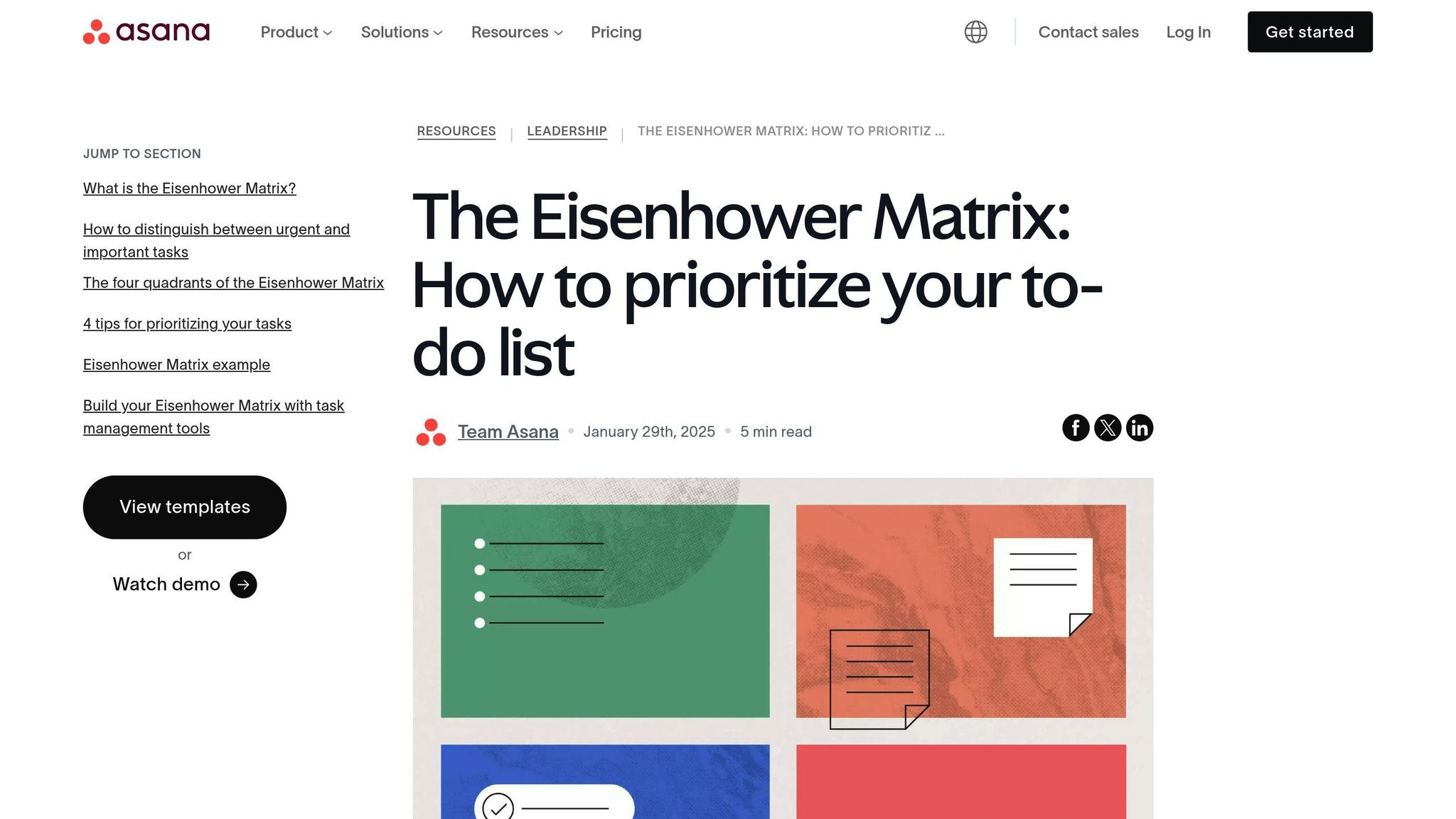
Eisenhower Matrix

The Eisenhower Matrix is a time management tool that helps sales teams prioritize tasks by considering two factors: urgency and importance. It organizes tasks into four quadrants, making it easier to decide where to focus.

Here’s how the matrix works for sales tasks:

Quadrant Type Sales Activities Action
Q1 Urgent & Important • Resolving client issues
• Closing deals with tight deadlines
• Responding to hot leads
Handle immediately
Q2 Important, Not Urgent • Prospecting for leads
• Building client relationships
• Planning sales strategies
Schedule dedicated time
Q3 Urgent, Not Important • Routine reporting
• Certain team meetings
• Administrative work
Delegate when possible
Q4 Not Urgent or Important • Over-checking emails
• Unnecessary meetings
• Social media distractions
Cut these out

To make this system work:

  • Evaluate Tasks Daily: Spend 10 minutes each morning assigning tasks to the right quadrant.
  • Prioritize Q2 Tasks: While Q1 tasks are immediate, focusing on Q2 tasks like relationship building and strategy planning can prevent future crises and fuel growth.
  • Automate Routine Work: Use tools like Teamgate CRM to handle repetitive tasks like data entry and reporting. Automation frees up time for more impactful work.
  • Track Your Progress: Regularly review how this approach affects your sales performance. Many sales teams find they spend less time on low-value tasks and more on activities that drive results.

Sticking to the matrix takes discipline. For example, when managing leads, place immediate buyers in Q1 and nurture longer-term prospects in Q2. Reassess and adjust quadrant placements as needed.

This prioritization lays the foundation for the next step: scheduling tasks into focused blocks of time.

2. Schedule Tasks in Time Blocks

Time blocking is all about assigning specific time slots to your most important tasks. This approach helps you stay focused and avoid jumping between tasks. By combining time blocking with the Eisenhower Matrix, you can ensure your top priorities get the attention they deserve.

Here’s how you can organize your sales activities into time blocks:

Morning Power Block (8:00 AM – 10:00 AM)
Use your peak energy hours for tasks that make the biggest impact, such as:

  • Prospecting calls to key decision-makers
  • Following up on high-priority leads
  • Preparing proposals for qualified opportunities

Administrative Block (10:30 AM – 11:30 AM)
Dedicate this time to keeping your sales pipeline up-to-date in Teamgate CRM. Activities might include:

  • Updating contact details
  • Logging notes from calls
  • Scheduling follow-ups
  • Running essential reports

Client Communication Block (1:00 PM – 3:00 PM)
Focus on connecting with clients by:

  • Responding to emails
  • Making follow-up calls
  • Addressing customer concerns
  • Sending requested information

Strategic Block (3:30 PM – 4:30 PM)
Spend this block on tasks that help you plan ahead and grow your business:

  • Reviewing pipeline metrics
  • Setting priorities for the next day
  • Identifying upselling opportunities
  • Strategizing for key accounts

To make time blocking work for you, keep these tips in mind:

  • Include Buffers: Add 15-minute breaks between blocks to handle unexpected issues.
  • Minimize Distractions: Turn off notifications during your scheduled blocks.
  • Evaluate Results: Track which blocks are most productive and adjust as needed.
  • Adapt Timing: Adjust block lengths based on your sales cycle and client needs.

Sticking to this structure can help you stay organized and make the most of your workday.

3. Follow the Two-Minute Rule

The Two-Minute Rule is a simple time management strategy: if a task takes less than two minutes, handle it right away.

Why It Works for Sales Teams

Delaying small tasks can lead to a pileup, creating unnecessary mental stress and distraction from more important sales activities. Tackling these quick tasks as they arise helps to:

  • Avoid task overload
  • Keep your workflow streamlined
  • Reduce the mental effort of remembering minor tasks

Examples of Quick Tasks

Here are some tasks that fit perfectly into the Two-Minute Rule:

  • Logging key call notes in Teamgate CRM
  • Sending a quick follow-up email to confirm a meeting
  • Updating a client’s contact details after a call
  • Setting a reminder for your next sales follow-up
  • Adding a new lead’s information from a business card to your database

How to Apply It in Your Sales Process

When a task pops up, ask yourself: "Can I finish this in under two minutes?"

  • If yes, handle it immediately – like sending a standard product sheet.
  • If no, schedule time to complete it later, such as preparing a customized proposal.

This approach keeps your task list focused and helps you maintain a more efficient sales process.

4. Work in 25-Minute Focus Sessions

The Pomodoro Technique is a simple way to tackle sales tasks by breaking your work into 25-minute focused intervals. It pairs well with time blocking, helping you stay productive during scheduled work periods.

How to Structure Your Sales Pomodoros

  1. Pick One Task
    • Focus on a single sales activity, like prospecting, following up with leads, or drafting proposals.
    • Remove distractions: close unrelated tabs, silence non-urgent notifications, and mark yourself as busy in your CRM.
  2. Set a Timer
    • Use a timer for 25 minutes.
    • Stay fully focused on your chosen task during this period.
    • Log your time in tools like Teamgate CRM.
  3. Take Breaks
    • After each session, take a 5-minute break.
    • Once you’ve completed four sessions, take a longer break of 15–20 minutes to recharge.

This approach makes it easier to stay focused and maintain productivity throughout your day.

Adapting It for Sales Teams

To make the Pomodoro Technique work in a sales setting, try these tips:

  • Block off time on your calendar to reduce interruptions during focus sessions.
  • Group similar tasks into back-to-back sessions to streamline your workflow.
  • Track your sessions in your CRM to evaluate productivity patterns.
  • Adjust session lengths if needed – some tasks might require longer focus periods.
  • Let your team know when you’re unavailable during these focused intervals.

5. Use CRM Tools to Track Tasks

CRM tools can take your time management to the next level, especially when it comes to sales management. A good CRM keeps tasks organized and provides insights to help you focus on what matters most.

Keep Everything in One Place

Stop juggling multiple tools. A CRM like Teamgate helps streamline your workflow by letting you:

  • Track customer interactions and follow-ups
  • Stay on top of deadlines with built-in alerts
  • Handle emails directly within the platform
  • Schedule and log calls using SmartDialer
  • Move deals through your sales pipeline with simple drag-and-drop features

Use Insights to Guide Your Efforts

CRMs aren’t just about organization – they also provide data that helps you decide where to focus your energy. Analytics tools within your CRM can show you which tasks or customers need the most attention, so you can allocate your time wisely.

Automate to Save Time

Automation is a game-changer for handling repetitive tasks. Here’s how teams make the most of their CRM:

  • Highlight Critical Tasks: Use your dashboard to identify key activities and track performance metrics.
  • Set Follow-Up Reminders: Automate reminders for calls and emails. Phone conversations, for instance, are 70% more likely to convert leads.
  • Track Progress in Real Time: Use analytics to monitor your team’s efficiency and tweak strategies as needed.

Consistency is what ties everything together. By managing your tasks in one central system, you create a scalable, efficient process that grows with your team and supports your broader sales strategy.

6. Group Similar Tasks Together

Switching between tasks can drain your focus and waste time. By grouping similar tasks, you can stay more efficient and focused throughout your day.

Organize Tasks into Categories

Take the time to sort your activities into clear categories. For example:

  • Communication: Emails, phone calls, and follow-ups
  • Administrative: Data entry, report creation, documentation
  • Prospecting: Researching leads, building lists, initial outreach
  • Deal Management: Writing proposals, reviewing contracts, negotiating

This makes it easier to focus on one type of work at a time.

Use Time Blocks for Each Category

Dedicate specific time slots to each task category. For instance, spend an hour on emails, then move to lead research. This keeps you on track and helps maintain momentum.

Make the Most of Your CRM

Your CRM can be a powerful tool for staying organized. Many systems, like Teamgate CRM, allow you to sort tasks by:

  • Priority
  • Client Stage
  • Activity Type

This ensures you’re focusing on what matters most at the right time.

Tips for Grouping Tasks Effectively

  • Plan Ahead: Before ending your day, review and organize tasks for tomorrow.
  • Work Smart: Tackle high-focus tasks when your energy is at its peak.
  • Take Breaks: Schedule short pauses between task categories to recharge.
  • Be Flexible: Leave room for unexpected, urgent tasks.

7. Create Clear, Measurable Goals

Clear goals help focus your efforts and ensure you’re working toward meaningful outcomes. Using SMART (Specific, Measurable, Achievable, Relevant, and Time-bound) goals allows sales teams to prioritize effectively and track progress with precision.

Define Your SMART Goals

  • Specific
    Be clear about what you want to achieve. For instance, aim to secure 25 new enterprise clients in the healthcare industry.
  • Measurable
    Use metrics to track progress. Your CRM can help monitor indicators like qualified leads, conversion rates, pipeline stages, deal closure times, and revenue per customer.
  • Achievable
    Set targets that are realistic based on past performance. Break larger goals into smaller, actionable steps.
  • Relevant
    Ensure your goals align with the bigger picture and contribute to overarching business objectives.
  • Time-bound
    Assign deadlines to create urgency and maintain focus.

Leverage Data-Driven Insights

Only half of sales teams use data for accurate forecasting. Those that do often see better outcomes. For example:

"Utilizing sales insights we have been able to conduct targeted experiments, enabling Packagecloud to increase engagement rates by 18% through the refinement of scripts and lead targeting."
– Krish Sivanathan, Director of Operations | Packagecloud

Track Progress in Real-Time

Keep an eye on your metrics regularly. Your CRM dashboard can help you monitor how you’re tracking against your goals. This allows you to spot issues early, adjust strategies as needed, celebrate milestones, and allocate resources where they’re most effective.

Set Activity-Based Goals

In addition to outcome goals, focus on daily and weekly activities. Examples include setting targets for prospecting calls, follow-up emails, or discovery meetings. These smaller actions build momentum and contribute to long-term success.

8. Focus on Top 20% of Tasks

After setting up efficient task tracking in your CRM, shift your attention to the 20% of tasks that deliver 80% of your results. This concept, known as the Pareto Principle, highlights how a small portion of your efforts often drives the majority of your outcomes. For sales teams, identifying and prioritizing these key activities is essential for boosting productivity and revenue.

Identify High-Impact Activities

Certain sales activities consistently outperform others. For example, phone calls are 70% more effective at converting leads compared to other methods. By leveraging your CRM to track and analyze sales activities, you can uncover which tasks have the greatest impact on your success.

Use Data-Driven Prioritization

Making smart decisions starts with accurate data, yet only half of sales teams rely on data for forecasts and decision-making. To pinpoint your most impactful tasks:

  • Track Outcomes: Identify which activities consistently lead to closed deals, higher conversions, or greater customer value.
  • Evaluate Time Spent: Compare the time invested in various tasks with the results they produce, using insights from your CRM.
  • Prioritize Revenue-Driving Tasks: Focus on activities that directly contribute to closing deals and generating income.

This approach ensures your efforts are concentrated where they matter most.

Real-World Impact

Focusing on high-impact activities can produce impressive results. Take Baremetrics as an example:

"With Teamgate we’ve been able to refine our true ICP through sales insights. This has enabled targeted marketing campaigns resulting in more conversions and an increase in our overall marketing ROI."
– Allison Barkley, Director of Operations, Baremetrics

Refine and Adjust

Once you’ve identified your key tasks:

  • Streamline Processes: Develop efficient workflows for these critical activities to enhance their effectiveness.
  • Monitor and Adapt: Regularly review your metrics to ensure you’re staying focused on what works best.

Keep refining your approach as market conditions change to maintain your edge.

9. Remove Common Distractions

Distractions make it hard to stay productive. Cutting down interruptions helps you stay focused and get the most out of the strategies mentioned earlier.

Digital Distractions

Digital interruptions can be a major time sink. Adjust your CRM notifications so they only alert you to high-priority tasks, and set specific times to check your email. Use "Do Not Disturb" mode during client meetings or while working on critical tasks like proposals.

Workspace Organization

A clutter-free desk can do wonders for focus. Use noise-canceling headphones to block out background noise, and keep your digital files in your CRM well-organized to save time searching for what you need.

Meeting Management

Group your meetings together and keep them short by sticking to clear agendas. Use your CRM’s calendar tools to block off time for deep, uninterrupted work.

Communication Boundaries

Define what’s urgent and what can wait. Set clear expectations for response times and establish specific hours where you won’t be interrupted.

Technology Tools

Take advantage of tools like task automation, focus timers, and workflow templates to handle repetitive tasks efficiently and stay on track.

10. Check and Update Time Use

Taking a closer look at how time is spent helps sales teams identify inefficiencies and make smarter decisions to improve productivity.

Tools like Teamgate CRM come with built-in analytics and real-time dashboards. These can track activities such as client communications, proposal prep, meetings, admin tasks, and follow-ups. Dashboards make it easy to spot trends instantly. Interestingly, only half of sales teams currently use data for accurate forecasting and decision-making. This shows how valuable it can be to measure how time is being used.

Time tracking also highlights the impact of each activity. For example, for every $1 spent on a sales CRM, businesses see an average return of over $8. This underscores how effective time management can amplify the value of your CRM investment.

Krish Sivanathan, Director of Operations at Packagecloud, shares how these insights can drive results:

"Utilizing sales insights we have been able to conduct targeted experiments, enabling Packagecloud to increase engagement rates by 18% through the refinement of scripts and lead targeting"

Tips for Reviewing Time Usage

  • Weekly: Check individual activity reports
  • Monthly: Look at team-wide trends
  • Quarterly: Adjust strategies based on data
  • Real-Time: Use dashboard alerts to make quick corrections

By regularly reviewing and tweaking time use, sales teams can stay efficient and focused on what drives results.

Conclusion

Managing time effectively plays a key role in boosting sales productivity and revenue. For instance, when Baremetrics revamped their time management strategies using Teamgate CRM, they saw an impressive 132% jump in conversion rates. This highlights how combining focused time management with smart sales tools can deliver real results.

Sales teams can achieve better efficiency by applying methods like the Eisenhower Matrix, time blocking, and the two-minute rule alongside data-driven insights. This approach is especially impactful when we consider that phone conversations are 70% more likely to convert leads compared to other communication methods.

By integrating structured techniques with real-time analytics, teams can continuously fine-tune their performance. Companies that adopt these strategies and leverage technology-driven insights tend to exceed their targets consistently.

To put it simply, aligning practical strategies with actionable data helps sales teams:

  • Prioritize high-conversion tasks
  • Cut down on low-value activities
  • Make informed decisions
  • Track performance regularly
  • Scale successful practices

The combination of proven productivity methods and tech-enabled insights is essential to staying ahead in a competitive landscape. When applied correctly, these strategies create a strong foundation for growth and enhanced sales outcomes.

Related Blog Posts

Real-time sales forecasting helps businesses make faster, more accurate decisions by using live data instead of outdated, manual calculation and analytic methods. Here’s why it matters:

  • Boosts ROI: For every $1 spent on sales CRM tools, businesses see an average return of $8.
  • Improves Accuracy: Automated tools reduce human error and provide continuous updates.
  • Saves Time: Decisions that used to take weeks can now be made in minutes.
  • Drives Results: Companies like Baremetrics saw a 132% increase in conversions, and Packagecloud improved engagement rates by 18%.

Quick Comparison: Manual vs. Automated Forecasting

Aspect Manual Forecasting Automated Real-Time Forecasting
Data Collection Manual entry Instant capture
Update Frequency Monthly or quarterly Continuous/On-Demand
Error Rate High (human errors) Low
Decision Speed Slow (days/weeks) Fast (minutes/hours)

Real-time forecasting transforms sales operations by providing instant insights, enabling proactive decisions, and improving team performance. Tools like Teamgate CRM make this process simple and effective.

How to Use AI to Accurately Call Your Sales Forecast

Understanding Real-Time Sales Forecasting

Real-time forecasting moves away from relying solely on static, historical data and instead uses live data streams to provide instant sales insights. Unlike traditional methods, it continuously updates predictions based on current market and sales data. Let’s dive into how manual methods compare with automated forecasting to understand these advancements better.

Manual vs. Automated Forecasting Methods

Sales teams today are increasingly turning to automated real-time solutions to address the challenges of manual processes. Here’s a quick comparison:

Aspect Manual Forecasting Automated Real-Time Forecasting
Data Collection Requires manual entry Captures data instantly
Update Frequency Monthly or quarterly Updates continuously
Error Rate Prone to human error Significantly lower
Resource Needs Requires extensive staff hours Minimal intervention needed
Decision Speed Takes days or weeks Happens within minutes or hours

Key Benefits of Real-Time Forecasting

Real-time forecasting offers several clear advantages that can boost sales performance and streamline operations:

  • Instant Performance Insights
    Tools like Teamgate CRM, which feature integrated dashboards, give sales teams immediate access to performance metrics. This allows leaders to quickly identify trends and adjust strategies on the fly.
  • Better Decision Making with Data
    With real-time analytics, businesses can test strategies and measure outcomes almost immediately, enabling more precise and informed decisions.
  • Higher ROI
    Companies using advanced sales technologies report an average return of over $8 for every $1 spent on their CRM systems. This is achieved through faster identification of opportunities, better resource allocation, and improved team efficiency.
  • Addressing Issues Proactively
    Real-time forecasting helps teams spot potential problems early, enabling them to take action before these issues affect revenue and performance.

How Live Data Improves Sales Predictions

Live data takes sales predictions to the next level by tackling common execution challenges head-on. With real-time updates, businesses can make quicker, more accurate decisions that adapt to changing market conditions. Additionally, Integrate.io provides a low-code data integration platform that helps teams connect data across multiple sources, ensuring that forecasting tools receive clean, unified information from databases, APIs, CRMs, and data warehouses.

Cutting Down on Manual Errors

Manual data entry can often lead to mistakes that hurt forecasting accuracy. In fact, research shows that only half of sales teams currently rely on data for accurate forecasts. Tools like Teamgate CRM help reduce these errors, leading to higher conversion rates for their users.

Adapting Quickly to Market Changes

Real-time insights make it easier to respond to market shifts. For example, an 18% increase in engagement was achieved by leveraging live data to adjust strategies on the fly. This kind of agility is made possible through:

  • Instant pipeline evaluations
  • Real-time strategy tweaks
  • Spotting trends as they happen

Making Decisions Faster

Having immediate access to reliable data speeds up decision-making for sales leaders. FiveCRM provides a great example of this. Sales Manager Jack Hodges shared:

"With Teamgate’s intuitive interface, our user adoption was immediate. Even with a remote team consisting of sales, customer success and marketing – we were onboarded and up and running within hours."

This ability to act quickly lays the groundwork for impactful strategies and noticeable results.

Setting Up Real-Time Forecasting

Establishing real-time forecasting requires a clear, step-by-step approach to ensure success.

Review Your Current Methods

Start by evaluating your existing processes. Identifying the gaps in your current forecasting system will help you make better use of real-time data for smarter decisions. Did you know that only half of sales teams rely on data for accurate forecasting and decision-making?

Key areas to examine include:

  • How you currently collect data
  • How often reports are generated
  • Any bottlenecks slowing down the process
  • The amount of time spent on manual tasks

Choose the Right Tools

Investing in the right tools pays off – on average, every $1 spent on a Sales CRM returns over $8. Look for platforms that offer these features:

Feature Category Key Capabilities
Data Integration Real-time updates, email sync, activity tracking
Analytics Custom dashboards, performance tracking, trend analysis
Automation Workflow automation, reduced manual data entry, alerts
Customization Adjustable pipelines, custom fields, flexible forecasting models

Once you’ve chosen the right tools, it’s time to integrate them into your workflow.

Implementation Steps

Follow these steps to roll out your new forecasting tools effectively:

  1. Prepare Your Team
    Develop a detailed onboarding plan to ensure your team understands the new tools. Quick adoption can lead to faster results.
  2. Customize Your Tools
    Tailor the tools to your team’s needs. For example, Packagecloud used sales insights to refine their scripts and lead targeting, boosting engagement rates by 18%.
  3. Monitor and Adjust
    Keep a close eye on performance and make adjustments as needed. Here’s a simple schedule to follow:
    • Track key performance indicators daily
    • Review forecast accuracy weekly
    • Assess team adoption monthly
    • Evaluate ROI quarterly

Measuring Results and Impact

Track how real-time forecasting influences sales success using key metrics.

Performance Metrics

Metric Category Key Indicators
Pipeline Health Conversion rates
Forecast Accuracy Comparison of projected vs. actual sales
Team Performance Engagement rates, phone call conversion rates

Did you know? Phone conversations are 70% more likely to convert leads than other communication methods. These metrics provide a solid foundation for understanding how real-time forecasting drives results.

Real Business Examples

Companies like Packagecloud and Baremetrics have seen major boosts in engagement and conversion rates thanks to real-time forecasting. However, challenges like ensuring data accuracy, team buy-in, and correctly interpreting metrics still persist.

Solving Common Problems

When measuring the impact of real-time forecasting, teams often encounter obstacles. Here’s how to tackle them:

  • Data Accuracy Issues
    Regularly clean your data, automate validation processes, and schedule monthly audits to maintain reliability.
  • Adoption Resistance
    Offer thorough training, share success metrics frequently, and showcase ROI (e.g., every $1 invested can return over $8).
  • Metric Interpretation
    Use standardized reporting, set clear benchmarks, and review metrics on a weekly basis to ensure everyone stays on the same page.

Conclusion

Real-time forecasting has changed the game for sales teams, moving them from gut-based decisions to precise, data-driven strategies. For years, many teams overlooked the potential of their data, leaving plenty of room for growth.

Success stories show how real-time forecasting improves engagement and boosts conversion rates. In fact, businesses report an average return of over $8 for every $1 invested in sales CRM tools. Here’s why this return is so impressive:

  • Smarter Decision Making: Real-time data helps teams make faster, well-informed choices about resources and strategies.
  • Stronger Pipeline Management: Dashboards provide instant insights into conversion rates and deal progress.
  • Improved Team Performance: Clear visibility into performance metrics allows managers to coach and make adjustments when it matters most.

This shift from periodic guesswork to precision is a key theme throughout this guide. To get the most out of real-time forecasting, organizations should focus on keeping data accurate, ensuring team buy-in, and setting clear performance goals. With regular monitoring and proper use, forecasting becomes a reliable, data-driven process.

Tools like Teamgate CRM make this process easier. Its analytics and reporting features turn real-time forecasting into something teams can use right away. Thanks to its simple interface, teams can start seeing better forecasting results in just a few days.

Related Blog Posts

The first impression determines the future of a product. When a user first visits a website or opens an app, their instant opinion will largely influence future behavior. A logical, clear and pleasant interface means that the product has a chance to show all its advantages. If a user sees an outdated, cluttered, uncomfortable website or app, they may irrevocably leave if a competitor has a more convenient one.

The main competitive advantages of quality UX/UI are increased traffic, conversions, sales, saving money on support and reducing customer churn. To increase your competitiveness and reduce costs in the future, the topic should be broken down in more detail.

What is UX (User Experience) and UI (User Interface)?

What is UXand UI

UX stands for User Experience. It encompasses all human interaction with software. UX includes the overall perception of the product, logical structure, speed of task completion and usability.

UI is User Interface. It consists of visual design and interactive elements such as menus, icons, buttons, color schemes and fonts. In other words, UI design refers to how a product looks and how intuitive it is.

The connection between these areas is inseparable: a well-designed UX is responsible for a user-friendly and efficient product experience, and UI makes interaction enjoyable. Thus, UX/UI is not just a visual shell, but a strategically important success factor.

Why is it important for software customers to consider UX/UI?

Let’s list the main reasons why the future of software depends on the quality of UX/UI:

  • Meeting market expectations. Modern users are used to well-designed interfaces. So it’s important to be on par with, or better than, your competitors.
  • Accelerating time to market. The right User Experience and Interface helps to avoid long revisions after launch, which speeds up project payback.
  • User Loyalty. If a product is user-friendly and pleasant to use, customers come back and recommend it to others. This reduces the cost of attracting new users.
  • Reduced development and support costs. UX/UI errors detected at early stages with the help of UX research tools, such as UXtweak, are cheaper to fix than finalizing the finished product. An intuitive interface reduces the support workload.
  • Good UX/UI helps achieve business goals faster, e.g., increase conversions and profits, lower user training and support costs, attract investors. Key points: a business should not miss opportunities and give competitors a chance to get the user’s attention because of flaws in structure and interface.

How does UX/UI impact software success, business metrics and investment attractiveness?

Impact design software

The impact of UX/UI on software success cannot be overemphasized. The factors of successful software can be considered to be:

  • user satisfaction and audience retention;
  • positive brand reputation and organic user growth;
  • so-called “word of mouth” marketing, when satisfied users recommend the product to other people;
  • flexibility and scalability, when the product is easier to adapt to new market conditions; for this purpose, the interface should have the option to add new features and expand the audience;
  • conversion and monetization in digital products work well when the user follows a clear path with simplified navigation and successfully completes targeted actions (registration, subscription, purchase);
  • reducing support load and costs is achieved through an intuitive interface where the customer does not encounter problems;
  • increased ROI – ROI refers to a quick return on investment in UX/UI through increased profitability and reduced bug fixing costs.

If a business gathers a loyal audience with a long lifecycle, you can plan for higher goals and expect steady growth.

Interesting facts about user experience and interface

  1. According to Forester Research every $1 invested in UX brings an average $100 return.
  2. 70% of venture capitalists consider UX design a critical factor when evaluating startups.
  3. Fintech startup Revolut has attracted billions of dollars in investment, largely due to its user-friendly mobile app with an intuitive interface.
  4. Airbnb was able to capture the home rental market by significantly improving its user interface over its competitors.
  5. Amazon’s redesign of the “Buy” button resulted in millions of dollars a year in increased sales.

Investment attractiveness of software

First, investors evaluate not only the functionality of a product, but also its usability. If the UX/UI design makes the product in demand and competitive, it increases the chances of receiving investment. Second, companies with well-designed UX/UI are more competitive on the stock exchange because their products have high user ratings and low customer churn. This makes it easier to go public. A finance software development company that prioritizes intuitive UX/UI design can significantly improve user satisfaction, which directly contributes to long-term valuation and investor confidence.

How UX/UI affects the perception and usability of software

Below you will find the key qualities to look for when you hire a UX/UI designer and what makes a decent UX/UI design for software. So, what the “face” of the product should be:

  • simple and intuitive, i.e. clear controls, minimum clicks to achieve a goal, use without instructions;
  • consistent, i.e. consistent in style, fonts, icons, with repeatable patterns and predictable guidelines;
  • responsive and fast, meaning instant response, lag-free loading and animation, and ease of use on mobile devices and computers;
  • accessible to people with disabilities, which is realized through contrast, voiceover, keyboard navigation, contrasting colors and readable fonts, simple wording without complex terms;
  • visual hierarchy, with which important and secondary information is clearly visible, clear structure without overloading, grouping of elements;
  • personalization to the user’s needs that engages through interest and behavior-based recommendations, the ability to customize the interface and its modes.

Note examples of successful UX/UI design such as, Google’s minimalism, Apple’s unified style, Amazon’s instant loading speed, Microsoft’s inclusivity, Gmail’s hierarchy, Spotify’s personalization, and many other examples from tech giants.

Case studies: anti-examples of software with failed UX/UI

Poor UX/UI design can lead to low user engagement, increased bounce rates, and even financial losses. Let’s take a look at a few famous cases where UX/UI errors led to negative consequences.

Windows 8 – confusion between interfaces

Microsoft dramatically changed the interface in Windows 8 after eliminating the familiar Start and replacing it with a tiled Metro UI design. This led to confusion among users, especially those who worked on PCs without a touchscreen.

Consequences:

  • users had difficulty navigating;
  • Windows 8 sales were below expectations;
  • Microsoft was forced to bring back the Start button in Windows 8.1 and completely redesign the interface in Windows 10.

Snapchat (2018) – a redesign that disappointed users

Snapchat released a major update in which it changed the navigation: mixing private messages and public content, making the interface confusing.

The consequences:

  • millions of users complained about the inconvenience;
  • a petition demanding the return of the old design gathered more than 1.2 million signatures;
  • The company lost $1.3 billion in market value after Kylie Jenner tweeted, “Has anyone else stopped opening Snapchat? Or is it just me?”

MySpace: chaotic and cluttered UIs

Social network MySpace allowed users to fully customize pages, but the lack of a unified design led to chaos:

  • cluttered profiles with flashing banners;
  • different styles on each page prevented easy interaction.

Consequences:

  • users moved en masse to Facebook, which offered a clean and user-friendly interface;
  • MySpace lost its leadership in social networking and lost its audience.

These examples show that mistakes in UX/UI can cost a company money, users and even its future in the market. The success of a product depends not only on features, but also on how user-friendly it is for people.

How to avoid costly UX/UI mistakes?

What are some common mistakes to avoid in ui/ux design

Investing in UX/UI at the start is saving time and money in the future, that’s what the software design and development folks say. Fixing bugs after launch is much more expensive and in some cases leads to loss of users and losses. So think about these nuances:

  • early UX-research and testing (user interviews, A/B tests);
  • creating interactive prototypes before development, whether you’re building a simple web app or a complex application with no-code app builders that help visualize the user experience;
  • constant tracking of UX/UI metrics (time on task, abandonment, conversions);
  • flexible design that can be improved without drastic changes.

So, if you are planning to commission a UX/UI design or fix, don’t delay this step. This strategic approach will allow you to get ahead of the competition, save resources, ensure business growth, attract new users and retain regular ones.

Getting your brand to rank at the top of search results is necessary. If your business isn’t visible on Google, chances are you’re missing out on many potential customers. But achieving those coveted top search engine spots takes more than luck. It requires a strategic, data-driven approach that a digital marketing agency specializes in.

When you partner with an experienced marketing agency like First Page New Zealand, you get access to expert knowledge, cutting-edge tools, and proven strategies designed to boost your website’s visibility, drive organic traffic, and ultimately increase revenue. Let’s explain exactly how a marketing agency helps your brand dominate search rankings and stay ahead of the competition.

Comprehensive SEO Strategy

Search Engine Optimisation (SEO) is the backbone of search rankings. A good marketing agency doesn’t just tweak a few keywords here and there; it builds a comprehensive SEO strategy that aligns with your business goals. This includes:

  • Keyword Research & Optimisation: Identifying high-performing keywords your audience is actively searching for.
  • On-Page SEO: Optimising title tags, meta descriptions, headings, and URL structures to ensure search engines understand your content.
  • Technical SEO: Enhancing your website’s speed, mobile-friendliness, and overall performance to improve ranking signals.
  • Content Optimisation: Ensuring your site has high-quality, valuable content that engages users and encourages conversions.

High-Quality Content Creation

Content is king in SEO. Google prioritises websites that offer informative, relevant, and engaging content. A brand marketing agency helps by:

  • Conducting content audits to identify gaps in your current strategy.
  • Creating keyword-rich blog posts, guides, and landing pages to establish authority.
  • Developing shareable content that attracts backlinks and boosts domain authority.
  • Ensuring content is optimised for both users and search engines, increasing dwell time and reducing bounce rates.

Link Building & Authority Growth

Google places high value on websites that are considered authoritative and trustworthy. A marketing agency strengthens your site’s authority by:

  • Acquiring high-quality backlinks from reputable websites in your industry. Working with the best backlink agencies can further accelerate your link-building strategy.
  • Guest posting on relevant blogs to drive referral traffic and improve credibility.
  • Conducting competitor backlink analysis to identify new opportunities for link acquisition.
  • Removing toxic or spammy links that may harm your SEO performance.

Local SEO for Geographic Domination

If you’re a local business, ranking well in local searches is critical. A marketing agency ensures that your business appears in Google’s local pack and is easily discoverable by nearby customers by implementing strategies like local citations service, which helps your business get listed accurately across local directories and boosts local SEO credibility. This involves:

  • Optimising your Google Business Profile (formerly Google My Business).
  • Ensuring your NAP (Name, Address, Phone Number) is consistent across all directories.
  • Getting positive customer reviews and ratings to enhance credibility.
  • Implementing localised content and location-based keywords.

Technical SEO & Website Optimisation

SEO isn’t just about content and keywords – your website’s structure and performance play a huge role, too. A marketing agency ensures:

  • Faster page speed to improve user experience and reduce bounce rates.
  • Mobile-friendly design to cater to the growing number of mobile users.
  • Secure HTTPS encryption to protect user data and improve trustworthiness.
  • Structured data markup to help search engines understand your content better, enhancing visibility in rich snippets.

Google Ads & PPC Integration for Maximum Visibility

By integrating SEO with Google Ads (PPC) and performance marketing services, a marketing agency ensures immediate visibility and data-driven optimisations:

  • Running highly targeted Google Ads campaigns to complement organic traffic
  • Using data from paid campaigns to refine organic SEO efforts.
  • Implementing retargeting strategies to bring back users who have visited your site but haven’t converted.
  • Analysing paid search insights to identify new keyword opportunities for organic search.
  • Partnering with a specialised Google Ads Agency can further enhance campaign performance through expert bidding strategies, audience segmentation, and continuous A/B testing to maximise ROI.

Data-Driven Analytics & Continuous Improvement

SEO isn’t a one-time effort- it’s an ongoing process that requires continuous monitoring and adjustments. A marketing agency supports this with advanced analytics tools like Integrate.io, which provides the low-code data integration and transformation needed to connect analytics data across multiple sources, helping teams build the data pipelines necessary for comprehensive SEO reporting and decision-making. Additionally, brands can leverage an AI visibility tool that helps understand how they surface across AI-driven search and generative results. A marketing agency ensures your brand stays ahead by:

  • Tracking rankings and organic traffic growth using advanced analytics tools.
  • Analysing user behaviour to refine content and conversion strategies.
  • Conducting regular SEO audits to fix technical issues and improve site performance.
  • Using A/B testing to determine what works best for your audience.

Social Media & Brand Authority Boost

While social media is one of the key processes of digital marketing, it doesn’t directly impact search rankings. However, it does help build brand authority, which in turn influences SEO performance. A marketing agency strengthens your brand presence by:

  • Creating engaging social media content that drives traffic to your site.
  • Encouraging social sharing to increase brand exposure and attract backlinks.
  • Leveraging influencer marketing to boost credibility and reach.
  • Using social signals to complement SEO efforts and enhance overall visibility.

Final Thoughts

Partnering with a marketing agency is one of the smartest investments you can make if you want to dominate search rankings. With expert SEO strategies, high-quality content, technical optimisation, and data-driven decision-making, an agency ensures your brand stay

s ahead of the competition.

Working with a trusted digital marketing agency is the way to go if you’re serious about growing your online presence. The right agency doesn’t just improve rankings—they help your business thrive in the long run.

Customer Relationship Management (CRM) plays a crucial role in modern businesses, helping organizations manage customer interactions, streamline operations, and boost sales. However, for a CRM system to be truly effective, it must integrate seamlessly with the company’s digital infrastructure. A custom website tailored to business needs can significantly enhance CRM efficiency, ensuring smooth data flow, automation, and an improved user experience.

Understanding Custom Websites and CRM Integration

A custom website is built from scratch to meet specific business requirements rather than relying on pre-designed templates. Unlike off-the-shelf solutions, custom websites offer greater flexibility, scalability, and enhanced security, making them ideal for businesses that require seamless CRM integration.

Custom websites allow businesses to design their CRM workflows, ensuring that all customer data, interactions, and transactions are accurately captured and processed in real time. This deep integration minimizes redundancies and enables businesses to provide a more personalized customer experience. For organizations managing complex data ecosystems, platforms like DreamFactory can provide governed API access to any data source, streamlining how CRM systems connect with enterprise applications and backend systems.

Key Benefits of Custom Websites for CRM Efficiency

Custom websites provide a range of benefits that significantly enhance the efficiency and functionality of a CRM system. From personalized data management to automation and security enhancements, these websites offer tailored solutions that ensure seamless CRM operations. Below are some key advantages businesses can gain from integrating their CRM with a custom-built website.

Tailored Data Management

Custom websites’ primary advantages are their ability to support personalized data management. Unlike generic solutions, a custom website enables businesses to structure their CRM data to align with their unique operational needs. This improves data accuracy, enhanced real-time synchronization, and streamlined reporting.

With IT Monks company specializing in creating tailored digital solutions, businesses can leverage customized website development to ensure their CRM system captures and processes data efficiently. This tailored approach eliminates inconsistencies and enhances decision-making.

Enhanced User Experience

A well-designed custom website improves the overall user experience, making CRM functionalities more accessible and efficient. User-friendly dashboards, intuitive navigation, and responsive interfaces ensure that employees can quickly access customer data, manage leads, and track sales processes without complications.

A positive user experience boosts employee productivity and enhances customer satisfaction. When CRM data is easily accessible and well-organized, businesses can respond faster to customer inquiries, resolve issues efficiently, and provide personalized support.

Automation and Workflow Optimization

Automation is a game-changer in CRM efficiency. A custom website allows businesses to implement automated workflows that handle repetitive tasks such as lead capture, follow-ups, and customer segmentation.

Companies like SolveIt, which specialize in building automation-driven CRM solutions, help businesses streamline these workflows with tailored digital platforms.

For example, businesses can automate customer onboarding, email responses, and sales pipeline tracking, reducing manual efforts and minimizing errors. This level of automation ensures timely interactions, improves response times, and enhances overall customer relationship management.

Scalability and Flexibility

As businesses grow, their CRM requirements evolve. A custom website offers the scalability needed to accommodate new features, modules, and integrations. Unlike template-based solutions, custom websites provide flexibility, allowing businesses to modify their CRM workflows as their operations expand.

Enterprise web solutions tailored to specific business needs ensure that a CRM system remains adaptable and future-proof. Whether a company needs to integrate new sales channels, expand customer support capabilities, or enhance reporting features, a custom website can seamlessly support these changes. Tools like Integrate.io further support this flexibility by providing low-code data integration and transformation pipelines that connect CRM data across databases, APIs, and third-party systems without requiring heavy engineering overhead.

Improved Security and Compliance

Data security is a top priority for businesses handling sensitive customer information. Custom websites provide enhanced security measures like encrypted data transmission, role-based access controls, and regular security updates.

Moreover, a custom-built website can be designed to comply with industry regulations such as GDPR, HIPAA, or PCI DSS, ensuring that customer data is handled securely and legally. This level of security reduces the risk of data breaches and strengthens customer trust.

Real-World Use Cases of Custom Websites Enhancing CRM

Many businesses have successfully leveraged custom websites to improve CRM efficiency. For instance, eCommerce companies use custom platforms to integrate real-time customer behavior tracking with their CRM, enabling personalized marketing campaigns.

Similarly, service-based businesses implement automated booking systems linked to their CRM, allowing seamless appointment scheduling, follow-ups, and feedback collection. These real-world applications highlight how custom websites enhance CRM functionality across various industries.

Conclusion

A well-integrated custom website plays a vital role in enhancing CRM efficiency. By offering tailored data management, improved user experiences, automation, scalability, and heightened security, businesses can optimize their CRM workflows and deliver superior customer experiences. Investing in a custom CRM-friendly website ensures businesses remain competitive, agile, and customer-centric in today’s digital landscape.


Tracking the right CRM adoption metrics can transform how effectively your team uses your CRM and directly impact your sales performance. Here are the 7 key metrics you should monitor to identify adoption issues and maximize ROI:

  • Daily Active Users (DAU): Monitor unique daily logins and interactions with key features. Warning signs include sharp usage declines or role-specific gaps.
  • Most Used Features: Identify which tools your team uses most and spot underutilized features that may require training.
  • New Data Entry Frequency: Track how often team members input new data like leads, updates, or notes. Ensure both quantity and accuracy.
  • Task Completion Stats: Monitor task completion rates and use automation tools to improve efficiency and meet deadlines.
  • Sales Pipeline Speed: Measure how quickly deals move through stages. Identify bottlenecks and optimize the process.
  • Lead-to-Customer Rate: Track how effectively leads convert into paying customers. Refine nurturing and targeting to boost this metric.
  • Sales Performance Changes: Analyze revenue growth, deal closure speed, and win rates to assess the impact of CRM adoption.

Why These Metrics Matter

  • Businesses see an $8 return for every $1 spent on CRM.
  • Companies like Baremetrics, a subscription analytics and revenue recovery platform, achieved a 132% increase in conversion rates by focusing on CRM adoption.
  • SaaS teams using insights effectively have boosted engagement rates by 18%.

Pro Tip: Use dashboards to track these metrics in real-time, set clear benchmarks, and provide training to close adoption gaps. Consistently monitoring these metrics ensures your CRM delivers maximum value.

1. Daily Active Users

Daily Active Users (DAU) tracks how effectively your team incorporates the CRM into their daily routines.

What to Measure:

  • Number of unique daily logins and time spent actively using the CRM
  • Frequency of interactions with key features
  • Differences in usage patterns across various teams

For example, Jack Hodges, Sales Manager at FiveCRM, highlights the ease of adoption:

"With Teamgate’s intuitive interface, our remote team was onboarded within hours."

Best Practices:

Set usage benchmarks tailored to specific roles, keep an eye on daily activity trends, and evaluate team performance. Krish Sivanathan, Director of Operations at Packagecloud, shares how data-driven experimentation improved their outcomes:

"Utilizing sales insights we have been able to conduct targeted experiments, enabling Packagecloud to increase engagement rates by 18% through the refinement of scripts and lead targeting."

Warning Signs:

  • Sharp declines in usage
  • Inconsistent login activity
  • Minimal interaction with core features
  • Usage gaps tied to specific roles

Consistently monitoring DAU can provide valuable insights as you evaluate other CRM adoption metrics.

2. Most Used Features

Understanding which CRM features your team interacts with the most can reveal patterns in adoption, highlight strengths, and pinpoint gaps. This helps you see how well your team uses the tools at their disposal and where extra support might be required.

Key Areas to Focus On

Pay attention to how core features are being used. For example, tools like Teamgate’s SmartDialer or email integration can shed light on important trends. Different roles may gravitate toward specific tools – sales managers might frequently use analytics dashboards, while sales reps may prefer contact management and communication features.

These insights help you dig deeper into how individual tools contribute to overall CRM success.

Analyzing Feature Usage

Here are some useful metrics to track:

  • Access frequency: How often specific tools are used each day
  • Time spent: The duration users spend on particular features
  • Completion rates: The percentage of actions started that are fully completed
  • User segments: Which teams or roles rely on specific features the most

Spotting Training Needs

If certain powerful tools aren’t being used as much as they could be, it might signal a need for better training. For instance, if advanced reporting features are rarely used, it’s a good opportunity to organize targeted training sessions to boost engagement. When your team lacks essential skills, consider supplementing with resources like Treehouse, an online learning platform that helps team members learn to code and develop the technical capabilities they need for advanced CRM features.

Addressing these gaps quickly ensures your team gets the most out of your CRM.

Red Flags to Watch For

Be on the lookout for warning signs such as:

  • Low usage of features that are key to your sales process
  • High abandonment rates for certain tools
  • Uneven usage patterns among team members in similar roles
  • A tendency to stick with basic features while ignoring advanced ones

Steps to Take

If you notice underused features, act quickly to address the issue:

  • Survey your team to understand any obstacles to adoption
  • Create tailored training materials to address specific gaps
  • Set clear usage benchmarks for critical tools
  • Track progress after implementing changes

The goal isn’t to push high usage of every feature. Instead, focus on ensuring your team uses the tools that are most relevant to their roles and your business objectives. This ensures efficiency and better alignment with your workflow.

3. New Data Entry Frequency

Tracking how often your team inputs new data into the CRM is key to understanding adoption. Studies indicate that only 50% of sales teams use CRM data effectively for forecasts and decision-making. This metric reveals if your team is consistently logging critical information or missing important opportunities.

Measuring Input Activity

Keep an eye on entries like new leads, contact updates, deal status changes, activity logs, and meeting notes. These are the building blocks of a well-maintained CRM.

Balancing Quantity and Accuracy

Frequent data entry matters, but it’s just as important to ensure accuracy. Monitor both the volume and quality of entries to avoid data being added just to meet quotas.

Setting Practical Benchmarks

Data entry frequency varies by role. Use benchmarks tailored to each position, such as:

Role Minimum Daily Entries Type of Data
Sales Rep 15–20 Leads, calls, meetings
Account Manager 10–15 Customer updates, interactions
Sales Manager 5–10 Pipeline updates, forecasts

Encouraging Better Data Entry Habits

Analyze data entry patterns over different timeframes to identify trends:

  • Daily input levels
  • Weekly completion rates
  • Monthly data growth
  • Quarterly comparisons

Make the process easy and efficient for your team. As Jack Hodges, Sales Manager at FiveCRM, shared:

"With Teamgate’s intuitive interface, our user adoption was immediate. Even with a remote team consisting of sales, customer success and marketing – we were onboarded and up and running within hours."

Regularly review data entry activity to catch issues early. Establish clear benchmarks, provide training, and stress the importance of accurate data. You can also track task completion stats to get a fuller picture of CRM engagement.

4. Task Completion Stats

Task completion rates are a key indicator of how effectively your team handles CRM tasks. By monitoring how quickly and accurately tasks are completed, you can spot process bottlenecks and improve CRM adoption. Just like user engagement and data accuracy, completing tasks on time is essential for getting the most out of your CRM investment.

Automated Task Management

Modern CRM platforms come equipped with tools to simplify task management. For example, Teamgate CRM includes features like deadline indicators and warning systems to help teams stay organized. These tools include:

  • Visual alerts for tasks nearing or past their deadlines
  • Flags to highlight urgent tasks needing immediate attention
  • Progress tracking to monitor the completion of sales stages

These features, when combined with metrics like daily usage and data accuracy, provide a more complete view of CRM adoption.

Impact on Sales Performance

Good task management has a direct impact on sales results. Businesses that make use of CRM task management tools have reported an average ROI of over $8 for every $1 spent on their CRM systems. This substantial return underscores the importance of staying on top of tasks and managing them effectively.

Best Practices for Task Management

To improve task completion rates, take full advantage of your CRM’s automation tools. Features like deadline alerts and automated reminders in Teamgate can help ensure tasks are finished on time. Additionally, use sales pipeline management tools to regularly review task progress, allowing you to quickly address any delays or inefficiencies.

Task Visibility

Clear task visibility helps keep teams accountable and focused. Tools like Teamgate’s Sales Pipeline Management let managers track progress in real time, identify delayed activities, evaluate performance at both individual and team levels, and adjust workloads as needed.

Proactive Management

Task completion stats can also reveal areas for improvement, such as training gaps or inefficient processes. By monitoring these metrics regularly, you can minimize missed opportunities and encourage consistent CRM use across your team.

5. Sales Pipeline Speed

Sales pipeline speed measures how quickly deals move through your sales stages. It’s a key metric for spotting delays and improving your sales process to close deals more efficiently.

Real-Time Pipeline Monitoring

Modern CRMs come equipped with real-time dashboards that provide a clear view of your pipeline’s health. For example, Teamgate CRM uses a drag-and-drop interface, allowing sales teams to seamlessly shift deals between stages while keeping pipeline speed metrics accurate. This kind of visibility helps sales managers identify:

  • Deals stuck in certain stages
  • Stages taking longer than expected to complete
  • Broader trends in pipeline movement

Spotting these patterns allows you to take targeted actions to improve efficiency.

Improving Pipeline Speed

To boost how quickly deals progress, focus on these areas:

  • Stage Transition Timing: Use CRM analytics to establish typical progression times and quickly highlight deals that are lagging.
  • Identifying Bottlenecks: Analyze stages where deals frequently stall. Look for patterns that point to recurring issues in your process.
  • Automated Notifications: Set up alerts for missed deadlines to ensure deals don’t linger in one stage for too long.

Key Metrics to Track

Your CRM dashboard can provide important insights by tracking metrics such as:

These metrics can help you fine-tune your sales process and keep deals moving smoothly.

6. Lead-to-Customer Rate

Converting leads into paying customers is one of the most important ways to measure how well your CRM is working. It reflects how effectively your CRM supports user engagement and streamlines operations to drive results.

Why Conversion Rates Matter

A well-implemented CRM can significantly boost your conversion rates. For example, phone calls alone can increase the likelihood of conversion by 70%. This shows how impactful it can be to fully utilize the tools your CRM offers.

Real-World Success Stories

Companies like Baremetrics and Packagecloud have seen their conversion rates soar by optimizing how they use their CRM. By focusing on actionable insights, they’ve shown how adopting the right CRM strategies can make a big difference.

How to Improve Your Conversion Rate

Boosting your lead-to-customer rate often comes down to refining a few key areas:

  • Stronger Lead Nurturing: Simplify and improve the way you guide prospects through the sales funnel.
  • Better Contact Management: Stay on top of every interaction with organized and trackable contact data.
  • Smarter, Data-Driven Decisions: Use real-time analytics to understand what’s working and adjust your approach.
  • Aligned Marketing Efforts: Fine-tune campaigns based on sales insights for more accurate targeting.

Keeping an Eye on Performance

Your CRM should make it easy to track conversion metrics. Look for tools like dashboard analytics that let you monitor everything from first contact to follow-ups and final conversions. These insights can help you refine your sales process and achieve better results.

7. Sales Performance Changes

Analyzing changes in sales performance highlights how CRM adoption can significantly boost ROI. On average, every $1 spent on CRM delivers over $8 in return.

Key Performance Metrics to Watch

To understand the impact of your CRM, keep an eye on these critical metrics:

  • Revenue Growth: Track monthly and yearly increases.
  • Deal Closure Speed: Measure how quickly deals move through the pipeline.
  • Average Deal Size: Assess the value of individual transactions.
  • Win Rate: Calculate the percentage of opportunities that turn into successful deals.

Real-World Results

Companies like Baremetrics and Packagecloud have demonstrated how CRM adoption can transform sales outcomes. For example, Packagecloud used CRM data to refine its strategies:

"Utilizing sales insights we have been able to conduct targeted experiments, enabling Packagecloud to increase engagement rates by 18% through the refinement of scripts and lead targeting." – Krish Sivanathan, Director of Operations, Packagecloud

Making the Most of CRM Data

Your CRM system is packed with analytics that can guide better decisions and strategies. Here are some ways to leverage this data:

  • Spot Trends: Use dashboards to identify top-performing products and strategies.
  • Optimize the Pipeline: Regularly assess pipeline health to find areas for improvement.
  • Forecast Sales: Use data to make informed predictions about future performance.
  • Understand Customers: Analyze customer profiles to predict which leads are most likely to convert.

Tracking phone call activity is another powerful tactic. Research shows that focusing on calls can increase lead conversion rates by 70%. By combining these insights with other engagement and data quality metrics, you can unlock the full potential of your CRM system.

Steps to Improve Sales Performance

To further enhance your sales performance, take these actionable steps:

  1. Review Metrics Regularly: Set a schedule to analyze CRM data weekly.
  2. Train Your Team: Ensure everyone knows how to use CRM features effectively.
  3. Refine Sales Processes: Look for ways to streamline workflows.
  4. Update Customer Profiles: Use recent wins to refine your ideal customer criteria.

These strategies can help you get the most out of your CRM and drive consistent growth.

Conclusion

Keep an eye on these seven metrics to get the most out of your CRM and increase sales. Each one plays a key role in improving CRM usage and driving revenue.

Build a Strong Tracking System

  • Set Up a Centralized Dashboard
    Use tools like Teamgate to display all metrics in real-time. Customizable dashboards make it easy to track progress as it happens.
  • Define Clear Goals
    • Daily Active Users: Aim for 85% of your sales team.
    • Data Quality Score: Target 95% accuracy.
    • Lead-to-Customer Rate: Match historical data for realistic benchmarks.
  • Review Metrics Regularly
    Look for trends, identify where adoption is lagging, share success strategies from top performers, and adjust plans based on what the data tells you.

Take Action Based on Metrics

Turn insights into improvements:

  • Close Usage Gaps: Offer focused training for features that aren’t being used enough.
  • Simplify Data Entry: Reduce manual input and add automation where possible.
  • Improve Sales Processes: Use pipeline and task data to eliminate roadblocks and make workflows smoother.

Keep the Momentum Going

CRM adoption isn’t a one-time effort. Use these metrics to continue refining your approach and building a sales team that thrives on data. By staying focused, you’ll get the most out of your CRM and create a system that consistently delivers results.

Related Blog Posts

