
Most sales emails fail because they lack relevance, not effort. CRM-driven personalization changes this by using customer data to craft tailored messages that align with a prospect’s buying journey, behaviors, and challenges. The results? Emails with 6x higher transaction rates and open rates of 30–50%, compared to generic campaigns. Sales teams also save time, with reps spending less time on manual tasks and more on closing deals.
To make this work:
- Centralize customer data in your CRM to ensure accuracy.
- Use automation to trigger timely, relevant outreach.
- Train your team to personalize effectively, focusing on insights like purchase history, engagement signals, and real-time behaviors.
Teamgate simplifies this process by combining structured workflows, trustworthy pipeline insights, and automation – helping sales teams focus on selling, not admin tasks.
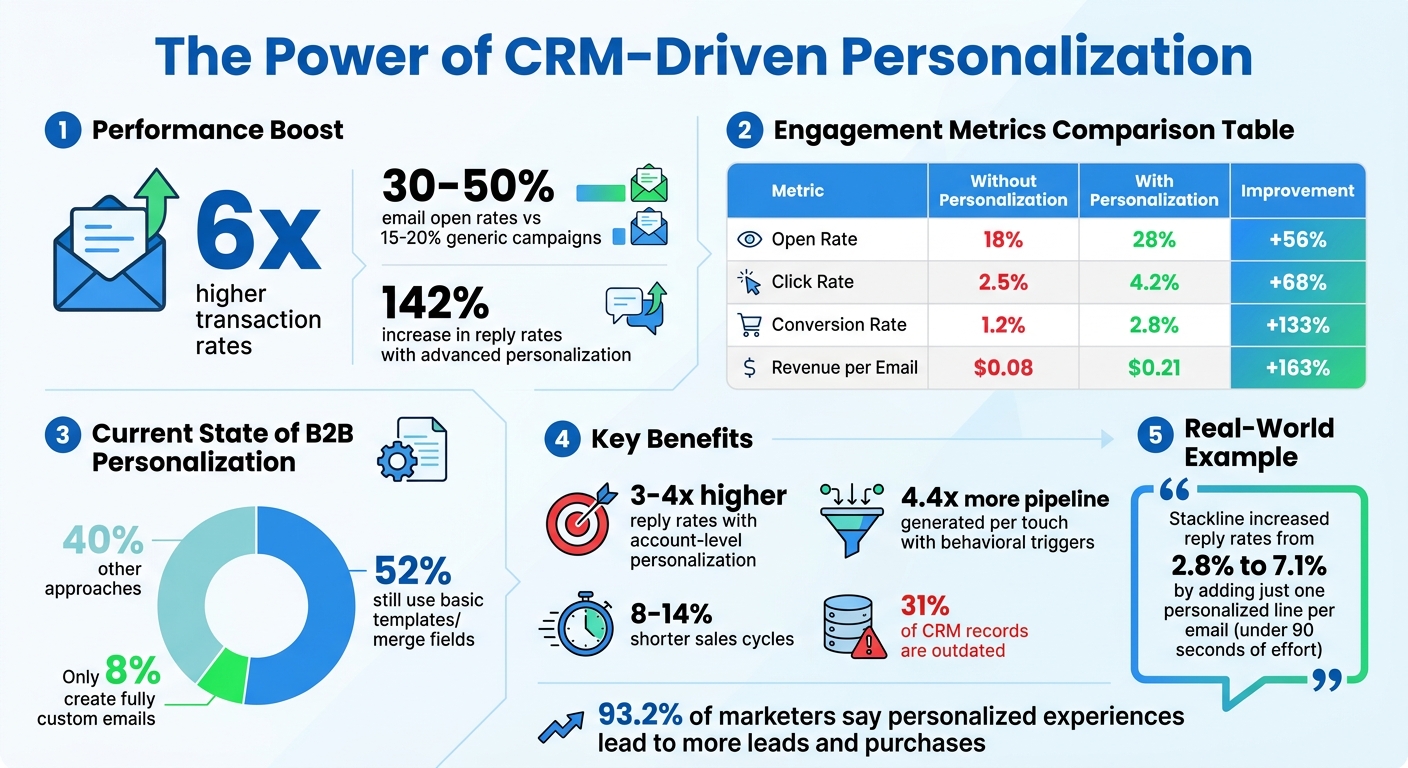
CRM Personalization Impact: Key Statistics and Performance Metrics
Crafting Sales Emails with AI and Personalization | GTM Crossroads #02
sbb-itb-5772723
What CRM-Driven Personalization Means for Sales
CRM-driven personalization tailors sales outreach using detailed customer data stored in your CRM, such as purchase history, behavior patterns, firmographics, and engagement signals. It goes beyond basic placeholders, using insights into customer actions and needs to craft messages that truly resonate.
Teams that focus on account-level personalization – like referencing recent funding rounds, new product launches, or hiring trends – see reply rates that are 3–4 times higher than those sticking to generic merge fields. This method lays the groundwork for smarter, data-driven outreach that feels more personal.
How CRM Systems Personalize Sales Outreach
Your CRM acts as the backbone of personalization by organizing customer data and turning it into automated, relevant communication. Through dynamic content, CRMs can adapt messaging based on specific conditions. For example, a CFO might receive messaging about cost efficiency, while a VP of Sales gets content focused on hitting sales targets – all within a single workflow.
Lead scoring is another critical feature. By combining website visits, form submissions, and email engagement into one score, sales reps can easily prioritize prospects. For instance, outreach that highlights relevant tools tends to resonate more with roles like SDRs. This automation sharpens outreach strategies and allows sales teams to work smarter, not harder.
Why Sales Teams Benefit from CRM Personalization
CRM-driven personalization doesn’t just enhance outreach – it boosts efficiency and revenue. By cutting down on manual tasks like research and data entry, it gives sales reps instant access to valuable context, such as recent activity, engagement history, and recommended next steps.
For managers, this approach provides real-time pipeline insights, making it easier to identify which deals are moving forward and which are stalling. It’s especially helpful in managing the long B2B sales cycle. Automated workflows can be triggered for new leads, active prospects, or even customers who seem likely to churn, ensuring no opportunity slips through the cracks.
Interestingly, only 8% of B2B teams create fully custom emails for each prospect, while 52% still rely on basic templates or merge fields. Teams that take personalization further – leveraging behavioral triggers, lifecycle segmentation, and detailed account insights – see 4.4 times more pipeline generated per touch when engaging with accounts showing genuine interest.
How to Start Using CRM-Driven Personalization
You don’t need to overhaul your entire sales process to leverage CRM-driven personalization. Instead, focus on building a strong foundation: clean data, smart automation, and a team that knows how to use these tools effectively. Most sales teams already have what they need – it’s just a matter of connecting the dots in the right way.
Centralize Your Customer Data
Personalization breaks down when customer data is scattered across multiple tools. To fix this, consolidate all key data – like customer profiles (demographics, company details), behavior (purchase history, site activity), and engagement scores (lead quality, churn risk) – into one unified view. A real-time, two-way data flow ensures CRM records are always up-to-date when prospects engage. This streamlined approach improves the effectiveness of your outreach.
Still, around 31% of CRM contact records are outdated or inaccurate, and referencing information like an old job title can hurt your credibility. To combat this, modern sales teams are automating the collection of external signals – such as LinkedIn updates, job postings, or funding news – and syncing them directly to CRM fields. For instance, if someone at a target account posts about a challenge your product solves, your CRM can trigger the right outreach at the right time.
Create Automated Workflows and Triggers
Once your data is centralized, automation can turn insights into timely, relevant actions. Automated workflows ensure follow-ups happen consistently, reducing the risk of missed opportunities. Start by defining different levels of personalization based on account value. For smaller accounts, basic details like name and company might be enough. For high-value accounts, go deeper – incorporate account-specific insights like recent news, hiring trends, or product launches.
For example, in 2025, Stackline, an e-commerce analytics company, added just one personalized line based on account data to their cold emails. This simple tweak increased their reply rates from 2.8% to 7.1%, with less than 90 seconds of effort per email.
Behavioral triggers are another key tool. If a prospect abandons their cart, your CRM can automatically send reminders at intervals like one hour, 24 hours, and 72 hours after the event. Similarly, if someone visits your pricing page multiple times in a week, their assigned rep should get an alert with context about their interest.
Dynamic content blocks with IF/ELSE logic can further personalize messaging within a single email template. For example, a CFO might see messaging about cost efficiency, while a VP of Sales sees a focus on revenue growth. Always include fallback values – if a first name is missing, the email should default to a friendly opener like “Hello there”.
Train Your Team on CRM Best Practices
Even the best CRM setup won’t deliver results if your team isn’t trained to use it effectively. Sales Development Representatives often spend 35–50% of their time on non-selling tasks like manual research and data entry, so training on SDR performance optimization can help them reclaim valuable selling time. Stress the importance of clean data – personalization based on outdated or incorrect information can do more harm than good.
Encourage your team to shift from rigid scripts to flexible frameworks. A simple structure like Observation → Bridge → Proof → Call-to-Action ensures personalization feels natural, not forced. A good test? Ask if the recipient would forward the email to a colleague because it offers genuine insight or valuable benchmarks. Training should also cover how to quickly draft personalized openers using structured CRM data, freeing up time for meaningful conversations. For instance, referencing recent news (less than two weeks old) can triple reply rates compared to older events.
With the right training, your team can make personalization feel authentic while staying efficient.
What Data to Use for CRM Personalization
The effectiveness of CRM personalization lies in leveraging the right data. Sales teams that focus on customer behavior, purchase history, and real-time signals can create outreach that feels relevant and timely rather than generic. Here’s how these data types can elevate your sales efforts:
Customer Behavior and Activity Data
Understanding what prospects are doing right now is a goldmine for personalization. For instance, website activity – like frequent visits to a pricing page – can indicate serious interest, signaling the perfect time for outreach. Similarly, email engagement metrics (e.g., opens, clicks, and replies) offer clues about who’s engaged and when they’re most likely to respond. This behavior-driven approach can push open rates to 30-50%, far outshining the 15-20% from mass email campaigns.
By combining these signals, you can create engagement scores to prioritize your efforts. For example:
- High-value customers: Top 20% by purchase value.
- Category browsers: Contacts who visited a product category three or more times.
- Dormant contacts: Those with no engagement in 90+ days.
These scores simplify decision-making, helping sales reps focus on the leads that matter most. Historical interactions further enrich this data, providing a deeper understanding of customer behavior.
Purchase History and Past Interactions
Past purchases and conversations offer a treasure trove of insights for personalization. For example, if a customer recently bought a product, your CRM can prompt a follow-up with recommendations for complementary items or tips for maximizing their purchase. This approach aligns your outreach with their demonstrated needs, increasing the likelihood of conversion.
Support data is just as valuable. Information from resolved tickets, satisfaction scores, or recurring issues can reveal the customer’s current sentiment. If someone has had multiple support interactions recently, it might be better to focus on rebuilding trust rather than pitching a sale. Tailoring communication based on these insights ensures every touchpoint feels relevant and thoughtful.
Real-Time Signals and Predictive Data
Real-time actions combined with predictive insights take personalization to the next level. For instance, real-time triggers like cart abandonment, pricing page visits, or content downloads allow immediate, contextually relevant follow-ups. Automated responses – such as reminders for abandoned carts or recommendations based on recent product views – keep prospects engaged. Even referencing recent news or events (within the past two weeks) can boost reply rates by nearly 3x compared to older references.
Predictive data helps anticipate customer needs before they arise. For example, analyzing historical purchase cycles can predict when a customer might need a refill or an upgrade, enabling timely reminders. Predictive lead scoring evaluates prospects’ likelihood to convert by combining behavioral data with factors like company size or recent organizational changes. External triggers, such as funding announcements or executive role changes, provide additional opportunities for crafting highly personalized outreach.
"Predictive analytics uses historical data, machine learning, and CRM insights to anticipate customer behavior. This allows businesses to send highly relevant emails before the customer even expresses a need." – Nimble
How Teamgate CRM Supports Personalization
Teamgate CRM simplifies the challenge of personalization by offering tools that make tailored outreach both effective and manageable. Personalization at scale isn’t just about collecting data – it’s about using that data to create meaningful interactions. Teamgate helps sales teams achieve this by centralizing customer information, automating outreach tasks, and providing visual pipelines that ensure consistent, relevant engagement. This approach allows teams to focus on building relationships without getting bogged down by administrative work.
Email Integration and Automated Workflows
Teamgate’s integration with Gmail and Outlook ensures that all email communications are automatically synced and logged within the CRM. No more digging through inboxes or manually updating records – everything is organized and connected to the right deals and contacts. Additionally, automated workflows make it easier to deliver tailored outreach at the right time. For instance:
- When a new contact is added, a welcome email can be triggered.
- If a deal moves to a new stage, follow-up actions can be set in motion.
- Responses from prospects can automatically trigger the next step in the sequence.
These workflows not only save time but also improve email engagement. Personalized emails sent through automated campaigns often achieve open rates of 30–50%, compared to the 15–20% typical of generic emails. For example, you can create a drip campaign that sends a follow-up email 24 hours after a prospect downloads a pricing guide, with another email at 72 hours if there’s no response. This automation ensures timely, relevant communication without extra effort.
Centralized Customer Data and Context
Teamgate consolidates data from multiple sources, giving sales reps a single, organized view of each customer. This includes everything from lifecycle stages and purchase history to firmographic details and behavioral signals like website activity or email interactions. Having all this information in one place enables reps to craft messages that are truly relevant to the customer’s needs.
"Personalization works at scale when content, data, and delivery logic share the same source of truth." – HubSpot
When accessing a contact record in Teamgate, reps can see a complete history, including past purchases, support tickets, and recent engagement. This level of detail helps them tailor their outreach – whether it’s a first-time buyer, a returning customer, or someone who hasn’t engaged in months. The result? Communication that feels thoughtful and timely, rather than generic or misplaced.
Visual Pipelines and Follow-Up Reminders
Teamgate’s visual pipelines make it easy to segment prospects based on their stage in the customer lifecycle – whether they’re new subscribers, active prospects, first-time buyers, or at-risk customers. This segmentation ensures that outreach aligns with where the customer actually is in their journey. For example, dormant contacts with no activity in over 90 days can be identified and included in a re-engagement campaign featuring a special offer or helpful content.
To keep follow-ups on track, Teamgate offers automated reminders tied to behavioral triggers. For instance, if a prospect views a pricing page or abandons their cart, the system will prompt a follow-up. You can also schedule post-purchase check-ins at regular intervals – such as 7, 14, and 30 days – to encourage repeat business and build loyalty. These reminders help sales teams stay proactive, ensuring that no opportunity slips through the cracks and that every interaction feels intentional and timely.
How to Measure CRM Personalization Success
To know if CRM-driven personalization is actually making a difference, you need to measure its impact on key sales metrics. The right data helps you see if personalization is improving engagement, speeding up pipeline movement, and ultimately protecting revenue. Here’s how to track success effectively.
Email and Engagement Metrics
Start with the basics: open rates, click-through rates (CTR), and response rates. These numbers show how well your personalized messages connect with different audience segments. For example, emails with personalized subject lines can increase open rates by 15–25%. Personalized emails, in general, tend to outperform generic ones in terms of engagement.
Click-through rates reveal how relevant your email content is to recipients. Segmented campaigns often see 50% more clicks than unsegmented ones. However, the most telling metric is reply rate – particularly when replies lead to meaningful conversations. Advanced personalization techniques (beyond just using merge tags) can increase reply rates by up to 142%. By tracking these metrics, you can identify which segments respond best to your efforts.
Conversion Rates and Revenue Impact
Engagement metrics are just the starting point. To see the true impact of personalization, monitor conversion rates by segment, deal closure rates, and revenue per email. Personalized emails can deliver transaction rates six times higher than generic ones. Measuring revenue per email lets you directly compare the financial return of personalized versus non-personalized campaigns.
| Metric | Without Personalization | With Personalization | Improvement |
|---|---|---|---|
| Open Rate | 18% | 28% | +56% |
| Click Rate | 2.5% | 4.2% | +68% |
| Conversion Rate | 1.2% | 2.8% | +133% |
| Revenue per Email | $0.08 | $0.21 | +163% |
Additionally, track metrics like average order value (AOV) and upsell rates to see if personalization drives customer loyalty and long-term growth. These figures help differentiate between one-time successes and sustainable revenue increases.
Pipeline Movement and Forecast Accuracy
Personalization should do more than spark activity – it should push deals forward. Keep an eye on pipeline stage conversion rates and how quickly deals move between stages. This can be measured by calculating pipeline velocity using the formula:
(Number of deals in pipeline × average deal size × average win rate) ÷ average sales cycle length.
Look for reductions in sales cycle length; personalized CRM systems often shorten cycles by 8–14%. Also, measure forecast accuracy by comparing predicted revenue to actual closed deals. When personalization works, forecasts become more reliable because deals progress based on clear engagement and actionable next steps. Finally, track "lost opportunity by reason" using custom fields to pinpoint recurring issues, such as pricing objections or poor timing, that may hinder the success of personalized outreach.
Building a Sales Process Around Personalization
Personalization in sales isn’t just a tactic – it’s a scalable system that drives results for modern teams. For example, personalized emails are shown to deliver 6x higher transaction rates, and 93.2% of marketers say personalized experiences lead to more leads and purchases. However, the success of personalization hinges on creating a process that matches the effort to the value of the account, keeps data accurate, and automates the research phase – so reps can focus on selling, not managing spreadsheets.
The best teams rely on tiered personalization to scale effectively. This means using different levels of effort based on the type of account. For general outreach, basic merge fields suffice. Segment-based templates handle most of the pipeline, while detailed 1:1 research is saved for high-value accounts. A great example comes from Stackline, an e-commerce analytics company, which boosted cold email reply rates from 2.8% to 7.1% in 2025 by adding a single personalized line per prospect. This demonstrates how aligning effort with account value can significantly improve results. Building such a system integrates data, automation, and consistent follow-up into a repeatable process.
For this strategy to work, disciplined data management is essential. Clean data is critical. Outdated contact details, incorrect lifecycle stages, or incomplete activity logs don’t just reduce effectiveness – they erode trust. A strong CRM should help maintain data hygiene by flagging aging opportunities, identifying missing follow-ups, and ensuring deal contexts are always up-to-date. This keeps every interaction relevant and accurate.
Automation is the key to making personalization scalable. Behavioral triggers ensure outreach happens at the right time without manual effort. CRM integrations eliminate silos by syncing email activity and pipeline changes, which keeps forecasts grounded in accurate data.
Teamgate CRM makes this process seamless without overwhelming users. It centralizes customer information, automates follow-up reminders, and ensures every deal stays in a real stage with a clear next step. Features like email integration, workflow automation, and visual pipelines allow reps to send timely, relevant messages while giving managers the insights they need to coach effectively. By embedding these principles, Teamgate CRM ensures personalization isn’t just a buzzword – it’s a strategy that protects and grows revenue. This approach creates a clean, reliable pipeline, laying the groundwork for long-term success.
FAQs
What’s the fastest way to start CRM-driven personalization?
To kickstart CRM-driven personalization, leverage the customer data already stored in your CRM – like purchase history, behaviors, and demographics – to design targeted email campaigns. Begin by pinpointing critical data points, segmenting your contact list, and creating tailored email templates. By automating these campaigns, you can send timely and relevant messages, shifting away from generic communication and delivering content that truly connects with your audience – all while streamlining your workflow.
Which CRM data fields matter most for personalized emails?
When crafting personalized emails, some CRM data fields stand out as essential. Purchase history, recent activity, and engagement patterns allow you to fine-tune offers, content, and timing to match each recipient’s preferences.
On top of that, demographic details like a person’s name and location make greetings feel more personal, while tracking interaction history – such as email replies or call records – helps ensure your messages are relevant and meaningful. By leveraging accurate and well-rounded data, you can create campaigns that resonate with your audience, drive engagement, and provide clear metrics for success.
How can I prove personalization is boosting revenue?
To demonstrate that personalization increases revenue, focus on tracking measurable results like higher transaction rates, better engagement, and stronger pipelines. Analyze key metrics such as conversion rates, response rates, and deal velocity both before and after introducing personalization. Leverage tools like automation and segmentation to directly connect revenue growth to personalized strategies. Continuously monitoring these metrics over time will give you clear proof of how personalization drives revenue.