

Responding to leads within 5 minutes can increase your chances of converting them by up to 100x compared to waiting 30 minutes. Additionally, 78% of customers buy from the first company that responds. Delays hurt revenue – sales reps are 60x more likely to qualify a lead within an hour than after 24 hours. Yet, the average response time across industries is a staggering 42 hours, leaving significant room for improvement.
Key insights:
- 5-minute response time: Boosts conversions and revenue significantly.
- 1-hour response time: 7x higher lead qualification rates than slower follow-ups.
- Delays beyond 1 hour drastically reduce conversion odds.
- 30% of leads are never contacted, wasting billions in marketing spend.
To improve, track metrics like response time, contact rate, and revenue per lead. Tools like Teamgate CRM can help automate and streamline lead follow-ups, ensuring faster responses and better results.
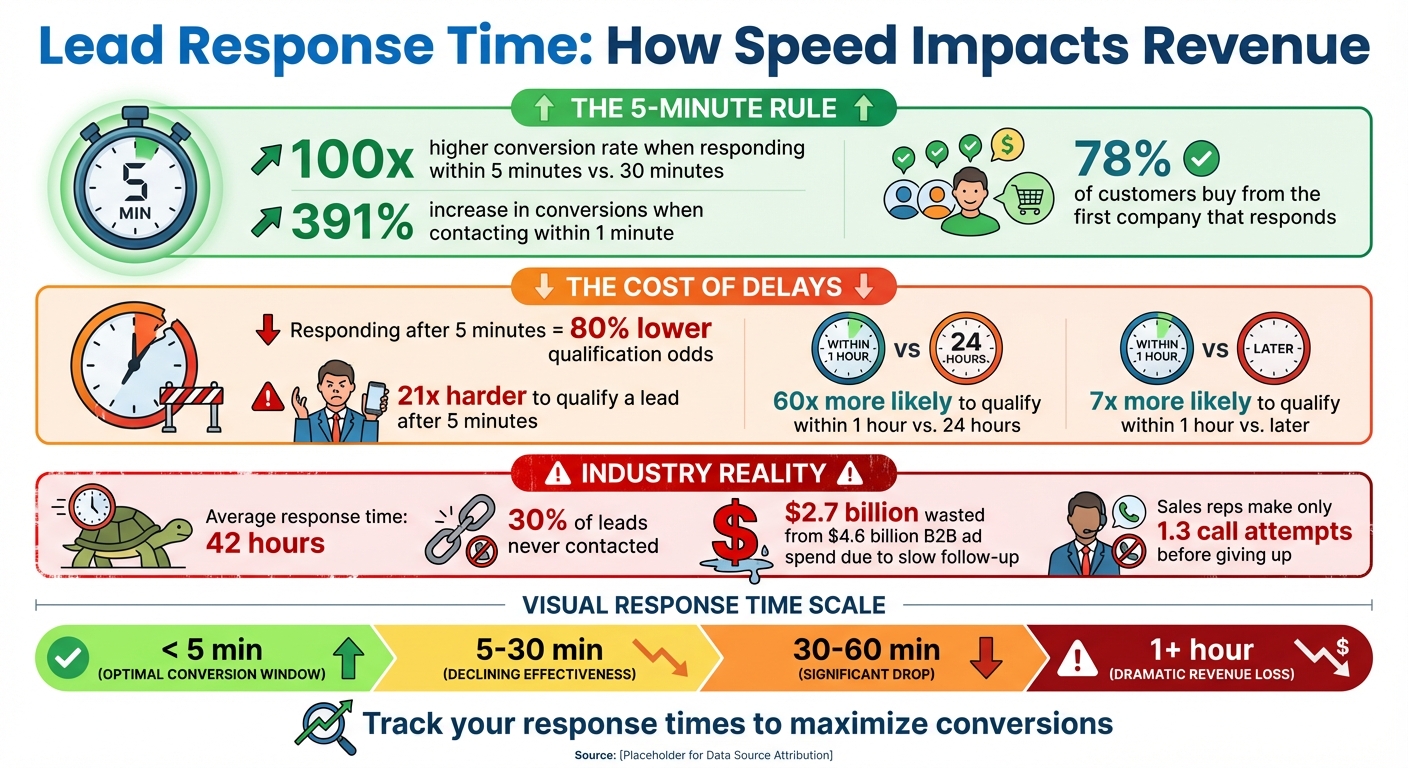
Lead Response Time Impact on Conversion Rates and Revenue
Lead Response Time Basics and Measurement
Responding to new leads quickly is no longer optional—it’s a measurable revenue driver. Data consistently shows that contacting a lead within five minutes dramatically increases qualification and close rates, while delays of even one hour sharply reduce conversion potential.
Despite this, the average lead response time across industries exceeds 40 hours, leaving revenue on the table and giving competitors a major advantage.
This guide explains:
-
What lead response time is (and how to measure it correctly)
-
How response delays directly impact revenue
-
Proven benchmarks for response speed
-
How to model revenue gains from faster follow-up
-
How tools like Teamgate CRM help teams respond faster at scale
What is Lead Response Time?
Lead response time is the amount of time it takes for a sales team to respond to a prospect after they’ve shown interest. This process kicks off the moment a lead reaches out – whether through a web form, phone call, email, or chat – and ends when someone from your sales team makes contact.
This clock starts the moment a lead:
-
Submits a form
-
Initiates a chat
-
Sends an email
-
Requests a callback
…and ends when a real outreach attempt occurs (call, email, or message).
For example, if a potential customer submits a contact form on your website at 10:30 AM and your sales rep calls back at 10:35 AM, your response time is 5 minutes. But if that callback doesn’t happen until 2:30 PM the next day, your response time stretches to more than 28 hours.
Metrics for Measuring Response Speed
Several key metrics can help you understand how response speed impacts your sales efforts. These include:
- Average response time: How quickly your team reaches out to leads on average.
- Contact rate: The percentage of leads your team successfully connects with.
- Qualification rate: The percentage of leads that move further into the sales pipeline.
- Revenue per lead: How much revenue is generated per individual lead.
Together, these metrics provide a clear picture of how effective your sales process is. For instance, if your team has a fast average response time but a low contact rate, it might mean that speed alone isn’t enough to ensure connections. On the other hand, a high contact rate paired with a low qualification rate could indicate that timely follow-ups aren’t translating into meaningful conversations or opportunities.
By analyzing these metrics, you can better understand how response times influence your overall revenue performance.
How Slow Response Times Hurt Revenue
Speed matters – a lot. It is one of the strongest predictors of lead conversion. Research consistently shows:
-
Sales teams are 60× more likely to qualify a lead if they respond within one hour compared to waiting 24 hours.
-
Waiting more than five minutes reduces the likelihood of qualifying a lead by up to 80%.
-
78% of buyers choose the first company that responds, regardless of price or brand.
Slow responses don’t just hurt individual deals—they compound revenue loss at scale. In B2B alone, billions in ad spend are wasted each year due to delayed or missed follow-ups. Even more alarming: over 30% of inbound leads are never contacted at all.
The numbers are staggering. Last year, B2B marketers spent over $4.6 billion on advertising, but nearly $2.7 billion of that investment may have been wasted due to slow or no follow-up. On top of that, more than 30% of leads are never contacted, with sales reps typically making just 1.3 call attempts before giving up. “Every hour of delay not only decreases your chances of connecting with a lead but also gives your competitors a chance to swoop in and win the business instead,” says Brian Lim, CEO of iHeartRaves & INTO THE AM.
Why 47 Hours = $0 in Sales (Lead Response Time Explained)
Research Data: Response Speed and Conversion Rates
The data below highlights how quick responses can significantly boost conversion rates and directly impact revenue growth.
The 5-Minute Rule
Responding within five minutes is the single most impactful benchmark:
-
Up to 100× higher conversion rates compared to responding after 30 minutes
-
Significantly higher contact and close rates
The 1-Hour Threshold
-
Leads contacted within one hour are 7× more likely to be qualified
-
Conversion rates drop steeply after the first hour
Beyond 1 Hour
Once response times exceed an hour, close rates fall dramatically—and often never recover.
Bottom line: two sales teams with identical leads and skills will produce wildly different revenue results based solely on response speed.
sbb-itb-5772723
Calculating Revenue Gains from Faster Response
How to Model Revenue by Response Time
To estimate how response time impacts revenue, start by analyzing historical CRM data. Break down leads into response time categories: under 5 minutes, 5–30 minutes, 30–60 minutes, and over 1 hour. This segmentation helps identify which response windows drive the most revenue.
Use the formula:
Lead Response Time = Time of First Contact – Time of Lead Submission
This gives you a baseline to work with. Once you determine your current average response time and related conversion rates, you can apply data-backed improvements to forecast potential revenue growth. For instance, SaaS companies that reduced response times from 24 hours to under 5 minutes reported a 21% increase in conversion rates. To estimate your gains, multiply this improvement percentage by your total lead volume and average deal size.
Analyzing CRM Data by Response Time
After defining response time categories, dig into your CRM metrics. Ensure your system tracks timestamps for both lead submissions and first contact attempts. Focus on calculating the median response time rather than the average, as this avoids distortions caused by outliers.
Key metrics to evaluate within each response time bucket include:
- Opportunity Rate: How many leads turn into qualified opportunities
- Win Rate: How many opportunities result in closed deals
- Conversion Rate: The percentage of leads converting by time bucket
Further refine your analysis by segmenting leads based on source, sales rep, and territory. This can help highlight top-performing areas or individuals. Research by Velocify underscores the importance of speed, showing that contacting a lead within one minute of their inquiry can boost conversion rates by an incredible 391%.
Comparing Results Before and After Changes
Once you’ve implemented faster response strategies, use your CRM to compare performance metrics from before and after the changes. Generate reports that focus on:
- Average response time by sales rep
- Opportunities created by response time category
- Overall conversion rates
Create side-by-side tables showing results over 30-day periods to clearly track the impact. Additionally, monitor pipeline value and revenue by response time category. For example, cutting response times from 2 hours to 5 minutes should lead to noticeable improvements in both qualified opportunities and closed deals.
To maintain momentum, set up real-time notifications for managers whenever response times exceed your targets. This ensures that response optimization becomes an ongoing effort, consistently driving revenue growth.
Using Teamgate CRM to Speed Up Lead Response
When it comes to responding to leads quickly, Teamgate CRM equips your sales team with tools designed to seize every opportunity without delay.
Tools in Teamgate CRM That Boost Response Speed
Teamgate CRM simplifies the lead follow-up process with features designed to save time and reduce administrative headaches. For instance, the SmartDialer lets your team call leads directly from the platform. No need to toggle between apps or manually dial numbers – this tool keeps the focus on meaningful conversations instead of tedious tasks.
Another standout feature is automated workflows. You can set up rules to assign leads automatically based on criteria like location, product interest, or rep availability. This ensures every lead is routed to the right person without delay. Plus, email integration keeps all correspondence synced directly to contact records, and lead scoring helps reps zero in on the most promising opportunities.
These tools can be tailored to meet the specific needs of US-based businesses, ensuring your team gets the most out of every lead.
Customizing Teamgate CRM for US-Based Businesses
To make Teamgate CRM work seamlessly for US businesses, you can adjust settings to fit local preferences. Configure the platform to use USD ($), MM/DD/YYYY date formats, and the correct US time zones. For companies managing international clients, higher-tier plans offer multi-currency support while keeping key reports in dollars.
A practical tip? Set up an initial pipeline stage labeled “New Lead – Immediate Contact Required.” This can trigger automatic notifications the moment a lead is submitted, helping your team act fast.
Tracking Response Times with Teamgate
Teamgate’s sales dashboards make it easy to keep an eye on lead response times. You can track real-time metrics for individual reps and entire teams, and create custom reports to measure how long it takes to go from lead creation to the first contact. Dive deeper into data like median response times by rep, lead source, or even time of day to uncover any delays.
For more detailed insights, advanced reporting tools allow you to segment response metrics further. For example, you can generate weekly comparison reports to monitor how new strategies are improving response times. If you hit a snag, Teamgate offers 24/7 chat support for Team plan users and 24/7 phone support for Growth plan subscribers, ensuring help is always on hand to resolve any issues that could slow you down.
Conclusion
Responding to leads quickly – ideally within five minutes – can make a world of difference. Studies show it can boost conversion rates by up to 100 times, while instant replies can drive an impressive 391% increase in conversions. Notably, 78% of customers end up choosing the first company that responds to them.
The stakes are high. In 2021, slow response times put nearly $2.7 billion of the $4.6 billion B2B advertising spend at risk. Taking more than five minutes to reply slashes the odds of qualifying a lead by 80%.
To reclaim lost revenue, businesses need to rely on data-driven strategies. Tracking response times, analyzing conversion trends, and identifying weak points in the sales process can provide valuable insights. With the average lead response time across industries sitting at a staggering 42 hours, there’s a significant opportunity for improvement.
This is where tools like Teamgate CRM come into play. By automating and optimizing lead responses, Teamgate helps businesses hit that critical five-minute mark. Features like SmartDialer, automated lead routing, and real-time dashboards equip teams to respond faster, turning speed into a competitive edge and driving measurable revenue gains.
FAQs
Why is it so important to respond to leads within five minutes?
Responding to leads within five minutes can make a world of difference in your success rate. Research highlights that reaching out within this short window makes you up to 100 times more likely to connect with a lead compared to waiting just 30 minutes.
Why does speed matter so much? When someone shows interest, they’re at their peak level of engagement. A prompt response not only grabs their attention but also shows that your business is professional and dependable. Acting quickly can boost your chances of turning leads into customers and help you seize valuable revenue opportunities.
What are the best ways for businesses to track and improve lead response times?
Businesses can keep a close eye on lead response times by leveraging a CRM system. These systems allow you to record precise timestamps for when leads come in and when follow-ups happen, giving you a crystal-clear picture of how your team is performing.
Want to speed things up? Try to connect with leads within five minutes of their inquiry. You can make this easier by automating lead assignments to the right team members, setting up real-time notifications for new leads, and incorporating tools like AI-powered chatbots to engage prospects immediately. These steps not only help you respond faster but also improve your chances of turning leads into loyal customers.
How does responding to leads slowly impact a company’s revenue?
Responding to leads quickly isn’t just a nice-to-have – it’s crucial for keeping your revenue on track. Research reveals that if you wait longer than 5 minutes to follow up with a lead, your conversion rates can drop by a staggering 8 times. That’s a massive missed opportunity. Why? Because potential customers don’t wait around – they lose interest or move on to a competitor.
Speed matters. By making fast response times a priority, you increase the likelihood of turning leads into paying customers. Not only does this help grow your revenue, but it also helps build stronger, more reliable relationships with your customers.






