

Microsoft is transforming Dynamics 365 Sales with AI tools in its 2026 Release Wave 1, turning CRMs into action-oriented platforms. These updates aim to reduce manual tasks, improve data accuracy, and guide sales teams with actionable insights. Key features include Microsoft 365 Copilot for Sales, autonomous agents for lead qualification and deal management, and tools for real-time pipeline monitoring. For small and mid-market teams, this means less admin work, better lead prioritization, and more reliable sales forecasting.
Key Takeaways:
- AI-Powered Agents: Automate lead qualification, deal tracking, and follow-ups.
- Improved Forecasting: Real-time insights and risk detection for pipeline accuracy.
- Reduced Admin Work: Automates data entry, task creation, and meeting summaries.
- Preparation Tips: Ensure clean CRM data, integrate with Microsoft 365, and define clear sales processes.
Teamgate helps sales teams follow structured processes and trust their pipeline insights – without turning CRM into a full-time admin job.
Agentic AI Vision for Dynamics 365 Sales | Fortunato Di Donato | March 2026 CRM Community Call
sbb-itb-5772723
Common Problems with Sales CRM Today
CRM Pain Points & Microsoft AI Solutions: Key Stats
Before diving into how Microsoft’s AI tools aim to help, it’s important to acknowledge the issues many SMB and mid-market sales teams face. These ongoing challenges often block productive selling and are exactly what Microsoft’s AI seeks to address.
Manual Data Entry and Admin Overload
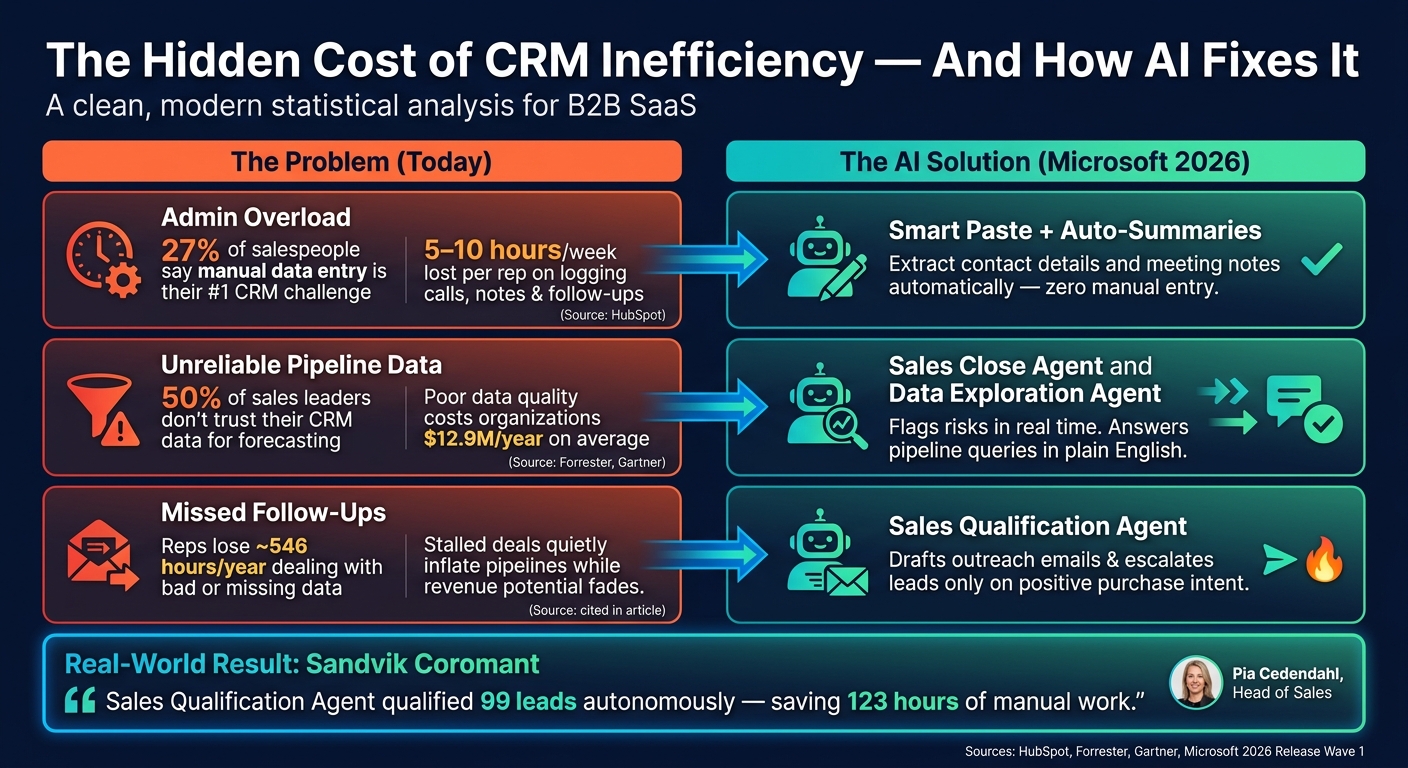
For sales reps, manual data entry is a constant source of frustration. HubSpot research highlights that 27% of salespeople name manual data entry as their biggest CRM challenge. The numbers tell the story: a mid-market account executive might spend 5–10 hours per week logging calls, updating deal stages, jotting down meeting notes, and creating follow-up tasks. That’s valuable time pulled away from actual selling.
What happens as a result? Reps start cutting corners. They might batch-update the CRM on Friday afternoons from memory or skip updates altogether, relying on personal spreadsheets to manage their real pipeline. The CRM becomes an incomplete, delayed snapshot of reality – hardly a system anyone can trust or act on effectively.
Messy Pipelines and Unreliable Data
When updates are inconsistent, pipeline data quickly becomes unreliable. Deals linger in the same stage for months, close dates get pushed forward repeatedly without reason, and key details like deal size or decision-maker information are left blank. The pipeline may look full, but it’s riddled with gaps and inaccuracies.
This issue directly impacts forecasting. Forrester reports that 50% of sales leaders don’t fully trust their CRM data for forecasting, often due to incomplete fields and irregular updates. As a workaround, leaders resort to manual "deal-by-deal" reviews to gauge the quarter – an unsustainable approach that doesn’t address the root problem. Compounding this, Gartner estimates poor data quality costs organizations an average of $12.9 million annually, with CRM data being a major culprit.
Missed Follow-Ups and Stalled Deals
Even the most organized and motivated reps struggle with fragmented workflows. Picture this: a rep promises a prospect a proposal by Thursday but gets caught up in back-to-back calls. The task never gets logged in the CRM, so it’s not tied to the opportunity. To a manager, the deal looks fine – no red flags – while the prospect hasn’t heard back in weeks.
This scenario plays out across teams, leading to what’s often called stalled opportunities: deals that haven’t moved forward or been disqualified in weeks, quietly inflating the pipeline while real revenue potential fades. The issue isn’t laziness but a lack of structure. Follow-up discipline often relies on manual task creation and memory rather than a systematic process. Without a clear framework, even the best deals can go cold.
These persistent issues underscore the need for smarter tools, setting the stage for how Microsoft’s AI solutions can transform CRM efficiency.
How Microsoft AI Changes Day-to-Day CRM Work
Microsoft AI is reshaping CRM workflows by tackling two major pain points: excessive administrative tasks and unreliable data. By embedding AI directly into CRM processes, it addresses these issues at their roots, offering practical solutions instead of just retrospective insights.
AI-Driven Lead Scoring and Prioritization
Dynamics 365 Sales uses historical data and engagement signals to assign scores to leads, helping reps prioritize their efforts. Even better, it highlights the key factors influencing each score, giving sales teams a clearer understanding of why certain leads rank higher or lower.
Going a step further, the Sales Qualification Agent – introduced in Microsoft’s 2026 Wave 1 release – automatically evaluates leads using sales qualification best practices, public web data, company websites, and internal files. It applies the BANT framework (Budget, Authority, Need, Timeline) to filter out low-intent leads. Sandvik Coromant, led by Head of Sales Pia Cedendahl, implemented this tool early in 2026. The agent qualified 99 leads autonomously, saving the team 123 hours of manual work.
"Right away we saw the value of the agent." – Pia Cedendahl, Head of Sales, Sandvik Coromant
This streamlined lead scoring naturally enhances pipeline management.
Pipeline Insights and Forecast Accuracy
Building on smarter lead scoring, Microsoft AI also improves pipeline monitoring. The Sales Close Agent tracks open deals in real time, flags risks, and provides updates on changes since the last review. Microsoft calls this "delta-first guidance", which helps managers focus on deals with actual movement or issues instead of revisiting every deal unnecessarily.
Additionally, the Data Exploration Agent allows users to query the pipeline in plain English. For example, asking "What opportunities are closing next quarter?" instantly generates a filtered view or visual chart, eliminating the need for manual data filtering. This reduces guesswork and strengthens forecasting accuracy.
Automated Summaries and Next-Step Recommendations
Dynamics 365 Sales pulls insights from Microsoft Teams calls, recorded meetings, and emails to automatically update opportunity records. After a discovery call, it extracts key information and suggests next steps directly on the Sales dashboard.
Another time-saving tool, Smart Paste, lets reps copy unstructured text – like an email or LinkedIn message – and paste it into a CRM form. The AI then extracts details like names, titles, and contact information, populating the relevant fields automatically. These features significantly cut down on administrative tasks, allowing reps to focus more on selling.
Task Automation and Follow-Up Support
The Sales Qualification Agent also drafts personalized outreach emails and escalates leads only when positive purchase intent is detected. This ensures reps spend their time on high-value conversations, reducing missed follow-ups and stalled deals.
Jeremy Hallett, EY‘s Demand Generation Leader, sums it up well:
"With agents, we’re making CRM a way of life."
How to Prepare Your Team for AI in CRM
AI tools like Microsoft’s can only deliver results when built on a strong CRM foundation. The effectiveness of these tools hinges on the quality of your CRM data and how well your system is integrated and maintained. Here’s how you can prepare your team to maximize the benefits of AI in CRM.
Keep Your CRM Data Clean and Current
AI’s performance often falters due to bad data – not flawed technology.
"Most AI failures in Dynamics 365 stem from data issues, not technology issues." – CRM Software Blog
CRM data tends to degrade over time, with around 30% of it becoming outdated annually, and duplicate records accounting for 10–30% of entries. This directly impacts AI performance. Before enabling features like lead scoring or pipeline forecasting, audit your CRM fields – such as industry, company size, and revenue – and aim for at least 80% completion. Additionally, enforce rules to deactivate records that have been inactive for over 12 months. Sales reps already lose approximately 546 hours per year dealing with bad data, and AI will only amplify these inefficiencies if the data isn’t clean.
Connect Your CRM to Microsoft 365
Microsoft’s AI tools thrive on access to comprehensive data. Without integrating your CRM with tools like Outlook, Teams, SharePoint, and OneDrive, critical sales activities may remain invisible to AI.
One often-overlooked requirement is server-side synchronization with Exchange, which is essential for AI agents to perform tasks like generating outreach emails or engaging with leads. Without this synchronization, features like the Sales Qualification Agent won’t function properly. Make sure your CRM is fully connected to these platforms so AI can access the data it needs to operate effectively.
"If server-side synchronization isn’t set up, the agent doesn’t generate outreach emails or engage with leads." – Microsoft Learn
Define Your Sales Stages and Follow-Up Rules
AI recommendations, such as "schedule a demo" or "send a proposal", rely on a well-defined and consistently applied sales process. If your pipeline stages are vague or inconsistently used, AI won’t be able to accurately assess deal statuses or suggest appropriate next steps.
Before activating AI features, ensure every team member agrees on what qualifies as a lead, how deals progress through stages, and criteria for identifying stalled deals. Consistency here is critical for AI accuracy.
Build Rep Adoption and Process Discipline
AI depends on patterns in CRM data to make predictions and recommendations. If reps fail to log calls, update deal stages, or record contact details consistently, the AI won’t have enough reliable data to work with.
This isn’t just a matter of training – it’s about creating a culture where CRM usage is non-negotiable. Teams that treat CRM data entry as optional will find AI outputs unreliable or misleading. Organizations that see the best results from Microsoft’s AI tools are those where CRM usage is a daily habit, not an afterthought. Start by emphasizing disciplined and consistent data entry long before rolling out AI features. With clean, connected data and a culture of CRM discipline, your team will be ready to leverage Microsoft AI for better sales results.
Putting Microsoft AI to Work in Your Sales Process
Microsoft AI, when paired with clean CRM data and structured processes, can transform your sales operations. By leveraging tools like advanced lead scoring and pipeline insights, you can streamline everything from lead qualification to post-interaction coaching. These tools integrate directly into your workflow, helping your team make quicker decisions and perform more effectively.
Faster Lead Qualification and Follow-Up
The Sales Qualification Agent operates in two modes: one for conducting background research and another for directly engaging prospects. This ensures that follow-ups happen promptly and efficiently. The tool quickly qualifies leads and prioritizes follow-up actions, so high-potential prospects get immediate attention. Predictive lead scoring assigns a score and grade to each lead based on historical data, allowing reps to focus on the most promising opportunities as soon as a lead is added.
Cleaner Pipelines and More Accurate Forecasts
Predictive forecasting introduces a "Prediction" column, which uses historical data and real-time trends to provide up-to-date forecasting insights. Additionally, the Opportunity Score Trend feature highlights whether a deal’s health is improving, declining, or staying steady, enabling timely and informed interventions. These features empower teams to manage pipelines with greater confidence and precision.
Less Admin Work for Reps
Automation plays a key role in reducing the administrative workload for sales reps. Tasks like lead follow-ups and data entry are handled automatically, ensuring no lead is overlooked and freeing up time for more strategic activities. This automation simplifies CRM tasks, allowing reps to focus on selling rather than managing data.
Better Coaching and Team Performance
AI tools also enhance coaching by providing call summaries and meeting prep notes based on real data. Managers gain insights into patterns, such as which reps struggle at certain stages or why deals are delayed.
"With…conversation intelligence, our Investec teams can easily drill down for more detail [about] the information they’re given." – Jody Teren, Group Engagement Lead for the AI Data Team, Investec
This level of insight turns coaching sessions into targeted, data-driven discussions, helping teams improve their overall performance.
Conclusion: Where Sales CRM Is Headed with AI
Microsoft’s AI advancements are transforming how sales teams handle pipelines, forecast revenue, and reduce administrative burdens. The shift is clear: CRM systems are moving from being mere record-keeping tools to action-oriented platforms, with AI working behind the scenes to identify risks and automate repetitive tasks.
For small and mid-sized teams, this evolution brings noticeable benefits: cleaner pipelines lead to better forecasts, less manual data entry gives reps more time to focus on selling, and AI-driven insights enable smarter coaching. These changes directly tackle the CRM pain points mentioned earlier.
"AI is no longer just a feature – it’s becoming the foundation of how work gets done in Dynamics 365." – Jesse Bucholz, Verified Expert, Stoneridge Software
To make the most of these advancements, preparation is key. Teams should focus on simplifying CRM forms and views, integrating Microsoft 365 signals via Microsoft Graph, and defining clear sales stages before enabling AI agents. Testing new features in a sandbox environment is a practical way to identify potential issues without affecting active deals.
Microsoft is also making these tools more accessible. For Business Central users, several AI-driven agents are included in existing licenses at no additional cost. The message is clear: AI-powered tools are becoming an essential part of the sales toolkit.
FAQs
Which Dynamics 365 Sales AI agents are most useful for SMB teams?
The Sales Qualification Agent and the Sales Close Agent are two standout Dynamics 365 Sales AI tools for small to medium-sized businesses. The Sales Qualification Agent automates lead qualification while delivering detailed insights about leads, saving time and effort for sales teams. Meanwhile, the Sales Close Agent keeps an eye on deal stages, flags important changes, and provides actionable guidance to help close deals faster. Together, these tools simplify workflows and boost productivity for smaller sales teams.
What CRM data do we need before turning on Microsoft’s AI features?
Before turning on Microsoft’s AI features, make sure your CRM is set up with structured data. This includes details like lead and contact information, company profiles, customer history, and sales records. Focus on key data points such as past deals, win/loss trends, and engagement patterns. A well-organized data foundation is essential for accurate lead scoring, better qualification, and meaningful insights.
What setup in Microsoft 365 is required for agents to work?
To configure Microsoft 365 for agents, follow these steps:
- Create an app in Azure: Set up the necessary application within Azure to integrate with your system.
- Assign an app user in Dataverse: Ensure the app user is assigned the AISalesPerson role for proper access and functionality.
- Configure server-side synchronization: Link Microsoft Exchange with server-side synchronization to manage communication effectively.
- Set permissions and data policies: Verify that all permissions and data policies align with organizational requirements.
- Enable the modern UI for Sales Hub: Activate the modern user interface for the Sales Hub app for a better user experience.
- Activate required connectors: Ensure all necessary connectors are enabled to support full functionality.
These steps ensure a smooth setup and optimal operation for agents using Microsoft 365.






