

If your CRM only gets updated after the work is done, your pipeline is already behind.
I’d sum up the shift like this: modern CRM is moving from a place reps visit later to a layer that works inside email, calendars, calling, forms, and task flow. That cuts admin time, keeps records closer to what buyers are doing, and gives managers a pipeline they can use. Teamgate gives growing sales teams clarity, structure, and trustworthy pipeline insight – without enterprise CRM bloat or feature overload.
Here’s the short version of what matters:
- reps often lose 20%–30% of their time to admin and data entry
- some teams lose 10%–20% of inbound leads from slow routing or late follow-up
- auto-logged email, meetings, calls, and texts help keep deal history current
- tasks, routing, scoring, and dashboards help teams act on pipeline data instead of cleaning it up later
This article boils the shift down to nine core changes:
- active deal stages
- automatic email logging
- calendar and meeting sync
- call and SMS logging
- built-in tasks and reminders
- rules-based lead routing
- workflow automation
- data enrichment and lead scoring
- manager dashboards for deal risk and sales forecasting
Quick Comparison
| CRM style | How reps use it | What managers get |
|---|---|---|
| Database-style CRM | Reps enter updates after calls, emails, and meetings | Delayed pipeline view, gaps in activity, weaker forecast confidence |
| Sales-layer CRM | Activity flows into CRM while reps work in their day-to-day tools | More current pipeline view, clearer next steps, better read on risk |
If you want a CRM people will keep using, the answer is simple: make it part of selling, not a second job.
CRM AUTOMATION MASTERCLASS (From A to Z in 18 mins)
sbb-itb-5772723
Why CRM Is No Longer a Destination
CRM can’t just be the place where updates go to die. If reps work in email, calendars, calls, and forms all day, then log things later, the pipeline is already behind. Teamgate helps reps follow a clear sales process and helps managers trust the numbers – without turning CRM into a full-time admin job.
Here’s the core issue:
- When reps update CRM after the fact, pipeline data gets stale
- Follow-up gets missed, deals stall, and leads cool off
- Some mid-market teams lose 10% to 20% of inbound leads because routing or response happens too late
- A sales-layer CRM keeps activity current by pulling it in as it happens
Reps used to sell from inboxes, calendars, spreadsheets, and notes, then circle back to CRM later. That turned CRM into a reporting stop instead of part of the day-to-day selling flow. And that’s a big reason pipelines can look busy even after buyer activity has slowed down.
Once activity gets logged late, CRM stops matching what’s going on in the deal. Follow-up slips. Deals sit too long. Leads go cold. You’ll often see opportunities parked in the same stage for weeks, even while emails and meetings are still happening around them. The record says one thing; the deal says another.
That disconnect costs teams. Some mid-market sales teams lose 10% to 20% of inbound leads simply because nobody manages sales leads or responds in time. That’s not a lead volume issue. It’s a speed and visibility issue.
Modern CRM fixes this by closing the gap between work and recordkeeping. Instead of asking reps to remember every update later, it captures activity as it happens. Email, calendar, calling, forms, and automation all feed the pipeline in real time, so the system stays close to reality.
That’s the shift a sales-layer CRM makes. It flips CRM from a passive database into an active part of the selling process. Reps don’t have to act like data clerks just to keep the pipeline clean, and managers get a clearer view of deal health, stalled movement, and overdue follow-up.
Teamgate is built around that idea. It works as a rep-friendly sales system that cuts manual admin instead of piling more on, while giving managers a cleaner read on what needs attention next. Here’s what that looks like in practice.
What a Sales-Layer CRM Looks Like in Practice
A sales-layer CRM cuts admin work and keeps your pipeline current without reps having to update every little thing by hand. It pulls activity from email, calendars, calling tools, LinkedIn, and web forms, then keeps records moving in the background. Teamgate helps reps follow a clear sales process and helps managers trust the numbers – without turning CRM into a full-time admin job.
The change shows up fast in day-to-day work: reps spend less time logging activity, and the deal record stays up to date as work happens.
Here are the nine ways that usually shows up:
- Active deal stages
- Automatic activity capture
- Visible next steps
- Smart lead routing
- Connected calling and messaging
- Calendar and meeting sync
- Workflow automation
- Data enrichment and scoring
- Manager dashboards
These aren’t abstract ideas. They replace the slow, manual work that clutters a sales day and makes pipeline data hard to trust.
| Trait | What it replaces |
|---|---|
| Active deal stages | Static pipeline cards that don’t reflect current progress |
| Automatic activity capture | Manually logging sent and received emails, calls, and meetings |
| Visible next steps | Sticky notes and follow-up remembered later |
| Smart lead routing | Manual assignment from shared inboxes |
| Connected calling and messaging | Writing call notes and copying SMS threads by hand |
| Calendar and meeting sync | Creating meeting activities by hand |
| Workflow automation | Repetitive field updates and record creation |
| Data enrichment and scoring | Researching company size, industry, and fit |
| Manager dashboards | Chasing reps for pipeline status updates |
The workflow gap is pretty simple. In an old setup, the CRM waits for the rep to feed it. In a sales-layer setup, the system picks up what’s already happening and turns that activity into a current pipeline view. That means less guesswork, fewer stale records, and a cleaner picture of what needs attention next.
The nine examples below show how those traits work in practice.
1. Teamgate CRM keeps deal stages and next steps active, not passive
A deal stage only helps if it points to the next action. In Teamgate, stages work best when each opportunity stays tied to a live follow-up, task, or call. Teamgate helps reps follow a clear sales process and helps managers trust the numbers – without turning CRM into a full-time admin job.
Teamgate documentation says adding activities to deals keeps the next step visible and the work already done easy to track. That means the deal card is not just a status label. It becomes a working prompt that shows what should happen next, when it should happen, and which task belongs to that stage.
For reps, that keeps the next move in plain sight. For managers, it makes the pipeline more honest. Deal age, stage, and pending activity give a better view for coaching and forecasting, without having to chase reps for manual updates.
The next step is capturing those activities automatically.
2. Automatic email capture turns inbox activity into CRM history
If you want your CRM to stay current, start with email. Most deal updates already happen in Gmail or Outlook, not in a CRM form. When those messages aren’t logged on their own, reps have to do it by hand. That usually falls apart, and deal timelines end up with holes. Teamgate helps reps follow CRM best practices and helps managers trust the numbers – without turning CRM into a full-time admin job.
Modern email integration fixes that by linking a rep’s Gmail or Outlook inbox straight to the CRM. After setup, sent and received emails for existing contacts are matched by email address and logged to the right contact, company, and deal. In Teamgate, inbox activity becomes part of the deal record, so the timeline shows what actually happened, not just what someone happened to enter later. For managers, that means last-activity and engagement data stay dependable.
The payoff is simple and measurable. Automatic capture often gives back 30 to 60 minutes per rep per day, which can go into outreach instead of admin work.
A few setup choices matter:
- Turn on bidirectional logging by default.
- Exclude internal emails.
- Exclude automated system emails.
Without those filters, timelines get messy fast. With them in place, each email thread becomes a clean record of buyer conversations, which makes it much easier to keep deals moving instead of letting them stall in half-finished records.
Once email history is logged on its own, the next step is meeting sync, so live conversations update the pipeline too.
3. Calendar and meeting sync makes the pipeline reflect real buyer motion
Booked meetings are one of the clearest signs that a deal is still moving. If a prospect schedules a discovery call, agrees to a demo, or sets up a technical review, that tells you more than a sent email ever could. Teamgate helps reps follow a clear sales process and helps managers trust the numbers – without turning your Sales CRM for SMBs into a full-time admin job. When meeting data flows into the CRM on its own, your pipeline starts to match what buyers are doing now, not what a rep meant to log later.
Email shows outreach. Calendar sync shows actual buyer engagement. Without sync, that signal often shows up late or never makes it into the CRM at all.
When you connect Google Calendar, Outlook, or Calendly to the CRM, booked meetings attach to the right contact, account, and open deal on their own. In Teamgate, the deal timeline shows the full meeting trail without extra manual work. The pipeline reflects the meeting trail, not rep memory. That means you can see meeting cadence, not just a raw meeting total.
Cadence matters just as much as the meeting itself. A deal with three meetings in two weeks tells a very different story than a deal with no meetings on the calendar for a month. That gap is often where forecast risk starts to show. Managers can spot late-stage deals with no upcoming meetings and step in sooner.
To keep the timeline clean, use two-way sync and leave out private or internal meetings. When a prospect books through Calendly, the meeting can create or update the contact and attach the event to the open opportunity on its own.
When meetings appear in the CRM without rep effort, admin work drops. Just as important, reps are more likely to trust the system because it already mirrors how their day is unfolding. After meetings, the next gap is calls and texts.
4. Calling and SMS logging create a complete conversation record
If calls and texts aren’t logged, your pipeline starts to drift from what’s happening with the buyer. A deal record gets old fast when key chats live in someone’s phone, inbox, or memory. Teamgate helps fix that by keeping essential CRM features like calls, texts, meetings, and follow-up in one place. Teamgate helps reps follow a clear sales process and helps managers trust the numbers – without turning CRM into a full-time admin job.
Teamgate’s SmartDialer, powered by Twilio, lets reps call directly from the contact or deal view. When the call ends, Teamgate logs the caller and recipient numbers, call duration, status, and the linked contact, lead, or deal record automatically. If recording is turned on, Teamgate adds the recording link to the call activity, which makes it easy for reps and managers to review what was said for coaching or the next follow-up.
SMS follows the same pattern. When a rep sends or gets a text in Teamgate’s integrated SMS channel, the message body, timestamp, and direction are logged on the contact record automatically. That means calls and texts live in one timeline, so you can see what happened last and what should happen next without digging around.
This becomes even more useful during handoffs and shared accounts. If an SDR passes a deal to an AE, the AE can open the record and see the last call, the text that came after it, and whether the prospect replied. Nothing gets lost in the shuffle, and the handoff stays clean.
For managers, this kind of activity trail keeps the deal record tied to buyer action instead of rep recall. Logged call results, text follow-up, and response status show whether momentum is real. Once that conversation history is in place, tasks and reminders help keep the next step moving.
5. Embedded tasks and reminders enforce next-step discipline
A CRM should tell reps what to do next, not just store what already happened. That’s the point of embedded tasks. Teamgate helps reps follow a clear sales process and helps managers trust the numbers – without turning CRM into a full-time admin job.
Once calls and texts are logged, the next weak spot is execution. Follow-up usually breaks when the next step sits in someone’s inbox, notebook, or memory instead of inside the CRM.
In Teamgate CRM, tasks are tied straight to deal and contact records. After a call or meeting, a rep can set the next action on the record, and it shows up in the rep’s task list with the deal context attached. The next step stays with the deal, where it belongs.
Speed matters here. Contacts reached within 5 minutes are 21 times more likely to convert than those contacted after 30 minutes. When a webhook fires on a high-intent trigger like a demo request, Teamgate can create and assign a follow-up task within 30 to 60 seconds. That short window cuts lead decay and helps stop deals from cooling off before a rep moves.
Automation also helps with leads that aren’t ready yet. Instead of leaving them parked in a stalled stage, a return-path workflow can automatically create a nurture task so the opportunity keeps moving instead of getting stuck.
With the next step attached, the next issue is making sure the right rep owns the lead right away.
6. Smart lead routing assigns ownership before leads go cold
Fast follow-up starts with instant ownership. If a lead sits unassigned, your team loses time, and time is what kills momentum. Teamgate helps reps follow a clear B2B SaaS sales process and helps managers trust the numbers – without turning CRM into a full-time admin job.
Here’s the core idea in plain English:
- Route each new lead the moment it comes in
- Send it to the right rep based on rules like territory, company size, industry, product interest, or source
- Trigger the first follow-up task right away
- Reassign stalled leads if no one touches them within set business-hour limits
Teamgate can route new leads by territory, company size, industry, product interest, or source, so the right rep gets them without manual triage. A web form submission can go straight to the correct rep’s queue with no manual handoff.
That speed can change the math in a big way. One calculation found that cutting response time from 6 hours to 5 minutes could move close rate from 6.4% to about 18%, adding about 22 deals and $480,000 in quarterly ARR at that deal size. That’s not a small lift. It changes the whole system.
You should also set catch-all rules for leads that don’t match your main routing logic. Then add a backup rule: if a lead goes untouched for more than 2 hours on business days, re-route it to another rep or a manager.
Once the lead is assigned, don’t stop at ownership. Routing should also fire the first-touch task for the assigned rep. After ownership is clear, automation can take care of the admin work in the background.
7. Workflow automation through Zapier and APIs removes repetitive admin
Once ownership is clear, the handoff should run on its own. If you want reps selling instead of logging updates, automation needs to take over the routine steps. Teamgate helps reps follow a clear sales process and helps managers trust the numbers – without turning CRM into a full-time admin job.
Here’s the core idea:
- When a prospect fills out a Typeform, books through Calendly, or replies to a cold email sequence, Teamgate can create the deal, connect it to the right contact and account, and trigger the first follow-up task.
- You can set qualification rules so leads enter the pipeline only when they match your criteria.
- That keeps pipeline data clean and cuts down on clutter.
Automation keeps CRM inside the sales flow instead of turning it into a pit stop for data entry. The handoff happens when the trigger fires, so reps don’t have to patch things together after the fact.
A few rules matter more than the rest. Link every automation to both the contact and the account. That way, if a rep leaves, the full deal history stays with the account instead of getting stranded. Create the next-step task by default. If a proposal goes out, set a follow-up for 3 days later so the deal keeps moving. Flag deals with no activity for 14 days. That gives managers a clear signal to step in before the opportunity goes cold.
Teamgate connects through Zapier, so teams can automate handoffs, tasks, and notifications without heavy implementation work. Once manual admin drops, the next step is getting better data.
8. Data enrichment and lead scoring improve pipeline accuracy
Not every open deal deserves the same attention. Once handoffs run on their own, the next problem is simpler: reps still waste time on poor-fit deals, and forecasts can still slip. Teamgate helps reps follow a clear sales process and helps managers trust the numbers – without turning CRM into a full-time admin job. That starts with better data and a clear way to rank what matters now.
Here’s the short version:
- Data enrichment fills in key CRM fields automatically, so reps don’t have to.
- Lead scoring uses that data plus buying signals to rank deals by fit and intent.
- Together, they help reps spend more time on the deals most likely to close.
Data enrichment fills in core details like company size, industry, job title, seniority, and verified contact info. That matters because scoring only works when those fields are complete. If your CRM is full of gaps, your scoring will be off too. Complete records give scoring a solid base, and enriched leads often convert at 2–3x the rate of unenriched ones because reps reach the right person with the right context from the start.
Lead scoring takes the next step. It ranks open deals based on firmographic, contact, and behavioral signals, so reps can see which opportunities need attention first. Instead of sorting through the pipeline by gut feel, they get a clearer view of fit and intent. Organizations using lead scoring report 38% higher sales win rates and 24% faster three-year revenue growth than teams without it.
For managers, this makes pipeline reviews much cleaner. Instead of asking, “What’s the status on this deal?”, they can check score changes, missing fields, and engagement signals to see which deals are active and which ones are just sitting there. Deals with missing key fields or flat scores stand out fast.
Teamgate’s Growth plan includes lead scoring and prioritization to help reps focus on the right opportunities. Enrichment feeds scoring, and scoring keeps attention on the best deals. The result is a pipeline that’s easier to review and deal priorities that are easier to trust.
9. Manager Dashboards Expose Deal Health, Inactivity, and Forecast Risk
A dashboard should tell you, fast, which deals are slipping, why they’re at risk, and what needs to happen next. Once deal scoring shows where attention should go, the next job is simple: check whether those deals are still moving. Teamgate helps reps follow a clear sales process and track movement and helps managers trust the numbers – without turning CRM into a full-time admin job.
Teamgate dashboards pull CRM activity into one risk view, so managers can spot trouble before an opportunity goes cold. The most useful dashboard views look at a small set of signals:
- stage age
- last activity date
- next-step coverage
- close-date movement
A practical benchmark is clear: 80% or more of pipeline value should have a next step scheduled within 14 days. Mid- and late-stage deals should be flagged when they’ve had no activity for 14 days or more, or when stage age is far above the team median.
The best dashboards work like a triage list. They show the highest-risk deals, explain why each one is flagged, and point to the next action needed. That matters because it shifts the conversation away from gut feel and toward live activity. You’re not guessing which deals are weak. You’re looking at stalled movement, missing next steps, and forecast risk in plain view.
That same dashboard can also help managers compare forecast versus actual results and keep commit, best case, and target tied to what the pipeline is doing right now.
For SMB and mid-market teams, this makes day-to-day coaching much easier. Managers can push follow-through, requalify thin deals, and keep the forecast clean. That gap is a big part of what separates a database CRM from a sales-layer CRM.
Database-Style CRM vs. Sales-Layer CRM
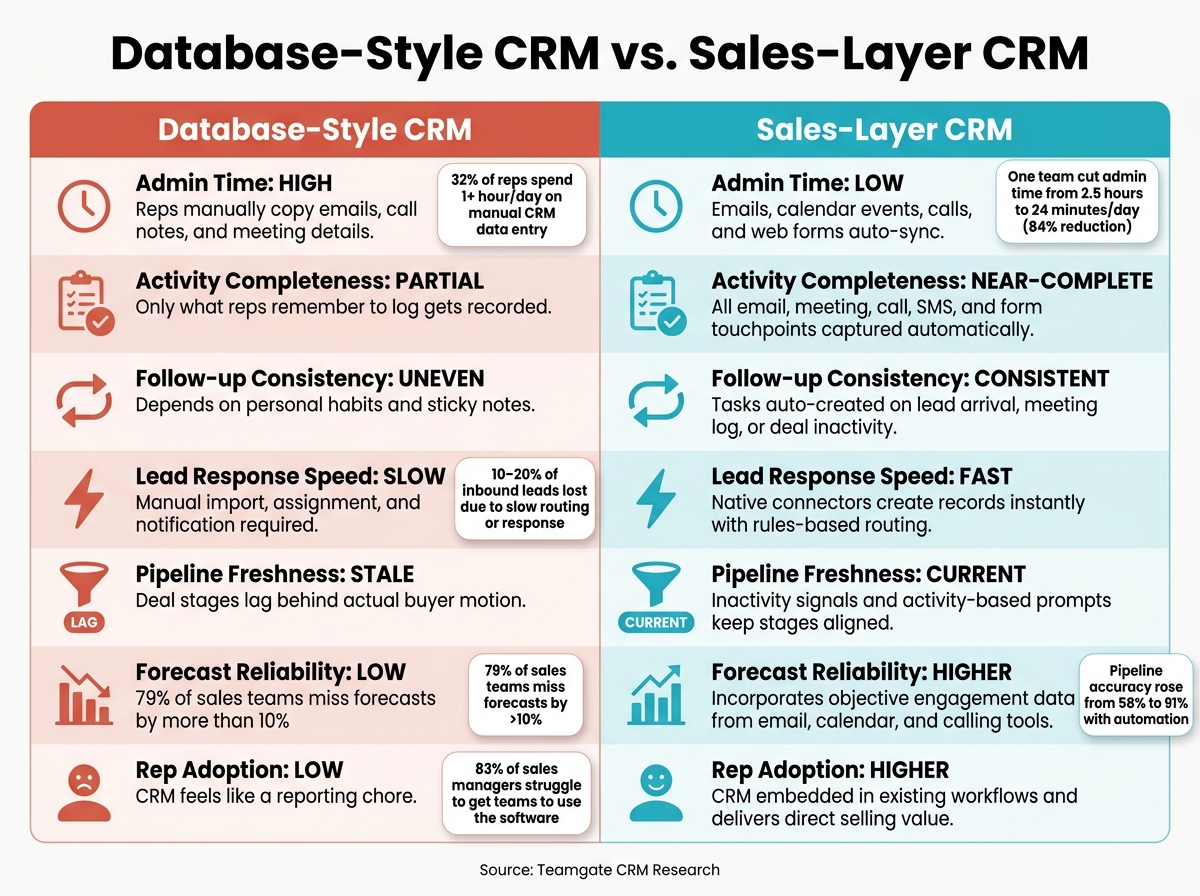
Database-Style CRM vs. Sales-Layer CRM: Key Differences
CRM works better when it sits inside the sales work itself, not after it. When reps have to copy emails, calls, and meetings into a database by hand, the pipeline slips out of date fast. Teamgate helps reps follow a clear sales process and helps managers trust the numbers – without turning CRM into a full-time admin job.
Here’s the plain-English version:
- Database-style CRM depends on manual updates, so records are often late or incomplete.
- Sales-layer CRM pulls activity into the record on its own, so reps can stay in their inbox and keep selling.
- That shift matters because it improves use, data quality, and forecast trust.
Taken together, the features above move CRM from a place where data gets dumped into a tool and into the middle of the selling workflow. The pattern is simple: CRM does its best work as a layer inside sales activity, not as a separate stop once the work is done.
With database-style CRM, reps manually copy activity into the record. They log emails, calls, and meetings after the fact, so the pipeline trails what’s happening in real time. Research shows 32% of reps spend an hour or more each day on manual CRM data entry alone, and 83% of sales managers say their main difficulty is getting teams to use the software.
A sales-layer CRM works differently. It feeds activity into the record on its own, so reps stay in the tools they already use, and the CRM stays up to date.
| Dimension | Database-Style CRM | Sales-Layer CRM |
|---|---|---|
| Admin time | High; reps manually copy emails, call notes, and meeting details into CRM fields | Low; emails, calendar events, calls, and web form submissions auto-sync |
| Activity completeness | Partial; only what reps remember to log gets recorded – many calls and one-off emails never make it in | Near-complete; all email, meeting, call, SMS, and form touchpoints captured automatically |
| Follow-up consistency | Uneven; depends on personal habits, sticky notes, and optional task creation | Consistent; tasks auto-created when leads arrive via web form, meetings are logged, or deals go inactive |
| Lead response speed | Slow; web form leads require manual import, assignment, and notification | Fast; native connectors create CRM records instantly, with rules-based routing and alerts |
| Pipeline freshness | Stale; deal stages lag behind actual buyer motion | Current; inactivity signals and activity-based prompts keep stages aligned with real conversations |
| Forecast reliability | Low; based on rep sentiment and partially updated records – 79% of sales teams miss forecasts by more than 10% when relying on inaccurate CRM data and manual entry | Higher; forecasts incorporate objective engagement data from email, calendar, and calling tools |
| Rep adoption | Low; CRM feels like a reporting chore disconnected from daily tools | Higher; CRM is embedded in existing workflows and delivers direct selling value |
The biggest gap shows up in three places: adoption, data quality, and forecast confidence. If reps can work where they already spend their time, they’re more likely to keep records current. That removes the extra reporting step that many teams dread.
Automated capture also improves activity completeness. Managers get a cleaner view of pipeline health because more of the actual sales motion makes it into the system, not just the parts a rep had time to enter manually.
What This Means for SMB and Mid-Market Sales Teams
These changes give sales teams time back, speed up follow-up, and cut deal drag. For small and mid-market teams, that matters fast: less time on CRM cleanup means more time selling, and faster lead handoff means fewer good leads go cold. Teamgate gives growing sales teams clarity, structure, and trustworthy pipeline insight – without enterprise CRM bloat or feature overload.
One SaaS team using AI-assisted CRM automation cut admin time from 2.5 hours to 24 minutes per rep per day – an 84% reduction. At the same time, pipeline accuracy rose from 58% to 91%, and deal velocity tripled. That’s not a small tweak. It changes how a rep’s day feels. Instead of ending the day buried in notes, they can spend that time following up, moving deals, and keeping momentum alive.
Even at a smaller scale, the math is hard to ignore. For a 10-person sales team, getting back just 3 hours per rep per week adds up to about 30 selling hours returned every week without hiring anyone new. For most teams, that shows up first in two places:
- More rep time for calls, follow-ups, and deal movement
- Faster response to inbound leads before interest drops off
At $39.90 per user/month, Teamgate’s Team plan costs $478.80 per month for 12 users and includes email integration, workflow automation, dashboards, Twilio dialing, and unlimited contacts. Put side by side with the cost of wasted rep time, manual logging, and messy pipeline cleanup, the software cost is often easier to defend than the admin burden it removes.
Lead response speed is where the difference gets obvious. When a form fill turns into an owned lead within minutes, your team can act while the buyer is still paying attention. That’s the window that often decides whether a lead becomes a conversation or disappears into the pile.
For managers, the payoff is just as clear. When activity gets captured on its own, dashboards show what’s actually happening, not just what someone remembered to enter later. That gives managers better data for coaching and cuts down the weekly scramble to build reports. Teams using AI-assisted forecast rollups built on automated activity data have reported 8–12 hours per week of manager time redirected from spreadsheet compilation to coaching and deal strategy.
That difference is clearest in the database-style vs. sales-layer comparison below.
Conclusion
The best CRM doesn’t pull reps out of selling. It supports selling while the work is happening. That’s the big pattern across all nine examples: less admin, more selling, and cleaner pipeline data. Teamgate helps reps follow a clear sales process and helps managers trust the numbers – without turning CRM into a full-time admin job.
When logging becomes part of the sales flow, a few good things happen at once:
- The sales pipeline stays current
- Reps keep working in the tools they already use
- Managers see live activity instead of end-of-day recall
This isn’t mainly a feature issue. It comes down to setup. Integrations, workflows, and stage-based tasks decide whether your CRM sits there like a database or acts like a sales layer that supports each deal as it moves.
A simple test helps: if you removed the CRM tab from your reps’ browsers for a week, would your pipeline still be accurate? If the answer is no, your CRM is still acting like a destination.
If you want to move from database to sales layer, start with the basics that cut friction fast. Turn on email and calendar sync. Connect calling. Add stage-based tasks. Build one manager dashboard. Then pick one workflow that slows your team down – like inbound lead handling or late-stage follow-up – and fix that first.
For SMB and mid-market teams, this usually means less manual work, faster lead response, and better adoption without adding headcount.
The teams that win aren’t the ones with the fullest records. They’re the ones whose pipeline reflects what buyers are doing, whose reps spend more time selling, and whose managers coach instead of chasing updates.
FAQs
How do I know if my CRM is still a destination?
If your CRM still depends on manual updates, it’s not helping much day to day. It’s still a place you visit after the work is done, not where the work happens. Teamgate helps reps follow a clear sales process and helps managers trust the numbers – without turning CRM into a full-time admin job.
You can usually spot this fast:
- You jump between email, calendar, and spreadsheets just to piece together deal details.
- You log calls and activities later in batches instead of in the moment.
- You skip updates because the interface feels clunky or out of sync with how you work.
At that point, the CRM is less of a sales tool and more of an archive. It stores what happened, but it doesn’t do much to help move the deal forward.
What should I automate first in a sales-layer CRM?
Start with email and calendar sync. It logs emails, meetings, and calls to the right contact or deal without manual work, so your team spends less time updating CRM and more time moving deals forward. Teamgate helps reps follow a clear sales process and helps managers trust the numbers – without turning CRM into a full-time admin job.
Next, set up follow-up task automation for stage changes. When a deal moves, the next task and due date should appear right away. That keeps every active deal tied to a clear next step, helps stop deals from going stale, and cuts down on manual reminders.
How long does it take to see results from this setup?
You can see gains right away when the setup fits into your team’s daily work from day one. Teamgate helps reps follow a clear sales process and helps managers trust the numbers – without turning CRM into a full-time admin job.
Once integrations are live, reps spend less time on manual logging, email sync, and meeting scheduling. They also get instant pipeline visibility. Bigger gains, like better sales-cycle efficiency and higher conversion rates, tend to build over time as data hygiene improves and the team uses the system more consistently.