

Most CRMs fail because manual data entry wastes time and creates unreliable data. Sales reps spend up to 65% of their time on non-selling tasks, leaving pipelines cluttered and forecasts inaccurate. Automation is changing this by syncing emails, calls, and meetings directly into CRMs without requiring reps to input data manually. AI tools now analyze interactions, update fields, and suggest next steps, saving time and improving accuracy.
If your CRM feels like more of a chore than a tool, it’s likely because it’s not integrated into your team’s daily workflow. Tools like Teamgate help sales teams follow a clear process, reduce admin work, and provide trustworthy pipeline insights – without unnecessary complexity. By automating repetitive tasks and using AI for insights, you can focus on selling instead of logging.
Key takeaways:
- Time savings: Automation reduces manual data entry, giving reps more time to sell.
- Better data: AI ensures CRM records are accurate and up-to-date.
- Actionable insights: AI recommends next steps and improves sales forecasting.
The shift to automated CRMs is already happening. Start small by enabling email and call syncing, and gradually adopt AI tools to make your CRM work for you – not the other way around.
How AI Transforms Sales CRM Workflows
sbb-itb-5772723
The Real Costs of Manual CRM Logging
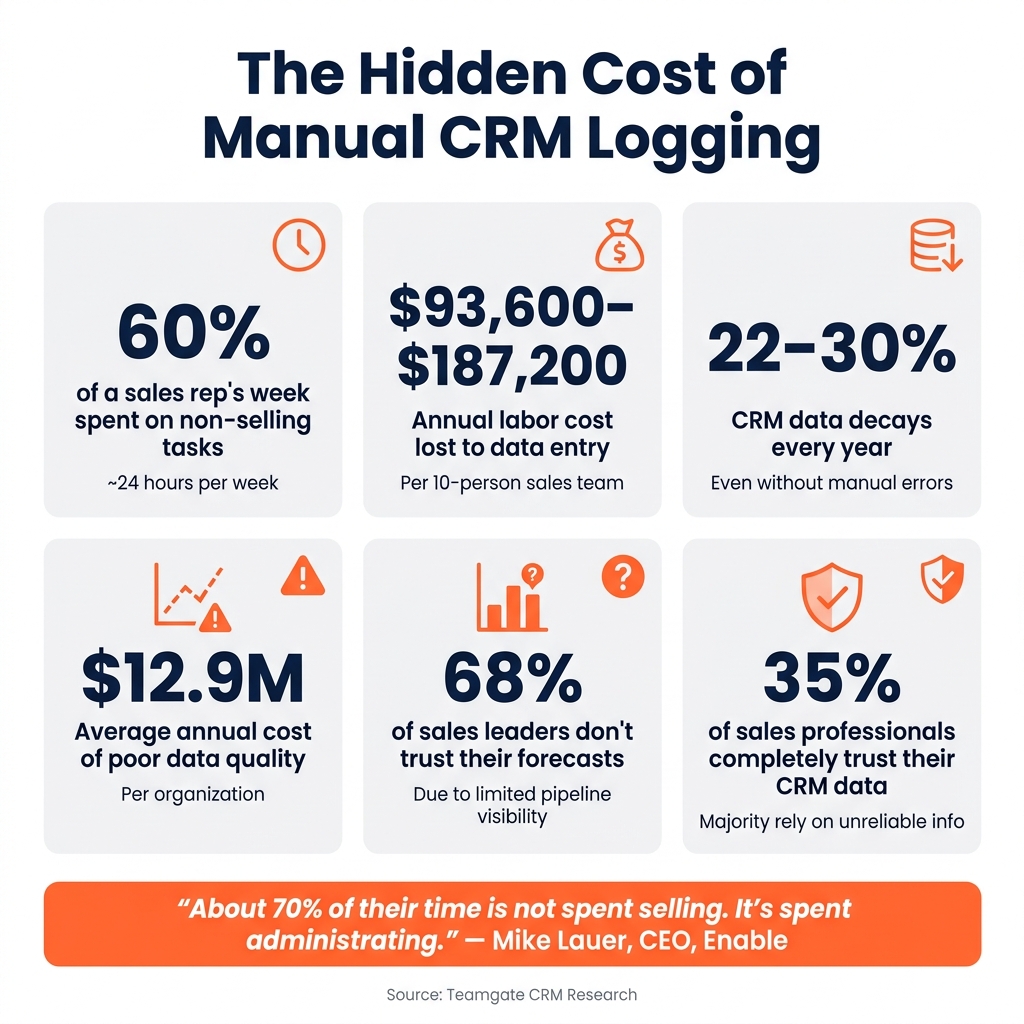
The Hidden Cost of Manual CRM Logging: Key Stats
Manual CRM logging comes with hidden expenses that can weigh heavily on businesses. From wasted time on data entry to missed opportunities and unreliable data, the impact is especially pronounced for SMBs and mid-market B2B teams. These inefficiencies don’t just slow teams down – they directly affect profitability.
Time Lost to Data Entry
Modern CRM tools aim to reduce manual effort, but outdated practices still persist, leading to significant time loss. On average, B2B sales reps spend about 60% of their week – roughly 24 hours – on non-selling activities like data entry. For a 10-person sales team, this translates to an annual cost of $93,600 to $187,200 in labor. For larger teams, like one with 25 reps, losing 12 hours per week per rep to admin tasks is equivalent to losing the productivity of seven full-time sellers.
“About 70% of their time is not spent selling. It’s spent administrating.” – Mike Lauer, CEO, Enable
This lost time isn’t just a productivity issue – it also affects the accuracy and reliability of CRM data.
Bad Data and Pipeline Problems
Manual logging doesn’t just take time; it also compromises data quality. When reps delay logging calls or meetings due to busy schedules, crucial details can be forgotten or recorded inaccurately. Over time, this leads to a pipeline filled with incomplete or outdated information.
CRM data decays at a rate of 22–30% annually. This means that even without manual errors, a significant portion of your data becomes obsolete within a year. Poor data quality costs organizations an average of $12.9 million annually and can siphon off up to 30% of revenue. No wonder 68% of sales leaders admit they don’t trust their forecasts due to limited visibility into their pipelines.
### How Manual Logging Hurts CRM Adoption
Manual logging creates a vicious cycle of inefficiency and distrust. Reps often skip or rush through data entry because it feels like a chore. Managers, noticing the incomplete or inaccurate data, stop relying on the CRM. This lack of trust trickles down, further demotivating reps from using the system effectively.
Only 35% of sales professionals say they completely trust their CRM data. When the majority of decisions are based on unreliable information, the CRM becomes more of a compliance tool than a strategic asset. This cycle of inefficiency and mistrust highlights the need for automated solutions, which the following sections will explore in more detail.
Why Manual Logging Fails Even Disciplined Teams
Even the most diligent sales teams struggle with manual CRM logging, not because they lack discipline, but because the workflows themselves are flawed. Many sales processes are inherently designed in ways that make consistent and accurate CRM updates nearly impossible to sustain over time. This isn’t just a problem for disorganized teams – it’s a structural issue that impacts even the best.
Delayed and Batched Data Updates
One major culprit is the habit of batch logging. Many reps postpone updating the CRM until the end of the week, often during a Friday “CRM catch-up” session. By then, details are often forgotten or misremembered, which compromises data accuracy. On top of that, reps can lose 2–3 hours every Friday just trying to log this overdue information. When data is entered days after interactions occur, forecasting accuracy can plummet to as low as 40%.
“The rep who meticulously updates every field after every interaction is also the rep who makes fewer calls per day. Managers want both perfect data and maximum activity. That math doesn’t work.” – Ibby Syed, Founder, Cotera
This issue is further compounded when reps are forced to navigate disconnected tools, creating additional friction and inefficiency.
Too Many Tools, Too Much Admin Work
Sales reps often juggle multiple tools – email, calendars, calling systems, and the CRM – none of which are seamlessly integrated. Without proper automation, reps must manually replicate their efforts across these platforms, leading to fragmented and siloed data. This lack of integration not only wastes time but also undermines real-time insights. As a result, managers often spend valuable coaching time interrogating reps about deal statuses instead of focusing on strategy and growth.
“The rep-manager relationship improves when neither person has to play data interrogation games.” – Ibby Syed, Founder, Cotera
CRM Tools That Don’t Fit How Reps Work
Many CRMs fail reps because they don’t align with their daily workflows. If logging a call or updating a deal requires switching apps, filling out multiple fields, or wrestling with a clunky interface, reps are likely to avoid it altogether – or do it poorly. Over time, the CRM becomes less of a selling tool and more of a tedious reporting task. This disconnect underscores the need for solutions that integrate seamlessly into the tools reps already use, like Gmail, Outlook, or their phones, and rely on automation to handle repetitive tasks. When the CRM supports the way reps actually work, it becomes a tool for growth rather than an administrative headache.
How Automation and Integrations Replace Manual Logging
Automation has transformed the way sales teams handle data, solving the delays and fragmented information caused by manual processes. By automating repetitive tasks and integrating tools like email sync, call logging, and workflow automations, sales teams can maintain accurate, real-time data without relying on manual updates.
Automatic Email and Calendar Sync
Integrations with platforms like Gmail and Outlook ensure that emails and calendar events are automatically linked to the appropriate CRM records. This includes timestamps, participants, and thread histories, saving sales reps up to 20% of their work time with better time management. For a team of five, that’s the equivalent of gaining an extra workday every week – without hiring additional staff.
Beyond time savings, the quality of data improves significantly. Since every interaction is logged automatically, managers can easily spot deals lacking recent activity, a level of insight that’s almost impossible to achieve when relying on reps to log details manually.
Automated Call and SMS Logging
In-app calling through integrated VoIP tools like Twilio captures call details instantly, while tools like Nexmo do the same for SMS messages – both inbound and outbound. This eliminates the need for reps to manually log communications, ensuring that every touchpoint, from brief texts to missed calls, is documented.
This automation enhances more than just efficiency. When all interactions are logged seamlessly, team transitions become effortless. For instance, an account executive taking over a deal from an SDR can instantly access the complete conversation history. Managers can also monitor call activity and deal progress without waiting for manual updates or scheduling status meetings.
Workflow Automations That Keep Data Current
While email sync and call logging document past actions, workflow automations ensure that CRM data stays up-to-date without relying on reps. For example, completing a demo can automatically trigger follow-up tasks, update fields like “Last Meeting Date”, and flag stalled deals worth over $25,000 that haven’t seen activity in 14 days. These automated processes maintain pipeline accuracy and help managers identify potential issues, such as phantom deals, before they skew forecasts.
Stage-based checks further enhance data quality. For example, when a deal moves to “Negotiation”, the CRM can require key fields – like decision-maker details, estimated close date, and deal value – to be completed before allowing the stage change.
AI-Powered Data Capture for Sales Teams
Automation has simplified basic data logging, but AI takes it a step further by ensuring data accuracy and providing actionable insights. It doesn’t just record interactions – it fills in gaps, highlights crucial details, and guides sales reps toward their next moves, making CRM systems far more effective.
AI That Fills Gaps in CRM Records
Even with tools like email sync and call logging, CRM records often miss critical details. Information like contact titles, deal budgets, and close dates frequently change without being updated. That’s where AI steps in.
AI constantly analyzes interaction signals to close these gaps. For instance, if a prospect emails, “finalize the $42,000 package mid-May”, AI updates the deal value to $42,000 and adjusts the close date to May automatically. It can also extract details like job titles and time zones from email signatures, identify new stakeholders mentioned in email threads, and flag duplicate records by matching data across email, calendars, and call logs using identifiers like email domains or phone numbers.
This creates a pipeline that reflects the real status of deals, not just what reps managed to input at the end of a busy week. By ensuring complete and accurate records, AI also sets the stage for reps to take more effective next steps.
Next-Step Recommendations for Reps
Once the CRM data is accurate and up-to-date, AI simplifies the sales process further by providing clear, prioritized action plans. Sales reps often lose time trying to figure out the best follow-ups, but AI eliminates the guesswork.
By analyzing factors like email response times, meeting activity, deal size, and opportunity age, AI can rank deals based on urgency. For example, a $25,000 opportunity where multiple stakeholders attended a recent demo and one clicked a pricing link twice is likely a higher priority than a larger deal that’s gone silent for three weeks. AI can then suggest specific next steps, such as “Send a recap email within 24 hours” or “Bring in your sales engineer for support.” For teams working across different U.S. time zones, AI even recommends the best time to call – typically between 9–11 AM in the prospect’s local time zone.
Better Forecasting and Coaching with AI Insights
AI doesn’t just help with immediate actions – it also improves overall forecasting and coaching by identifying patterns in sales behavior. Traditional forecasts based on reps’ input often lean toward optimism. In contrast, AI uses real activity data – like conversion rates, stakeholder involvement, and deal cycle timelines – to calculate win probabilities based on historical trends, not wishful thinking.
AI also provides managers with powerful coaching tools. For example, it might reveal that a rep’s win rate drops significantly when deals involve only one contact or that introducing pricing too early in the process leads to lost deals. By analyzing calls and meetings, AI can generate scorecards that track metrics like talk-to-listen ratios and whether key topics like budget or timeline were covered. Armed with these insights, managers can have more productive one-on-one sessions, offering targeted feedback instead of vague suggestions.
How to Move to Automated Logging with Teamgate CRM
Transitioning to automation and AI in your CRM doesn’t have to be overwhelming. By taking a phased approach – simplifying first, then integrating tools, and finally layering in automation and AI – you can ensure that each step builds on a solid foundation. Here’s how to make the move effectively with Teamgate CRM.
Start by Reducing CRM Fields
Begin with a field audit. Review every field in your Lead, Contact, and Deal records, and eliminate anything that doesn’t directly impact forecasting, pipeline reviews, or coaching. Most teams find they can remove 20–40% of custom fields – these often include outdated tags, redundant labels, or fields created for temporary projects.
Aim for a streamlined Deal layout where reps regularly update only 8–12 fields. This makes automation more manageable and reliable. Standardize key fields like Close Date (in MM/DD/YYYY format), Amount (in USD), and Stage (as a controlled picklist). A clean data model ensures any automation you add later functions as intended.
Connect Email, Calendar, and Calling Tools
Once your CRM fields are simplified, connect the tools your team uses daily. Teamgate’s Sales Inbox integration is a great place to start – it’s more effective than manual CC/BCC methods, as it automatically tracks emails without requiring extra steps from reps.
“Using sales inbox saves up to 20% of your time.” – Teamgate
Sync Gmail or Outlook via OAuth to automatically log emails and meetings to the correct records. Reps can stick to their usual workflows while Teamgate captures the details in the background. For calls, enable the SmartDialer (powered by Twilio) to let reps make calls directly from Lead or Deal views. Each call is logged automatically with details like timestamp, duration, direction, and outcome – no need for manual notes.
“Being able to make and receive calls effortlessly, and directly, from your Teamgate CRM can save your sales teams bundles of time, and effort.” – Teamgate
To keep call data consistent and useful, define standard call outcomes such as Connected, Left Voicemail, No Answer, and Follow-up Required.
Build Workflow Automations and Use AI
With clean, automatically logged data, you’re ready to automate routine tasks. Start with high-impact workflows, such as:
- Creating follow-up tasks for new leads without scheduled activities.
- Setting a Next Step field and due date whenever a Deal moves to “Proposal Sent.”
- Triggering alerts for deals that remain stagnant without activity, preventing them from going cold.
Once reliable activity data – emails, calls, and meetings – is captured, you can introduce AI-driven features like lead scoring and deal prioritization. Teamgate’s scoring tools analyze engagement signals (e.g., email replies, call connections, meeting frequency) alongside deal size and stage to help reps focus on the most promising opportunities. Managers benefit too, with sharper, data-driven pipeline reviews and forecasts.
Conclusion: Moving Past Manual CRM Logging
Manual CRM logging isn’t just a nuisance – it’s a drain on revenue. Salesforce’s “State of Sales” research shows that sales reps lose up to 5.5 hours per week on manual data entry. That’s time they could spend selling instead of wrestling with admin tasks.
Automated logging flips this script. By automatically capturing emails, calendar events, and calls, pipeline data stays accurate and up to date. Managers gain a clearer picture of deal progress, while reps can focus on moving deals forward instead of updating fields. And since the CRM integrates seamlessly with how reps already communicate, adoption happens naturally – without the need for constant oversight.
Beyond day-to-day efficiency, automation delivers long-term advantages. Sales leaders benefit from more reliable data, which drives double-digit gains in forecast accuracy for organizations with high CRM adoption. This means fewer end-of-quarter surprises, more effective pipeline reviews, and coaching based on real activity rather than guesswork.
Teamgate CRM simplifies this transformation with features like email and calendar sync, SmartDialer for call logging, workflow automations, and AI-driven insights. These tools cut down on busywork, helping sales teams focus on what truly matters: securing revenue.
FAQs
What should we automate first in our CRM?
To cut down on manual data entry and enhance productivity, begin by automating repetitive tasks and connecting your communication tools.
Integrate your email, calendar, and calling platforms with your CRM to automatically log interactions. Next, create automated workflows, such as trigger-based reminders or tasks that activate when a lead is captured or a deal moves forward. These actions not only save time but also keep your pipeline accurate and ensure consistent follow-ups.
How do we keep CRM data accurate without extra rep work?
You can keep your CRM data accurate without burdening your sales reps by leveraging automation and integrations. With Teamgate CRM, interactions like calls, meetings, and emails are automatically logged through features like email and calendar sync. This removes the need for manual data entry, allowing reps to dedicate their time to selling. Plus, mandatory fields and clearly defined pipeline stages make sure essential data is captured seamlessly as part of their regular workflow, ensuring the information stays dependable and current.
How can AI improve our forecasts and coaching?
AI transforms forecasting and coaching by using data-driven insights to eliminate guesswork. It analyzes factors like buyer engagement, stakeholder activity, and communication trends to provide real-time, precise predictions. For coaching, AI identifies stalled deals, overlooked opportunities, and process bottlenecks, allowing managers to deliver focused, actionable guidance. Additionally, by automating activity logging, AI ensures that both forecasts and coaching rely on complete, machine-recorded data rather than inconsistent manual inputs.






