

Most CRMs fail not because they lack features, but because they demand too much manual effort. Sales reps often avoid tools that feel like extra work, leading to poor adoption and unreliable data. A workflow-first CRM like Teamgate flips the script by integrating directly into daily tasks – helping reps focus on selling instead of data entry.
Teamgate is a sales operating system for teams who want disciplined selling, real insight, and a CRM their reps actually use. It automates repetitive CRM workflows, syncs with tools like Gmail and Google Calendar, and ensures every deal has a clear next step. This approach improves adoption, keeps pipelines accurate, and helps sales teams hit their goals without feeling bogged down by admin work.
Key highlights:
- Automated workflows: Reduce manual data entry with email, calendar, and call integrations.
- Actionable pipelines: Every deal includes a next step, ensuring no opportunity is missed.
- Centralized communication: All interactions – emails, calls, meetings – are logged in one place.
- Real-time insights: Dashboards and forecasts provide clarity without extra spreadsheets.
If your CRM feels more like a chore than a tool, Teamgate’s workflow-first approach can help transform your sales process into a system that drives results.
CRM Workflow Automations | Introduction and How to Guide
sbb-itb-5772723
Core Principles of Workflow-First CRM
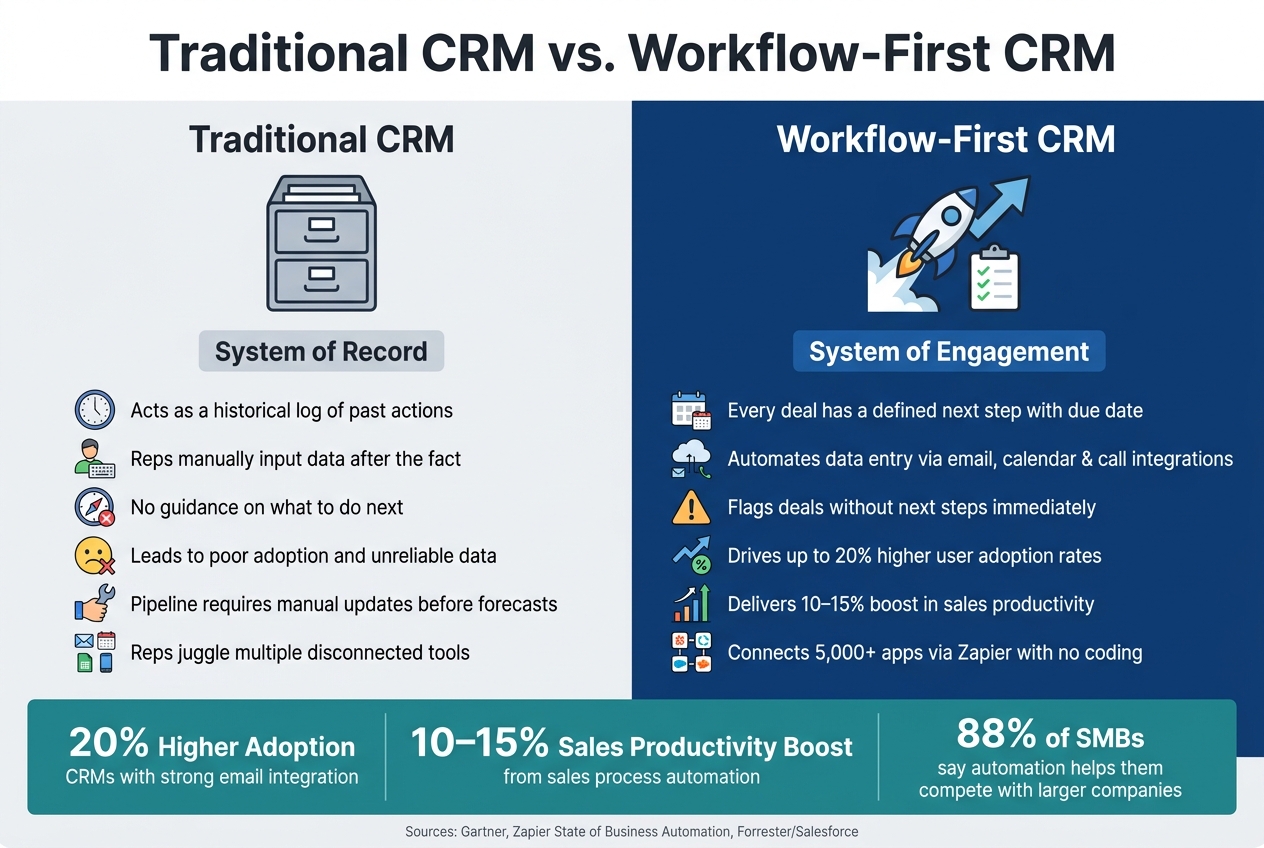
Traditional CRM vs. Workflow-First CRM: Key Differences
From Static Databases to Actionable Workflows
The key difference between a traditional CRM and a workflow-first CRM boils down to one question: does the system guide reps on what to do next, or does it merely record what they’ve already done?
Most traditional CRMs act as a historical log. Reps input call details, update fields, and track activities after the fact, turning the CRM into a static record of past actions. A workflow-first CRM, like Teamgate, flips this model. Every deal in Teamgate includes a clearly defined next step – whether it’s a call, email, or meeting – complete with a due date and assigned owner. This means reps start each day with a prioritized task list, not an empty inbox. Deals without a next step are immediately flagged, ensuring no opportunity quietly slips away. Gartner describes this shift as moving toward "systems of engagement," where the pipeline becomes a dynamic daily action plan rather than a static archive. This approach fuels Teamgate’s focus on driving sales efficiency and time management, while its integrations ensure all tools work together seamlessly.
Integration-First Design for Connected Operations
A workflow-first CRM only works if it integrates smoothly with the tools reps already rely on. When emails live in Gmail, meetings in Google Calendar, and deals in a separate CRM, reps either double their workload or avoid the CRM altogether.
Teamgate addresses this challenge head-on. Its Gmail and Outlook integrations automatically log emails to the correct contact or deal record, keeping communication history complete without manual effort. Meetings sync between Google Calendar or Office 365 Calendar and the CRM, ensuring they’re always linked to the appropriate deal. Through Zapier, Teamgate connects to over 5,000 apps, from web forms to Slack, without requiring custom development. For example, a lead generated through a web form can automatically create a new contact, assign it to the right rep, and schedule a follow-up task. Research supports the importance of these integrations – CRMs with strong email integration see up to 20% higher user adoption rates compared to those without.
Automation as the Default, Not the Exception
Automation is at the heart of a workflow-first CRM. Manual data entry drains time and energy, disrupting sales momentum. Teamgate eliminates this bottleneck by making automation the standard, not an afterthought.
Routine tasks that bog down reps are handled automatically. For instance, when a deal advances to a new pipeline stage, Teamgate can generate the next follow-up task with a pre-set due date. If a deal sits inactive for 7 days, an automated reminder prompts action before it goes cold. With the SmartDialer (powered by Twilio), call details – like duration, outcome, and notes – are logged automatically, saving reps from tedious manual updates. This streamlining not only ensures cleaner data but also encourages consistent CRM usage, as the system handles much of the administrative burden.
"With Teamgate’s intuitive interface, our user adoption was immediate. Even with a remote team consisting of sales, customer success and marketing – we were onboarded and up and running within hours." – Jack Hodges, Sales Manager, FiveCRM
Companies that implement sales process automation often experience 10–15% boosts in sales productivity and more accurate forecasts. This isn’t because reps are working harder – it’s because fewer opportunities fall through the cracks when the system does the heavy lifting.
How Teamgate Supports Workflow-First Selling
Lead Capture and Qualification Without the Gaps
Sales teams often lose leads not because of poor marketing but due to scattered lead capture points – like a WordPress form here, a Mailchimp signup there, or a cold email in a shared inbox. Teamgate’s Leads module centralizes all incoming leads into one unified queue. Whether leads come from web forms, Mailchimp campaigns, or inbound emails, they’re automatically funneled into the same place. This allows SDRs to start their day by filtering "New Today" and working through a prioritized list, instead of wasting time jumping between platforms. The result? Less time on admin tasks and more time engaging with prospects.
The qualification process is seamlessly integrated. Teams can set up lead scoring best practices based on factors like company size, job title, or engagement activity. These criteria generate a numeric score (e.g., 85/100) that’s visible right in the Leads list. For example, an SDR targeting mid-market accounts in the U.S. can sort by score and focus on the most promising leads first – no guesswork required. When a lead converts, all related notes, history, and files move with it, ensuring a smooth handoff into the pipeline.
Pipeline Management That Drives Daily Sales Activity
After capturing leads, the next challenge is moving them through clear, actionable stages. Teamgate’s visual pipeline offers a kanban-style board where every deal is placed in a defined stage, such as Qualified, Discovery Call, Proposal Sent, Negotiation, Closed Won/Lost. Each stage includes exit criteria, like completing fields such as "Budget (USD)" or "Decision Maker Identified", to ensure deals only progress when all critical information is captured.
When a deal advances, the next action is automatically scheduled, keeping follow-ups consistent. If a deal sits idle for over 14 days, it’s flagged as "At Risk", giving managers a clear signal to step in and coach. This structured pipeline eliminates ambiguity, ensures reps know their next steps, and keeps deals moving forward efficiently.
Centralized Communication for Full Deal Context
Keeping deals moving isn’t just about managing stages – it’s also about having complete visibility into every interaction. Teamgate consolidates all communication – calls, emails, meetings, and SMS – into one chronological timeline. With tools like the SmartDialer, call details such as duration, outcome, and notes are logged automatically, eliminating manual data entry.
SMS integration adds another layer of visibility by logging text messages alongside calls, ensuring every touchpoint is recorded in the contact’s timeline. This centralized approach means the entire team, not just the rep involved, has access to a complete record of interactions. That kind of transparency is critical for accurate forecasting and collaboration.
Real-Time Data for Accurate Forecasting
Teamgate’s real-time data tools make forecasting more reliable. Dashboards provide managers with insights into deal age, stage duration, and activity levels, offering a clear view of pipeline health without relying solely on rep updates. The Sales Pipeline Forecast tool uses deal values and win probabilities by stage to calculate expected revenue, while color-coded indicators flag overdue deals and highlight those nearing closure.
For instance, during a Q3 review (07/01/2026–09/30/2026), managers can quickly identify stalled deals, reps falling behind on activity, and areas where the forecast may miss the mark – allowing for immediate corrective action. The "Morning Muffin" daily summary email further supports this by providing a quick snapshot of the previous day’s pipeline changes and the current day’s priorities. This simple, automated update keeps both reps and managers aligned without requiring anyone to manually generate reports.
Teamgate as the Center of a Modern Sales Tech Stack
For a sales team to thrive, its CRM must be more than a tool – it should be the heartbeat of operations. Teamgate fulfills this role by seamlessly integrating with your sales tech stack, automating data flow, and freeing up reps to focus on selling instead of juggling apps.
Key Integrations That Keep Workflows Connected
Teamgate’s integrations are designed to simplify workflows and ensure that every interaction is logged automatically. Here’s how it connects with essential tools:
- Gmail and Google Calendar: Emails and meetings sync directly with the relevant contact or deal, providing a complete communication history and keeping schedules aligned with your pipeline.
- Twilio: Through the SmartDialer, calls and SMS are auto-logged into Teamgate, capturing outcomes and notes without extra steps.
- QuickBooks: When a deal is marked Closed-Won, invoice data flows into QuickBooks, and payment updates sync back to the CRM, giving reps visibility into account health.
- Slack: Real-time deal alerts keep the entire team informed, even those without CRM access.
| Integration | What It Connects | Sales Workflow Benefit |
|---|---|---|
| Gmail / Outlook | Email threads to contacts and deals | Full communication history, auto-logged |
| Google Calendar | Meetings to CRM records | Schedules and follow-ups visible in pipeline |
| Twilio | Calls and SMS to contact timelines | Auto-logged call outcomes and notes |
| QuickBooks / Xero | Invoices and payment status | Aligns sales and finance on account health |
| Slack | Real-time deal alerts to team channels | Instant visibility for non-CRM users |
No-Code Automation Across the Stack with Zapier
Teamgate’s integration with Zapier opens the door to over 5,000 additional apps, empowering teams to automate repetitive tasks without coding. This eliminates manual data entry and speeds up workflows.
"The integration between Teamgate and Zapier empowers you to automate repetitive tasks, streamline workflows, and connect Teamgate with over 5,000 other applications." – Teamgate
For example:
- A Typeform submission on your website can automatically create a new lead in Teamgate, assign it to the right rep, and schedule a follow-up task.
- When a deal closes, Zapier can trigger onboarding tasks in Asana and notify the team in Slack.
According to Zapier’s "State of Business Automation" report, 88% of SMB employees say automation helps them compete with larger companies. To keep automations reliable, treat them as part of your sales process. Use "find or create" logic to avoid duplicates, maintain consistent field mapping (e.g., USD currency as $10,000.00), and review workflows monthly.
Mobile Access for Reps Selling in the Field
For field reps, Teamgate’s iOS and Android apps ensure they stay productive on the go. After a client meeting, reps can instantly update deal stages, log notes, and schedule follow-ups – right from their phones. This kind of immediacy matters: a Forrester study cited by Salesforce found that sales teams using mobile CRM achieve 14.6% higher productivity than those who don’t.
The app also integrates with OpenStreetMaps, helping reps plan smarter routes by visualizing contact locations. For example, a rep working in a metro area can map out back-to-back visits efficiently. The key practice here is straightforward: log before you leave. Capturing updates in real time keeps pipeline data accurate, ensuring managers can rely on it for accurate sales forecasting.
Teamgate is more than a CRM – it’s the hub that keeps your sales tech stack connected, your workflows streamlined, and your team focused on what matters most: closing deals.
How to Set Up Teamgate for a Workflow-First Sales Process
Identifying Gaps in Your Current Sales Workflow
Before diving into Teamgate’s setup, take a step back and evaluate where your current sales process falls short. Review the last 3–6 months of deal data – whether it’s stored in spreadsheets or an older CRM – and look for patterns. Are there unlogged leads? Deals that stalled at certain stages? Opportunities that slipped through because no one followed up?
For U.S.-based B2B sales teams, the most common issues aren’t dramatic errors but small, overlooked steps. Maybe a follow-up call wasn’t scheduled, a qualification meeting wasn’t recorded, or a promising lead went cold because no one took ownership of the next move.
"The longer a lead is overdue, the more the potential exists for blockages forming right across your sales pipeline." – Teamgate
Trace a deal’s path from the first interaction to closing. Highlight any points where delays or friction occur. These are the areas where Teamgate’s automations and integrations can make a difference. By identifying these trouble spots, you’ll be ready to align your sales process with Teamgate’s structured pipeline.
Configuring Teamgate for Pipeline Discipline
Once you’ve pinpointed the gaps, it’s time to set up Teamgate to reflect your sales process. Start by customizing your pipeline stages to match the language your team already uses – terms like "Discovery Completed", "Proposal Sent", or "Verbal Commit" resonate better than generic labels. For each stage, define clear criteria for moving deals forward, such as completing a meeting, confirming a budget, or identifying a decision-maker.
Teamgate’s customizable pipeline stages and required fields ensure these rules are enforced. For example, a deal can’t move to "Negotiation" unless fields like close date and deal value are filled out. Pair these rules with task automation – such as assigning a follow-up task with a three-day deadline when a deal moves to "Proposal Sent" – to make consistent follow-up a built-in part of the process rather than relying on individual habits.
"Utilizing sales insights we have been able to conduct targeted experiments, enabling Packagecloud to increase engagement rates by 18% through the refinement of scripts and lead targeting." – Krish Sivanathan, Director of Operations, Packagecloud
Teamgate also supports multiple pipelines for different sales approaches, giving you the flexibility to manage various sales motions. Once your pipeline reflects your process, it’s crucial to monitor and adjust as needed.
Tracking Progress and Refining Your Workflow Over Time
Teamgate’s workflow-first design makes it easy to track progress and refine your process. Use dashboards and reports to keep an eye on key warning signs: deals without next steps, stages with unusually long durations, or reps with low activity compared to their pipeline size.
Schedule a quick weekly pipeline review – just 15 to 20 minutes – to go over Teamgate’s activity and deal-age data. Use this time to identify bottlenecks and adjust criteria for stages or tasks where progress stalls. Over time, this feedback loop ensures your pipeline evolves to reflect how your team actually sells, rather than sticking to an idealized version of the process.
Conclusion: Where Teamgate Fits in the Workflow-First CRM Era
Teamgate redefines sales processes by turning static records into actionable workflows. With features like customizable pipelines, automated tasks, native email integration, and Zapier automations, it’s designed to drive daily sales actions – not just store data. From capturing leads to providing real-time forecasts, every tool in Teamgate works toward enabling sales teams to act decisively and efficiently.
This workflow-first approach ensures measurable results. For example, refining an Ideal Customer Profile with Teamgate’s insights can lead to more targeted campaigns, higher conversion rates, and improved marketing ROI. That’s the difference between a CRM that passively records data and one that actively drives outcomes.
Here’s a key question to consider: Does your current CRM help your team know what to do next, or does it simply document what’s already happened? A true workflow-first system should guide daily actions – highlighting overdue deals, prompting follow-ups, and keeping the pipeline accurate – without requiring managers to chase updates or juggle extra spreadsheets.
If your CRM feels more like an administrative burden than a sales tool, or if your pipeline needs manual updates before every forecast call, it may be time for a change. Use the principles outlined here – gap-free lead capture, structured pipeline stages, centralized communication, and built-in automation – as a checklist to evaluate your essential CRM features. Teamgate can help bridge the gaps, turning inefficiencies into actionable results and making your CRM a tool that actually works for your team.
FAQs
What makes a CRM “workflow-first”?
A workflow-first CRM fits naturally into a sales team’s everyday routines, focusing on making tasks easier while cutting down on manual work. It takes care of repetitive tasks like logging emails, scheduling meetings, and updating deal stages automatically. This reduces time spent on admin work and switching between apps. By keeping all data in one place and clarifying who’s responsible for the next steps, it helps sales reps concentrate on closing deals, encourages consistent CRM use, and keeps the pipeline organized and easy to manage.
How does Teamgate reduce manual data entry?
Teamgate cuts down on tedious manual data entry by seamlessly syncing CRM records with the tools your team already relies on. Emails, calls, and calendar events are automatically logged to the correct contacts and deals, so nothing slips through the cracks. Automations further simplify your workflow by creating and updating leads – like those captured through web forms – and setting follow-up tasks based on deal progress. With features like email and calendar sync alongside workflow automation, Teamgate ensures your data stays accurate while freeing up time for more important tasks.
What should I automate first in Teamgate?
To build a workflow-focused sales environment, begin by automating repetitive tasks to save time and eliminate manual data entry. Link your email and calendar with Teamgate to keep all communication in one place and ensure meetings are logged automatically. Then, implement automated reminders and follow-up triggers tied to deal stages or periods of inactivity. After covering these essentials, enhance productivity further by using lead capture forms and integrations like Zapier to streamline data movement across tools.