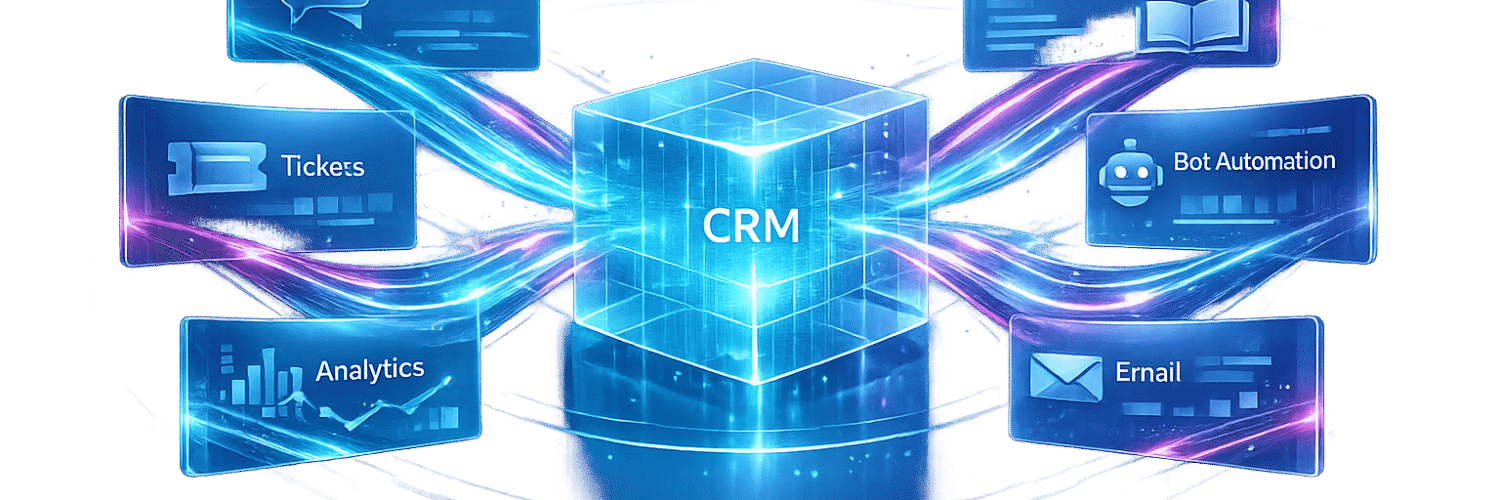

Sales teams lose hours hunting for context when customer data is scattered across multiple systems. Integrating AI support tools with your CRM solves this by centralizing customer interactions, insights, and history into one actionable view. This approach not only streamlines workflows but also helps sales reps focus on selling instead of admin tasks.
Key takeaways:
- AI tools analyze customer behavior, predict churn risks, and uncover upsell opportunities.
- CRMs like Teamgate turn AI insights into actionable steps, automating follow-ups and deal updates.
- Integration reduces manual data entry, saving reps up to 4 hours weekly.
- Clean, organized CRM data is critical for effective AI integration.
Teamgate helps sales teams stay disciplined, gain clarity, and trust their pipeline – without the complexity of enterprise CRMs. By combining AI tools with a pipeline-first CRM like Teamgate, you can improve sales efficiency, align teams, and boost revenue growth.
Core Concepts of AI Support and CRM Integration
What AI Support Tools Actually Do
Businesses comparing AI customer support tools can evaluate these platforms based on their automation capabilities, integrations, and ability to handle customer conversations at scale. AI support tools generally fall into three main categories: chatbots, ticketing systems, and sentiment analysis engines. Chatbots tackle initial customer interactions, handling tasks like answering frequently asked questions, directing complex issues to the right team, and qualifying leads before they reach a sales rep. Ticketing systems focus on organizing and prioritizing support requests, identifying urgent cases based on factors like keywords, customer status, or response deadlines. Sentiment analysis tools, on the other hand, analyze conversations and feedback to identify emotions such as frustration, satisfaction, or even purchasing intent.
While these tools gather a wealth of data, their real strength lies in converting that data into actionable insights within your CRM. This transformation ensures smoother data synchronization and automation across systems.
Data Sync and Workflow Automation
At the heart of AI-CRM integration is a continuous flow of data between platforms, ensuring both stay updated without manual input. For example, when a support ticket is resolved, the CRM reflects that update automatically. Similarly, if a deal stage changes in the CRM, the AI tool adjusts its customer context in real time, eliminating the need for manual data entry.
Event-driven automation plays a critical role here. When a chatbot qualifies a lead, it can trigger the creation of a new deal record, assign it to the appropriate sales rep, and even schedule follow-up tasks – all automatically. Tools like Zapier and Make.com make these workflows accessible to teams without requiring programming expertise. This type of automation not only saves time but ensures that pipelines remain updated and relevant, reducing the administrative load for sales and support teams.
By streamlining these processes, automation creates a stronger connection between sales and support, which is explored further in the next section.
How Integration Helps Sales and Support Teams
The biggest advantage of integrating AI tools with a CRM is that it eliminates blind spots for both sales and support teams. Support agents gain access to a customer’s deal history before responding to a ticket, while sales reps can review a customer’s support history before making a call. This shared context ensures smoother interactions and more personalized communication. By embedding these insights directly into the CRM, sales and support teams stay aligned, which is essential for driving revenue growth.
Integration also helps uncover hidden opportunities. AI-driven lead scoring uses behavioral data and interaction history to highlight accounts with the highest likelihood of conversion or expansion, allowing reps to focus their efforts more effectively. Additionally, when sentiment analysis identifies a dissatisfied customer, the CRM can automatically notify the account owner and initiate a recovery plan, preventing potential churn. This creates a tighter feedback loop between customer satisfaction and revenue generation, making both teams more effective in their roles.
sbb-itb-5772723
Build an AI CRM Agent With Make.com (Learn AI Automations)
How to Integrate AI Support Tools with Your CRM
7-Day AI-CRM Integration Rollout Plan
Integrating AI tools with your CRM can revolutionize your sales process, but it requires careful preparation. Below, you’ll find step-by-step guidance to seamlessly connect AI support tools with Teamgate CRM.
Getting Your CRM Ready for Integration
Start by ensuring your CRM data is clean and organized. Duplicate records, incomplete fields, and outdated contact information can lead to inaccurate AI outputs. Teamgate simplifies this process with its AI-powered duplicate detection and data cleanup features, which identify and flag inconsistencies before they create issues downstream.
Next, align your CRM field structure with the requirements of the AI tool you plan to use. Mismatched fields can cause import errors, so it’s essential to map them correctly. To maintain data quality, keep raw leads in a separate module until they’re fully qualified. This prevents unvetted data from cluttering your pipeline and skewing AI-generated forecasts. For teams using Salesforce, automated workflows can also help verify email and phone information before incomplete or inaccurate contact details move further through the CRM and affect downstream processes.
Finally, consolidate all communication records – emails, call logs, meeting notes – within Teamgate. AI tools rely on a unified dataset to deliver accurate predictions and actionable recommendations.
Once your data is fully prepared, you’re ready to connect your AI tools.
Connecting AI Tools to Teamgate CRM
Teamgate integrates natively with popular tools like Gmail, Microsoft Outlook, Slack, Zendesk, Freshdesk, Intercom, and Google Drive. For other tools, platforms like Zapier and Make.com bridge the gap, enabling connections without the need for coding.
Start by using a pre-built connector whenever possible. Authenticate the connection, then configure triggers (e.g., lead scoring and prioritization or ticket resolution) and corresponding automated actions in Teamgate, such as updating deal records or assigning follow-up tasks. This setup ensures that AI insights immediately enhance your workflow.
For teams using specialized tools, Teamgate’s updated 2026 API supports custom integrations, allowing data to flow directly into internal dashboards.
“We used V7 Go to automate our diligence process with data extraction and automated analysis. This led to a 35% productivity increase in just the first month of use.” – Trey Heath, CEO, Centerline
Once your tools are connected and workflows defined, it’s time to test and launch the integration.
Testing and Rolling Out the Integration
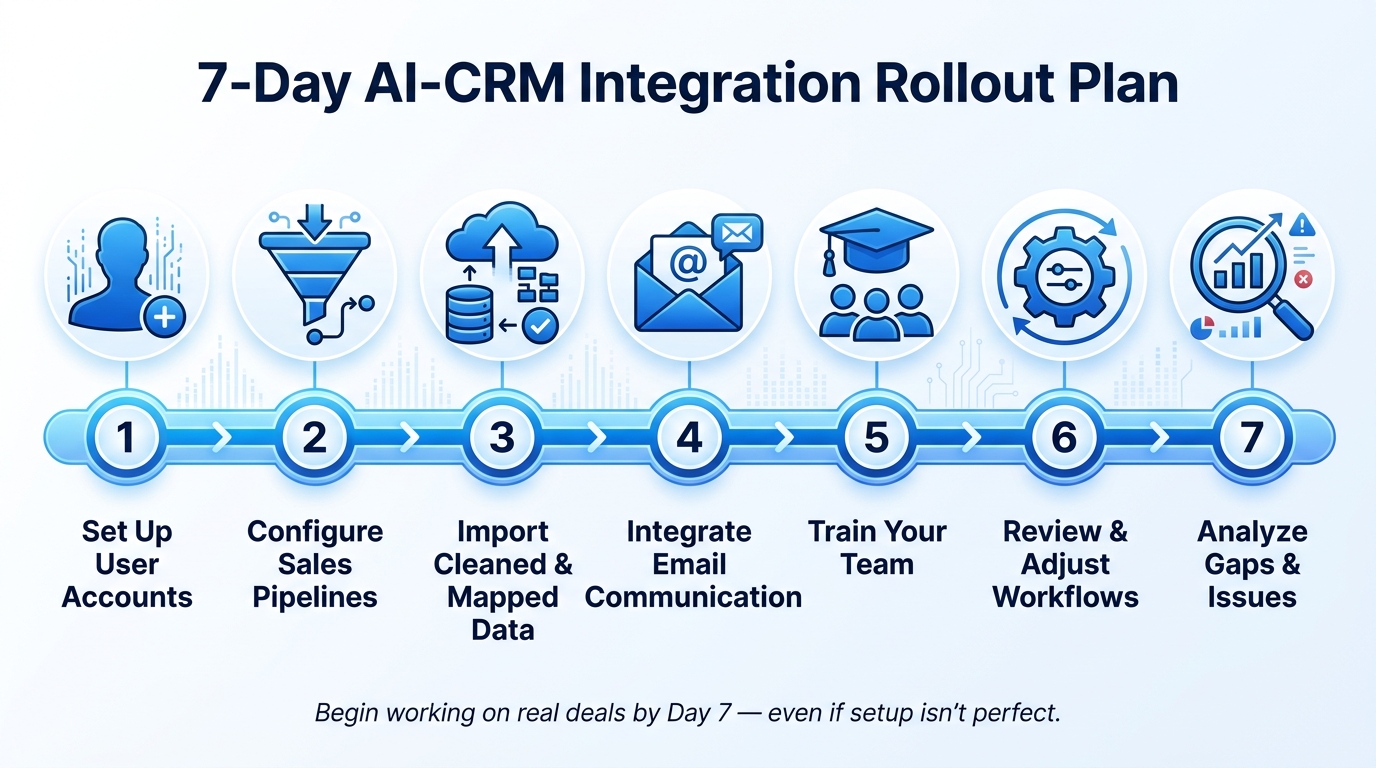
To ensure a smooth transition, follow a staged 7-day rollout plan:
- Day 1: Set up user accounts.
- Day 2: Configure sales pipelines.
- Day 3: Import cleaned and mapped data.
- Day 4: Integrate email communication.
- Day 5: Train your team on the new system.
- Day 6: Review and adjust workflows.
- Day 7: Analyze any gaps or issues.
Before full deployment, manually test each workflow to confirm that triggers and actions function correctly in Teamgate. Use audit logs to verify secure and accurate data movement between systems. Once stable, encourage your team to begin working on real deals right away. Early hands-on use helps identify and resolve edge cases faster than pre-launch testing.
“The pattern distinguishing successful CRM rollouts from failed ones is simple: get the team using the tool on real deals within the first week, even if the setup isn’t perfect.” – AeroLeads Blog
Use Cases for AI Support Tool CRM Integrations
When your AI-CRM integration is live and operational, it opens up real opportunities to improve revenue outcomes. But where does it make the biggest impact? Here are three ways AI-CRM workflows can drive measurable results for revenue teams.
Catching At-Risk Accounts Before They Churn
Customers rarely announce when they’re about to leave – they just stop engaging. Fewer support tickets, stalled product usage, and unanswered emails are common signs of trouble. By the time these patterns are noticed, it’s often too late.
AI tools integrated with Teamgate CRM tackle this by monitoring behavioral patterns like ticket frequency, response times, and engagement history. If early warning signs appear, the system flags the account, creates a follow-up task in Teamgate, assigns it to the right rep, and ensures there’s always a clear next step.
Teamgate’s AI-powered forecasting tools also help by identifying pipeline issues and sales velocity concerns early on. This allows managers to step in before an account is lost and even uncover potential revenue opportunities through these insights.
Spotting Upsell and Expansion Opportunities
Your current customers often hold the key to more revenue, but identifying buying signals can be tricky. For instance, if a customer starts asking detailed questions about a feature they don’t currently have or their usage spikes just before hitting a plan limit, these are often clues for upsell or cross-sell opportunities.
AI integrations with Teamgate can pick up on these signals and suggest actionable next steps, like scheduling a call or moving a deal forward. Teams can even create a dedicated expansion pipeline in Teamgate to focus exclusively on upsell and cross-sell motions, keeping them distinct from new business efforts. This targeted approach has proven results:
“With Teamgate we’ve been able to refine our true ICP through sales insights. This has enabled targeted marketing campaigns resulting in more conversions and an increase in our overall marketing ROI.” – Allison Barkley, Director of Operations, Baremetrics
Reducing Manual Work for Reps
Administrative tasks like logging calls, updating deal stages, or assigning follow-ups eat into valuable selling time. These repetitive tasks can significantly drag down productivity.
Teamgate eliminates much of this manual work by automating call logs, deal updates, follow-up reminders, and email sequences. On average, reps save over 4 hours per week on research and data entry alone. That’s half a workday freed up for actual selling. By minimizing the admin load, Teamgate helps reps stay focused on activities that drive deals forward.
Measuring ROI and Improving AI-CRM Integrations Over Time
Key Metrics to Track Success
Measuring the impact of AI-CRM integrations is essential to understand their effectiveness. Focus on metrics like deal velocity, conversion rates for AI-scored leads, and the time saved on administrative tasks. For example, organizations using AI alongside their CRM have reported a 35% productivity boost within just one month. In specific areas, such as invoice processing, AI automation can cut time spent by up to 95%.
Other important metrics include forecast accuracy and data quality. When AI-driven predictions align closely with actual outcomes and duplicate contacts decrease, your CRM evolves into a reliable source of truth.
Building Dashboards to Monitor Performance
Dashboards are central to tracking performance in real time. With Teamgate CRM, you can create custom views, such as kanban-style pipeline displays, which showcase deal age, next steps, and overall pipeline health. Automated alerts through tools like Slack or Microsoft Teams notify you of lead conversions or deal progress. Additionally, AI-powered sales qualification tools can recover around 5% of previously disqualified leads, ensuring you maintain visibility into potential opportunities.
How to Keep Improving the Integration
Consistently reviewing performance data helps identify bottlenecks, such as stalled leads, and allows you to fine-tune AI scoring rules and automation triggers.
For instance, Packagecloud improved engagement by 18% by refining their sales scripts based on insights:
“Utilizing sales insights we have been able to conduct targeted experiments, enabling Packagecloud to increase engagement rates by 18% through the refinement of scripts and lead targeting.” – Krish Sivanathan, Director of Operations, Packagecloud
As your business grows, refine your Ideal Customer Profile (ICP) using CRM data to improve how AI tools score and prioritize leads. Tools like Zapier or Make.com can empower non-technical team members to adjust workflows quickly, keeping processes flexible as business needs evolve. These ongoing adjustments ensure your CRM stays effective and continues driving revenue growth.
Conclusion: Getting More Revenue from AI and Teamgate CRM
Integrating AI tools with your CRM isn’t just about technology – it’s about transforming how your team works. By automating tasks like lead scoring, data cleanup, and follow-ups, your sales reps can spend more time doing what they do best: selling. A CRM that keeps every deal in a defined stage with clear next steps helps prevent revenue from slipping through the cracks. This approach boosts efficiency and keeps your sales pipeline healthy.
Accurate, clean data is the foundation of revenue growth. For example, Baremetrics sharpened their Ideal Customer Profile using the insights provided by Teamgate, which led to more focused marketing efforts and a measurable boost in ROI. These results aren’t random – they come from having dependable data that AI tools can effectively analyze.
Teamgate’s rep-first design ensures it’s a CRM your team will actually use. High adoption happens because the system supports reps in selling, not because managers are enforcing updates. This consistent usage keeps your data accurate, so AI-driven tools like scoring and forecasting deliver reliable results.
With AI highlighting actionable opportunities and Teamgate enabling timely, consistent follow-ups, your team avoids admin bottlenecks and keeps revenue on track. Teamgate helps reps follow a clear sales process and gives managers trustworthy insights – without turning CRM into a chore.
FAQs
What data should I clean in Teamgate before connecting AI tools?
Before connecting AI tools with Teamgate CRM, it’s crucial to prepare your data for a smooth integration. Start by reviewing and organizing your contacts, companies, deals, and activities. Eliminate duplicate entries, confirm email addresses, and make sure essential fields like Company Name and Contact Name are filled in. Use consistent formats for dates (MM/DD/YYYY), phone numbers (e.g., (555) 123-4567), and currency ($). Additionally, split address details into clear components like City, ZIP, and Country. Finally, back up all your data to safeguard against any unexpected issues.
Which Teamgate workflows should I automate first for quick ROI?
To see results quickly with Teamgate, focus on automating tasks that eat into your selling time. Start by integrating your email and calendar tools, such as Gmail or Outlook, to automatically log interactions with the correct records. Then, create task triggers tied to deal stages or periods of inactivity to ensure opportunities keep progressing. Lastly, set up automated lead follow-ups – like reminders or task assignments – to keep your pipeline organized and deals moving forward.
How can I ensure AI insights stay accurate as my pipeline evolves?
Keep your CRM records accurate and up-to-date with real-time, two-way synchronization and automation. Teamgate CRM simplifies this by centralizing activity logging – emails, calls, meetings, and notes – through built-in automations, ensuring no data goes stale. Use task automation and next-step prompts during critical deal stages to maintain a pipeline that reflects real-time progress and avoids missed follow-ups.