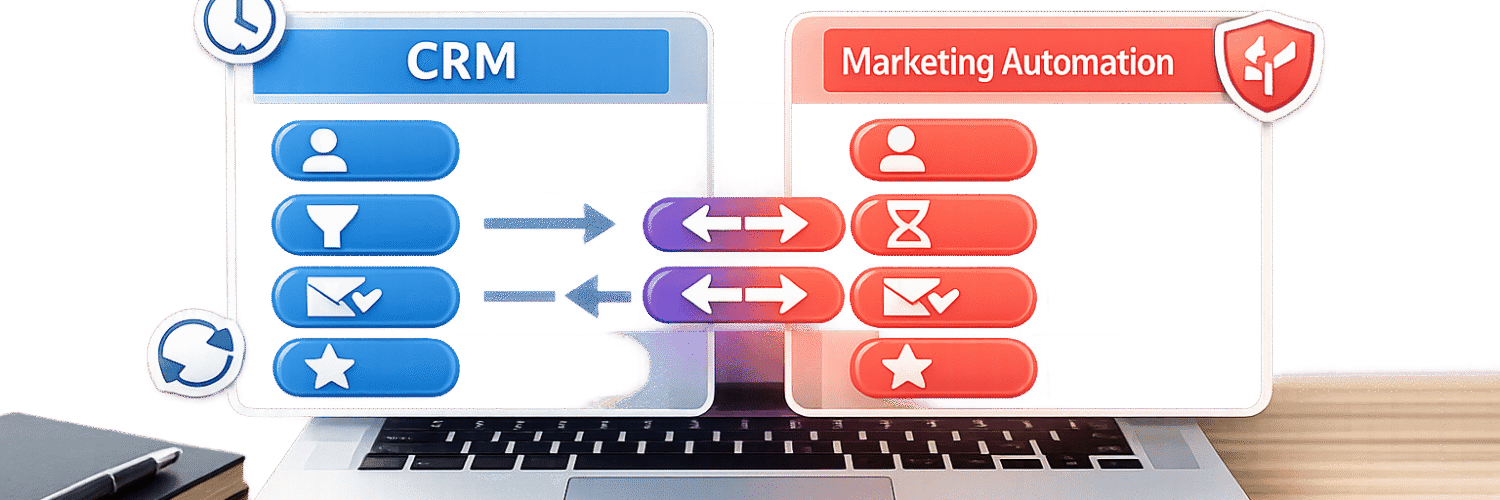

When your CRM and marketing automation tools aren’t connected, leads slip through cracks, sales teams lack context, and marketing wastes resources on closed deals. Syncing key data between these systems creates a single source of truth, helping sales respond faster and marketing focus on what works. Studies show businesses that automate lead management see a 10% revenue boost within 6–9 months, while responding to leads within 5 minutes makes teams 100x more likely to convert.
Here’s what to sync for better alignment and results:
- Contact Details: Ensure names, emails, phone numbers, and job titles match across systems to avoid duplicates and missed opportunities.
- Lead Status & Scores: Sync lifecycle stages (e.g., MQL, SQL) and scores to prioritize high-value leads and trigger follow-ups.
- Engagement Data: Share email opens, clicks, and form submissions so sales has context for personalized outreach.
- Deal Information: Keep deal stages, values, and close dates updated for accurate sales forecasting and campaign ROI tracking.
- Campaign Metrics: Sync UTM parameters and lead sources to track marketing’s impact on revenue.
Teamgate helps growing sales teams achieve clarity and structure without overwhelming them with unnecessary features. By syncing the right data, you’ll avoid outdated records, duplicate entries, and slow follow-ups that cost revenue. Clean data and a well-planned sync strategy ensure your pipeline reflects reality, so every team can rely on it.
SuiteCRM & Mautic Integration Tutorial | How to Sync Your CRM & Marketing Automation
sbb-itb-5772723
Key Data Points to Sync Between CRM and Marketing Automation
Not every piece of data needs to sync between your CRM and marketing automation tools. The key is to focus on syncing the information that keeps your pipeline accurate, equips your sales reps with the right insights, and ensures consistent follow-ups. Here’s what matters most:
Contact and Lead Information
Syncing essential details like names, email addresses, phone numbers, job titles, and company names ensures your team can identify leads accurately and avoid duplicate records. Including firmographic data – such as industry, company size, and headquarters location – helps prioritize accounts that align with your ideal customer profile (ICP). Without this synchronization, incomplete records can lead to missed opportunities and wasted time.
Once the basics are in place, syncing lead statuses further sharpens the sales process.
Lead Status and Scoring
Syncing lead scores, qualification statuses, and lifecycle stages (e.g., MQL, SQL, or "Nurture") ensures no lead falls through the cracks. For instance, when a lead hits a scoring threshold or is tagged as an MQL in your marketing platform, that update should automatically reflect in your CRM. This update can assign the lead to a rep and even create a follow-up task. By connecting lead scoring and lifecycle stages between systems, you can improve SQL generation and reduce costs.
Activities and Engagement History
Your sales team needs visibility into how prospects are engaging. Syncing data like email opens, clicks, form submissions, webinar attendance, and page views (especially on high-interest pages like pricing or product details) gives reps the context they need for personalized outreach. When this engagement data is integrated into your CRM, it can trigger real-time alerts for key actions, turning cold calls into informed, relevant conversations.
Deal and Opportunity Data
Keeping deal data updated is just as important as syncing leads. Syncing deal stages, values, and close dates ensures your pipeline reflects reality. For marketing teams, knowing when deals close helps shift their focus from nurturing leads to measuring ROI. For sales teams, accurate stage data supports better forecasting. For example, moving a deal to "Proposal Sent" could trigger the delivery of tailored content like case studies or ROI calculators to help close the deal. Companies with integrated CRM and marketing systems report 42% shorter sales cycles and 28% higher close rates.
Campaign and Marketing Metrics
To round out the picture, syncing campaign-related details like UTM parameters, lead source, and campaign IDs is essential. This data reveals where leads are coming from and which messaging resonates most. By creating custom fields in your CRM (e.g., UTM_Source__c or Campaign_ID__c) to capture information from marketing forms, sales reps can tailor their approach based on the prospect’s interests. This targeted strategy can shorten sales cycles and increase conversions.
Integrating these metrics into Teamgate CRM gives your team immediate access to actionable insights, helping you refine your processes and improve outcomes.
Sync Directions and Methods: Choosing the Right Approach
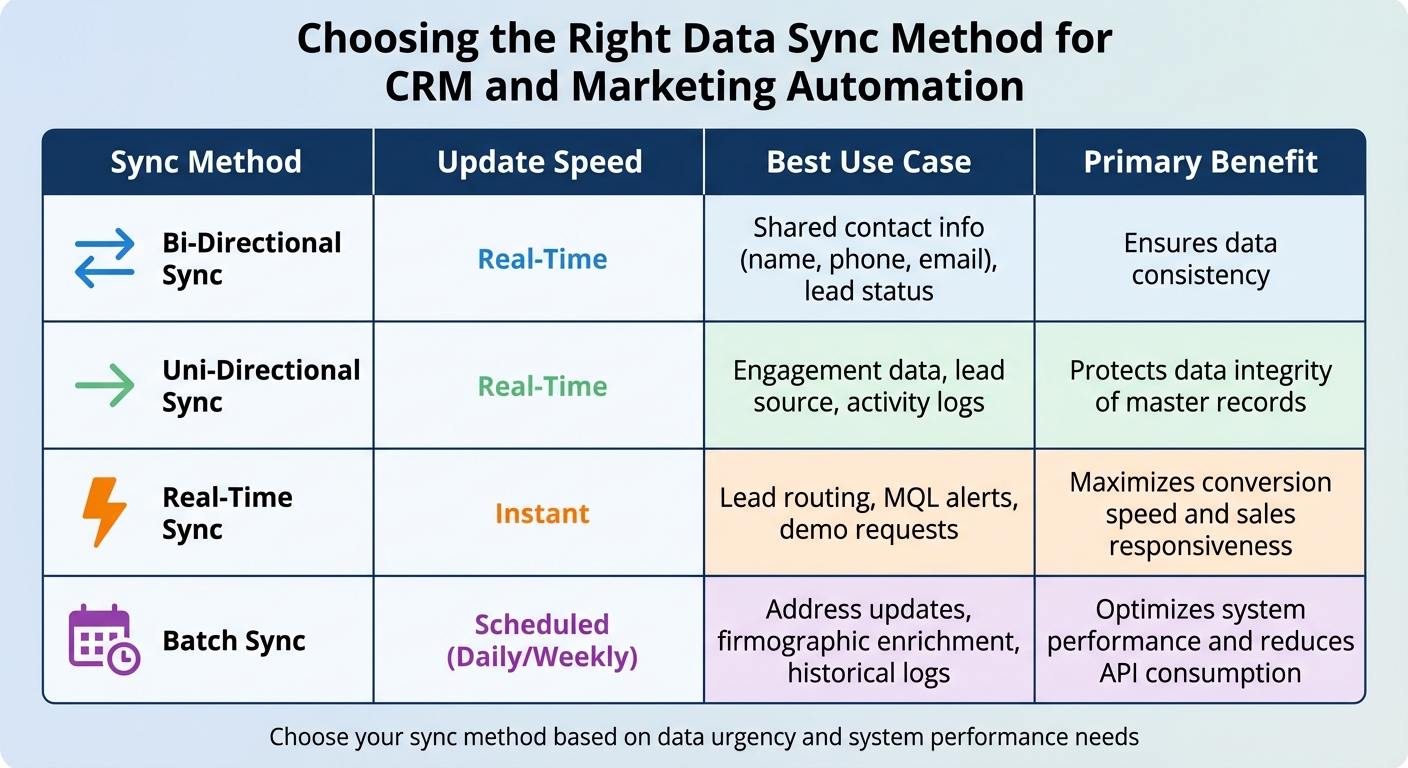
CRM and Marketing Automation Data Sync Methods Comparison
Keeping your pipeline accurate and up to date requires selecting the right sync direction and timing. These choices directly affect how well your sales and marketing teams stay aligned and how much time you spend fixing sync issues.
Bi-Directional vs. Uni-Directional Sync
Bi-directional sync allows data to flow both ways. For instance, when you update a contact’s phone number in your CRM, it automatically reflects in your marketing automation platform, and vice versa. This setup is ideal for shared fields like contact information and lead statuses. For example, if marketing updates a lead’s lifecycle stage to "MQL", that status should immediately sync to the CRM, prompting sales to take action. This seamless flow ensures your pipeline remains accurate and actionable.
Uni-directional sync, on the other hand, moves data in one direction only. This setup is best when you want to protect certain data or provide "read-only" access. For example, syncing engagement data – like email opens or webinar attendance – to your CRM gives sales valuable insights without risking accidental edits that could overwrite marketing data.
"A successful CRM and marketing automation integration is 90% strategy and only 10% technology." – MarTech Do
The cornerstone of an effective sync strategy is defining a source of truth for each field. Typically, your CRM should manage sales-related data, like account details and opportunity stages, while your marketing platform handles behavioral data, such as email clicks or website visits. Without clear ownership, you risk endless data overwrites, API overuse, and corrupted records.
Batch vs. Real-Time Updates
Real-time sync processes updates instantly, making it essential for time-sensitive actions like lead routing, demo requests, or MQL alerts. For example, when a prospect visits your pricing page or downloads a key resource, your sales team needs to act immediately to capitalize on the opportunity.
Batch sync, however, updates data at scheduled intervals – whether daily, weekly, or hourly. This method is ideal for non-urgent data, such as address updates, firmographic enrichment, or historical engagement logs. It reduces system strain and is perfect for handling large volumes of data. For instance, updating a contact’s industry classification doesn’t need to happen in real time but should be accurate when reviewed during a sales call.
In 2024, Instructure successfully integrated Marketo, Salesforce, Cvent, and ON24 using an iPaaS platform. By syncing webinar engagement data with Salesforce and triggering real-time sales alerts, they achieved 50% faster lead follow-up and enriched lead profiles with over 100 data points.
Comparison Table of Sync Types
| Sync Method | Update Speed | Best Use Case | Primary Benefit |
|---|---|---|---|
| Bi-Directional | Real-Time | Shared contact info (name, phone, email), lead status | Ensures data consistency |
| Uni-Directional | Real-Time | Engagement data, lead source, activity logs | Protects data integrity of master records |
| Real-Time | Instant | Lead routing, MQL alerts, demo requests | Maximizes conversion speed and sales responsiveness |
| Batch | Scheduled (Daily/Weekly) | Address updates, firmographic enrichment, historical logs | Optimizes system performance and reduces API consumption |
Tips for Effective Sync Configuration
When setting up your sync in Teamgate CRM, consider using inclusion lists to filter which records sync. For instance, you might configure your system to sync only leads with a score of 100 or higher, ensuring your pipeline remains focused on qualified prospects. This approach prevents unnecessary clutter and keeps your team zeroed in on sales-ready opportunities. Proper configuration, such as inclusion lists, lays the groundwork for tackling common sync challenges later on.
Best Practices for Accurate Data Syncing
Setting up data sync correctly is not just about convenience – it’s essential for avoiding costly errors. Studies show that between 10% and 25% of B2B marketing database contacts have critical inaccuracies, and poor-quality data costs businesses an average of $12.9 million annually. A well-executed sync strategy ensures your systems work together seamlessly and keeps your data reliable.
Data Mapping and Field Alignment
Start by bringing together a team from Marketing, Sales, and IT to decide on a single source of truth for every data field. Clearly document which system is the master for each type of data. For instance, your CRM typically manages firmographic and sales information – like account details, contact data, and opportunity stages – while your marketing automation platform handles engagement metrics, such as email clicks and website visits.
Consistency is key. Standardize field values across systems. For example, if one platform uses "USA" and another uses "United States", you’ll risk creating duplicates and skewed reporting. To track marketing performance effectively, map custom fields like UTM parameters (Source, Medium, Campaign) from your marketing platform to your CRM. This allows you to link marketing spend directly to revenue.
A great example of this is Glassdoor’s 2024 integration of Marketo, Salesforce, and Bizible. By aligning their data and improving lead scoring techniques through precise field mapping, they boosted SQLs by 50% and cut their cost-per-MQL by 30%.
Deduplication and Data Cleanup
Before enabling sync, clean up your data. Deduplication is crucial and should be done within each platform using either built-in tools or third-party solutions. Use unique identifiers, such as email addresses or CRM IDs, to match records across systems. For accounts, employ advanced matching logic that combines domain and company names to catch duplicates that simpler checks might miss.
Define clear rules for merging duplicates. For instance, you might merge into the oldest record to preserve historical context or prioritize the record with the most recent activity. Add notes to surviving records to maintain a full history of interactions, such as multiple outreach attempts. Schedule weekly manual reviews to catch duplicates that automated processes might overlook.
"Duplicates are the silent killers of an integration. They compromise data integrity and erode your team’s trust in the systems." – MarTech Do
Once your data is clean and duplicates are removed, you can confidently validate your sync setup.
Real-Time Sync Setup and Validation
After ensuring data integrity, focus on setting up and validating real-time sync. Before enabling it, audit user permissions and establish field-level authority to avoid conflicts. This helps prevent scenarios where, for example, a marketing list import overwrites a sales rep’s recent notes.
Test real-world scenarios with user acceptance testing (UAT). Have team members simulate updates like changing a phone number, triggering an MQL handoff, or confirming that an "Unsubscribe" action in the marketing platform is reflected in the CRM. Regularly review sync logs and error reports – monthly reviews can help you catch and resolve mismatches or permission changes before they become bigger problems.
In 2024, Instructure successfully integrated Marketo, Salesforce, Cvent, and ON24 using an iPaaS. By validating their sync setup and capturing webinar engagement data directly in Salesforce, they reduced lead follow-up time by 50% and enriched lead profiles with over 100 data points. Achieving this level of accuracy starts with thorough validation from the beginning.
Common Data Syncing Problems and How to Fix Them
When it comes to integrating data, even the best systems can run into issues. The difference between a minor inconvenience and a major disruption often depends on how quickly you can identify and address these challenges. Below are some of the most common data syncing problems teams encounter, along with practical steps to resolve them.
Handling Duplicate Records
Duplicate records often occur when data from multiple channels isn’t properly matched. For example, a lead might download an eBook (tracked by your marketing platform) and later call a sales rep (manually entered into the CRM), creating two separate records. Manual data entry and inconsistent formatting, such as "USA" versus "U.S.A.", further complicate matching.
To tackle duplicates:
- Audit your systems: Before syncing, identify and merge duplicates using a unique identifier like an email address.
- Standardize fields: Use picklists instead of free-text fields for critical data points like Country, State, and Industry to ensure consistency.
- Sync rules: Configure your integration to check for existing records before creating new ones.
- Automated maintenance: Schedule regular tasks to catch duplicates that slip through. For example, review and merge duplicates weekly, keeping the oldest record to retain historical data. Add notes to merged records to provide context, such as noting multiple touchpoints.
Once duplicates are under control, maintaining up-to-date and consistent data becomes the next priority.
Outdated or Inconsistent Data
Stale or inconsistent data can lead to confusion and poor decisions. For example, if your CRM uses "United States" while your marketing platform lists "USA", reporting may break down, leaving teams with incomplete information.
To avoid this:
- Define a system of record: Assign one platform as the source of truth for specific data types. For example:
- CRM: Firmographic and sales data (e.g., account details, contact info, opportunity stages)
- Marketing automation: Behavioral data (e.g., email clicks, website visits)
- Document processes: Clearly outline and share these guidelines across teams to ensure everyone is aligned.
- Enrich and validate data: Use data enrichment tools to fill in missing information and enforce validation rules at data entry to avoid errors.
- Monitor sync logs: Regularly review logs to identify and fix issues before they escalate.
Field-Level Conflicts and Authority Rules
Conflicts can arise when two systems try to update the same field simultaneously, creating a "tug-of-war." For instance, a marketing list import might overwrite recent notes added by a sales rep.
"Duplicates are the silent killers of an integration. They compromise data integrity and erode your team’s trust in the systems." – MarTech Do
To prevent these conflicts:
- Set field-level directionality: Decide which fields should sync in one direction (e.g., phone numbers from CRM to marketing platform) and which require bidirectional syncing (e.g., lead status).
- Prioritize manual updates: Always give precedence to manual edits by sales reps over automated updates from campaigns.
- Use inclusion lists: Limit syncs to qualified, sales-ready records to keep the CRM pipeline clean and focused on actionable opportunities.
Here’s a quick guide to managing data authority:
| Data Category | Recommended Master | Reason |
|---|---|---|
| Firmographic Data | CRM | Sales reps maintain the most accurate details |
| Engagement Data | Marketing Automation | Originates from marketing activities |
| Opportunity Data | CRM | Critical for tracking pipeline and revenue |
| Lead Scoring and Prioritization | Marketing Automation |
Conclusion
Synchronizing key data between your CRM and marketing automation tools is essential for protecting and growing revenue. By connecting contact details, lead scoring, engagement history, deal information, and campaign metrics, you close the gaps that can cause opportunities to stall. This integration equips sales, marketing, and leadership teams with actionable insights that drive better decisions.
Once you’ve identified the important data points, it’s just as crucial to align your syncing strategy. The how is just as important as the what. Use bidirectional syncing and inclusion lists to maintain data accuracy and relevance. Real-time updates allow sales teams to respond within the critical five-minute window – companies that do this are 100 times more likely to connect with and convert leads. However, speed alone isn’t enough. Standardized fields, routine deduplication, and clear authority rules ensure your data remains clean and trustworthy.
"Integration is not a ‘nice-to-have.’ It is essential for any B2B company aiming to transition from reactive tactics to a proactive, predictable growth model." – MarTech Do
The results speak for themselves. Businesses that automate lead nurturing experience a revenue boost of 10% or more within six to nine months, with an average return of $5.44 for every dollar spent. Beyond the numbers, syncing data effectively prevents opportunities from going cold, enables timely follow-ups, and optimizes marketing efforts.
To get started, conduct a pre-sync audit to clean up your existing data, map out your customer journey to determine where data should flow, and regularly monitor sync logs to identify and address any issues early. With a comprehensive solution like Teamgate CRM, your systems can integrate seamlessly. Teamgate helps sales teams follow a clear and disciplined process while providing managers with reliable insights – turning your pipeline into a powerful revenue engine.
FAQs
Which fields should be the source of truth in each system?
For a reliable source of truth, focus on key fields such as contacts, leads, activities, and campaign metrics. Your CRM should serve as the central hub for customer and deal information, while marketing automation tools handle engagement data, behavioral patterns, and campaign responses. This division of responsibilities ensures accurate data and keeps both systems aligned effectively.
What data should NOT be synced between CRM and marketing automation?
Make sure to avoid syncing duplicate records, outdated or incomplete information, or system-specific elements like custom objects or system-generated fields. These issues can lead to sync errors or inconsistencies in your data. By keeping your records accurate and relevant, you’ll achieve smoother integrations and more dependable outcomes.
How often should data sync run (real-time vs batch)?
The frequency of syncing data between your CRM and marketing automation tools hinges on your organization’s priorities and how the systems are configured.
- Real-time sync keeps data updated continuously, which is great for timely follow-ups and maintaining accurate insights. However, it often demands more system resources.
- Batch sync (e.g., daily or weekly) is less resource-intensive and lowers system strain, making it a better fit for tasks that aren’t as time-sensitive.
The right choice depends on how quickly you need updates and what your systems can handle efficiently.






