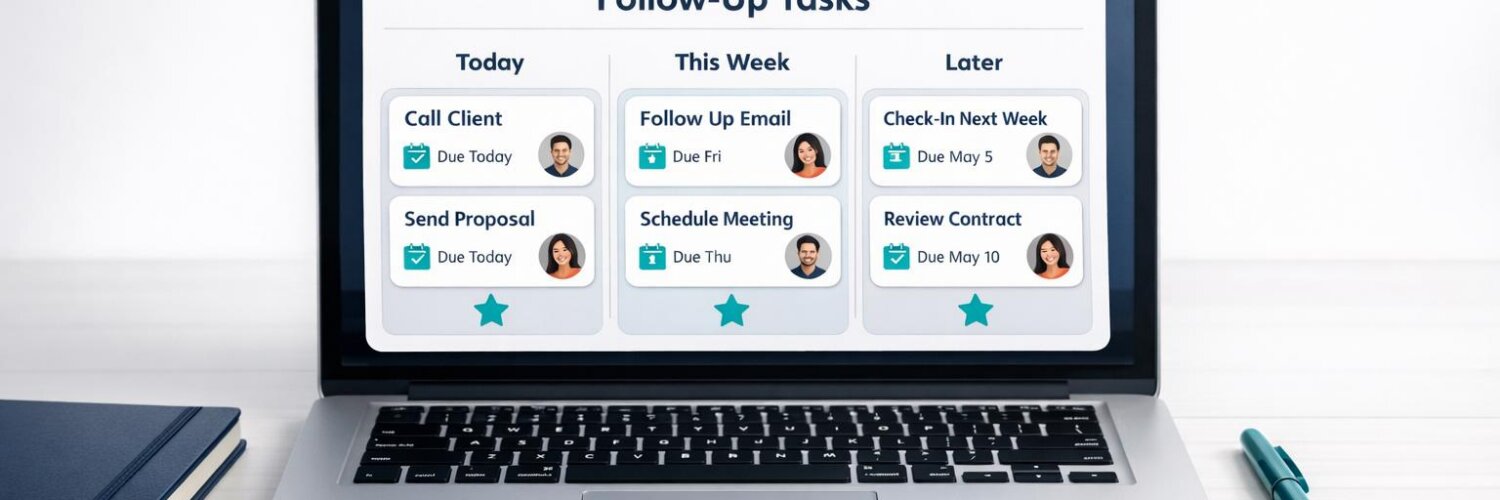

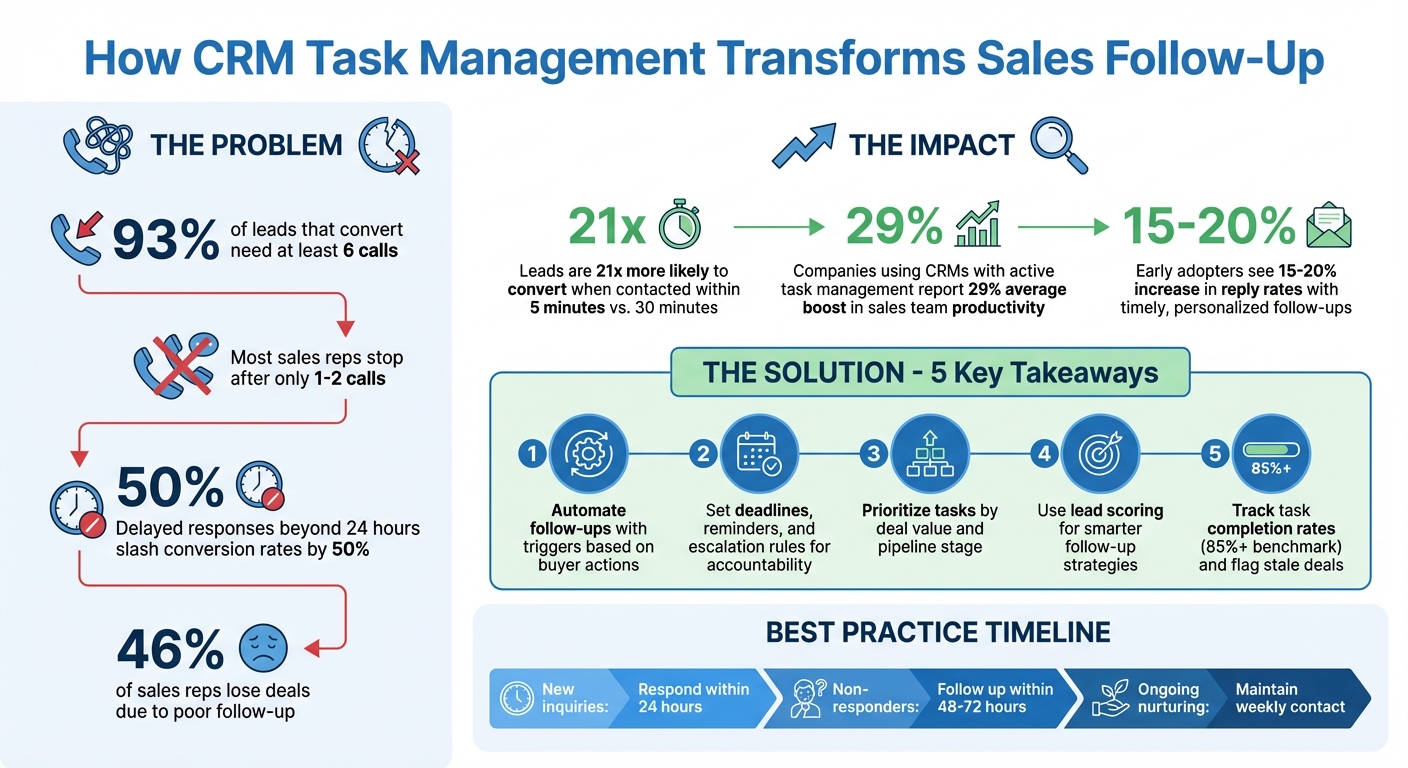
Missed follow-ups quietly kill deals. Research shows 93% of leads that convert need at least six calls, yet most sales reps stop after one or two. Delayed responses – beyond 24 hours – can slash conversion rates by 50%. Without a reliable system, stalled deals, inaccurate forecasting, and wasted effort become the norm.
CRM task management fixes this by automating follow-ups, setting clear deadlines, and ensuring no lead is forgotten. Automated triggers, task assignments, and reminders keep sales reps focused on the next step while managers gain visibility into overdue tasks and pipeline health. The result? Teams close more deals and trust their pipeline data.
Key takeaways:
- Automate follow-ups with triggers based on buyer actions.
- Set deadlines, reminders, and escalation rules for accountability.
- Prioritize tasks by deal value and pipeline stage.
- Use lead scoring for smarter follow-up strategies.
- Track task completion rates and flag stale deals to protect revenue.
Teamgate helps reps follow a clear sales process and gives managers trustworthy pipeline insights – without turning CRM into a full-time admin job. Let’s break down how task management can transform your sales process.
CRM Task Management Impact on Sales Follow-Up Performance
HubSpot Tasks: A How-To Guide Of Task Management
sbb-itb-5772723
How CRM Task Management Stops Missed Follow-Up
The real danger to your pipeline isn’t your competitors – it’s inaction. Deals without a clear next step tend to stall, and missed or late follow-ups can drain the momentum you’ve built with leads. Without a structured system to enforce timely outreach, potential revenue can quietly slip away. CRM task management turns this potential loss into a proactive, organized process, making follow-ups a dependable part of your revenue strategy.
With CRM task management, the phrase “no next step” becomes a thing of the past. Every deal gets a follow-up task with a defined deadline. Automated triggers can instantly schedule these tasks when a lead enters the system or when a prospect engages, reducing the need for manual updates. Centralized task lists prioritize actions, ensuring the most critical tasks get handled first.
In addition, CRM task management keeps your pipeline organized. Instead of relying on memory or scattered spreadsheets, reps work from a system that highlights the right actions at the right time.
"Clean pipeline data and disciplined processes shorten sales cycles, prevent missed follow-ups, and improve forecasting accuracy." – Chase Horn, Sales Management Specialist, Teamgate
Setting and Tracking Follow-Up Deadlines
Deadlines turn good intentions into concrete commitments. With a CRM, reps can set deadlines for calls, emails, meetings, or proposals, while tracking task completion in real time.
Automated reminders make sure nothing is forgotten. Notifications – whether on desktop, mobile, or email – alert reps to urgent tasks before they’re overdue. For even greater integration, CRM tasks can sync with external calendars like Google or Outlook, embedding deadlines directly into a rep’s daily schedule and making them harder to overlook.
Managers also gain visibility into follow-up performance. They can track which reps consistently meet deadlines and identify overdue tasks. By using the CRM to enforce a clear next step for every deal, teams can avoid the revenue loss that comes from neglected opportunities.
Beyond deadlines, task assignments bring an added layer of accountability to the process.
Using Task Assignments to Increase Accountability
Assigning tasks to specific team members ensures clear ownership. When a lead enters the system, the CRM can automatically assign follow-up tasks based on criteria like territory, product line, or workload. This clarity helps ensure no lead is left unattended.
Task assignments also prevent duplicated efforts. When reps can see exactly who is responsible for each follow-up, they avoid overlapping actions or leaving prospects without contact. A centralized activity tracker records every interaction – calls, emails, meetings, and notes – so managers can confirm that follow-up tasks are being handled effectively.
For added accountability, escalation rules can step in. If a task remains incomplete or if an automated follow-up sequence doesn’t receive a response within a set timeframe, the CRM can flag the lead for manual outreach or notify a manager to intervene. This way, even high-value opportunities don’t fall through the cracks, no matter how busy individual reps may be.
When task assignments become an integrated part of the sales process, the team shifts from reactive to proactive follow-ups. Reps spend less time figuring out their next move and more time engaging with leads – keeping deals on track and moving forward.
Building CRM Task Workflows That Work
Workflows transform planned actions into reliable, repeatable systems. Instead of relying on reps to remember every follow-up, a well-designed CRM workflow automates task creation, sets deadlines, and triggers the next action based on pipeline activity. The aim? Make consistent follow-up automatic, removing the need for memory or individual effort.
The best workflows respond to buyer behavior and pipeline changes. For example, when a lead fills out a form, opens a pricing email, or moves from "qualified" to "proposal sent", the CRM should instantly initiate the next step. This eliminates delays between intent and action – the moments where deals often go cold. By combining manual input with automated precision, these workflows ensure seamless task execution and follow-up.
Creating Task Triggers and Templates
Task triggers link buyer actions to automatic follow-ups. For instance, if a prospect submits a form, the CRM can immediately assign a task like "qualification call within 24 hours." Similarly, when a deal progresses to the proposal stage, it can trigger "send proposal follow-up email in 48 hours." These triggers ensure no lead is left without a clear next step, maintaining momentum throughout the sales process.
Templates standardize follow-up actions, saving time and ensuring consistency. Instead of reps crafting emails from scratch, predefined templates guide their communication. For example, a "post-demo follow-up" template might include a recap of pain points, next steps, and a calendar link. A "proposal nurture sequence" could send automated emails on days 3, 7, and 14 if there’s no response. These templates ensure every rep follows a proven process.
| Trigger Event | Recommended Task/Action | Template Type |
|---|---|---|
| Form Submission | Immediate Lead Qualification Call | Discovery Script |
| Pipeline Stage Change | Send "Next Steps" Email | Follow-up Template |
| Email Link Click | Schedule Deep-Dive Demo | Product Feature Sheet |
| Stale Deal (No activity 48h) | Escalation Notification to Manager | N/A |
| Objection Raised | Send Comparative Value Doc | Objection Handling Guide |
By structuring stages and automating task creation, you avoid the "no next step" scenario that often stalls deals. Every deal remains active, with a clear action plan at each stage.
Setting Deadlines and Escalation Rules
Automated triggers are only part of the equation – deadlines must also be enforced. Assign realistic due dates based on factors like deal size and stage. For example, a trade show lead might need same-day outreach, while a $50,000 proposal could allow for a one-week follow-up. Smaller deals often move faster, while enterprise deals require more time but still demand clear next steps.
Escalation rules ensure overdue tasks don’t slip through the cracks. A basic escalation process might look like this:
- One day overdue: Internal reminder to the rep
- Three days overdue: Manager notification
- Seven days overdue: Flag the deal as "at risk" for immediate attention
This approach ensures high-value opportunities don’t quietly expire while reps focus on other tasks.
Additionally, every pipeline stage should have specific entry and exit criteria. For instance, a deal shouldn’t move from "demo completed" to "proposal sent" until the follow-up call task is marked complete. This keeps the pipeline accurate and prevents tasks from being skipped just to make the funnel appear healthier.
Using Notifications to Keep Reps on Track
Notifications are most effective when they use tiered alerts: daily task summaries via email or dashboard, push notifications for high-priority or overdue items, and custom reminders (like one hour before a task is due). This system keeps reps informed without overwhelming them.
A best practice is to provide a single daily task list instead of individual alerts for each upcoming action. Reps can start their day by reviewing priorities, with the CRM interrupting only for urgent issues such as an idle high-value deal or an overdue task. These notifications ensure consistent follow-up, reinforcing pipeline integrity.
Teamgate’s CRM is designed with reps in mind, focusing on minimal, meaningful notifications. It highlights aging deals, overdue tasks, and key activity gaps without creating alert fatigue. By surfacing what truly matters – like deal health and next-step coverage – Teamgate helps reps spend less time managing the CRM and more time advancing deals.
Prioritizing Follow-Up Tasks by Deal Value
Time is a limited resource for sales teams, and spreading focus evenly across all deals can mean missing out on high-value opportunities. In fact, 46% of sales reps lose deals due to poor follow-up. To avoid this, sales teams should prioritize tasks based on deal value and pipeline stage, ensuring that top opportunities are addressed first. By integrating lead scoring and stage-based task organization, follow-up efforts become more strategic and impactful.
Using Lead Scoring to Focus on Top Prospects
Lead scoring helps sales reps determine which prospects deserve immediate attention by assigning points based on their engagement and fit with your ideal customer profile. For example, actions like downloading multiple resources, visiting the pricing page, or requesting a demo can signal strong buying intent. A CRM can use these signals to highlight high-priority leads and trigger follow-up actions.
The trick lies in connecting lead scoring to measurable buyer behaviors tracked by your CRM, such as form submissions, email interactions, or content downloads. For instance, a prospect who engages multiple times should rank higher than one with only a single, outdated interaction. Once a lead reaches a predefined score – say, 75 points – the CRM can notify the sales rep to step in with a personal follow-up, bypassing automation.
"Knowing which leads to prioritise is pivotal when it comes to keeping your sales pipeline clean and moving." – Teamgate
Teamgate’s lead scoring system allows you to define custom criteria – such as industry, lead source, location, and company size – and categorize leads into "Hot", "Warm", or "Cold" segments. These scores adjust automatically as new data comes in, helping reps focus their energy on the most promising leads while lower-priority prospects are funneled into automated nurturing sequences.
Once high-priority leads are identified, the next step is to align follow-up tasks with the deal’s stage in the pipeline to ensure timely and relevant actions.
Organizing Tasks by Pipeline Stage
Follow-up strategies should adapt to where a deal stands in the buyer’s journey. For instance, a lead that just downloaded an eBook requires a different approach than one evaluating a proposal. Structuring tasks by pipeline stage ensures that reps take the right actions at the right time, avoiding a one-size-fits-all approach.
- Early-stage leads: Automate educational follow-ups within 24 hours to build trust and awareness.
- Mid-stage leads: Focus on recapping pain points and scheduling in-depth demos to advance the conversation.
- Late-stage opportunities: Prioritize closing activities, such as sending quotes with specific deadlines, scheduling follow-ups within 48–72 hours after proposal delivery, and addressing final decision-making criteria.
A well-structured CRM enforces this discipline by linking tasks to deals and requiring task completion before advancing to the next pipeline stage. For example, a deal shouldn’t move from "demo completed" to "proposal sent" until the follow-up call is marked as done. This approach ensures accuracy in the pipeline and prevents high-value deals in advanced stages from stalling while reps are caught up with earlier-stage activities.
Teamgate supports this process by making it impossible to ignore next steps – every active deal must have a scheduled task or follow-up action. This ensures that aging opportunities are flagged before they slip away, keeping the pipeline active and moving.
Automating Follow-Up While Keeping It Personal
Streamlining follow-ups through automation can save time without losing the human element. By automating routine tasks and using CRM data for personalization, sales reps can focus on meaningful conversations. When implemented thoughtfully, automation ensures timely, relevant outreach while reducing manual workload.
Automating Routine Follow-Up Tasks
Routine tasks can eat up valuable time, but automation can handle many of them seamlessly. For example, action-triggered emails can be sent automatically when prospects engage with your content – like opening an email, clicking a link, or downloading a resource. This ensures quick follow-ups without delay.
Other tasks, such as updating deal stages, setting reminders, and routing leads based on criteria like location or interest, can also be automated. For instance, when a deal moves forward, the CRM can automatically schedule the next follow-up. Similarly, templates for contracts or proposals can speed up the closing process and reduce errors.
However, automation should complement, not replace, the rep’s role. A well-designed system drafts tasks and messages for the rep to review and personalize. This approach keeps the process efficient while maintaining the personal touch that builds trust with prospects.
Once routine tasks are automated, the focus shifts to making each interaction feel tailored and relevant.
Personalizing Outreach with CRM Data
Automation only works when grounded in accurate CRM data. Clean, organized data – like lead source, persona, last interaction, and pipeline stage – enables personalized outreach. Without it, automated messages risk coming across as generic or irrelevant.
"Automation can fail when complete data isn’t available. Your CRM becomes the decision-making foundation for AI agents." – Datagrid Team
Behavioral triggers make automation feel more human. Instead of sending follow-ups on a fixed schedule, the CRM can react to specific actions, such as visiting a pricing page or downloading a whitepaper. For instance, if a CFO downloads a case study on ROI, the follow-up can emphasize financial benefits. If a CIO interacts with compliance materials, the message might highlight security features.
Dynamic segmentation enhances personalization further by tailoring the message to the recipient’s role or industry. For example, a finance leader might receive follow-ups focused on cost savings, while an operations manager might see messages about efficiency improvements. The CRM pulls relevant details – like job title, past conversations, or product preferences – and integrates them into the outreach automatically.
Early users of this approach have seen a 15-20% increase in reply rates when follow-ups are both timely and personalized. The key is referencing the prospect’s specific context – their recent activity, past meetings, or pipeline stage – so the message feels like a natural continuation of the conversation, not an impersonal interruption.
Tracking Task Completion and Pipeline Health
Efficient task management is just the beginning – keeping a close eye on task execution and pipeline metrics ensures your sales process stays on track. Without clear visibility into sales pipeline movement and task completion, revenue can quietly slip away. Stalled deals, missed follow-ups, and inaccurate forecasts are all symptoms of a pipeline lacking oversight. The key is tracking the right metrics to shift from reactive problem-solving to proactive revenue protection.
Measuring Task Completion Rates
CRM dashboards provide a clear snapshot of task completion, helping you identify where things might be slipping through the cracks. Key metrics to monitor include:
- Task completion percentage: A healthy benchmark is 85% or higher – anything less may indicate a process issue.
- Average time to completion: Tracks how quickly tasks are being addressed.
- Overdue task rate: Pinpoints tasks that are falling behind schedule.
Dashboards should also organize tasks into categories like "due today", "due this week", and "overdue." This structure makes it easier to detect patterns, such as specific reps consistently missing deadlines or certain pipeline stages where follow-ups tend to stall. Smart filtering allows you to drill down into overdue actions by rep, deal, or time period.
"All of the events and activities which you create in your Teamgate calendar may be taken into account when tracking and assessing your performance in achieving set goals." – Teamgate CRM
Activity feeds and automated reports further simplify oversight, consolidating data into actionable insights. According to Salesforce (2023), companies using CRMs with active task management report a 29% average boost in sales team productivity. But task completion is only part of the picture – monitoring individual deals is equally important for maintaining pipeline health.
Identifying Stale Deals and Overdue Tasks
Deals that lack recent activity or a defined next step can quietly slip out of the pipeline, undermining your forecasts. A good CRM should automatically flag opportunities that have gone more than seven days without activity or that lack a planned follow-up. These visual alerts ensure stalled deals don’t go unnoticed while reps mistakenly assume they’re still viable.
Next-step coverage is a vital metric to track, as it measures the percentage of deals with scheduled future activities. Deals without a next step are at high risk of stalling, and if too many of these deals exist in your pipeline, your forecasts can quickly become unreliable.
"Clean pipeline data and disciplined processes shorten sales cycles, prevent missed follow-ups, and improve forecasting accuracy." – Chase Horn, Sales Management
Teamgate CRM offers dashboards that highlight aging deals, neglected opportunities, and next-step metrics. This setup makes it easier to identify and address deals lacking planned follow-ups, giving managers the chance to intervene before opportunities are lost. Reports that analyze win rates based on follow-up activity can also help pinpoint whether deals are failing due to missed requirements or poorly timed outreach.
Regularly reviewing deals stuck in a pipeline stage can refine your sales process. HubSpot Research found that 46% of sales reps lose deals because of poor follow-up, emphasizing the importance of systematic tracking to safeguard revenue. By staying vigilant, you can ensure your pipeline remains healthy and productive.
Conclusion: Making Follow-Up a System, Not a Hope
Revenue doesn’t disappear with a bang – it fades quietly when deals stall, follow-ups are missed, and promising leads grow cold. If you want predictable growth, you need a disciplined follow-up system, not wishful thinking. A well-structured CRM with effective task management turns follow-up into a dependable process that protects revenue before it’s too late.
To make this work, standardize your follow-up tasks with clear ownership, firm due dates, and clear priorities. Set up a defined follow-up schedule, such as responding to new inquiries within 24 hours, non-responders within 48–72 hours, and maintaining weekly contact for ongoing nurturing. Quick responses matter – a lead is 21 times more likely to convert when contacted within five minutes compared to waiting 30 minutes.
Ensure every deal has a next step assigned and use visual alerts to flag overdue tasks. Encourage your team to treat their CRM task page as their go-to morning checklist. Strike a balance between automation and personal effort: automated triggers can speed up routine outreach, but high-value leads still demand a personal touch.
The results are undeniable: a clean, accurate pipeline and disciplined processes lead to shorter sales cycles, fewer missed follow-ups, and better sales forecasting. With Teamgate CRM, aging opportunities won’t go unnoticed, and consistent follow-up becomes second nature. When your pipeline reflects reality instead of wishful thinking, growth becomes predictable – and your team spends more time selling and less time buried in admin work. Teamgate helps you stay on track by turning follow-up into a reliable system, not a gamble.
FAQs
How does CRM task management help ensure consistent follow-ups?
CRM task management helps sales teams stay on top of their follow-ups by automating reminders, alerts, and scheduled tasks. This ensures that no opportunities slip through the cracks, keeping sales reps organized and enabling them to act quickly. It also helps maintain an accurate and up-to-date pipeline, preventing deals from stalling.
By automating these processes, the system minimizes human errors, such as forgetting to follow up or letting leads grow cold. It builds consistency into the sales process, turning follow-ups into a dependable habit. This not only safeguards revenue but also improves overall sales performance.
How do task assignments and deadlines improve sales follow-up?
Assigning tasks and setting deadlines are crucial for keeping sales follow-ups on track. When reps have clear action items, like sending an email or making a call, it helps them stay organized and ensures no opportunity gets overlooked. Deadlines add urgency, making sure follow-ups happen promptly before leads lose interest.
Using a CRM to automate task reminders and deadlines takes this a step further. It integrates follow-up into the sales process, eliminating guesswork. This not only improves pipeline accuracy but also gives managers real-time insights to coach their teams effectively. The result? A faster sales cycle, fewer missed opportunities, and stronger revenue protection.
How do lead scoring and pipeline stages improve sales follow-ups?
Lead scoring and clearly defined pipeline stages are key to improving follow-ups, ensuring sales reps focus their efforts where it matters most. Lead scoring assigns points to leads based on criteria like engagement, industry, or source, helping reps quickly identify high-priority prospects. This approach minimizes time spent on less promising leads and ensures the most valuable opportunities get the attention they deserve.
A structured pipeline complements this by clearly mapping out each deal’s stage, making it easier to track progress and determine the next steps. With automated reminders and task assignments, follow-ups become more consistent, reducing the chances of deals slipping through the cracks. Together, these tools create an organized system that supports better follow-ups, improves conversion rates, and leads to more reliable revenue outcomes.






