In this article, you will learn about the importance of sales tracking and the different methods available, including traditional spreadsheets and modern CRM software. Discover the pros and cons of each approach and determine which method suits your business needs. By the end, you’ll understand how effective sales tracking can optimize your sales process and drive business growth.

Key Takeaways:

  1. Sales tracking is crucial for maintaining a profitable sales strategy and achieving sales goals.
  2. Traditional spreadsheets offer basic insights but require manual attention and lack advanced analysis capabilities.
  3. Modern CRM software automates sales tracking, provides real-time insights, saves time, and offers scalability.
  4. A quality CRM enables you to identify important stages in your sales pipeline, improve sales efficiency, and eliminate time-wasting activities.
  5. Smart sales tracking helps optimize sales performance, make accurate forecasts, and build stronger customer relationships.
  6. Choosing a powerful CRM solution can give you a competitive edge and support your business growth. Consider taking a demo to explore its benefits firsthand.

Contents:

What is sales tracking?

Sales tracking is the cornerstone of successful sales management, embodying the meticulous documentation and analysis of every facet of the sales process. This comprehensive approach ensures that sales managers are not merely overseeing transactions but are deeply engaged in a strategic orchestration of the sales journey from inception to closure.

The Essence of Sales Tracking

At its core, sales tracking involves a detailed and organized monitoring of every action within your sales pipeline. It’s about transcending the traditional view of sales as a series of discrete events to a holistic understanding of a continuous process. This shift in perspective enables sales managers to maintain a dynamic and profitable sales strategy that is both responsive and proactive.

The Strategic Advantage

The strategic advantage of effective sales tracking lies in its ability to keep sales Key Performance Indicators (KPIs) aligned with overarching business goals. It prevents the sales process from deviating unnoticed from its intended trajectory, ensuring that every effort contributes meaningfully towards achieving target outcomes.

Insight and Analysis: The Path to Optimization

Through diligent sales tracking, managers gain real-time insights into the nuances of their sales operations. This level of analysis fosters an acute awareness of each stage within the sales pipeline, illuminating the path from potential customer engagement to successful conversion. It’s this granular understanding that enables the fine-tuning of strategies, ensuring that the sales process is not just effective, but also efficient and customer-centric.

Traditional and Modern Sales Tracking Methods Comparison
Sales tracking software

In the realm of sales management, tracking methods have evolved significantly, moving from traditional manual systems to modern, automated solutions. Each approach has its strengths and challenges, making it crucial for businesses to choose the method that aligns best with their operational needs, sales volume, and growth aspirations.

Traditional Sales Tracking with Spreadsheets

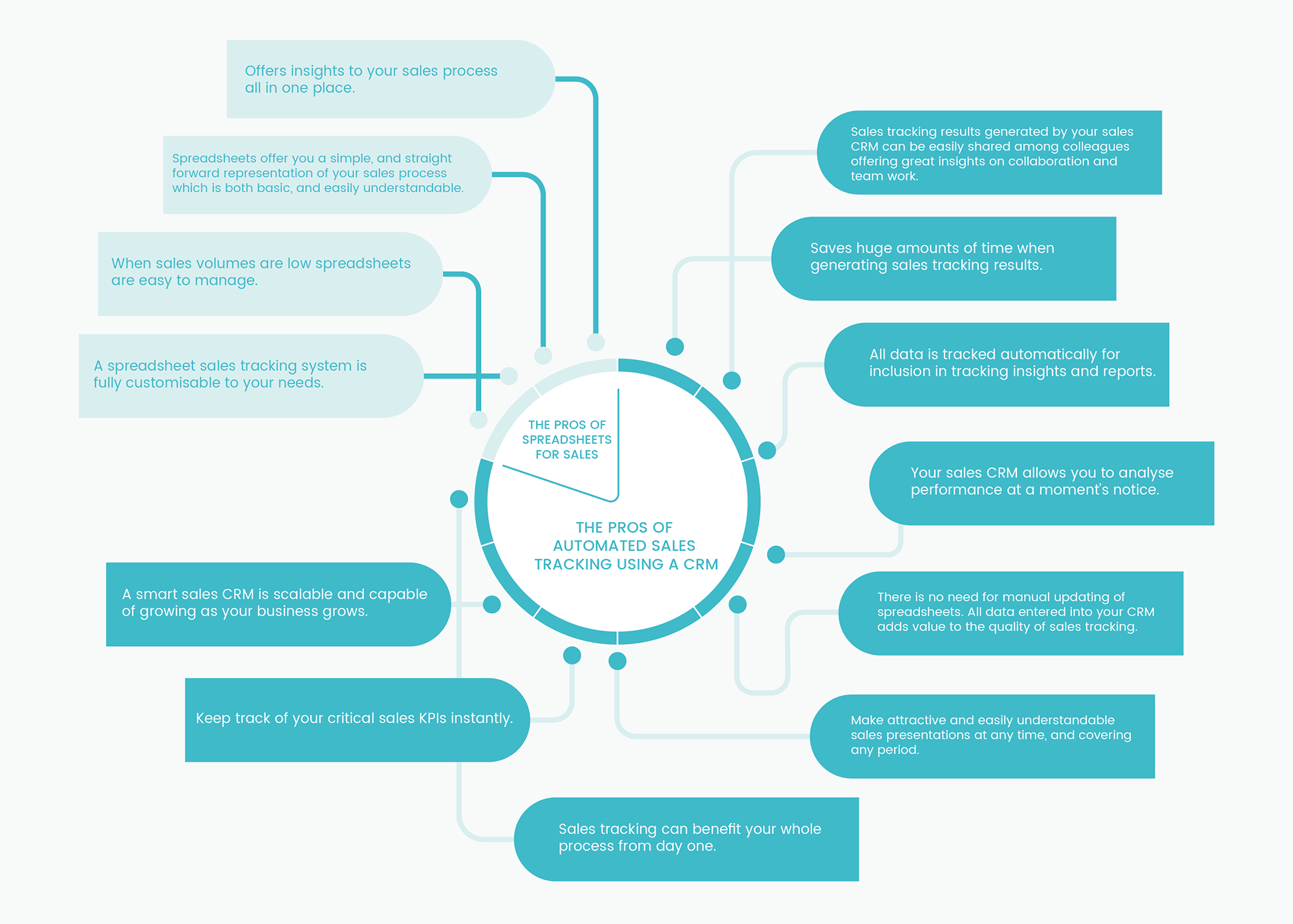
For small businesses, startups, or those with limited sales volumes, traditional spreadsheets can serve as a practical and cost-effective sales tracking solution. They offer a straightforward and easily understandable representation of the sales process, providing insights into sales activities without the need for sophisticated software.

Pros of Using Spreadsheets:

  • Simplicity and Clarity: Spreadsheets present sales data in a basic, digestible format.
  • Centralized Insights: Gather insights into your sales process in a single location.
  • Ease of Management: When dealing with low sales volumes, spreadsheets are manageable and straightforward.
  • Customizability: Tailor your sales tracking system to meet specific needs without complex configurations.

Cons of Using Spreadsheets:

  • Basic Level Insights: The insights offered are fundamental, lacking the depth that sales tracking software provides.
  • Manual Maintenance Required: Spreadsheets demand significant manual input and upkeep.
  • Collaboration Challenges: Sharing and collaborating on spreadsheet documents can be cumbersome.
  • Inferior Sales Analysis: The quality of analysis is much lower compared to dedicated sales tracking tools.
  • Presentation Limitations: Spreadsheets lack visual appeal for detailed sales presentations.

Modern Sales Tracking with CRM Software

Leveraging CRM for Comprehensive Sales Management

Modern Customer Relationship Management (CRM) software revolutionizes sales tracking by providing a suite of advanced tools designed for comprehensive sales process management. From automated data collection to in-depth analysis, CRMs offer a holistic view of the sales pipeline, enhancing decision-making and strategic planning.

Pros of Automated Sales Tracking with a CRM:

  • Enhanced Collaboration: Facilitates easy sharing of sales tracking results among team members, promoting collaboration.
  • Time Efficiency: Significantly reduces the time required for generating and managing sales data.
  • Automated Data Tracking: Automatically collects and analyzes sales data, reducing manual errors.
  • Instant Performance Analysis: Offers the ability to assess performance metrics swiftly and accurately.
  • No Manual Updates Required: Data entered into a CRM enhances sales tracking quality without additional manual effort.
  • Engaging Sales Presentations: Enables the creation of visually appealing and detailed sales presentations.
  • Comprehensive Process Benefit: Benefits the entire sales process from the outset.
  • Real-Time KPI Tracking: Allows for instant monitoring of critical sales KPIs.
  • Scalability: Adapts and grows with your business, accommodating increasing complexity.

Cons of Using a CRM:

  • Cost Considerations: May represent a significant investment for small businesses or startups.
  • Dependency on Sales Process Definition: Requires a well-defined sales process for accurate tracking.
  • Data Entry Compliance: Relies on consistent and accurate data input by sales teams to ensure reliability.

Spreadsheets vs. CRM for Sales Tracking: Making the Right Choice for Your Business

When it comes to managing your sales process, the decision between using spreadsheets and adopting a Customer Relationship Management (CRM) software is pivotal. This choice not only impacts your daily operations but also your business’s potential for growth and scalability.

The Case for Spreadsheets in Small Businesses

For small businesses, especially those at the nascent stage or operating as a sole proprietorship, spreadsheets might seem like a natural choice. Their advantages are clear:

  • Cost-Effectiveness: Spreadsheets are a low-cost option, often available through free or existing software suites.
  • Simplicity: They offer a straightforward way to start tracking sales without a steep learning curve.
  • Flexibility: You can customize spreadsheets to your immediate needs, provided you’re diligent about updating the data.

However, this simplicity and cost-effectiveness come with limitations. While spreadsheets can serve adequately for basic tracking and small volumes of sales, they lack the scalability and depth required for a growing business. The manual effort required to maintain and update spreadsheets can also become a significant drain on time and resources as your business expands.

Transitioning to CRM for Growth and Scalability

As your business grows or if you’re already operating with a team, the need for a more robust, scalable, and efficient system becomes apparent. Here’s where modern CRM software shines:

  • Scalability: CRM systems are designed to grow with your business, accommodating increasing volumes of sales data and customer interactions without a hitch.
  • Automation and Efficiency: Automating data entry and sales tracking tasks saves time and reduces errors, allowing your sales team to focus on selling rather than on administrative tasks.
  • Insights and Analytics: CRMs provide powerful analytics tools, offering real-time insights, graphs, and charts that help you refine your sales process for better performance.
  • Enhanced Communication: With top-level communication features, CRMs facilitate better interaction within your sales team and with your customers.
  • Lead Prioritization: Features like lead scoring enable your sales team to focus their efforts on the most promising leads, improving conversion rates and sales efficiency.

Making the Decision: Spreadsheets or CRM?

The decision between spreadsheets and CRM software hinges on several factors, including the size of your business, your growth aspirations, and the complexity of your sales process. While spreadsheets may suffice for very small businesses or those just starting out, the benefits of CRM software become increasingly compelling as your need for scalability, efficiency, and comprehensive analytics grows. For businesses transitioning to CRM but seeking spreadsheet flexibility, tools like Coefficient Spreadsheet Connector bridge both worlds by syncing live CRM data directly into Excel or Google Sheets.

For Startups and Small Businesses:

  • Consider starting with spreadsheets if your operations are small and straightforward.
  • Evaluate the point at which the limitations of spreadsheets outweigh their benefits as your business begins to grow.

For Growing and Established Businesses:

  • Invest in a CRM system that offers the scalability and functionality necessary to support your business’s growth.
  • Look for CRM features that align with your specific sales processes and business needs.

Conclusion: Elevating Your Sales Tracking with Teamgate CRM

In the journey of sales management, while spreadsheets serve as a foundational tool for beginners, the dynamic capabilities of CRM software stand out as the beacon for scalability, efficiency, and deep analytical insight. The transition to a CRM system is not merely a step but a leap towards empowering your sales team, optimizing your sales processes, and propelling your business into a future of enhanced productivity and profitability.

Teamgate CRM emerges as a premier choice for businesses ready to embrace this transformation. With its intuitive interface, comprehensive feature set, and robust analytics, Teamgate CRM is designed to support your business’s growth at every stage. Whether you’re looking to streamline operations, enhance team collaboration, or gain actionable insights into your sales pipeline, Teamgate offers a solution tailored to your needs.

Why Choose Teamgate CRM?

As you contemplate the future of your sales tracking and management, consider the strategic advantage of integrating Teamgate CRM into your operations. With its user-friendly platform and comprehensive capabilities, Teamgate stands ready to help you achieve a level of oversight and insight that spreadsheets simply cannot match. Benefit from:

  • Scalability: Grow your business with confidence, knowing Teamgate CRM can adapt to increasing complexity and volume.
  • Efficiency: Automate mundane tasks and focus your efforts on building relationships and closing deals.
  • Insights: Leverage detailed analytics and reporting tools to make informed decisions and fine-tune your sales strategy.
  • Collaboration: Foster a collaborative environment with shared access to critical data, ensuring everyone is aligned and informed.

Taking the Next Steps with Teamgate CRM

Are you considering the transition to a CRM system, or do you have more questions about how CRM software can be tailored to fit your business’s unique needs?

Visit our website to learn more about our features, benefits, and how we can tailor our solution to meet your unique business needs. Elevate your sales tracking with Teamgate CRM and unlock the full potential of your sales team and process.

Contact us today to get started with a demo tailored to your specific requirements, or start your own free trial.  Your journey towards more efficient, insightful, and profitable sales tracking begins with Teamgate.


FAQs: Sales Tracking

Q1: What is the purpose of tracking sales activities?

A1: Sales tracking is essential for monitoring all aspects of the sales process, from initial contact to closing a deal. It helps sales managers develop effective strategies, ensure sales KPIs are met, and gain insights for optimizing the sales pipeline.

Q2: Can spreadsheets be used effectively for managing sales data?

A2: Yes, spreadsheets can be an effective tool for managing sales data for small businesses or startups with limited sales volume. They offer a simple, customizable way to track sales but may require significant manual effort and become less practical as a business grows.

Q3: What advantages do CRM systems offer over spreadsheets for sales tracking?

A3: CRM systems offer scalability, automation, in-depth analytics, enhanced collaboration, and real-time access to data. These features make CRMs more efficient and insightful compared to the manual and time-consuming nature of spreadsheets.

Q4: Are there any downsides to using CRM software for sales tracking?

A4: The initial cost and the need for ongoing data maintenance can be seen as downsides. However, the benefits of improved efficiency, data accuracy, and actionable insights often outweigh these challenges.

Q5: How does sales tracking impact a business’s growth?

A5: Effective sales tracking allows businesses to identify opportunities for improvement, streamline sales processes, prioritize leads, and make informed decisions. This strategic approach can significantly impact a business’s ability to grow and remain competitive.

Q6: What should small businesses consider when choosing between spreadsheets and CRM for sales tracking?

A6: Small businesses should consider their current sales volume, growth goals, budget, and the complexity of their sales process. While spreadsheets may suffice initially, a CRM system can offer long-term benefits for scalability and efficiency.

Q7: How can a business transition from spreadsheets to CRM software for sales tracking?

A7: Transitioning involves evaluating CRM options that fit your business needs, planning data migration, training your team to use the new system, and gradually shifting sales tracking processes to the CRM. It’s important to ensure a smooth transition to minimize disruptions.

Q8: Can CRM software integrate with other business tools?

A8: Yes, modern CRM software often features robust integration capabilities with a wide range of business tools, including email platforms, marketing automation software, and accounting systems. This integration facilitates a more cohesive and efficient workflow.

Q9: How does Teamgate CRM enhance sales tracking for businesses?

A9: Teamgate CRM enhances sales tracking by providing an all-in-one platform for managing sales activities, analyzing performance, automating tasks, and fostering collaboration. Its features are designed to support businesses in achieving greater productivity and profitability.

Q10: Is it worth investing in CRM software for a startup?

A10: Yes, investing in CRM software can be highly beneficial for startups, as it sets a strong foundation for sales processes, enables efficient scaling, and provides valuable insights that can guide strategic decisions from the outset.

GET READY TO OWN YOUR WORKDAY

with the most user-friendly CRM on the market.

Start Free 14-Day Trial

Painless setup, no credit card required

Welcome to the world of savvy financial management, where the power of budgeting transforms small businesses into thriving enterprises. In this age, where every penny counts, mastering the art of budgeting is not just a skill – it’s a necessity. And what better tool to wield in this financial quest than Google Sheets, the versatile and accessible ally in your business’s journey towards fiscal robustness.

Dive into the world of efficient financial management with our guide to explore how Google Sheets transforms budgeting from a complex task into an accessible, streamlined process, offering small businesses the tools to navigate their financial journey with confidence and precision.

Key Takeaways:

  1. Budgeting Basics: Understand the fundamentals of budgeting for small businesses, highlighting its significance and addressing common challenges.
  2. Google Sheets Advantages: Discover why Google Sheets is an ideal budgeting tool for small businesses, emphasizing its accessibility, cost-effectiveness, and customization capabilities.
  3. Setting Up a Budget: Learn step-by-step how to create a comprehensive budget in Google Sheets, ensuring effective financial tracking and management.
  4. Advanced Features: Utilize advanced Google Sheets features like automated calculations, conditional formatting, and dynamic charts for an enhanced budgeting experience.
  5. Maintenance Best Practices: Embrace best practices for maintaining and updating your budget, ensuring long-term accuracy and alignment with business goals.

Contents:

Understanding the Basics of Budgeting for Small Businesses

The Essence of Budgeting in Small Business

Budgeting, in its simplest form, is the art of balancing your business’s income against its expenditures. It’s a strategic blueprint that guides your financial decisions and forecasts future monetary needs. For small businesses, budgeting is akin to navigating a ship in turbulent seas – it’s vital for keeping your venture afloat amidst the unpredictable tides of the market.

The Lifeline of Financial Stability

A well-structured budget serves as a lifeline, offering a clear view of your financial horizon. It helps you identify potential cash flow issues, plan for future investments, and allocate resources effectively. With a budget, you’re not just reacting to financial situations; you’re proactively managing them.

Overcoming Budgeting Hurdles

Yet, many small businesses stumble on the path of budgeting, often intimidated by its perceived complexity. The challenges range from a lack of financial literacy to the daunting task of tracking every penny. But fear not – the solution lies in embracing simplicity and utilizing the right tools, which is where Google Sheets enters the scene.

Why Choose Google Sheets for Your Budgeting Needs?

Accessibility: Budgeting at Your Fingertips

Google Sheets operates in the cloud, making it accessible from anywhere, at any time. This level of accessibility is a boon for small business owners who are constantly on the move. Whether you’re at the office, at home, or on a business trip, your budget is just a few clicks away.

The Cost-Effective Champion

In the world of small businesses, every dollar saved is a dollar earned. Google Sheets, being part of the free Google Workspace suite, is the epitome of cost-effectiveness. This removes the financial barrier to entry for high-quality budgeting tools, allowing you to allocate funds to other critical areas of your business.

Tailor-Made for Your Business

Every small business is unique, and so are its budgeting needs. Google Sheets offers unparalleled customization, enabling you to tailor your budgeting template to your specific requirements. Whether you’re a retail store tracking inventory costs or a service provider monitoring project expenses, Google Sheets molds to fit your unique financial landscape.

Seamless Integration for Streamlined Processes

Google Sheets doesn’t just stand alone; it’s part of a larger ecosystem. Its ability to integrate seamlessly with other tools in the Google Workspace and various third-party applications enhances its functionality. Imagine automatically importing data from your accountancy software or syncing with your bank account for real-time financial updates – Google Sheets makes it possible.

Setting Up Your Budget on Google Sheets

Embarking on your budgeting journey in Google Sheets begins with setting up a basic template – a process akin to an artist preparing their canvas. Here, your financial data will take shape, forming a vivid picture of your business’s fiscal health.

Starting with a Blank Slate

Open Google Sheets and begin with a blank spreadsheet. This is where you’ll build your budget from the ground up. Title your sheet for easy identification, such as “2024 Business Budget”.

Structuring Your Budget

Divide your spreadsheet into key sections: Income, Expenses, and Net Profit. These categories are the pillars of your budget and will guide your financial tracking.

  • Income: This section captures all your revenue streams. Label columns for different income sources, such as sales, services, or investments. Include a column for the date and a summary column to tally monthly or quarterly income.
  • Expenses: Here, detail your outgoing cash flow. Break down expenses into categories like rent, utilities, salaries, marketing, and unexpected costs. This categorization not only helps in tracking but also in identifying areas for cost reduction.
  • Net Profit: This is calculated by subtracting total expenses from total income. It gives you a clear picture of your financial gain or loss over a period.

Inputting Formulas for Efficiency

Google Sheets becomes a powerful tool when you harness its formula capabilities. Utilize simple formulas like SUM to calculate totals or more complex ones to automate percentage calculations or comparative analysis.

For instance, to calculate total monthly income, use the SUM function ie:=SUM(B2:B10), where B2 to B10 are cells containing your income figures. Similarly, use formulas to automatically update your net profit as you input new data.

Data Validation for Accuracy

Mistakes in data entry can derail your budgeting accuracy. Utilize Google Sheets’ data validation feature to set rules for each cell, ensuring that the entered data is in the correct format. For example, you can restrict a column to only accept numerical values or dates.

Conditional Formatting for Instant Insights

Use conditional formatting to bring your data to life. This feature helps in quickly identifying trends and anomalies, similar to dashboards you may see in CRM software. For instance, you can set a rule to highlight expenses that exceed a certain threshold in red, making it easy to spot areas where you’re overspending.

Regular Review and Update

A budget is not a set-and-forget tool; it requires regular updates and reviews. Schedule a monthly budget review to adjust for any changes in your financial situation. This habit ensures that your budget remains a true reflection of your business’s financial status.

By following these steps, you’ll transform a blank Google Sheets spreadsheet into a dynamic and insightful financial management tool.

Advanced Budgeting Features in Google Sheets

Once you have mastered the basics of setting up your budget in Google Sheets, it’s time to explore its advanced features. These functionalities will not only save you time but also provide deeper insights into your financial data.

Automating Calculations with Advanced Formulas

Beyond basic sum functions, Google Sheets offers a plethora of advanced formulas that can automate complex calculations and analyses. For instance, the VLOOKUP function can be used to cross-reference and pull data from different sheets, making it easier to manage large datasets. Similarly, SUMIF and COUNTIF functions allow you to sum or count cells based on specific criteria, such as categorizing expenses.

Implementing Conditional Formatting for Better Tracking

Conditional formatting goes beyond basic color coding. You can set up rules to change the color of a cell, row, or column based on the data it contains. For example, you might have a rule that turns a cell green when your income exceeds your targets or red when expenses surpass budgeted amounts. This instant visual feedback helps in quickly assessing financial performance.

Data Validation for Enhanced Consistency

Advanced data validation techniques can be employed to ensure consistency and accuracy in your data entry. Create dropdown lists for expense categories or payment status to maintain uniformity in your entries. This not only minimizes errors but also streamlines the process of analyzing your data.

Creating Dynamic Charts and Graphs

Visual representation of data can be a game changer in understanding your financial health. Google Sheets allows you to create various types of charts and graphs, such as pie charts for expense distribution, line graphs for income trends, and bar charts for comparing different financial aspects. These visual tools help in quickly identifying trends and making informed decisions.

Linking Sheets for Consolidated Views

For businesses managing multiple streams of income or expenses across different projects, linking various sheets within Google Sheets provides a consolidated view of your finances. You can link data from one sheet to another, ensuring that updates in one are automatically reflected in the other. This interconnectedness simplifies the management of complex financial structures.

By leveraging these advanced features in Google Sheets, small business owners can transform their budgeting from a mere record-keeping exercise into a dynamic tool for financial analysis and decision-making.

Best Practices for Maintaining Your Budget

A well-set-up budget in Google Sheets is just the starting point. The real challenge lies in maintaining it effectively over time. Adhering to best practices in budget maintenance can make the difference between merely surviving and thriving financially.

Regular Updates: Keeping the Pulse on Your Finances

Consistency is key when it comes to budgeting. Regularly updating your budget ensures that it remains a reliable tool for decision-making. Set aside a specific time each week or month to review and update your budget. This routine allows you to stay on top of your finances and make adjustments as needed.

Embracing Flexibility: Adapting to Changing Business Dynamics

While consistency is important, so is flexibility. The business landscape is ever-changing, and your budget should reflect these changes. Be prepared to adjust your budget in response to new opportunities, unexpected challenges, or shifts in your business strategy. This adaptability ensures that your budget continues to serve its purpose in guiding your financial decisions.

Accuracy and Diligence: The Cornerstones of Reliable Budgeting

The effectiveness of your budget heavily relies on the accuracy of the data entered. Ensure that all financial transactions are recorded diligently and accurately. Double-check figures for errors and make sure that all entries are up-to-date. Accurate data is the foundation of meaningful financial analysis and forecasting.

Goal-Oriented Reviews: Aligning Budget with Business Objectives

Regular budget reviews should be more than just a cursory glance at numbers. Use these reviews to assess how well your budget aligns with your overall business goals. Are you on track to meet your financial objectives? Are your spending patterns supporting your business strategy? These goal-oriented reviews can provide valuable insights and guide strategic adjustments.

Collaborative Budgeting: Involving Your Team

If you have a team, involve them in the budgeting process. Collaborative budgeting fosters a sense of ownership and accountability. It also brings diverse perspectives, which can be invaluable in identifying cost-saving opportunities or areas for financial improvement.

By following these best practices, your Google Sheets budget becomes more than just a financial document; it transforms into a dynamic tool that actively supports the growth and success of your business.

Conclusion

As we draw the curtains on our journey through the realm of budgeting with Google Sheets, it’s clear that this tool is much more than a mere spreadsheet application. It’s a gateway to financial clarity, a catalyst for informed decision-making, and a companion in your business’s growth story.

Through this guide, we’ve navigated the essentials of budget setup, delved into advanced features, and uncovered best practices for maintaining an effective budget. The power of Google Sheets lies in its simplicity, flexibility, and depth – qualities that resonate perfectly with the needs of small businesses.


FAQs: Google Sheets for Budgeting

Q: How do I access Google Sheets for budgeting?

A: Accessing Google Sheets for budgeting is straightforward. If you have a Google account, you can open Google Sheets by visiting sheets.google.com or through Google Drive. Google Sheets is free to use and doesn’t require any additional software installation. Once opened, you can start with a blank sheet or choose from various budgeting templates available within Google Sheets.

Q: Can Google Sheets integrate with my existing accounting software?

A: Yes, Google Sheets can integrate with many accounting software solutions, either directly or via third-party add-ons. These integrations allow you to seamlessly import financial data from your accounting software into Google Sheets. This feature simplifies the process of updating your budget and ensures consistency across your financial management tools. It’s advisable to check compatibility with your specific accounting software for smooth integration.

Q: Are there templates available for budgeting in Google Sheets?

A: Absolutely! Google Sheets offers a range of pre-built budgeting templates that you can use as a starting point. These templates are designed to cater to different budgeting needs and can be easily customized. To access these templates, go to the Google Sheets homepage, click on ‘Template Gallery,’ and you will find a variety of budget templates under the ‘Personal’ or ‘Work’ categories.

Q: How secure is my financial data in Google Sheets?

A: Google Sheets employs robust security measures to protect your data. This includes secure data encryption, two-factor authentication, and regular security updates. However, it’s important to follow best practices for data security, such as regularly updating your passwords and limiting access to your budget sheet. Remember, the security of your data also depends on how you manage your Google account’s security settings.

Q: Tips for troubleshooting common issues in Google Sheets budgeting?

A: Common issues in Google Sheets budgeting often involve formula errors, data syncing problems, or formatting inconsistencies. Here are a few tips:

  • Double-check your formulas for accuracy.
  • Ensure that your data ranges in formulas are correct.
  • Use the ‘Help’ feature in Google Sheets for troubleshooting specific issues.
  • Regularly back up your budget sheet to avoid data loss.
  • If using integrations, ensure they are correctly set up and updated.

In this article, we delve into the transformative benefits of switching from traditional spreadsheets to dynamic Customer Relationship Management (CRM) systems in modern businesses. Learn why CRM systems are outpacing spreadsheets as indispensable tools in today’s data-driven business environment.

Key Takeaways:

  1. Spreadsheets, while useful for basic data tasks, fall short in managing complex business data and customer interactions.
  2. CRM systems enhance customer relationship management, offer improved sales forecasting, and foster better team collaboration.
  3. Automation capabilities of CRM systems increase operational efficiency and ensure robust data security and compliance.
  4. Real-world examples demonstrate significant benefits businesses can reap from switching to CRM systems.
  5. The transition from spreadsheets to CRM, while requiring careful planning and execution, is a strategic move for business growth and success.

Table of Contents

  1. Introduction
  2. Understanding Spreadsheets and CRM Systems
  3. Limitations of Spreadsheets for Business Management
  4. Benefits of CRM Systems Over Spreadsheets
  5. How to Transition from Spreadsheets to CRM
  6. Conclusion
  7. FAQs


Introduction

In the pulsating digital heart of modern business, data reigns supreme. This data, when harnessed efficiently, can become a powerful tool for success. Traditionally, businesses have used spreadsheets to manage their data, but the increasing complexity of today’s business environment has necessitated more advanced tools. This article explores the transformative benefits of switching from spreadsheets to Customer Relationship Management (CRM) systems.

Understanding Spreadsheets and CRM Systems

Spreadsheets, like Microsoft Excel and Google Sheets, are digital tools for organizing, calculating, and storing data. They use a grid of cells arranged in rows and columns, making them suitable for basic data tasks like budgeting, inventory tracking, and simple databases.

However, as businesses grow, their needs evolve. Enter CRM systems. CRM systems are software applications designed to manage a company’s interactions with current and potential customers. They centralize, simplify, automate, and integrate multiple facets of customer interaction, including sales, marketing, and customer service, leading to improved customer relationships and business success. While spreadsheets can be a useful starting point for organizing customer data, they often lack the automation and scalability of a dedicated CRM. For those looking to maximize the efficiency of their spreadsheets, tools like Spreadsheeto offer expert guides and training to help users make the most of Excel and Google Sheets.

Limitations of Spreadsheets for Business Management

While spreadsheets have their utility, they falter when tasked with managing complex, growing business data. Key limitations include scalability challenges, inefficiencies with complex data management, and a lack of dynamic updates.

Scaling a business using spreadsheets can be akin to building a skyscraper with a hand tool. As the volume and complexity of data increase, spreadsheets become increasingly unwieldy and error-prone.

Furthermore, spreadsheets are not designed for managing intricate relationships between data points or tracking customer interactions or sales performance over time. This deficiency can lead to missed opportunities and a lack of understanding of customer needs and behaviors.

Benefits of CRM Systems Over Spreadsheets

Switching to a CRM system can feel like upgrading to a supercharged jet from a bicycle. Key benefits include enhanced customer relationship management, improved sales management and forecasting, better team collaboration, increased efficiency through automation, and robust data security and compliance.

CRM systems offer a holistic view of each customer, including their history, preferences, and interactions with your business. This comprehensive understanding empowers businesses to nurture and strengthen their customer relationships.

Furthermore, CRM systems provide powerful tools for sales management and forecasting, helping businesses understand their sales funnel and predict future sales trends with greater accuracy. They also foster improved team collaboration and communication, as all customer-related data is centralized and easily accessible to all team members.

Another significant advantage of CRM systems is their automation capabilities. Tasks such as sending follow-up emails, updating contact information, and scheduling appointments can be automated, freeing up time for more strategic tasks. Additionally, CRM systems are built with robust data security measures and can help businesses stay compliant with data protection regulations.

How to Transition from Spreadsheets to CRM

The switch from spreadsheets to a CRM system requires careful planning and execution. The first step is to identify your business’s unique needs and choose a CRM system that caters to them. Next, migrate your existing data to the new system, ensuring its accuracy and completeness. Lastly, train your team effectively on how to use the new system to minimize disruption and facilitate a smooth transition.

Conclusion

The switch from spreadsheets to CRM systems is a strategic move that empowers businesses to understand their customers better, make data-driven decisions, and ultimately drive growth. The benefits of CRM systems far outweigh those of spreadsheets, making it a worthy investment for businesses of all sizes and industries.

While the transition may seem daunting, the long-term advantages – enhanced customer relationship management, improved sales forecasting, better team collaboration, increased efficiency, and robust data security – make it a crucial step towards business success. Businesses that take the leap are poised to revolutionize their operations, maximize their potential, and stand out in today’s competitive business landscape.

At Teamgate CRM we’ve made the transition from spreadsheets to CRM simple. With a thorough and hand-held onboarding process, Teamgate ensures your CRM is first set up to replicate your business needs, before easily importing your data from existing spreadsheets. With custom fields and out-of-the-box sales insights and reports, your business will gain the benefits from both CRM efficiency and the flexibility of spreadsheets. Speak with our team today to book in your free onboarding session or trial.

FAQs

  • How does a CRM system compare to a Spreadsheet in terms of cost?
    While spreadsheets may seem cheaper initially, the cost of missed opportunities, inefficiencies, and errors often outweighs the investment in a CRM system. CRM systems provide value through improved customer relationships, increased sales, and time saved through automation.
  • Can small businesses also benefit from CRM systems?
    Absolutely! CRM systems are scalable and offer benefits for businesses of all sizes. For small businesses, CRM systems can help manage customer relationships efficiently and streamline operations, laying a strong foundation for future growth.
  • How long does it typically take to transition from Spreadsheets to a CRM system?
    The transition time can vary depending on the size of the business, the volume of data, and the chosen CRM system. However, with a well-planned approach, businesses can expect to make the transition within a few weeks to a few months.
  • What are some potential challenges when switching from Spreadsheets to CRM?
    Potential challenges include resistance to change from employees, data migration issues, and choosing the right CRM system that aligns with your business needs. These challenges can be mitigated with effective change management, thorough planning, and careful CRM system selection.
