
Most CRMs fail because they only store data – they don’t help you act on it. Sales teams lose deals when follow-ups are missed, pipelines stall, and forecasts rely on incomplete or outdated information. Modern CRMs are solving these problems by shifting from being passive systems of record to active systems of action. They automate tasks, provide clear next steps, and ensure reps focus on closing deals instead of logging data.
Teamgate helps sales teams follow a clear process, stay organized, and trust their pipeline insights – without turning CRM into a full-time admin job.
Christopher O’Donnell of Day.ai | Systems of Action | Episode 1 | Bessemer Venture Partners
sbb-itb-5772723
System of Record vs. System of Action
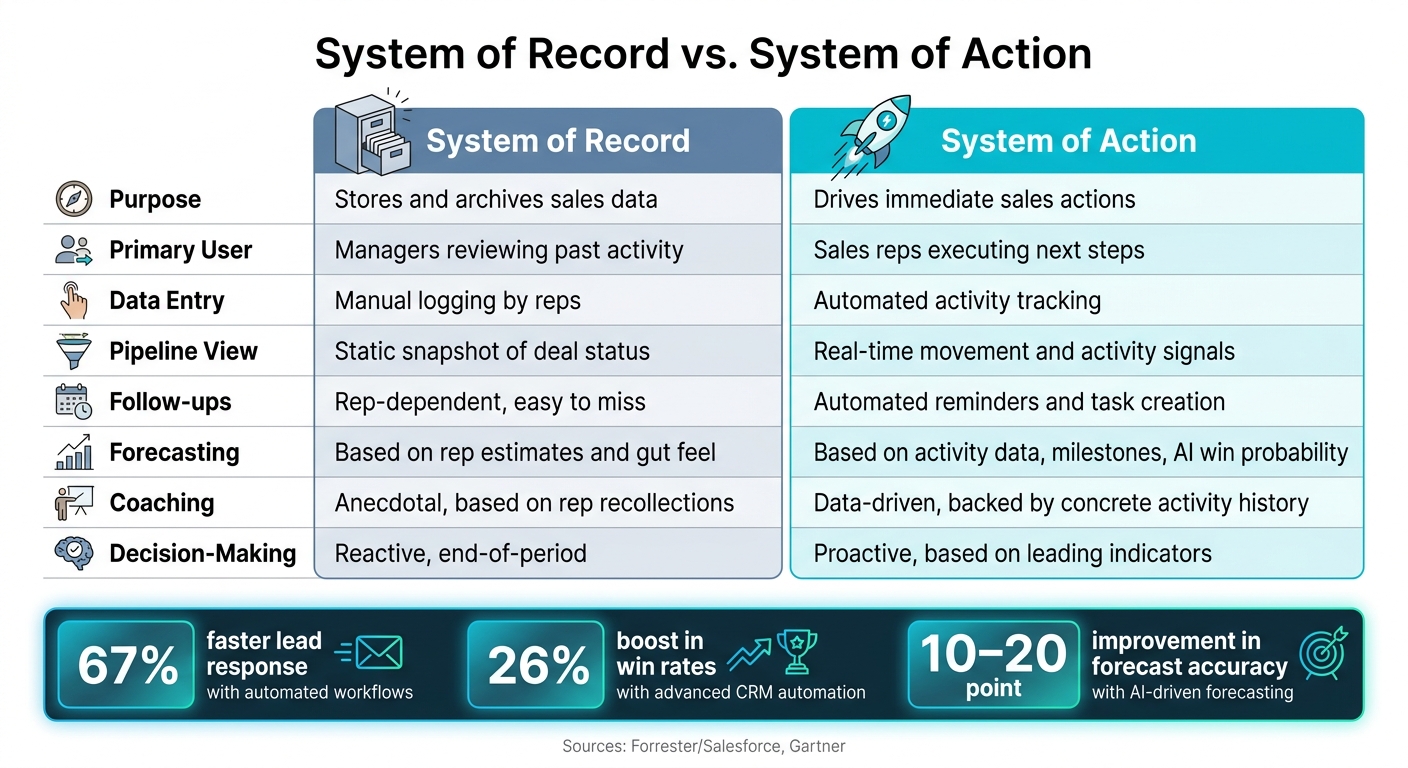
CRM System of Record vs. System of Action: Key Differences
What Each Term Actually Means
A system of record serves as a digital archive, storing essential sales data like contact information, interaction histories, and pipeline updates. While it keeps everything organized and available for review, it doesn’t actively guide sales reps. The responsibility for deciding what to do next falls entirely on the salesperson.
On the other hand, a system of action takes a more dynamic approach. It doesn’t just store data – it uses it to drive immediate results. For example, it highlights deals that need attention, automates follow-up tasks, and provides actionable suggestions for the next steps. Jaime Walker from B2Bdaily explains this shift:
"The enterprise software landscape is currently undergoing a radical transformation as businesses abandon static databases in favor of intelligent engines that can actually finish the work they track."
The key difference lies in the purpose of the tool. Systems of record were built for managers to analyze past activity with sales reports, while systems of action are designed to empower sales reps by bridging the gap between insight and execution. As CRM tools evolved from simple data storage to action-oriented platforms, their ability to directly influence sales outcomes became clear.
How CRM Technology Has Changed Over Time
In the early days, CRMs were little more than digital Rolodexes. They allowed basic deal tracking and provided a place to log interactions, but they were passive tools. Sales reps entered data, and managers used it to review progress – end of story.
The game started to change when CRMs moved to the cloud. Integration with tools like email and calendars reduced manual data entry and improved accuracy. Today’s CRMs go even further by incorporating AI. These systems analyze historical data from logged calls, notes, and other interactions to uncover patterns – like deals that have stalled or accounts that are no longer engaged – and bring these insights to the forefront.
"The CRM isn’t going to go away… but it’s turning into just an input; one of many inputs, into the systems of intelligence which we use to get work done." – Gio Ahern, Stephenie Zhang, and Alex Immerman, Partners, Andreessen Horowitz
This evolution underscores the shift from static data storage to tools that actively support the sales process.
Why Storing Data Is No Longer Enough
Merely storing data doesn’t help close deals. When sales reps manually log calls or interactions, only part of the story gets recorded. This incomplete data leaves managers trying to coach and forecast with gaps in the picture. Without structured, reliable data, a CRM can’t deliver the kind of proactive insights that modern sales teams need.
Cate Costin of Dakota sums it up well: "It’s a system of record masquerading as a strategy tool." The real value of a CRM lies in its ability to transform raw data into actionable insights that help sales teams move deals forward – not just keep track of them. This distinction separates tools that merely document activity from those that genuinely drive results.
Why Sales Teams Need Action-Oriented CRMs Today
The Problem with Scattered Data and Disconnected Tools
Sales teams often have plenty of data, but the problem is where that data lives – scattered across emails, spreadsheets, call notes, and calendar events. Each piece tells part of the customer story, but the lack of integration between tools forces reps to jump between them just to figure out where deals stand.
This constant switching isn’t just annoying – it slows everything down. When a CRM doesn’t sync with the tools reps actually use, it becomes more of an afterthought, something updated after work is done rather than helping to drive the work itself. This fragmented system disrupts workflows and ultimately drags down sales performance.
What Inaction in Sales Actually Costs
A CRM that doesn’t actively support sales efforts comes with hidden costs. Sales reps lose valuable hours every week on manual data entry and logging activities – time that could be spent selling.
On top of that, the data reps do manage to log is often incomplete or outdated. As Brian LaManna, Enterprise Account Executive at Gong, explains:
"Reps enter biased, incomplete, and outdated information that captures less than 1% of what actually happens in customer conversations."
This lack of reliable data has real consequences. Missed follow-ups, unnoticed stalled deals, and unreliable forecasts become the norm. It’s not just the obvious problem deals that fall through the cracks – it’s the ones no one was watching closely enough.
How Automation and AI Are Changing CRM
Modern CRMs are tackling these issues head-on with automation and AI, turning raw data into actionable insights. Tools like these can automatically log calls, emails, and other interactions, linking them to the correct accounts without reps needing to lift a finger. This eliminates the data gaps and gives reps back the hours they used to spend on admin work.
AI goes even further by analyzing engagement signals – like a quiet stakeholder or how often a proposal is opened – and flagging the deals that need immediate attention. This doesn’t replace a rep’s judgment; instead, it ensures their focus is on the deals that matter most. The impact can be dramatic: Frontify, for instance, reported a 30% increase in lead conversions by implementing lead scoring best practices and a 20% boost in forecast accuracy after moving away from manual, spreadsheet-heavy workflows. With automation and AI, sales teams can stop guessing and start acting with precision where it counts.
Key Features That Make a CRM a System of Action
Structured Pipelines with Clear Stage Definitions
A well-designed pipeline reflects actual progress, not just hope. Action-oriented CRMs enforce strict rules for moving deals through stages. For example, a deal can’t move to "Proposal Sent" unless the rep has documented a quoted price and solution outline. Similarly, it shouldn’t stay in "Qualified" without confirming a budget, identifying the decision-maker, and setting a target close date. By requiring mandatory fields, these CRMs ensure reps base their updates on facts, not assumptions.
This structure also improves forecasting. Assigning probability percentages to each stage – like 20% for "Qualified", 60% for "Proposal Sent", and 80% for "Negotiation" – allows leaders to create weighted forecasts based on actual progress. To keep things manageable, pipelines should stick to 5–7 stages, which still capture key milestones without becoming overwhelming. With this foundation, automated workflows can seamlessly step in to prompt timely actions.
Automated Workflows and Task Management
When juggling multiple deals, it’s easy for reps to lose track of follow-ups. Automated workflows eliminate this risk by turning CRM activity into actionable tasks. For instance, when a new lead comes in, the CRM can instantly assign it to the appropriate rep based on territory and create a task to call within 15 minutes. If a deal reaches "Demo Scheduled", the system might generate tasks like sending a calendar invite or preparing a custom presentation. And for high-value deals – say, those over $10,000 – the CRM can flag inactivity after seven days and create a follow-up task to prevent the deal from going stale.
The impact of automation is hard to ignore. Teams using automated lead rotation and task creation respond to leads up to 67% faster than those relying on manual processes. A Forrester study commissioned by Salesforce found organizations using advanced CRM automation experienced a 26% boost in win rates and a 36% increase in sales productivity.
Email, Calendar, and Calling Integrations
To complement automated workflows, native integrations ensure every interaction is captured without extra effort. Reps often skip CRM updates when they feel like added work, but integrations with tools like Gmail, Outlook, and in-app dialers make the CRM the central hub for daily activities – not just a reporting tool.
For example, connected email automatically logs every message to the correct contact and deal record, saving reps from manual entry. They can also use pre-built templates with merge fields to personalize emails by pulling in details like the prospect’s name, company, and pricing. Engagement signals – such as a prospect opening an email multiple times in a short period – are surfaced directly in the CRM, letting reps know the best time and reason to follow up. Features like click-to-call and in-app call logging further streamline the workflow, ensuring the entire sales day is managed in one place. According to Salesforce’s State of Sales report, 81% of sales reps say a connected CRM is essential for closing deals, and that connection begins with the tools they rely on daily.
How Action-Oriented CRMs Change the Way Sales Teams Work
Action-oriented CRMs are revolutionizing how sales teams operate by streamlining daily tasks, enhancing coaching opportunities, and delivering accurate, real-time insights. These tools are designed to prioritize actions and provide clarity across all levels of the sales organization.
For Sales Reps: Clear Priorities Every Day
Sales reps no longer need to guess what to tackle first. With an action-oriented CRM, they start their day with an automatically generated, prioritized task list. This list highlights high-priority follow-ups, fresh inbound leads with SLA timers, and deals that have been stagnant for over 10 days, all ranked by deal value and expected close date.
Currently, sales reps spend only 28% of their week actively selling, according to Salesforce. The rest of their time is consumed by administrative tasks and constant context switching. By automating data entry and communications, these CRMs can cut manual workload by 30–50%, freeing up 5–10 hours each week. This extra time allows reps to focus on building pipelines and closing deals, while also laying the foundation for managers to provide more effective, data-driven coaching.
For Managers: Coaching Backed by Real-Time Insights
Traditional CRMs often leave managers working with outdated or anecdotal information during pipeline reviews. Action-oriented CRMs change this by offering up-to-the-minute data on every deal, including its activity history, next steps, and how long it’s been in its current stage. For instance, if a deal has been stuck in the "Proposal Sent" stage for 25 days without any follow-up, managers can quickly intervene – either by re-engaging the prospect or disqualifying the deal.
This level of visibility helps managers spot trends, such as low conversion rates during specific stages or uneven focus on deals of varying sizes. With this data, coaching becomes more precise and impactful. Addressing bottlenecks as they occur leads to better overall sales performance.
For Leadership: Reliable Forecasts and Comprehensive Pipeline Insights
While reps and managers benefit from operational clarity, leadership gains a new level of accuracy in forecasting and pipeline management. Traditional CRMs often rely on rep expectations, which can be overly optimistic or subjective. In contrast, action-oriented CRMs base forecasts on real activities, milestones, and AI-driven win probabilities. This approach eliminates inactive "ghost deals" by maintaining sales pipeline hygiene to prevent inflated pipelines and distorted forecasts.
Research from Gartner reveals that organizations using AI-driven forecasting in their CRM systems see a 10–20 percentage point improvement in forecast accuracy compared to spreadsheet-based methods. Leadership also benefits from real-time dashboards that track key metrics like pipeline coverage ratios (e.g., a 3x pipeline-to-quota ratio) and leading indicators such as new opportunities, meetings held, and stage conversions. These insights allow executives to address potential issues early, rather than waiting for end-of-month reports to uncover problems.
| Leadership View | System of Record | System of Action |
|---|---|---|
| Forecast basis | Rep estimates and gut feel | Activity data, milestones, AI win probability |
| Pipeline freshness | Often stale, manually updated | Continuously updated via rep activity |
| Visibility | Lagging KPIs, static reports | Real-time dashboards, scenario views |
| Decision-making | Reactive, end-of-period | Proactive, based on leading indicators |
How Teamgate CRM Puts This Into Practice
Teamgate CRM is built on a simple yet powerful principle: it should help sales teams sell smarter, not just store data. Every feature is crafted to keep deals moving, reduce administrative tasks, and ensure the right information reaches the right people at the right time. Instead of being a passive database, Teamgate transforms the sales process into an active, streamlined system at every stage.
Setting Up Pipelines and Workflow Automations in Teamgate CRM
Teamgate allows teams to create pipelines that clearly define what success looks like at each stage. This eliminates vague deal statuses and ensures every opportunity has a clear position and next step. For example, when a deal moves to "Proposal Sent", Teamgate can automatically schedule a follow-up task or send an internal alert. This way, nothing slips through the cracks.
Strong sales systems depend on automation. Teamgate’s workflow automations handle repetitive tasks like lead routing, reminders, and task creation, freeing up sales reps to focus on building relationships and closing deals. Here’s how Teamgate compares to traditional CRM setups:
| Feature | Traditional CRM | Teamgate CRM |
|---|---|---|
| Pipeline View | Static, showing where deals are supposed to be | Dynamic, showing real-time movement and activity signals |
| Data Entry | Manual logging of calls and emails | Automated activity tracking and integrations |
| Coaching | Based on rep recollections | Based on concrete activity history |
| Forecasting | Often overly optimistic | Grounded in real behavior and stage progression |
Teamgate moves beyond static record-keeping to create a proactive sales environment. Next, let’s see how it centralizes daily sales activities for even greater efficiency.
Making Teamgate CRM the Hub for Daily Sales Work
Teamgate integrates seamlessly with the tools sales reps already rely on, making it the central hub for their daily tasks. The Sales Inbox allows reps to send and receive emails, use templates, and track engagement like opens and clicks – all without leaving the CRM. Emails automatically link to the right deal or contact, saving up to 20% of time spent switching between tools.
With the SmartDialer (powered by Twilio), reps can make calls directly from the CRM, and call details are logged automatically. Calendar sync with Google Calendar and Microsoft 365 ensures meetings and follow-ups stay organized in one place. To kick off each day, Teamgate sends a Morning Muffin – a daily digest summarizing the previous day’s updates and outlining a clear agenda. This eliminates guesswork and helps reps hit the ground running.
Giving Leaders the Visibility to Forecast and Grow
Teamgate delivers real-time insights that empower leaders to make informed decisions. The Insights section provides a clear view of pipeline activity, highlighting deal aging, activity coverage, and stage conversion rates. This allows leaders to identify bottlenecks before they impact revenue. For example, if deals consistently stall at a particular stage, the issue is flagged immediately rather than surfacing at the end of the quarter.
Forecasting in Teamgate is based on actual behavior and historical data, not overly optimistic close dates. Leaders can measure performance against goals, track the ROI of lead sources, and pinpoint exactly where the pipeline is leaking – whether it’s unqualified leads clogging early stages or stalled deals without next steps. This level of visibility ensures the pipeline becomes a tool for driving decisions and growth.
Conclusion: Why Action-Oriented CRMs Are the Next Step for Sales Teams
A CRM that simply stores data won’t help you close deals. Traditional systems focus on tracking the past, but modern sales teams need tools that actively guide future actions.
Passive data logging comes at a cost. Incomplete records lead to unreliable pipelines, which, in turn, result in missed opportunities. As LaManna highlights, the real issue isn’t poor decision-making – it’s that decisions are often based on biased, incomplete, or outdated data that only captures part of the story from customer interactions.
Action-oriented CRMs solve this problem. For example, Verse.ai saw a 76% revenue boost from closed-won deals by eliminating manual data entry, while Piano achieved 90% forecast accuracy by consolidating fragmented pipeline data into an AI-powered system.
Teamgate CRM operates on the same principle. It ensures sales teams follow structured stages, automates follow-ups, and provides leaders with actionable insights for better coaching and accurate forecasting – all while reducing the administrative burden on reps. These features help teams move from static record-keeping to actively driving revenue, creating a pipeline that reflects reality instead of wishful thinking.
For SMB and mid-market sales teams, the real challenge isn’t deciding whether to adopt an action-oriented CRM – it’s how quickly you can make the shift to proactive, disciplined selling. Teamgate helps make that transition seamless by combining clarity, structure, and trustworthy pipeline insights.
FAQs
How do I know if my CRM is a system of action?
Your CRM becomes a true system of action when it actively supports and drives your sales process rather than just storing data. Here are some key indicators:
- Automated workflows: Tasks and next steps are automatically triggered based on lead engagement or deal progress, keeping the process moving smoothly.
- Auto-logging activities: Calls, emails, and meetings are recorded automatically, saving time and reducing manual data entry.
- Real-time insights: Dashboards and analytics provide up-to-date information on deal status, helping you make informed decisions.
By simplifying processes and ensuring consistent follow-ups, your CRM serves as the central hub for your sales team.
What should I automate first in Teamgate CRM?
To get results quickly, focus on automating time-consuming admin tasks. Start by linking your email and calendar to Teamgate CRM. This ensures that emails, meetings, and call outcomes are automatically logged. Next, create task reminders and set up workflows triggered by specific actions to streamline deal follow-ups. These changes keep your data organized and your pipeline moving, letting your team spend more time connecting with leads and closing deals rather than handling manual updates.
How do I keep my pipeline stages consistent?
To keep your pipeline reliable, it’s essential to set up a clear sales process with well-defined entry and exit criteria for each stage. Aim for 5–7 stages, prioritizing measurable actions taken by the buyer rather than internal tasks. Maintain focus and consistency by ensuring every deal has a defined "next step." With Teamgate, this becomes easier – tasks are automatically created whenever a stage changes, helping reps stay on track and focus on moving deals forward.