
Behavior-triggered campaigns ensure your sales outreach happens at the right time, based on specific actions prospects take, like visiting a pricing page or leaving a deal idle. They’re about relevance and timing – key factors that drive faster deal closures and prevent missed opportunities. Research shows that high-intent signals lose impact within 48–72 hours, yet many sales reps stop after just one follow-up.
Teamgate helps sales teams stay disciplined and focused by turning these signals into actionable next steps – without overloading reps with admin work. With automated triggers, clear workflows, and real-time alerts, you can keep your pipeline clean, active, and reliable.
Key Takeaways:
- Time-sensitive triggers: Automate follow-ups for stalled deals, inactivity, or high-intent actions like multiple pricing page visits.
- Personalized outreach: Tailor messages to specific behaviors, improving engagement and response rates.
- Automation benefits: Save time on repetitive tasks, ensuring reps focus on meaningful interactions.
- Pipeline clarity: Use tools like visual flags, activity reports, and stage-based triggers to keep deals moving.
Teamgate ensures structured selling with real insight, helping managers trust the numbers and reps focus on selling. By automating timely, behavior-driven campaigns, you can close deals 15–30% faster and maintain a trustworthy pipeline.
10 Surprising Customer Behavior Triggers You’ll Want to Steal by Nancy Harhut
Key Behavior Triggers for Sales Pipelines
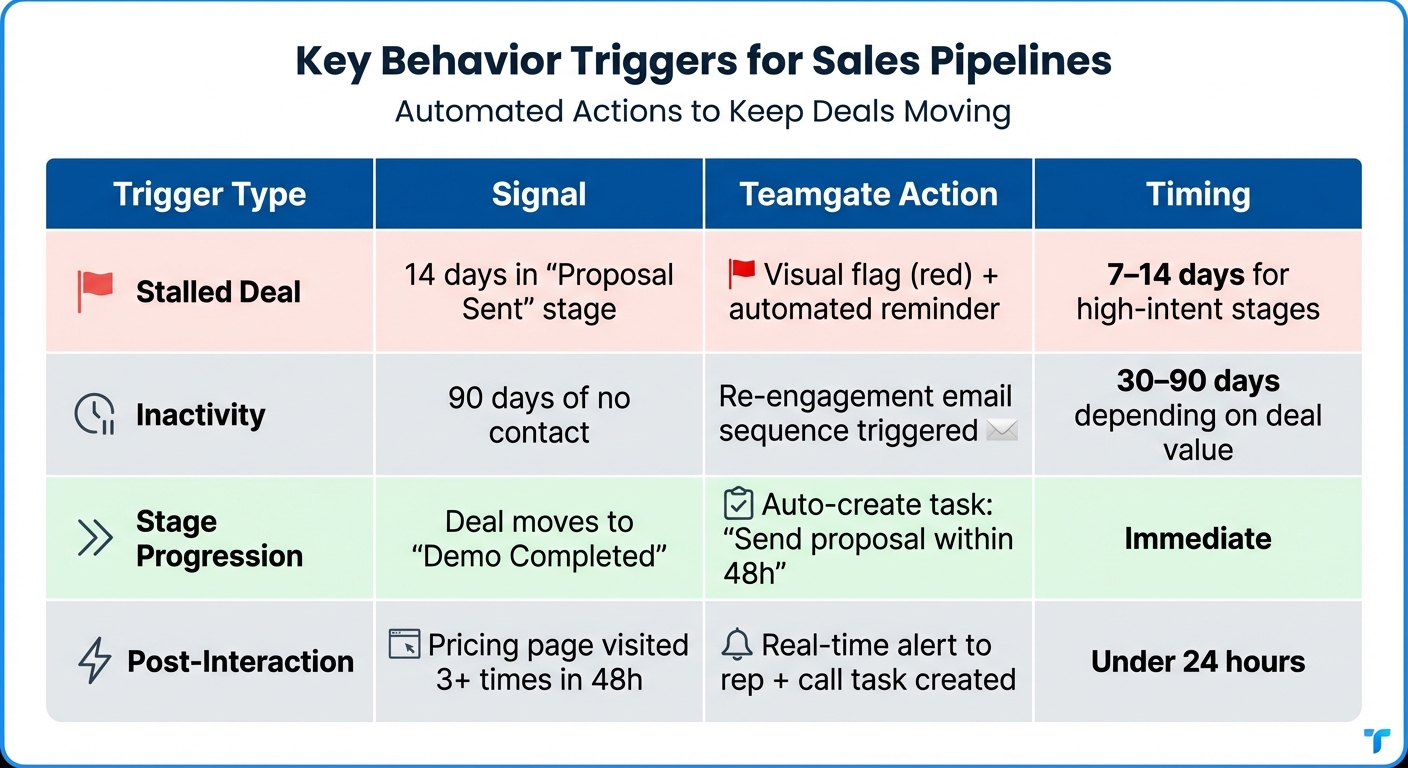
Sales Behavior Trigger Types and Automated Actions in CRM
Triggers help your CRM act as a safeguard for revenue by identifying potential issues before they result in lost opportunities. Below are key trigger types that address challenges at various sales stages.
Identifying Stalled Deals and Abandoned Leads
When a deal lingers in the "Proposal Sent" stage for 15 days, it often means momentum has been lost. Teamgate’s visual pipeline highlights such stagnant deals in red if they exceed preset activity thresholds. While the general inactivity threshold is typically set at 90 days, high-priority stages like proposal or negotiation benefit from much shorter thresholds, usually 7 to 14 days.
Automated reminders can notify account owners when deals age past these thresholds. By combining deal age metrics with overdue task tracking, managers can identify and address neglected deals during pipeline reviews. This proactive approach reduces the risk of losing prospects who may have already disengaged, keeping your pipeline active and your revenue on track.
Re-Engagement Based on Inactivity
Periods of inactivity are a clear warning sign of potential revenue loss. Whether it’s 30–90 days without activity, an overdue task, or fewer meetings, these signals should trigger re-engagement efforts. Teamgate’s activity reports differentiate between actively managed slow deals and those that have been forgotten.
"Traditional pipeline dashboards miss the subtle warning signs that matter most – your executive champion goes quiet, meeting frequency drops, or that critical contract sits unsigned for weeks."
– Maria Akhter, Editor, Outreach
Using Teamgate, you can set up conditional logic to initiate a 2–3 email re-engagement sequence when inactivity thresholds are reached. For high-value opportunities, escalate to more personalized outreach, possibly involving executives. If there’s no response after the sequence, removing the deal from the active pipeline ensures forecast accuracy, which for most teams ranges between 50% and 70%. This approach keeps your pipeline clean and focused.
Milestone and Stage-Based Triggers
Each stage in the sales process should prompt the next action automatically. For instance, when a deal advances to "Demo Completed" in Teamgate, the system can create a task to send a proposal within 48 hours. Similarly, opening an email can trigger a follow-up call. By syncing emails, calls, and calendars, Teamgate ensures every stage has a clear next step. This structured approach can speed up deal progression by as much as 30%.
Post-Interaction Follow-Up Triggers
Every interaction – be it a call, email, or meeting – should lead to a follow-up action. For example, after a discovery call logged via SmartDialer, Teamgate can automatically create a task to send pricing details within 24 hours. If a prospect visits the pricing page three times in 48 hours, the system can trigger a real-time alert and a call task. High-intent signals like these lose their impact within 48–72 hours, so acting quickly is essential. A combination of pricing page visits and email opens is treated as a Tier 1 signal, warranting immediate sales attention.
Centralizing interactions ensures that triggers are based on complete and accurate context. This transforms follow-ups from a manual effort into an automated, reliable system.
Here’s a summary of the key trigger types, signals, and actions available in Teamgate:
| Trigger Type | Signal | Teamgate Action | Timing |
|---|---|---|---|
| Stalled Deal | 14 days in "Proposal Sent" stage | Visual flag (red) + automated reminder | 7–14 days for high-intent stages |
| Inactivity | 90 days of no contact | Re-engagement email sequence triggered | 30–90 days depending on deal value |
| Stage Progression | Deal moves to "Demo Completed" | Auto-create task: "Send proposal within 48h" | Immediate |
| Post-Interaction | Pricing page visited 3+ times in 48h | Real-time alert to rep + call task created | Under 24 hours |
Designing Behavior-Triggered Campaigns: Best Practices
The success of a triggered campaign hinges on two key factors: relevance and timing. A generic message often falls flat because it doesn’t acknowledge the prospect’s recent actions. To create campaigns that resonate, focus on tailoring your messages to the specific behaviors that triggered them. This approach transforms timely signals into meaningful opportunities for revenue growth.
Understanding the intent behind each behavior is where effective campaigns begin. For example:
- If a prospect repeatedly views a key page, they’re likely in an urgent decision-making phase. Your response should be direct and address their immediate needs.
- A content download signals research mode, calling for an educational follow-up.
- When a new executive joins an account, it points to fresh priorities and quick wins, requiring a strategic, goal-oriented message.
The tone and content of your message should always align with the signal you’re responding to. This balance ensures your outreach feels helpful rather than intrusive.
Personalization for Better Engagement
Personalization is the cornerstone of engagement. In fact, 72% of customers only respond to personalized messages, and 80% are more likely to make a purchase when they encounter tailored experiences. With Teamgate, you can reference specific actions that triggered your outreach. For instance, instead of a vague "Let’s connect", try: "I noticed you were exploring our enterprise pricing – let’s discuss how similar teams implement their plans." This specificity shows you’re paying attention to their needs.
Teamgate’s centralized activity history enables personalized communication at scale. For example, if a deal lingers in the "Demo Completed" stage, your follow-up can reference:
- Features discussed during the demo
- Pain points they mentioned
- Next steps relevant to their industry
Segmentation further sharpens your targeting. By grouping leads based on factors like lifecycle stage, engagement level, or deal history, you can craft highly relevant campaigns. For instance:
- A re-engagement email for dormant leads should differ significantly from a welcome sequence for new sign-ups.
- With Teamgate, you can also use lead statuses and rejection reasons to refine these segments, ensuring your messages align with where each prospect stands in their journey.
Timing is equally critical. Welcome emails should be sent immediately after sign-up to capitalize on high interest, while re-engagement campaigns work best after 30–60 days of inactivity. For high-intent actions like pricing page visits, the response window is much shorter – 48–72 hours – before the signal loses its impact. Teamgate’s trigger-based workflows automate these perfectly timed responses, so you don’t miss a beat.
Using Dynamic Content and A/B Testing
Dynamic content and A/B testing take your campaigns to the next level by increasing relevance and refining performance:
- Dynamic content adapts in real time. For example, if a prospect abandons their cart, your follow-up email could include images of the exact products they left behind. Similarly, if they attend a webinar on sales forecasting, you might send a forecasting template and a related case study.
- A/B testing helps you fine-tune subject lines, calls-to-action, and send times. For instance, compare a personalized subject line against a generic one, or test urgency-driven language versus a more informative tone. Triggered emails already outperform standard campaigns, with a 38% open rate compared to 21.5% for regular marketing emails, and a 6.8% click-through rate. Testing variations can reveal what drives better engagement and pipeline movement.
Given that recipients typically spend only 10 seconds reading marketing emails, your subject line and opening sentence must grab attention instantly. For example, testing whether referencing the specific trigger or emphasizing benefits works better can provide actionable insights. Teamgate allows you to track which variations lead to more follow-up meetings or deal progress.
Suppression Rules: Avoiding Over-Messaging
Over-messaging can harm your relationship with prospects. To prevent this, Teamgate uses suppression rules to ensure thoughtful communication. For instance:
- If a prospect replies to an email, or if they’ve already received a triggered campaign in the past 48 hours, Teamgate automatically removes them from additional sequences.
This approach keeps your outreach respectful and prevents overwhelming prospects, ensuring your messages are received positively and at the right time. By combining personalization, dynamic content, and careful timing, your campaigns can feel more like meaningful conversations and less like mass marketing.
sbb-itb-5772723
Optimizing Timing and Frequency of Campaigns
Getting the timing and frequency right can make the difference between engaging your prospects and overwhelming them. These strategies ensure your automated campaigns enhance engagement while maintaining a balance, building on the trigger types and personalized follow-ups discussed earlier.
Setting Trigger Timing for High Impact
Immediate triggers are essential for high-intent actions. When someone signs up for a demo, requests pricing, or completes a purchase, your response should arrive within minutes, not hours. For example, send welcome emails instantly or follow up on abandoned carts within 30–60 minutes of the exit.
For re-engagement campaigns, timing is more delicate. A "win-back" sequence works best after 30–60 days of inactivity, giving prospects enough time to miss your presence without feeling pressured. Similarly, subscription renewal reminders sent seven days before expiration provide a helpful nudge without creating urgency stress.
Teamgate automates these workflows, allowing you to set exception events – canceling a message if the prospect takes the desired action during a wait period. For instance, if they book a meeting before receiving a follow-up email, the system automatically adjusts.
While proper timing boosts engagement, optimizing your sales process by controlling how often you reach out is just as critical.
Managing Frequency to Prevent Overload
Even perfectly timed messages can lose their impact if sent too often. To avoid overwhelming your audience, use frequency caps to limit how many automated messages a recipient gets within a specific timeframe. This approach reduces email fatigue and helps prevent unsubscribes. Teamgate’s automations incorporate wait steps and conditionals, ensuring follow-ups only trigger when leads remain unresponsive.
Delivery windows add another layer of refinement. Restrict automated sends to business hours (9:00 a.m. to 9:00 p.m. in the recipient’s time zone) to ensure your messages land at appropriate times. For instance, a prospect who revisits your pricing page multiple times in one day might deserve immediate attention, whereas a casual blog reader may not require the same urgency.
"By sending that abandoned cart message 30 minutes after a user closes your app, for instance, instead of instantly, you can allow for customers who would have come back on their own to do so."
- Team Braze
Teamgate’s Activity Reports and Sales Cycle Reports provide insights into where deals are stalling, helping you fine-tune trigger timings and keep your campaigns effective.
Implementing Behavior-Triggered Campaigns in Teamgate CRM
Teamgate’s workflow automations make behavior-triggered campaigns seamless, integrating emails, calls, tasks, and reminders into a single system. This ensures campaigns run automatically while keeping every deal in a defined stage with clear next steps.
Setting Up Triggers and Automations
Start by defining trigger conditions based on key actions in your sales pipeline. For example, you can set up a trigger to activate when a lead score surpasses a specific threshold, signaling that the prospect is ready for direct outreach. Another useful trigger is an inactivity alert, which can automatically create a follow-up task if no activity occurs within 10–14 days.
Teamgate’s automation builder connects actions effortlessly. For instance, if a prospect opens a pricing email but doesn’t respond within 48 hours, the system can create a follow-up task, send a personalized SMS via Twilio, or set a call reminder using SmartDialer. This ensures consistent follow-ups without needing manual input, which is critical given that 80% of sales require five or more follow-ups, yet 44% of sales reps stop after just one attempt.
For lead assignment, you can configure instant routing triggers based on location, campaign source, or activity scores. This keeps leads engaged and ensures your team meets service level agreements without delays. Advanced plans also allow you to track email opens and clicks, offering real-time insights into engagement.
All these automated workflows feed directly into Teamgate’s performance dashboards, giving you the tools to make quick adjustments when needed.
Monitoring and Adjusting Campaign Performance
Once your workflows are in place, use Teamgate’s real-time dashboards to monitor their effectiveness. These dashboards and reports track essential metrics like sales funnel progress, win rates, task completion, and campaign performance through Activity and Marketing Reports. They help pinpoint where deals are stalling and identify campaigns that are driving results.
"Accurate CRM reports and analytics are essential for identifying strengths and weaknesses among a sales team, and the individuals involved, the complete sales process, and any shortcomings in sales cycles." – Teamgate
You can also use A/B testing to fine-tune subject lines, send times, and calls to action based on real-time data. Teamgate’s rotting deal alerts notify you of opportunities that have been inactive for over 90 days, allowing you to initiate win-back campaigns or remove unresponsive contacts to maintain your sender reputation.
Pipeline visibility is key to understanding both activity and revenue impact. With 79% of top-performing sales teams using automation to cut down on low-value tasks like manual data entry, the focus isn’t just on efficiency – it’s about building a reliable pipeline based on real data, not guesswork. Regularly review metrics like deal age, activity coverage, and next-step completion rates, and adjust your campaigns accordingly to maintain consistent, predictable revenue.
Conclusion: Driving Predictable Revenue with Behavior-Triggered Campaigns
Behavior-triggered campaigns are a powerful way to address common sales challenges like stalled deals, cold leads, and missed follow-ups. By delivering the right message at the right moment – when buyers take specific actions – these campaigns can accelerate opportunities through the pipeline 15–30% faster than traditional outreach methods. Moving away from the outdated "batch and blast" approach, this strategy emphasizes relevance and timing, offering a clear edge in B2B sales. This approach ensures your pipeline stays active and revenue keeps flowing.
At the core of this success is maintaining a clean and organized pipeline. When 56% of sales leaders report that their tech stack doesn’t align with their sellers’ workflows, the result is often stalled deals and poor forecasting. Teamgate addresses this with disciplined pipeline management, ensuring every deal stays in a meaningful stage with a clear next action. Automated triggers further guarantee that no opportunity slips through the cracks. As Krish Sivanathan, Director of Operations at Packagecloud, shared:
"Utilizing sales insights we have been able to conduct targeted experiments, enabling Packagecloud to increase engagement rates by 18% through the refinement of scripts and lead targeting".
Timing is everything when it comes to buyer intent. High-value signals, like visits to pricing pages, lose their impact within 48–72 hours. That’s why triggers must activate quickly, and follow-ups must happen consistently. Teamgate’s tools – CRM workflow automations, real-time dashboards, and alerts for aging deals – ensure a systematic approach so that sales teams don’t rely on last-minute efforts. This creates a pipeline leaders can trust, with forecasts based on real data instead of guesswork.
Behavior-triggered campaigns bridge the gap by making follow-ups automatic, highlighting aging deals before they’re lost, and providing reps with key metrics like deal age, activity coverage, and next-step progress. By combining precise timing, consistent follow-up, and actionable insights, Teamgate turns reactive sales processes into a reliable revenue engine. A pipeline that reflects real-time activity ensures revenue stays predictable. Teamgate helps sales teams achieve this clarity, structure, and trust without unnecessary complexity.
FAQs
How do behavior-triggered campaigns improve the efficiency of your sales pipeline?
Behavior-triggered campaigns streamline your sales pipeline by automating personalized outreach based on a prospect’s actions – like visiting your website or downloading a resource. This timely communication boosts the chances of moving leads forward while minimizing delays and missed opportunities.
With automated workflows, these campaigns ensure consistent engagement without the need for manual follow-ups. Sales teams can send follow-ups, reminders, or offers triggered by specific actions, keeping prospects engaged and preventing leads from going cold. This approach allows teams to focus on high-priority tasks, creating a more responsive and efficient pipeline that improves conversion rates.
What are the best practices for setting up automated triggers in Teamgate CRM?
To set up automated triggers in Teamgate CRM, begin by pinpointing the customer actions that are most important to your sales process. These might include activities like visiting a specific webpage, filling out a form, or opening an email. Such actions can act as triggers, automatically prompting follow-ups, task assignments, or moving leads further along in the pipeline.
With Teamgate’s automation tools, you can set precise conditions and define the actions that follow each trigger. Make sure these triggers align with your sales objectives to keep the process effective. Regularly assess their performance and fine-tune them to maintain accuracy and efficiency.
Using automation this way helps you save time, ensures consistent follow-ups, and keeps your sales workflow running smoothly.
Why is personalization important for behavior-triggered campaigns?
Personalization plays a crucial role in making behavior-triggered campaigns more impactful by tailoring messages to the recipient’s specific actions and preferences. By aligning communications with behaviors like browsing activity, past purchases, or engagement trends, you can send messages that feel timely and relevant – making them more likely to grab attention and inspire action.
When done right, personalized campaigns feel less like interruptions and more like helpful suggestions. For instance, sending a reminder email after someone leaves items in their cart or providing recommendations based on their browsing history can boost engagement significantly. This approach doesn’t just improve response rates – it builds trust and fosters stronger customer connections, which ultimately leads to better campaign results.






