Designed for Growth: Scale your recurring revenue with the new Teamgate SaaS CRM. Explore SaaS Features →

Book a demo today and save 50% off your first month, or 20% off your first year.

Get a free sales audit to uncover hidden revenue opportunities!

Small habits can transform your sales performance. The key? Focus on consistent, incremental improvements. James Clear’s Atomic Habits emphasizes that a 1% daily improvement leads to exponential growth over time. By applying Clear’s principles – cue, craving, response, and reward – to your sales routine, you can build systems that ensure steady results.

Here’s how:

  • Cue: Use triggers like CRM reminders to prompt action.
  • Craving: Set clear goals and track progress to stay motivated.
  • Response: Simplify tasks to make them easier to complete.
  • Reward: Celebrate small wins to reinforce good habits.

For example, a sales rep adding just five extra calls a day can generate 1,300 new touchpoints annually. Tools like Teamgate CRM help automate tasks, track metrics, and streamline workflows, making it easier to stick to these habits. Over time, these small changes compound, driving consistent sales growth.

Start small: Pick one habit – like updating your CRM after every call – and commit to it daily. The results will compound into measurable success.

Developing Atomic Sales Habits by James Clear: Business Book Club

The 4 Laws of Behavior Change for Sales Teams

James Clear’s four laws of behavior change – cue, craving, response, and reward – offer a practical framework for cultivating habits that stick. When applied to sales, these principles can transform your daily activities into consistent, results-driven routines. By embedding these habits into your workflow, you can move from sporadic efforts to a structured approach that delivers steady success.

Cue: Create Triggers for Your Sales Tasks

Cues are the signals in your environment that prompt specific actions. In sales, these cues eliminate the guesswork of deciding when to prospect, follow up, or update your pipeline. They can be tied to time, location, or even a preceding task.

Your CRM can act as a powerful cue system. Use automated reminders for follow-up calls, notifications for lead engagement, or alerts for stagnant deals. Habit stacking – adding a new habit to an existing one – can also help. For instance, after checking your morning emails, immediately review your pipeline in Teamgate. Or use a mid-morning coffee break to research prospects or refine your pitch. Time-based cues work well too: dedicate 9:00–10:00 AM solely for prospecting or set a 3:00 PM reminder to update your deal stages. These small, consistent triggers can make your sales process feel second nature.

Craving: Fuel Motivation with Clear Goals and Progress Tracking

Craving is what drives you to act. In sales, this means creating a sense of purpose and excitement around your daily tasks. Visual tools like progress trackers in your CRM can turn routine activities into engaging challenges. For example, configure your Teamgate dashboard to show real-time progress toward your monthly or quarterly goals – it’s a simple way to make your efforts feel rewarding.

Breaking big goals into smaller milestones can keep motivation high. The SMART framework (Specific, Measurable, Achievable, Relevant, Time-bound) is a great tool for setting actionable targets. Watching deals move through different stages – from initial contact to closing – offers small wins that reinforce your habit loop. Recognition also plays a huge role: 70% of workers say they’d feel more motivated if managers showed more gratitude. Whether it’s a quick “thank you” or a team-wide celebration, acknowledgment can keep the momentum going.

Response: Make Sales Tasks Simple and Manageable

The easier a task is, the more likely you are to do it. Simplify your sales process to make it feel effortless. For example, use email templates to avoid starting from scratch every time you reach out to a prospect.

Start small to build consistency. Instead of aiming for 50 cold calls a day, begin with five, ensuring that as the habit solidifies and you can gradually increase the number without feeling overwhelmed. For sales teams looking to enhance their outreach with personalized video, Sendspark offers AI-powered video personalization that can make your initial prospecting touches more engaging and memorable.

Reward: Reinforce Habits with Immediate Feedback

Rewards are what lock habits into place. In sales, this means celebrating even the small wins and using real-time data to validate your efforts. CRM analytics can provide instant feedback, such as tracking calls made, email open rates, or pipeline velocity. These insights act as tangible proof of your progress.

Personalized rewards can make the process even more satisfying. For example, treat yourself to a short break after completing a block of prospecting, or use a fun system like adding a quarter to a jar for every personalized email you send. While closing a deal is the ultimate reward, recognizing smaller milestones – like hitting your daily call goal or getting a positive response from a prospect – is just as important.

Team recognition amplifies these rewards. Sharing wins during meetings or on platforms like Slack fosters a culture of acknowledgment and encouragement. Sales contests, in particular, have been shown to motivate more reps than traditional awards programs.

“You are what you repeatedly do. Excellence, then, is not an act, but a habit.” – Will Durant

Focus on Systems, Not Just Goals: Building Consistent Sales Results

Goals point you in the right direction, but systems are what keep you moving forward. For example, your goal might be to hit $500,000 in annual sales. That’s great – but your system is the daily grind: making 20 prospecting calls, sending 15 personalized emails, and keeping your CRM updated after every client interaction. As James Clear famously said, “We don’t rise to the level of our goals, we fall to the level of our systems”.

Missing your monthly target? A system-based approach pushes you to ask, “Where in my daily process can I improve?” Goals may inspire you, but systems ensure progress – even when the numbers don’t look great.

Systems also solve a common issue for salespeople: motivation. While goals often depend on feeling motivated, systems work like clockwork – even on tough days. Whether or not you feel like it, your system nudges you to review your pipeline, make those calls, and follow up with prospects. This consistency is what separates top performers from everyone else.

Another benefit of strong systems? The compound effect of small, repeated actions. For instance, adding just five extra prospecting calls a day might not seem like much. But over a year, that’s about 1,300 additional touchpoints with potential clients. Instead of thinking, “Maybe I’ll hit my target someday”, systems let you say, “I won today because I stuck to my process”. In this way, your CRM and daily habits become the driving force behind steady sales growth.

Create Effective Sales Systems with Your CRM

A well-configured CRM takes scattered tasks and turns them into a smooth, reliable workflow. It’s like having a personal assistant that never forgets. Start by automating repetitive tasks that eat up your time. For example, you can set up Teamgate to send automatic follow-up reminders, schedule recurring prospecting blocks, and flag deals that haven’t been updated in a week. Automation like this ensures nothing falls through the cracks – even during your busiest days. In fact, effective CRM automation can increase sales by an average of 29%.

Keep your data clean and consistent by standardizing contact fields, deal stages, and pipeline updates. When your CRM is well-organized, it delivers accurate insights that help you make smarter decisions every day.

Your CRM dashboard should focus on the metrics that matter most for your system. Track daily activities like calls made, emails sent, and meetings scheduled – not just revenue. This allows you to measure progress in real time rather than waiting for end-of-month results.

Integration takes your system to the next level. Connect Teamgate with your email, calendar, and other tools to eliminate data silos. When everything works together seamlessly, sticking to your routine becomes easier and less stressful. Just like cues and rewards in habit formation, a well-integrated system transforms small, daily actions into consistent performance.

Use Habit Stacking and the 2-Minute Rule

Once your system is in place, techniques like habit stacking can make it even stronger. Habit stacking links new sales behaviors to routines you already have, making them second nature. For example, after checking your morning emails, immediately open your CRM to review your pipeline. After lunch, spend 15 minutes researching prospects on LinkedIn. By tying new habits to existing ones, you ensure they become part of your daily rhythm.

The 2-minute rule is another game-changer. If a task takes less than two minutes, do it right away instead of adding it to your to-do list. Reply to that prospect’s email, update the deal stage after a call, or log meeting notes immediately. These small actions prevent minor tasks from snowballing into an overwhelming backlog.

You can also use the 2-minute rule to build bigger habits. Want to establish a consistent prospecting routine? Start with just two minutes of research each day. Need to improve your CRM hygiene? Commit to updating one deal record daily. Over time, these tiny actions grow into powerful habits.

Morning routines are especially valuable for sales professionals. Start your day by reviewing your CRM, identifying top prospects, and setting clear activity goals. This ensures you focus on your most important tasks when your energy is highest, helping you avoid getting sidetracked by reactive tasks.

At the end of the day, take five minutes to reflect. Review what worked, what didn’t, and what needs attention tomorrow. This simple practice sharpens your system and sets you up for a productive start the next day.

Small Changes Create Big Results: The Power of Compounding in Sales

Compounding in sales works like a snowball rolling downhill – it starts small, but over time, it builds momentum. A simple habit, like making one extra call each day, adds up to 260 additional touchpoints over the course of a year. Similarly, taking a few moments to update your CRM after every call ensures accurate data and can lead to more closed deals. Even sending one personalized email using CRM insights can make a difference, especially since personalized marketing can boost revenue by up to 15%. These small, consistent actions align perfectly with CRM-driven processes, turning minor efforts into measurable growth.

On the flip side, neglecting these habits can lead to compounding losses. Skipping CRM updates might not seem like a big deal at first, but over time, missing data can result in lost opportunities and frustrated prospects. It’s no wonder that increasing customer retention by just 5% can lead to profit increases ranging from 25% to 95%.

Track Small Improvements with CRM Analytics

CRM analytics can help you pinpoint where small adjustments yield big results. Start by tracking daily activities alongside revenue metrics. Monitor calls made, emails sent, meetings scheduled, and CRM updates completed to get a clear picture of your progress.

“There’s no shortage of data out there for any company. The issue is finding the data that you need when you need it.” – Susan Emerson, Senior Vice President, Product GTM at Salesforce

Using tools like Teamgate, set up weekly reports to track key metrics like conversion rates, response times, and pipeline velocity. For instance, if you begin documenting specific pain points for each prospect, you can later analyze how this impacts your close rates. CRM data also provides insights into the effectiveness of sales calls – tracking metrics like quantity, duration, and conversion rates.

Your CRM can also reveal which small tweaks make the biggest difference. For example, if additional prospecting calls aren’t boosting results, but adjusting your follow-up timing is leading to more meetings, you’ll know where to focus your efforts. This data-driven approach ensures you’re doubling down on what works.

Pipeline analysis is another powerful tool. If deals frequently stall at the proposal stage, spending a few extra minutes personalizing each proposal using CRM insights could unlock significant revenue. CRM analytics can spotlight these bottlenecks, allowing you to address them proactively.

Additionally, tracking the performance of your lead sources helps you allocate resources effectively. By analyzing which channels benefit most from improved habits, you can focus on the ones delivering the highest quality leads. For instance, if better call logging leads to higher-quality leads from specific channels, you’ll know where to concentrate your efforts.

Real Examples of Small Sales Habits That Pay Off

The real impact of small, consistent habits becomes clear when you look at actual results. Using CRM insights, these micro-habits can transform outreach and conversion rates into measurable success.

Take Cutter & Buck, for example. In March 2023, they increased weekly meetings per sales rep from 12 to 20 by refining their sales processes and CRM usage. This seemingly small change led to a 22% increase in annual revenue. That’s just eight extra meetings per week per rep – proof that minor adjustments can yield major outcomes.

Daily prospecting is another habit with impressive results. A rep who commits to reaching out to five new prospects a day – just 15 minutes of effort – will engage with around 1,300 potential customers over a year.

Analyzing lost deals weekly is another small but impactful habit. Spending just 10 minutes reviewing why deals didn’t close can uncover recurring patterns, like common objections or missing key decision-makers early on. CRM analysis can help you spot these trends and improve your approach.

Customer segmentation is another area where small efforts pay off. Taking five minutes each day to categorize and tag prospects in your CRM enables more targeted outreach. Over time, this habit leads to tailored campaigns that address specific needs, improving response rates and speeding up deal closures.

Even a simple daily CRM review can create exponential benefits. Spending the first 10 minutes of your day reviewing your pipeline, identifying priorities, and planning your outreach ensures nothing gets overlooked. This small investment in organization often saves 30 to 60 minutes later in the day and improves follow-through.

The numbers speak for themselves: the average ROI for a CRM system is $5.60 for every dollar spent. When you combine consistent sales habits with the power of CRM, those daily improvements don’t just add up – they give you a growing edge over the competition.

Common Problems When Building Sales Habits and How to Fix Them

Creating lasting sales habits can be tough. Sales professionals often face unique challenges that can throw even the best plans off track. Consider this: sales reps dedicate just 28% of their week to actual selling activities. Common hurdles include low motivation, unrealistic expectations, procrastination, and weak accountability systems. On top of that, sales-specific issues like ineffective prospecting, trouble reaching decision-makers, lack of value in initial meetings, and constant pressure to handle objections add to the complexity.

The good news? These challenges aren’t permanent roadblocks. With the right mindset and strategies, you can overcome them and develop habits that stick. Let’s explore how to tackle these barriers head-on.

Remove Obstacles That Block Your Sales Habits

The biggest threat to building strong sales habits isn’t your competition – it’s the distractions and inefficiencies in your daily routine. Sales reps lose about 1.6 hours each day to distractions, which translates to roughly $65 per day per rep – or $17,300 annually per representative.

Start by identifying your top time-wasters. Common culprits include excessive paperwork, constant email interruptions, unproductive meetings, and social media distractions. Often, the real issue isn’t external – it’s weak systems that create unnecessary friction.

“Distractions don’t derail businesses. Weak systems do.” – Megan Courcy, Sandler

Here are some practical steps to streamline your workflow:

  • Simplify your CRM system. Customize dashboards to display only key information, remove unnecessary fields, and automate repetitive tasks. Updating your CRM shouldn’t feel like a chore – it should work for you.
  • Schedule email blocks. Process emails only twice a day, unsubscribe from unnecessary lists, and use filters to organize your inbox automatically. This simple change can free up 30–45 minutes daily for selling.
  • Audit your meetings. Only schedule meetings that directly impact deals or improve your skills. Set clear agendas, enforce time limits, and limit attendees to those who are essential.
  • Leverage automation. Use tools to handle data entry, follow-ups, and reporting. Sales reps spend about 30% of their day searching for or creating content, so automating these tasks can save valuable time.

By eliminating these obstacles, you create space for more productive habits and pave the way for better team accountability.

Use Team Accountability and Celebrate Small Wins

Building habits solo can feel isolating. This is especially true in sales, where three in five professionals report struggling with mental health challenges. That’s why team support is essential for long-term success.

Here’s how to build accountability into your team culture:

  • Partner up. Share your habit goals with a colleague and check in weekly. This isn’t about judgment – it’s about mutual support and encouragement.
  • Track habits as a team. Use your CRM to create shared dashboards that display metrics like daily prospecting calls, follow-ups, or CRM updates. This transparency fosters positive peer pressure and keeps everyone motivated.
  • Celebrate small wins. Publicly acknowledge achievements, like meeting a prospecting goal for the week or successfully implementing a new follow-up routine. These celebrations reinforce good habits and build momentum.
  • Hold weekly habit reviews. Dedicate 10–15 minutes in team meetings to discuss progress, challenges, and adjustments. This keeps small issues from snowballing into bigger problems and ensures everyone stays aligned.

Additionally, use CRM notifications wisely. Set up reminders for critical tasks, but avoid overloading your team with unnecessary alerts. The goal is to support, not overwhelm.

Manual vs. Automated Habit Tracking: Which Works Better

When it comes to tracking your habits, there’s no one-size-fits-all solution. The best approach depends on your personality and workflow. Both manual and automated tracking methods have their pros and cons.

  • Manual tracking gives you full control and flexibility. Writing down daily activities can reinforce habits and help you reflect on your progress. However, this method can be time-consuming and harder to maintain during busy periods.
  • Automated tracking removes the hassle of data entry by logging calls, tracking emails, and generating reports. It’s consistent and provides objective insights, but it may feel impersonal and might not capture the nuances of your goals.

A hybrid approach often works best. For example, let your CRM automatically track basic activities like calls and emails, while you manually jot down insights from prospect conversations or rate how well you handled objections. This way, you get the efficiency of automation with the personal touch of manual tracking.

Ultimately, the key is consistency. Whether you prefer manual reflection or automated efficiency, the best tracking system is the one you’ll stick with every day.

Start Building Better Sales Habits Today

Achieving success in sales isn’t about making one giant leap; it’s about making small, consistent improvements that add up over time. To get started, take a close look at your current habits and routines.

Use your CRM data to perform a habit audit. Identify what’s working – like practices that consistently lead to closed deals – and what’s wasting your time. Are administrative tasks eating up too much of your day? Are you regularly following up with prospects? Are you keeping your CRM updated, or is data piling up and becoming unmanageable?

Once you’ve pinpointed areas for improvement, try the Two-Minute Rule to get the ball rolling. This means starting with quick, manageable actions – like sending a brief thank-you email after a meeting – that take less than two minutes to complete.

Tools like Teamgate CRM make building better habits easier. Its user-friendly interface and habit-tracking features help you stay accountable with visual progress indicators. For example, you can track daily activities like prospecting calls, follow-ups, or updating deals directly from your dashboard. Marking off these tasks on your calendar can help you spot patterns in your consistency. Companies like Baremetrics have seen impressive results – achieving a 132% increase in conversion rates – by using Teamgate’s insights and metrics to refine their sales strategies.

To make good habits stick, optimize your environment. Set up CRM reminders for follow-ups, customize your dashboard to show only the most critical information, and automate repetitive tasks. For instance, Packagecloud used Teamgate’s sales insights to run targeted experiments, refine their scripts, and improve lead targeting, resulting in an 18% boost in engagement rates.

Another powerful strategy is creating a habit contract. Share your goals publicly or with a colleague to build external accountability. Use team meetings to discuss progress, share challenges, and celebrate small wins. This shared commitment can help keep you on track.

Instead of just focusing on end goals, develop systems that support consistent action. For example, commit to calling five new prospects every morning or updating your CRM within 30 minutes of meeting with a client. These systems create a foundation for sustainable success.

Teamgate makes it easy to get started. With their Starter plan available for free (up to two users and 500 contacts) and a 4.8/5 rating on Capterra, you can begin building better sales habits without any upfront cost.

Start small. Choose one habit to focus on this week – whether it’s updating your CRM right after calls, sending follow-up emails within 24 hours, or dedicating your first hour each day to prospecting. The key is consistency. Small steps taken daily can lead to big results over time.

FAQs

How can I use the 4 Laws of Behavior Change to build better sales habits and achieve greater success?

To develop stronger sales habits using the 4 Laws of Behavior Change, start by making your desired actions clear and obvious. For instance, set up specific cues like scheduling daily sales activities on your calendar or using reminders to ensure you stay on track.

Next, focus on making these actions appealing. Celebrate small victories – whether it’s closing a deal, booking a meeting, or even completing a follow-up call. Recognizing these wins can boost your motivation and keep your energy high.

Keep things simple by reducing unnecessary effort. Tools like Teamgate CRM can help streamline your process by organizing leads, simplifying follow-ups, and making your workflow more efficient. The easier it is to take action, the more likely you are to stick with it.

Finally, reinforce these habits with satisfying rewards. This might include tracking your progress visually – like marking off tasks on a chart – or celebrating key milestones in your sales journey. These rewards can keep you consistent and motivated as you work toward improving your performance.

What are some small, actionable habits that can boost sales performance over time?

Small, consistent habits can make a big difference in sales performance. Take, for instance, the practice of promptly and professionally following up with leads every day. This simple routine not only builds trust but also increases the likelihood of closing deals. Starting your day with a clear plan – prioritizing tasks and carving out time to strengthen client relationships – can also yield impressive results.

Another key habit is asking open-ended, thoughtful questions during client conversations. This approach helps uncover their needs and fosters stronger connections. And let’s not overlook the importance of personal well-being. Prioritizing enough sleep, staying physically active, and managing stress ensures you have the energy and focus to excel. Over time, these small, consistent actions add up, driving better results and long-term success in sales.

How can Teamgate CRM help sales professionals develop better habits and achieve consistent success?

Teamgate CRM helps sales professionals develop productive habits by simplifying their daily tasks and providing a clear framework for managing customer relationships. By consolidating all customer information, automating routine processes, and delivering practical insights, it ensures sales efforts are both streamlined and reliable.

Key features like follow-up reminders, activity tracking, and performance analytics keep sales teams on track and organized. These tools promote consistent routines over time, making it easier to build strong connections with leads, close more deals, and maintain steady growth. This steady approach is essential for cultivating habits that lead to lasting success in sales.
Related Blog Posts

67% of sales are lost due to poor lead qualification. That’s why frameworks like BANT (Budget, Authority, Need, Timeline) and CHAMP (Challenges, Authority, Money, Prioritization) exist to streamline the process and identify promising prospects.

Here’s the key difference:

  • BANT focuses on the seller’s perspective, prioritizing budget and timelines.
  • CHAMP shifts to a customer-first approach, emphasizing challenges and priorities.

Both frameworks have their strengths:

The choice depends on your sales environment. Many teams combine the two: using BANT to qualify leads quickly and CHAMP to dive deeper into opportunities. Tools like Teamgate CRM can help integrate both into your process effectively, especially when paired with complementary platforms like Sendspark to add personalized video outreach to your engagement strategy.

BANT NO LONGER CUTS IT in Modern Sales, Here’s What To Do Instead 👊 #BANT

What Are BANT and CHAMP?

BANT and CHAMP are two distinct sales qualification frameworks, each with its own approach to evaluating prospects. Let’s break down how they work and when to use them.

BANT, which stands for Budget, Authority, Need, and Timeline, was created by IBM in the 1950s. It’s a seller-focused model designed to evaluate whether a prospect has the budget, the decision-making authority, a clear need, and a specific timeline for purchasing. This framework works best in structured procurement environments where processes are well-defined and predictable.

On the other hand, CHAMP – short for Challenges, Authority, Money, and Prioritization – takes a more customer-focused approach. It emphasizes understanding the prospect’s challenges and pain points. CHAMP aligns well with empathetic, consultative sales strategies, especially in environments involving multiple stakeholders and complex decision-making.

To give you an idea of how these frameworks are applied, companies like Cisco, Microsoft, and HubSpot often rely on BANT for structured procurement scenarios. Meanwhile, Adobe, SAP, and AWS lean on CHAMP to navigate intricate, multi-stakeholder sales processes.

Here’s a quick side-by-side comparison:

Feature BANT CHAMP
Focus Budget, Authority, Need, Timeline Challenges, Authority, Money, Prioritization
Approach Seller-centric Customer-centric
Primary Priority Emphasizes budget Emphasizes challenges
Best For Clear procurement processes Complex B2B advisory sales

BANT is ideal for straightforward, transactional sales where the buying process is well-defined. CHAMP, however, shines in relationship-driven, consultative sales, making it particularly effective in today’s customer-first sales environment. Knowing the strengths of each framework can help sales teams choose the right one for their specific needs.

1. BANT (Budget, Authority, Need, Timeline)

For decades, BANT has served as a go-to framework for sales qualification, helping teams identify promising prospects by focusing on four key pillars. While its structured approach has proven effective, it’s not without its challenges in today’s more intricate sales landscape.

Focus

At its core, BANT zeroes in on transactional criteria rather than fostering deeper relationships. It prioritizes measurable factors like budget and timeline over exploring a prospect’s broader business challenges or pain points.

Among the four pillars, budget often takes center stage, as it provides a straightforward way to gauge a prospect’s financial viability. Companies using BANT report a 59% boost in conversion rates, but this success sometimes comes at a price. Prospects who don’t align perfectly with the framework – especially those without defined budgets – may be overlooked, even if they hold long-term potential.

Interestingly, discussing budget early in the sales process can improve win rates by about 10%. This highlights BANT’s strength in early-stage qualification, though its heavy focus on quantifiable criteria may limit its scope in more nuanced sales conversations.

Qualification Order

One of BANT’s strengths is its flexibility in how the criteria are applied. Sales reps can adjust the sequence to fit the flow of the conversation, making it easier to connect with prospects on their terms.

Many sales professionals start with identifying the prospect’s need to build rapport and guide the discussion naturally. A lead is typically considered qualified if it meets at least three of the four BANT criteria, allowing for some leeway in the decision-making process. This adaptability is especially useful in complex B2B sales, where not every prospect will tick all the boxes.

That said, while the order can be adjusted, the framework’s overall structure can feel rigid in more intricate sales scenarios.

Adaptability

While BANT offers a clear structure, its rigidity can clash with the flexibility required in modern sales strategies. For example, focusing too heavily on budget can prematurely disqualify leads with genuine potential, especially in consultative sales where prospects may not have allocated budgets for solutions they’re still learning about.

The framework also struggles with the complexities of multi-stakeholder decision-making, which is common in larger organizations. Deals involving multiple departments, long approval processes, or evolving needs often require a more nuanced approach. BANT doesn’t account for these complexities, making it less effective for enterprise-level sales or innovative solutions where prospects may not fully understand the value or investment required.

Suitability for Sales Cycles

BANT works best in environments with structured procurement processes, predictable timelines, and clear decision-making. It shines in transactional sales where buyers already have defined needs, set budgets, and established processes.

However, BANT falls short in longer, more complex sales cycles that involve multiple stakeholders and shifting priorities. For example, the authority component assumes decision-making is concentrated in one person, but in reality, authority often shifts as deals progress, especially in larger organizations. Sales conversations that exclude decision-makers are 80% less likely to close, underscoring the importance of this element – but also its challenges in dynamic settings.

The framework’s focus on timelines can also be limiting. It assumes a linear buying process, which is rarely the case in today’s fast-changing business environment. Budgets shift, new stakeholders emerge, and priorities evolve, making BANT’s linear approach less effective for complex sales.

Despite these challenges, over half of sales reps find BANT reliable, while 40% appreciate its flexibility. The key is to use BANT as a guide rather than a strict checklist. When approached this way, it can help structure conversations while leaving room for relationship-building and deeper exploration of a prospect’s needs.

2. CHAMP (Challenges, Authority, Money, Prioritization)

CHAMP is a modern take on sales qualification, shifting the focus from the seller’s needs to the buyer’s journey. Unlike older methods, it prioritizes understanding the customer’s challenges and aligning solutions with their specific business needs.

Focus

Rather than starting with budget concerns like BANT, CHAMP places challenges at the center of the conversation. This approach not only feels more natural but also helps build trust and rapport with prospects right from the start.

"CHAMP framework focuses on the prospect’s challenge and treats it as a top priority proving to have a customer-centric approach." – Sonali Negi, Content Writer, Salesmate

The framework acknowledges that many buyers don’t have a predefined budget set aside – they create one when they find a solution to a pressing problem. By focusing on these challenges, CHAMP opens doors to opportunities that might otherwise be missed. It also helps sales teams work collaboratively with prospects to shape budgets around real business needs.

The prioritization aspect is another standout feature. Instead of simply asking when a solution is needed, CHAMP digs deeper to understand how important the issue is within the broader scope of the company’s goals. This insight helps sales teams better gauge urgency and allocate their efforts more effectively.

Qualification Order

CHAMP’s structure follows a logical, conversational flow that feels comfortable for prospects. It starts with challenges, allowing sales reps to show genuine interest in the prospect’s situation before discussing money or authority. This order reinforces the framework’s customer-first philosophy and fosters stronger engagement early on.

Authority comes next, recognizing that decision-making power often shifts in complex sales cycles. This is especially true in larger organizations, where multiple stakeholders influence the process. By addressing authority after identifying challenges, sales reps can pinpoint all the key players involved in the decision.

Instead of pushing for arbitrary deadlines, CHAMP emphasizes realistic timelines that emerge naturally during discussions. This approach builds trust and helps set clear, achievable expectations for closing deals.

Flexibility

CHAMP’s adaptability makes it a strong fit for today’s dynamic B2B sales landscape. It works across various industries and sales cycles, acknowledging that modern buyers rarely follow a straight path to purchase.

Real-world results highlight its effectiveness: some companies report cutting their sales cycles by up to 75% and improving conversion rates by over 100%. Its customer-first mindset helps sales teams engage with prospects early on, gradually building urgency and shaping buying intent. This flexibility is especially helpful when dealing with buyers who are still figuring out their needs or exploring potential solutions.

CHAMP also accounts for the fact that priorities can shift quickly due to external factors. Staying informed about industry trends enables sales teams to adjust their approach as needed.

Ideal for Complex Sales

CHAMP shines in situations with multiple stakeholders and intricate decision-making processes, such as SaaS or enterprise-level sales. Traditional methods often struggle in these environments, but CHAMP’s structure helps sales teams navigate complexity effectively.

For instance, deals close 40% faster when all key stakeholders are identified and engaged early in the process. By mapping out the full decision-making landscape, CHAMP avoids the common pitfall of assuming a single contact holds all the authority.

One example of its success comes from a manufacturing equipment supplier that boosted its win rate by 47% within six months of adopting CHAMP. This improvement was largely due to the framework’s ability to handle shifting priorities and evolving needs – factors that are common in complex sales cycles.

In enterprise sales, where multiple initiatives compete for resources, the prioritization element proves especially valuable. By understanding where a prospect’s challenge fits among their other priorities, sales teams can better predict timelines and tailor their approach.

CHAMP’s intuitive, conversation-driven style aligns well with how today’s buyers make decisions. This sets the stage for a closer look at the strengths and weaknesses of different sales qualification frameworks.

Pros and Cons

BANT and CHAMP each bring their own strengths to the table, catering to different sales scenarios. Knowing their advantages and drawbacks can help sales teams decide which framework aligns best with their needs. Here’s a closer look at how they compare in practice.

BANT is highly effective in straightforward sales situations. Its clear criteria – budget, authority, need, and timeline – make it easier to quickly qualify prospects. This approach is particularly useful in shorter sales cycles, where speed is critical.

That said, BANT’s focus on the seller’s perspective can sometimes feel overly transactional. Starting with budget-related questions might alienate prospects who haven’t yet understood the full value of a solution. Additionally, rigid budget requirements could disqualify leads that might otherwise evolve into valuable opportunities.

On the other hand, CHAMP takes a customer-first approach, addressing many of BANT’s limitations. By prioritizing the prospect’s challenges and focusing on their needs, CHAMP fosters stronger relationships and more meaningful conversations. This approach is especially effective in complex sales environments, where demonstrating value and ROI can open doors that might remain closed under a budget-first strategy.

Aspect BANT Advantages BANT Disadvantages CHAMP Advantages CHAMP Disadvantages
Speed Enables quick qualification for fast decisions May sacrifice relationship-building Builds deeper understanding over time Requires more time upfront
Approach Simple and easy to implement Can feel transactional Focused on relationships and problem-solving May be too intricate for simpler deals
Budget Focus Clearly defines budget requirements early Risks disqualifying viable leads Emphasizes value to create flexible budgets Financial qualification can be less predictable
Best Fit Works well for short, simple sales cycles Struggles with multi-stakeholder, complex deals Excels in enterprise and consultative sales Less suited for quick, transactional deals

CHAMP’s adaptability makes it a strong fit for today’s dynamic sales landscape. It excels in addressing shifting priorities and involving multiple stakeholders. However, it does require more time, effort, and skill to execute effectively.

BANT, meanwhile, remains a solid choice for businesses handling high-volume, low-complexity sales. Its simplicity is ideal for smaller companies or startups, where quick lead qualification is often more important than an in-depth consultative approach.

Ultimately, your choice between BANT and CHAMP will depend on your sales environment and customer profile. BANT offers speed and simplicity for straightforward transactions, while CHAMP thrives in scenarios that call for a consultative, relationship-driven approach. To maximize the benefits of either framework, tools like Teamgate CRM can streamline lead management and improve overall sales efficiency.

Conclusion

BANT and CHAMP each shine in different sales scenarios. BANT is ideal for straightforward, fast-paced sales where simplicity and speed are key.

On the other hand, CHAMP thrives in more complex, consultative sales environments, focusing on understanding customer challenges and fostering strong relationships.

For companies managing quick, transactional sales, BANT offers unmatched efficiency. Meanwhile, businesses dealing with intricate solutions and longer sales cycles will appreciate CHAMP’s emphasis on relationship-building and addressing deeper customer needs.

Combining both frameworks can elevate your sales strategy. Many successful teams use BANT for initial qualification and transition to CHAMP for more intricate opportunities, ensuring they stay efficient while adapting to varying customer demands.

Teamgate CRM supports both approaches, offering customizable pipelines, visual insights, and detailed reporting to streamline your qualification process – no matter which framework you prefer.

FAQs

How can sales teams combine the BANT and CHAMP frameworks to improve their sales process?

Sales teams can blend the BANT and CHAMP frameworks to build a more thorough and effective lead qualification process. Start with BANT to quickly assess prospects based on their Budget, Authority, Need, and Timing – a great way to gauge if they’re worth pursuing. Then, layer in CHAMP to dig deeper into their Challenges, Authority, Money, and Prioritization, giving you a clearer picture of their pain points and how they make decisions.

By combining these approaches, you can address both the immediate and long-term needs of your prospects, making it easier to prioritize leads and focus on those with the highest potential. To make this process even smoother, a CRM platform like Teamgate can help automate lead qualification, provide real-time insights, and boost overall sales efficiency.

When is CHAMP a better fit than BANT for sales qualification?

CHAMP tends to work better than BANT in complex sales scenarios where understanding a prospect’s unique challenges and priorities is crucial. It’s especially useful when dealing with prospects who have shifting needs, undisclosed decision-makers, or require a more tailored approach to identify their pain points.

By concentrating on Challenges, Authority, Money, and Prioritization, CHAMP enables sales teams to foster deeper relationships and craft solutions that align closely with the customer’s specific requirements. This approach is particularly suited for sales environments that prioritize long-term partnerships and meaningful, value-focused discussions over quick qualification methods.

How does CHAMP’s focus on customer challenges change the sales process compared to BANT’s budget-first approach?

CHAMP emphasizes getting to the heart of customer challenges, creating stronger relationships, and offering solutions that are specifically designed to meet those needs. This method not only helps establish trust but can also streamline the sales process by ensuring solutions are directly aligned with what the customer is looking for.

On the other hand, BANT takes a more straightforward approach, focusing on qualifying prospects based on budget, authority, need, and timing. While it’s a fast way to filter leads, it may miss key pain points, which could result in overlooked opportunities or delays if those deeper needs aren’t uncovered early in the process.

Related Blog Posts

CRM sales forecasting is the process of using your pipeline data to predict future revenue based on what is actually happening in active deals.

A good forecast helps you answer four practical questions early:

  • How much revenue is likely to close this month or quarter?

  • Which deals are at risk of slipping?

  • Where should managers focus coaching and review time?

  • Can the business hire, spend, and plan with confidence?

Most forecasts break for a simple reason: the pipeline does not reflect reality. Stages are inconsistent, deals sit without a next step, and CRM updates happen late. That turns forecasting into opinion instead of evidence.

In this guide, you’ll learn:

  • What CRM sales forecasting means

  • The main forecasting methods and when to use them

  • How to improve forecast accuracy through better pipeline discipline

Teamgate gives growing sales teams clarity, structure, and trustworthy pipeline insight without enterprise CRM bloat or feature overload. That makes forecasting easier to trust because the data behind it stays cleaner and more current.

Key Takeaways:

  • CRM sales forecasting provides insights that help manage finances, plan for the future, and make strategic decisions.
  • Accurate forecasting aids in managing stock levels, understanding cash flow, and predicting future economic trends.
  • Utilizing sales funnel forecasting and scoring methods in a CRM enables more precise sales predictions.
  • Regression analysis, though complex, offers the most accurate forecasting results when data is clean and accurate.
  • Implementing effective sales forecasting processes and educating the sales team on data collection can drive business growth.
  • Teamgate sales CRM simplifies data gathering and automates the process, enabling accurate and informed sales forecasting.

What is CRM sales forecasting?

When it comes to CRM sales forecasting the rule of thumb is this – the more accurate the information you have, the more you can prepare and plan for the future.

However, understanding the past to predict the future is an inexact science. Having access to the correct data is one thing, applying the right methods to extract the correct conclusions is another matter.

Using a modern and effective CRM, like Teamgate, can assist in providing you with an accurate, and well-engineered sales forecast. This, in turn, can help you avoid major, and costly mistakes when it comes to planning marketing campaigns, lead gathering strategies, stock control, hiring practices, and the overall management of the entire sales process, and it gives you the ability to correct off-course sales directions faster than your competitors.

Why CRM sales forecasting matters

Sales forecasting matters because it helps you run the business before problems show up in closed revenue.

When your forecast is reliable, you can:

  • Plan hiring, budget, and spend earlier

  • Spot deals that are likely to slip before the quarter is lost

  • Focus rep time on deals with real close potential

  • Identify pipeline gaps while there is still time to fix them

When your forecast is unreliable, the opposite happens. Managers review a pipeline that looks healthy on paper, but late-stage deals have no recent activity, no clear next step, or no real buying momentum. Reps keep working deals that are already stalled. Leaders make hiring and spend decisions on numbers they cannot trust.

That is why forecasting is not just a reporting exercise. It is a management system. The more accurately your CRM reflects stage progress, follow-up activity, and deal health, the more useful your forecast becomes.

For sales teams, the practical value is simple: forecasting helps you decide what is real, what is slipping, and where to act next.

How CRM sales forecasting works

CRM sales forecasting works by turning deal data into a probability-based revenue view.

At a basic level, the process looks like this:

  1. Define clear pipeline stages

  2. Require a real next step for every active deal

  3. Keep deal activity and status updated in the CRM

  4. Apply a forecasting method to estimate likely revenue

The important part is not the math first. It is the process first.

If reps use stages differently, skip updates, or leave deals open without a next action, the forecast becomes unreliable. A CRM can only produce a trustworthy forecast when the pipeline reflects reality.

That is why accurate forecasting depends on sales discipline:

  • Clear stage definitions

  • Consistent next-step rules

  • Regular activity logging

  • A shared standard for what makes a deal real

There are several main methods of sales forecasting using your sales CRM

Forecasting by Sales Funnel

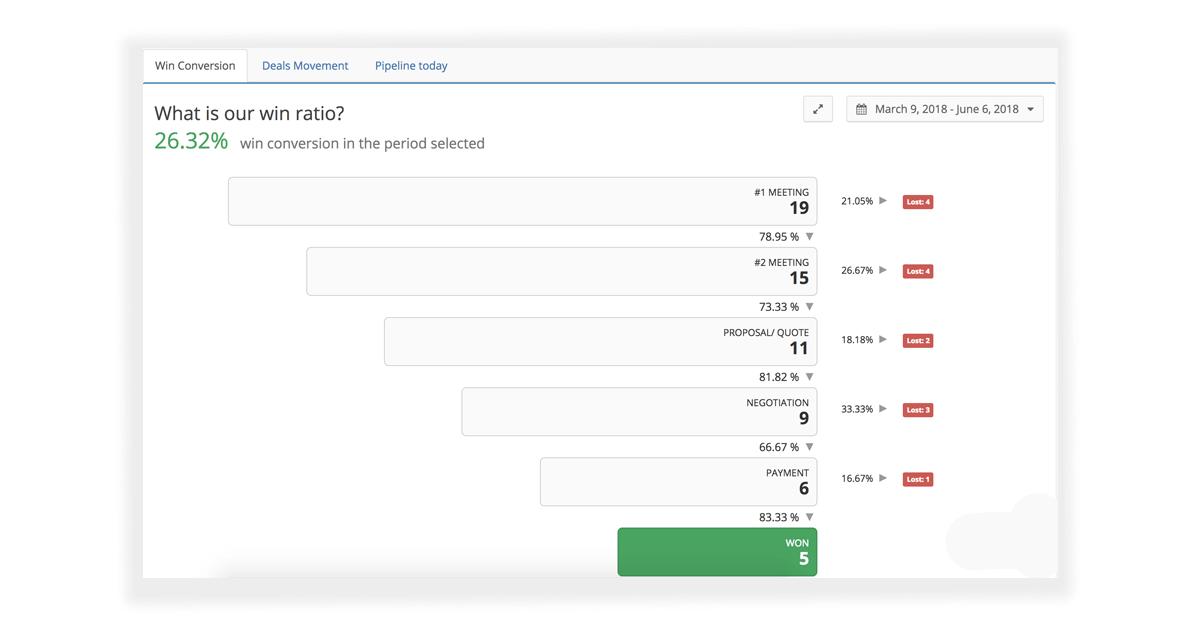
sales forecast sales funnel chart

Sales funnel forecasting estimates revenue based on the stage a deal is currently in.

Each stage gets a win probability. As a deal moves through the pipeline, its probability of closing increases.

Example stage weighting:

  • New lead: 10%

  • Qualified: 25%

  • Proposal sent: 50%

  • Negotiation: 75%

  • Verbal/closing: 90%

This method is simple and useful when your team has a defined process and stage criteria that actually mean something.

Best for: teams with a stable pipeline structure and consistent stage usage

Main strength: easy to understand and easy to manage at scale

Main risk: if reps move deals forward too early or use stages inconsistently, the forecast will be inflated

Teamgate supports this method by helping teams run deals through clear stages, enforce next steps, and keep activity visible so managers can judge whether stage position matches real deal health. That fits the broader Teamgate approach: disciplined process, cleaner data, and forecast visibility leaders can actually use.

Forecasting by Score

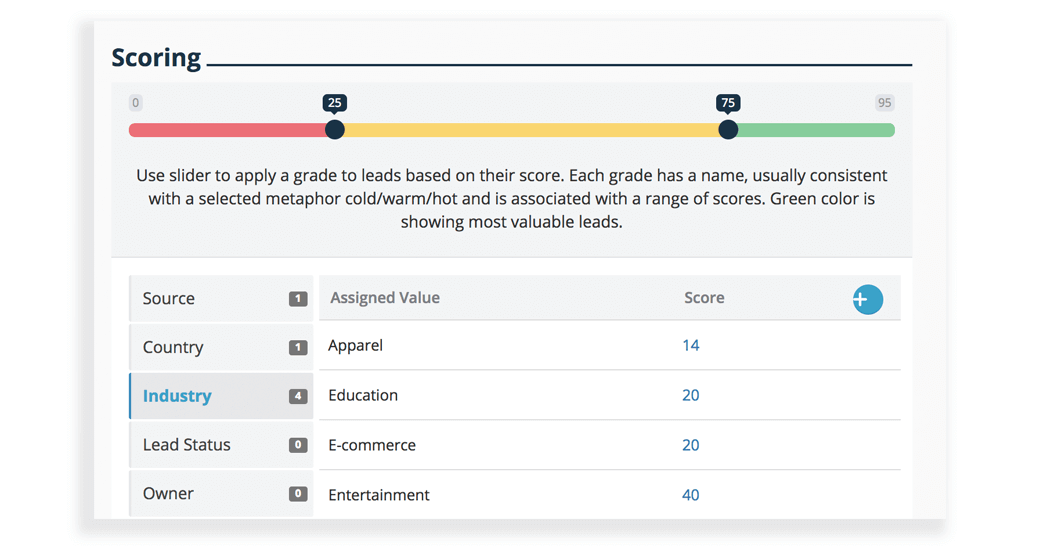
crm sales forecasting lead scoring

In order to understand the likelihood of a deal closing, you need to have a reliable scoring system in place. One of the best methods of sales forecasting is by allocating scores to the source of your leads.

The lead score will reflect past sales performance when compared to similarly sourced leads. Past results will offer insights into how much time a lead took to convert to a deal, plus, how long the deal took to close.

For example, deals which came from the following sources may be scored in the following manner:

  • Referral – 8.1
  • Email campaign – 7.2
  • Landing pages – 6.5
  • Social media – 5.4
  • Cold calling – 3.6

Referral is placed higher than social media on the list, due to the fact that historically the sales team have closed more deals from referral sources, than from social media sources.

If you use source, plus a number of other criteria – ie. company size, number of employees, etc. – you can create an even more accurate method of identifying deals which are more than likely to close, and are therefore more entitled to your time.

Advantages

Forecasting by sources removes any emotional involvement in the sales forecasting process. All forecasts calculated in your CRM are based on hard facts and reputable data in order to bolster results.

Disadvantages

If salespeople don’t complete all of the requested data in their sales CRM the results will be inaccurate and only measure certain attributes of the sales process.

Forecasting by Regression Analysis

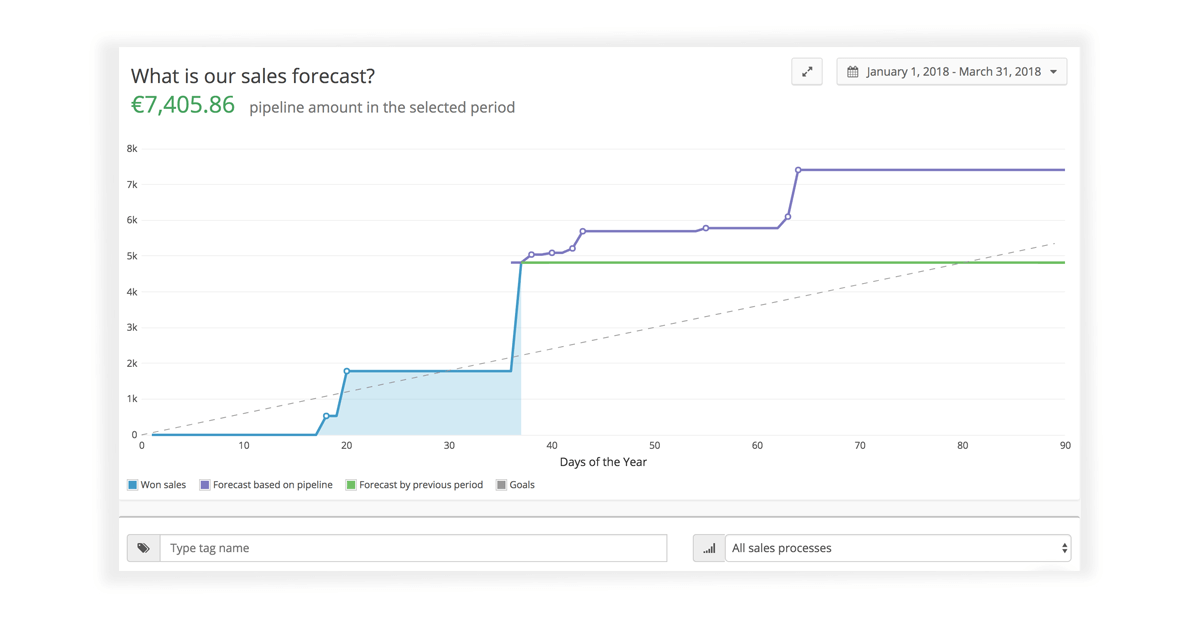
crm forecast sales forecast chart

By far the most difficult method of sales forecasting, but the method which garners the most accurate information. CRM forecasts using regression analysis uses strict mathematical theories and equations to measure covariance and correlation between variables.

As complicated as this may sound, accurate record keeping and stringent data entry in your sales CRM is imperative for regression analysis to be really effective. But, once that data has been gathered correctly and entered into your CRM simple mathematical equations can use this data for concise sales forecasting.

Most companies can only dream of sales forecasting using this method, however, data collected in your CRM can go a long way towards making this a possibility.

Advantages

As the forecasting equation is based on a strict mathematical formula, results tend to give more accurate, and more actionable results.

Disadvantages

The data collected in your CRM needs to be clean, concise, and accurate to formulate accurate results.

Accurate forecasting will drive your sales forward

As with all statistical analysis, the results are only as good as the data entered.

As Laurynas Gružinskas, Head of Product at Coresignal, a leading B2B data provider, explains: “Most AI agents don’t fail from bad algorithms, they fail from bad inputs. In high-stakes tasks like lead gen, market research, or candidate scoring, performance jumps when agents tap into continuously refreshed, structured data from diverse public sources – critical for AI agents in production. It’s not about having more data – it’s about feeding the AI the most relevant, recent, and usable signals. Without that, even the smartest AI agent lacks context and starts guessing.

Sales forecasting is a complicated process, but a vital one to keep your business moving forward, for allowing you to see opportunities for further investment, and for identifying possible difficulties ahead. An accurate sales forecast process lets you make faster, more targeted business decisions. For teams managing recurring revenue models, combining forecasting with revenue recovery tools like Baremetrics — which provides subscription analytics and churn insights — ensures you’re not only predicting future revenue but also recovering revenue that would otherwise be lost.

In order to have the most effective forecasting process possible, attempt to educate your entire sales team in the task of regular, and accurate data collection and update. The more accurate the information you have, the easier it is to future-proof your business.

Teamgate sales CRM goes a long way towards allowing you to easily gather the information you need – even automatically – in order to create sales forecasts which can really help you understand your business more intimately.

And remember always – forewarned, is forearmed.

FAQs: CRM Forecasting

Q: What is CRM sales forecasting?

A: CRM sales forecasting is the process of using a CRM (Customer Relationship Management) system to analyze data and predict future sales performance. It helps businesses make informed decisions, plan strategies, and manage resources effectively.

Q: Why is CRM sales forecasting important?

A: CRM sales forecasting is crucial because it enables businesses to anticipate future sales trends, manage finances, make strategic investments, and identify potential challenges. It provides insights that aid in decision-making and helps businesses stay ahead of the competition.

Q: How does CRM sales forecasting work?

A: CRM sales forecasting works by analyzing historical sales data, customer information, and market trends. The CRM system uses algorithms and statistical models to predict future sales based on this data. It takes into account factors such as lead scoring, sales funnel stages, and regression analysis to generate accurate forecasts.

Q: What are the benefits of using CRM for sales forecasting?

A: Using CRM for sales forecasting offers several benefits, including:

  • Accurate predictions: CRM systems leverage data analytics to generate reliable sales forecasts.
  • Strategic planning: Forecasting helps businesses plan marketing campaigns, resource allocation, and budgeting.
  • Risk management: It allows businesses to identify potential risks and take proactive measures to mitigate them.
  • Performance evaluation: Sales forecasting helps assess the effectiveness of sales strategies and identify areas for improvement.

Q: What methods can be used for CRM sales forecasting?

A: There are different methods for CRM sales forecasting, including:

  • Sales funnel forecasting: Allocating percentages to each stage of the sales pipeline to predict conversion rates.
  • Forecasting by score: Assigning scores to leads based on past performance and lead source to determine likelihood of conversion.
  • Regression analysis: Using mathematical equations to analyze covariance and correlation between variables for more accurate forecasts.

Q: Can CRM sales forecasting be automated?

A: Yes, CRM sales forecasting can be automated with the help of advanced CRM systems. These systems can automatically collect and analyze data, generate forecasts, and provide real-time insights. Automation saves time and ensures more accurate and up-to-date forecasting results.

Q: How can Teamgate CRM assist with sales forecasting?

A: Teamgate CRM provides robust sales forecasting capabilities. It allows businesses to track and analyze sales data, create customized sales pipelines, assign lead scores, and generate accurate forecasts. With its automation features and intuitive interface, Teamgate CRM simplifies the sales forecasting process and helps businesses make data-driven decisions.

Q: What should businesses consider when implementing CRM sales forecasting?

A: To ensure successful CRM sales forecasting, businesses should:

  • Define clear sales processes and stages in the CRM system.
  • Ensure accurate and comprehensive data entry by the sales team.
  • Regularly update and clean the CRM data for reliable forecasting results.
  • Provide proper training and support to the sales team on using the CRM system effectively for forecasting purposes.

GET READY TO OWN YOUR WORKDAY

with the most user-friendly CRM on the market.

Start Free 14-Day Trial

Painless setup, no credit card required

APIs power 83% of web traffic today, making their performance critical for businesses. Downtime costs can reach $5,600 per minute, and repeated failures drive away 80% of customers. Effective API monitoring helps prevent these issues by improving uptime, identifying bottlenecks, and ensuring smooth operations. Below are five popular tools for API monitoring, each with unique strengths:

  • Middleware: Real-time alerts, root cause analysis, and scalability. Great for small to medium teams with a pay-as-you-go pricing model.
  • Runscope: Automated API testing and global performance tracking. Ideal for teams needing real-time insights and distributed system support.
  • Uptrace: Open-source tool with advanced distributed tracing and cost efficiency. Best for teams managing complex microservices.
  • Datadog: Comprehensive monitoring for infrastructure, APIs, and applications. Suited for large enterprises with extensive integrations.
  • Postman: Combines API development, testing, and monitoring. Perfect for developers seeking an all-in-one solution.

Quick Comparison

Tool Key Features Pricing Ideal For
Middleware Real-time alerts, root cause analysis Free tier; $0.30/GB logs Small-medium teams
Runscope Automated testing, global reach Custom pricing Distributed systems
Uptrace Open-source, distributed tracing Free; hosted plans Cost-conscious teams
Datadog Unified monitoring, 400+ integrations $31/host/month Large enterprises
Postman API testing and monitoring Free; $29/user/month Developer workflows

These tools help businesses reduce downtime, improve response times, and scale their API ecosystems effectively. Choose the one that fits your team’s needs and budget.

How To Monitor API Using Postman Monitors

Postman

1. Middleware

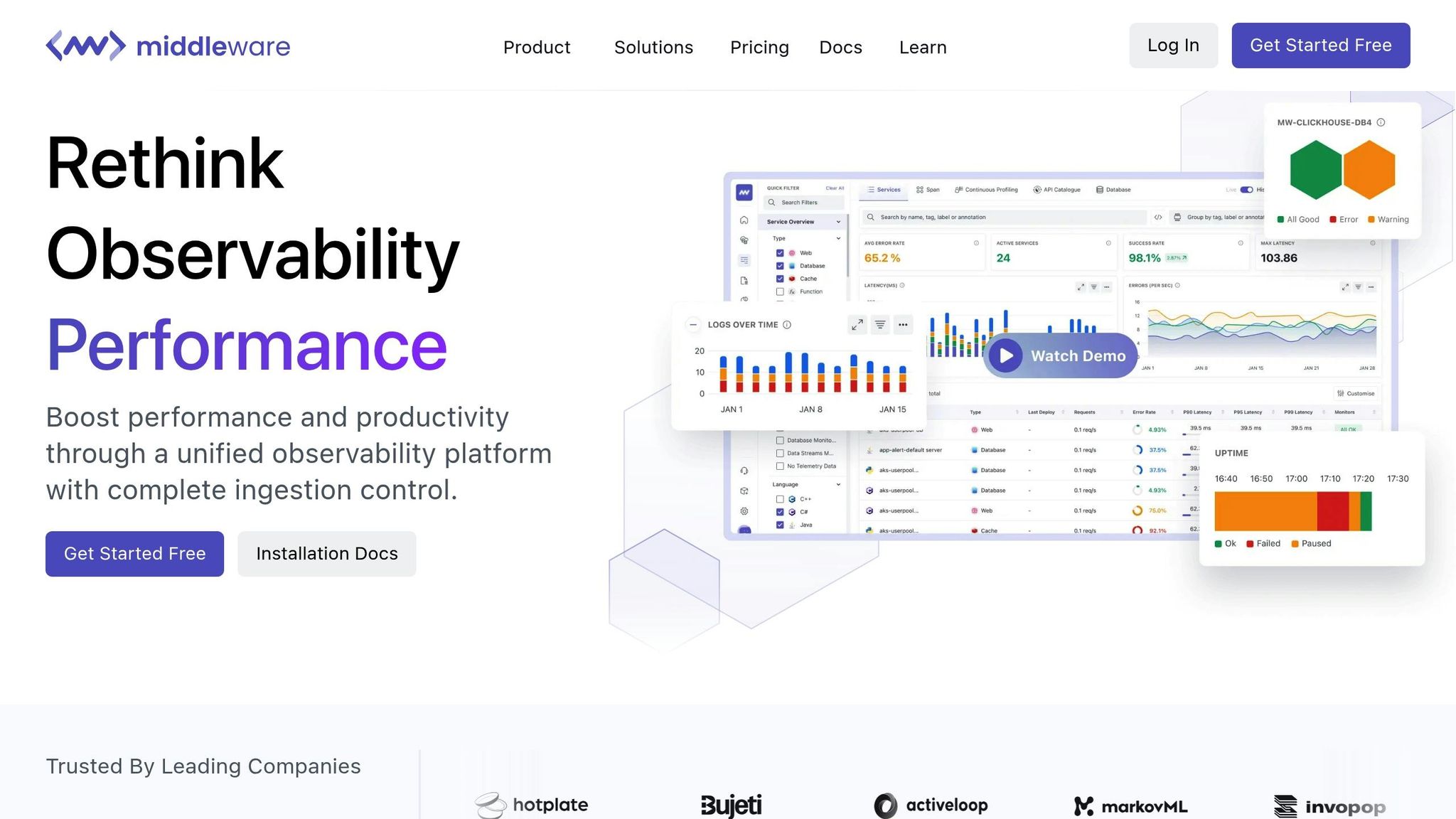
Middleware

Middleware serves as a powerful observability platform designed to monitor API performance with precision. Its unified system empowers organizations to quickly identify issues and conduct in-depth root cause analyses across their tech stack.

Real-time monitoring and alerts

Middleware provides near-real-time alerts, refreshing every 15 seconds, which allows teams to detect anomalies and address them before they escalate.

The importance of such rapid alerting was highlighted during the CrowdStrike outage in July 2024, emphasizing the need for swift responses. To make these alerts most effective, teams should carefully adjust alerting parameters to minimize unnecessary notifications and reduce alert fatigue. Role-based notifications further streamline the process by ensuring only relevant team members are alerted, maintaining both system stability and security.

This fast-alerting mechanism also integrates seamlessly with various development tools.

Integration with development tools

Middleware supports over 200 development tools and connects effortlessly with platforms like Slack and PagerDuty, ensuring alerts are delivered directly to the right channels.

By combining logs, metrics, and traces, Middleware offers actionable insights into API performance. Teams can customize alerts based on specific thresholds – such as CPU usage or response times – and use its drill-down features to locate the root cause of issues quickly. This efficiency reduces the time spent on debugging and simplifies troubleshooting in complex, distributed systems. For teams needing to integrate APIs with enterprise applications and data sources, DreamFactory provides a self-hosted platform for governed API access that complements monitoring efforts by ensuring secure, role-based data integration.

"Middleware accelerates troubleshooting, saving significant time daily."
– Akshat Gupta, Trademarkia

Scalability and analytics

Beyond real-time alerts and tool integration, Middleware enhances API performance through its scalable analytics capabilities. It manages challenges at scale by handling tasks like authentication, protocol translation, and message queuing, while improving performance with dynamic routing and load balancing.

Middleware also supports asynchronous communication patterns, which boost scalability and fault tolerance – an essential feature as enterprise applications grow more complex.

By enabling smooth communication between microservices, Middleware centralizes logging and monitoring across services, allowing teams to detect and resolve issues more efficiently.

"Middleware.io is a powerful cloud observability platform that helps us monitor our infrastructure and applications in real time. The AI-powered insights have helped us identify and resolve issues faster, resulting in stellar uptime and increased customer satisfaction for Fortune 500 customers."
– Tatevik H., Activeloop

For organizations adopting middleware solutions, focusing on modular components ensures flexibility for evolving requirements. Incorporating strong security measures within integration layers protects data during transit, while regular evaluations and optimizations of integration points help maintain low latency and high availability as systems scale.

2. Runscope

Runscope

Runscope, much like Middleware, focuses on delivering real-time insights but places a stronger emphasis on automated testing and global reach. This API monitoring platform has gained the trust of over 60,000 developers worldwide, who have collectively executed more than 400 million test runs since its inception. Its core strengths lie in automated API testing and real-time monitoring.

Real-Time Monitoring and Alerts

Runscope’s Live Traffic Alerts provide instant notifications for API production traffic, quickly identifying transaction failures and exceptions as they occur. Developers can set business-critical metrics and receive immediate alerts whenever an API call fails. This allows teams to pinpoint issues, analyze failed requests in detail, and address problems before they escalate.

The platform’s monitoring tools handle large-scale demands, with over 65 million uptime, performance, and data validation checks conducted monthly. Industry users have praised Live Traffic Alerts for giving teams greater control over alert settings and improving data trend analysis. These features not only enhance uptime and customer satisfaction but also reduce response times and minimize revenue loss caused by API failures.

This real-time feedback integrates smoothly with popular development tools, creating a cohesive workflow.

Integration with Development Tools

Runscope seamlessly connects with key CI/CD tools and communication platforms, enhancing team efficiency. It integrates with Jenkins for continuous integration and platforms like Slack, HipChat, and PagerDuty for instant notifications. Additionally, it supports third-party analytics tools such as Datadog, Splunk, and New Relic Insights, enabling a comprehensive and unified monitoring process.

As Cory Watson, Principal Infrastructure Engineer at Keen, explains:

"The ability to integrate API Monitoring into the communications channels our engineers use most often adds tremendous value, and allows us to respond to API failures much more quickly"

Runscope also simplifies complex authentication scenarios. Jim Naylor, Director of Product Management at Edmunds.com, highlights this:

"API Monitoring allows us to set up complicated API monitors that include our OAuth layer with just a few clicks"

Support for Distributed Systems

Runscope stands out in global monitoring, offering coverage across multiple regions to ensure consistent performance tracking regardless of location. This global reach is especially useful for teams managing distributed infrastructures.

Chris Knowles, Technology Director at Omnifone, shares:

"The fact that API Monitoring has multiple locations across the globe from which you can monitor is very valuable so that we can proactively solve even the most under-the-radar issues"

With this setup, teams can monitor performance across distributed components while maintaining an overarching view of system health.

Scalability and Analytics

Runscope provides detailed performance analytics and error tracking, empowering teams to closely monitor API health as their systems expand. These analytics ensure that monitoring efforts scale effectively alongside growing API ecosystems.

Sara Cowie, Head of Customer Acquisition at Syncano, emphasizes the importance of these features:

"Uptime and performance are vital to us. API Monitoring reduces development time and ensures optimal performance of our API at all times"

With its global infrastructure and in-depth analytics, Runscope is particularly well-suited for teams managing APIs across different regions while maintaining consistent performance.

3. Uptrace

Uptrace

Uptrace stands out as a powerful tool for API performance monitoring, combining real-time tracking with in-depth analytics. Like Middleware and Runscope, it offers a unique mix of open-source adaptability and enterprise-level features, with a strong focus on distributed tracing. Impressively, it processes over 10,000 spans per second on a single core, compressing 1KB spans down to just 40 bytes.

Real-Time Monitoring and Alerts

Uptrace delivers unified real-time monitoring by integrating traces, metrics, and logs. This allows teams to keep an eye on crucial API metrics, such as latency and error rates, in one place. Its alert system is highly flexible, supporting notifications via email, Slack, Telegram, and more. Users can even create custom alert conditions using SQL-like or PromQL-like query languages.

James Davidson, DevOps Lead at TechFlow, shared his experience:

"Uptrace has transformed how we monitor our microservices. We migrated from a solution costing 6x more and haven’t looked back. The OpenTelemetry integration was seamless."

To make onboarding easier, Uptrace offers pre-configured dashboards for common instrumentations, helping teams get started without needing extensive setup.

Integration with Development Tools

Uptrace integrates effortlessly with key development and monitoring tools. It works natively with Prometheus, OpenTelemetry, and Grafana, pulling data from sources like Vector, FluentBit, and CloudWatch. For teams using Grafana, Uptrace can act as a Prometheus data source, enabling unified dashboards across different tools. Additionally, its JSON API allows for programmatic interactions, making it easy to build custom workflows and integrations.

Sarah Kim, CTO at GrowthCraft, highlighted the cost efficiency:

"As our system grew to hundreds of services, our previous monitoring solution became prohibitively expensive. Uptrace offers all the features we need at a fraction of the cost."

This seamless integration makes Uptrace a strong choice for teams looking to unify their monitoring efforts while keeping costs under control.

Support for Distributed Systems

Uptrace excels in monitoring complex distributed systems, thanks to its advanced tracing capabilities and efficient data handling. It uses the ClickHouse database, which significantly reduces storage needs and speeds up query performance compared to traditional solutions. Distributed tracing provides detailed insights into API requests as they move through multiple services, helping teams pinpoint bottlenecks and performance issues.

Miguel Rodriguez, SRE Manager at CloudScale, praised its visibility:

"The level of visibility Uptrace provides into our distributed system is unmatched. We identified and resolved performance bottlenecks we didn’t even know existed."

This level of insight is invaluable for teams managing intricate microservice environments.

Scalability and Analytics

Built to scale with growing systems, Uptrace maintains its efficiency even as data volumes increase. Its compression and optimized storage ensure that monitoring costs remain predictable, no matter how large the system grows. Pricing is based on ingested gigabytes and active time series, with new users receiving 1TB of storage and 50,000 time series free during their first month.

For deeper analysis, Uptrace offers span grouping, allowing teams to filter and study similar spans for more detailed insights. This feature adds another layer of value, making it easier to analyze performance data and fine-tune systems.

Uptrace’s scalability and robust analytics make it a standout choice for modern API monitoring, offering the tools teams need to manage and optimize their systems effectively.

4. Datadog

Datadog

Datadog provides a powerful API monitoring solution designed to cover everything from infrastructure to applications. With over 850 integrations, it offers seamless scalability while delivering detailed insights into API performance. Its standout feature is the ability to unify monitoring across your entire tech stack, helping you identify and resolve issues before they affect users. Let’s dive into the key features that make Datadog a robust choice for API monitoring.

Real-Time Monitoring and Alerts

Datadog’s API Catalog offers complete visibility into your APIs, enabling quick identification of underperforming endpoints. The platform continuously tracks reliability through alerts, test results, and security signals, giving teams a comprehensive view of API health. You can set custom alerts for critical metrics like latency and error rates, while built-in anomaly detection flags unusual patterns and integrates with Service Level Objectives (SLOs) .

"The Datadog API gives you the full picture, collecting metrics, logs, and traces in real time. This comprehensive view helps teams quickly spot issues, fix them, and make smarter decisions." – Zuplo Blog

Alerts can include direct links to relevant SLOs, dashboards, and API tests, making troubleshooting more efficient.

For proactive monitoring, Datadog uses synthetic monitoring to simulate user interactions and continuously test API endpoints. This ensures critical business transactions run smoothly and catches potential issues early. Alert notifications integrate with tools like Slack, PagerDuty, and Microsoft Teams, ensuring that the right team members are notified instantly.

Integration with Development Tools

Datadog simplifies monitoring by aggregating data from a wide range of sources, including SaaS applications, cloud platforms, automation tools, and databases. Its auto-generated service overviews allow teams to monitor application performance without requiring extensive manual setup, making it easy to graph and alert on metrics like error rates or latency percentiles.

Additionally, its log management features let you configure log forwarding via the Datadog agent, enabling you to collect, filter, and analyze logs across your infrastructure seamlessly.

Support for Distributed Systems

Datadog’s Application Performance Monitoring (APM) uses distributed tracing to provide end-to-end visibility across microservices and databases, helping teams quickly identify slowdowns and errors. The platform offers trace visualizations that make it easy to locate slow requests, errors, or exceptions in real time. Service health checks monitor availability and response times, triggering alerts when latency exceeds predefined thresholds.

Root cause analysis tools further simplify the process by tracing issues down to individual transactions and service dependencies. With Datadog’s APM libraries, teams can instrument their applications to track key metrics like latency, error rates, and throughput, ensuring optimal performance across distributed systems.

Scalability and Analytics

Datadog is built to handle high-traffic environments, scaling effortlessly alongside your API ecosystem. It supports programmatic automation and multi-region monitoring to ensure consistent performance.

The platform’s analytics features capture critical metrics, track events, and enable the creation of custom dashboards. The API Catalog is particularly useful for identifying deviations in performance trends, helping to pinpoint issues with business-critical endpoints. Companies using Datadog have reported significant improvements in issue resolution times – up to an 80% reduction.

Yony Feng, CTO & Co-founder at Peloton, shared their experience:

"Within the first 30 to 45 days, we were able to quickly identify the top five endpoints that had performance issues and reduce response times by 80 to 90%."

For teams managing large-scale systems, employing a well-thought-out tagging strategy can help organize metrics effectively. Datadog’s aggregation functions also help reduce data volume while preserving key insights.

5. Postman

Postman has grown into a widely-used platform, supporting millions of developers by combining API development, testing, and monitoring into a single workflow-friendly solution. It stands out for its real-time monitoring, smooth integration with other tools, and flexible analytics.

Real-Time Monitoring and Alerts

Postman Monitors help ensure your APIs are running smoothly by performing scheduled health checks. These monitors execute test scripts and chained requests, sending instant alerts if something goes wrong. This way, you can catch and fix issues before they impact your users.

The monitoring dashboard provides a clear view of your API’s performance, showing trends, anomalies, and average response times. You can use filters to focus on specific requests, regions, or results, making it easier to pinpoint recurring problems. For deeper troubleshooting, console logs capture detailed information, including outputs from pre-request and post-response scripts.

For teams working within strict network security environments, Postman offers monitors that operate from static IP addresses. This feature allows you to monitor APIs even when they’re behind restricted firewalls.

Integration with Development Tools

Postman’s ability to integrate with other tools makes it a natural fit for every stage of the API lifecycle. It works seamlessly with CI/CD pipelines, APM tools, messaging platforms, and source control systems.

Integration Description
Slack Share Postman links and send notifications to a Slack channel
Microsoft Teams Collaborate using a chat-based workspace
VS Code Develop and test APIs directly within Visual Studio Code
GitHub Sync and back up Postman Collections to GitHub
Datadog Correlate Postman monitoring data with broader application telemetry
New Relic Track application performance alongside API monitoring
Opsgenie Manage incidents and alerts effectively
PagerDuty Integrate with monitoring tools for advanced incident management

These integrations simplify workflows by enabling tasks like syncing collections to source control, sending monitor alerts to team messaging platforms, and managing API deployments. When paired with tools like Datadog or New Relic, Postman’s monitoring data can be combined with other application metrics for a complete performance overview.

Scalability and Analytics

Postman is built to handle scalability, offering tools to simulate real-world traffic conditions during performance testing. You can configure virtual users to test API endpoints, tweaking settings like the number of users, test duration, and load profiles (e.g., fixed or ramp-up).

During these tests, Postman provides real-time metrics, including response times, throughput (requests per second), and error rates. By aggregating these metrics over short intervals, the platform makes it easier to track performance changes and identify trends.

For teams of all sizes, Postman combines ease of use with powerful monitoring and testing features. Its ability to scale and deliver actionable analytics ensures APIs remain reliable and perform well, even under demanding conditions.

Tool Comparison Chart

When choosing an API monitoring tool, it’s essential to match your team’s needs, budget, and technical requirements. Below is a table that summarizes key features, pricing, integrations, and ideal use cases to help you make an informed decision.

Tool Key Features Pricing Integration Capabilities Ideal Use Cases
Middleware Uptime tracking, AI-powered alerts, instant root cause analysis, one-minute installation Free Forever Account (up to 100 GB); pay-as-you-go at $0.30 per GB for logs, metrics, and traces Limited integrations compared to enterprise tools Small to medium teams needing quick setup with both cloud and on-premise support
Uptrace Distributed tracing, OpenTelemetry integration, real-time monitoring Open-source (free) with hosted plans available Seamless integration with Prometheus, Grafana, and OpenTelemetry Teams seeking customizable, open-source solutions with advanced distributed tracing
Datadog Infrastructure monitoring, log management, customizable dashboards, 400+ integrations APM starts at $31 per host/month; logs at $0.10 per GB Over 400 built-in integrations including AWS, Azure, and GCP Large enterprises requiring comprehensive observability across the entire tech stack
Postman Collection-based monitoring, automated testing, developer-friendly interface Free tier available; Professional plan at $29 per user/month Integrates with CI/CD platforms (Jenkins, Travis CI, CircleCI), Slack, and GitHub API development teams needing integrated testing and monitoring workflows

This table breaks down the strengths of each tool, showing how they cater to various monitoring needs. For instance, Middleware’s pay-as-you-go model suits teams with fluctuating workloads, while fixed pricing options like those offered by Datadog or Postman provide stability for businesses with predictable API traffic. If you’re working with limited resources or smaller systems, keep in mind that some tools may require more processing power and could impact performance. Use this chart to weigh ease of use, scalability, and cost against your team’s specific requirements.

Conclusion

Selecting the right API monitoring tool is more than a technical decision – it’s a business-critical one. With APIs now powering 83% of web traffic, the need for effective monitoring has never been greater.

Consider the stakes: IT downtime costs businesses a staggering $5,600 per minute, and repeated API failures drive away 80% of customers. On the flip side, companies adopting API observability have reported tangible benefits: a 30% drop in mean time to resolution (MTTR) for API issues, a 20% boost in customer satisfaction, and a 12%+ increase in market capitalization. It’s no wonder over 90% of executives view APIs as essential to their operations.

As Mohammed Usman, a Researcher and Development Scientist at Karlstad University, puts it:

"The core of the observability is to quickly learn what is happening within the IT infrastructure to avoid extended outages, and during an outage, quickly enable so-called root cause analysis of the problem. For example, the Mean Time to Resolution (MTTR) metric measures outages, and the observability objective is to drive MTTR value as close to zero as possible."

When evaluating API monitoring tools, focus on how their features align with your business needs. Middleware offers AI-powered alerts for quick and easy setup, Datadog provides enterprise-grade features for large-scale operations, and Postman shines with its developer-friendly approach. The key is to choose a solution that complements your team’s workflows and supports your growth strategy.

FAQs

What should I consider when selecting an API monitoring tool for my business?

Choosing an API monitoring tool isn’t just about picking something off the shelf – it’s about finding a solution that fits your business like a glove. Start by pinpointing the essential features you need. Look for tools that offer uptime monitoring, response time tracking, error detection, and customizable alerts. These features ensure you can spot and fix problems before they affect your users.

Also, think about how the tool will grow with you. If your business expands, your monitoring needs will likely grow too. Choosing a tool that can scale alongside your operations can save you from headaches down the road. Lastly, take a close look at the overall cost. Don’t just focus on the subscription price – factor in any additional fees for advanced features or add-ons. The right tool will not only meet your current needs but also set you up for smooth growth, keeping your systems running without a hitch as your business evolves.

What are the advantages of using Middleware tools for small to medium-sized teams?

Middleware tools are a game-changer for small to medium-sized teams, simplifying operations and boosting efficiency. These tools make it possible to connect different systems seamlessly, so teams can share and manage data across various applications without breaking a sweat. This means smoother workflows and far less manual effort.

On top of that, middleware tools make scaling up a breeze. They allow teams to add new applications without throwing existing systems off balance. Many of these tools also come with API performance monitoring, letting teams keep tabs on uptime and response times to quickly tackle any issues that pop up. By streamlining processes and ensuring systems work well together, middleware tools save both time and money – perfect for teams looking to grow without unnecessary headaches.

What is distributed tracing, and how does it improve API performance monitoring?

Distributed tracing is a technique for keeping tabs on how requests move through various services within an application. It follows a request’s journey from start to finish – spanning frontend to backend – so developers can pinpoint slowdowns, errors, or performance hiccups at any step along the way.

Using unique trace IDs, platforms like Uptrace and Datadog offer a visual breakdown of how requests are handled. This clarity is especially helpful for troubleshooting in intricate setups, like microservices-based architectures, and for fine-tuning API performance to ensure systems scale efficiently and run smoothly.

Related Blog Posts

Dirty CRM data can cost your business big time – up to $3.1 trillion annually in the U.S. alone. Poor data leads to wasted time, lost revenue, and damaged customer relationships. But keeping your CRM clean doesn’t have to be overwhelming. Here’s how to fix it:

  • Set Data Entry Standards: Use clear rules for names, titles, and phone numbers to avoid errors.
  • Run Regular Audits: Check for duplicates, outdated records, and missing details every quarter.
  • Clean Up Duplicates: Merge similar records and create a single source of truth.
  • Enrich Your Data: Add missing info like emails, phone numbers, and key decision-makers.
  • Establish Data Rules: Assign team ownership, automate processes, and train staff regularly.

Why it matters: Clean data boosts lead targeting, shortens sales cycles, and improves customer experiences. Start today to avoid wasted time and missed opportunities.

#75 Salesforce Data Hygiene: How to Get It Right – with Janis & Philipp

Why CRM Data Hygiene Matters

Your CRM system is the backbone of your sales operations, but its effectiveness hinges on the accuracy and reliability of the data it holds. Companies that leverage data effectively are 23 times more likely to attract and retain customers. In today’s competitive market, that edge can be the difference between thriving and falling behind. Let’s explore the pitfalls of poor data quality and the rewards of keeping your CRM data clean.

"The harsh truth? Your CRM is only as good as the data it holds. Bad data leads to bad outcomes." – Sybill.ai

When your CRM data is accurate and well-maintained, it empowers sales reps to focus on high-value leads, choose the right time to follow up, and tailor their outreach. The result? Faster deal closures and improved conversion rates.

Problems Caused by Poor Data Quality

Poor data quality introduces a host of challenges that can undermine your sales efforts:

  • Revenue Loss: Bad data can drain resources, costing businesses an average of $15 million annually.
  • Data Decay: CRM records degrade over time, with around one-third of data becoming outdated every year. This leaves sales teams chasing dead ends or working with incomplete information.
  • Wasted Time: When reps can’t trust their CRM, they spend valuable hours double-checking details, manually updating records, or researching prospects from scratch. This inefficiency eats into time that could be spent selling.
  • Missed Opportunities: Unreliable data leads to lost leads – whether it’s due to incorrect contact details or duplicate records. These missed connections can cost your business potential deals.
  • Damaged Relationships: Outdated or irrelevant outreach erodes trust. In a world where 80% of people prefer personalized experiences, poor data makes it nearly impossible to deliver the tailored interactions customers expect.

Benefits of Clean CRM Data

On the flip side, maintaining clean CRM data unlocks a range of advantages:

  • Better Lead Targeting: With accurate prospect details, sales teams can focus on leads that are most likely to convert. Knowing factors like company size, decision-maker roles, and buying timelines helps reps prioritize effectively.
  • Improved Forecasting: Clean data allows for more precise revenue predictions. Right now, only 50% of sales teams rely on data for accurate forecasting, leaving plenty of room for improvement.
  • Enhanced Customer Experiences: Accurate data enables personalized interactions, addressing the challenge that 78% of brands face in delivering personalization due to insufficient customer information. Tools like Sendspark help teams leverage clean contact data to create highly personalized outreach at scale.
  • Increased Efficiency: Organized data streamlines the sales process. Teams spend less time searching for information and more time closing deals. And the financial payoff is clear – every $1 spent on a Sales CRM delivers an average ROI of $8.

The impact of clean CRM data is evident in real-world success stories. For instance, Krish Sivanathan, Director of Operations at Packagecloud, shared how their team achieved an 18% increase in engagement rates:

"Utilizing sales insights we have been able to conduct targeted experiments, enabling Packagecloud to increase engagement rates by 18% through the refinement of scripts and lead targeting."

This improvement was made possible by having access to clean, actionable data, which empowered their team to target leads more effectively and refine their sales strategies.

In short, CRM data hygiene isn’t just about keeping your database tidy – it’s a cornerstone of sales success. Clean data equips your team to work smarter, connect with prospects more effectively, and create meaningful customer experiences that drive long-term revenue growth.

CRM Data Hygiene Checklist

Now that you see why keeping your CRM data clean is essential, it’s time to dive into the process. This five-step checklist will help your sales team build a solid system for maintaining data accuracy and reliability. As Scratchpad puts it, "Maintaining your CRM’s hygiene isn’t a one-time task but an ongoing commitment."

Step 1: Set Data Entry Standards

Clean CRM data starts with consistent, standardized data entry. Clear guidelines ensure uniformity and reduce errors. In fact, 92% of analytics and IT decision-makers agree that trustworthy data is more important than ever.

Start by creating formatting rules for all fields. For example:

  • Use full names and standardized job titles from professional profiles.
  • Record full legal company names.
  • Format phone numbers consistently, such as +1 555-555-1234.

Custom fields should include clear examples for dropdowns, tags, and text entries to avoid confusion. Many CRMs, like Teamgate CRM, offer tools to enforce these rules automatically. Use features like validation rules and field restrictions to maintain consistency. Additionally, limit access to sensitive fields to protect your data’s integrity.

Once standards are in place, schedule regular audits to catch issues early.

Step 2: Run Regular Data Audits

Data audits are like routine checkups for your CRM. They help you identify and fix problems before they escalate. Plan quarterly audits to catch duplicates, outdated records, and incomplete entries.

During these audits, focus on common trouble spots, such as:

  • Contacts missing key details like email addresses or phone numbers.
  • Deals that haven’t been updated recently.
  • Company records lacking essential information.

Duplicates are another red flag – look for entries with minor spelling differences or inconsistent formats. Keep track of recurring errors to refine your processes and identify team members who might need additional training. Regular audits ensure your database stays organized and ready for the next step.

Step 3: Clean and Remove Duplicate Data

Duplicate records can wreak havoc on your CRM. They confuse your team, waste time, and can even damage customer relationships by leading to inconsistent communication.

To identify duplicates, watch for:

  • Non-standardized names or nicknames.
  • Typos in company names.
  • Variations in titles, suffixes, or phone number formats.
  • Inconsistent website URLs.

Use tools like fuzzy matching to spot similar entries. When duplicates are found, carefully review the information to determine which record is most complete. Merge the best data into one comprehensive profile, creating a "single source of truth" for each contact or company.

Many CRMs offer automated deduplication tools that flag potential duplicates and alert you to new entries that might overlap with existing ones. Set a regular cleaning schedule – whether it’s quarterly, monthly, or bi-weekly – to keep your database in top shape.

Step 4: Add More Data to CRM Records

Good data isn’t just clean – it’s also complete. Enrich your CRM records to give your sales team the insights they need for effective conversations.

Fill in missing details like direct phone numbers, personal email addresses, or active social media profiles. Add company information such as size, industry, revenue, and key decision-makers. Don’t forget important dates, like contract renewals or budget cycles.

Use your CRM’s tagging and segmentation features to organize contacts and companies. Tags can help you track lead sources, product interests, buying stages, and other criteria that make it easier to personalize outreach. Well-structured tags also reveal patterns in your sales data.

Encourage your team to add detailed notes after every interaction. Notes should include what happened, next steps, and any insights for future follow-ups. This context is invaluable when leads change hands or when revisiting old prospects.

Data enrichment tools can also help by automatically updating records with information like company details and social media profiles. These tools save time while improving the quality of your data.

Step 5: Create Data Management Rules

To maintain clean data over time, you need clear rules and accountability. Without them, even the best efforts can fall apart.

Assign ownership of specific data areas to team members. For example, one person might handle contact accuracy, another might oversee company details, and someone else could manage deal data. Clear roles prevent important tasks from being overlooked.

As Jeff Ignacio, Head of GTM Operations and Growth at Regrow Agriculture, explains: "RevOps serves as a single source of truth; it should govern your GTM motion, and your GTM notion needs to impact your revenue. Data-driven insights and decision-making underpin these three notions."

Train your team regularly on data hygiene practices to reinforce good habits. This is especially important for new hires, who need to align with your standards quickly.

Automate wherever possible to reduce manual work and minimize errors. Set up workflows to validate data at entry, create alerts for incomplete records, and prompt updates for outdated information.

Finally, don’t strive for perfection – it’s an impossible goal. As Sid Kumar, AVP of Revenue Operations at Databricks, points out: "You sometimes have to accept it’s never going to be perfect. There’s no such thing as ‘perfect’ data, and as soon as it becomes perfect, normally it’s outdated and stale."

Focus on continuous improvement. Even if your data isn’t flawless, consistent effort will pay off with better outcomes for your sales team.

How to Track Data Hygiene Success

Once you’ve implemented strong data hygiene practices, the next step is to measure their effect on your sales performance. Start by monitoring key CRM metrics to evaluate improvements in your data. Poor data quality can cost organizations an average of $12.9 million annually, so the stakes are high.

It’s essential to focus on metrics that directly connect data quality to sales outcomes.

Key Metrics to Track

Begin with three fundamental data quality metrics that serve as the backbone of clean CRM data:

  • Data completeness: Measures how many required fields are filled in your records.
  • Data accuracy: Tracks how often your information aligns with reality.
  • Duplication rates: Identifies how many duplicate records exist in your system.

Set clear benchmarks, such as maintaining less than 2% duplicates and achieving over 95% accuracy. These targets provide your team with specific goals and highlight areas needing attention.

Beyond these basics, track metrics that reflect the business impact of clean data. For example:

  • Customer churn rate: Shows how many customers leave over a certain period.
  • Close rate: Compares the number of deals closed to the leads in your pipeline.
  • Customer lifetime value (CLV) and customer acquisition cost (CAC): Help gauge the financial benefits of improved data quality.

Sales efficiency metrics are also critical. Keep an eye on how long leads stay in each pipeline stage and monitor quota attainment to see how close your team gets to meeting sales goals. Additionally, track average resolution time for service tickets to measure whether clean data improves team productivity.

Finally, consider customer satisfaction. A higher Net Promoter Score (NPS) – which measures how likely customers are to recommend your product or service – can often be tied to better data enabling more personalized interactions.

Metric Category Key Metrics Target
Data Quality Data completeness, accuracy, duplication rates >95% complete, <2% duplicates
Sales Performance Close rate, pipeline stage length, quota attainment Varies by industry
Customer Impact Churn rate, CLV, CAC, NPS Lower churn, higher CLV

How to Read Your Data Results

Interpreting your metrics is just as important as tracking them. Raw numbers provide a snapshot, but trends reveal the bigger picture. Analyze how data quality improvements influence sales results, and use these insights to refine your strategies.

Here’s an example of the impact proper analysis can have: A sales team improved pipeline hygiene and saw data completeness jump from 75% to 95%. At the same time, the average opportunity age dropped from 120 days to 90 days, update frequency increased from bi-weekly to weekly, and forecast accuracy rose from 65% to 85%. These changes led to shorter sales cycles, better resource allocation, and more reliable forecasting.

If you notice that data completeness improves but the close rate remains flat, dig deeper. It could mean the additional data isn’t the right kind, or your team might need more training on how to use it effectively.

Teams spend up to 32% of their time fixing data issues, so it’s also worth tracking time-related metrics. Measure how much time your team spends on data cleanup versus revenue-generating activities to identify efficiency gains.

Schedule regular reviews – monthly during normal operations and weekly during intensive cleanup efforts. Use your CRM’s reporting tools to create dashboards that make trends easy to spot. For example, Teamgate CRM offers integrated reporting that displays these metrics clearly.

By calculating the time and money saved through better data quality, you can demonstrate the value of your efforts. This not only justifies ongoing investment in data hygiene but also keeps leadership engaged in the process.

Conclusion

Clean CRM data forms the backbone of efficient sales operations. Did you know that companies lose 12% of their revenue due to inaccurate data? Even more striking, only 3% of businesses meet basic data quality standards. These numbers make it clear: maintaining clean CRM data isn’t just a best practice – it’s a competitive advantage.

This five-step checklist offers straightforward actions to keep your CRM data in top shape. By setting clear data entry standards, conducting regular audits, removing duplicates, enriching records, and establishing strong management rules, you’re not just tidying up your CRM – you’re empowering your sales team to perform at their best.

The results speak volumes. Effective CRM data hygiene can drive a 20% increase in lead conversion rates, cut duplicate contacts by 30%, and boost sales forecast accuracy by 15%. All of this directly impacts your bottom line.

"Data quality is directly linked to the quality of decision making. Good quality data provides better leads, better understanding of customers and better customer relationships. Data quality is a competitive advantage." – Melody Chien, Senior Director Analyst at Gartner

It’s important to remember that data hygiene is a continuous process, not a one-and-done task. With CRM data deteriorating at a rate of about 34% each year, regular upkeep is essential. Tools like Teamgate CRM can help automate key processes, such as identifying duplicates and validating data, making it easier to maintain high standards without extra manual effort.

FAQs

How can improved CRM data hygiene boost my sales team’s performance?

Maintaining accurate and up-to-date CRM data is a game-changer for your sales team’s performance. When your data is clean, your team can make smarter, more informed decisions, leading to targeted outreach efforts and better conversion rates. For instance, eliminating duplicate entries not only saves time but also boosts overall efficiency.

Focusing on data hygiene delivers real results: higher lead conversions, fewer missed opportunities, and smoother workflows. On the flip side, poor-quality data can lead to lost revenue and wasted resources. Keeping your CRM data current isn’t just a best practice – it’s a critical strategy for driving sales success.

What are the most common mistakes sales teams make when maintaining CRM data hygiene?

Sales teams often struggle with keeping their CRM data clean and accurate, largely due to a few avoidable missteps. One of the biggest culprits is the absence of clear processes for entering data. When there’s no standard way to input information, it can result in inconsistencies, duplicate entries, or incomplete details – turning the CRM into a messy and inefficient tool.

Another common issue is neglecting routine data checks. Over time, outdated or incorrect data builds up, which can lead to missed opportunities and flawed sales plans. On top of that, inadequate training on proper data management practices often leaves team members with bad habits, like inconsistent updates or failing to communicate key details within the team.

The solution? Set up clear rules for how data should be entered, commit to regular audits, and make sure everyone on the team understands why clean CRM data matters. A well-organized CRM isn’t just easier to manage – it boosts productivity, strengthens customer connections, and helps the team make smarter decisions.

How often should I audit my CRM data to keep it accurate and up-to-date?

Keeping your CRM data clean and accurate is essential for smooth operations. Plan quarterly full audits to thoroughly review your data and address any inconsistencies. For day-to-day upkeep, implement weekly spot checks to catch minor errors before they grow into bigger problems. Additionally, schedule monthly reviews to take a closer look at data accuracy. These regular check-ins ensure your sales team has reliable information at their fingertips, helping them work more efficiently and make better decisions.

Related Blog Posts

Starting a business is challenging, but the right books can make a huge difference. These five books are must-reads for first-time entrepreneurs, offering practical advice on building, managing, and growing a startup:

  1. The Lean Startup by Eric Ries: Learn how to test ideas quickly with a Minimum Viable Product (MVP) and adapt based on customer feedback.
  2. The Hard Thing About Hard Things by Ben Horowitz: Understand how to navigate tough decisions and lead effectively during crises.
  3. Zero to One by Peter Thiel: Focus on innovation and creating something entirely new instead of competing in crowded markets.
  4. The Innovator’s Dilemma by Clayton Christensen: Discover how disruption can help startups outpace established companies.
  5. The Challenger Sale by Matthew Dixon & Brent Adamson: Transform your sales strategy by teaching customers new insights instead of just building relationships.

These books cover everything from product development to leadership and sales strategies, helping you avoid common pitfalls and build a sustainable business.

5 Must Read Books for Beginner Entrepreneurs

1. The Lean Startup by Eric Ries

Eric Ries shifts the way we think about startups by treating them as a series of experiments rather than traditional businesses. His philosophy is straightforward: instead of spending endless months perfecting a product behind closed doors, create a minimum viable product (MVP), test it with actual customers, and use their feedback to guide your next steps. This process transforms ideas into measurable growth quickly and efficiently.

Central to Ries’s method is the Build-Measure-Learn feedback loop. This cycle helps avoid the all-too-common mistake of creating something no one wants. It begins with building an MVP – the simplest version of your idea that delivers value. Next, you measure how users interact with it, gathering real-world data to test your assumptions. Finally, you use what you’ve learned to decide what to improve or change next.

"Startup success can be engineered by following the process, which means it can be learned, which means it can be taught." – Eric Ries

Startups like Buffer and Airbnb are prime examples of this approach. Buffer tested its social media scheduling idea using a basic landing page, while Airbnb’s founders validated their hypothesis about professional photos increasing bookings by photographing properties themselves in New York. These simple yet effective tests confirmed market demand without requiring heavy upfront investment.

Traditional Approach Lean Startup Approach
Detailed business plans, rigid execution Business model canvas, hypothesis testing
Fully developed product before launch MVP, iterative development with feedback
Focus on cash flow and profits Focus on metrics like acquisition cost and churn rate
Sticking to the original plan Pivoting and adapting based on data

Pivoting is a strategy, not a failure. When Buffer launched in 2010, they didn’t dive straight into building a full product. Instead, they created a simple landing page explaining the concept and inviting users to sign up. The strong interest validated their idea before they wrote any code. This saved time and resources while confirming they were on the right track.

The book emphasizes the importance of customer feedback as your compass. Take Airbnb as an example: in 2008, its founders suspected that better photos of listed properties would boost bookings. Rather than assume, they tested the idea by taking professional-quality photos themselves. The results were clear – engagement and bookings surged, shaping their platform’s future strategy.

Ries also introduces tools like the business model canvas to help you map out your idea, MVPs to gather actionable feedback, and meaningful metrics to track progress. More importantly, the book teaches you to pivot based on hard data rather than intuition, turning potential setbacks into valuable lessons. This mindset lays the groundwork for mastering the challenges of scaling a startup.

2. The Hard Thing About Hard Things by Ben Horowitz

Ben Horowitz’s The Hard Thing About Hard Things doesn’t sugarcoat the entrepreneurial journey. Instead of offering feel-good anecdotes or a blueprint for success, it dives into the gritty realities of building and running a business. Horowitz lays bare the emotional rollercoaster of entrepreneurship, describing it as a path filled with potential disasters lurking at every turn.

At its heart, the book emphasizes one key idea: there’s no universal solution for navigating tough times. Each crisis comes with its own challenges, and simplistic, one-size-fits-all approaches rarely work. To tackle these moments, Horowitz leans on three guiding principles: embrace the struggle, be brutally honest, and prioritize people. These principles are designed to help leaders steer their teams through even the stormiest of situations.

"The biggest myth is that it’s fun. The reality is that creating and running a business is an incredibly tough grind, and it’s emotionally debilitating. It can be euphoric, but more often than not, it’s terrifying." – Ben Horowitz

One of the toughest challenges for any entrepreneur is managing their emotions. The moments when you feel like giving up are often the times when strong leadership is most critical. Horowitz introduces the concept of peacetime versus wartime CEOs to highlight the different leadership styles needed in varying circumstances. A peacetime CEO focuses on long-term planning, follows established rules, and avoids unnecessary conflict. On the flip side, a wartime CEO takes immediate action, bends the rules when necessary, and confronts challenges head-on. He points to examples like Steve Jobs’ bold decisions at Apple and Brian Chesky’s tough cost-cutting measures at Airbnb as illustrations of effective wartime leadership.

Horowitz also underscores the importance of putting people first, explaining that when leaders care for their teams, success in products and profits naturally follows.

"We take care of the people, the products and the profits…in that order."

Honesty is another cornerstone of Horowitz’s approach. Leaders who are transparent about challenges can build trust and encourage their teams to face problems directly. For instance, when Netflix CEO Reed Hastings decided to pivot the company toward streaming in the early 2000s, his clear and open communication helped align his team through a difficult transition.

"Sometimes an organization doesn’t need a solution; it just needs clarity." – Ben Horowitz

Horowitz also provides practical advice for crisis management. He suggests reframing daunting questions to uncover actionable steps. For example, instead of asking, “How do we avoid bankruptcy?” he advises asking, “What would we do if we went bankrupt?” This shift in perspective can help reveal practical paths forward. Additionally, he recommends creating a trusted circle where leaders can openly discuss their fears and write down their thoughts to gain clarity.

Another critical point Horowitz makes is about investing in your team. He believes that creating a workplace where people want to stay can be the difference between a startup’s survival and failure. This often means addressing problems quickly – sometimes within 24 hours – to keep the team focused and motivated.

On the emotional side of leadership, Horowitz reflects on how decisions evolve over time:

"Early in my career as an engineer, I’d learned that all decisions were objective until the first line of code was written. After that, all decisions were emotional." – Ben Horowitz

Recognizing this emotional element can help leaders make better, more thoughtful decisions under pressure while fostering stronger communication with their teams during challenging periods. Horowitz’s insights remind entrepreneurs that while the road may be tough, effective leadership and a focus on people can make all the difference.

3. Zero to One by Peter Thiel

Peter Thiel’s Zero to One flips the script on traditional ideas about competition. He argues that true value comes from innovation-driven monopolies. His main point? It’s far better to create something entirely new (what he calls "going from zero to one") than to simply copy existing ideas (moving from one to n).

Thiel urges entrepreneurs to ask themselves:

"What important truth do very few people agree with you on?"

This question pushes founders to uncover unique insights – what Thiel calls "secrets" – that can form the foundation for something groundbreaking.

The Monopoly Advantage

Thiel believes monopolies, not competition, are the real drivers of lasting value. According to him, there are only two types of businesses: those in perfect competition and those that are monopolies.

To explain, he compares the airline industry with Google. In 2012, U.S. airlines earned a mere 37 cents per passenger trip due to fierce competition. Meanwhile, Google, with its dominant position, retained 21% of its revenues as profit. By May 2014, Google controlled about 68% of the search market.

His bold statement?

"Competition is for losers."

This isn’t about endorsing harmful monopolies. Instead, Thiel champions dynamic monopolies – those that innovate and create new markets. Tesla is a prime example. When Tesla launched the Model S in 2012, it didn’t just make an electric car; it created the premium electric vehicle market, earning high margins by offering something entirely new.

Four Traits of Monopoly Businesses

Thiel outlines four essential elements that help businesses achieve monopoly status:

  • Proprietary Technology: Your technology should be at least ten times better than existing alternatives in a significant way.
  • Network Effects: The more people use your product, the more valuable it becomes.
  • Economies of Scale: As businesses grow, they can spread fixed costs over a larger output, becoming more efficient.
  • Branding: A strong identity is vital, but it must be backed by genuine value.

These elements, much like the iterative processes discussed earlier, offer a clear roadmap to sustainable growth.

Start Small, Then Expand

Thiel emphasizes the importance of starting small. He advises entrepreneurs to dominate a niche market before scaling up. Netflix is a textbook example of this strategy. In 2000, while Blockbuster focused on retail stores, Netflix invested in streaming technology. By targeting a specific market early on, Netflix built the foundation to later dominate the entertainment industry.

The Role of Distribution

Thiel highlights that having a great product isn’t enough. A solid distribution plan – how you’ll reach your customers – is equally critical.

Planning for the Future

Thiel places a high value on long-term planning. He famously says:

"A bad plan is better than no plan."

He advocates for "definite optimism", which combines a clear vision for the future with the courage to pursue ambitious goals. This mindset encourages founders to set a strong direction for their ventures.

Building the Right Team

For Thiel, a successful startup hinges on having the right team. The founding team should share a unified vision and bring diverse strengths to the table. They must align on the problem they’re solving and the future they’re working to create.

Timing and Boldness

Thiel argues that while brilliant thinking is rare, courage is even rarer. He believes bold risks are far more valuable than playing it safe.

Thiel’s insights challenge entrepreneurs to think bigger and act bolder. From distribution strategies to team alignment and long-term planning, his approach underscores the importance of clear, innovative strategies for building a successful startup. His ideas push founders to look beyond the obvious and strive for something transformative.

4. The Innovator’s Dilemma by Clayton Christensen

Clayton Christensen’s The Innovator’s Dilemma dives into a paradox that can haunt even the most successful companies: flawless execution doesn’t guarantee lasting market dominance. The book introduces the idea of disruptive innovation – how smaller companies, initially serving low-value customers with simpler technology, can eventually refine their approach and unseat established market leaders.

When Good Management Becomes a Roadblock

Christensen points out that established companies often stumble in the face of disruption, not due to poor leadership, but because their resource-allocation processes and focus on existing customers prevent them from pursuing low-margin, unproven opportunities. He famously remarked:

"Poor management was not the root cause of their failure. Good management was the problem."

This insight underscores how even the best strategies can falter in dynamic, evolving markets.

The Advantage of Starting Small

The financial impact of disruptive innovation shows how timing can make or break a company. Between 1976 and 1994, firms that launched disruptive products early captured a combined $62 billion in revenue, while those that entered later in established markets earned only $3.3 billion. Starting small, but early, can lead to big rewards.

Tesla‘s Journey from Underdog to Leader

A prime example of disruption in action is Tesla. Initially, its Roadster was seen as a niche product with limited appeal. But by 2024, Tesla had transformed into a dominant force, turning early criticisms into strengths as it refined its technology. This journey highlights how initial shortcomings can evolve into key advantages in emerging industries.

A Playbook for Startups

Christensen’s insights offer a strategic guide for startups looking to disrupt established markets. He advises new businesses to:

  • Target underserved markets.
  • Accept low margins early on.
  • Iterate quickly to exceed expectations.

One critical warning: don’t rely solely on current customer feedback during periods of disruption. Instead, anticipate future needs and focus on solving problems that customers may not even realize they have yet.

Thriving in a Disruptive World

To stay competitive in fast-changing markets, Christensen recommends companies "fail early and cheaply" as they search for viable disruptive opportunities. He also suggests creating independent innovation teams that can experiment without being tied to the constraints of the core business. By prioritizing simplicity, accessibility, and affordability, businesses can build long-term advantages. As Christensen aptly puts it:

"If you’re waiting until a disruptive technology is ‘mature’ before taking it seriously, you’re already too late."

Why Startups Have the Edge

The Innovator’s Dilemma offers a blueprint for startups to outmaneuver established companies. With their agility, willingness to take risks, and ability to explore emerging markets, entrepreneurs can carve out lasting advantages without directly competing with industry giants. Christensen’s work serves as a reminder that disruption isn’t just a challenge – it’s an opportunity.

5. The Challenger Sale by Matthew Dixon & Brent Adamson

Matthew Dixon and Brent Adamson’s The Challenger Sale flips traditional sales strategies on their head. Instead of focusing solely on relationship-building or endless probing questions, this approach equips sales teams to deliver insights that customers may have overlooked, reshaping how they view their business challenges. When combined with AI-powered personalization tools like Sendspark, which let you record personalized videos to engage prospects, the Challenger methodology becomes even more powerful—allowing you to teach and tailor your message to each buyer’s specific context and pain points.

Teaching vs. Relationship Building

Statistics show that nearly 40% of top sales performers use the Challenger approach, compared to just 7% who rely on relationship-building tactics. As Dixon puts it:

"The best salespeople don’t just build relationships with customers. They challenge them."

This method emphasizes teaching customers something new rather than simply nurturing connections, making it especially effective in today’s competitive environment.

Why Challengers Excel in Modern B2B Sales

The way B2B buyers operate has evolved significantly. According to Gartner, buyers now spend only 17% of their time meeting with potential suppliers. The Challenger approach capitalizes on this limited window by focusing on three core principles: Teach, Tailor, and Take Control. By introducing fresh perspectives early in the conversation, sales reps help buyers uncover challenges they may not even realize exist. This structured approach is particularly useful for startups, as outlined in the "Three T’s Framework."

The Three T’s Framework for Startups

  • Teaching: Offer insights that reshape how customers view their problems. Instead of asking generic questions, provide data or trends that highlight overlooked risks or opportunities.
  • Tailoring: Adapt these insights to align with the specific needs and goals of each customer.
  • Taking Control: Lead the discussion by emphasizing the dangers of ignoring these challenges and the urgency of action.

Sales Experience: A Key Driver of Customer Loyalty

Did you know that 53% of customer loyalty is tied to the sales experience? This means that how you sell can matter just as much as what you sell. Startups adopting the Challenger approach can stand out by demonstrating a deep understanding of customer pain points. As the authors explain:

"Challengers aren’t so much world-class investigators as they are world-class teachers. They win not by understanding their customers’ world as well as the customers know it themselves, but by actually knowing their customers’ world better than their customers know it themselves, teaching them what they don’t know but should."

How Startups Can Implement the Challenger Sale

To adopt the Challenger approach, startups need to rethink their sales strategies. Instead of focusing on product features, teams should prioritize preparing for conversations rich in insights and value. Equip your sales reps with a strong grasp of industry trends and competitive landscapes to help them confidently educate potential buyers.

Training should include role-playing exercises and strategic questioning to uncover hidden customer needs. Use your CRM system to track these insight-driven interactions – such as identifying customer challenges and sharing relevant data – throughout the sales funnel. Success should be measured by how effectively your team challenges assumptions and drives meaningful conversations, rather than relying on traditional relationship metrics.

Why Startups Have an Edge

Startups have a unique opportunity to embrace the Challenger method from the outset. While established businesses may be tied to traditional, relationship-driven sales models, startups can embed this strategy into their operations from day one. By positioning your team as educators rather than just sellers, you go beyond pitching product features and pricing, delivering actionable insights that set you apart from competitors. This approach not only disrupts the conventional sales playbook but also positions your business as a trusted partner in solving real problems.

Conclusion

These five books offer a solid starting point for anyone navigating the intricate world of entrepreneurship. Each one provides tools to tackle the hurdles of building and growing a startup. Together, they create a well-rounded guide: The Lean Startup emphasizes testing your ideas with precision, while The Hard Thing About Hard Things prepares you for the tough decisions and challenges that come with scaling.

The insights from these works serve as a practical playbook for crafting effective startup strategies. As Marc Andreessen puts it:

"The only thing that matters is getting to product-market fit."

To steer your startup toward product-market fit, take a page from these authors. Use Eric Ries’s MVP framework to test your ideas quickly and efficiently. Apply Peter Thiel’s forward-thinking approach to identify untapped opportunities. Leverage the Challenger methodology from Dixon and Adamson to educate and connect with your customers in meaningful ways.

Paul Graham’s advice adds another layer of clarity:

"The way to succeed in a startup is not to be an expert on startups, but to be an expert on your users and the problem you’re solving for them."

This means engaging directly with your audience, running experiments, analyzing the results, and refining your approach based on what you learn. By staying resourceful and embracing constraints, you’ll often discover creative solutions that lead to stronger alignment with your market.

To put these lessons into action, focus on validating your business idea through real-world testing. Build a thorough business model, assemble a capable team, protect your intellectual property, and craft marketing strategies that balance growth with long-term stability. Lay the groundwork for scaling by investing in solid infrastructure and systems early on.

These books are just the beginning of your entrepreneurial education. The true value lies in applying their principles to your own unique journey. As you grow, seek out resources that challenge your perspective and push you to think differently. The path of entrepreneurship is one of continuous learning, and these five reads provide a strong foundation for building something that truly resonates with people.

FAQs

How can new entrepreneurs use the Lean Startup approach to test and grow their business ideas?

New entrepreneurs can embrace the Lean Startup methodology by prioritizing experimentation and learning directly from customer feedback. The first step? Develop a Minimum Viable Product (MVP) – a stripped-down version of your product or service that focuses on its most essential function. Think of it as a way to showcase your idea’s core value without investing too much time or money upfront.

Launching an MVP lets you test your concept in the real world. You’ll gather valuable feedback from actual users, helping you figure out what’s working and what needs tweaking. The process revolves around a straightforward cycle: build, measure, learn. With customer insights in hand, you can refine your product, address key challenges, and even pivot your strategy if needed.

By iterating quickly and staying focused, you’ll avoid wasting resources and move closer to a business model that works. This method is particularly helpful for startups navigating uncertainty, allowing them to make smarter, data-informed decisions.

What’s the difference between peacetime and wartime leadership styles in ‘The Hard Thing About Hard Things’?

In The Hard Thing About Hard Things, the concept of leadership is split into two distinct modes: peacetime and wartime.

Peacetime leadership revolves around nurturing growth, creating stability, and giving employees the autonomy to make decisions. Leaders in this mode concentrate on shaping a strong organizational culture and laying the groundwork for long-term achievements.

Wartime leadership, however, is about navigating through crises. It demands swift, decisive actions and often involves making tough, hands-on decisions to keep the company afloat. Peacetime leaders focus on strategy, while wartime leaders zero in on tackling immediate obstacles. The book underscores the need for leaders to adapt their approach based on the challenges their business is facing.

Why does Peter Thiel emphasize creating monopolies in Zero to One, and how can startups discover innovative opportunities?

In Zero to One, Peter Thiel emphasizes the value of building monopolies, arguing that they allow companies to focus on long-term innovation rather than getting bogged down by relentless competition. According to Thiel, competition often squeezes profits and stifles creativity, while monopolies enjoy the freedom to invest in transformative ideas.

Thiel also urges startups to seek out "secrets" – hidden opportunities or overlooked areas that others have missed. Instead of simply refining existing products, entrepreneurs should aim to create entirely new markets or reshape industries. By thinking boldly and delivering something genuinely different, startups can carve out their own space and achieve lasting impact.

Related Blog Posts