
CRM migration can transform how small and medium-sized businesses manage customer relationships, but it’s often more complicated than expected. Poor data quality, mismatched fields, low team adoption, and lack of planning are common hurdles that lead to delays, lost records, and wasted resources.
Here’s what you need to know:
- Data Quality Matters: Start with a full data audit to remove duplicates and standardize formats.
- Field Mapping is Key: Misaligned fields can corrupt data – test with small samples first.
- Team Adoption Drives Success: Involve your team early, simplify workflows, and provide practical training.
- Plan Ahead: A structured timeline and phased migration reduce risks.
- Testing Prevents Errors: Validate workflows and integrations before going live.
Teamgate simplifies CRM adoption by helping sales teams follow clear processes and providing managers with reliable insights – without the complexity of bloated systems. A successful migration ensures clean data, a smooth transition, and a system your team will actually use.
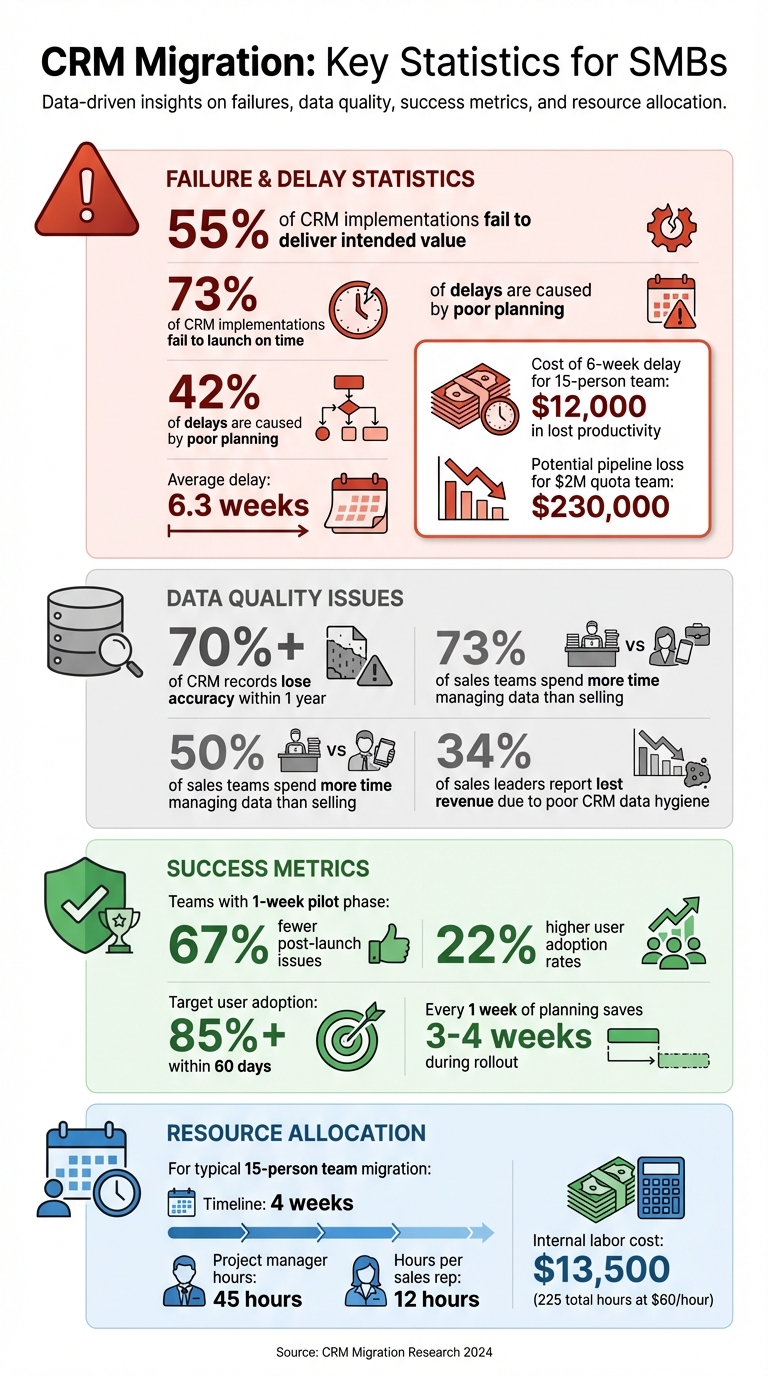
CRM Migration Statistics: Failure Rates, Costs, and Success Metrics for SMBs
How to Plan a Successful CRM Data Migration
Moving your data from spreadsheets to a CRM requires a structured approach to ensure no information is lost during the transition.
sbb-itb-5772723
Challenge 1: Poor Data Quality and Incomplete Records
Clean, organized data is the backbone of any successful CRM migration. Without it, system functionality suffers, team adoption falters, and your shiny new CRM can quickly feel like a burden. Small and medium-sized businesses (SMBs) often face issues like duplicate contacts, outdated fields, inconsistent naming, missing deal details, and incomplete contact information – all of which can create chaos in a new system. These problems not only disrupt workflows but also undermine automation, reporting, and forecasting capabilities.
Here’s a striking fact: 55% of CRM implementations fail to deliver their intended value. Many businesses find themselves considering a new CRM within just a few years, often due to frustrations caused by poor data quality. Even the most advanced AI tools can’t compensate for bad data, as their effectiveness depends entirely on the quality of the input they process.
"If you migrate messy data, you’re importing your old problems into a new tool." – Nutshell
Running a Pre-Migration Data Audit
Before moving to a new CRM, take the time to conduct a thorough data audit. Start by cataloging all record types – companies, contacts, deals, activities, notes, and tasks – and decide what needs to migrate and what can be archived. This process helps you identify inconsistencies, redundancies, and outdated records. Use cleansing and validation techniques to ensure the data you bring into the new system is accurate and useful.
Inactive records older than a year should be archived, and historical interactions should be limited to the past five years. It’s worth noting that over 70% of CRM records lose accuracy within just one year, so migrating stale or irrelevant information only clutters your new system. Create a source catalog to clearly outline which data is essential for your business goals and which can be left behind.
This audit isn’t just about cleanup – it’s about setting a clear foundation for your sales CRM implementation and data migration strategy.
How to Clean and Standardize Data
Data cleaning and standardization are crucial to avoid compounding old issues in your new CRM. Follow these steps:
- Standardize formats: Split full names into first and last names, normalize phone numbers with country prefixes, convert all dates to MM/DD/YYYY, and unify currency fields using ISO codes. For instance, if you have multiple "Lead Source" fields with inconsistent naming, merge them into one standardized list.
- Deduplicate records: Use fuzzy matching techniques and set clear "survivorship rules" to decide which data points to keep. For example, combine company records by creating a compound key using the Company Name and Address, ensuring all contacts link to the correct account ID.
- Assign ownership: To avoid confusion, assign one owner per lead or deal during the cleaning process.
Once your data is cleaned, conduct a pilot migration to test field mapping, relationships, and workflows. Schedule a data freeze – usually over a weekend – to ensure no records are missed during the final transfer. Maintain a detailed change log and keep a pre-migration snapshot so you can roll back if needed.
Challenge 2: Field Mapping and System Compatibility
Clean data is only part of the equation. Field mapping – lining up old fields with their new counterparts – can be a major obstacle. Misaligned structures risk misplacing, corrupting, or even losing data altogether.
Why Field Mapping Is Difficult
Field mapping issues often arise from three main challenges:
- Semantic discrepancies: Data might transfer successfully but land in the wrong fields. For example, a "grand total" field from your old CRM could map to an unrelated column in the new system, leading to inaccurate reports and data inconsistencies.
- Data type mismatches: Problems occur when formats don’t align, such as trying to import a number field into a text field. This can result in import errors or system crashes.
- Complex custom objects: While standard objects like contacts are easier to migrate, custom objects with unique relationships require careful restructuring to avoid errors.
Small to medium businesses (SMBs) comparing CRM options also face challenges with redundant fields, which can clutter the new system if not consolidated during mapping. Additionally, renaming or restructuring fields that trigger automated workflows or connect with third-party tools can disrupt entire business processes.
"A smooth CRM migration comes down to four things: knowing what you’re moving, deciding what you don’t need, understanding what’s connected to your data, and cleaning your database before anything gets imported." – Chris Algiere, Accelant
Field Mapping and Testing Methods
To avoid these pitfalls, follow a structured approach to field mapping and testing:
- Create a detailed mapping sheet: Document every object, property, data type, and their relationships. This serves as a blueprint to identify mismatches and helps you decide which fields to exclude, reducing unnecessary clutter in the new system.
- Run sample imports: Test with small batches of data to identify formatting errors or unexpected field mappings. Multiple rounds of testing can catch semantic issues, ensuring data lands in the correct fields. Ivan Karp, Managing Director at SyncMatters, stresses the importance of this step:
"Running multiple rounds of data migration tests, especially when dealing with lots of data, helps catch these sneaky semantics issues before they cause bigger headaches".
- Schedule controlled downtime: Plan specific blocks of downtime to ensure no active changes occur in either CRM during migration. This minimizes risks and ensures data integrity.
- Maintain backups and a rollback plan: Periodic backups provide a safety net, allowing you to revert to a previous state if something goes wrong.
Challenge 3: Low Team Adoption and Involvement
One of the biggest hurdles in CRM implementation is getting the team to actually use it. Often, the issue isn’t a lack of training – it’s that the system doesn’t align with how people prefer to work.
Sales reps, for example, may abandon the CRM if it feels clunky or requires too many steps to complete simple tasks. Instead, they might fall back on spreadsheets or notebooks. As Simone Morgan from Nutshell explains:
"Avoidance usually isn’t a discipline problem; it’s a usability problem. If reps feel like every update takes too many clicks, they’ll do the minimum required (or skip it entirely)".
Signs of poor adoption include pipeline stages that rarely get updated, deal values that are inconsistent, or managers needing to ask for status updates outside the CRM. This resistance highlights the importance of involving the team from the beginning.
Getting Teams Involved in the Migration Process
Forcing a CRM onto your team without their input is a recipe for failure. To secure buy-in, involve end-users early in the process – during selection, configuration, and workflow design. Allow team members to test the system and confirm that it fits their daily routines. Keep the decision-making group small to avoid delays, but make sure it includes representatives from different departments.
Training should focus on practical, everyday tasks like logging calls and updating deal stages. Create "quick wins" by introducing features that provide immediate value, such as automated follow-up reminders or simplified pipeline views. This helps users associate the CRM with progress rather than extra administrative work. Setting clear minimum usage standards and celebrating early successes during the first week can also build momentum.
Reducing Admin Work to Increase Adoption
A staggering 50% of sales teams spend more time managing data than selling. On top of that, 34% of sales leaders report that poor CRM data hygiene leads to lost revenue. The solution isn’t to push reps harder – it’s to make the system easier to use.
Here are some practical ways to cut down on admin work:
- Use dropdown menus instead of open text fields to reduce errors and standardize data entry.
- Make only the most critical fields "required" to avoid overwhelming users.
- Automate routine tasks like logging calls, tracking emails, and sending follow-up reminders.
To ease the transition, roll out the CRM in phases. Start with a small pilot group to identify pain points before launching it company-wide. Introduce advanced features gradually to prevent overwhelming the team. During the first few months, set up "office hours" where users can ask questions and get hands-on support.
When reps see the CRM as a tool that makes their job easier – not just another layer of admin – they’ll naturally adopt it. Tools like Teamgate CRM, designed with user-friendly workflows and minimal busywork, help teams embrace the system by simplifying processes and reducing friction.
Addressing user resistance is just as critical as preparing the data and system itself. A CRM that fits seamlessly into real-world workflows ensures teams stay engaged and committed.
Challenge 4: Limited Resources and Poor Planning
Small and medium-sized businesses (SMBs) often underestimate the effort involved in CRM migration. Statistics show that 73% of CRM implementations fail to launch on time, with poor planning being the main culprit in 42% of these delays. On average, migrations are delayed by 6.3 weeks, which can cost a 15-person sales team around $12,000 in lost productivity and extended licensing fees.
The issue isn’t just financial – it’s also about time and manpower. Delays disrupt data collection and diminish access to actionable insights. When top-performing sales reps are diverted to manage the transition, the opportunity cost grows quickly. SMBs frequently overlook hidden expenses such as dual licensing costs and the time-consuming process of cleaning up data.
A lack of planning can stretch out the migration process, frustrating teams and slowing adoption. Amer Wilson from Rolustech emphasizes the importance of preparation:
"A CRM migration is not just a technological change but an opportunity to enhance your customer relationships and streamline your operations".
To achieve this, realistic expectations and a well-structured timeline are essential.
Building a Realistic CRM Migration Plan
For SMBs with teams of 10–30 sales reps, a 4-week migration timeline is ideal. This timeline breaks down as follows:
- Week 1: Planning and data audit
- Week 2: System setup
- Week 3: Pilot testing
- Week 4: Rollout and training
This approach ensures that 60% of the effort is concentrated in the first two weeks, allowing for a smoother rollout.
Resource allocation is another key factor. For a typical 15-person team, plan for 45 hours of work from a project manager and 12 hours per sales rep over the month. At an average rate of $60 per hour, this results in internal labor costs of roughly $13,500 (225 total hours). Before finalizing the migration, conduct an audit to archive inactive records.
To avoid over-complicating the system, limit yourself to 5–6 sales stages and 10–15 custom fields. Start with integrations that directly impact revenue, like email and calendar syncing, and hold off on adding less critical tools. It’s also wise to set aside a reserve fund for unexpected issues to avoid project delays. Finally, establish a rollback plan with regular backups in case reverting to the old system becomes necessary.
Using Phased Migration to Reduce Risk
Rather than migrating everything at once, consider a staged approach. Begin with a pilot migration involving a small sample – such as 25 customers and 25 active deals – to test workflows and ensure accurate reporting before rolling out the full system. Teams that conduct a 1-week pilot phase experience 67% fewer post-launch issues and see 22% higher user adoption rates.
Schedule the final migration during off-peak times, steering clear of quarter-end or major product launches. Implement a data freeze window, typically over a weekend, to prevent new records from being created in the old system during the final cutover. Once the new system is live, keep the old CRM in read-only mode for 1–2 weeks so reps can reference historical data without duplicating efforts.
When forming your pilot group, include at least one skeptical or resistant team member. If the system works for them, it’s likely to work for the rest of the team. This phased approach not only reduces risks but also ensures that your team is better prepared for the challenges that come with CRM adoption.
Challenge 5: Insufficient Testing and Validation
Thorough testing is essential to ensure data integrity during CRM migration. Skipping or rushing this step can lead to severe consequences, such as data loss, corruption, and misinterpreted values. These issues not only compromise the migration process but can also erode your team’s trust in the new system, resulting in poor business decisions and a diminished customer experience.
Statistics reveal that 55% of CRM implementations fail to meet expectations, with inadequate testing being a major factor. Post-launch challenges often include missing activity histories, duplicate records reappearing through integrations, and reports that no longer match prior benchmarks. Additionally, security vulnerabilities can arise due to misconfigured permissions in the new CRM. As highlighted by IntegrateIQ:
"When handled poorly, it [CRM migration] creates long-term friction and undermines confidence in the system".
Chris Algiere of Accelant stresses the unpredictable nature of data imports:
"You never know what will happen until you start the import. It will be quicker and safer to begin with a small sample of data to ensure everything is working as expected".
Testing Methods to Ensure Data Accuracy
To mitigate risks, always conduct sandbox testing before going live. This includes validating fields, workflows, and integrations. Start with a small pilot test to confirm field mappings, workflows, and relationships between records, such as Company to Contact to Deal.
Test integrations to ensure smooth syncing of emails, calendars, and web forms. Use automated scripts to compare record counts and verify key field accuracy between the old and new systems. Additionally, validate user access permissions to confirm that security roles are properly configured.
Pre-Launch Validation Checklist
Before finalizing the migration, follow this checklist to ensure everything is in place:
- Cross-check record counts between the old and new systems to confirm accuracy.
- Verify that required fields are populated correctly and that deals are in the appropriate pipeline stages.
- Test user access across roles and departments to ensure everyone can access the necessary information.
- Document all integrations and automations to confirm they are rebuilt or transferred correctly.
- Schedule a data freeze over a weekend to prevent new record creation during the final cutover, and communicate this downtime clearly to all teams.
- Back up all exports to safeguard against potential migration failures.
- Keep the old CRM in read-only mode for 2–4 weeks to maintain continuity while the new system stabilizes.
Challenge 6: Lack of Leadership Support
CRM migration efforts can falter without strong leadership backing. Surprisingly, 55% of CRM implementations fail to meet their goals. When executives treat the new CRM as optional rather than essential, it sets a tone that trickles down to the entire team. Many businesses even find themselves switching systems within a few years due to poor outcomes, often stemming from a lack of leadership commitment from the outset.
Getting Executive Buy-In
The first step in securing leadership support is appointing an Executive Sponsor – a high-ranking leader, such as a CEO or VP of Sales, who can align the CRM migration with the company’s growth objectives over the next 12–24 months. Unlike a project manager who handles day-to-day logistics, the Executive Sponsor focuses on strategic oversight and ensures the necessary resources are available.
Kick off the migration process with a dedicated executive meeting to highlight the business-critical need for the transition. Avoid scheduling the launch during high-pressure times, like quarter-end, to ensure focus. Emphasize key outcomes such as better forecast accuracy, improved revenue predictability, and reduced administrative tasks. This approach signals that CRM adoption is not optional but a strategic priority.
Using a CRM like Teamgate, which prioritizes leadership visibility, structured follow-ups, and streamlined workflows, can further strengthen these efforts by providing actionable insights in real time.
Setting Accountability and Success Metrics
Once leadership is on board, the next step is to establish clear accountability and measurable success metrics. Start by defining usage standards before the migration begins. For instance, every active deal should have an assigned owner, value, next step, and close date. These standards make CRM usage a formal part of performance evaluations.
Develop a Success Metrics Matrix to track progress against your business objectives. For example, set goals such as achieving 85% user adoption (measured by team members logging in three or more times weekly) within the first 60 days. Below are some key metrics to consider:
| Metric | 60-Day Target | How to Measure |
|---|---|---|
| User Adoption | 85%+ active users | % of team logging in 3+ times/week |
| Data Quality | 95%+ complete records | % of contacts with email, phone, and company fields |
| Forecast Accuracy | 90%+ | Variance between actual revenue and forecasted revenue |
| Sales Velocity | +20% | Average number of days from lead creation to close |
It’s important to start monitoring adoption immediately after launch. If activity levels fall short by Day 26, intervene with targeted actions. Establish feedback channels, such as a Slack group or feedback forms, to quickly identify and resolve obstacles during the first 60–90 days. Hosting office hours during this period can also help address team concerns in real time.
Leadership should also address low adoption rates directly. One-on-one check-ins or manager-led discussions can be effective in bringing lagging team members up to speed. Finally, tying CRM usage to performance reviews and compensation ensures it becomes an integral part of daily operations. With leadership actively involved, your CRM migration plan stands on solid ground, ready for execution.
How to Execute a Successful CRM Migration
CRM migrations often face delays, with 73% of implementations running behind schedule, costing a typical 15-person team around $12,000 in lost productivity. To avoid these setbacks, preparation and disciplined follow-through are critical. Below is a step-by-step guide to help ensure a smooth migration process.
Pre-Migration Preparation Steps
Start by conducting a thorough data inventory. Identify the records and fields essential for your new CRM and decide what to migrate versus what to archive. This step helps create a cleaner, more manageable system.
Next, focus on data quality. Remove duplicates, fix inaccuracies, and standardize naming conventions for consistency – such as uniform phone formats and company names. Develop a detailed field mapping document to ensure all fields from your old CRM correctly align with the new one, covering picklist values, ownership rules, and required fields. This minimizes the risk of data ending up in the wrong place.
To reduce post-launch issues, run a one-week pilot phase. Test migrations with a small sample – like 25 customers and 25 deals – to confirm that record relationships remain intact and reporting functions as expected. During the final cutover, define a brief "data freeze window" to prevent discrepancies by halting new deal entries in the old system.
A phased migration approach works best for small and midsize businesses (SMBs). Begin with core elements like Leads, Contacts, Accounts, and Deals, and limit automations to 3–5 key rules. This "Minimum Viable CRM" strategy ensures essential workflows are operational without overwhelming users. Time your migration to avoid high-stress periods, like quarter-end or major product launches. As Revenue Velocity Lab notes:
"For every week of proper planning, teams save 3–4 weeks during rollout".
Training and Monitoring After Migration
Once the migration is complete, focus on training and monitoring to ensure the team adopts the new system effectively. Training should center on practical, everyday workflows. Instead of detailing every button, teach your team how to handle their daily tasks – like logging calls, creating deals, and updating next steps. Conduct a 2.5-hour group session on core workflows, followed by 30-minute one-on-one sessions for personalized dashboard setup. Supplement this with a one-page "Quick Start Guide" and a 5–10 minute video walkthrough for easy reference.
Monitor usage metrics closely during the first week. If a team member hasn’t logged in by day three, reach out with a friendly check-in to offer assistance. Hold brief daily stand-ups to share quick wins and resolve blockers in real time. Create a dedicated Slack channel for feedback, and prioritize addressing the top three user requests weekly – this responsiveness builds trust and encourages adoption.
Successful SMB rollouts aim for 85%+ user adoption within the first 60 days. Track metrics like daily active users, email logging rates, deal updates, and data completeness to identify and address friction points early. Keep your old CRM in read-only mode for a week post-launch, allowing reps to reference historical data as they adjust to the new system.
Using a CRM like Teamgate can simplify this process. Designed with rep-first workflows and minimal admin overhead, Teamgate supports structured stages and consistent follow-ups, helping reps focus on actions that move deals forward while reducing the learning curve. This clarity and structure ensure both reps and managers can trust the system from day one.
Conclusion: Turning CRM Migration Challenges into Growth Opportunities
CRM migration offers a chance to create a revenue system that supports steady and predictable growth. Despite 55% of CRM implementations failing to meet expectations, success often hinges on careful planning, thorough testing, and active team participation.
For example, a sales team with a US$2M quota could lose US$230,000 in pipeline opportunities due to a 6-week delay. Conversely, teams that include a 1-week pilot testing phase experience 67% fewer post-launch issues and see a 22% increase in user adoption rates. Effective planning can also cut rollout timelines significantly, with each week of planning reducing implementation time by 3 to 4 weeks.
Migration also highlights hidden problems like poor data quality, unclear workflows, and inconsistent follow-up – issues that can quietly erode revenue. Tackling these through steps like data audits, streamlined sales stages, and role-based training ensures that every deal has a clear next step, follow-ups become systematic, and leadership can forecast with confidence.
Achieving 85% or higher user adoption within 60 days and maintaining clean, reliable pipeline data are key indicators of success. When your CRM supports reps by simplifying their work instead of adding to it, adoption happens naturally. With clear ownership of deals and defined next steps, opportunities stop slipping through the cracks. This approach not only sharpens pipeline accuracy but also increases team accountability and engagement. At this point, your CRM evolves from a basic tracking tool into a system that actively safeguards and drives revenue growth.
FAQs
What data should we migrate vs. archive?
When moving to a new CRM, prioritize transferring the most important data – such as contacts, companies, deals, and activity histories. These are critical for effective sales and customer management. To keep things streamlined, archive old, duplicate, or unnecessary records (like inactive accounts) to avoid clutter and enhance the system’s efficiency. Taking the time to clean and organize your data beforehand will make the migration process smoother and help you start with a well-structured and easy-to-manage database in your new CRM.
How do we avoid breaking integrations and automations during migration?
To avoid disruptions during a CRM migration, begin by thoroughly mapping out all current integrations and automations, such as email systems, calendars, and billing tools. Confirm that these connections are either preserved or properly reconfigured during the process. After transferring your data, test these automations and integrations in a staging environment to catch and resolve any issues before going live. Keep clear and ongoing communication with your technical team to quickly address challenges and ensure the transition goes smoothly.
What should we measure in the first 60 days to ensure adoption?
In the first 60 days, prioritize tracking activity levels, deal health, and next-step coverage. These metrics are crucial for confirming that the CRM is being used consistently and effectively. They also help identify any problem areas early on, setting the stage for lasting success and consistent usage.






