

Small sales teams don’t need more people – they need smarter tools. A CRM can help organize deals, automate follow-ups, and centralize communication, saving time and boosting efficiency. For example, a 5-person agency in Spokane cut their sales cycle by 43% and doubled client intake within 30 days of switching to a CRM. Here’s what you should look for:
- Pipeline Management: Track deals visually, customize stages, and get real-time updates to avoid bottlenecks.
- Email Integration: Sync Gmail/Outlook, centralize conversations, and use templates to save time.
- Workflow Automation: Automate repetitive tasks like lead follow-ups, reminders, and data entry.
- Sales Insights: Use dashboards and custom reports to make data-driven decisions.
- Mobile CRM: Access customer data and manage tasks on the go.
- SmartDialer: Make calls directly from the CRM, log outcomes, and schedule follow-ups automatically.
- Multi-Currency Support: Simplify international sales with automated currency conversions and consistent pricing.
These features streamline operations, reduce manual work, and let your team focus on closing deals. Whether you’re managing five reps or scaling to twenty, the right CRM ensures growth without chaos.
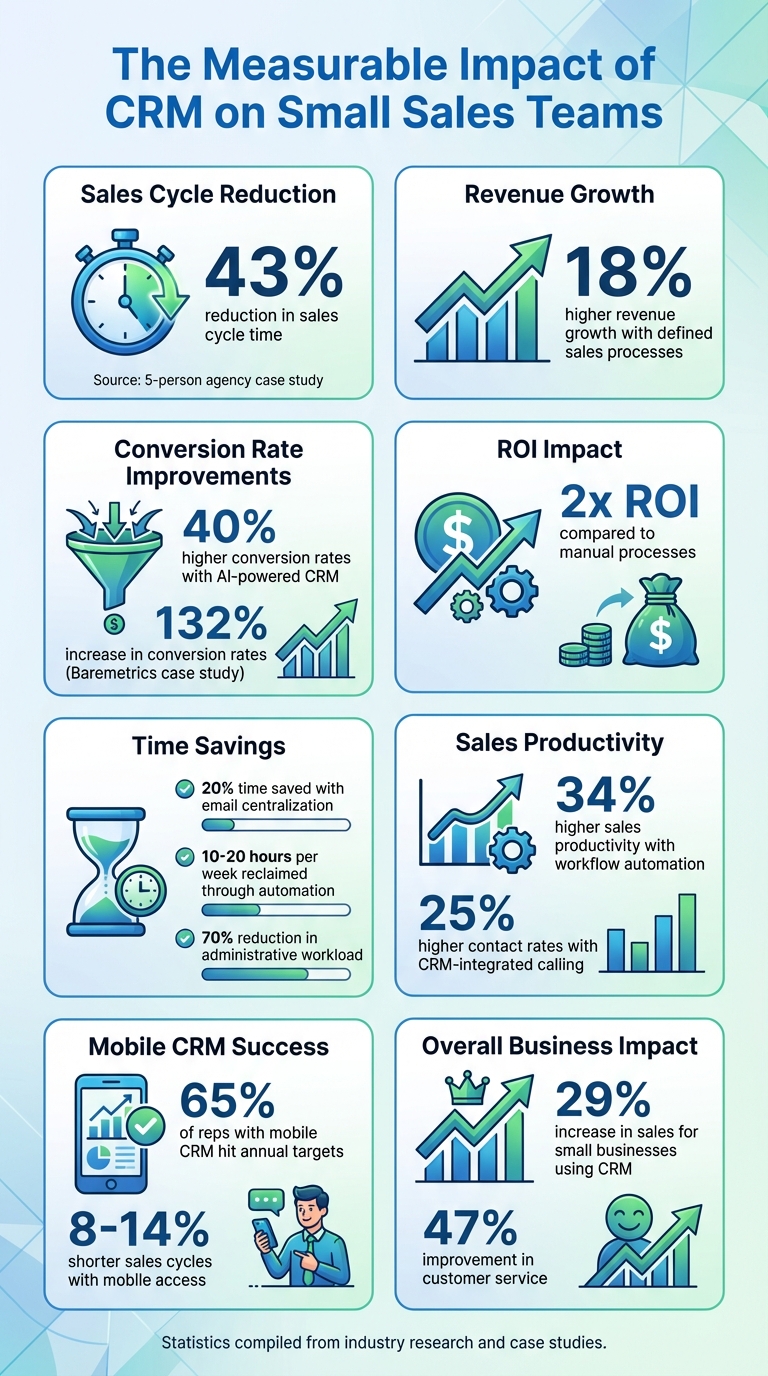
CRM Impact Statistics: Sales Growth and Productivity Gains for Small Teams
Pipeline Management: Track and Organize Your Deals
When your team is juggling more deals than ever, relying on manual tracking just doesn’t cut it. Pipeline management provides a clear, structured way to view every opportunity at a glance – its current stage, who’s responsible for it, and what needs to happen next. Without this kind of visibility, high-value deals can get stuck while your team focuses on less critical leads.
Think of a visual pipeline as your sales command center. It lays out all open deals by stage – like New Lead, Qualified, Proposal Sent, Negotiation, and Closed – making it easy to spot what needs attention. Research shows that companies with well-defined sales processes see up to 18% higher revenue growth compared to those without them. For smaller teams, that can be the difference between hitting your quarterly goals or falling short. Adapting your pipeline to fit your evolving process is key to staying competitive.
Customizable Pipelines That Match Your Workflow
As your business grows and changes, rigid one-size-fits-all pipelines can slow you down. That’s why Teamgate CRM lets you create multiple pipelines tailored to your needs – whether it’s one for new business, another for renewals, or even separate pipelines for enterprise deals. Each pipeline can be customized with its own stages, fields, and reporting, so your team isn’t wasting time sifting through irrelevant data.
You can add fields that make sense for your business, like deal size in USD, expected close dates, decision-maker names, or the likelihood of closing. Companies using AI-powered CRM pipelines report 40% higher conversion rates and more than double the ROI compared to those that don’t. This kind of flexibility ensures your pipeline works for you, not the other way around.
Real-Time Deal Tracking and Workflow Clarity
Simply knowing a deal is “in progress” doesn’t provide enough insight. You need to know the latest contact, the next scheduled action, and whether the deal is stalling. With Teamgate CRM, you get real-time updates on every deal’s status, with all emails, calls, and tasks linked directly to the opportunity. Color-coded indicators for closing dates highlight overdue deals, so nothing falls through the cracks.
This level of clarity drives immediate action.
“With in-depth insights and metrics, Teamgate truly is the only CRM designed specifically for SaaS teams. We were up and running within days and immediately increased productivity and efficiency of our sales teams resulting in a 132% increase in conversion rates!” – Allison Barkley, Director of Operations, Baremetrics
Transparency like this not only helps managers focus their coaching but also allows reps to zero in on deals they can close right now. When everyone has access to the full picture – not just their own slice – your team works smarter, avoids wasted effort, and moves deals through the pipeline faster.
Email Integration: Centralize Your Customer Communication
When businesses grow quickly, customer emails can easily get lost in scattered inboxes and endless email threads. Email integration solves this problem by bringing all those conversations into a single, organized location – your CRM. This way, your entire team can access the full communication history without wasting time digging through multiple inboxes.
Teamgate CRM makes this process seamless by integrating with Gmail and Outlook, automatically syncing emails to the appropriate contact or deal. For instance, if a sales rep emails a prospect about pricing, the entire email thread is automatically logged on the contact’s timeline, making it accessible to the whole team. This centralized system can save salespeople up to 20% of their time.
Teamgate also offers a CC/BCC solution that forwards emails and attaches them to the correct contact card. Even better, when a lead turns into a deal, the full communication history moves effortlessly to the new deal card, ensuring that no details are lost during the transition. This streamlined setup paves the way for advanced features like an in-CRM Sales Inbox and customizable email templates.
Keep All Email Communication in One Place
Taking centralization a step further, Teamgate’s Sales Inbox feature – available with the Team and Growth plans – allows reps to send and receive emails directly within the CRM. No need to juggle multiple tools. Businesses using AI-driven CRM tools with centralized communication report a 40% increase in conversion rates. This visibility not only helps new team members get up to speed faster but also enables managers to offer better coaching. Plus, it ensures that critical context is always available, even if a rep is out of the office or leaves the company.
Save Time With Email Templates
Teamgate’s email templates are a time-saver for busy sales teams. These templates let you create reusable messages for frequent scenarios, like outreach emails, demo follow-ups, or proposal submissions. You can still personalize them using merge tags like {first_name} and {company_name}. Teamgate estimates that using templates can save up to 20% of your time, cutting down on repetitive tasks. Templates also promote consistency across your team, ensuring everyone communicates professionally and includes key details. Best of all, every templated email is automatically logged on the relevant lead or deal card, keeping your communication history intact and organized.
Workflow Automation: Save Time on Repetitive Tasks
When your sales team is small but growing, every hour matters. Teamgate CRM takes the hassle out of repetitive tasks by automating data entry, follow-ups, and lead assignments, giving your team more time to focus on closing deals.
For example, when a new lead fills out your website form, Teamgate automatically creates a contact, assigns it to a sales rep, and schedules a follow-up within 24 hours. It even attaches email conversations to the correct lead cards and transfers the full communication history when a lead converts – no manual data migration needed. These features help lay a solid foundation for streamlining your sales process.
The results speak for themselves. Companies using AI-powered CRM automation report 40% higher conversion rates and achieve more than double the ROI compared to those sticking with manual processes. One business even cut its administrative workload by 70%.
Automate Follow-Ups, Data Entry, and Reminders
You can take this even further by automating follow-ups, reminders, and data entry. Set up automatic follow-up emails, task reminders via email or SMS, and let the CRM handle lead scoring without any manual effort. Syncing with Google or Outlook calendars ensures meetings and reminders are logged automatically. These automations ensure no potential customer is overlooked.
Set Up Trigger-Based Workflows
Trigger-based workflows take automation to the next level. They can send follow-up emails, create call tasks, notify team members, or update records when specific events occur – like a lead status change or deal inactivity. For instance, if a deal sits idle for too long, the system can automatically create a follow-up task and alert the owner to re-engage.
By implementing standardized workflows, businesses can reclaim 10–20 hours per week. These automation features are available in Teamgate’s Team and Growth plans, and you can expand their reach by integrating with tools like Zapier or Make.com to connect with over 3,000 other apps.
“Utilizing sales insights we have been able to conduct targeted experiments, enabling Packagecloud to increase engagement rates by 18% through the refinement of scripts and lead targeting.” – Krish Sivanathan, Director of Operations, Packagecloud
Start small with high-impact workflows, such as automating new lead follow-ups or reminders after meetings. As your team grows, these automations will grow with you, keeping your sales process efficient without needing to add more team members.
Sales Insights and Reporting: Make Data-Driven Decisions
As your sales team grows, relying on intuition alone just doesn’t cut it anymore. To truly understand what’s working, where deals are stalling, and how close you are to hitting those revenue goals, you need hard data. In fact, research from McKinsey reveals that using AI-powered CRM analytics can boost conversion rates by 40% and double ROI.
By combining efficient pipeline management with streamlined communication, data-driven insights allow for smarter, more strategic decisions. Teamgate CRM takes your sales data and turns it into actionable insights through visual dashboards and custom reports. With real-time updates on your pipeline, team performance, and revenue forecasts (presented in USD and MM/DD/YYYY date formats), you’ll have everything you need to fine-tune your strategy. This approach ensures that every part of your sales process – whether it’s tracking the pipeline or integrating email – is continuously improving.
Take Allison Barkley from Baremetrics, for example. By embracing data-driven strategies, she achieved a 132% increase in conversion rates.
Monitor Performance With Sales Dashboards
Teamgate’s dashboards make it easy to stay on top of the numbers that matter most. Instantly see metrics like pipeline value, win rates, deal velocity, and team activity. Spot deals that need immediate attention, track individual reps’ performance against their quotas, and identify bottlenecks before they become major issues. For example, if win ratios start dropping at any stage, you’ll see it right away and can act quickly to fix the problem.
Create Custom Reports for Detailed Analysis
Dashboards are great for quick insights, but sometimes you need a deeper dive. That’s where Teamgate’s custom reports come in. With advanced filtering and Excel export capabilities, you can segment data by rep, deal stage, lead source, product line, or time period to answer your pressing questions. Analyze metrics like lead source win rates, sales stage conversions, and revenue forecasts to make proactive, informed decisions.
For businesses looking for even deeper insights, Teamgate’s Growth plan ($59.90/user/month) offers advanced analytics and lead scoring, giving you the tools to refine your strategy and drive revenue growth.
sbb-itb-5772723
Mobile CRM: Manage Sales From Anywhere
Sales teams are often on the go, meeting clients and closing deals outside the office. That’s why having a mobile CRM is no longer a luxury – it’s a necessity. Did you know that 65% of sales reps with mobile access to their CRM system hit their annual sales targets? Plus, mobile CRM tools can help shorten sales cycles by 8% to 14%.
Teamgate’s mobile app brings the full power of its desktop CRM to your pocket. Available for both Android and iOS, the app ensures you can update deal details right after a client meeting or review customer histories before your next pitch. Everything syncs automatically, so there’s no need to wait until you’re back at your desk to log key information.
Access Customer Data Anytime, Anywhere
With the Teamgate mobile app, your entire sales database is just a tap away. Whether you need to check a customer’s history, review deal specifics, or pull up contact details, it’s all there. The app even includes an integrated map to pinpoint client locations, making it easy to spot nearby opportunities and get directions to your next meeting.
This location-based feature is a game-changer for field sales teams. Imagine wrapping up an appointment and quickly identifying other prospects in the area to fill your schedule more efficiently. You can also use the app’s in-app dialer to call leads, send emails, or update meeting notes – all without juggling multiple tools.
Stay on Top of Tasks With Mobile Notifications
Following up on time can make or break a deal. Teamgate’s mobile app ensures you never miss a beat by letting you manage tasks, schedule meetings, and set reminders on the fly. You can even configure automatic alerts via email or SMS, so important follow-ups don’t slip through the cracks while you’re on the road.
After meeting with a client, you can immediately log outcomes, update deal stages, and add notes – all from your phone. This real-time updating keeps your entire team on the same page and minimizes errors caused by outdated information. The app’s efficiency perfectly complements the broader CRM strategy, helping your team stay organized and productive, no matter where they are.
Multi-Currency Support and Product Catalog: Expand Into New Markets
Once your team has a handle on domestic sales, stepping into international markets requires tools that can simplify global transactions. As your sales team starts closing deals outside the U.S., managing multiple currencies and maintaining consistent pricing across regions can quickly become a headache. Studies show that businesses dealing with multiple currencies without proper systems spend 30–40% more time on reconciliation and reporting due to manual conversions and spreadsheet reliance. That’s time your team could use for more productive tasks.
Teamgate tackles these challenges with its multi-currency support and a robust product catalog. Available in the Growth plan ($59.90 per user/month), these features allow you to quote in your customer’s local currency while keeping forecasts and reports in USD. Combined with pipeline and automation tools, these capabilities ensure smooth transitions from domestic to international sales.
Handle International Deals With Multi-Currency Support
Teamgate enables you to set USD as your base currency and add only the currencies you need – whether it’s EUR, GBP, CAD, or AUD. For example, when a rep creates a deal with a prospect in London, they can simply select GBP as the deal currency. The system automatically converts the amount to USD, giving leadership a consistent revenue view.
This automation eliminates the need for manual calculations, reducing errors and saving time. McKinsey reports that companies with centrally managed, consistent pricing see margin improvements of 3–8% compared to those using decentralized pricing methods. Teamgate also lets you configure exchange rates and update them on a set schedule – weekly or monthly – so your reports remain accurate. This ensures smooth commission calculations and reliable investor reporting.
Maintain Consistent Pricing With a Product Catalog
Teamgate’s product catalog acts as a single source of truth for your offerings. It lets you list products and services with clear names, SKU codes, descriptions, and standard USD prices. When reps add products to deals, the system automatically fills in accurate pricing, eliminating guesswork and outdated information.
“Catalogue your merchandise or services offered by you and easily attach them to your deals. Add SKU codes, descriptions, prime cost and unit price in multi-currencies!” – Teamgate CRM Documentation
For international deals, you can either set region-specific pricing or let Teamgate convert your USD list prices based on the deal’s currency. For instance, if your software plan costs $99/month in the catalog, a rep working on a deal in EUR can apply a predefined €89 price or use the system’s current exchange rate. This keeps your core product information centralized while allowing flexibility for local markets.
A centralized product catalog also boosts quote accuracy by 15–20% and speeds up deal turnaround times, as reps work from pre-approved products rather than starting from scratch. As your team grows, the product catalog provides valuable insights into which products generate the most revenue in specific regions. You can filter by product, currency, or market to refine your strategy and focus on what drives results.
SmartDialer: Make Calls Directly From Your CRM
When your sales team has to bounce between a CRM, a phone app, and note-taking software, efficiency takes a hit. Studies reveal that switching between apps can cost sales teams 20–30 minutes each day – time that could be better spent closing deals. For small teams growing from 5 to 20 members, every minute matters. That’s where Teamgate’s SmartDialer steps in. Available with the Team plan ($39.90 per user/month), this feature simplifies your team’s communication workflow.
SmartDialer is an in-browser calling tool that allows sales reps to make and receive calls without ever leaving the CRM. By simply clicking on a phone number in a contact or deal record, reps can instantly connect via VoIP or carrier services like Twilio. This eliminates the delay of manual dialing and provides all the context – email history, deal notes, and past calls – on the same screen during the conversation.
“SmartDialer™ enables you to dial directly from your CRM, reducing dial lag and powering your agents to spend more time closing deals and generating leads.” – Teamgate
The feature also includes intelligent call routing. When a customer calls back, the system automatically identifies the caller and directs the call to the assigned representative. This ensures that the right person handles the conversation, avoiding unnecessary transfers or delays. For teams managing large volumes of leads, this creates a smoother and more personalized experience for customers.
Call Customers Without Switching Tools
One of SmartDialer’s standout features is its click-to-call functionality, which saves 5–10 minutes per call. Over the course of a 30-call day, that adds up to reclaiming as much as 2.5 hours for actual selling. Teams using CRM-integrated calling report 25% higher contact rates compared to manual dialing, as reps can move through their call lists more efficiently and maintain momentum.
Setting up SmartDialer is straightforward. Log into Teamgate’s admin settings, enable telephony under Integrations, and connect your provider by entering API credentials. A free trial is available to test it out. Assign phone numbers to users, try click-to-call with a demo contact, and you’re good to go. The feature works on both desktop and mobile apps, so field reps can make calls from their smartphones with the same one-click ease.
For growing teams, SmartDialer also offers customizable call dispositions – labels like “Interested”, “No Answer”, or “Callback Requested” – to categorize call outcomes. When a rep ends a call, they select a disposition, and the system automatically logs the result. This keeps your pipeline data organized and helps managers identify trends, such as which reps are securing the most “Interested” outcomes.
Track Calls and Schedule Follow-Ups Automatically
SmartDialer ensures that every call is logged in the contact timeline, capturing details like call duration, time, outcome, and rep notes. It also triggers workflows to schedule follow-ups based on call results. Missed calls? No problem. They’re logged and assigned to the responsible contact owner, with instant notifications in the CRM. This ensures no lead falls through the cracks, which is especially important for small teams where every opportunity counts.
For instance, if a call lasts more than two minutes and the disposition is marked as “Interested”, the system can automatically create a task to send a proposal within two days. Teams using this feature report a 40% increase in follow-up rates because the CRM handles scheduling without requiring manual input.
Call recordings and inline notes make it easy for managers to coach their reps and reduce prep time. One SaaS sales team of 10 reps using SmartDialer cut their call prep time from three minutes to just 30 seconds per call by having email history and notes readily available. They saw a 25% boost in contact rates and automated 80% of their follow-ups, helping them scale from $500,000 to $1.2 million in annual recurring revenue in just six months – without adding new hires.
For US-based teams, SmartDialer supports local carriers and VoIP at competitive rates (e.g., $0.01 per minute via Twilio). It also formats US-specific details like dates (MM/DD/YYYY) and phone numbers automatically. This seamless integration ensures that every call not only saves time but also contributes to a more streamlined and data-driven sales process.
Conclusion
After diving into the key CRM features, it’s clear how they contribute to driving sales growth effectively. Scaling a small sales team doesn’t mean hiring more people – it’s about leveraging the right tools. Features like pipeline management keep deals on track, email integration ensures all communications are centralized, workflow automation takes care of repetitive tasks, sales dashboards transform raw data into actionable insights, and mobile access keeps productivity high, no matter where your team works.
These tools don’t just improve local sales processes – they also set the stage for international expansion. Multi-currency support and a product catalog eliminate pricing mistakes and manual calculations, while the SmartDialer enables reps to make calls directly from the CRM, automatically logging conversations and scheduling follow-ups. A great example? In 2024, Krish Sivanathan, Director of Operations at Packagecloud, used Teamgate’s sales insights to refine lead targeting, boosting engagement rates by 18%.
Small businesses using CRM systems report a 29% jump in sales and a 47% improvement in customer service. Teams that automate workflows see up to 34% higher sales productivity by cutting down on repetitive tasks. These results come from centralizing customer data, automating routine tasks, and giving sales reps the tools they need to build stronger customer connections.
Teamgate offers flexible plans, starting with a free Starter plan, while advanced features are available on paid tiers. Plus, you can try it risk-free with a 14-day free trial – no credit card required.
Whether you’re managing a small team of five or scaling up to twenty, the right CRM features can mean the difference between chaotic growth and smooth, controlled expansion. Teamgate simplifies operations, helps your team zero in on high-value opportunities, and ensures consistent communication. This way, you can focus on what truly matters: closing deals and building meaningful customer relationships. By bringing together the essential tools, Teamgate equips small sales teams to grow sustainably and confidently.
FAQs
How do CRM features help small sales teams grow effectively?
CRM tools equip small, growing sales teams with everything they need to manage leads, simplify workflows, and boost revenue – all without adding more people to the team. A centralized contact database keeps every customer and prospect detail in one place. This means team members can quickly access interaction histories, avoid duplicating efforts, and stay on the same page.
Features like pipeline tracking make it easier to visualize deal stages, spot bottlenecks, and prioritize high-value opportunities. The result? Faster deal closures and a healthier sales funnel, even as the workload grows. Meanwhile, automation tools – think task reminders, email follow-ups, and lead scoring – cut down on time-consuming admin work. This allows sales reps to focus on their main job: selling.
On top of that, real-time reporting and analytics transform raw sales data into actionable insights. Leaders can pinpoint what’s working, identify areas that need improvement, and uncover new growth opportunities. Altogether, these tools create a streamlined, scalable system that helps small teams handle more leads, close more deals, and grow efficiently.
How does email integration benefit growing sales teams?
Email integration simplifies communication by syncing every sent and received message directly with your CRM, creating a centralized inbox. This setup allows sales reps to view complete conversation histories without toggling between email platforms and the CRM. Plus, each email is automatically tied to the correct contact, lead, or deal, ensuring smoother collaboration, faster follow-ups, and fewer missed opportunities.
Beyond visibility, email syncing enhances automation and workflow efficiency. Logged emails can automatically trigger tasks, reminders, or email sequences, cutting down on repetitive manual work. This streamlined process keeps sales teams focused on closing deals, increasing productivity, and delivering a smoother experience for both reps and customers.
How can workflow automation improve sales team efficiency?
Workflow automation takes the hassle out of repetitive tasks for sales teams, freeing up valuable time and boosting efficiency. Think about tasks like capturing leads, sending follow-up emails, setting task reminders, or moving deals along the pipeline – all of these can be handled automatically based on preset triggers.
By cutting down on manual work, automation lets sales reps zero in on what really matters: building relationships and closing deals. For small but growing teams, this shift can make a huge difference, helping them scale their operations without overwhelming their resources.






