

Your sales pipeline might look full, but if deals are stalling, follow-ups are missed, and forecasts are unreliable, you’re losing revenue. The root cause? Poor pipeline hygiene. Clean data and disciplined processes can shorten sales cycles, improve forecasting, and prevent missed opportunities.
Here’s how to fix it:
- Define a clear sales process with deal stages: Ensure every stage has specific entry/exit criteria and mandatory next steps.
- Track overdue tasks: Missed follow-ups hurt sales; automate reminders to keep deals moving.
- Log all activities: Centralize emails, calls, and meetings to maintain a complete deal history.
- Use dashboards: Spot stalled deals and bottlenecks with visual insights.
- Automate pipeline management: Set alerts for aging deals and schedule regular audits.
Teamgate helps sales teams follow structured processes, track real-time activity, and maintain pipeline discipline – without turning CRM into a full-time admin job. A clean pipeline isn’t just about organization; it’s the key to predictable revenue and better coaching.
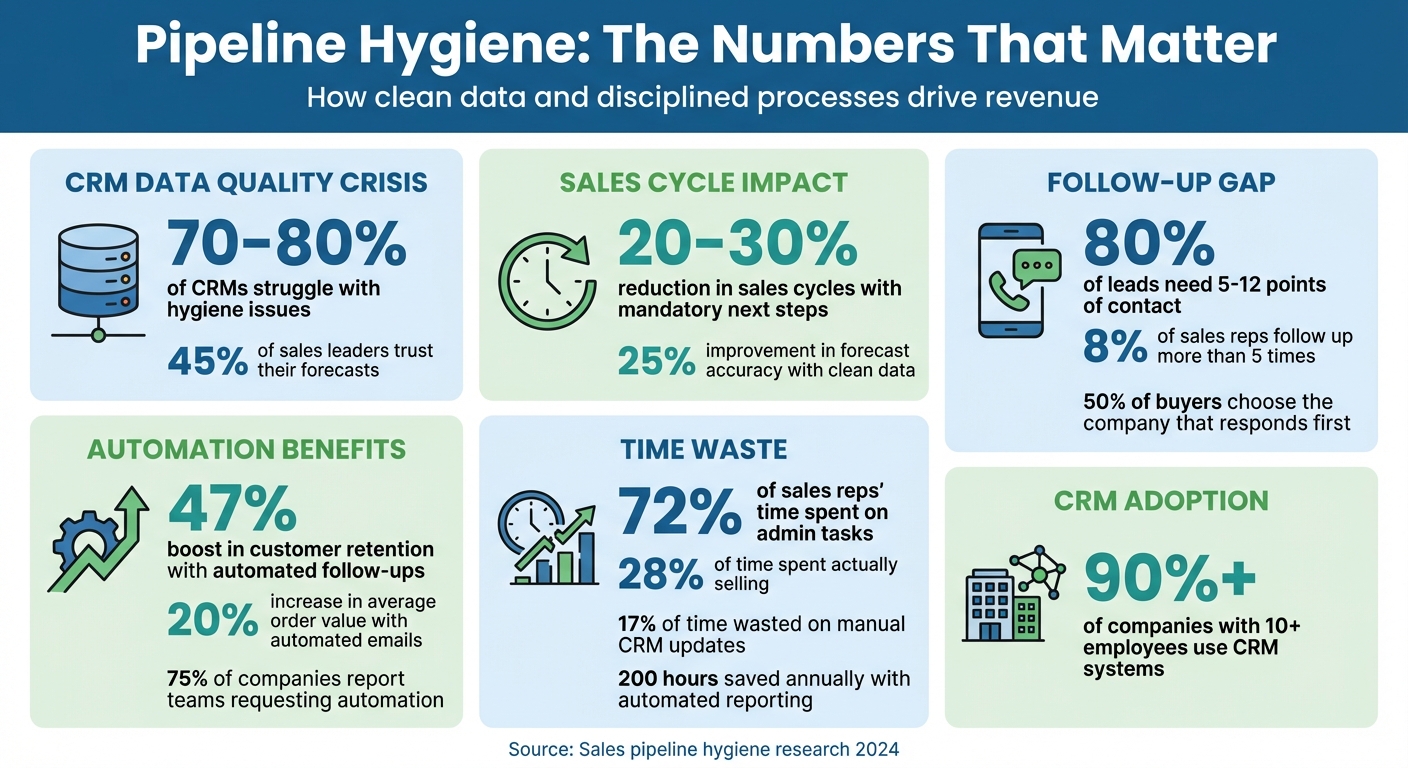
Pipeline Hygiene Statistics: Impact on Sales Performance and Revenue
Fix Pipeline (Mis)Management: Tips from Top Experts
sbb-itb-5772723
Define Clear Deal Stages and Required Next Steps
When your pipeline lacks standardized stages, it becomes an unreliable guessing game. Deals can sit in vague categories like "In Progress" for weeks, making it nearly impossible for managers to pinpoint real opportunities. In fact, 70-80% of CRMs struggle with hygiene issues due to undefined stages and missing validation rules. Setting clear definitions and requiring specific actions at each stage creates the structure needed for a disciplined and effective pipeline.
Every deal must have a clearly defined next step. Leaving next steps optional allows opportunities to slip through the cracks. Teams that enforce mandatory next actions often see sales cycles reduced by 20-30% because follow-ups become part of the process, not a last-minute scramble. The difference between a well-maintained pipeline and one that stalls lies in ensuring no deal moves forward without a clear next step.
Teamgate CRM simplifies this process by making it impossible to overlook missing next steps. Its Visual Deal Pipeline uses color-coded alerts to highlight deals that are overdue or lack a defined next action, bringing stalled opportunities to the forefront. Real-time tracking also shows how long each deal has been in its current stage, giving managers the tools they need to coach their teams more effectively.
Use Consistent Stage Definitions
Clear, objective criteria for each stage are essential for keeping your pipeline organized. For example, "Prospecting" might require initial contact, "Qualified" could mean a scheduled demo with a confirmed budget, and "Proposal" might indicate that a formal quote has been sent. By defining specific entry and exit requirements for each stage, your team moves from subjective interpretation to consistent execution. This approach eliminates confusion and ensures that reports accurately reflect deal progress.
During onboarding, train your team on these stage definitions using real-world examples of effective and poor data entry. Assign a data steward to conduct regular audits and monitor metrics like stage completion rates. This ensures everyone follows the same process, leading to more accurate forecasting and smoother operations.
Require a Next Step for Every Deal
Make it a rule that every deal in your CRM must include a next step. Validation rules should block deals from advancing without scheduling a specific action, such as a call, demo, or proposal. This practice keeps deals moving forward and prevents stagnation. When follow-ups become second nature, reps spend less time figuring out what to do next and more time taking meaningful actions.
Create sales dashboards to track the percentage of deals missing next steps, and review these regularly to identify stalled opportunities. This proactive approach transforms pipeline management from reactive problem-solving into forward-thinking coaching. With this visibility, leaders can quickly identify recurring issues and address process gaps before they impact revenue.
Clear Overdue Tasks and Prevent Missed Follow-Ups
Tackling overdue tasks is essential once you’ve established clear stages and next steps. These overdue items can hurt revenue, as leads lose interest and deals stall. The data is striking: 80% of leads need five to twelve points of contact before making a decision, yet only 8% of sales reps follow up more than five times. This gap leaves opportunities untapped.
The answer lies in automating follow-ups. Companies using automated follow-up systems report a 47% boost in customer retention compared to those relying on manual processes. By automating follow-ups, reps can shift their focus from administrative duties to building relationships. Tools like Teamgate CRM automatically log activities such as emails and calls, and set reminders for deals that are aging without action. Real-time alerts and color-coded indicators help reps identify at-risk deals, ensuring no opportunity slips through the cracks. Automating these steps minimizes human error and keeps your pipeline moving.
Speed also matters – 50% of buyers choose the company that responds first. With a CRM that flags aging deals and suggests next-best actions, response times improve, and engagement stays strong. This isn’t about adding more work; it’s about removing the manual oversight that slows teams down. In fact, 75% of companies say their teams are asking for automation to manage workloads, freeing up time for reps to connect with prospects instead of chasing forgotten tasks.
Set Up Automated Follow-Up Tasks
Automation makes follow-ups seamless. Configure triggers to create tasks when a lead hasn’t responded within three to five days or when they interact with high-intent pages, like pricing or demo requests.
Multi-channel follow-ups amplify the impact. Automate outreach across email, SMS, and LinkedIn to meet prospects where they’re most active. Companies using automated follow-up emails see a 20% increase in average order value, thanks to timely and personalized recommendations. The goal is to reduce manual effort while preserving a personal touch – your CRM should handle scheduling and reminders, so reps can focus on meaningful conversations.
Build a Daily Task Routine
Automation aside, a disciplined daily routine ensures timely follow-ups. Start each day by reviewing and prioritizing overdue and upcoming tasks, focusing on deal value and urgency. This structured approach prevents indecision and keeps you on track.
"Clean data is not a one-time task; it is a daily habit." – Tate Stone, CRM Data Hygiene Expert
Weekly pipeline reviews can also help you monitor deal health and ensure proper coverage. Use drop-down menus instead of open text fields during data entry to maintain consistency and accuracy. This habit pays off: sales reps waste up to 17% of their time on manual CRM updates. When your system automates activity tracking and task creation, that time can be redirected to selling.
Log All Activities and Keep Deal Records Current
Keeping your follow-ups timely is just one piece of the puzzle – accurate activity logging ensures your pipeline remains dependable and actionable.
Every interaction matters when it comes to forecasting. Yet, only 45% of sales leaders trust their forecasts, often due to missing context: lost conversations, overlooked bottlenecks, and stalled deals. As Paul Bookstaber from Salesforce aptly states:
"Your forecast is only as good as the data coming into it from your sales teams."
By centralizing all interactions in your CRM, you can avoid these pitfalls. Over 90% of companies with more than 10 employees already use a CRM system to store emails, calls, and meetings in one place. This approach creates a complete picture of customer relationships, prevents duplicate efforts, and ensures outreach happens at the right stage of the sales process. Whether a deal changes hands or is revisited after a lull, having all the details in one place means no guesswork – just clarity.
Take Bailey International, for example. This hydraulic components manufacturer automated the logging and routing of customer calls using CRM and contact-center software. By centralizing interaction data and instantly accessing customer information, they cut call-answer times by 15% and reduced call abandonment rates by 60% to 70%. The result? Faster responses, better customer experiences, and a more reliable pipeline. Centralized logging turns raw data into actionable insights.
Store All Interactions in One Place
When emails, calls, and meetings are linked directly to deal records, nothing slips through the cracks. Imagine a rep logging a discovery call, attaching the follow-up email, and noting the next meeting date – all in the same CRM record. The result? A transparent view of the deal’s progress, enabling smooth handoffs and seamless communication across the team. Teamgate CRM simplifies this process by automatically capturing activities as they happen, eliminating the need for manual data entry.
Adding supporting documents, like proposals or contracts, directly to deal records further enhances clarity. This way, when managers review the pipeline, they don’t just see the stage of the deal – they also see the latest activities and relevant documentation, enabling accurate, evidence-backed forecasts.
Update Records in Real-Time with Mobile Apps
Real-time updates are just as important as centralized data for maintaining pipeline accuracy. Delaying activity logging until the end of the day or week often leads to forgotten details. Research shows that employees who clearly understand how their performance is measured are twice as likely to stay motivated. Logging interactions immediately ensures nothing is missed.
Mobile apps with cloud synchronization make real-time updates effortless. For instance, after a client meeting, a rep can use the Teamgate mobile app (available for iOS and Android) to log the call outcome, schedule the next task, and attach notes – all on the spot. This ensures that pipeline reviews reflect the most up-to-date information. Quick and easy logging not only keeps the data accurate but also encourages natural CRM adoption.
Track Pipeline Health with Dashboards and Reports
Once you have accurate activity logging in place, the next step is to make sense of that data. Without clear visibility into your pipeline, problems can go unnoticed until they start affecting revenue. Dashboards transform raw data into actionable insights, acting as early warning systems that highlight potential risks. This allows managers to step in with coaching or solutions before small issues snowball into major problems. By keeping your pipeline organized and transparent, dashboards play a key role in ensuring predictable revenue.
When managers struggle to quickly identify aging opportunities, missed follow-ups, or deals without defined next steps, they’re left guessing instead of making informed decisions. Teamgate CRM tackles this head-on by spotlighting critical indicators like deal age, activity levels, and next-step coverage. This ensures that coaching and forecasting are based on real, up-to-date data.
Monitor Key Pipeline Metrics
Tracking the right metrics is essential for spotting bottlenecks and neglected opportunities. For example, deals that have been open for over 90 days or have seen no calls, emails, or meetings in the past 14 days are clear signs of inactivity and need immediate attention.
Teamgate’s dashboards make it easy to spot these issues. Color-coded indicators flag deals with overdue closing dates, while the Pipeline Movement report highlights deals that haven’t advanced in weeks. These tools help you identify where your sales process might be stalling, so you can take focused action to address the problem.
Run Weekly Reviews to Find Stalled Deals
Tracking metrics is only half the battle – regular reviews are what turn insights into action. Dashboards are most effective when used consistently. Set aside 30 minutes every Monday to review deals that are at risk. Focus on opportunities that lack next steps, have been inactive for over 45 days, or show no recent engagement. Prioritize high-value deals, assign follow-up tasks, and document outcomes to keep everything on track.
Teamgate’s Time Journey Dashboard simplifies this process by tracking status changes and highlighting bottlenecks. You can use filters to create a focused "at-risk" view, showing deals that are overdue, inactive for two weeks, or missing next steps. By catching these issues early, weekly reviews help turn your pipeline into a reliable tool for predicting revenue.
Use Automation to Maintain Pipeline Discipline
Keeping your pipeline organized and effective is crucial, but relying on manual updates isn’t realistic. Sales reps already spend 72% of their week on administrative tasks, leaving just 28% for actual selling. Automation steps in to make pipeline management easier, keeping everything on track without adding to your workload.
Automation helps catch potential issues early, ensuring timely action and removing the guesswork from managing your pipeline. Below are some practical automation techniques to keep your pipeline disciplined and effective.
Set Alerts for Aging Deals
Deals that sit idle for too long are often lost opportunities. A deal untouched for 30 days isn’t "active" – it’s more likely dead, even if it still appears in your forecast. Teamgate CRM tackles this with Staleness Rules that flag deals based on inactivity. For example, if a deal shows no activity for 30 days, the system prompts the rep to either update it with meaningful progress or close it as lost. If no action is taken, the system can automatically close the deal, preventing outdated deals from distorting your forecasts.
To make it even easier, Teamgate uses color-coded indicators to visually highlight overdue deals. The closing date indicator turns red for overdue deals and yellow for those approaching their deadlines. This way, reps can quickly identify which deals need immediate attention. These automated prompts ensure follow-ups happen on time, keeping your pipeline accurate and actionable.
Schedule Regular Pipeline Audits
Maintaining pipeline discipline isn’t a one-time effort – it requires ongoing attention. Automation simplifies this by generating automated sales reports and analytics, eliminating the need for manual data collection. In fact, automated reporting for weekly reviews can save up to 200 hours annually, giving managers more time to focus on coaching rather than data gathering.
Teamgate’s Pipeline Movement reports offer a clear view of where deals are getting stuck and how long they’ve been stalled. For example, you can set up a recurring Monday morning report that highlights deals with over 14 days of inactivity, missing next steps, or overdue close dates. This ensures that pipeline audits happen automatically, creating a routine where issues are addressed promptly – before they affect your quarterly results.
Conclusion
Maintaining a clean pipeline is the foundation for protecting revenue and achieving predictable growth. Clean data can reduce sales cycles by 20–30% and improve forecast accuracy by up to 25%. With a well-maintained pipeline, leaders gain actionable insights like deal age, activity levels, and next-step coverage – replacing guesswork with data-driven decisions.
Revenue leaks, though often unnoticed, can have a significant impact. Open deals without progress, missed follow-ups, and time spent on lost opportunities quietly drain resources. Teamgate CRM is designed to stop these leaks. It ensures no deal is left without a next step, automates follow-up reminders, and flags aging deals before they slip away – all while keeping administrative tasks to a minimum.
Teamgate CRM is built on three core principles: discipline, pipeline clarity, and high user adoption. Reps update it seamlessly because it integrates naturally into their daily workflows, not because managers are constantly monitoring them. This gives leaders a clear view of deal health and next steps, enabling focused and effective coaching.
FAQs
What are the main advantages of keeping your sales pipeline clean?
Maintaining a clean sales pipeline is key to ensuring your team works efficiently, focusing their energy on active, high-potential opportunities. By clearing out outdated or stagnant deals, your team can better prioritize their efforts, avoid wasted time, and concentrate on what truly matters.
A well-organized pipeline also sharpens forecasting accuracy. With up-to-date and reliable data, sales leaders can spot bottlenecks, provide targeted coaching, and make informed decisions that lead to steady revenue growth. In essence, keeping your pipeline in order saves time, boosts productivity, and ensures no valuable opportunities slip through the cracks.
How does automation make sales pipeline management more efficient?
Automation streamlines sales pipeline management by taking over repetitive tasks, keeping follow-ups on track, and reducing the need for manual data entry. This frees up your sales team to focus on what truly matters – building strong connections with leads and closing more deals.
With features like automated reminders, task assignments, and activity tracking, sales reps can stay on top of their opportunities without skipping important steps. Plus, automation keeps the pipeline accurate and up-to-date, offering a clear and reliable view for both the sales team and leadership.
Why is it essential to define clear deal stages and next steps in your sales pipeline?
Defining clear deal stages and actionable next steps is essential for keeping your sales process organized and effective. This clarity ensures every opportunity is actively managed, aligns your sales activities with the buyer’s journey, and reduces the risk of deals stalling or falling through the cracks.
With clearly outlined stages and next steps, you can better monitor progress, prioritize the right opportunities, and maintain a more reliable and predictable pipeline. This not only helps speed up sales cycles but also increases the likelihood of closing deals successfully.






