
Social ads can drive leads, but without proper CRM integration, many of those opportunities are lost. Integrating your CRM with platforms like Facebook, Google, and LinkedIn ensures leads flow directly into your sales pipeline. This eliminates manual data handling, enables faster follow-ups (responding within 5 minutes can boost conversions by 400%), and provides clear attribution from ad to revenue. Tools like Zapier, LeadsBridge, and native integrations with Teamgate CRM simplify this process by automating lead management, syncing data in real-time, and offering actionable insights into campaign performance.
Key Takeaways:
- Automated Lead Management: Instantly sync leads from platforms like Facebook, Google, LinkedIn, and Instagram into Teamgate CRM.
- Faster Follow-Ups: Respond to leads quickly with automated tasks, emails, or SMS.
- Campaign Attribution: Track customer journeys and connect ad spend to revenue using Teamgate dashboards.
- Scalable Tools: Use integrations like Zapier, LeadsBridge, or Twilio to streamline workflows without technical complexity.
Teamgate gives growing sales teams clarity, structure, and trustworthy pipeline insight – without enterprise CRM bloat or feature overload. Below, explore the top integrations to maximize your social ad ROI.
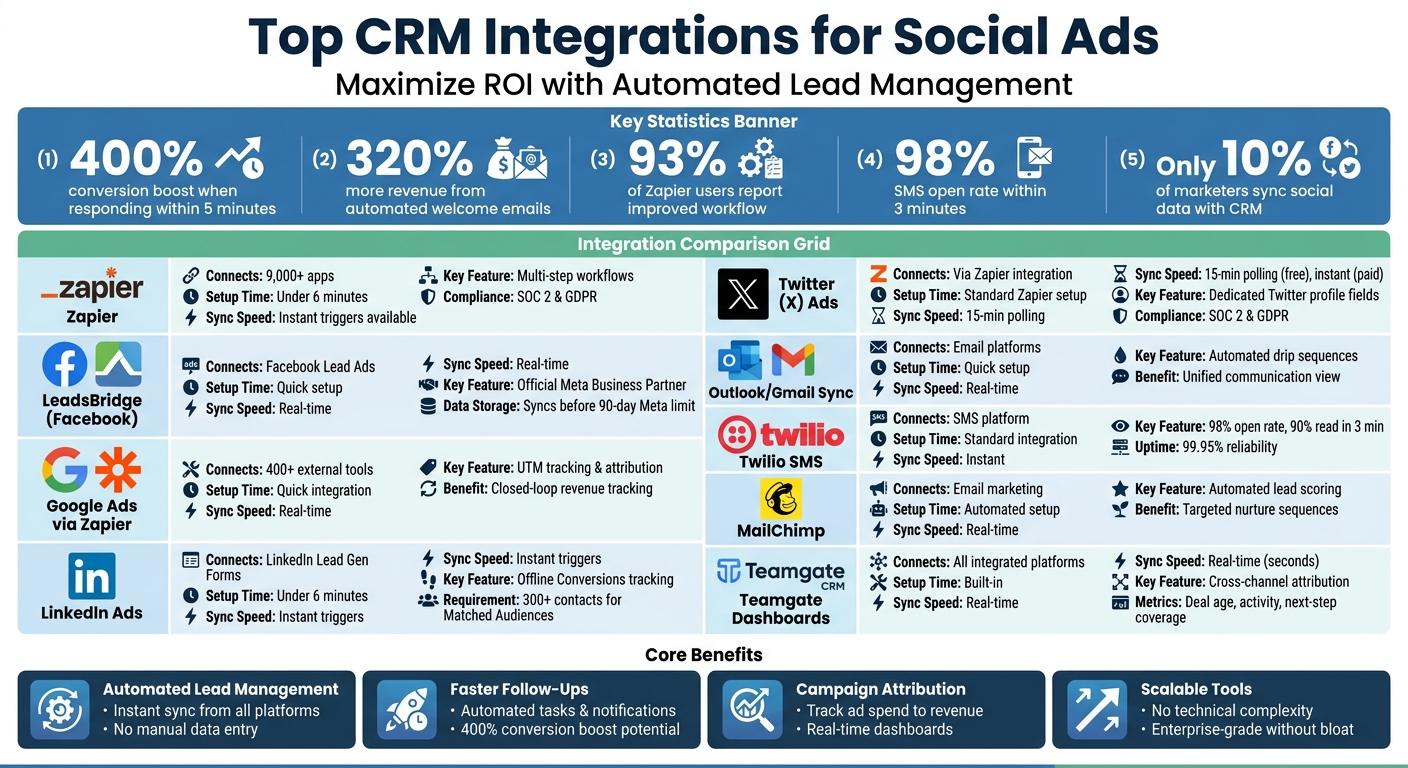
Top 10 CRM Integrations for Social Ads: Features and Benefits Comparison
1. Zapier Integration with Teamgate CRM
Seamless Connection with Social Media Ad Platforms
Zapier makes it easy to link Teamgate CRM with over 9,000 apps, including popular social media ad platforms like Facebook Lead Ads, Google Ads, and TikTok. You can set up a fully functional Zap in less than 6 minutes, ensuring a smooth and quick integration process for managing your leads.
This platform removes the usual technical hurdles of CRM integrations. There’s no need for developers or IT support to map form fields from Facebook Lead Ads to Teamgate. Using Zapier’s visual workflow builder, you can select triggers (e.g., "New Lead from Facebook Lead Ads") and actions (e.g., "Create Lead in Teamgate") through simple dropdown menus. This means your sales team can start capturing leads from social ads in Teamgate almost immediately.
Streamlined Automation for Lead Management
Once the connection is established, Zapier transforms how leads from social ads are managed. For example, when someone fills out a Facebook lead form or interacts with a Google Ad, Zapier instantly creates a new lead in Teamgate with all relevant details – such as name, email, phone number, and any custom fields you’ve included. Notably, 93% of Zapier users say the tool has improved their workflow and job performance.
Zapier also supports multi-step workflows. This means a single lead form submission can simultaneously create a lead in Teamgate, assign it to a rep, send notifications, and even schedule follow-ups. Acting quickly is critical, as a lead’s interest is highest right when they first engage.
Real-Time Updates and Data Synchronization
Zapier’s "Instant" triggers ensure that data from platforms like Facebook Lead Ads is sent to Teamgate as soon as it’s captured. For platforms without instant triggers, Zapier checks for updates every 15 minutes, with faster syncing available on paid plans. This ensures your Teamgate pipeline stays current at all times.
Additionally, Zapier automatically updates existing records in Teamgate when there are status changes or new details submitted by leads. The platform is SOC 2- and GDPR-compliant, so you can trust that your lead data is handled securely. With over 25 million Zaps created and 87% of Forbes Cloud 100 companies using Zapier in 2023, the platform has proven its reliability for managing large-scale data synchronization.
sbb-itb-5772723
2. Facebook Lead Ads via LeadsBridge and Teamgate CRM
Connecting Social Ads to Teamgate CRM with Ease
Getting the most out of your social media ad budget starts with smooth data flow. LeadsBridge, an official Meta Business Partner, acts as a direct link between Facebook Lead Ads and Teamgate CRM. This integration eliminates the hassle of downloading and uploading CSV files – a tedious task that only 10% of marketers currently bypass by syncing their social data directly with their CRM systems.
LeadsBridge ensures precise field mapping, meaning every detail from your Facebook Instant Forms lands in the right spot within Teamgate CRM. This keeps your data neat and organized. Timing is essential here, as Meta only stores lead data for 90 days. With this integration, you’re set up for timely, automated follow-ups, which can make all the difference in your response strategy.
Automating Lead Management for Faster Results
Once the integration is in place, automation takes over. The moment a prospect submits a Facebook form, LeadsBridge springs into action – creating the lead, assigning it to the right sales rep, and triggering automated welcome sequences. Research highlights the importance of speed: reaching out to leads within minutes can significantly increase your chances of qualifying them.
Automated welcome emails, for example, can boost revenue by as much as 320%. This process not only captures leads quickly but also ensures they’re engaged right away with clear next steps, saving you from the hassle of manual data entry.
Keeping Your Data Updated in Real Time
LeadsBridge even offers a free version tailored for lead ad synchronization, making it accessible for teams of all sizes. With Facebook’s 3.07 billion monthly active users, and 98.5% of them accessing the platform via mobile devices, responding quickly is more important than ever.
3. Google Ads Integration through Zapier and Teamgate CRM
Connecting Google Ads to Teamgate CRM with Ease
Zapier simplifies the process of linking Google Ads to Teamgate CRM, making it easy to align your ad campaigns with your sales pipeline. With access to over 400 external tools, Zapier ensures that your marketing and sales efforts work together seamlessly. For Google Ads, you can map critical lead details directly into Teamgate CRM, keeping your database organized and accurate from the very beginning.
Automating Lead Management Tasks
Once integrated, Zapier takes over repetitive tasks, helping you respond to leads faster. When a potential customer submits a lead form via your Google Ads campaign, Zapier automatically creates a contact in Teamgate CRM, assigns it to the right sales rep, and schedules follow-up actions. You can even set up workflows to format phone numbers, send Slack notifications to your team, and trigger welcome emails. This automation ensures a smooth, uninterrupted flow of data and saves valuable time.
Keeping Your Data Up to Date in Real Time
Real-time synchronization ensures your pipeline is always current and actionable. Leads from Google Ads are instantly added to Teamgate CRM, allowing your team to act quickly while leads are still engaged. Sales reps gain immediate visibility into new opportunities, while managers can monitor lead volume by campaign as it happens. With every lead entering the system with a clear next step, you reduce the risk of missed opportunities and make the most of your ad spend.
Tracking and Analyzing Ad Performance
The integration also enhances your ability to measure ad performance. By connecting Google Ads to Teamgate CRM through Zapier, you can create a closed-loop system to track which ads directly drive revenue. Using UTM parameters, you can trace every closed deal back to the specific ad, audience, and creative that generated it. Teamgate’s dashboards provide real-time updates on conversion rates, deal progress, and revenue attribution by campaign. These insights enable you to allocate your ad budget more effectively, focusing on campaigns that deliver high-quality leads and tangible sales results, ensuring your forecasts are based on real data rather than assumptions.
4. LinkedIn Ads Sync Using Native Tools and Teamgate CRM
Effortless Integration with Social Media Ad Platforms
Teamgate CRM makes it simple to connect LinkedIn Ads, automatically transferring LinkedIn Lead Gen Form data directly into your sales pipeline using CRM integrations for sales automation. With native integration tools, you can complete the setup in under six minutes. The "Instant" triggers ensure that lead submissions are captured immediately. New LinkedIn leads appear in Teamgate right away, complete with the latest professional details. This approach highlights the importance of quick lead capture and accurate data across all social ad channels.
Automated Lead Management Features
Once LinkedIn Ads are integrated with Teamgate CRM, the system ensures that LinkedIn leads are processed efficiently for timely follow-up. You can set rules to filter for high-intent actions, such as form submissions, instead of tracking every minor interaction. With built-in reminders and task triggers, Teamgate helps your team follow up quickly, reducing the risk of missed opportunities.
Real-Time Data Sync and Updates
Teamgate CRM keeps your pipeline updated in real time, ensuring you always have actionable insights. The integration supports LinkedIn Offline Conversions, linking closed deals to their original ads, so you can see exactly which campaigns drive revenue. Additionally, your CRM data can be used to create LinkedIn Matched Audiences for retargeting or exclusion lists, helping you avoid spending ad dollars on existing customers. Keep in mind, LinkedIn requires at least 300 contacts to create a Matched Audience. This two-way synchronization keeps your ad targeting precise and ensures your sales team works with the most current data.
Tracking and Analyzing Social Ad Performance
Teamgate’s dashboards connect LinkedIn ad engagement directly to revenue outcomes. You can monitor conversion rates, deal progress, and revenue attribution by campaign, providing a clear picture of which LinkedIn ads generate high-quality leads that close. As Zapier notes, "Measuring campaign performance across platforms can get chaotic… With Zapier, you can create a centralized view of your performance". This level of visibility helps you allocate your budget effectively and coach your team based on concrete sales data rather than assumptions. By aligning LinkedIn ads with real-time lead management and detailed analytics, Teamgate CRM ensures every lead is acted on promptly and strategically, protecting your revenue potential.
5. Instagram Ads Lead Capture with Teamgate CRM
Integration with Social Media Ad Platforms Made Simple
Instagram Ads leverage Meta’s "Instant Forms", which are designed for mobile users and automatically populate fields like name and email directly from user profiles. This eliminates the need for external landing pages. Considering that 98.5% of Meta users access the platform via mobile and Meta connects with roughly 3.07 billion people monthly, this approach captures leads efficiently where they are most engaged.
Teamgate CRM integrates seamlessly with Instagram lead data through tools like LeadsBridge or Zapier. The setup process takes less than six minutes, saving you from the hassle of manually downloading CSV files. This streamlined connection ensures your leads flow directly into your CRM, ready for immediate action.
Automating Lead Management for Faster Engagement
Once Instagram leads are captured, they are automatically imported into Teamgate CRM, assigned to the right sales reps, and paired with follow-up tasks through precise field mapping. Teamgate can also instantly deliver resources promised in your ads, such as ebooks or discount codes, right after a lead submits their information. Research shows that welcome emails triggered immediately upon lead capture can generate up to 320% more revenue compared to standard promotional emails. Since Meta only stores lead data for 90 days, real-time syncing is essential to avoid losing valuable information.
Real-Time Synchronization for Immediate Action
Teamgate ensures Instagram leads are added to your pipeline within seconds, enabling sales teams to act without delay. Real-time updates provide complete engagement histories and resolve duplicate entries while enriching each lead record. This two-way synchronization captures every interaction, ensuring no opportunities slip through the cracks.
Tracking Social Ad Performance with Clear Analytics
Teamgate CRM dashboards link Instagram ad engagement directly to revenue outcomes, offering a clear view of campaign performance from lead generation to deal closure. By attributing revenue to specific campaigns, you can measure social ad ROI in tangible terms and avoid losing sales leads. These detailed insights help you refine your ad strategy to focus on driving meaningful revenue.
6. Twitter (X) Ads Integration for Teamgate CRM
Connecting Social Media Ads to Your CRM
Teamgate CRM works seamlessly with Twitter (X) Ads through Zapier, allowing you to automate critical workflows. With Zapier connecting over 9,000 apps, it acts as a bridge for integrating social ad data into your CRM. For instance, when a lead submits their details via a Twitter (X) Ad, the system automatically creates a corresponding lead record in Teamgate.
To enhance this connection, Teamgate includes dedicated fields for Twitter profiles within Lead, Person, and Company records. This ensures your sales team starts with a clear view of each prospect’s social identity alongside their standard contact details, providing valuable context from the first interaction.
Streamlined Lead Management Through Automation
When leads come in from Twitter (X) Ads, Teamgate takes care of the heavy lifting. It automatically creates lead records, assigns them to the right sales reps, and sets up follow-up tasks. With the "Search or Write" feature, duplicate records are avoided, keeping your pipeline organized and free of redundant entries.
Workflows can also be customized to auto-assign leads based on their social source and send instant notifications via Slack or email. This ensures your team can act quickly, capturing opportunities while they’re still fresh.
Keeping Data Updated in Real Time
Zapier’s instant triggers ensure workflows are activated immediately, with free plans polling data every 15 minutes. This near-real-time synchronization means leads are added to your pipeline promptly, giving your team the chance to engage while interest is high.
Teamgate also prioritizes data security, with SOC 2 and GDPR compliance ensuring every interaction is tracked and auditable. This provides clear accountability and visibility throughout the lead management process.
Turning Social Ad Data into Actionable Insights
Teamgate CRM’s dashboards go beyond basic metrics, linking Twitter (X) interactions directly to revenue outcomes. This allows you to see which campaigns are driving actual results, not just clicks or impressions. By analyzing deal-related indicators like activity levels, deal age, and next steps, managers can provide targeted coaching based on real performance data.
This integration perfectly aligns with Teamgate’s goal of delivering clear pipeline insights and fostering disciplined follow-up, ensuring your social ad efforts translate into measurable success.
7. Outlook and Gmail Email Sync for Ad Follow-Ups in Teamgate CRM
Automating Lead Follow-Ups
Quick responses are crucial when a lead shares their details through a Facebook or LinkedIn ad, significantly improving conversion chances. Teamgate CRM integrates seamlessly with Outlook and Gmail to automate these follow-ups. Once a lead is captured, the system sends out follow-up emails instantly. You can also set up automated drip sequences to deliver personalized follow-ups over time, eliminating the need for manual outreach. This ensures leads are engaged promptly and consistently, without the risk of them being overlooked.
Keeping Data Synced in Real-Time
Real-time email synchronization ensures your sales team has a unified view of all lead interactions within Teamgate CRM. Whether emails are sent through Outlook, Gmail, or directly via the CRM, every conversation is automatically logged to the corresponding lead or deal record. This eliminates manual data entry and keeps your pipeline updated. If a prospect replies to a follow-up, the response is instantly visible in their activity timeline. This feature allows sales managers to track the progress of ad follow-ups across the team and quickly intervene with inactive leads before they’re lost.
Analyzing Social Ad Performance
By centralizing all communications, Teamgate CRM enables you to measure the true ROI of your social ad campaigns. You can trace each lead’s journey from initial ad engagement to deal closure, identifying which platforms deliver leads that convert versus those that only drive form submissions. The CRM also tracks essential metrics like email response rates, engagement levels, and time-to-first-reply for leads from different social sources. This data allows managers to coach their teams more effectively, pinpointing areas where reps excel or where opportunities are being missed. Considering that only 10% of marketers currently integrate social data with their CRM systems, this feature positions you ahead of the curve, turning your social ad spend into a reliable revenue stream.
8. Twilio SMS Integration for Social Ad Leads in Teamgate CRM
Automation Capabilities for Lead Management
Quick follow-up is key when someone fills out a form on your Facebook or LinkedIn ad. Reaching out within minutes can dramatically improve lead qualification rates. With Teamgate CRM’s Twilio integration, this first touch is automated – an SMS is sent immediately after a lead is captured from any social platform.
The integration doesn’t just stop at sending messages. It also assigns new leads to specific sales reps based on rules you set, such as location, product interest, or source. High-priority leads trigger instant SMS alerts, ensuring they don’t fall through the cracks. Automated SMS sequences even reference the specific ad or offer that caught the lead’s attention. All interactions are logged in Teamgate CRM, creating a complete contact timeline and ensuring everything stays organized.
Real-Time Data Synchronization and Updates
Speed matters when managing lead data, especially since platforms only store it temporarily. The Twilio integration ensures leads are instantly synced into Teamgate CRM, removing the hassle of manual uploads or file downloads. If a lead replies to your SMS, their response is logged immediately in the activity timeline, keeping the team updated in real time.
This instant synchronization prevents data from becoming outdated, which can hurt conversion rates. SMS messages have an impressive 98% open rate, with 90% being read within just three minutes. Twilio’s infrastructure further supports this by optimizing traffic every 75 seconds, maintaining a 99.95% uptime. This reliability ensures your messages reach leads when their interest is at its peak.
Reporting and Analytics for Social Ad Performance
Beyond automated engagement, Teamgate’s analytics tools help you make sense of the data. Dashboards reveal which social platforms generate leads that convert versus those that only fill out forms. You can track metrics like SMS response rates, time-to-first-reply, and engagement levels for leads from platforms like Facebook, Instagram, LinkedIn, and Twitter. This attribution reporting highlights which interactions lead to closed deals and revenue, helping you optimize your ad spend. The Twilio integration strengthens Teamgate CRM’s focus on delivering actionable insights and effective lead management.
9. MailChimp Integration for Nurturing Social Ad Leads in Teamgate CRM
Automating Lead Management Effortlessly
When a lead fills out a social ad form, the MailChimp integration with Teamgate CRM takes over, syncing that lead into targeted email lists and kicking off nurture sequences automatically. This eliminates the need for manual data entry, ensuring that every interaction is recorded. Your sales team stays informed and equipped with a clean, actionable pipeline, making disciplined follow-up a breeze and reducing the risk of missed opportunities.
Keeping Data Updated in Real-Time
With real-time syncing, contact details stay up-to-date. If a lead changes their email address or updates their company information, those adjustments are instantly reflected in Teamgate CRM. This seamless flow of data integrates social, email, and CRM information, giving your team a complete view of engagement metrics in one place. Such synchronization not only enhances visibility but also lays the groundwork for detailed performance tracking.
Tracking Social Ad Performance with Precision
The integration doesn’t just stop at automation and data unification – it also provides powerful tools for analyzing social ad performance. Surprisingly, only 10% of marketers currently connect their social data with CRM systems. With MailChimp and Teamgate working together, you can pinpoint which social ad interactions contribute to closed deals. This insight allows you to evaluate which actions lead to conversions and enables automated lead scoring and prioritization based on social engagement. Leads with strong activity can be prioritized for direct outreach, while others can continue in tailored nurture sequences shaped by their behavior, removing the need for manual segmentation.
10. Measuring Social Ad ROI with Teamgate CRM Dashboards and Integrations
Real-Time Data Synchronization and Updates
Teamgate CRM connects seamlessly with social ad platforms like Facebook, Google Ads, and LinkedIn through tools like Zapier and LeadsBridge. This integration ensures that leads are captured instantly whenever someone interacts with your ad. By using identity resolution, the system matches social profiles to existing CRM contacts, avoiding duplicate records and ensuring all interactions are tracked across the customer journey. If a lead updates their details or re-engages, the changes sync immediately, keeping your pipeline accurate and your team informed. This real-time synchronization provides the foundation for reliable metrics that help measure ROI.
Automation Capabilities for Lead Management
Automation within Teamgate simplifies lead management and feeds essential data into its performance dashboards. Workflow triggers can initiate email sequences, assign follow-ups, and score leads with lead scoring based on firmographic details. Additionally, automated enrichment adds company and contact information to new records as they come in, reducing manual data entry and enabling your team to focus on closing deals. This structured approach ensures no lead is forgotten, and every opportunity progresses with a clear next step.
Reporting and Analytics for Social Ad Performance
Teamgate’s cross-channel attribution links social ad engagement directly to closed revenue. This level of insight reveals which ads are driving results. Considering that only 10% of marketers currently integrate social data with their CRM, there’s a considerable opportunity to gain a clearer understanding of campaign performance. Teamgate addresses this by offering dashboards that highlight deal age, activity levels, and next-step coverage, providing actionable insights for coaching and forecasting. These analytics help you make smarter budget decisions, focusing investment on campaigns that deliver results and cutting spending on underperforming ones. By tying social ad engagement to closed deals in real time, Teamgate CRM supports a dependable revenue pipeline.
How to Connect Facebook Lead Ads to Your CRM with Make.com (No Coding Required!)
Conclusion
CRM integrations make it easier to capture, manage, and measure leads generated from social ads. By automating lead capture, you eliminate manual data entry and reduce the risk of missing out on high-intent prospects.
Beyond automation, unified tracking and attribution amplify the value of these integrations. Combining social interactions with emails, calls, and other touchpoints gives you a complete picture of the customer journey. With Teamgate CRM, you can access dashboards that highlight critical metrics – like deal age, activity levels, and next-step coverage – helping you pinpoint which platforms and campaigns deliver the highest-intent leads. This insight ensures your budget is allocated where it matters most.
However, to turn these advantages into revenue, thorough testing is non-negotiable. Test integrations end-to-end to confirm accurate field mapping and ensure timely follow-ups. Focus on defining meaningful engagement triggers, such as pricing inquiries, rather than capturing every interaction like a "like", to maintain lead quality.
Start small – implement one integration and expand as you see ROI. Tracking attribution from the beginning helps validate ad spend and protects your budget from cuts. The ultimate goal isn’t just to gather more data; it’s to safeguard revenue by ensuring every social ad lead gets a timely, informed follow-up and progresses through a well-organized, reliable pipeline.
FAQs
Which integration should I start with first?
To get started, connect your email and calendar tools, such as Gmail or Outlook. This streamlines communication and keeps your pipeline organized. After setting these up, you can explore adding integrations for social media or accounting as your needs grow.
How do I prevent duplicate leads when syncing social ads?
To avoid duplicate leads when syncing social ads, set up your CRM with rules to prevent duplicates. Use unique identifiers, such as email addresses or social media profiles, to match new leads with existing records. Automate the process to check for duplicates before adding new entries. This approach helps ensure your CRM stays organized and your data remains accurate and reliable.
What do I need to track ad revenue attribution in Teamgate CRM?
To connect ad revenue attribution to your campaigns in Teamgate CRM, integrate your social media platforms directly with the CRM. This integration lets you gather engagement data and associate it with deals and contacts. By doing so, you can directly tie revenue outcomes to specific social ad campaigns.