Get a free sales audit to uncover hidden revenue opportunities!

At Teamgate, we’re big fans of building a repeatable sales process that guides and supports sales teams through the entire sales cycle from the first touchpoint with a prospect to the close of a deal.

According to Marketo, when sales and marketing teams are in sync, companies become 67% better at closing deals, but only 30% of CMOs have a clear process or program to make marketing and sales alignment a priority and a mere 44% of companies are using any kind of lead scoring system.

To reach the kind of synchronization state that drives higher sales, a company needs to follow a clear-cut process with explicitly defined rules and criteria. A Harvard Business Review study found that there is an 18% difference in revenue growth between companies that define a formal sales process and companies that don’t. So it seems that creating a reliable, scalable sales process is of utmost importance to all companies that have their eyes set on growth.

If you’re wondering how to pull this tricky task off, we’ve gathered the most pertinent advice that will guide you the right way.

Do you have a CRM that keeps you organised?

The most user-friendly CRM on the market. 14-day free trial.

Start Free Trial

Painless setup, no credit card required

Understand and document your current sales cycle

The average sales cycle length is the amount of time it takes to close a deal, measuring from the first touchpoint with a prospect to the conversion point, averaged across all won deals.

An analysis of pipelines of hundreds of companies has revealed that the average length from Lead to Opportunity (or from MQL to SQL) is 84 days and the average length from Opportunity to Close (or from SQL to Deal) is 18 days. That puts the average sales cycle length at 102 days. This, of course, varies significantly based on the source of the opportunity, the quality of leads, the complexity of the sale, and so on.

However, before anything else, it must be said that there is no single right sales cycle. Different markets, products, and internal team dynamics mean that the only way to develop a world-class sales process is to know your typical customer sales cycle like the back of your hand.

The most important step to building a killer sales process is to audit your baseline and document every step that a lead goes through until it converts. If you’ve never done this before, you’ll be surprised to see how much chaos and confusion can cloud what seems like a straightforward process. Only by knowing what needs to be changed or improved can you confidently begin implementing new tactics and strategies. 

Average Sales Process 102 Days

The average sales cycle length is 102 days. Image Source: Pexels

To trace back the steps your sales reps took with each lead, accurately answer these questions and you’ll quickly see a clear picture of the current state of your sales cycle.

  • How did you learn about new leads? When were you notified? How were they distributed?
  • What was the initial form of contact – a phone call, an email, a face-to-face contact? How long after they came in?
  • What questions were asked and how were they answered during the first conversation?
  • When were you able to make contact with the new leads (1st call or email, 1st follow-up, etc.)?
  • How did the sales rep handle and coordinate the follow-up? Did they use a reminder tool, made a note in your CRM system or relied on their memory?
  • What sales material did the lead receive? At what stage in the cycle was it given to the lead?
  • What was the main reason for your closed-lost leads?
  • Roughly, how long did it take for the lead to move from one stage to another?

Knowing where you stand before you make any changes to your sales process will help you measure their impact and ensure the right decisions are made along the way.

The goal of every sales team is to shorten their sales cycle. The shorter a company’s sales cycle, the faster they make money, simple as that. That’s why sales cycle length is one of the most important metrics measuring the efficiency and effectiveness of a company’s sales team. Poring over the sales cycle statistics to find points in which leads slow down or speed through in the hopes of discovering ways to optimize the process, is a number one priority for sales operations professionals. Here are three ways how to measure the length of your company’s sales cycle:

    1. When a lead is created. The most obvious way to recognize the beginning of a sales cycle is to track when a lead is created in your CRM. Then, to know the length of your sales cycle, you simply look at when that deal is closed. It’s worth noting, though, that lead duplication issues and the variability of when leads are created and when they’re worked can skew your analysis.  
    2. When an opportunity is created. Some sales teams choose to consider the time when a lead is converted into an opportunity as the beginning of the sales cycle to have more contextual information on their deals in the CRM and reduce the time it takes to clean the leads. Because the changing of the lead status is a manual task carried out by a sales rep, there is often a risk of it not being created along consistent criteria. Enforcing strict rules for the process when a lead should be converted to an opportunity is crucial to ensure you have an accurate view of your pipeline.
    3. When the sales conversation starts. Measuring the actual conversation length of closed-won deals is probably the most accurate gauge of how long it takes for a lead to convert. However, this method also carries the human error risk, as it relies on a sales rep to update the CRM for every email they send or every prospect they target.

The solution that many sales teams are finding is to automate the entire process. And it can be done by choosing a modern sales software like Teamgate that can analyze conversation length, automate CRM data entry, and create reports by rep, deal, team or company to reduce the burden of sales cycle analysis.

The typical stages of a sales pipeline and how to create one

Think about sales stages as milestones in your sales process, signaling how far from the typical conversion point your leads are. Although the exact stages and their names vary from company to company, the basic idea is the same – leads are either in an open stage or in a closed stage, such as won or lost.

As an example, here are the default stages in Teamgate. You can customize them as you like.
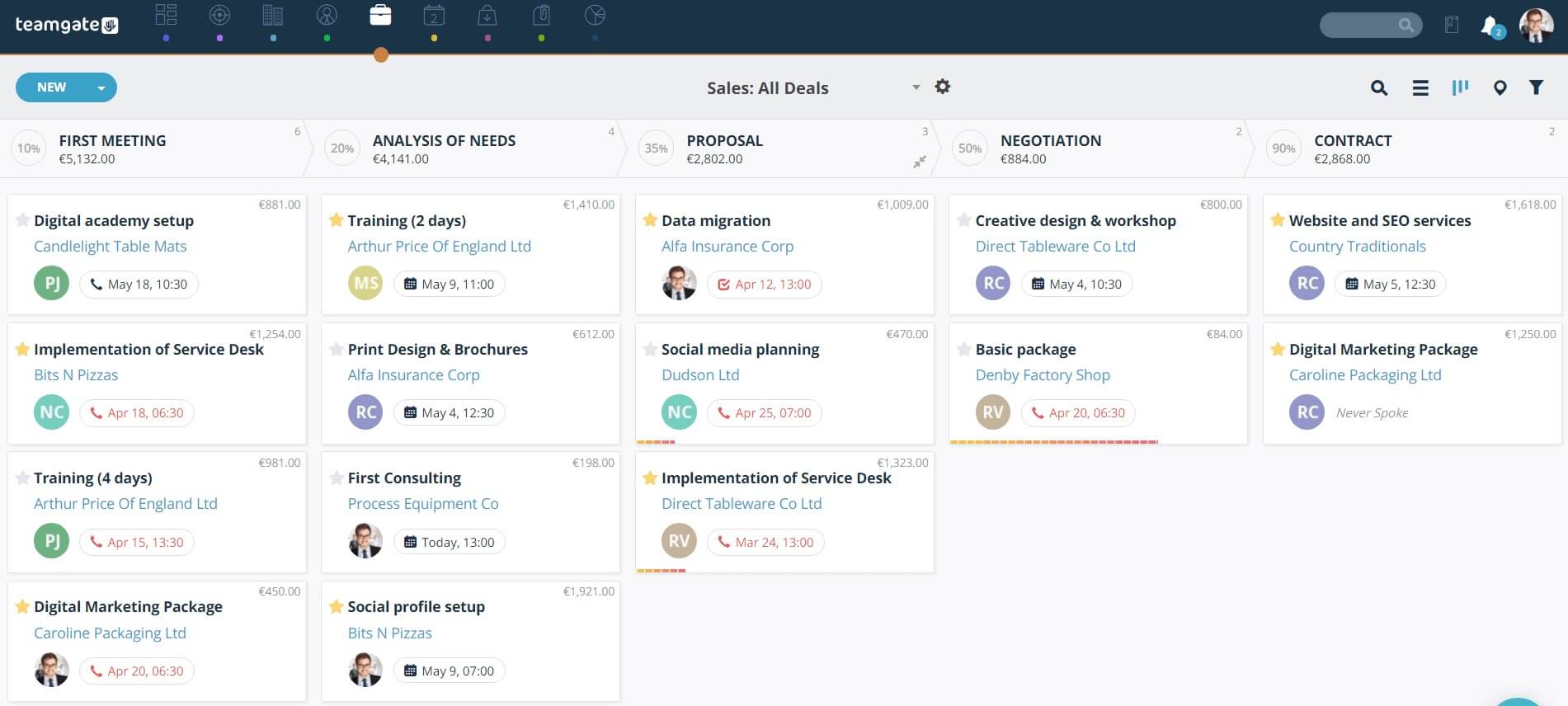
Teamgate Default Sales Process StagesFor the sake of this article, let’s focus on the typical stages of a sales pipeline:

  • Lead generation. At this stage, a company focuses on finding and attracting new prospects through marketing campaigns, aiming to capture their contact information (inquiries). The most effective B2B marketing methods used to generate leads include email, events, and content.
  • Lead nurturing. Once a lead expresses an interest in a product or service, they’re usually entered into a lead nurturing campaign to establish the pain points and continue to foster the relationship. Marketing automation is the go-to tactic to further qualify leads and send the best ones to sales. According to Forrester Research, companies that excel at lead nurturing generate 50% more sales-ready leads at 33% lower cost.
  • Marketing Qualified Lead (MQL). Based on your definition of a marketing qualified lead, your CRM can use lead scoring to track meaningful activities and behaviors to determine which leads are more likely to become customers. This is a vital stage in your sales process that will help you ensure your sales team is fed high-quality, sales-ready leads.
  • Sales Accepted Lead (SAL). Once sales receive a lead from marketing, they need to check if it matches the key targeting criteria and either accept it or decline it. Typically, SALs are identified as having a verified propensity to buy.
  • Sales Qualified Lead (SQL). SQLs represent a quantifiable business opportunity with a clarified need, timeline and budget. They are close to making the final purchase decision and can either move to closed won or closed lost opportunities.  
  • Closed deal. At this stage, around 27% of opportunities convert to deals, according to Capterra. Assisting with implementation is one of the tactics that sales reps use to improve and speed up the conversion process.
  • Post sale. A sale is not the end of the pipeline, as the customer relationship continues to develop and both sales and marketing teams should work to further engage buyers and add value through loyalty programs, upsells and cross-sells.

If you’re just creating your sales pipeline, there are a few basic rules you can follow to build clearly defined sales stages and a smooth process:

  1. Remove ambiguity. Make sure each stage of your sales cycle is self-explanatory and immediately clear. The best way to examine the current status of your sales cycle is to test it on a new hire. If a new sales rep can’t see a difference between Stage1 and Stage2, it means you have a problem.
  2. Define stage criteria. One of the factors that will determine whether your sales stages are easy to understand is knowing the ‘trigger’ that moves a lead from one stage to another. To maintain consistency and clarity in your pipeline, ensure that every sales rep knows why and when to change the status of a lead.
  3. Take on the buyer perspective. The new school of sales teaches that the sales process should reflect how a customer buys, not how a sales rep sells. This means your sales stages should be part of a buyer’s journey, not the seller’s steps. Map out your buyer journey to identify the key stages and replace seller-centered milestones, such as “Demo Completed” and “Trial” to buyer-driven stages, such as “Evaluating solutions” and “Technical Fit Assessment”.
  4. Ditch the linear way of thinking. The order in which milestones are achieved is becoming less and less important, as sales reps start recognizing that different customers make decisions differently. Rather than sticking to a rigid, linear process, allow your buyers to progress through the funnel as they like, even if that means they sign up for a trial before watching a demo. Focus on the list of activities that need to happen to make the sale possible and let the buyer follow their own path.   
  5. Monitor and iterate. Since every company is unique and follows a different sales process, there is no single optimization strategy that can kick your business into higher gear. However, you should make it a priority to track the time leads spend in each stage of your sales cycle to quickly identify optimization opportunities. If you notice that leads tend to linger at one stage or even drop out altogether, you will be able to put some measures in place and prevent deal loss.

The benefits of a daily routine for your sales team

Poor time management will always result in disappointing sales performance. Sales reps are often masters of multitasking, but even the best can benefit from a daily routine that helps to set the priorities straight and ensure the key tasks are accomplished on time. To help your team drive the sales performance through the roof, introduce some practical habits that will become part of their daily schedules.

  1. Review and plan before you wrap up for the day. Take 10-15 minutes at the end of each day to review your pipeline and prioritize the next day’s to-do list. Check your calendar events, meeting notes and emails to ensure no important information falls through the cracks endangering your ability to close.
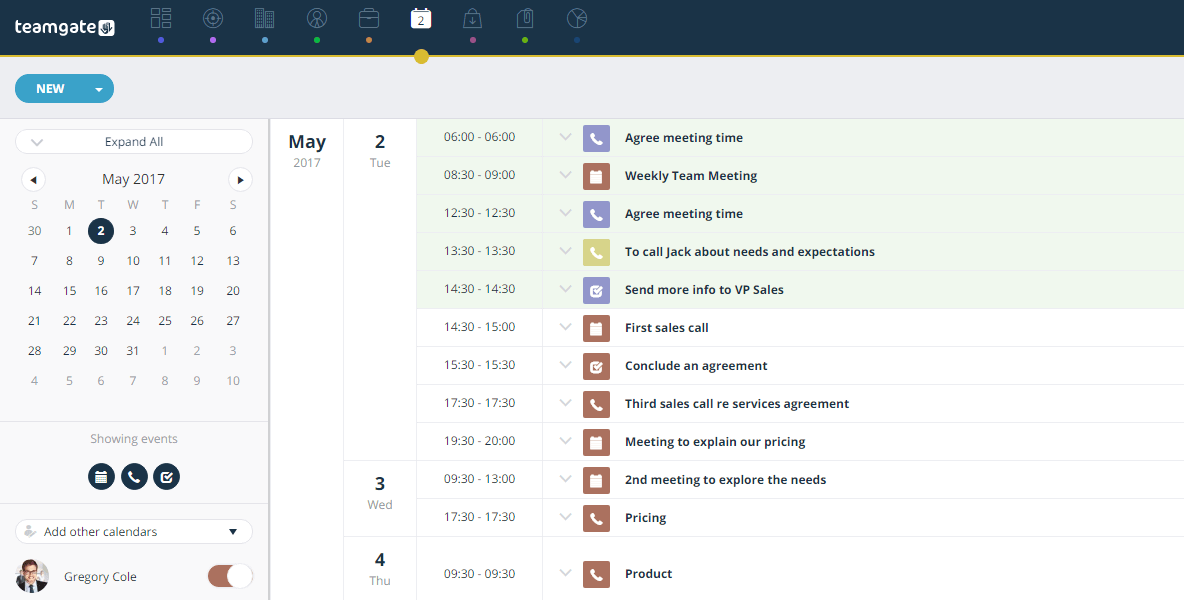
    Teamgate Agenda Sales ProcessHere’s an example of Teamgate’s agenda that comes in handy for busy salespeople. 
  2. Start your day strong. While you’re sipping on your first cup of coffee, review your to-do list from the day before and scan through the inbox to see if there are any high-priority issues that need to be addressed immediately. The key here is not to get distracted by the gazillion of low-importance emails and requests. Sticking to a plan will help you stay on track no matter how many tasks you have to juggle.  
  3. Group your tasks. The best way to tackle the most important tasks during your most productive time of day is by organizing your tasks into groups. Instead of handling each task independently, set time aside for a set of tasks that require a similar level of energy and type of approach to reduce the time wasted on readjusting and refocusing your attention. By carving out a certain amount of time for each group of tasks and scheduling them into your calendar, you will be able to better manage your time and keep your mind focused.  
  4. Automate where possible. With so many useful tools at their fingertips, salespeople are learning to free up time in their schedules and focus on doing what they do best – engaging with customers and closing deals. Leverage technologies available to you to make sure your time is spent on activities that have the best ROI.   

Conclusion

The biggest mistake you can make is to treat your sales process as a one-and-done project. Making a habit of tracking your sales performance metrics on a daily basis and reevaluating the sales process every five to six months is a surefire way to ensure your sales process map is regularly updated and remains a work in progress, as it should.

Instead of wasting your time on manual data entry, cold leads and tasks that detract your attention from the most important task at hand – selling, improve and modernize your sales process with the help of a smart CRM that will keep you at your game.
As companies move away from the traditional landlines, integrating your CRM with a VOIP app becomes paramount.
As we’ve discussed in a previous article, Integrated Telephony in the workplace has tremendous advantages. Notably:

  • Making our CRM a platform for unified communication
  • Cheaper costs and easier scalability
  • Access to analytics by measuring and monitoring call-specific data.

Which is why we are excited to unveil our next feature: Teamgate SmartDialer. 

Related: Introducing an easiest Mailchimp and Teamgate Integration and Integrate Teamgate CRM with Google Contacts

What is Teamgate SmartDialer?

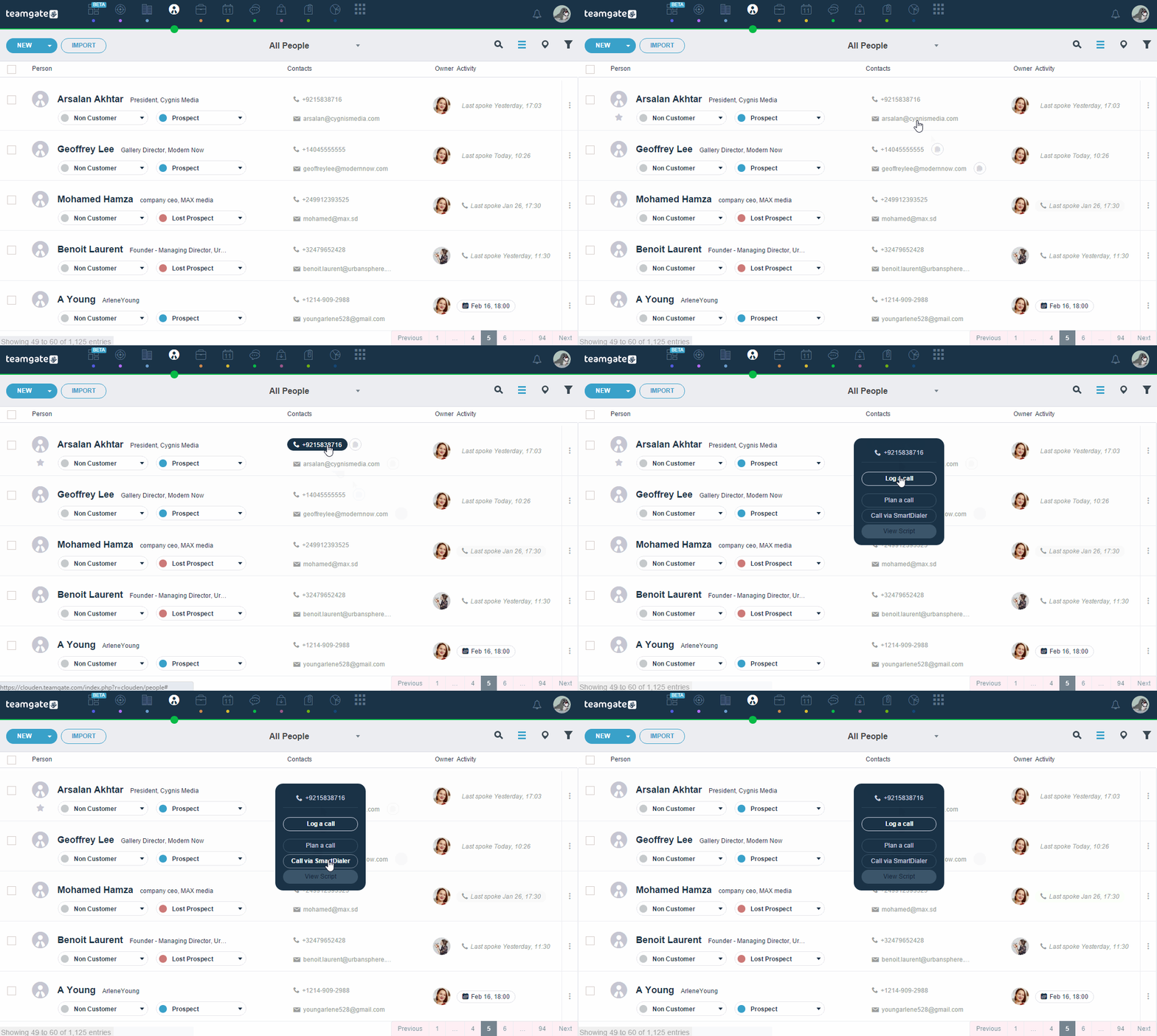
SmartDialer allows calling directly from Teamgate with a native dialer, no manual entry required so you can make smarter calls faster with Teamgate’s built-in automatic dialer.

Our SmartDialer ensures that you have a great phone selling experience and never waste time dialling phone numbers & names again.

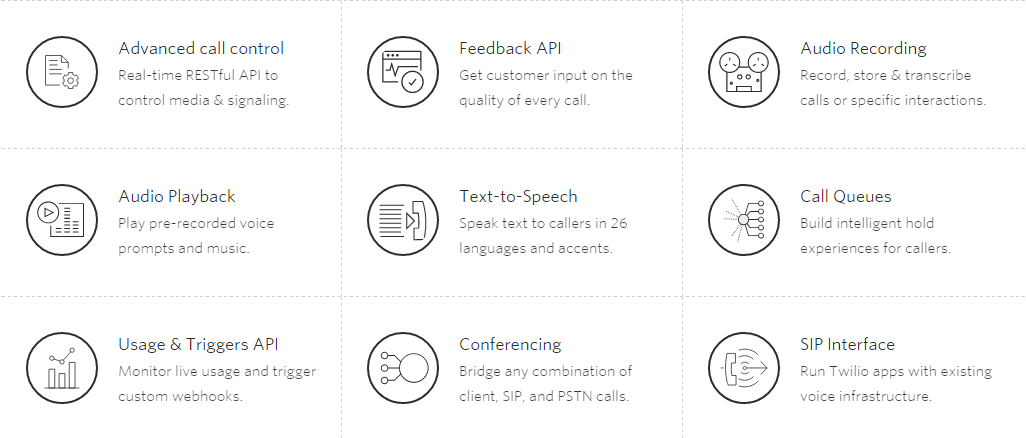
Teamgate SmartDialer is a cloud-hosted Twilio-Based phone integration. Twilio is a messaging, voice and video API that allows apps (like Teamgate CRM) to easily integrate telephony services. Check out some of Twilio’s best features below:

twiliofeats

How will it help?

Teamgate’s exclusive built-in automatic SmartDialer is a fast and easy system that integrates perfectly with our CRM and lets you make and receive calls directly from your Teamgate account.

call_GIF

Teamgate SmartDial will allow you to do the following:

  • Make and receive Calls directly through Teamgate’s CRM.
  • Missed calls will be listed and recorded on each customer’s profile.
  • Unlimited storage for call records and history.
  • Record call-specific notes on the customer’s profile.
  • Share call notes with teammates.
  • Track the number and effectiveness of calls made.

How to set your SmartDialer up?

  1. Activate your SmartDialer, by clicking on the “Activate” button.
  2. Add your personal or work phone number and hit “Save”. After, you’ll receive an SMS with a registration code. Enter the code as received into Teamgate.
  3. Choose the number you like from the list which is offered to you by Teamgate. This number will be used when you call your leads or contacts. Please remember that You won’t be able to change the number you chose.
  4. Enter your country code.
  5. Choose if you want SmartDialer to record all your made or accepted calls. Make sure not to forget selecting the duration for which you’d like Teamgate to save and store your records.

Find more detailed information at Teamgate Support page.

In the meantime, why not take Teamgate for a test drive? Try Teamgate SmartDialer for free!

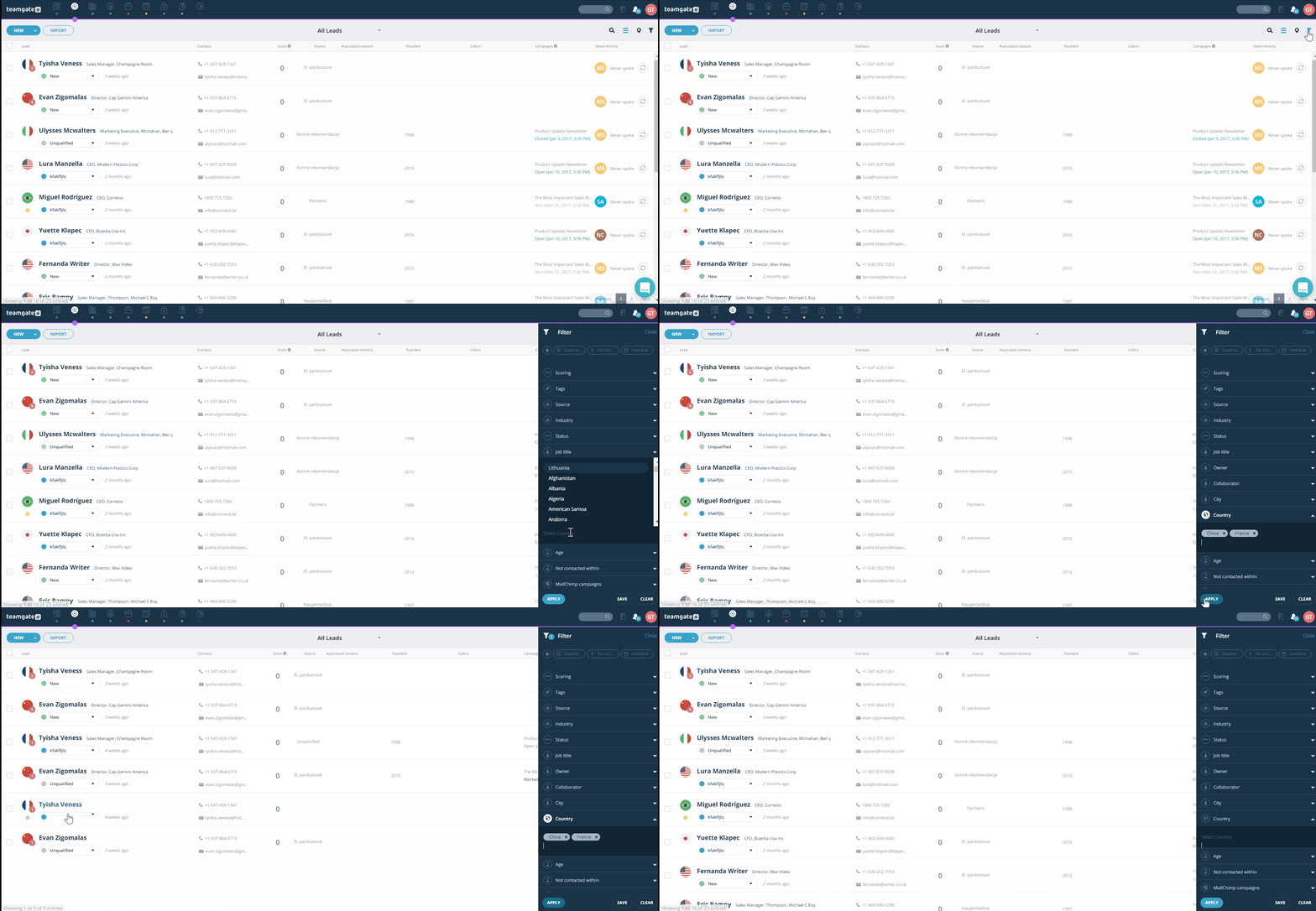
If you are working with large amounts of data, every time you need to find some specific information may become a nightmare, right? Even if you have automated sales processes with the help of a CRM, sometimes you may feel overwhelmed by the amount of information. Luckily, Teamgate CRM has powerful filtering and sorting features, which help to keep everything well-organized and improve your productivity. 

Complete Filtering

Basically, you can quickly filter every available list, including leads, contacts, companies, deals, and files. Items in each of the lists can be filtered by predefined and custom fields. Let’s say you need to see a list of every single lead from a specific country; you can do it in just a few clicks by either selecting the country or typing it in. Likewise, you can easily get a list of all won or lost deals, new leads, and much more.

Leads Filtering By Country Teamgate

For your convenience, you can choose which of the custom fields should be added to the list of filters. It is easy to adjust filters considering your business needs. Moreover, not only ‘Standard text’ but also ‘Multi-select’ custom fields can be filtered. 

Clean Filtering

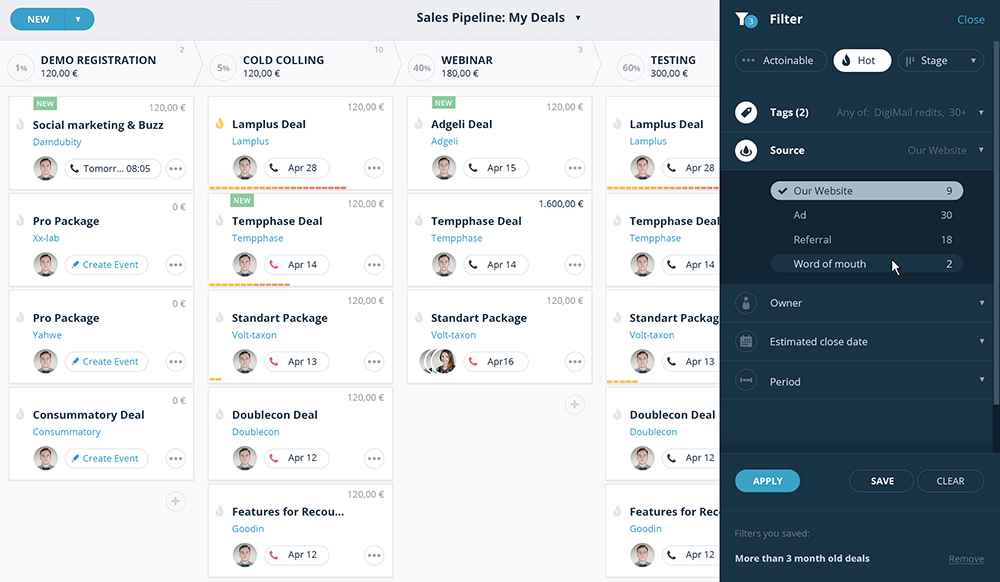
Teamgate filtering solution is user-friendly and neat. Even if you use a lot of information fields, you won’t find filters too overwhelming – they can be expanded or collapsed so you can customize viewing options. To improve your experience, we made it possible both select and enter options manually. The latter helps when there are hundreds of options, e.g. zip codes, and it’s simply too time-consuming to scroll down the drop-down list.

Deals Filter On Teamgate

Besides, Teamgate supports sorting. This feature may help to see a better overview of your lists. For example, you can sort leads by the lead score, and instantly see the hot leads at the top of your list; or sort your deals by value to see the most valuable ones. It may seem like a very simple feature, but it can help to grow your business. 

Add Some Extra Value!

If you want to get the most out of Teamgate filtering solution, it’s entirely up to you, because we also support tagging. You can use the keywords of your choice and re-use this data to make filtering more relevant. Teamgate adds some default tags, but you’re free to create as much custom tags as you need. Maybe you want to remember that a lead is a #CEO or #purchased your product, or maybe some contact is #important? You can easily do this! And remember that tagging is also helpful when you use Teamgate Insights.

So, wait no more and try Teamgate CRM yourself!

It’s always good to know that we are consistent in being a great CRM tool quarter by quarter!

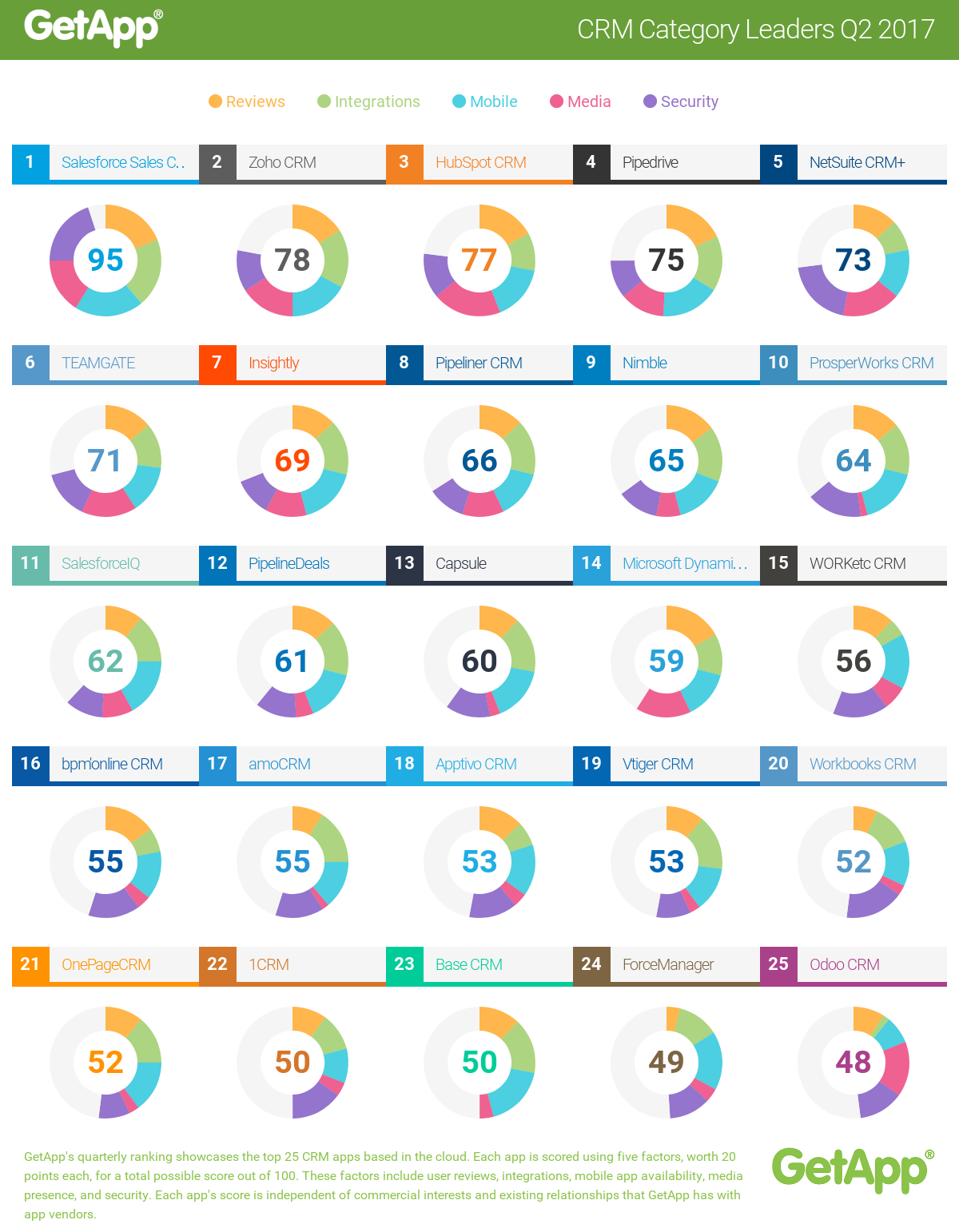
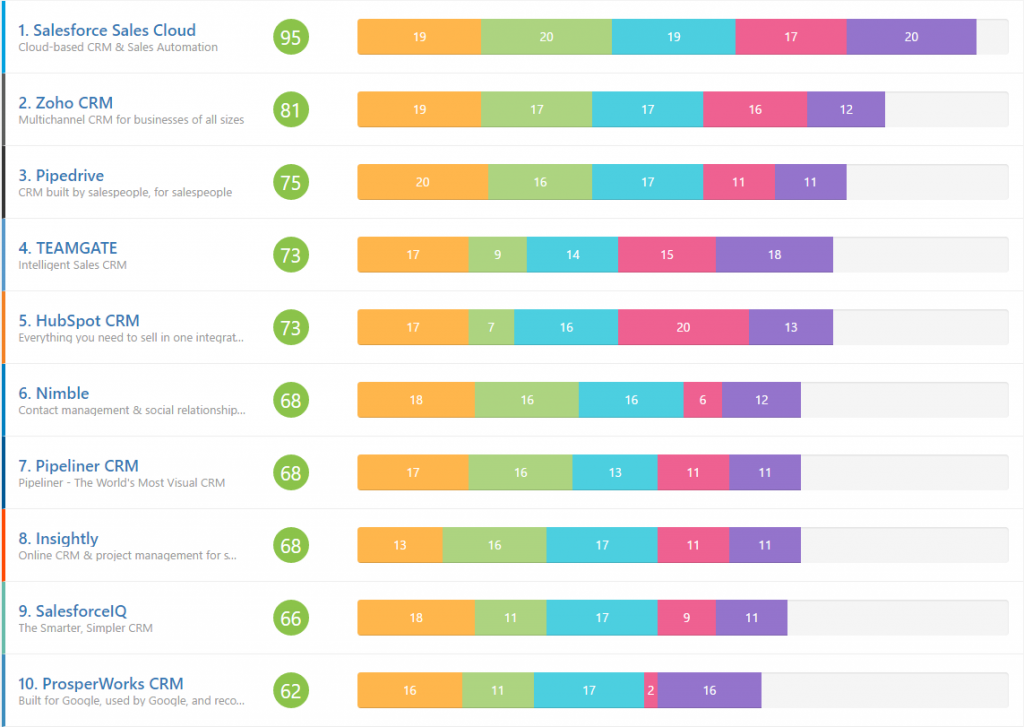
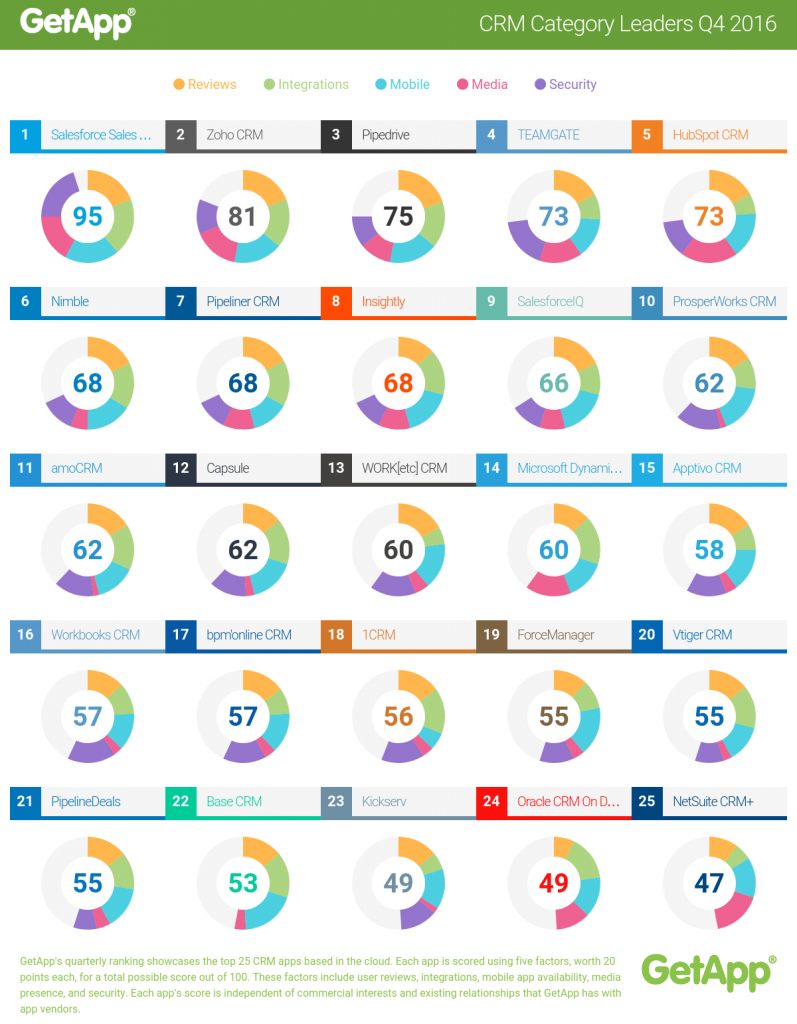
The leading Premium business app discovery platform GetApp.com announced Teamgate as #6 in Q2 2017 rankings of the best CRM applications on the market!

GetApp’s researcher Rhiân Davies says:

“Teamgate has been a fixture in GetApp’s top 10 Category Leader ranking for CRM since Q3 2015. Coming in at #6 this quarter with a total score of 71, Teamgate displays its strength with scores of 16 points for media presence and 14 points for its security features and its mobile apps. An additional 14 points for user reviews, with an average rating of 4.81/5 stars, secures Teamgate’s strong position in GetApp’s ranking.”

GetRank is GetApp’s quarterly ranking of the top 25 CRM apps based in the cloud. Each app is scored using five criteria, each worth 20 points, for a total possible score out of 100: User Reviews, Integrations, Mobile Apps availability,  Media Presence and Security.

On July 1 of 2015 GetApp was acquired by Gartner Inc.  (NYSE: IT)

[optin-monster-shortcode id=”rs4shvbsq8bjva7m”]

Top CRM Software 2016 | GetApp

Related: Teamgate Is Among the Most User-Friendly and Affordable CRMs According to Capterra

* * *

The Ranking

GetApp’s Category Leader rankings highlight the top 25 cloud-based business applications for every essential business operation, from CRM to HR and marketing. The ranking uses five unique data points to assess apps, giving software buyers a shortlist of some of the top cloud-based solutions for their growing business.

The five data points used to rank each app are:

User reviews– The score for user reviews is calculated using a Bayesian estimate, which is a weighted average that includes the number of reviews and the rating of an app, benchmarked against other apps in the category.

Integrations– based on the number of integrations with other apps listed on GetApp.

Mobile Platforms– based on the availability of an Android and iOS app and its rating in Google Play and the App Store, respectively.

Do you have a CRM that keeps you organised?

The most user-friendly CRM on the market. 14-day free trial.

Start Free Trial

Painless setup, no credit card required

Media Presence– based on the number of followers and fans on Twitter and Facebook, respectively.

Security– based on a security survey developed by GetApp in collaboration with Microsoft, modeled on the Cloud Security Alliance self-assessment form.

With a maximum high score of 100 up for grabs, each data point is scored out of 20 and weighted equally. If two or more apps have the same score, higher security scores take precedence, followed by reviews, integrations, mobile, and media scores.

This scoring system ensures that the ranking is completely independent of any commercial relationship that GetApp has with software vendors. High user opinion, the ability to function well with other software solutions, availability on mobile, a strong online presence, and a high level of security reflect applications that are reliable and well-respected in the market.

Using this list as a point of reference, software buyers and small business owners can get a good sense of the market landscape for whichever software they are looking for.

Click here for a full report on GetRank.

As we’ve looked at the best practices of lead capturing quite recently, continuing with a topic about lead management seemed logical. So, this post is all about actions that one should take when they already have a solid amount of leads captured. It doesn’t really matter whether you use spreadsheets or a CRM to manage your sales process, tips shared in this article can be applied in any case.

But before diving into details, let’s point out why lead management is important:

  • It helps business to understand which tactics bring in the best leads.
    • Therefore, it allows to optimize your sales strategy.
  • It documents the full history of lead’s interactions and experiences with your company.
    • Therefore, your sales process becomes more personalized and consultative rather than generic and pushy.

Do you have a CRM that keeps you organised?

The most user-friendly CRM on the market. 14-day free trial.

Start Free Trial

Painless setup, no credit card required

Everything’s in Your Hands

Keeping things well-organized comes with the feeling that everything’s in your hands and you’re ready for whatever comes next. You know that unexpected guests won’t make you panic, you will find whatever you’re looking for in a tidy room and all that jazz. Likewise, keeping your sales leads organized can help you feel more confident and ready to qualify or convert them whenever necessary.

Smart Ways to Manage Sales Leads

Every person has their own way of keeping things organized, but here are some tips and tricks useful for everyone:

  • Customized fields is a good way to ensure that you track all the information necessary to match your business needs. The more information about a lead you have, the easier it will be to qualify and convert it. Teamgate users can set custom fields once they start using the CRM or later if they think that something useful is missing.
  • Tagging your sales leads allows to differentiate them from one another and categorize to conveniently perform actions, e.g. exporting, adding to a mailing list, etc. Moreover, tags can be useful when looking at reports. Teamgate does not only provide a number of default tags, custom tags are also supported to ensure that your business needs are satisfied.
  • Make sure your leads are not duplicated. Try keeping the list as clean as possible because this allows to focus your efforts on the right leads. To make de-duplicating easier and quicker, you may want to start using a CRM. Such systems automate the workflow; for example, Teamgate marks possible duplicates and allows users to instantly merge them.
  • Track status of your sales leads to make sure necessary actions are taken on the right time. By assigning leads status values, you can segment them based on previous sales activities, keep sales reps on the top of the sales funnel, prioritize the outreach, enable follow-ups, and nurture your leads.
  • If you follow these advices, sorting and filtering your leads will not only be easy but also beneficial. By sorting and filtering you are able to find necessary leads a lot quicker. Also, this helps to categorize leads and perform actions with multiple items at the time.

Finally, staying organized is nothing without planning. Make sure to plan your sales activities in advance and stay on schedule. A CRM may be of great use in this case, because most of the CRMs, including Teamgate, support event calendars and reminders. Well-organized sales leads and activity schedule is a good way to start lead nurturing.

Building Relationships Pays Off

Lead nurturing helps to raise company’s profile in the eyes of potential customers and build relationships with them at every stage of your sales funnel. Investing additional effort in lead nurturing definitely pays off. Therefore, we have put together a list of things to consider:

  1. Nurturing campaigns must offer value and create brand awareness. Build the relationships with potential customers by providing them with relevant and valuable content. From blog posts to videos, from infographics to e-books, and so on – create content that would attract, engage and serve your target audience.
  2. Focus on acquiring quality leads. Remember that quantity is less important, especially if you own a small business and have limited sales resources.
  3. Create targeted content, because if you understand who your audience are, you’re more likely to reach out to them. It’s time your marketing and sales teams put their efforts together because sales can identify what they look for in a lead and this is what marketing needs to create well-targeted content.
  4. Use multiple communication channels. People may prefer different ways to be contacted and, luckily, there are various channels available,  e.g. email, landing pages, web forms, ads, newsletters, social media, phone, etc. You can use them in combination, e.g. to retarget leads using different channels, or on their own, e.g. send newsletters to certain leads only.
  5. Communication has to be timely and two-way. Don’t miss a chance to interact with your leads, make sure to contact them as soon as possible and present the value proposition or next steps. Also, provide the opportunity to contact you, it can be via a live chat, social media, phone, or email.

Finally, consider automating the process of lead nurturing. Using a CRM helps saving time and ensures you don’t miss necessary follow-ups. For instance, instant automatic emails can make your prospects feel welcome and informed. Or, if you keep your leads database well-organized, you can easily communicate with particular categories by sending newsletters. For example, Teamgate supports an integration with the powerful email marketing platform MailChimp. You not only can automate the distribution of newsletters but also track the statistics without leaving the CRM.

Know What You’re Looking For

Sales Leads Management

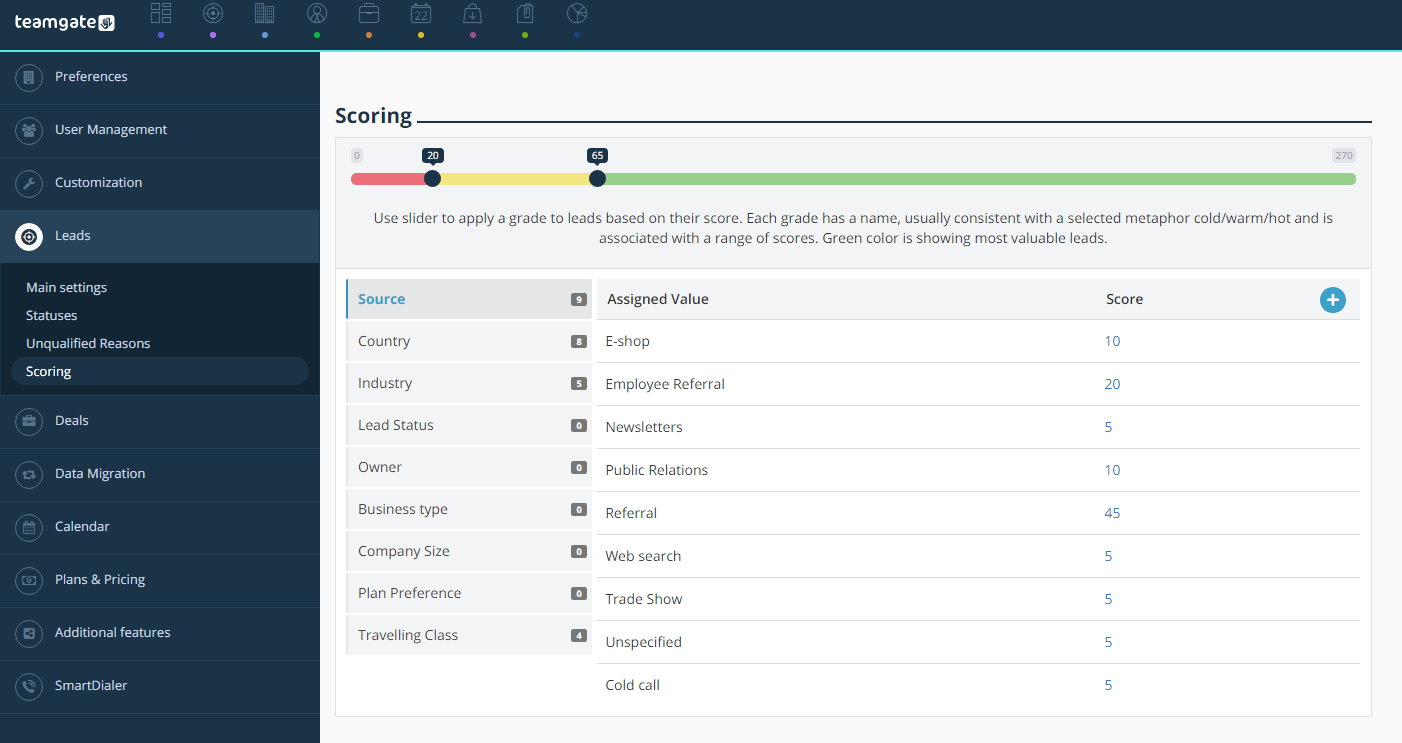
Deal management can also be enhanced by lead scoring, which is used in conjunction with inbound marketing tactics to decide which of your leads are ready to convert. To make sure that lead scoring helps you close more deals, it is also important to follow the other tips in this article. Good organization of leads and careful nurturing contributes to getting the most out of lead scoring. This works vice versa too – lead scoring helps to categorize leads and identify those that need nurturing.

As lead scoring is not a particularly simple process, we made sure to describe it in detail. In a nutshell, here’s what you need to know about it:

  • Efforts of sales and marketing have to be joined to identify the ideal leads and decide on the lead score criteria.
  • Lead scoring is necessary if you have enough leads and want to focus the effort on the right ones.
  • To score your leads, you need lead capturing forms on your website to collect relevant data.
  • Capturing and funneling the data to CRM software is the most convenient way to score leads. Then, you can start tracking the interactions with your potential customers.

Improving the Never-ending Cycle

Tracking interactions of your leads allow you to collect and analyze information. This comes in handy with the processes of lead scoring and qualification. By tracking leads you get to know who they are, what impact nurturing has on them, and when it’s the best time to convert.

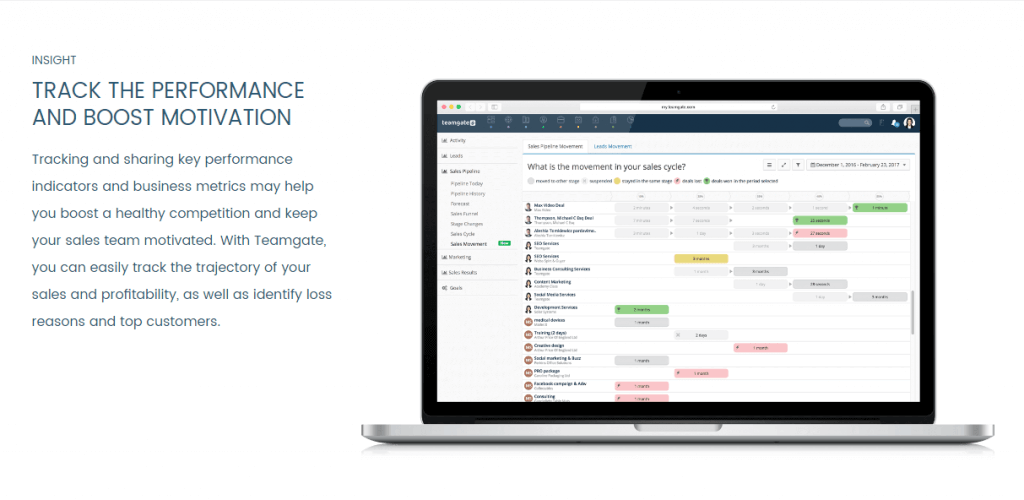
First and foremost, rather than striving to collect all the possible data, focus on the most relevant which would help to qualify and convert captured leads. The next step is data analysis, which, there’s no secret, is the most convenient when automated. Teamgate Insights offers a number of templates that facilitate the analysis. For example, you can:

  • Quickly identify where your leads come from.
  • Follow the trajectory of leads to get the big picture of your lead management process.
  • Audit leads history to understand how lead criteria are tied to the amount of opportunities and closed deals.
  • Analyze data to decide on lead score criteria, or revise it.

Manage Sales Leads Teamgate Insights

To sum up, tracking your leads and their management cycle helps to identify where optimizations can be made. We suggest to consider using a CRM to automate this process, because the time saved for the analysis can be invested in the optimization as lead management is a never-ending cycle.

Too Much Work? Think of Automating!

Long story short, you may want to keep your leads systematized to nurture, score, and track them easier. Building long-lasting relationships with potential customers start with lead nurturing and you should have a strategy for it. Moreover, you need to think of your ideal customer profile to be able to score your leads and get the most out of lead scoring, i.e. successfully qualify and convert the leads. Finally, tracking interactions and analyzing data is the key to success, because lead management is a continuous cycle, which has to be improved constantly. 

If you’d look back at the tips we’ve shared in this article, you would probably agree that automating some, or all, the processes might be a good idea. This may sound like a cliché statement, but using a CRM software would save time and help your team, to work more efficiently. Just think about it, you would be able to deal with different types of leads, categorize them and apply different nurturing strategies quicker. Also, you would have a chance to look at reports and decide on lead scoring criteria, identify necessary improvements, understand where your leads come from, and much more. You wouldn’t ever get lost in your spreadsheets again because CRMs help to keep everything well-organized and accessible.

By the way, what we’ve discussed here is only the beginning of a sales process. So, stay tuned for more articles about the next steps in the process and some extra tips and tricks.

Every achievement is great. But today we are especially delighted about this one!

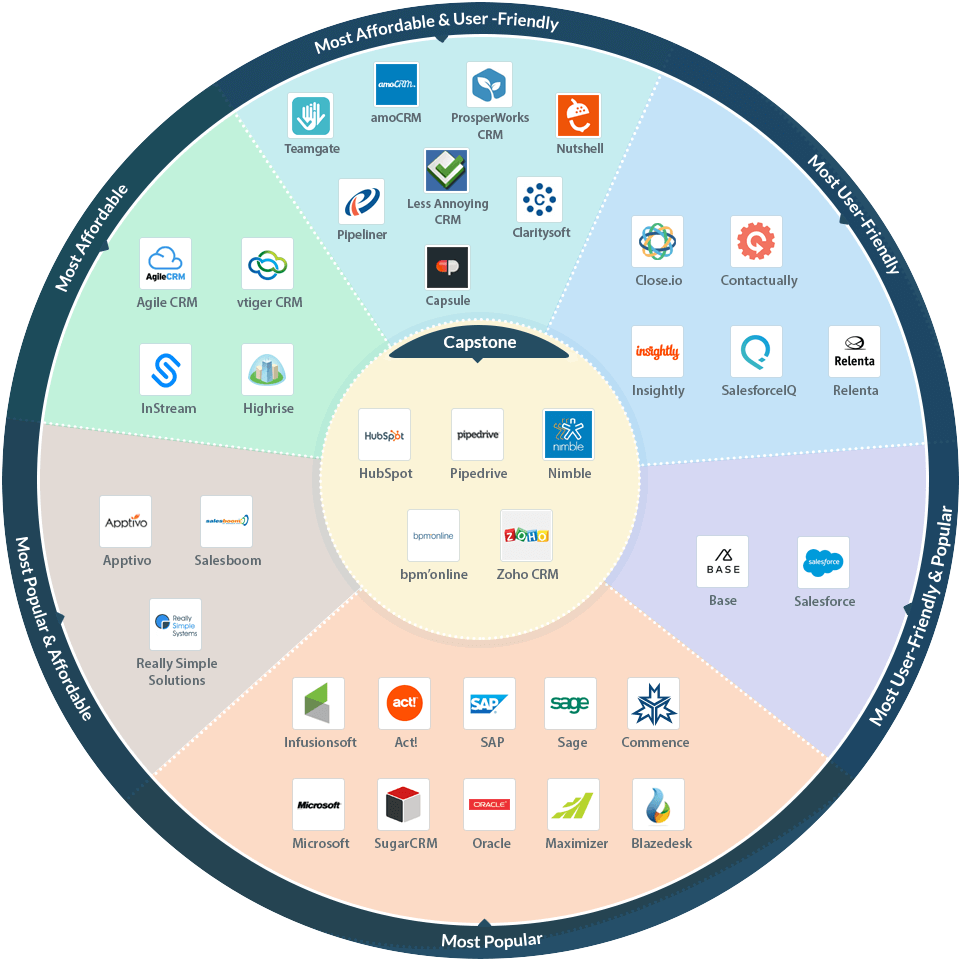
A well-known software marketplace Capterra.com which helps businesses to find the right software, placed Teamgate on Top CRM Software Roundup report as one of the Most Affordable & User-Friendly CRM Software!

This report focuses on combination of three categories: affordability, user-friendliness, and popularity.

On September 25 of 2015 Capterra was acquired by Gartner Inc.  (NYSE: IT)

* * *

Teamgate Capterra Top CRM Software Roundup Report

Related: Teamgate has Earned #1 Spot on Capterra new Top 20 Most User Friendly CRM Software list

The Report

Capterra has Top 20 reports on different topics – such as affordability, user-friendliness, and popularity. But the fact is, when most people buy software, they’re usually looking for a combination of all three of those qualities in one solution.

Right above you can find an infographic where all of these reports intersect and also see which CRMs have made one or more of Capterra’s Top 20 reports. The middle of the infographic indicated Capstone solutions – CRMs which made it to all three reports.

You can check out all these solutions and more in Capterra’s Customer Relationship Management Software directory.

* * *

For an original report on Capterra, click here.

Are you a person who thinks that fishing is boring? Or maybe you’re a fisherman who knows how exciting fishing can be? Either way, if you are someone who wants to know why lead capturing compares to fishing, just keep on reading.

Standing on a shore and waiting for a fish to bite can make you feel stupid, unless you have a strategy. If you come at the right time and prepared, if you know what kind of fish you want to catch, and if you have the necessary equipment, you are more likely to go home with a good catch. The same applies if you want to capture more sales leads.

In this article, we discuss how Smarketing can help you to come at the right time and prepared. Also, how important it is to know your target audience and how it can help to capture leads. Finally, we write about the necessary “equipment”, i.e. landing pages, web forms, mobile, and CRM, and share some useful tips and tricks.

Play Smart from the Very Beginning

You may have heard of Smarketing and think that it’s just another fancy buzzword. But we want to prove otherwise and show how exactly it can boost your sales. To begin with, Smarketing integrates sales and marketing processes to ensure a common approach. This can be done by frequent and direct communication between the two departments from the very start of your sales process.

Rule #1 – every marketing activity should be tied to a sales objective. As this article talks about lead capturing, let’s say your sales team has an objective to generate more leads. Here’s where Smarketing comes in. It is necessary to make sure that your sales team identifies what they look for in a lead and communicates this to the marketing team. This way marketers can create targeted campaigns and generate more qualified leads.

Leads Capturing Compares to Fishing

It’s worth noting that a CRM may come in handy in this process. With Teamgate, your marketing team is able to manage and track newsletter campaigns, thanks to the integration with MailChimp. Having additional information about leads can ensure that sales conversations become more helpful and consultative. Moreover, you can use Insights to analyze which of the sources are generating the most leads and what impact marketing campaigns have on deals. All in all, a common tool can facilitate the communication, which has to be frequent and direct. 

Know Your Prospects and Create Trust

To be one step closer to capturing more leads, you need to take care of your landing pages. Having a standalone page for each marketing campaign is important, but this page shouldn’t just be an in-your-face web form. There’s a lot to think about when designing an attractive landing page, so here are some tips & tricks to consider:

  • Think about your audience. Your landing pages, as well as your marketing campaigns, should be targeted to either prospects, leads, or existing customers. You may want to think what kind of content is relevant to each of these groups.
  • Give something back. Make it clear that in exchange to taking an action, e.g. filling out a form, you are going to repay. It can be digital content, a discount coupon, a longer trial, or something else, but whatever it is, it should be relevant to your target audience.
  • Content is the key. First, your landing page should have an informative headline, ideally, one that matches the CTA message. Second, the intro paragraph must be short but persuasive; listing benefits as bullet points might be a good idea because it’s easy to read. Lastly, you can add visual content to complement the overall design as well as repeat the visuals of your marketing campaign.
  • Add trust elements. Use elements which show involvement of other people, it can be a number of shares on social media, feedback from your customers, media mentions, etc.
  • Create a sense of urgency. People tend to stay on a page and take actions if there is a deadline or limitations set.
  • Look for inspiration and test. Spend some time to gather the best practices and try them yourself. And don’t forget that testing may lead you to the best result. For example, A/B testing can help to identify in what landing pages leads are more likely to convert. 

Get the Most by Asking for Just a Bit of Effort

Without doubt, web forms is a great way to capture leads. However, to gather enough data to be able to qualify leads, you need to create well-thought-out forms. Here are some useful insights which may help to get most out of the web forms.

Leads Generation

First, just like with landing pages, there is a lot to think about when creating a web form. It should draw the attention and be engaging, e.g. animated or visualized. Maybe it doesn’t even have to look like a form? Think of using attractive design elements, like images, sliders, etc.

Second, remember that shorter forms are more likely to convert, however longer forms may provide you with more information and capture better quality leads. Think about your ultimate goal and add only the relevant fields which are enough to convert and qualify leads.

Lastly, make sure to provide a Privacy Policy statement because people are concerned about the safety of their data. Like with landing pages, provide elements of trust and don’t forget to emphasize the value proposition

Integrate to Automate Leads Capturing

In addition, to be able to conveniently reuse your data, integrate web forms with a CRM. You can make special forms with the popular WordPress platform and add simple template web forms to all of the landing pages directly from Teamgate. Alternatively, look for a unique tool in the advanced technology platform Zapier. Finally, if you are looking for something more specific, a powerful API allows to integrate more systems which you need to capture sales leads. 

Leads Capturing Magnets

Image Source: ImpactBND

Be Where Your Prospects Are

It’s no secret that the use of mobile devices has increased over the past few years and is still growing. If you want to capture more leads, you should definitely think of strategies which would ensure you won’t miss the mobile users. Here are some things to consider if you want to be more mobile-friendly:

  • Establish your presence in mobile apps and consider having one yourself. Yahoo’s Flurry Analytics data shows that 90% of consumers’ time is spent in apps. And if you want to capture leads, you have to be where they are.
  • Make your landing pages and web forms mobile-friendly. A lot of user start their search using mobile devices, make sure that once they stumble upon your content, they can convert immediately.
  • Present clear CTA messages – this will help to prevent accident clicks and ensure better quality of your leads.

Finally, think about your sales team and allow them to capture leads wherever they are by using a CRM. Most of the CRMs, including Teamgate, have mobile apps which make it possible to enter new data at any time. 

Less Manual Work, More Focus on the Right Things

We have already discussed the importance of good quality landing pages and web forms, which help to capture more leads. If you take care of these, you’re half-way into automating your processes. Now you may just need a good CRM.

Automating your workflows allows to generate leads in a more convenient way. A CRM can help you save time – you won’t have to add new leads manually; instead, you will be able to import them from spreadsheets, various contact lists, or even your social media accounts. For example, Teamgate-LinkedIn Shuttle, a simple integration tool, allows to import a new lead from your LinkedIn profile in just a click. By the way, there are a number of proven ways to utilize LinkedIn to generate new and nurture your current sales leads.

Leads Capturing Lead Scoring

Image: Lead Scoring in Teamgate CRM

Talking about nurturing leads, automated workflows can facilitate it too. A CRM allows to track communication history, plan activities and tasks, push notification, automate lead scoring, and more. Put everything together and you can be sure that you won’t miss an opportunity to contact leads when they are most interested.

Do you have a CRM that keeps you organised?

The most user-friendly CRM on the market. 14-day free trial.

Start Free Trial

Painless setup, no credit card required

It Doesn’t End When You Catch a Fish

To sum up, if you want to be the one coming home with a good catch, you need to have a strategy and follow it. Marketing campaigns that are aligned with your sales team can be compared to a good bait. The more often you go fishing, the better you understand where to find the fish and how to catch it. Likewise, you need to understand who your leads are and how to capture them; lead scoring is a great for getting to know your leads. Make sure your landing pages and web forms are the “tasty bait” that ensures better conversion rates. Also, don’t forget that the waters are wide and you need to be where your fish are. Establish your presence on mobile; even though it may still be “a small river”, it’s getting filled with more and more prospects.

Finally, remember that you’re not the only fisherman standing on a shore. Maybe you need to get a better fishing rod, or even a boat? Always look for the right tools and improve your sales processes. Start with a CRM which can help you save time by automating lead generation process. The time saved is going to be a valuable asset when nurturing your leads.

If you run a small to medium-sized business, you’ve probably heard of lead scoring. We are sharing a set of lead scoring best practices which will help to improve sales conversion rates of your company. Lead scoring is not something you can set up overnight, but you can get started today with careful thought and evaluation of your customers. It may also be a good idea to invest in a lead scoring software to automate the process. We’ll discuss this in more detail, but let’s start from the beginning. 

How Does Lead Scoring Work

Lead scoring is a methodology used to help sales teams closing more leads. It’s a process that involves both marketing and sales, as each team must decide which leads should be qualified as the ideal ones. Lead scoring is used in conjunction with the inbound marketing tactics, such as building a social media following, blogging or offering free guides, to decide which of your leads are ready to convert.

Instead of pursuing every lead you have, you may rank your leads according to their value for your business and decide which ones to follow up with first. This allows you to prioritize and invest more of your energy into leads that matter most.

Do you have a CRM that keeps you organised?

The most user-friendly CRM on the market. 14-day free trial.

Start Free Trial

Painless setup, no credit card required

Why Would I need Lead Scoring?

It’s all about making your sales process more efficient. If your sales team doesn’t have enough leads yet, then lead scoring is not necessary. Instead, your marketing team needs to put more focus on the lead generation.

However, if there are more than enough leads, rather than following up on each one, simply assign values to your leads. This will help to decide which ones are ready to convert. Set the criteria, then use analytics and lead sign-up forms to collect the relevant data. As a result, you will be able to pursue only those leads that are most likely to convert.

Which Companies Need Lead Scoring?

lead scoring best practices for companies

Every organization is different and some may not require lead scoring at all. The best practice to follow is to identify whether your company is struggling with leads conversion or not. Companies that want to boost their sales conversions, and have more leads than they can pursue, most probably, need lead scoring. 

Setting Up Your Lead Capturing Forms

In order to score your leads, you have to know who they are. So, to start tracking your leads you would need a lead capturing form. This is a form on your website which offers a way for customers to sign up to hear more about you and your products. This data is then captured and funneled into your lead scoring or CRM (customer relationship management) software, where you can begin tracking interactions of your potential customers.

Optimizing Your Lead Capturing Form

Put forms on your landing pages where your prospects can see it. This could be combined as a gateway to some content that your target customers will be interested in engaging with, such as an ebook or a PDF that they can download. In exchange for this content, customers should provide their name, email address and a few details about themselves.

Note: If you ask your leads to fill in too many fields, you may fail to capture them as people may not want to sign up. If you ask for too few details, the quality of your lead data can suffer as well. Make sure you ask for relevant details about your customers by linking the fields you include with your lead score criteria, which we’ll go into next.

Deciding Upon Your Lead Score Criteria

lead scoring best practices criteria

You can find out what sort of characteristics your customers normally possess by analyzing your current customer base. They won’t be identical to the future prospects but they are your best source of inspiration. You can also work with your sales and marketing teams to create descriptions of your ideal customers. It could be that they are a CEO of a mid-sized tech company, or a Marketing Manager of a small health food supplier. You can have more than one type of ideal customer.

There are a number of factors you need to take into account when deciding upon your criteria, but the best practice is to follow a points-based system. You need a) demographic information and b) behavioral intelligence for your leads. First, you will be focusing on the characteristics of your ideal customers who are worth to be pursued as leads. Second, you’ll be looking at how these customers are behaving to see who is ready to be contacted by your sales team.

a) Demographic Information

After you have decided upon the characteristics of your ideal customers, you can start to set up your lead score by assigning multiple values to criteria, such as job title, industry, company size, country, marketing source, links with competitors, and more. Demographic information about a lead can identify personal information, such as job title, company information (e.g. number of employees), relationship to your organization (e.g. past customer), and others.

When considering which demographic information to choose to evaluate your leads, you may want to include some basic criteria which must be met for them to qualify or disqualify as a lead. For example, you may instantly disqualify someone if they are a student.

b) Behavioral Intelligence

After you have decided upon the essential criteria for determining your lead score, include some key behaviors for your leads to engage in, these will also contribute to their score. This is where it is really important to have the appropriate software to track the behavior of your leads. For example, if you send them an email, you need to track whether they’ve received it, opened and clicked on it. Or, if you post some content on social media, you want to know whether they saw it, how long they spent on the page, if they shared it on social media, and so on. You can also decide on behaviors that deserve a negative score, such as if they unsubscribe from your mailing list.

Identifying Leads to Pursue

You need to set up a points-based scoring system when evaluating your lead criteria for each potential customer, typically a scale between 1 and 100. With this in mind, score your leads based on how closely they match your ideal customer profile, based on the demographic information and behavioral intelligence.

lead scoring best practices leads to pursue

For instance, if one of your leads is a CEO of a mid-sized tech company, but they haven’t demonstrated any engagement behaviors, then your lead might score around 50 points. A similar company that fits the demographic criteria and has somewhat engaged with your company can be awarded 75 points, which is a trigger to your sales team to contact them.

There is a number of systems you can use to score how close your leads are to converting, ranging from the letters A, B, C and D, to Hot, Warm or Cold, or in numbers from 1 to 4. Then you may assign each label a range on your scale. Pick a system that feels most natural to your company and easiest to work with.

Other Purposes of Lead Scoring

In your process of scoring leads, some potential customers may not quite qualify, but you can identify and target the leads which need nurturing. If you have the right software, particular lead scores can trigger automation. For example, once a lead passes a certain score, an email is triggered to invite your lead for a demo of your product.

You can also use lead scoring to get to know your potential customers better. Paying so much attention to your target market is always great because you may uncover surprising insights. Test different marketing messaging with your leads to see which ones work best, and optimize your marketing strategy. 

Choosing Your Lead Management Software

Having the right software is key to success with lead scoring. If you lack the capabilities to properly analyze your leads, you won’t get very far. The type of lead scoring software that you need will depend on your company. Compare different options based on price, functionality and size with reviews from trusted sites such as Capterra or Software Advice

lead scoring best practices choosing the right software

Teamgate offers lead scoring as a part of our cloud-based intelligent Sales CRM for small and mid-size teams. With its user-friendly interface, Teamgate is a great sales stack for today’s business that helps you convert more leads. 

The software is changing all the time and becoming more sophisticated, with some solutions beginning to use AI and bots to engage leads. For example, software can determine if your lead is highly engaged or a student doing research. A virtual sales assistant using AI technology to email the leads can interpret their responses and alert your sales team. 

Smarten Up Your Teamwork

Know who your leads are, track when they’re ready to buy, and make your sales team contact them. Lead scoring streamlines this process so you’re only focusing on high-quality leads who are most ready to convert. The key is capturing your data with the right software, optimizing your website with properly prepared content and forms, and integrating your software solutions so your leads don’t fall through the cracks. It is a team effort, but totally worth it for the boost you’ll see in your sales conversions.

If hot leads aren’t converting, then you might need to take a look at the products and services you’re offering. Check whether they’re suitable for your target market and if your pricing is appropriate. Don’t get discouraged, but remember that analyzing your leads and scoring them is the beginning of streamlining your sales process. 

We are excited to share some more fantastic news with you!

2017 started great for Teamgate as we were recognized as a FrontRunner for Customer Relationship Management on Software Advice, powered by Gartner Methodology.

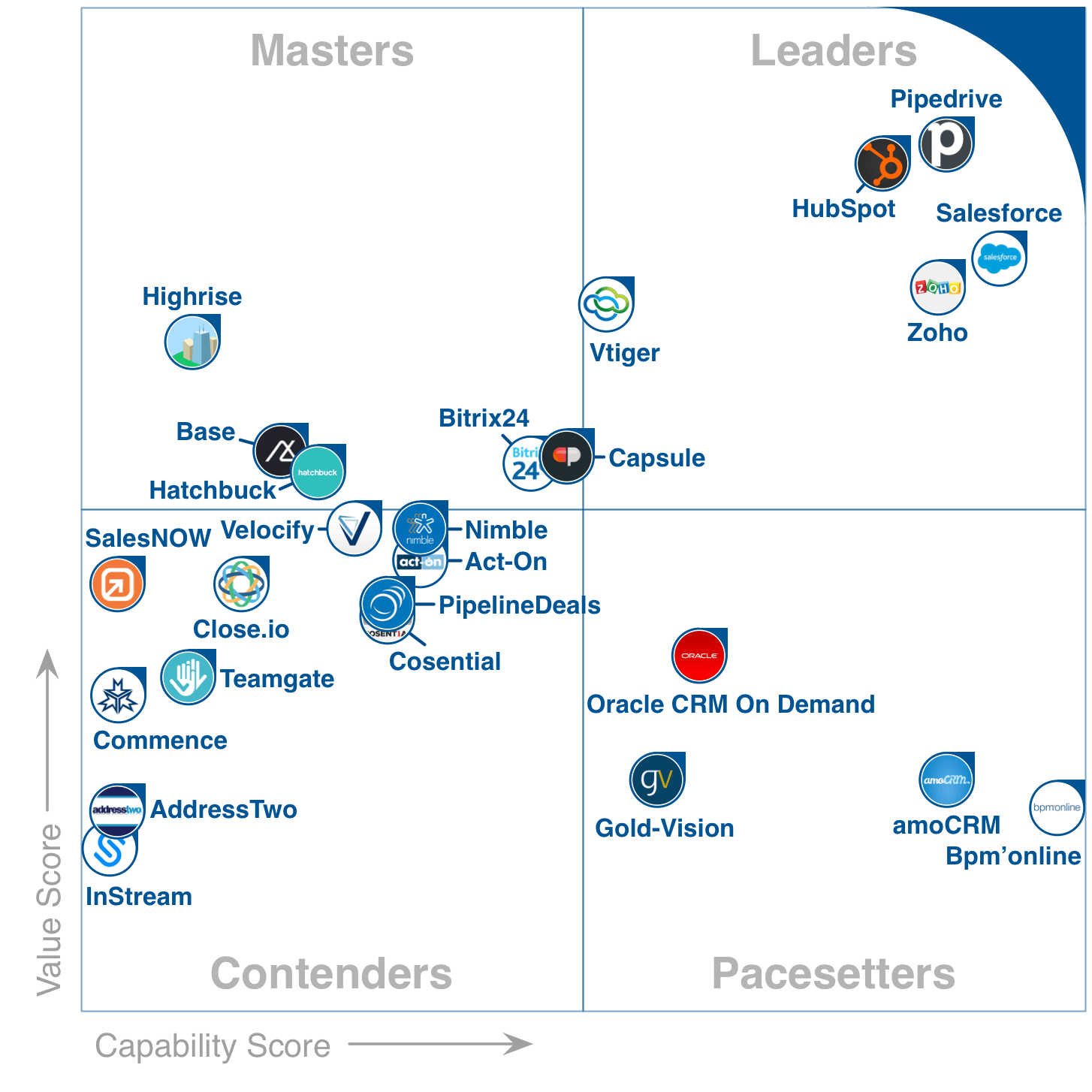
With a Capability score of 3.69 out of 5 and a Value score of 4.11 out of 5, Teamgate landed as a Contender in the FrontRunners quadrant.

FrontRunners Quadrant January 2017 CRM

Related: GetApp announced Teamgate as #2 of the top 25 CRM apps and Teamgate Receives A Very Positive Review From CompareCamp

Gartner’s quadrant FrontRunners for CRMs

The FrontRunners quadrant, powered by Gartner Methodology, provides a data-driven assessment of products in a particular software category to determine which ones offer the best capability and value for businesses. It helps business leaders to make the right decision when choosing which software to buy.

On 2016 September, Gartner launched a new type of quadrant called FrontRunners. It is released for four software markets, which are (1) CRM software, (2) Project Management software, (3) Help Desk software and (4) Applicant Tracking software.

[optin-monster-shortcode id=”kandoug21absj0ox”]

All products that qualify as FrontRunners are top performing products in their market. They have been evaluated and given score for Capability and Value. Capability (x-axis) starts at 3.60 and ends at 4.60, while Value (y-axis) starts at 3.60 and ends at 4.70. FrontRunners evaluate the top 20-30 products in a quadrant format and it is completely data-driven with no analyst interpretation, also, it is heavily influenced by user reviews.

During the first half of 2017, Gartner is planning to launch FrontRunners quadrants for 24 software markets.

FrontRunners Badge Gartner 2017 Software Advice

The content for the FrontRunners quadrant is derived from actual end-user reviews and ratings as well as vendor-supplied and publicly available product and company information that gets applied against a documented methodology. The results neither represent the views of, nor constitute an endorsement by, Gartner or any of its affiliates.

Quadrant Methodology

As it was mentioned above, the FrontRunners methodology assesses and calculates a score for products on two primary dimensions: Capability and Value. Here’s how they both are calculated.

The Capability score is an overall weighted average of scores including:

  1. End-user ratings of 1 to 5 stars on the product’s functionality.
  2. End-user ratings of 1 to 5 stars ratings on the product’s ease of use.
  3. End-user ratings of 1 to 5 stars on the product’s customer support.
  4. A score, relative to other products in the market, for the product’s inclusion of key functionality for the software category.
  5. A score, relative to other products in the market, representing the number of other products that integrate with it.

Do you have a CRM that keeps you organised?

The most user-friendly CRM on the market. 14-day free trial.

Start Free Trial

Painless setup, no credit card required

The Value score is an overall weighted average of scores including:

  1. End-user ratings of 1 to 5 stars on overall satisfaction with the product.
  2. End-user ratings of 1 to 5 stars on how valuable users consider the product to be relative to its price.
  3. End-user ratings of 1 to 5 stars on how likely they are to recommend the product to others.
  4. A score, relative to other products in the market, for the size of the product’s customer base.
  5. A score, relative to other products in the market, for the number of professionals in the market who have experience with the product (e.g., users, developers, administrators).
  6. A score, relative to other products in the market, representing the total number of user reviews across the three Gartner web properties.
  7. A score, relative to other products in the market, representing the average number of times per month internet users search for the product on Google.

For a full report and methodology on Gartner’s FrontRunners quadrant, check out the information on Software Advice.

If Mark Twain was a salesman, he would definitely advocate the new Teamgate & Slack integration. He once said that “to get the full value of joy you must have someone to divide it with” and we couldn’t agree more. In the fast-paced society, one often doesn’t have time to stop, appreciate winnings, and share the good news while they’re still relevant. Luckily, we live in the 21st century and technology is at our fingertips – let’s use it to spread the good news!

By now, you most probably know that with Teamgate you can improve communication with customers, boost your sales and implement set goals. But how about letting people know about the success? Traditionally, you could organize a status meeting and gather a group of people in a room. But we all know how busy work schedules can be. You’re lucky if everyone’s at your meeting few weeks after a deal was closed successfully. However, the good news is the most exciting while still fresh.

Fortunately, we know a way to keep your managers and teams up-to-date with your Teamgate activity, even if they don’t have an account! All you need is to use Slack, a multi-device team collaboration platform. Connect an integrated CRM solution to share instant, automatic notifications when deals are won. A few simple steps and your communication is improved significantly!

Related: 5 Most Important Sales Metrics You Need To Focus On Today

How does it work?

To be able to set up this integration, you will need the most powerful, yet free, app integration platform – Zapier. With this platform, you can connect various products into one solution to use them on a daily basis. So, you need to connect Teamgate with Slack over Zapier using easy selection steps inside the platform.

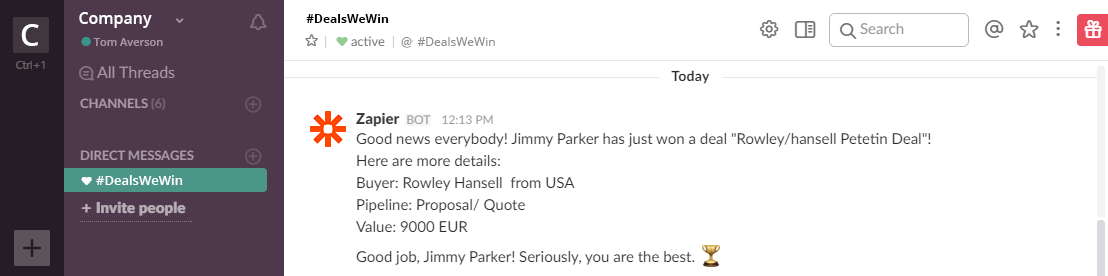
Create a new channel on Slack, e.g. #DealsWeWin, and make sure to invite the entire sales team, as well as other interested parties, to join the channel. Now, when everybody, including the Teamgate Winbot, is there, real-time notifications about winning deals will be pushed and the good news shared on the channel. You can setup the notification message yourself – include details about a customer, deal size and value, sales reps, etc. It is even possible to add more sophisticated messages and use them to congratulate your sales team member for doing a great job. Because they deserve this, right?

DealsWeWin Channel on Slack

Added value hides in simple things

For those wondering why this integration is better than tracking winning deals inside Teamgate, for example, using pipelines, insights, dashboard, here’s our argument: with this small feature you can be informed of the same minute wherever you are, with no extra action required. As Slack is a multi-device platform, one can be notified instantly, even on the go, because we cannot live without our smartphones and smartwatches!

Do you have a CRM that keeps you organised?

The most user-friendly CRM on the market. 14-day free trial.

Start Free Trial

Painless setup, no credit card required

Use Zapier wisely to build different information structures and you will improve your team communication by spreading the good news and appreciating great work. You’ll not only be the first one to do that, you’ll also save precious time spent in status update meetings where, most of the time, information shared is often outdated.

In a nutshell, if you decide to use the Slack integration, you will be able to:

  • Instantly share information about winning deals with a group of people.
  • Build the structure of information the way you want.
  • Improve team communication and reach those on the go.
  • Appreciate the excellent work.

The larger your customer base becomes, the more imperative it is to purchase a quality contact management solution, and that’s something we at Teamgate know from personal experience. While planning our product, we considered the need to entrust our relationship management to a system that can genuinely reveal trends and measure conversions. As it turns out, we successfully addressed and solved some of the biggest performance bottlenecks of many small and medium businesses. 

For a few years already, Teamgate has been the preferred relationship and contact manager of leading service providers, often described as one of the top solutions of this type.

Recently we received the great news that our product has been featured in a very positive review by CompareCamp, a popular site focused on reviews of B2B and SaaS software. In our Teamgate review readers can find a detailed and very technical look at our product and maybe get inspired to try it themselves. 

The Review

CompareCamp’s B2B experts introduce our product as a top rated sales & contact management system that helps increase deals and conversions, but first and foremost manages corporate data to identify trends and opportunities. Most of the review is devoted to the Teamgate benefits, such as the opportunity to generate clear insights, organize and filter partners and contacts, and generate smart reports based on leads’ performance and forecast pipelines. What the review team seems to be really fond of is our product’s devotion to effective collaboration, which according to them, is not found too often in the CRM software market.


Teamgate Dashboard Preview

Related: Again, Teamgate is a Category Leader on Top 25 CRM Apps Chart by GetApp

[optin-monster-shortcode id=”kandoug21absj0ox”]

Reviewers then proceed to discussing the most valuable and unique features Teamgate has to offer, referring in particular to Sales pipeline tracking, Goals & Quotas, Timetable Storage, and Individual Customer Cards. In the same review, users can familiarize with a wide range of integrations offered by Teamgate as well as read the technical and accessibility specs to confirm if our product can indeed respond to their needs.

Usain Bolt, the 30-year-old Jamaican sprinter, is regarded as being the fastest man on the planet. He is an eight-time Olympic gold medalist as well as holding the world’s 100m record. According to him, there is a simple rule when you run a distance – the faster you run, the faster you reach the finish line. Being an entrepreneur or a sales representative means that you too will always be part of a competition. As experienced business consultants and sports lovers, we can see the parallels between the experience of running a distance and running a business.

As soon as you stand in the same starting line with your competitors, your secret to success can be an absolutely unique service, a niche market, a commitment to hard work, the best team available, or a well-organized sales process. But when Usain Bolt has been asked about how to be the world’s fastest human, he simply replied: “I don’t want to be the second best”. So, if you have already made the decision to run a business, your choice is clear – you have to be the first one.

How Not to be Second in Sales - Finish Line

Speed up your sales process to be the first one

Time plays an equally important role in both cases: whether running a distance or running a business. A business sales process means specific, step-by-step actions are made in order to close a deal; too-long sales cycles prevent you from making those sales. Unfortunately, there are no precise rules, no clear diagrams or methodologies as to how exactly you should be doing things. However, there are three TOP negative factors (or we would rather say – mistakes) which may delay the closing process:

  1. Poor follow-up

One of the most frequent mistakes sales reps make is poor planning and lack of initiative. At first, sales reps usually think about their own sales steps instead of prospects. It means that the sales team cannot control what is going on with a prospect after their sales steps have been carried out.

Let’s take a typical sales step within a Sales Pipeline named “Commercial offer”. The most common mistake made by sales reps is to send an offer to a client and then do nothing; still expecting to receive a positive response/feedback sometime later. Unfortunately, on the basis of various studies, clients do not read an offer 10+ times in order to make a final decision. In this case, the sales reps loses the advantage of speed as well as the chance to be the first one across the line and sell. Meanwhile, it’s possible that your prospect is dealing with your competitor.

Do you have a CRM that keeps you organised?

The most user-friendly CRM on the market. 14-day free trial.

Start Free Trial

Painless setup, no credit card required

  1. Delayed evaluation

Each step of the whole sales cycle should be measured by time in order to immediately improve it. Just try to remember how time-consuming the qualification and closing stages are. In order to run faster, sales reps should determine the length of time spent on each stage of a sales process. Furthermore, only these steps which sales reps are able to measure by time should be set in your Sales Pipeline.

  1. Pending deals

Indeed, according to experts, the majority of a sales reps’ time each day is spent on hardly-closed deals. It means that these deals are suspended, or marked as pending, with many explanation tags within your Sales Pipeline. However, if you do not want to be second best again, get rid of it! Your sales reps should start to follow the approach “No more pending deals in my Sales Pipeline!” by focusing on the end results, and enabled-to-close deals.

Empower your CRM software to be the first one

Client relationship management system (CRM) has proven very effective for many sales actions, but it is not enough to simply have it. No doubt – it is an advantage. But if sales reps spend too much time receiving lower-than-expected results, it is time to seriously reconsider your sales process management tool. The robust sales software solution is like your running shoes. You should feel comfortable by using it and the most important – it should help you to win! So, try to count how long it takes for your sales reps to answer the following questions:

  • How long does the opportunity stay in this step?
  • When the opportunity has been moved into this step and how long does it take in the previous one?
  • Which opportunity hasn’t been moved to the next stage today/this week/this month?
  • How long does it take to close an opportunity? Does it fit into your sales cycle timing?
  • What are the bottlenecks of your spent time?
  • What kinds of deals are pending by needing quick attention?

If it takes just a few minutes to understand and answer these questions, it means you are already further on in the sales race compared to your competitors. Though it will take some time you probably need to spend more time in order to reconsider your current sales tools. To achieve best-in-class productivity, sales reps have to realise the need for a really easy to use and understandable Sales CRM tool.

Old Sales Pipeline

Follow the best examples to be the first one

Here at Teamgate, over the last few years, we have had a normal practice to prepare the various sales reports for the sales team, managers, board, investors, etc. As all of these reports are automated, it is easy to show the goals reached, the forecasts, the status of lead qualification, the sales funnels, the sales activities and even more differing insights needed on a daily basis. However, we had one continuing issue which couldn’t be solved during this time. Therefore, we tried to solve this by handling the situation manually and because of this lost much valuable time. Finally, we decided to set a TOP KPI on purpose to make our sales cycle significantly shorter.

During this time our sales reps had been trying to report to the sales director with the status of opportunities, explaining every situation and so on. Believe us – when you are doing this on a daily basis it is a tiresome and time-consuming process. Finally, we came up with a simple idea to show in detail, each opportunity and its movement in a real-time perspective. Since that time we have started to focus more closely on the opportunities at hand.

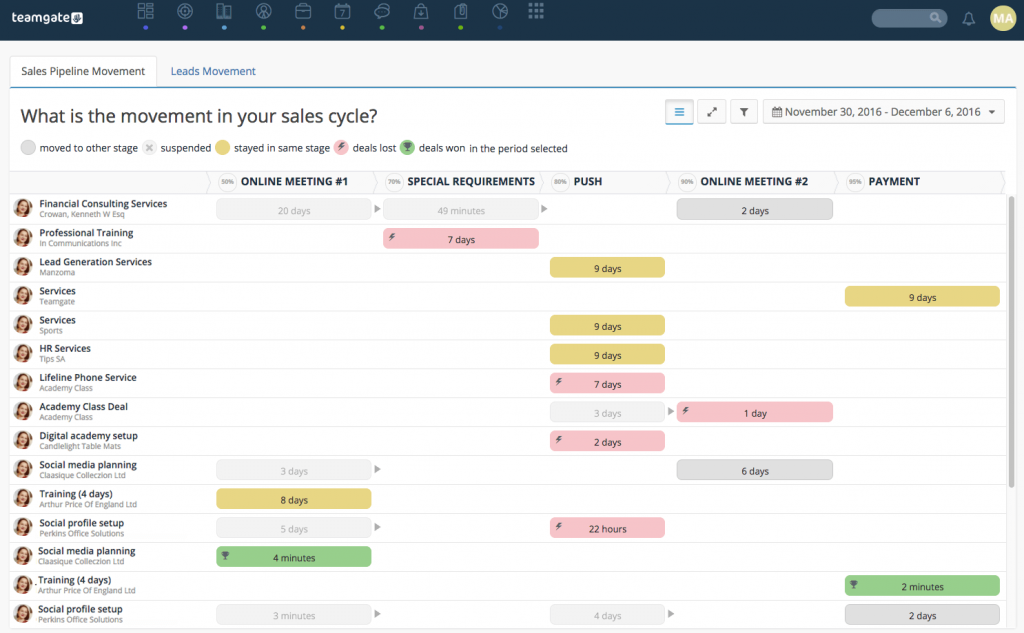
New Sales Movement Pipeline View

With this absolutely simple decision, we have made our sales cycle twice as fast and all within a couple of weeks. Finally, we started to focus on the minutes instead of days or even weeks.

How to Stop Being the Second in Sales - Photo Finish

Related: 7 CRM Best Practices for 2017

Be the first one who crosses the finish line

To be number one in sales depends on many factors, but you can start by following these prescribed tips:

  • Set up your Sales Pipeline in the way which your prospects would buy.
  • Make sure you are able to measure the time for each of your sales steps. Don’t forget to set the time duration for each step!
  • As your Sales Pipeline should be clear and clean, try to avoid pending deals.
  • Review the movement of your Sales Pipeline. Install a TV screen on your wall with live streaming – it really helps!
  • Split your products or services into different Sales Pipelines.
  • Don’t forget to set goals for win conversion and try to beat 9 out of 9 records!

A free personal presentation: Learn how to win 9 out of 9 deals

Join Teamgate CRM Senior Sales Manager Amber Gintare for a free personal presentation and learn the best practices on how to improve your sales process and close more deals, faster.

The sales department is the most important department in your company.

How can it not be when your sales team is responsible for driving the majority of revenue?

Most businesses, especially marketing agencies, SaaS businesses, and professional services, hold their sales team directly responsible for supporting the growth of the business.

Not only are they responsible for driving new revenue, but they make sure your customers view you positively.

They’re the guys sitting at the forefront of your industry, which puts them in the position to be the best advisors for new innovation and strategies.

The best way to build a successful sales strategy is to take a look at those who are successful.

The most successful sales strategies are the ones that align their sales processes with their customer resource management (CRM) (Related: How to Win Friends and Influence People? Vs. What is CRM?).

And having a strong prospect management process is at the heart of getting the most out of your sales people and their time.

According to Salesforce, high-performing sales teams use nearly 3 times as much sales technology than underperforming teams and are 8 times more likely to be heavy tech adopters than under-performers.

As a Sales Director, it’s your job to make sure the sales team performs, and that your sales technology operates efficiently along with your processes.

There are many reasons your sales model could be failing…

In this guide we’ll go over some of the most common things we see standing between struggling sales team, and huge breakthrough success companies:

Spending too much time on data entry

why-your-traditional-sales-model-is-failing-and-how-you-can-save-it-7

One of the biggest common complaints of failing sales organizations is that their teams are spending too much time on data entry.

Manually entering prospect and lead information into the database isn’t something your sales team should be spending a lot of time on.

The right CRM will do a good job of collecting data from leads, and updating their information simultaneously so your sales team doesn’t have to spend time doing so.

Related: Proven Ways to Utilize LinkedIn to Generate New Sales Leads

You’re spending too much time generating sales reports

why-your-traditional-sales-model-is-failing-and-how-you-can-save-it-6

Sales reports are the main time suck for Sales Director. If your data is being entered manually because your sales technology isn’t in alignment with your processes, pulling reports is going to be a time consuming task.

[optin-monster-shortcode id=”kandoug21absj0ox”]

The minute you’re asked to produce a sales report on this month’s success, and your sales technology doesn’t align, two negative things could happen:

  1. The first is the hardest to swallow – your sales numbers are reflecting worse performance than your team is delivering.
  2. The second – your numbers are inflated, which looks suspicious if your numbers aren’t matching up with revenue.

Either way, you’re going to be in trouble when this happens.

And I can almost guarantee that…

You’re spending extra time on your sales reports because of this.

Related: How to Stop Being the Second Best in Sales? and Reports and Summaries: The Two Ingredients for Your Business Success

You’re pipeline visibility isn’t accurate

why-your-traditional-sales-model-is-failing-and-how-you-can-save-it-5

When your data isn’t clean, or your manually entering data, you’re not tracking key stages into prospect lifecycle. This is a problem, because you won’t get real visibility into your pipeline.

Without real visibility into your pipeline, you won’t be able to accurately track your team’s sales process in real-time.

Why’s that important?

Well, if at only the end of the month/quarter/year you take the time to gain an understanding of where you’re at, you’ve already lost the sales game.

Sales teams that have real time visibility are 42% more likely to meet quota than those that don’t!

That’s huge!  But think about it…

A successful sales organization knows whether or not they’re going to hit their goals ahead of time, and adjusts in real-time in order to make or surpass those goals.

Related: Sales Pipeline: Why it is the Most Effective Way to Manage Customers and How To Analyze Your Sales Pipeline and Track Sales Effectively

Your sales tool doesn’t support internal challenges, or a modern day sales process

why-your-traditional-sales-model-is-failing-and-how-you-can-save-it-3

The worst thing that a sales tool can do is try to pigeonhole you into the process it believes is best.

For example, if your sales method is founded on inbound leads, you may purchase a tool that only allows leads to move through the pipeline in one direction – forward.

This may be a challenge for you when you stumble upon those exceptions to the rule, or prospects you might have to nurture a little more to move them through the pipeline.

Now you’re stuck in a CRM where you can’t move leads backwards in your lifecycle stage.  The system is assuming it knows the solutions to your problems better than you do.

BUT… Your sales tool should be able to support these problems, not try to fix them for you and force you into processes you don’t want or need.

Related: 7 CRM Best Practices for 2017

Your tool isn’t reliable when your sales team needs it most

why-your-traditional-sales-model-is-failing-and-how-you-can-save-it-4

Your sales tool needs to be there for you always.

At some point, there will come a time where your sales team needs support working with your sales technology.  And If you’re working with a sales tool that doesn’t have an office in your country, has limited support hours, or can only be contacted in limited ways – they’re not there for you.

It’s in these instances where sales teams get the most frustrated.

They need their tool to work for them now, so they can move on with their day, update a lead, view a report etc.

So, If your sales technology isn’t reliable, you’re wasting time.

Related: Some Businesses Could Fail to Make the Leap to CRM – Here’s Why

Your customer lifecycle stages don’t mirror reality

why-your-traditional-sales-model-is-failing-and-how-you-can-save-it-1

Some sales technologies force you into lifecycle stages that you don’t have in your organization.

For example, some out of the box CRM lifecycle stages include MQL, SAL, SQL and so on.

If you run a smaller organization, you might be skipping the conversion from SAL to SQL, but have to go through the conversion process anyways because your sales technology is forcing your hand.

If your lifecycle stages aren’t mirroring reality, this is also giving you unrealistic visibility into your pipeline and will affect reporting and optimization tactics.

Your sales solution isn’t mobile

why-your-traditional-sales-model-is-failing-and-how-you-can-save-it-2

Fact: Sales people don’t usually sit at their desks all day.

They’re mobile workers.

They’re working trade shows, going to sales meetings with potential clients, and traveling often. Having a mobile application for your sales team to lean on is key to monitoring real-time success and pipeline movement.

If you follow up with web leads within 5 minutes, you’re 9 times more likely to convert them.

So can you imagine the power that comes with being able to access everything you need about a contact right then and there?

Conclusion

The right CRM can help assist you with all of these points that may be causing your sales processes to fail.

In fact at Teamgate, we pride ourselves on helping businesses all over the world streamline their sales process, so that they’re selling to prospects the same way they like to buy.

Do you have a CRM that keeps you organised?

The most user-friendly CRM on the market. 14-day free trial.

Start Free Trial

Painless setup, no credit card required

Read that again, because it’s incredibly important.

Sales has changed, and you need to start selling to prospects the same way they like to buy.  This starts by making sure your sales CRM solution supports all of the above:

  • Get automatic data entry – stop wasting your time here
  • Produce sales reports in seconds – not several days
  • Real time reporting on sales pipeline – increase your chances of hitting quote by 42%
  • Avoid human error with a solution that keeps you in process – never drop another lead again, and have them think you’re a mind-reader!
  • A reliable tool your team can access anytime, anywhere – Remember, 5 minute follow ups increase chances of a sale by 900%!
  • Make sure your lifecycle stages match reality

The bottom line – you need a CRM that can work for you, not against you. The right sales tool is the solution to your failing sales model, and will help you get your team back on track with a focus on what they do best – selling.

Teamgate CRM team is excited to share some more great news with our community!

The leading Premium business app discovery platform GetApp.com announced Teamgate as #4 in Q4 2016 rankings of the best CRM applications on the market!

GetApp’s researcher Suzie Blaszkiewicz highlights that:

‘Teamgate has been a staple in the top 5 of GetApp’s Category Leader ranking for CRM since Q1 2016. Coming in at #4 this quarter with a total score of 73, Teamgate showcases its strength when it comes to security and reviews, scoring an impressive 18 points for its security protocols and a 17 for its user reviews, with an average rating of 4.82/5 stars. An additional 15 points for its media presence and 14 for its mobile apps ensures that Teamgate remains strong in GetApp’s ranking quarter after quarter.’

GetRank is GetApp’s quarterly ranking of the top 25 CRM apps based in the cloud. Each app is scored using five criteria, each worth 20 points, for a total possible score out of 100: User Reviews, Integrations, Mobile Apps availability,  Media Presence and Security.

On July 1 of 2015 GetApp was acquired by Gartner Inc.  (NYSE: IT)

[optin-monster-shortcode id=”kandoug21absj0ox”]

* * *

Getapp_rankings_list

GetApp CRM Category Leaders Ranking - Top10

Related: GetApp announced Teamgate as #2 of the top 25 CRM apps and Teamgate has Earned #1 Spot on Capterra new Top 20 Most User Friendly CRM Software list

The Ranking

GetApp’s Category Leader rankings highlight the top 25 cloud-based business applications for every essential business operation, from CRM to HR and marketing. The ranking uses five unique data points to assess apps, giving software buyers a shortlist of some of the top cloud-based solutions for their growing business.

The five data points used to rank each app are:

User reviews– The score for user reviews is calculated using a Bayesian estimate, which is a weighted average that includes the number of reviews and the rating of an app, benchmarked against other apps in the category.

Integrations– based on the number of integrations with other apps listed on GetApp.

Do you have a CRM that keeps you organised?

The most user-friendly CRM on the market. 14-day free trial.

Start Free Trial

Painless setup, no credit card required

Mobile Platforms– based on the availability of an Android and iOS app and its rating in Google Play and the App Store, respectively.

Media Presence– based on the number of followers and fans on Twitter and Facebook, respectively.

Security– based on a security survey developed by GetApp in collaboration with Microsoft, modeled on the Cloud Security Alliance self-assessment form.

With a maximum high score of 100 up for grabs, each data point is scored out of 20 and weighted equally. If two or more apps have the same score, higher security scores take precedence, followed by reviews, integrations, mobile, and media scores.

This scoring system ensures that the ranking is completely independent of any commercial relationship that GetApp has with software vendors. High user opinion, the ability to function well with other software solutions, availability on mobile, a strong online presence, and a high level of security reflect applications that are reliable and well-respected in the market.

Using this list as a point of reference, software buyers and small business owners can get a good sense of the market landscape for whichever software they are looking for.

For a full report on GetRank check out the information on GetApp, while pressing on the picture:

GetApp CRM Category Leaders Rankings 2016 Q4

How do you plan to maximize your productivity? No matter what your business is, you sure would be looking to make the most of the resources at your hand. And one of the best ways to do it is by having reports and summaries with you.

But how can reports and summaries help?

Each day matters in business. How you plan your day and how you execute it eventually determines how successful you are in the longer run.

And this is where reports and summaries help, as you can see all that you need to do every day, in one place.
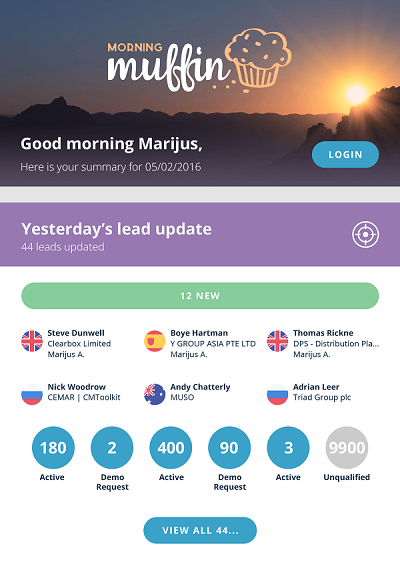
For one, you would need to keep a periodic record of the progress of your business goals. Reports are a great way to do that. Know how daily progress has been. Note the recent developments. Keep track of employee progress. Keep a check on whether you are in alignment with your overall goals at all times.

Summaries, on the other hand, help you know the to-do tasks for the day. You can keep yourself updated at all times, and have better time management.

Related: Could The Traditional Sales Model Really Be Hurting Small Businesses?

Do you have a CRM that keeps you organised?

The most user-friendly CRM on the market. 14-day free trial.

Start Free Trial

Painless setup, no credit card required

How Can You Use Summaries and Reports To Get the Best Results?

Here is how you can use summaries to do more with your time.

  1. Know the Sales That You Are Going to Make

Sales and Marketing teams can use summaries and reports to keep a tab of the sales that they are making with time. Each day, a new goal can be set. Enquire at whether Facebook and other social media sites are profitable for you. See if you are converting potential customers into real ones. And review your cash and profits margins daily.

Reports and summaries can help you know:

  • Whether the sales margins are increasing
  • Whether your marketing campaigns are yielding the results you need
  • Check the daily tasks you need to do when it comes accomplishing your marketing goals
  1. Check the Audience

The right strategy will also help you know if you are building on customer loyalty and improving brand image over time. You would be able to better understand your audience. This includes the ability to understand how customers are generally behaving. For instance, if you own a restaurant, you can use summaries and reports to understand the following.

  • What are the typical ages of customers who normally visit your restaurant?
  • Do your customers have a specific liking for something or share any common interest?
  • What is the most popular food item?

You can then create summaries every day to check you are getting the reports you need. For instance, you might want to know if your customers love chocolate more – and if they do, you might want to introduce newer chocolate dishes.

  1. Be Clear to the Requirements

Be clear as to what you need from your summaries and reports. It all depends on the role that you are handling within the organization. A CEO’s summary and a report will be different from that of one who is in the marketing and sales team. For instance, as a CEO, you might want to have summaries that consist of things like the following.

  • How is the marketing and sales team progressing?
  • What meetings do you need to be part of that day and what are your expectations regarding it?
  • What are the common employee problems that you need to solve?
  • Measures that will help you deal with customer touch points.
  1. Beat the Work Overload

Summaries and reports can help you beat the work overload easily. You would not have to worry about missing deadlines, and you would be able to understand the business pain points easily. You would also be able to be focused and keep you organized.

When writing summaries, keep pointers to keep a to-do list that you can use easily. When writing your reports at the end of the day, you can also have some pointers so that you can compare them with reports of the next day.

Reports and Summaries

  1. Allocate the Priorities

Sometimes, you will not be able to do all that you write in the summaries. So, it is a good idea to prioritize and write according to the things that are more urgent. You can also write ‘A’ for the task that is more important and ‘F’ for the one that is less important.

You can carry out all the necessary tasks, and you would not get stressed by the large number of jobs that you have to deal with.

Why Is Time Management So Important In Business?

Time management helps businesses power ahead of the competition. You will be able to do more, and get the best results by creating the right summaries and reports.

If you have a lot of many tasks to do the next day, which you can understand from your reports, change the task when you begin to get bored. Take it into account when you are creating the summary the next day.

To manage time effectively, set an achievable goal. Do not set an unreasonable goal that would lower your confidence. Irrespective of the type of work, plan each day’s summary according to your priorities. Creating a schedule will also minimize last-minute deadlines.

The next step would be to prioritize your tasks with summaries. Unimportant tasks such as chatting on social networking sites consume a lot of your day. Research shows that setting the color scheme to black and white would make the sites look boring and make you uninterested in using them.

Evaluating is also an important aspect of time management. Use summaries to maintain an account of how you spend time. Knowing the time estimates for each work will help you plan in a better way.

Before you evaluate the day’s reports, take a short break at regular intervals to the task, as it will help regain concentration and ensure you do not make any mistakes.

For any business, the ability to manage time with unmatched efficiency can help produce quality work in good time. And summaries and reports can just make the process a lot more efficient.

Teamgate Introduces ‘Morning Muffin’

In October (2016) Teamgate will introduce its newest Summary-building feature – ‘Morning Muffin’. With Morning Muffin you can choose to receive a morning email with the most important updates from the last day:

  • Lead update
  • Pipeline update
  • Today’s agenda, including your meetings, calls and tasks.

Morning Muffin - Lead Updates

Users will be able to turn on ‘Morning Muffin’ in their Teamgate Account settings bar. All daily updates or just a few of them can be selected. The start of the day supposed to be productive!

If you do not have Teamgate account yet, you can sign up for free here.